suspension MERCEDES-BENZ E-CLASS CABRIOLET 2017 Owners Manual
[x] Cancel search | Manufacturer: MERCEDES-BENZ, Model Year: 2017, Model line: E-CLASS CABRIOLET, Model: MERCEDES-BENZ E-CLASS CABRIOLET 2017Pages: 521, PDF Size: 10.64 MB
Page 151 of 521
R
2 Gentle deceleration and rolling
R 3 Consis tent speed
The inner segment is gr eyand the outer seg‐
ment em pties:
R 1 Sporty acceleration
R 2 Heavy braking
R 3 Fluctuations in speed
Yo u ha vedriven economically when:
R theth re e outer segments are comple tely fil‐
led simultaneousl y.
R the ECO display border lights up.
The additional range achi eved as a result of your
driving style in comparison toa driver with a
ve ry sporty driving style is shown under Bonus
from start. The range displ ayed does not indicate
a fixe dre duction in consum ption. DY
NA MIC SELECT switch Fu
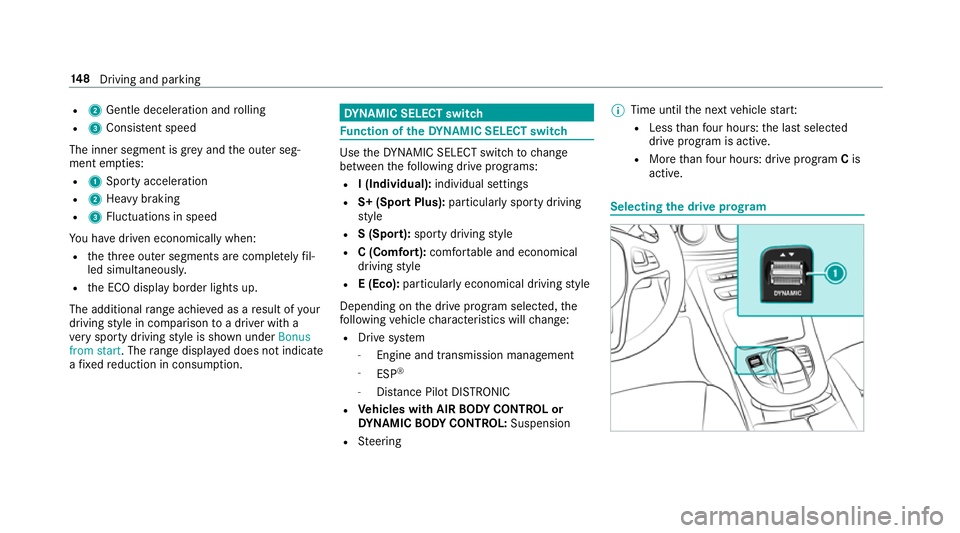
nction of theDY NA MIC SELECT switch Use
theDY NA MIC SELECT switch tochange
between thefo llowing drive programs:
R I (Individual): individual settings
R S+ (Sport Plus): particularlysporty driving
st yle
R S (Sport): sporty driving style
R C (Comfort): comfortable and economical
driving style
R E (Eco): particular lyeconomical driving style
Depending on the drive program selected, the
fo llowing vehicle characteristics will change:
R Drive sy stem
- Engine and transmission management
- ESP ®
- Distance Pilot DISTRONIC
R Vehicles with AIR BODY CONT ROL or
DY NA MIC BODY CONT ROL:Suspension
R Steering %
Time until the next vehicle star t:
R Less than four hours: the last selected
drive program is active.
R More than four hours: drive program Cis
active. Selecting
the drive prog ram 14 8
Driving and pa rking
Page 194 of 521
The HOLD function is deactivated in
thefo llow‐
ing situations:
R If Dis tance Pilot DISTRONIC has been acti va‐
te d.
R The transmission is switched toposition j.
R When theve hicle is secured with the electric
parking brake.
In thefo llowing situations, theve hicle is held by
th e transmission position jorby the electric
parking brake:
R When the seat belt is unfas tened and the
driver's door is opened.
R When the engine is switched off.
R When there is a malfunction in the sy stem or
if th e po wer supp lyis insuf ficient. DY
NA MIC BODY CONT ROL DY
NA MIC BODY CONTROL has thefo llowing
ch aracteristics:
R Variable damping characteristics R
Continual adjustment of the damping forc es
The damping characteristics adapt tothe cur rent
operating and driving situation.
The da mping is tuned individually for each wheel
and is af fected bythefo llowing factors:
R The road sur face conditions
R Vehicle load
R The drive program selected
The drive program can be adjus ted using the
DY NA MIC SELECT switch. AIR
BODY CONT ROL AIR
BODY CONT ROL function
AIR BODY CONTROL is an air suspension sy stem
with variable damping for impr oved driving com‐
fo rt. The all-round le vel control sy stem ensures
th e best possible suspension and const ant
ground clearance, even with a laden vehicle.
When driving at speed, theve hicle is lo wered
automatically toimpr ovedriving saf ety and to re
duce fuel consum ption. The option of manually
adjusting theve hicle le vel is also available.
AIR BODY CONTROL comprises:
R Air suspension with variable spring rate
R Automatic le vel control sy stem
R Speed-dependent lo wering toreduce fuel
consum ption
R Manual le vel adjustment
R ADS PLUS (Adaptive Damping Sy stem with
const ant damping forc e adjustment)
R DYNA MIC SELECT switch and le vel button Driving and parking
191
Page 195 of 521
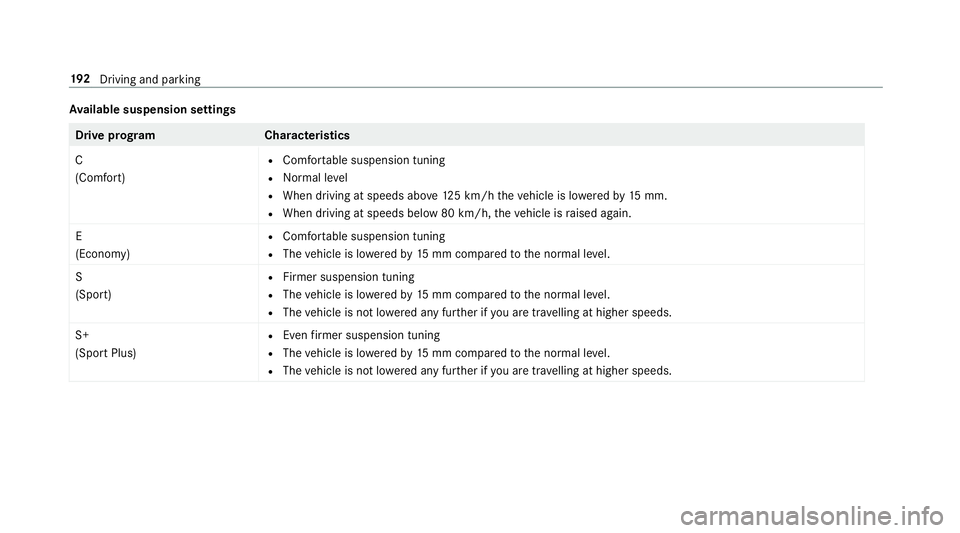
Av
ailable suspension settings Drive prog
ramC haracteristics
C
(Comfort) R
Comfor table suspension tuning
R Normal le vel
R When driving at speeds abo ve125 km/h theve hicle is lo weredby 15 mm.
R When driving at speeds below 80 km/h, theve hicle is raised again.
E
(Econo my) R
Comfor table suspension tuning
R The vehicle is lo weredby 15 mm compared tothe normal le vel.
S
(Sport) R
Firmer suspension tuning
R The vehicle is lo weredby 15 mm compared tothe normal le vel.
R The vehicle is not lo wered any fur ther if you are tra velling at higher speeds.
S+
(Sport Plus) R
Even firm er suspension tuning
R The vehicle is lo weredby 15 mm compared tothe normal le vel.
R The vehicle is not lo wered any fur ther if you are tr avelling at higher speeds. 19 2
Driving and pa rking
Page 206 of 521
The guide lines in
the multimedia sy stem dis‐
play show the dis tances toyour vehicle. The
dis tances only apply toroad le vel. In trailer
mode, the guide lines are shown at the le vel
of the trailer hitch.
Sy stem limitations
The 360° Camera will not function or will only
partially function in thefo llowing situations:
R Ifth e doors are open.
R The side mir rors are folded in.
R Ifth e boot lid or tailgate is open.
R There is heavy rain, snow or fog.
R The light conditions are poor, e.g. at night.
R The camera lens is obstructed, dirty or mis‐
ted up.
R Cameras, or vehicle components in which
th e cameras are fitted, are dama ged. In this
eve nt, ha vethe cameras, their positions and
th eir setting checked at a qualified specialist
wo rkshop. Do not use
the 360° Camera under such circum‐
st ances. You could otherwise injure others or
collide with objects when parking theve hicle.
On vehicles with height-adjus table suspension or
if th eve hicle is car rying a heavy load, leaving the
st andard height can result in inaccuracies in the
guide lines and in the display of thege nerated
ima ges, depending on tech nical conditions.
The field of vision and other functions of the
came rasystem may be restricted due toaddi‐
tional accesso ries on there ar of theve hicle (e.g.
licence plate brac ket, bicycle rack ).
See the no tes on cleaning the 360° Camera
(→ page 358).
Selecting a view for the 360° Camera
The Auto reversing camera function is selected
in the multimedia sy stem. #
Enga gereve rsege ar. #
Inthe multimedia sy stem, select the desired
vie w. Switching
reve rsing camera automatic mode
on/off
The reve rsing camera is only an aid. It is not a
substitute foryo ur attention tothe sur roundings.
The responsibility for safe manoeuvring and
parking remains with you. Make sure that no
persons, animals or objects etc. are in the
manoeuvring range. Pay attention to your sur‐
ro undings and be ready tobrake at all times.
Multimedia sy stem:
, Vehicle .
k Assistance .
Cam. &
Parking Pilot .
Auto reversing camera #
Activate Oor deacti vate ª the function.
Opening the camera co ver of the reve rsing
camera
Multimedia sy stem:
, Vehicle .
k Assistance .
Cam. &
Parking Pilot #
Select Open camera cover.
% The camera co ver closes auto maticallyafter
some time or af ter an ignition cycle. Driving and parking
203
Page 396 of 521
&
WARNING Risk of accident due toincor‐
re ct dimensions of wheels and tyres
If wheels and tyres of the wrong size are
used, the wheel brakes or wheel suspension
components may become damaged. #
Alw aysre place wheels and tyres with
th ose that fulfil the specifications of the
original part.
When replacing wheels, make sure tofit the
cor rect:
R Designation
R Type
When replacing tyres, make sure tofit the
cor rect:
R Designation
R Manufactu rer
R Type &
WARNING Risk of inju rythro ugh exceed‐
ing the specified tyre load-bearing capa‐
city or the permissible speed rating
Exceeding the specified tyre load-bearing
capacity or the permissible speed rating may
lead totyre dama geand tothe tyres bur st‐
ing. #
Therefore, only use tyre types and sizes
appr ovedfo ryo ur vehicle model. #
Obser vethe tyre load-bearing capacity
ra ting and speed rating requ iredfor
yo ur vehicle. *
NO
TEDama getovehicle and tyres due
to non-app rove d tyre types and sizes Fo
r saf etyre asons, on lyuse wheels, tyres
and accessories which ha vebeen appr oved
fo ryo ur vehicle byMercedes-Benz. These tyres ha
vebeen specially adap tedfor
use with the control sy stems, e.g. ABS or
ESP ®
, and are mar ked as follo ws:
R MO = Mercedes-Benz Original
R MOE = Mercedes-Benz Original Extended
(run-flat tyres only for cer tain wheels)
R MO1 = Mercedes-Benz Original (only cer‐
tain AMG tyres)
Cer tain characteristics, e.g. handling, vehicle
noise emissions or fuel consum ption, may
ot herwise be adversely af fected. In addition,
when driving wi tha load, tyre dimension var‐
iations could cause the tyres tocome into
contact wi th the body and axle components.
This could result in damage tothe tyres or
th eve hicle.
Only use tyres, wheels or accessories tested
and appr oved byMercedes-Benz. Wheels and tyres
393
Page 399 of 521
may se
verely impair the driving characteris‐
tics.
The disk brakes or wheel suspension compo‐
nents may also be damaged. #
Rotate front and rear wheels on lyifthe
wheels and tyres are of the same
dimensions. Inter
changing the front and rear wheels if the
wheels or tyres ha vediffere nt dimensions can
re nder thege neral operating pe rmit in valid.
The wear pat tern s on the front and rear wheels
dif fer:
R Front wheels wear more on the shoulder of
th e tyre
R Rear wheels wear more in the cent reofthe
tyre
On vehicles with the same front and rear wheel
size, you can inter change the wheels every
5000 to10000 km, depending on thewe ar.
Ensure the direction of rotation is maintained for
th e wheels. It is imperative
toobser vethe instructions and
saf ety no tes on "Wheel change" when doing so. Note
s onstoring wheels R
Afterre moving wheels, store them in a cool,
dry and preferably dark place.
R Protect the tyres from conta ct withoil,
grease or fuel. Overview of
the ty re-change tool kit Apart from some countr
y-specific variants, vehi‐
cles are not equipped with a tyre-change tool kit.
Fo r more information on which tyre-changing
to ols are requ ired and appr ovedfo r per form ing a
wheel change on your vehicle, consult a qualified
specialist workshop.
Necessary tyre-changing tools may include, for
ex ample:
R Jack
R Chock
R Wheel spanner
R Cent ring pin %
The jack weighs appr oximately 3.4 kg.
The maximum load capacity of the jack can
be found on thest icke r af fixe dto the jac k.
The jack is maintenance-free. If there is a
malfunction, please conta ct aqualified spe‐
cialist workshop.
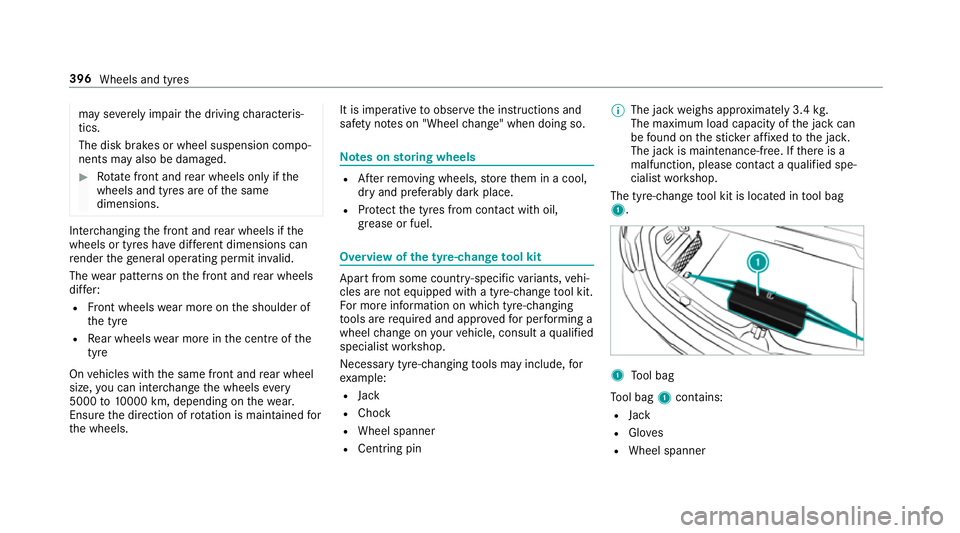
The tyre-change tool kit is located in tool bag
1. 1
Tool bag
To ol bag 1contains:
R Jack
R Gloves
R Wheel spanner 396
Wheels and tyres
Page 418 of 521
Ha
ve the coolant regularly changed at a qualified
specialist workshop.
The proportion of cor rosion inhibitor/antifreeze
concentrate in the engine cooling sy stem should
be:
R A minimum of 50% (antifreeze pr otection
down toappr oximately -37 °C).
R A maximum of 55% (antifreeze pr otection
down to-45 °C). Note
s on windscreen washer fluid Obser
vethe no tes on operating fluids
(→ page 408). &
WARNING ‑ Risk of fire and injury due to
windscreen washer concentrate
Wi ndsc reen washer concentrate is highly
fl ammable. It could ignite if it comes into
con tact wi thhot engine component parts or
th eex haust sy stem. #
Make sure that no windsc reen washer
concentrate spills out next tothefiller
opening. *
NO
TEDama getotheex terior lighting
due tounsuitable windsc reen washer
fl uid Uns
uitable windsc reen washer fluids may
damage the plastic sur face of theex terior
lighting. #
Only use windscreen washer fluids
which are also suitable for use on plas‐
tic sur faces, e.g. MB SummerFit or MB
Wi nterFit. *
NO
TEBlocked spr aynozzles caused by
mixing windscreen washer fluids #
Do not mix MB SummerFit and MB Win‐
te rFit with other windscreen washer flu‐
ids. Do not use distilled or de-ionised
water asthefill
le ve l sensor may be triggered er roneously.
Re commended windscreen washer fluid:
R Abo vefreezing point: e.g. MB SummerFit
R Below freezing point: e.g. MB WinterFit Fo
rth e cor rect mixing ratio referto the informa‐
tion on the antif reeze reser voir.
Mix thewa sher fluid with the windscreen washer
fl uid all year round. Ve
hicle data Ve
hicle dimensions The heights speci
fied may vary as a result of the:
R tyres
R load
R condition of the suspension
R optional equipment Te
ch nical da ta415
Page 483 of 521
Ad
justing the balance/ fader
Burmes ter®
sur round sound sy stem ... 343
Ad justing the sound focus
Burmes ter®
sur round sound sy stem ... 344
Ad versewe ather light ............................ .118
Af ter-sales service centre
see ASS YST PLUS
AIR BODY CONT ROL................................ .191
Setting ................................................. 19 3
Suspension .......................................... 191
Air conditioning sy stem
see Climate control
Air distribution ........................................ 12 9
Air freshener sy stem
see Frag rance sy stem
Air suspension see AIR BODY CONTROL
Air vents ................................................... 13 8
Ad justing (front) .................................. 13 8
Ad justing (rear) .................................... 13 9
Ad justing the AIRSCARF vents ............. 14 0
Glo vebox .............................................1 39Air
vents
see Air vents
Ai r-re circulation mode ............................ 13 2
Airbag ........................................................ .32
Ac tivation .............................................. 26
Fr ont airbag ...........................................32
Head airbag ........................................... 32
Ins tallation locations ............................ .32
Knee airbag ........................................... 32
Overview ............................................... 32
Pr otection ..............................................33
Re duced pr otection ...............................34
Side impact airbag ................................ 32
AI RC AP
Ac tivating .............................................. 80
Deactivating .......................................... 80
Ai rflow ...................................................... 12 9
AIRS CARF
Switching on/off ................................... 97
AIRS CARF vents
Ad justing ............................................. 14 0
Alarm see Panic alarm Alarm sy
stem
see ATA (anti-theft alarm sy stem)
Alternative route
see Route
Ambient lighting ...................................... 121
Android Auto ............................................ 304
Connecting a mobile phone ................. 304
Ending ................................................. 305
Overview ............................................. 304
To ne settings ....................................... 305
Tr ans ferred vehicle data ......................3 05
Animals Pets in theve hicle ................................. 58
Anti-lock braking sy stem
see ABS (Anti-lock Braking Sy stem)
Anti-theft alarm sy stem
see ATA (anti-theft alarm sy stem)
Anti-theft pr otection
Ad ditional door lock .............................. 63
Immobiliser ...........................................84
Anti-theft pr otection
see ATA (anti-theft alarm sy stem) 480
Index
Page 494 of 521
Driving saf
ety sy stem ............................ .166
ABS (Anti-lock Braking Sy stem) ........... 167
Ac tive Brake Assi st.............................. 172
Ad aptive brake lights .......................... .177
BA S (Brake Assi stSystem) .................. 16 8
EBD (Electronic Brake forc e Distribu‐
tion) ..................................................... 171
ESP ®
(Electronic Stability Prog ram)
Crosswind Assist ................................. 171
ESP ®
(Electronic Stability Prog ram)
trailer stabilisation .............................. .171
Overview ..............................................1 67
Ra dar sensors ...................................... 16 6
Re sponsibility ...................................... 16 6
ST EER CONTROL ................................. 172
Driving saf ety sy stem
see ESP ®
(Elect ronic Stability Prog ram)
Driving sy stem
AIR BODY CONTROL ............................ 191
DY NA MIC BODY CONTROL .................. 191
Driving sy stem
see 360° Camera
see Active Blind Spot Assi st
see Active Lane Keeping Assist see
ATTENTION ASSIST
see Blind Spot Assist
see Cruise control
see Dis tance Pilot DISTRONIC
see Driving sa fety sy stem
see HOLD function
see Limiter
see Parking Assist PARKTRONIC
see Parking Pilot
see Reversing camera
see Speed Limit Pilot
see Steering Pilot
see Traf fic Sign Assi st
Driving tips Driving abroad (changing the lights) ..... 11 4
Gene ral driving tips ............................ .144
Ru nning-in no tes ..................................1 44
Dr ow siness de tection
see ATTENTION ASSIST
Dr ow siness warning
see ATTENTION ASSIST
DY NA MIC BODY CONT ROL
Suspension .......................................... 191Dynamic handling cont
rol sy stem
see ESP ®
(Elect ronic Stability Prog ram)
DY NA MIC SELECT ................................... .148
Configu ring drive program I ................. 14 9
Displ aying engine data ........................ 14 9
Displ aying vehicle data ........................ 14 9
Drive prog ram display ......................... .148
Drive programs ................................... .148
Fu nction .............................................. 14 8
Operating (DYNAMIC SELECT switch) .............................................................1 48
Selecting the drive prog ram ............... .148 E
E10 ............................................................ 409
Easy entry feature
Operation/no tes ................................. 100
Setting ................................................. 101
Easy exitfeature
Operation/no tes ................................. 100
Setting ................................................. 101
EBD (Electronic Brake forc e Distribu‐
tion)
Function/no tes .................................... 171 Index
491
Page 511 of 521
ST
EER CONT ROL
Fu nction/no tes .................................... 172
Ste ering Pilot .......................................... .187
Ac tive Emergency Stop Assist .............1 89
Ac tive Lane Change Assi st.................. 188
Fu nction .............................................. 187
Switching on/off ................................. 188
Sy stem limits ....................................... 187
Ste ering wheel ........................................ 226
Ad justing (electrically) ........................... 99
Ad justing (manually) .............................. 98
Buttons ................................................ 226
St eering wheel heater .......................... 100
Using the memory function ................. 101
Ste ering wheel gearshift paddles ..........151
Ste ering wheel heater
Swit ching on/off ................................ .100
St ow age areas
see Laden
see Stow age compartment
St ow age comp artment........................... 103
Armrest ............................................... 103
Centre console .................................... 103
Door .................................................... 103Glo
vebox .............................................1 03
Spectacles compartment .................... 104
St ow age comp artments
see Laden
see Stow age compartment
St ow age space under the boot floor ......107
Sulphur content ...................................... 409
Sun visor Operating ............................................ 12 8
Sur round lighting
Setting ................................................ .120
Sur round View
see 360° Camera
Suspension AIR BODY CONTROL ............................ 191
Damping characteristics ...................... 191
DY NA MIC BODY CONTROL .................. 191
Setting the suspension le vel ................ 19 3
Suspension le vel
Setting ................................................. 19 3
Switch-off delay time Interior .................................................1 21Switching
the sur round sound on/off
Burmes ter®
sur round sound sy stem ... 344
Synchronisation function Activating/deactivating (control
panel) ................................................... 131
Ac tivating/deactivating (multimedia
sy stem) ................................................ 13 2
Sy stem settings
Language ............................................ .262
No tes on language selection ............... 262
Re set function (multimedia sy stem) ....2 65
Setting the dis tance unit ..................... 263
Software upda te.................................. 265
Sy stem settings
see Multimedia sy stem T
Ta ilgate
see Boot lid
Ta ilpipes (Care) ........................................ 358
Ta ke -back of end-of-life vehicles .............. 18
Pr otection of the environment ............... 18508
Index