warning MERCEDES-BENZ E-CLASS CABRIOLET 2018 Owner's Manual
[x] Cancel search | Manufacturer: MERCEDES-BENZ, Model Year: 2018, Model line: E-CLASS CABRIOLET, Model: MERCEDES-BENZ E-CLASS CABRIOLET 2018Pages: 498, PDF Size: 6.28 MB
Page 168 of 498
0071WARNING Risk of accident due toActive
Dis tance Assist DISTRONIC still being
activated when you lea vethe driver's
seat
If yo u lea vethe driver's seat while theve hicle
is being braked byActive Dis tance Assist
DISTRONIC only, theve hicle can rollaw ay.
00BBAlw ays deactivate Active Dis tance
Assist DISTRONIC and secure theve hi‐
cle topreve nt it from rolling away
before you lea vethe driver's seat.
Re quirementsRThe vehicle's engine must be switched on.
RThe electric parking brake must be released.
RAc tive Parking Assist is not being used to
park theve hicle or toexit from a parking
space.
RESP®must be activated, but not inter vening.
RThe transmission must be in position005B.
RThe driver door, front passenger door and the
re ar doors must be closed.
RThe engine hood must be closed.
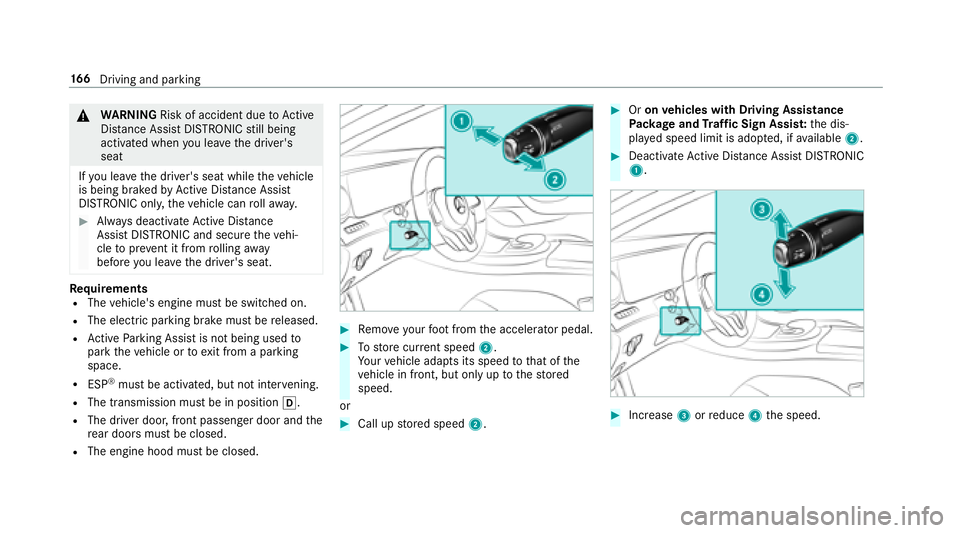
00BBRe mo veyour foot from the accelerator pedal.
00BBTo store cur rent speed 2.
Yo ur vehicle adapts its speed tothat of the
ve hicle in front, but only up tothestored
speed.
or
00BBCall up stored speed 2.
00BBOron vehicles with Driving Assistance
Pa ckage and Traf fic Sign Assis t:the dis‐
pla yed speed limit is adop ted, if available 2.
00BBDeactivate Active Dis tance Assist DISTRONIC
1.
00BBIncrease 3orreduce 4the speed.
16 6
Driving and pa rking
Page 169 of 498
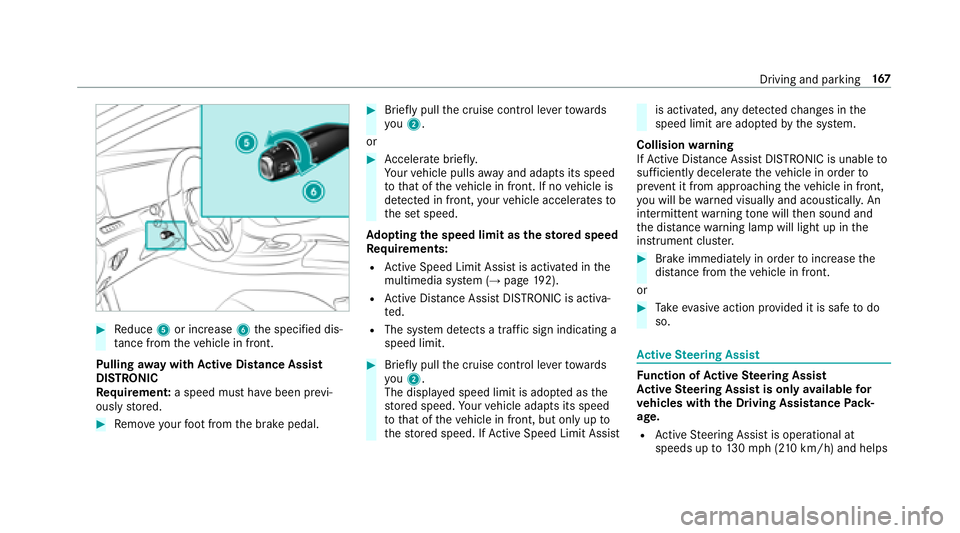
00BBReduce 5or increase 6the specified dis‐
ta nce from theve hicle in front.
Pulling away wit hAc tive Di stance Assist
DI STRO NIC
Re quirement: a speed must ha vebeen pr evi‐
ously stored.
00BBRe mo veyour foot from the brake pedal.
00BBBrief lypull the cruise control le verto wa rds
yo u2.
or
00BBAc celerate brie fly.
Yo ur vehicle pulls away and adapts its speed
to that of theve hicle in front. If no vehicle is
de tected in front, your vehicle accelerates to
th e set speed.
Ad opting the speed limit as thesto red speed
Re quirements:
RActive Speed Limit Assi stis activated in the
multimedia sy stem (→page 192).
RAc tive Dis tance Assist DISTRONIC is acti va‐
te d.
RThe sy stem de tects a traf fic sign indicating a
speed limit.
00BBBrie fly pull the cruise control le verto wa rds
yo u2.
The display ed speed limit is adop ted as the
st ored speed. Your vehicle adapts its speed
to that of theve hicle in front, but only up to
th estored speed. If Active Speed Limit Assi st
is activated, any detected changes in the
speed limit are adop tedby the sy stem.
Collision warning
If Ac tive Dis tance Assist DISTRONIC is unable to
suf ficiently decele rate theve hicle in order to
pr eve nt it from approach ingtheve hicle in front,
yo u will be warned visually and acousticall y.An
intermittent warning tone will then sound and
th e dis tance warning lamp will light up in the
instrument clus ter.
00BBBrake immediately in order toinc rease the
dis tance from theve hicle in front.
or
00BBTa ke evasive action pr ovided it is safe todo
so.
Ac tive Steering Assist
Function of Active Steering Assist
Ac tive Steering Assist is only available for
ve hicles with the Driving Assistance Pack‐
age.
RAc tive Steering Assist is operational at
speeds up to130mp h(210 km/h) and helps
Driving and pa rking 16
7
Page 171 of 498
RActive Dis tance Assist DISTRONIC is acti va‐
te d.
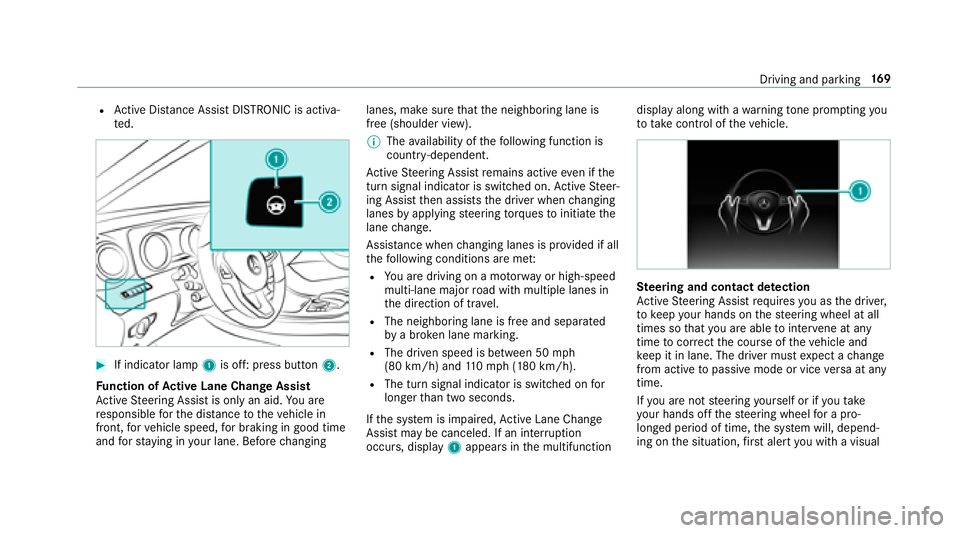
00BBIf indicator lamp 1is off: press button 2.
Fu nction of Active Lane Change Assi st
Ac tive Steering Assist is only an aid. You are
re sponsible forth e dis tance totheve hicle in
front, forve hicle speed, for braking in good time
and forst ay ing in your lane. Before changing lanes, make sure
that the neighboring lane is
free (shoulder view).
00CE The availability of thefo llowing function is
countr y-dependent.
Ac tive Steering Assist remains active even if the
turn signal indica tor is switched on. Active Steer‐
ing Assist then assists the driver when changing
lanes byapplying steering torques toinitiate the
lane change.
Assis tance when changing lanes is pr ovided if all
th efo llowing conditions are me t:
RYou are driving on a mo torw ay or high-speed
multi-lane major road with multiple lanes in
th e direction of tr avel.
RThe neighboring lane is free and separated
bya broken lane marking.
RThe driven speed is between 50 mph
(80 km/h) and 110mp h(1 80 km/h).
RThe turn signal indicator is switched on for
longer than two seconds.
If th e sy stem is impaired, Active Lane Change
Assi stmay be canceled. If an inter ruption
occurs, display 1appears in the multifunction display along with a
warning tone pr om
ptin
g you
to take control of theve hicle.
Ste ering and contact de tection
Ac tive Steering Assist requ ires you as the driver,
to keep your hands on thesteering wheel at all
times so that you are able tointer vene at any
time tocor rect the course of theve hicle and
ke ep it in lane. The driver must expect a change
from active topassive mode or vice versa at any
time.
If yo u are not steering yourself or if you take
yo ur hands offthesteering wheel for a pro‐
longed period of time, the sy stem will, depend‐
ing on the situation, firs t alert you with a visual
Driving and parking 16
9
Page 172 of 498

warning. 1appears in the multifunction displa y.
If yo u are still not steering theve hicle yourself or
if yo u ha venot take n hold of thesteering wheel,
a wa rning tone sounds in addition tothewa rning
message toremind youto take control of the
ve hicle.
The warning message does not appear or disap‐
pears if one of thefo llowing conditions are me t:
RThe driversteers theve hicle.
RThe driver presses a steering wheel button or
operates Touch Control.
Fu nction of Active Eme rgency Stop Assist
If th e driver continues toigno rethe acoustic
wa rning of Active Lane Change Assi st,Ac tive
Dis tance Assist DISTRONIC reduces the speed.
If th e driver still does not respond, theve hicle is
decelerated in stages toast andstill.
The driver can cancel the deceleration at any
time byper form ing one of thefo llowing actions:
RSt eering
RBraking or accelerating
RPressing a steering wheel button or operat‐
ing Touch Control
RAc tivating or deacti vating Active Steering
Assist or Dis tance Assist DISTRONIC
The driver must beready totake control of the
ve hicle at any time.
Information on Hill Start Assist
Hill Start Assist holds theve hicle for a short
time when pulling away on a hill under thefo l‐
lowing conditions:
RThe transmission is in position 005Bor005E.
RThe elect ric park ing brake is released.
This gives you enough time tomo veyour foot
from the brake pedal tothe accelerator pedal
and depress it before theve hicle begins toroll.
0071
WARNING Risk of accident and injury
caused bytheve hicle rolling away
Af ter a short time, Hill Start Assist no longe r
holds theve hicle and it can rollaw ay.
00BBTherefore, swiftly mo veyour foot from
th e brake pedal tothe accelerator
pedal. Ne ver attem pttolea vetheve hi‐
cle if it is being held byHill Start Assist.
HOLD function
HOLD function
The HOLD function holds theve hicle at a stand‐
st ill without requ iring youto depress the brake
pedal, e.g. when pulling away on steep slopes.
Sy stem limitations
RThe incline must not be greaterth an 30%.
Ac tivating/deactivating the HOLD function
0071
WARNING Risk of an accident due tothe
HOLD function being activated when you
lea vetheve hicle
If yo u lea vetheve hicle while only the HOLD
function is braking theve hicle, theve hicle
can rollaw ay inthefo llowing situations:
RIf th ere is a malfunction in the sy stem or
in the po wer supply.
170
Driving and pa rking
Page 175 of 498
Driveprog ramC haracteristics
S
(Sport)
RThe suspension tuning is firm er.
RThe vehicle is set tothe low le vel.
RThe vehicle is not lo wered any fur ther if you are tra veling at higher speeds.
S+
(Sport Plus)
RThe suspension tuning is evenfirm er.
RThe vehicle is set tothe low le vel.
RThe vehicle is not lo wered any fur ther if you are tra veling at higher speeds.
Setting theve hicle le vel
0071
WARNING Risk of accident because
ve hicle le vel is too high
If yo udriv e at a higher vehicle le vel,th e driv‐
ing characteristics may be impaired due to
th e higher vehicle center of gr avity.
The vehicle can drift outwards, forex ample,
when steering or cornering.
00BBAlw aysch oose a vehicle le vel which is
suited tothe driving style and thero ad
sur face conditions.
0071
WARNING Risk of entrapment from vehi‐
cle lo wering
When lo wering theve hicle, people could
become trapped if their limbs are between
th eve hicle body and the tires or underneath
th eve hicle.
00BBMake sure no one is underneath the
ve hicle or in the immediate vicinity of
th e wheel ar ches when you lo werth e
ve hicle.
0071
WARNING Risk of entrapment from vehi‐
cle lo wering
Ve hicles with AIR BODY CONT ROL or
le ve l control sy stem: When you unload lug‐
ga ge or lea vetheve hicle, theve hicle firs t
ri ses slightly and then returns tothe set le vel
shortly af terw ards.
Yo u or an yone else in the vicinity of the
wheel ar ches or the underbody could thus
become trapped.
The vehicle can also be lo wered af ter being
loc ked.
Driving and parking 17
3
Page 178 of 498

Cleanthe sensors regularly, taking care not to
scratch or damage them.
Fu nction of the passive side impact pr otec‐
tion
Pa ssive side impact pr otection is an additional
Pa rking Assist PARKTRONI Cfunction whic h
wa rnsth e driver about obs tacles at the side of
th eve hicle. A warning is issued when obs tacles
are de tected between the front and rear de tec‐
tion range. In order for an object tobe de tected,
th e sensors in the front and rear bumper must
de tect the object while you are driving past it.
During the parking procedure or maneuvering,
objects are de tected as theve hicle drives past.
If yo usteer in the direction of a de tected obs ta‐
cle and there is a risk of a lateral collision, a
wa rning is issued. The lateral segments light up
orange or red, depending on the dis tance tothe
obs tacle. Segment color depending on distance
Color Lateral distance in
cm
Re dA pprox. < 30
Orang eA pprox. 30 - 60
In order for lateral front or rear segments tobe
displa yed, theve hicle must firs t tr ave l a dis tance
of at least half of theve hicle length. Once the
ve hicle has tr aveled the length of theve hicle, all
of the lateral front and rear segments can be dis‐
pla yed.
Ve hicles without 360° Camera
1Parking Assist PARKTRONI Cis on ly oper a‐
tional in the front and rear
2Pa rking Assist PARKTRONI Cis operational
and can also warnthe driver about obs tacles
at the side of theve hicle
3Obs tacle de tected at the front right (orange)
and rear (red)
17 6
Driving and pa rking
Page 179 of 498

Vehicles with 360° Camera
1Parking Assist PARKTRONI Cis on ly oper a‐
tional in the front and rear
2Pa rking Assist PARKTRONI Cis operational
and can also warnthe driver about obs tacles
at the side of theve hicle
3Obs tacle de tected at the front right (orange)
and rear (red)
Sa ved obs tacles are del eted in thefo llowing sit‐
uations, forex ample:
RYo uswit choff theve hicle
RYo u open the doors Af
terth e engine is restar ted, obs tacles must be
de tected again, before a new warning can be
issued.
Sy stem limitations
The sy stem limitations forPa rking Assist
PA RKTRONI Cappl yfo r passive side impact pro‐
te ction.
The following objects are not de tected, forex am‐
ple:
RPe destrians who approach theve hicle from
th e side
RObjects placed next totheve hicle
Deactivating/activating PARKTRONIC
0075 NO
TERisk of an accident from objects
at close range
Pa rking Assist PARKTRONI Cma yno tde tect
cer tain objects at close range.
00BBWhen pa rking or maneuvering theve hi‐
cle, pay particular attention toany
objects which are abo veor below the
sensors, e.g. flowe r pots or dr awbars.
The vehicle or other objects could oth‐
erwise be damaged.
If indicator lamp 1is not lit, Parking Assist
PA RKTRONI Cis active. If the indicator lamp is lit
or theé symbol appears in the multifunction
displa y,Pa rking Assist PARKTRONI Cis no t
active.
00BBPress but ton 2.
Driving and pa rking 17
7
Page 180 of 498

00CEDepending on theve hicle's equipment, the
button may also be located in the center
console.
00CE Parking Assist PARKTRONI Cis automatical ly
activated when theve hicle is star ted.
Ad justing the warning tones of Parking
Assist PARKTRONIC
Multimedia sy stem:
00869HKLFOH00CFk $VVLVWDQFH00CF&DPHUD
3DUNLQJ00CF6HW :DUQLQJ 7RQHV
Ad justing the volume of thewa rning tones
00BBSelect :DUQLQJ 7RQH 9ROXPH.
00BBSet avalue.
Ad justing the pitch of the warning tones
00BBSelect :DUQLQJ 7RQH 3LWFK.
Set a value.
Specifying thest arting point for the warning
to nes
Yo u can specify whe ther thePa rking Assist
PA RKTRONI Cwa rning tones should commence
when theve hicle is fur ther aw ay from an obs ta‐
cle.
00BBSelect :DUQ (DUO\ .
00BBActivate 0073or deacti vate 0053 the function.
Ac tivating/deactivating audio fadeout
Yo u can specify whe ther thevo lume of a media
source in the multimedia sy stem is tobe
re duced when Parking Assist PARKTRONI Cgives
an audible warning.
00BBSelect $XGLR )DGHRXW 'XULQJ :DUQLQJ 7RQHV.
00BBActivate 0073or deacti vate 0053 the function.
Re versing camera
Fu nction of there ar view camera
When you enga gereve rsege ar, the image from
re ar view camera 1is shown in the multimedia
sy stem. Dynamic guide lines show the path the
ve hicle will take with thesteering wheel in its
cur rent position. This helps youto orient your‐
self and toavoid obs tacles when back ing up.
178
Driving and pa rking
Page 182 of 498
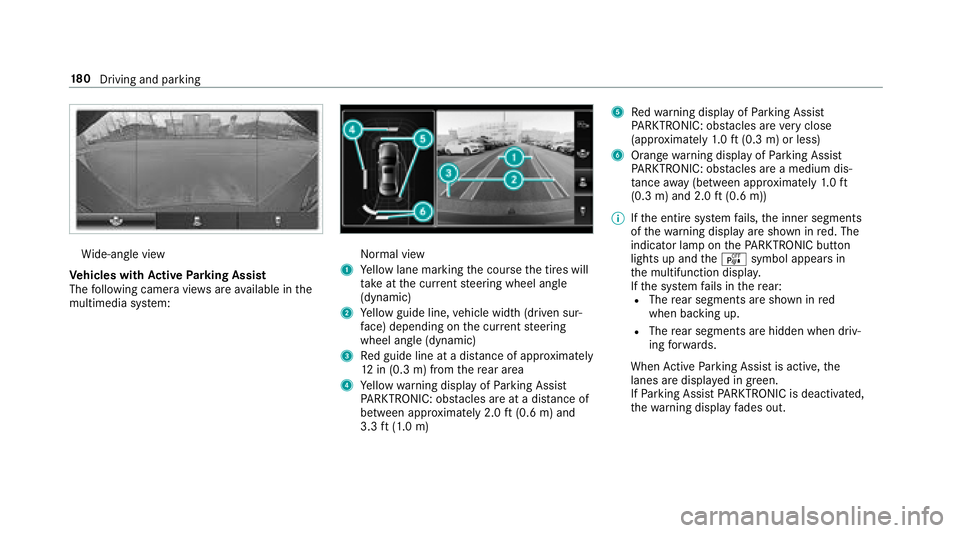
Wide-angle view
Ve hicles with Active Parking Assist
The following camera vie wsare available in the
multimedia sy stem:Normal view
1Ye llow lane marking the course the tires will
ta ke atthe cur rent steering wheel angle
(dynamic)
2Ye llow guide line, vehicle width (driven sur‐
fa ce) depending on the cur rent steering
wheel angle (dynamic)
3Re d guide line at a dis tance of appr oximately
12 in (0.3 m) from there ar area
4Ye llow warning display of Parking Assist
PA RKTRONIC: obstacles ar eat adis tance of
between appr oximately 2.0 ft(0.6 m) and
3.3 ft(1.0 m)
5Re dwa rning display of Parking Assist
PA RKTRONIC: obstacles ar eve ry close
(appr oximately 1.0 ft (0.3 m) or less)
6Orange warning display of Parking Assist
PA RKTRONIC: obstacles ar e amedium dis‐
ta nce away (between appr oximately 1.0 ft
(0.3 m) and 2.0 ft(0.6 m))
00CE Ifth e entire sy stem fails, the inner segments
of thewa rning display are shown in red. The
indicator lamp on thePA RKTRONI Cbut ton
lights up and theé symbol appears in
th e multifunction displa y.
If th e sy stem fails in there ar:
RThe rear segments are shown in red
when backing up.
RThe rear segments are hidden when driv‐
ing forw ards.
When Active Parking Assist is active, the
lanes are displa yed in green.
If Pa rking Assist PARKTRONI Cis deacti vate
d,
th ewa rnin
g display fades out.
18 0
Driving and pa rking
Page 184 of 498
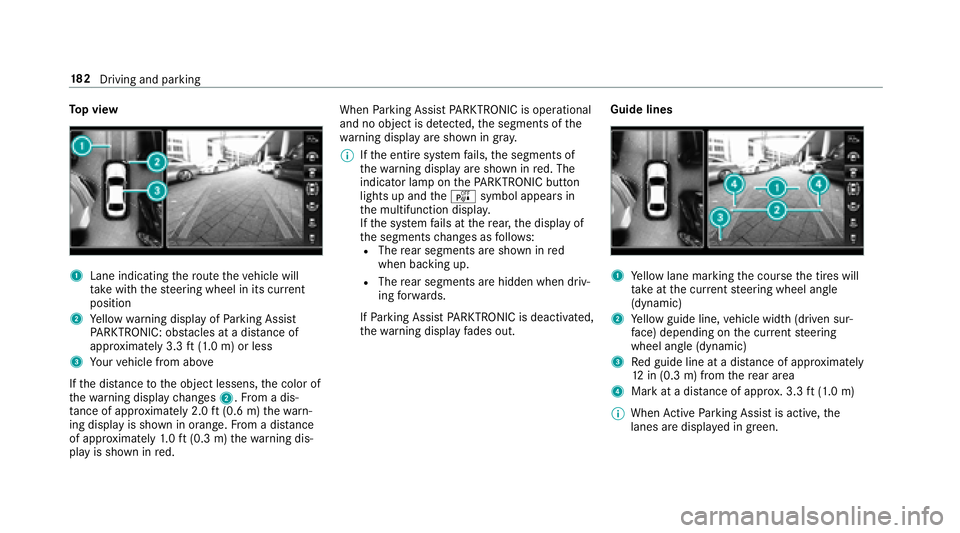
Top view
1Lane indicating thero ute theve hicle will
ta ke with thesteering wheel in its cur rent
position
2Ye llow warning display of Parking Assist
PA RKTRONIC: obstacles at adis tance of
appr oximately 3.3 ft(1.0 m) or less
3Yo ur vehicle from abo ve
If th e dis tance tothe object lessens, the color of
th ewa rning display changes 2.From a dis‐
ta nce of appr oximately 2.0 ft(0.6 m) thewa rn‐
ing display is shown in orange. From a dis tance
of appr oximately 1.0 ft (0.3 m) thewa rning dis‐
play is shown in red. When
Parking Assist PARKTRONI Cis operational
and no objec tis de tected, the segments of the
wa rning display are shown in gray .
00CE Ifth e entire sy stem fails, the segments of
th ewa rning display are shown in red. The
indicator lamp on thePA RKTRONI Cbut ton
lights up and theé symbol appears in
th e multifunction displa y.
If th e sy stem fails at there ar, the display of
th e segments changes as follo ws :
RThe rear segments are shown in red
when backing up.
RThe rear segments are hidden when driv‐
ing forw ards.
If Pa rking Assist PARKTRONI Cis deacti vated,
th ewa rning display fades out. Guide lines1Ye
llow lane marking the course the tires will
ta ke atthe cur rent steering wheel angle
(dynamic)
2Ye llow guide line, vehicle width (driven sur‐
fa ce) depending on the cur rent steering
wheel angle (dynamic)
3Re d guide line at a dis tance of appr oximately
12 in (0.3 m) from there ar area
4Mark at a distance of appr ox. 3.3 ft(1.0 m)
00CE When Active Parking Assist is active, the
lanes are displa yed in green.
18 2
Driving and pa rking