weight MERCEDES-BENZ E-CLASS CABRIOLET 2018 User Guide
[x] Cancel search | Manufacturer: MERCEDES-BENZ, Model Year: 2018, Model line: E-CLASS CABRIOLET, Model: MERCEDES-BENZ E-CLASS CABRIOLET 2018Pages: 589, PDF Size: 10.56 MB
Page 472 of 589
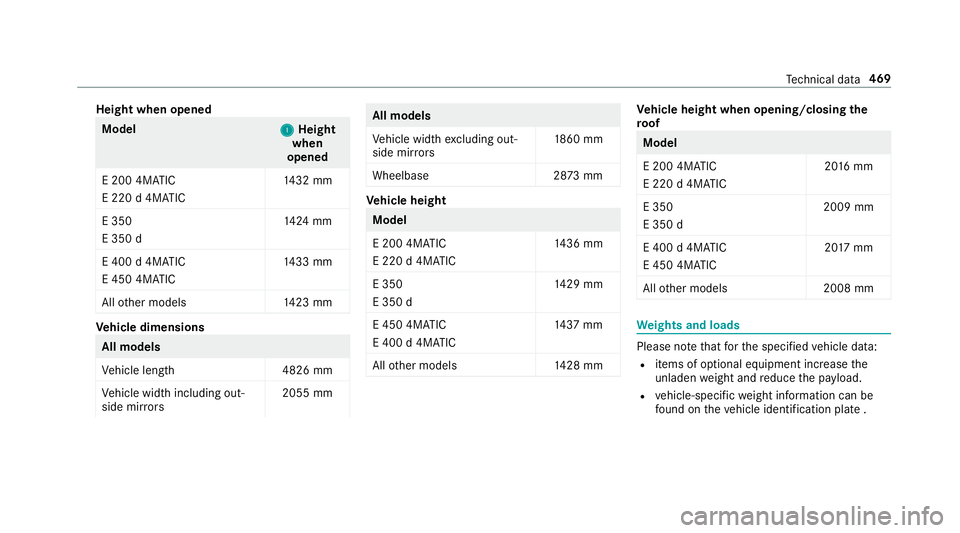
Height when opened
Model
1 1Height
when
opened
E 200 4MATIC
E 220 d 4MATIC 14
32 mm
E 350
E 350 d 14
24 mm
E 400 d 4MATIC
E 450 4MATIC 14
33 mm
All other models 1423 mm Ve
hicle dimensions All models
Ve
hicle lengt h4 826 mm
Ve hicle width including out‐
side mir rors 2055 mm All models
Ve
hicle width excluding out‐
side mir rors 18
60 mm
Wheelbase 2873 mm Ve
hicle height Model
E 200 4MATIC
E 220 d 4MATIC
14
36 mm
E 350
E 350 d 14
29 mm
E 450 4MATIC
E 400 d 4MATIC 14
37 mm
All other models 1428 mm Ve
hicle height when opening/closing the
ro of Model
E 200 4MATIC
E 220 d 4MATIC
20
16 mm
E 350
E 350 d 2009 mm
E 400 d 4MATIC
E 450 4MATIC 20
17 mm
All other models 2008 mm We
ights and loads Please no
tethat forth e specified vehicle data:
R items of optional equipment increase the
unladen weight and reduce the pa yload.
R vehicle-specific weight information can be
fo und on theve hicle identification plate . Te
ch nical da ta469
Page 473 of 589
Tr
ailer hitch Gene
ral no tes on the trailer hit ch Not all models can be used
for trailer operation
(→ page 245).
Modi fications tothe engine cooling sy stem may
be necessar y,depending on theve hicle model.
The retrofitting of a trailer hitch is only pe rmissi‐
ble if a towing capacity is specified in your vehi‐
cle documents.
Fu rther information can be obtained at a quali‐
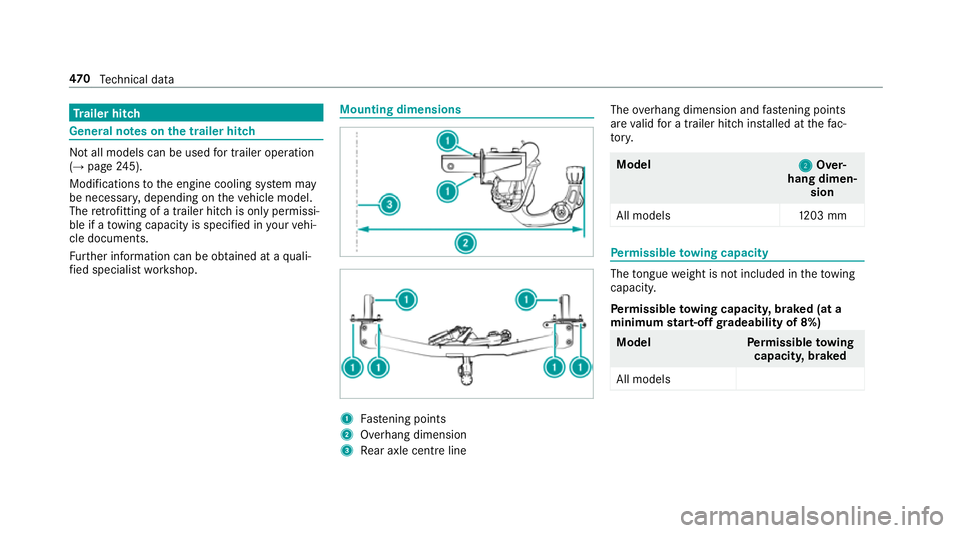
fi ed specialist workshop. Mounting dimensions
1
Fastening points
2 Overhang dimension
3 Rear axle centre line The
overhang dimension and fastening points
are valid for a trailer hitch ins talled at thefa c‐
to ry. Model
2 2Over‐
hang dimen‐ sion
All model s1 203 mm Pe
rm issible towing capacity The
tongue weight is not included in theto wing
capacity.
Pe rm issible towing capacit y,braked (at a
minimum start-off gradeability of 8%) Model
Perm issible towing
capacit y,braked
All models 47 0
Tech nical da ta
Page 474 of 589
Pe
rm issible towing capacit y,braked (at a
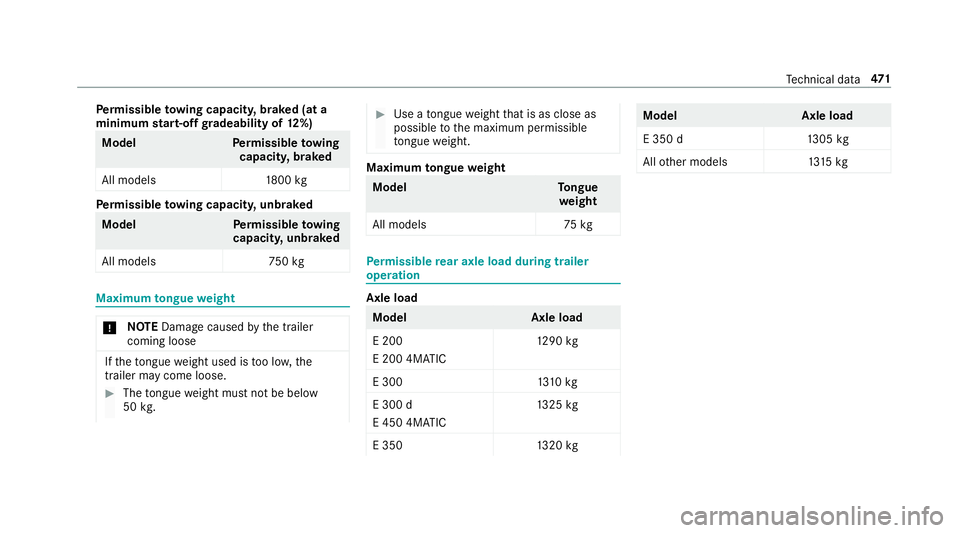
minimum start-off gradeability of 12%) Model
Perm issible towing
capacit y,braked
All models 1800 kg Pe
rm issible towing capacit y,unbraked Model
Perm issible towing
capacit y,unbraked
All model s7 50kg Maximum
tongue weight *
NO
TEDama gecaused bythe trailer
coming loose If
th eto ngue weight used is too lo w,the
trailer may come loose. #
The tongue weight must not be below
50 kg. #
Use a tongue weight that is as close as
possible tothe maximum permissible
to ngue weight. Maximum
tongue weight Model
Tongue
we ight
All models 75kg Pe
rm issible rear axle load during trailer
operation Axle load
Model
Axle load
E 200
E 200 4MATIC 12
90 kg
E 300 1310 kg
E 300 d
E 450 4MATIC 13
25 kg
E 350 1320 kg Model
Axle load
E 350 d1 305kg
All other models 1315 kg Te
ch nical da ta471
Page 484 of 589
Display messages
Possible causes/consequences and M
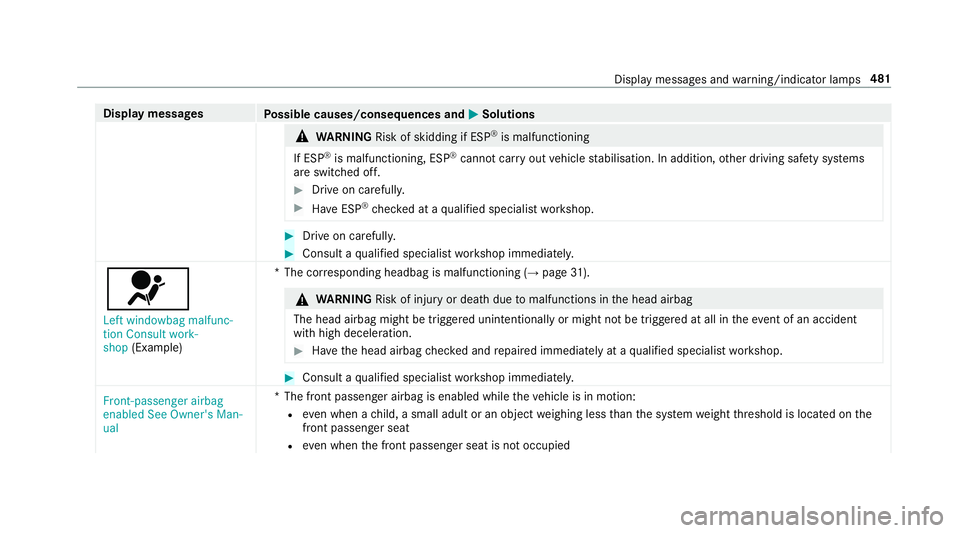
MSolutions &
WARNING Risk of skidding if ESP ®
is malfunctioning
If ESP ®
is malfunctioning, ESP ®
cannot car ryout vehicle stabilisation. In addition, other driving saf ety sy stems
are switched off. #
Drive on carefull y. #
Have ESP ®
ch ecked at a qualified specialist workshop. #
Drive on carefully. #
Consult a qualified specialist workshop immediatel y.
6
Left windowbag malfunc-
tion Consult work-
shop (Example) *T
he cor responding headbag is malfunctioning (→ page31). &
WARNING Risk of inju ryor death due tomalfunctions in the head airbag
The head airbag might be triggered unintentionally or might not be triggered at all in theeve nt of an accident
wi th high deceleration. #
Have the head airbag checked and repaired immediately at a qualified specialist workshop. #
Consult a qualified specialist workshop immediatel y.
Front-passenger airbag
enabled See Owner's Man-
ual *T
he front passenger airbag is enabled while theve hicle is in motion:
R even when a child, a small adult or an object weighing less than the sy stem weight thre shold is located on the
front passenger seat
R even when the front passenger seat is not occupied Display messages and
warning/indicator lamps 481
Page 566 of 589
Map
.......................................... 322, 324, 325
Av oiding an area ..................................3 27
Av oiding an area (o verview) ................ .326
Changing an area ................................ 327
Deleting an area .................................. 327
Displ aying Qibla .................................. 329
Displaying the compass ....................... 329
Displaying the map version ................ .326
Displ aying the next intersecting
st re et ................................................... 326
Displaying the satellite map ................3 29
Displ aying the tra ffic map .................. .322
Displ aying weather information .......... .329
Map data ............................................. 328
Moving ................................................ 325
Overview ............................................. 324
Selecting POI symbols ......................... 325
Selecting text information ................... 326
Selecting the map orientation .............3 25
Setting the map scale .......................... 325
Setting the map scale automatically ....3 29
Up dating .............................................3 28
Map and comp ass
Overview ............................................. 324 Massage prog
rammes
Re setting the settings .......................... 106
Massage prog rams
Overview ............................................ .105
Selecting the front seats ..................... 105
Massage settings Resetting ............................................. 106
Matt finish (cleaning instructions) ........ 402
Maximum gross vehicle weight ............ .457
Maximum speed see Limiter
Mecca ...................................................... .329
Media Menu (on-boa rdcompu ter) .................. 262
Sear ching ............................................ 371
Media display Notes ................................................... 281
Media Inter face
Ac tivating ............................................ 372
Information ..........................................3 71
Overview ............................................. 373
Media mode Activating ............................................ 366 Media playba
ck
Operating (on-board computer) ........... 262
Media sear ch
St arting ................................................ 371
Media source Selecting (on-boa rdcompu ter) ............ 262
Memory function Head-up display — Calling up stored
settings ................................................ 11 3
Head-up display — Storing settings ...... 11 3
Operating ............................................. 11 3
Outside mir rors — Calling up stored
settings ................................................ 11 3
Outside mir rors —St oring settings .......1 13
Seat — Calling up stored settings ......... 11 3
Seat — Storing settings ........................ 11 3
St eering wheel — Calling up sa ved
settings ................................................ 11 3
St eering wheel — Saving settings ......... 11 3
Menu (on-board computer) Assis tant displ ay................................. 257
Designs ............................................... 255
Head-up displ ay................................... 263
Media .................................................. 262 Index
563
Page 577 of 589
Setting
the time and date automati‐
cally ..................................................... 291
Setting the time zone .......................... 291
Setting the time/date form at .............. 291
Swit ching transmission of theve hicle
position on/off .................................... 292
Sy stem settings
see Blue tooth®
see Data import/export
see Language
see Software update
see Wi-Fi T
Ta ilpipes (Care) ........................................ 407
Ta ke -back of end-of-life vehicles .............. 19
Pr otection of the environment ............... 19
Ta nk content
Ad Blue ®
............................................... 464
Fu el ..................................................... 463
Re ser ve(fuel) ...................................... 463
Te ch nical data
Axle load (trailer operation) ................. 471
Fa stening points (trailer hitch) .............4 70Information .......................................... 455
Mounting dimensions (trailer hitch) ..... 470
No tes (trailer hitch) ............................. 470
Overhang dimension (trailer hitch) ...... 470
To ngue weight ...................................... 471
To wing capacity (trailer operation) ...... 470
Ty re pressure monitoring sy stem ........ 440
Ve hicle identification plate .................. 457
Te lephone ........................................ .262, 331
Ac tivating functions du ring a call ........ 339
Business telephony settings ................ 336
Call and ringtone volume .................... .338
Calls with se veral participants ............ .339
Connecting a mobile phone (busi‐
ness telephony) .................................. .334
Connecting a mobile phone (Near
Field Communication (NFC)) .............. .337
Connecting a mobile phone (Pass‐
ke y) .................................................... .332
Connecting a mobile phone (Secu re
Simple Pairing) .................................... 332
De-authorising a mobile phone ............ 337
Disconnecting a mobile phone ............ 337
Importing con tacts .............................. 341
Importing contacts (o verview) ............ .341 Incoming call during an
existing call .... 339
Information .......................................... 332
Inter changing mobile phones .............. 336
Locking theve hicle (mobile phone) .......77
Menu (on-board computer) .................. 262
Mobile phone voice recognition .......... 338
No tes .................................................. 330
Operating modes ................................. 332
Re ception and transmission volume .... 338
St arting theve hicle (mobile phone) ..... 15 8
Switching mobile phones (Near Field
Communication (NFC)) ........................ 337
Symbols for business telephony .......... 335
Te lephone menu overview ...................3 31
Te lephone operation ............................ 338
Un locking theve hicle (mobile phone) ....77
Using a SIM card for business tel‐
ephony ................................................ 334
Using Near Field Communication
(NFC) .................................................. .337
Vo ice commands (LINGU ATRO NIC) ...... 274
Wi reless charging (mobile phone) ........ 12 5
Te lephone
see Second telephone 574
Index
Page 578 of 589
Te
lephone number
Dialling (on-board computer) .............. .262
Te lephone operation
see Calls
Te lephony operating modes
Blue tooth ®
Te lephony .......................... 332
Business telephony ............................ .332
Te lephony operating modes
see Second telephone
Te lete xt
Displaying ............................................ 387
Overview ............................................. 387
Te levision
see TV
Te mp erature ............................................ 14 3
Te xt messages ......................................... 342
Calling a message sender .................... 344
Changing folders ................................ .344
Composing .......................................... 343
Con figuring the displa yedte xt mes‐
sa ge s ................................................... 343
Deleting ............................................... 344
Drafts .................................................. 344 No
tes .................................................. 342
Options ............................................... 344
Outbox ................................................ 344
Re ad-aloud function ............................ 343
Re ading .............................................. .343
Re plying .............................................. 344
Sending ...............................................3 43
Vo ice commands (LINGU ATRO NIC) .....2 77
Through-loading feature
see Seat
Ti e-d owney es .......................................... .118
Time Manual time setting ............................. 291
Setting summer time ........................... 291
Setting the time and date automati‐
cally ..................................................... 291
Setting the time zone .......................... 291
Setting the time/date form at .............. 291
TIREFIT kit ................................................ 416
Declaration of conformity ...................... 24
St orage location ................................... 416
Using ................................................... 416
To ne settings ...........................................3 89
Calling up the sound menu .................. 389 Information .......................................... 389
To ngue weight .......................................... 471
To ol
see Vehicle tool kit
To pTe ther .................................................. .61
To tal di stance .......................................... 258
Displ aying ............................................ 258
To uch Control .......................................... 282
On-board computer ............................. 254
Operating ............................................ 282
Setting the sensitivity .......................... 282
To uchpad .................................................. 283
Ac tivating/deactivating ha ptic oper‐
ation feedback .................................... 284
Operating ............................................ 283
Re ading the handwriting recognition
aloud ................................................... 284
Selecting a station and track .............. .284
Setting the sensitivity .......................... 284
Switching on/off ................................. 283
To w- aw ay protection
Fu nction ................................................ 97
Priming/deactivating ............................. 98 Index
575
Page 579 of 589
To
w- bar sy stem ........................................ 251
To w- starting ............................................. 431
To wing away ............................................ 427
To wing eye
Ins talling .............................................. 430
St orage location ..................................4 30
To wing me thods ...................................... 426
Tr ack
Selecting (audio mode) ....................... 368
Tr af fic announcements
Ac tivating/deactivating ...................... .380
Tr af fic information .................................. 321
Displaying the tra ffic map .................. .322
Displ aying traf fic incidents .................. 323
Extending a Live Traf fic Information
subscription ......................................... 321
Issuing hazard warnings ...................... 323
Live Traf fic Information ........................ 321
Overview .............................................. 321
Re gis tering Live Traf fic Information ..... 321
Tr af fic information service volume
increase
Setting ................................................ .380 Tr
af fic map
see Map
Tr af fic Sign Assist .................................. .237
Fu nction/no tes ................................... 237
Setting .................................................2 38
Sy stem limitations ...............................2 37
Tr ailer hitch
Axle load .............................................. 471
Bicycle rack ......................................... 24 9
Care .................................................... 407
Coupling up/uncoupling a trailer ........ .247
Fa stening points ..................................4 70
Fo lding the ball neck out/in ................2 46
Gene ral no tes ...................................... 470
Mounting dimensions .......................... 470
No tes ................................................... 24 5
Overhang dimension ............................4 70
Soc ket ................................................. 247
To ngue weight ...................................... 471
To wing capacity .................................. .470
Tr ailer operation
Ac tive Blind Spot Assi st....................... 24 0
Bicycle rack ......................................... 24 9
Coupling up/uncoupling a trailer ........ .247
Fo lding the ball neck out/in ................2 46No
tes ................................................... 24 5
Soc ket ................................................. 247
Tr ailer stabilisation
Fu nction/no tes ................................... 19 2
Tr ansfer redve hicle data
Android Auto ....................................... 349
Apple CarPl ay™ ................................... 349
Tr ansmission position display ................16 9
Tr anspo rting
Ve hicle ................................................ 429
Tr im element (Care) ................................ 409
Tr ip
Menu (on-board computer) .................. 258
Tr ip computer
Displaying ............................................ 258
Re setting ............................................. 260
Tr ip distance ............................................ 258
Displaying ............................................ 258
Re setting ............................................. 260
Tr ip me ter
see Trip dis tance
Tu rn signal indicator
see Turn signal lights 576
Index