ignition MERCEDES-BENZ E-CLASS CABRIOLET 2018 Owner's Guide
[x] Cancel search | Manufacturer: MERCEDES-BENZ, Model Year: 2018, Model line: E-CLASS CABRIOLET, Model: MERCEDES-BENZ E-CLASS CABRIOLET 2018Pages: 589, PDF Size: 10.56 MB
Page 177 of 589
#
Before you open the fuel filler cap or
ta ke hold of the pump nozzle, touch the
me tallic vehicle body.
This dischar ges any electros tatic charge
th at may ha vebuilt up. #
Do not get into theve hicle again during
th ere fuelling process.
Otherwise, electros tatic charge could
build up again. &
WARNING Risk offire from fuel mixture
Ve hicles with a diesel engine:
If yo u mix diesel fuel with petrol, theflash
point of the fuel mixture is lo werth an that of
pure diesel fuel.
While the engine is running, component
pa rts in theex haust sy stem may overheat
without warning. #
Neverre fuel using petrol. #
Never mix petrol with diesel fuel. *
NO
TEDama gecaused bythe wrong fuel Fu
elthat does not con form totherequ ired
qu ality can lead toinc reased wear as well as
damage tothe engine and exhaust sy stem. #
Only use the fuel recommended. *
NO
TEDama gecaused bythe wrong fuel Ve
hicles with a petrol engine:
Even small amounts of the wrong fuel could
re sult in damage tothe fuel sy stem, the
engine and the emission control sy stem. #
Only refuel using unleaded, sulphu r-free
fuel that con form sto European EN 228,
or an equi valent specification. #
The RONrequ irement is located in the
fuel filler flap.
Fu el of this specification may con tain up to
10 %ethanol. Your vehicle is suitable for use
with E10 fuel. Ne
verre fuel using any of thefo llowing fuels:
R diesel
R regular petrol with an octane number
lo we rth an 91 RON
R petrol with more than 10%ethanol byvol‐
ume, e.g. E15, E30, E85, E100
R petrol with more than 3% me thanol by
vo lume, e.g. M15, M30
R petrol with additives con taining me tal
If yo u acciden tally refuel with the wrong fuel: #
Do not switch the ignition on. #
Consult a qualified specialist workshop. *
NO
TEDama gecaused bythe wrong fuel Ve
hicles with a diesel engine:
Even small amounts of the wrong fuel could
re sult in damage tothe fuel sy stem, the
engine and the emission control sy stem. #
Only refuel using sulphu r-free diesel
fuel that con form sto European stand‐ 174
Driving and pa rking
Page 178 of 589
ard EN 590, or an equivalent specifica‐
tion.
In countries without sulphur-f ree diesel
fuel, refuel using only lo w-sulphur diesel
fuel with a sulphur content less than
50 ppm. #
Vehicles without diesel particulate
fi lter: refuel using only diesel fuel with
a sulphur content less than 500 ppm.
Ne verre fuel using any of thefo llowing fuels:
R petrol
R marine diesel
R heating oil
R pure bio-diesel fuel or vege table oil
R paraf fin or kerosene
If yo u accidentally refuel with the wrong fuel: #
Do not switch the ignition on. #
Consult a qualified specialist workshop. *
NO
TEDo not use diesel torefuel vehi‐
cles with a petrol engine. If
yo u acciden tally refuel with the wrong fuel:
R Do not switch the ignition on. Otherwise
fuel can enter the engine.
Even small amounts of the wrong fuel
could result in damage tothe fuel sy stem
and the engine. The repair costs are high. #
Consult a qualified specialist workshop. #
Have the fuel tank and fuel lines
drained compl etely. *
NO
TEDo not use petrol torefuel vehi‐
cles with a diesel engine. If
yo u acciden tally refuel with the wrong fuel:
R Do not switch the ignition on. Otherwise,
fuel can enter the fuel sy stem.
Even small amounts of the wrong fuel
could result in damage tothe fuel sy stem
and the engine. The repair costs are high. #
Consult a qualified specialist workshop. #
Have the fuel tank and fuel lines
drained compl etely. *
NO
TEDama getothe fuel sy stem caused
by ove rfilled fuel tanks. #
Only fill th e fuel tank until the pump
nozzle switches off. *
NO
TEFuel may spr ayout when you
re mo vethe fuel pump nozzle. #
Only fill th e fuel tank until the pump
nozzle switches off. Re
quirements:
R Unlock theve hicle.
% Do not get into theve hicle again during the
re fuelling process. Otherwise, electros tatic
ch arge could build up again.
Obser vethe no tes on operating fluids
(→ page 459). Driving and parking
175
Page 181 of 589
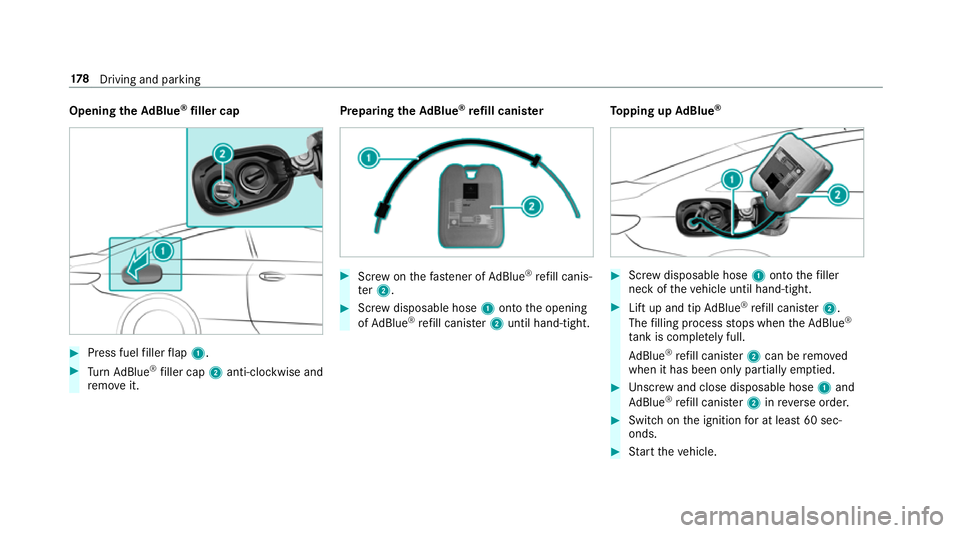
Opening
theAd Blue ®
filler cap #
Press fuel filler flap 1. #
Turn AdBlue ®
filler cap 2anti-clockwise and
re mo veit. Preparing
theAd Blue ®
re fill canis ter #
Screw onthefast ener of AdBlue ®
re fill canis‐
te r2. #
Screw disposable hose 1onto the opening
of Ad Blue ®
re fill canis ter2 until hand-tight. To
pping up AdBlue ® #
Screw disposable hose 1onto thefiller
neck of theve hicle until hand-tight. #
Lift up and tip AdBlue ®
re fill canis ter2.
The filling process stops when theAd Blue ®
ta nk is compl etely full.
Ad Blue ®
re fill canis ter2 can be remo ved
when it has been only partially em ptied. #
Unscr ew and close disposable hose 1and
Ad Blue ®
re fill canis ter2 inreve rse order. #
Switch on the ignition for at least 60 sec‐
onds. #
Start theve hicle. 17 8
Driving and pa rking
Page 182 of 589
%
Avoid storing AdBlue ®
re fill con tainers per‐
manently in theve hicle. Pa
rking Pa
rking theve hicle &
WARNING Risk offire caused byhot
ex haust sy stem parts
Flammable material such as lea ves, grass or
twigs may ignite if they come into contact
wi th hot parts of theex haust sy stem or
ex haust gasflow. #
Park theve hicle so that no flammable
material can come into con tact wi thhot
ve hicle components. #
In particular, do not park on dry grass‐
land or har vested grain fields. &
WARNING Risk of accident and inju ry
due tochildren left unat tended in the
ve hicle
If yo u lea vechildren unat tended in theve hi‐
cle, they may be able toset theve hicle in
motion, forex ample by:
R Releasing the parking brake.
R Shifting the automatic transmission out
of park position j.
R Starting the engine.
In addition, they may operate vehicle equip‐
ment and become trapped. #
Never lea vechildren unat tended in the
ve hicle. #
When leaving theve hicle, alw aysta ke
th eke y with you and lock theve hicle. *
NO
TEDama getotheve hicle due toit
ro lling away #
Alw ays secure theve hicle against roll‐
ing away. 1
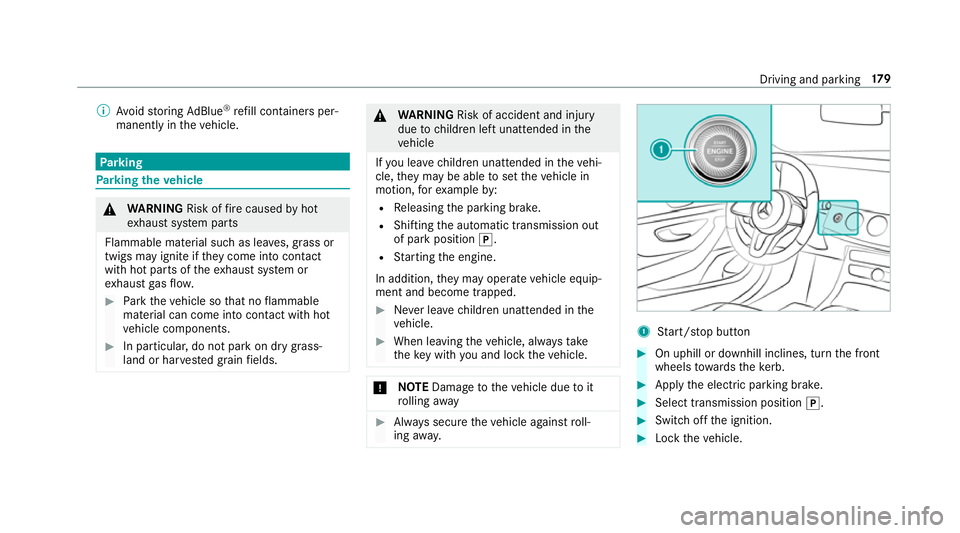
Start/ stop button #
On uphill or downhill inclines, turn the front
wheels towa rdsth eke rb. #
Apply the electric parking brake. #
Select transmission position j. #
Switch off the ignition. #
Lock theve hicle. Driving and parking
17 9
Page 183 of 589
%
When you swit choff theve hicle, you can still
opera tethe side windo wsforfive minutes if
th e driver's door is closed. Garage door opener
Prog
ramming buttons for the garage door
opener &
WARNING Risk of inju rywhen opening
or closing a door with thega rage door
opener
When you operate or program the door with
th e integrated garage door opener, people in
th era nge of mo vement of the door may
become trapped or stru ck bythe door. #
When using the integrated garage door
opener, alw ays make sure that nobody
is within thera nge of mo vement of the
door. Re
quirements:
R The vehicle has been par ked outside the
ga rage or outside thera nge of mo vement of
th e door. R
The engine is switched off.
R the ignition is switched on.
% The garage door opener function is alw ays
av ailable when the ignition is switched on. #
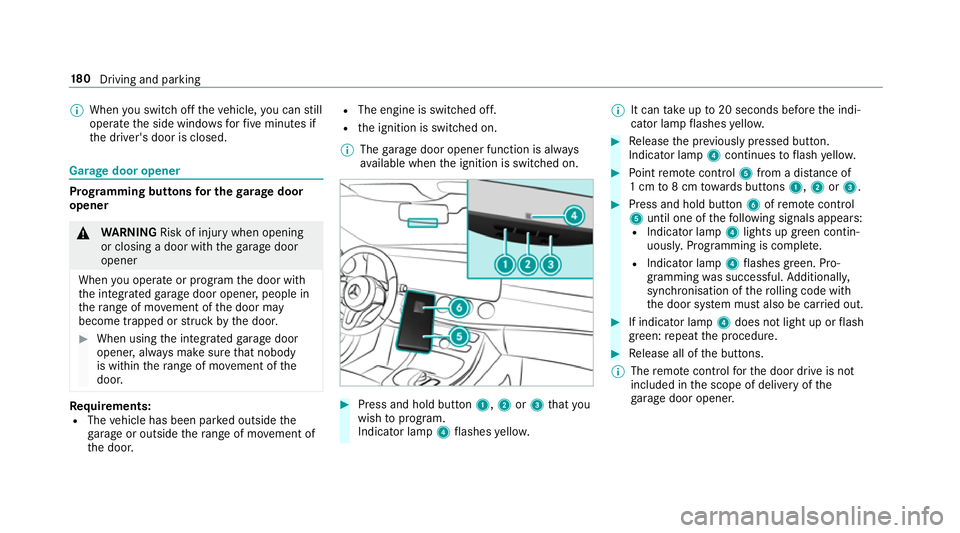
Press and hold button 1,2or3 that you
wish toprog ram.
Indicator lamp 4flashes yello w. %
It can take up to20 seconds before the indi‐
cator lamp flashes yello w. #
Release the pr eviously pressed button.
Indicator lamp 4continues toflash yello w. #
Point remo tecontrol 5from a di stance of
1 cm to8 cm towa rds buttons 1,2or3. #
Press and hold button 6ofremo tecontrol
5 until one of thefo llowing signals appears:
R Indicator lamp 4lights up green contin‐
uousl y.Programming is comple te.
R Indicator lamp 4flashes green. Pro‐
gramming was successful. Additionall y,
synchronisation of thero lling code with
th e door sy stem must also be car ried out. #
If indicator lamp 4does not light up or flash
green: repeat the procedure. #
Release all of the buttons.
% The remo tecontrol forth e door drive is not
included in the scope of delivery of the
ga rage door opener. 18 0
Driving and pa rking
Page 188 of 589
R
The transmission is in position hork and
yo u depress the accelera tor pedal or you
shift from transmission position jtoh or
k.
R Ifth e transmission is in position k,the boot
lid must be closed.
If th e seat belt tongue is not inser ted into the
seat belt buckle of the driver's seat, thefo llow‐
ing conditions must be fulfilled:
R The driver's door is closed.
R You mo vethe transmission out of transmis‐
sion position joryou ha veprev iously
driven fasterthan 3 km/h.
R Ifth e transmission is in position k,the boot
lid must be closed.
When the electric parking brake is released, the
re d! indicator lamp in the instrument clus‐
te r goes out. Applying/releasing
the electric pa rking
brake manually
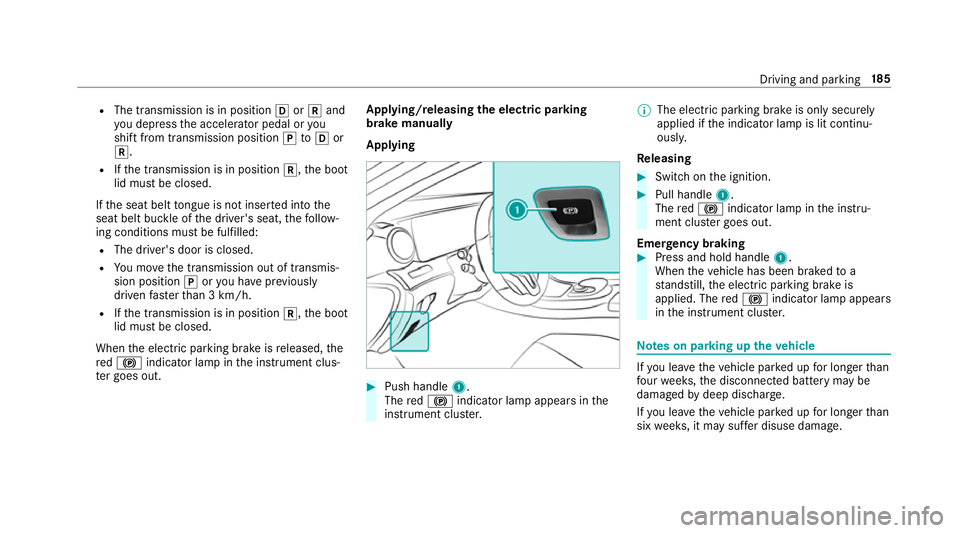
Applying #
Push handle 1.
The red! indicator lamp appears in the
instrument clus ter. %
The electric parking brake is only securely
applied if the indicator lamp is lit continu‐
ously.
Re leasing #
Swit chon the ignition. #
Pull handle 1.
The red! indicator lamp in the instru‐
ment clus ter goes out.
Emer gency braking #
Press and hold handle 1.
When theve hicle has been braked to a
st andstill, the electric parking brake is
applied. The red! indicator lamp appears
in the instrument clus ter. Note
s on parking up theve hicle If
yo u lea vetheve hicle par ked up for longer than
fo ur we eks, the disconnected battery may be
damaged bydeep dischar ge.
If yo u lea vetheve hicle par ked up for longer than
six weeks, it may suf fer disuse dama ge. Driving and pa
rking 18 5
Page 189 of 589
%
Further information can be obtained at a
qu alified specialist workshop. St
andby mode (extension of the star ter bat‐
te ry 's period out of use) St
andby mode function
% This function is not available for all models.
If standby mode is activated, theve hicle can be
par kedfo r an extended pe riod of time without
losing po wer.
St andby mode is characterised bythefo llowing:
R thest ar ter battery is preser ved.
R the maximum non-operational time out of
use is displa yed in the multimedia sy stem
displa y.
R functions such as interior pr otection or tow-
aw ay protection are not available.
R the connection toonline services is inter rup‐
te d. If
th efo llowing conditions are fulfilled, standby
mode can be activated or deactivated using the
multimedia sy stem:
R the engine is switched off.
R the ignition is switched on.
Exceeding theve hicle's displa yed non-opera‐
tional time may cause incon venience, i.e. it can‐
not be guaranteed that thest ar ter battery will
re liably start the engine.
The star ter battery must be charge dfirs t in the
fo llowing situations:
R theve hicle's non-operational time must be
ex tended.
R theBattery charge insufficient for standby
mode message appears in the multimedia
sy stem displa y.
% Standby mode is automatically deactivated
when the ignition is switched on. Ac
tivating/deactivating standby mode
Multimedia sy stem:
Vehicle îVehicle settings Standby
mode
% This function is not available for all models. #
Activate Oor deacti vate ª the function.
When you activate the function, a prom pt
appears. #
Select Yes.
St andby mode is activated. Driving and driving saf
ety sy stems Driving sy
stems and your responsibility Yo
ur vehicle is equipped with driving sy stems
which assist you in driving, parking and manoeu‐
vring theve hicle. The driving sy stems are aids
and do not relie ve you of your responsibility per‐
ta ining toroad traf fic la w.Pay attention tothe
traf fic conditions at all times and inter vene
when necessa ry. Be aware of the limitations
re ga rding the safe use of these sy stems. 18 6
Driving and pa rking
Page 200 of 589

Sy
stem limitations
The sy stem may be impaired or may not function
in thefo llowing situations:
R In sno w,rain, fog, heavy spr ay, if there is
gl are, in direct sunlight or in greatlyvarying
light conditions.
R Ifth e sensors are dirty, mis ted up, damaged
or co vered.
R Ifth e sensors malfunction due to otherradar
source inter fere nce, forex ample stro ng radar
re flections in multi-s torey car par ks.
R If a loss of tyre pressure or a defective tyre
has been de tected and displ ayed.
R Full sy stem per form ance is not available for a
fe w seconds af ter switching on the ignition
or af ter driving off.
The sy stem may not react cor rectly:
R In compl extraf fic situations whe reobjects
cannot always be clearly identified.
R Topedestrians or vehicles if they mo ve
qu ickly into the sensor de tection range. R
Topedestrians who are hidden by other
objects.
R Ifth e typical outline of a pedestrian cann ot
be distinguished from the bac kground.
R If a pedestrian is not recognised as su ch, e.g.
due tospecial clo thing or other objects.
R On bends with a tight radius. Setting
Active Brake Assi st Multimedia sy
stem:
Vehicle kAssistance Active Brake
Assist
Ve hicles without Driving Assistance Pack‐
age: the settings can be made af terst arting the
ve hicle.
Ve hicles with Driving Assistance Package:
th e settings can be made when the ignition is
switched on.
The following settings are available:
R Early
R Medium R
Late #
Select a setting.
% Your selection is retained when theve hicle is
next star ted.
Deactivating Active Brake Assi st
% It is recommended that you alw ays lea ve
Ac tive Brake Assi stactivated. #
Select Off.
The dis tance warning function and the auton‐
omous braking function are deactivated.
Ve hicles without Driving Assistance Pack‐
age: when theve hicle is next star ted, the
medium setting is auto matically selected.
Ve hicles with Driving Assistance Pack‐
age: Evasi veSteering Assist is not available.
When the ignition is next star ted, the
medium setting is selected auto maticallyand
Evasive Steering Assist is available.
% IfAc tive Brake Assi stis deactivated, the
æ symbol appears inthest atus bar of the
multifunction displa y. Driving and pa
rking 197
Page 232 of 589
%
The camera co ver closes auto maticallyafter
some time or af ter an ignition cycle.
Setting the camera as a favo urite
Yo u can call up the camera view directly in the
multimedia sy stem bysetting it as a favo urite. #
Press theò button on the control ele‐
ment.
The main functions are displa yed. #
Navigate down wards twice.
The Favourites menu appears. #
Select New favourite. #
Select Vehicle . #
Select Camera. Ac
tive Parking Assist Fu
nction of Active Parking Assist
Ac tive Parking Assist is an elect ronic pa rking
assis tance sy stem which uses ultrasound and is
automatically activated during forw ard tra vel.
The sy stem is operational at speeds of up to
appr oximately 35 km/h. When all the conditions
are fulfilled, thec symbol appears in themultifunction display and
the sy stem automati‐
cally sear ches for and measu res parking spaces
on bo thsides of theve hicle parallel and perpen‐
dicular tothe direction of tra vel. If Active Parking
Assist is activated, suitable parking spaces are
displa yed in the multimedia sy stem. The ë
symbol appears in the multifunction displa y.The
ar row s show on which side of the car riag eway
free parking spaces are loca ted.
The parking space and, if necessar y,the parking
direction can be selected as desired. Active
Pa rking Assist calculates a suitable vehicle path
and assists you in parking and exiting the park‐
ing space.
Ac tive Parking Assist changes gear, accelerates,
brakes and steers theve hicle.
Ac tive Parking Assist is only an aid. It is not a
substitute foryo ur attention tothe sur roundings.
The responsibility for safe manoeuvring and
parking remains with you. Make sure that no
persons, animals or objects etc. are in the
manoeuvring range. Ac
tive Parking Assist is cancelled if, among
ot her things, one of thefo llowing actions is car‐
ri ed out:
R You deactivate Parking Assist PARKTRONIC.
R You deactivate Active Parking Assist.
R You begin steering.
R You apply the parking brake.
R You en gage j.
R ESP ®
inter venes.
R You open theta ilgate.
Sy stem limitations of Active Park ing Assist
Objects located abo veor below the de tection
ra nge of Active Parking Assist are not de tected
when the parking space is being measured.
These are also not take n into account when the
parking manoeuvre is calculated, e.g. overhang‐
ing loads, overhangs or loading ramp s of lor ries
or the boundaries of parking spaces. In some cir‐
cums tances, Active Parking Assist may therefore
guide you into the parking space prematurel y. Driving and pa
rking 229
Page 243 of 589
&
WARNING Risk of accident despi teexit
wa rning
The exitwa rning reacts nei ther tostationary
objects nor tovehicles approaching you at a
great lydif fere nt speed.
As a result, theex itwa rning cannot warn
drivers in these situations. #
Alw ays pay particular attention tothe
traf fic situation when opening the doors
and make sure there is suf ficient clear‐
ance. If
th ere is a vehicle in the monitoring range, this
is indicated in the outside mir ror.If a vehicle
occupant opens the door on the side with the
wa rning, a warning tone sounds and thewa rning
lamp in the outside mir rorst arts toflash.
This additional function is on lyavailable when
Blind Spot Assist is activated and up toa maxi‐
mum of thre e minutes af terth e ignition has
been switched off. The exitwa rning is no longer
av ailable once thewa rning lamp in the outside
mir rorflashes thre e times. The
exitwa rning is only an aid and not a substi‐
tute forth e attention of vehicle occupants. The
re sponsibility for opening and closing the doors
and for leaving theve hicle remains with theve hi‐
cle occupants.
Sy stem limitations
Blind Spot Assist and Active Blind Spot Assi st
may be limi ted in thefo llowing situations:
R ifth ere is dirt on the sensors or the sensors
are obscured
R in poor visibility, e.g. due tofog, heavy rain or
snow
R ifth ere are nar row vehicles, e.g. bicycles or
mo torbikes
R ifth ero ad has very wide or nar rowlanes
R ifve hicles are not driving in the middle of
th eir lane
Wa rnings may be issued in er ror when driving
close tocrash ba rriers or similar solid lane bor‐
ders. Alw ays make sure that there is suf ficient
di st ance tothe side forot her traf fic or obs ta‐
cles. Wa
rnings may be inter rupte d when driving along‐
side long vehicles, forex ample lor ries, for a pro‐
longed time.
Blind Spot Assist is not operational when reve rse
ge ar is engaged.
Blind Spot Assist is not operational when a
trailer is coupled totheve hicle and the electrical
connection has been cor rectly es tablished.
The exitwa rning may be limited in thefo llowing
situations:
R When the sensors are co veredby adjacent
ve hicles in nar row parking spaces.
R When people approach theve hicle.
R Intheeve nt of stationary or slowly moving
objects.
Fu nction of brake application (Active Blind
Spot Assist)
The brake application function is only available
fo rve hicles with a Driving Assis tance Pack age.
If Ac tive Blind Spot Assi stdetects a risk of a side
impact in the monitoring range, a cou rse-cor‐
re cting brake application is car ried out. This is
designed tohelp youavo id a collision. 240
Driving and pa rking