wipers MERCEDES-BENZ E-CLASS CABRIOLET 2018 Owners Manual
[x] Cancel search | Manufacturer: MERCEDES-BENZ, Model Year: 2018, Model line: E-CLASS CABRIOLET, Model: MERCEDES-BENZ E-CLASS CABRIOLET 2018Pages: 589, PDF Size: 10.56 MB
Page 5 of 589
Symbols
........................................................ 5At
agl ance .................................................... 6
Cockpit ........................................................... 6
Wa rning and indicator lamps .......................... 8
Overhead control panel ................................ 12
Door control panel and seat adjustment ....... 14
Emergencies and breakdowns ...................... 16Digital Owner's Manual
.............................18
Calling up the Digital Owner's Manual ..........18 Genera
l notes............................................. 19
Pr otection of the environment ......................19
Ta ke -ba ckof end-of-life vehicles ...................19
Mercedes-Benz Genuine Parts ......................20
Owner's Manual ............................................ 21
Operating saf ety .......................................... .21
Declaration of Conformity ............................ 23
Diagno stics connection ................................ 24
Qualified specialist workshop ....................... 25
Ve hicle registration ....................................... 25
Cor rect use of theve hicle ............................25 Information on
the REA CHregulation ........... 26
Implied warranty .......................................... .26
QR code forre scue card ...............................26
Data storage .................................................26
Copyright ...................................................... 29 Occupant saf
ety......................................... 30
Re stra int sy stem ...........................................30
Seat belts ..................................................... 32
Airbags ......................................................... 38
Ro ll bar ........................................................ .45
PRE-SAFE ®
sy stem ....................................... 46
Safely transporting children in theve hi‐
cle ................................................................. 47
No tes on pets in theve hicle .........................70 Opening and closing
.................................. 72
Ke y .............................................................. .72
Doo rs............................................................ 76
Boot .............................................................. 81
Side windo ws............................................... 84
Soft top ........................................................ 89
Anti- theft pr otection .....................................96 Seats and
stowing ..................................... 99
No tes on the cor rect driver's seat posi‐
tion ............................................................... 99
Seats .......................................................... 100
St eering wheel ............................................ 11 0
Easy entry and exitfeature .......................... 11 2
Operating the memory function .................. 11 3
St ow age areas ............................................ .114
Cup holders ................................................ 121
Ashtr ayand cigar ette lighter ...................... .122
Soc kets ....................................................... 12 3
Wi reless charging of the mobile phone
and connection with theex terior aerial ...... 12 3
Fitting and removing thefloor mats ............ 12 5 Light and sight
......................................... 127
Exterior lighting .......................................... 127
Interior lighting ........................................... 13 4
Wi ndsc reen wipers and windscreen
wa sher sy stem ............................................ 13 5
Mir rors ........................................................ 13 9
Operating the sun visors ............................. 14 22
Contents
Page 138 of 589
Ac
tivating multi-coloured animation #
Select Multi-colour anim.. #
Activate Oor deacti vate ª the function.
The chosen colour combination changes at
predefined inter vals.
Ac tivating dependency on air conditioning
settings #
Select Climate. #
Activate Oor deacti vate ª the function.
If ch anges are made tothete mp erature set‐
ting in theve hicle, the colour of the ambient
lighting changes brief ly.
Ac tivating welcome lighting #
Select Welcome. #
Activate Oor deacti vate ª the function.
When theve hicle is unloc ked, a special inte‐
ri or lighting sequence runs. Setting the in
terior lighting switch-off delay
time Multimedia sy
stem:
Vehicle ÷Light settings Interior
light shut-off #
Set the switch-off delay time. Wi
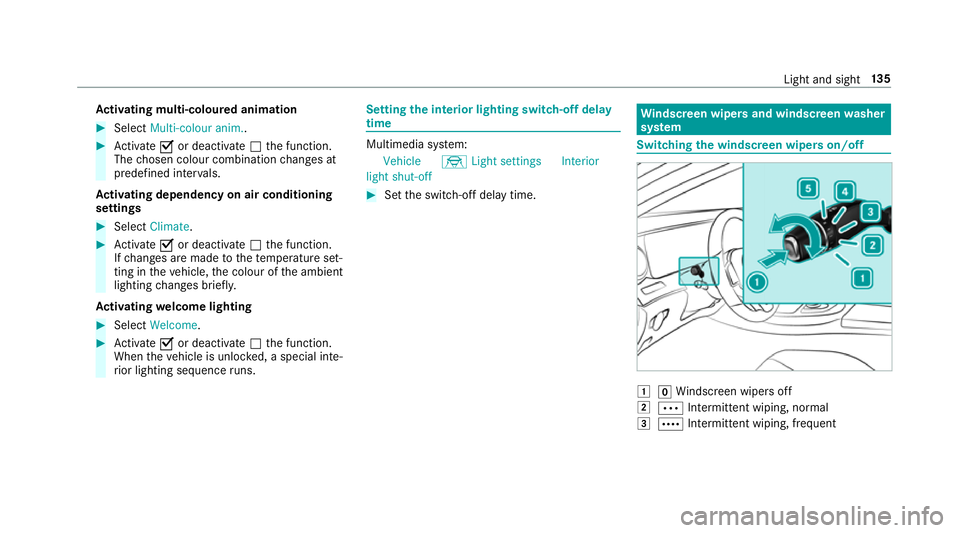
ndscreen wipers and windscreen washer
sy stem Switching
the windscreen wipers on/off 1
gWindsc reen wipers off
2 Ä Intermittent wiping, normal
3 Å Intermittent wiping, frequent Light and sight
13 5
Page 139 of 589
4
° Continuous wiping, slow
5 ¯ Continuous wiping, fast #
Turn the combination switch tothe cor re‐
sponding position 1-5. #
Single wipe/washing: pushthe button on
th e combination switch in the direction of
ar row 1.
R í Single wipe
R î Wiping with washer fluid Re
placing the windsc reen wiper blades &
WARNING Risk of becoming trapped if
th e windscreen wipers are switched on
while wiper blades are being replaced
If th e windscreen wipers begin tomo vewhile
yo u are changing the wiper blades, you can
be trapped bythe wiper arm. #
Alw ays switch off the windscreen wip‐
ers and ignition before changing the
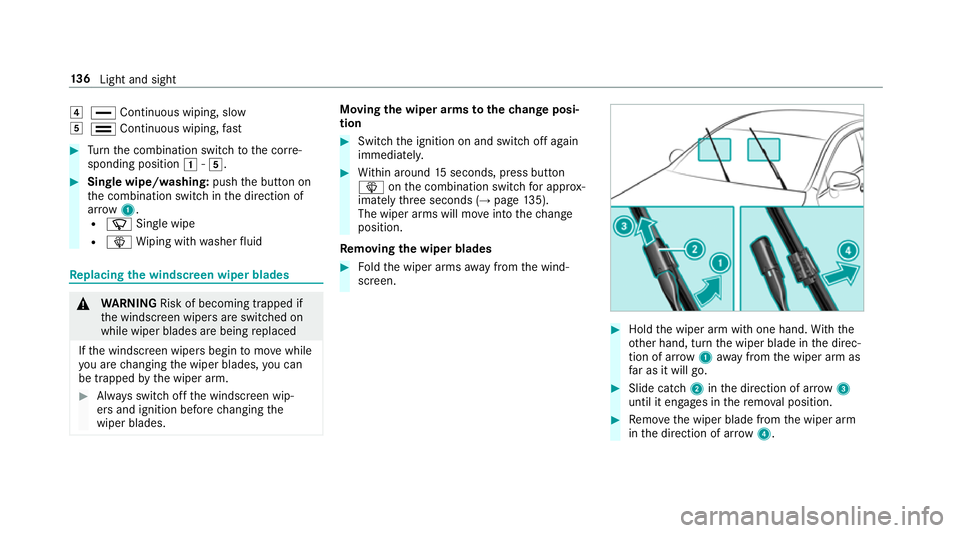
wiper blades. Moving
the wiper arms tothech ange posi‐
tion #
Switch the ignition on and switch off again
immediatel y. #
Within around 15seconds, press button
î onthe combination switch for appro x‐
ima tely thre e seconds (→ page135).
The wiper arms will mo veinto thech ange
position.
Re moving the wiper blades #
Foldthe wiper arms away from the wind‐
screen. #
Hold the wiper arm with one hand. With the
ot her hand, turn the wiper blade in the direc‐
tion of ar row1away from the wiper arm as
fa r as it will go. #
Slide catch 2inthe direction of ar row 3
until it engages in there mo val position. #
Remo vethe wiper blade from the wiper arm
in the direction of ar row4. 13 6
Light and sight
Page 140 of 589
Fi
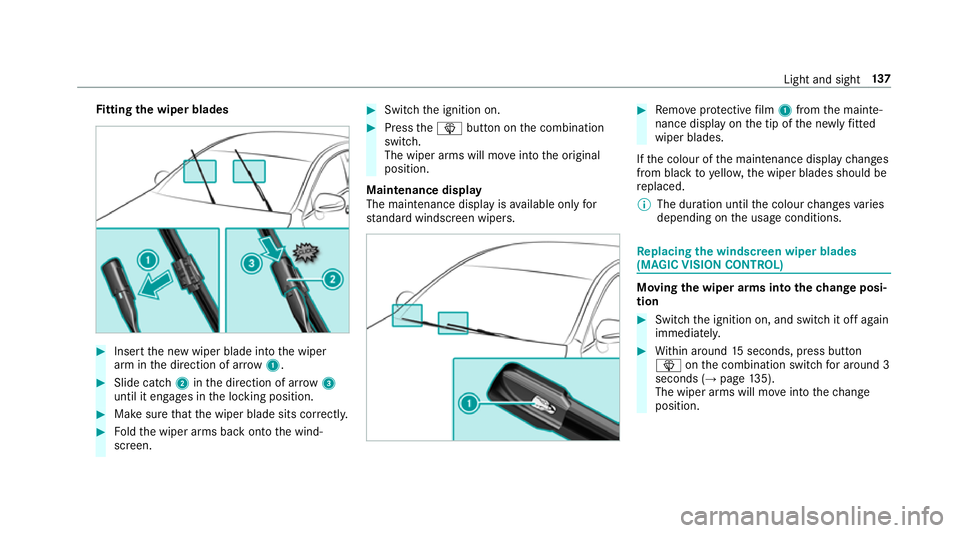
tting the wiper blades #
Inse rtthe new wiper blade into the wiper
arm in the direction of ar row1. #
Slide catch 2inthe direction of ar row 3
until it engages in the locking position. #
Make sure that the wiper blade sits cor rectly. #
Foldthe wiper arms back onto the wind‐
screen. #
Switch the ignition on. #
Press theî button on the combination
switch.
The wiper arms will mo veinto the original
position.
Maintenance display
The maintenance display is available on lyfor
st andard windsc reen wipers. #
Remo veprotective film 1 from the mainte‐
nance display on the tip of the newly fitted
wiper blades.
If th e colour of the maintenance display changes
from black to yellow, the wiper blades should be
re placed.
% The duration until the colour changes varies
depending on the usage conditions. Re
placing the windsc reen wiper blades
(MAGIC VISION CONT ROL) Moving
the wiper arms into thech ange posi‐
tion #
Switch the ignition on, and switch it off again
immediatel y. #
Within around 15seconds, press button
î onthe combination switch for around 3
seconds (→ page135).
The wiper arms will mo veinto thech ange
position. Light and sight
137
Page 149 of 589
Ac
tivating/deactivating the climate control
syn chro nisation function via the control
panel The climate control can be operated centrally
using
the synchronisation function. The temp era‐
ture and air distribution setting forth e driver
side is adop ted automatically forth e front
passenger side. #
Press the 0 button.
The synchronisation function is deactivated if
th e settings for one of theot her climate zones
are changed. Ac
tivating or deactivating the climate con‐
trol syn chronisation function using the mul‐
timedia sy stem Multimedia sy
stem:
Vehicle bClimate control SYNC
The climate control can be controlled cent rally
using the synchronisation function. The temp era‐
ture setting is automatically adop tedfo r all cli‐
mate zones. #
Activate Oor deacti vate ª the function. Demisting
the windo ws Wi
ndo wsmis ted up on the inside #
Press theà button. #
Ifth e windo wscontinue tomist up: press the
¬ button.
Wi ndo wsmis ted up on the outside #
Switch on the windscreen wipers. #
Press theà button. Switching air-recirculation mode on/off
#
Press theg button.
The interior air will be recirculated.
Air-reci rculation mode automatically swit ches to
fresh air mode af ter some time.
% If air-recirculation mode is switched on, the
windo wsmay mist up more quickl y.Switch
on ai r-re circulation mode only brie fly. Switching
there sidual heat on/off Re
quirements:
R The vehicle is par ked.
It is possible tomake use of there sidual heat
from the engine tocontinue heating or ventilat‐
ing the front compartment of theve hicle for
appr oximately 30 minutes. #
Toswitch on: pressthe! button.
Re sidual heat is switched off automaticall y. Ac
tivating/deactivating ionisation Multimedia sy
stem:
Vehicle bClimate control Ionisa-
tion
Ionisation cleans and refreshes the interior air of
th eve hicle. The ionisation of the interior air is
odourless. #
Activate Oor deacti vate ª the function. 14 6
Climate cont rol
Page 397 of 589
&
WARNING Risk of inju ryfrom touching
co mp onent parts under voltage
The ignition sy stem and the fuel injection
sy stem workunder high voltage. If youto uch
co mp onent parts which are under voltage,
yo u could recei vean electric shoc k.#
Neverto uch co mponents of the ignition
sy stem or the fuel injection sy stem
when the ignition is switched on. &
WARNING Risk of bu rns from hot com‐
ponent parts in the engine compartment
Cer tain components in the engine compart‐
ment can be very hot, e.g. the engine, the
ra diator and parts of theex haust sy stem. #
Allow the engine tocool down and only
to uch co mponent parts described in the
fo llowing. &
WARNING Risk of inju ryfrom using the
windscreen wipers while the engine bon‐
net is open
When the engine bonn etis open, and the
windscreen wipers are set in motion, you can
be trapped bythe wiper linkage. #
Alw ays switch off the windscreen wip‐
ers and ignition before opening the
engine bonn et. #
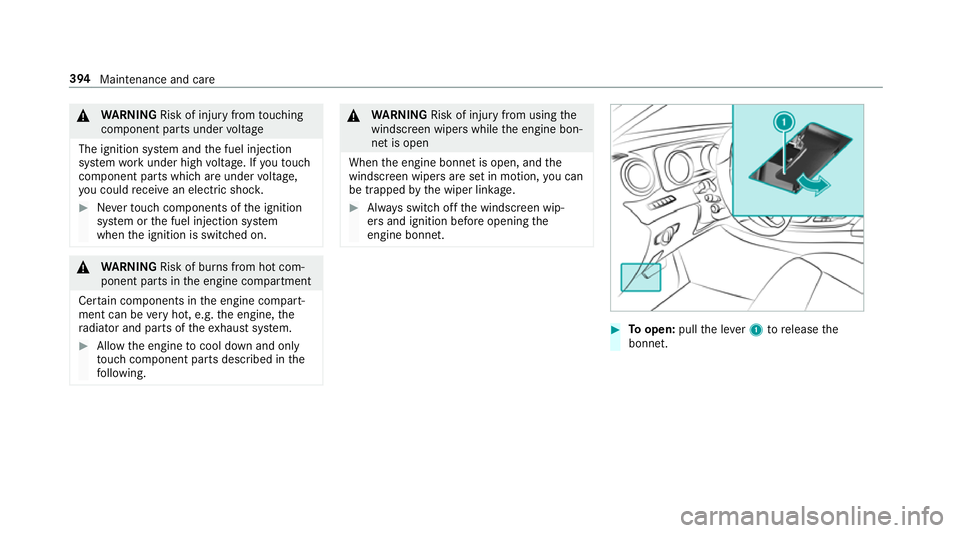
Toopen: pullthe le ver1 torelease the
bonn et. 394
Maintenance and care
Page 410 of 589
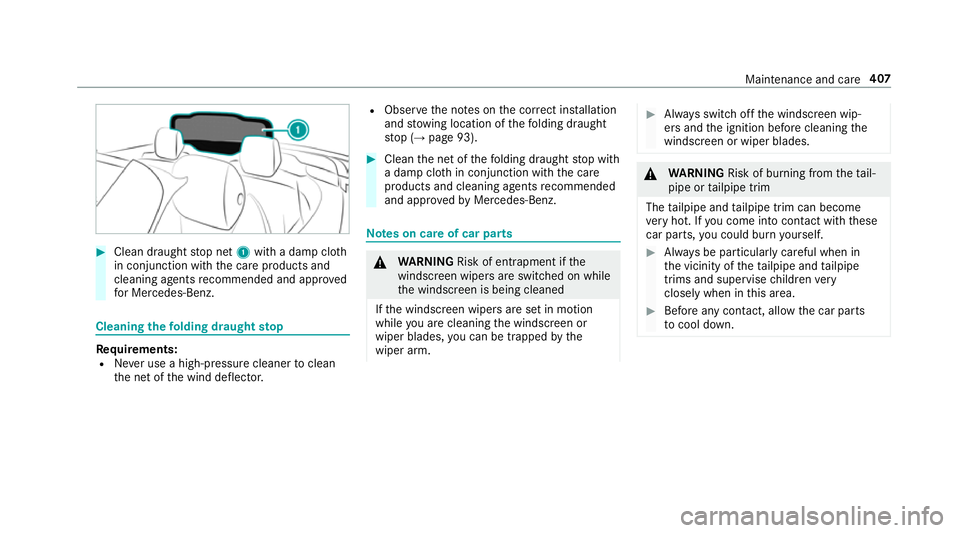
#
Clean draught stop net 1with a damp clo th
in conjunction with the care products and
cleaning agents recommended and appr oved
fo r Mercedes-Benz. Cleaning
thefo lding draught stop Re
quirements:
R Never use a high-p ressure cleaner toclean
th e net of the wind deflector. R
Obser vethe no tes on the cor rect ins tallation
and stow ing location of thefo lding draught
st op (→ page 93). #
Clean the net of thefo lding draught stop with
a damp clo thin conjunction with the care
products and cleaning agents recommended
and appr ovedby Mercedes-Benz. Note
s on care of car parts &
WARNING Risk of entrapment if the
windscreen wipers are swit ched on while
th e windscreen is being cleaned
If th e windscreen wipers are set in motion
while you are cleaning the windscreen or
wiper blades, you can be trapped bythe
wiper arm. #
Alw ays switch off the windscreen wip‐
ers and the ignition before cleaning the
windscreen or wiper blades. &
WARNING Risk of bu rning from theta il‐
pipe or tailpipe trim
The tailpipe and tailpipe trim can become
ve ry hot. If you come into contact with these
car parts, you could burn yourself. #
Alw ays be particular lycareful when in
th e vicinity of theta ilpipe and tailpipe
trims and supervise children very
closely when in this area. #
Before any con tact, allow the car parts
to cool down. Maintenance and care
407
Page 435 of 589
#
When the fuse box is open, make sure
th at no moisture can enter the fuse
box. #
When closing the fuse box, make sure
th at the seal of the lid is positioned cor‐
re ctly on the fuse box. If
th e newly inser ted fuse also blo ws, ha vethe
cause traced and rectified at a qualified special‐
ist workshop.
Ensure thefo llowing before replacing a fuse:
R The vehicle is secured against rolling away
R All electrical consumers are switched off
R The ignition is switched off
The electrical fuses are located in various fuse
bo xes:
R Fuse box in the engine compartment on the
driver's side (→ page 432)
R Fuse box on the driver's side of the cockpit
(→ page 433)
R Fuse box in the front passenger foot we ll
(→ page 433) R
Fuse box in the boot on theright-hand side
of theve hicle when vie wed in the direction of
tr ave l (→ page 433) Opening and closing
the fuse box in the
engine compa rtment Re
quirements:
R A dry clo thand a sc rewdriver are available.
Obse rveth e no tes on electrical fuses
(→ page 431).
Opening &
WARNING Risk of inju ryfrom using the
windscreen wipers while the engine bon‐
net is open
When the engine bonn etis open, and the
windscreen wipers are set in motion, you can
be trapped bythe wiper linkage. #
Alw ays switch off the windscreen wip‐
ers and ignition before opening the
engine bonn et. #
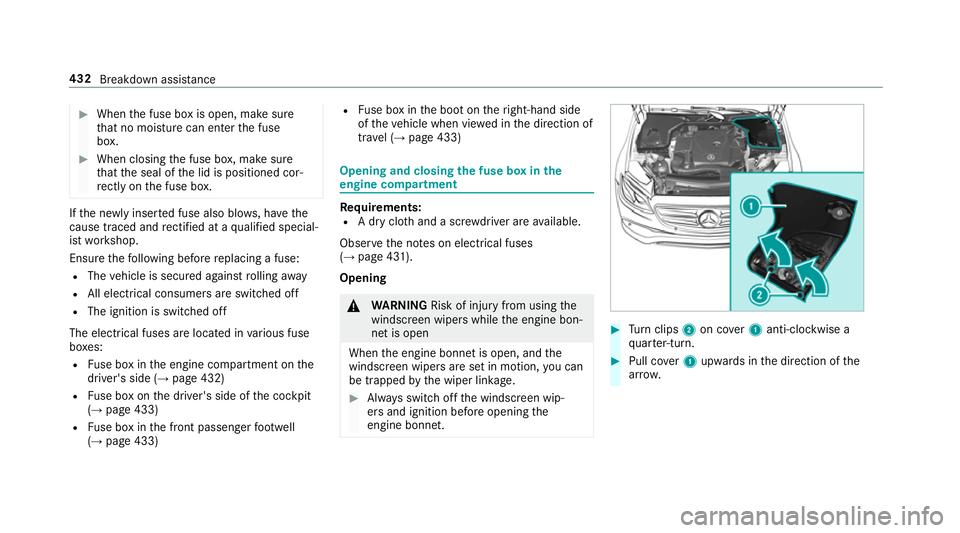
Turn clips 2on co ver1 anti-clockwise a
qu arter-turn. #
Pull co ver1 upwards in the direction of the
ar row. 432
Breakdown assis tance
Page 565 of 589
Sy
stem limitations ...............................1 99
Limiting speed see Limi ter
LINGU ATRO NIC ........................................ 266
Application specific voice commands
............................................................ .267
Au dible help functions .........................2 68
Global voice commands ...................... 267
Impr oving speech quality .................... 268
Language setting ................................ .268
Media pla yervo ice commands ............ 275
Message voice commands .................. 277
Multifunction steering wheel (operat‐
ing) ...................................................... 266
Na vigation voice commands ................ 270
Operable functions .............................. 267
Operating saf ety .................................. 266
Ra dio voice commands ........................ 274
Switch voice commands ...................... 269
Te lephone voice controls .................... .274
Te xt messa gevoice commands .......... .277
TV voice commands ............................ .274
Ty pes of voice commands .................. .267
Ve hicle voice commands .................... .278
Vo ice prom pting .................................. 267 Live
Traf fic Information
Displaying subsc ript ion information .... .321
Displ aying the tra ffic map .................. .322
Displ aying traf fic incidents .................. 323
Extending a subscription ..................... 321
Issuing hazard alerts ........................... 323
Re gis tering on Mercedes me ............... 321
Loading ..................................................... 11 8
Bag hook .............................................. 11 8
No tes ................................................... 11 4
St ow age space under the boot floor ....1 20
Ti e-down eyes ...................................... 11 8
Loading guidelines ...................................114
Loads Securing .............................................. .114
Locator lighting see Sur round lighting
Locking/unlocking Activating/deactivating the auto‐
matic locking feature ............................ .80
Ad ditional door lock ...............................76
Digital Vehicle Keyst icke r .................... .77
Emergency key ...................................... 80
KEYLESS-GO .......................................... 78Mobile phone ........................................77
Smartphone ..........................................
77
Un locking/opening the doors from
th e inside ............................................... 76
Low beam (symm etrical dipped beam) ................. 127
Switching on/off ................................. 127
Lu bricant additives
see Additives
Lu ggage
Lu ggage net ......................................... 11 9
Secu ring ............................................... 11 4
Lu mbar support
see Lumbar support (4-w ay)
Lu mbar support (4-w ay)........................ .103 M
MAGIC VISION CONTROL Windsc reen wipers .............................. 137
Maintenance see ASS YST PLUS
Malfunction Restra int sy stem .................................... 31562
Index
Page 584 of 589
Checking ............................................
.435
Che cking the tyre pressure (tyre
pressure monitoring sy stem) ............... 438
Fitting .................................................. 451
Flat tyre ............................................... 414
Inter changing ...................................... 446
MOExtended tyres ...............................4 15
No ise .................................................. .435
No tes on fitting ................................... 443
Re moving ............................................. 451
Re placing .................................... 443,447
Re starting the tyre pressure loss
wa rning sy stem ................................... 442
Re starting the tyre pressure monitor‐
ing sy stem ...........................................4 39
Selection ............................................. 443
Snow chains ........................................ 435
St oring ................................................ 446
TIREFIT kit ............................................ 416
Ty re pressure (N otes) .......................... 436
Ty re pressure loss warning sy stem
(function) ............................................. 442
Ty re pressure monitoring sy stem
(function) ............................................. 438
Ty re pressure table .............................. 437
Un usual handling characteristics ........ 435 Wi
-Fi ........................................................ .292
Overview ............................................. 292
Setting ................................................. 293
Setting up a hotspot ............................ 294
Setting up an Internet connection ....... 357
Wi nd deflector
Care ....................................................4 05
Wi ndo ws
Closing (all) .......................................... .84
Opening (all) .......................................... 84
Wi ndo ws
see Side windo ws
Wi ndo ws(Care) ...................................... .407
Wi ndscreen ...................................... 137, 14 3
Defrosting ............................................ 14 3
Re placing wiper blades (MAGIC
VISION CONTROL) ............................... 137
Wi ndscreen
see Windsc reen
see Windshield
Wi ndscreen washer fluid ........................ 467
No tes ................................................... 467 Wi
ndscreen washer sy stem
To pping up ...........................................3 98
Wi ndscreen wipers
Changing the wiper blades .................. 13 6
Re placing wiper blades (MAGIC
VISION CONTROL) ............................... 137
Switching on/off ................................. 13 5
Wi ndshield ............................................... 13 6
Changing the wiper blades .................. 13 6
Wi nter operation
Snow chains ........................................ 435
Wi nter tyres
Setting the permanent speed limita‐
tion ...................................................... 202
Wi per blades
Ca re .................................................... 407
Re placing .............................................1 36
Re placing (MAGIC VISION CONTROL)
.............................................................1 37
Wire lesscharging
Fu nction/no tes ................................... 12 3
Mobile phone ....................................... 12 5 Index
581