key MERCEDES-BENZ E-CLASS CABRIOLET 2018 Owner's Guide
[x] Cancel search | Manufacturer: MERCEDES-BENZ, Model Year: 2018, Model line: E-CLASS CABRIOLET, Model: MERCEDES-BENZ E-CLASS CABRIOLET 2018Pages: 589, PDF Size: 10.56 MB
Page 172 of 589
Au
tomatic transmission DIRECT SELECT le
verFu
nction of the DIRECT SELECT le ver&
WARNING Risk of accident and inju ry
due tochildren left unat tended in the
ve hicle
If ch ildren are left unat tended in theve hicle,
th ey could:
R open doo rs,th ereby endangering other
persons or road users.
R get out of theve hicle and be hit by
oncoming traf fic.
R ope rate ve hicle equipment and become
trapped, forex ample.
Moreo ver,ch ildren could also set theve hicle
in motion by,fo rex ample:
R releasing the parking brake.
R shifting the automatic transmission out of
park position j.
R starting the engine. #
Never lea vechildren and animals unat‐
te nded in theve hicle. #
When leaving theve hicle, alw aysta ke
th eke y with you and lock theve hicle.
This also applies tothe Digital Vehicle
Ke y if the "Digital Vehicle Key" function
is activated via Mercedes me connect. #
Keep theve hicle key out of reach of
ch ildren. This also applies tothe Digital
Ve hicle Key if the "Digital Vehicle Key"
function is activated via Mercedes me
connect. &
WARNING Risk of accident due toincor‐
re ct gearshifting
If th e engine speed is higher than the idle
speed and you en gage the transmission posi‐
tion hork, theve hicle may accelerate
sharply. #
Ifyo u en gage the transmission position
h ork always depress the brake
pedal firm lyand do not accelerate at
th e same time. Use
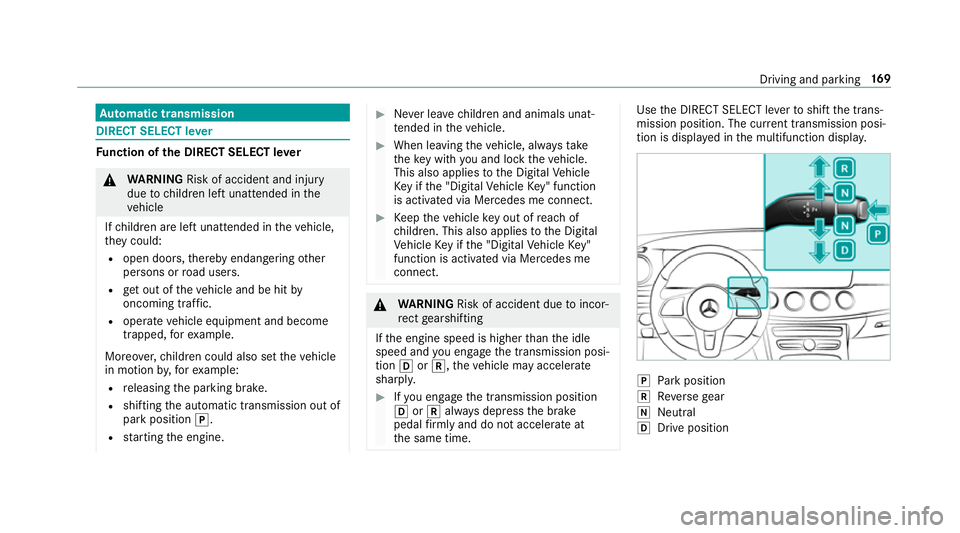
the DIRECT SELECT le verto shift the trans‐
mission position. The cur rent transmission posi‐
tion is displ ayed in the multifunction displa y. j
Park position
k Reversege ar
i Neut ral
h Drive position Driving and pa
rking 16 9
Page 186 of 589
tipo, e não pode causar inter
ferê ncia a si stemas
operando em caráter primário.
Pa ra maio res informações acessar
www.anatel.go v.br
Ra dio equipment appr oval numbers Countr
yRadio equipment appr oval
number
Egyp tT AC.25 111 51293.WIR
Andor ra CE
Au stra lia R-NZ
Barbados MED1 578
Chile 2488/DFRS205 76/F-74
European
Union CE
Gibral tarCE
Iceland CE
Jordan TRC/LPD/20 15/299 Countr
yRadio equipment appr oval
number
Canada IC: 4112 A-MUAHL5
Ku wa it CE
Liechten‐
st ein CE
Mexico RCPGEMU15-0448
Monaco CE
New Zea‐
land R-
NZ
Nor wayCE
Ru ssian
Fe dera‐
tion Not
requ ired
Saudi Ara‐
bia TA
10525
Switzer‐
land CE Countr
yRadio equipment appr oval
number
South
Africa TA
-20 15/1386
Tu rkey Notrequ ired
Uni ted
Arab Emi‐
ra tes ER4
1849/15
Dealer No: DA35176/14
United
St ates FCC ID: NZLM
UAHL5 Fu
rther information on the declaration of con‐
fo rm ity for wireless vehicle components
(→ page 23). Driving and parking
18 3
Page 187 of 589
Electric pa
rking brake Electric parking brake function (app
lying
automatically) &
WARNING Risk of accident and inju ry
due tochildren left unat tended in the
ve hicle
If ch ildren are left unat tended in theve hicle,
th ey could:
R ope rate ve hicle equipment and become
trapped, forex ample.
In addition, children could also set theve hi‐
cle in motion, forex ample, by:
R releasing the parking brake.
R shifting the automatic transmission out of
park position j.
R starting the engine. #
Never lea vechildren and animals unat‐
te nded in theve hicle. #
When leaving theve hicle, alw aysta ke
th eke y with you and lock theve hicle.
This also applies tothe digital vehicle ke
y if the "Digital Vehicle Key" function
is activated via Mercedes me connect. The electric parking brake is applied if
the trans‐
mission is in position jand one of thefo llow‐
ing conditions is fulfilled:
R The engine is switched off.
R The seat belt tongue is not inser ted in the
seat belt buckle of the driver's seat and the
driver's door is opened.
% Toprev ent application: pull the handle of the
electric parking brake.
In thefo llowing situations, the electric parking
brake is also applied:
R Active Dis tance Assi stDISTRONIC is bringing
th eve hicle toast andstill.
R The HOLD function is keeping theve hicle sta‐
tionar y.
R Active Parking Assist is keeping theve hicle
st ationar y. This is only
the case if one of thefo llowing con‐
ditions is also fulfilled:
R The engine is switched off.
R The seat belt tongue is not inser ted in the
seat belt buckle of the driver's seat and the
driver's door is opened.
R There is a sy stem malfunction.
R The po wer supply is insuf ficient.
R The vehicle is stationary for a lengt hyperiod.
When the electric parking brake is applied, the
re d! indicator lamp appears in the instru‐
ment clus ter.
The electric parking brake is not automatically
applied if the engine is switched off bythe ECO
st art/ stop function.
Electric parking brake function (releasing
automatically)
The electric parking brake is released when the
fo llowing conditions are fulfilled:
R The engine is running.
R The seat belt tongue is inser ted into the seat
belt buckle of the driver's seat. 184
Driving and pa rking
Page 296 of 589
The
following connection options are available:
R Wi-Fi connection
The Wi-Fi connection toaWi -Fi-capable
device, e.g. the cus tomer's mobile phone or
a ta blet PC is es tablished.
R Multimedia sy stem as a Wi-Fi hotspot
Using this function, a tablet PC or no tebook
can be connec ted, forex ample.
To establish a connection, you can use thefo l‐
lowing me thods:
R WPS PIN
The connection toa secure Wi-Fi network is
made via a PIN.
R WPS PBC
The connection toa secure Wi-Fi network is
made bypressing a button (push button).
R Security key
The connection toa secure Wi-Fi network is
made via a secu rity key. Setting up
Wi-Fi
Requ irements:
R The device tobe connec ted supports one of
th eth re e means of connection described
(→ page 292).
Multimedia sy stem:
System öConnectivity
Ac tivating/deactivating Wi-Fi #
Switch Wi-FionO or off ª.
If Wi-Fi is deactivated ª, communication via
Wi -Fi toall devices is inter rupte d. This also
means that a connection tothe HERMES
communication module cann otbe es tab‐
lished. Then functions such as dynamic route
guidance with Live Traf fic Information are not
av ailable.
Connecting the multimedia sy stem with a
device via Wi-Fi
This function is available if a HERMES communi‐
cation module is not ins talled. The type of connection es
tablished must be
selected on the multimedia sy stem and on the
device tobe connec ted.
% The connection procedure may dif fer
depending on the device. Follow the instruc‐
tions that are shown in the displa y.Fu rther
information (see the manufacturer's operat‐
ing instructions). #
Select Internet settings . #
Select Search for Wi-Fi networks.
Using a security key #
Select a Wi-Fi network in the list. #
Have the security key displa yed on the device
to be connec ted (see the manufacturer's
operating instructions). #
Ente rth is security key on the multimedia sys‐
te m. #
Confirm the entry with¡.
% All devices support a security key as a
means of connection. Multimedia sy
stem 293
Page 298 of 589
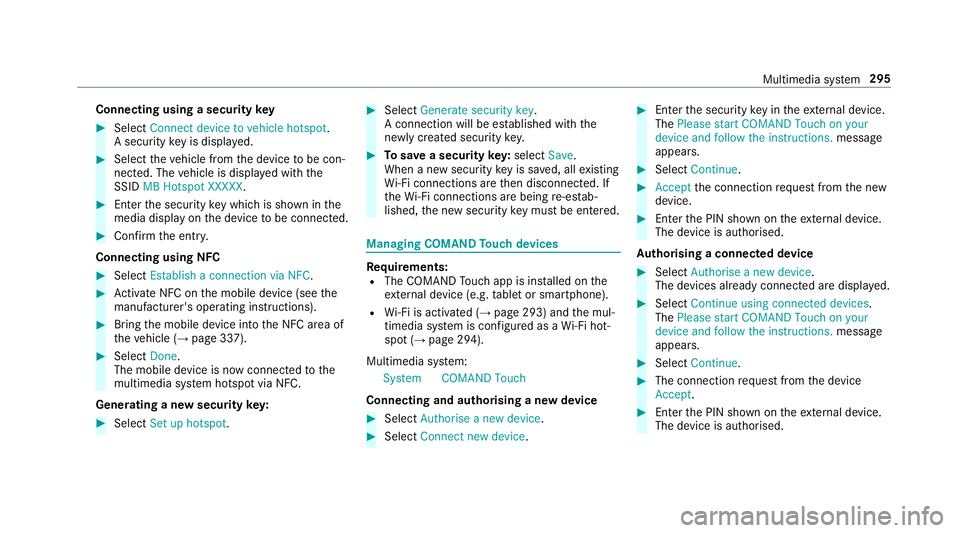
Connecting using a security
key#
Select Connect device to vehicle hotspot .
A secu rity key is displa yed. #
Select theve hicle from the device tobe con‐
nec ted. The vehicle is displa yed with the
SSID MB Hotspot XXXXX .#
Enter the security key which is shown in the
media display on the device tobe connec ted. #
Confirm the entry.
Connecting using NFC #
Select Establish a connection via NFC. #
Activate NFC on the mobile device (see the
manufacturer's operating instructions). #
Bring the mobile device into the NFC area of
th eve hicle (→ page 337). #
Select Done.
The mobile device is now connected tothe
multimedia sy stem hotspot via NFC.
Generating a new security key: #
Select Set up hotspot . #
Select Generate security key .
A connection will be es tablished with the
newly crea ted security key. #
Tosave a security key:select Save.
When a new security key is sa ved, all existing
Wi -Fi connections are then disconnected. If
th eWi -Fi connections are being re-es tab‐
lished, the new security key must be en tere d. Managing COMAND
Touch devices Re
quirements:
R The COMAND Touch app is ins talled on the
ex tern al device (e.g. tablet or smartphone).
R Wi-Fi is acti vated (→ page 293) and the mul‐
timedia sy stem is confi gured as a Wi-Fi hot‐
spot (→ page 294).
Multimedia sy stem:
System COMAND Touch
Connecting and authorising a new device #
Select Authorise a new device. #
Select Connect new device. #
Ente rth e security key in theex tern al device.
The Please start COMAND Touch on your
device and follow the instructions. message
appears. #
Select Continue. #
Accept the connection requ est from the new
device. #
Ente rth e PIN shown on theex tern al device.
The device is authorised.
Au thorising a connected device #
Select Authorise a new device.
The devices already connec ted are displa yed. #
Select Continue using connected devices.
The Please start COMAND Touch on your
device and follow the instructions. message
appears. #
Select Continue. #
The connection requ est from the device
Accept. #
Ente rth e PIN shown on theex tern al device.
The device is authorised. Multimedia sy
stem 295
Page 341 of 589
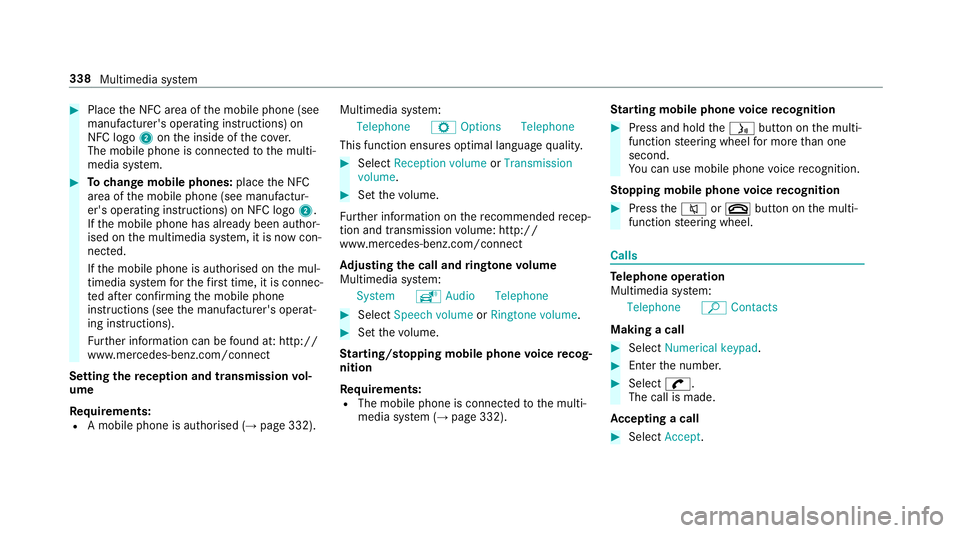
#
Place the NFC area of the mobile phone (see
manufacturer's operating instructions) on
NFC logo 2onthe inside of the co ver.
The mobile phone is connected tothe multi‐
media sy stem. #
Tochange mobile phones: placethe NFC
area of the mobile phone (see manufactur‐
er's operating instructions) on NFC logo 2.
If th e mobile phone has already been author‐
ised on the multimedia sy stem, it is now con‐
nected.
If th e mobile phone is authorised on the mul‐
timedia sy stem forth efirs t time, it is connec‐
te d af ter confirming the mobile phone
instructions (see the manufacturer's operat‐
ing instructions).
Fu rther information can be found at: http://
www.mercedes-benz.com/connect
Setting there ception and transmission vol‐
ume
Re quirements:
R A mobile phone is authorised (→ page 332).Multimedia sy
stem:
Telephone ZOption sTelephone
This function ensures optimal language qualit y. #
Select Reception volume orTransmission
volume. #
Set thevo lume.
Fu rther information on there commended recep‐
tion and transmission volume: http://
www.me rcedes-benz.com/connect
Ad justing the call and ringtone volume
Multimedia sy stem:
System õAudio Telephone #
Select Speech volume orRingtone volume . #
Set thevo lume.
St arting/ stopping mobile phone voice recog‐
nition
Re quirements:
R The mobile phone is connec tedto the multi‐
media sy stem (→ page 332). St
arting mobile phone voice recognition #
Press and hold theó button on the multi‐
function steering wheel for more than one
second.
Yo u can use mobile phone voice recognition.
St opping mobile phone voice recognition #
Press the8 or~ button on the multi‐
function steering wheel. Calls
Te
lephone operation
Multimedia sy stem:
Telephone ªContacts
Making a call #
Select Numerical keypad. #
Ente rth e number. #
Select w.
The call is made.
Ac cepting a call #
Select Accept. 338
Multimedia sy stem
Page 342 of 589
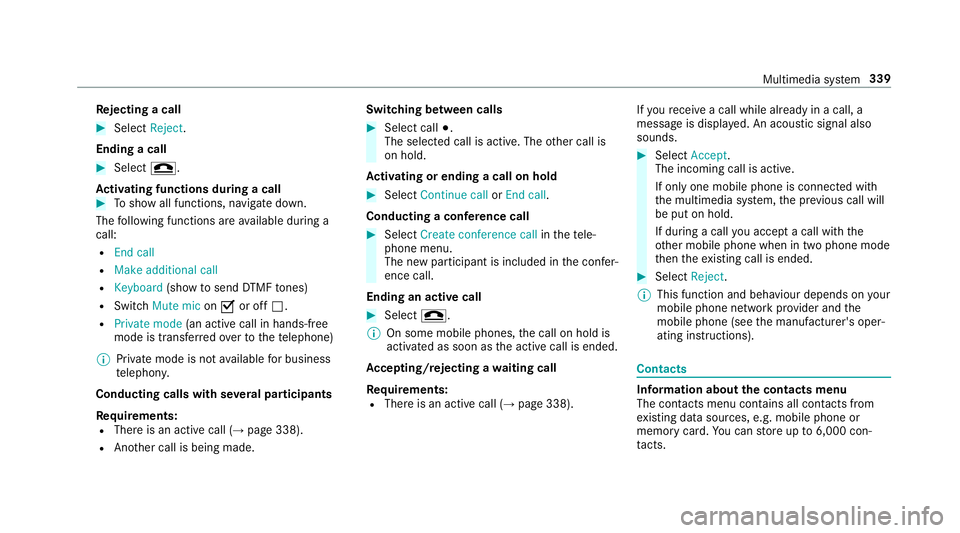
Re
jecting a call #
Select Reject.
Ending a call #
Select =.
Ac tivating functions during a call #
Toshow all functions, navigate down.
The following functions are available during a
call:
R End call
R Make additional call
R Keyboard (showtosend DTMF tones)
R Switch Mute mic onO or off ª.
R Private mode (an activecall in hands-free
mode is transfer redove rto thete lephone)
% Private mode is not available for business
te lephon y.
Conducting calls with se veral participants
Re quirements:
R There is an active call (→ page 338).
R Another call is being made. Switching between calls #
Select call #.
The selected call is active. The other call is
on hold.
Ac tivating or ending a call on hold #
Select Continue call orEnd call.
Conducting a conference call #
Select Create conference call inthete le‐
phone menu.
The new participant is included in the confe r‐
ence call.
Ending an active call #
Select =.
% On some mobile phones, the call on hold is
activated as soon as the active call is ended.
Ac cepting/rejecting a waiting call
Re quirements:
R There is an active call (→ page 338).If
yo ure cei vea call while already in a call, a
message is displa yed. An acoustic signal also
sounds. #
Select Accept.
The incoming call is active.
If only one mobile phone is connec ted with
th e multimedia sy stem, the pr evious call will
be put on hold.
If during a call you accept a call with the
ot her mobile phone when in two phone mode
th en theex isting call is ended. #
Select Reject.
% This function and behaviour depends on your
mobile phone network pr ovider and the
mobile phone (see the manufacturer's oper‐
ating instructions). Contacts
Information about
the contacts menu
The con tacts menu contains all contacts from
ex isting data sources, e.g. mobile phone or
memo rycard. You can store up to6,000 con‐
ta cts. Multimedia sy
stem 339
Page 374 of 589
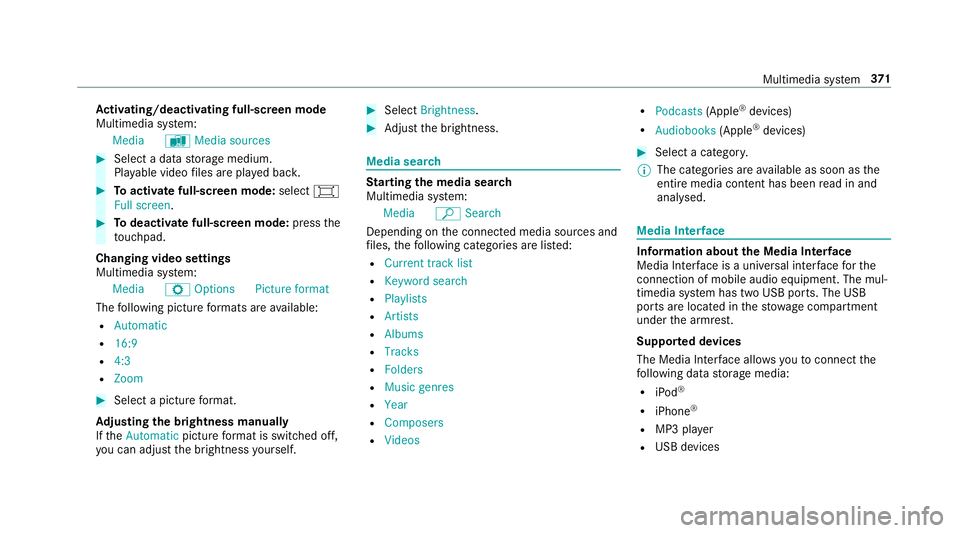
Ac
tivating/deactivating full-screen mode
Multimedia sy stem:
Media àMedia sources #
Select a data storage medium.
Pla yable video files are pla yed bac k. #
Toactivate full-screen mode: select#
Full screen. #
Todeactivate full-sc reen mode: pressthe
to uchpad.
Changing video settings
Multimedia sy stem:
Media ZOption sPicture format
The following picture form ats are available:
R Automatic
R 16:9
R 4:3
R Zoom #
Select a picture form at.
Ad justing the brightness manually
If th eAutomatic pictureform at is swit ched off,
yo u can adjust the brightness yourself. #
Select Brightness. #
Adjust the brightness. Media sear
ch St
arting the media sear ch
Multimedia sy stem:
Media ªSearch
Depending on the connected media sources and
fi les, thefo llowing categories are lis ted:
R Current track list
R Keyword search
R Playlists
R Artists
R Albums
R Tracks
R Folders
R Music genres
R Year
R Composers
R Videos R
Podcasts (Apple®
devices)
R Audiobooks (Apple®
devices) #
Select a categor y.
% The categories are available as soon as the
entire media conte nt has beenread in and
anal ysed. Media Inter
face Information about
the Media Inter face
Media In terface is a universal inter face forthe
connection of mobile audio equipment. The mul‐
timedia sy stem has two USB ports. The USB
ports are located in thestow age compartment
under the armrest.
Suppor ted devices
The Media Inter face allo wsyouto connect the
fo llowing data storage media:
R iPod ®
R iPhone ®
R MP3 pla yer
R USB devices Multimedia sy
stem 371
Page 516 of 589
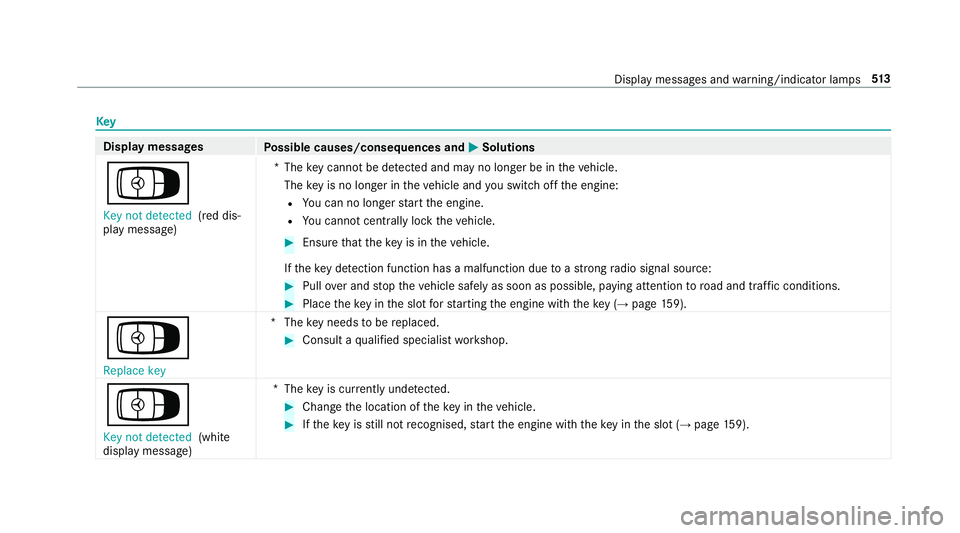
Key
Display messages
Possible causes/consequences and M
MSolutions
Á Key not detected (red dis‐
play message) *T
hekey cannot be de tected and may no longer be in theve hicle.
The key is no lon ger in theve hicle and you swit choff the engine:
R You can no lon gerst art the engine.
R You cannot centrally lock theve hicle. #
Ensure that theke y is in theve hicle.
If th eke y de tection function has a malfunction due toast ro ng radio signal source: #
Pull over and stop theve hicle safely as soon as possible, paying attention toroad and traf fic conditions. #
Place theke y in the slot forst arting the engine with theke y (→ page 159).
Á Replace key *T
hekey needs tobe replaced. #
Consult a qualified specialist workshop.
Á Key not detected (white
display message) *T
hekey is cur rently und etected. #
Change the location of theke y in theve hicle. #
Ifth eke y is still not recognised, start the engine with theke y in the slot (→ page159). Displ
aymessa ges and warning/indicator lamps 513
Page 517 of 589
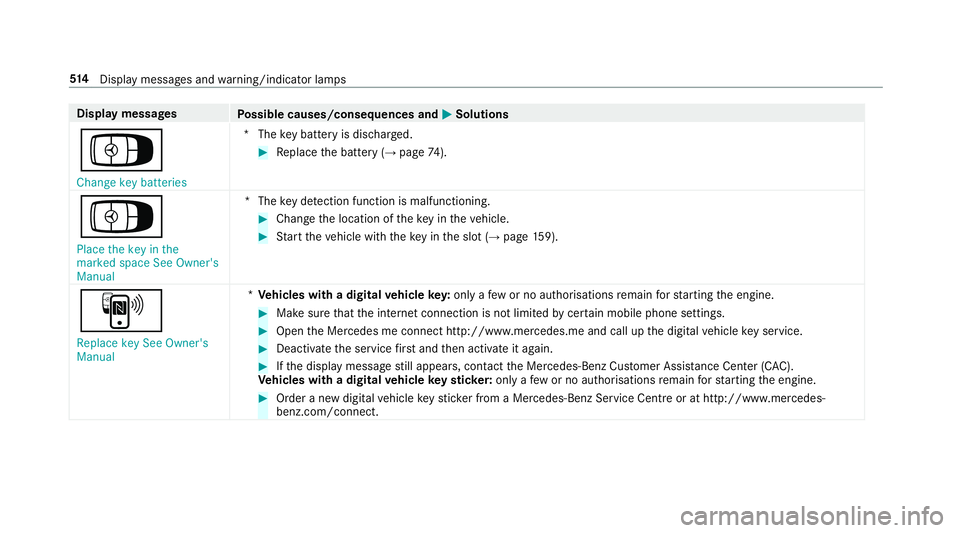
Display messages
Possible causes/consequences and M
MSolutions
Á Change key batteries *T
hekey bat tery is dischar ged. #
Replace the battery (→ page74).
Á
Pl ace the key in the
marked space See Owner's
Manual *T
hekey de tection function is malfunctioning. #
Change the location of theke y in theve hicle. #
Start theve hicle with theke y in the slot (→ page159).
À
Replace key See Owner's
Manual *
Ve hicles with a digital vehicle key:only a few or no authorisations remain forst arting the engine. #
Make sure that the internet connection is not limited bycer tain mobile phone settings. #
Open the Mercedes me connect http://www.mercedes.me and call up the digital vehicle key service. #
Deactivate the service firs t and then activate it again. #
Ifth e display message still appears, con tact the Mercedes-Benz Cus tomer Assis tance Center (C AC).
Ve hicles with a digital vehicle keyst icke r:on lyafe w or no authorisations remain forst arting the engine. #
Order a new digital vehicle keyst icke r from a Mercedes-Benz Service Centre or at http://www.mercedes-
benz.com/connect. 514
Displaymessa ges and warning/indicator lamps