phone MERCEDES-BENZ E-CLASS CABRIOLET 2018 Service Manual
[x] Cancel search | Manufacturer: MERCEDES-BENZ, Model Year: 2018, Model line: E-CLASS CABRIOLET, Model: MERCEDES-BENZ E-CLASS CABRIOLET 2018Pages: 589, PDF Size: 10.56 MB
Page 336 of 589
Multimedia sy
stem:
Telephone ªDevices
Sear ching for a mobile phone #
Select Use Bluetooth telephony only. #
Select Connect new device .#
Select Start search on the system .
The available mobile phones are displa yed. If
a new mobile phone is found, it is indicated
by the# symbol.
Connecting a mobile phone (authorisation
using Secure Simple Pairing) #
Select the mobile phone.
A code is displa yed in the multimedia sy stem
and on the mobile phone. #
Ifth e codes match: confirm the code on
th e mobile phone.
Connecting a mobile phone (authorisation by
entering a passk ey) #
Select the mobile phone. #
Choose a one tosixteen-digit number combi‐
nation as a passk ey. #
On the multimedia sy stem: enter the pass‐
ke y and select a. #
On the mobile phone: enterthe passk ey
again and con firm.
% Upto15 mobile phones can be auth orised
on the multimedia sy stem.
Auth orised mobile phones are reconnected
au tomatical ly.
Connecting a second mobile phone (two
phone mode)
Re quirements:
R Atleast one mobile phone is already connec‐
te dto the multimedia sy stem via Blue tooth ®
.
Multimedia sy stem:
Telephone ªDevices #
Select Connect new device. #
Select Start search on the system .
The available mobile phones are displa yed. #
Select the mobile phone. #
Answer theHow would you like to connect
the new device? prompt. #
Toreplace the cur rently connected
mobile phone: selectPhone 1.
The cur rently connected mobile phone is
re placed bythe new mobile phone.
or #
Toconnect the second mobile phone:
select Phone 2.
The new mobile phone is connec ted as
Phone 2. If two mobile phones ha vealready
been connec ted, the second telephone is
re placed bythe new mobile phone.
or #
Touse the mobile phone as an audio
source: selectAudio source (→page 374).
% A mobile phone can be operated bo thas an
audio source as well as telephone in parallel.
% It is possible at any future point tochange
th e type of connection forth e mobile phone
already connected and toset this as Phone
1, Phone 2 orAudio source (→page 336). Multimedia sy
stem 333
Page 337 of 589
Fu
nctions of the mobile phone in two phone
mode
Fu nctions overview Mobile phone in
the
fo re gr ound Mobile phone in
the
bac kground
Fu llra nge of func‐
tions Incoming calls Using a SIM card
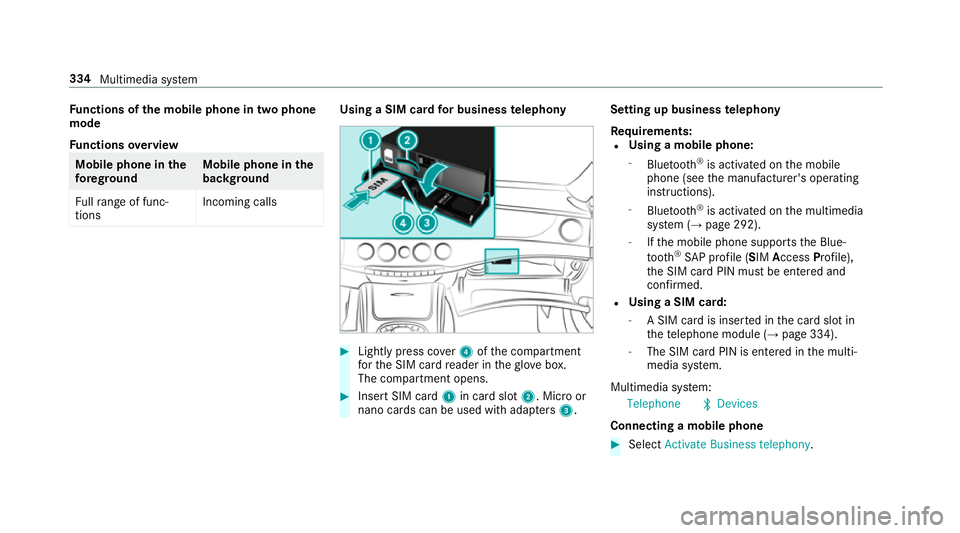
for business telephony #
Light lypress co ver4 ofthe compartment
fo rth e SIM card reader in theglove box.
The compartment opens. #
Insert SIM card 1in card slot 2. Micro or
nano cards can be used with adap ters 3 . Setting up business
telephony
Re quirements:
R Using a mobile phone:
- Blue tooth ®
is activated on the mobile
phone (see the manufacturer's operating
instructions).
- Blue tooth ®
is activated on the multimedia
sy stem (→ page 292).
- Ifth e mobile phone supports the Blue‐
tooth ®
SA P profile (SIM AccessProfile),
th e SIM card PIN must be entered and
confi rmed.
R Using a SIM card:
- A SIM card is inser ted in the card slot in
th ete lephone module (→ page 334).
- The SIM card PIN is entered in the multi‐
media sy stem.
Multimedia sy stem:
Telephone ªDevices
Connecting a mobile phone #
Select Activate Business telephony .334
Multimedia sy stem
Page 338 of 589
#
Select Connect a new device .#
Select Start search on the system .#
Select a mobile phone. #
Connect the mobile phone with the multime‐
dia sy stem via Secure Simple Pairing or the
passk ey (→page 332). #
Ente rth e SIM card PIN and confi rm.
The reception and call quality are impr oved
when theve hicle's exterior aerial is connec‐
te d.
% Ifth e mobile phone is connected as an SAP
te lephone, calls cannot be made on the
mobile phone, since the SIM card is inser ted
in theve hicle. Connect the mobile phone to
th eve hicle hotspot for data reception
(→ page 292).
Connecting the SIM card #
Select the SIM card. #
Ente rth e SIM card PIN and confi rm.#
Parallel use with a mobile phone: select
an authorised mobile phone. #
Select Yes, SIM card and
and, if necessar y,enter the SIM card PIN.
Ac cess tothe mobile phone data is available.
Incoming and outgoing calls are available
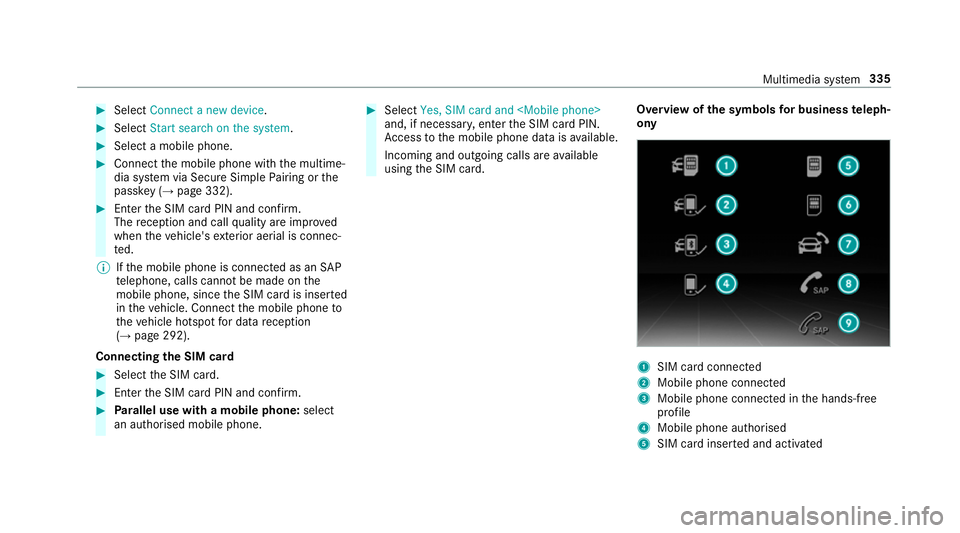
using the SIM card. Overview of
the symbols for business teleph‐
ony 1
SIM card connec ted
2 Mobile phone connected
3 Mobile phone connected in the hands-free
profile
4 Mobile phone authorised
5 SIM card inser ted and activated Multimedia sy
stem 335
Page 339 of 589
6
SIM card inse rted and available
7 Hands-free profile activated
8 SAP function available and activated
9 SAP function not available
% Ifth e mobile phone is actively connected
with the sy stem, the cor responding symbol
is highlighte d inyello w.
Calling up the business telephony settings
Multimedia sy stem:
Telephone ZOption sBusiness tel-
ephony #
Select the desired option.
The following settings are available:
R Phone number blocking
R Call waiting
R Select network provider
R Data usage, voice
R Call forwarding Inter
changing mobile phones (two phone
mode)
Re quirements:
R The mobile phones are authorised
(→ page 332).
Multimedia sy stem:
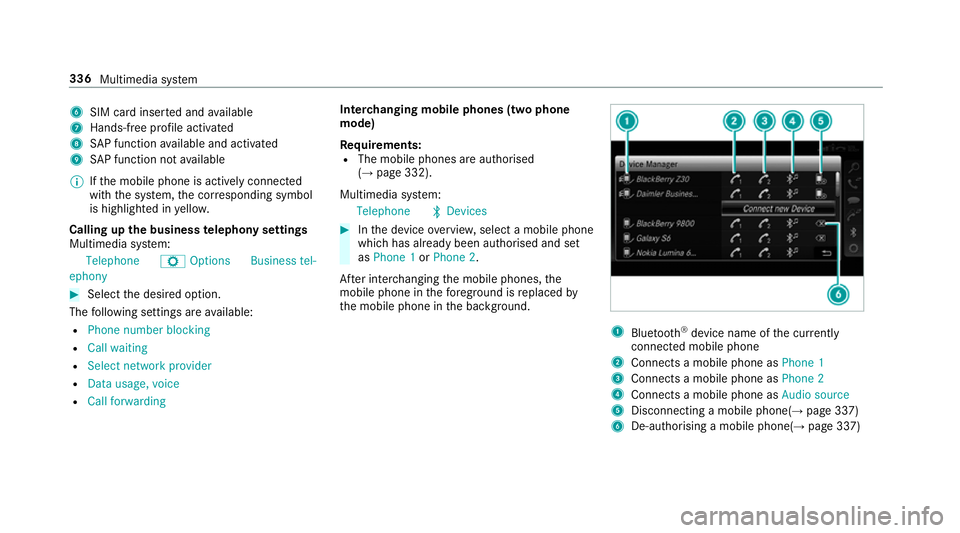
Telephone ªDevices #
Inthe device overview, select a mobile phone
which has already been authorised and set
as Phone 1 orPhone 2.
Af ter inter changing the mobile phones, the
mobile phone in thefo re ground isreplaced by
th e mobile phone in the bac kground. 1
Blue tooth ®
device name of the cur rently
connected mobile phone
2 Connects a mobile phone as Phone 1
3 Connects a mobile phone as Phone 2
4 Connects a mobile phone as Audio source
5 Disconnecting a mobile phone(→ page 337)
6 De-au thorising a mobile phone(→ page 337)336
Multimedia sy stem
Page 340 of 589
%
If a new mobile phone is connected and
defined as Phone 1,forex ample, this ov er‐
writes the pr eviously connec ted mobile
phone in thefo re ground of the sy stem.
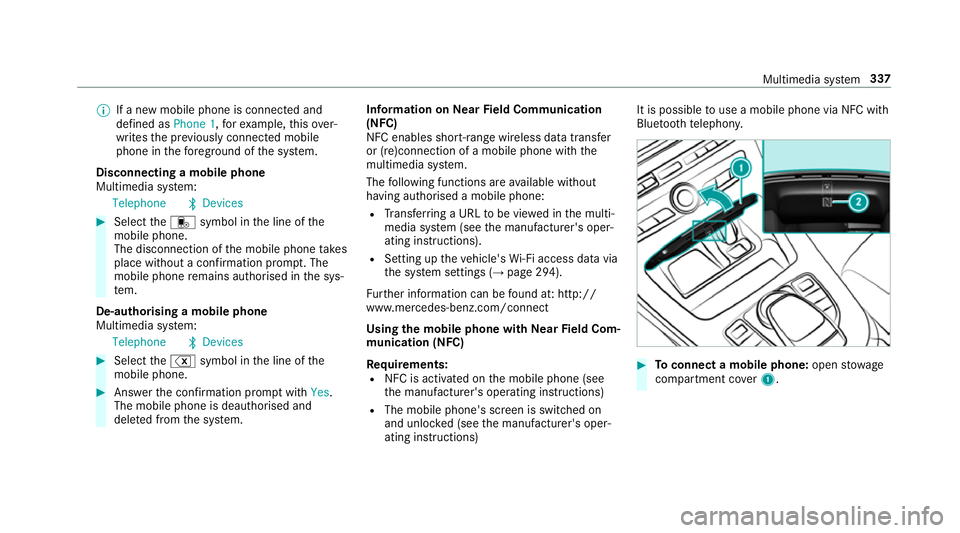
Disconnecting a mobile phone
Multimedia sy stem:
Telephone ªDevices #
Select thei symbol in the line of the
mobile phone.
The disconnection of the mobile phone takes
place without a con firm ation prom pt. The
mobile phone remains auth orised inthe sys‐
te m.
De-authorising a mobile phone
Multimedia sy stem:
Telephone ªDevices #
Select the% symbol in the line of the
mobile phone. #
Answer the confi rmation prom ptwith Yes.
The mobile phone is deauthorised and
dele ted from the sy stem. Information on
NearField Communication
(NFC)
NFC enables short- range wi reless data transfer
or (re)connection of a mobile phone with the
multimedia sy stem.
The following functions are available without
having authorised a mobile phone:
R Trans ferring a URL tobe vie wed in the multi‐
media sy stem (see the manufacturer's oper‐
ating instructions).
R Setting up theve hicle's Wi-Fi access da tavia
th e sy stem settings (→ page 294).
Fu rther information can be found at: http://
www.mercedes-benz.com/connect
Using the mobile phone with NearField Com‐
munication (NFC)
Re quirements:
R NFC is activated on the mobile phone (see
th e manufacturer's operating instructions)
R The mobile phone's screen is switched on
and unloc ked (see the manufacturer's oper‐
ating instructions) It is possible
touse a mobile phone via NFC with
Blue toothte lephon y. #
Toconnect a mobile phone: openstowage
compartment co ver1. Multimedia sy
stem 337
Page 341 of 589
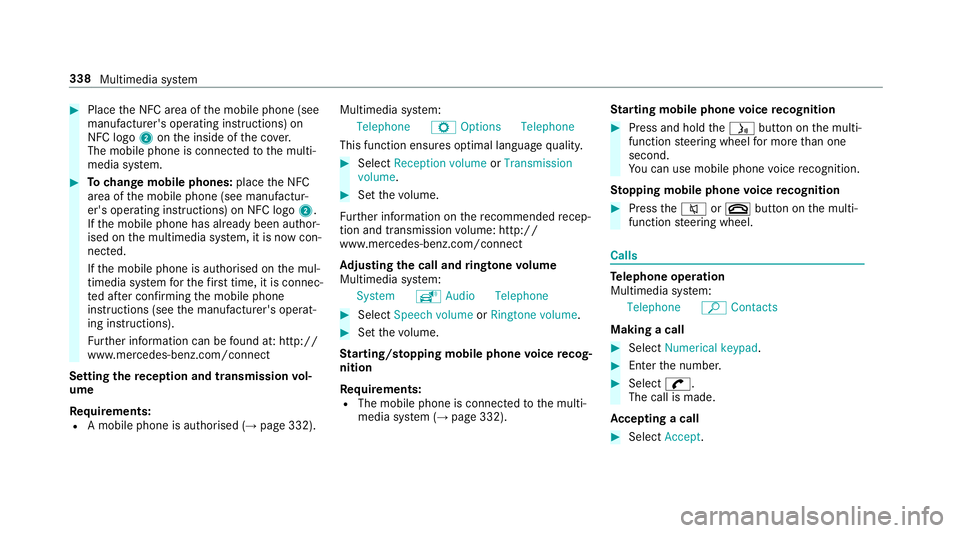
#
Place the NFC area of the mobile phone (see
manufacturer's operating instructions) on
NFC logo 2onthe inside of the co ver.
The mobile phone is connected tothe multi‐
media sy stem. #
Tochange mobile phones: placethe NFC
area of the mobile phone (see manufactur‐
er's operating instructions) on NFC logo 2.
If th e mobile phone has already been author‐
ised on the multimedia sy stem, it is now con‐
nected.
If th e mobile phone is authorised on the mul‐
timedia sy stem forth efirs t time, it is connec‐
te d af ter confirming the mobile phone
instructions (see the manufacturer's operat‐
ing instructions).
Fu rther information can be found at: http://
www.mercedes-benz.com/connect
Setting there ception and transmission vol‐
ume
Re quirements:
R A mobile phone is authorised (→ page 332).Multimedia sy
stem:
Telephone ZOption sTelephone
This function ensures optimal language qualit y. #
Select Reception volume orTransmission
volume. #
Set thevo lume.
Fu rther information on there commended recep‐
tion and transmission volume: http://
www.me rcedes-benz.com/connect
Ad justing the call and ringtone volume
Multimedia sy stem:
System õAudio Telephone #
Select Speech volume orRingtone volume . #
Set thevo lume.
St arting/ stopping mobile phone voice recog‐
nition
Re quirements:
R The mobile phone is connec tedto the multi‐
media sy stem (→ page 332). St
arting mobile phone voice recognition #
Press and hold theó button on the multi‐
function steering wheel for more than one
second.
Yo u can use mobile phone voice recognition.
St opping mobile phone voice recognition #
Press the8 or~ button on the multi‐
function steering wheel. Calls
Te
lephone operation
Multimedia sy stem:
Telephone ªContacts
Making a call #
Select Numerical keypad. #
Ente rth e number. #
Select w.
The call is made.
Ac cepting a call #
Select Accept. 338
Multimedia sy stem
Page 342 of 589
Re
jecting a call #
Select Reject.
Ending a call #
Select =.
Ac tivating functions during a call #
Toshow all functions, navigate down.
The following functions are available during a
call:
R End call
R Make additional call
R Keyboard (showtosend DTMF tones)
R Switch Mute mic onO or off ª.
R Private mode (an activecall in hands-free
mode is transfer redove rto thete lephone)
% Private mode is not available for business
te lephon y.
Conducting calls with se veral participants
Re quirements:
R There is an active call (→ page 338).
R Another call is being made. Switching between calls #
Select call #.
The selected call is active. The other call is
on hold.
Ac tivating or ending a call on hold #
Select Continue call orEnd call.
Conducting a conference call #
Select Create conference call inthete le‐
phone menu.
The new participant is included in the confe r‐
ence call.
Ending an active call #
Select =.
% On some mobile phones, the call on hold is
activated as soon as the active call is ended.
Ac cepting/rejecting a waiting call
Re quirements:
R There is an active call (→ page 338).If
yo ure cei vea call while already in a call, a
message is displa yed. An acoustic signal also
sounds. #
Select Accept.
The incoming call is active.
If only one mobile phone is connec ted with
th e multimedia sy stem, the pr evious call will
be put on hold.
If during a call you accept a call with the
ot her mobile phone when in two phone mode
th en theex isting call is ended. #
Select Reject.
% This function and behaviour depends on your
mobile phone network pr ovider and the
mobile phone (see the manufacturer's oper‐
ating instructions). Contacts
Information about
the contacts menu
The con tacts menu contains all contacts from
ex isting data sources, e.g. mobile phone or
memo rycard. You can store up to6,000 con‐
ta cts. Multimedia sy
stem 339
Page 343 of 589
Depending on
the data source, you ha vethefo l‐
lowing number of con tacts:
R Perm anently sa ved con tacts: 3,000 entries
R Contacts loaded from the mobile phone:
3,000 entri es
Fr om the conta cts menu, you can per form the
fo llowing actions:
R Telephone operation:
- Calling a con tact (→ page 341)
- Calling a new number (→ page 338)
R Navigation (→ page 309)
R Compose messa ges (→ page 343)
If a mobile phone is connected tothe multimedia
sy stem (→ page 332) and automatic calling up
(→ page 340) is activated, the mobile phone's
conta cts are displ ayed in the address book. Downloading mobile phone contacts
Multimedia sy
stem:
Telephone ZOption sContacts
Au tomatically #
Activate Synchronise contacts automatically
O.
Manual ly #
Deactivate ªSynchronise contacts auto-
matically. #
Select Synchronise contacts .
Calling up contacts
Multimedia sy stem:
Telephone ªContacts
Depending on thech aracter set, thefo llowing
options can be used tosear chfor contacts:
R sear ching byinitials
R sear ching byname
R searching byphone number #
Ente rch aracters into the sear chfield.
A selection of possible conta cts appears.
Entering more characters into the sear ch
fi eld nar rows down the number of possible
selections. #
Select the conta ct.
A contact can contain thefo llowing de tails:
R phone numbers
R navigation addresses
R geo-coordinates
R Internet address
Editing thefo rm at of a contact's name
Multimedia sy stem:
Telephone ZOption sCon-
tactsN ame format
The following options are available:
R Surname, first name
R Surname First name
R First name Surname #
Select an option. 340
Multimedia sy stem
Page 344 of 589
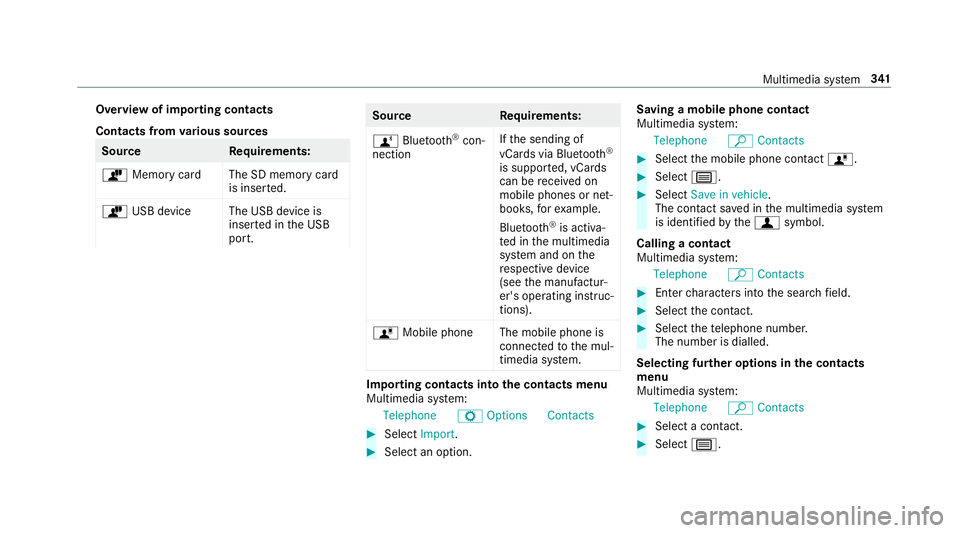
Overview of importing contacts
Contacts from
various sources Source
Requirements:
ò Memory car dThe SD memory card
is inser ted.
ò USB device The USB device is
inserted in the USB
port. Source
Requirements:
ñ Bluetooth ®
con‐
nection If
th e sending of
vCards via Blue tooth®
is suppor ted, vCards
can be recei ved on
mobile phones or net‐
books, forex ample.
Blue tooth ®
is activa‐
te d in the multimedia
sy stem and on the
re spective device
(see the manufactur‐
er's operating instruc‐
tions).
ó Mobile phone The mobile phone is
connectedtothe mul‐
timedia sy stem. Importing contacts into
the contacts menu
Multimedia sy stem:
Telephone ZOption sContacts #
Select Import. #
Select an option. Saving a mobile phone contact
Multimedia sy
stem:
Telephone ªContacts #
Select the mobile phone conta ctó. #
Select p. #
Select Save in vehicle .
The contact sa ved in the multimedia sy stem
is identified bythef symbol.
Calling a contact
Multimedia sy stem:
Telephone ªContacts #
Ente rch aracters into the sear chfield. #
Select the conta ct. #
Select thete lephone number.
The number is dialled.
Selecting fur ther options in the contacts
menu
Multimedia sy stem:
Telephone ªContacts #
Select a conta ct. #
Select p. Multimedia sy
stem 341
Page 345 of 589
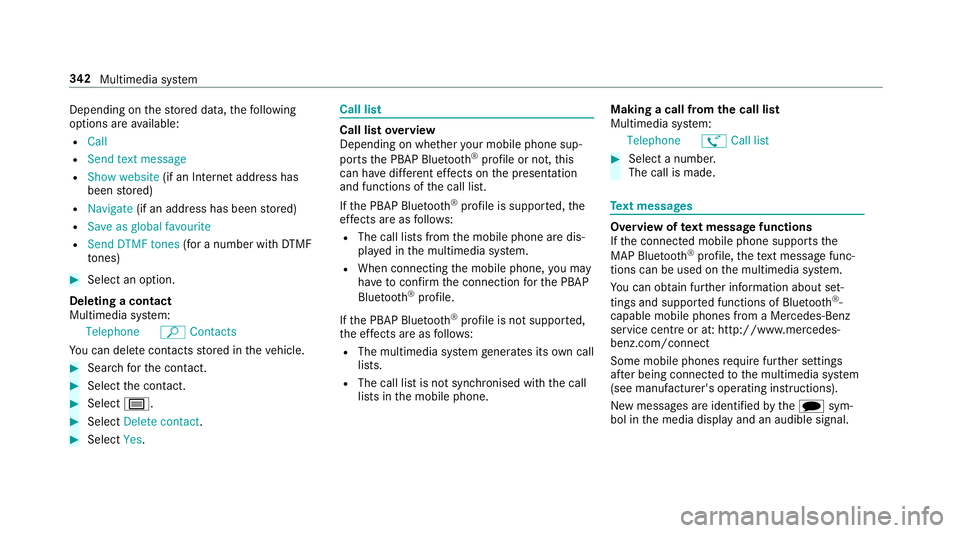
Depending on
thestored data, thefo llowing
options are available:
R Call
R Send text message
R Show website (if an Intern et address has
been stored)
R Navigate (if an address has been stored)
R Save as global favourite
R Send DTMF tones (for a number with DTMF
to nes) #
Select an option.
Deleting a contact
Multimedia sy stem:
Telephone ªContacts
Yo u can dele tecontacts stored in theve hicle. #
Sear chforth e conta ct. #
Select the conta ct. #
Select p. #
Select Delete contact .#
Select Yes. Call li
st Call list
overview
Depending on whe ther your mobile phone sup‐
ports the PBAP Blue tooth®
profile or not, this
can ha vediffere nt ef fects on the presentation
and functions of the call list.
If th e PBAP Blue tooth ®
profile is suppor ted, the
ef fects are as follo ws:
R The call lists from the mobile phone are dis‐
pla yed in the multimedia sy stem.
R When connecting the mobile phone, you may
ha ve toconfirm the connection forth e PBAP
Blue tooth ®
profile.
If th e PBAP Blue tooth ®
profile is not suppor ted,
th e ef fects are as follo ws:
R The multimedia sy stem generates its own call
li st s.
R The call list is not synchronised with the call
lists in the mobile phone. Making a call from
the call list
Multimedia sy stem:
Telephone øCall list #
Select a number.
The call is made. Te
xt messages Overview of
text message functions
If th e connected mobile phone supports the
MAP Blue tooth®
profile, thete xt messa gefunc‐
tions can be used on the multimedia sy stem.
Yo u can obtain fur ther information about set‐
tings and suppor ted functions of Blue tooth ®
-
capable mobile phones from a Mercedes-Benz
service centre or at: http://www.mercedes-
benz.com/connect
Some mobile phones require fur ther settings
af te r being connected tothe multimedia sy stem
(see manufacturer's operating instructions).
New messages are identified bythei sym‐
bol in the media display and an audible signal. 342
Multimedia sy stem