light MERCEDES-BENZ E-CLASS CABRIOLET 2019 Repair Manual
[x] Cancel search | Manufacturer: MERCEDES-BENZ, Model Year: 2019, Model line: E-CLASS CABRIOLET, Model: MERCEDES-BENZ E-CLASS CABRIOLET 2019Pages: 530, PDF Size: 44.1 MB
Page 185 of 530

mus
tbe initia ted. An immediat elane chang eis
on lypo ssible on free wa ysec tion swit hout speed
limi ts.
If th esy stem isim pair ed,ActiveLa ne Chang e
Assi stma ybe canceled .If it is canceled ,th e
Lane Change Cancel edmessag eappe arsin the
multifu nctiondisplay and awa rning tone sou nds. 000A
WARNIN GRisk ofacci dent from chang ‐
ing lane toan occ upied adjacentlane
Lan eChan geAssi stcanno tal wa ys detect
cle arly ifth eadjacen tlane isfree.
The lane chang emigh tbe init iated although
th eadjacen tlane isno tfr ee. 0007
Beforech ang inglane s,mak esur eth at
th eneighbor inglane isfree and ther eis
no dang ertoother road user s. 0007
Mon itor thelane chang e. 000A
WARNIN GRisk ofacci dent ifLane
Ch ang eAssi stune xpectedl yst ops func‐
tionin g
If th esy stem limit ations forLane Change
Assis tha ve been reac hed, ther eis no guar‐
ant eethat thesy stem will remain active.
Lane ChangeAssis tcanno tth en assis tyo u
by appl ying steer ing torq ues . 0007
Alw aysmonit orthelane chang eand
ke ep your han dson thesteer ing wheel.
Obser vethetra ffic con dition sand steer
and/or brak eif neces sary. Sy
stem limita tions
The system limit ations ofActiveSt eer ing Assis t
apply toActiveLa ne Chang eAssi st
( → pag e18 0).
The system mayalso beimpair edorma yno t
func tion inthefo llo wing situat ions:
R The sensorsin there ar bum peraredir ty,
damag edorcovered, forins tance bya
st icke ror ice and snow.
R The exterior lighting ismalfunct ioning. Ac
tiv atin g/deac tivatin gAc tiv eLan eCha nge
As sist
Multimedia system:
Vehicle kAssist ance 0007
Select LaneChange Assist. 0007
Activate0073 ordeacti vate 0053 thefunc tion.
Fu nction ofActiv eEme rgency Stop Assis t
If th edr iver con tinuall yignor esthevisual or
acous ticwarning toput their hands onthesteer‐
ing wheel, theBeginn ingEmer gencySt op mes‐
sag eappear sin themultifunc tiondispla y.Ifth e
dr iver still does notre spond, ActiveDis tance
Assi stDIS TRONI Creduces thespeed. Thevehi‐
cle isdeceler ated instag es toast ands till.At
speeds below40 mph(6 0km/h) thehazar d
wa rning light sswitc hon aut omat ically.
When theve hicle isstatio nary,thefo llo wing
act ions arecar ried out :
R The vehicle issecur edwithth eelectr icpar k‐
ing brak e
R ActiveDis tance AssistDIS TRONI Cis end ed
R The vehicle isunloc ked Dr
iving and parking 18
3
Page 187 of 530
3
ActiveDis tance AssistDIS TRONI Cacti ve,
speed stor ed, novehicle detected (brigh t
ve hicle symbol)
4 ActiveDis tance AssistDIS TRONI Cacti ve,
speed stor ed, vehicle detected (green vehi‐
cle symbol)
5 ActiveDis tance AssistDIS TRONI Cand route-
based speedadap tatio nacti ve,speed stor ed
0009 Onhighw aysor high-speed major roads, the
gr een ç vehicle symbol isdispla yedcy cli‐
cally when theve hicle isready topull away.
Speedome ter
The stor ed speed ishighlight edon thespeedom‐
et er.If th espeed oftheve hicle infront orthe
speed adjustment isless than thestor ed speed
due tothero uteeve ntahead, thesegment sin
th espeedome terlig ht up. Activati on ordeacti va‐
tio nof ActiveDis tance AssistDIS TRONI C,as
we llas alteration sto thespeed duetomanua lor
au tomatic adoptionofthespeed limit,aredis‐
pla yedin thecon trol feedbac kof themultifunc ‐
tion displa yon asing leline. Ac
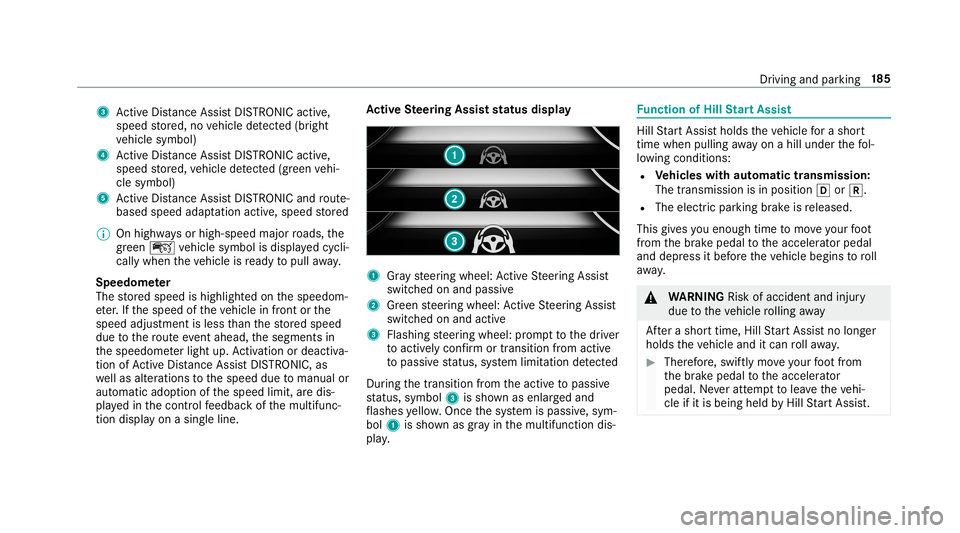
tiv eSte ering Assis tst atus displa y 1
Gray steer ing wheel: ActiveSt eer ing Assis t
switc hedonand passiv e
2 Green steer ing wheel: ActiveSt eer ing Assis t
switc hedonand activ e
3 Flashing steer ing wheel: prom pttothedr iver
to act ivel ycon firm ortransition from activ e
to passiv est atus ,sy stem limit ation detected
Dur ing thetransition from theactiv eto passiv e
st atus ,symbo l3 issho wnasenl arge dand
fl ashes yello w. Once thesy stem ispassiv e,sym‐
bol 1issho wnasgray inthemultifunc tiondis‐
pla y. Fu
nction ofHill StartAss ist Hill
StartAs sis tholds theve hicle fora shor t
time when pulling away on ahill under thefo l‐
lo wing condition s:
R Vehicl eswith automatic transmiss ion:
The transmis sionisin posi tion 005Bor005E.
R The electricpar king brak eis released.
This gives youen ough timeto mo veyour foot
fr om thebr ak epedal totheaccelera torpeda l
and depr essitbef oreth eve hicle begins toroll
aw ay. 000A
WARNIN GRisk ofacci dent andinjury
due totheve hicle rolling away
Af tera shor ttime, HillStartAs sis tno longer
holds theve hicle anditcan rollaw ay. 0007
Ther efor e, swif tly mo veyour foot from
th ebr ak epedal totheacceler ator
pedal. Neveratt em pttolea vetheve hi‐
cle ifit is being heldbyHillSt artAs sis t. Dr
ivin gand parking18
5
Page 191 of 530
Se
tting theve hicl eleve l 000A
WARNIN GRisk ofacci dent because
ve hicle leve lis toohigh
If yo udr ive at ahigh ervehicle leve l,th edr iv‐
ing charact eristic sma ybe impair eddue to
th ehigher vehicle centerofgrav ity .
The vehicle candrift outw ards, forex am ple,
when steer ing orcor ner ing. 0007
Alw aysch oose ave hicle leve lwhic his
suit edtothedr iving style and thero ad
sur face condi tions. 000A
WARNIN GRisk ofentr apment from vehi‐
cle lowe ring
Whe nlowe ring theve hicle, people could
become trapped ifth eir limbs arebe tween
th eve hicle body andthetir es orunder neath
th eve hicle. 0007
Mak esur eno one isunder neathth e
ve hicle orintheimmediat evicinit yof
th ewheel arch es when youlowe rth e
ve hicle. 000A
WARNIN GRisk ofentr apment from vehi‐
cle lowe ring
Ve hicl eswith AIRBO DY CONT ROLor
le ve lcontr olsystem: When youunlo adlug‐
ga ge orlea vetheve hicle, theve hicle firs t
ri ses slightly andthen retur ns tothese tle ve l
shor tly af te rw ards.
Yo uor anyone else inthevicinit yof the
wheel arch es ortheunderbody couldthus
bec ome trapped.
The vehicle canalso belowe redaf te rbeing
loc ked. 0007
When leaving theve hicle, makesur e
th at nobody isin thevicinit yof the
wheel arch es ortheunderbody . Re
quirement s:
R The vehicle hasbeen star ted.
R The vehicle mustno tbe mo ving faster than
37 mph(60 km/h). Ra
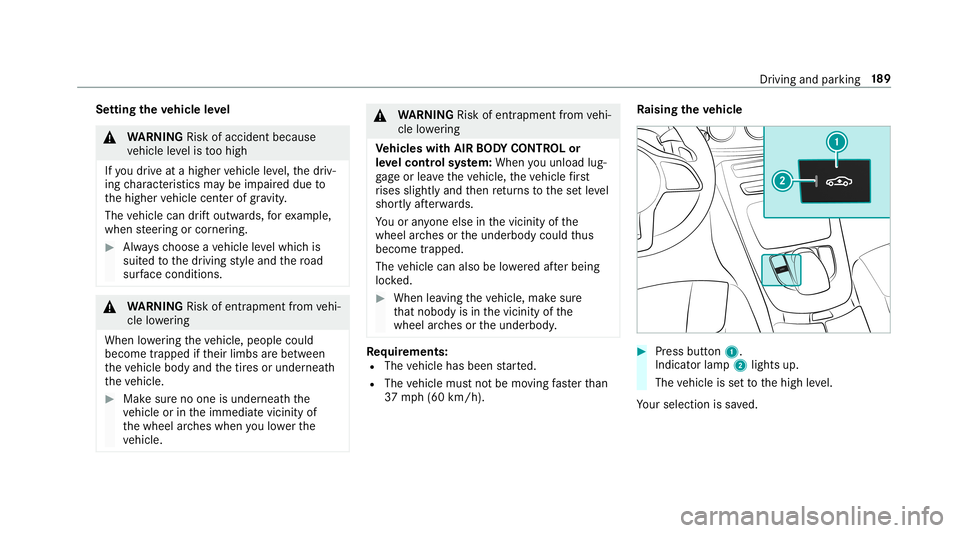
ising theve hicl e 0007
Press butt on1.
Indica torlam p2 lights up.
The vehicle issetto thehigh leve l.
Yo ur sele ction issave d. Dr
iving andparking18
9
Page 194 of 530
light
upyello wor red, dependin gon thedis tance
to theobs tacle .
Seg ment colordepe ndingon distan ce
Co lor Lateral dis tan cein
cm
Ye llo wA pprox.30 -60
Re dA pprox.< 30 In
order forlat eral front orrear segm entsto be
displa yed, theve hicle mustfirs ttr ave la dis tance
of at leas tha lfof theve hicle length.Once the
ve hicle hastrave led thelengt hof theve hicle, all
of thelat eral front and rear segm entscan bedis‐
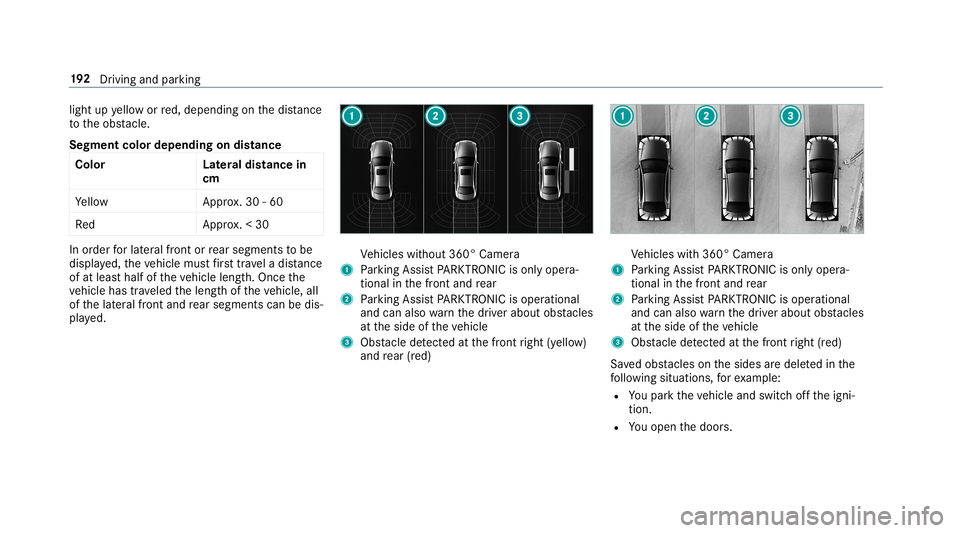
pla yed. Ve
hicles without 360° Camer a
1 Parking AssistPA RK TRONI Cis on lyop era‐
tio nal inthefront and rear
2 Parking AssistPA RK TRONI Cis oper ational
and canalso warnthedr iver about obstacle s
at theside oftheve hicle
3 Obstacle detected atthefront right (yello w)
and rear (red) Ve
hicles with360° Camer a
1 Parking AssistPA RK TRONI Cis on lyop era‐
tio nal inthefront and rear
2 Parking AssistPA RK TRONI Cis oper ational
and canalso warnthedr iver about obstacle s
at theside oftheve hicle
3 Obstacle detected atthefront right (red)
Sa vedobs tacle son thesides aredele tedin the
fo llo wing situat ions,fo rex am ple:
R Youpar kth eve hicle andswitc hof fth eigni‐
tion .
R Youopen thedoor s. 19
2
Driving and parking
Page 196 of 530

0007
Select WarnEarl y. 0007
Activate0073 ordeacti vate 0053 thefunc tion.
Ac tiv atin g/deac tivatin gaudi ofa deo ut
Yo ucan spec ifywhe ther thevo lume ofamedia
sour ceinthemultimedia system isto be
re duced whenParking AssistPA RK TRONI Cgiv es
an audible warning. 0007
Selec tAudio Fadeout DuringWarn ingTone s. 0007
Activate0073 ordeacti vate 0053 thefunc tion. Re
versing camer a Fu
nction ofthere ar vie wcamer a When
youen gage reve rsege ar,th eimag efrom
re ar vie wcam era1 issho wninthemultimedia
sy stem. Dynamic guidelinesshowthepat hth e
ve hicle willtake wit hth esteer ing wheel inits
cur rent positio n.Thi shel psyouto orient your‐
self and toavoid obstacle swhe nba cking up. The
rear vie wcam erais on lyan aid. Itis no ta
subs titutefo ryo ur att entio nto thesur round ings.
The responsibili tyforsaf emaneu vering and
pa rking remains withyo u. Mak esur eth at ther e
ar eno per sons, animals orobjec tsetc., inthe
maneu vering area while ma neu vering and park‐
ing.
Yo ucan selectfrom thefo llo wing views:
R Normalvie w
R Wide-ang levie w
R Trailer view
The area behin dth eve hicle isdispla yedas a
mir rorimag e,as intheinside rear vie wmir ror.
Sy stem limita tions
The rear vie wcam erawill notfun ction orwill
on lypa rtially function inthefo llo wing situat ions:
R Ifth etrunk lidortailg ateis open .
R Ther eis hea vyrain, sno wor fog.
R The ambient lightispoor ,e.g. atnight.
R The camer alens isobs truct ed, dirtyor fog‐
ge dup. Obser vetheno teson cleaning the
re ar vie wcam era(→ pag e36 0). 19
4
Driving and parking
Page 197 of 530
R
The camer aor rear ofyour vehicle isdam‐
ag ed. Inthis case, have thecamer aand its
position andsetting checkedat aqu alif ied
spec ialistwo rkshop.
The field ofvision andother funct ionsofthere ar
vie wcam erama ybe restrict ed dueto addit ional
acc esso ries on there ar oftheve hicle (e.g.
license platebr ac ketor bicy cle rack ).
0009 The displa ycon tras tma ybe impair eddue to
inc ident sunligh tor other light sources. In
th is case, paypar ticular attent ion.
0009 Have thedispla yre pair edorreplaced if,for
ex am ple, pixelerro rs consi derablyrestrict its
us e.
Ve hicl eswithout Activ ePa rking Assis t
The follo wing camera views areav ailable inthe
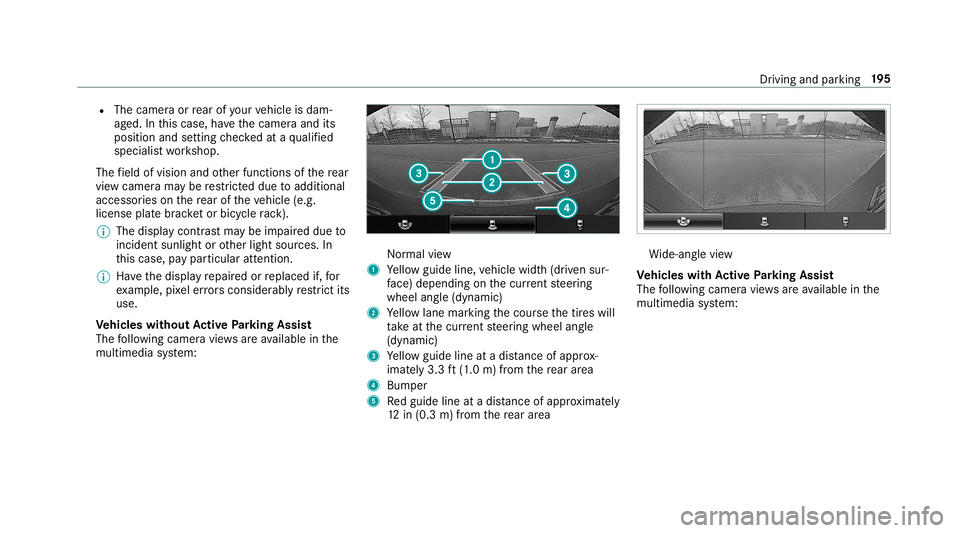
multime diasystem: Nor
mal view
1 Yello wguide line,vehicle width(dr iven sur‐
fa ce) dep endi ngon thecur rent steer ing
wheel angle(dynamic)
2 Yello wlane markingth ecour sethetir es will
ta ke atthecur rent steer ing wheel angle
(dynamic)
3 Yello wguide lineatadis tance ofapprox ‐
imat ely3. 3ft (1.0 m) from there ar area
4 Bum per
5 Redguide lineatadis tance ofapprox imat ely
12 in(0. 3m) from there ar area Wi
de-ang levie w
Ve hicl eswith Activ ePa rking Assis t
The follo wing camera views areav ailable inthe
multime diasystem: Dr
iving andparking 19
5
Page 198 of 530
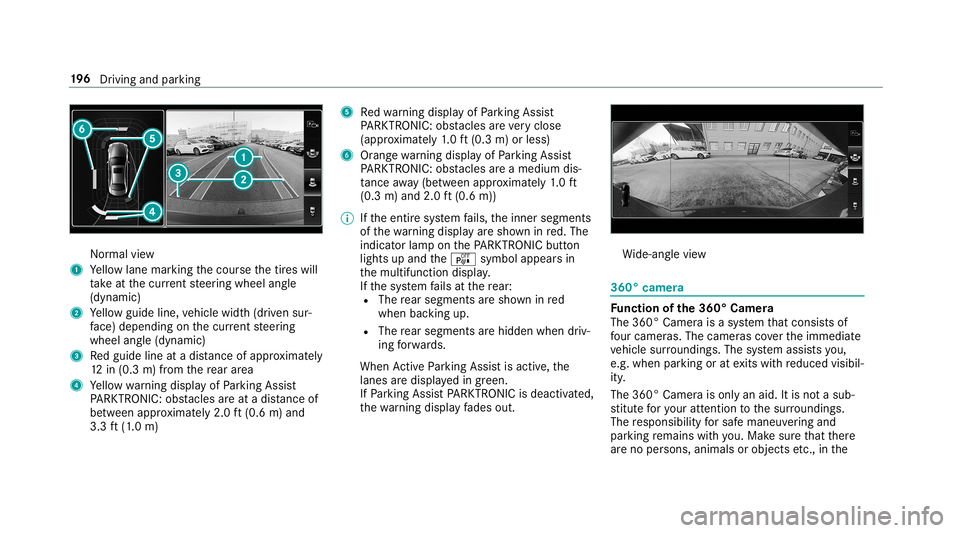
Nor
mal view
1 Yello wlane markingth ecour sethetir es will
ta ke atthecur rent steer ing wheel angle
(dynamic)
2 Yello wguide line,vehicle width(dr iven sur‐
fa ce) dep endi ngon thecur rent steer ing
wheel angle(dynamic)
3 Redguide lineatadis tance ofapprox imat ely
12 in(0. 3m) from there ar area
4 Yello wwa rning displa yof Parking Assist
PA RK TRONI C:obs tacles areat adis tance of
be twee nap prox imat ely2. 0ft (0.6 m)and
3.3 ft(1.0 m) 5
Redwa rning displa yof Parking Assist
PA RK TRONI C:obs tacles areve ry clos e
(a ppr oximat ely1. 0 ft (0.3 m)orless)
6 Orang ewa rning displa yof Parking Assist
PA RK TRONI C:obs tacles areamed iumdis‐
ta nce away (be tween appr oximat ely1. 0 ft
(0.3 m)and 2.0ft(0.6 m))
0009 Ifth eent ire sy stem fails, theinner segment s
of thewa rning displa yar esho wninred. The
indicat orlam pon thePA RK TRONI Cbut ton
light sup and theé symbol appearsin
th emultifunc tiondispla y.
If th esy stem fails atthere ar :
R The rear segm entsar esho wninred
when backingup.
R The rear segm entsar ehidde nwhen driv‐
ing forw ards.
When ActivePa rking Assistis act ive, the
lanes aredispla yedin green.
If Pa rking AssistPA RK TRONI Cis deac tiva ted,
th ewa rning displa yfa des out. Wi
de-ang levie w 360°
camer a Fu
nction ofthe360° Camera
The 360° Camera isasy stem that con sistsof
fo ur cam eras. The cam eras coverth eimmediat e
ve hicle surround ings.The system assis tsyou,
e.g .when parkingor atexits withre duced visibil‐
ity .
The 360°Camer ais onl yan aid. Itis no ta sub‐
st itut efo ryo ur att entio nto thesur round ings.
The responsibili tyforsaf emaneu vering and
pa rking remains withyo u. Mak esur eth at ther e
ar eno per sons, animals orobjec tsetc., inthe 19
6
Driving and parking
Page 200 of 530
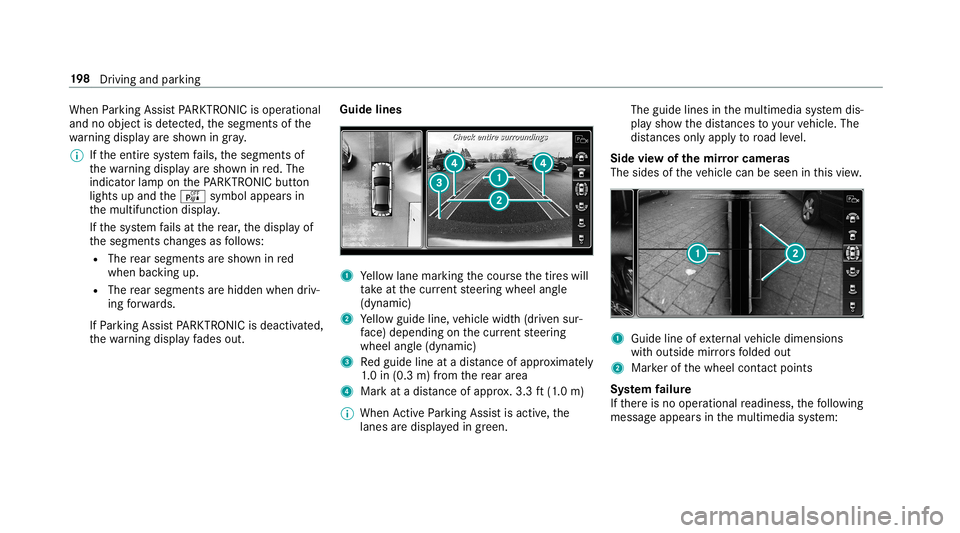
When
Parking AssistPA RK TRONI Cis oper ational
and noobj ectis de tected, thesegment sof the
wa rning displa yar esho wningray .
0009 Ifth eent ire sy stem fails, thesegment sof
th ewa rning displa yar esho wninred. The
indicat orlam pon thePA RK TRONI Cbut ton
light sup and theé symbol appearsin
th emultifunc tiondispla y.
If th esy stem fails atthere ar,th edispla yof
th esegment sch ang esasfollo ws :
R The rear segm entsar esho wninred
when backingup.
R The rear segm entsar ehidde nwhen driv‐
ing forw ards.
If Pa rking AssistPA RK TRONI Cis deac tiva ted,
th ewa rning displa yfa des out. Guid
elines 1
Yello wlane markingth ecour sethetir es will
ta ke atthecur rent steer ing wheel angle
(dynamic)
2 Yello wguide line,vehicle width(dr iven sur‐
fa ce) dep endi ngon thecur rent steer ing
wheel angle(dynamic)
3 Redguide lineatadis tance ofapprox imat ely
1. 0 in (0.3 m)from there ar area
4 Markat adis tance ofapprox .3.3 ft(1.0 m)
0009 When ActivePa rking Assistis act ive, the
lanes aredispla yedin green. The
guide linesinthemultimedia system dis‐
pla ysho wthedis tances toyour vehicle. The
dis tances onlyapply toroad leve l.
Side viewof themir rorca mer as
The side sof theve hicle canbeseen inthis vie w. 1
Guide lineofextern al vehicle dimensions
wit houtside mirrors folded out
2 Markerof thewheel contact poi nts
Sy stem failur e
If th er eis no oper ational readin ess, thefo llo wing
mess ageappear sin themultimedia system: 19
8
Driving and parking
Page 201 of 530
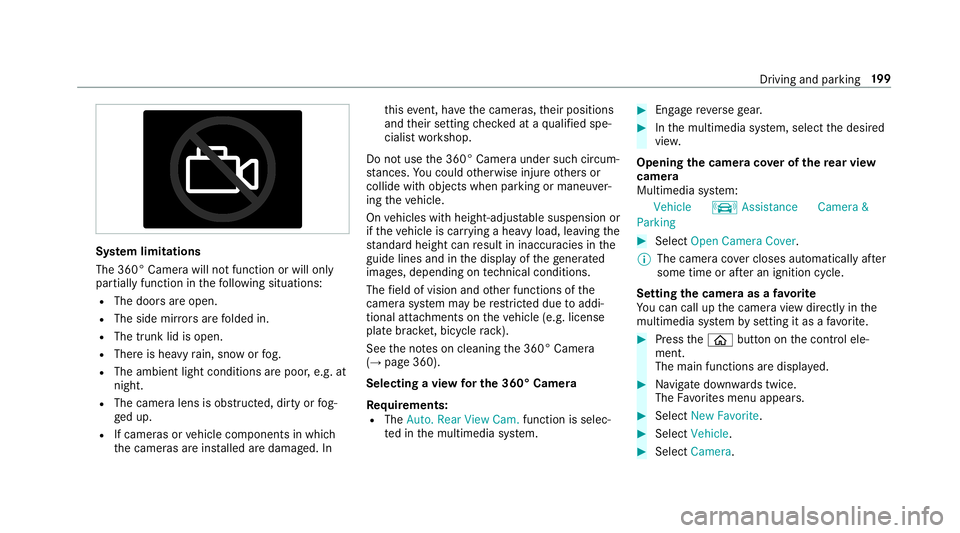
Sy
stem limita tions
The 360°Camera willnotfun ction orwill only
par tiall yfun ction inthefo llo wing situat ions:
R The door sar eopen .
R The side mirrors arefo lded in.
R The trunk lidisopen .
R Ther eis hea vyrain, sno wor fog.
R The ambient lightcondit ionsarepoor ,e.g. at
night.
R The camer alens isobs truct ed, dirtyor fog‐
ge dup.
R Ifcamera sor vehicle component sin whic h
th ecamer asareins talled aredamag ed.In th
is eve nt,have thecamer as,their position s
and their setting checkedat aqu alif ied spe‐
cialis two rkshop.
Do notuse the360° Camer aunder suchcir cum‐
st anc es.Youco uld other wise injureot her sor
collide withobject swhen parking ormaneuv er‐
ing theve hicle.
On vehicles withheight-adjus table suspension or
if th eve hicle iscar rying ahea vyload, leavingth e
st andar dheigh tcan result ininaccur aciesinthe
guide linesandinthedispla yof thege ner ated
ima ges,depending ontech nica lcond itions.
The field ofvision andother funct ionsofthe
came rasystem maybe restrict ed dueto addi‐
tio nal attachme ntson theve hicle (e.g.license
plat ebr ac ket,bicy cle rack ).
See theno teson cleaning the360° Camer a
(→ pag e360).
Selecting avie wforthe 360° Camer a
Re quirement s:
R The Auto.Rear View Cam. function isselec‐
te din themultimedia system. 0007
Engage reve rsege ar. 0007
Inthemultimedia system, select thedesir ed
vie w.
Opening thecam eraco verof the rear vie w
camer a
Mul timedi asy stem:
Vehicle kAssist ance Camera&
Parkin g 0007
Select OpenCamera Cover.
0009 The camer aco vercloses automatical lyafte r
some timeorafte ran ignitio ncy cle.
Se tting thecam eraas afa vo rite
Yo ucan callupthecamer avie wdir ect lyin the
multime diasystem bysettin git as afa vo rite . 0007
Press the00E2 buttononthecon trol ele‐
ment .
The main functionsar edispla yed. 0007
Navig atedo wn wardstwice.
The Favorite smenu appears. 0007
Select New Favorite. 0007
Select Veh icle. 0007
Select Camera. Dr
iving and parking 19
9
Page 211 of 530
R
Ifth ewindshield inthear ea ofthemultifunc ‐
tion camer ais dir ty,or ifth ecamer ais fog‐
ge dup, damag edorcovered.
R Ifth etraf fic sig ns areha rd todetect, e.g. due
to dir tor sno w,orbecause they areco vered
or due toinsuf ficie ntlighti ng.
R Ifth einf ormation inthena vig ation system's
digit almap isincor rect or out-of-da te.
R Ifth esigns areambiguous, e.g.traffic sign s
on con stru ction sites orinad jacent lanes.
R Ifyo utur nshar plywhen traf fic sig ns areou t‐
sid eth ecamer a'sfield ofvision.
Se tting Traf fic Sign Assis t
Mult imed iasystem:
Vehicle kAssist ance TrafficSign
Assist
Ac tiv atin g/deac tivatin gaut omati cadop tion
of spe edlimits
Re quiremen ts:
R ActiveDis tance AssistDIS TRONI Cis acti va‐
te d. 0007
Select LimitAdopt ion. 0007
Activate0073 ordeacti vate 0053 thefunc tion.
The speed limitsdetected byTraf fic Sign
Assi stareaut omat icallyadop tedby Active
Dis tance AssistDIS TRONI C.
Di spl aying detected traf fic signs inthe
med iadis pla y 0007
Select Display inCOMA ND. 0007
Activate0073 ordeacti vate 0053 thefunc tion.
0009 When DISTRONIC orcruise control areacti‐
va ted, thespeed detected can bemanu ally
ad op tedas thespeed limit(→pag e17 6).
Ad jus tingthe type ofwa rning 0007
Selec tVisual &Audible ,Visual orNon e.
Ad jus tingthe warning threshold
This value determ ines thespeed atwhic ha
wa rning isissued whenexceeded. 0007
Select Warning Threshold. 0007
Setth edesir edspeed. Blind
SpotAssis tand Activ eBli nd Spo t
As sist Fu
nction ofBlind SpotAssis tand Activ e
Bli nd Spo tAs sist wit hex itwa rning
Blin dSpo tAss istand ActiveBli nd Spo tAssi st
use twolat eral, rear-facin gra dar sensor sto
monit orthear ea up to130ft (40 m)behind your
ve hicle and10ft(3 m) direct lyne xt to your vehi‐
cle.
If ave hicle isde tected atspe eds aboveappr ox‐
imat ely8 mp h(12 km/h) andthis vehicle subse‐
qu ent lyent ersth emonit oring rang edire ctly next
to your vehicle, thewa rning lam pin theoutside
mir rorlig hts upred.
If ave hicle isde tected clos eto theside ofyour
ve hicle, there dwa rning lam pin theoutside mir‐
ro rflashes .If yo uswit chon thetur nsignal indi‐
cat orinthecor responding direction, awa rning
to ne sou nds once .If th etur nsignal indicat or
re mains switchedon,allother detected vehicles
ar eindicat edonlyby theflashin gof there d
wa rning lam p.
If yo uove rtak eave hicle quickl y, no warning is
giv en. Dr
ivin gand parking209