light MERCEDES-BENZ E-CLASS CABRIOLET 2019 Manual PDF
[x] Cancel search | Manufacturer: MERCEDES-BENZ, Model Year: 2019, Model line: E-CLASS CABRIOLET, Model: MERCEDES-BENZ E-CLASS CABRIOLET 2019Pages: 530, PDF Size: 44.1 MB
Page 214 of 530
ma
ybe interru pte dat anytime ifyo usteer
slightl yin theopposit edir ect ion oraccelera te.
Sy stem limita tions
Eit her acour se-cor recting brak eap plica tion
ap propr iate to thedr iving situation ,or non eat
all, mayoccur inthefo llo wing situat ions:
R Vehicles orobs tacle s,e.g. crash barrier s,are
locat edon both sides ofyour vehicle.
R Ave hicle approaches tooclosely ontheside.
R Youha ve adop tedaspor tydriving style wit h
high corner ing speeds.
R Youbr ak eor acc elerat esign ifican tly.
R Adr ivi ng safety system interve nes, e.g.ESP ®
or ActiveBr ak eAssi st.
R ESP ®
is de acti vated.
R Aloss oftirepr essur eor adef ective tir eis
de tected. Ac
tiv atin g/deac tivatin gBli nd Spo tAs sist or
Ac tiv eBli nd Spo tAs sist
Multimedia system:
Vehicle kAssist ance BlindSpot
Assist 0007
Activate0073 ordeacti vate 0053 thefunc tion. Ac
tiv eLan eKe eping Assist Fu
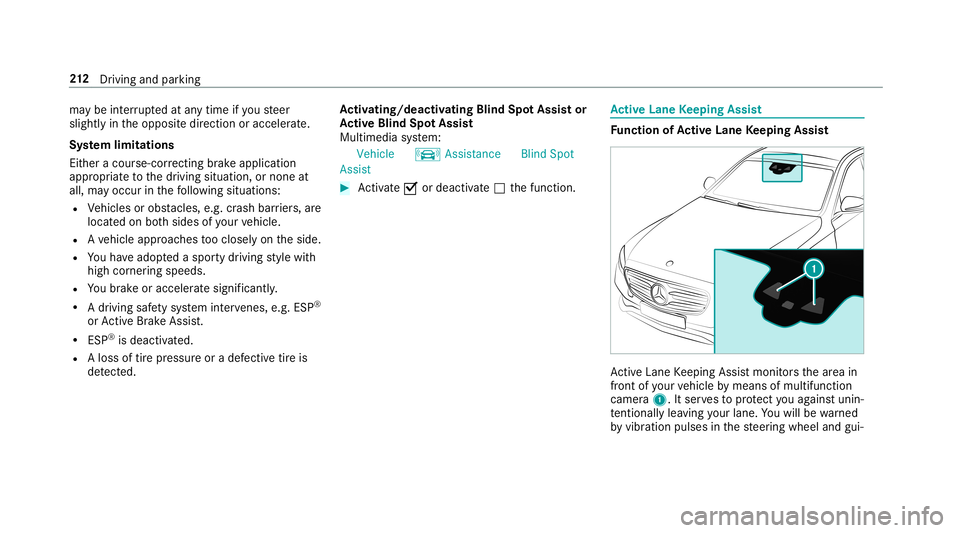
nction ofActiv eLan eKe eping Assist Ac
tiveLa ne Keeping Assistmonit orsth ear ea in
fr ont ofyour vehicle bymeans ofmultifu nction
camer a1. Itser vesto protect youag ains tunin ‐
te ntio nallylea vingyo ur lane .Yo uwill bewarned
by vibr ation pulses inthesteer ing wheel andgui‐ 21
2
Driving and parking
Page 217 of 530
at
ebr ak eapplic ation,e.g .af te rint entional ly
dr iving overa soli dlane marking.
The brak eapp lication canbeinterru pte dat
an ytime ifyo usteer slightl yin theopposit e
dir ect ion. 0007
Alw aysmak esur eth at ther eis suf fi‐
cie ntdist anc eto theside forot her traf‐
fi c or obs tacle s. 000A
WARNIN GRisk ofacci dent despite Lane
Ke eping Assist
Lane Keeping Assistcann otalw aysclear ly
de tect lane mar kings .
In such case s,Lane Keeping Assistcan:
R givean unnec essarywa rning
R notgiv eawa rning 0007
Alw ayspa ypar ticular attention tothe
tr af fic situ ation and keep within the
lane, espec iallyif Ac tiveLa ne Keeping
Assis taler tsyou. Be
sureto obser vethesy stem limit ations of
Ac tiveLa ne Keeping Assist. 0007
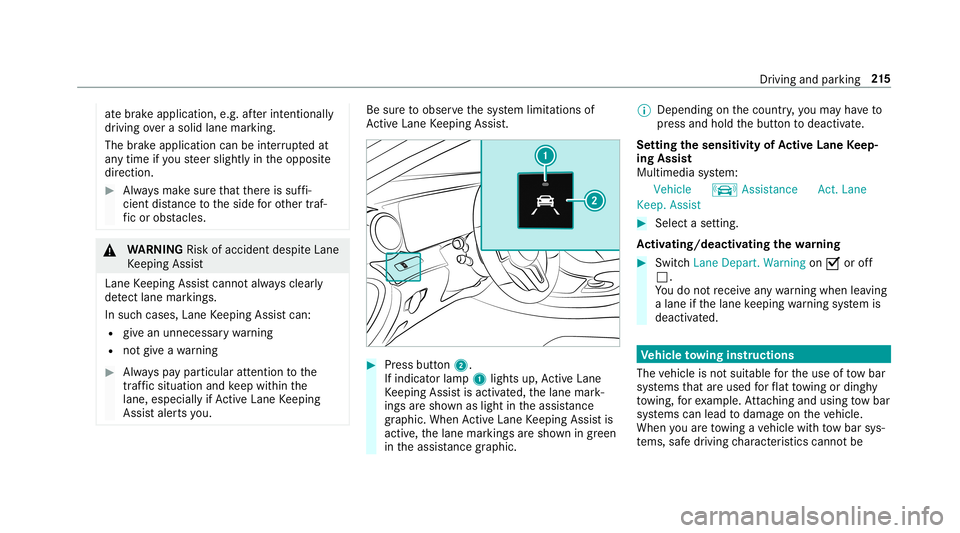
Press butt on2.
If indicat orlam p1 lights up,ActiveLa ne
Ke eping Assistis activ ated, thelane mark‐
ings aresho wnaslight intheassis tance
gr ap hic. Whe nAc tiveLa ne Keeping Assistis
activ e,thelane marking sar esho wningreen
in theassis tance grap hic. 0009
Dep endingonthecount ry,yo uma yha ve to
pr ess and hold thebutt ontodeactiv ate.
Se tting thesensit ivityof Activ eLan eKe ep‐
ing Assis t
Multi media system:
Vehicle kAssist ance Act.Lane
Keep. Assist 0007
Select ase tting.
Ac tiv atin g/deac tivatin gthe warning 0007
Swit chLane Depart. Warning on0073 oroff
0053.
Yo udo notre cei veanywa rning when leaving
a lane ifth elane keeping warning system is
deactiv ated. Ve
hicl eto wing instruct ions
The vehicle isno tsuit able forth euse oftow bar
sy stems that areused forflat towing ording hy
to wing, forex am ple. Attach ing and using tow bar
sy stems canlead todamag eon theve hicle.
When youar eto wing ave hicle withto w bar sys‐
te ms, safedr iving charact eristic scan notbe Dr
ivin gand parking 21
5
Page 222 of 530
0009
Ve
hicl eswithout Activ eDi stance Assist
DI ST RO NIC :pr ess the00E2 buttontocal l
up themenu baroftheon- boar dcom puter. 0007
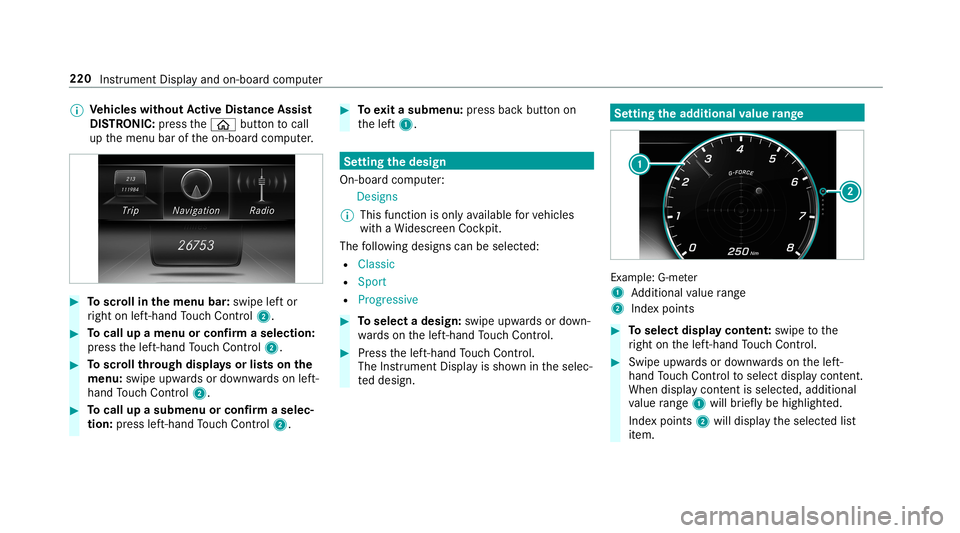
Toscr ollinthemenu bar:swipe leftor
ri ght onleft-h and Touc hCon trol 2. 0007
Tocall upamen uor conf irm aselect ion:
pr ess thelef t-hand Touc hCon trol 2. 0007
Toscr ollthrough displa ysorlists on the
menu :swipe upwards ordown wardson left-
hand Touc hCon trol 2. 0007
Tocall upasub men uor conf irm aselec‐
tion :pr ess left-han dTo uc hCon trol 2. 0007
Toexitasubm enu:press backbutt onon
th elef t1. Se
tting thedesig n
On -bo ardcom puter:
Des igns
0009 This function isonl yav ailable forve hicles
wit haWi descr eenCockpit.
The follo wing design scan beselec ted:
R Classic
R Sport
R Progres sive 0007
Toselect adesign: swipeupwards ordown‐
wa rdson thelef t-hand Touc hCon trol. 0007
Press thelef t-hand Touc hCon trol.
The Instru ment Displa yis sho wnintheselec‐
te ddesign. Se
tting thead dit ional value rang e Ex
am ple: G-me ter
1 Addition alvalue rang e
2 Inde xpo ints 0007
Toselect displaycont ent:swipe tothe
ri ght onthelef t-hand Touc hCon trol. 0007
Swip eupw ards ordown wardson thelef t-
hand Touc hCon trol to select displaycont ent.
When displaycont entisselect ed,additional
va lue rang e1 willbr iefly be high lighted.
Inde xpoint s2 will displa yth eselect edlist
it em. 220
Instrument Displayand on-boar dcom puter
Page 224 of 530
Ad
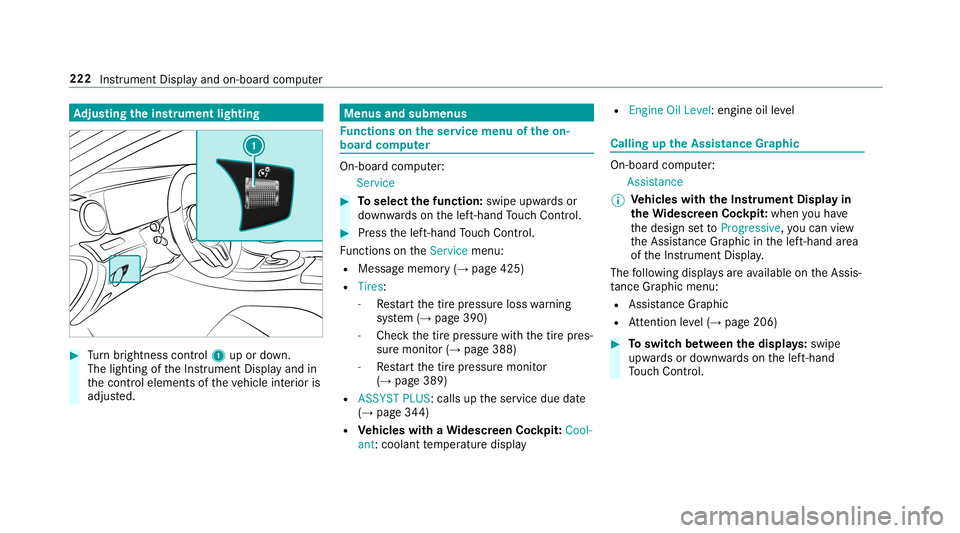
jus tingthe inst ru men tlighti ng 0007
Turn brightn esscontrol 1 upordown.
The lightin gof theIns trument Displayand in
th econ trol element sof theve hicle interior is
adjus ted. Menus
andsubmenu s Fu
nctions ontheser vice menu oftheon-
boar dcom puter On-boar
dcom puter:
Service 0007
Toselect thefun ction: swipeupwards or
do wn wardson thelef t-hand Touc hCon trol. 0007
Press thelef t-hand Touc hCon trol.
Fu nctio nson theServ icemenu:
R Messag ememor y(→ pag e425)
R Tires :
- Restar tth etir epr essur eloss warning
sy stem (→pag e390)
- Chec kth etir epr essur ewit hth etir epr es‐
sur emonit or(→ pag e388)
- Restar tth etir epr essur emonit or
(→ pag e389)
R ASSYST PLUS: callsuptheser vice duedate
(→ pag e34 4)
R Vehicl eswith aWi des cree nCo ckpit: Cool-
ant :cool anttemp eratur edispla y R
Engine OilLevel: engine oilleve l Callin
gup theAssis tance Grap hic On
-bo ardcom puter:
As sist anc e
0009 Ve
hicl eswith theIns trum ent Displa yin
th eWi des cree nCo ckpit: whenyo uha ve
th edesign setto Progressive ,yo ucan view
th eAssis tance Grap hicin thelef t-hand area
of theIns trument Display.
The follo wing displa ysareav ailable ontheAssis‐
ta nce Grap hicmenu :
R Assi stanc eGr aphic
R Attentio nleve l(→ pag e206) 0007
Toswitc hbe tw een thedisp lays :swipe
upw ards ordown wardson thelef t-hand
To uc hCon trol. 222
Instru ment Displa yand on-boar dcom puter
Page 225 of 530
St
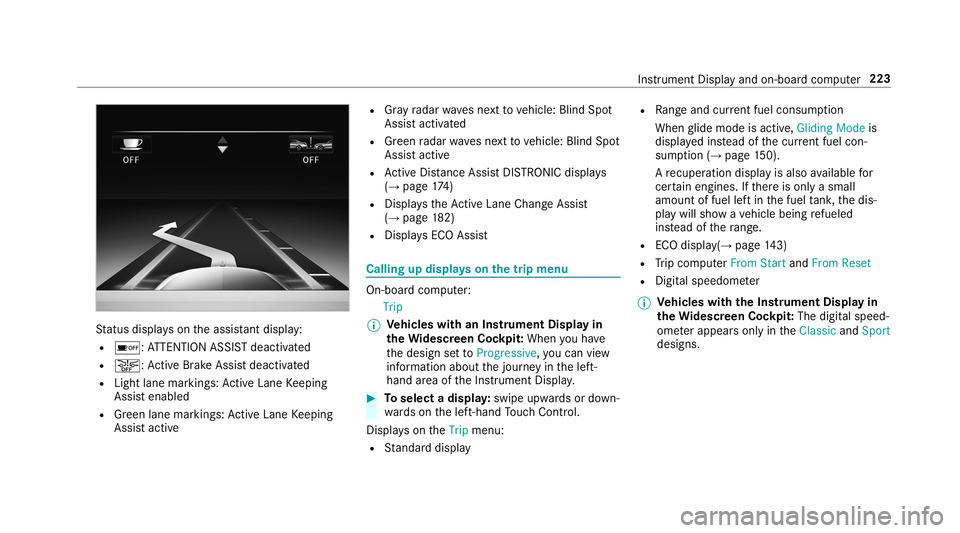
atus displa yson theassis tant displ ay:
R 00D7 :AT TENTION ASSISTdeactiv ated
R 00D4: ActiveBr ak eAssi stdeactiv ated
R Light lanemarkings: ActiveLa ne Keeping
Assis tenabled
R Green lane marking s:Ac tiveLa ne Keeping
Assis tactiv e R
Gray radar wavesne xt to vehicle: BlindSpot
Assis tactiv ated
R Green radar wavesnext to vehicle: BlindSpot
Assis tactiv e
R ActiveDis tance AssistDIS TRONI Cdisp lays
( → pag e17 4)
R Displ aysth eAc tiveLa ne Chang eAssi st
( → pag e18 2)
R Display sECO Assis t Calling
updispla yson thetrip menu On
-bo ardcom puter:
Trip
0009 Ve
hicl eswith anIns trument Displayin
th eWi des cree nCo ckpit: Whe nyo uha ve
th edesign setto Progressive ,yo ucan view
inf ormat ionabout thejour neyin thelef t-
hand area oftheIns trument Display. 0007
Toselect adispla y:swipe upwards ordown‐
wa rdson thelef t-hand Touc hCon trol.
Dis playson theTrip menu:
R Standar ddispla y R
Rangeand current fue lconsu mption
Wh englide mode isact ive, Gliding Modeis
displa yedins tead ofthecur rent fue lcon‐
su mp tion(→ page 150).
A recup erati on displ ayisalso available for
cer tain engin es.Ifth er eis onl ya small
amount offuel leftin thefuel tank ,th edis‐
pla ywill showave hicle being refuel ed
ins tead ofthera ng e.
R ECOdispl ay(→ pag e14 3)
R Trip com puterFro mStart and FromReset
R Digit alspeedom eter
0009 Ve
hicl eswith theIns trum ent Displa yin
th eWi des cree nCo ckpit: The digit alspe ed‐
ome terapp earsonly intheClassic andSport
designs. Ins
trument Displayand on-boar dcom puter 223
Page 232 of 530
Sy
stem limita tions
The visib ilityisinf luenc edbythefo llo wing condi‐
tion s:
R Seat position
R The posit ioningof thedispla yimag e
R Light conditions
R Wetro ads
R Objectson thedispla yco ver
R Polar izat ion insung lasses
0009 Inextreme sunli ght, sectio nsofthedispla y
ma yappear washed out.Youcan correct this
by switc hingtheHead-up Displayof fand on
ag ain. Switc
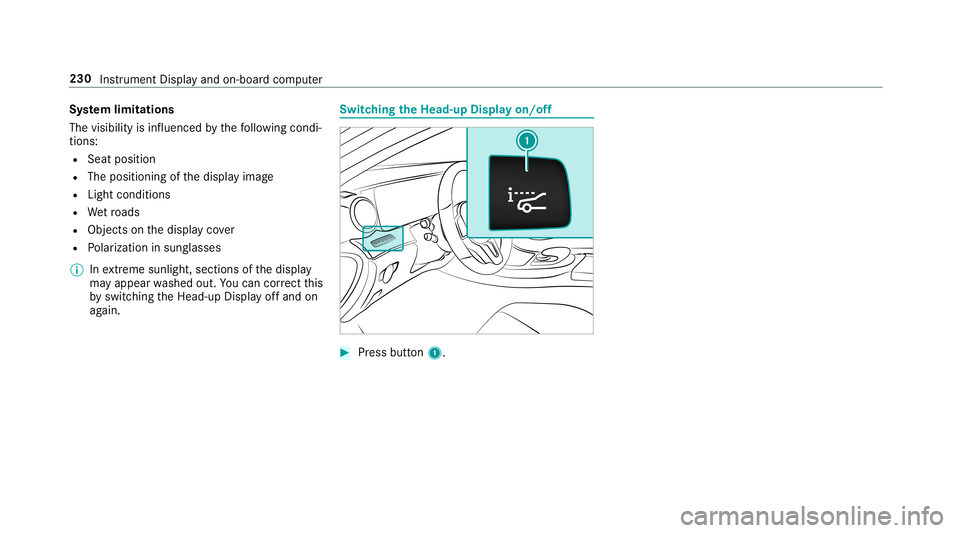
hingtheHead -upDispla yon/of f 0007
Press butt on1. 230
Instru ment Displa yand on-boar dcom puter
Page 245 of 530
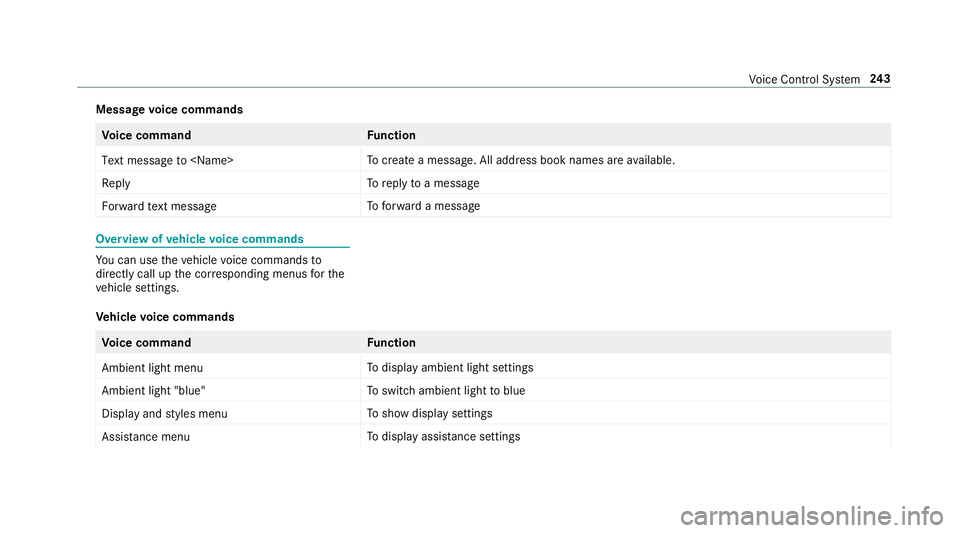
Messag
evo ice comm ands Vo
ice comm and Function
Text message to
crea te ames sage.All addr essbook namesareav ailable.
Reply To
reply toames sage
For ward text mes sage To
forw ardames sage Ov
ervie wof vehicl evo ice comm ands Yo
ucan usetheve hicle voice com mand sto
dir ect lycall upthecor responding menusforth e
ve hicle settin gs.
Ve hicl evo ice comm ands Vo
ice comm and Function
Ambien tlight menu To
displa yambient lightsettings
Ambien tlight "blue" To
switc hambient lighttoblue
Display andstyles menu To
sho wdispla yse ttin gs
Assistance menu To
displa yassis tance settings Vo
ice Cont rolSy stem 24
3
Page 246 of 530
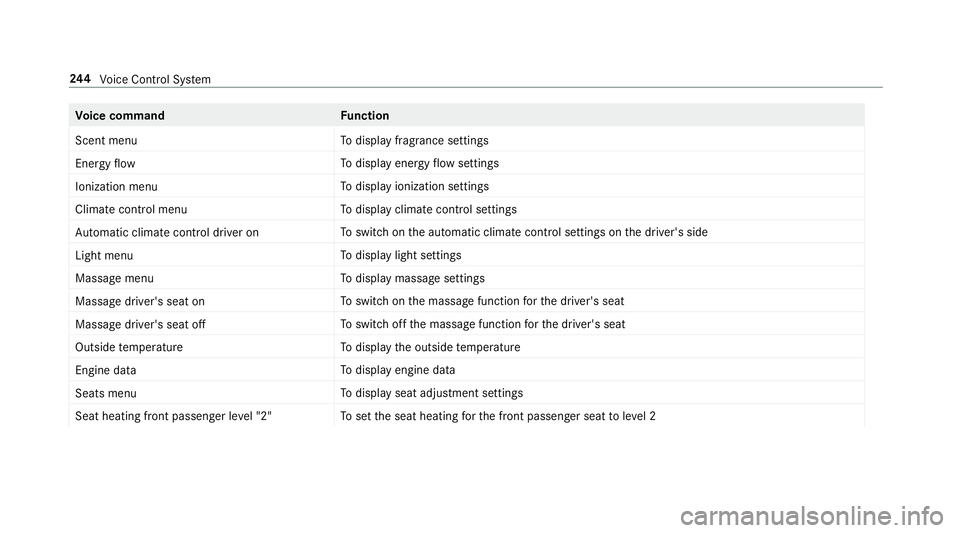
Vo
ice comm and Function
Scen tmenu To
displa yfragr ance settings
En ergy flow To
displa yener gyflow settin gs
Ionization menu To
displa yioniz ation settings
Climate control menu To
displa yclimat econ trol settings
Auto matic climate control driver on To
switc hon theaut omatic climatecon trol settings onthedr iver's side
Light menu To
displa ylight settings
Massage menu To
displa ymassag ese ttings
Massage driver'sseat on To
switc hon themassag efunc tion forth edr iver's seat
Massage driver'sseatoff To
switc hof fth emassag efunc tion forth edr iver's seat
Outside temperature To
displa yth eoutside temp eratur e
En gine data To
displa yengin edat a
Seats menu To
displa yseat adjus tmentse ttings
Seat heating frontpassenger level"2" To
setth eseat heating forth efront passeng erseat toleve l2 24
4
Voice Cont rolSy stem
Page 257 of 530
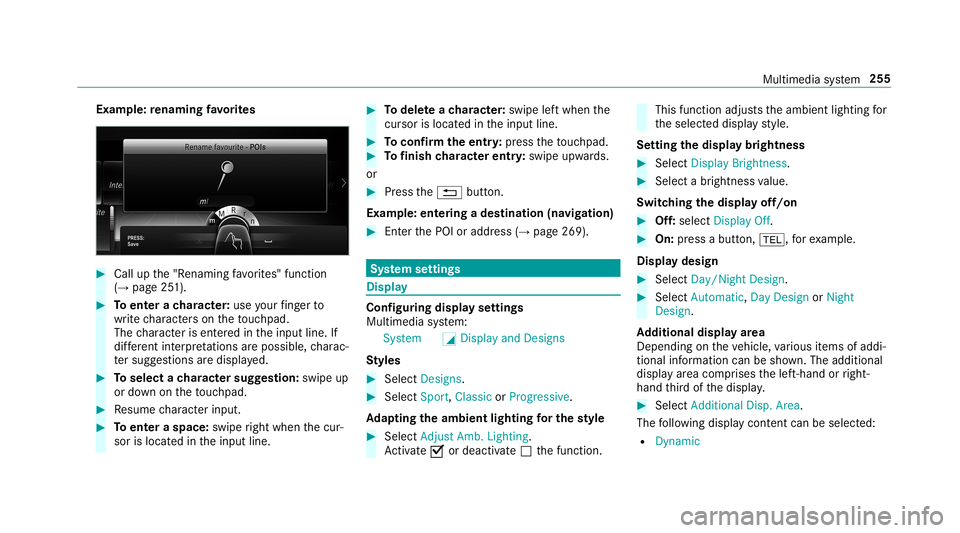
Ex
am ple: renaming favo rite s 0007
Call upthe"R enaming favo rite s" function
(→ pag e25 1). 0007
Toent erach aract er:use your fing er to
wr ite ch aract erson theto uc hpad.
The charact erisent ered intheinput line. If
dif fere nt interpr etatio nsareposs ible, charac‐
te rsugg estions aredisp laye d. 0007
Toselect ach aract ersugg estion :swi peup
or down ontheto uc hpad. 0007
Resume charact erinput. 0007
Toent eraspa ce:swipe right when thecur‐
sor islocat edintheinput line. 0007
Todel eteach aract er:swi peleftwhe nth e
cur sor isloca tedin theinput line. 0007
Toconf irm theentr y:press theto uc hpad. 0007
Tofinish charact erentr y:swipe upwards.
or 0007
Press the0038 button.
Ex am ple: entering ades tinat ion(navigation) 0007
Enterth ePOI oraddr ess(→pag e269). Sy
stem settings Displa
y Conf
iguringdisp layse ttings
Multi media system:
System 0043Display andDesign s
St yles 0007
Sele ctDes igns. 0007
Sele ctSpo rt,Classic orProg ressive.
Ad apting theam bient lightingforthe style 0007
Select Adju stAmb. Lighting .
Ac tivate0073 ordeacti vate 0053 thefunc tion. This
function adjus tstheambient lightingfor
th eselect eddispla yst yle.
Se tting thedisp laybr ight ness 0007
Sele ctDis play Bright ness. 0007
Sele ctabr ight nessva lue.
Switc hingthedisp layof f/on 0007
Off:selec tDis play Off. 0007
On: press abutt on,002B, forex am ple.
Displ aydes ign 0007
Select Day /Nig htDesi gn. 0007
Select Autom atic,Day DesignorNig ht
Desi gn.
Ad diti onaldispl ayarea
Dependi ngon theve hicle, various items ofaddi‐
tional information canbesho wn. The additional
displa yar ea com prises thelef t-hand orright-
hand third of thedispla y. 0007
Select Addi tiona lDisp .Area .
The follo wing displa ycon tent can beselect ed:
R Dyna mic Mu
ltimed iasystem 255
Page 258 of 530

R
Naviga tionMap
R Consumptio n
R Time andDate Ti
me and date Se
tting thetim eand date aut omatic ally
Mul timedi asy stem:
System &TimeandDate 0007
Deact ivat e0053 Manual TimeAdjustmen t.
The time anddatear ese taut omaticall yfo r
th eselect edtime zoneand summer time
op tion .
0009 The correct time isrequ ired forth efo llo wing
func tions:
R Routeguidan cewithtim e-depen dent
traf fic gu idance .
R Calcu lation ofexpect edtime ofarriva l. Se
tting thetim ezone
Multi media system:
System &TimeandDate Time
Zone:
The listof count ries isdispla yed. 0007
Select acount ry003B.
Dep endingonthecount ry,time zonesare
displa yed. 0007
Select atime zone.
The time zonese tis displa yedaf te rTime
Zone:.
Se tting summer time
The Automatic Daylight Saving TimeandDay-
lig ht Saving Timeoptions canno tbe sele cted in
all countr ies.
Mul timedi asy stem:
System &TimeandDate
Au tomatic ally 0007
Swi tchAuto matic Day light Saving Time on
0073 oroff0053. Man
ually 0007
Dea ctivate0053 Auto matic Day light Saving
Ti me. 0007
Select Day light Saving Time. 0007
Select OnorOff.
Se ttin gthe time anddatefo rm at
Mul timedi asy stem:
System &TimeandDate SetFor-
mat 0007
Setth edat eand time form at003B.
Se tting thetim ema nua lly
Re quirement s:
R The Manual TimeAdjustm entfunc tion is
switc hedon.
Multime diasystem:
System &TimeandDate SetTime 0007
Setth ehour s. 0007
Navig ateto theright tosetth eminut es. 0007
Setth eminut es. 0007
Conf irm chang eswhen exitin gth emenu. 256
Multimedia system