ECU MERCEDES-BENZ E-CLASS CABRIOLET 2019 Manual Online
[x] Cancel search | Manufacturer: MERCEDES-BENZ, Model Year: 2019, Model line: E-CLASS CABRIOLET, Model: MERCEDES-BENZ E-CLASS CABRIOLET 2019Pages: 530, PDF Size: 44.1 MB
Page 296 of 530
0007
Onlyoper ateth is eq uipmen twhen the
tr af fic situ ation per mits. 0007
Ifyo ucan notbe sur eof this, stop the
ve hicle whilstpa ying attention toroad
and traffic condi tions andoperate the
eq uipment withth eve hicle statio nary. 000A
WARNIN GRisk ofdist ra ction from oper‐
ati ng mob ile commu nication equipme nt
whi letheve hicle isin mo tion
If yo uoper atemob ilecomm unic ationeq uip‐
men twhen drivin g,youwill bedistract ed
fr om thetra ffic situat ion.This could also
cause youto lose control of theve hicle. 0007
Onlyoper ateth is eq uipmen twhen the
ve hicle isstatio nary. Yo
umus tobse rveth eleg alrequ iremen tsforth e
cou ntryin whi chyouar ecur rentl ydr ivi ng when
op erati ng mob ile comm unicati onequip ment in
th eve hicle.
Fu rther information canbeobt ained from an
aut hor ized Mercedes-Ben zCent eror at:http: //
www .mercedes-benz .com/connect. 29
4
Multimedia system
Page 297 of 530
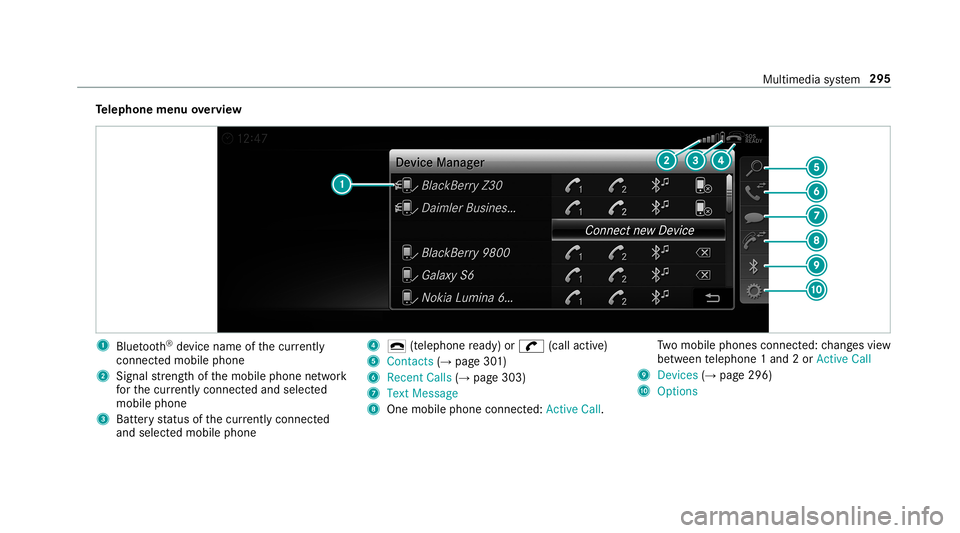
Te
lephone menuoverview 1
Blue tooth®
de vice name ofthecur rently
conne cted mob ile pho ne
2 Signal stre ngt hof themobile phonenetwork
fo rth ecur rently conne cted and select ed
mob ile pho ne
3 Batt eryst atus ofthecur rently conne cted
and select edmob ile pho ne 4
0071 (tel ep hone ready) or0097 (callactive)
5 Con tacts(→ pag e30 1)
6 Rece ntCalls (→pag e30 3)
7 TextMess age
8 Onemobi lephon econ nected: Ac tive Call. Tw
omobile phones connected: chang esview
be tween telephon e1 and 2or ActiveCall
9 Devices (→pag e296)
A Options Multim
ediasystem 295
Page 299 of 530
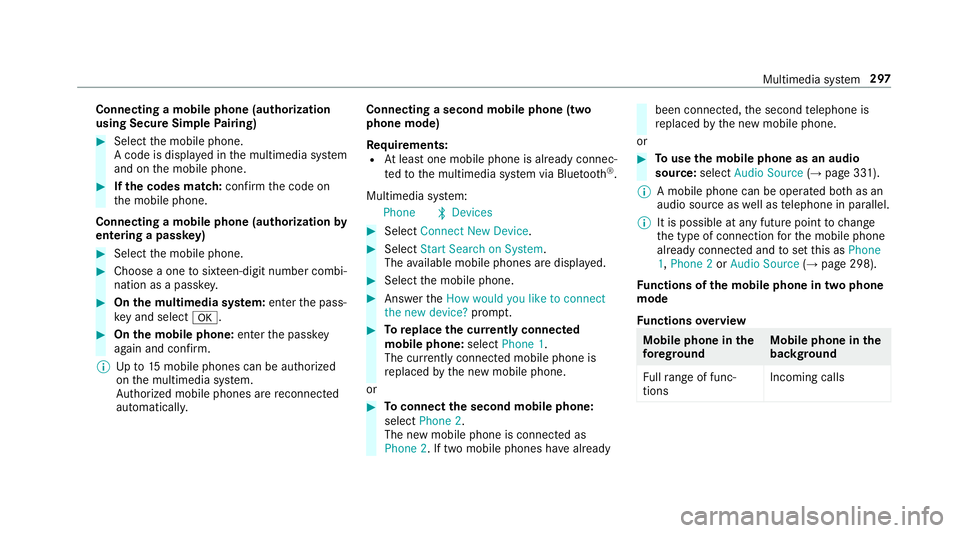
Connect
ingamob ilephone (authoriza tion
using SecureSim plePairing) 0007
Selec tth emobile phone.
A code isdispla yedin themultimedia system
and onthemobile phone. 0007
Ifth ecodes match: con firm thecode on
th emobile phone.
Connecting amobile phone(authorizat ion by
ent ering apa ssk ey) 0007
Select themobile phone. 0007
Choose aone tosixt een-digit numbercombi‐
nation asapassk ey. 0007
On themu ltim edia system: enterthepass‐
ke yand select0076. 0007
On themobil eph one: enterthepassk ey
ag ain and confirm .
0009 Upto15 mobil ephones canbeauthor ized
on themultimedia system.
Au thor ized mobile phones arere connect ed
au tomatical ly. Connect
ingasecond mobilephone (two
ph one mod e)
Re quirement s:
R Atleas tone mobile phoneis alr eady connec‐
te dto themultimedia system viaBlue tooth®
.
Multimedia system:
Phone 00A5Devic es 0007
Select Connec tNew Devic e. 0007
Select Start Search onSystem.
The available mobilephon esaredispla yed. 0007
Select themobile phone. 0007
Answ ertheHow would youliketocon nect
the new device? prom pt. 0007
Toreplac ethe currentl yconnect ed
mobile phone:selectPhone 1.
The currentl yconne cted mob ile pho neis
re placed bythene wmobile phone.
or 0007
Toconnect thesecond mobileph one:
selec tPhon e2.
The newmobile phoneis con nectedas
Phone 2.Iftw omobile phones have already been
connected, thesecon dte lephon eis
re placed bythene wmobile phone.
or 0007
Touse themobil eph one asan aud io
sour ce:selec tAudio Source(→ pag e33 1).
0009 Amobile phonecan beoperat edboth as an
audio sourceaswellas telephon ein par allel.
0009 Itis possible atanyfutur epoint tochang e
th etype ofcon nect ionforth emobile phone
alr eady connect edand tosetth is as Phon e
1, Phon e2 or Audio Source(→ pag e298) .
Fu nctions ofthemobil eph one intw oph one
mod e
Fu nctions overview Mobile
phoneinthe
fo re gr ound Mobile
phone inthe
bac kground
Fu llra ng eof func ‐
tio ns Incom
ingcalls Mu
ltimed iasystem 29
7
Page 300 of 530
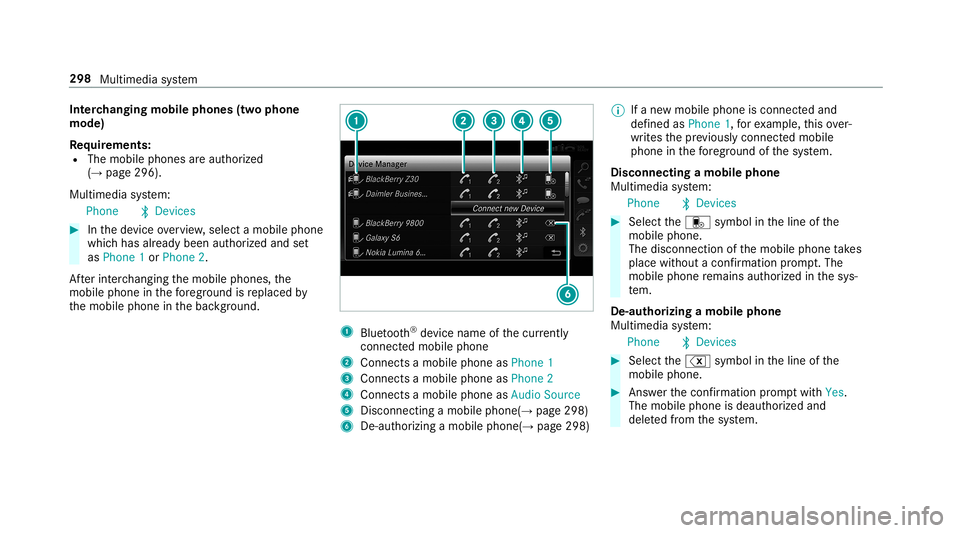
Int
erch angi ngmobi lephone s(tw ophone
mode)
Re quirement s:
R The mobile phonesareaut hor ized
(→ pag e296) .
Multime diasystem:
Phone 00A5Devic es 0007
Inthede vice overview, select amobile phone
whic hhas already been author ized andset
as Phone 1or Phone 2.
Af terint erch ang ingthemobile phones, the
mobil ephone inthefo re grou nd isreplaced by
th emobile phoneinthebac kground. 1
Blue tooth®
de vice name ofthecur rently
conne cted mob ile pho ne
2 Connects amob ile pho neasPho ne1
3 Connects amob ile pho neasPho ne2
4 Connects amob ile pho neasAud ioSou rce
5 Disc onnec tingamob ile pho ne(→ page 298)
6 De-au thor izing amobile phone(→pag e298) 0009
Ifane wmobile phoneisconn ectedand
def ined asPhone 1,forex am ple, this ov er‐
wr ites thepr ev iousl ycon nectedmobile
phone inthefo re grou nd ofthesy stem.
Disconnec tingamobile phone
Multimedia system:
Phone 00A5Devic es 0007
Select thei symbol intheline ofthe
mobil ephone.
The disconnection ofthemobile phonetake s
place without acon firm atio npr om pt.The
mob ile pho neremains author ized inthesy s‐
te m.
De -aut horizing amobil ephone
Mul timedi asy stem:
Phone 00A5Devic es 0007
Select the% symbol intheline ofthe
mobil ephone. 0007
Answ erthecon firm atio npr om ptwit hYes.
The mobile phoneis deaut horized and
dele tedfrom thesy stem. 298
Multimedia system
Page 308 of 530
0009
The service prov ider isresponsible forth ese
apps andtheser vices andcontent conne c‐
te dto it.
Connecting Mercedes-B enzLink withth e
mu ltim edia system 0007
Conn ecttheMer cedes- BenzLinkcontrol bo x
wit hth e00C2 USBportof themultimedia
con nect ionunit using asuit able connect ing
cable.
0009 Asuit able connect ingcable isavailable sep‐
ar atelyat an aut hor izedMer cedes-Ben zCen‐
te r.
Using Mercedes-Benz Link
Re quirement s:
R The Mercedes- BenzLink control bo xis con ‐
nec tedwit hth emultimedia system using the
00C2 USBport.
Multimedi asy stem:
Connec t 0007
Select Mercedes- BenzLink. 0007
Select MBLink.
The mobile phonefunctionsand apps are
av ailable andshownonthemedia display.
Yo ucan find mor einf orma tionin theMer cedes-
Benz Linkcontrol bo xoper ating instruction s.
Ending Mercedes-Benz Link
Multimedia system:
Connec tMercedes- BenzLink 0007
Select Disconnect.
The connect ionisended.
The mobile phonecontinues tobe supplied
wit helect ricity .
or 0007
Disco nnect thecon nect ingcable between
th eMer cedes- BenzLinkcontrol bo xand the
multime diasystem.
0009 Mer cedes- Benzrecomme ndsdisconnecti ng
th econ nect ingcable onlywhen theve hicle
is statio nary. App
leCar Play™ Ov
ervie wof App leCar Play™ 000A
WARNIN GRisk ofdist ra ction from infor‐
mati onsystems andcomm unication s
eq uipment
If yo uoper ateinf ormat ionand comm unic a‐
tio neq uipme ntintegratedin theve hicle
when driving, youwill bedistract ed from the
tr af fic situ ation. Thiscou ldalso cau seyouto
lose control of theve hicle. 0007
Onlyoper ateth is eq uipmen twhen the
tr af fic situ ation per mits. 0007
Ifyo ucan notbe sur eof this, stop the
ve hicle whilstpa ying attention toroad
and traffic condi tions andoperate the
eq uipment withth eve hicle statio nary. Yo
umus tobse rveth eleg alrequ iremen tsforth e
cou ntryin whi chyouar ecur rentl ydr ivi ng when
op erati ng themultimedia system.
iPhone ®
func tionscan beused viathemultime‐
dia system using Apple CarPla y™.Theyar eoper‐
at ed using thecent ralcon trol elemen tor the 306
Multimedia system
Page 310 of 530
Endin
gApp leCar Play™
Mult imedia system:
Connec tAppleCarPlay 0007
Select Disconnect.
The connection isended.
The mobile phonecontinues tobe supplied
wit helect ricity .
or 0007
Disco nnect thecon nect ingcable between
th emobile phoneandmultimedia system.
Mer cedes- Benzrecomme ndsdisconnecti ng
th econ nect ingcable onlywhen theve hicle is
st atio nary. Andr
oidAuto Andr
oidAutoove rview 000A
WARNIN GRisk ofdist ra ction from infor‐
mati onsystems andcomm unication s
eq uipment
If yo uoper ateinf ormat ionand comm unic a‐
tio neq uipme ntintegratedin theve hicle when
driving, youwill bedistract ed from the
tr af fic situ ation. Thiscou ldalso cau seyouto
lose control of theve hicle. 0007
Onlyoper ateth is eq uipmen twhen the
tr af fic situ ation per mits. 0007
Ifyo ucan notbe sur eof this, stop the
ve hicle whilstpa ying attention toroad
and traffic condi tions andoperate the
eq uipment withth eve hicle statio nary. Yo
umus tobse rveth eleg alrequ iremen tsforth e
cou ntryin whi chyouar ecur rentl ydr ivi ng when
op erati ng themultimedia system.
Mobile phonefunctionscan beused with
An droid Autousin gth eAn droid oper ating sys‐
te m on themultimedia system. Itis oper ated
using thecent ralcon trol elemen tor thevo ice
con trol. Youcan activat eth evo ice- opera tedcon ‐
tr ol system bypressing andholding the00E3
butt onon themultifunc tionsteer ing wheel.
When usingAndroid Autovia thevo ice- opera ted
contr olsystem, themultimedia system can still
be opera tedvia theVo ice Cont rolSy stem
(→ pag e23 1). Onl
yone mobile phoneatatime canbecon nec‐
te dvia Android Autoto themultimedia system.
The availabilit yof An droid Autoand Android Auto
App sma yva ry acc ordin gto thecount ry.
The service prov ider isresponsible forth is appli‐
cat ion and theser vices andcontent conne cted
to it.
Inf orma tion onAndr oidAuto
While usingAndroid Auto,va rious funct ionsof
th emultimedia system, forex am ple themedia
sour ceBlue tooth®
audio, areno tav ailable.
On lyone routeguidan cecan beact ive at atim e.
If ro uteguidan ceisact ive on themultimedia sys‐
te m, itis closed whenrouteguidan ceisstar ted
on themobile phone.
Connecting amobile phoneviaAndr oidAuto
Re quirement s:
R The firs tacti vatio nof Andr oid Au toon the
multime diasystem mus tbe car ried out when
th eve hicle isstatio naryfo rsaf etyre ason s.
R The mobi lephon esuppo rts Andr oidAuto
fr om Andr oid5.0. 308
Multimedi asy stem
Page 312 of 530
The
follo wing system information istra nsmit ted:
R Softwarere lease ofthemultimedia system
R System ID(anon ymized)
The transf erofthis dat ais used tooptimize com‐
munication between theve hicle andthemobile
phone.
To do this, and toassig nse veralve hicles tothe
mobil ephone, ave hicle identif ierisrando mly
ge ner ated .
Thi sha sno conne ctionto theve hicle identif ica‐
tion number (VIN)andisdele tedwhen themulti‐
media system isrese t(→ pag e265).
The follo wing drivin gst atus datais transm itted:
R Trans miss ionposit ionengaged
R Distinction between parking,stands till,ro ll‐
ing and drivin g
R Day/n ight mode oftheins trument cluster
The transf erofthis dat ais used toalter how
con tent isdispl ayed tocor respond tothedr iving
situation . The
follo wing positiondatais transm itted:
R Coor dinat es
R Speed
R Com pass direct ion
R Accel erati on dire ction
Thi sda ta isonl ytransf erredwhile thena vig ation
sy stem isactiv ein order toimprove it(e.g. soit
can continue func tioningwhen inatun nel). Mer
cedes meconnect No
teson Mer cedes meconnect
Mer cedes meconn ectprov ides thefo llo wing
ser vice s:
R Accid ent and brea kdo wnmana gement (me
butt on)
R Concierg eSer vice (whe nth eser vice isacti‐
va ted), appointm entrequ ests or similar (me
butt on)
R Mer cedes- Benzemergency callsy stem (aut o‐
matic emergency callor SOS button) The
Mercede s-BenzCustomer Centerand the
Mer cedes-Ben zemer gency callcent erareav aila‐
ble foryo uar oun dth ecloc k.
The mebutt onand theSOS buttoncan befound
on theve hicle's overhead control panel
(→ pag e31 1).
Yo ucan also calltheMer cedes- BenzCustomer
Cent erusi ng themultimedia system
(→ pag e31 1).
Pl eas eno te that Mer cedesme connectis a
Mer cedes-Ben zser vice.In emer gencie s,alwa ys
cal lth enation alemer gency service sfirs tus ing
th est andar dnat ionalemer gency service phone
num bers.In eme rgencies, youcan also usethe
Mer cedes-Ben zemer gency callsy stem
(→ pag e31 3).
Ob serveth econ ditions ofuse forMer cedes me
connect andother services. These canbe
obt ained intheMer cedes meportal:htt ps:/ /
me. secur e.mercedes -benz.com 31
0
Multimedia system
Page 314 of 530
Yo
ucan find informa tionon thefo llo wing topics:
R Activati on ofMe rcedes meconnect
R Oper ating theve hicle
R Near estaut hor ized Mercedes-Ben zCent er
R Other products andservices from Mer cedes-
Benz
Dat ais transf erreddur ing thecon nect iontothe
Mer cedes-Ben zCus tomer Cent er(→ pag e31 2).
Inf ormation onMer cedes meconne ctacc i‐
dent manag ement
The Mercedes meconnect accidentmanag e‐
ment isan extensi on oftheMer cedes- Benz
emer gency callsy stem (→pag e31 3).
An emerg encycallismade totheMer cedes-
Benz emergency callcent erafte ran accide nt:
R Avo ice con nection ismade toacon tact per ‐
son attheMer cedes- Benzemergency call
cent er.
R Ifnece ssary,th econ tact per son atthe
Mer cedes-Ben zemer gency callcent erfor‐
wa rdsth ecall toMer cedes meconn ectacci‐
dent manag ement. Fo
rw ardin gth ecall isno tpossible inall
count ries.
R Ifneces sary,theve hicle willbetowe dto an
aut hor izedMer cedes-Ben zCent er.
Ar ranging aser vice appointment via
Mer cedes meconnect
If yo uha ve act ivat ed themaint enanc emanag e‐
ment service, releva nt vehicle datais transf erred
aut omat icallyto theMer cedes- BenzCustomer
Cent er.Yo uwill then recei veindiv idual recom‐
mend ations rega rding themaint enanc eof your
ve hicle.
Re gardless ofwhe ther youha ve conse nted to
th emaint enanc emanag ement service, themulti‐
media system reminds youaf te ra cer tain
amount oftim eth at aser viceis due. Apr om pt
appear sask ing ifyo uwo uld liketo mak ean
app ointment. 0007
Toarra ng easer vice appointment :select
Call .
Af teryo ur agr eem entth eve hicle datais sent
and aMer cedes-Ben zCus tomer Cent er
em ployeedeals withyo ur appoin tment.The inf
ormat ionisthen sent toyour desir ed
ser viceout let.
This serviceout letwill then con tact you
wit hin 24hour s.
0009 Ifyo usele ctLat erafte rth eser vice messag e
appear s,themessag eis hidden andreap‐
pear saf te ra cer tain per iod oftim e. Tr
ansf erre ddata during ase rvice call Obser
vethecon ditions ofuse forMer cedes me
connect andother services. These canbe
obt ained intheMer cedes meportal:htt ps:/ /
me. secur e.mercedes -benz.com
When youmak easer vicecall viaMer cedesme
co nn ect ,dat awill betransm itted.
The follo wing datais transmit tedifaser vice call
is made viaMer cedes meconnect:
R Vehicle identif ication number
R Reason forth einitiat ionofthecall 31
2
Multimedia system
Page 317 of 530
Endin
gan unin tentional emergency call 0007
Select 0076onthemultifunc tionsteer ing
wheel. Depressbutt onforse veralseco nds.
Data transf eroftheMer cedes- Benzemer‐
ge ncy callsystem
In theeve ntofan automatic ormanua lemer‐
ge ncy callth efo llo wing datais transmit ted, for
ex am ple:
R Vehicle's GPSposition data
R GPS position dataon thero ute(a few
300 feet (hundr edmeters)bef oreth einci‐
dent )
R Direct ion oftra vel
R Vehicle identif ication number
R Vehicle drive type
R Number ofpeop lede term ined tobe inthe
ve hicle
R Whe ther Mer cedes meconnect isavailable
or not
R Whe ther theemer gency callwa sinitiat ed
manually oraut omatically
R Time oftheacciden t R
Languag ese tting onthemultimedia system
Dat atra nsmit tedis vehicle information. Foran y
qu estion sabout thecollect ion,useand shar ing
of theeCall system data,please contact MBU‐
SA 'sCus tomer Assis tance Center at800-F OR-
MER C.
Fo rCa nada ,plea secont actMBC's Customer
Assis tance Center at1-800-38 7-000.
Cu stomer requ ests forco veredinf ormation
should besubmitt edvia thesame chann els.
Fo raccide ntclar ificatio npur poses ,th efo llo wing
measur escan betake nup toan hour afte rth e
emer gency callha sbe en initia ted:
R The current vehicle position canbecalled up
R Avo ice con nection totheve hicle occupants
can beestab lished Online
andInterne tfunct ions Int
erne tconnection Inf
orma tion onconnecting totheInt erne t 000A
WARNIN GRisk ofdist ra ction from infor‐
mati onsystems andcomm unication s
eq uipment
If yo uoper ateinf ormat ionand comm unic a‐
tio neq uipme ntintegratedin theve hicle
when driving, youwill bedistract ed from the
tr af fic situ ation. Thiscou ldalso cau seyouto
lose control of theve hicle. 0007
Onlyoper ateth is eq uipmen twhen the
tr af fic situ ation per mits. 0007
Ifyo ucan notbe sur eof this, stop the
ve hicle whilstpa ying attention toroad
and traffic condi tions andoperate the
eq uipment withth eve hicle statio nary. Yo
umus tobse rveth eleg alrequ iremen tsforth e
cou ntryin whi chyouar ecur rentl ydr ivi ng when
op erati ng themultimedia system. Multimedia
system 31
5
Page 318 of 530
000A
WARNIN GRisk ofdist ra ction from oper‐
ati ng mob ile commu nication equipme nt
whi letheve hicle isin mo tion
If yo uoper atemob ilecomm unic ationeq uip‐
men twhen drivin g,youwill bedistract ed
fr om thetra ffic situat ion.This could also
cause youto lose control of theve hicle. 0007
Onlyoper ateth is eq uipmen twhen the
ve hicle isstatio nary. Yo
umus tobse rveth eleg alrequ iremen tsforth e
cou ntryin whi chyouar ecur rentl ydr ivi ng when
op erati ng mob ile comm unicati onequip ment in
th eve hicle.
The Interne tfunct ionscanonlybe used toalimi‐
te ddeg reewhils tdr iving.
Fu nction ofthecomm unicationmodule
On vehicles withabuilt-in communication mod‐
ule, theInt erne tcon nect ionises tablished viaan
int egratedSIM card. To
use Inte rn et acc ess viathecomm unication
module thefo llo wing condition smus tbe met:
R The vehicle iseq uipped withaper manent ly
ins talled com munic ationmodule.
R Mer cedes meconnectis act ive and ready for
oper ation.
R Mer cedes meconn ectisactiv ated forInt er‐
ne taccess.
R Cou ntrydepe ndent :dat avo lume via
Mer cedes meconnectis available.
If th edat avo lume limitisreac hed, theav ailabil‐
ity ofMer cedesme connectser vices islimit ed.
The datavo lume mustbe pur chased via
Mer cedesme connect.
0009 Con tact an author ized Mercedes-B enzCen‐
te rto find outwh ether itis possible topur‐
ch ase datavo lume inyour count ry.
Es tablish inganInterne tconnect ion
Mult imedia system:
Connec t 0007
Forex am ple, selec tz Browser . 0009
The mult imed iasystem usually establishes
th eInt erne tcon nect ionautomatic ally.Ifth e
multime diasystem isno tcon nect edtothe
Int erne t,th eInt erne tcon nect ionises tab‐
lished whenanInterne tapplication isused.
0009 The availabilit yof we bbr ows ersis count ry-
dependen t. Connection
status Co
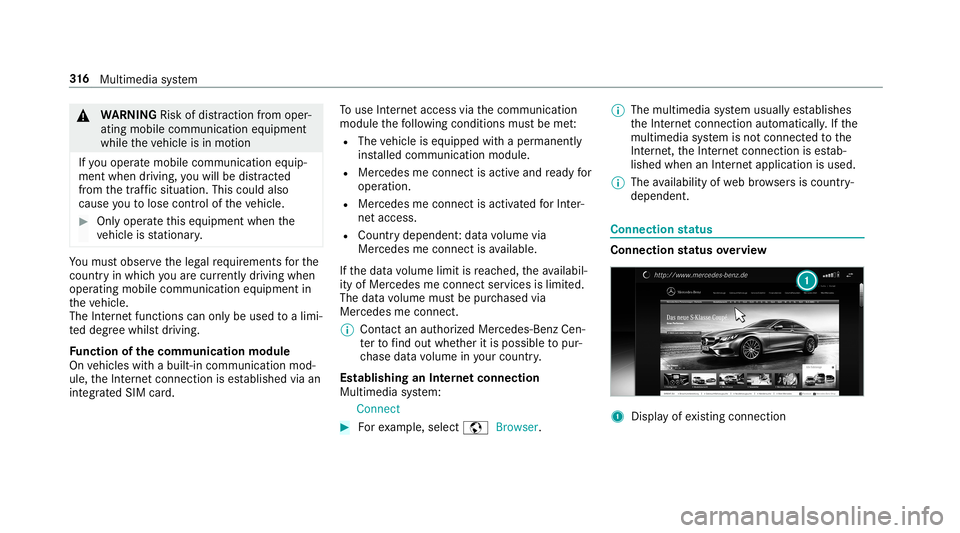
nne ctio nst atus overview 1
Displa yof existin gcon nection 31
6
Multimedia system