ignition MERCEDES-BENZ E-CLASS CABRIOLET 2020 User Guide
[x] Cancel search | Manufacturer: MERCEDES-BENZ, Model Year: 2020, Model line: E-CLASS CABRIOLET, Model: MERCEDES-BENZ E-CLASS CABRIOLET 2020Pages: 469, PDF Size: 8.47 MB
Page 91 of 469
Fo
llow the instructions in reve rse order to
re mo vethefo lding draught stop. Problems with
the soft top The so
fttop will not open or close.
Po ssible causes:
R The ignition is not switched on. #
Make sure that the ignition is switched on.
R The brake pedal is not depressed with the
ve hicle stationar y. #
Dep ress the brake pedal.
R The boot separator is not closed. #
Remo ve ov erhanging luggage and close the
boot separator.
R The boot lid is open. #
Close the boot lid (/ page 80).
R The soft top has been opened and closed
se veral times in a row. The soft top drive has
been switched off automatically and will be av
ailable again af ter appro ximately ten
minutes. #
Repeat the opening or closing procedure
af te r appro ximately ten minu tes.
R You are driving at a speed greaterth an
60 km/h. #
Reduce your speed tobelow 60 km/h.
R The soft top mechanical components or con‐
trol sy stem are defective. #
Consult a qualified specialist workshop. Side windo
ws Opening and closing
the side windo ws &
WARNING Risk of becoming trapped
when opening a side window
When you open a side wind ow, parts of the
body could be dr awn in or become trapped
between the side window and window frame. #
When opening, make sure that nobody
is touching the side windo w. #
If someone is trapped, release the but‐
to n immedia tely or pull it in order to
close the side window again. &
WARNING Risk of becoming trapped
when closing a side window
When closing a side windo w,body parts
could be trapped in the closing area in the
process. #
When closing, make sure that no body
parts are in the closing area. #
If someone is trapped, release the but‐
to n immedia tely or press the button in
order toreopen the side windo w. &
WARNING Risk of becoming trapped
when children opera tethe side windo ws
Children could become trapped if they oper‐
ate the side windo ws, particularly when unat‐
te nded. #
Activate thech ild saf ety lock forthe
re ar side wind ows. 88
Opening and closing
Page 92 of 469
#
When leaving theve hicle, alw aysta ke
th eke y with you and lock theve hicle. #
Never lea vechildren unat tended in the
ve hicle. Re
quirements:
R The po wer supply or the ignition is switched
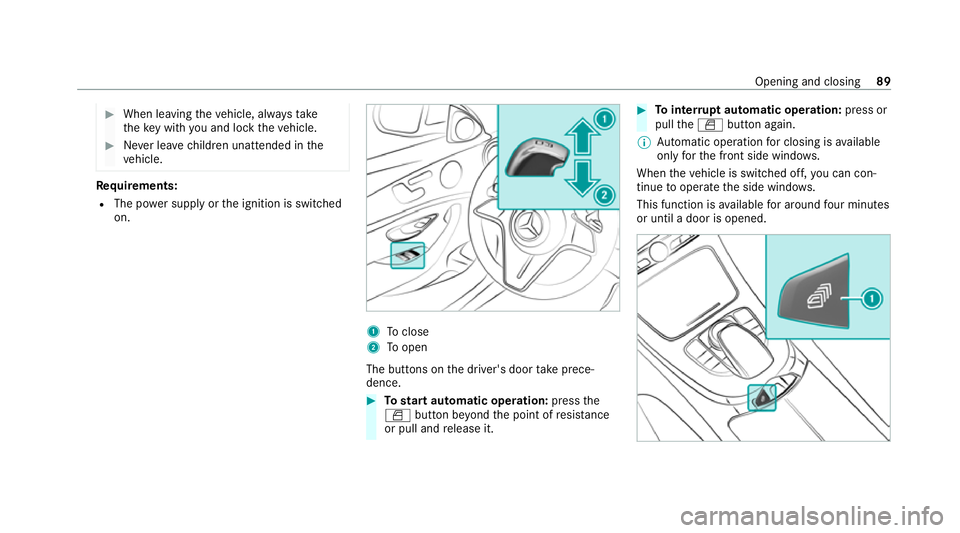
on. 1
Toclose
2 Toopen
The buttons on the driver's door take prece‐
dence. #
Tostart automatic operation: pressthe
W button be yond the point of resis tance
or pull and release it. #
Tointer rupt automatic operation: press or
pull theW button again.
% Automatic operation for closing is available
on lyforth e front side windo ws.
When theve hicle is switched off, you can con‐
tinue tooperate the side windo ws.
This function is available for around four minutes
or until a door is opened. Opening and closing
89
Page 93 of 469
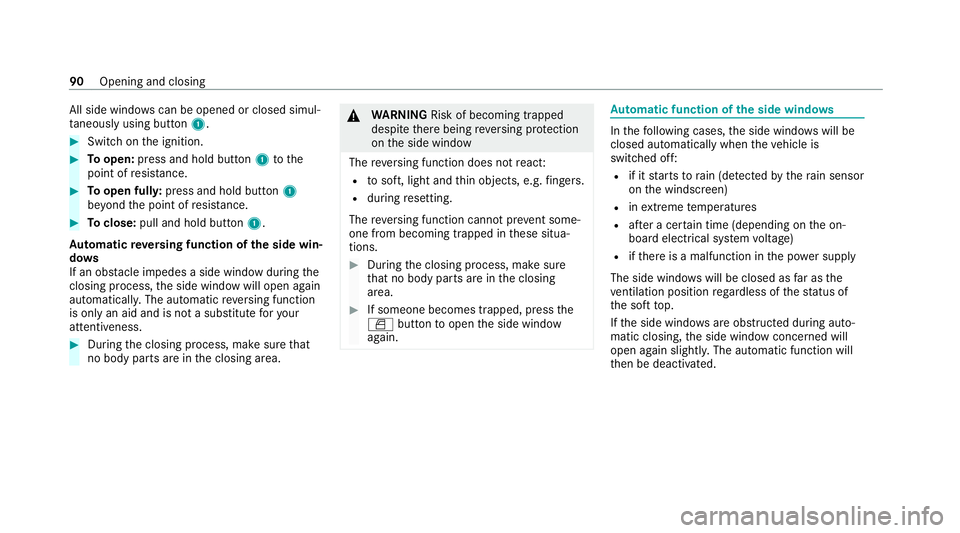
All side windo
wscan be opened or closed simul‐
ta neously using button 1.#
Switch on the ignition. #
Toopen: press and hold button 1tothe
point of resis tance. #
Toopen full y:press and hold button 1
be yond the point of resis tance. #
Toclose: pull and hold button 1.
Au tomatic reve rsing function of the side win‐
do ws
If an obs tacle impedes a side window du ring the
closing process, the side window will open again
automaticall y.The automatic reve rsing function
is only an aid and is not a substitute foryo ur
attentiveness. #
During the closing process, make sure that
no body parts are in the closing area. &
WARNING Risk of becoming trapped
despi tethere being reve rsing pr otection
on the side window
The reve rsing function does not react:
R tosoft, light and thin objects, e.g. fingers.
R during resetting.
The reve rsing function cannot pr event some‐
one from becoming trapped in these situa‐
tions. #
During the closing process, make sure
th at no body parts are in the closing
area. #
If someone becomes trapped, press the
W button toopen the side window
again. Au
tomatic function of the side windo ws In
thefo llowing cases, the side windo wswill be
closed automatically when theve hicle is
switched off:
R if it starts torain (de tected bythera in sensor
on the windscreen)
R inextreme temp eratures
R afte r a cer tain time (depending on the on-
board electrical sy stem voltage)
R ifth ere is a malfunction in the po wer supp ly
The side windo wswill be closed as far as the
ve ntilation position rega rdless of thest atus of
th e soft top.
If th e side windo wsare obstructed during auto‐
matic closing, the side window concerned will
open again slightl y.The automatic function will
th en be deactivated. 90
Opening and closing
Page 95 of 469
#
Tointer rupt convenience closing: release
th eß button.
% Con venience closing also functions wi th
KEYLESS-GO (/ page76). Problems with
the side windo ws &
WARNING Risk of becoming trapped or
fa tal ly inju red if reve rsing pr otection is
not activated
If yo u close a side wind owagain immediately
af te r it has been bloc ked, the side window
will close with increased or maximum forc e.
The reve rsing function is then not active and
body parts may become trapped. #
Make sure that no parts of the body are
in the closing area. #
Tostop the closing process, release the
button or press the button again to
re open the side windo w. A side wind
owcann otbe closed and you can‐
not see the cause. #
Check tosee whe ther any objects are in the
window guide. #
Adjust the side windo ws.
Ad justing the side windo ws
If a side window is obstructed during closing and
re opens again immediately: #
Immediately af terth is, pull and hold the cor‐
re sponding button again until the side win‐
dow has closed and hold the button for at
least one more second (re-adjustment).
The side window will be closed without the
automatic reve rsing function.
If th e side window is obstructed again and
re opens again immediately: #
Immediately af terth is, pull and hold the cor‐
re sponding button again until the side win‐
dow has closed and hold the button for at least
one more second (follo w-up adjust‐
ment).
The side wind owwill be closed without the
automatic reve rsing function.
The side windo wscann otbe opened or
closed using the con venience opening fea‐
ture.
Po ssible cause:
R The key bat tery iswe ak or dischar ged. #
Check the battery using the indicator lamp
(/ page 71). #
Replace theke y bat tery, if necessary
(/ page 73). Anti-theft pr
otection Fu
nction of the immobiliser The immobiliser pr
events your vehicle from
being star ted without the cor rect key.
The immobiliser is automatically activated when
th e ignition is switched off and deactivated when
th e ignition is switched on. 92
Opening and closing
Page 100 of 469
Seats
Ad
justing the front seat mechanically and
electrically (without Seat Comfort Package) &
WARNING Risk of becoming trapped if
th e seats are adjus tedby children
Children could become trapped if they adjust
th e seats, particularly when unattended. #
When leaving theve hicle, alw aysta ke
th eke y with you and lock theve hicle. #
Never lea vechildren unat tended in the
ve hicle. This also applies
tothe Digital Vehicle Key
st icke r.
Yo u can adjust the seats when the ignition is
switched off. &
WARNING Risk of becoming trapped
du ring seat adjustment
When you adjust a seat, you or other vehicle
occupants could become trapped, e.g. on the
seat guide rail. #
Make sure when adjusting a seat that
no one has any body parts in the sweep
of the seat. Obser
vethe saf ety no tes on "Airbags" and "Chil‐
dren in theve hicle". &
WARNING Risk of accident due tothe
driver's seat not being engaged
The driver's seat may mo veunexpectedly
while driving.
This could cause youto lose control of the
ve hicle. #
Alw ays make sure that the driver's seat
is engaged before starting theve hicle. &
WARNING Risk of accident due to
adjusting vehicle settings while theve hi‐
cle is in motion
Yo u could lose cont rol of theve hicle in the
fo llowing situations in particular:
R Ifyo u adjust the driver's seat, the head
re stra ints, thesteering wheel or the mir‐
ro r while theve hicle is in motion.
R Ifyo ufast enyour seat belt while theve hi‐
cle is in motion. #
Before starting the engine: adjust the
driver's seat, the head restra ints, the
st eering wheel and the mir ror and fas‐
te nyo ur seat belt. &
WARNING Risk of becoming trapped if
th e seat height is adjus ted carelessly
If yo u adjust the seat height carelessly, you
or other vehicle occupants could be trapped
and thereby injured. Seats and
stowing 97
Page 113 of 469
R
The po wer supp lyor the ignition is switched
on. #
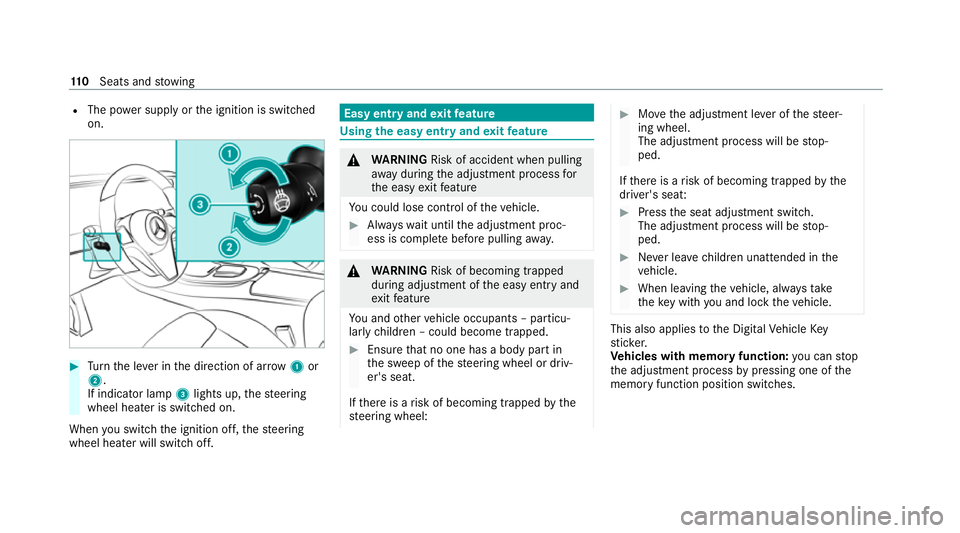
Turn the le ver in the direction of ar row1or
2.
If indicator lamp 3lights up, thesteering
wheel heater is switched on.
When you swit ch the ignition off, thesteering
wheel heater will switch off. Easy entry and
exitfeature Using
the easy entry and exitfeature &
WARNING Risk of accident when pulling
aw ay during the adjustment process for
th e easy exitfeature
Yo u could lose cont rol of theve hicle. #
Alw ayswa it until the adjustment proc‐
ess is comple tebefore pulling away. &
WARNING Risk of becoming trapped
du ring adjustment of the easy entry and
ex itfeature
Yo u and other vehicle occupants – particu‐
lar lych ildren – could become trapped. #
Ensure that no one has a body part in
th e sweep of thesteering wheel or driv‐
er's seat.
If th ere is a risk of becoming trapped bythe
st eering wheel: #
Movethe adjustment le ver of thesteer‐
ing wheel.
The adjustment process will be stop‐
ped.
If th ere is a risk of becoming trapped bythe
driver's seat: #
Press the seat adjustment switch.
The adjustment process will be stop‐
ped. #
Never lea vechildren unat tended in the
ve hicle. #
When leaving theve hicle, alw aysta ke
th eke y with you and lock theve hicle. This also applies
tothe Digital Vehicle Key
st icke r.
Ve hicles with memory function: you can stop
th e adjustment process bypressing one of the
memory function position switches. 11 0
Seats and stowing
Page 114 of 469
&
WARNING Risk of becoming trapped if
ch ildren activate the easy entry andexit
fe ature‑
Children could become trapped if they acti‐
va te the easy entry ‑ andexitfeature, particu‐
lar lywhen unat tended. #
Never lea vechildren unat tended in the
ve hicle. #
When leaving theve hicle, alw aysta ke
th eke y with you and lock theve hicle. This also applies
tothe Digital Vehicle Key
st icke r.
If th e easy entry andexitfeature is active, the
st eering wheel will mo veupwards and the driv‐
er's seat will mo veback in thefo llowing situa‐
tions:
R You swit chthe ignition off with the driver's
door open.
R You open the driver's door with the ignition
switched off.
% The steering wheel will then mo veupwards
on ly if it is not already as high as it will go. The driver's seat will
then mo vebackwards
only if it is not already in there armost posi‐
tion.
The steering wheel and the driver's seat will
mo veback tothe last drive position in thefo l‐
lowing cases:
R You swit chthe po wer supp lyor the ignition
on when the driver's door is closed
R You close the driver's door with the ignition
switched on.
The last drive position will be sa ved when:
R You swit chthe ignition off.
R Vehicles with memory function: you call
up the seat settings via the memory function.
R Vehicles with memory function: you sa ve
th e seat settings via the memory function.
Ve hicles with memory function: press one of
th e memory function memory position switches
to stop the adjustment process. Setting
the easy entry and exitfeature Multimedia sy
stem:
4 © 5
Settings 5
Vehicle
5 Automatic seat adjustment
5 Easy Entry/Exit #
Activate or deacti vate the function. Memory function
Fu
nction of the memory function &
WARNING Risk of an accident if the
memory function is used while driving
If yo u use the memory function on the driv‐
er's side while driving, you could lose cont rol
of theve hicle as a result of the adjustments
being made. #
Only use the memory function on the
driver's side when theve hicle is station‐
ar y. Seats and
stowing 111
Page 122 of 469
If
th e ignition is switched on you can charge a
USB device, e.g. a mobile phone, at the USB
ports using a suitable charging cable.
The devices can be charge d with 5 V (up to3 A)
and when the ignition is switched on. Wire
lesscharging of the mobile phone and
connection with theex terior aerial Note
s on wirelessly charging the mobile
phone &
WARNING Risk of inju rydue toobjects
being stowed incor rectly
If objects in theve hicle interior are stowed
incor rectly, they can slide or be thrown
around and hit vehicle occupants. In addi‐
tion, cup holders, open stowage spaces and
mobile phone recep tacles cannot al ways
re tain all objects within.
There is a risk of injur y,particularly in the
ev ent of sudden braking or a sudden change
in direction. #
Alw aysstow objects so that they can‐
not be throw n around in su chsitua‐
tions. #
Alw ays make sure that objects do not
pr otru de from stowage spaces, luggage
nets or stowage nets. #
Close the loc kable stow age spaces
before starting a journe y. #
Alw aysstow and secure heavy, hard,
poin ted, sharp-edged, fragile or bulky
objects in the boot/load compartment. Obser
vethe no tes on loading theve hicle. &
WARNING Risk offire from placing
objects in the mobile phone stowage
compartment
Placing other objects in the mobile phone
stow age compartment could con stitute a fire
hazard. #
Apart from a mobile phone, do not
place any other objects in the mobile phone
stowage compartment, espe‐
cially those made of me tal. *
NO
TEDama getoobjects caused by
placing them in the mobile phone stow‐
age compartment If objects are placed in
the mobile phone
stow age compartment, they may be dam‐
aged byelectromagnetic fields. #
Do not place credit cards, data storage
devices, ski passes or other objects
sensitive toelectromagnetic fields in
th e mobile phone stowage compart‐
ment. *
NO
TEDama getothe mobile phone
stow age compartment caused byliquids If liquids enter
the mobile phone stowage
compartment, the compartment may be
damaged. #
Ensure that no liquids enter the mobile
phone stowage compartment. Seats and
stowing 11 9
Page 123 of 469
R
Depending on theve hicle equipment, the
mobile phone is connected totheve hicle's
ex terior aerial via thech arging module.
R The charging function and wireless connec‐
tion of the mobile phone totheve hicle's
ex terior aerial are only available if the ignition
is switched on.
R Small mobile phones may not be able tobe
ch arge d in everyposition of the mobile
phone stowage compartment.
R Largemobile phones which do not rest flat in
th e mobile phone stowage compartment may
not be able tobe charge d or connec ted with
th eve hicle's exterior aerial.
R The mobile phone may heat up during the
ch arging process. The mobile phone can be
cooled in the mobile phone stowage com‐
partment when the air conditioning sy stem is
switched on. The cooling output in the
mobile phone stowage compartment is high‐
est when the controller in theglove box is
closed.
R Toensure more ef ficient charging and con‐
nection with theve hicle's exterior aerial, re
mo vethe pr otective co ver from the mobile
phone.
R When charging, the mat should be used if
possible. Wire
lessly charging a mobile phone Re
quirements:
R The mobile phone is suitable for wireless
ch arging (Qi-compatible mobile phone).
A list of Qi-compatible mobile phones can be
fo und at: https://www.mercedes-benz-
mobile.com #
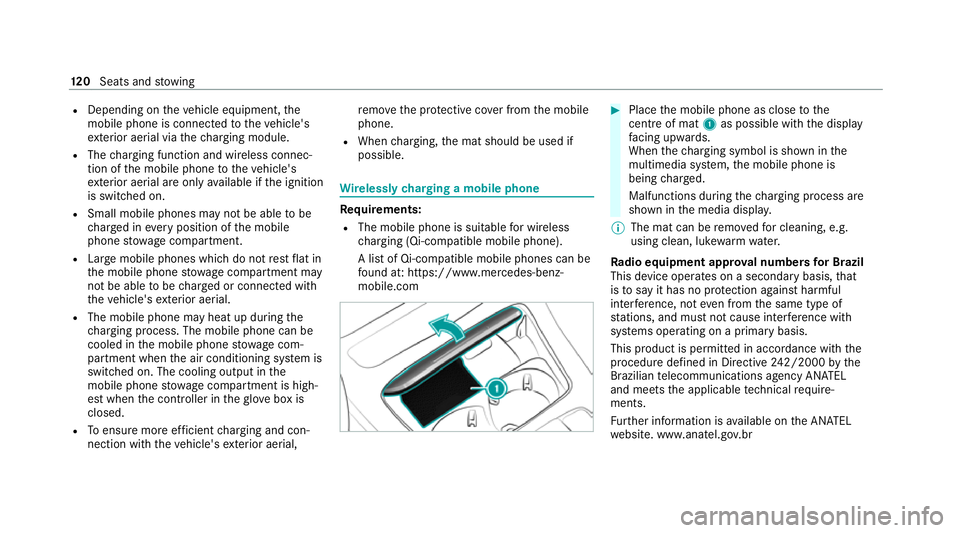
Place the mobile phone as close tothe
centre of mat 1as possible wi th the display
fa cing up wards.
When thech arging symbol is shown in the
multimedia sy stem, the mobile phone is
being charge d.
Malfunctions during thech arging process are
shown in the media displa y.
% The mat can be remo vedfo r cleaning, e.g.
using clean, luk ewarmwate r.
Ra dio equipment appr oval numbers for Brazil
This device operates on a secondary basis, that
is to say it has no pr otection against harmful
inter fere nce, not even from the same type of
st ations, and must not cause inter fere nce wi th
sy stems operating on a primary basis.
This product is permitted in accordance with the
procedure defined in Directive 242/2000 bythe
Brazilian telecommunications agency AN ATEL
and meets the applicable tech nical requ ire‐
ments.
Fu rther information is available on the AN ATEL
we bsite. www.anatel.go v.br 12 0
Seats and stowing
Page 126 of 469
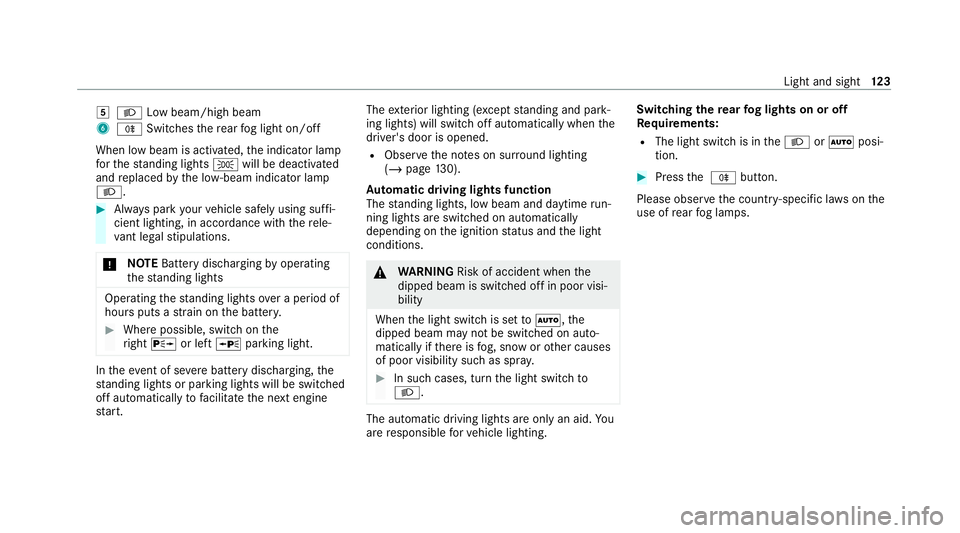
5
L Low beam/high beam
6 R Switches there ar fog light on/off
When low beam is activated, the indicator lamp
fo rth est anding lights Twill be deactivated
and replaced bythe lo w-beam indicator lamp
L. #
Alw ays park your vehicle safely using suf fi‐
cient lighting, in acco rdance with there le‐
va nt le galst ipulations.
* NO
TEBattery discharging byoperating
th est anding lights Operating
thest anding lights over a period of
hours puts a stra in on the batter y. #
Where possible, switch on the
ri ght X or left Wparking light. In
theeve nt of se vere battery discharging, the
st anding lights or parking lights will be swit ched
off automatically tofacilitate the next engine
st art. The
exterior lighting (e xcept standing and park‐
ing lights) will swit choff automatically when the
driver's door is opened.
R Obser vethe no tes on sur round lighting
(/ page 130).
Au tomatic driving lights function
The standing lights, low beam and daytime run‐
ning lights are switched on au tomatically
depending on the ignition status and the light
conditions. &
WARNING Risk of accident when the
dipped beam is switched off in poor visi‐
bility
When the light switch is set toà ,the
dipped beam may not be switched on auto‐
matically if there is fog, snow or other causes
of poor visibility such as spr ay. #
In such cases, turn the light switch to
L . The automatic driving lights are only an aid.
Yo u
are responsible forve hicle lighting. Switching
there ar fog lights on or off
Re quirements:
R The light switch is in theL orà posi‐
tion. #
Press the R button.
Please obser vethe count ry-specific la wsonthe
use of rear fog lamps. Light and sight
12 3