service MERCEDES-BENZ E-CLASS CABRIOLET 2020 Owner's Manual
[x] Cancel search | Manufacturer: MERCEDES-BENZ, Model Year: 2020, Model line: E-CLASS CABRIOLET, Model: MERCEDES-BENZ E-CLASS CABRIOLET 2020Pages: 469, PDF Size: 8.47 MB
Page 246 of 469
8
Selected transmission position
9 Multifunction displ ay(exa mp le:standard dis‐
play for a trip): assi stance / telephone /
navigation / trip / media / radio / styles
and displa ys/ service / possible settings
fo r head-up display
A Fuel le vel and fuel filler flap location indica‐
tor Overview of
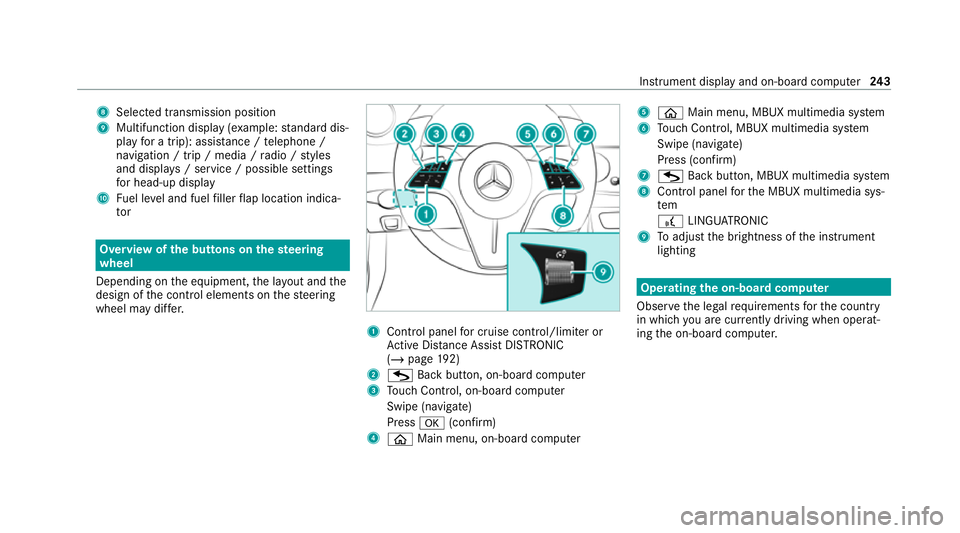
the but tons on thest eering
wheel
Depending on the equipment, the la yout and the
design of the control elements on thesteering
wheel may dif fer. 1
Control panel for cruise control/limiter or
Ac tive Dis tance Assi stDISTRONIC
(/ page 192)
2 G Back button, on-board compu ter
3 Touch Control, on-board co mputer
Swipe (navigate)
Press a(confirm)
4 ò Main menu, on-board co mputer 5
ò Main menu, MBUX multimedia sy stem
6 Touch Control, MBUX multimedia sy stem
Swipe (navigate)
Press (confirm)
7 G Back button, MBUX multimedia sy stem
8 Control panel forth e MBUX multimedia sys‐
tem
£ LINGU ATRO NIC
9 Toadjust the brightness of the instrument
lighting Operating
the on-boa rdcompu ter
Obser vethe legal requ irements forth e count ry
in which you are cur rently driving when operat‐
ing the on-board computer. Instrument display and on-board computer
243
Page 247 of 469
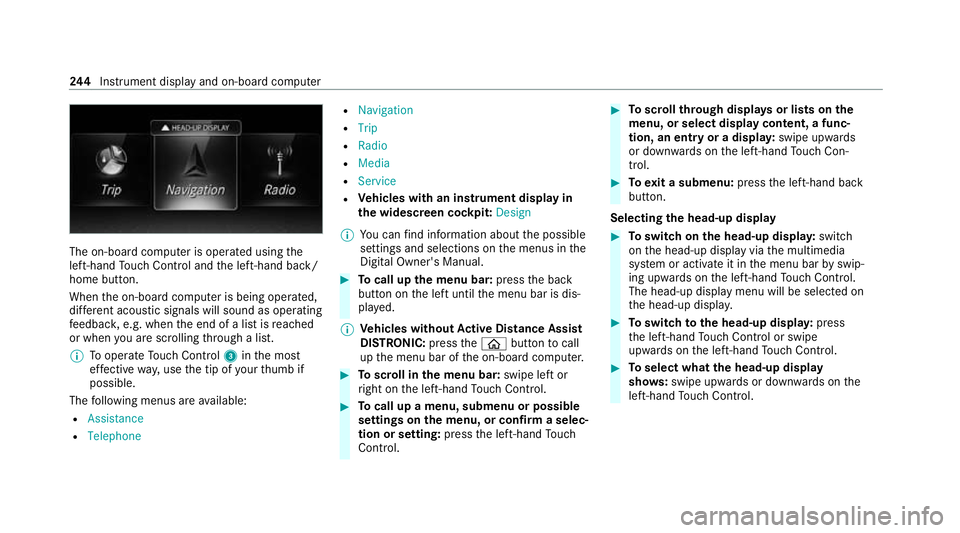
The on-board computer is operated using
the
left-hand Touch Control and the left-hand back/
home button.
When the on-board computer is being operated,
dif fere nt acoustic signals will sound as operating
fe edbac k,e.g. when the end of a list is reached
or when you are sc rolling thro ugh a list.
% Tooperate Touch Control 3inthe most
ef fective way,use the tip of your thumb if
possible.
The following menus are available:
R Assistance
R Telephone R
Navigation
R Trip
R Radio
R Media
R Service
R Vehicles with an instrument display in
th e widescreen cockpit: Design
% You can find information about the possible
settings and selections on the menus in the
Digital Owner's Manual. #
Tocall up the menu bar: pressthe back
button on the left until the menu bar is dis‐
pla yed.
% Ve
hicles without Active Di stance Assist
DISTRO NIC:press theò button tocall
up the menu bar of the on-board computer. #
Toscroll in the menu bar: swipe left or
ri ght on the left-hand Touch Control. #
Tocall up a menu, submenu or possible
settings on the menu, or confirm a selec‐
tion or setting: pressthe left-hand Touch
Control. #
Toscroll through displa ysor lists on the
menu, or select display content, a func‐
tion, an entry or a displa y:swipe upwards
or down wards on the left-hand Touch Con‐
trol. #
Toexit a submenu: pressthe left-hand back
button.
Selecting the head-up display #
Toswitch on the head-up displa y:switch
on the head-up display via the multimedia
sy stem or activate it in the menu bar byswip‐
ing upwards on the left-hand Touch Control.
The head-up displ aymenu will be selected on
th e head-up displa y. #
Toswitch tothe head-up displa y:press
th e left-hand Touch Control or swipe
upwards on the left-hand Touch Control. #
Toselect what the head-up display
sho ws:swipe up wards or down wards on the
left-hand Touch Control. 244
Instrument display and on-board computer
Page 253 of 469
%
If Mercedes me connect is active 5,the
ve hicle is linked with Mercedes me connect.
Ve hicle data is then transmit tedto the bac k-
end sy stem. What data is transmit ted
depends on which services are activated.
Fu rther de tails can be found in the Mercedes
me connect term s and conditions and data
pr otection information. The function is coun‐
tr y- dependent.
If Transmission of vehicle position is active
6, Mercedes me connect services ha ve
been activated forth is vehicle which access
th eve hicle's geoposition. In which ins tances
th ege oposition is transmitted depends on
th e particular services. Further de tails can
be found in the Mercedes me connect terms
and conditions and data pr otection informa‐
tion. The function is count ry-dependent. Ope
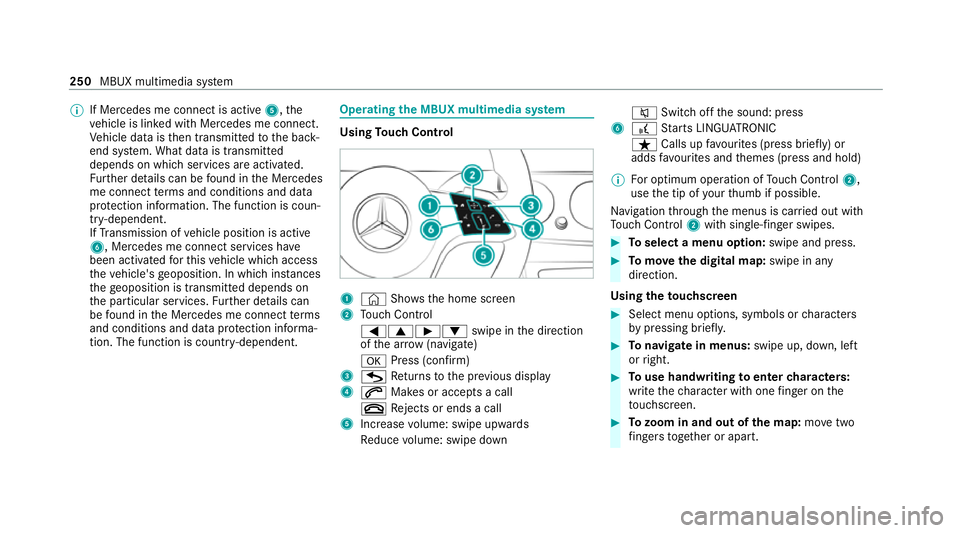
rating the MBUX multimedia sy stem Using
Touch Control 1
© Shows th e home screen
2 Touch Control
=9Ì :swipe in the direction
of the ar row (navigate)
a Press (con firm)
3 G Returns tothe pr evious display
4 6 Makes or accepts a call
~ Rejects or ends a call
5 Increase volume: swipe upwards
Re duce volume: swipe down 8
Switchoff the sound: press
6 £ Starts LINGU ATRO NIC
ß Calls up favo urites (press brief ly) or
adds favo urites and themes (press and hold)
% For optimum operation of Touch Control 2,
use the tip of your thumb if possible.
Na vigation thro ugh the menus is car ried out with
To uch Control 2with sin gle-finger swipes. #
Toselect a menu option: swipe and press. #
Tomo vethe digital map: swipe in any
direction.
Using theto uchscreen #
Select menu options, symbols or characters
by pressing briefly. #
Tonavigate in menus: swipe up, down, left
or right. #
Touse handwriting toenter characters:
write thech aracter with one finger on the
to uchsc reen. #
Tozoom in and out of the map: movetwo
fi ngers toget her or apart. 250
MBUX multimedia sy stem
Page 264 of 469
#
Enter the destination in 2. The entries can
be made in any order.
The following ent ries can be made, forex am‐
ple:
R City, stre et, house number
R Street,to wn
R Postcode
R POI name or POI catego ry, e.g. Parking
R Contact name #
Select a sear chresult in list 3.
The route can be calculated.
% You can find fur ther information about desti‐
nation entry , e.g. 3wordaddresses, in the
Digital Owner's Manual.
Changing country #
Select the count ryindicator in 1. #
Enterth e count ryindicator. #
Select the count ryin3.
Using online sear ch
Destination entry uses online map services. If
th e on-board sear chfinds no suitable de stina‐ tions or if
youch ange countries, the online
sear chisavailable.
Fo rth e destination you can en ter an addre ss, a
POI or a 3 wordaddress. #
Select country indicator 1. #
Select the pr ovider forth e online service
from the count ries list.
or #
Ifth e on-board sear chdelivers no results,
enter the destination in input line 2. #
Select the destination in the list.
The de tailed view forth ero ute is displ ayed. Calculating a
route and using settings for
ro ute guidance Re
quirements:
R The destination has been entered.
R The destination address is shown. Multimedia sy
stem:
4 © 5
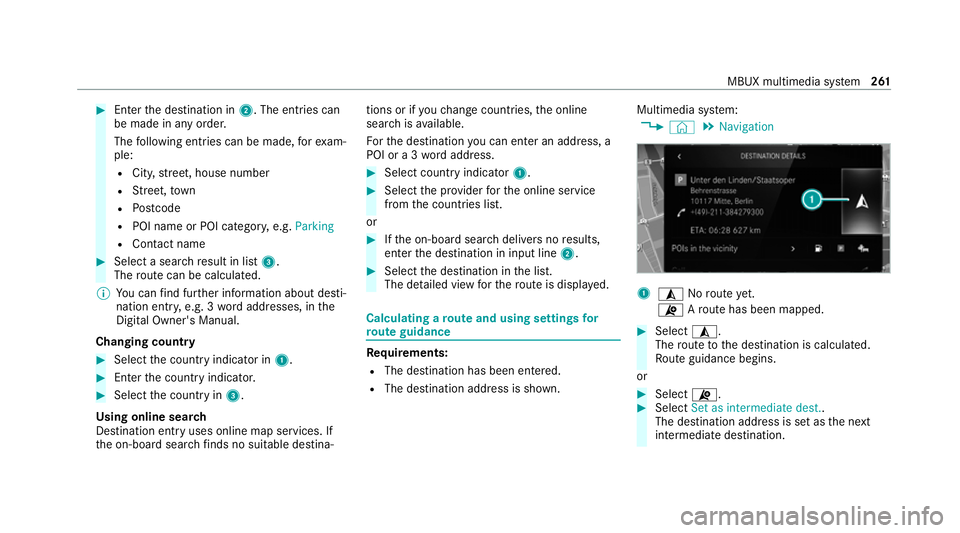
Navigation 1
¥ Noroute yet.
¦ Aro ute has been mapped. #
Select ¥.
The route tothe destination is calculated.
Ro ute guidance begins.
or #
Select ¦. #
Select Set as intermediate dest..
The destination address is set as the next
intermediate destination. MBUX multimedia sy
stem 261
Page 266 of 469
#
Switch Motorway information on or off.Using se
rvices Re
quirements:
R There is an Internet connection.
R Mercedes me connect is available.
R You ha veset up a user account in the
Mercedes me Portal.
R The vehicle is connected toa user account
and you ha veaccep tedth e conditions of use
fo rth e service.
Fu rther information can be found at:
https://www.mercedes.me
R The service is available and has been activa‐
te d.
Multimedia sy stem:
4 © 5
Navigation
Displaying the traf fic situation with Live Traf‐
fi c Information #
Select Z. #
Activate Traffic. #
Select Advanced . #
Select View. #
Select Map elements. #
Switch on Traffic incidents ,Free-flowing traf-
fic and Delay.
If traf fic information has been recei ved, then
tra ffic incidents such as roadwor ks,ro ad
bloc ks, local area reports (e.g. fog) and warn‐
ing messages are displa yed.
The tra ffic delay is displa yedfo rth e cur rent
ro ute. Traf fic del ays lasting one minute or
longer are take n into conside ration.
Displ aying hazard warnings with Car-to-X-
Communication
If hazard warnings are available these can be
shown as symbols on the map. The display
depends on the settings forth eTraffic andTraf-
fic incidents options. #
Set the options.
If Traffic is switched off and Traffic incidents
is switched on, the symbols are shown on
th e prospective route. Displaying
weather information and other
map contents #
Select Z. #
Select Advanced . #
Select View. #
Select Map elements. #
Scroll up and show theONLINE MAP CON-
TENTS categor y. #
Switch on a service, e.g. Weather.
Cu rrent weather information is displa yed on
th e navigation map, e.g. temp erature or
cloud co ver. MBUX multimedia sy
stem 263
Page 268 of 469
Obser
vethe additional information on stowing
mobile communications devices cor rectly:
R Loading theve hicle (/ page113)
Blue tooth ®
connection:
The menu view and theav ailable functions in the
te lephone menu are in part dependent on the
Blu etoo th®
profile of the connected mobile
phone. Full functionality is only available if the
mobile phone supports bo thofthefo llowing
Blue tooth ®
profiles:
R PBAP (Phone Book Access Profile)
- The contacts on the mobile phone are
shown automatically on the multimedia
sy stem.
R MAP (Message Access Profile)
- The mobile phone message functions can
be used on the multimedia sy stem.
Ir re spective of this, Blue tooth ®
audio functional‐
ity can byused with any mobile radio unit.
Fo r information on thera nge of functions of the
mobile radio unit tobe connec ted, see the man‐
ufacturer's operating instructions. Ne
twork connection:
The following cases can lead tothe call being
disconnected while theve hicle is in motion:
R You swit chinto a transmission/reception
st ation, in which no communication channel
is free.
R The SIM card used is not compatible with the
network available
R a mobile phone with "Twincard" is logged into
th e network with the second SIM card at the
same time
The multimedia sy stem supports calls in HD
Vo ice ®
for impr oved speech qualit y.Arequ ire‐
ment forth is is that the mobile phone and the
mobile phone network pr ovider of the person
yo u are calling suppo rtHD Voice ®
.
Depending on thequ ality of the connection, the
vo ice quality may fluctuate.
Fu rther information can be obtained from a
Mercedes-Benz service centre or at: https://
www.mercedes-benz.com/connect MBUX multimedia sy
stem 265
Page 270 of 469
R
Two mobile phones are connected with the
multimedia sy stem via Blue tooth®
(two
phone mode).
- You can use all the functions of the multi‐
media sy stem with the mobile phone in
th efo re ground.
- You can recei veincoming calls and mes‐
sages with the mobile phone in the back‐
ground.
Yo u can inter change the mobile phone in
th efo re ground and bac kground.
R A mobile phone is connected as the car
phone.
Connecting a mobile phone
Re quirements:
R Blue tooth ®
is activated on the mobile phone
(see the manufacturer's operating instruc‐
tions).
R Blue tooth ®
is activated on the multimedia
sy stem. Multimedia sy
stem:
4 © 5
Phone
Sear ching for a mobile phone #
Select í. #
Select Connect new device .
Connecting a mobile phone
Auth orisation follo ws using secure simple pair‐
ing. #
Select a mobile phone.
A code is displ ayed in the multimedia sy stem
and on the mobile phone. #
If bo thcodes match, confirm the code on the
mobile phone.
Fu nctions in thete lephony menu
In thete lephony menu you ha vethefo llowing
functions, forex ample:
R Making calls, e.g.:
-
R Accept a call
- k End call
- i Create conferen. call -
Accepting or rejecting a waiting call
R Managing con tacts, e.g.:
- Downloading mobile phone contacts
- Managing thefo rm at of a con tact's name
- Saving a contact as a favo urite
R Receiving and sending messages, e.g.:
- Using there ad-aloud function
- Dictating a new message Mercedes me and apps
Mercedes me connect
Information on Mercedes me connect
% Mercedes me connect or individual
Mercedes me connect services are not avail‐
able in everycountr y.Find out at a
Mercedes-Benz service centre if these func‐
tions are available in your count ry.
Mercedes me connect consists of multiple serv‐
ices. MBUX multimedia sy
stem 267
Page 271 of 469
Yo
u can use thefo llowing services via the multi‐
media sy stem and theove rhead control panel,
fo rex ample:
R Accident and Breakdown Management (me
button or situation-dependent displ ayinthe
multimedia sy stem)
R Mercedes-Benz emer gency call sy stem (auto‐
matic emer gency call and SOS button)
The Mercedes me connect Accident and Break‐
down Management and the Mercedes-Benz
emer gency call centre are available to you
around the cloc k.
The me button and the SOS button can be found
on theve hicle's overhead control panel
(/ page 269).
Yo u can also call the Mercedes-Benz Cus tomer
Centre using the multimedia sy stem
(/ page 270).
Please no tethat Mercedes me connect is a
Mercedes-Benz service. In emer gencies, firs t call
th e national emer gency services using the
st andard national emer gency service telephone
numbers. In emer gencies, you can also use theMercedes-Benz emer
gency call sy stem
(/ page 276).
Obse rveth e conditions of use for Mercedes me
connect and other services. These can be
obtained in the Mercedes me Portal: https://
me.secure.mercedes-benz.com
Fu rther information about Mercedes me con‐
nect, the pr ovided service scope and operation:
https://moba.i.daimler.com/mar kets/ece-r ow/
baix/cars/connectme/en_GB/#emotions/
St artseite.html
Information on Mercedes me connect Acci‐
dent and Breakdown Management
The Accident and Breakdown Management can
include thefo llowing functions:
R Supplement tothe Mercedes-Benz emer‐
ge ncy call sy stem (/ page276)
If necessa ry,th e conta ct person at the
Mercedes-Benz emer gency call centre for‐
wa rdsth e call toMercedes me connect Acci‐
dent and Breakdown Management. Forw ard‐
ing the call is ho wever not possible in all
countries. R
Breakdown assi stance byate ch nician on
location and/or theto wing away oftheve hi‐
cle tothe nearest Mercedes-Benz service
cent re
Yo u may be charge dfo rth ese services.
R Addition tothe emer gency guide af ter auto‐
matic accident or breakdown de tection
(/ page 270)
In theeve nt of a breakdown or accident, fur‐
th er vehicle data is sent which enables opti‐
mal support bythe Mercedes-Benz Cus tomer
Centre and the authorised service partner or
breakdown assis tance.
R Addition tothe Mercedes me connect
service Telediagno stics
Wi th th eTe lediagno stics function, specific
we ar and failure reports are recorded bythe
service pr ovider, in so far as these can be
clearly interpr eted and are available thro ugh
th e monitoring of components that are sub‐
ject todiagnostics.
If yo ur vehicle de tects a breakdown or thre at
of a breakdown, you may be prom pted via
th e multimedia sy stem tocontact the 268
MBUX multimedia sy stem
Page 272 of 469
Mercedes-Benz Cus
tomer Centre for fur ther
help. This prom ptinthe multimedia sy stem
only appears when theve hicle is stationar y.
% These services are subject to technical
re strictions su chasthe mobile phone co ver‐
age, mobile network quality and the ability of
th e processing sy stems tointerpr etthe
trans ferred data. In some circums tances,
th is can result in dela ysorthefa ilure of the
information toappear in the multimedia sys‐
te m.
More information about Mercedes me connect
services can be obtained in the Mercedes me
Po rtal: https://me.secure.mercedes-benz.com
Data trans ferre d during Mercedes me con‐
nect call se rvices
The data transfer red during a Mercedes me con‐
nect call depends on:
R The reason for initiation of the call
R The service that is selec ted in thevo ice con‐
trol sy stem
R The activated Mercedes me connect services Which data is transfer
redfo rth e services can be
ta ke n from the cur rently valid term s of use.
These can be obtained in the Mercedes me por‐
ta l: https://me.secure.mercedes-benz.com Mercedes me calls
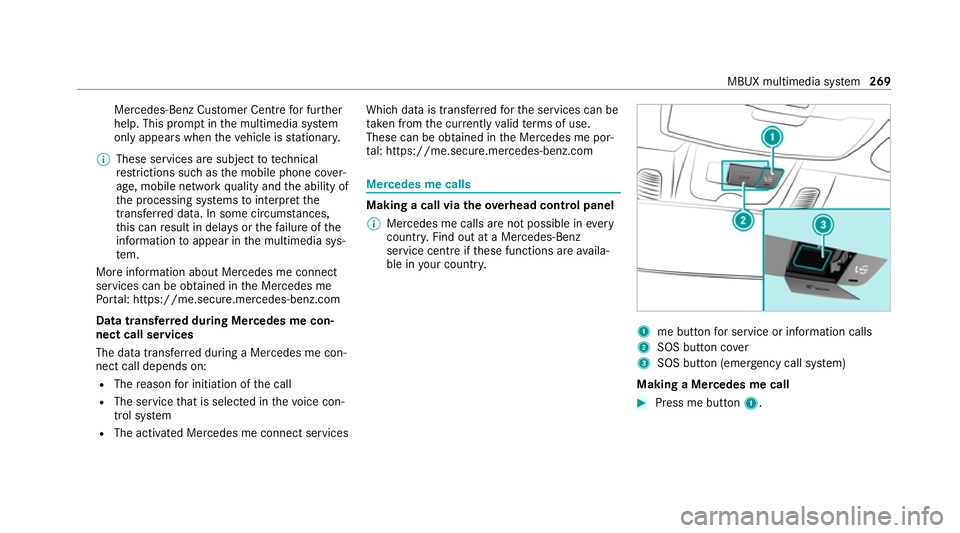
Making a call via
theove rhead control panel
% Mercedes me calls are not possible in every
count ry. Find out at a Mercedes-Benz
service centre if these functions are availa‐
ble in your count ry. 1
me button for service or information calls
2 SOS button co ver
3 SOS button (emergency call sy stem)
Making a Mercedes me call #
Press me button 1. MBUX multimedia sy
stem 269
Page 273 of 469
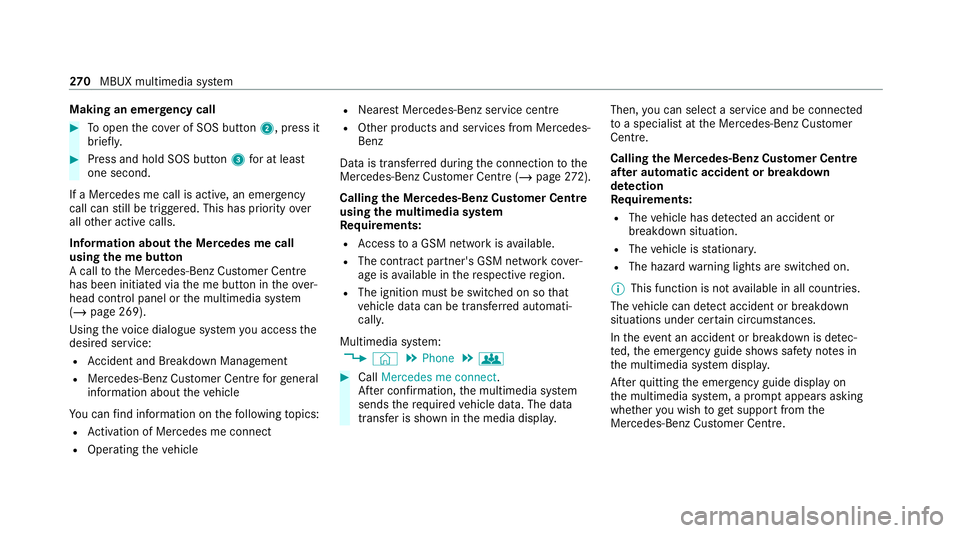
Making an emer
gency call #
Toopen the co ver of SOS button 2, press it
brief ly. #
Press and hold SOS button 3for at least
one second.
If a Mercedes me call is active, an emer gency
call can still be triggered. This has priority over
all other active calls.
Information about the Mercedes me call
using the me but ton
A call tothe Mercedes-Benz Cus tomer Centre
has been initia ted via the me button in theove r‐
head control panel or the multimedia sy stem
(/ page 269).
Using thevo ice dialogue sy stem you access the
desired service:
R Accident and Breakdown Management
R Mercedes-Benz Cu stomer Centre forge neral
information about theve hicle
Yo u can find information on thefo llowing topics:
R Activation of Me rcedes me connect
R Operating theve hicle R
Nearest Mercedes-Benz service centre
R Other products and services from Mercedes-
Benz
Data is transfer red during the connection tothe
Mercedes-Benz Cus tomer Centre (/ page272).
Calling the Mercedes-Benz Cus tomer Centre
using the multimedia sy stem
Requ irements:
R Access toa GSM network is available.
R The contract partner's GSM network co ver‐
age is available in there spective region.
R The ignition must be switched on so that
ve hicle data can be transfer red automati‐
call y.
Multimedia sy stem:
4 © 5
Phone 5
g #
Call Mercedes me connect.
Af ter confirmation, the multimedia sy stem
sends there qu ired vehicle data. The data
transfer is shown in the media displa y.Then,
you can select a service and be connected
to a specialist at the Mercedes-Benz Cus tomer
Centre.
Calling the Mercedes-Benz Cus tomer Centre
af te r automatic accident or breakdown
de tection
Re quirements:
R The vehicle has de tected an accident or
breakdown situation.
R The vehicle is stationar y.
R The hazard warning lights are switched on.
% This function is not available in all countries.
The vehicle can de tect accident or breakdown
situations under cer tain circums tances.
In theeve nt an accident or breakdown is de tec‐
te d, the emer gency guide sho wssafety no tes in
th e multimedia sy stem displa y.
Af terqu itting the emer gency guide displ ayon
th e multimedia sy stem, a prom ptappears asking
whe ther you wish toget support from the
Mercedes-Benz Cus tomer Centre. 270
MBUX multimedia sy stem