fuel MERCEDES-BENZ E-CLASS CABRIOLET 2020 Owners Manual
[x] Cancel search | Manufacturer: MERCEDES-BENZ, Model Year: 2020, Model line: E-CLASS CABRIOLET, Model: MERCEDES-BENZ E-CLASS CABRIOLET 2020Pages: 469, PDF Size: 8.47 MB
Page 6 of 469
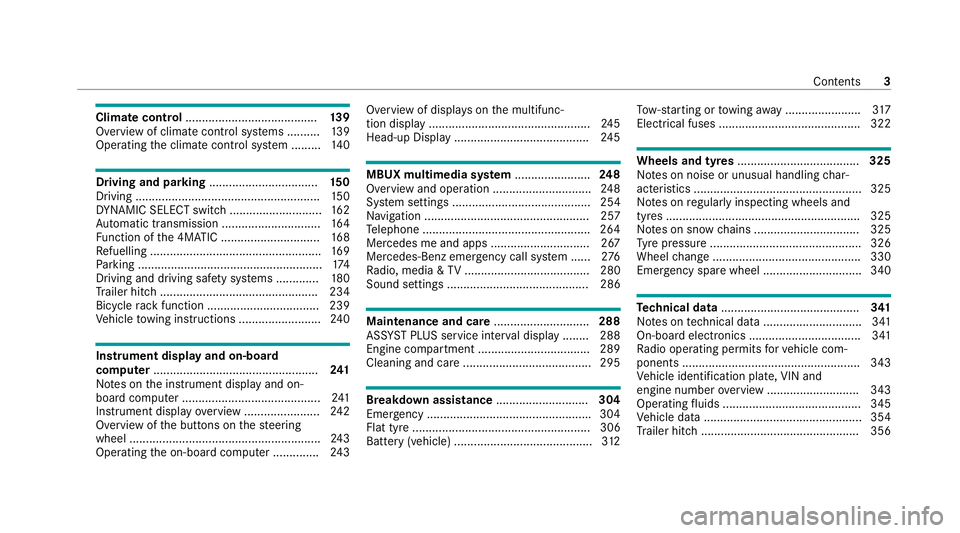
Climate control
........................................ 13 9
Overview of climate contro l systems ..........1 39
Operating the climate control sy stem ......... 14 0 Driving and pa
rking ................................. 15 0
Driving ........................................................ 15 0
DY NA MIC SELECT switch ............................1 62
Au tomatic transmission .............................. 16 4
Fu nction of the 4MATIC .............................. 16 8
Re fuelling .................................................... 16 9
Pa rking ........................................................ 174
Driving and driving sa fety sy stems .............1 80
Tr ailer hit ch................................................ 234
Bicycle rack function .................................. 239
Ve hicle towing instructions ........................ .240 Instrument display and on-board
comp
uter.................................................. 241
No tes on the instrument display and on-
board computer .......................................... 241
Instrument display overview ...................... .242
Overview of the buttons on thesteering
wheel ..........................................................2 43
Operating the on-board computer .............. 24 3Overview of displa
yson the multifunc‐
tion display .................................................2 45
Head-up Displ ay......................................... 24 5 MBUX multimedia sy
stem ....................... 248
Overview and operation .............................. 24 8
Sy stem settings .......................................... 254
Na vigation .................................................. 257
Te lephone .................................................. .264
Mercedes me and apps .............................. 267
Mercedes-Benz emer gency call sy stem ...... 276
Ra dio, media & TV...................................... 280
Sound settings ........................................... 286 Main
tenance and care ............................. 288
ASS YST PLUS service inter val display ........ 288
Engine compartment .................................. 289
Cleaning and care ...................................... .295 Breakdown assi
stance ............................ 304
Emergency ................................................. .304
Flat tyre ...................................................... 306
Battery (vehicle) .......................................... 312To
w- starting or towing away ....................... 317
Electrical fuses ........................................... 322 Wheels and tyres
..................................... 325
No tes on noise or unusual handling char‐
acteristics .................................................. .325
No tes on regular lyinspecting wheels and
tyres .......................................................... .325
No tes on snow chains ................................ 325
Ty re pressure .............................................. 326
Wheel change ............................................ .330
Emergency spa rewheel .............................. 340 Te
ch nical data .......................................... 341
No tes on tech nical da ta.............................. 341
On-board electronics .................................. 341
Ra dio operating permits forve hicle com‐
ponents ...................................................... 343
Ve hicle identification plate, VIN and
engine number overview ............................ 343
Operating fluids .......................................... 345
Ve hicle data ................................................ 354
Tr ailer hit ch................................................ 356 Contents
3
Page 14 of 469
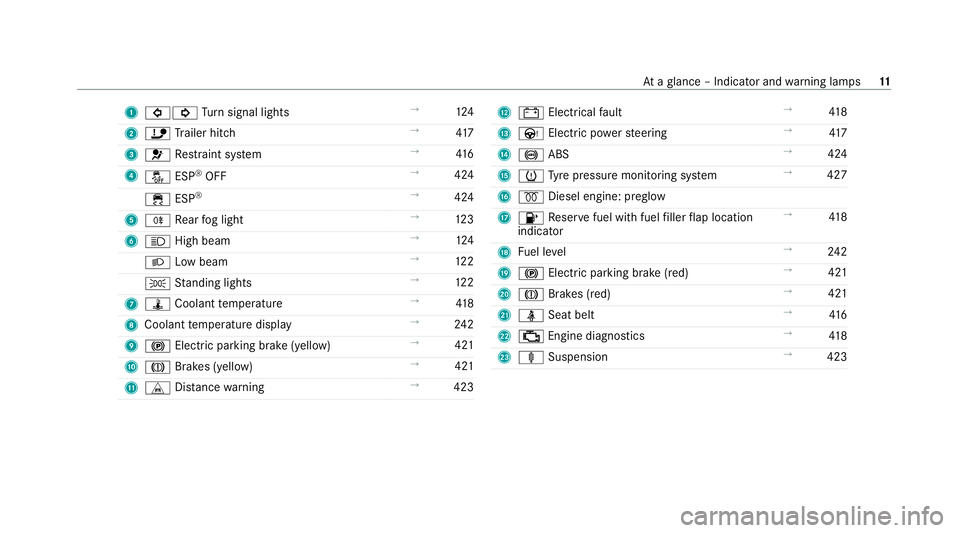
1
#! Turn signal lights →
124
2 ï Trailer hit ch →
417
3 6 Restra int sy stem →
416
4 å ESP®
OFF →
424
÷ ESP®
→
424
5 R Rear fog light →
12 3
6 K High beam →
124
L Low beam →
12 2
T Standing lights →
12 2
7 ÿ Coolant temp erature →
41 8
8 Coolant temp erature display →
24 2
9 ! Electric pa rking brake (yellow) →
421
A J Brakes (yellow) →
421
B L Distance warning →
423 C
# Electrical fault →
41 8
D Ù Electric po werst eering →
417
E ! ABS →
424
F h Tyre pressure monitoring sy stem →
427
G % Diesel engine: preglow
H 8 Reser vefuel with fuel filler flap location
indicator →
41 8
I Fuel le vel →
24 2
J ! Electric pa rking brake (red) →
421
K J Brakes (red) →
421
L ü Seat belt →
416
M ; Engine diagnostics →
41 8
N ä Suspension →
423 At
aglance – Indicator and warning lamps 11
Page 20 of 469
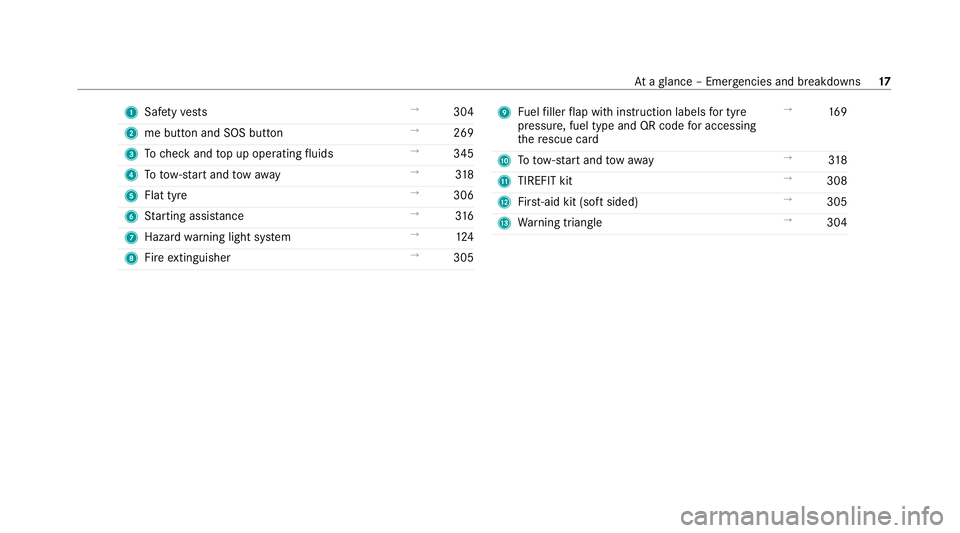
1
Safetyve sts →
304
2 me button and SOS button →
269
3 Tocheck and top up operating fluids →
345
4 Totow- start and tow aw ay →
318
5 Flat tyre →
306
6 Starting assis tance →
316
7 Haza rdwa rning light sy stem →
124
8 Fire extinguisher →
305 9
Fuelfiller flap with instruction labels for tyre
pressu re, fuel type and QR code for accessing
th ere scue card →
16 9
A Totow- start and tow aw ay →
318
B TIREFIT kit →
308
C First-aid kit (so ftsided) →
305
D Warning triangle →
304 At
aglance – Emer gencies and breakdowns 17
Page 23 of 469
Pr
otection of the environment
+ ENVIRONMENTAL
NOTEEnvironmental
dama gedue tooperating conditions and
personal driving style The pollutant emission of
theve hicle is
directly related tothewa yyo u operate the
ve hicle.
Operate your vehicle in an environmentally
re sponsible manner tohelp pr otect the envi‐
ro nment. Please obser vethefo llowing rec‐
ommendations on ope rating conditions and
pe rsonal driving style.
Operating conditions: #
Make sure that the tyre pressure is cor‐
re ct. #
Do not car ryany unnecessary weight
(e.g. roof luggage rack s once you no
lon ger need them). #
Adhere tothe service inter vals.
A regularly serviced vehicle will contri b‐
ute toenvironmen tal pr otection. #
Alw ays ha vemaintenance workcar ried
out at a qualified specialist workshop.
Pe rsonal driving style: #
Do not depress the accelera tor pedal
when starting the engine. #
Do not warm upthe engine while the
ve hicle is stationar y. #
Drive carefully and maintain a suitable
di st ance from theve hicle in front. #
Avoid frequent, sudden acceleration
and braking. #
Change gear in good time and use each
ge ar on lyup toÔ of its maximum
engine speed. #
Switch off the engine in stationary traf‐
fi c, e.g. byusing the ECO start/ stop
function. #
Drive fuel-ef ficiently. Obser vethe ECO
display for a fuel-ef ficient driving style. Ta
ke -back of end-of-life vehicles
EU countries onl y:
Mercedes-Benz will take back your end-of-life
ve hicle for environment-friendly disposal in
accordance with the European Union(EU) End-
of-Life Vehicles Directive.
A network of vehicle take -ba ckpoints and dis‐
mantlers has been es tablished foryo uto return
yo ur vehicle. You can lea veit at any of these
points free of charge . This makes an impor tant
contribution toclosing there cycling circle and
conse rving resources.
Fo r fur ther information about there cycling and
disposal of end-of-li fevehicles, and theta ke-
back conditions, please visit the national
Mercedes-Benz website foryo ur count ry. 20
General no tes
Page 34 of 469
Obser
vethe no tes and warnings of the manufac‐
turer of the medical aids; if in doubt, conta ctthe
device manufacturer and/or your doc tor.
Mercedes-Benz AGrecommends using only few
electrical vehicle sy stems and/or maintaining a
dis tance from the components if there is con‐
tinuing uncer tainty concerning the possibility of
medical aids malfunctioning.
Only ha verepairs and maintenance workinthe
area of thefo llowing components car ried out by
a qu alified specialist workshop:
R vehicle components car rying live voltage
R transmission aerials
R multimedia sy stem and sound sy stem
If yo u ha veany queries or suggestions, consult a
qu alified specialist workshop. Implied
warranty
* NO
TEDama getotheve hicle arising
from violation of these operating instruc‐
tions. Damage
totheve hicle can arise from viola‐
tion of these operating instructions.
This damage is not co vered either bythe
Mercedes-Benz implied warranty or bythe
New‑ or Used- Vehicle Warrant y. #
Follow the instructions in these operat‐
ing instructions on proper operation of
yo ur vehicle as well as on possible vehi‐
cle damage. QR code
forre scue card
QR codes are attached in the fuel filler flap and
on the opposite side on the B-pillar. In theeve nt
of an accident, rescue services can use the QR
code toquickly find the appropriate rescue card
fo ryo ur vehicle. The cur rent rescue card con‐
ta ins the most impor tant information about your ve
hicle in a compact form , e.g. thero uting of the
electric lines.
Fu rther information can be obtained at https://
www.mercedes-benz.de/qr-code. Data
storage Electronic control units
Elect
ronic control units are fitted in your vehicle.
Some of these are necessary forth e safe opera‐
tion of your vehicle, while some assist you when
driving (driver assis tance sy stems). In addition,
yo ur vehicle pr ovides com fort and enter tainment
functions, which are also made possible byelec‐
tronic control units.
Elect ronic control units contain da tamemories
which cantemp orarily or permanently store
te ch nical information about theve hicle's operat‐
ing state, component loads, main tenance
re qu irements and tech nical events or faults. General no
tes31
Page 74 of 469
Key
Overview of
key functions &
WARNING Risk of accident and inju ry
due tochildren left unat tended in the
ve hicle
If ch ildren are left unsupervised in theve hi‐
cle, they could, in pa rticular:
R open doors, thereby endangering other
persons or road users.
R get out and be stru ck byoncoming traf‐
fi c.
R ope rate ve hicle equipment and become
trapped, forex ample.
In addition, thech ildren could also set the
ve hicle in motion, forex ample by:
R releasing the parking brake.
R changing the transmission position.
R starting theve hicle. #
Never lea vechildren unat tended in the
ve hicle. #
When leaving theve hicle, alw aysta ke
th eke y with you and lock theve hicle. #
Keep theke y out of reach of children. This also applies
tothe Digital Vehicle Key
st icke r.
* NO
TEDama getotheke y caused by
magnetic fields #
Keep theke yaw ay from strong mag‐
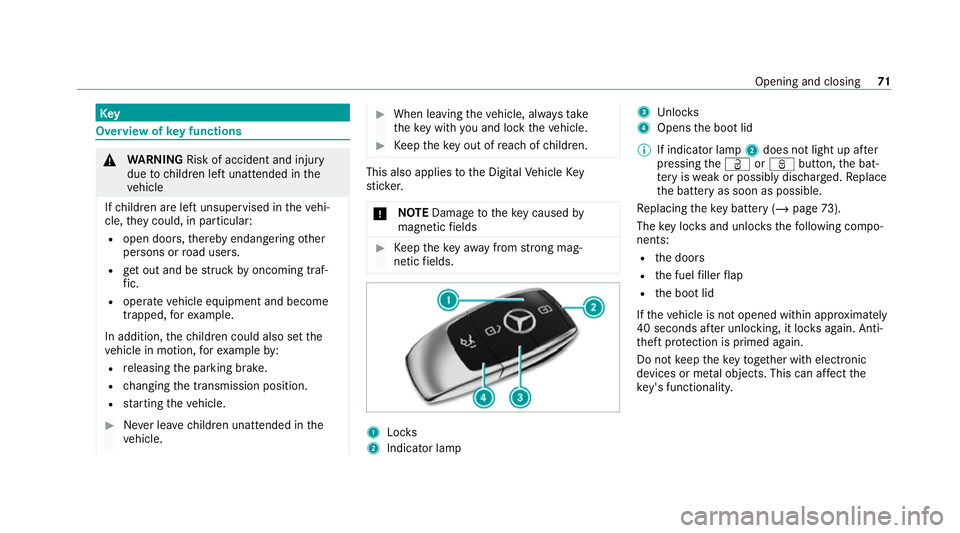
netic fields. 1
Locks
2 Indicator lamp 3
Unloc ks
4 Opens the boot lid
% If indicator lamp 2does not light up af ter
pressing theÜ orß button, the bat‐
te ry iswe ak or possibly dischar ged. Re place
th e battery as soon as possible.
Re placing theke y bat tery ( / page 73).
The key loc ksand unlo cksth efo llowing compo‐
nents:
R the doors
R the fuel filler flap
R the boot lid
If th eve hicle is not opened within appr oximately
40 seconds af ter unlocking, it loc ksagain. Anti-
th eft pr otection is primed again.
Do not keep theke yto ge ther with electronic
devices or me tal objects. This can af fect the
ke y's functionalit y. Opening and closing
71
Page 75 of 469
Ac
tivating/deactivating the acoustic lo cking
ve rification signal Multimedia sy
stem:
4 © 5
Settings 5
Vehicle #
Activate or deacti vate Acoustic lock .
% Please no
te:
The selected setting forth e acoustic locking
ve rification signal must comply wi th there le‐
va nt national road and traf fic re gulations. In
some countri es, including German y,using
th e acoustic locking verification signal is for‐
bidden bytraf fic la ws(in accordance with
§16 Para. 1 and §30 Para. 1 of the German
national road traf fic re gulations). The driver
of theve hicle must comply with these regu‐
lations. In countri es wherethe use of this
function is forbidden, this function is not
activated in theve hicle and must not be acti‐
va ted. Changing
the unlocking settings Po
ssible unlocking functions of theke y:
R Central unlocking R
Unlocking the driver's door and fuel filler flap #
Toswitch between settings: pressthe
Ü andß buttons simultaneously for
appr oximately six seconds until the indicator
lamp flashes twice.
Options if the unlocking function forth e driver's
door and fuel filler flap has been selec ted:
R Tounlo cktheve hicle centrall y:press the
Ü button twice.
R Vehicles with KEYLESS-GO: ifyo uto uch
th e inner sur face of the door handle on the
driver's door, only the driver's door and fuel
fi ller flap are unlo cked. Deactivating
theke y functions If
yo u do not use theve hicle or a keyfo r an
ex tended pe riod of time, you can reduce the
energy consum ption of there spective key.Todo
so, deactivate theke y functions. #
Todeactivate: presstheß button on the
ke y twice in quick succession.
The key indicator lamp flashes twice brief ly
and lights up once. #
Toactivate: press any button on thekey.
% When theve hicle is star ted with theke y in
th estow age compartment of the cent recon‐
sole, theke y functions are automatical ly
activated (/ page152). Re
moving/inserting the eme rgency key Re
moving the eme rgency key 72
Opening and closing
Page 78 of 469
If
th eve hicle has been loc ked via Mercedes me
connect, the additional door lock is not activa‐
te d.
If th e additional door lock is activated, the doors
cann otbe opened from the inside.
% After locking you can issue a signal with the
horn.
Yo u can pr eventthe additional door lock from
being activated bydeactivating interior pr otec‐
tion before locking theve hicle (/ page 95). Un
locking/opening the doors from the inside #
United Kingdom onl y:obser vethe no tes on
th e additional door lock (/ page74). #
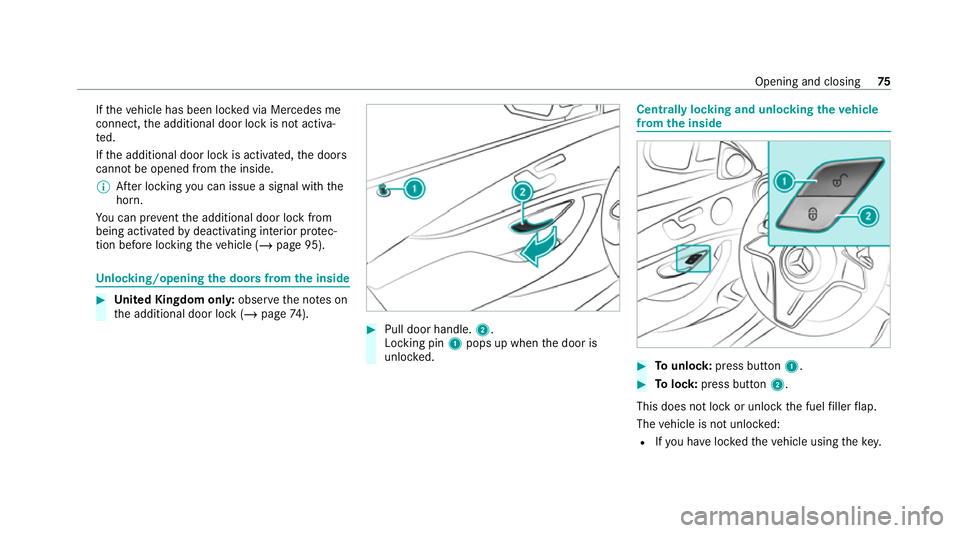
Pull door handle. 2.
Locking pin 1pops up when the door is
unloc ked. Centrally locking and unlocking
theve hicle
from the inside #
Tounlo ck:press button 1. #
Tolock: press button 2.
This does not lock or unlock the fuel filler flap.
The vehicle is not unloc ked:
R Ifyo u ha veloc kedth eve hicle using thekey. Opening and closing
75
Page 147 of 469
R
Ifth e outside temp erature changes, ventila‐
tion mode au tomatical lyswitches toheating
mode or heating mode automatically
switches toventilation mode.
The stationary heater and theex haust gas outlet
are situated at theright-hand front wheel.
Switching thest ationary heater/ventilation
on/off via the control panel &
DANG ER Risk of fata l injury due topoi‐
sonous exhaust gases
If th eta ilpipe is bloc ked or suf ficient ventila‐
tion is not possible, poisonous exhaust gases
such as carbon monoxide may enter theve hi‐
cle. This is the case in enclosed spaces or if
th eve hicle gets stuck in sn ow,fo rex ample. #
Alw ays switch thest ationary heater off
in enclosed spaces without an air
ex traction sy stems, e.g. in garage s. #
Keep theta ilpipe and the area around
th eve hicle free from snow when the
engine or thest ationary heater are run‐
ning. #
Open a window on the windward side of
th eve hicle toensure an adequate sup‐
ply of fresh air. &
WARNING Risk offire due tohot station‐
ary heater components and exhaust
ga ses
Flammable materials such as lea ves, grass or
twigs may ignite. #
When thest ationary heater is swit ched
on, make sure that:
R hot vehicle parts do not come into
contact with flammable materials.
R theex haust gas can flow out of the
st ationary heater exhaust pipe
unhindered.
R theex haust gas does not come into
contact with flammable materials. *
NO
TEBattery discharge caused bysta‐
tionary heater or stationary ventilation
operation Ope
rating thest ationary heater or stationary
ve ntilation drains the batter y. #
After heating or ventilating theve hicle
twice, drive for a longer period of time. Re
quirements:
R The fuel tank is filled toat least there ser ve
le ve l. #
Set the desired temp erature using thew
button. #
Press the& button.
The red or blue indicator lamp on the button
will light up or go out.
The colours of the indicator lamp ha vethefo l‐
lowing meaning:
R Blue: stationary ventilation is switched on.
R Red:thest ationary heater is swit ched on.
R Yello w: the departure time is preselected. 14 4
Climate cont rol
Page 148 of 469
The
stationary heater/ ventilation will switch off
au tomatical lyafte r 50 minutes.
Operation using the app: thest ationary
heater/ ventilation can also be operated via the
Mercedes me connect app. You can find fur ther
information in the separate Owner's Manual at
https://moba.i.daimler.com/mar kets/ece-r ow/
baix/cars/connectme/en_GB/#emotions/
St artseite.html.
Setting thest ationary heater/stationary ven‐
tilation via the multimedia sy stem #
Call up the air conditioning menu
(/ page 140). #
Select Auxiliary heating.
Selecting the departu retime #
Select the time TIME A: XX, TIME B: XXor
TIME C: XX.
Setting the departu retime #
Select the time TIME A: XX, TIME B: XXor
TIME C: XX. #
Select the pen beside the time. #
Set a time. Setting
thest ationary heater/ventilation via
re mo tecont rol
Re quirements:
R The fuel tank is filled toat least there ser ve
le ve l.
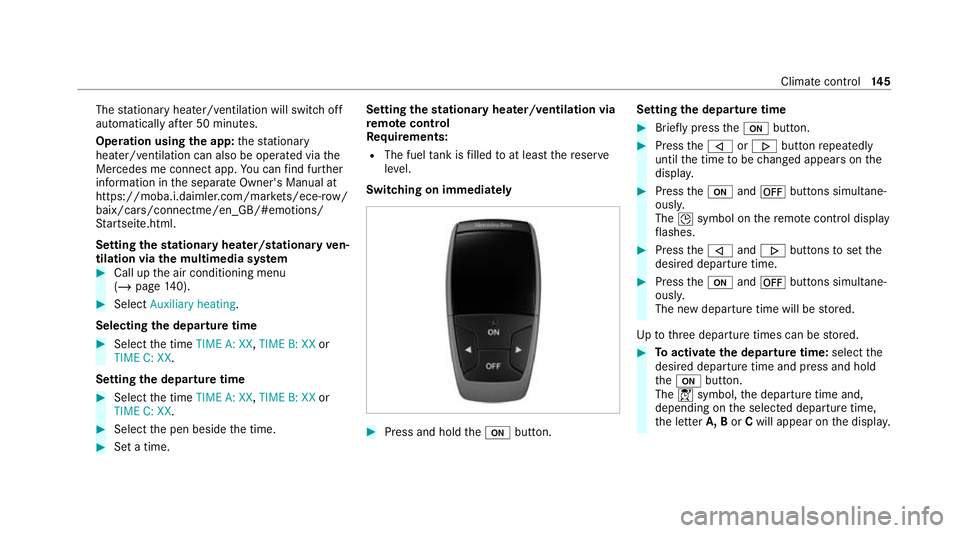
Switching on immedia tely #
Press and hold theu button. Setting
the departu retime #
Brie fly press theu button. #
Press the, or. button repeatedly
until the time tobe changed appears on the
displa y. #
Press theu and^ buttons simultane‐
ousl y.
The Îsymbol on there mo tecontrol displ ay
fl ashes. #
Press the, and. buttons toset the
desired departure time. #
Press theu and^ buttons simultane‐
ousl y.
The new departure time will be stored.
Up tothre e departure times can be stored. #
Toactivate the departu retime: select the
desired departure time and press and hold
th eu button.
The Ísymbol, the departure time and,
depending on the selected departure time,
th e letter A, BorCwill appear on the displa y. Climate cont
rol14 5