warning MERCEDES-BENZ E-CLASS CABRIOLET 2021 Owner's Guide
[x] Cancel search | Manufacturer: MERCEDES-BENZ, Model Year: 2021, Model line: E-CLASS CABRIOLET, Model: MERCEDES-BENZ E-CLASS CABRIOLET 2021Pages: 442, PDF Size: 37.23 MB
Page 189 of 442
Br
ak eimme diat ely ortake eva siveaction, prov i‐
ded itis saf eto do soand thetra ffic situat ion
allo wsthis.
Dis tance warning funct ion(vehicles without
Dr iving Assistance Packag e)
The distance warning func tion canaidyouin the
fo llo wing situat ionswithan intermit tent wa rning
to ne and awa rning lam p:
R atspeeds uptoappr oximat ely15 5mp h
(250 km/h)when approaching vehicles
ahead
R atspeeds uptoappr oximat ely50 mph
(80 km/ h)when approaching statio naryve hi‐
cles, pedes trians walkin gin thedir ect ion of
tr av el and cyclis tsahead
R atspeeds uptoappr oximat ely37 mph
(60 km/ h)when approaching crossin g
pedes trians Dis
tance warning funct ion(vehicles with
Dr iving Assistance Packag e)
The distance warning func tion canaidyouin the
fo llo wing situat ionswithan intermit tent wa rning
to ne and awa rning lam p:
R atspeeds uptoappr oximat ely15 5mp h
(250 km/h)when approaching vehicles
ahead
R atspeeds uptoappr oximat ely62 mph
(1 00 km/ h)when approaching statio nary
ve hicles
R atspeeds uptoappr oximat ely50 mph
(80 km/ h)when approaching moving pedes‐
tr ians andcyclis tsahead
R atspeeds uptoappr oximat ely43 mph
(70 km/ h)when approaching statio nary
pedes trians ,cr oss ing vehicles andstatio nary
and cross ing cyclis ts Au
tonomous braking function (vehicles with‐
out Driving Assistance Packag e)
If th eve hicle istrave ling atspeeds above
appr oximat ely4 mp h(7 km/h), theaut onomous
br aking function mayint erve ne inthefo llo wing
situat ions:
R atspeeds uptoappr oximat ely12 4mp h
(200 km/h)when approaching vehicles
ahead
R atspeeds uptoappr oximat ely50 mph
(80 km/ h)when approaching cyclis tsahead
R atspeeds uptoappr oximat ely37 mph
(60 km/ h)when approaching statio naryve hi‐
cles ormo ving pedes trians
Au tonomous braking function (vehicles with
Dr iving Assistance Packag e)
If th eve hicle istrave ling atspeeds above
appr oximat ely4 mp h(7 km/h), theaut onomous
br aking function mayint erve ne inthefo llo wing
situat ions:
R atspeeds uptoappr oximat ely15 5mp h
(250 km/h)when approaching vehicles
ahead Dr
iving andparking 18
7
Page 191 of 442
R
Activati on byan abr uptst eer ing movement
dur ing asw erving maneu ver.
R Assi stanc edur ing swervin gand stra ight enin g
of theve hicle.
R React ion from aspee dof appr oximat ely
12 mp h(20 km/h) uptoaspee dof appr ox‐
imat ely43 mph(70 km/h).
Yo ucan preve nttheassis tance atanytime by
act ivel yst eer ing.
Cor nering function (onlyve hicl eswith Driv‐
ing Assistanc ePa ckag e)
If adang erofcoll ision from anoncoming vehicle
is de tected whe ntur ning across anoncomi ng
la ne, autonomo usbraki ng can beinitia tedat
speeds below9mp h(1 5 km/h) beforeyo uha ve
lef tth elane inwhic hyo uar edr ivin g. &
WARNIN GRisk ofacci dent despite Eva‐
si ve Steer ing Assis t
Ev asiv eSt eer ing Assis tcann otalw aysre cog‐
nize objectsorcom plex traf fic situ ations
cle arly. Mor
eover,th esteer ing suppor tpr ov ided by
Ev asive St eer ing Assis tis no tsuf ficie ntto
av oid acollision. #
Alw ayspa ycar eful attention tothetra f‐
fi c situ ation; donotre ly on Evasiv e
St eer ing Assis talone. #
Beprepar edtobrak eor sw erve ifnec ‐
essar y. #
End thesuppor tby act ivel yst eer ing in
non -critical situation s. #
Drive at an appr opriatespeed ifth er e
ar epedes trians close tothepat hof
yo ur vehicle. Sy
stem limit s
Fu llsy stem perform anc eis no tav ailable fora
fe w sec ond saf te rswitc hingontheignition or
af te rdr iving off.
If Ac tiveBr ak eAssi stisim pair edorinope rativ e
du eto amalf unction,the00C7 warning lam p
appear sin themultifunc tiondispla y. The
system maybe impair edorma yno tfunc ‐
tion ,par ticular lyin thefo llo wing situat ions:
R Insno w,rain, fog, hea vyspr ay,if th er eis
gl ar e, indir ect sunlight oringrea tly varying
ambien tlight .
R Ifth esensor sar edir ty,fo gg ed up, damag ed
or covered.
R Ifth esensor sar eim pair eddue tointerfer‐
ence from other radar sour ces, e.g.stro ng
ra dar reflect ions inpar king garage s.
R Ifaloss oftirepr essur eor afa ulty tirehas
been detected and displ ayed.
R Incom plextraf fic situ ations whereobject s
cann otalw aysbe clear lyidentif ied.
R Ifpedes trians orvehicles movequickl yint o
th esensor detection rang e.
R Ifpe destrians arehidde nby other object s.
R Ifth etypical outline ofapedes trian cann ot
be distinguished from thebac kground .
R Ifapedes trian isno tde tected assuch ,e.g.
due tospecial clothing orother object s.
R Ifth edr iver's seat beltisno tfa stened. Dr
iving andparking 18
9
Page 192 of 442
R
Oncurveswit hatight radius.
% The ActiveBr ak eAssi stsensor sadjus taut o‐
matically whileacer tain dis tance isbe ing
dr iven afte rth eve hicle hasbeen delivered.
Ac tiveBr ak eAssi stisuna vailable oronl y
par tiall yav ailable during thete ac h-in proc‐
ess.
Se tting Activ eBr ak eAs sist
Re quirement s:
R The ignit ionisswitc hedon.
Multime diasystem:
4 © 5
Set ting s5
Assist ance
5 Act ive Brak eAssist #
Select thedesir edsetting.
The setting isretained when thedr ive sy stem
is ne xt star ted.
Deactiv atingActiv eBr ak eAs sist
% Itis recomme ndedthat youalw ayslea ve
Ac tiveBr ak eAssi stact ivat ed. #
Select Off.
The distance warning func tion,th eaut ono‐
mous braking function andtheEv asiv eSt eer‐
ing Assis tar edeactiv ated.
When theve hicle isne xt star ted, themiddle
se tting isaut omaticall yselect ed.
% IfAc tiveBr ak eAssi stisdeact ivat ed, the
00D4 symbol appearsinthest atus barofthe
multifu nctiondisplay. Tr
af fic Sign Assis t Fu
nction ofTraf fic Sign Assis t
Tr af fic Sign Assistdetects traf fic sig ns with the
multifu nctioncamera(/ page16 4).It as sis ts
yo uby displa yingdetected spe edlimits and
ove rtakin gre strictions intheins trument cluster.
Obser vetheno teson driving systems andyour
re sponsibili ty;yo uma yot her wise failto recog‐
nize dangers(/ page 164).
Since Traf fic Sign Assistalso uses thedat a
st or ed inthena vig ation system, itcan updat e
th edispla yin thefo llo wing situat ionswithout
de tecting traf fic sig ns. The
came raalso detects traf fic sig ns with a
re striction indicated byan addit ionalsign (e.g.
when wet).The seareonly disp laye difare stric‐
tion appliesor ifth esy stem cann otcle arly de ter‐
mine whether there striction applies.
Wa rning when thema xim um permis sible
speed isexceeded
The system can warnyouif yo uunin tentio nally
ex ceed themaximum permissible speed.Todo
th is, youcan spec ifyinthemultimedia system
by howmuc hth emaximum permissible speed
can beexceed edbef oreawa rning isissued. You
can specify whether thewa rning isto be justa
visual warning oran acous ticone aswell. 19
0
Driving and parking
Page 194 of 442
Multimedia
system:
4 © 5
Set ting s5
Assist ance
5 Traffic SignAssist
Ac tiv atin gor deac tivatin gaut omati cadop ‐
tio nof spe edlimits (onlyve hicl eswith Driv‐
ing Assistanc ePa ckag e) #
Select LimitAdoptio n. #
Activateor deacti vate thefunc tion.
The speed limitsdetected byTraf fic Sign
Assi stareaut omat icallyadop tedby Active
Dis tance AssistDIS TRONI C.
% Ifone ofthefo llo wing systems isactiv ated,
th ede tected spe edcan bemanu ally ad op ted
as thespeed limit:
R ActiveDis tance AssistDIS TRONI C
R Cruise contr ol
R Variable limiter
Fu rther information (/page17 6).
Di spla ying detected traf fic signs inthe
me diadispla y #
Select DisplayinCentra lDispl ay. #
Activateor deacti vate thefunc tion.
Se tting thety pe ofwa rning #
Selec tVisual &Audible ,Visual orOff .
Se tting thewa rning threshold
This value determ ines thespeed atwhic ha
wa rning isissued whenexceeded. #
Select Warning Threshold. #
Setth edesir edspeed. Ov
ervie wof thetraf fic ligh tda ta ser vice &
WARNIN GRisk ofan acci dent orinju ry
due todis traction, incor rect or mis sing
da ta
The traf fic light informati ondispl ayisan aid
and cannotre place theobser vatio nof the
act ual drivin gsit uatio n. #
Keep theactual traffic situat ioncon‐
st ant lyin view when approachingatraf‐
fi c light and whench ang inglane s. #
Avoid prolong edviewing oftheIns tru‐
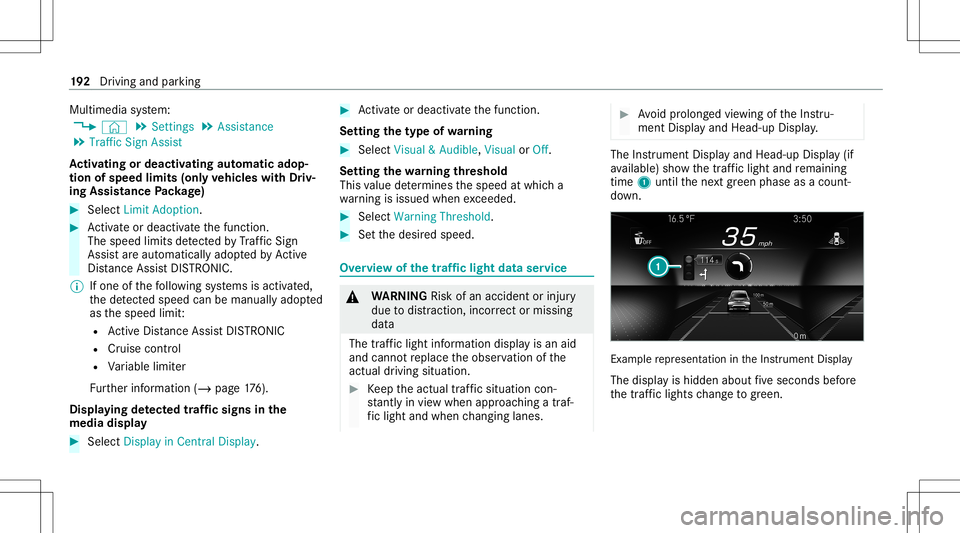
ment Displa yand Head-up Display. The
Instrument Displayand Head-up Display(if
av ailable) showthetra ffic light andremaini ng
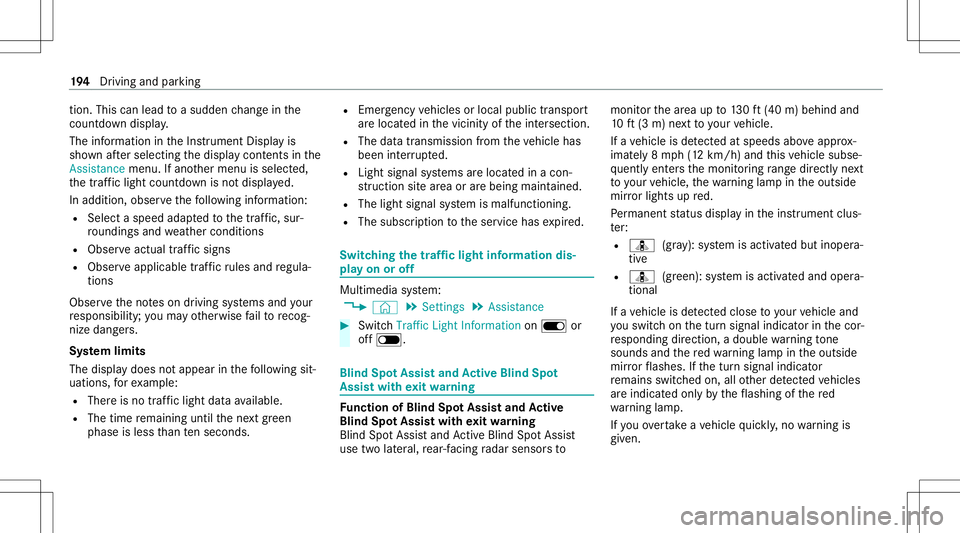
time 1until thene xt green phase asacount ‐
do wn. Ex
am ple repr esent ation intheIns trument Display
The displa yis hidden aboutfive seconds before
th etraf fic lights chang eto gree n. 19
2
Driving and parking
Page 196 of 442
tio
n.Thi scan lead toasudden chang ein the
cou ntdo wndispl ay.
The information intheIns trument Displayis
sho wnafte rsele cting thedispla ycon tents inthe
Assi stance menu .If ano ther menu isselect ed,
th etraf fic light countdo wnisno tdi spl ayed.
In addition, observethefo llo wing informatio n:
R Selec ta speed adaptedto thetra ffic, sur‐
ro und ingsand weather condition s
R Obse rveactual traffic sign s
R Obser veapplic abletraffic ru les and regula‐
tions
Obser vetheno teson driving systems andyour
re sponsibili ty;yo uma yot her wise failto recog‐
nize dangers.
Sy stem limit s
The displa ydoes notappear inthefo llo wing sit‐
uation s,forex am ple:
R Ther eis no traf fic light data available.
R The timere maini nguntil thene xt green
phase isless than tenseco nds. R
Emerg encyvehicles orlocal publictranspor t
ar elocat edinthevicinit yof theint ersect ion.
R The datatransmission from theve hicle has
been interru pted.
R Light signal systems arelocat edinacon ‐
st ru ction sitear ea orarebei ng mai ntained.
R The light signal system ismalfunct ioning.
R The subscr iption totheser vice hasexpir ed. Switc
hingthetraf fic ligh tinf orma tion dis‐
pla yon oroff Mult
imed iasystem:
4 © 5
Set ting s5
Assist ance #
Switc hTraffic LightInformation onD or
of fE. Blind
SpotAssis tand Activ eBli nd Spo t
As sist wit hex itwa rning Fu
nction ofBlind SpotAssis tand Activ e
Bli nd Spo tAs sist wit hex itwa rning
Blin dSpo tAss istand ActiveBli nd Spo tAssi st
use twolat eral, rear-facin gra dar sensor sto monit
orthear ea up to130ft (40 m)behind and
10 ft(3 m) next to your vehicle.
If ave hicle isde tected atspe eds aboveappr ox‐
imat ely8 mp h(12 km/h) andthis vehicle subse‐
qu ent lyent ersth emonit oring rang edire ctly next
to your vehicle, thewa rning lam pin theoutside
mir rorlig hts upred.
Pe rm anen tst atus displa yin theins trument clus‐
te r:
R ¸ (gra y): system isactiv ated but inoper a‐
tiv e
R ¸ (green): system isactiv ated and oper a‐
tion al
If ave hicle isde tected clos eto your vehicle and
yo uswit chon thetur nsignal indicat orinthecor‐
re sponding direction, adoubl ewa rning tone
sou nds and there dwa rning lam pin theoutside
mir rorflashes .If th etur nsignal indicat or
re mains switchedon,allother detected vehicles
ar eindicat edonlyby theflashin gof there d
wa rning lam p.
If yo uove rtak eave hicle quickl y, no warning is
giv en. 19
4
Driving and parking
Page 201 of 442
is
de tected inyour lane ,no lane -cor recting
br ak eap plica tion take splace.
Ac tiv atin g/deac tivatin gAc tiv eLan eKe eping
Assis t
Multi media system:
4 © 5
Set ting s5
Quick Access
5 Act ive Lane Keeping Assist #
Activateor deacti vate thefunc tion.
Se tting Activ eLan eKe eping Assist
Multi media system:
4 © 5
Set ting s5
Assist ance
5 Act ive Lane Keeping Assist
Ac tiv atin gor deac tivatin gthe hapticwarning #
Selec tWarnin g.
Ac tivateor deacti vate thefunc tion. DY
NA MIC BODY CONT ROLfun ction DY
NA MIC BODY CONTR OLcontinuously adjusts
th ech aract eristic sof thesuspension dampersto
th ecur rent operati ng and drivi ng cond itions. The
damp ing istun edindiv iduall yfo reac hwhee l
and isaffect ed bythefo llo wing fact or s:
R The road sur face condi tions
R Vehicle load
R The drive pr ogr am select ed
R The driving style
The drive pr ogr am can beadjus tedusing the
DY NA MIC SELE CTswitc h. AIR
BODY CONT ROL AIR
BODY CONT ROLfun ction
* NO
TEMer cedes-AMG vehicles #
Obser vetheno tesin theSupplement .
Yo uco uld other wise failto recogni ze
da ngers. AIR
BOD YCO NTR OLisan air suspe nsion system
wit hva riable dampingfo rim prove ddr iving com‐
fo rt.The all-r ou nd leve lcon trol system ensur es
th ebes tpossible suspension andconstant
gr oun dcle aranc e,eve nwi th aladen vehicle. When
driving atspeed, theve hicle islowe red
aut omat icallyto improve driving safetyand to
re duce fuelconsum ption. Youalso have the
op tion ofmanually adjustingtheve hicle leve l.
AI R BO DY CONTR OLinclude sth efo llo wing com‐
pone ntsand func tions:
R Airsuspen sionwithva riable spring rate
R Automatic leve lcon trol system
R Speed-depen dentlowe ring toreduce fuel
con sum ption
R Manuall yselec table high-le velse tting for
gr ea tergr ound clearance
R ADS PLUS (Ada ptive Dam ping System with
con stant dam pingfo rc eadjus tment)
R DYNA MIC SELE CTswitc hand leve lbutt on
Susp ension setting and vehicl eleve lper
dr ive pr og ram
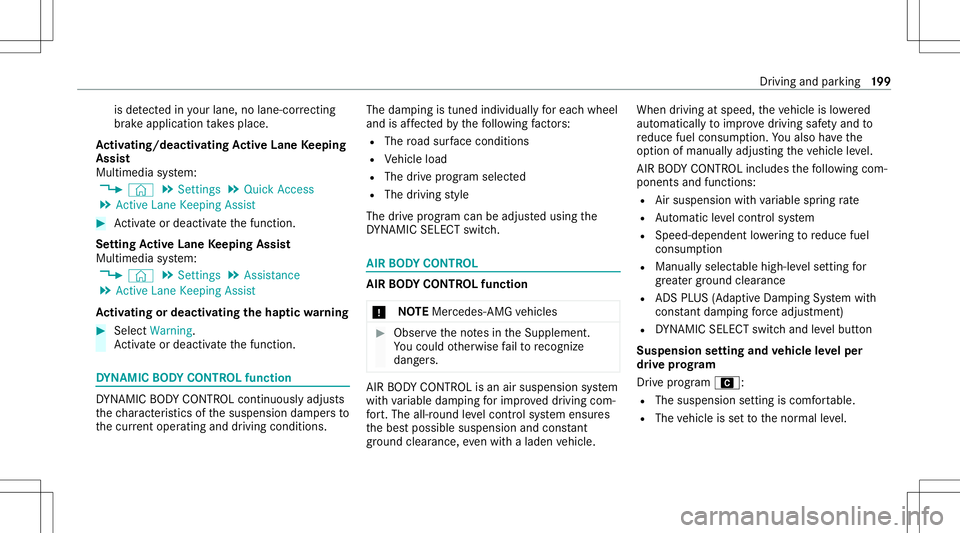
Dr ive pr ogr am A:
R The susp ens ion se tting iscomf ortable.
R The vehicle issetto thenor mal leve l. Dr
ivin gand parking19
9
Page 207 of 442
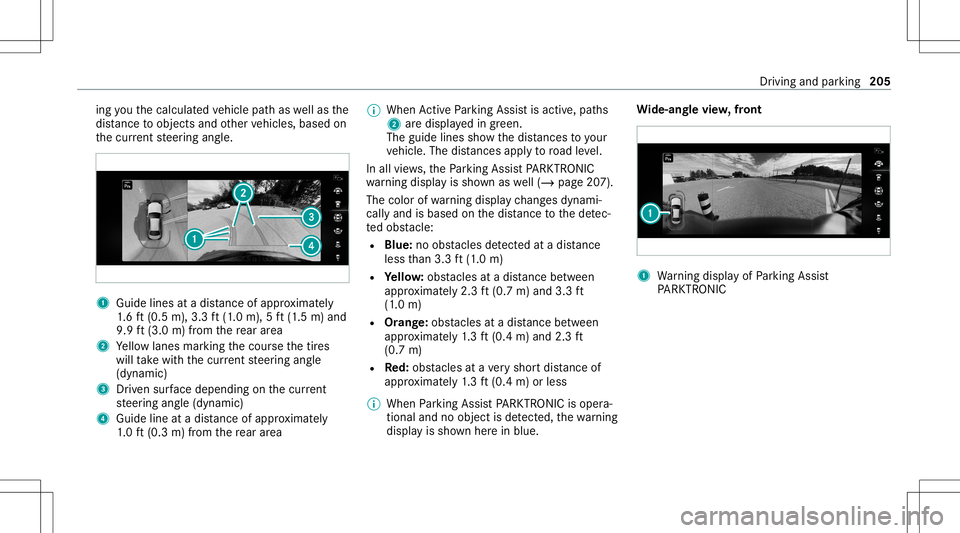
ing
youth ecalculat edvehicle pathas wellas the
dis tance toobject sand other vehicles, basedon
th ecur rent steer ing ang le. 1
Guide linesatadis tance ofapprox imat ely
1. 6 ft (0.5 m),3.3 ft(1.0 m), 5ft (1.5 m) and
9.9 ft(3.0 m)from there ar area
2 Yello wlanes markingth ecour sethetir es
will take wit hth ecur rent steer ing ang le
(dynamic)
3 Driven sur face dep endi ngon thecur rent
st eer ing ang le(dynamic)
4 Guide lineatadis tance ofapprox imat ely
1. 0 ft (0.3 m)from there ar area %
When ActivePa rking Assistis act ive, pat hs
2 aredispla yedin green.
The guide linesshowthedis tances toyour
ve hicle. Thedistances apply toroad leve l.
In all views,th ePa rking AssistPA RK TRONI C
wa rning displa yis sho wnaswell(/ page20 7).
The color ofwa rning displa ych ang esdynam i‐
call yand isbased onthedis tance tothede tec‐
te dobs tacle :
R Blue :no obs tacle sde tected atadi st anc e
less than 3.3ft (1.0 m)
R Yello w: obs tacle sat adi st anc ebe tween
appr oximat ely2. 3ft (0.7 m)and 3.3ft
(1 .0 m)
R Orang e:obs tacles atadis tance betwee n
ap prox imat ely1. 3 ft (0.4 m)and 2.3ft
(0.7 m)
R Red:obs tacle sat ave ry shor tdis tance of
ap prox imat ely1. 3 ft (0.4 m)orless
% When Parking AssistPA RK TRONI Cis oper a‐
ti on aland noobj ectis de tected, thewa rning
displa yis sho wnherein blue. Wi
de-an glevie w,front 1
Warning displa yof Parking Assist
PA RK TRONI C Dr
ivin gand parking205
Page 208 of 442
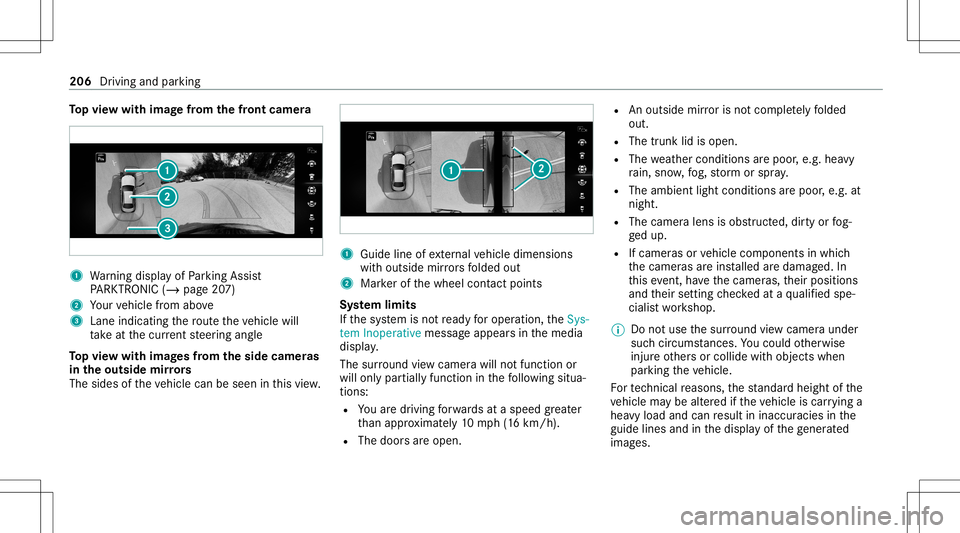
To
pvie wwi th imag efrom the fron tcame ra 1
Warning displa yof Parking Assist
PA RK TRONI C(/ page20 7)
2 Your vehicle from above
3 Lane indicating thero uteth eve hicle will
ta ke atthecur rent steer ing ang le
To pvie wwi th imag esfrom the side came ras
in theout side mirrors
The sides oftheve hicle canbeseen inthis vie w. 1
Guide lineofextern al vehicle dimensions
wit houtside mirrors folded out
2 Markerof thewheel contact poi nts
Sy stem limit s
If th esy stem isno tre ady foroper ation, theSys-
tem Inoper ativemessag eappear sin themedia
displa y.
The surround viewcam erawill notfun ction or
will onlypa rtiall yfunc tion inthefo llo wing situa‐
tion s:
R Youar edr ivin gfo rw ards ataspee dgr ea ter
th an appr oximat ely10 mph(1 6 km/h).
R The door sar eopen. R
Anoutside mirroris no tcom pletely folded
out.
R The trunk lidisopen .
R The weather condition sar epoor ,e.g .hea vy
ra in, sno w,fog, stor m or spr ay.
R The ambient lightcondit ionsarepoor ,e.g. at
night.
R The camer alens isobs truct ed, dirtyor fog‐
ge dup.
R Ifcamera sor vehicle component sin whic h
th ecamer asareins talled aredamag ed.In
th is eve nt,have thecamer as,their position s
and their setting checkedat aqu alif ied spe‐
cialis two rkshop.
% Donotuse thesur round viewcam eraund er
suc hcir cum stanc es.Youco uld other wise
injur eot her sor collide withobject swhen
par king theve hicle.
Fo rte ch nica lre ason s,thest andar dheigh tof the
ve hicle maybe altered ifth eve hicle iscar rying a
hea vyload andcanresult ininaccur aciesinthe
guide linesandinthedispla yof thege ner ated
ima ges. 206
Driving andparking
Page 210 of 442
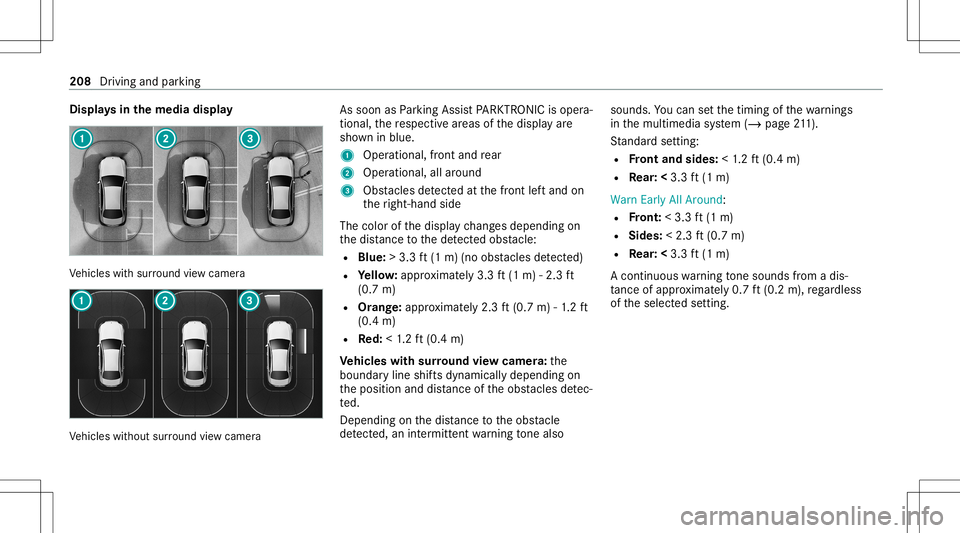
Disp
lays inthemed iadisp lay Ve
hicles withsur round viewcam era Ve
hicles without surround viewcam era As
soon asParking AssistPA RK TRONI Cis oper a‐
ti on al, there spectiv ear eas ofthedispla yar e
sho wninblue.
1 Oper ational, front and rear
2 Operation al,allaroun d
3 Obstacle sde tected atthefront leftand on
th eright-h andside
The color ofthedispla ych ang esdepen dingon
th edis tance tothede tected obs tacle :
R Blue :> 3.3 ft(1 m) (no obstacle sde tected)
R Yello w: appr oximat ely3. 3ft (1 m) -2.3 ft
(0.7 m)
R Orang e:appr oximat ely2. 3ft (0.7 m)-1. 2 ft
(0.4 m)
R Red:<1.2 ft (0.4 m)
Ve hicl eswith surround viewcamer a:the
boundar yline shiftsdynamicall ydependin gon
th eposition anddistance oftheobs tacle sde tec‐
te d.
Depen dingonthedis tance totheobs tacle
de tected, anintermitt entwarning tone also sou
nds. Youcan setth etimin gof thewa rnings
in themultimedia system (/ page21 1).
St andar dse tting :
R Front and sides :< 1.2 ft (0.4 m)
R Rear: <3.3 ft(1 m)
Warn EarlyAllAro und :
R Front :< 3. 3ft (1 m)
R Sides: <2.3 ft(0.7 m)
R Rear: <3.3 ft(1 m)
A con tinuous warning tone sou nds from adi s‐
ta nce ofapprox imat ely0. 7ft (0.2 m),rega rdless
of theselect edsetting. 208
Driving andparking
Page 213 of 442
sensor
s,e.g. flowe rpo ts or draw bar s.
The vehicle orother object scould oth‐
er wise bedamag ed. Re
quirement s:
R The camera menuis open.
R Or:Ac tivePa rking Assistis act ive.
R Or:th ePA RK TRONI Cpop- upwin dow
appear s. #
Tap= inthemedia display.
If th eindicat orlam pis lit, Parking Assist
PA RK TRONI Cis act ive. Ifth eindicat orlam pis
no tlit or theé symbol appearsin theins tru‐
ment cluster,Pa rking AssistPA RK TRONI Cis no t
act ive.
% Parking AssistPA RK TRONI Cis aut omat ically
act ivat ed when theve hicle isstar ted.
Alt ernativ ely,Pa rking AssistPA RK TRONI Ccan be
act ivat ed ordeac tiva tedin thequ ick acc ess
men u. Se
tting thewa rning tones ofParking Assis t
PA RK TRONI C
Mu ltimed iasystem:
4 © 5
Set ting s5
Assist ance
5 Camera &Parkin g
Ad jus tingthe volum eof thewa rning tones #
Select Warning ToneVolume. #
Seta va lue.
Ad jus tingthe pitchof the warning tones #
Select Warning TonePitch. #
Seta va lue.
Specif yingthest ar ting pointfo rthe warning
to nes
Yo ucan spec ifywhe ther thePa rking Assist
PA RK TRONI Cwa rning tones should comm ence
wh en theve hicle isfur ther aw ay from anobs ta‐
cle . #
Sele ctWa rnEarl yAll Arou nd. #
Activateor deacti vate thefunc tion. Ac
tiv atin g/deac tivatin gaudi ofa deo ut
Yo ucan spec ifywhe ther thevo lume ofamedia
sour ceinthemultimedia system isto be
re duced whenParking AssistPA RK TRONI C
soun dsawa rning tone. #
Select Aud ioFad eou tDuri ngWa rning Tones. #
Activateor deacti vate thefunc tion. Ac
tiv ePa rking Assis t Fu
nction ofActiv ePa rking Assis t
Ac tivePa rking Assistis an elect ronic parking
assis tance system, whic huses ultrasound with
th eassis tance ofthere ar vie wcam eraand sur‐
ro und viewcam era. When youar edr ivin gfo r‐
wa rdsup toappr oximat ely22 mph(35 km/h),
th esy stem automaticall ymeasur espar king
spaces onboth sides oftheve hicle.
Ac tivePa rking Assistof fers thefo llo wing func‐
tion s:
Ve hicles withre ar vie wcam era
R Parking inpar kingspaces parallel tothero ad Dr
ivin gand parking 21
1