brake light MERCEDES-BENZ E-CLASS COUPE 2009 User Guide
[x] Cancel search | Manufacturer: MERCEDES-BENZ, Model Year: 2009, Model line: E-CLASS COUPE, Model: MERCEDES-BENZ E-CLASS COUPE 2009Pages: 313, PDF Size: 7.76 MB
Page 88 of 313
The hazard warning lamps automatically
switch on if:
R
an airbag is deployed.
R you brake sharply and bring the vehicle to
ah alt from aspeed of more than
70 km/h.
The hazard warning lamps still operate if the
ignition is switched off.
X To switch on: press button0046.
All turn signals flash.
X To switch off: press button0046.
X To switch off the hazard warning lamps
using the combination switch: if the haz-
ard warning lamps are on, push the combi-
nation switch in the direction of arrow 0071
or 0073 beyond the pressure point
(Y page 82).
The indicator lamp on the corresponding
side of the vehicle flashes.
The hazard warning lamp switches off auto-
matically after full brake application if the
vehicle then reaches aspeed of over
10 km/ha gain.
Intelligent Light System* (bi-xenon
headlamps*) The Intelligent Light System is
asystem which
adjusts the headlamps automatically to suit
the prevailing driving and weather conditions.
The bi-xenon headlamps offer enhanced func-
tions to improve illumination of the road sur-
face, e.g. depending on the vehicle speed or
weather conditions. The system includes the
active light function, cornering light function,
motorway mode and extended range fog-
lamps. The system is only active when it is
dark.
You can activat eordeactivate the "Intelligent
Light System" using the on-board computer
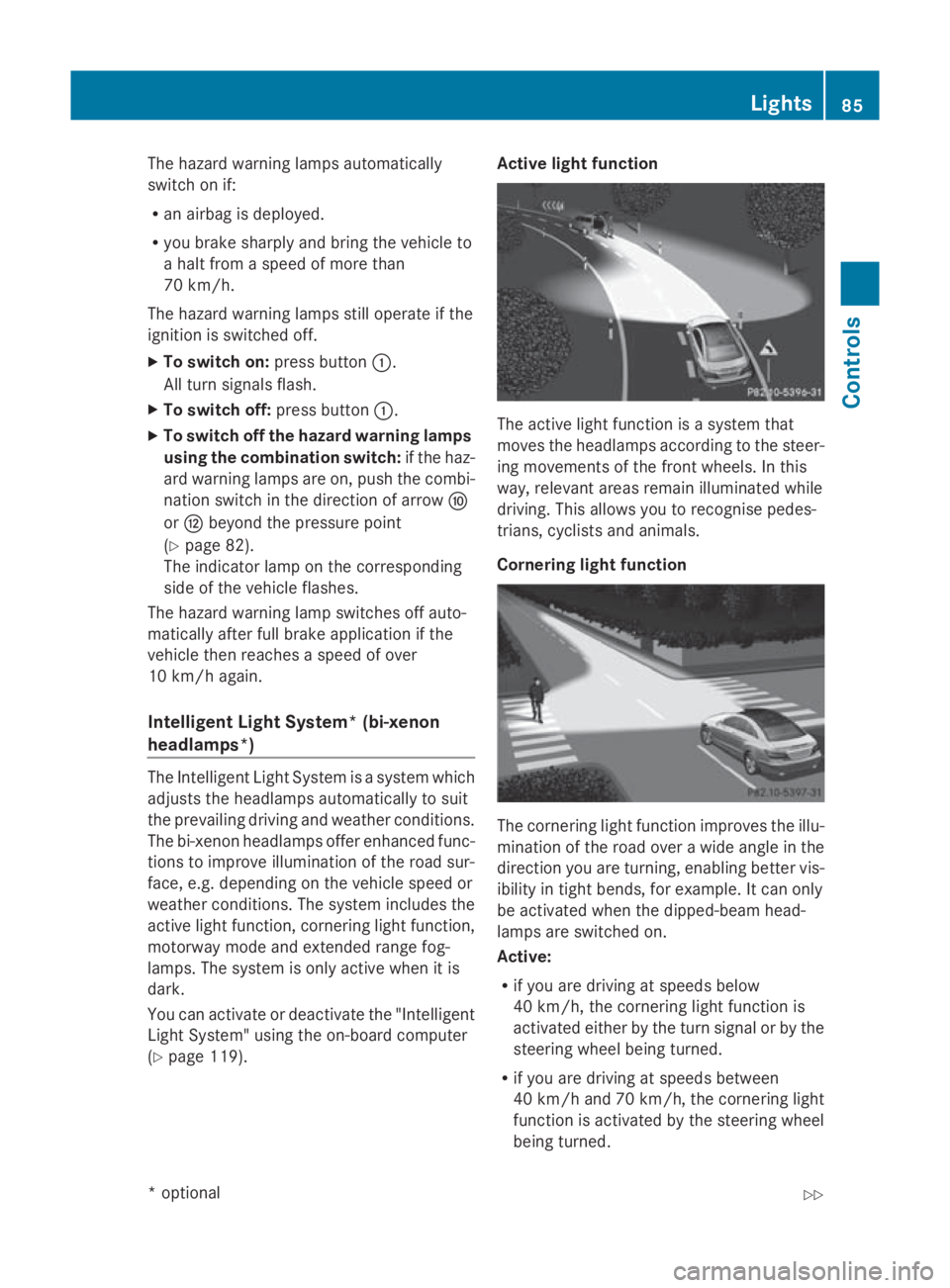
(Y page 119). Active light function
The active light function is
asystem that
moves the headlamps accordin gtothe steer-
ing movements of the frontw heels. In this
way, relevant areas remain illuminated while
driving. This allows you to recognise pedes-
trians, cyclists and animals.
Cornering light function The cornering light function improves the illu-
mination of the road over
awide angle in the
direction you are turning, enabling better vis-
ibility in tight bends, for example. It can only
be activated when the dipped-beam head-
lamps are switched on.
Active:
R if you are driving at speeds below
40 km/h, the cornering light function is
activated either by the turn signal or by the
steerin gwheel being turned.
R if you are driving at speeds between
40 km/ha nd 70 km/h ,the cornerin glight
function is activated by th esteering wheel
bein gturned. Lights
85Controls
*optional
207_AKB
;2;3,en-GB
mkalafa ,V ersion: 2.11.8.1
2009-07-23T10:23:49+02:00
-Seite 85 Z
Page 94 of 313
Turn signals
X
To indicate briefly: press the combination
switch briefl yinthe direction of arrow 0070
or 0072 (Ypage 88).
The corresponding tur nsigna lflashe sthree
times.
X To indicate: push the combinatio nswitch
beyond the pressure point in the direction
of arrow 0070or0072 (Ypage 88).
The corresponding tur nsigna lindicator
lamp 0024 or0026 in the instrument clus-
ter flashes.
Hazard warning lamps The hazar
dwarnin glam ps automatically
switch on if:
R an airba gisdeployed.
R yo ub rake sharpl yand bring the vehicl eto
ah altf romas peed of mor ethan
70 km/h.
The hazar dwarnin glam ps still operate if the
ignition is switched off.
X To switc hon:press button 0046.
All tur nsignals flash.
X To switc hoff:press button 0046.
X To switc hoffthe hazard warning lamps
using the combination switch: when the
hazar dwarnin glam ps ar eon, push the
combinatio nswitch in the direction of
arrow 0070or0072 beyond the pressure point
(Y page 87).
The indicator lamp on the corresponding
side of the vehicl eflashes. The hazar
dwarnin glam pswitches off auto-
maticall yafter full brake applicatio nifthe
vehicl ethenr eache saspeed of over
10 km/h again.
Intelligent Light System* (bi-xenon
headlamps*) The Intelligent Light System is
asystem which
adjusts the headlamps automaticall ytosuit
the prevailing driving and weather conditions.
The bi-xeno nheadlam ps offer enhance dfun c-
tions to improv eillum ination of the roa dsur-
face, e.g .depen ding on the vehicl espeed or
weather conditions. The system includes the
active light function, cornering light function,
motorway mod eand extende drange fog-
lamps .The system is onl yactive when it is
dark.
Yo uc an activate or deactivate the "Intelligent
Light System" using the on-board computer
(Y page 119).
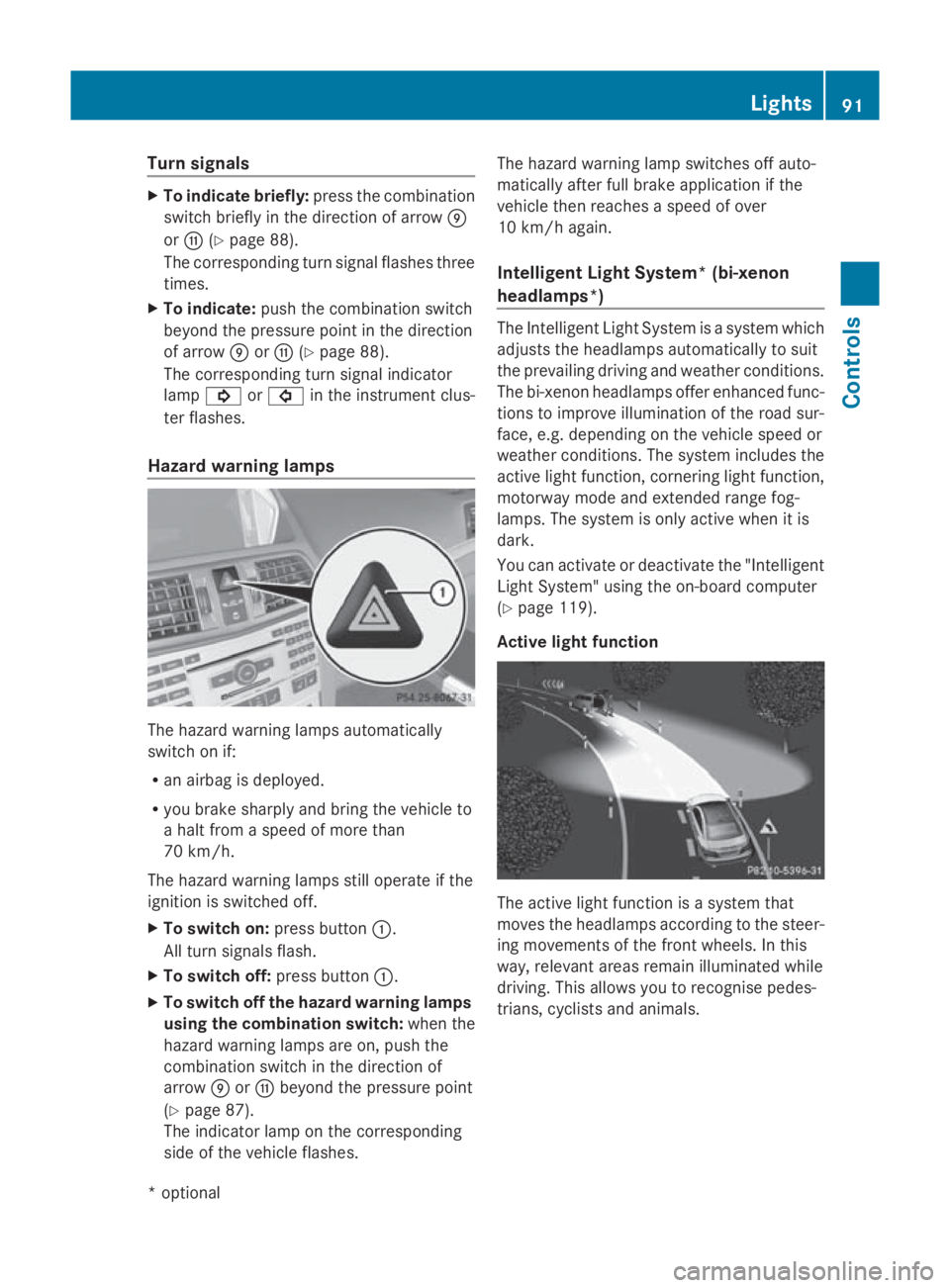
Activ elight function The active light functio
nisas ystem that
moves the headlamps according to the steer-
ing movements of the front wheels .Inthis
way, relevant area sremai nillum inate dwhile
driving .Thisa llow syou to recognise pedes-
trians, cyclists and animals. Lights
91Controls
*optional
207_AKB; 2; 3, en-GB
mkalafa
,V ersion: 2.11.8.1
2009-07-23T10:23:49+02:00
-Seite 91 Z
Page 101 of 313
Drivin
gand parking Starting th
eengine G
Risk of accident
Do no tplac ea ny objects in th edriver's foot-
well. If you use afloormat or carpet in the
driver's footwell, mak esuret hatitisc orrectly
secure dand that there is sufficien tclearance
fo rt he pedals.
Do no tplac es evera lfloormat sontopof one
another.
Loose objects or th efloormat scould other-
wise get caught between th epedals if you
accelerat eorbrake suddenly. You will then
no tbea ble to brake ,declutch or accelerate
as intended. Thi scould lead to accidents and
injury. G
Risk of poisoning
Never leav ethe engin erunning in enclosed
spaces. The exhaus tgases contain carbon
monoxide. Inhaling exhaus tfumes consti-
tute sah ealth hazard and could lead to loss
of consciousness or eve ndeath.
! Do no tdepress th eaccelerator pedal
when startin gthe engine.
Manual transmission Gear lever
X
Depress th ebrake peda land keep it
depressed.
X Depress th eclutc hpedal.
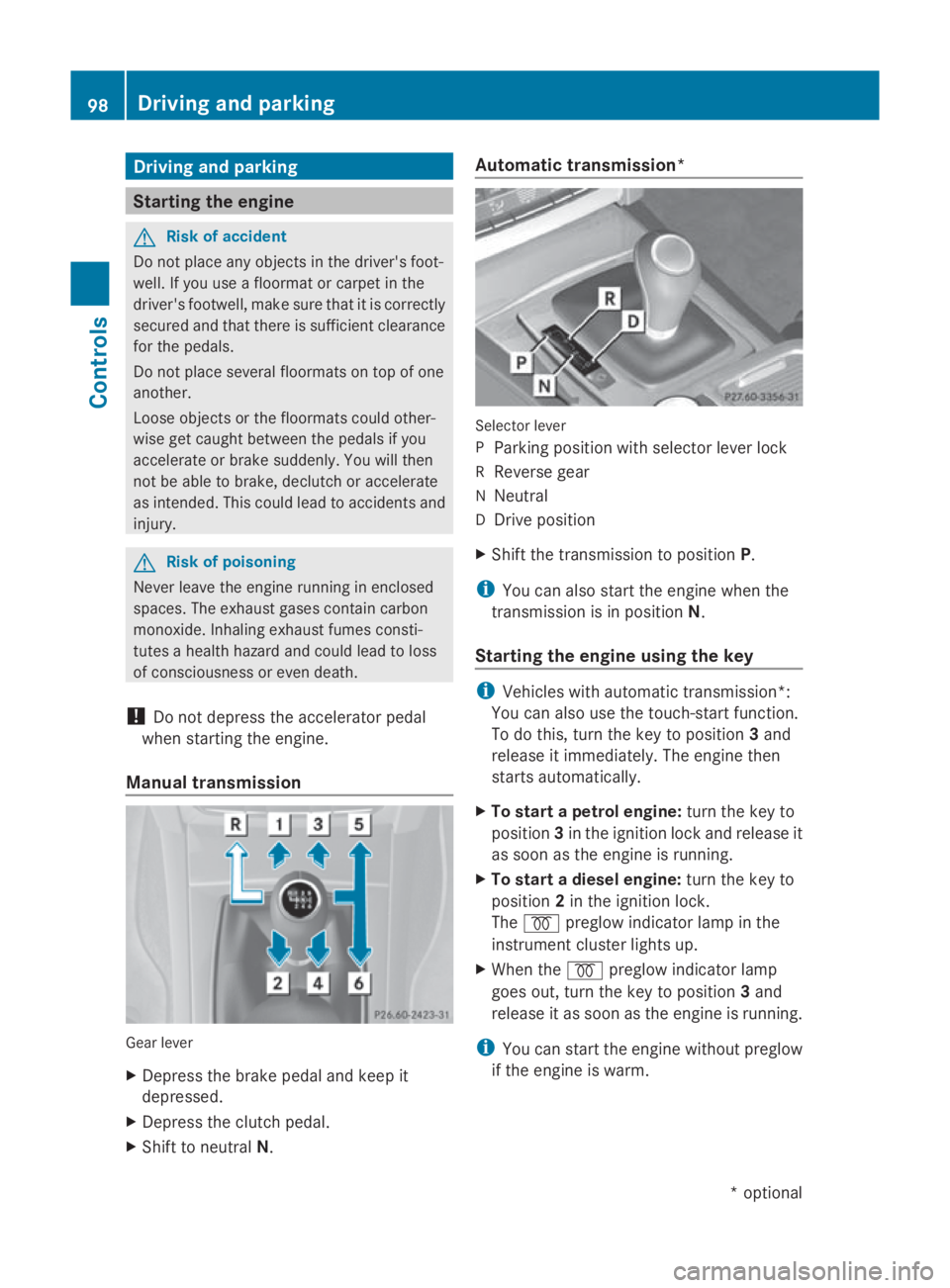
X Shift to neutral N. Automatic transmission*
Selecto
rlever
P Parking position wit hselecto rlever lock
R Revers egear
N Neutral
D Drive position
X Shift th etransmissio ntoposition P.
i You can also start th eenginew hen the
transmissio nisinpositionN.
Starting th eengin eusing th ekey i
Vehicles wit hautomatic transmission*:
You can also use th etouch-start function.
To do this, turn th ekeyto position 3and
release it immediately. The engin ethen
start sautomatically.
X To star tapetrolengine: turn thekeyto
position 3in th eignition loc kand release it
as soo nastheengin eisrunning.
X To star tadiesel engine: turn thekeyto
position 2in th eignition lock.
The 0028 preglo windicator lamp in the
instrumen tcluster lights up.
X Whe nthe 0028 preglo windicator lamp
goe sout,tur nt he keyt op osition 3and
release it as soo nastheengin eisrunning.
i You can start th eenginew ithout preglow
if th eengineisw arm. 98
Driving an
dpark ingCont rols
*optio nal
207_AKB; 2; 3, en-GB
mkalafa
,V ersion: 2.11.8.1
2009-07-23T10:23:49+02:00
-Seite 98
Page 103 of 313
Hill start assist
Hill start assist help
syou when pulling away
forwards or in reverse on an uphill gradient.
It hold sthe vehicl efor as hort time after you
have removed yourf oot from the brake pedal.
This gives you time to move yourf oot from
the brake peda ltothe accelerator peda land
depress it before the vehicl ebegins to roll. G
Risk of accident
Never leave the vehicl ewhen it is held by hill
start assist. After approximately one second,
hil lstart assist wil lnolonger brake yourv ehi-
cle and it coul droll away.
X Take yourf oot off the brake pedal.
i Once you have taken yourf oot off the
brake pedal, the vehicl eisheld for around
one second.
X Pulla way.
Hill start assist willn ot function if:
R you are pulling away on aleve lroad or a
downhill gradient.
R on vehicles with automatic transmission*,
the transmission is in position N.
R the vehicl eissecure dwith the parking
brake.
R ESP ®
is malfunctioning. Parking
G
Risk of accident
Only remove the key from the ignitio nlock
when the vehicl eisstationary, as you cannot
steer the vehicl ewhen the key is removed.
Never leave children unsupervised in the vehi-
cle. They coul drelease the parking brake. This
coul dleadtoas erious or fatal accident. G
Risk of fire
Make sure that the exhaust system does not
under any circumstances come into contact
with easily ignitable material such as dry grass or petrol
.Otherwise, the flammable material
may ignite and set the vehicl eonfire.
To ensure that the vehicl eissecure dagainst
rolling away unintentionally:
R the parking brake must be applied
R on vehicles with manua ltransmission,
engag efirst gearorr everse gear
R on vehicles with automatic transmission*,
the transmission must be in position Pand
the key must be removed from the ignition
lock
R on steep uphill or downhill gradients, turn
the front wheels toward sthe kerb
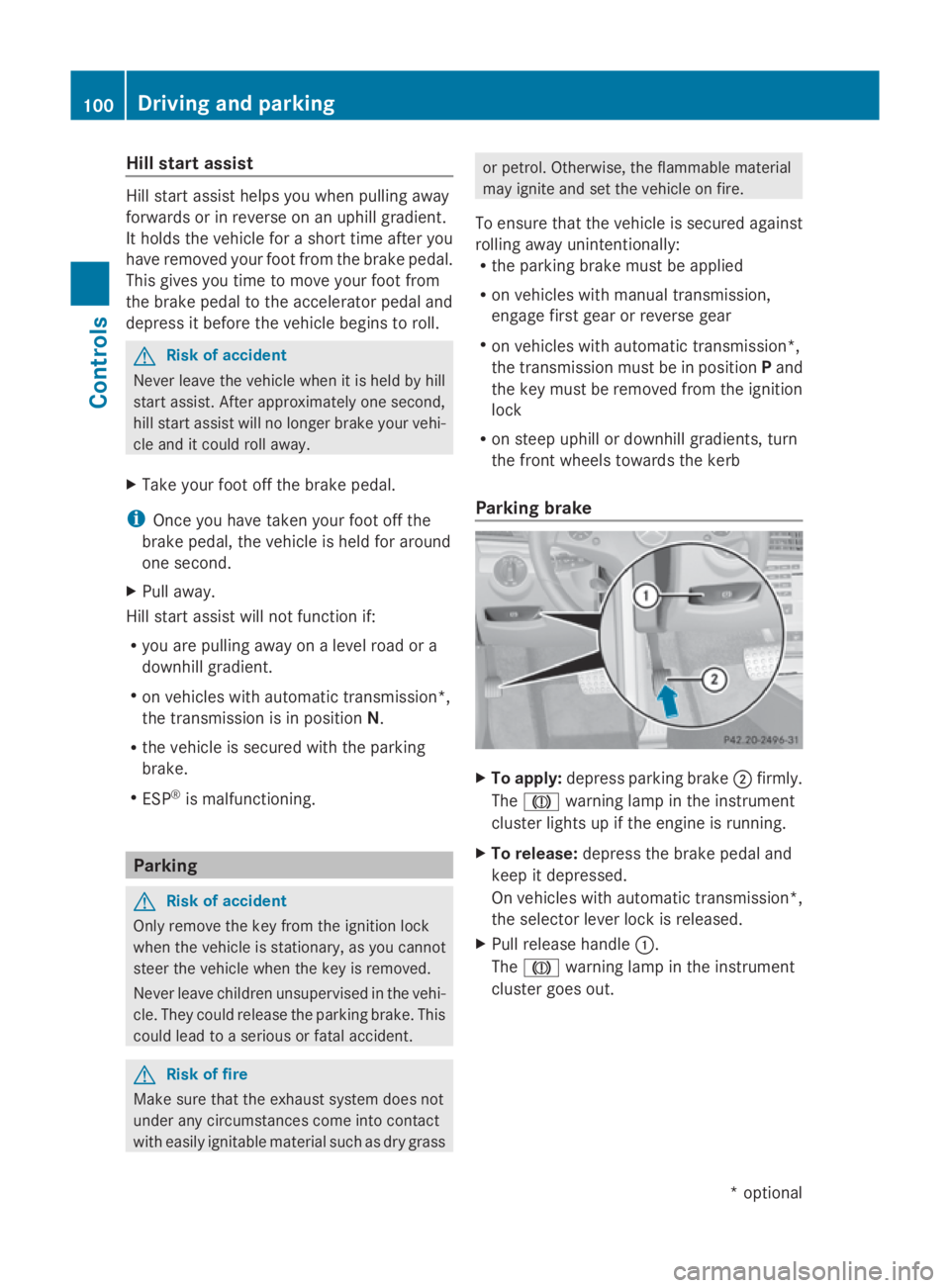
Parking brake X
To apply: depress parking brake 0047firmly.
The 004D warning lampint he instrument
cluster lights up if the engine is running.
X To release: depress the brake peda land
keep it depressed.
On vehicles with automatic transmission*,
the selector leve rlock is released.
X Pullr elease handle 0046.
The 004D warning lampint he instrument
cluster goes out. 100
Driving and parkingControls
*o
ptional
207_AKB; 2; 3, en-GB
mkalafa,
Version: 2.11.8.1 2009-07-23T10:23:49+02:00-Seite 100
Page 125 of 313
Switching the fold in mirrors when lock-
ing* function on/off
If you switch on the Fold mirrors in when
locking: function, the exterior mirrors fold
in when you lock the vehicle. When you
unlock the vehicle and then open the driver's
or front-passenger door, the exterior mirrors
fold out again.
If you have switched the function on and you
fold the exterior mirrors in using the button
on the door (Y page 74), they will not fold out
automatically. The exterior mirrors can then
only be folded out using the button on the
door.
X Press the 0040or003E button on the steer-
ing wheel to select the Settingsmenu.
X Press the 003Dor003C button to select the
Convenience submenu.
X Press the 0064button to confirm.
X Press the 003Dor003C button to select the
Fold in mirrors when locking: func-
tion.
You will see the selected setting: onor
off.
X Press the 0064button to save the setting.
Restoring the factory settings For safety reasons, not all functions are reset:
the
Limit speed (winter tyres): func-
tion in permanent SPEEDTRONIC can only be
set in the Vehiclesubmenu. If you want to
reset the Daytime driving lamps: in the
Light submenu, you must turn the key in the
ignition lock to position 1.
X Press the 0040or003E button on the steer-
ing wheel to select the Settingsmenu.
X Press the 003Dor003C button to select the
Factory setting submenu.
X Press the 0064button to confirm.
The Reset all settings? message
appears. X
Press the 003Dor003C button to select
Yes orNo.
X Press the 0064button to confirm the selec-
tion.
If you have selected Yes,the multifunction
display shows aconfirmation message. Driving systems
Overview of driving systems
The vehicle's driving systems are described
on the following pages:
R cruise control, Distronic Plus* and Speed-
tronic, which are used to control the speed
of the vehicle
R HOLD function, which makes pulling away
easier, particularly on steep uphill gradi-
ents
R dynamic handling package with sports
mode*, which is used to adjust the vehi-
cle's suspension system
R PARKTRONIC* and Parking Guidance*,
which assist you in finding aparking space,
as well as when manoeuvring and parking
R reversing camera*, which assists you when
parking and manoeuvring
R ATTENTION ASSIST, which helps you
detect tiredness or increasing lapses in
concentration
R Speed Limit Assist*, which shows you
speed limits that are detected in the multi-
function display
The ABS,B AS,BAS PLUS* ,adaptive brake
lights, ESP ®
,E BV and ADAPTIVE BRAKE driv-
ing safety systems and the PRE-SAFE ®
Brake* are described in the "Driving safety
systems" section (Y page 52). Cruise control
Cruise control maintains aconstant road
speed for you. It brakes automatically in order 122
Driving systemsControls
*o
ptional
207_AKB; 2; 3, en-GB
mkalafa,
Version: 2.11.8.1 2009-07-23T10:23:49+02:00-Seite 122
Page 126 of 313
to avoi
dexceeding the se tspeed. On long and
steep downhil lgradients ,especially if the
vehicl eisladen or towing atrailer, yo umust
shift to alower gear in good tim eorselect
shift range 1,2or 3on vehicles with auto-
matic transmission* .Bydoing so ,you will
make us eofthe braking effect of the engine,
which relieves the load on the brake system
and prevents the brakes fro moverheating
and wearing too quickly. G
Ris
kofa ccident
Do not change down for additional engine
braking on aslipper yroads urface. This could
cause the drive wheels to lose their gri pand
the vehicl ecould skid.
Use cruis econtrol onl yifroada nd traffi ccon-
ditions make it appropriate to maintain a
stead yspeed foraprolonge dperiod. Youc an
store any roa dspeed above 30 km/h. G
Ris
kofa ccident
Cruise control cannot take account of road
and traffi cconditions.
Alway spayattentio ntotrafficconditions
eve nw henc ruis econtrol is activated.
Cruise control is onl yanaiddesigne dtoassist
driving. Yo uareresponsibl efor the vehicle's
spee dand for braking in good time. G
Ris
kofa ccident
Do not us ecruis econtrol:
R in roa dand traffi cconditions which do not
allo wyouto maintain aconstant spee d(e.g.
heav ytraffi corw inding roads). Yo ucould
otherwis ecause an accident.
R on slippery roads .Braking or accelerating
could cause the drive wheels to lose trac-
tio na nd the vehicl ecould the nskid.
R when there is poor visibility, e.g .due to fog,
heav yrainors now
Cruis econtro llever Yo
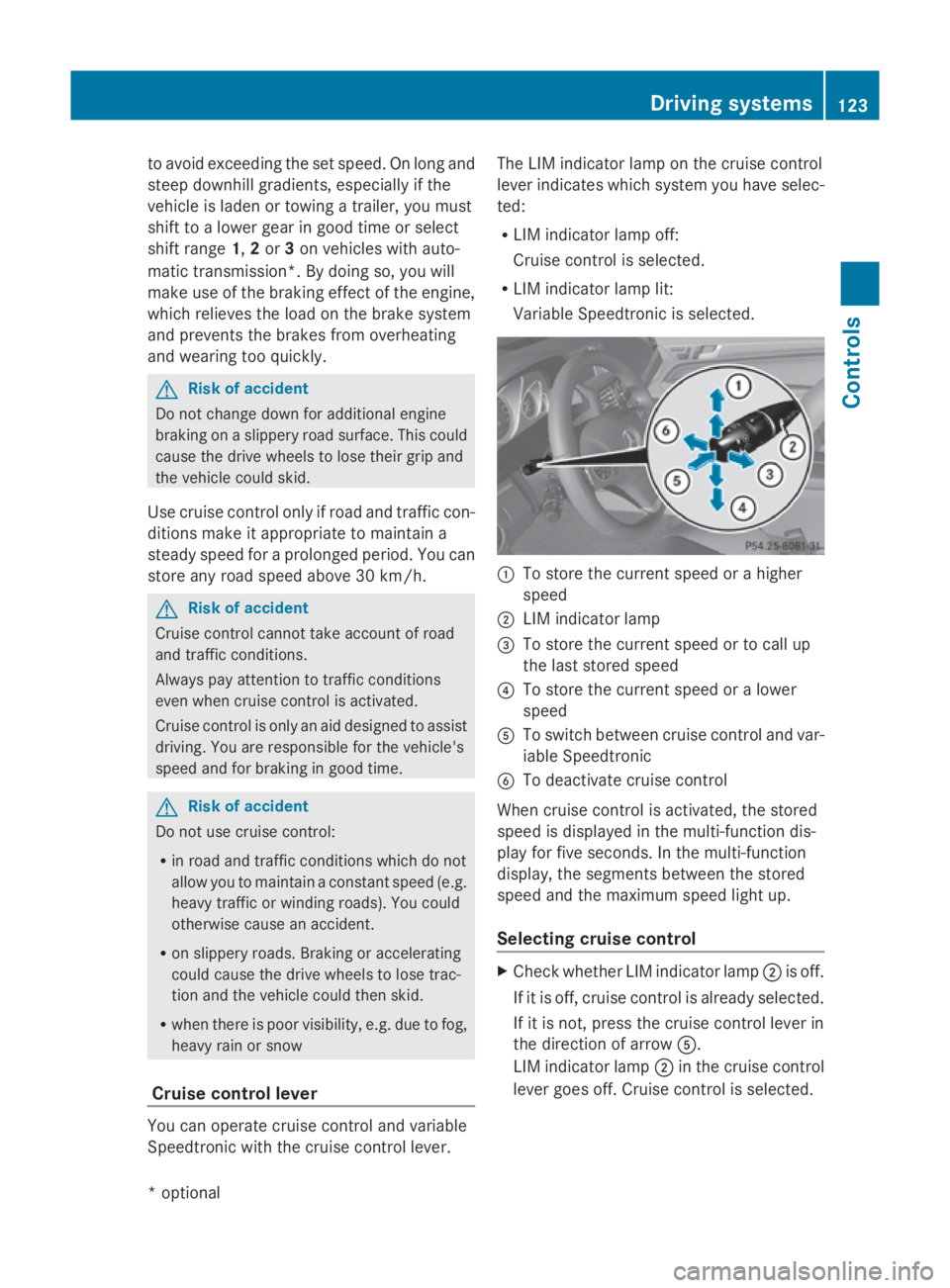
uc an operate cruis econtrol and variable
Speedtroni cwitht he cruis econtrol lever. Th
eL IM indicator lamp on the cruis econtrol
lever indicates which syste myouhave selec-
ted:
R LIM indicator lamp off:
Cruise control is selected.
R LIM indicator lamp lit:
Variable Speedtroni ciss elect ed. 0046
To store the current spee dorahigher
speed
0047 LIM indicator lamp
008A To store the current spee dortocallup
the last stored speed
0088 To store the current spee doralower
speed
0086 To switch between cruis econtrol and var-
iabl eSpeedtronic
0087 To deactivate cruis econtrol
When cruis econtrol is activated ,the stored
spee disd isplayed in the multi-functio ndis-
play for five seconds. In the multi-function
display, the segments between the stored
spee dand the maximum spee dlight up.
Selecting cruis econtrol X
Check whether LIM indicator lamp 0047is off.
If it is off ,cruis econtrol is already selected.
If it is not, press the cruis econtrol lever in
the directio nofarrow 0086.
LIM indicator lamp 0047in the cruis econtrol
lever goes off .Cruise control is selected. Driving systems
123Controls
*optio nal
207_AKB; 2; 3, en-GB
mkalafa
,V ersion: 2.11.8.1
2009-07-23T10:23:49+02:00
-Seite 123 Z
Page 128 of 313
X
Briefly press the cruise control lever in the
direction of arrow 0086.
Variabl eSpeedtroni cisselected .LIM indi-
cator lamp 0047in the cruise control lever
lights up.
Cruise control is automaticall ydeactivated if:
R yo ud epress the parking brake.
R yo ud rive at less than 30 km/h
R ESP ®
intervenes or yo udeactivate ESP ®
R yo uc hange into neutral in avehicle with
manual transmission while driving or if the
clutch is depressed for longer than 6sec-
onds
R on vehicle swithm anual transmission, you
shift to ahigher gea rand as aresult the
engine speed is too low
R yo um ove the selector lever to Non vehi-
cle sw itha utomatic transmission* while
driving
If cruise control is deactivated, yo uwillh ear
aw arning tone. You see the Cruise con‐
trol off messageinthe multi-function dis-
play for approximately five seconds.
i The last speed store disclearedwheny ou
switch off the engine. DISTRONI
CPLUS*
i Distronic Plu sisnot available in al lcoun-
tries.
Distronic Plu sregulates the speed and auto-
matically maintains the distance to the vehi-
cle in front. It brakes automaticall yinorder
to avoid exceeding the set speed. On long and
stee pdownhil lgradients, especially if the
vehicle is laden or towing atrailer, yo umust
select shift range 1,2or 3in goo dtime .By
doing so, yo uwillm ake us eofthe braking
effect of the engine, which relieves the load
on the brake system and prevents the brakes
from overheating and wearing too quickly. G
Risk of accident
Do not change dow nfor additiona lengine
braking on aslippery roa dsurface .Thisc ould
cause the drive wheel stoloset hei rgripa nd
the vehicle could skid. G
Risk of accident
DISTRONIC PLUS is only an ai ddesigne dto
assist driving .The driver is fully responsible
for the vehicle's distance from othe rvehicles,
the vehicle's speed and for braking in good
time.
DISTRONIC PLUS doe snot react to:
R pedestrians
R stationar yobstacles on the road, e.g. stop-
ped or parked vehicles
R oncoming and crossing traffic
DISTRONIC PLUS may not detect narro wvehi-
cle sdriving in front, e.g. motorcycles, or vehi-
cle sd riving on adifferent line. Therefore,
always pa yattention to traffi cconditions even
whe nDISTRONIC PLUS is activated. Other-
wise, yo umay fai ltorecognise dangers in
time ,cause an accident and injure yourself
and others.
If as lower-moving vehicle is detected in front,
Distronic Plu scauses your vehicle to brake
and maintai napreset distance to the vehicle
in front. G
Risk of accident
DISTRONIC PLUS cannot take account of road
and traffi cconditions .IfDISTRONIC doe snot
recognise or no longer recognise sthe vehicle
in front, do not activate DISTRONIC or, if it is
already active, deactivate it. Thi sisespecially
the case:
R before corners
R in filter lanes Drivin
gsystems
125Controls
*optional
207_AKB; 2; 3, en-GB
mkalafa
,V ersion: 2.11.8.1
2009-07-23T10:23:49+02:00
-Seite 125 Z
Page 129 of 313
R
when changing to alane with faster moving
traffic
R in complex driving situation sorwhere the
lanes are diverted ,e.g.atm otorway/road-
way construction sites
Otherwise, DISTRONIC PLUS maintain sthe
current speed or accelerates up to th eset
speed.
DISTRONIC PLUS cannot tak eaccount of
weather conditions .Deactivate, or do not
activate, DISTRONIC PLUS if:
R ther oads are slippery, snow-covered or icy.
The wheels could lose grip when braking or
accelerating. The vehicle could start to
skid.
R thes ensors are dirt yorthere is poor visi-
bility, e.g .due to snow, rain or fog. Distance
control may be impaired.
Always pay attention to traffic conditions
even when DISTRONIC PLUS is activated.
Otherwise, you may fail to recognise dangers
in time, cause an acciden tand injure yourself
and others.
The radar sensor system is automatically
deactivated near radio telescope facilities
(Y page 304).
If you want Distronic Plus to assist you, the
radar sensor system must be activated and
operational.
If no car is driving in front of you, Distronic
Plus work slike cruise control in th espeed
range between 30 km/h and 20 0km/ h. If a
vehicle is driving in front of you, Distronic Plus
work sint hespeed range between 0km/h
and 20 0km/ h.
Do not use Distronic Plus while driving on
roads with steep gradients. G
Risk of accident
DISTRONIC PLUS brakes your vehicle at a
maximum of 4m/s2
depending on its speed.
This correspond stoapproximately 40 %of
your vehicle's maximum brak eforce. You must also apply th
ebrakes yoursel fifthis
braking power is not sufficient.
If DISTRONIC PLUS detect sarisk of collision
with avehicle in front ,anintermittent warning
ton esounds. In addition, the 00BAdistance
warning lamp in th einstrumen tcluster lights
up. Brake to avoid acollision.
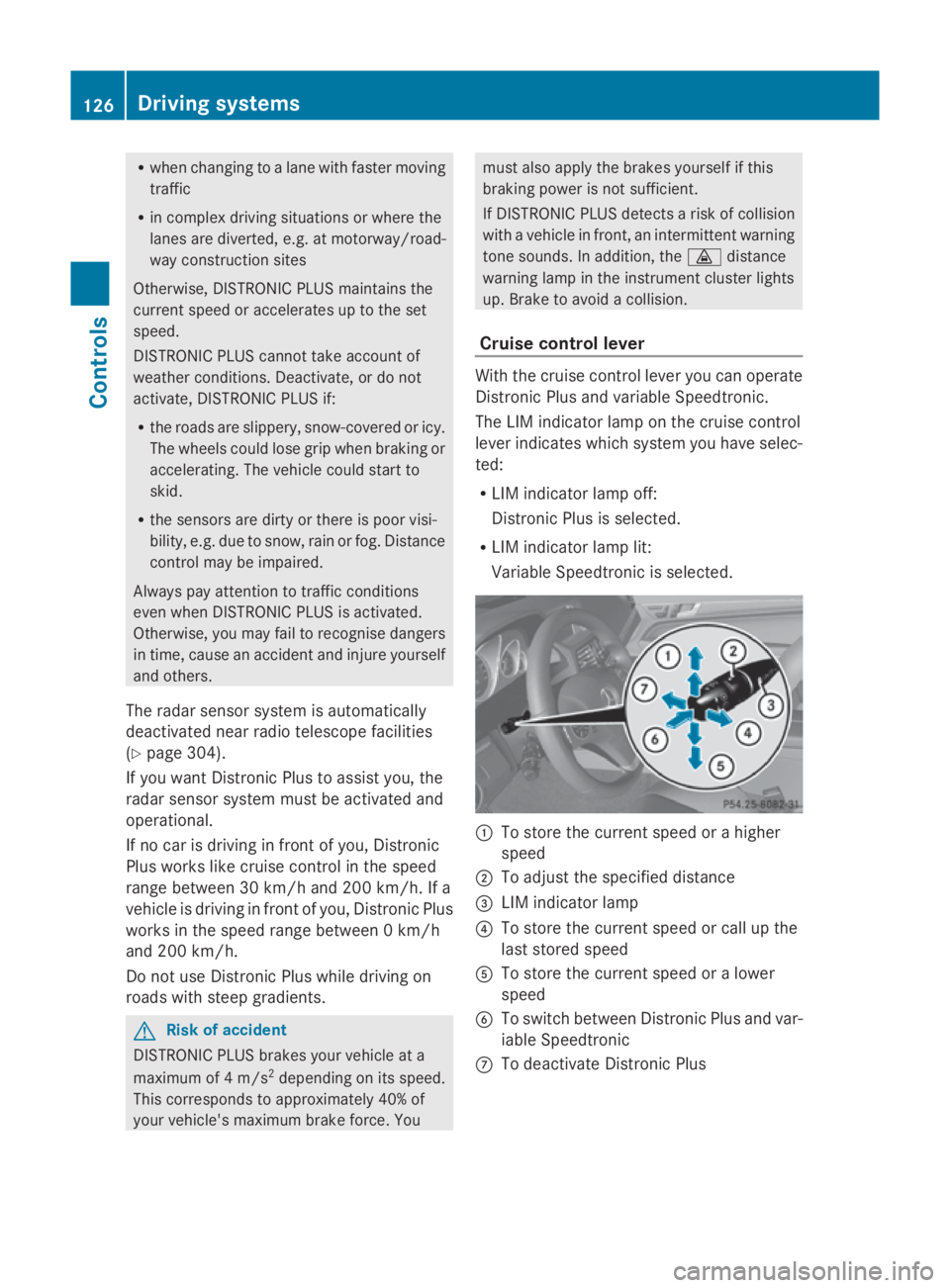
Cruise control lever With th
ecruise control lever you can operate
Distronic Plus and variable Speedtronic.
The LIM indicator lamp on th ecruise control
lever indicates which system you have selec-
ted:
R LIM indicator lamp off:
Distronic Plus is selected.
R LIM indicator lamp lit:
Variable Speedtronic is selected. 0046
To store th ecurrent speed or ahigher
speed
0047 To adjus tthe specified distance
008A LIM indicator lamp
0088 To store th ecurrent speed or call up the
last stored speed
0086 To store th ecurrent speed or alower
speed
0087 To switch between Distronic Plus and var-
iable Speedtronic
006E To deactivat eDistronic Plus 126
Drivin
gsystemsControls
207_AKB; 2; 3, en-GB
mkalafa, Version: 2.11.8.1 2009-07-23T10:23:49+02:00-Seite1 26
Page 133 of 313
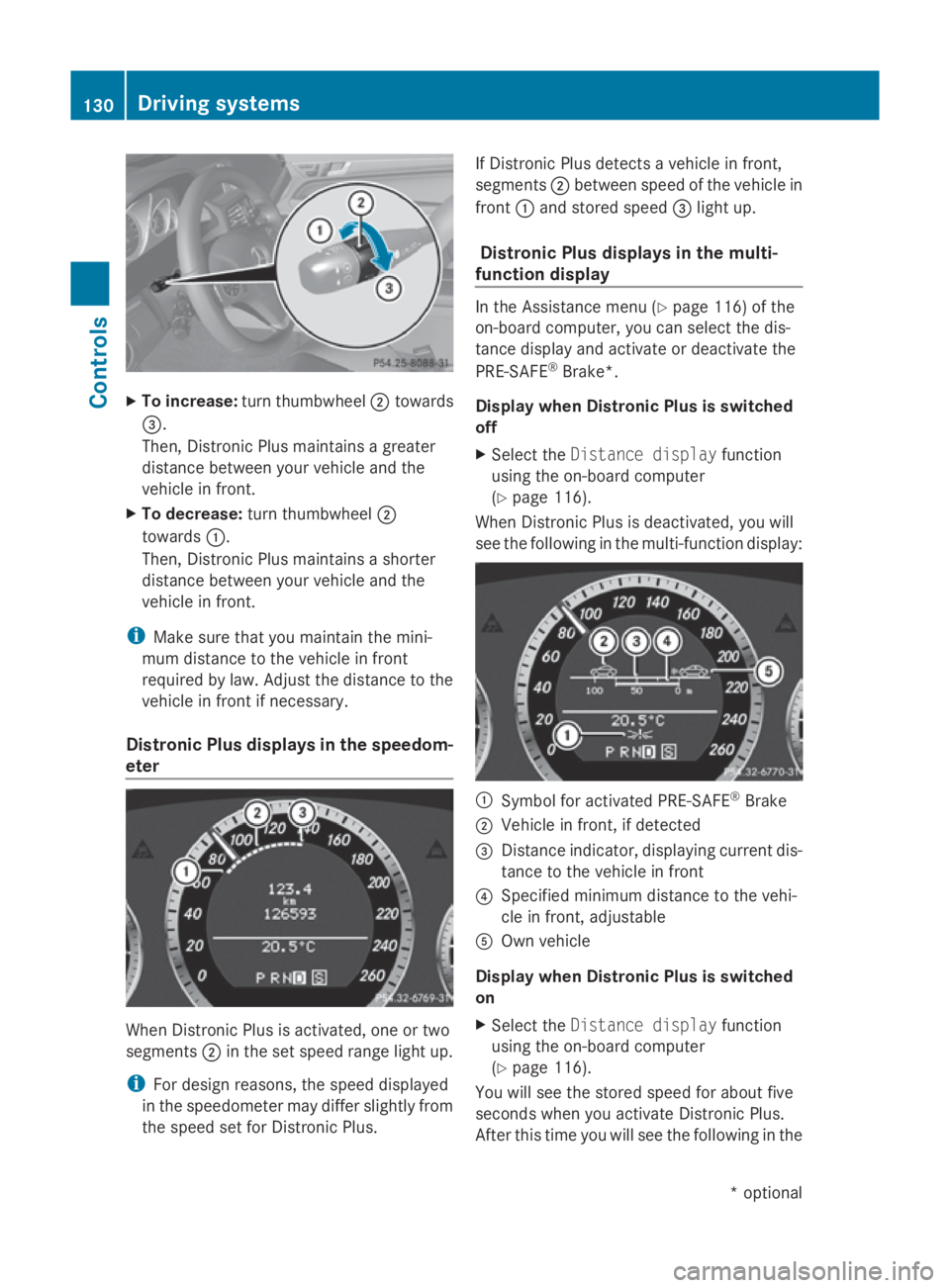
X
To increase: turnthumbwheel 0047towards
008A.
Then, Distroni cPlusm aintains agreater
distance between your vehicl eand the
vehicl einfront.
X To decrease: turnthumbwheel 0047
towards 0046.
Then, Distroni cPlusm aintains ashorter
distance between your vehicl eand the
vehicl einfront.
i Make sure tha tyou maintain the mini-
mu md istance to the vehicl einfront
required by law. Adjust the distance to the
vehicl einfront if necessary.
Distroni cPlusd isplay sinthe speedom-
eter Whe
nDistroni cPlusisa ctivated ,one or two
segments 0047in the set speed range light up.
i For design reasons ,the speed displayed
in the speedometer ma ydiffe rs ligh tlyf rom
the speed set for Distroni cPlus. If Distroni
cPlusd etects avehicl einf ront,
segments 0047between speed of the vehicl ein
front 0046and stored speed 008Alight up.
Distroni cPlusd isplay sinthe multi-
function display In the Assistance menu (Y
page 116) of the
on-board computer, yo ucan select the dis-
tance display and activate or deactivate the
PRE-SAFE ®
Brake*.
Display when Distroni cPlusiss witched
off
X Select the Distance display function
using the on-board computer
(Y page 116).
Whe nDistroni cPlusisd eactivated ,you will
see the following in the multi-functio ndisplay: 0046
Symbo lfor activated PRE-SAFE ®
Brake
0047 Vehicl einfront, if detected
008A Distance indicator, displaying current dis-
tance to the vehicl einfront
0088 Specified minimu mdistance to the vehi-
cle in front, adjustable
0086 Ownvehicle
Display when Distroni cPlusiss witched
on
X Select the Distance display function
using the on-board computer
(Y page 116).
Yo uw ills ee the stored speed for abou tfive
second swheny ou activate Distroni cPlus.
After thi stime yo uwills ee the following in the 130
Driving systemsControls
*o
ptional
207_AKB; 2; 3, en-GB
mkalafa,
Version: 2.11.8.1 2009-07-23T10:23:49+02:00-Seite 130
Page 134 of 313
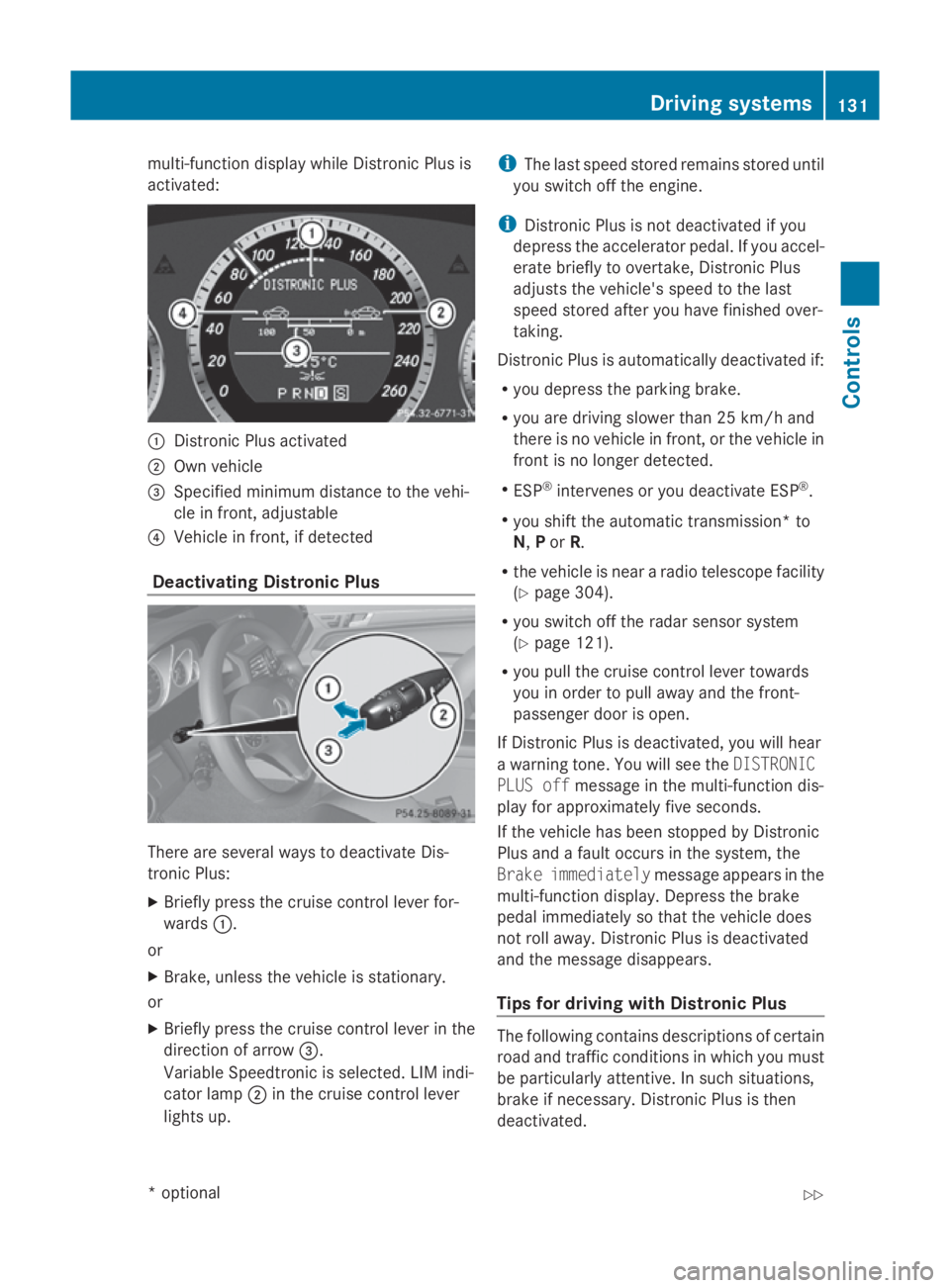
multi-function display while Distronic Plusis
activated: 0046
Distronic Plusa ctivated
0047 Own vehicle
008A Specifie dminimu mdistance to the vehi-
cle in front, adjustable
0088 Vehicl einfront, if detected
Deactivatin gDistronic Plus There are severa
lwaystod eactivate Dis-
tronic Plus:
X Briefly press the cruise control lever for-
wards 0046.
or
X Brake, unles sthe vehicl eisstationary.
or
X Briefly press the cruise control lever in the
directio nofarrow008A.
VariableS peedtronic is selected. LIM indi-
cator lamp 0047in the cruise control lever
lights up. i
The lasts peedstored remains stored until
you switch off the engine.
i Distronic Plusisn ot deactivated if you
depress the accelerator pedal. If you accel-
erate briefl ytoovertake, Distronic Plus
adjusts the vehicle's spee dtothe last
spee dstored after you have finishe dover-
taking.
Distronic Plusisa utomatically deactivated if:
R you depress the parking brake.
R you are driving slower than 25 km/h and
there is no vehicl einfront, or the vehicl ein
front is no longer detected.
R ESP ®
intervenes or you deactivate ESP ®
.
R you shift the automatic transmission* to
N, Por R.
R the vehicl eisneararadiot elescop efacility
(Y page3 04).
R you switch off the rada rsensor system
(Y page1 21).
R you pullt he cruise control lever towards
you in order to pulla waya nd the front-
passenger door is open.
If Distronic Plusisd eactivated, you willh ear
aw arning tone. You wills ee theDISTRONIC
PLUS off message in the multi-function dis-
playf or approximatel yfive seconds.
If the vehicl ehas been stopped by Distronic
Plusa ndafault occurs in the system, the
Brake immediately message appears in the
multi-function display.D epress the brake
peda limmediatel ysothat the vehicl edoes
not roll away. Distronic Plusisd eactivated
and the message disappears.
Tips for driving with Distronic Plus The following contains descriptions of certain
road and traffic conditions in which you must
be particularl
yattentive. In such situations,
brake if necessary .Distronic Plusist hen
deactivated. Driving systems
131Controls
*optional
207_AKB; 2; 3, en-GB
mkalafa,
Version: 2.11.8.1 2009-07-23T10:23:49+02:00-Seite 131 Z