distronic MERCEDES-BENZ E-CLASS COUPE 2009 User Guide
[x] Cancel search | Manufacturer: MERCEDES-BENZ, Model Year: 2009, Model line: E-CLASS COUPE, Model: MERCEDES-BENZ E-CLASS COUPE 2009Pages: 313, PDF Size: 7.76 MB
Page 129 of 313
R
when changing to alane with faster moving
traffic
R in complex driving situation sorwhere the
lanes are diverted ,e.g.atm otorway/road-
way construction sites
Otherwise, DISTRONIC PLUS maintain sthe
current speed or accelerates up to th eset
speed.
DISTRONIC PLUS cannot tak eaccount of
weather conditions .Deactivate, or do not
activate, DISTRONIC PLUS if:
R ther oads are slippery, snow-covered or icy.
The wheels could lose grip when braking or
accelerating. The vehicle could start to
skid.
R thes ensors are dirt yorthere is poor visi-
bility, e.g .due to snow, rain or fog. Distance
control may be impaired.
Always pay attention to traffic conditions
even when DISTRONIC PLUS is activated.
Otherwise, you may fail to recognise dangers
in time, cause an acciden tand injure yourself
and others.
The radar sensor system is automatically
deactivated near radio telescope facilities
(Y page 304).
If you want Distronic Plus to assist you, the
radar sensor system must be activated and
operational.
If no car is driving in front of you, Distronic
Plus work slike cruise control in th espeed
range between 30 km/h and 20 0km/ h. If a
vehicle is driving in front of you, Distronic Plus
work sint hespeed range between 0km/h
and 20 0km/ h.
Do not use Distronic Plus while driving on
roads with steep gradients. G
Risk of accident
DISTRONIC PLUS brakes your vehicle at a
maximum of 4m/s2
depending on its speed.
This correspond stoapproximately 40 %of
your vehicle's maximum brak eforce. You must also apply th
ebrakes yoursel fifthis
braking power is not sufficient.
If DISTRONIC PLUS detect sarisk of collision
with avehicle in front ,anintermittent warning
ton esounds. In addition, the 00BAdistance
warning lamp in th einstrumen tcluster lights
up. Brake to avoid acollision.
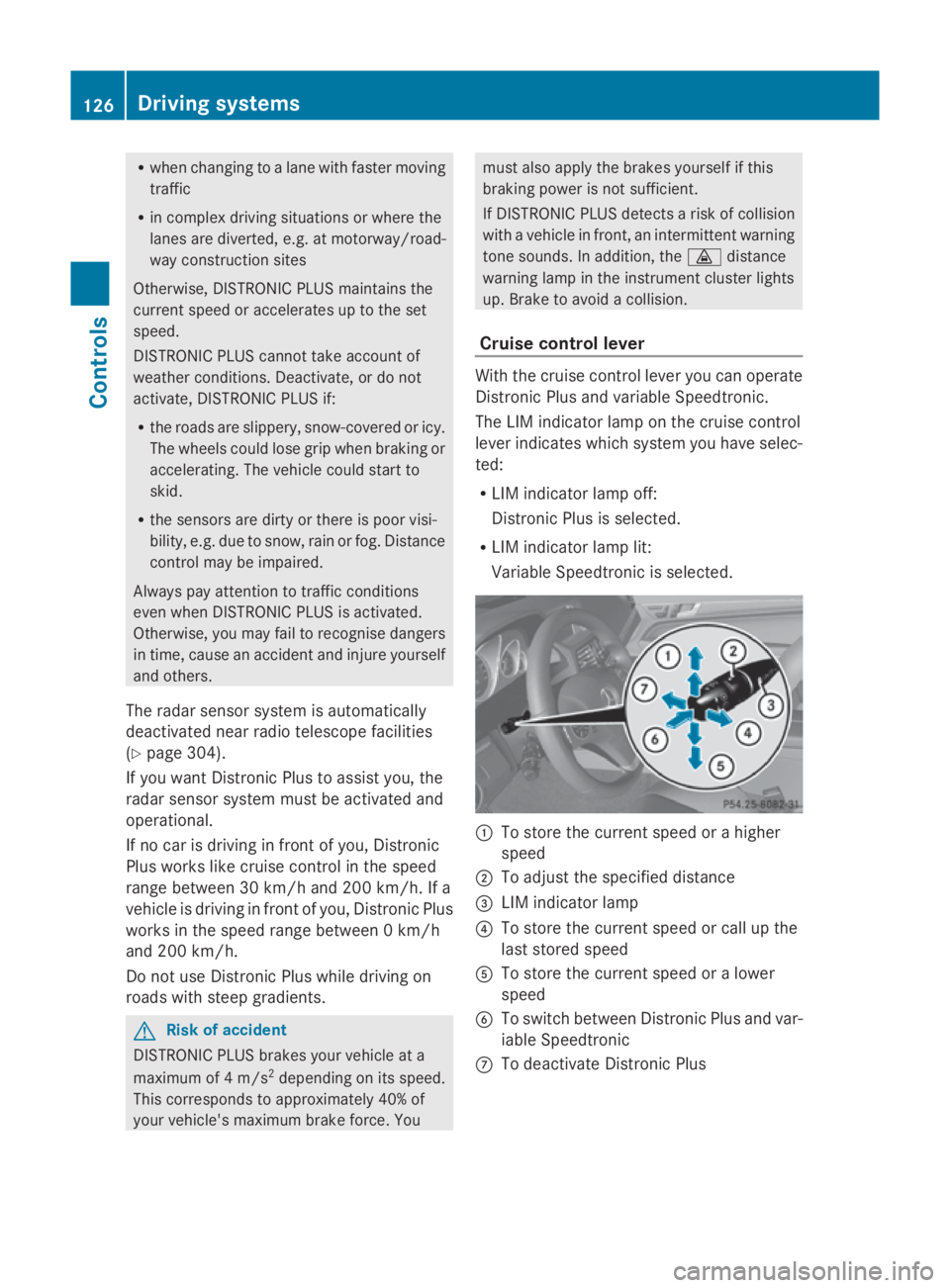
Cruise control lever With th
ecruise control lever you can operate
Distronic Plus and variable Speedtronic.
The LIM indicator lamp on th ecruise control
lever indicates which system you have selec-
ted:
R LIM indicator lamp off:
Distronic Plus is selected.
R LIM indicator lamp lit:
Variable Speedtronic is selected. 0046
To store th ecurrent speed or ahigher
speed
0047 To adjus tthe specified distance
008A LIM indicator lamp
0088 To store th ecurrent speed or call up the
last stored speed
0086 To store th ecurrent speed or alower
speed
0087 To switch between Distronic Plus and var-
iable Speedtronic
006E To deactivat eDistronic Plus 126
Drivin
gsystemsControls
207_AKB; 2; 3, en-GB
mkalafa, Version: 2.11.8.1 2009-07-23T10:23:49+02:00-Seite1 26
Page 130 of 313
Selecting Distronic Plus
X
Check whether LIM indicator lamp 008Ais off.
If it is off, Distronic Plus is already selected.
If it is not, press the cruise control lever in
the direction of arrow 0087.
LIM indicator lamp 008Ain the cruise control
lever goes off. Distronic Plus is selected.
Switching on Distronic, storing the cur-
rent speed and maintaining it G
Risk of accident
The vehicle can be braked when DISTRONIC
PLUS is activated. For this reason, deactivate
DISTRONIC PLUS if the vehicle is to be set in
motion by other means (e.g. in acar wash or
by towing).
You can activate Distronic Plus in the follow-
ing circumstances:
R after the engine has been running for about
two minutes
R if the parking brake is not applied
R if ESP ®
is activated
R if the automatic transmission* is in position
D
R if the bonnet is closed
R if the driver's door is closed and you switch
from Pto Dor your seat belt is fastened.
R if the front-passenger door is closed
Activating while driving
When driving at speeds below 30 km/h, you
can only activate Distronic Plus if the vehicle
in front has been detected and is shown in the
multi-function display.Ift he vehicle in front is
not shown in the multi-function display and is
no longer being detected, because it has
changed lanes, for example, Distronic Plus is
deactivated and atone sounds. X
Briefly pull the cruise control lever towards
you 0088or press it up 0046or down 0086to the
pressure point.
Distronic Plus is selected.
X Keep the cruise control lever pressed
up 0046 or down 0086until the desired speed
is set.
X Remove your foot from the accelerator
pedal.
Your vehicle adapts its speed to that of the
vehicle in front,b ut only up to the stored
speed.
i If you do not fully release the accelerator
pedal, the DISTRONIC PLUS suspended
message appears in the multi-function dis-
play.T he set distance to aslower-moving
vehicle in front will then not be maintained.
You will be driving at the speed you deter-
mine by the position of the accelerator
pedal.
Activating when driving towards asta-
tionary vehicle
If the vehicle in front of you is stationary, you
can only activate Distronic Plus once your
vehicle is stationary as well.
X Briefly pull the cruise control lever towards
you 0088.
Distronic Plus is selected.
i Distronic Plus can only be activated at
under 30 km/hi favehicle in front has been
detected. Therefore, the Distronic Plu sdis-
tance displayint he instrument cluster
should be activated.
X Keep the cruis econtrol leve rpressed
up 0046 or down 0086until the desired speed
is set.
i You can use the cruis econtrol leve rtoset
the stored spee dand the thumbwheel on
the cruis econtrol leve rtoset the specified
minimu mdistance (Y page129). Driving systems
127Controls
*optional
207_AKB; 2; 3, en-GB
mkalafa,
Version: 2.11.8.1 2009-07-23T10:23:49+02:00-Seite 127 Z
Page 131 of 313
Pulling away
X
If the vehicle in front pulls away: remove
your foot from the brake pedal.
X Briefly pull the cruise control lever towards
you 0088.
or
X Accelerate briefly.
Your vehicle pulls away and adapts its
speed to that of the vehicle in front.
Driving
If there is no vehicle in front,D istronic Plus
operates in the same way as cruise control.
If as lower-moving vehicle is detected in front,
Distronic Plus causes your vehicle to brake
and maintain apreset distance to the vehicle
in front.
If Distronic Plus detectsaf aster-moving vehi-
cle in front,iti ncreases the driving speed, but
only up to the stored speed. G
Risk of accident
If you depress the brake, DISTRONIC PLUS is
deactivated unless your vehicle is stationary.
DISTRONIC PLUS then no longer brakes your
vehicle. The driver is fully responsible for the
vehicle's distance from other vehicles, its
speed and for braking in good time.
Stopping G
Risk of accident
The DISTRONIC PLUS braking effect is can-
celled and the vehicle can start moving if:
R DISTRONIC PLUS is deactivated using the
cruise control lever.
R you accelerate.
R the system or the power supply is disrup-
ted, e.g. due to battery failure.
R the electrical system in the engine com-
partment or the fuses are tampered with.
R the battery is disconnected. G
Risk of accident
Never get out of the vehicle when DISTRONIC
PLUS is activated.
DISTRONIC PLUS must never be operated or
deactivated by apassenger or from outside
the vehicle.
DISTRONIC PLUS does not replace the park-
ing brake and must not be used for parking.
If you wish to leave the vehicle or park it,
deactivate DISTRONIC PLUS and secure the
vehicle against rolling away.
If Distronic Plus detectst hat the vehicle in
front is stopping, it brakes your vehicle until
it is stationary.
Once your vehicle is stationary, it remains
stationary and you do not need to depress the
brake.
i Depending on the specified minimum dis-
tance, your vehicle will come to astandstill
at as ufficient distance behind the vehicle
in front.T he specified minimum distance is
set using the thumbwheel on the cruise-
control lever.
When Distronic Plus is activated and the vehi-
cle is at astandstill, awarning message
appears in the multi-function display if:
R the driver's door is opened and you release
the seat belt.
R the engine is switched off.
R the bonnet is opened.
Select Park (P)
X Move the selector lever to Pto prevent the
vehicle from rolling away.
Distronic Plus is deactivated. The warning
message in the multi-function display dis-
appears.
Ah orn will also sound at regular intervals if
Distronic Plus is activated and you:
R switch off the engine, open the driver's
door and remove your seat belt.
R open the bonnet. 128
Driving systemsControls
207_AKB; 2; 3, en-GB
mkalafa,
Version: 2.11.8.1 2009-07-23T10:23:49+02:00-Seite 128
Page 132 of 313
The sounding of the horn alerts you to the fact
that the vehicle has been parked while Dis-
tronic Plus is still activated. The sound
becomes louder if you attempt to lock the
vehicle. The vehicle is not locked until Dis-
tronic Plus is deactivated.
i If the ignition has been switched off, the
engine cannot be started again until Dis-
tronic Plus has been deactivated.
If Distronic Plus is activated and afault occurs
in the system or there is adisruption in the
power supply while the vehicle is stationary,
the Brake immediately message is shown
in the multi-function display .Immediately
depress the brake firmly until the warning
message in the multi-function display goes
out or move the selector lever to P.Distronic
Plus is deactivated.
Setting aspeed X
Press the cruise control lever to the pres-
sure point, up 0046for ahigher speed or
down 0086for alower speed.
X Keep the cruise control lever pressed until
the desired speed is reached.
X Release the cruise control lever.
The new speed is stored. Distronic Plus is
activated and adjusts the vehicle's speed
to the new speed stored.
Making adjustments in 1km/h incre-
ments X
Briefly press the cruise control lever to the
pressure point, up 0046for ahigher speed or
down 0086for alower speed.
The last speed stored is increased or
reduced. Making adjustments in 10 km/h incre-
ments X
Briefly press the cruise control lever
beyond the pressure point, up 0046for a
higher speed or down 0086for alower speed.
The last speed stored is increased or
reduced.
Storing the current speed or calling up
the last stored speed G
Risk of accident
Only select astored speed if you knoww hat
that speed is and whether it is suitable for the
curren tsituation. Otherwise, sudden acceler-
ation or braking could endanger you or others.
X Briefly pull the cruise control lever towards
you 0088.
X Remove your foot from the accelerator
pedal.
Distronic Plus is activated. The first time it
is activated, the curren tspeed is stored.
Otherwise, it sets the vehicle cruise speed
to the previously stored value.
Setting the specified minimu mdis-
tance for Distronic Plus You can set the specified minimum distance
for Distronic Plus by varying the time span
between one and two seconds. With this func-
tion, you can set the minimum distanc
ethat
Distronic Plus keeps to the vehicle in front,
dependent on vehicle speed. You can see this
distanc einthe multi-function display
(Y page 130). Driving systems
129Controls
207_AKB; 2; 3, en-GB
mkalafa, Version: 2.11.8.1 2009-07-23T10:23:49+02:00-Seite 129 Z
Page 134 of 313
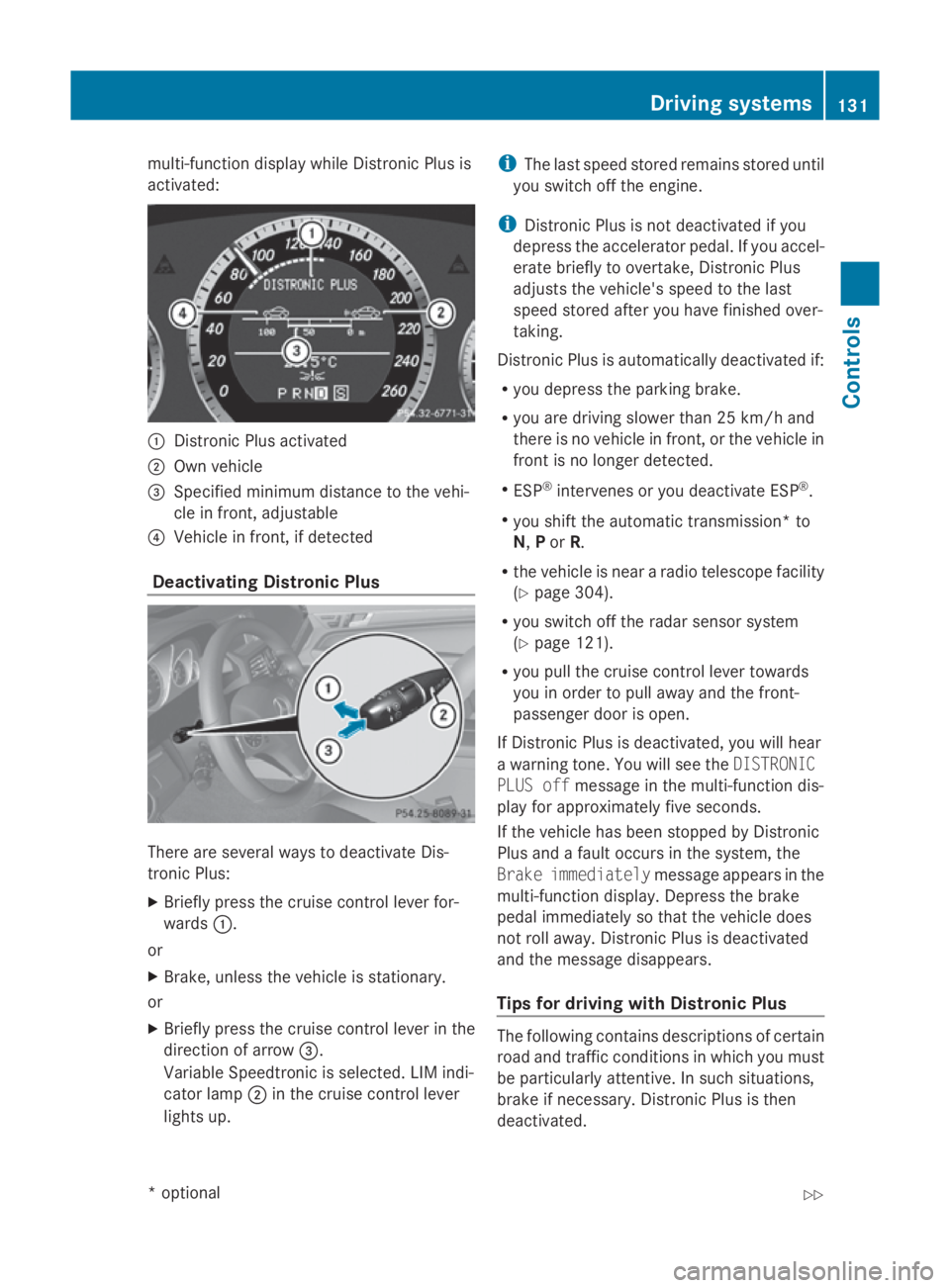
multi-function display while Distronic Plusis
activated: 0046
Distronic Plusa ctivated
0047 Own vehicle
008A Specifie dminimu mdistance to the vehi-
cle in front, adjustable
0088 Vehicl einfront, if detected
Deactivatin gDistronic Plus There are severa
lwaystod eactivate Dis-
tronic Plus:
X Briefly press the cruise control lever for-
wards 0046.
or
X Brake, unles sthe vehicl eisstationary.
or
X Briefly press the cruise control lever in the
directio nofarrow008A.
VariableS peedtronic is selected. LIM indi-
cator lamp 0047in the cruise control lever
lights up. i
The lasts peedstored remains stored until
you switch off the engine.
i Distronic Plusisn ot deactivated if you
depress the accelerator pedal. If you accel-
erate briefl ytoovertake, Distronic Plus
adjusts the vehicle's spee dtothe last
spee dstored after you have finishe dover-
taking.
Distronic Plusisa utomatically deactivated if:
R you depress the parking brake.
R you are driving slower than 25 km/h and
there is no vehicl einfront, or the vehicl ein
front is no longer detected.
R ESP ®
intervenes or you deactivate ESP ®
.
R you shift the automatic transmission* to
N, Por R.
R the vehicl eisneararadiot elescop efacility
(Y page3 04).
R you switch off the rada rsensor system
(Y page1 21).
R you pullt he cruise control lever towards
you in order to pulla waya nd the front-
passenger door is open.
If Distronic Plusisd eactivated, you willh ear
aw arning tone. You wills ee theDISTRONIC
PLUS off message in the multi-function dis-
playf or approximatel yfive seconds.
If the vehicl ehas been stopped by Distronic
Plusa ndafault occurs in the system, the
Brake immediately message appears in the
multi-function display.D epress the brake
peda limmediatel ysothat the vehicl edoes
not roll away. Distronic Plusisd eactivated
and the message disappears.
Tips for driving with Distronic Plus The following contains descriptions of certain
road and traffic conditions in which you must
be particularl
yattentive. In such situations,
brake if necessary .Distronic Plusist hen
deactivated. Driving systems
131Controls
*optional
207_AKB; 2; 3, en-GB
mkalafa,
Version: 2.11.8.1 2009-07-23T10:23:49+02:00-Seite 131 Z
Page 135 of 313
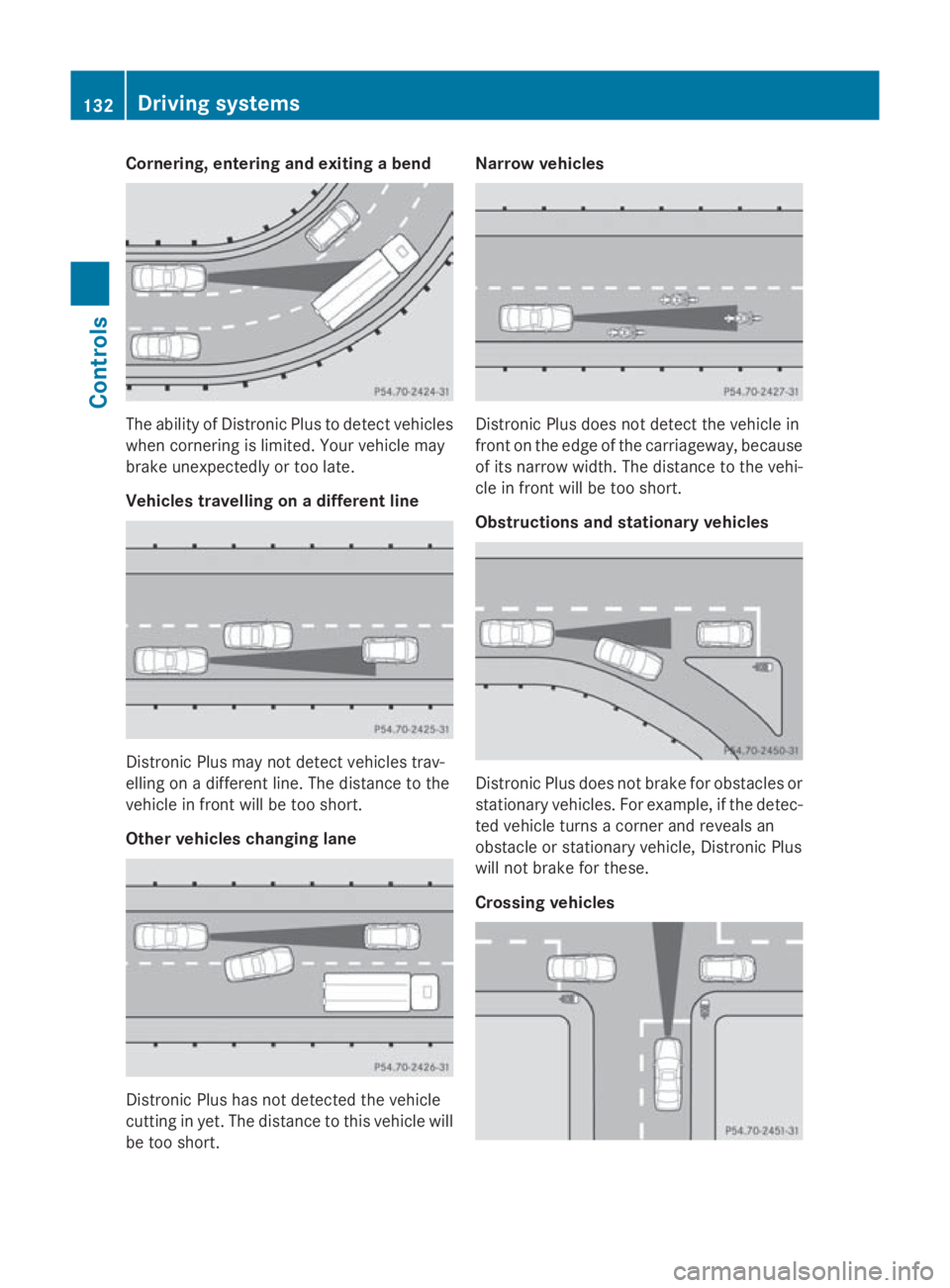
Cornering, enterin
gand exiting abend The abilit
yofDistronic Plus to detect vehicles
when cornering is limited. Your vehicle may
brak eunexpectedly or to olate.
Vehicles travelling on adifferent line Distronic Plus may no
tdetect vehicle strav-
ellin gonad ifferentline .The distanc etothe
vehicle in fron twill be to oshort.
Other vehicles changing lane Distronic Plus has no
tdetected th evehicle
cuttin ginyet. The distanc etothisv ehicle will
be to oshort. Narrow vehicles
Distronic Plus does no
tdetect th evehicle in
fron tont heedge of th ecarriageway, because
of its narrow width. The distanc etothevehi-
cle in fron twill be to oshort.
Obstruction sand stationar yvehicles Distronic Plus does no
tbrak efor obstacles or
stationar yvehicles. For example, if th edetec-
te dv ehicle turns acorner and reveals an
obstacle or stationar yvehicle ,Distronic Plus
will no tbrak efor these.
Crossing vehicles 132
Driving systemsControls
207_AKB
;2;3,en-GB
mkalafa, Version:2.11.8.1
2009-07-23T10:23:49+02:00
-Seite 132
Page 138 of 313
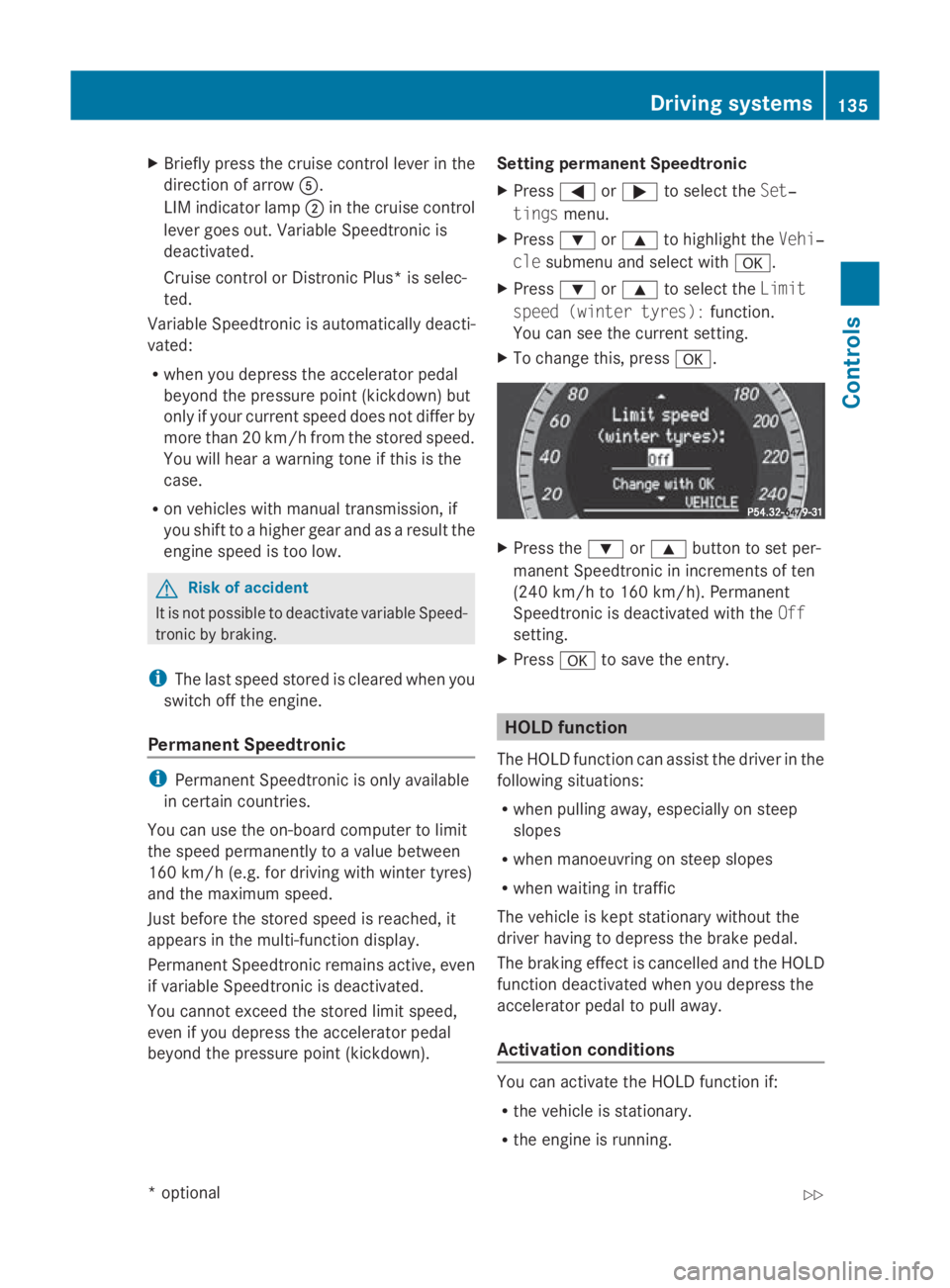
X
Briefly press the cruise control lever in the
direction of arrow 0086.
LIM indicator lamp 0047in the cruise control
lever goe sout.V ariabl eSpeedtroni cis
deactivated.
Cruise control or Distronic Plus* is selec-
ted.
Variabl eSpeedtroni cisautomaticall ydeacti-
vated:
R whe nyou depress the accelerato rpedal
beyond the pressure point (kickdown) but
only if your current speed doe snot differ by
more than 20 km/h from the store dspeed.
You will hea rawarning tone if this is the
case.
R on vehicle swithm anual transmission, if
yo us hift to ahigher gea rand as aresult the
engine speed is too low. G
Risk of accident
It is not possible to deactivate variabl eSpeed-
tronic by braking.
i The last speed store disclearedwheny ou
switch off the engine.
Permanen tSpeedtronic i
Permanent Speedtroni cisonly available
in certain countries.
You can us ethe on-board compute rtolimit
the speed permanently to avalue between
160 km/h (e.g .for driving with winter tyres)
and the maximum speed.
Just before the store dspeed is reached ,it
appears in the multi-function display.
Permanent Speedtroni cremains active, even
if variabl eSpeedtroni cisdeactivated.
You cannot excee dthe store dlim it speed,
eve nify oudepress the accelerato rpedal
beyond the pressure point (kickdown). Setting permanent Speedtronic
X Press 0040or003E to select the Set‐
tings menu.
X Press 003Dor003C to highlight the Vehi‐
cle submenu and select with 0064.
X Press 003Dor003C to select the Limit
spee d(winter tyres): function.
You can see the current setting.
X To change this ,press 0064. X
Press the 003Dor003C button to set per-
manent Speedtroni cinincrements of ten
(240 km/h to 160 km/h). Permanent
Speedtroni cisdeactivated with the Off
setting.
X Press 0064to save the entry. HOL
Dfunction
The HOLD function can assis tthe driver in the
following situations:
R whe npulling away ,especially on steep
slopes
R whe nmanoeuvring on stee pslopes
R whe nwaiting in traffic
The vehicle is kept stationar ywithou tthe
driver having to depress the brake pedal.
The braking effect is cancelled and the HOLD
function deactivated whe nyou depress the
accelerato rpedal to pull away.
Activation conditions You can activate the HOLD function if:
R
the vehicle is stationary.
R the engine is running. Drivin
gsystems
135Controls
*optional
207_AKB; 2; 3, en-GB
mkalafa
,V ersion: 2.11.8.1
2009-07-23T10:23:49+02:00
-Seite 135 Z
Page 201 of 313
service.
Anumber or another letter may be
displayed after the letter. This figure indicates
any necessary additional maintenance work
to be performed. If you report this displayed
information to aqualified specialist work-
shop, for example aMercedes-Benz Service
Centre, they can inform you of the costs the
service will incur.
The ASSYST PLUS service interval display
does not take into account any periods of
time during which the battery is disconnec-
ted. To maintain the time-dependent service
schedule:
X Note down the service due date displayed
before disconnecting the battery.
or
X Subtract the battery disconnection periods
from the service date shown on the display
after reconnecting the battery.
Hiding aservice message X
Press 0041or0064.
Service overdue Ad
isplaym essage is shown in the multi-func-
tion display, for example:
Service Aoverdue by ... days
Service Aoverdue by .. km
i If you fail to have the service performed
by the specified date, you may be violating
applicable laws. Your warranty may be inva-
lidated and goodwills ettlementsmay be
refused.
Callingupa service due date X
Switch on the ignition.
X Press the 0040or003E button to select the
Service menu.
X Press the 003Cor003D button to select the
ASSYST PLUS submenu and confirm with
0064.
The multi-function displays hows the
service due date. Care
Care and cleaning products
Regular care of your vehicle is acondition for
retaining the quality in the long term.
Use only care products and cleaning agents
recommended and approved by Mercedes-
Benz.
! For cleaning your vehicle, do not use any
of the following:
R dry, rough or hard cloths
R abrasive cleaning agents
R solvents
R cleaning agents containing solvents
and do not scrub.
Do not touch the surfaces and protective
films with hard objects, e.g. rings or ice
scrapers. You could otherwise scratch or
damage the surfaces and protective film. H
Environmental note
Dispose of empty packaging, cleaning cloths
and polishing wads in an environmentally
responsible manner.
! Do not park the vehicle for along period
of time directly after cleaning, especially if
the wheels have just been cleaned with a
wheel cleaner. Wheel cleaners could cause
rapid corrosion of the brake discs and
brake pads/linings. After cleaning, park
the vehicle when it is at normal operating
temperature. Exterior care
Automatic car wash G
Risk of accident
The vehicle is braked when the HOLD function
or DISTRONIC PLUS* is activated. Therefore,
deactivate the Hold function or DISTRONIC
PLUS before the vehicle is washed in an auto-
matic car wash. 198
CareOperation
*o
ptional
207_AKB;2;3,e
n-GB
mkalafa, Version: 2.11.8.1 2009-07-23T10:23:49+02:00-Seite 198
Page 213 of 313
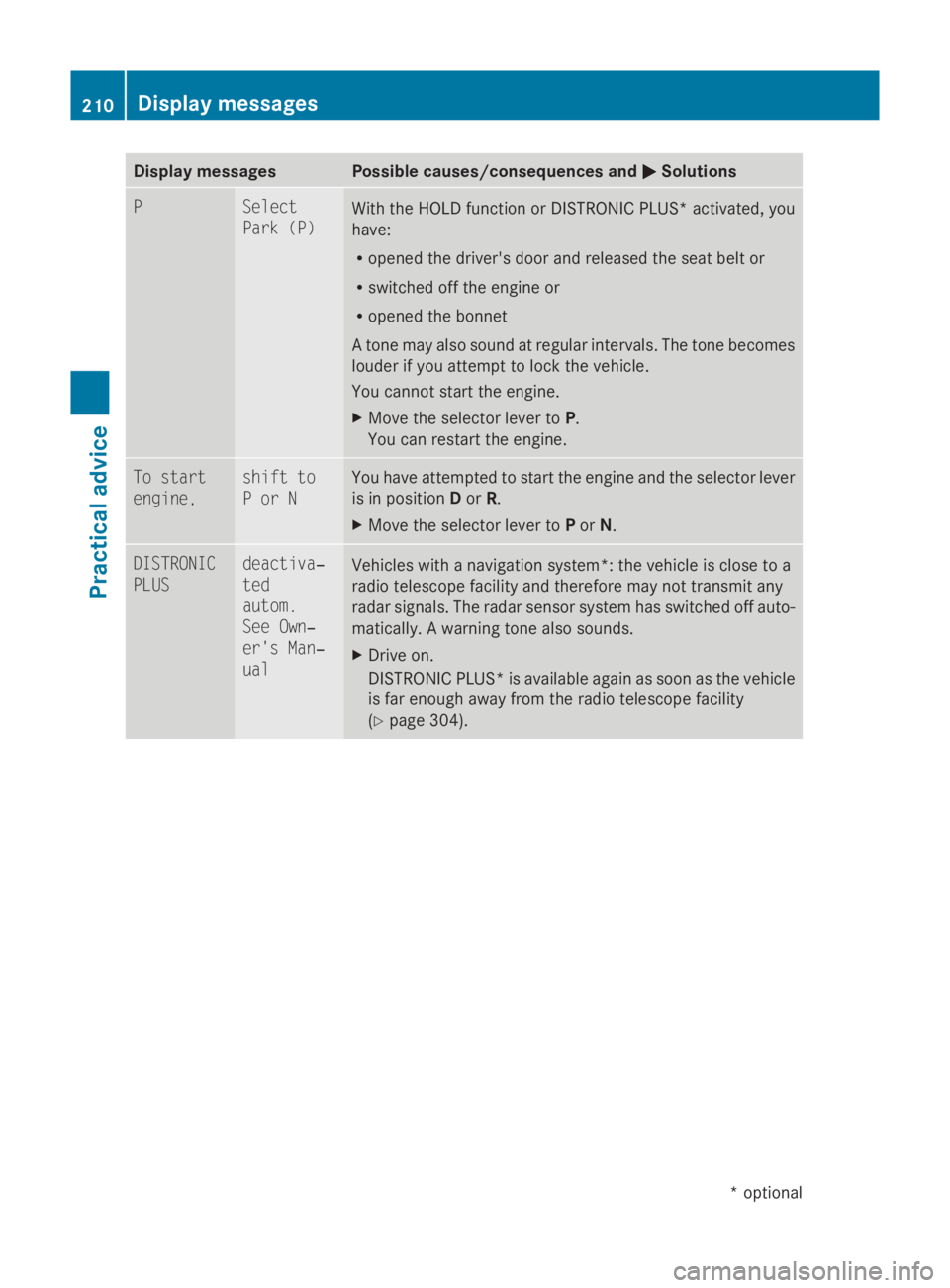
Display messages Possible causes/consequences and
0050
0050Solutions P Select
Par
k( P) Wit
hthe HOLD function or DISTRONIC PLUS* activated, you
have:
R opened th edriver's doo rand release dthe seat belt or
R switched of fthe engin eor
R opened th ebonnet
At onem ay also soun datregular intervals. The tone becomes
loude rifyou attemp ttolockt he vehicle.
You canno tstart th eengine.
X Mov ethe selector lever to P.
You can restar tthe engine. To start
engine, shift to
PorN You hav
eattempte dtos tart th eenginea nd th eselector lever
is in position Dor R.
X Mov ethe selector lever to Por N. DISTRONIC
PLUS deactiva‐
ted
autom.
See Own‐
er'
sM an‐
ual Vehicles wit
hanavigation system* :the vehicl eisclose to a
radi otelescope facilit yand therefore may no ttransmit any
rada rsignals. The rada rsensor system has switched of fauto-
matically. Awarnin gtonea lso sounds.
X Drive on.
DISTRONIC PLUS* is available again as soo nasthevehicle
is far enough away from th eradi otelescope facility
(Y page 304). 210
Display
messagesPractical advice
*optional
207_AKB; 2; 3, en-GB
mkalafa
,V ersion: 2.11.8.1
2009-07-23T10:23:49+02:00
-Seite 210
Page 214 of 313
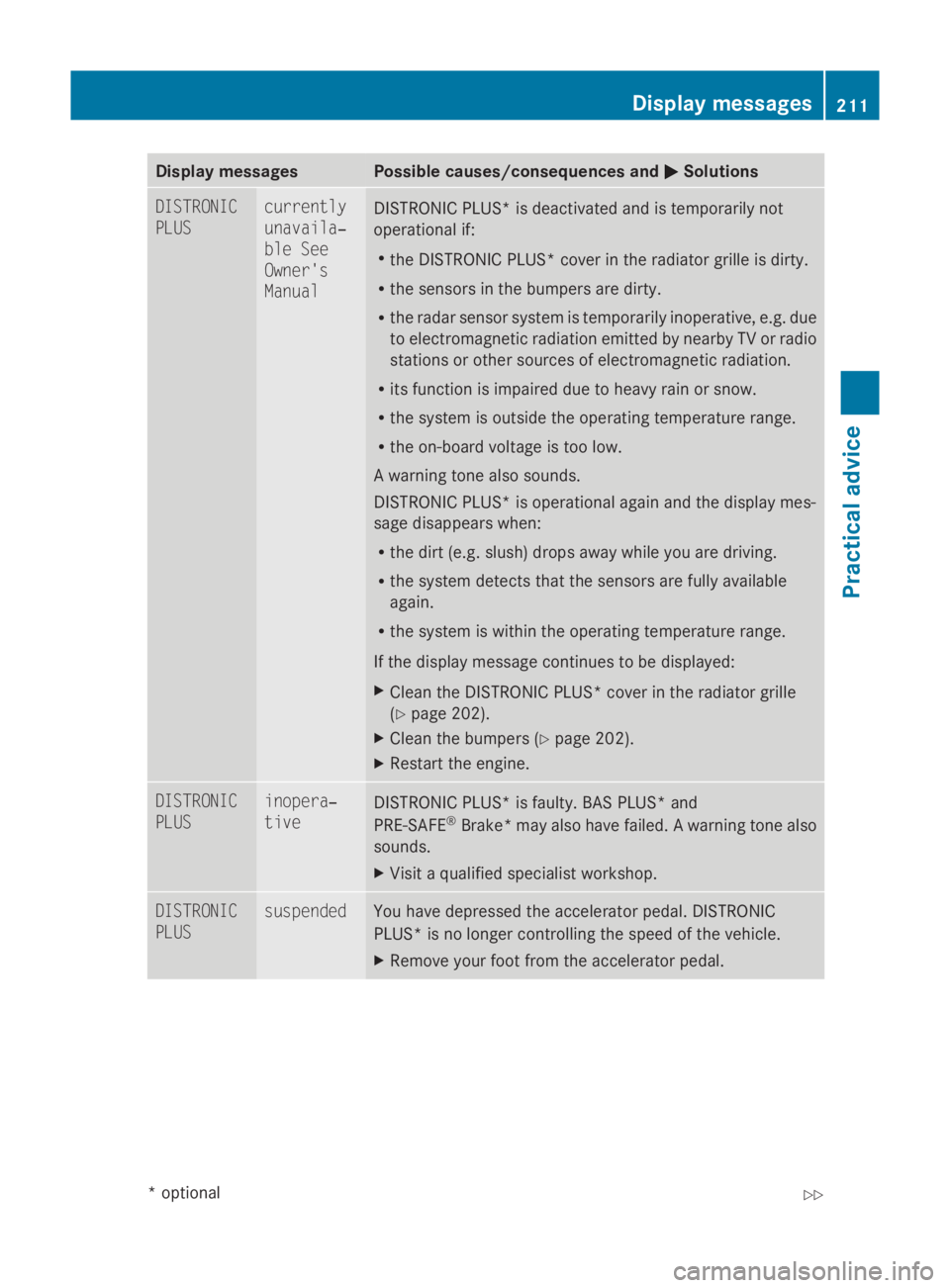
Display messages Possible causes/consequences and
0050
0050 Solutions DISTRONIC
PLUS currently
unavaila‐
ble See
Owner's
Manual
DISTRONIC PLUS* is deactivated and is temporarily not
operational if:
R theD ISTR ONIC PLUS* cover in th eradiato rgrille is dirty.
R thes ensor sinthebumpers are dirty.
R ther ada rsensor system is temporarily inoperative, e.g. due
to electromagnetic radiation emitted by nearby TV or radio
station sorother source sofelectromagnetic radiation.
R itsf unction is impaire ddue to heav yrain or snow.
R thes ystem is outside th eoperating temperature range.
R theo n-bo ardv oltag eistoolow.
Aw arnin gtonea lso sounds.
DISTRONIC PLUS* is operational again and th edisplay mes-
sage disappear swhen:
R thed irt( e.g. slush) drops away while you are driving.
R thes ystem detects that th esensor sare full yavailable
again.
R thes ystem is within th eoperating temperature range.
If th edisplay message continues to be displayed:
X Clean th eDISTR ONIC PLUS* cover in th eradiato rgrille
(Y page 202).
X Clean th ebumpers (Y page 202).
X Restart th eengine. DISTRONIC
PLUS inopera‐
tive
DISTRONIC PLUS* is faulty. BA
SPLUS* and
PRE-SAFE ®
Brake *may also have failed. Awarning tone also
sounds.
X Visi taq ualified specialist workshop. DISTRONIC
PLUS suspended You have depressed th
eaccelerato rpedal. DISTRONIC
PLUS* is no longer controlling th espee doft hevehicle.
X Remove your foo tfromt heaccelerato rpedal. Display messages
211Practical advice
*optional
207_AKB
;2;3,en-GB
mkalafa ,V ersion: 2.11.8.1
2009-07-23T10:23:49+02:00
-Seite 211 Z