reset MERCEDES-BENZ E-CLASS COUPE 2009 User Guide
[x] Cancel search | Manufacturer: MERCEDES-BENZ, Model Year: 2009, Model line: E-CLASS COUPE, Model: MERCEDES-BENZ E-CLASS COUPE 2009Pages: 313, PDF Size: 7.76 MB
Page 79 of 313
X
Make sure that the vehicle is stationary and
that the key is in position 2in the ignition
lock.
X Press button 0047for the exterior mirror on
the front-passenger side.
X Engage reverse gear.
The exterior mirror on the front-passenger
side moves to the preset parking position.
X Use adjustment button 008Ato adjust the
exterior mirror to aposition which allows
you to see the rear wheel and the kerb.
The parking position is stored.
i If you shift the automatic transmission
into another gear, the exterior mirror on the
front-passenger side returns to the driving
position.
i You can also store the parking position
using the memory button M0088:
X With the key in position 2in the igni-
tion lock and with the exterior mirror
on the front-passenger side activated,
use adjustment button 008Ato set the
exterior mirror such that the rear
wheel and kerb are visible.
X Press memory button M0088 and one of
the arrows on adjustment button 008A
within three seconds.
The parking position is stored if the
exterior mirror does not move.
If the mirror moves out of position, repeat
the steps.
Calling up the parking position X
When the key is in position 2in the ignition
lock and the exterior mirror on the front-
passenger side is activated, engage
reverse gear.
The exterior mirror on the front-passenger
side moves to the stored parking position.
The exterior mirror on the front-passenger
side moves back to its original position: R
as soon as you exceed aspeed of
10 km/h
R about ten seconds after you have disen-
gaged reverse gear
R if you press button 0046for the exterior mir-
ror on the driver's side Seat belts
Wearing seat belts
Seat belts are the most effective means of
restraining the movement of vehicle occu-
pants in the event of an accident. This
reduces the risk of vehicle occupants coming
into contact with the vehicle interior. G
Risk of injury
As eat belt which is not worn correctly, or
which has not been engaged in the seat belt
buckle correctly, cannot perform its intended
protective function. Under certain circum-
stances, this could result in severe or even
fatal injuries.
Make sure that all occupants –inparticular,
pregnant women –wear their seat belt cor-
rectly at all times.
R The seat belt must fit snugly on your body
and must not be twisted. Therefore, you
should avoid wearing bulky clothing (e.g. a
winter coat). The shoulder belt section
must be routed across the centre of your
shoulder –onnoaccount across your neck
or under your arm –and pulled tight against
your upper body. The lap belt must always
pass across your lap as low down as possi-
ble, i.e. over your hip joints–n ot across
your abdomen. If necessary, push down the
belt strap slightly and then retighten it in
the roll-up direction.
R Do not route the belt strap across sharp
edges or fragile objects, especially if these
are located on or in your clothing, e.g. spec-
tacles, pens, keys, etc. The seat belt strap
could be damaged and tear in an accident, 76
Seat beltsControls
207_AKB; 2; 3, en-GB
mkalafa,
Version: 2.11.8.1 2009-07-23T10:23:49+02:00-Seite 76
Page 96 of 313
Not active:
if youaredrivin gatspeeds above
100 km/h or yo uswitch off the rea rfoglamp
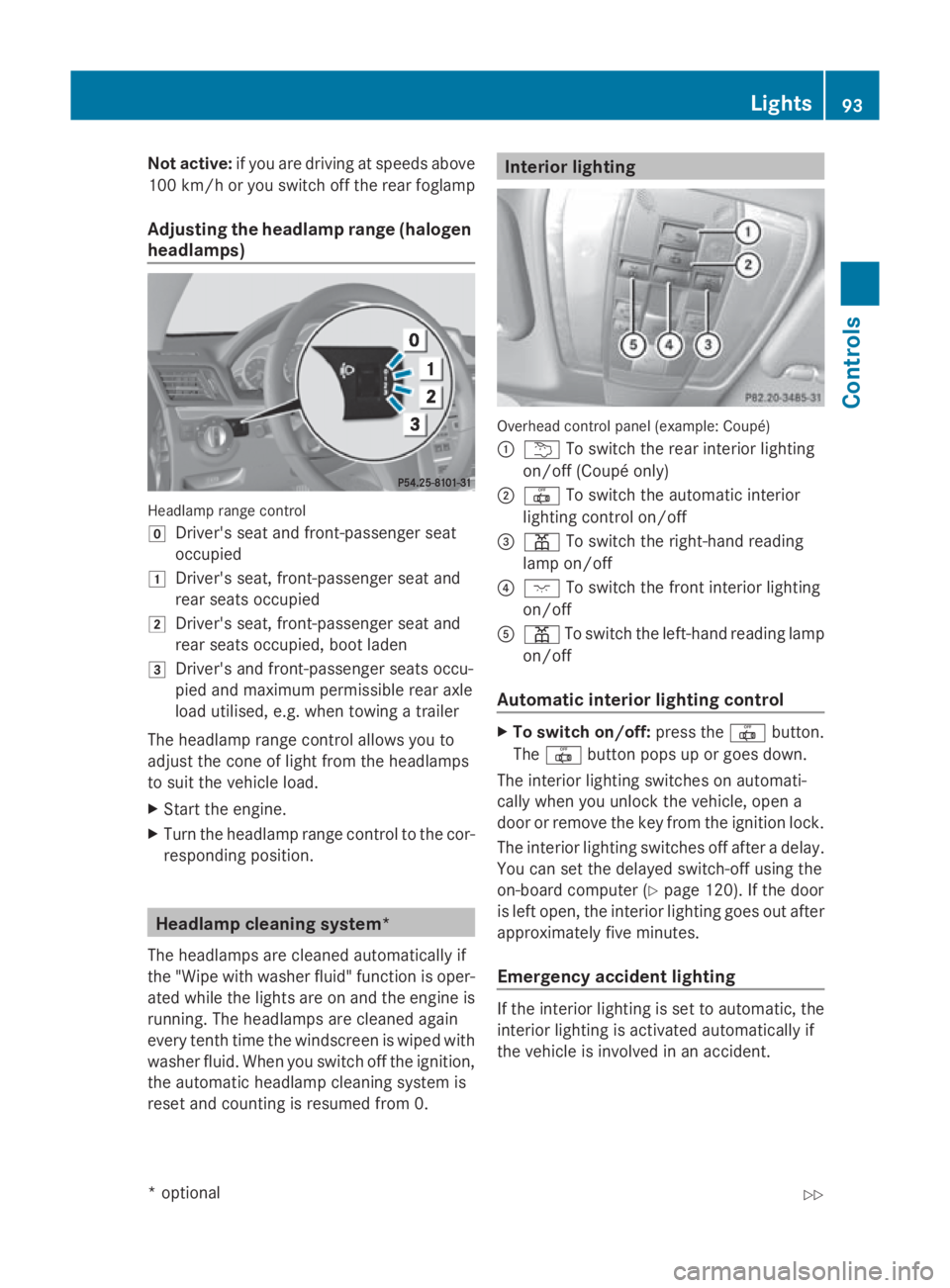
Adjusting the headlamp rang e(ha logen
headlamps) Headlam
prange control
005D Driver' sseata nd front-passenge rseat
occupied
004A Driver' sseat, front-passenge rseata nd
rea rseats occupied
004B Driver' sseat, front-passenge rseata nd
rea rseats occupied ,boo tladen
004C Driver' sand front-passenge rseats occu-
pied and maximum permissibl ereara xle
load utilised, e.g .whent owing atrailer
Th eh eadlam prange contro lallow syou to
adjus tthe cone of light fro mthe headlamps
to suit the vehicl eload.
X Star tthe engine.
X Turn the headlamp range contro ltothe cor-
responding position. Headlamp cleaning system*
Th eh eadlam ps arecleane dautomaticall yif
the "Wip ewithw ashe rfluid "fun ctio niso per-
ate dw hile the lights ar eonand the engine is
running .The headlamps ar ecleane dagain
every tenth time the windscree nisw iped with
washe rfluid .Wheny ou switch off the ignition,
the automatic headlamp cleaning syste mis
reset and counting is resumed fro m0. Interior lighting
Overhead control panel (example: Coupé)
0046
004E To switch the rea rinterior lighting
on/off (Coupé only)
0047 003F To switch the automatic interior
lighting contro lon/off
008A 0049 To switch the right-hand reading
lamp on/off
0088 0056 To switch the front interior lighting
on/off
0086 0049 To switch the left-hand reading lamp
on/off
Automati cinterior lighting control X
To switc hon/of f:press the 003Fbutton.
The 003F button pops up or goes down.
Th einterior lighting switches on automati-
cally when yo uunlock the vehicle, open a
door or remove the key fro mthe ignition lock.
Th einterior lighting switches off after adelay.
Yo uc an se tthe delaye dswitch-off using the
on-board compute r(Ypage 120) .Ifthe door
is left open, the interior lighting goes ou tafter
approximately fiv eminutes.
Emergenc yaccident lighting If the interior lighting is se
ttoautomatic, the
interior lighting is activated automaticall yif
the vehicl eisinvolved in an accident. Lights
93Controls
*optional
207_AKB; 2; 3, en-GB
mkalafa
,V ersion: 2.11.8.1
2009-07-23T10:23:49+02:00
-Seite 93 Z
Page 113 of 313
Function
0046
Trip
menu(Ypage 110) 0047
Navi*m
enu( navigation details)
(Y page 111) 008A
Audio
menu(Ypage 113) 0088
Tel
men u(telephone) ( Ypage 114) 0086
Assist
menu(Assistance)
(Y page 115) 0087
Service
(Ypage 117) menu
R calls up display messages
(Y page 208)
R Tyre pressur eloss warning
(Y page 187)
R ASSYS TPLUSs ervic einterval dis-
play (Y page 197) 006E
Settings
menu(Ypage 117) The number of menus shown depends on the
optional equipmen tinthevehicle.
The Audio, Navi*a ndTel menus are dis-
played slightly differently in vehicle swithan
audio system and vehicle swithC OMAND
APS* .The example sgivenint hisO wner's
Manual apply to vehicle sequipped with
COMAND APS*. Trip menu
i Reset th etripm eter or trip computer
(Y page 111).
Standar ddisplay X
Press and hold the 0041buttonont he
steering wheel until the Tripmenuwith
trip meter 0046and total distance
recorder 0047is shown.
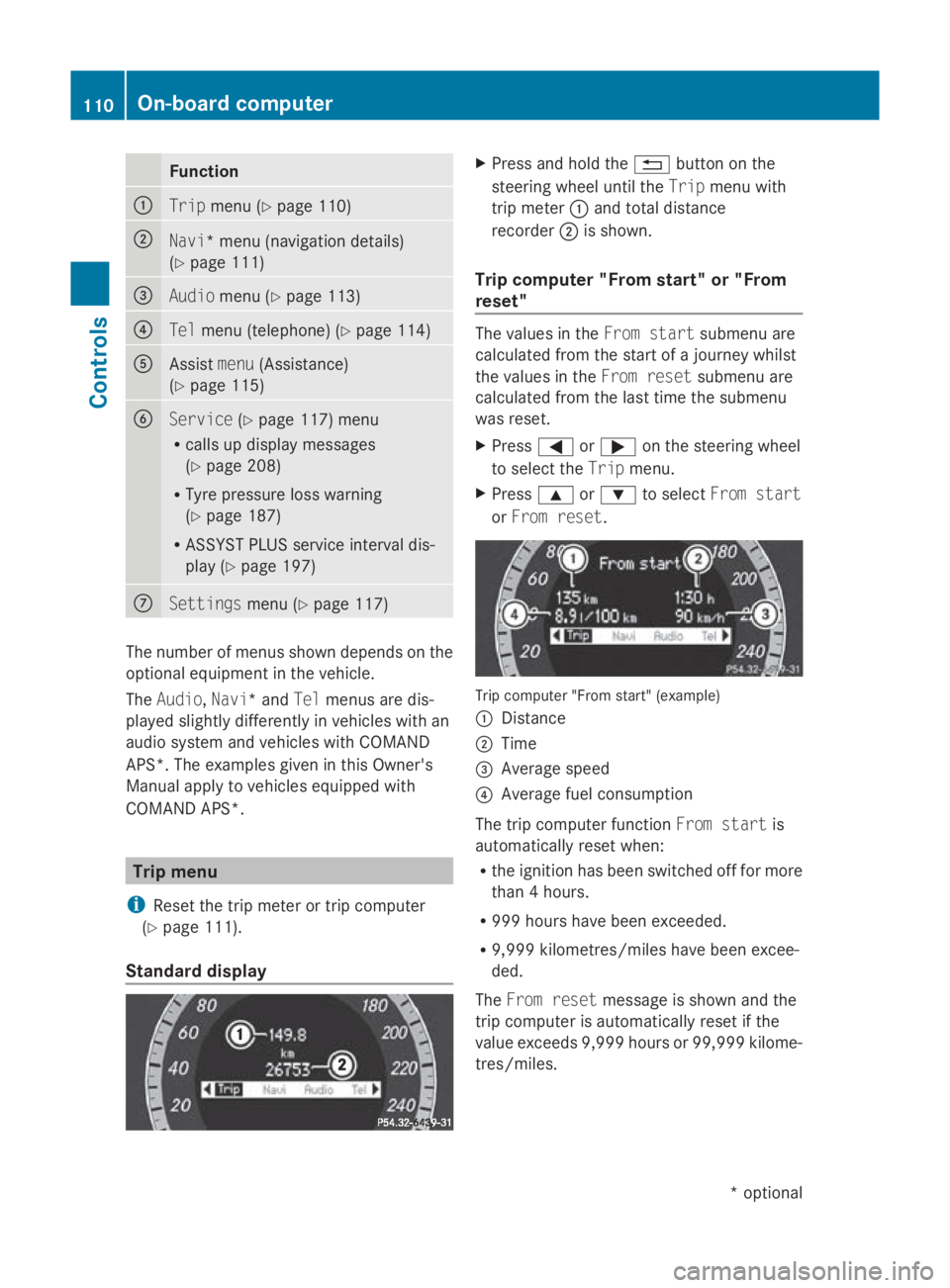
Trip computer "From start" or "From
reset" The values in the
Froms tart submen uare
calculate dfromt hestart of ajou rney whilst
th ev alues in the Fromr eset submen uare
calculate dfromt helast tim ethe submenu
was reset.
X Press 0040or003E on thesteering wheel
to select the Tripmenu.
X Press 003Cor003D to select Froms tart
or Fro mr eset. Trip computer "From start
"(example)
0046 Distance
0047 Time
008A Averag espeed
0088 Averag efuel consumption
The trip computer function Froms tart is
automaticall yreset when:
R thei gnition has been switched off for more
than 4hours.
R 99 9h our shave been exceeded.
R 9,999 kilometres/mile shave been excee-
ded.
The Fromr eset message is shown and the
trip computer is automaticall yreset if the
value exceeds 9,999 hour sor99,99 9k ilome-
tres/miles. 110
On-boar
dcomputerControls
*optional
207_AKB
;2;3,en-GB
mkalafa ,V ersion: 2.11.8.1
2009-07-23T10:23:49+02:00
-Seite 110
Page 114 of 313
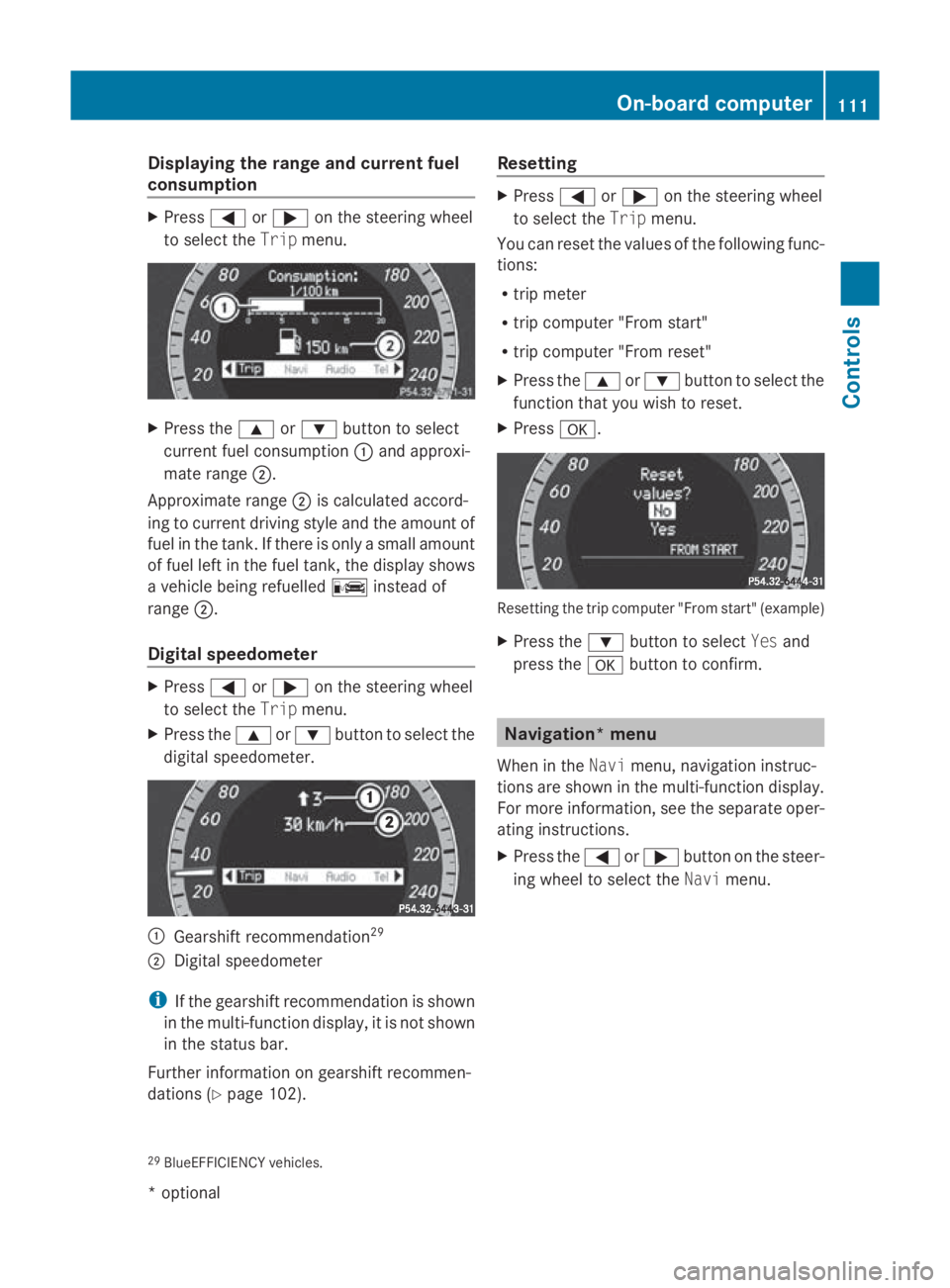
Displaying th
erange an dcurrent fuel
consumption X
Press 0040or003E on thesteerin gwheel
to selec tthe Trip menu. X
Press the 003Cor003D buttontos elect
curren tfue lconsu mption 0046and approxi-
mat erange 0047.
Approximat erange 0047is calculated accord-
in gtoc urrentdrivin gstyle and th eamount of
fue lint hetank .Ifthere is only asma ll amount
of fue llef tint hefue ltank, thed isplay shows
av ehicle bein grefuelled 00AAinstead of
range 0047.
Digital speedometer X
Press 0040or003E on thesteerin gwheel
to selec tthe Trip menu.
X Press the 003Cor003D buttontoselectthe
digita lspeedometer. 0046
Gearshift recommendation 29
0047 Digital speedometer
i If th egearshift recommendation is shown
in th emulti-function display, it is no tshown
in th estatu sbar.
Further information on gearshift recommen-
dation s(Ypage 102). Resetting X
Press 0040or003E on thesteerin gwheel
to selec tthe Trip menu.
You can reset th evalues of th efollowing func-
tions:
R trip meter
R trip compute r"From start"
R trip compute r"From reset"
X Press the 003Cor003D buttontoselectthe
function that you wish to reset.
X Press 0064. Resettin
gthe trip compute r"From start "(example)
X Press the 003Dbuttontos electYesand
press the 0064buttontoc onfirm. Navigation* menu
Whe nint heNavi menu, navigation instruc-
tion sare shown in th emulti-function display.
Fo rm orei nformat ion,see th eseparat eoper-
atin ginstructions.
X Press the 0040or003E buttononthesteer-
in gw hee ltos elec tthe Navi menu.
29 BlueEFFICIENCY vehicles. On-boa
rdcompu ter
111Controls
*optio nal
207_AKB; 2; 3, en-GB
mkalafa
,V ersion: 2.11.8.1
2009-07-23T10:23:49+02:00
-Seite 111 Z
Page 120 of 313
Service menu
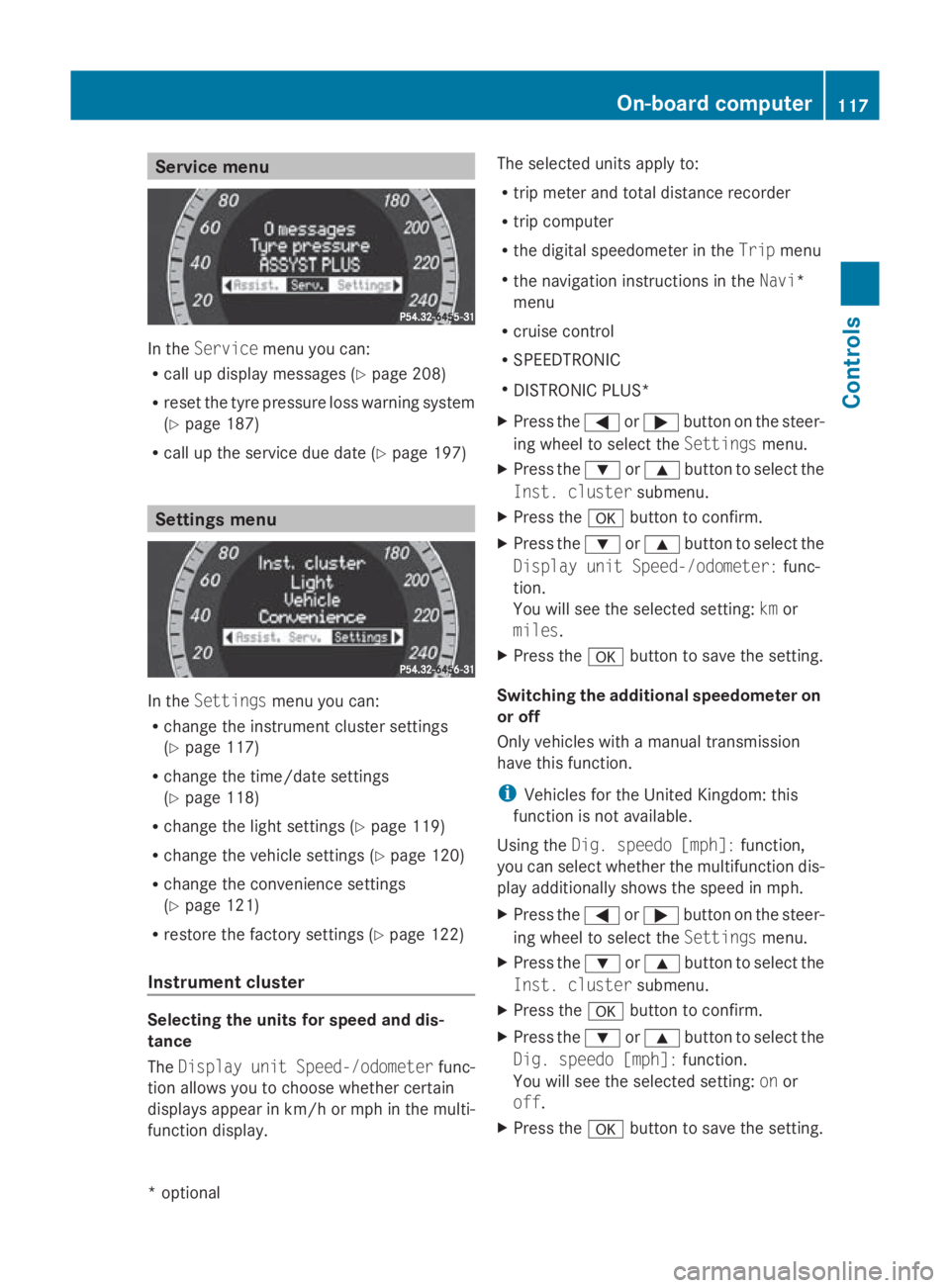
In the
Service menu you can:
R call up display messages (Y page 208)
R reset the tyre pressure loss warning system
(Y page 187)
R call up the service due date (Y page 197)Settings menu
In the
Settings menu you can:
R change the instrumen tcluster settings
(Y page 117)
R change the time/date settings
(Y page 118)
R change the light settings (Y page 119)
R change the vehicle settings (Y page 120)
R change the convenience settings
(Y page 121)
R restore the factory settings (Y page 122)
Instrument cluster Selecting the units for speed and dis-
tance
The Display unit Speed-/odometer func-
tion allowsy ou to choose whether certain
displaysa ppearinkm/ horm ph in the multi-
function display. The selected units apply to:
R
trip meter and total distance recorder
R trip computer
R the digital speedometer in the Tripmenu
R the navigation instructions in the Navi*
menu
R cruise control
R SPEEDTRONIC
R DISTRONIC PLUS*
X Press the 0040or003E button on the steer-
ing wheel to select the Settingsmenu.
X Press the 003Dor003C button to select the
Inst. cluster submenu.
X Press the 0064button to confirm.
X Press the 003Dor003C button to select the
Display unit Speed-/odometer: func-
tion.
You will see the selected setting: kmor
miles.
X Press the 0064button to save the setting.
Switching the additional speedometer on
or off
Only vehicles with amanual transmission
have this function.
i Vehicles for the United Kingdom: this
function is not available.
Using the Dig. speedo [mph]: function,
you can select whether the multifunction dis-
play additionally shows the speed in mph.
X Press the 0040or003E button on the steer-
ing wheel to select the Settingsmenu.
X Press the 003Dor003C button to select the
Inst. cluster submenu.
X Press the 0064button to confirm.
X Press the 003Dor003C button to select the
Dig. speedo [mph]: function.
You will see the selected setting: onor
off.
X Press the 0064button to save the setting. On-board computer
117Controls
*optional
207_AKB; 2; 3, en-GB
mkalafa,
Version: 2.11.8.1 2009-07-23T10:23:49+02:00-Seite 117 Z
Page 125 of 313
Switching the fold in mirrors when lock-
ing* function on/off
If you switch on the Fold mirrors in when
locking: function, the exterior mirrors fold
in when you lock the vehicle. When you
unlock the vehicle and then open the driver's
or front-passenger door, the exterior mirrors
fold out again.
If you have switched the function on and you
fold the exterior mirrors in using the button
on the door (Y page 74), they will not fold out
automatically. The exterior mirrors can then
only be folded out using the button on the
door.
X Press the 0040or003E button on the steer-
ing wheel to select the Settingsmenu.
X Press the 003Dor003C button to select the
Convenience submenu.
X Press the 0064button to confirm.
X Press the 003Dor003C button to select the
Fold in mirrors when locking: func-
tion.
You will see the selected setting: onor
off.
X Press the 0064button to save the setting.
Restoring the factory settings For safety reasons, not all functions are reset:
the
Limit speed (winter tyres): func-
tion in permanent SPEEDTRONIC can only be
set in the Vehiclesubmenu. If you want to
reset the Daytime driving lamps: in the
Light submenu, you must turn the key in the
ignition lock to position 1.
X Press the 0040or003E button on the steer-
ing wheel to select the Settingsmenu.
X Press the 003Dor003C button to select the
Factory setting submenu.
X Press the 0064button to confirm.
The Reset all settings? message
appears. X
Press the 003Dor003C button to select
Yes orNo.
X Press the 0064button to confirm the selec-
tion.
If you have selected Yes,the multifunction
display shows aconfirmation message. Driving systems
Overview of driving systems
The vehicle's driving systems are described
on the following pages:
R cruise control, Distronic Plus* and Speed-
tronic, which are used to control the speed
of the vehicle
R HOLD function, which makes pulling away
easier, particularly on steep uphill gradi-
ents
R dynamic handling package with sports
mode*, which is used to adjust the vehi-
cle's suspension system
R PARKTRONIC* and Parking Guidance*,
which assist you in finding aparking space,
as well as when manoeuvring and parking
R reversing camera*, which assists you when
parking and manoeuvring
R ATTENTION ASSIST, which helps you
detect tiredness or increasing lapses in
concentration
R Speed Limit Assist*, which shows you
speed limits that are detected in the multi-
function display
The ABS,B AS,BAS PLUS* ,adaptive brake
lights, ESP ®
,E BV and ADAPTIVE BRAKE driv-
ing safety systems and the PRE-SAFE ®
Brake* are described in the "Driving safety
systems" section (Y page 52). Cruise control
Cruise control maintains aconstant road
speed for you. It brakes automatically in order 122
Driving systemsControls
*o
ptional
207_AKB; 2; 3, en-GB
mkalafa,
Version: 2.11.8.1 2009-07-23T10:23:49+02:00-Seite 122
Page 128 of 313
X
Briefly press the cruise control lever in the
direction of arrow 0086.
Variabl eSpeedtroni cisselected .LIM indi-
cator lamp 0047in the cruise control lever
lights up.
Cruise control is automaticall ydeactivated if:
R yo ud epress the parking brake.
R yo ud rive at less than 30 km/h
R ESP ®
intervenes or yo udeactivate ESP ®
R yo uc hange into neutral in avehicle with
manual transmission while driving or if the
clutch is depressed for longer than 6sec-
onds
R on vehicle swithm anual transmission, you
shift to ahigher gea rand as aresult the
engine speed is too low
R yo um ove the selector lever to Non vehi-
cle sw itha utomatic transmission* while
driving
If cruise control is deactivated, yo uwillh ear
aw arning tone. You see the Cruise con‐
trol off messageinthe multi-function dis-
play for approximately five seconds.
i The last speed store disclearedwheny ou
switch off the engine. DISTRONI
CPLUS*
i Distronic Plu sisnot available in al lcoun-
tries.
Distronic Plu sregulates the speed and auto-
matically maintains the distance to the vehi-
cle in front. It brakes automaticall yinorder
to avoid exceeding the set speed. On long and
stee pdownhil lgradients, especially if the
vehicle is laden or towing atrailer, yo umust
select shift range 1,2or 3in goo dtime .By
doing so, yo uwillm ake us eofthe braking
effect of the engine, which relieves the load
on the brake system and prevents the brakes
from overheating and wearing too quickly. G
Risk of accident
Do not change dow nfor additiona lengine
braking on aslippery roa dsurface .Thisc ould
cause the drive wheel stoloset hei rgripa nd
the vehicle could skid. G
Risk of accident
DISTRONIC PLUS is only an ai ddesigne dto
assist driving .The driver is fully responsible
for the vehicle's distance from othe rvehicles,
the vehicle's speed and for braking in good
time.
DISTRONIC PLUS doe snot react to:
R pedestrians
R stationar yobstacles on the road, e.g. stop-
ped or parked vehicles
R oncoming and crossing traffic
DISTRONIC PLUS may not detect narro wvehi-
cle sdriving in front, e.g. motorcycles, or vehi-
cle sd riving on adifferent line. Therefore,
always pa yattention to traffi cconditions even
whe nDISTRONIC PLUS is activated. Other-
wise, yo umay fai ltorecognise dangers in
time ,cause an accident and injure yourself
and others.
If as lower-moving vehicle is detected in front,
Distronic Plu scauses your vehicle to brake
and maintai napreset distance to the vehicle
in front. G
Risk of accident
DISTRONIC PLUS cannot take account of road
and traffi cconditions .IfDISTRONIC doe snot
recognise or no longer recognise sthe vehicle
in front, do not activate DISTRONIC or, if it is
already active, deactivate it. Thi sisespecially
the case:
R before corners
R in filter lanes Drivin
gsystems
125Controls
*optional
207_AKB; 2; 3, en-GB
mkalafa
,V ersion: 2.11.8.1
2009-07-23T10:23:49+02:00
-Seite 125 Z
Page 131 of 313
Pulling away
X
If the vehicle in front pulls away: remove
your foot from the brake pedal.
X Briefly pull the cruise control lever towards
you 0088.
or
X Accelerate briefly.
Your vehicle pulls away and adapts its
speed to that of the vehicle in front.
Driving
If there is no vehicle in front,D istronic Plus
operates in the same way as cruise control.
If as lower-moving vehicle is detected in front,
Distronic Plus causes your vehicle to brake
and maintain apreset distance to the vehicle
in front.
If Distronic Plus detectsaf aster-moving vehi-
cle in front,iti ncreases the driving speed, but
only up to the stored speed. G
Risk of accident
If you depress the brake, DISTRONIC PLUS is
deactivated unless your vehicle is stationary.
DISTRONIC PLUS then no longer brakes your
vehicle. The driver is fully responsible for the
vehicle's distance from other vehicles, its
speed and for braking in good time.
Stopping G
Risk of accident
The DISTRONIC PLUS braking effect is can-
celled and the vehicle can start moving if:
R DISTRONIC PLUS is deactivated using the
cruise control lever.
R you accelerate.
R the system or the power supply is disrup-
ted, e.g. due to battery failure.
R the electrical system in the engine com-
partment or the fuses are tampered with.
R the battery is disconnected. G
Risk of accident
Never get out of the vehicle when DISTRONIC
PLUS is activated.
DISTRONIC PLUS must never be operated or
deactivated by apassenger or from outside
the vehicle.
DISTRONIC PLUS does not replace the park-
ing brake and must not be used for parking.
If you wish to leave the vehicle or park it,
deactivate DISTRONIC PLUS and secure the
vehicle against rolling away.
If Distronic Plus detectst hat the vehicle in
front is stopping, it brakes your vehicle until
it is stationary.
Once your vehicle is stationary, it remains
stationary and you do not need to depress the
brake.
i Depending on the specified minimum dis-
tance, your vehicle will come to astandstill
at as ufficient distance behind the vehicle
in front.T he specified minimum distance is
set using the thumbwheel on the cruise-
control lever.
When Distronic Plus is activated and the vehi-
cle is at astandstill, awarning message
appears in the multi-function display if:
R the driver's door is opened and you release
the seat belt.
R the engine is switched off.
R the bonnet is opened.
Select Park (P)
X Move the selector lever to Pto prevent the
vehicle from rolling away.
Distronic Plus is deactivated. The warning
message in the multi-function display dis-
appears.
Ah orn will also sound at regular intervals if
Distronic Plus is activated and you:
R switch off the engine, open the driver's
door and remove your seat belt.
R open the bonnet. 128
Driving systemsControls
207_AKB; 2; 3, en-GB
mkalafa,
Version: 2.11.8.1 2009-07-23T10:23:49+02:00-Seite 128
Page 148 of 313
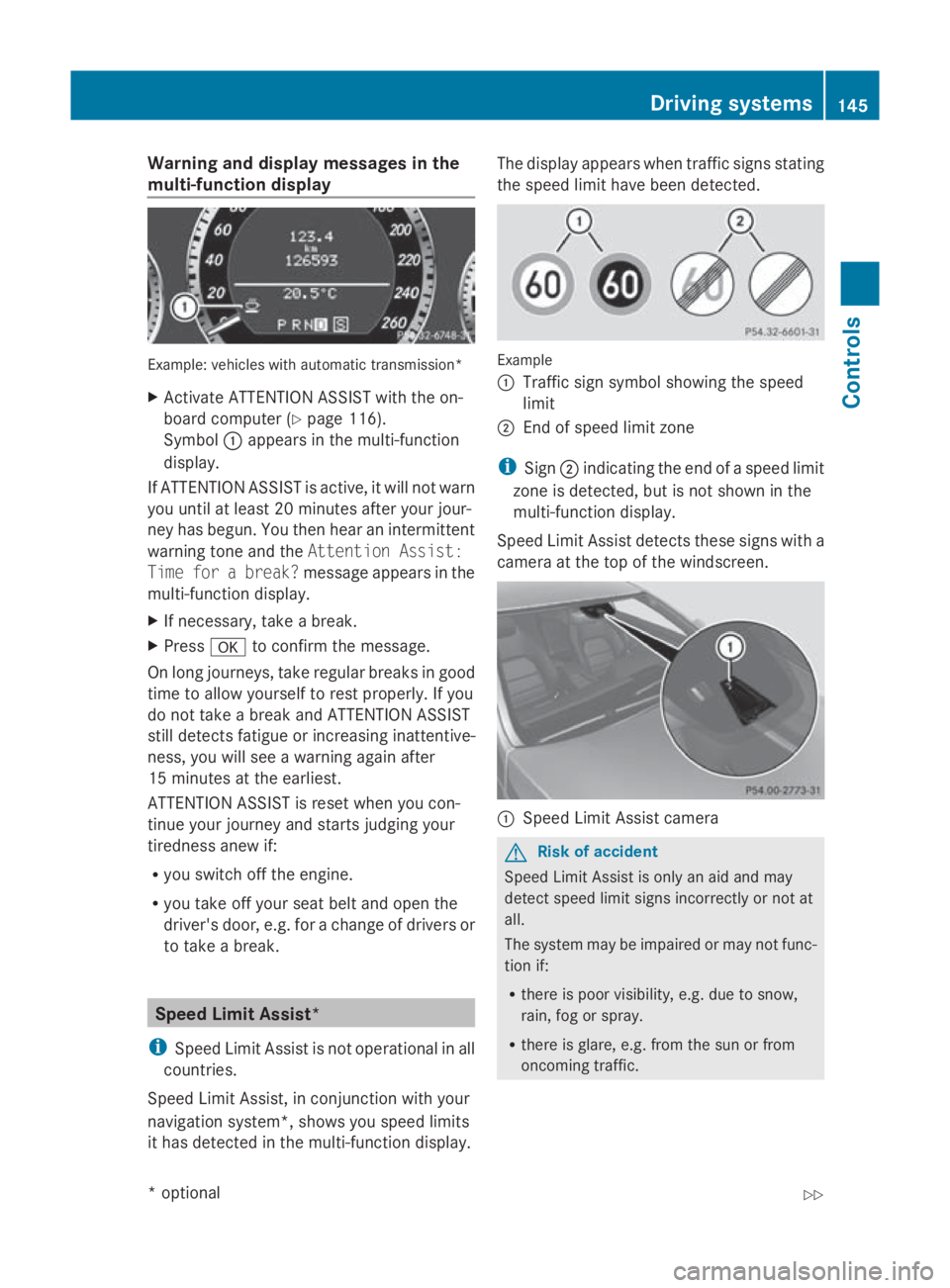
Warning and display messages in the
multi-function display Example
:vehicles with automatic transmission*
X Activate ATTENTION ASSIST with the on-
board computer (Y page116).
Symbol 0046appears in the multi-function
display.
If ATTENTION ASSIST is active, it wil lnot warn
you until at least 20 minutes after you rjour-
ney has begun. You then hea ranintermittent
warning tone and the Attention Assist:
Time for abreak? message appears in the
multi-function display.
X If necessary, take abreak.
X Press 0064to confirm the message.
On long journeys, take regularb reaks in good
time to allow yourself to rest properly .Ifyou
do not take abrea kand ATTENTION ASSIST
still detects fatigu eorincreasing inattentive-
ness, you wil lsee aw arning again after
15 minutes at the earliest.
ATTENTION ASSIST is reset whe nyou con-
tinue you rjourney and starts judging your
tirednes sanew if:
R you switch off the engine.
R you take off you rseatb elta nd open the
driver's door, e.g. for achange of drivers or
to take abreak. Spee
dLimi tAssist*
i Speed Limit Assist is not operational in all
countries.
Speed Limit Assist, in conjunction with your
navigation system*, show syou spee dlimits
it has detected in the multi-function display. The displaya
ppears whentraffic signs stating
the spee dlimi thave been detected. Example
0046
Traffi csign symbol showing the speed
limit
0047 End of spee dlimi tzone
i Sign 0047indicating the end of aspee dlimit
zone is detected, but is not show ninthe
multi-function display.
Speed Limi tAssist detects these signs with a
camera at the top of the windscreen. 0046
Speed Limit Assist camera G
Risk of accident
Speed Limit Assist is only an aid and may
detect spee dlimi tsigns incorrectly or not at
all.
The syste mmay be impaired or may not func-
tion if:
R there is poor visibility, e.g. due to snow,
rain, fog or spray.
R there is glare, e.g. from the sun or from
oncoming traffic. Driving systems
145Controls
*optional
207_AKB; 2; 3, en-GB
mkalafa,
Version: 2.11.8.1 2009-07-23T10:23:49+02:00-Seite 145 Z
Page 163 of 313
X
Turn the key to position 1or 2in the ignition
lock.
X Pull or push the switch in the corresponding
direction.
i If you press the switch beyond the point
of resistance, an automatic opening/clos-
ing process is started in the corresponding
direction .You can stop automatic opera-
tion by pressing again.
Resetting the panorama sliding sunroof
and the roller sunblind Reset the panorama sliding sunroof and the
roller sunblind if the panorama sliding sunroof
or the roller sunblind does not close
smoothly.
X Turn the key to position 1or 2in the ignition
lock.
X Pull the switch repeatedly to the point of
resistanc einthe direction of arrow 0047until
the panorama sliding sunroof is fully
closed.
X Keep the switch pulled for an additional
second.
X Pull the switch repeatedly to the point of
resistanc einthe direction of arrow 0047until
the roller sunblind is fully closed.
X Keep the switch pulled for an additional
second.
X Check that the panorama sliding sunroof
and the roller sunblind can be fully opened
again.
X If this is not the case, consult aqualified
specialist workshop. Soft top (Cabriolet)
Opening and closing the soft top
You can open or close the soft top either
when the vehicle is stationary or when driving
up to aspeed of 40 m/h.
If there is astron ghead wind, it may not be
possible to close the soft top fully. In this case, reduce speed or stop in order to close
the soft top fully.
For safety reasons, Mercedes-Benz recom-
mends that you only open or close the soft
top when the vehicle is stationary. G
Risk of accident and injury
Only drive with the soft top fully open or
closed.
If the soft top does not open or close fully, the
soft-top hydraulics are depressurised and the
soft top is lowered:
R after about seven minutes if the ignition is
switched on
R immediately if the ignition is switched off
Aw arning tones ounds shortly beforehand.
The Top being opened message appears in
the multifunction display.
Lock the soft top again before driving on. Oth-
erwise, the unlocked soft top could open dur-
ing the journey and cause you to lose control
of your vehicle. You or other persons could be
injured as aresult.
! Never sit on the soft-top compartment
cover and do not store any heavy objects
on it. You will otherwise damage the soft
top and soft-top compartment cover of the
vehicle.
! The soft top swings upwards when it is
opened or closed. In order to avoid dam-
aging the soft top or other parts of the vehi-
cle when opening or closing the soft top,
observe the following:
R there must be sufficient clearance above
the vehicle.
R the boot separator must be closed and
must not be pushed upwards by the load.
R there must not be any object sonthe
soft-top compartment cover. 160
Soft top (Cabriolet)Controls
207_AKB; 2; 3, en-GB
mkalafa,
Version: 2.11.8.1 2009-07-23T10:23:49+02:00-Seite 160