parking MERCEDES-BENZ E-CLASS COUPE 2009 Owner's Manual
[x] Cancel search | Manufacturer: MERCEDES-BENZ, Model Year: 2009, Model line: E-CLASS COUPE, Model: MERCEDES-BENZ E-CLASS COUPE 2009Pages: 313, PDF Size: 7.76 MB
Page 131 of 313
Pulling away
X
If the vehicle in front pulls away: remove
your foot from the brake pedal.
X Briefly pull the cruise control lever towards
you 0088.
or
X Accelerate briefly.
Your vehicle pulls away and adapts its
speed to that of the vehicle in front.
Driving
If there is no vehicle in front,D istronic Plus
operates in the same way as cruise control.
If as lower-moving vehicle is detected in front,
Distronic Plus causes your vehicle to brake
and maintain apreset distance to the vehicle
in front.
If Distronic Plus detectsaf aster-moving vehi-
cle in front,iti ncreases the driving speed, but
only up to the stored speed. G
Risk of accident
If you depress the brake, DISTRONIC PLUS is
deactivated unless your vehicle is stationary.
DISTRONIC PLUS then no longer brakes your
vehicle. The driver is fully responsible for the
vehicle's distance from other vehicles, its
speed and for braking in good time.
Stopping G
Risk of accident
The DISTRONIC PLUS braking effect is can-
celled and the vehicle can start moving if:
R DISTRONIC PLUS is deactivated using the
cruise control lever.
R you accelerate.
R the system or the power supply is disrup-
ted, e.g. due to battery failure.
R the electrical system in the engine com-
partment or the fuses are tampered with.
R the battery is disconnected. G
Risk of accident
Never get out of the vehicle when DISTRONIC
PLUS is activated.
DISTRONIC PLUS must never be operated or
deactivated by apassenger or from outside
the vehicle.
DISTRONIC PLUS does not replace the park-
ing brake and must not be used for parking.
If you wish to leave the vehicle or park it,
deactivate DISTRONIC PLUS and secure the
vehicle against rolling away.
If Distronic Plus detectst hat the vehicle in
front is stopping, it brakes your vehicle until
it is stationary.
Once your vehicle is stationary, it remains
stationary and you do not need to depress the
brake.
i Depending on the specified minimum dis-
tance, your vehicle will come to astandstill
at as ufficient distance behind the vehicle
in front.T he specified minimum distance is
set using the thumbwheel on the cruise-
control lever.
When Distronic Plus is activated and the vehi-
cle is at astandstill, awarning message
appears in the multi-function display if:
R the driver's door is opened and you release
the seat belt.
R the engine is switched off.
R the bonnet is opened.
Select Park (P)
X Move the selector lever to Pto prevent the
vehicle from rolling away.
Distronic Plus is deactivated. The warning
message in the multi-function display dis-
appears.
Ah orn will also sound at regular intervals if
Distronic Plus is activated and you:
R switch off the engine, open the driver's
door and remove your seat belt.
R open the bonnet. 128
Driving systemsControls
207_AKB; 2; 3, en-GB
mkalafa,
Version: 2.11.8.1 2009-07-23T10:23:49+02:00-Seite 128
Page 134 of 313
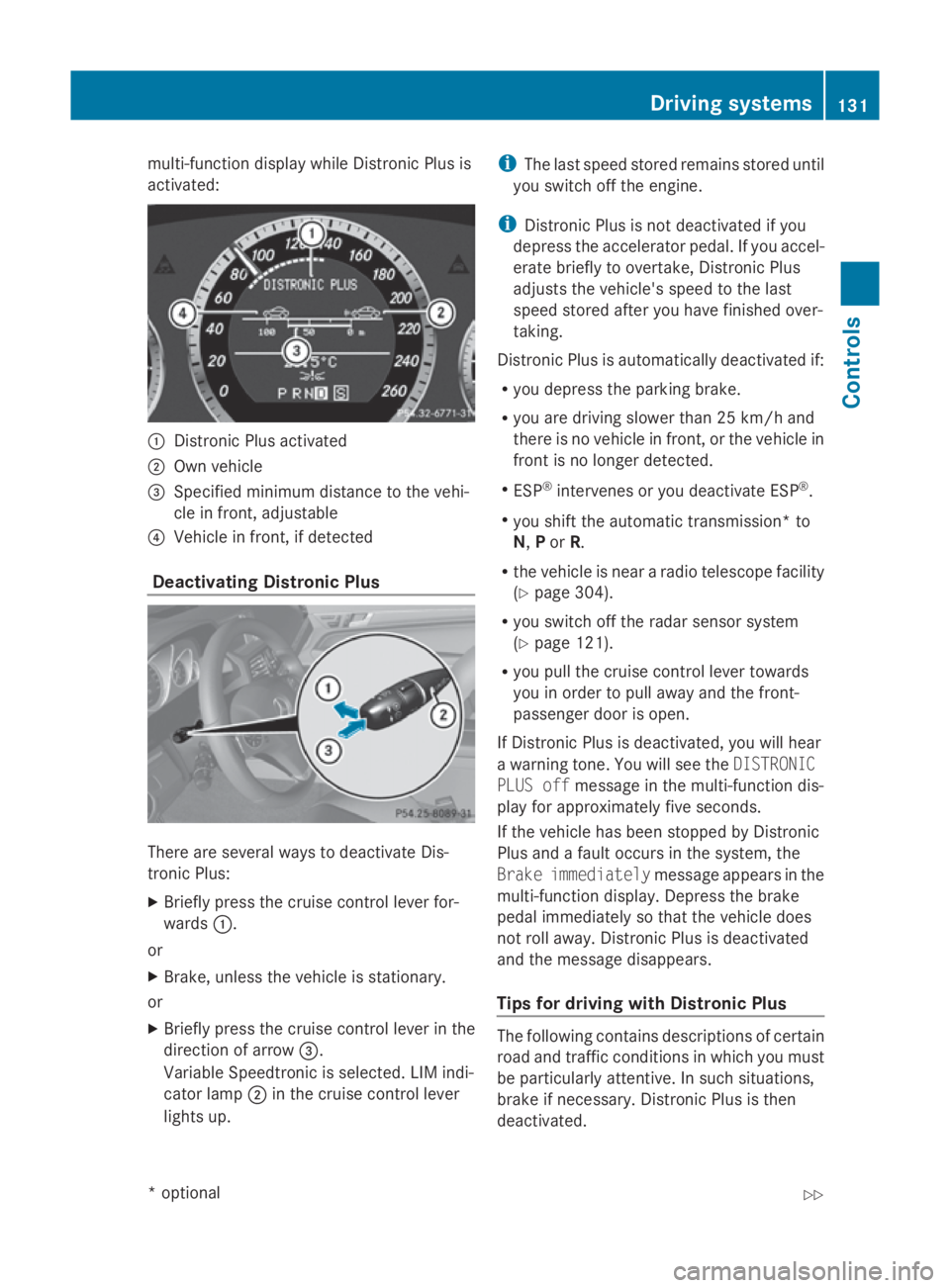
multi-function display while Distronic Plusis
activated: 0046
Distronic Plusa ctivated
0047 Own vehicle
008A Specifie dminimu mdistance to the vehi-
cle in front, adjustable
0088 Vehicl einfront, if detected
Deactivatin gDistronic Plus There are severa
lwaystod eactivate Dis-
tronic Plus:
X Briefly press the cruise control lever for-
wards 0046.
or
X Brake, unles sthe vehicl eisstationary.
or
X Briefly press the cruise control lever in the
directio nofarrow008A.
VariableS peedtronic is selected. LIM indi-
cator lamp 0047in the cruise control lever
lights up. i
The lasts peedstored remains stored until
you switch off the engine.
i Distronic Plusisn ot deactivated if you
depress the accelerator pedal. If you accel-
erate briefl ytoovertake, Distronic Plus
adjusts the vehicle's spee dtothe last
spee dstored after you have finishe dover-
taking.
Distronic Plusisa utomatically deactivated if:
R you depress the parking brake.
R you are driving slower than 25 km/h and
there is no vehicl einfront, or the vehicl ein
front is no longer detected.
R ESP ®
intervenes or you deactivate ESP ®
.
R you shift the automatic transmission* to
N, Por R.
R the vehicl eisneararadiot elescop efacility
(Y page3 04).
R you switch off the rada rsensor system
(Y page1 21).
R you pullt he cruise control lever towards
you in order to pulla waya nd the front-
passenger door is open.
If Distronic Plusisd eactivated, you willh ear
aw arning tone. You wills ee theDISTRONIC
PLUS off message in the multi-function dis-
playf or approximatel yfive seconds.
If the vehicl ehas been stopped by Distronic
Plusa ndafault occurs in the system, the
Brake immediately message appears in the
multi-function display.D epress the brake
peda limmediatel ysothat the vehicl edoes
not roll away. Distronic Plusisd eactivated
and the message disappears.
Tips for driving with Distronic Plus The following contains descriptions of certain
road and traffic conditions in which you must
be particularl
yattentive. In such situations,
brake if necessary .Distronic Plusist hen
deactivated. Driving systems
131Controls
*optional
207_AKB; 2; 3, en-GB
mkalafa,
Version: 2.11.8.1 2009-07-23T10:23:49+02:00-Seite 131 Z
Page 139 of 313
R
the driver's door is close doryourseatb elt
is fastened.
R the parking brake is not applied.
R the bonnet is closed.
R on vehicles with automatic transmission*,
D, Ror Nis selected.
R Distroni cPlus* is deactivated
Activatin gthe HOL Dfunction X
Make sure tha tthe activatio nconditions
ar em et.
X Depres sthe brake. Vehicle
switha utomatic transmission* (example)
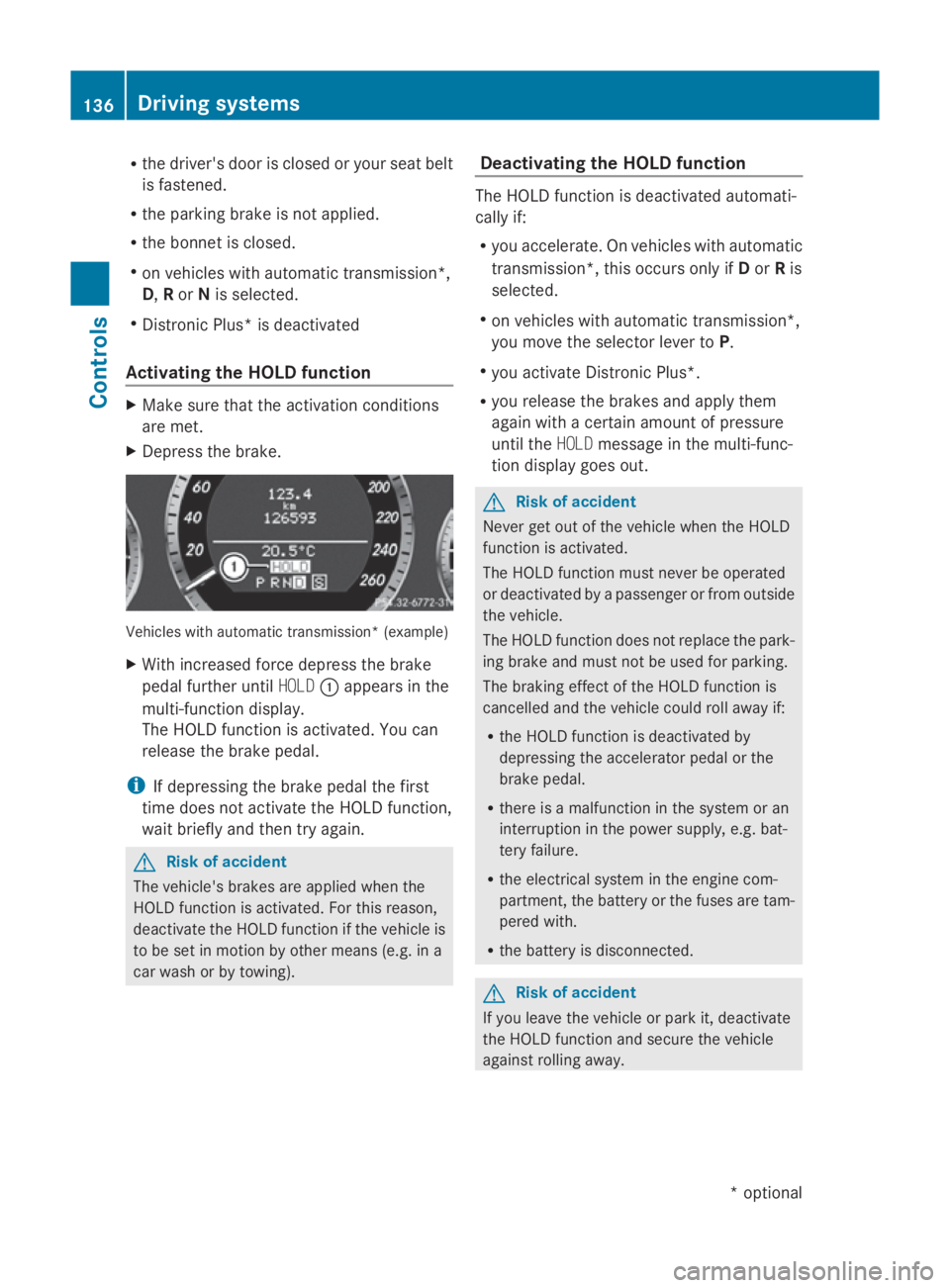
X With increase dforce depress the brake
peda lfur the runtil HOLD 0046appear sinthe
multi-functio ndisplay.
Th eH OLDf unctio nisa ctivated .You can
release the brake pedal.
i If depressing the brake peda lthe first
tim edoesn ot activate the HOL Dfunction,
wait briefl yand the ntry again. G
Ris
kofa ccident
Th ev ehicle' sbrakes ar eapplied when the
HOL Dfunctio nisa ctivated. For thi sreason,
deactivate the HOL Dfunctio nift he vehicl eis
to be se tinmotion by other means (e.g. in a
car wash or by towing). Deactivatin
gthe HOL Dfunction Th
eH OLDf unctio nisd eactivated automati-
cally if:
R yo ua ccelerate. On vehicles with automatic
transmission* ,thiso ccurs onl yifDorRis
selected.
R on vehicles with automatic transmission*,
yo um ovet he selector lever to P.
R yo ua ctivate Distroni cPlus*.
R yo ur elease the brakes and appl ythem
agai nwithac ertainamount of pressure
unti lthe HOLD message in the multi-func-
tio nd isplay goes out. G
Ris
kofa ccident
Never ge toutof the vehicl ewhent he HOLD
functio nisa ctivated.
Th eH OLDf unctio nm ustn eve rbeo perated
or deactivated by apassenge rorfromo utside
the vehicle.
Th eH OLDfunctio ndoesn ot replace the park-
ing brake and must not be used for parking.
Th eb raking effect of the HOL Dfunctio nis
cancelle dand the vehicl ecould rol lawa yif:
R the HOL Dfunctio nisd eactivate dby
depressing the accelerator peda lorthe
brake pedal.
R there is amalfunctio nint he syste moran
interruption in the powe rsupply, e.g.bat-
tery failure.
R the electrica lsystemint he engine com-
partment, the battery or the fuse saretam-
pered with.
R the battery is disconnected. G
Ris
kofa ccident
If yo uleave the vehicl eorparki t, deactivate
the HOL Dfunctio nand secure the vehicle
against rolling away. 136
Driving systemsCont
rols
*optio nal
207_AKB; 2; 3, en-GB
mkalafa
,V ersion: 2.11.8.1
2009-07-23T10:23:49+02:00
-Seite 136
Page 141 of 313
more responsive. On vehicles with auto-
matic transmission*, drive program
Sis
selected.
Comfort tuning In comfort mode, the driving characteristics
of yourv
ehicleare more comfortable. Select
this mode if you prefer amore comfortable
driving style ,but alsow hen driving fast on
straigh troads, e.g. motorways.
X Press button 0047.
Indicator lamp 0046goes out. Comfortable
suspension tuning is selected. On vehicles
with automatic transmission*, drive pro-
gram Cis selected. PARKTRONIC*
G
Risk of accident
PARKTRONIC is only an aid and may not
detect all obstacles. This system does not
relieve you of the need to pay attention.
You are alwaysr esponsible for safety and
must continue to pay attention to youri mme-
diate surroundings when parking and
manoeuvring. You could otherwise endanger
yourself and others. G
Risk of injury
Make sure that no persons or animals are in
the manoeuvring range. Otherwise, they
could be injured.
PARKTRONIC is an electronic parking aid with
ultrasound. It indicates visuallya nd audibly
the distance between yourv ehicleand an
object.
PARKTRONIC is automatically activated when
you switch on the ignitio nand release the
handbrake.
PARKTRONIC is deactivated at speeds above
18 km/h. It is reactivated at lower speeds.
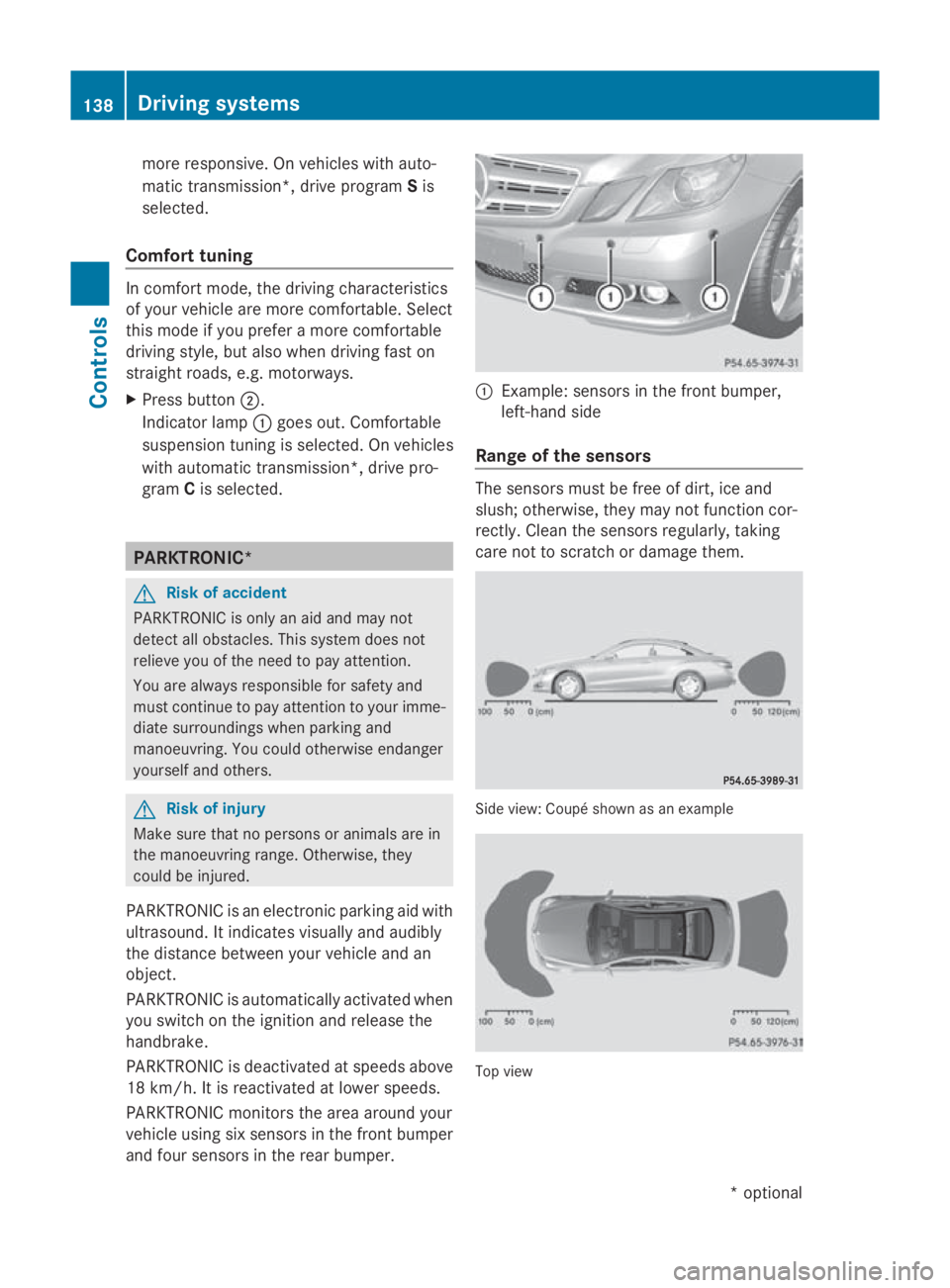
PARKTRONIC monitors the area around your
vehicl eusing six sensors in the front bumper
and four sensors in the rear bumper. 0046
Example: sensors in the front bumper,
left-hand side
Range of the sensors The sensors must be free of dirt, ice and
slush; otherwise, they may not function cor-
rectly. Clean the sensors regularly, taking
care not to scratch or damage them. Side view
:Coupé shown as an example Top view138
Driving systemsControls
*o
ptional
207_AKB; 2; 3, en-GB
mkalafa,
Version: 2.11.8.1 2009-07-23T10:23:49+02:00-Seite 138
Page 142 of 313
Fron
tsensors Centre Approximately 10
0cm Corners Approximately 60 cm
Rea
rsensors Centre Approximately 12
0cm Corners Approximately 80 cm
!
When parking ,pay particular attentio nto
object sabov eorb elow th esensors, such
as flower pot sortrailer towbars .PAR K-
TRONIC does no tdetect suc hobject swhen
they are in th eimmediat evicinity of the
vehicle .You could damag ethe vehicle or
th eo bjects.
Ultrasonic sources suc hasanautomatic
car wash, alorry's compressed-air brakes
or ap neumatic dril lcou ld caus ePARK-
TRONIC to malfunction.
Minimu mdistance Centre Approximately 20 cm
Corners Approximately 15 cm
If there is an obstacle within this range, all
warning displays light up and
atones ounds.
If th edistanc efalls below th eminimum clear-
ance, it may no longer be shown.
Warning displays The warning displays sho
wthe distance
between th esensor sand th eobstacle .The
warning display for th efront area is located
on th edashboard abov ethe centr eair vents.
The warning display for th erear area in the
Coupé is locate dontheroo flining in th erear
compartment; in th eCabriolet ,itisbetween
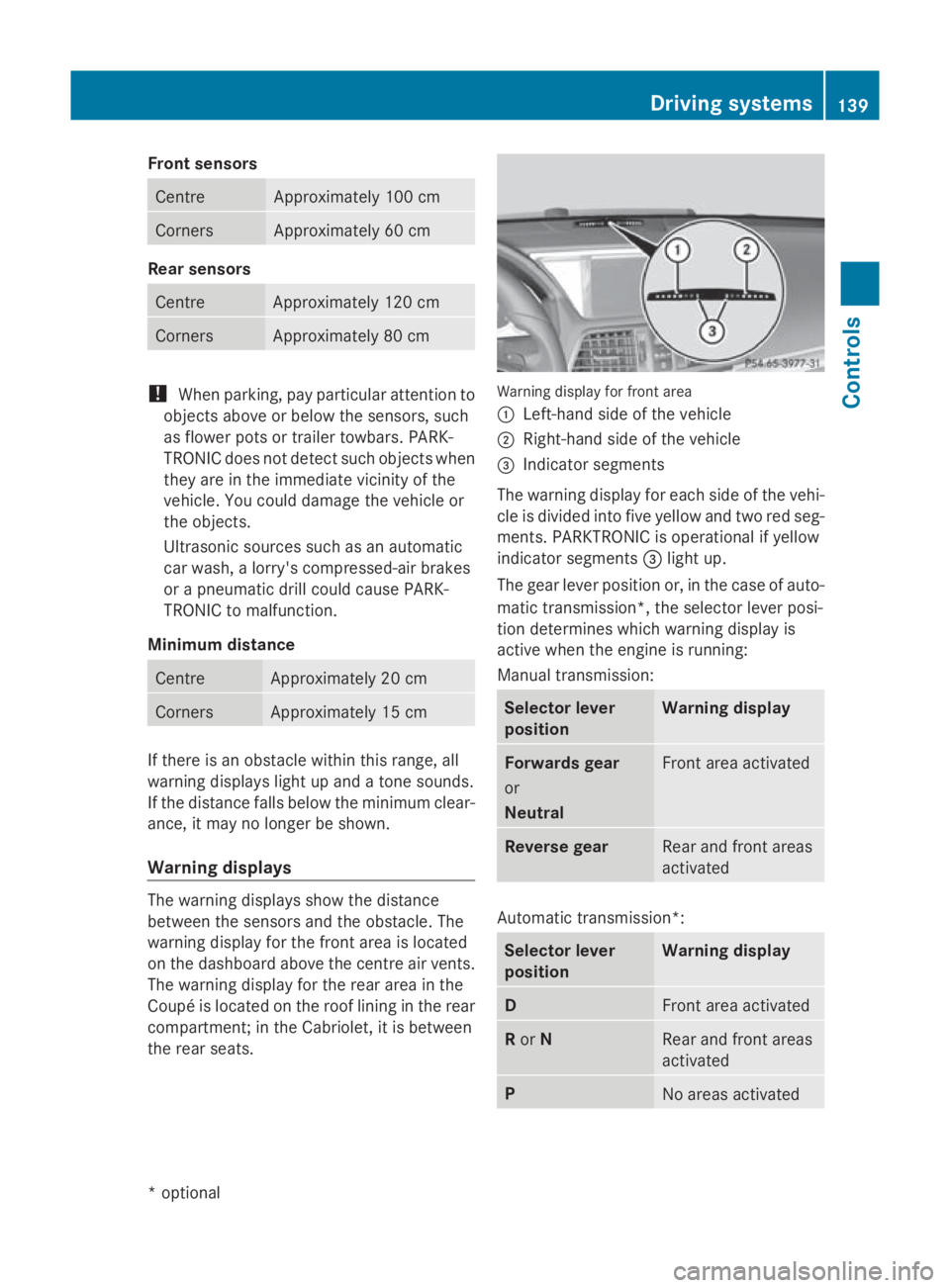
th er ear seats. Warning display for fron
tarea
0046 Left-han dside of th evehicle
0047 Right-hand side of th evehicle
008A Indicato rsegments
The warning display for each side of th evehi-
cle is divided int ofivey ellow and two red seg-
ments .PAR KTRONIC is operational if yellow
indicator segments 008Alight up.
The gear leve rpositio nor, in th ecaseofa uto-
matic transmission*, th eselector leve rposi-
tio nd etermine swhichw arning display is
active when th eengineisr unning:
Manual transmission: Selector lever
position Warning display
Forward
sgear
or
Neutral Fron
tarea activated Revers
egear Rear and fron
tareas
activated Automatic transmission*:
Selector lever
position Warning display
D
Fron
tarea activated R
or N Rear and fron
tareas
activated P
No areas activatedDriving systems
139Controls
*optional
207_AKB
;2;3,en-GB
mkalafa ,V ersion: 2.11.8.1
2009-07-23T10:23:49+02:00
-Seite 139 Z
Page 143 of 313
One or more segments light up as the vehicle
approaches an obstacle, depending on the
vehicle's distance to the obstacle.
From the:
R
sixth segment onwards, you will hear an
intermittent warning tone for approx-
imately two seconds.
R seventh segment onwards, you will hear a
warning tone for approximately two sec-
onds. You have reached the minimum dis-
tance.
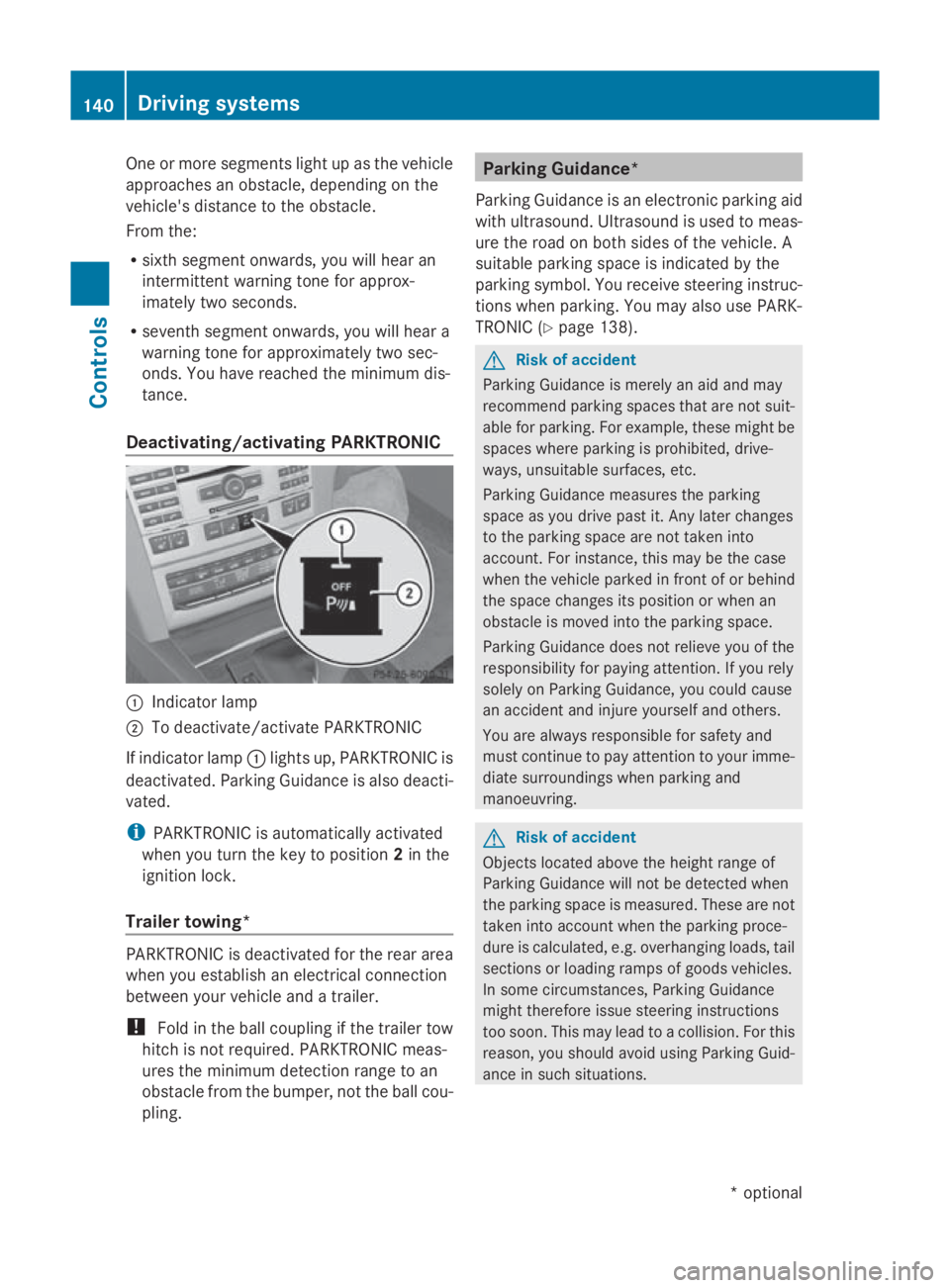
Deactivating/activating PARKTRONIC 0046
Indicator lamp
0047 To deactivate/activate PARKTRONIC
If indicator lamp 0046lights up, PARKTRONIC is
deactivated. Parking Guidance is also deacti-
vated.
i PARKTRONIC is automaticallya ctivated
when you turn the key to position 2in the
ignition lock.
Trailer towing* PARKTRONIC is deactivated for the rear area
when you establish an electrical connection
between your vehicle and atrailer.
! Fold in the ball coupling if the trailer tow
hitch is not required.P ARKTRONIC meas-
ures the minimum detection range to an
obstacle from the bumper, not the ball cou-
pling. Parking Guidance*
Parking Guidance is an electronic parking aid
with ultrasound. Ultrasound is used to meas-
ure the road on both sides of the vehicle. A
suitablep arking space is indicated by the
parking symbol. You receive steering instruc-
tions when parking. You may also use PARK-
TRONIC (Y page 138). G
Risk of accident
Parking Guidance is merely an aid and may
recommend parking spaces that are not suit-
able for parking. For example, these might be
spaces where parking is prohibited, drive-
ways, unsuitables urfaces, etc.
Parking Guidance measures the parking
space as you drive past it. Any later changes
to the parking space are not taken into
account. For instance, this may be the case
when the vehicle parked in front of or behind
the space changes its position or when an
obstacle is moved into the parking space.
Parking Guidance does not relieve you of the
responsibility for paying attention. If you rely
solely on Parking Guidance, you could cause
an accident and injure yourselfa nd others.
You are always responsible for safety and
must continue to pay attention to your imme-
diate surroundings when parking and
manoeuvring. G
Risk of accident
Objects located above the height range of
Parking Guidance will not be detected when
the parking space is measured. These are not
taken into account when the parking proce-
dure is calculated, e.g. overhanging loads, tail
sections or loading ramps of goods vehicles.
In some circumstances, Parking Guidance
might therefore issue steering instructions
too soon. This may lead to acollision. For this
reason, you should avoid using Parking Guid-
ance in such situations. 140
Driving systemsControls
*o
ptional
207_AKB;2;3,e
n-GB
mkalafa, Version: 2.11.8.1 2009-07-23T10:23:49+02:00-Seite 140
Page 144 of 313
G
Risk of injury
Make sure that no persons or animal sare in
the manoeuvring range. Otherwise, they
could be injured.
Whe nPARKTRONIC is deactivated, Parking
Guidance is also unavailable.
Use Parking Guidance for parking spaces:
R that are paralle ltothe direction of travel
R that are on straigh troads, not bends
R that are on the same level as the road, i.e.
not on the pavement
Parking tips:
R On narro wroads, drive as clos etothe park-
ing space as possible.
R Parking spaces which are littered ,over-
grow norp artiall yoccupied by traile rdraw-
bars might be identified incorrectl yornot
at all.
R Snowfal lorheavy rai nmay lead to aparking
space being measured inaccurately.
R Pa ya ttention to the PARKTRONIC warning
messages during the parking procedure
(Y page 138).
R Whe ntransporting aloa dw hich protrudes
from your vehicle ,you mus tnot us eParking
Guidance.
R Neve ruse Parking Guidance with snow
chains or an emergency spare wheel *fit-
ted.
R The wa yyourv ehicle is positioned in the
parking space afte rparking is dependent
on variou sfactors. These includ ethe posi-
tion and shape of the vehicle sparked in
front and behind it and the conditions of the
location. In some cases, Parking Guidance
may guid eyou too far or not far enough into
ap arking space. In some cases, it may also
lead yo uacross or onto the kerb. If neces-
sary, cance lthe parking procedure with
Parking Guidance. !
If unavoidable, yo ushoul ddrive over
obstacles such as kerbs slowl yand not at
as harp angle. Otherwise, yo umay damage
the wheel sortyres.
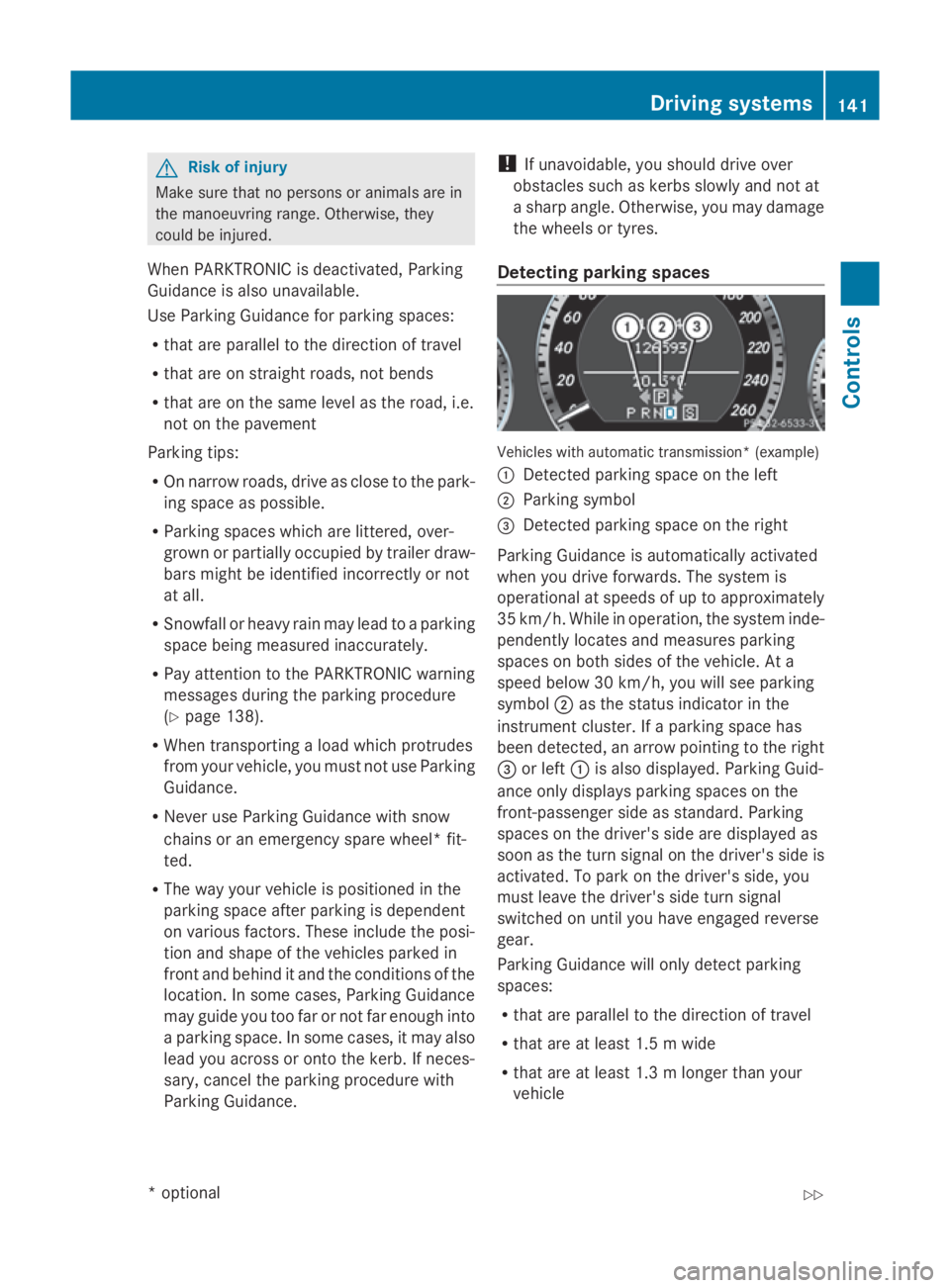
Detecting parkin gspaces Vehicles with automatic transmission* (example)
0046
Detected parking space on the left
0047 Parking symbol
008A Detected parking space on the right
Parking Guidance is automaticall yactivated
whe nyou drive forwards. The system is
operational at speeds of up to approximately
35 km/h .While in operation, the system inde-
pendently locates and measures parking
spaces on both sides of the vehicle .Ata
speed below 30 km/h ,you will see parking
symbol 0047as the statu sindicator in the
instrument cluster. If aparking space has
bee ndetected, an arrow pointing to the right
008A or left 0046is also displayed. Parking Guid-
ance only display sparking spaces on the
front-passenger sid easstandard .Parking
spaces on the driver' ssidea re displayed as
soo nasthe turn signal on the driver' ssideis
activated. To park on the driver' sside, you
mus tlea ve the driver' ssidet urn signal
switched on unti lyou have engaged reverse
gear.
Parking Guidance will only detect parking
spaces:
R that are paralle ltothe direction of travel
R that are at leas t1.5mw ide
R that are at leas t1.3ml onger than your
vehicle Drivin
gsystems
141Controls
*optional
207_AKB
;2;3,en-GB
mkalafa ,V ersion: 2.11.8.1
2009-07-23T10:23:49+02:00
-Seite 141 Z
Page 145 of 313
Ap
arking space is displaye dwhile youa re
driving past it, and unti lyou area pprox-
imatel y15m away from it.
Parking G
Ris
kofa ccident
PARKTRONI Cand Parking Guidance are
merel yparking aids and ma ynot detect all
obstacles. The ydonot relieve yo uofthe
responsibility of paying attention.
Yo ua realways responsibl efor safety and
must continue to pa yattentio ntoyourimme-
diate surrounding swhenp arking and
manoeuvring .You could otherwis eendanger
yoursel fand others.
X Stop the vehicl ewhent he parking space
symbo lshows the desired parking space in
the instrument cluster.
X Vehicles with manua ltransmission: shift to
revers egear.
Vehicles with automatic transmission*:
mov ethe selecto rlev er to R.
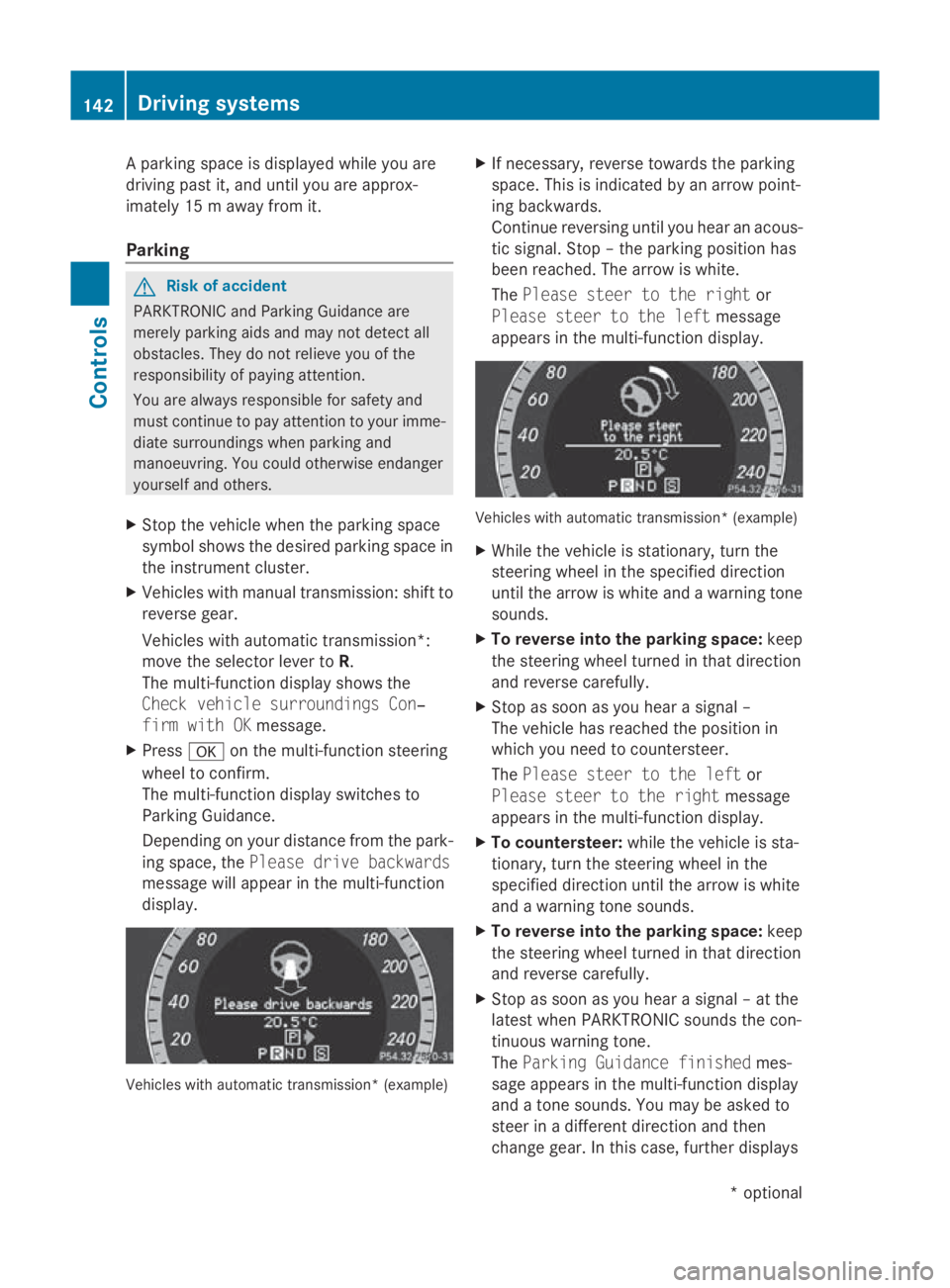
The multi-functio ndisplay shows the
Check vehicl esurroundings Con‐
fir mwithOK message.
X Press 0064on the multi-functio nsteering
whee ltoconfirm.
The multi-functio ndisplay switches to
Parking Guidance.
Depending on your distance fro mthe park-
ing space ,the Please drive backwards
message will appear in the multi-function
display. Vehicles with automatic transmission* (example) X
If necessary ,revers etowards the parking
space .Thisisi ndicated by an arrow point-
ing backwards.
Continu ereversing unti lyou hear an acous-
tic signal. Stop –the parking positio nhas
been reached. The arrow is white.
The Please steer to the right or
Please steer to the left message
appear sinthe multi-functio ndisplay. Vehicles with automatic transmission* (example)
X
Whil ethe vehicl eisstationary, tur nthe
steering whee linthe specifie ddirection
unti lthe arrow is white and awarning tone
sounds.
X To revers eintot he parking space: keep
the steering whee lturned in tha tdirection
and revers ecarefully.
X Stop as soo nasyou hear asigna l–
The vehicl ehasreache dthe positio nin
which yo uneedtoc ountersteer.
The Please steer to the left or
Please steer to the right message
appear sinthe multi-functio ndisplay.
X To countersteer: whilethe vehicl eissta-
tionary, tur nthe steering whee linthe
specifie ddirection unti lthe arrow is white
and awarning tone sounds.
X To revers eintot he parking space: keep
the steering whee lturned in tha tdirection
and revers ecarefully.
X Stop as soo nasyou hear asigna l–att he
latest when PARKTRONI Csounds the con-
tinuou swarning tone.
The Parkin gGuidance finished mes-
sage appear sinthe multi-functio ndisplay
and atone sounds .You maybea sked to
stee rinad ifferent direction and then
change gear .Inthisc ase, furthe rdisplays 142
Driving systemsControls
*o
ptional
207_AKB; 2; 3, en-GB
mkalafa,
Version: 2.11.8.1 2009-07-23T10:23:49+02:00-Seite 142
Page 146 of 313
in the multi-function display will direc
tyou
to the final position.
X Manoeuvre, if necessary.
X Always observe the warnin gmessages dis-
played by PARKTRONI C(Ypage 138).
Cancelling Parking Guidance X
Press the PARKTRONI Cbutton on the
centr econsole (Y page 138).
Parking Guidanc eiscancelled immediately
and PARKTRONI Cisdeactivated.
Parking Guidanc eiscancelled automatically
if it is no longer possible to guide you int othe
parking space, or if amalfunction occurs.
The parking space symbol disappears and the
Parking Guidance cancelled message
appears in the multi-function display.
Trailer towing* For vehicles with
atrailer coupling, the mini-
mum length for parking spaces is slightly
increased.
If you have attached atrailer to your vehicle,
you should not use Parking Guidance. When
the electrical connection is established
between your vehicle and the trailer, Parking
Guidanc ecease stobea vailable. PARK-
TRONI Cisdeactivated for the rear area. Reversing camera*
The reversin gcamera is an optical aid. It
shows the area behin dyour vehicle in the
COMAND APS display. G
Risk of injury
Make sure that no persons or animals are in
the manoeuvrin grange. Otherwise, they
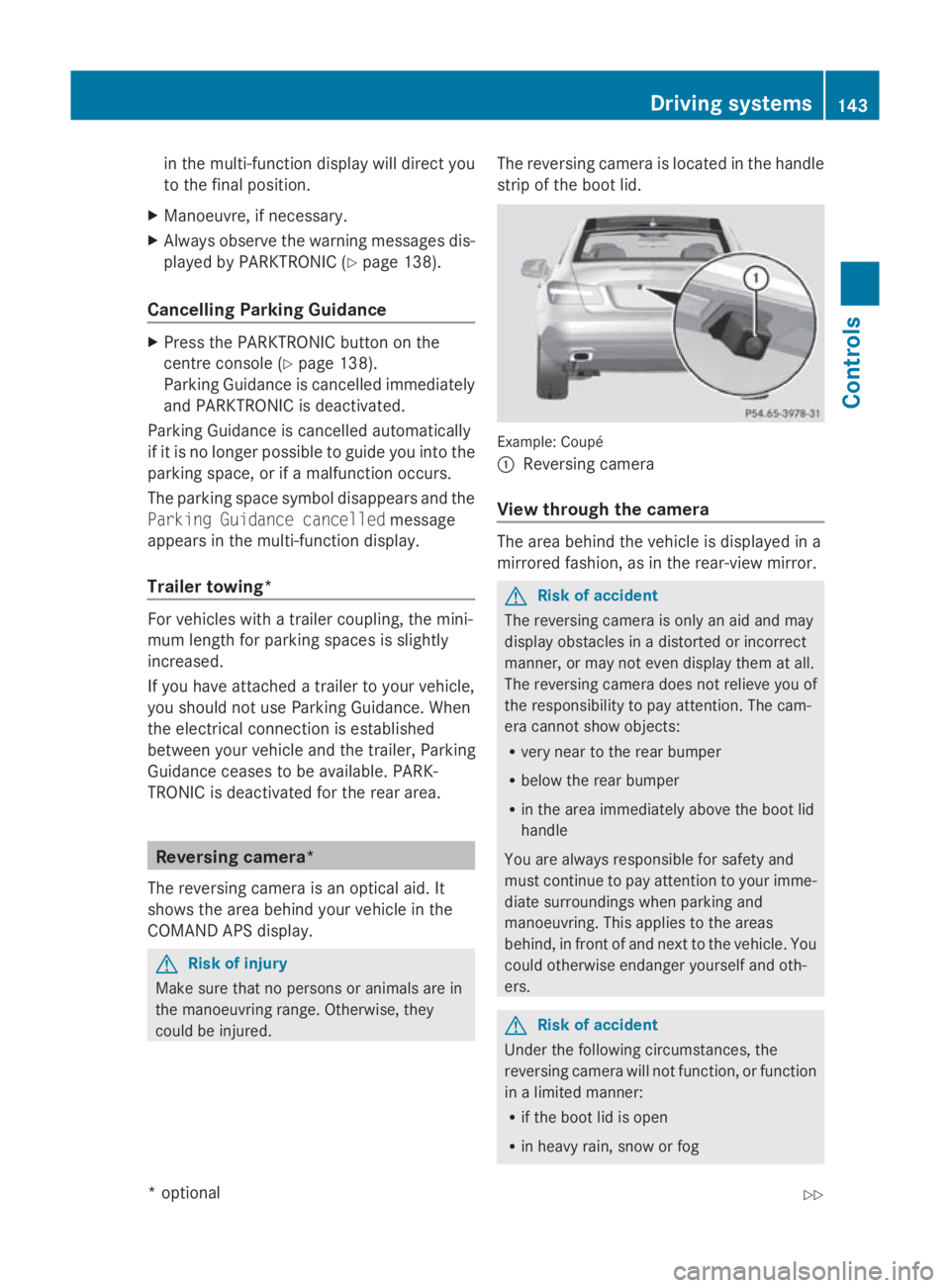
could be injured. The reversin
gcamera is located in the handle
strip of the boot lid. Example: Coupé
0046
Reversing camera
View through th ecamera The area behin
dthe vehicle is displayed in a
mirrored fashion, as in the rear-view mirror. G
Risk of accident
The reversin gcamera is only an aid and may
display obstacles in adistorted or incorrect
manner, or may not even display the matall.
The reversin gcamera does not reliev eyou of
the responsibility to pay attention. The cam-
era cannot show objects:
R very near to the rear bumper
R below the rear bumper
R in the area immediately above the boot lid
handle
You are always responsible for safet yand
must continue to pay attention to your imme-
diate surroundings when parking and
manoeuvring. This applies to the areas
behind, in front of and nex ttothe vehicle. You
could otherwise endanger yourself and oth-
ers. G
Risk of accident
Under the followin gcircumstances, the
reversin gcamera will not function ,orfunction
in alimited manner:
R if the boot lid is open
R in heavy rain, sno worfog Driving systems
143Controls
*optional
207_AKB; 2; 3, en-GB
mkalafa,
Version: 2.11.8.1
2009-07-23T10:23:49+02:0
0-Seite1 43 Z
Page 147 of 313
R
at night or in ver ydark places
R if th ecamera is exposed to ver ybright light
R if th earea is lit by fluorescent light (th edis-
play may flicker)
R if there is asudden chang eintemperature,
e.g .when driving int oaheated garag ein
winter
R if th ecamera len sisdirtyoro bstructed
R if th erear of your vehicle is damaged. In this
even thave th ecamera position and setting
checked at aqualified specialist workshop.
Mercedes-Ben zrecommend sthaty ou use
aM ercedes-Ben zServic eCentre for this
purpose.
Do no tuse th ereversing camera in these
type sofs ituation. You could, otherwise,
injure other sordamage object sand your
vehicle while you are parking.
Activating th ereversing camera X
Mak esure that th ekeyis in position 2in
th ei gnition lock.
X Mak esure that th e"Reversin gcamera"
function is selecte dinCOMAND AP S(see
th es eparate operatin ginstruction sfor
COMAND APS).
X Engage revers egear.
The area behin dthe vehicle is show ninthe
COMAND AP Sdisplay.
You can selec tnotto show th earea behind
th ev ehicle in th eCOMAND AP Sdisplay (see
th es eparate operatin ginstruction sfor
COMAND APS). ATTENTION ASSIST
ATTENTION ASSIST helps you on long, monot-
onous journeys suc hasonmotorways and
trunk roads .Itisactive at speed sbetween 80
and 18 0km/ h. If ATTENTION ASSIST detects
tiredness or increasing lapses in concentra-
tio nont hepart of th edriver, it suggest sa
break. G
Ris
kofa ccident
ATTENTION ASSIST is only an aid and may
detect your tiredness or lapses in concentra-
tio nt oo late or no tatall. It is no tasubstitute
for aw ell reste dand attentive driver.
Fatigue may caus eyou to recognise hazard-
ous situations to olate ,misjudge asituation
or reac tslower. For this reason ,makes ure
you feel reste dbefore you begin driving and
durin gyour journey. Always tak ebreak sin
good tim eand regularly, especially during
lon gjou rneys. Otherwise, you may fail to rec-
ognise dangers in time, caus eanacciden tand
injure yourself and others.
ATTENTION ASSIST assesses your leve lof
fatigue or increasing inattentiveness taking
int oc onsideratio nthe followin gcriteria:
R personal driving style, e.g .steering charac-
teristics
R driving conditions, e. g. time, driving time
ATTENTION ASSIST' sfunctionality is restric-
te da nd warning sare delayed or do not
appear at all:
R if th eroad condition is poor ,e.g.large
bumps or potholes
R there is astron gs ide wind
R you have adopted averys porty driving style
with high cornering speed sordriving with
ah igh rat eofacceleration
R if you are predominantly driving slower
than 80 km/h or faster than 18 0km/h
R if you are currently operatin gormaking a
call usin gCOMAND APS*
R in active driving situations ,for example, if
you are changing lane sorchanging the
vehicle speed 144
Driving systemsControls
*o
ptional
207_AKB
;2;3,en-GB
mkalafa, Version:2.11.8.1
2009-07-23T10:23:49+02:00
-Seite 144