wheel MERCEDES-BENZ E-CLASS COUPE 2009 Owner's Manual
[x] Cancel search | Manufacturer: MERCEDES-BENZ, Model Year: 2009, Model line: E-CLASS COUPE, Model: MERCEDES-BENZ E-CLASS COUPE 2009Pages: 313, PDF Size: 7.76 MB
Page 64 of 313
Opening and closing
...........................62
Boot ...................................................... 64
Key positions ....................................... 65
Seats .................................................... 66
Steering wheel .................................... 71
Mirrors ................................................. 73
Memor yfunctions* ............................. 75
Seat belts ............................................. 76
Lights ................................................... 80
Windscreen wipers .............................94
Side windows ...................................... 94
Driving and parking ............................98
Transmission ..................................... 101
Instrument cluster ............................106
On-boar dcomputer .......................... 107
Driving systems ................................ 122
Air conditioning ................................. 147
Sliding sunroof (Coupé) ....................158
Soft top (Cabriolet) ...........................160
Loading and stowing ........................165
Features ............................................. 172 61Controls
207_AKB
;2;3,en-GB
mkalafa, Version:2.11.8.1
2009-07-23T10:23:49+02:0
0-Seite 61
Page 66 of 313
approximately six seconds until th
ebattery
check lamp flashes twice.
The ke ynow function sasfollows:
X To unlock th edriver's door: pressthe
0036 buttononce.
X To unlock centrally: pressthe 0036 but-
to nt wice.
X To lock centrally: pressthe 0037 button.
The KEYLESS GO* function is changed as fol-
lows:
X To unlock th edriver's door: touch the
inner surface of th edoor handle on the
driver' sdoor.
X To unlock centrally: touch theinner sur-
fac eoft hefront-passenger door handle.
X To lock centrally: touch sensor sur-
face 0046on on eofthedoor handles.
Restoring th efactor ysettings X
Press the 0036and0037 buttons simulta-
neously for approximately six seconds until
th eb attery check lamp flashes twice.
Additional information R
Convenience opening (Y page 96)
R Convenience closin g(Ypage 97)
R Opening and closin ginanemergency
(Y page 249) Opening th
edoor sfromt heinside
You can open adoor from th einside eve nifit
has been locked. X
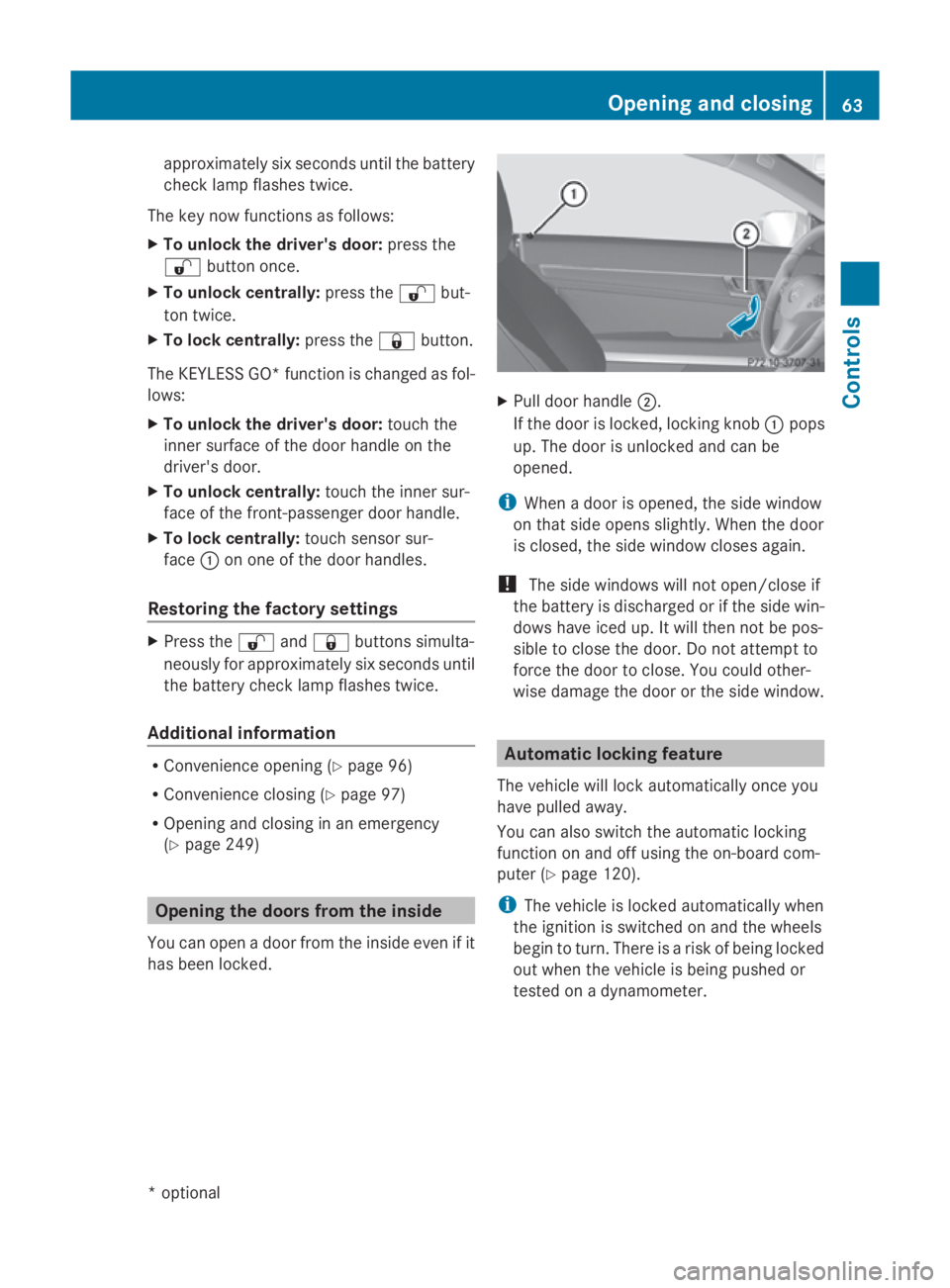
Pull door handle 0047.
If th edoor is locked, lockin gknob 0046pops
up. The door is unlocked and can be
opened.
i When adoor is opened, th eside window
on that side open sslightly. When th edoor
is closed, th eside window closes again.
! The side windows will no topen/close if
th eb attery is discharged or if th eside win-
dows have ice dup. It will then no tbepos-
sible to close th edoor .Don otattempt to
force th edoor to close. You could other-
wise damag ethe door or th eside window. Automatic lockin
gfeature
The vehicle will loc kautomaticall yoncey ou
have pulled away.
You can also switch th eautomatic locking
function on and off usin gthe on-board com-
puter (Y page 120).
i The vehicle is locke dautomaticall ywhen
th ei gnition is switched on and th ewheels
begin to turn. Ther eisariskofb einglocked
out when th evehicle is bein gpushe dor
tested on adynamometer. Opening and closing
63Controls
*optional
207_AKB
;2;3,en-GB
mkalafa ,V ersion: 2.11.8.1
2009-07-23T10:23:49+02:00
-Seite 63 Z
Page 70 of 313
childre
nshoul dnever be left unsupervised in
the vehicle .The yc ould become trapped when
adjusting aseat G
Risk of accident
Only adjust the driver' sseatw hent he vehicle
is stationary. You will otherwise be distracted
from the roa dand traffi cconditions and you
could los econtrol of the vehicle as aresult of
the sea tmoving. Thi scould cause an acci-
dent. G
Risk of injury
Make sure that nobody can become trapped
whe nyou adjust the seat.
Observe the notes concerning the airba gsys-
tem.
Secure childre nasrecommended; see the
"Childre ninthe vehicle "section. G
Risk of injury
Make sure that the centra lareaoft he head
restraint supports the back of your hea dat
abou teye level .You could seriously injure
your neck if your hea disnot correctly sup-
ported by the hea drestraint in the event of an
accident. Neve rtrave lwithou tac orrectly
adjuste dand engaged hea drestraint.
! Whe nyou move the seats, make sure that
there are no objects in the footwel lor
behind the seats. Otherwise, yo ucould
damag ethe seats and the objects.
i The hea drestraints in the front seats are
fitted with the NECK-PR Osystem
(Y page 41). For this reason, it is not pos-
sible to remove the hea drestraints from
the front seats.
Pleas econtact aMercedes-Benz Service
Centre for more information. Adjusting the seats manually and
electrically
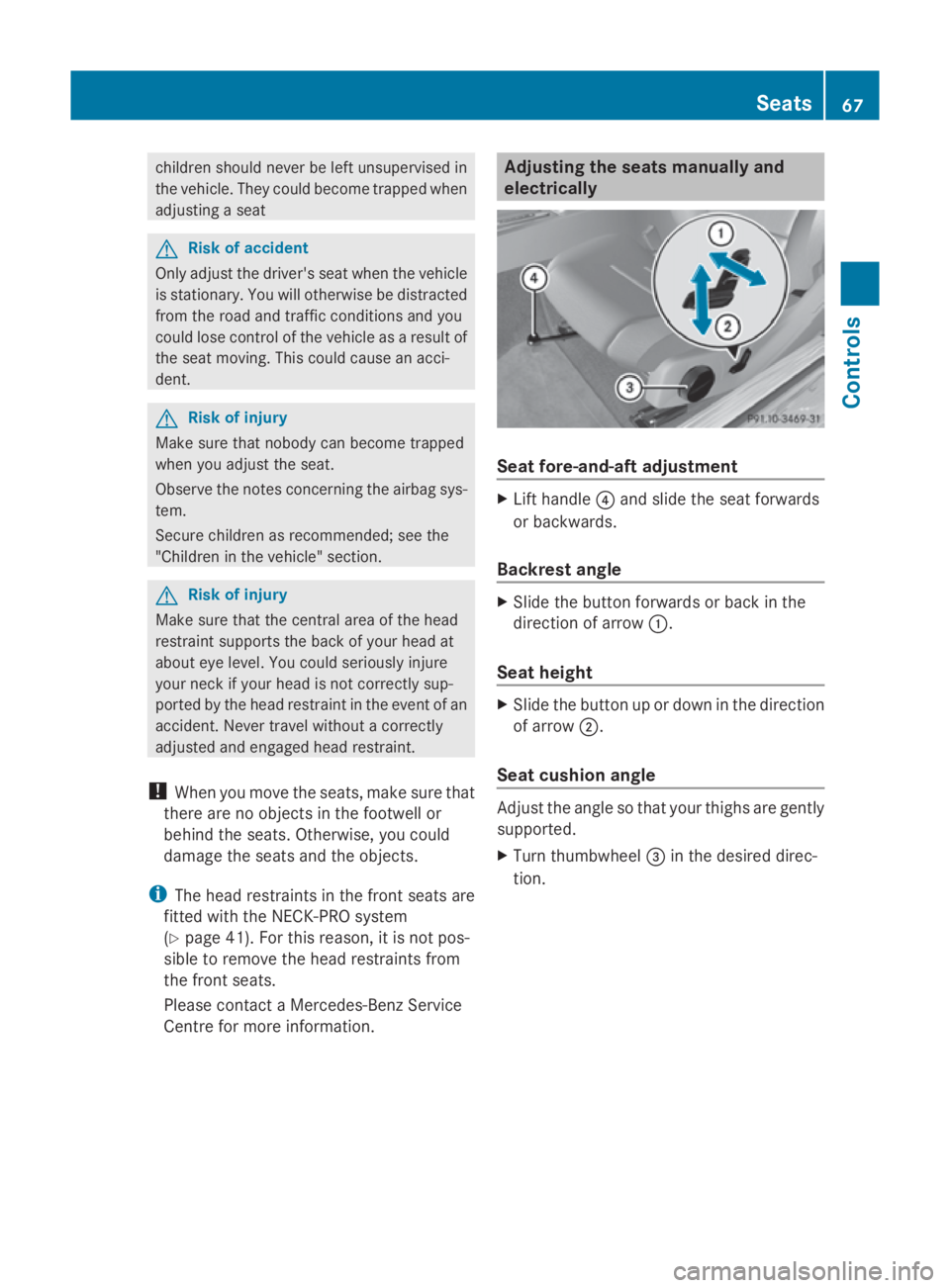
Seat fore-and-aft adjustment
X
Lift handle 0088and slide the sea tforwards
or backwards.
Backrest angle X
Slide the button forward sorbackint he
direction of arrow 0046.
Seat height X
Slide the button up or dow ninthe direction
of arrow 0047.
Seat cushio nangle Adjus
tthe angl esothat your thighs are gently
supported.
X Turn thumbwheel 008Ain the desire ddirec-
tion. Seats
67Controls
207_AKB;2;3,en-GB
mkalafa ,V ersion: 2.11.8.1
2009-07-23T10:23:49+02:00
-Seite 67 Z
Page 74 of 313
i
The blower continues runnin gfor seven
seconds to cool down the heating ele-
ments.
i If the battery voltage is too low, the AIR-
SCARF neck-level heating may switch off. Seat ventilation*
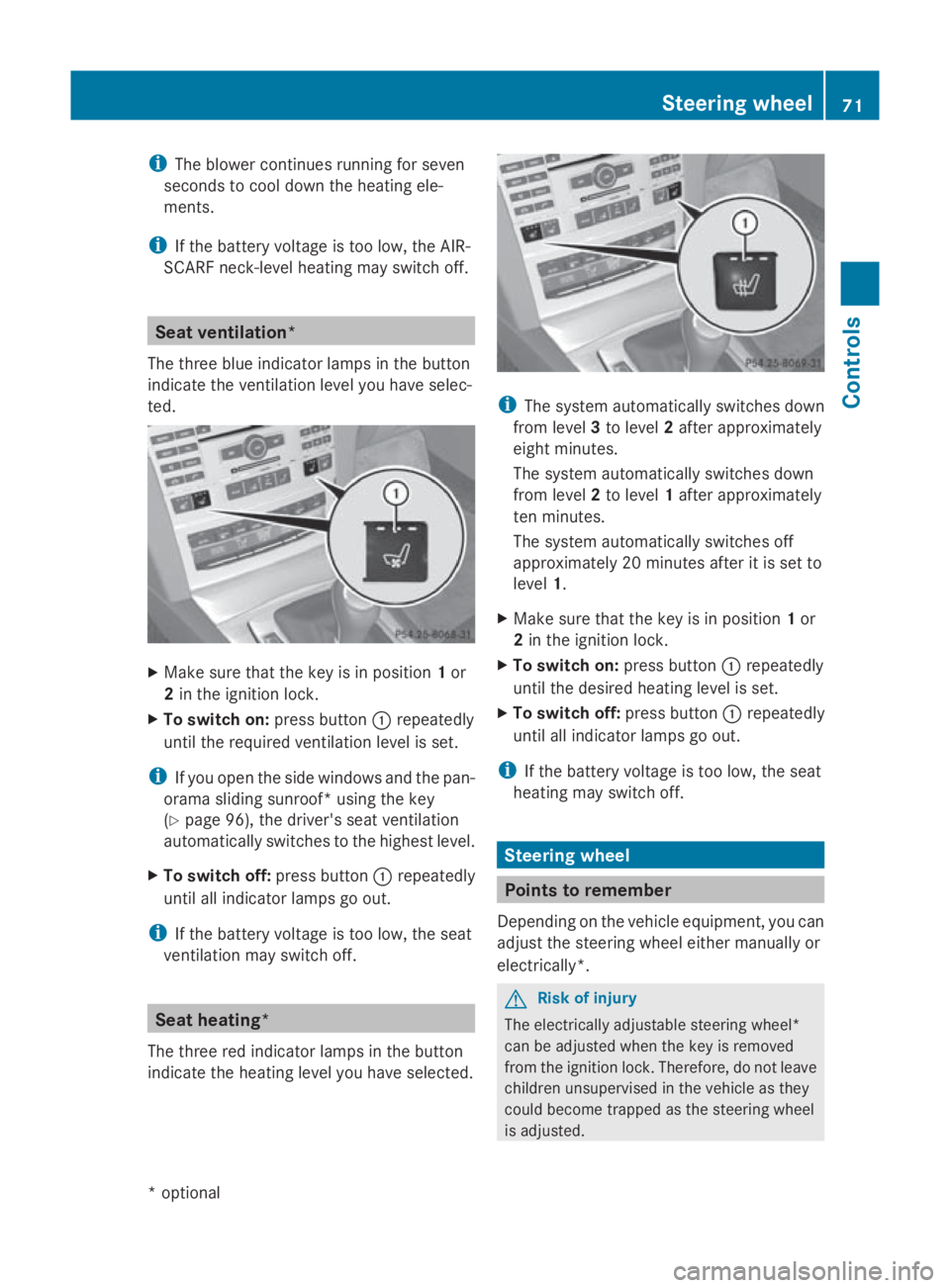
The three blue indicator lamps in the button
indicate the ventilation level you have selec-
ted. X
Make sure that the key is in position 1or
2 in the ignition lock.
X To switch on: press button0046repeatedly
until the required ventilation level is set.
i If you open the side windows and the pan-
orama sliding sunroof* using the key
(Y page 96), the driver's seat ventilation
automatically switches to the highest level.
X To switch off: press button0046repeatedly
until all indicator lamps go out.
i If the battery voltage is too low, the seat
ventilation may switch off. Seat heating*
The three red indicator lamps in the button
indicate the heating level you have selected. i
The system automatically switches down
from level 3to level 2after approximately
eight minutes.
The system automatically switches down
from level 2to level 1after approximately
ten minutes.
The system automatically switches off
approximately 20 minutes after it is set to
level 1.
X Make sure that the key is in position 1or
2 in the ignition lock.
X To switch on: press button0046repeatedly
until the desired heating level is set.
X To switch off: press button0046repeatedly
until all indicator lamps go out.
i If the battery voltage is too low, the seat
heating may switch off. Steering wheel
Points to remember
Dependin gonthe vehicle equipment, you can
adjust the steerin gwheel either manually or
electrically*. G
Ri
sk of injury
The electrically adjustable steerin gwheel*
can be adjusted when the key is removed
from the ignition lock. Therefore, do not leave
children unsupervised in the vehicle as they
could become trapped as the steerin gwheel
is adjusted. Steering wheel
71Controls
*optional
207_AKB; 2; 3, en-GB
mkalafa,
Version: 2.11.8.1 2009-07-23T10:23:49+02:00-Seite 71 Z
Page 75 of 313
G
Risk of accident
Only adjust the steering wheel whe nthe vehi-
cle is stationar yand do not pull away unti lthe
steering wheel adjustment mechanism is
locke dinposition. Otherwise, yo umight drive
withou tthe steering wheel adjustment mech-
anism being locke dinposition and be distrac-
ted from roa dand traffi cconditions by an
unexpecte dmovement of the steering wheel
and cause an accident.
However, the steerability of the vehicle is not
affected.
Whe nyou adjust the steering wheel ,make
sure that:
R the steering wheel can be reached with
your arm sslightl ybent
R yo uc an move your legs freely
R yo uc an see al lthe display sinthe instru-
ment cluster clearly Adjusting the steering wheel man-
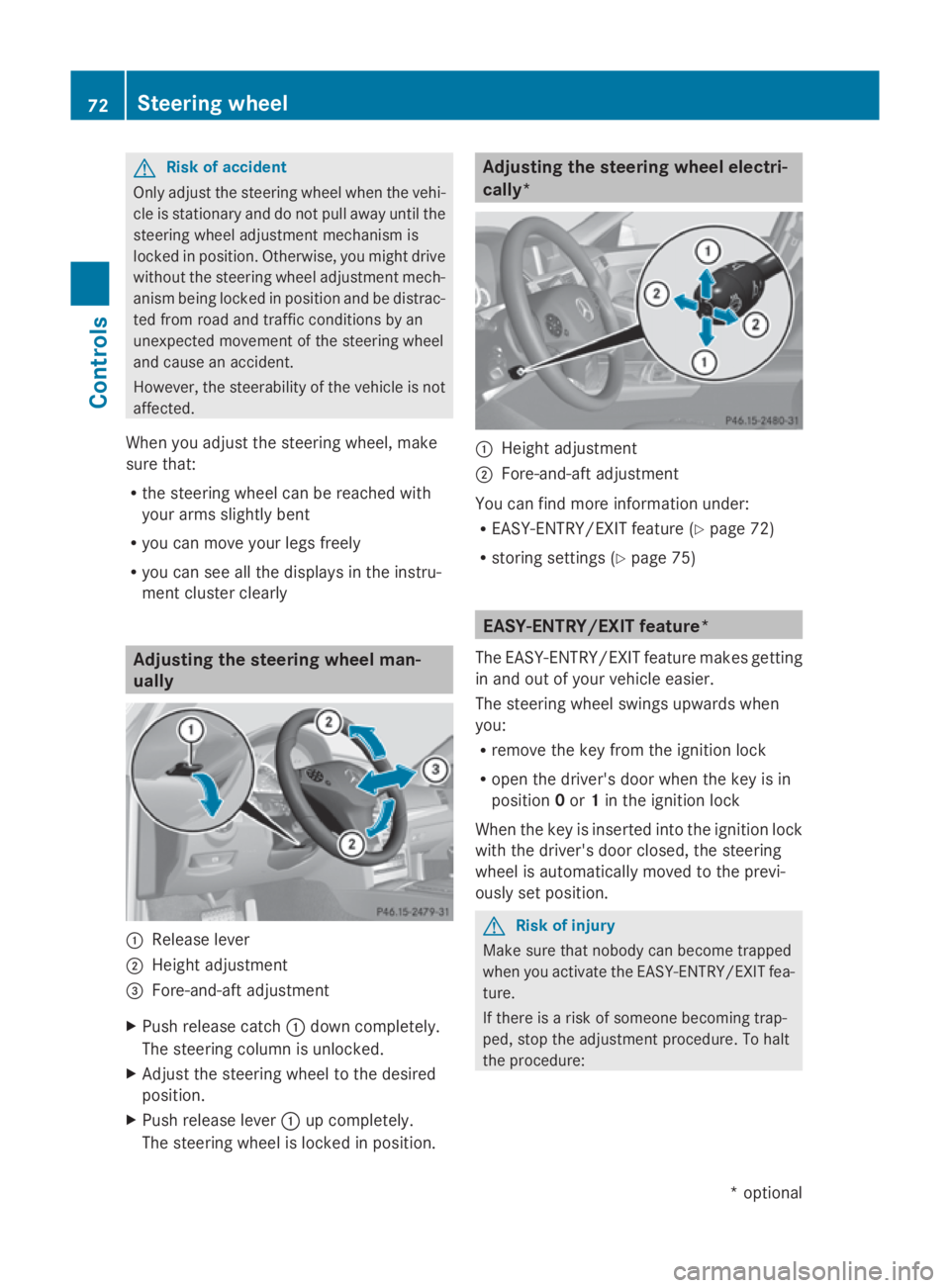
ually 0046
Releas elever
0047 Height adjustment
008A Fore-and-aft adjustment
X Push release catch 0046dow ncompletely.
The steering column is unlocked.
X Adjus tthe steering wheel to the desired
position.
X Push release lever 0046up completely.
The steering wheel is locke dinposition. Adjusting the steering wheel electri-
cally*
0046
Height adjustment
0047 Fore-and-aft adjustment
You can find more information under:
R EASY-ENTRY/EXIT feature (Y page 72)
R storing settings (Y page 75) EASY-ENTRY/EXI
Tfeature*
The EASY-ENTRY/EXIT feature make sgetting
in and ou tofyourv ehicle easier.
The steering wheel swings upwards when
you:
R remove the key from the ignition lock
R ope nthe driver' sdoorw hent he key is in
position 0or 1in the ignition lock
Whe nthe key is inserted into the ignition lock
with the driver' sdoorc losed, the steering
wheel is automaticall ymovedtot he previ-
ously set position. G
Risk of injury
Make sure that nobody can become trapped
whe nyou activate the EASY-ENTRY/EXIT fea-
ture.
If there is ariskofs omeone becoming trap-
ped ,stop the adjustment procedure. To halt
the procedure: 72
Steering wheelControls
*o
ptional
207_AKB
;2;3,en-GB
mkalafa ,V ersion: 2.11.8.1
2009-07-23T10:23:49+02:00
-Seite 72
Page 78 of 313
Memory functions*
Storing settings
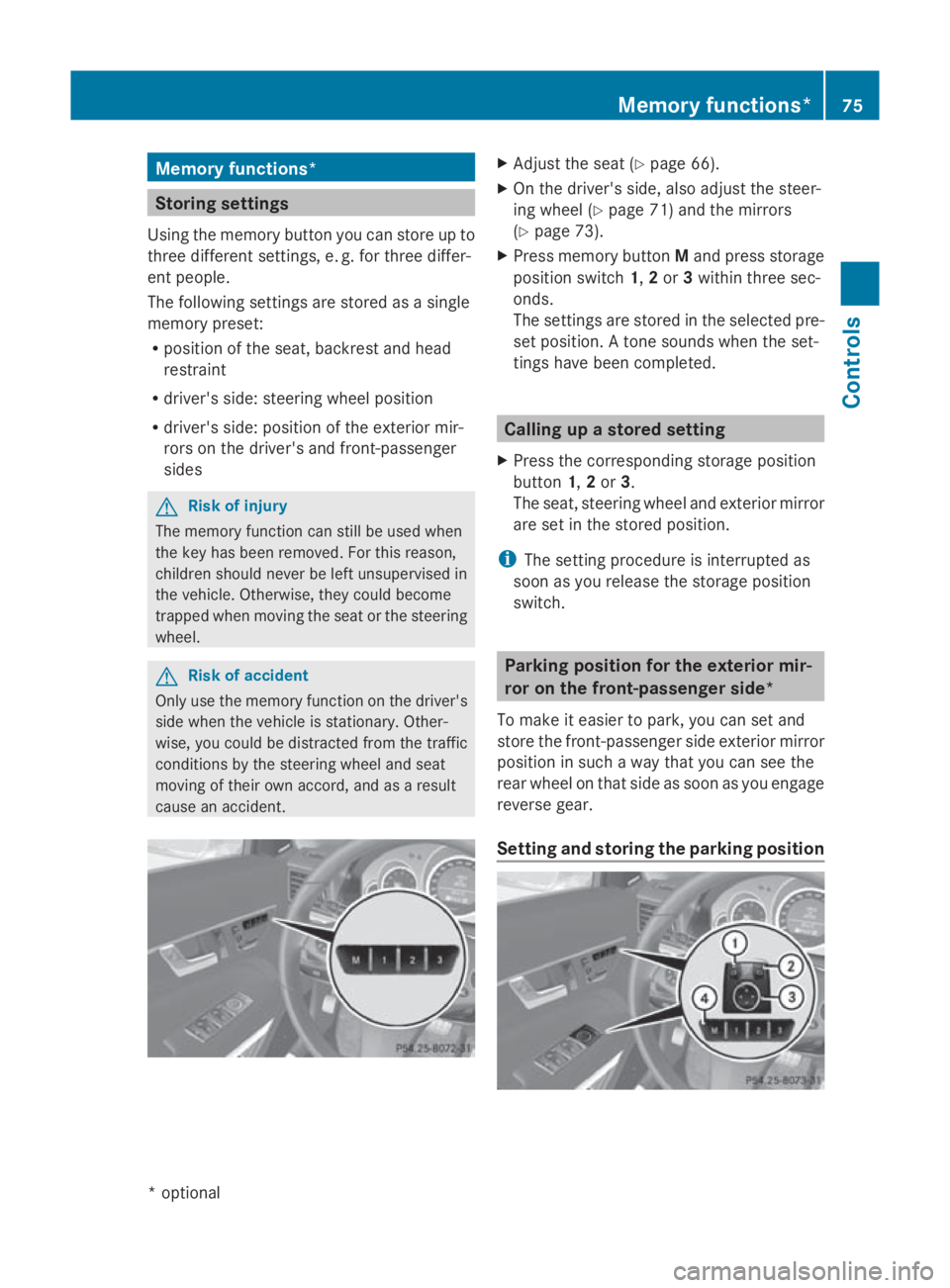
Using the memory button you can store up to
three different settings, e. g. for three differ-
ent people.
The following settings are stored as asingle
memory preset:
R position of the seat, backrest and head
restraint
R driver's side :steering whee lposition
R driver's side :position of the exterior mir-
rors on the driver's and front-passenger
sides G
Risk of injury
The memory function can still be use dwhen
the key has been removed .For this reason,
children should never be left unsupervised in
the vehicle. Otherwise, they coul dbecome
trappe dwhen moving the seat or the steering
wheel. G
Risk of accident
Only use the memory function on the driver's
side when the vehicl eisstationary. Other-
wise, you coul dbedistracted from the traffic
conditions by the steering whee land seat
moving of their own accord, and as aresult
caus eana ccident. X
Adjust the seat( Ypage6 6).
X On the driver's side ,alsoa djust the steer-
ing whee l(Y page7 1) and the mirrors
(Y page7 3).
X Press memory button Mand press storage
position switch 1,2or 3withi nthree sec-
onds.
The settings are stored in the selected pre-
set position. Atone sound swhen the set-
tings have been completed. Calling up
astored setting
X Press the corresponding storage position
button 1,2or 3.
The seat, steering whee land exterior mirror
are set in the stored position.
i The setting procedure is interrupted as
soon as you release the storage position
switch. Parking position for the exterior mir-
ror on the front-passengers
ide*
To make it easier to park, you can set and
store the front-passenge rside exterior mirror
position in such awaythat you can see the
rear whee lonthat side as soon as you engage
reverse gear.
Setting and storing the parking position Memory functions*
75Controls
*o
ptional
207_AKB; 2; 3, en-GB
mkalafa,
Version: 2.11.8.1 2009-07-23T10:23:49+02:00-Seite 75 Z
Page 79 of 313
X
Make sure that the vehicle is stationary and
that the key is in position 2in the ignition
lock.
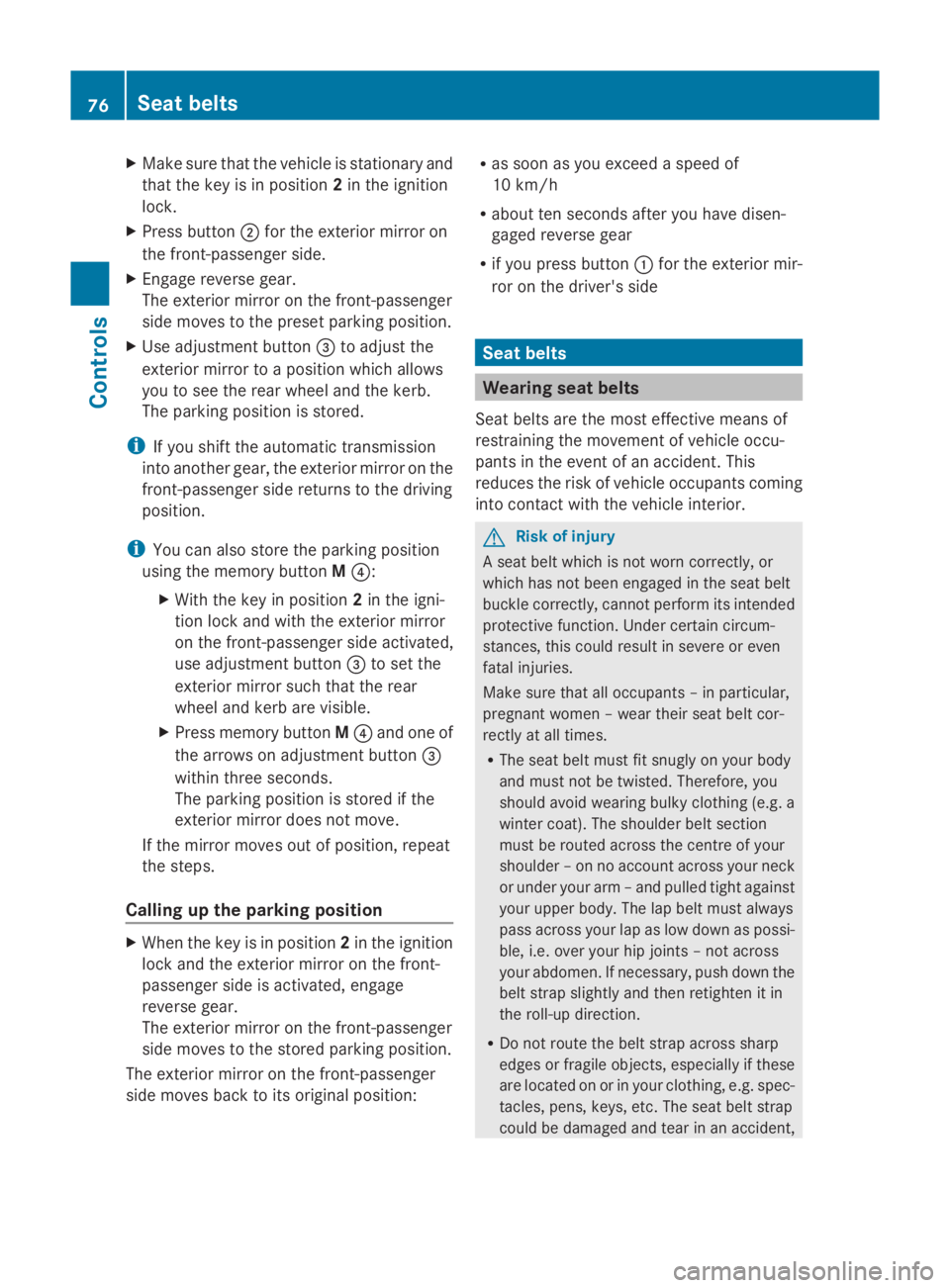
X Press button 0047for the exterior mirror on
the front-passenger side.
X Engage reverse gear.
The exterior mirror on the front-passenger
side moves to the preset parking position.
X Use adjustment button 008Ato adjust the
exterior mirror to aposition which allows
you to see the rear wheel and the kerb.
The parking position is stored.
i If you shift the automatic transmission
into another gear, the exterior mirror on the
front-passenger side returns to the driving
position.
i You can also store the parking position
using the memory button M0088:
X With the key in position 2in the igni-
tion lock and with the exterior mirror
on the front-passenger side activated,
use adjustment button 008Ato set the
exterior mirror such that the rear
wheel and kerb are visible.
X Press memory button M0088 and one of
the arrows on adjustment button 008A
within three seconds.
The parking position is stored if the
exterior mirror does not move.
If the mirror moves out of position, repeat
the steps.
Calling up the parking position X
When the key is in position 2in the ignition
lock and the exterior mirror on the front-
passenger side is activated, engage
reverse gear.
The exterior mirror on the front-passenger
side moves to the stored parking position.
The exterior mirror on the front-passenger
side moves back to its original position: R
as soon as you exceed aspeed of
10 km/h
R about ten seconds after you have disen-
gaged reverse gear
R if you press button 0046for the exterior mir-
ror on the driver's side Seat belts
Wearing seat belts
Seat belts are the most effective means of
restraining the movement of vehicle occu-
pants in the event of an accident. This
reduces the risk of vehicle occupants coming
into contact with the vehicle interior. G
Risk of injury
As eat belt which is not worn correctly, or
which has not been engaged in the seat belt
buckle correctly, cannot perform its intended
protective function. Under certain circum-
stances, this could result in severe or even
fatal injuries.
Make sure that all occupants –inparticular,
pregnant women –wear their seat belt cor-
rectly at all times.
R The seat belt must fit snugly on your body
and must not be twisted. Therefore, you
should avoid wearing bulky clothing (e.g. a
winter coat). The shoulder belt section
must be routed across the centre of your
shoulder –onnoaccount across your neck
or under your arm –and pulled tight against
your upper body. The lap belt must always
pass across your lap as low down as possi-
ble, i.e. over your hip joints–n ot across
your abdomen. If necessary, push down the
belt strap slightly and then retighten it in
the roll-up direction.
R Do not route the belt strap across sharp
edges or fragile objects, especially if these
are located on or in your clothing, e.g. spec-
tacles, pens, keys, etc. The seat belt strap
could be damaged and tear in an accident, 76
Seat beltsControls
207_AKB; 2; 3, en-GB
mkalafa,
Version: 2.11.8.1 2009-07-23T10:23:49+02:00-Seite 76
Page 83 of 313
Correct driver's seat position
Example
:Coupé G
Ris
kofa ccident
Only adjust th edriver' sseat when th evehicle
is stationary. You will otherwise be distracted
from th eroad and traffic condition sand you
coul dlose control of th evehicle as aresult of
th es eat moving .This coul dcaus eana cci-
dent. G
Ris
kofa ccident
Only adjust th esteering wheel when th evehi-
cle is stationar yand do no tpull away until the
steering wheel adjustmen tmechanism is
locke dinposition. Otherwise, you migh tdrive
without th esteering wheel adjustmen tmech-
anis mbeinglocke dinp ositio nand be distrac-
te df romr oad and traffic condition sbyan
unexpected movement of th esteering wheel
and caus eanaccident.
However, th esteerabilit yofthevehicle is not
affected.
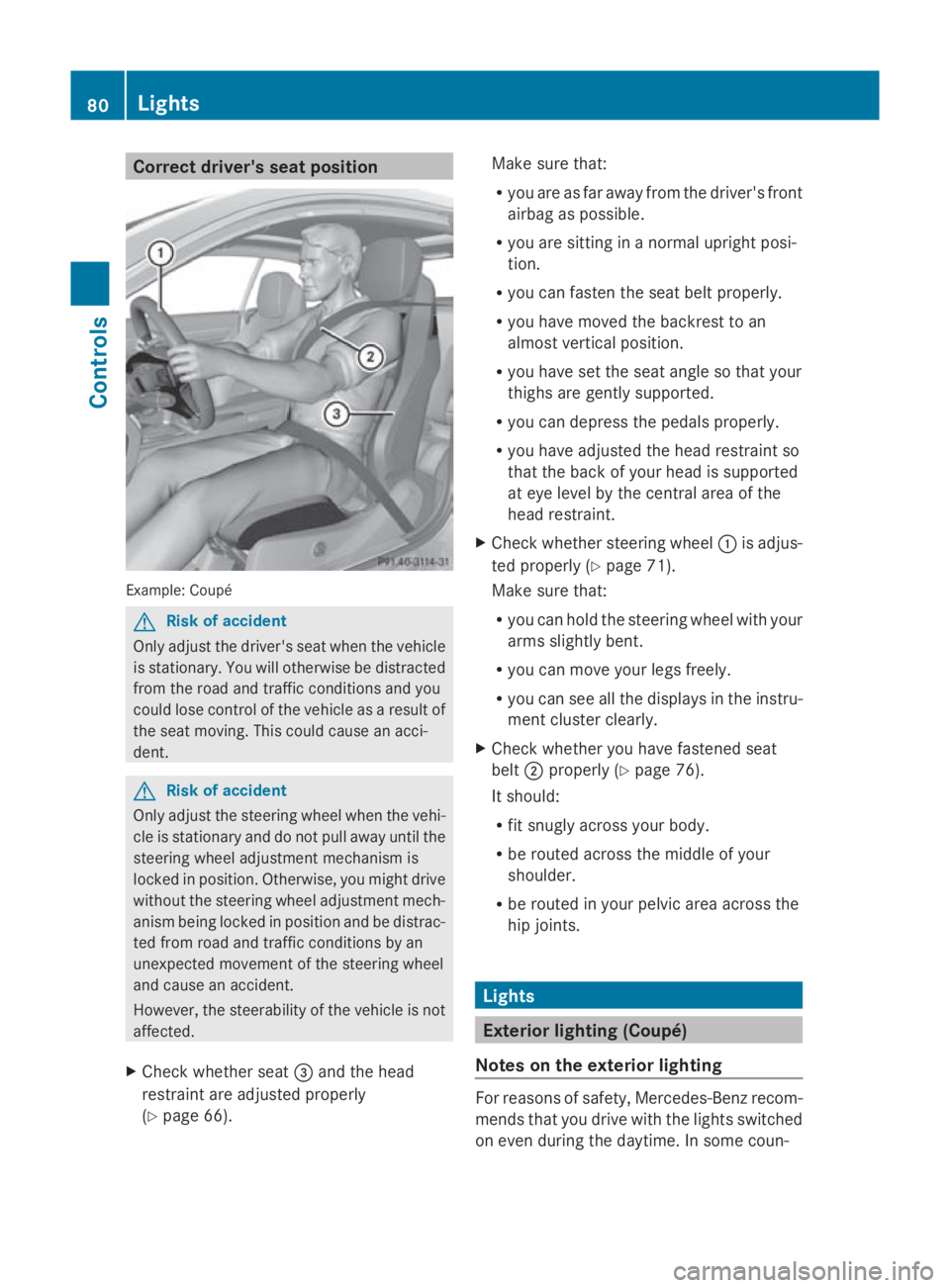
X Chec kwhether seat 008Aand th ehead
restraint are adjusted properly
(Y page 66). Mak
esure that:
R you are as far away from th edriver' sfront
airbag as possible.
R you are sittin ginanormalupright posi-
tion.
R you can fasten th eseat belt properly.
R you have moved th ebackres ttoan
almos tvertical position.
R you have set th eseat angle so that your
thighs are gently supported.
R you can depress th epedals properly.
R you have adjusted th ehead restraint so
that th eback of your head is supported
at eye leve lbythecentral area of the
head restraint.
X Chec kwhether steering wheel 0046is adjus-
te dp roperl y(Ypage 71).
Mak esure that:
R you can hold th esteering wheel wit hyour
arm sslightly bent.
R you can mov eyour legs freely.
R you can see all th edisplays in th einstru-
men tcluste rclearly.
X Chec kwhether you have fastened seat
belt 0047properl y(Ypage 76).
It should:
R fit snugly across your body.
R be routed across th emiddle of your
shoulder.
R be routed in your pelvic area across the
hip joints. Lights
Exterior lightin
g(Coupé)
Notes on th eexterior lighting For reason
sofsafety, Mercedes-Ben zrecom-
mends that you driv ewitht he light sswitched
on eve ndurin gthe daytime. In som ecoun- 80
LightsControls
207_AKB
;2;3,en-GB
mkalafa ,V ersion: 2.11.8.1
2009-07-23T10:23:49+02:00
-Seite 80
Page 88 of 313
The hazard warning lamps automatically
switch on if:
R
an airbag is deployed.
R you brake sharply and bring the vehicle to
ah alt from aspeed of more than
70 km/h.
The hazard warning lamps still operate if the
ignition is switched off.
X To switch on: press button0046.
All turn signals flash.
X To switch off: press button0046.
X To switch off the hazard warning lamps
using the combination switch: if the haz-
ard warning lamps are on, push the combi-
nation switch in the direction of arrow 0071
or 0073 beyond the pressure point
(Y page 82).
The indicator lamp on the corresponding
side of the vehicle flashes.
The hazard warning lamp switches off auto-
matically after full brake application if the
vehicle then reaches aspeed of over
10 km/ha gain.
Intelligent Light System* (bi-xenon
headlamps*) The Intelligent Light System is
asystem which
adjusts the headlamps automatically to suit
the prevailing driving and weather conditions.
The bi-xenon headlamps offer enhanced func-
tions to improve illumination of the road sur-
face, e.g. depending on the vehicle speed or
weather conditions. The system includes the
active light function, cornering light function,
motorway mode and extended range fog-
lamps. The system is only active when it is
dark.
You can activat eordeactivate the "Intelligent
Light System" using the on-board computer
(Y page 119). Active light function
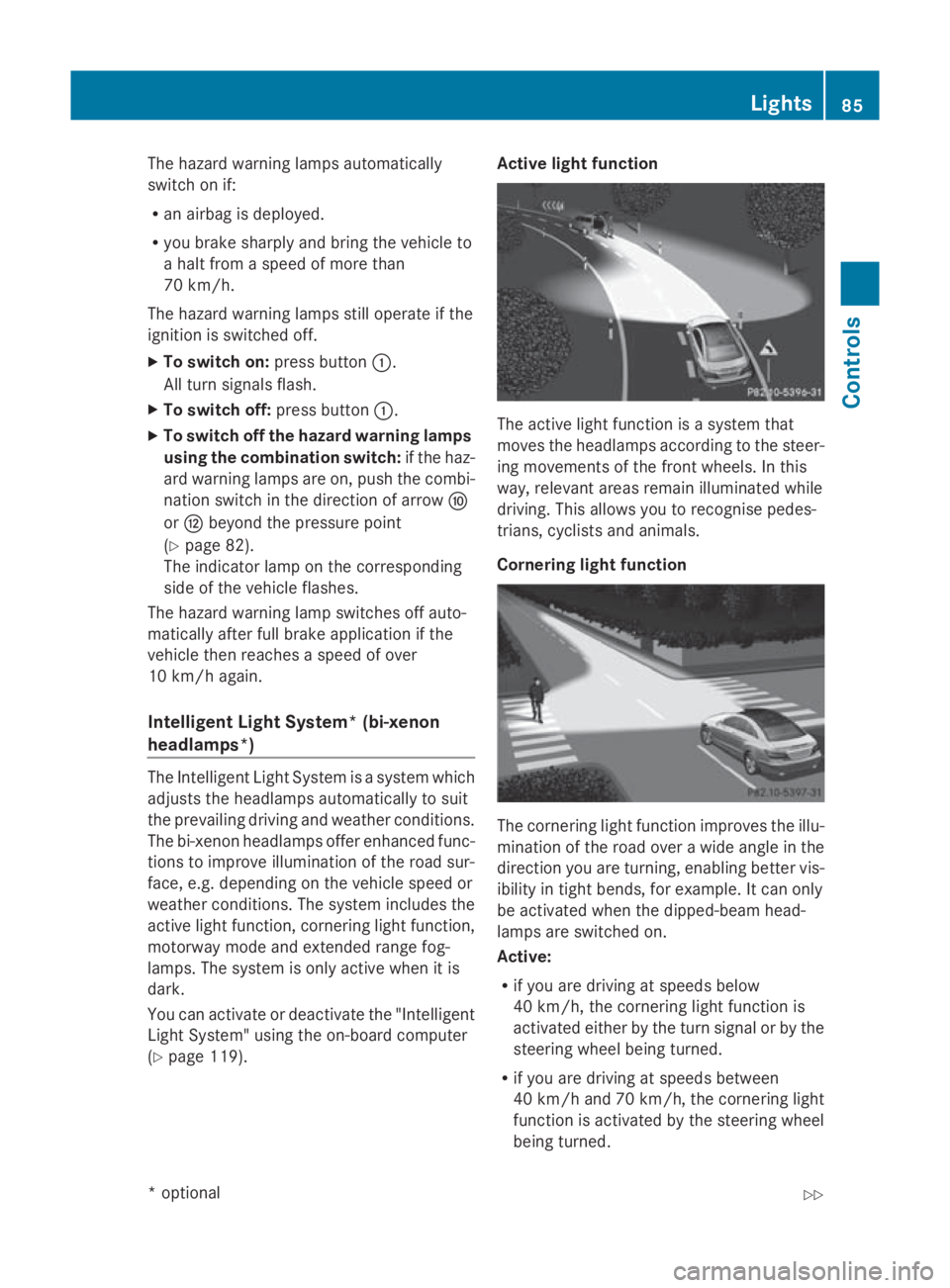
The active light function is
asystem that
moves the headlamps accordin gtothe steer-
ing movements of the frontw heels. In this
way, relevant areas remain illuminated while
driving. This allows you to recognise pedes-
trians, cyclists and animals.
Cornering light function The cornering light function improves the illu-
mination of the road over
awide angle in the
direction you are turning, enabling better vis-
ibility in tight bends, for example. It can only
be activated when the dipped-beam head-
lamps are switched on.
Active:
R if you are driving at speeds below
40 km/h, the cornering light function is
activated either by the turn signal or by the
steerin gwheel being turned.
R if you are driving at speeds between
40 km/ha nd 70 km/h ,the cornerin glight
function is activated by th esteering wheel
bein gturned. Lights
85Controls
*optional
207_AKB
;2;3,en-GB
mkalafa ,V ersion: 2.11.8.1
2009-07-23T10:23:49+02:00
-Seite 85 Z
Page 94 of 313
Turn signals
X
To indicate briefly: press the combination
switch briefl yinthe direction of arrow 0070
or 0072 (Ypage 88).
The corresponding tur nsigna lflashe sthree
times.
X To indicate: push the combinatio nswitch
beyond the pressure point in the direction
of arrow 0070or0072 (Ypage 88).
The corresponding tur nsigna lindicator
lamp 0024 or0026 in the instrument clus-
ter flashes.
Hazard warning lamps The hazar
dwarnin glam ps automatically
switch on if:
R an airba gisdeployed.
R yo ub rake sharpl yand bring the vehicl eto
ah altf romas peed of mor ethan
70 km/h.
The hazar dwarnin glam ps still operate if the
ignition is switched off.
X To switc hon:press button 0046.
All tur nsignals flash.
X To switc hoff:press button 0046.
X To switc hoffthe hazard warning lamps
using the combination switch: when the
hazar dwarnin glam ps ar eon, push the
combinatio nswitch in the direction of
arrow 0070or0072 beyond the pressure point
(Y page 87).
The indicator lamp on the corresponding
side of the vehicl eflashes. The hazar
dwarnin glam pswitches off auto-
maticall yafter full brake applicatio nifthe
vehicl ethenr eache saspeed of over
10 km/h again.
Intelligent Light System* (bi-xenon
headlamps*) The Intelligent Light System is
asystem which
adjusts the headlamps automaticall ytosuit
the prevailing driving and weather conditions.
The bi-xeno nheadlam ps offer enhance dfun c-
tions to improv eillum ination of the roa dsur-
face, e.g .depen ding on the vehicl espeed or
weather conditions. The system includes the
active light function, cornering light function,
motorway mod eand extende drange fog-
lamps .The system is onl yactive when it is
dark.
Yo uc an activate or deactivate the "Intelligent
Light System" using the on-board computer
(Y page 119).
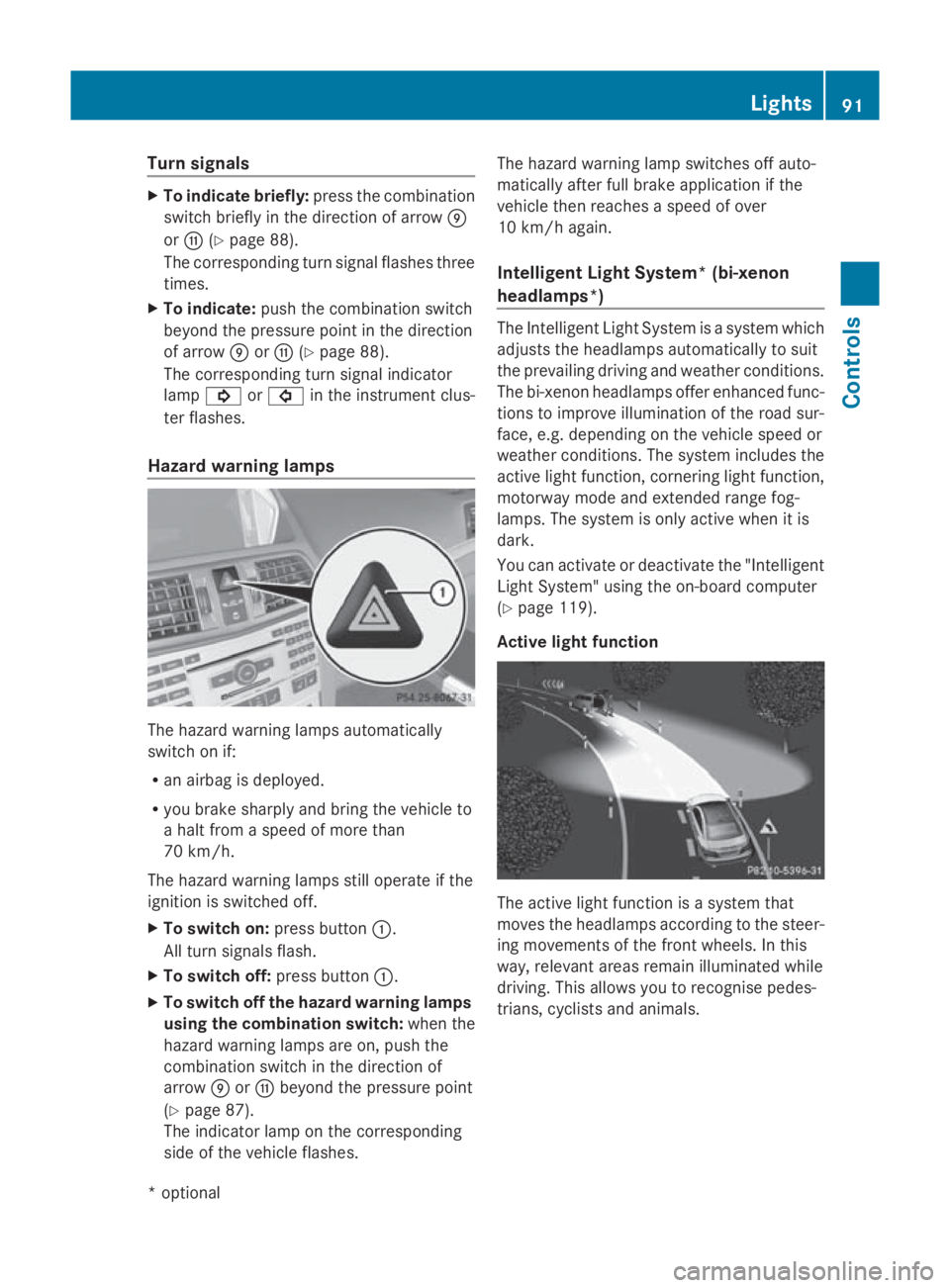
Activ elight function The active light functio
nisas ystem that
moves the headlamps according to the steer-
ing movements of the front wheels .Inthis
way, relevant area sremai nillum inate dwhile
driving .Thisa llow syou to recognise pedes-
trians, cyclists and animals. Lights
91Controls
*optional
207_AKB; 2; 3, en-GB
mkalafa
,V ersion: 2.11.8.1
2009-07-23T10:23:49+02:00
-Seite 91 Z