esp MERCEDES-BENZ E-CLASS COUPE 2009 Workshop Manual
[x] Cancel search | Manufacturer: MERCEDES-BENZ, Model Year: 2009, Model line: E-CLASS COUPE, Model: MERCEDES-BENZ E-CLASS COUPE 2009Pages: 313, PDF Size: 7.76 MB
Page 143 of 313
One or more segments light up as the vehicle
approaches an obstacle, depending on the
vehicle's distance to the obstacle.
From the:
R
sixth segment onwards, you will hear an
intermittent warning tone for approx-
imately two seconds.
R seventh segment onwards, you will hear a
warning tone for approximately two sec-
onds. You have reached the minimum dis-
tance.
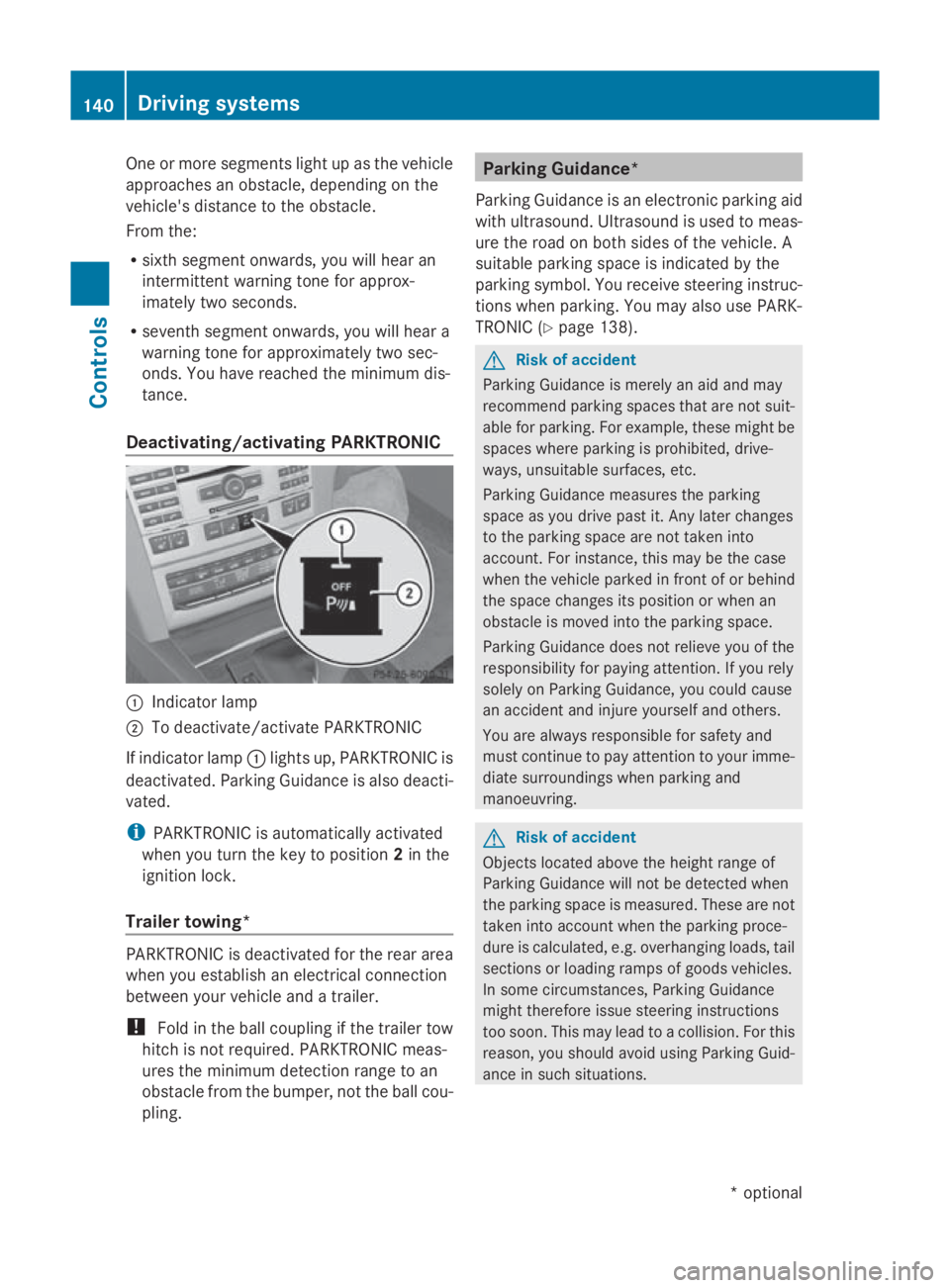
Deactivating/activating PARKTRONIC 0046
Indicator lamp
0047 To deactivate/activate PARKTRONIC
If indicator lamp 0046lights up, PARKTRONIC is
deactivated. Parking Guidance is also deacti-
vated.
i PARKTRONIC is automaticallya ctivated
when you turn the key to position 2in the
ignition lock.
Trailer towing* PARKTRONIC is deactivated for the rear area
when you establish an electrical connection
between your vehicle and atrailer.
! Fold in the ball coupling if the trailer tow
hitch is not required.P ARKTRONIC meas-
ures the minimum detection range to an
obstacle from the bumper, not the ball cou-
pling. Parking Guidance*
Parking Guidance is an electronic parking aid
with ultrasound. Ultrasound is used to meas-
ure the road on both sides of the vehicle. A
suitablep arking space is indicated by the
parking symbol. You receive steering instruc-
tions when parking. You may also use PARK-
TRONIC (Y page 138). G
Risk of accident
Parking Guidance is merely an aid and may
recommend parking spaces that are not suit-
able for parking. For example, these might be
spaces where parking is prohibited, drive-
ways, unsuitables urfaces, etc.
Parking Guidance measures the parking
space as you drive past it. Any later changes
to the parking space are not taken into
account. For instance, this may be the case
when the vehicle parked in front of or behind
the space changes its position or when an
obstacle is moved into the parking space.
Parking Guidance does not relieve you of the
responsibility for paying attention. If you rely
solely on Parking Guidance, you could cause
an accident and injure yourselfa nd others.
You are always responsible for safety and
must continue to pay attention to your imme-
diate surroundings when parking and
manoeuvring. G
Risk of accident
Objects located above the height range of
Parking Guidance will not be detected when
the parking space is measured. These are not
taken into account when the parking proce-
dure is calculated, e.g. overhanging loads, tail
sections or loading ramps of goods vehicles.
In some circumstances, Parking Guidance
might therefore issue steering instructions
too soon. This may lead to acollision. For this
reason, you should avoid using Parking Guid-
ance in such situations. 140
Driving systemsControls
*o
ptional
207_AKB;2;3,e
n-GB
mkalafa, Version: 2.11.8.1 2009-07-23T10:23:49+02:00-Seite 140
Page 145 of 313
Ap
arking space is displaye dwhile youa re
driving past it, and unti lyou area pprox-
imatel y15m away from it.
Parking G
Ris
kofa ccident
PARKTRONI Cand Parking Guidance are
merel yparking aids and ma ynot detect all
obstacles. The ydonot relieve yo uofthe
responsibility of paying attention.
Yo ua realways responsibl efor safety and
must continue to pa yattentio ntoyourimme-
diate surrounding swhenp arking and
manoeuvring .You could otherwis eendanger
yoursel fand others.
X Stop the vehicl ewhent he parking space
symbo lshows the desired parking space in
the instrument cluster.
X Vehicles with manua ltransmission: shift to
revers egear.
Vehicles with automatic transmission*:
mov ethe selecto rlev er to R.
The multi-functio ndisplay shows the
Check vehicl esurroundings Con‐
fir mwithOK message.
X Press 0064on the multi-functio nsteering
whee ltoconfirm.
The multi-functio ndisplay switches to
Parking Guidance.
Depending on your distance fro mthe park-
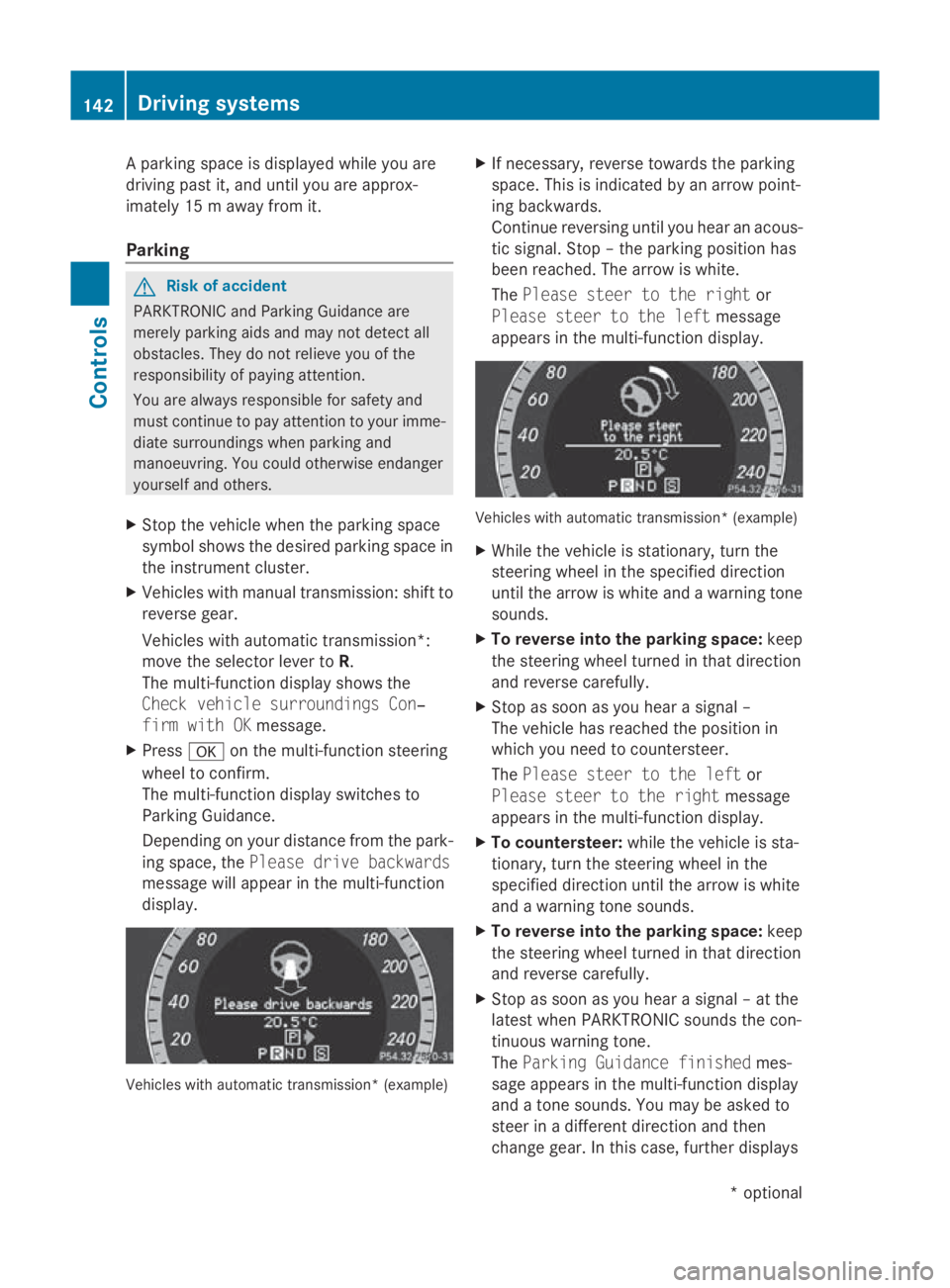
ing space ,the Please drive backwards
message will appear in the multi-function
display. Vehicles with automatic transmission* (example) X
If necessary ,revers etowards the parking
space .Thisisi ndicated by an arrow point-
ing backwards.
Continu ereversing unti lyou hear an acous-
tic signal. Stop –the parking positio nhas
been reached. The arrow is white.
The Please steer to the right or
Please steer to the left message
appear sinthe multi-functio ndisplay. Vehicles with automatic transmission* (example)
X
Whil ethe vehicl eisstationary, tur nthe
steering whee linthe specifie ddirection
unti lthe arrow is white and awarning tone
sounds.
X To revers eintot he parking space: keep
the steering whee lturned in tha tdirection
and revers ecarefully.
X Stop as soo nasyou hear asigna l–
The vehicl ehasreache dthe positio nin
which yo uneedtoc ountersteer.
The Please steer to the left or
Please steer to the right message
appear sinthe multi-functio ndisplay.
X To countersteer: whilethe vehicl eissta-
tionary, tur nthe steering whee linthe
specifie ddirection unti lthe arrow is white
and awarning tone sounds.
X To revers eintot he parking space: keep
the steering whee lturned in tha tdirection
and revers ecarefully.
X Stop as soo nasyou hear asigna l–att he
latest when PARKTRONI Csounds the con-
tinuou swarning tone.
The Parkin gGuidance finished mes-
sage appear sinthe multi-functio ndisplay
and atone sounds .You maybea sked to
stee rinad ifferent direction and then
change gear .Inthisc ase, furthe rdisplays 142
Driving systemsControls
*o
ptional
207_AKB; 2; 3, en-GB
mkalafa,
Version: 2.11.8.1 2009-07-23T10:23:49+02:00-Seite 142
Page 146 of 313
in the multi-function display will direc
tyou
to the final position.
X Manoeuvre, if necessary.
X Always observe the warnin gmessages dis-
played by PARKTRONI C(Ypage 138).
Cancelling Parking Guidance X
Press the PARKTRONI Cbutton on the
centr econsole (Y page 138).
Parking Guidanc eiscancelled immediately
and PARKTRONI Cisdeactivated.
Parking Guidanc eiscancelled automatically
if it is no longer possible to guide you int othe
parking space, or if amalfunction occurs.
The parking space symbol disappears and the
Parking Guidance cancelled message
appears in the multi-function display.
Trailer towing* For vehicles with
atrailer coupling, the mini-
mum length for parking spaces is slightly
increased.
If you have attached atrailer to your vehicle,
you should not use Parking Guidance. When
the electrical connection is established
between your vehicle and the trailer, Parking
Guidanc ecease stobea vailable. PARK-
TRONI Cisdeactivated for the rear area. Reversing camera*
The reversin gcamera is an optical aid. It
shows the area behin dyour vehicle in the
COMAND APS display. G
Risk of injury
Make sure that no persons or animals are in
the manoeuvrin grange. Otherwise, they
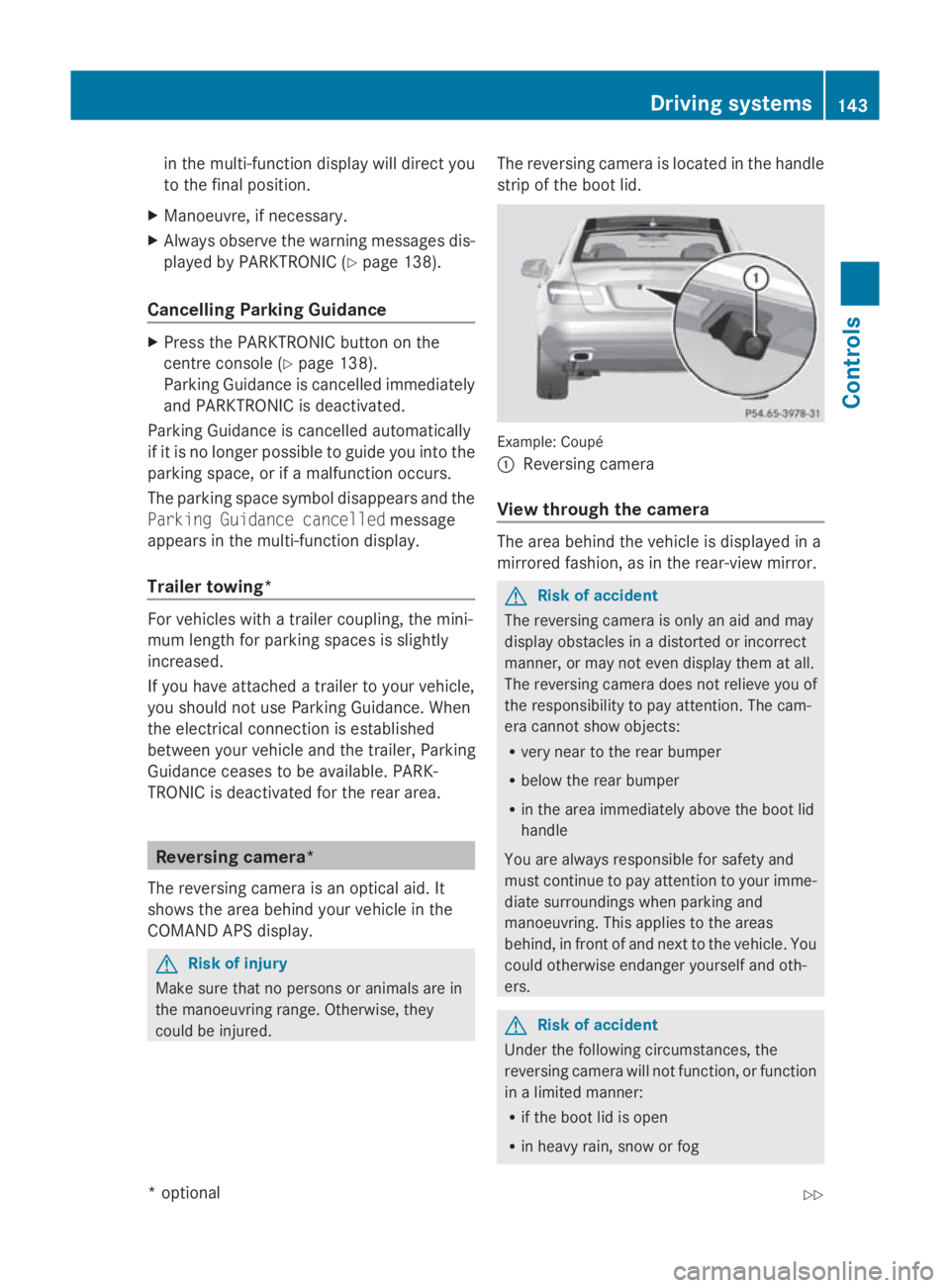
could be injured. The reversin
gcamera is located in the handle
strip of the boot lid. Example: Coupé
0046
Reversing camera
View through th ecamera The area behin
dthe vehicle is displayed in a
mirrored fashion, as in the rear-view mirror. G
Risk of accident
The reversin gcamera is only an aid and may
display obstacles in adistorted or incorrect
manner, or may not even display the matall.
The reversin gcamera does not reliev eyou of
the responsibility to pay attention. The cam-
era cannot show objects:
R very near to the rear bumper
R below the rear bumper
R in the area immediately above the boot lid
handle
You are always responsible for safet yand
must continue to pay attention to your imme-
diate surroundings when parking and
manoeuvring. This applies to the areas
behind, in front of and nex ttothe vehicle. You
could otherwise endanger yourself and oth-
ers. G
Risk of accident
Under the followin gcircumstances, the
reversin gcamera will not function ,orfunction
in alimited manner:
R if the boot lid is open
R in heavy rain, sno worfog Driving systems
143Controls
*optional
207_AKB; 2; 3, en-GB
mkalafa,
Version: 2.11.8.1
2009-07-23T10:23:49+02:0
0-Seite1 43 Z
Page 147 of 313
R
at night or in ver ydark places
R if th ecamera is exposed to ver ybright light
R if th earea is lit by fluorescent light (th edis-
play may flicker)
R if there is asudden chang eintemperature,
e.g .when driving int oaheated garag ein
winter
R if th ecamera len sisdirtyoro bstructed
R if th erear of your vehicle is damaged. In this
even thave th ecamera position and setting
checked at aqualified specialist workshop.
Mercedes-Ben zrecommend sthaty ou use
aM ercedes-Ben zServic eCentre for this
purpose.
Do no tuse th ereversing camera in these
type sofs ituation. You could, otherwise,
injure other sordamage object sand your
vehicle while you are parking.
Activating th ereversing camera X
Mak esure that th ekeyis in position 2in
th ei gnition lock.
X Mak esure that th e"Reversin gcamera"
function is selecte dinCOMAND AP S(see
th es eparate operatin ginstruction sfor
COMAND APS).
X Engage revers egear.
The area behin dthe vehicle is show ninthe
COMAND AP Sdisplay.
You can selec tnotto show th earea behind
th ev ehicle in th eCOMAND AP Sdisplay (see
th es eparate operatin ginstruction sfor
COMAND APS). ATTENTION ASSIST
ATTENTION ASSIST helps you on long, monot-
onous journeys suc hasonmotorways and
trunk roads .Itisactive at speed sbetween 80
and 18 0km/ h. If ATTENTION ASSIST detects
tiredness or increasing lapses in concentra-
tio nont hepart of th edriver, it suggest sa
break. G
Ris
kofa ccident
ATTENTION ASSIST is only an aid and may
detect your tiredness or lapses in concentra-
tio nt oo late or no tatall. It is no tasubstitute
for aw ell reste dand attentive driver.
Fatigue may caus eyou to recognise hazard-
ous situations to olate ,misjudge asituation
or reac tslower. For this reason ,makes ure
you feel reste dbefore you begin driving and
durin gyour journey. Always tak ebreak sin
good tim eand regularly, especially during
lon gjou rneys. Otherwise, you may fail to rec-
ognise dangers in time, caus eanacciden tand
injure yourself and others.
ATTENTION ASSIST assesses your leve lof
fatigue or increasing inattentiveness taking
int oc onsideratio nthe followin gcriteria:
R personal driving style, e.g .steering charac-
teristics
R driving conditions, e. g. time, driving time
ATTENTION ASSIST' sfunctionality is restric-
te da nd warning sare delayed or do not
appear at all:
R if th eroad condition is poor ,e.g.large
bumps or potholes
R there is astron gs ide wind
R you have adopted averys porty driving style
with high cornering speed sordriving with
ah igh rat eofacceleration
R if you are predominantly driving slower
than 80 km/h or faster than 18 0km/h
R if you are currently operatin gormaking a
call usin gCOMAND APS*
R in active driving situations ,for example, if
you are changing lane sorchanging the
vehicle speed 144
Driving systemsControls
*o
ptional
207_AKB
;2;3,en-GB
mkalafa, Version:2.11.8.1
2009-07-23T10:23:49+02:00
-Seite 144
Page 154 of 313
X
To activate: press the005Cbutton.
The indicator lamp above the 005Cbutton
come son.
X To switc hoff:press the 005Cbutton.
The indicator lamp above the 005Cbutton
goe sout.T he cooling with ai rdehumidifi-
cation functio nhasad elayed switch-off
feature. Controllin
gthe air conditioning auto-
matically
In automatic mode, the set temperatur eis
maintaine dautomaticall yataconstant level.
The system automaticall yregulate sthe tem-
peratur eofthe dispensed air, the airflow and
the ai rdistribution.
The automatic ai rconditioning will achieve
optima lope ratio nif" cooling with ai rdehu-
midification" is also activated .Ifnecessary,
cooling with ai rdehumidifica tion can be deac-
tivated.
X Turn the key to position 2in the ignition
lock.
X Set the desired temperature.
X To switc hon:press the 005Abutton.
The indicator lamp above the 005Abutton
lights up .Automatic ai rdistributio nand air-
flo wa reactivated.
X Thermotroni c3-zone luxur yautomatic cli-
mate control* :press button 0072up or down
and select the desired level (Y page 149).
FOCUS Air flo whigh/ai rdistributio nvia
the centre and side vents
MEDIU MAir flow medium/air distribution
via the centr eand side vents
DIFFUSE Air flow low/air distribution via the centre, side and defroster vents
i This settin gisespecially effective in auto-
matic mode when outside temperatures
are high.
X To deactivate: press the air distribution
button. Thermatic 2-zon
eautomatic climate con-
trol: press button 0071(Ypage 148).
Thermotronic 3-zon eluxury automatic cli-
mat econtrol*: press button 0074
(Y page 149).
The indicator lamp above the 005Abutton
goes out.
or
X Press the airflow button.
Thermatic 2-zon eautomatic climate con-
trol: press button 0072(Ypage 148).
Thermotronic 3-zon eluxury automatic cli-
mat econtrol*: press button 0073
(Y page 149).
The indicator lamp above the 005Abutton
goes out. Setting th
etemperature
2-zone THERMATIC automatic air condi-
tioning Different temperatures can be set for the
driver's and front-passenger sides.
X
Turn the key to position 2in the ignition
lock.
X To increase/reduce: press button0070or
0073 up or down ( Ypage 148). Only change
the temperature settin ginsmall incre-
ments .Start at 22 †. Air conditioning
151Controls
*optional
207_AKB; 2; 3, en-GB
mkalafa,
Version: 2.11.8.1 2009-07-23T10:23:49+02:00-Seite1 51 Z
Page 161 of 313
X
Turn the key to position 0in the ignition
lock or remove it.
X To switch on: press the004Dbutton.
The indicator lamp above the 004Dbutton
lights up.
X To deactivate: press the004Dbutton.
The indicator lamp above the 004Dbutton
goes out.
i The residual heat automatically switches
off after around 30 minutes or if:
R the ignition is switched on
R the battery voltage drops Sliding sunroof (Coupé)
General notes
G
Risk of injury
Make sure that nobody can become trapped
when closing the sliding sunroof. If there is a
risk of entrapment, release the switch and
push it briefly in any direction to stop the slid-
ing sunroof. G
Risk of injury
Children could injure themselves if they oper-
ate the sliding sunroof.
Never leave children unsupervised in the vehi-
cle. Always take the key with you when leaving
the vehicle, even if you are only leaving it for
as hort time. G
Risk of injury
The glass in the panorama sunroof could
break in an accident .Ifyou are not wearing a
seat belt, there is arisk that you could be
thrown through the opening in the event of the
vehicle overturning. Therefore, alway swear a
seat belt to reduce the risk of injuries.
! Only open the panorama sliding sunroof
if it is free of snow and ice. Otherwise, mal-
functions may occur. Do not allow anything to protrude from the
sliding sunroof. Otherwise, the seals could
be damaged.
i When the sliding sunroof is open, apart
from the normal airflow noises, resonance
noises may also occur. They are caused by
minor pressure fluctuation sinthe vehicle
interior. Change the position of the sliding
sunroof or open aside window slightly to
reduce or eliminate these noises.
i Related topics:
R convenienc eopening from out-
side(Y page 96) or inside the vehicle
(Y page 156)
R convenienc eclosing from out-
side(Y page 97) or inside vehicle
(Y page 156)
R automatic closing of the sliding sunroof
(PRE-SAFE)( Ypage 40) Panoram
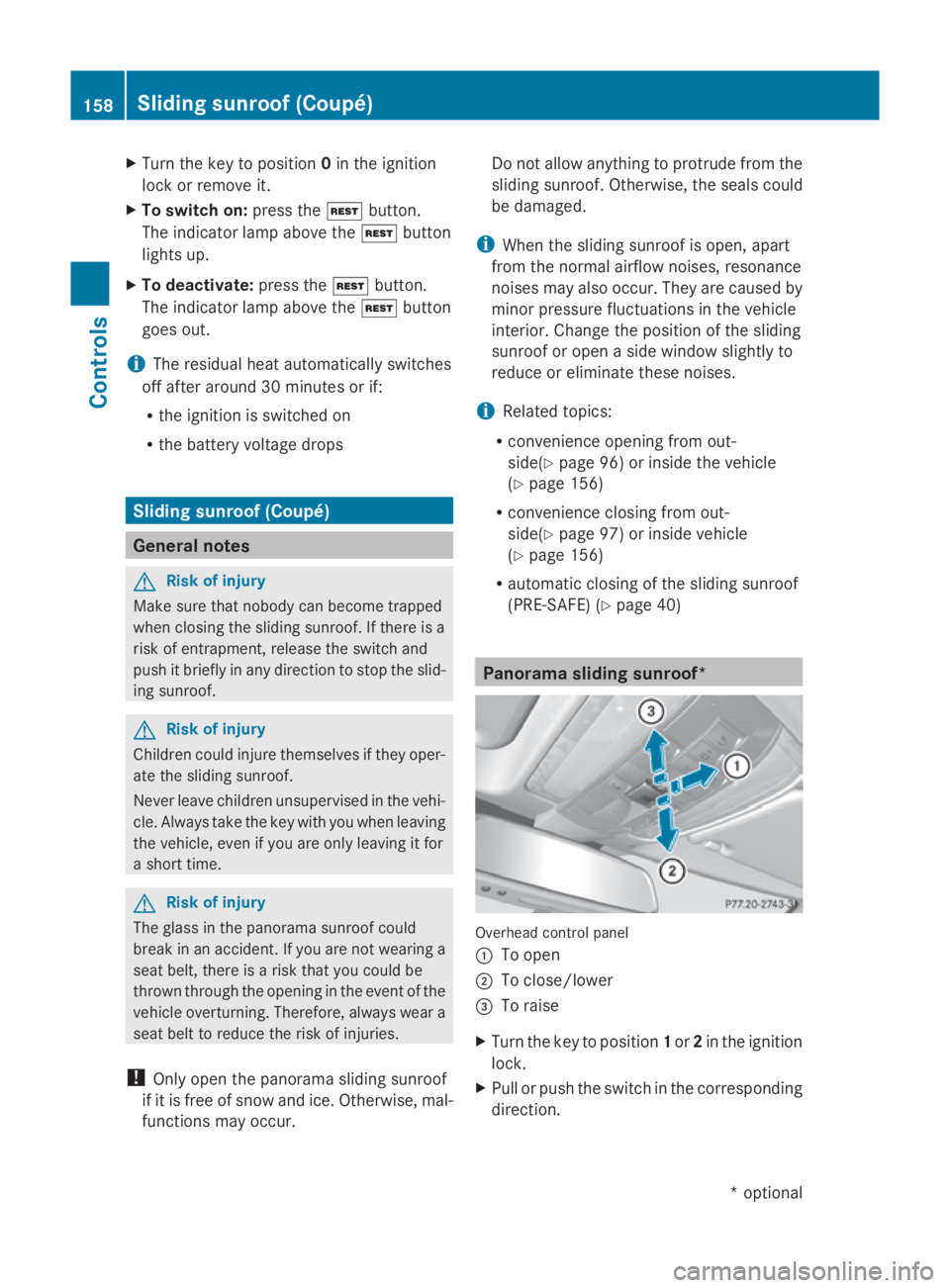
asliding sunroof* Overhead control panel
0046
To open
0047 To close/lower
008A To raise
X Turn the key to position 1or 2in the ignition
lock.
X Pull or push the switch in the corresponding
direction. 158
Sliding sunroof (Coupé)Controls
*o
ptional
207_AKB; 2; 3, en-GB
mkalafa,
Version: 2.11.8.1 2009-07-23T10:23:49+02:00-Seite 158
Page 162 of 313
i
If you press the switch beyond the point
of resistance, an automatic opening/clos-
ing process is started in the corresponding
direction. You can stop automatic opera-
tion by pressing again.
Closing with increased force and with-
out the anti-entrapment feature G
Risk of injury
You could be severel yoreven fatall yinjured
when closing the panorama sliding sunroof
with increased closing force or if the anti-
entrapment feature is deactivated. Make sure
that nobody can become trapped when clos-
ing the panorama sliding sunroof.
If the panorama sliding sunroof blocks during
closing:
X Immediately after the panorama sliding
sunroof blocks, pullt he switch again to the
point of resistance in the direction of
arrow 0047until the panorama sliding sun-
roof is closed.
The panorama sliding sunroof is closed
with more force.
If the panorama sliding sunroof blocks during
closing again:
X Immediately after the panorama sliding
sunroof blocks, pullt he switch again to the
point of resistance in the direction of
arrow 0047until the panorama sliding sun-
roof is closed.
The panorama sliding sunroof is closed
withou tthe anti-entrapment feature.
Rain closing feature* When the key is in position
0in the ignition
lock or is removed, the panorama sliding sun-
roof closes automatically:
R if it starts to rain
R at extreme outsid etemperatures
R after six hours
R if there is amalfunction in the powers upplyThe panorama sliding sunroof remains raised
at the rear in order to allow ventilation of the
vehicle interior.
i
If the panorama sliding sunroof is obstruc-
ted when being closed by the rain closing
feature, it opens again slightly. The rain
closing feature is then deactivated.
The panorama sliding sunroof does not close
if:
R it is raisedatt he rear.
R it is blocked.
R no rain is falling on the area of the wind-
screen being monitored by the rain sensor
(e.g. because the vehicle is under abridge
or in acarport). Rollers
unblind for the panorama slid-
ing sunroof*
The rollers unblind provide sprotection from
the sun. The rollers unblind can only be
opened and closed when the panorama slid-
ing sunroof is closed. G
Risk of injury
Make sure that nobody can become trapped
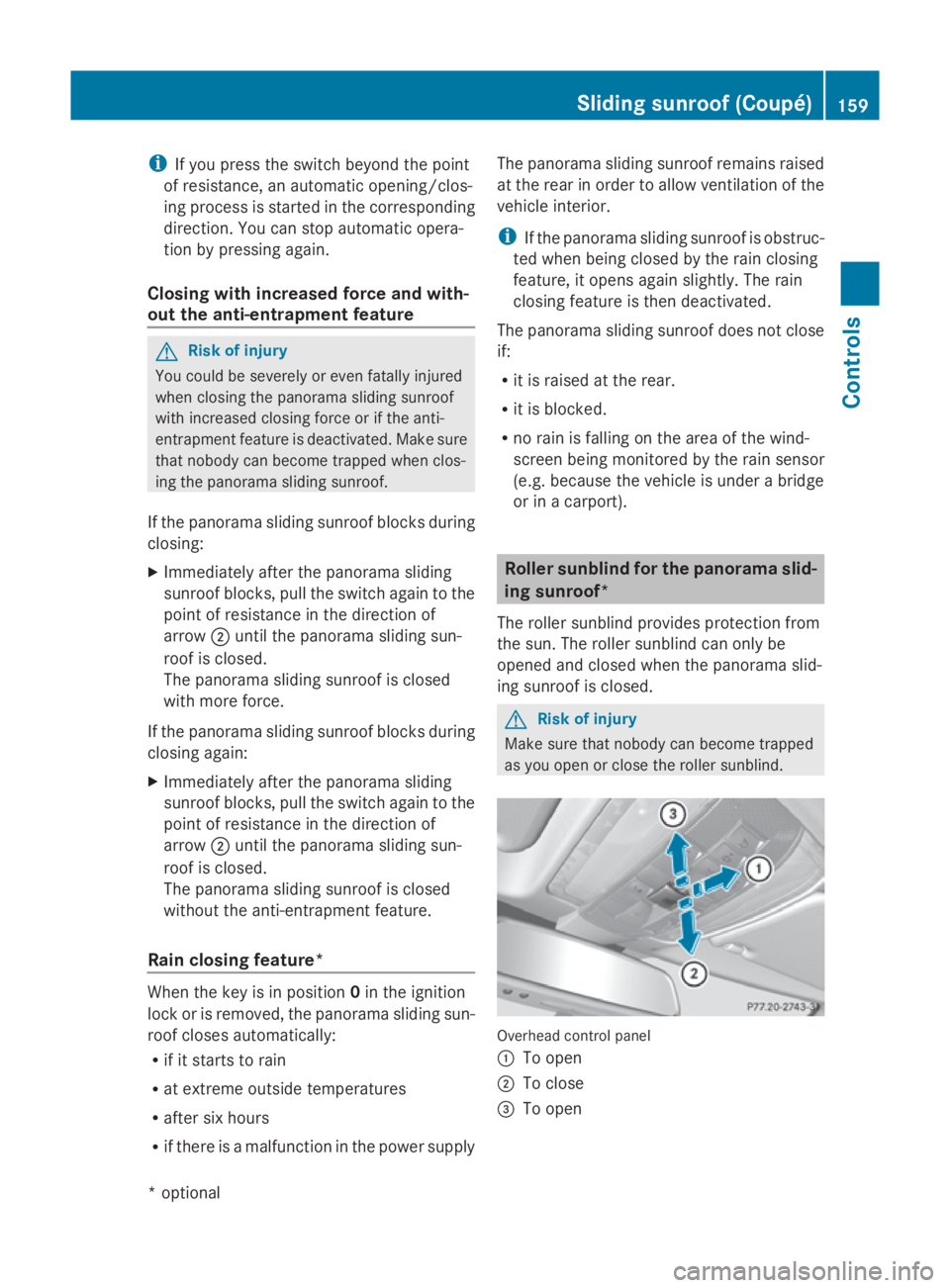
as you open or close the rollers unblind. Overhea
dcontrol panel
0046 To open
0047 To close
008A To open Sliding sunroof (Coupé)
159Controls
*optional
207_AKB; 2; 3, en-GB
mkalafa
,V ersion: 2.11.8.1
2009-07-23T10:23:49+02:00
-Seite 159 Z
Page 163 of 313
X
Turn the key to position 1or 2in the ignition
lock.
X Pull or push the switch in the corresponding
direction.
i If you press the switch beyond the point
of resistance, an automatic opening/clos-
ing process is started in the corresponding
direction .You can stop automatic opera-
tion by pressing again.
Resetting the panorama sliding sunroof
and the roller sunblind Reset the panorama sliding sunroof and the
roller sunblind if the panorama sliding sunroof
or the roller sunblind does not close
smoothly.
X Turn the key to position 1or 2in the ignition
lock.
X Pull the switch repeatedly to the point of
resistanc einthe direction of arrow 0047until
the panorama sliding sunroof is fully
closed.
X Keep the switch pulled for an additional
second.
X Pull the switch repeatedly to the point of
resistanc einthe direction of arrow 0047until
the roller sunblind is fully closed.
X Keep the switch pulled for an additional
second.
X Check that the panorama sliding sunroof
and the roller sunblind can be fully opened
again.
X If this is not the case, consult aqualified
specialist workshop. Soft top (Cabriolet)
Opening and closing the soft top
You can open or close the soft top either
when the vehicle is stationary or when driving
up to aspeed of 40 m/h.
If there is astron ghead wind, it may not be
possible to close the soft top fully. In this case, reduce speed or stop in order to close
the soft top fully.
For safety reasons, Mercedes-Benz recom-
mends that you only open or close the soft
top when the vehicle is stationary. G
Risk of accident and injury
Only drive with the soft top fully open or
closed.
If the soft top does not open or close fully, the
soft-top hydraulics are depressurised and the
soft top is lowered:
R after about seven minutes if the ignition is
switched on
R immediately if the ignition is switched off
Aw arning tones ounds shortly beforehand.
The Top being opened message appears in
the multifunction display.
Lock the soft top again before driving on. Oth-
erwise, the unlocked soft top could open dur-
ing the journey and cause you to lose control
of your vehicle. You or other persons could be
injured as aresult.
! Never sit on the soft-top compartment
cover and do not store any heavy objects
on it. You will otherwise damage the soft
top and soft-top compartment cover of the
vehicle.
! The soft top swings upwards when it is
opened or closed. In order to avoid dam-
aging the soft top or other parts of the vehi-
cle when opening or closing the soft top,
observe the following:
R there must be sufficient clearance above
the vehicle.
R the boot separator must be closed and
must not be pushed upwards by the load.
R there must not be any object sonthe
soft-top compartment cover. 160
Soft top (Cabriolet)Controls
207_AKB; 2; 3, en-GB
mkalafa,
Version: 2.11.8.1 2009-07-23T10:23:49+02:00-Seite 160
Page 164 of 313
R
the boot li dmustbec losed.
R the fabri cmustn ot be dirty ,wetor fro-
zen.
Wit hthe soft-to pswitch G
Ris
kofi njury
Make sure nobod ycan be trapped or injured
by moving parts such as the soft-top linkage
or soft-top compartment cover when opening
or closing the soft top.
Releas ethe soft-top switch in the event of
danger. Th esoft-top mechanis mstops imme-
diately. G
Ris
kofa ccident
If the vehicl espeed exceed s40km/h,the
soft top stops the opening or closing move-
men tand remains in tha tposit ion. This could
impair your rea rview. At high speeds ,the soft
top ma ybedamaged.
Reduce your spee dtobelow40 km/h or stop
the vehicl einaccordanc ewitht he traffi ccon-
ditions. Press the soft-top switch agai nin
order to open or close the soft top fully.
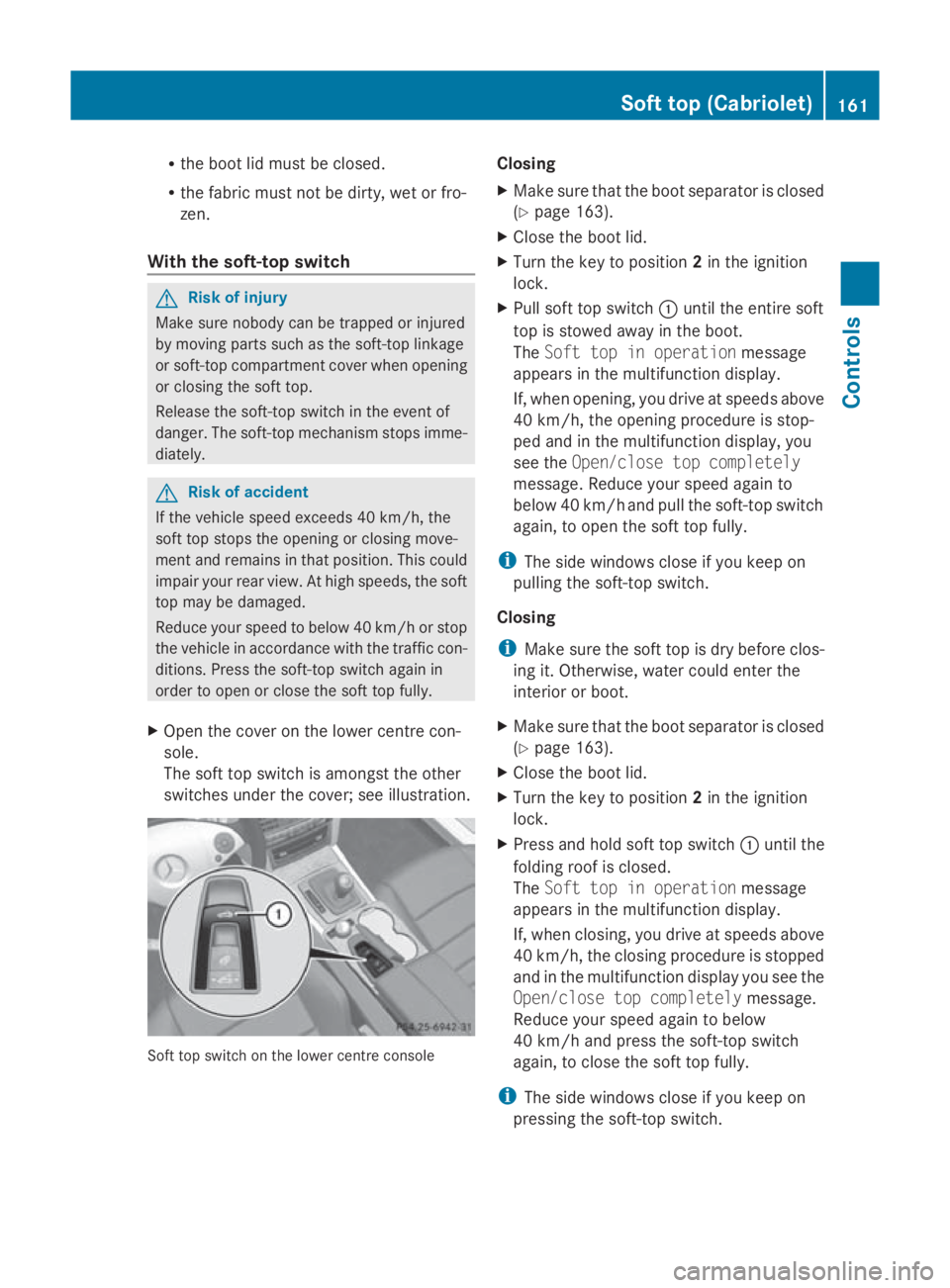
X Open the cove ronthe lowe rcentr econ-
sole.
Th es oftt op switch is amongst the other
switches under the cover; se eillus tration. Soft top switch on the lowe
rcentr econsole Closing
X
Make sure tha tthe boot separator is closed
(Y page 163).
X Clos ethe boot lid.
X Turn the key to position 2in the ignition
lock.
X Pull soft top switch 0046unti lthe entire soft
top is stowe dawayint he boot.
The Softtop in operation message
appear sinthe multifunctio ndisplay.
If, when opening, yo udrive at speeds above
40 km/h ,the opening procedur eisstop-
pe da nd in the multifunctio ndisplay ,you
se et he Open/clos etop completely
message .Reduc eyours peed againto
belo w40k m/h and pull the soft-top switch
again, to open the soft top fully.
i Thes idew indows close if yo ukeepon
pulling the soft-top switch.
Closing
i Make sure the soft top is dry befor eclos-
ing it. Otherwise, water could ente rthe
interior or boot.
X Make sure tha tthe boot separator is closed
(Y page 163).
X Clos ethe boot lid.
X Turn the key to position 2in the ignition
lock.
X Press and hold soft top switch 0046unti lthe
folding roo fisclosed.
The Softtop in operation message
appear sinthe multifunctio ndisplay.
If, when closing, yo udrive at speeds above
40 km/h ,the closing procedur eisstopped
and in the multifunctio ndisplay yous ee the
Open/clos etop completely message.
Reduce your spee dagain to below
40 km/h and press the soft-top switch
again, to close the soft top fully.
i Thes idew indows close if yo ukeepon
pressing the soft-top switch. Soft top (Cabriolet)
161Controls
207_AKB; 2; 3, en-GB
mkalafa,V ersion: 2.11.8.1
2009-07-23T10:23:49+02:00
-Seite 161 Z
Page 172 of 313
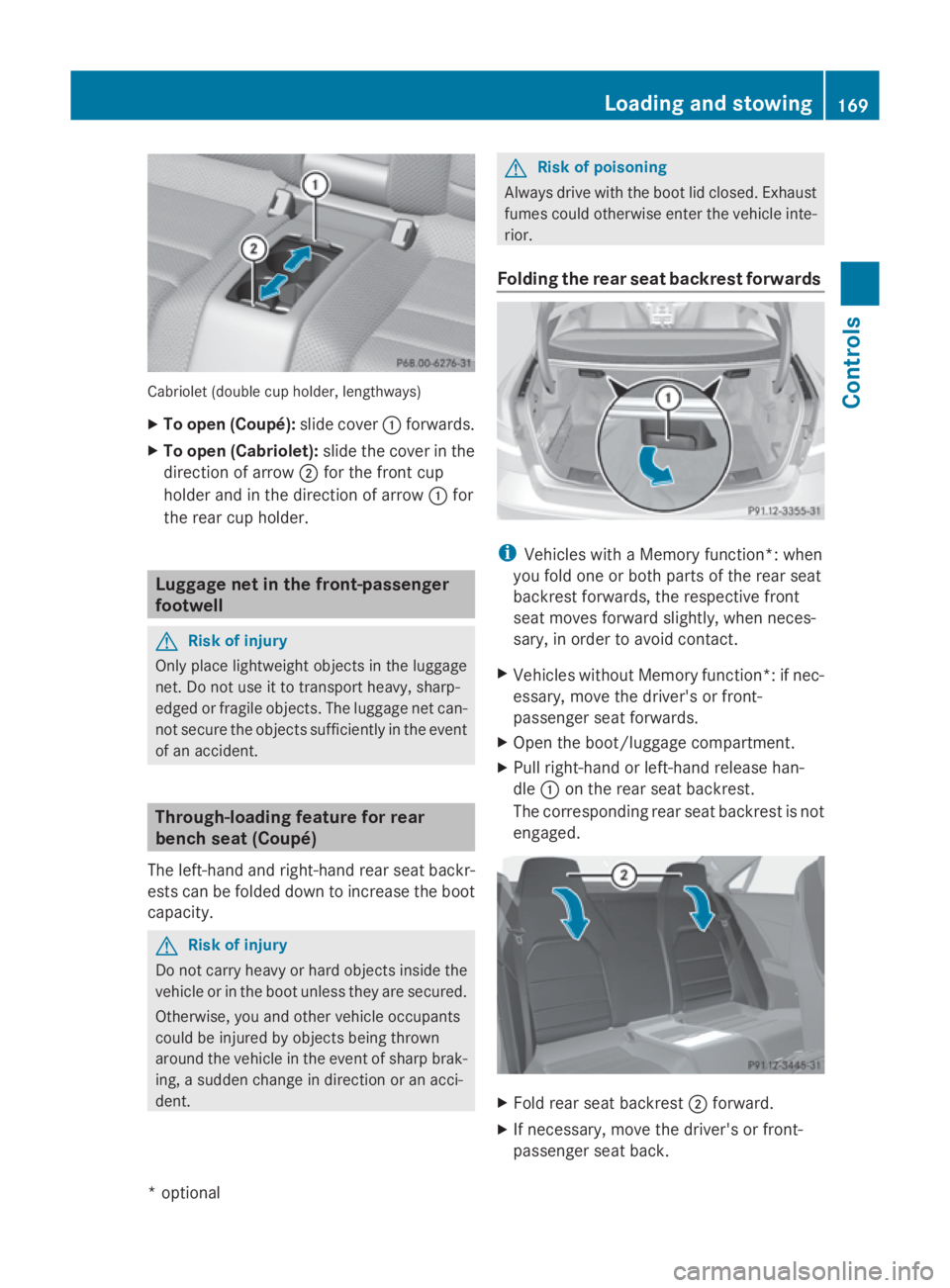
Cabriolet (double cup holder, lengthways)
X
To open (Coupé): slide cover0046forwards.
X To open (Cabriolet): slide thecover in the
direction of arrow 0047for th efront cup
holde rand in th edirection of arrow 0046for
th er ear cup holder. Luggage net in th
efront-passenger
footwell G
Ris
kofi njury
Only place lightweigh tobject sintheluggage
net .Don otuse it to transport heavy, sharp-
edged or fragile objects. The luggage net can-
no tsecure th eobject ssufficiently in th eevent
of an accident. Through-loading feature for rear
bench seat (Coupé)
The left-hand and right-han drear seat backr-
est scan be folded down to increas ethe boot
capacity. G
Ris
kofi njury
Do no tcarry heav yorhard object sinside the
vehicle or in th eboot unless they are secured.
Otherwise, you and other vehicle occupants
coul dbei njured by object sbein gthrown
aroun dthe vehicle in th eeven tofs harpbrak-
ing ,as udden chang eindirection or an acci-
dent. G
Ris
kofp oisoning
Always driv ewith th eboot lid closed. Exhaust
fumes coul dotherwise enter th evehicle inte-
rior.
Foldin gthe rea rseat backres tforwards i
Vehicles with aMemory function*: when
you fold on eorbothp artsoft herear seat
backres tforwards ,the respectiv efront
seat moves forward slightly, when neces-
sary, in orde rtoavoid contact.
X Vehicles without Memory function*: if nec-
essary, mov ethe driver' sorfront-
passenger seat forwards.
X Open th eboot/luggage compartment.
X Pull right-han dorleft-hand release han-
dle 0046on th erear seat backrest.
The correspondin grear seat backres tisnot
engaged. X
Fol drear seat backrest 0047forward.
X If necessary, mov ethe driver' sorfront-
passenger seat back. Loading and stowing
169Controls
*optional
207_AKB
;2;3,en-GB
mkalafa, Version:2.11.8.1
2009-07-23T10:23:49+02:00
-Seite 169 Z