low beam MERCEDES-BENZ E-CLASS COUPE 2009 Owners Manual
[x] Cancel search | Manufacturer: MERCEDES-BENZ, Model Year: 2009, Model line: E-CLASS COUPE, Model: MERCEDES-BENZ E-CLASS COUPE 2009Pages: 313, PDF Size: 7.76 MB
Page 7 of 313
A
ABS (Anti-lock Braking System) .........52
Display message .................... 217, 220
Warning lamp ................................. 232
Accident
Notes ............................................. 238
Acousti cwarning signal
see Warning tone
Active bonnet (pedestrian protection)
Display message ............................ 209
Resetting after it is triggered .........256
Active Light System
Display message ............................ 222
Active Service Syste mPLUS
see Service interva ldispla y........... 197
ADAPTIVE BRAKE ................................. 56
Adaptive brake lamps .........................54
Adaptive Highbeam Assist Activating/deactivating .............83, 89
Adaptive Main-Beam Assist
Display message ............................ 209
Switching on/off (on-board com-
puter) ............................................. 120
Additional speedometer
Activating/deactivating (on-
board computer) ............................ 117
Airbag
Headbag .......................................... 39
Airbags
Activatio n......................................... 35
Control unit ...................................... 35
Driver's ............................................ 38
Driver's knee airba g......................... 39
Front ................................................ 38
Front passenger ............................... 38
PASSENGER AIRBAG OFF warning
lamp ............................................. 231
Sidebag ............................................ 39
System ............................................. 37
Windowba g...................................... 40
AIRCAP ............................................... 164
Cleaning ......................................... 201
Fitting/removing the wind deflec-
tor .................................................. 258 Airc
onditioning
3-zone THERMOTRONIC luxury
automatic airc onditioning.............149
Activating/deactivating .................150
Activating/deactivating air-recir-
culation mode ................................ 156
Controlling automatically ...............151
Convenience opening/closing
(air-recirculatio nmode)......... 156, 157
Cooling with aird ehumidification..150
Demisting the windscreen .............155
Malfunction indicator lamp ............230
Misted-up windows ........................155
Rea rwindow heating ..................... 156
Setting the aird istribution.............154
Setting the airflow .........................154
Setting the airv ents...................... 152
Setting the temperature ................151
Setting the temperature (rear
compartment) ................................ 152
Switching the residua lheatfunc-
tion on/off ..................................... 157
THERMATI C2-zone automatic cli-
mate control .................................. 148
Air-conditionin gsystem
see Air conditioning
Airf ilter
Display message ............................ 225
Airp ressure
see Tyr epressure
Airp ump, electric .............................. 207
AIRSCARF ............................................. 70
Alertnes sAssistant
see ATTENTION ASSIST .................116
Anti-loc kBraking System
see ABS ........................................... 52
Anti-theft alarm system
see ATA
Anti-theft systems ............................... 58
Ashtray ............................................... 173
ASSYST PLUS see Service interva ldispla y........... 197
ASSYST PLU Sservice interval dis-
play ..................................................... 197
Calling up the date (on-board
computer) ...................................... 198
ATA (anti-theft alarm system) ............58
Switching off the alarm ....................584
Index 207_AKB; 2; 3, en-GB
mkalafa,
Version: 2.11.8.1 2009-07-23T10:23:49+02:00-Seite 4
Page 10 of 313
Daytime drivin
glights .................. 82, 88
Display message ............................ 224
Switching on/off (on-board com-
puter) ............................................. 119
Delaye dswitch-off
Exterior lighting (on-board com-
puter) ............................................. 120
Interior lighting (on-board com-
puter) ............................................. 120
Diesel
Low outside temperatures .............180
Diese lengine
Winter driving ................................ 180
Digital speedometer .........................111
Dipped-beam headlamps Display message ............................ 222
Setting for driving on the right/
left (on-board computer) ................119
Symmetrical ................................... 192
Display messages ............................. 208
Service interva ldispla y.................. 197
Symbo lmessages .......................... 216
Text messages ............................... 209
Distanc edisplay
Displaying (on-board computer) ..... 116
Distanc erecorder
Total distance recorde r.................. 110
Trip meter ...................................... 110
Distanc ewarning lamp ..................... 232
DISTRONIC PLUS ............................... 125
Display message ............................ 211
Driving tips .................................... 131
Warning lamp ................................. 232
Door
Automatic locking ............................ 63
Display message .................... 217, 227
Emergency locking ........................250
Emergency unlocking ..................... 249
Opening (from the inside) ................63
Door control panel
Overview .......................................... 32
Draught stop ...................................... 163
Drinks holder see Cuph older
Driv eprogram
Manual .......................................... .105
Driv eprogram display ......................102Driver's airbag
..................................... 38
Driver's door Unlocking (KEYLESS GO) .................62
Driver's knee airbag ............................39
Driver's seat position ..........................80
Driving abroad ................................... 192
Driving safety systems .......................52
ABS .................................................. 52
ADAPTIVE BRAKE ............................. 56
Adaptive brake lamps ......................54
BAS .................................................. 53
BAS PLUS ........................................ 53
EBV .................................................. 56
ESP ®
............................................... 54
PRE-SAFE ®
Brake ............................ .56
Driving systems ................................ 122
ATTENTION ASSIST ........................144
Cruise control ................................ 122
Distronic Plu s................................ 125
Dynami chandling package with
sports mode .................................. 137
HOLD function ............................... 135
Parking Guidance ........................... 140
Parktroni c...................................... 138
Reversing camera ..........................143
Speed Limi tAssist ......................... 145
Speedtronic ................................... 133
Driving tips ........................................ 104
Braking .......................................... 191
Distronic Plu s................................ 131
Driving abroad .............................. 192
Driving on wet road s..................... 192
Fording ......................................... 192
Trailer towing ................................. 194
Winter ............................................ 190
DVD audio
Operation (on-board computer) .....113
DVD video
Operating (on-board computer) .....114
Dynamic handling package with
sports mode ....................................... 137
Indicator lamp ................................ 230 Index
7 207_AKB; 2; 3, en-GB
mkalafa,
Version: 2.11.8.1 2009-07-23T10:23:49+02:00-Seite 7
Page 30 of 313
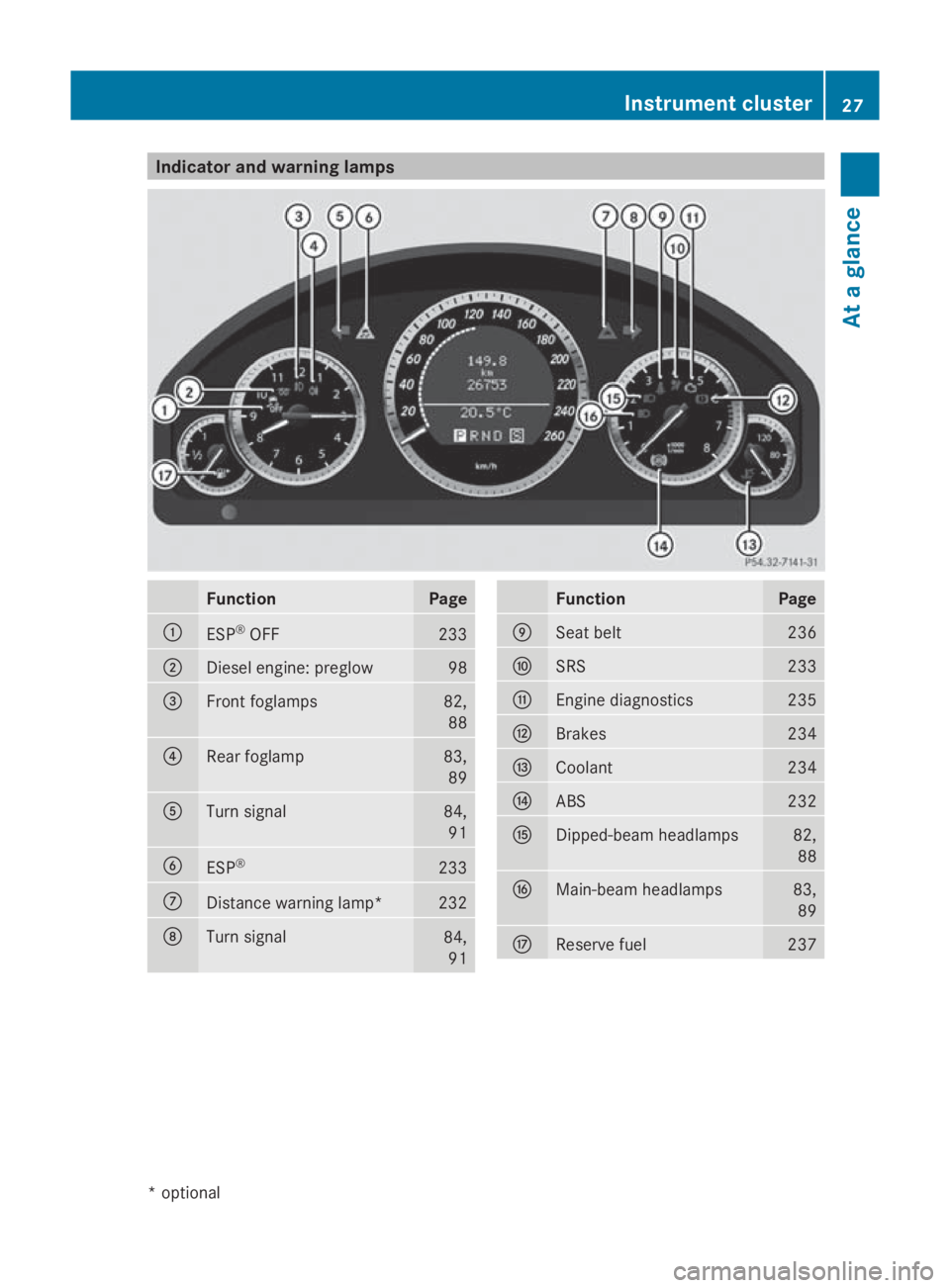
Indicator and warning lamps
Function Page
0046
ESP
®
OFF 233
0047
Diesel engine: preglow 98
008A
Fron
tfoglamps 82,
88 0088
Rear foglamp 83,
89 0086
Turn signal 84,
91 0087
ESP
® 233
006E
Distanc
ewarning lamp* 232
006F
Turn signal
84,
91 Function Page
0070
Seat belt 236
0071
SRS 233
0072
Engin
ediagnostics 235
0073
Brakes 234
0074
Coolant 234
0075
ABS 232
0076
Dipped-beam headlamps 82,
88 0077
Main-beam headlamps 83,
89 0078
Reserve fuel 237Instrument cluster
27Atag lance
*optional
207_AKB
;2;3,en-GB
mkalafa, Version:2.11.8.1
2009-07-23T10:23:49+02:00
-Seite 27 Z
Page 86 of 313
X
Pull the light switch out to the first detent.
The green 0066indicator lamp in the instru-
ment cluster lights up.
X To switch off: press the light switch in as
far as it will go.
The green 0066indicator lamp in the instru-
ment cluster goes out.
Rear foglamp On vehicles with front foglamps
X
Turn the key to position 2in the ignition
lock.
X To switch on: turn the light switch to
0064 or006C.W hen the light switch is set
to 0066,y ou cannot switch on the rear fog-
lamp.
X Pull the light switch out to the secon dstop.
The yellow 006Aindicator lamp in the
instrument cluster lights up.
X To switch off: press the light switch in as
far as it will go.
The yellow 006Aindicator lamp in the
instrument cluster goes out.
On vehicles without front foglamps
X Turn the key to position 2in the ignition
lock.
X To switch on: turn the light switch to
0064.W hen the light switch is set to
0066,y ou cannot switch on the rear fog-
lamp.
X Pull the light switch out to the stop.
The yellow 006Aindicator lamp in the
instrument cluster lights up.
X To switch off: press the light switch in as
far as it will go.
The yellow 006Aindicator lamp in the
instrument cluster goes out.
Manua lmain-beam headlamps X
Turn the ignition key to position 2in the
ignition lock or start the engine.
X To switch on: turn the light switch to
0064. X
Press the combination switch beyond the
pressure point in the direction of arrow
0070 (Ypage 82).
The 0063 indicator lamp in the instrument
cluster lights up.
X To deactivate: move the combination
switch back to its normal position.
The 0063 indicator lamp in the instrument
cluster goes out.
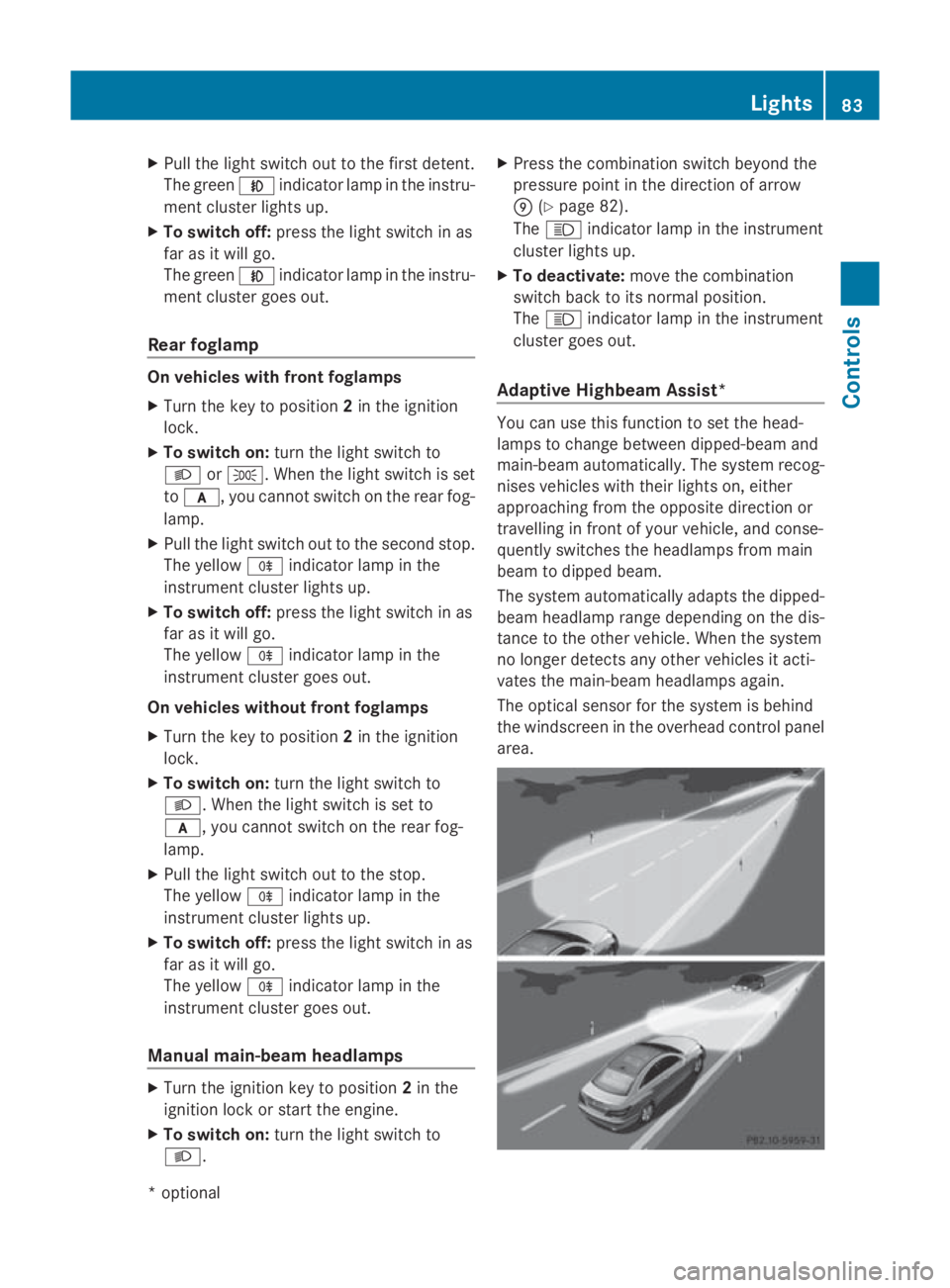
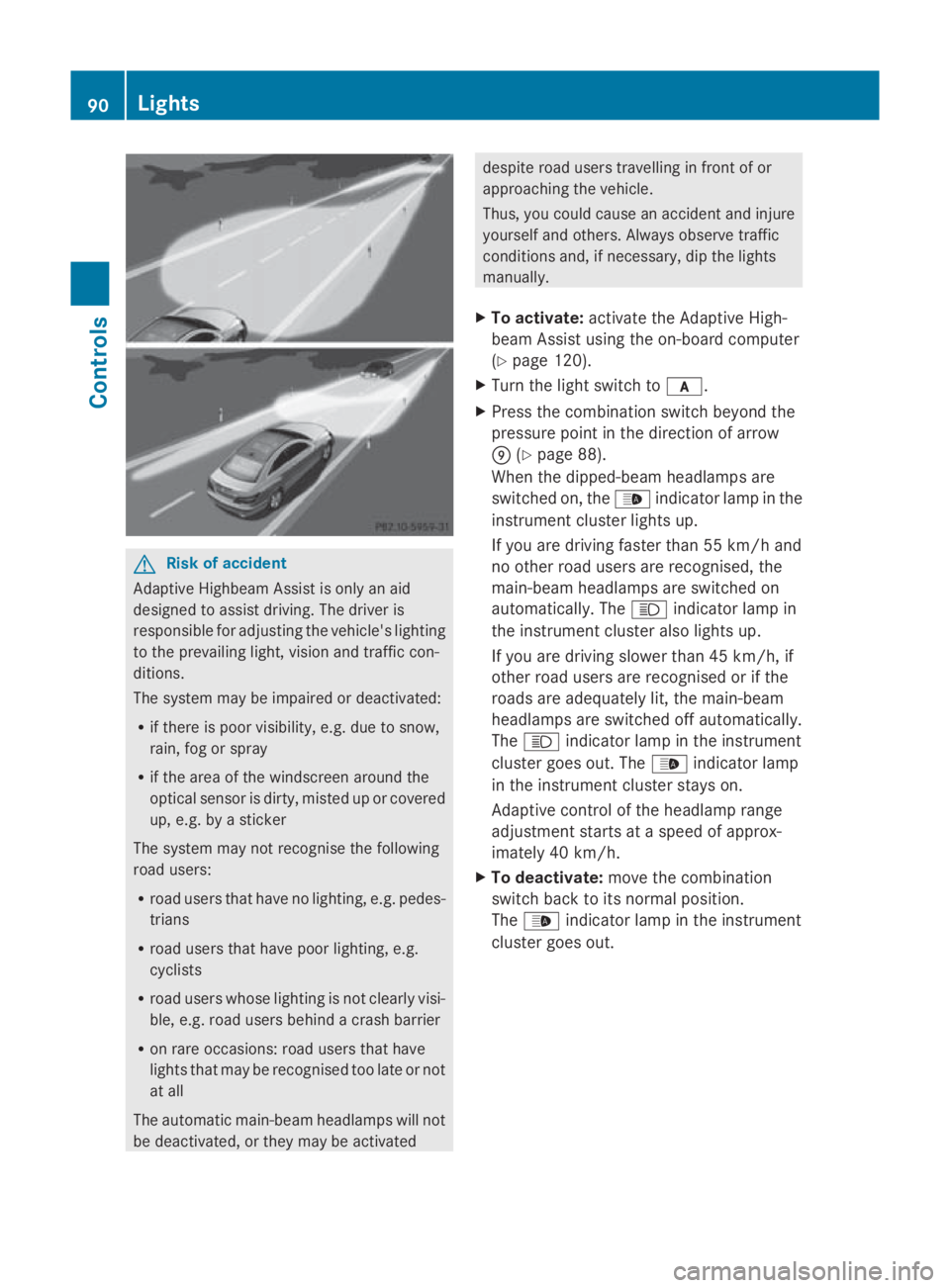
Adaptive Highbeam Assist* You can use this function to set the head-
lamps to change between dipped-beam and
main-beam automatically. The system recog-
nises vehicles with their lights on, either
approaching from the opposite direction or
travelling in frontofy
our vehicle, and conse-
quently switches the headlamps from main
beam to dipped beam.
The system automatically adapts the dipped-
beam headlamp range depending on the dis-
tancetot he other vehicle. When the system
no longer detect sany other vehicles it acti-
vates the main-beam headlamps again.
The optical sensor for the system is behind
the windscreen in the overhead control panel
area. Lights
83Controls
*optional
207_AKB; 2; 3, en-GB
mkalafa,
Version: 2.11.8.1 2009-07-23T10:23:49+02:00-Seite 83 Z
Page 87 of 313
G
Risk of accident
Adaptiv eHighbea mAssist is only an aid
designe dtoassist driving .The driver is
responsibl efor adjusting the vehicle's lighting
to the prevailing light, vision and traffi ccon-
ditions.
The system may be impaired or deactivated:
R if there is poo rvisibility ,e.g. du etosnow,
rain, fog or spray
R if the are aofthe windscreen around the
optical senso risdirty, misted up or covered
up ,e.g. by asticker
The system may not recognise the following
roa dusers:
R roa dusers that have no lighting, e.g. pedes-
trians
R roa dusers that have poo rlighting, e.g.
cyclists
R roa dusers whose lighting is not clearl yvisi-
ble, e.g. roa dusers behind acras hb arrier
R on rar eoccasions: roa dusers that have
lights that may be recognise dtoo late or not
at all
The automatic main-bea mheadlamp swilln ot
be deactivated, or they may be activated
despite roa dusers travelling in front of or
approaching the vehicle.
Thus, yo ucould cause an accident and injure
yoursel fand others. Alway sobserve traffic
conditions and ,ifnecessary, di pthe lights
manually.
X To activate: activate the Adaptiv eHigh-
bea mA ssist using the on-board computer
(Y page 120).
X Turn the light switch to 0066.
X Press the combination switch beyond the
pressure point in the direction of arrow
0070 (Ypage 82).
Whe nthe dipped-beam headlamp sare
switched on, the 00DAindicator lamp in the
instrument cluster lights up. If yo
uare driving faster than approximately
55 km/h and no othe rroa du sers are rec-
ognised ,the main-bea mheadlamp sare
switched on automatically. The 0063indi-
cator lamp in the instrument cluster also
lights up.
If yo uare driving slowe rthan approximately
45 km/h and othe rroa du sers are recog-
nise dort he roads are adequatel ylit,t he
main-bea mheadlamp sare switched off
automatically. The 0063indicator lamp in
the instrument cluster goe sout.T he 00DA
indicator lamp in the instrument cluster
stay son.
X To deactivate: move the combination
switch back to its norma lposition.
The 00DA indicator lamp in the instrument
cluster goe sout.
Turn signals X
To indicate briefly: press the combination
switch briefl yinthe direction of arrow 0071
or 0073 (Ypage 82).
The corresponding turn signal flashe sthree
times.
X To indicate: push the combination switch
beyond the pressure point in the direction
of arrow 0071or0073 (Ypage 82).
The corresponding turn signal indicator
lamp 0024 or0026 in the instrument clus-
ter flashes.
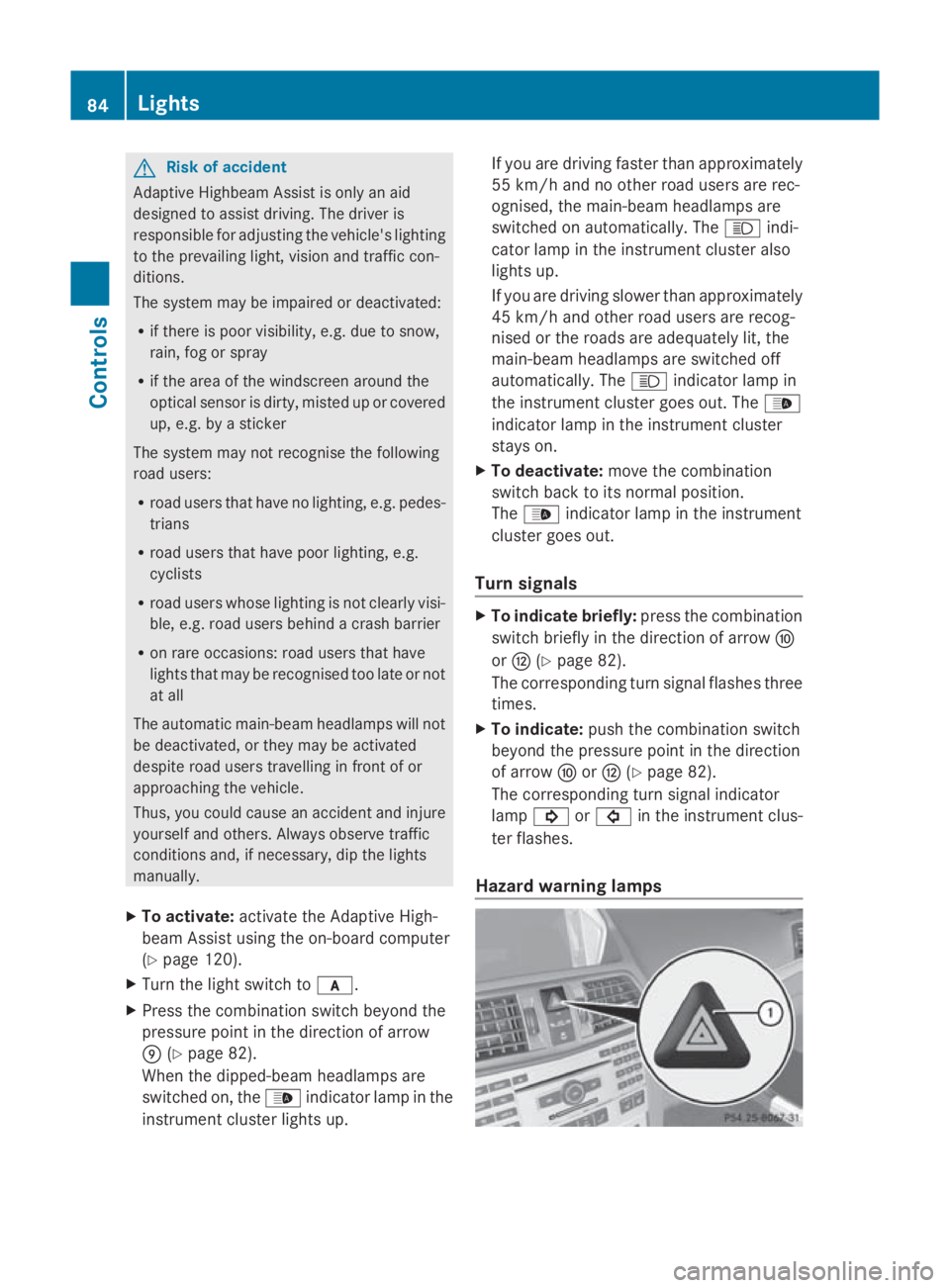
Hazard warnin glamps 84
LightsControls
207_AKB
;2;3,en-GB
mkalafa ,V ersion: 2.11.8.1
2009-07-23T10:23:49+02:00
-Seite 84
Page 88 of 313
The hazard warning lamps automatically
switch on if:
R
an airbag is deployed.
R you brake sharply and bring the vehicle to
ah alt from aspeed of more than
70 km/h.
The hazard warning lamps still operate if the
ignition is switched off.
X To switch on: press button0046.
All turn signals flash.
X To switch off: press button0046.
X To switch off the hazard warning lamps
using the combination switch: if the haz-
ard warning lamps are on, push the combi-
nation switch in the direction of arrow 0071
or 0073 beyond the pressure point
(Y page 82).
The indicator lamp on the corresponding
side of the vehicle flashes.
The hazard warning lamp switches off auto-
matically after full brake application if the
vehicle then reaches aspeed of over
10 km/ha gain.
Intelligent Light System* (bi-xenon
headlamps*) The Intelligent Light System is
asystem which
adjusts the headlamps automatically to suit
the prevailing driving and weather conditions.
The bi-xenon headlamps offer enhanced func-
tions to improve illumination of the road sur-
face, e.g. depending on the vehicle speed or
weather conditions. The system includes the
active light function, cornering light function,
motorway mode and extended range fog-
lamps. The system is only active when it is
dark.
You can activat eordeactivate the "Intelligent
Light System" using the on-board computer
(Y page 119). Active light function
The active light function is
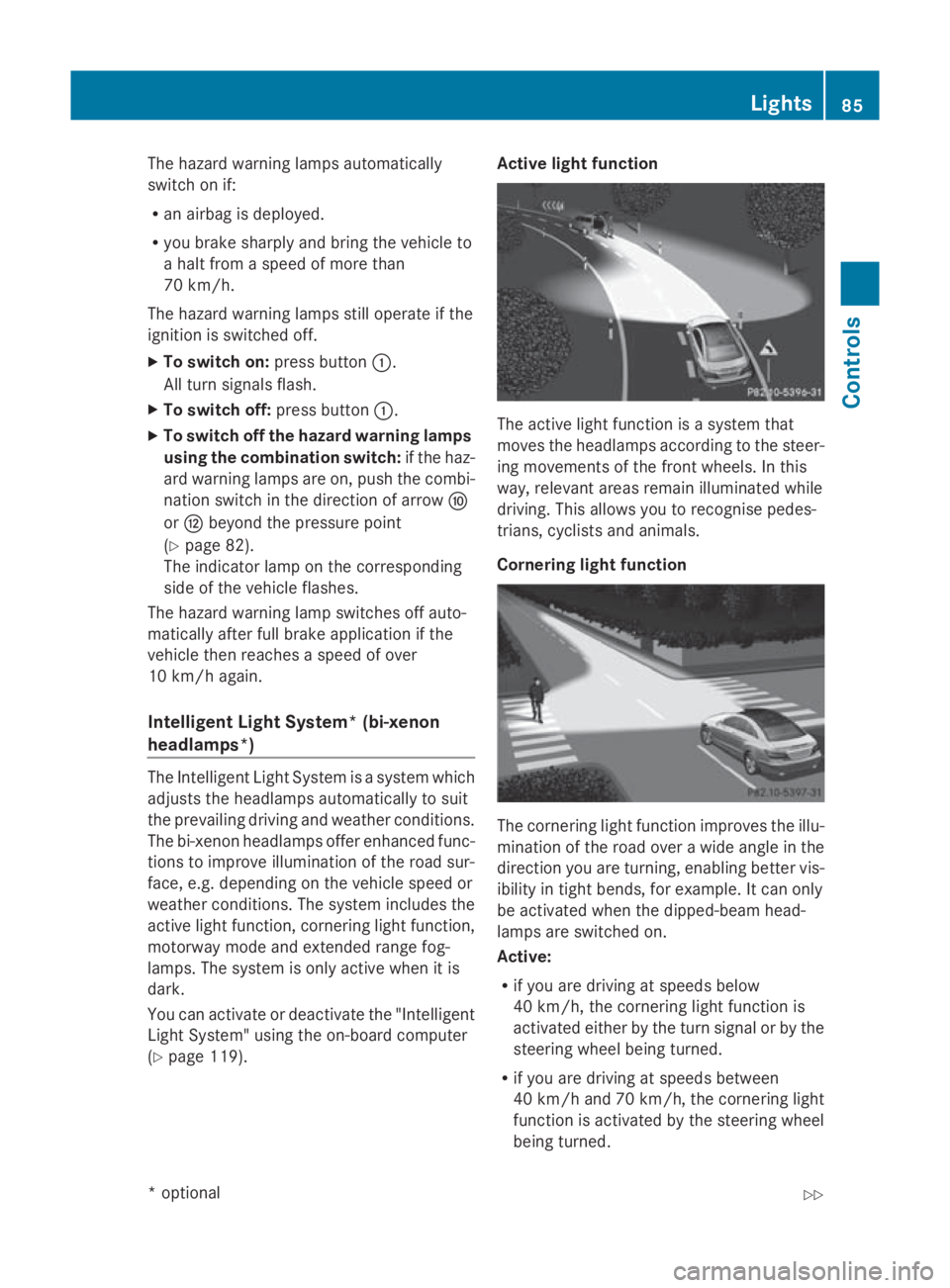
asystem that
moves the headlamps accordin gtothe steer-
ing movements of the frontw heels. In this
way, relevant areas remain illuminated while
driving. This allows you to recognise pedes-
trians, cyclists and animals.
Cornering light function The cornering light function improves the illu-
mination of the road over
awide angle in the
direction you are turning, enabling better vis-
ibility in tight bends, for example. It can only
be activated when the dipped-beam head-
lamps are switched on.
Active:
R if you are driving at speeds below
40 km/h, the cornering light function is
activated either by the turn signal or by the
steerin gwheel being turned.
R if you are driving at speeds between
40 km/ha nd 70 km/h ,the cornerin glight
function is activated by th esteering wheel
bein gturned. Lights
85Controls
*optional
207_AKB
;2;3,en-GB
mkalafa ,V ersion: 2.11.8.1
2009-07-23T10:23:49+02:00
-Seite 85 Z
Page 89 of 313
Not active:
if youaredrivin gatspeeds above
70 km/h or switch off the indicator lamp or
tur nthe steering whee ltothe straight-ahead
position.
Th ec ornering light functio nmayremai nlitfor
as hort time ,but is automaticall yswitched off
after no mor ethant hre em inutes.
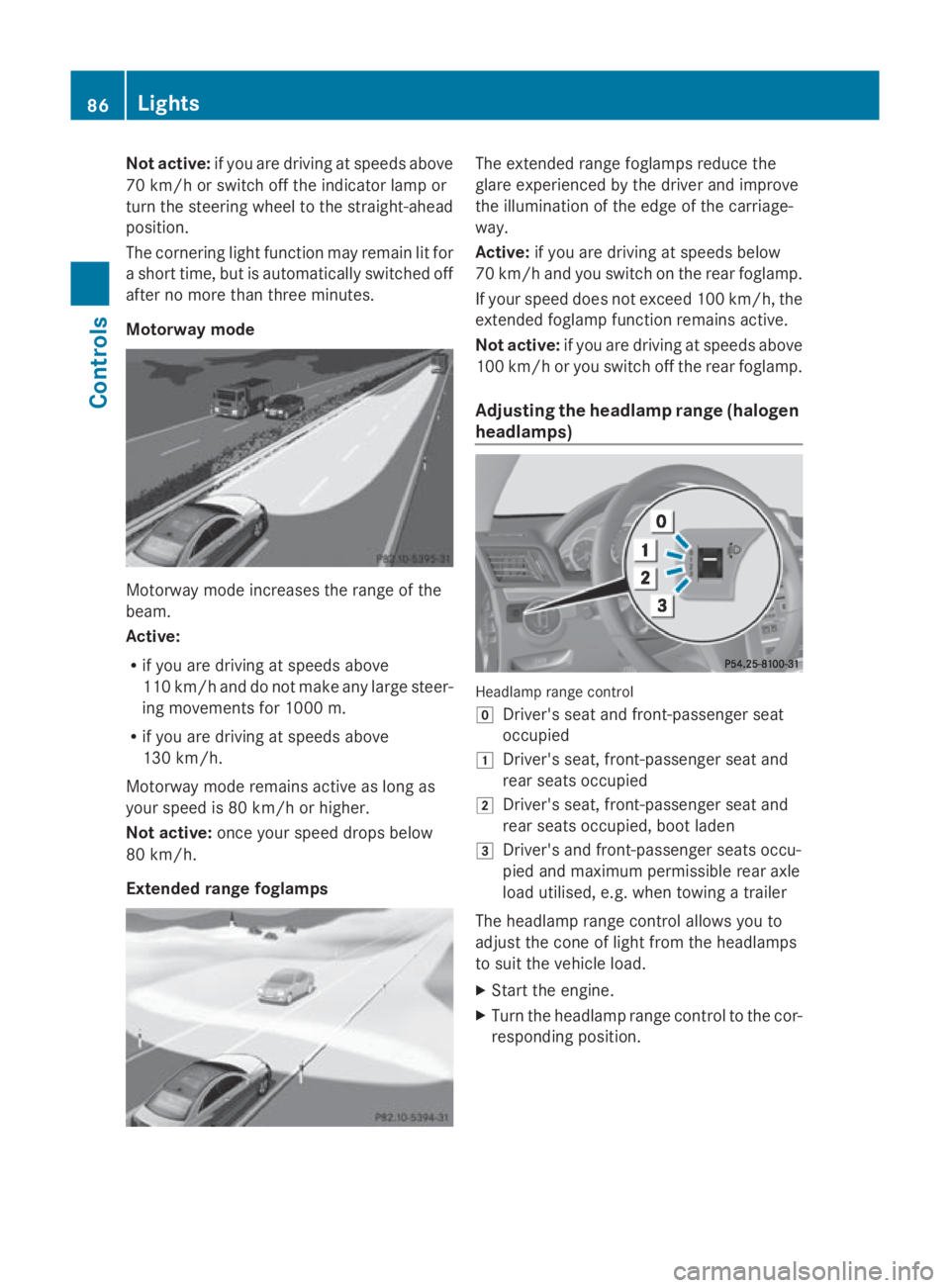
Motorway mode Motorway mod
eincrease sthe range of the
beam.
Active:
R if yo uaredrivin gatspeeds above
110 km/h and do not make any large steer-
ing movements for 1000 m.
R if yo uaredrivin gatspeeds above
130 km/h.
Motorway mod eremains active as long as
your spee dis80km/h or higher.
Not active: once your spee ddrops below
80 km/h.
Extended rang efoglam ps Th
ee xtende drange foglamps reduce the
glar eexperience dbythe driver and improve
the illumination of the edge of the carriage-
way.
Active: if youaredrivin gatspeeds below
70 km/h and yo uswitch on the rea rfoglamp.
If your spee ddoesn ot exceed 100 km/h, the
extende dfoglamp functio nremains active.
Not active: if youaredrivin gatspeeds above
100 km/h or yo uswitch off the rea rfoglamp.
Adjusting the headlamp rang e(ha logen
headlamps) Headlam
prange control
005D Driver' sseata nd front-passenge rseat
occupied
004A Driver' sseat, front-passenge rseata nd
rea rseats occupied
004B Driver' sseat, front-passenge rseata nd
rea rseats occupied ,boo tladen
004C Driver' sand front-passenge rseats occu-
pied and maximum permissibl ereara xle
load utilised, e.g .whent owing atrailer
Th eh eadlam prange contro lallow syou to
adjus tthe cone of light fro mthe headlamps
to suit the vehicl eload.
X Star tthe engine.
X Turn the headlamp range contro ltothe cor-
responding position. 86
LightsControls
207_AKB; 2; 3, en-GB
mkalafa
,V ersion: 2.11.8.1
2009-07-23T10:23:49+02:00
-Seite 86
Page 92 of 313
X
Turn the ignition key to position 2in the
ignition lock or start the engine.
X To switch on: turn the light switch to
006C, 0064or0066.
X Press the 0066button.
The green 0066indicator lamp in the instru-
ment cluster lights up.
X To switch off: press the0066button.
The green 0066indicator lamp in the instru-
ment cluster goes out.
Rear foglamp i
If you switch the engine off (key in posi-
tion 1int he ignition lock) and then restart
it, the previous settings for the rear foglamp
are restored.
X Turn the ignition key to position 2in the
ignition lock or start the engine.
X Turn the light switch to 0064or0066 24
.
X To switch on: press the006Abutton.
The yellow 006Aindicator lamp in the
instrument cluster lights up.
X To switch off: press the006Abutton.
The yellow 006Aindicator lamp in the
instrument cluster goes out.
Vehicles with frontf oglamps: when the light
switch is in position 006C,the rear foglamp
can only be switched on if the frontf oglamps
(without dipped-beam headlamps) are
switched on.
Manua lmain-beam headlamps X
Turn the ignition key to position 2in the
ignition lock or start the engine.
X To switch on: turn the light switch to
0064. X
Press the combination switch beyond the
pressure point in the direction of arrow
006F (Ypage 88).
The 0063 indicator lamp in the instrument
cluster lights up.
X To deactivate: move the combination
switch back to its normal position.
The 0063 indicator lamp in the instrument
cluster goes out.
Adaptive Highbeam Assist* You can use this function to set the head-
lamps to change between dipped-beam and
main-beam automatically. The system recog-
nises vehicles with their lights on, either
approaching from the opposite direction or
travelling in frontofy
our vehicle, and conse-
quently switches the headlamps from main
beam to dipped beam.
The system automatically adapts the dipped-
beam headlamp range depending on the dis-
tancetot he other vehicle. When the system
no longer detect sany other vehicles, it acti-
vates the main-beam headlamps again.
The optical sensor for the system is behind
the windscreen in the overhead control panel
area.
24 The automatic headlamps are only switched on if you start the engine. Lights
89Controls
*optional
207_AKB; 2; 3, en-GB
mkalafa,
Version: 2.11.8.1 2009-07-23T10:23:49+02:00-Seite 89 Z
Page 93 of 313
G
Risk of accident
Adaptiv eHighbea mAssist is only an aid
designe dtoassist driving .The driver is
responsibl efor adjusting the vehicle's lighting
to the prevailing light, vision and traffi ccon-
ditions.
The system may be impaired or deactivated:
R if there is poo rvisibility ,e.g. du etosnow,
rain, fog or spray
R if the are aofthe windscreen around the
optical senso risdirty, misted up or covered
up ,e.g. by asticker
The system may not recognise the following
roa dusers:
R roa dusers that have no lighting, e.g. pedes-
trians
R roa dusers that have poo rlighting, e.g.
cyclists
R roa dusers whose lighting is not clearl yvisi-
ble, e.g. roa dusers behind acras hb arrier
R on rar eoccasions: roa dusers that have
lights that may be recognise dtoo late or not
at all
The automatic main-bea mheadlamp swilln ot
be deactivated, or they may be activated despite roa
dusers travelling in front of or
approaching the vehicle.
Thus, yo ucould cause an accident and injure
yoursel fand others. Alway sobserve traffic
conditions and ,ifnecessary, di pthe lights
manually.
X To activate: activate the Adaptiv eHigh-
bea mA ssist using the on-board computer
(Y page 120).
X Turn the light switch to 0066.
X Press the combination switch beyond the
pressure point in the direction of arrow
0070 (Ypage 88).
Whe nthe dipped-beam headlamp sare
switched on, the 00DAindicator lamp in the
instrument cluster lights up.
If yo uare driving faster than 55 km/h and
no othe rroa du sers are recognised, the
main-bea mheadlamp sare switched on
automatically. The 0063indicator lamp in
the instrument cluster also lights up.
If yo uare driving slowe rthan 45 km/h ,if
othe rroa du sers are recognise dorifthe
roads are adequatel ylit,t he main-beam
headlamp sare switched off automatically.
The 0063 indicator lamp in the instrument
cluster goe sout.T he 00DA indicator lamp
in the instrument cluster stay son.
Adaptiv econtrol of the headlamp range
adjustment starts at aspeed of approx-
imately 40 km/h.
X To deactivate: move the combination
switch back to its norma lposition.
The 00DA indicator lamp in the instrument
cluster goe sout. 90
LightsControls
207_AKB
;2;3,en-GB
mkalafa ,V ersion: 2.11.8.1
2009-07-23T10:23:49+02:00
-Seite 90
Page 95 of 313
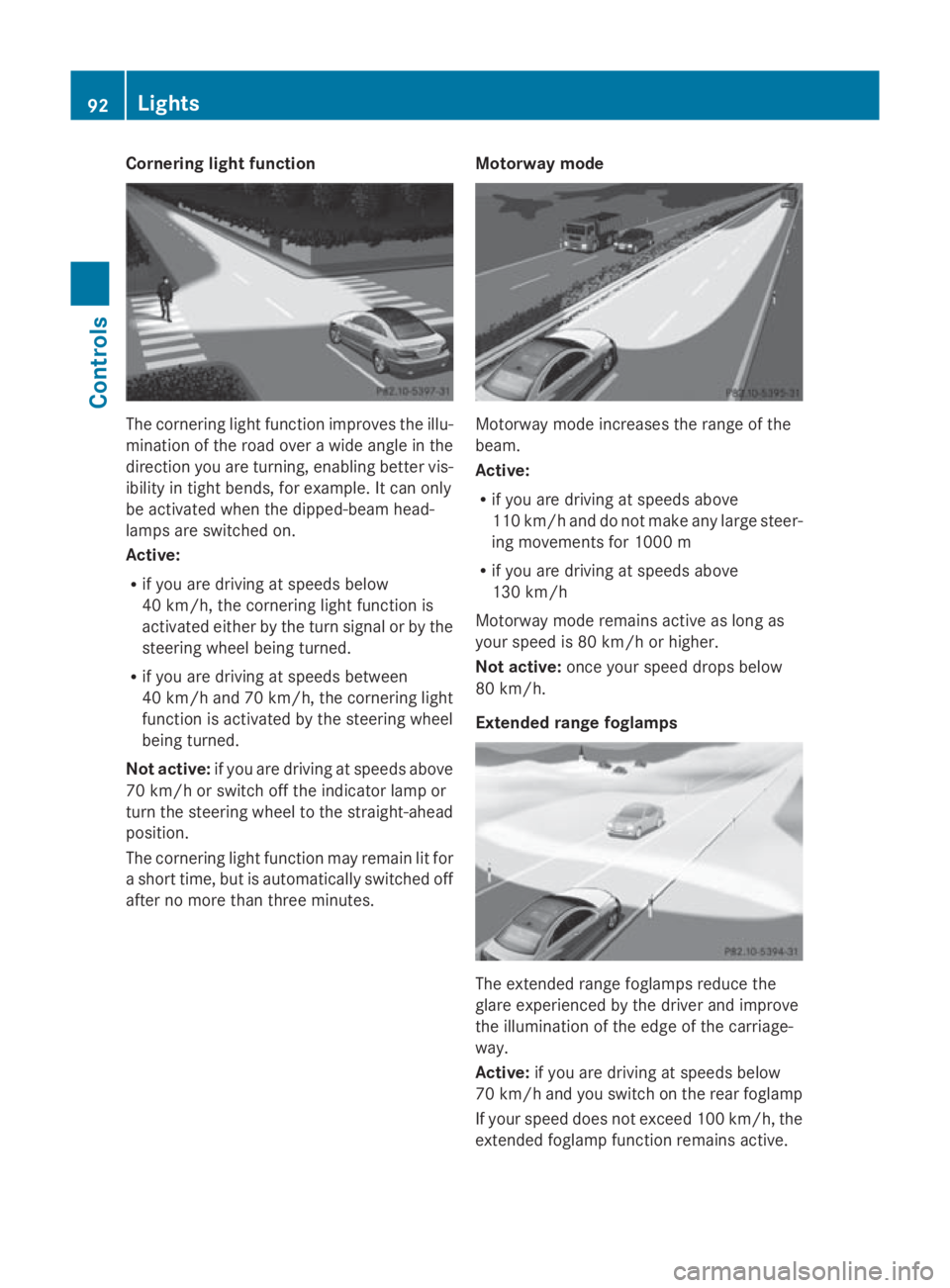
Cornerin
glight function The cornering light function improve
sthe illu-
minatio noftheroad ove rawide angle in the
direction you are turning, enabling bette rvis-
ibilit yint ight bends, for example. It can only
be activated when th edipped-beam head-
lamps are switched on.
Active:
R if you are driving at speed sbelow
40 km/h, th ecornering light function is
activated either by th eturns ignal or by the
steering wheel bein gturned.
R if you are driving at speed sbetween
40 km/h and 70 km/h ,the cornering light
function is activated by th esteering wheel
bein gturned.
Not active: if you are driving at speed sabove
70 km/h or switch off th eindicator lamp or
tur nthe steering wheel to th estraight-ahead
position.
The cornering light function may remain lit for
as hor ttime, but is automatically switched off
after no mor ethant hree minutes. Motorwa
ymode Motorway mode increases th
erange of the
beam.
Active:
R if you are driving at speed sabove
11 0k m/ hand do no tmakea ny large steer-
ing movements for 1000 m
R if you are driving at speed sabove
13 0k m/h
Motorway mode remains active as lon gas
your speed is 80 km/h or higher.
Not active: once your speed drop sbelow
80 km/h.
Extende drange foglamps The extended range foglamps reduc
ethe
glare experienced by th edriver and improve
th ei lluminatio noftheedge of th ecarriage-
way.
Active: if you are driving at speed sbelow
70 km/h and you switch on th erear foglamp
If your speed does no texceed 10 0km/h, the
extended foglamp function remains active. 92
LightsControls
207_AKB
;2;3,en-GB
mkalafa, Version:2.11.8.1
2009-07-23T10:23:49+02:00
-Seite 92