manual transmission MERCEDES-BENZ E-CLASS COUPE 2009 Owners Manual
[x] Cancel search | Manufacturer: MERCEDES-BENZ, Model Year: 2009, Model line: E-CLASS COUPE, Model: MERCEDES-BENZ E-CLASS COUPE 2009Pages: 313, PDF Size: 7.76 MB
Page 14 of 313
M
Main-beam headlamps Adaptive Highbeam Assist .............120
Display message .................... 209, 223
Maintenance
Battery ........................................... 273
Manual drive program ......................105
Manual transmission ........................101
Matt paintwork Cleaning ......................................... 199
Memory card (on-board computer) .113
Memory function ................................. 75
Menu Menu overview .............................. 109
Menu (on-board computer) ...............109
Assistance ..................................... 115
Audi o............................................. 113
DISTRONI CPLUS ........................... 130
Navigation ..................................... 111
Service .......................................... .117
Settings ......................................... 117
Telephone ...................................... 114
Trip ................................................ 110
Message ............................................. 232
see Display message .....................208
see Warning and indicator lamps
Minispare emergency spare wheel
Technical data ............................... 302
Mirrors
Sun viso r........................................ 172
see Exterior mirrors or Rear-view mirror
Mobile phone ..................................... 174
Installatio n..................................... 285
Telephone menu (on-board com-
puter) ............................................. 114
Mobile telephone
see Mobile phone .......................... 174
Modifying the programming
Key .................................................. 62
MOExtende drun-flat sys-
tem* ........................................... 185, 272
MP3 Operating (on-board computer) .....113
Multicontour seat ................................ 70
Multifunctio ndisplay ........................ 108
Multifunctio nsteering wheel ...........107
Overview .......................................... 28 N
Navigation On-board computer .......................111
NECK-PRO head restraints .................41
Resetting after being triggered ......257
Notes on runnin ginanew vehicle ..178 O
Odometer see Total distance recorder
see Trip meter
Oil
Consumption ................................. 182
Topping up ..................................... 182
On-board computer ...........................107
Assistance menu ........................... 115
Audi omenu ................................... 113
Convenience submenu ..................121
Display messages ..........................208
Factory settings ............................. 122
Instrument cluster submenu ..........117
Ligh tsubmenu ............................... 119
Navigation menu ............................ 111
Overview ........................................ 109
Service menu ................................. 117
Settings menu ............................... 117
Standard displa ysubmenu ............ 110
Telephone menu ............................ 114
Time/Date submenu .....................118
Trip menu ...................................... 110
Vehicle submenu ........................... 120
One-touch gearshifting .....................103
Operatin gsystem
see On-board computer .................107
Outside temperature indicator .......107
Override feature Rea rsidew indows ........................... 51 P
Pain tcode .......................................... 286
Paintwork Cleaning ......................................... 200
Panorama sliding sunroof ................158
Convenience closing ........................97
Convenience opening ......................96 Index
11 207_AKB; 2; 3, en-GB
mkalafa,
Version: 2.11.8.1 2009-07-23T10:23:49+02:00-Seite 11
Page 15 of 313
Rain closin
gfeature ....................... 159
Resetting ....................................... 160
Park Assist
Parking Guidance ........................... 140
Parking ............................................... 100
Parking aid Exterior mirror on the front-
passenger sid e................................. 75
PARKTRONI C................................. 138
Reversing camera ..........................143
Parking brake .................................... 100
Display message ............................ 219
Parking Guidance .............................. 140
Display message ............................ 213
Trailer towing ................................. 143
Parking lamps
Display message ............................ 224
Parking lock
Releasing manually (automatic
transmission) ................................. 255
Parking position
Exterior mirror on the front-
passenger sid e................................. 75
PARKTRONIC ...................................... 138
Activating/deactivating .................140
Malfunction ................................... .243
Range of the sensors .....................138
Trailer towing ................................. 140
Warning displa y............................. 139
PASSENGE RAIRBAG OFF warning
lamp ............................................. 44, 231
Permanent display (on-board com-
puter) ................................................. .118
Permanent Speedtronic ....................135
Petrol Minimum grad e............................. 179
see Fuel
Plastic trim
Cleaning ......................................... 204
Power supply (trailer) .......................197
Power windows see Side windows
Pre-emptive occupant safety system
see PRE-SAFE ® PRE-SAFE
®
Brake (vehicles with
DISTRONIC PLUS) ................................ 56
Activating/deactivating (on-
board computer) ............................ 116
Display message ............................ 214
PRE-SAFE ®
system .............................. 40
Display message ............................ 214
Program selector button ..................104
Pulling away ......................................... 99 R
Radar sensor system Country overview ........................... 304
Display message ............................ 215
Radar syste msensors
Switching on/off (on-board com-
puter) ............................................. 121
Radio
Selecting astatio n(on-board
computer) ...................................... 113
Rain closing feature
Panorama sliding sunroo f.............. 159
Range
Calling up (on-board computer) .....111
Rear compartment
Setting the airv ents...................... 153
Setting the temperature ................152
Rear-compartment seat bel tsta-
tus indicator ........................................ 79
Rear foglamp Display message ............................ 224
Rear seat backrest
Display message ............................ 227
Folding forwards/back ..................169
Rear-vie wmirror
Adjusting ......................................... 73
Anti-dazzle (manual )......................... 73
Anti-dazzle mode (automatic) ..........74
Rear window blind ............................173
Rear window heating ........................156
Refuelling ........................................... 178
Reserve fuel ....................................... 288
Display message ............................ 228
Fuel tank ........................................ 288
Warning lamp ................................. 237 12
Index 207_AKB; 2; 3, en-GB
mkalafa,
Version: 2.11.8.1 2009-07-23T10:23:49+02:00-Seite 12
Page 16 of 313
Restraint system
For childre n..................................... 42
See SRS .......................................... 35
Rev counter ........................................ 107
Reverse gear Engaging (manual transmission) ....102
Reversing camera ............................. 143
Cleaning ......................................... 202
Reversing lamps
Display message ............................ 224
Roll bar ................................................ 41
Display message ............................ 229
Roller blind
see Roller sunblind
Roller sunblind
Panorama sliding sunroo f.............. 159
Rea rwindow .................................. 173
Roof
see Soft top
Roof carrier ....................................... 171
Roof load (maximum) ........................291
Route see Route guidance .......................112
Route guidance
On-board computer .......................112 S
Seat Adjusting ............................. 66, 67, 68
Correct driver's sea tposition ........... 80
Storing settings ............................... 75
Seat belt
Adjusting the driver's and front-
passenger sea tbelt. ........................ 79
Display message ......................79, 216
Fault .............................................. 239
Switching bel tadjustment on/off
(on-board computer) ......................121
Seat belts
Fastening ......................................... 76
Warning lamp ........................... 79, 236
Seat covers
Cleaning ......................................... 204
Seat heating ........................................ .71
Seat ventilation ................................... 71
Malfunction indicator lamp ............230
Securing aload .................................. 170Selector lever
Display message ............................ 209
Sensors
Cleaning ......................................... 202
Service indicator
see Service interva ldispla y........... 197
Service products ............................... 287
Brake fluid .................................... 290
Coolant .......................................... 290
Engine oil ....................................... 288
Fuel ................................................ 287
Windscreen washer fluid ................291
Settings
Calling up astored setting ...............75
Factory (on-board computer) .........122
On-board computer .......................117
Shift ranges ....................................... 103
Sidebag ................................................ 39
Side windows Convenience closing ........................97
Convenience opening ......................96
Fault .............................................. 245
Opening/closing .............................. 94
Ski rack .............................................. 171
Sliding sunroof see Panorama sliding sunroof
Sno wchains ...................................... 190
Socket Cockpi t.......................................... 174
Rea rcompartment ......................... 174
Soft top .............................................. 160
AIRCAP .......................................... 164
Boot separator ............................... 162
Closing (key )................................. 162
Closing (switch) ............................. 161
Closing manually in an emergency .250
Display message ............................ 229
Draught stop .................................. 163
Fitting/removing the AIRCAP
draugh tstop .................................. 258
Malfunction ................................... .245
Opening (key )................................ 162
Opening (switch) ............................ 161
Re-locking ...................................... 162
Soft-top switch .................................. 161 Index
13 207_AKB; 2; 3, en-GB
mkalafa,
Version: 2.11.8.1 2009-07-23T10:23:49+02:00-Seite 13
Page 26 of 313
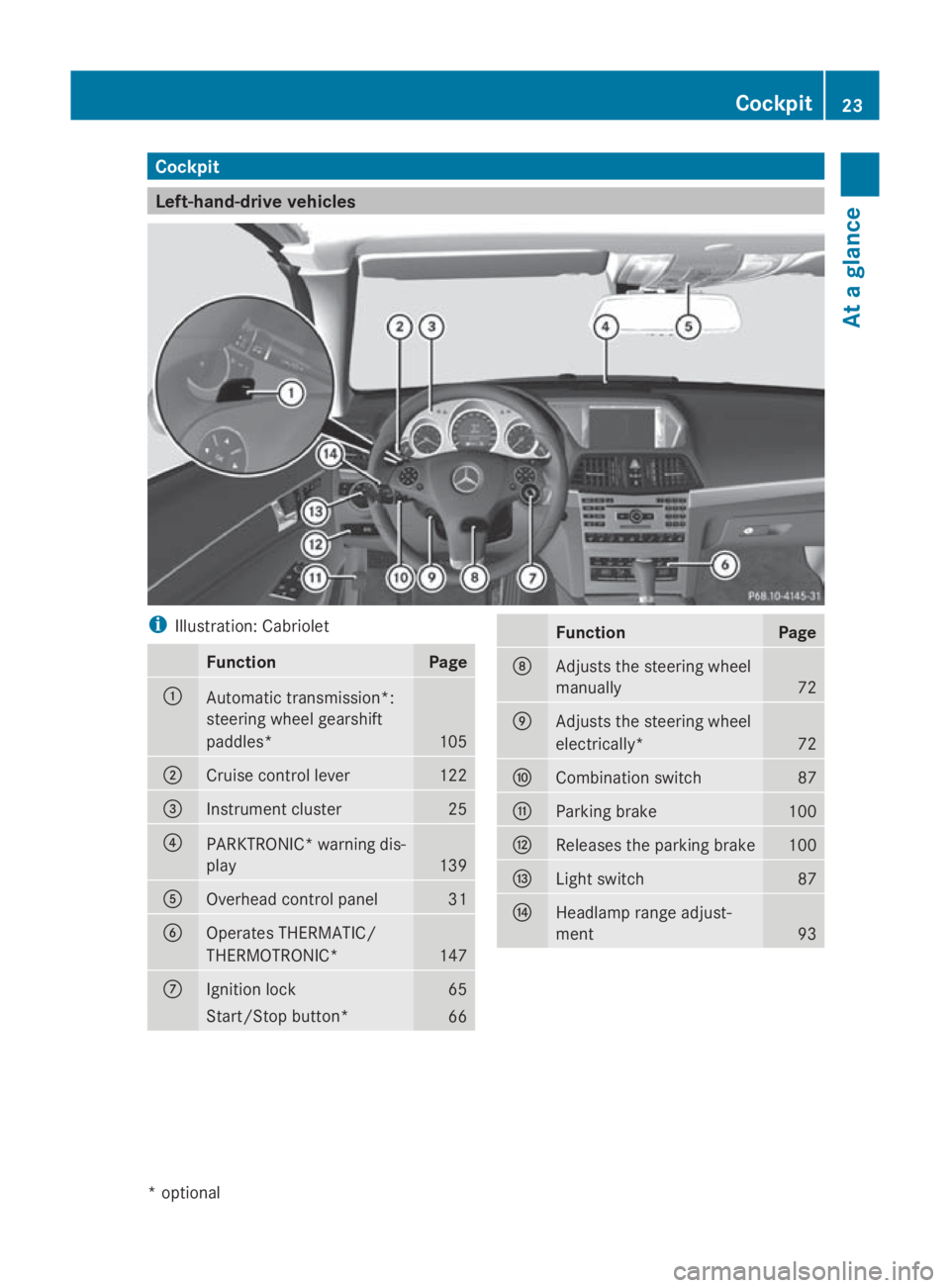
Cockpit
Left-hand-driv
evehicles i
Illustration: Cabriolet Function Page
0046
Automatic transmission*:
steering wheel gearshift
paddles* 105
0047
Cruise control lever 122
008A
Instrumen
tcluster 25
0088
PARKTRONIC* warning dis-
play
139
0086
Overhead control panel 31
0087
Operate
sTHERMATIC/
THERMOTRONIC* 147
006E
Ignition lock 65
Start/Sto
pbutton* 66 Function Page
006F
Adjusts th
esteering wheel
manually 72
0070
Adjusts th
esteering wheel
electrically* 72
0071
Combination switch 87
0072
Parking brake 100
0073
Release
sthe parking brake 100
0074
Ligh
tswitch 87
0075
Headlamp range adjust-
ment
93Cockpit
23Atag lance
*optional
207_AKB
;2;3,en-GB
mkalafa ,V ersion: 2.11.8.1
2009-07-23T10:23:49+02:00
-Seite 23 Z
Page 27 of 313
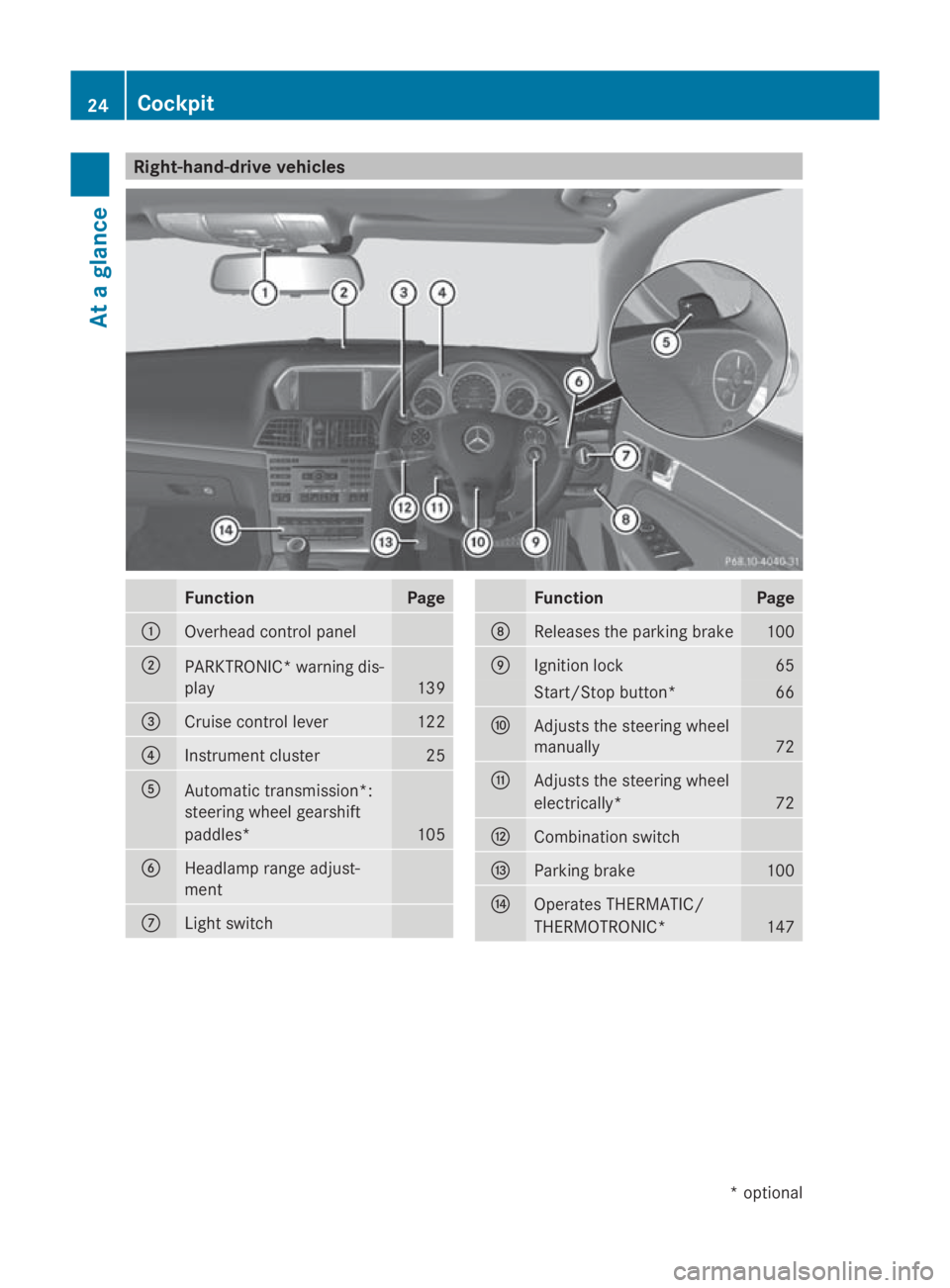
Right-hand-drive vehicles
Function Page
0046
Overhead control panel
0047
PARKTRONIC
*warning dis-
play 139
008A
Cruise control lever 122
0088
Instrumen
tcluster 25
0086
Automatic transmission*:
steering wheel gearshift
paddles*
105
0087
Headlamp range adjust-
ment
006E
Ligh
tswitch Function Page
006F
Release
sthe parking brake 100
0070
Ignition lock 65
Start/Sto
pbutton* 66
0071
Adjusts th
esteering wheel
manually 72
0072
Adjusts th
esteering wheel
electrically* 72
0073
Combination switch
0074
Parking brake 100
0075
Operate
sTHERMATIC/
THERMOTRONIC* 14724
CockpitAt
ag lance
*optional
207_AKB
;2;3,en-GB
mkalafa ,V ersion: 2.11.8.1
2009-07-23T10:23:49+02:00
-Seite 24
Page 101 of 313
Drivin
gand parking Starting th
eengine G
Risk of accident
Do no tplac ea ny objects in th edriver's foot-
well. If you use afloormat or carpet in the
driver's footwell, mak esuret hatitisc orrectly
secure dand that there is sufficien tclearance
fo rt he pedals.
Do no tplac es evera lfloormat sontopof one
another.
Loose objects or th efloormat scould other-
wise get caught between th epedals if you
accelerat eorbrake suddenly. You will then
no tbea ble to brake ,declutch or accelerate
as intended. Thi scould lead to accidents and
injury. G
Risk of poisoning
Never leav ethe engin erunning in enclosed
spaces. The exhaus tgases contain carbon
monoxide. Inhaling exhaus tfumes consti-
tute sah ealth hazard and could lead to loss
of consciousness or eve ndeath.
! Do no tdepress th eaccelerator pedal
when startin gthe engine.
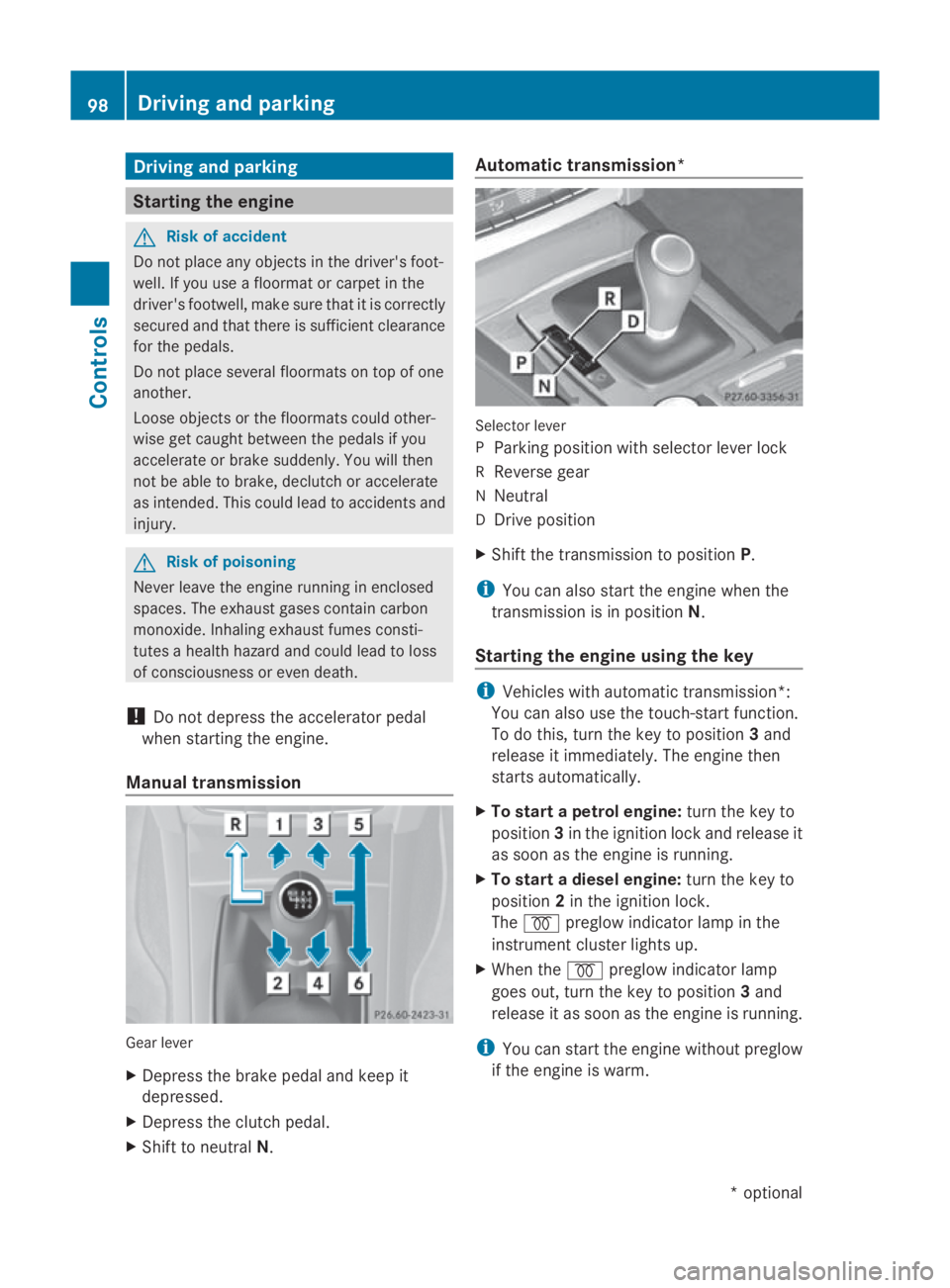
Manual transmission Gear lever
X
Depress th ebrake peda land keep it
depressed.
X Depress th eclutc hpedal.
X Shift to neutral N. Automatic transmission*
Selecto
rlever
P Parking position wit hselecto rlever lock
R Revers egear
N Neutral
D Drive position
X Shift th etransmissio ntoposition P.
i You can also start th eenginew hen the
transmissio nisinpositionN.
Starting th eengin eusing th ekey i
Vehicles wit hautomatic transmission*:
You can also use th etouch-start function.
To do this, turn th ekeyto position 3and
release it immediately. The engin ethen
start sautomatically.
X To star tapetrolengine: turn thekeyto
position 3in th eignition loc kand release it
as soo nastheengin eisrunning.
X To star tadiesel engine: turn thekeyto
position 2in th eignition lock.
The 0028 preglo windicator lamp in the
instrumen tcluster lights up.
X Whe nthe 0028 preglo windicator lamp
goe sout,tur nt he keyt op osition 3and
release it as soo nastheengin eisrunning.
i You can start th eenginew ithout preglow
if th eengineisw arm. 98
Driving an
dpark ingCont rols
*optio nal
207_AKB; 2; 3, en-GB
mkalafa
,V ersion: 2.11.8.1
2009-07-23T10:23:49+02:00
-Seite 98
Page 102 of 313
Starting the engine using KEYLESS-
GO* G
Risk of injury
Your vehicle can be started using avalid KEY-
LESS-GO* key. For this reason, children
should never be left unsupervised in the vehi-
cle. Always take the key with you when leaving
the vehicle, even if you are only leaving it for
as hort time.
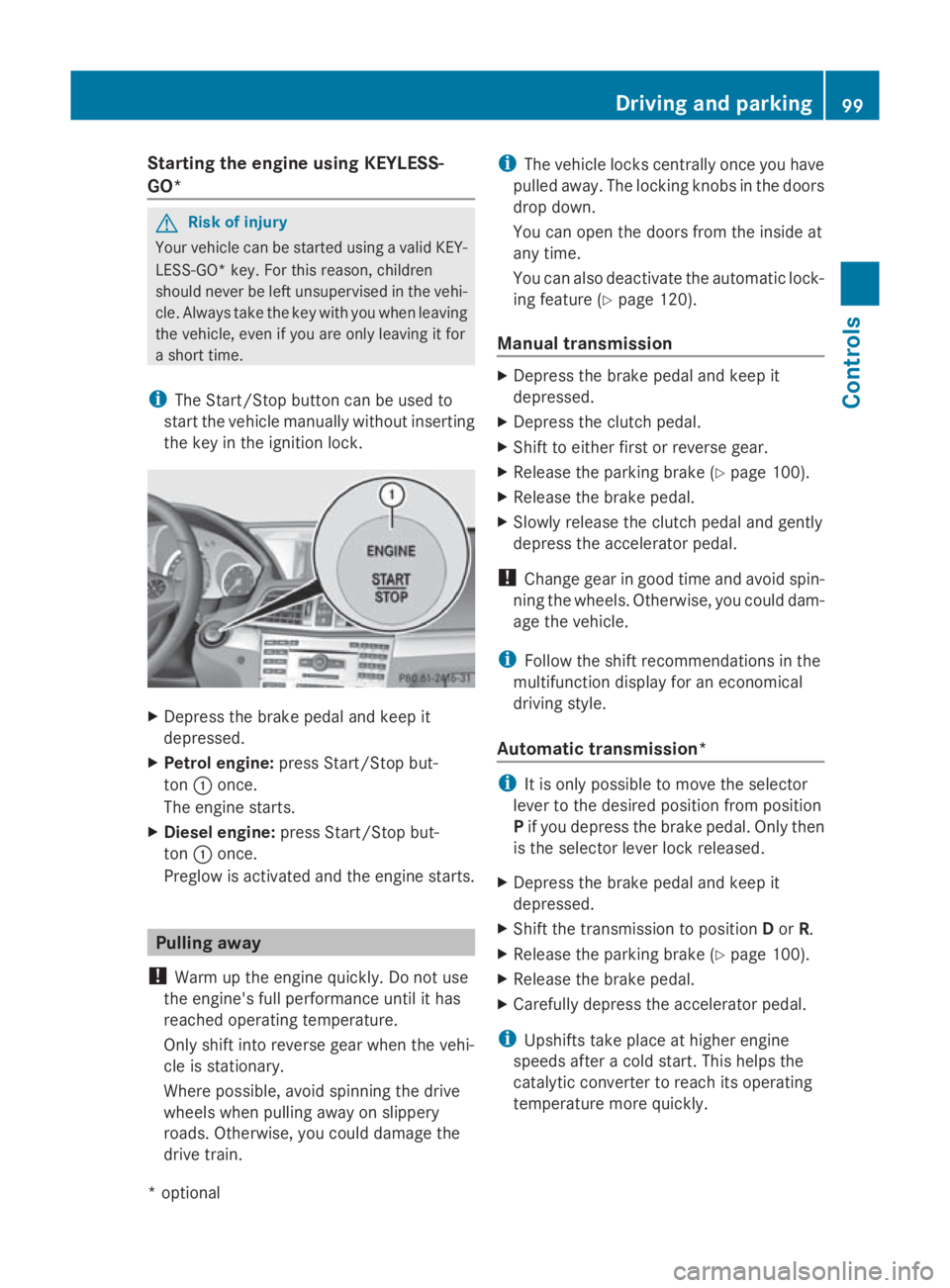
i The Start/Stop button can be used to
start the vehicle manually without inserting
the key in the ignition lock. X
Depress the brake pedal and keep it
depressed.
X Petrol engine: press Start/Stop but-
ton 0046once.
The engine starts.
X Diesele ngine:press Start/Stop but-
ton 0046once.
Preglow is activated and the engine starts. Pulling away
! Warm up the engine quickly. Do not use
the engine's full performanc euntil it has
reached operating temperature.
Only shift into reverse gear when the vehi-
cle is stationary.
Where possible, avoid spinning the drive
wheels when pulling away on slippery
roads. Otherwise, you could damage the
drive train. i
The vehicle locks centrally once you have
pulleda way.The locking knobs in the doors
drop down.
You can open the doors from the inside at
any time.
You can also deactivate the automatic lock-
ing feature (Y page 120).
Manual transmission X
Depress the brake pedal and keep it
depressed.
X Depress the clutch pedal.
X Shift to either first or reverse gear.
X Release the parking brake (Y page 100).
X Release the brake pedal.
X Slowly release the clutch pedal and gently
depress the accelerator pedal.
! Change gear in good time and avoid spin-
ning the wheels. Otherwise, you could dam-
age the vehicle.
i Follow the shift recommendations in the
multifunction display for an economical
driving style.
Automatic transmission* i
It is only possible to move the selector
lever to the desired position from position
P if you depress the brake pedal. Only then
is the selector lever lock released.
X Depress the brake pedal and keep it
depressed.
X Shift the transmission to position Dor R.
X Release the parking brake (Y page 100).
X Release the brake pedal.
X Carefull ydepress the accelerator pedal.
i Upshifts take place at higher engine
speeds after acold start. This helps the
catalytic converter to reach its operating
temperature more quickly. Driving and parking
99Controls
*optional
207_AKB; 2; 3, en-GB
mkalafa,
Version: 2.11.8.1 2009-07-23T10:23:49+02:00-Seite 99 Z
Page 104 of 313
Switching off the engine
G
Risk of accident
If the engine is not running, there is no power
assistance for the steering and brakes. Steer-
ing and braking will then require significantly
greater effort.
As aresult, you might lose control of the vehi-
cle, cause an accident and injure yourself and
others.
Therefore, do not switch off the engine while
you are driving.
Vehicles with manualt ransmission X
Shift to either first or reverse gear.
X Turn the key to position 0in the ignition
lock and remove it.
The immobiliser is activated.
Vehicles with automatic transmission* X
Shift the transmission to position P.
Using the key
X Turn the key to position 0in the ignition
lock and remove it.
The immobiliser is activated.
i The key can only be removed when the
selector lever is in position P.
Using KEYLESS GO*
X Press the Start/Stop button (Y page 66).
The engine stops and all the indicator
lamps in the instrumen tcluster go out
(Y page 25).
i The engine can be turned off while the
vehicle is in motion by pressing and holding
the Start/Stop button for three seconds. Transmission
Notes on the transmission
G
Risk of accident
The movement of the pedals must not be
impaired in any way. Do not keep any objects
in the driver's footwell. Make sure that floor-
mats or carpets are correctly secured and
that there is sufficient clearance for the ped-
als.
Do not place several floormats on top of one
another. G
Risk of accident
Do not change down for additional engine
braking on aslippery road surface. This could
cause the drive wheels to lose their grip and
the vehicle could skid. This could cause you
to lose control of your vehicle and cause an
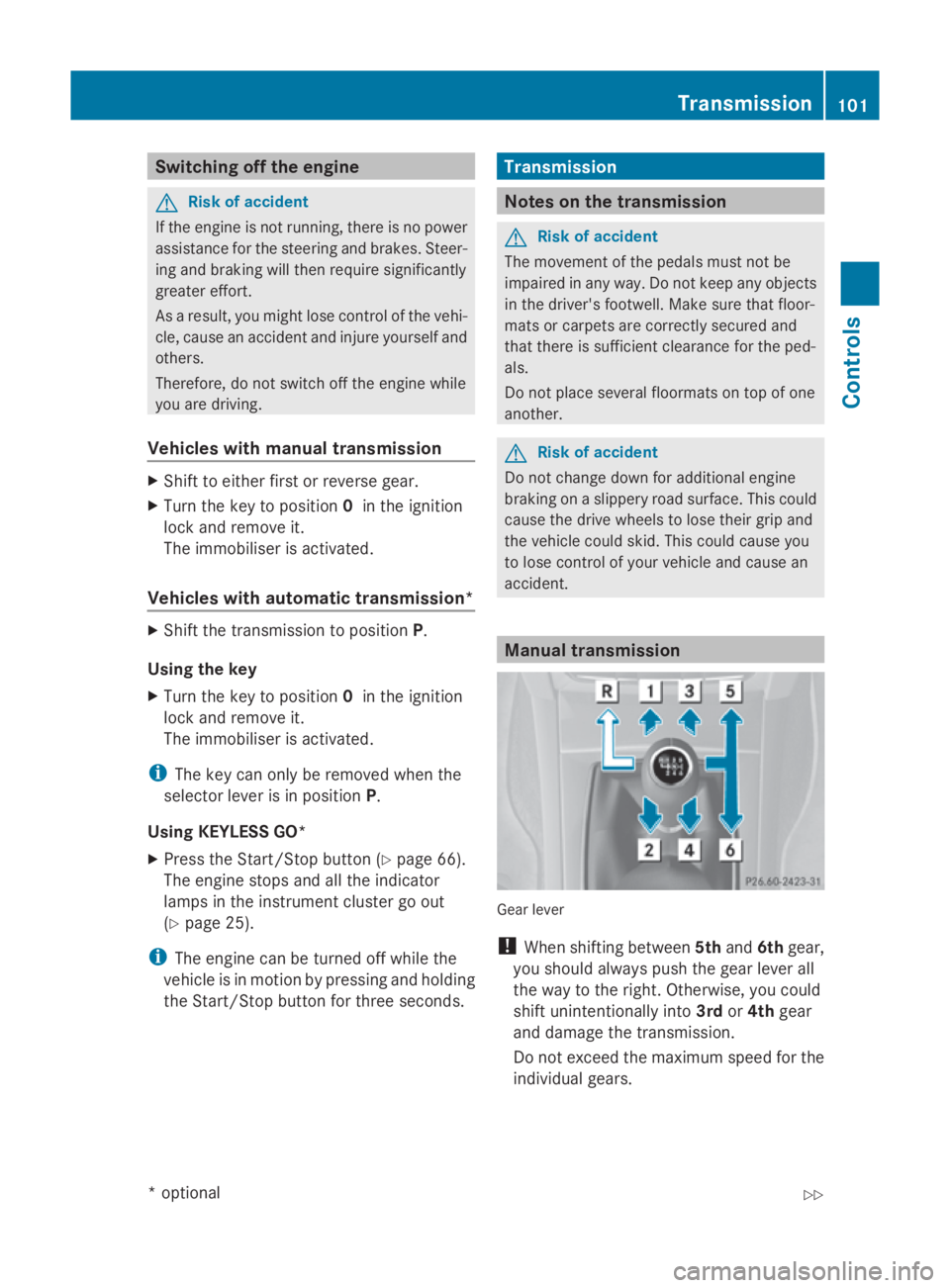
accident. Manual transmission
Gear lever
!
When shifting between 5thand 6thgear,
you should always push the gear lever all
the way to the right. Otherwise, you could
shift unintentionally into 3rdor4th gear
and damage the transmission.
Do not exceed the maximum speed for the
individual gears. Transmission
101Controls
*optional
207_AKB; 2; 3, en-GB
mkalafa,
Version: 2.11.8.1 2009-07-23T10:23:49+02:00-Seite 101 Z
Page 108 of 313
Kickdown
Use kickdown for maximum acceleration.
X Depress th eaccelerato rpedal beyon dthe
pressur epoint.
The transmission shifts to alower gear
depending on th eengines peed.
X Eas eoff th eaccelerato rpedal once the
desired spee disreached.
The automatic transmission shifts bac kup.
Traile rtowing
X When driving up gradients ,kee ptot hemid-
dle of th eengines pee drange.
X Shift down to shif trange 3or
2 (Y page 103) depending on th einclin eof
th eu phill or downhill gradient, eve nif
cruise control is activated. Steering wheel gearshift paddles*
and manua ldrive program* G
Ris
kofa ccident
Do no tchang ed own for additional engine
braking on aslippery road surface .This could
caus ethe driv ewheels to lose their gri pand
th ev ehicl ecould skid.
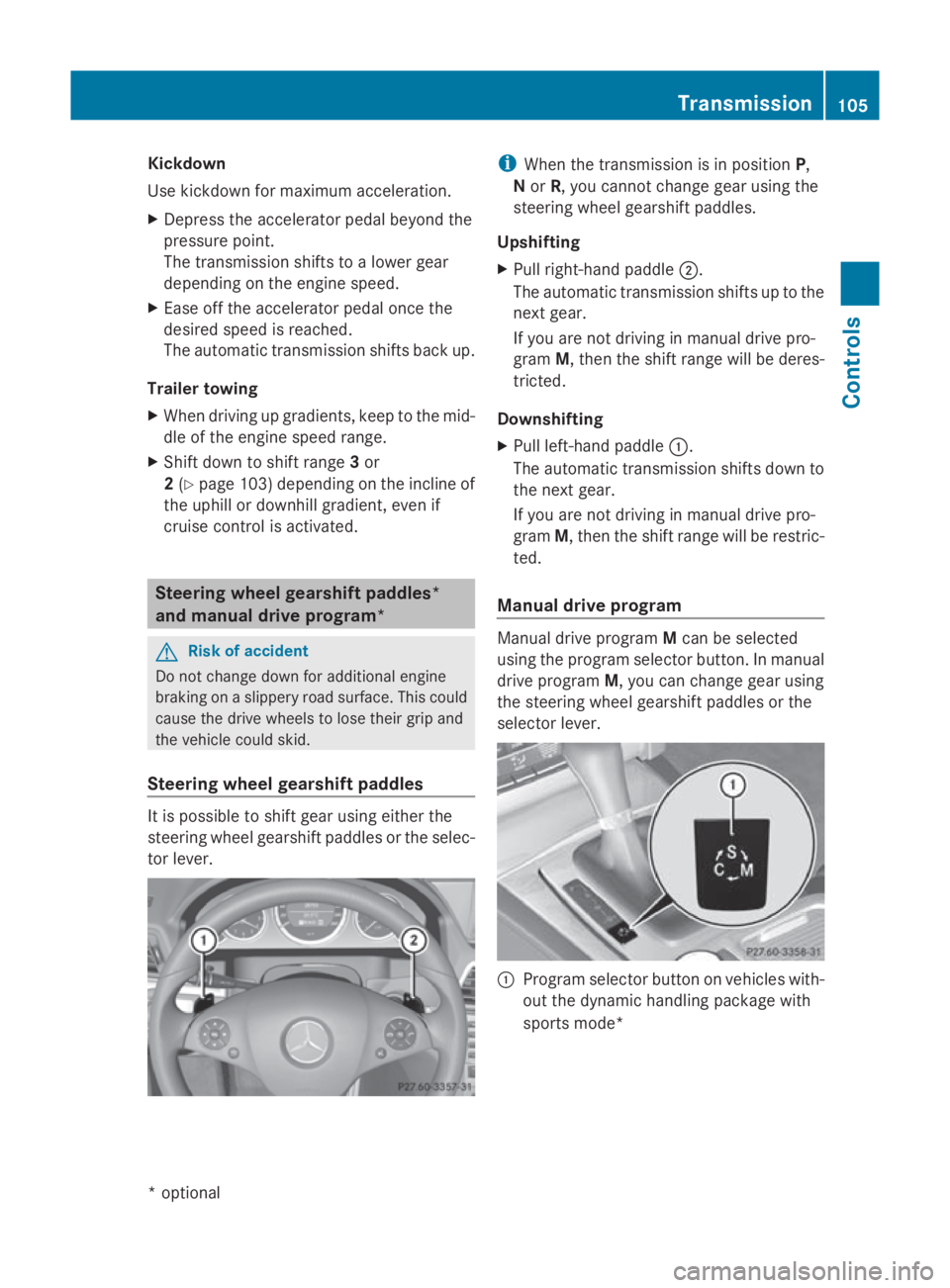
Steering wheel gearshift paddles It is possible to shif
tgear usin geither the
steering wheel gearshif tpaddle sortheselec-
to rlever. i
When th etransmission is in position P,
N or R,y ou canno tchang eg ear usin gthe
steering wheel gearshif tpaddles.
Upshifting
X Pull right-hand paddle 0047.
The automatic transmission shifts up to the
next gear.
If you are no tdriving in manual driv epro-
gram M,thent he shif trange will be deres-
tricted.
Downshifting
X Pull left-hand paddle 0046.
The automatic transmission shifts down to
th en extg ear.
If you are no tdriving in manual driv epro-
gram M,thent he shif trange will be restric-
ted.
Manua ldrive program Manual driv
eprogram Mcan be selected
usin gthe program selector button. In manual
driv eprogram M,you can chang egear using
th es teering wheel gearshif tpaddle sorthe
selector lever. 0046
Program selector butto nonvehicles with-
out th edynamic handlin gpackage with
sports mode* Transmission
105Controls
*optio nal
207_AKB; 2; 3, en-GB
mkalafa
,V ersion: 2.11.8.1
2009-07-23T10:23:49+02:00
-Seite 105 Z
Page 109 of 313
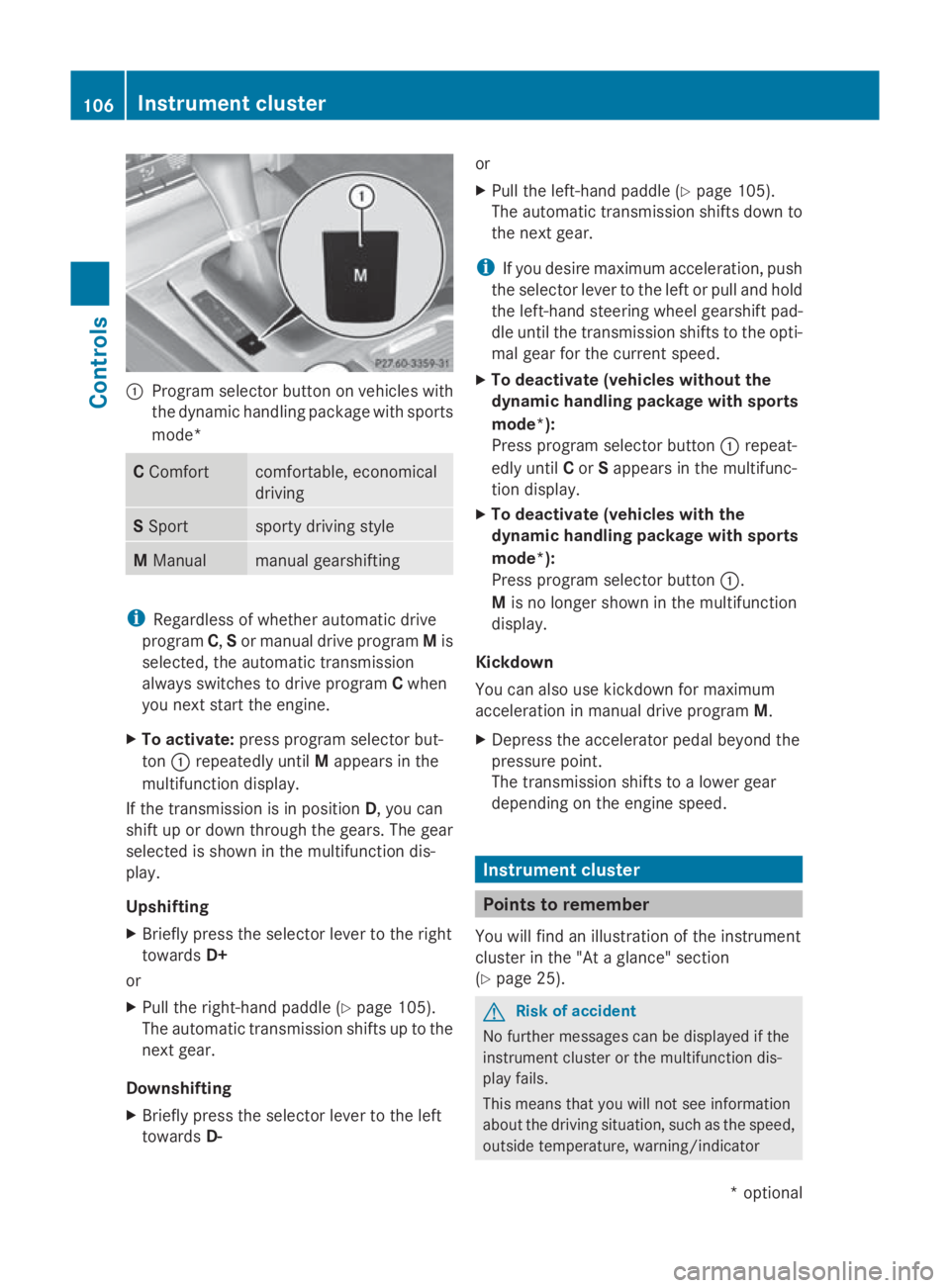
0046
Program selector button on vehicles with
the dynamic handling package with sports
mode* C
Comfort comfortable, economical
driving
S
Sport sporty driving style
M
Manual manual gearshifting
i
Regardless of whether automatic drive
program C,Sor manual drive program Mis
selected, the automatic transmission
alway sswitches to drive program Cwhen
you next start the engine.
X To activate: press program selector but-
ton 0046repeatedly until Mappears in the
multifunction display.
If the transmission is in position D,you can
shift up or down through the gears. The gear
selected is shown in the multifunction dis-
play.
Upshifting
X Briefly press the selector lever to the right
towards D+
or
X Pull the right-hand paddle ( Ypage 105).
The automatic transmission shifts up to the
next gear.
Downshifting
X Briefly press the selector lever to the left
towards D- or
X
Pull the left-hand paddle ( Ypage 105).
The automatic transmission shifts down to
the next gear.
i If you desire maximum acceleration ,push
the selector lever to the left or pull and hold
the left-hand steerin gwheel gearshift pad-
dle until the transmission shifts to the opti-
mal gear for the curren tspeed.
X To deactivate (vehicles without the
dynamic handling package with sports
mode*):
Press program selector button 0046repeat-
edly until Cor Sappears in the multifunc-
tion display.
X To deactivate (vehicles with the
dynamic handling package with sports
mode*):
Press program selector button 0046.
M is no longer shown in the multifunction
display.
Kickdown
You can also use kickdown for maximum
acceleration in manual drive program M.
X Depress the accelerator pedal beyond the
pressure point.
The transmission shifts to alower gear
depending on the engine speed. Instrument cluster
Points to remember
You will find an illustration of the instrument
cluster in the "At aglance" section
(Y page 25). G
Risk of accident
No further messages can be displayed if the
instrument cluster or the multifunction dis-
play fails.
This means that you will not see information
about the driving situation, such as the speed,
outside temperature, warning/indicator 106
Instrument clusterControls
*o
ptional
207_AKB; 2; 3, en-GB
mkalafa,
Version: 2.11.8.1 2009-07-23T10:23:49+02:00-Seite 106