ad blue MERCEDES-BENZ E-Class COUPE 2011 C207 Comand Manual
[x] Cancel search | Manufacturer: MERCEDES-BENZ, Model Year: 2011, Model line: E-Class COUPE, Model: MERCEDES-BENZ E-Class COUPE 2011 C207Pages: 194, PDF Size: 6.42 MB
Page 43 of 194

COMAN
Dfea tures <0021002100210021002100210021002100210021002100210021002100210021
002100210021002100210021002100210021002100210021002100210021V 42
Display settings <0021002100210021002100210021002100210021002100210021002100210021
0021002100210021002100210021002100210021002100210021002100210021
00210021> 42
Tim esett ings .................. .................. ... 43
Fuel consump tiondispla y<0021002100210021002100210021002100210021002100210021002100210021
00210021V 44
Text readersett ings .................. .......... 44
Voice Control System settings .......... 45
Bluet ooth®
sett ings <0021002100210021002100210021002100210021002100210021002100210021
002100210021002100210021002100210021002100210021V 46
System language settings <0021002100210021002100210021002100210021002100210021002100210021
00210021V 47
Reset function <0021002100210021002100210021002100210021002100210021002100210021
0021002100210021002100210021002100210021002100210021002100210021
00210021002100210021> 47 41System
settings
Page 48 of 194

At
the end ofthe first part, youwi llsee a
pro mpt asking whethe ryou wish tobegin the
second part.
X Select Yes or
No and
press Wtoconf irm.
If you select No ,
individuali zationwillbe
canceled. Thedata from thefirst part is
stored automatically.
If you select Yes ,
the second partwillbegin.
<001E000E0004000900160009000400150001000C0009001C000100140009000F
000EV iscompleted atthe end of
the second part.Youwillsee amessage to
this effect .The data from thesecond partis
stored automatically. Cancelin
gthe first orsecond partof
individ ualization X
Conf irmCanc el by
press ingWthe
COMAN Dcon troller.
Ap rompt appears asking whethe ryou
really dowish tocancel.
X Select Yes or
No and
press Wtoconf irm.
If you select Yes ,
individuali zationwillbe
canceled. Thedata from thepart canceled
is not stored.
If you select No ,
the current partbegins
again.
Dele ting existing individualiza tiondata X
Press theW button .
X Select Settings by
turnin gcVd the
COMAND controller andpress Wto
conf irm. X
Select Linguatronic and
press Wto
conf irm.
X Select Delete Individualiz ation and
press Wtoconf irm.
Ap rompt appears asking whethe ryou
really wishtodelete.
X Select Yes or
No and
press Wtoconf irm.
If you select No ,
the process willbeaborted.
If you select Yes ,
the individuali zationis
deleted. Youwillsee amessage tothis
effect .
<00340003001400090016000100140009000E0007002100040005000100030014
0009001600010014B ing
individualiza tion X
Press theW button .
X Select Settings by
turnin gcVd the
COMAND controller andpress Wto
conf irm.
X Select Linguatronic and
press Wto
conf irm.
X Select Individualiz ationOn and
press
W toconf irm.
You have switched individuali zationonO
or off ª. Bluetooth
®
settings General
informationabout
Bluetooth ®
Bluetooth ®
-capable devices,e.g.mobile
phones, mustsupport Hands-FreeProfile 1.0
or above inorder tobe conn ected to
COMAND. EveryBluetooth ®
device hasits
own specific Bluetooth ®
name.
Bluetooth ®
techn ology isthe standard for
short- range wireless datatrans mission ofup
to approximately 10meters. Bluetooth ®
allows, forexample, theexchan geofvCards.
Bluetooth ®
is aregistered trademark of
Bluetooth SpecialInterest Group (SIG)Inc. 46
Bluetooth ®
settingsSystem settings
Page 49 of 194
Acti
vating/d eactivating Blu eto oth ®
X Pre sstheW button.
The systemmen uappear s.
X Se lec tSet tin gs by
turnin gcVd the
COMA NDcontrol ler and pressW to
co nfirm .
X Se lec tAct iva teBluetooth and
press
W toconfirm .
This switches Blue tooth®
on O oroff ª. Sys
tem langua geset tings
This function allows youtodet erm inethe
lan guage forthemen udisp lays andthe
nav igat ionann oun cemen ts.T he selected
language affectsthecharacters availablefor
entr y.
When yousetthe system language ,the
language ofthe Voice Control System will
change accordingly. Ifthe selected language
is not supported bythe Voice Control System,
"English" willbeselected.
X Press theW button.
X Select Settings by
turning cVdthe
COMAND controller andpress Wto
confirm .
X Select Language and
press Wtoconfirm .
The listoflanguage sappea rs.The #dot
indicates thecurrent setting. X
Select thelanguage byturning cVdthe
COMAND controller andpress Wto
confirm .
COMAND loadstheselected language and
sets it. Reset
function
You canreset COMAND tothe factory
settin gs.Amon gstother things, thiswill
delete allpersonal data(e.g.station presets,
address bookentries, entriesinthe
destination memoryandinthe listofprevious
destinations inthe navigation system).
Resetting isrecommen dedbefore sellingor
transf erring ownership ofyour vehicle, for
example.
Data onthe intern alhard drive, e.g.music
files inthe MUSIC REGISTER, willbedeleted.
You canalso delete musicfilesfrom the
MUSIC REGISTER usingthe"Delete allmusic
files" (Ypage 146)function.
X Press theW functionbutton.
X Select Settings by
turning cVdthe
COMAND controller andpress Wto
confirm .
X Select Reset and
press Wtoconfirm .
Ap rompt appears asking whethe ryou wish
to reset.
X Select Yes or
No and
press Wtoconf irm.
If you select No ,
the process willbeaborted.
If you select Yes ,
a prompt willappear again
asking whether youreally wishtoreset.
X Select Yes or
No and
press Wtoconf irm.
If you select Yes ,
a message willbeshown.
COMAND isreset andrestart ed.
If you select No ,
the process willbeaborted. Reset
function
47Systemsettings
Page 72 of 194
For
this reason, youmus talways observe
applicable roadandtraffic rules and
regulat ionsdurin gyour journey. Road and
tr affic rules andregulat ionsalways have
prior ityover thenavig ation command s
gene ratedby the syst em.
Route guidanc ebegin sonc ear oute hasbeen
calculated (Ypage 56).
COMAND guidesyoutoyour destinat ionby
means ofnavigation commandsinthe form
of audib lenavigation announcementsand
route guidance displays.
The route guidance displayscan only beseen
if the display isswitched tonavigation mode.
If you donot follow thenavigation
announc ementsor ifyou leave thecalculated
route, COMAND automatically calculatesa
new route tothe destinat ion.
If the digital mapcontains thecorrespon ding
inform ation,thefollowing applies:
R when selectin garoute, COMAND triesto
avoid roads thatonly have limited access,
e.g. roads closed tothrough trafficandnon-
residents .
R roads thathave timerestriction s(e.g.
closed onSundays andpublic holiday s)are
avoided forroute guidance. Change
ofdirection
Introdu ction Changes
ofdirection havethree phases:
R preparation phase
R announc ementphase
R change- of-directionphase
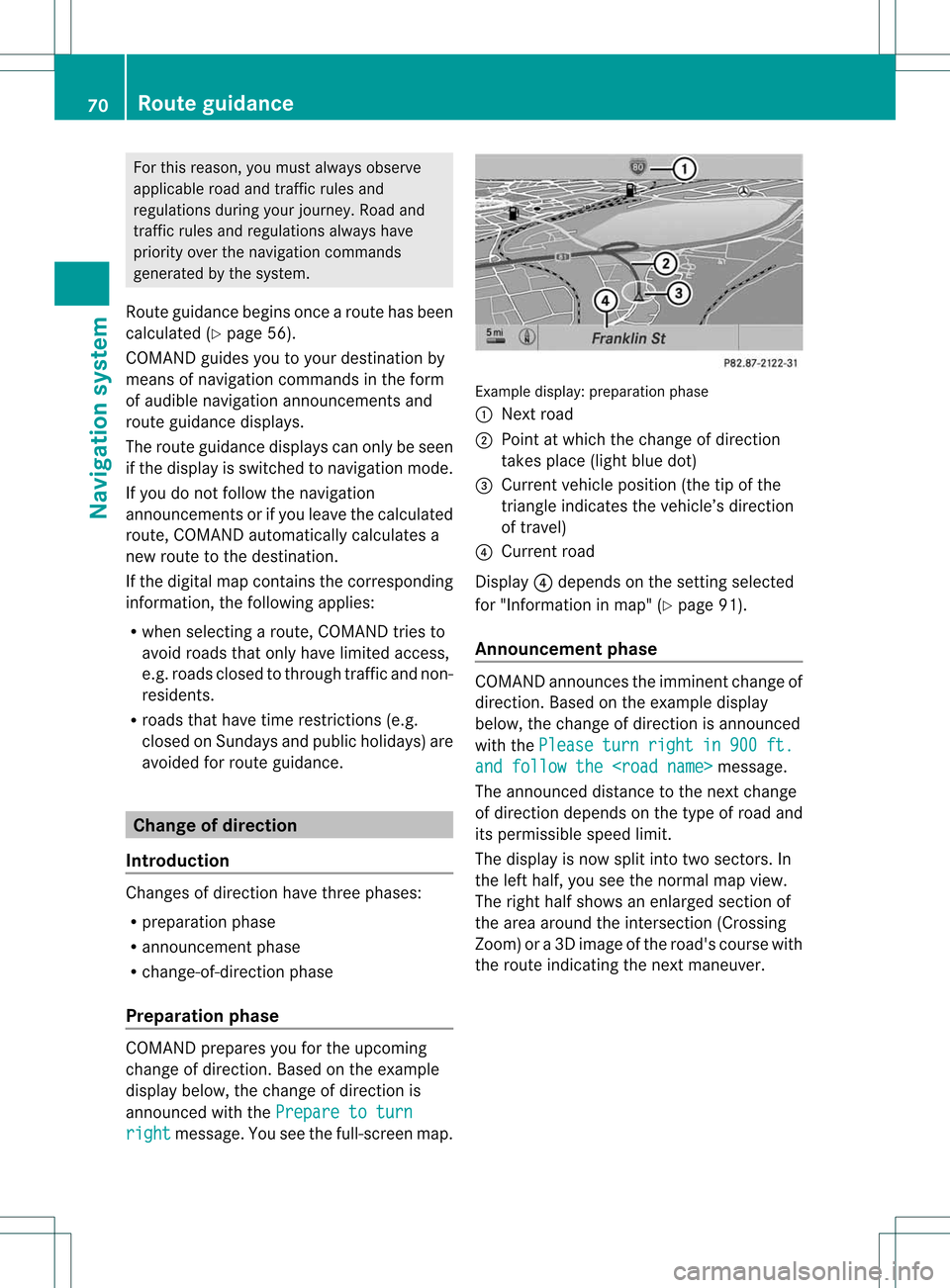
Prepa ration phase COMAND
preparesyouforthe upcoming
change ofdirection .Based ontheex ample
displ aybelow, thech ang eof dire ction is
ann oun ced withth ePre pareto turn rig
ht mes
sage. Youseethefull- scree nm ap. Ex
ample display:preparat ionphas e
: Nex troad
; Poin tatw hich thechange ofdirection
takes place(lightbluedot)
= Current vehicleposition (thetipofthe
triangle indicates thevehicle’s direction
of travel)
? Current road
Display ?depends onthe settin gselected
for "Information inmap" (Ypage 91).
Announc ementphase COMAND
announces theimminent changeof
direction. Basedonthe example display
below, thechange ofdirection isannounced
with thePlease turn right in 900 ft.
and
follow the
The announced distancetothe next change
of direction dependsonthe type ofroad and
its permissible speedlimit.
The displa yis now split intotwosectors. In
the left half, youseethenormal mapview.
The right halfshows anenlarged sectionof
the area around theintersec tion(Crossing
Zoom) ora3D image ofthe road's course with
the route indicating thenext maneuver. 70
Route
guidanceNavigat ionsystem
Page 73 of 194
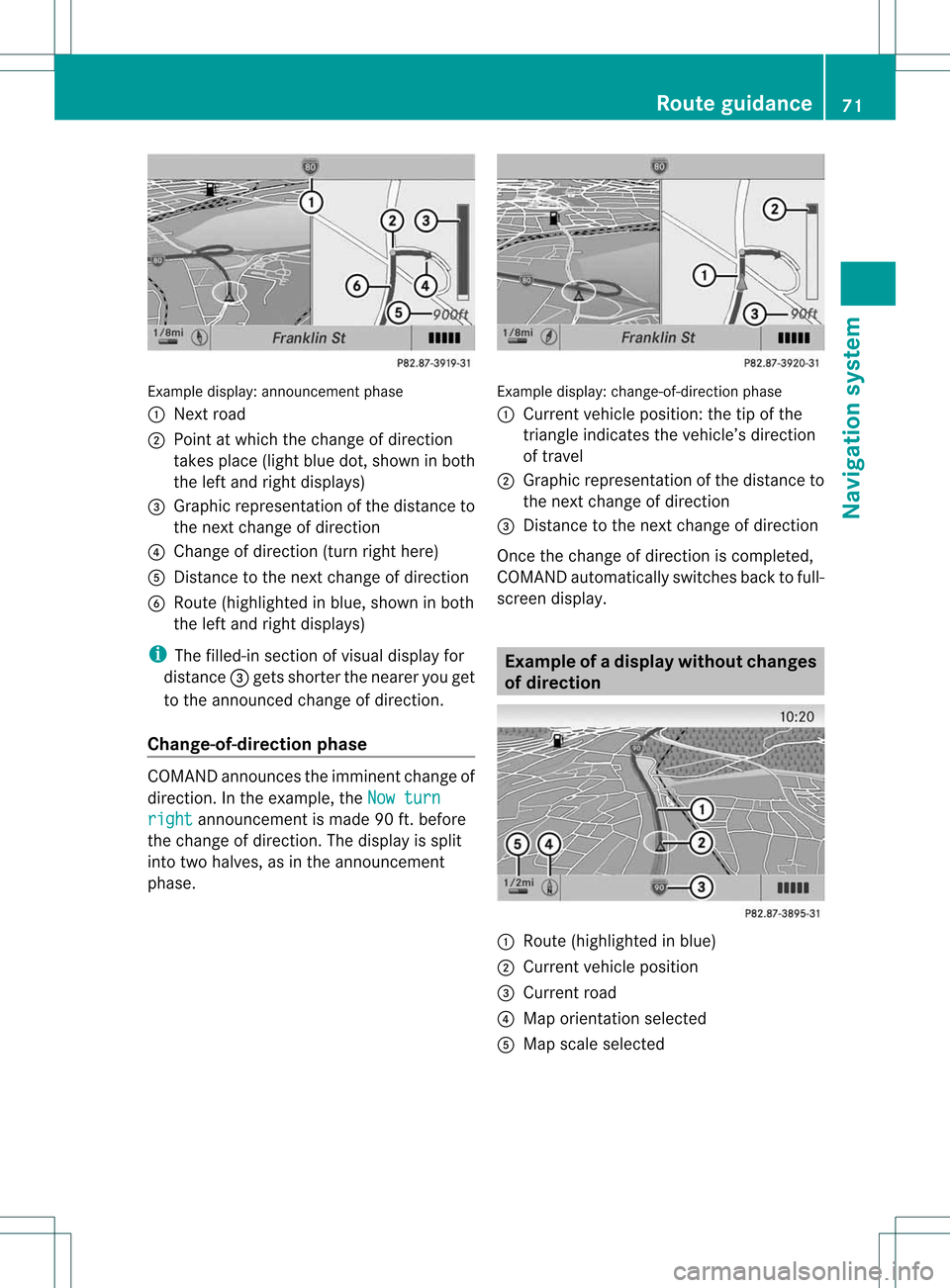
Exam
ple displ ay:a nnou nceme ntpha se
: Next road
; Pointatwh ich the change ofdirecti on
take spl ace (lig ht blue dot, showninboth
the left and right displ ays)
= Graphicrepresent ationofthe distanc eto
the nextchange ofdirect ion
? Change ofdirect ion(turn righthere)
A Dist ance tothe nextchange ofdirect ion
B Route (highlighted inblue, shown inboth
the left and right displays)
i The filled-in sectionofvisual display for
distanc e= gets short erthe nearer youget
to the announ cedchange ofdirect ion.
Change-of- direction phase COMAND
announcestheimminen tchange of
direction. Inthe example, theNow turn right announcemen
tis made 90ft.before
the change ofdirection. Thedispla yis split
into twohalves, asinthe announcemen t
phase. Example
display:change-of-direct ionphase
: Current vehicleposition: thetipofthe
triangle indicates thevehicle’s direction
of travel
; Graphic representation ofthe distance to
the next change ofdirection
= Distanc eto the next change ofdirection
Once thechange ofdirection iscompleted,
COMAND automatically switchesbacktofull-
screen display. Example
ofad ispla ywithout changes
of dir ection :
Route (highlight edinblue)
; Curren tvehicle position
= Current road
? Map orient ationselect ed
A Map scale select ed Rout
eguida nce
71Navigation system Z
Page 74 of 194
Lane
recom mendation s
Over view On
mult ilane roads ,COMA NDcan display
lane recomm endatio nsfor thenex tchange of
direction. Thecorresponding datamust be
availa bleinthe digital map.
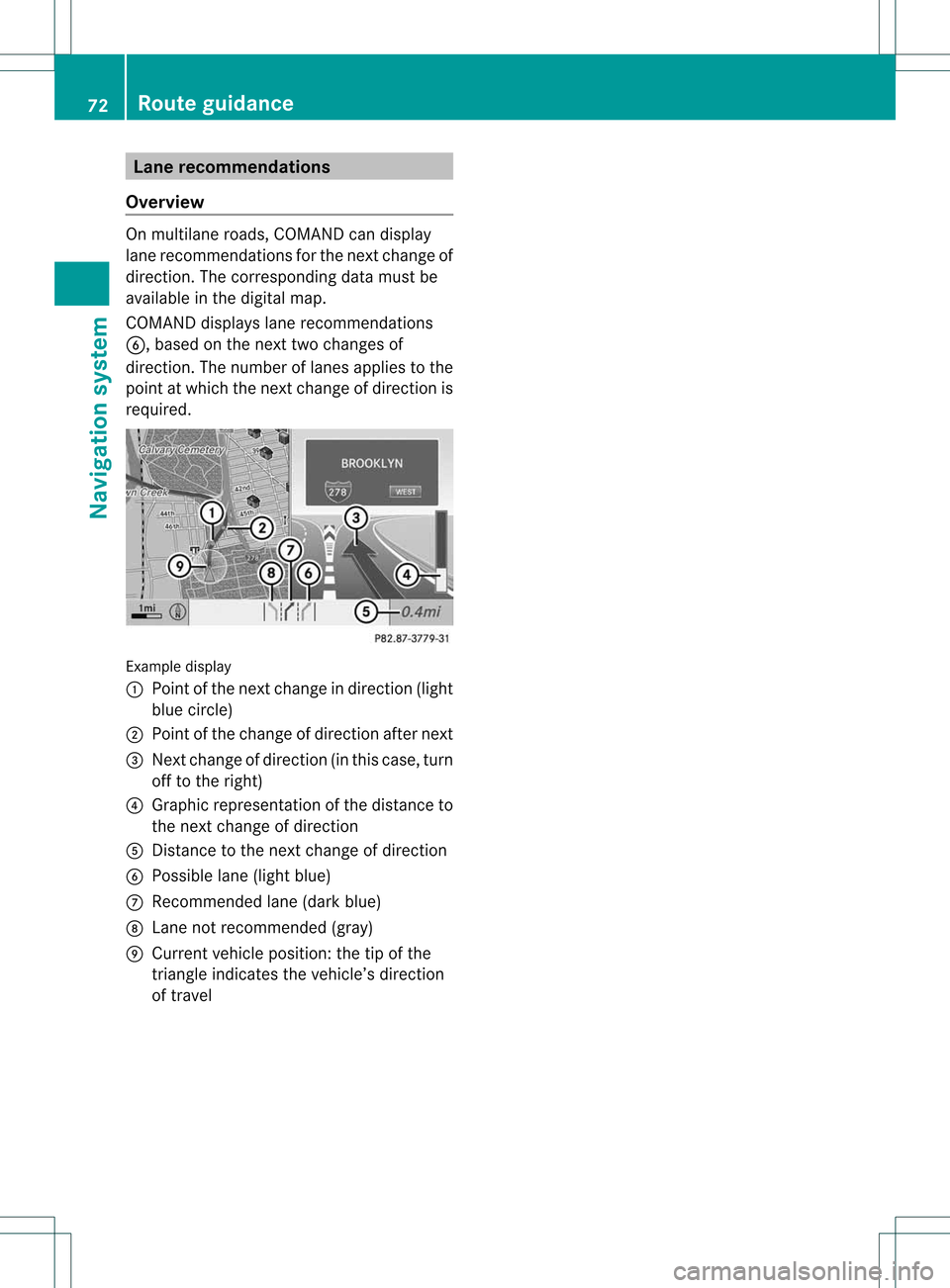
COMAND displayslane recommen dations
B, based onthe next twochanges of
direction. Thenumber oflanes appliestothe
point atwhich thenext change ofdirection is
required. Example
display
: Point ofthe next change indirection (light
blue circle)
; Point ofthe change ofdirection afternext
= Next change ofdirection (inthis case, turn
off tothe right)
? Graphic representat ionofthe distance to
the next change ofdirection
A Distanc eto the next change ofdirection
B Possible lane(light blue)
C Recommended lane(dark blue)
D Lane notrecommen ded(gray)
E Current vehicleposition: thetipofthe
triangle indicates thevehicle’s direction
of travel 72
Route
guidanceNavigat ionsystem
Page 75 of 194
Disp
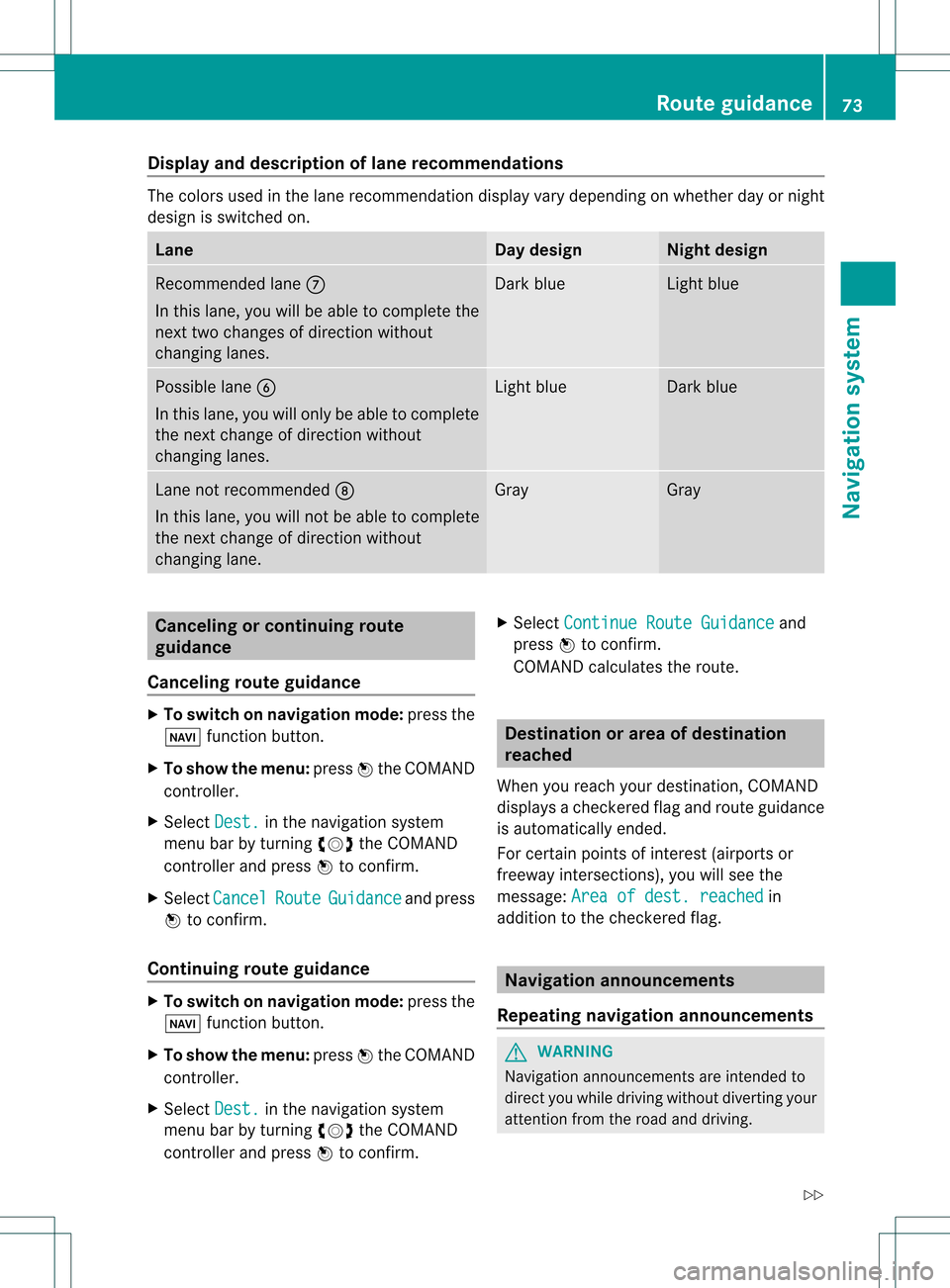
layandd escri ption oflane recom mendation s The
colors used inthelane recomm endatio ndisplay varydepen dingonwhet herday ornigh t
design isswitc hedon. Lane Day
design Nigh
tdesign Recom
mendedlane C
In this lane, youwillbeable tocom pleteth e
nex ttwo chan gesofdirec tionw itho ut
chan ginglanes. Dar
kblue Light
blue Possib
lelane B
In this lane, youwillonly beable tocom plete
the nextchange ofdirection without
changing lanes. Light
blue Dark
blue Lane
notrecommen dedD
In this lane, youwillnotbeable tocomplete
the next change ofdirection without
changing lane. Gray Gray
Cancel
ingorcontinuing route
guidance
Cancel ingroute guidance X
To switch onnavigation mode:pressthe
Ø functionbutton.
X To show themenu: pressWthe COMAND
cont roller.
X Select Dest. in
the navigation system
menu barbyturning cVdtheCOMAND
cont roller andpress Wtoconfirm .
X Select Cancel Route Guidance and
press
W toconfirm .
Continuing routeguidance X
To switch onnavigation mode:pressthe
Ø functionbutton.
X To show themenu: pressWthe COMAND
cont roller.
X Select Dest. in
the navigation system
menu barbyturning cVdtheCOMAND
cont roller andpress Wtoconfirm . X
Select Continue RouteGuidance and
press Wtoconfirm .
COMAND calculates theroute. Destination
orarea ofdestination
reached
When youreach yourdestination, COMAND
displa ysacheck eredflagand route guidance
is automatically ended.
For certain pointsofinterest (airports or
freeway intersections),youwillsee the
message: Areaofdest. reached in
addition tothe check eredflag. Navigat
ionannouncements
Repeating navigation announcements G
WARNING
Navigation announcemen tsare intended to
direct youwhile driving without diverting your
attent ionfrom theroad anddriving. Route
guidance
73Navigationsystem
Z
Page 77 of 194
X
To del ete the bloc ke ds ection: select
Del ete while
themess ageisshown and
pres sW tocon firm.
COMA NDcalc ulates therout ewitho utthe
block . Selecting
analterna tiveroute
With the"Alternativ erout e"func tion,rout es
oth erthan theorigin alone canbecalc ulated.
X To switch onnaviga tionmod e:press the
Ø function button.
X To show themenu :press Wthe COMA ND
con troller.
X Selec tRout e in
the navig ation system
men ubar byturnin gcVd theCOMA ND
con troller andpress Wtocon firm .
X Selec tAlte rnativeRoute and
press W
to con firm .
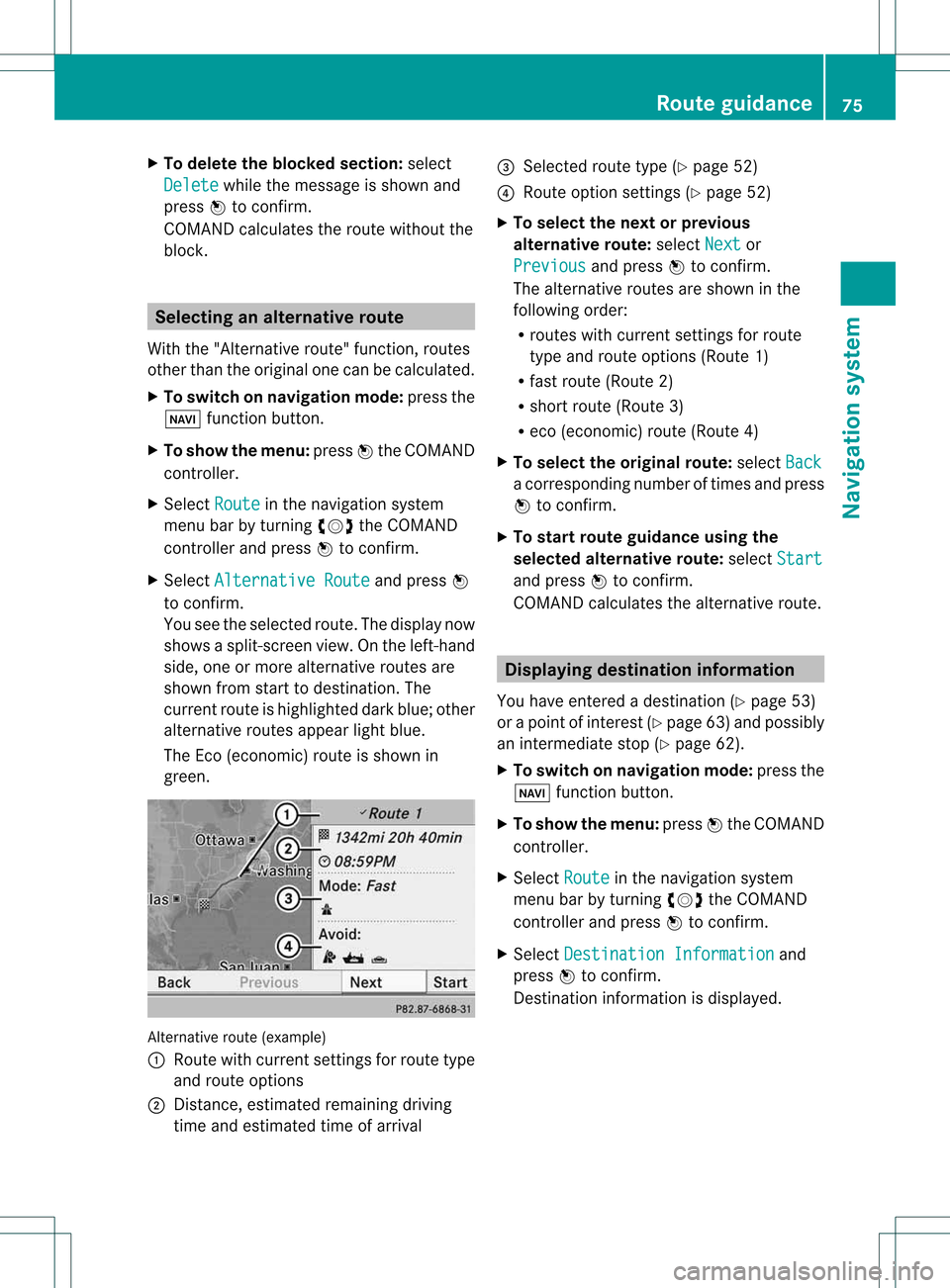
You seetheselec tedrout e.The display now
shows asplit -screen view. Onthe left-han d
side, oneormor ealter native rout esare
shown fromstart todest ination. The
curr entrout eis highligh teddark blue; other
alter native rout esappear lightblue.
The Eco(econ omic)rout eisshown in
green. Alternat
iveroute (example)
: Route withcurrent settings forroute type
and route options
; Distanc e,estimated remainingdriving
time andestimated timeofarrival =
Selected routetype(Ypage 52)
? Route option settings (Ypage 52)
X To selec tthe next orprevio us
alternativ eroute: selectNext or
Previo us and
press Wtoconfirm.
The alternative routesareshow nint he
following order:
R routes withcurrent settingsfor route
type androute options (Route1)
R fast route (Route2)
R short route (Route3)
R eco (economic) route(Route4)
X To selec tthe orig inal route: selectBack a
corresp ondingnumberoftimes andpress
W tocon firm .
X To sta rtrou teguid ance using the
selected alterna tiveroute:selec tStar t and
press Wtocon firm .
COMA NDcalc ulates thealter native rout e. Displa
yingdestinationinfor mation
You have entered adest ination(Y page 53)
or apoint ofint erest (Ypage 63)and possibly
an interme diate stop (Ypage 62).
X To switch onnaviga tionmod e:press the
Ø function butt on.
X To show themenu :press Wthe COMA ND
con troller.
X Selec tRout e in
the navig ation system
men ubar byturnin gcVd theCOMA ND
con troller andpress Wtocon firm .
X Selec tDest inationInformation and
press Wtocon firm .
Des tination inform ation isdisplayed. Rou
teguid ance
75Navigat ionsyst em Z
Page 79 of 194
nav
igati on anno uncements anddispl ayson
roa dsknow ntothe system. Route
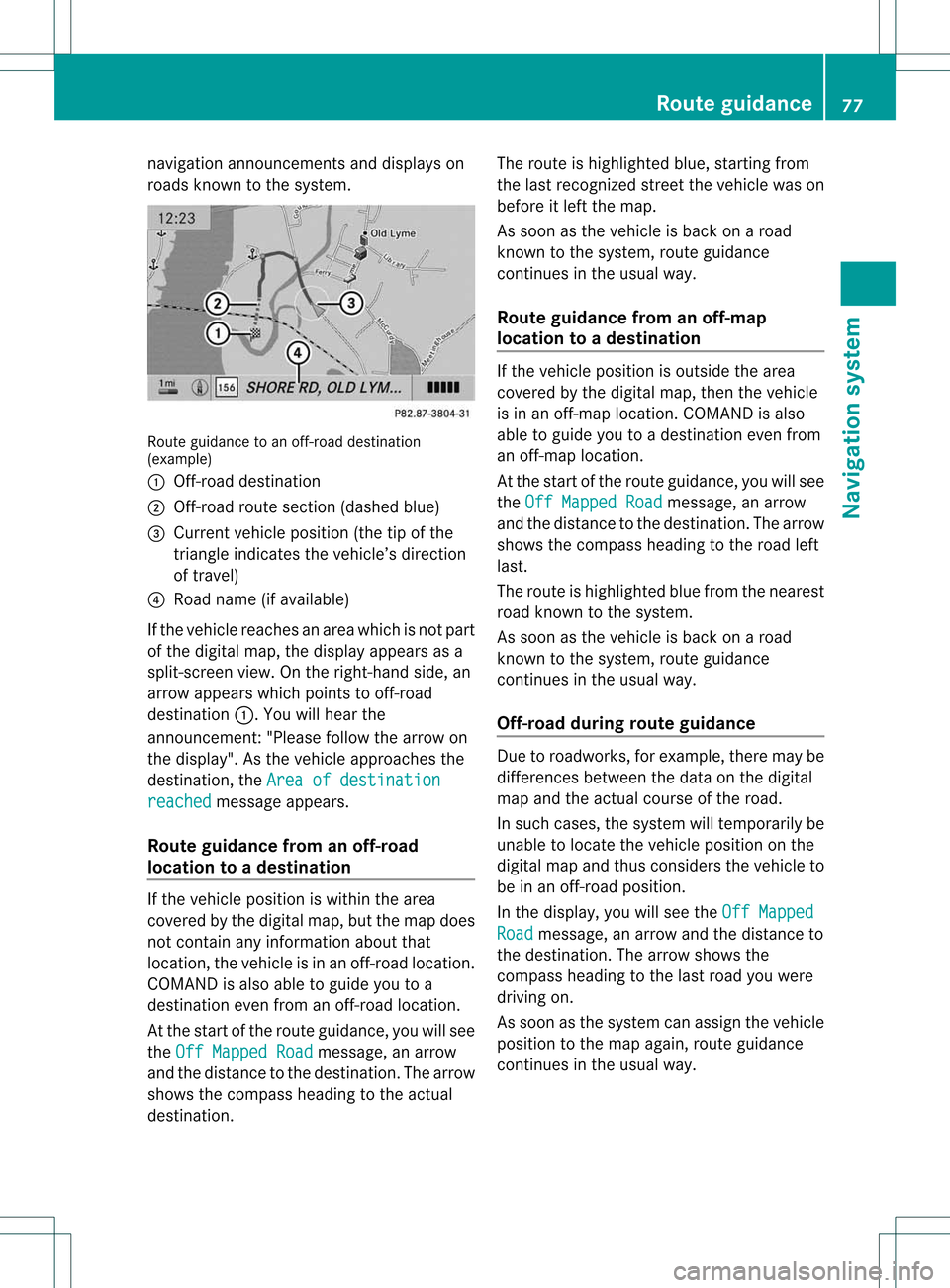
guidance toan off-r oad destination
(example)
: Off- road destinat ion
; Off- road route section (dashed blue)
= Current vehicleposition (thetipofthe
triangle indicates thevehicle’s direction
of travel)
? Road name (ifavaila ble)
If the vehicle reaches anarea which isnot part
of the digital map,thedisplay appears asa
split-sc reenview. Onthe right- hand side,an
arrow appears whichpoints tooff- road
destinat ion:.Y ouwill hear the
announc ement:"Please followthearrow on
the display" .Asthe vehicle approachesthe
destination, theArea ofdestination reached message
appears.
Route guidance fromanoff-road
location toad esti nation If
th eveh icle posit ioniswith inthearea
cov ered bythedigit almap, butthemap does
no tcon tain anyinform ationabout that
locat ion,th eveh icle isin an off-road locat ion.
COMA NDisalso able toguide youtoa
dest inationeven from anoff-road locat ion.
At thest art oftherout eguidan ce,you willsee
th eOff Mapped Road mes
sage, anarro w
and thedist anceto thed estin ation. Thearrow
shows thecompass headingtothe actual
destin ation. The
route ishighlighted blue,startingfrom
the last recogn izedstreet the vehicle wason
before itleft themap.
As soon asthe vehicle isback onaroad
kn own tothe system, routeguidance
con tinues inthe usual way.
Rout eguida ncefrom anoff-m ap
location toad esti nation If
th evehi cleposit ionisouts idethearea
cov ered bythedigit almap, then thevehi cle
is in an off-map locat ion.COMAND isalso
able toguide youtoadestination evenfrom
an off-map location.
At the start ofthe route guidance,youwillsee
the Off Mapped Road message,
anarrow
and thedistance tothe destination. Thearrow
shows thecompass headingtothe road left
last.
The route ishighli ghted bluefrom thenearest
road known tothe system.
As soon asthe vehicle isback onaroad
known tothe system, routeguidance
cont inues inthe usua lway .
Off-road duringrouteguidance Due
toroadworks, forexample, theremaybe
differences betweenthedata onthe digital
map andtheactual course ofthe road.
In such cases, thesystem willtemporarily be
unable tolocate thevehicle position onthe
digital mapandthus considers thevehicle to
be inan off-road position.
In the displa y,you willsee theOff Mapped Road message,
anarrow andthedistance to
the destination. Thearrow shows the
compass headingtothe last road youwere
driving on.
As soon asthe system canassign thevehicle
position tothe map again,route guidance
cont inues inthe usua lway . Route
guidance
77Navigationsystem Z
Page 103 of 194

COMAN
Dfea tures ........ .......... ........... 102
Gener alinfor mation <0021002100210021002100210021002100210021002100210021002100210021
002100210021002100210021002100210021V 102
Telephony viathe Bluet ooth®
inter-
face <0021002100210021002100210021002100210021002100210021002100210021
0021002100210021002100210021002100210021002100210021002100210021
0021002100210021002100210021002100210021002100210021002100210021
0021002100210021V 103
Reception andtransm ission volume 107
Telephone operation........ .......... ....... 108
Using thephone book<0021002100210021002100210021002100210021002100210021002100210021
002100210021002100210021V 110
Using calllists .................. ................. 113
Using theaddress book <0021002100210021002100210021002100210021002100210021002100210021
002100210021V 116 101Telephone