automatic transmission MERCEDES-BENZ E-CLASS COUPE 2011 User Guide
[x] Cancel search | Manufacturer: MERCEDES-BENZ, Model Year: 2011, Model line: E-CLASS COUPE, Model: MERCEDES-BENZ E-CLASS COUPE 2011Pages: 353, PDF Size: 8.42 MB
Page 149 of 353
Useful information
i This Owner's Manual describes all models
and all standard and optional equipment
available to your vehicle at the time of pub-
lication of the Owner's Manual. Country-
specific deviation sare possible. Please
not ethat your vehicle may not be equipped
with all feature sdescribed. This also
applies to safety-relevan tsystems and
functions.
i Pleas ereadt he information on qualified
specialist workshop s(Ypage 22). Running-i
nnotes Important safet
ynotes G
WARNING
New brake pads/lining sonlyh aveo ptimal
braking performanc eafter severa lhundred
kilometres .Until then, compensate for thi sby
applying greate rforce to the brake pedal. This
also applies when brake pads/linings or
brake discs have been changed. The first 1,500 km
The more you look after the engine when it is
new, the more satisfied you will be with its
performanc einthe future.
R Therefore, drive at varying speeds and
engine speeds for the first 1,500 km.
R Avoid heavy loads on the engine during this
period, e.g. driving at full throttle.
R Change gear in good time, at the latest
when the rev counter needle is 2
/ 3 of the
way to the red area in the rev counter dis-
play.
R Do not manually shift to alower gear to
brake the vehicle. Vehicles with automatic transmission:
R
If possible, do not depress the accelerator
pedal past the point of resistanc e(kick-
down).
R Only select shift ranges 3,2or 1when driv-
ing slowly, e.g. in mountainous terrain.
After 1,500 km, you may gradually bring the
vehicle up to full road and engine speeds.
i You should also observe these notes on
runnin ginift he engine or parts of the drive
train on your vehicle have been replaced. Driving
Important safety notes
G
WARNING
Do not place any object sinthe driver's foot-
well. If you use afloormat or carpet in the
driver's footwell, make sure that it is correctly
secured and that there is sufficient clearance
for the pedals.
Do not place several floormats on top of one
another.
Loose object sorthe floormats could other-
wise get caught between the pedals if you
accelerate or brake suddenly. You will then
not be able to brake, declutch or accelerate
as intended. This could lead to accident sand
injury. G
WARNING
Do not change down for additional engine
braking on aslippery road surface. This could
cause the drive wheels to lose their grip and
the vehicle could skid. This could cause you
to lose control of your vehicle and cause an
accident.
! Warm up the engine quickly. Do not use
the engine's full performanc euntil it has
reached operating temperature.
Only set the automatic transmission to the
respective drive positions when the vehicle
is stationary. 146
DrivingDriving and parking
Page 151 of 353
i
You do not have to remove the Start/ Stop
button fro mthe ignition lock when you
leave the vehicle. X
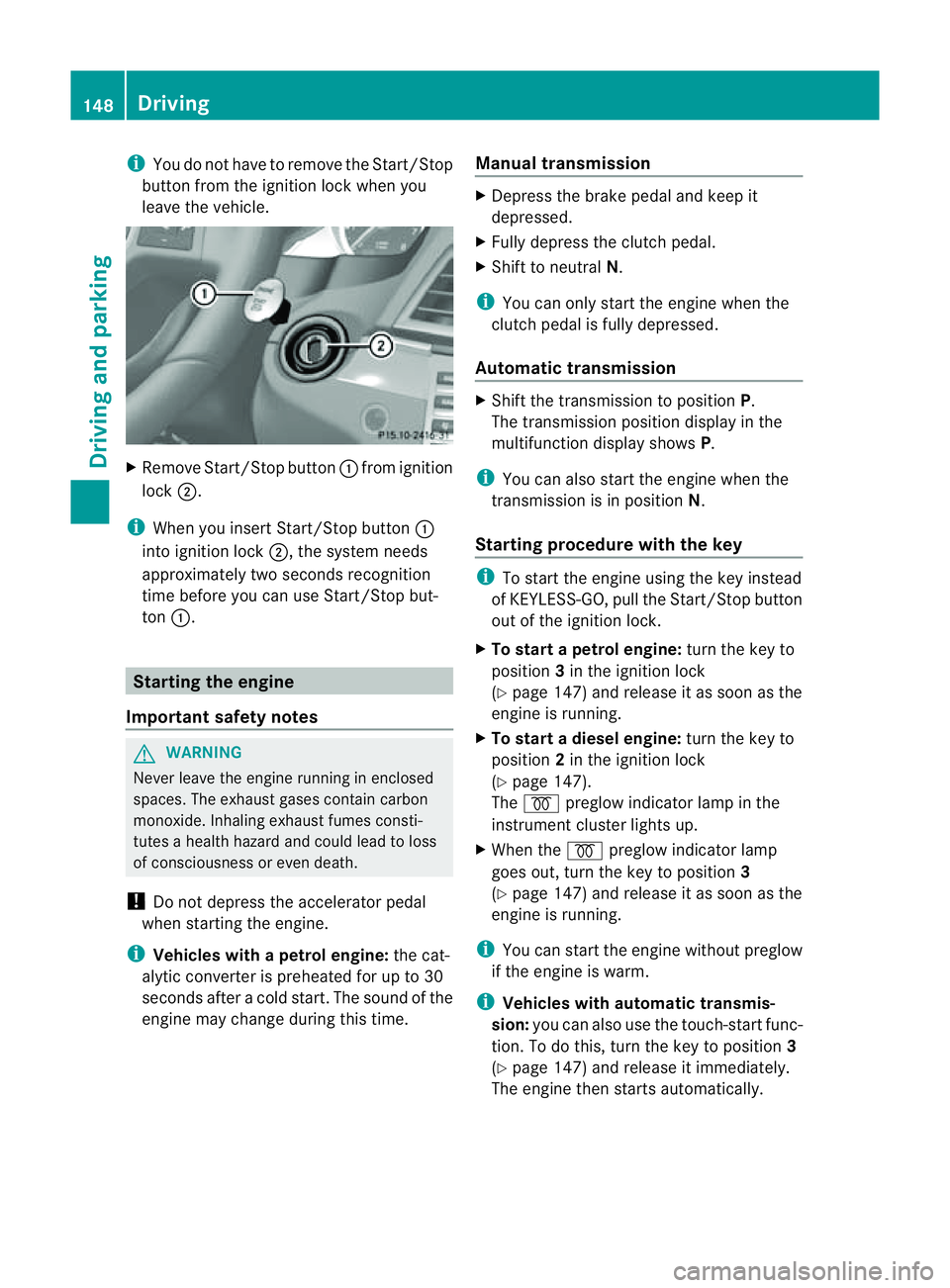
Remove Start/Stop button :fromi gnition
lock ;.
i When you insert Start/Stop button :
into ignition lock ;,the system needs
approximately two seconds recognition
time before you can use Start/Stop but-
ton :. Starting the engine
Important safety notes G
WARNING
Never leave the engine runnin ginenclosed
spaces. The exhaust gases contain carbon
monoxide. Inhaling exhaust fumes consti-
tutes ahealth hazard and could lead to loss
of consciousness or even death.
! Do not depress the accelerator pedal
when starting the engine.
i Vehicles with apetrol engine: thec at-
alytic converter is preheate dfor up to 30
second safter acold start .The sound of the
engine may change during this time. Manual transmission X
Depress the brake pedal and keep it
depressed.
X Fully depress the clutch pedal.
X Shift to neutral N.
i You can only start the engine when the
clutch pedal is fully depressed.
Automatic transmission X
Shift the transmission to position P.
The transmission position displayint he
multifunction displays howsP.
i You can also start the engine when the
transmission is in position N.
Starting procedurew ith the key i
To start the engine using the key instead
of KEYLESS-GO, pull the Start/Stop button
out of the ignition lock.
X To startap etrol engine: turn the key to
position 3in the ignition lock
(Y page 147) and release it as soon as the
engine is running.
X To startad iesel engine: turn the key to
position 2in the ignition lock
(Y page 147).
The % preglow indicator lamp in the
instrumen tcluster light sup.
X When the %preglo windicator lamp
goes out, tur nthe key to position 3
(Y page 147) and release it as soon as the
engine is running.
i You can start the engine without preglow
if the engine is warm.
i Vehicles with automatic transmis-
sion: you can also use the touch-start func-
tion. To do this, turn the key to position 3
(Y page 147) and release it immediately.
The engine then starts automatically. 148
DrivingDriving and parking
Page 152 of 353
Using KEYLESS-G
Otostart the engine G
WARNING
Your vehicle can be started using avalid KEY-
LESS-GO key. For this reason ,children should
neve rbel eft unsupervised in the vehicle.
Always take the key with you when leaving the
vehicle, even if you are only leaving it for a
short time.
i The Start/Stop button can be used to
start the vehicle manually without inserting
the key into the ignition lock. The key must
be in the vehicle and the Start/Stop button
must be inserted in the ignition lock. This
mode for starting the engine operates inde-
pendently of the ECO start/stop automatic
engine start function.
X Depress the brake pedal and keep it
depressed.
X To star tapetrol engine: pressthe Start/
Stop button (Y page 147) once.
The engine starts.
X To start adiesel engine: press the Start/
Stop button (Y page 147)once.
Preglow is activated and the engin estarts. Pulling away
Manual transmission X
Depress the brake pedal and keep it
depressed.
X Fully depress the clutch pedal.
X Shif ttoe itherfirst gear or reverse gear R.
X Release the parkin gbrake (Y page 166).
X Release the brake pedal.
X Slowly release the clutch pedal and gently
depress the accelerato rpedal.
! Change gear in good time and avoid spin-
ning the wheels. Otherwise, you could dam-
age the vehicle.
i Follow the shift recommendations in the
multifunction display for an economical
driving style (Y page 154). i
The vehicle locks centrally oncey ou have
pulled away. The lockin gknobs in the doors
drop down.
You can open the doors from the inside at
any time.
You can also deactivat ethe automatic lock-
ing feature (Y page 228).
Automatic transmission i
It is only possible to shift the transmission
from position Pto the desired position if
you depress the brake pedal. Only then is
the selector lever lock released.
X Depress the brake pedal and keep it
depressed.
X Shift the transmission to position Dor R.
X Release the parkin gbrake (Y page 166).
X Release the brake pedal.
X Carefully depress the accelerator pedal.
i The vehicle locks centrally oncey ou have
pulled away. The lockin gknobs in the doors
drop down.
You can open the doors from the inside at
any time.
You can also deactivat ethe automatic lock-
ing feature (Y page 228).
i Upshift stake place at higher engine
speeds after acold start .This helps the
catalytic converter to reach its operating
temperature more quickly.
Hill starta ssist Hill start assist helps you when pulling away
forwards or in reverse on an uphill gradient.
It holds the vehicle for
ashort time after you
have removed your foot from the brake pedal.
This gives you enough time to move your foot
from the brake pedal to the accelerator pedal
and depress it before the vehicle begins to
roll. Driving
149Driving and parking Z
Page 153 of 353
G
WARNING
Never leave the vehicl ewhen it is held by hill
start assist. After approximatel yone second,
hills tart assist willnol onger brake yourv ehi-
cle and it could roll away.
X Take your foot off the brake pedal.
i Oncey ou have taken your foot off the
brake pedal, the vehicle is held for around
one second.
X Pull away.
Hill start assist will not function if:
R you are pulling away on alevel road or a
downhill gradient.
R on vehicles with automatic transmission,
the transmission is in position N.
R the parking brake is applied.
R ESP ®
is malfunctioning. ECO start/stop function
General notes The ECO start/stop function is only available
for the
E200 CGI BlueEFFICIENCY model with
manual transmission.
The ECO start/stop function switches the
engine off automatically in certain situations.
The engine start sautomatically when you pull
away again. The ECO start/stop function
thereby helps you to reduce the fuel con-
sumption and emissions of your vehicle. The ECO start/stop function is activated each
time the engine is switched on. The system is operational when ECO symbol
:is shown in
the multifunction display.
! Always switch the ignition off and take the
key with you when leaving the vehicle.
Automatic engine switch-off The ECO start/stop function switches off the
engine automatically at low speeds if you:
R
apply the brake and bring the vehicle to a
standstill
R operate the clutc hpedal R
engage neutral N(follow gearshift instruc-
tion ;to engage neutral N,ifnecessary)
R release the clutc hpedal
The engine is only switched off if:
R the outside temperature is within the range
that is suitable for the system.
R the engine is at normal operatin gtemper-
ature.
R the set temperature for the vehicle interior
has been reached.
R the batter yissufficiently charged.
R the system detects that the windscreen is
not misted up when the air-conditioning
system is switched on.
R the bonnet is closed.
R the vehicle is not being steered.
R the fron tdoor is closed and the seat belt is
fastened.
i During an automatic engine switch-off, air
conditioning is reduced. If full air condition-
ing is required, the ECO start/stop function 150
DrivingDriving and parking
Page 157 of 353
Neutral
NwithE CO start/sto pfunc-
tio na ctivated
In neutral N,the engine is switched off if the
vehicl espeed is belo wacertainthreshold and
the clutch pedal is not depressed.
For further information on the ECO start/stop
function, see (Y page 150). Engaging reverse gear
! Only shift into reverse gear Rwhen the
vehicle is stationary. Otherwise, you could
damage the transmission.
i The ECO start/stop function is not avail-
able when reverse gear is engaged.
For further information on the ECO start/
stop function, see (Y page 150).
X Move the gear lever firmly to the left
beyond the point of resistance and then
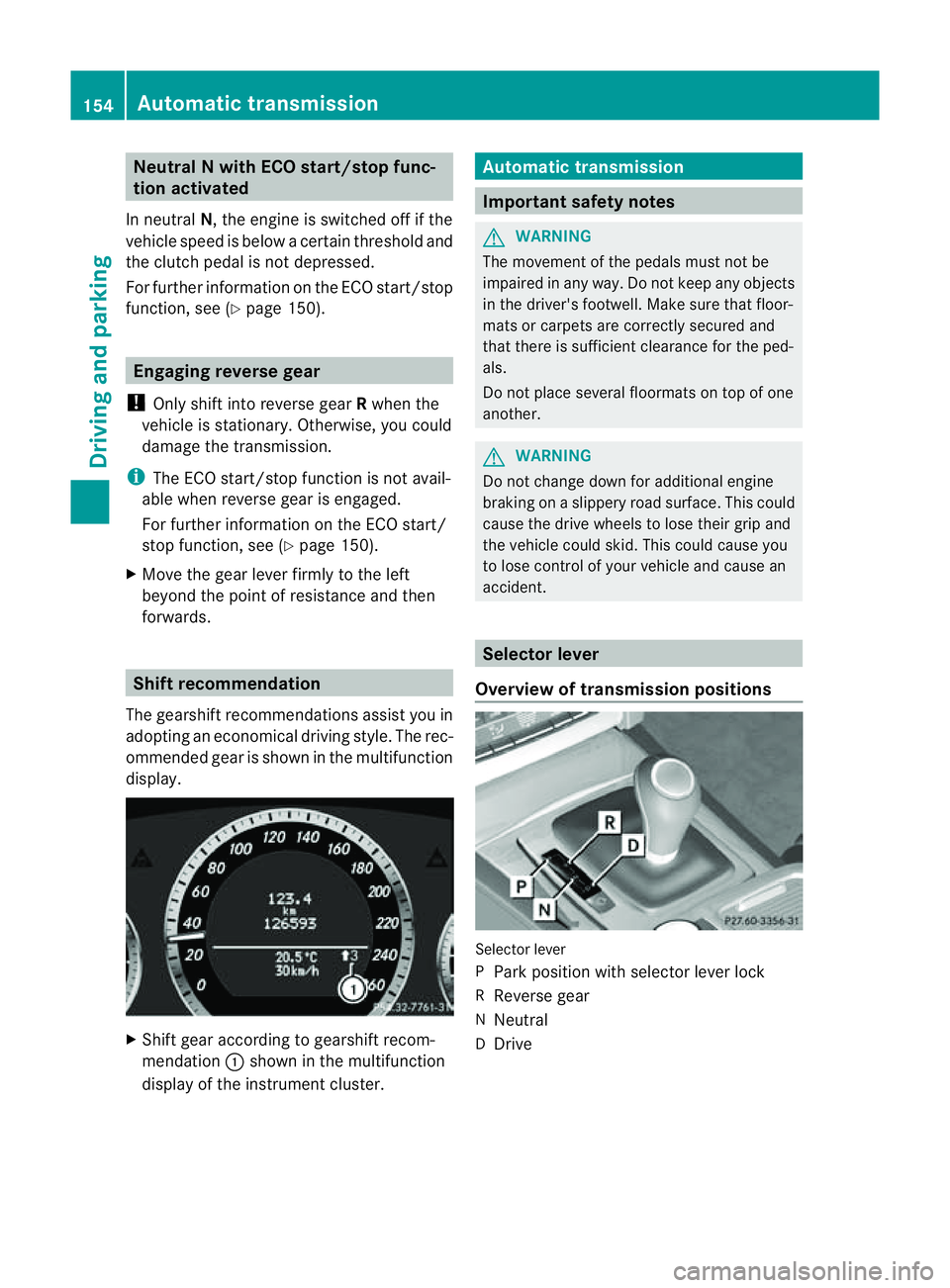
forwards. Shift recommendation
The gearshift recommendations assist you in
adopting an economical driving style. The rec-
ommended gear is shown in the multifunction
display. X
Shift gear according to gearshift recom-
mendation :shown in the multifunction
displayoft he instrumentc luster. Automatic transmission
Important safety notes
G
WARNING
The movemen tofthe pedals must not be
impaired in any way.Don ot keep any objects
in the driver's footwell. Make sure that floor-
mats or carpets are correctly secured and
that there is sufficient clearance for the ped-
als.
Do not place several floormats on top of one
another. G
WARNING
Do not change down for additional engine
braking on aslippery road surface. This could
cause the drive wheels to lose their grip and
the vehicle could skid. This could cause you
to lose control of your vehicle and cause an
accident. Selector lever
Overview of transmission positions Selector lever
P
Park position with selector lever lock
R Reverse gear
N Neutral
D Drive 154
Automatic transmissionDriving and parking
Page 158 of 353
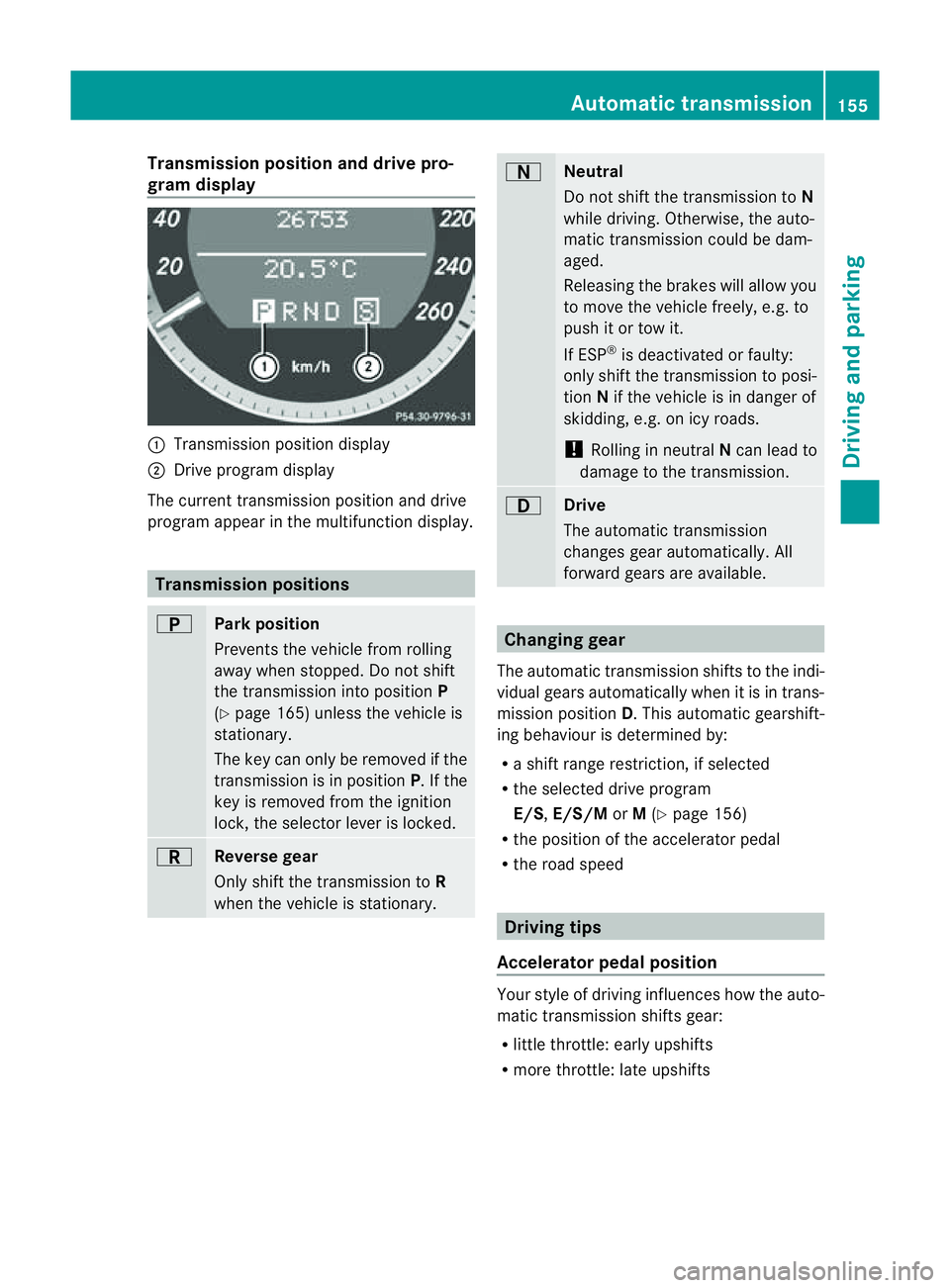
Transmission position and driv
epro-
gram display :
Transmission positio ndisplay
; Drive program display
The current transmission position and drive
program appear in the multifunction display. Transmission positions
B
Par
kposition
Prevent sthe vehicle fro mrolling
away when stopped. Do not shift
the transmission into position P
(Y page 165) unless the vehicle is
stationary.
The key can only be removed if the
transmission is in position P.Ifthe
key is removed from the ignition
lock, the selector lever is locked. C
Reverse gear
Only shift the transmission to
R
when the vehicle is stationary. A
Neutral
Do not shift the transmission to
N
while driving. Otherwise, the auto-
matic transmission could be dam-
aged.
Releasing the brakes will allow you
to move the vehicle freely, e.g. to
push it or tow it.
If ESP ®
is deactivated or faulty:
only shift the transmission to posi-
tion Nif the vehicle is in danger of
skidding, e.g. on icy roads.
! Rolling in neutral Ncan lead to
damage to the transmission. 7
Drive
The automatic transmission
changes gear automatically. All
forward gears are available.
Changing gear
The automatic transmission shifts to the indi-
vidual gears automatically when it is in trans-
mission position D.This automatic gearshift-
ing behaviourisd etermined by:
R as hift range restriction, if selected
R the selected drive program
E/S, E/S/M orM(Y page 156)
R the position of the accelerator pedal
R the road speed Driving tips
Accelerator pedal position Your style of driving influences how the auto-
matic transmission shifts gear:
R
little throttle: early upshifts
R more throttle: late upshifts Automatic transmission
155Driving and parking Z
Page 159 of 353
Double-clutch function
E3
50 an dE500 only: when shifting down,
the double-clutch function is activ eregard-
less of the currently selected drive program.
The double-clutch function reduces load
chang ereactions and is conducive to asporty
driving style. The sound generated by the
double-clutch function depends on the drive
program selected.
Kickdown Use kickdown for maximum acceleration.
X
Depres sthe accelerator pedal beyond the
pressure point.
The transmission shift stoalower gear
dependin gonthe engin espeed.
X Ease off the accelerator pedal onc ethe
desired speed is reached.
The automatic transmission shift sback up.
Trailer towing X
Driv eint he middle of the engin espeed
range on uphill gradients.
X Shift down to shift range 3or
2(Y page 157 )dependin gonthe uphill or
downhill gradient ,even if cruise control,
DISTRONIC PLUS or SPEEDTRONIC is acti-
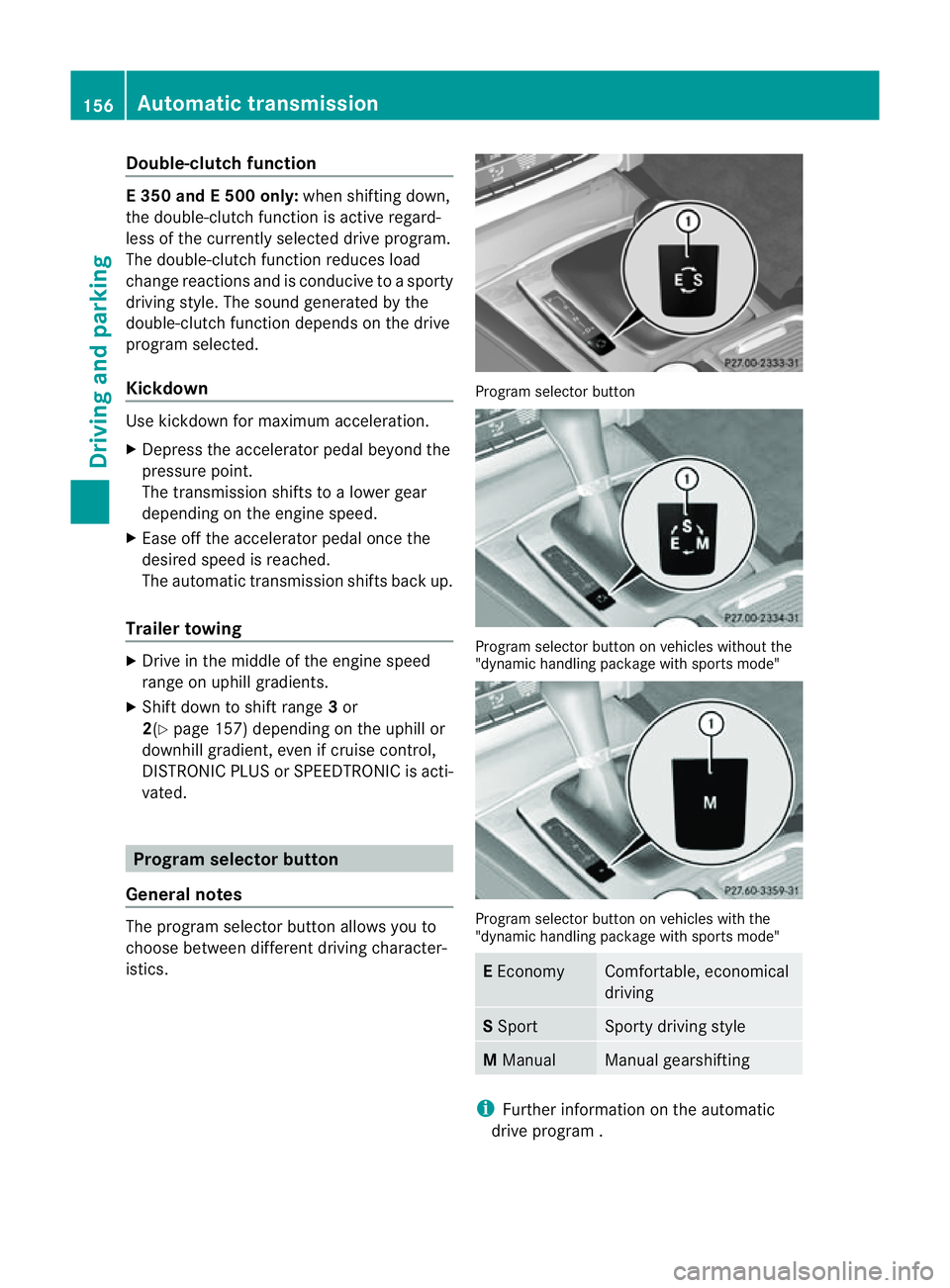
vated. Program selector button
General notes The program selector butto
nallows you to
choose between differen tdriving character-
istics. Progra
mselector button Program selecto
rbutton on vehicle swithout the
"dynamic handlin gpackage with sports mode" Program selecto
rbutton on vehicle swith the
"dynamic handlin gpackage with sports mode" E
Economy Comfortable, economical
driving
S
Sport Sport
ydriving style M
Manual Manual gearshifting
i
Further informatio nontheautomatic
driv eprogram . 156
Automatic transmissionDriving and parking
Page 160 of 353
X
Press program selector button :repeat-
edly until the letter for the desired gearshift
program appears in the multifunction dis-
play.
i The automatic transmission switches to
automatic drive program Eeach time the
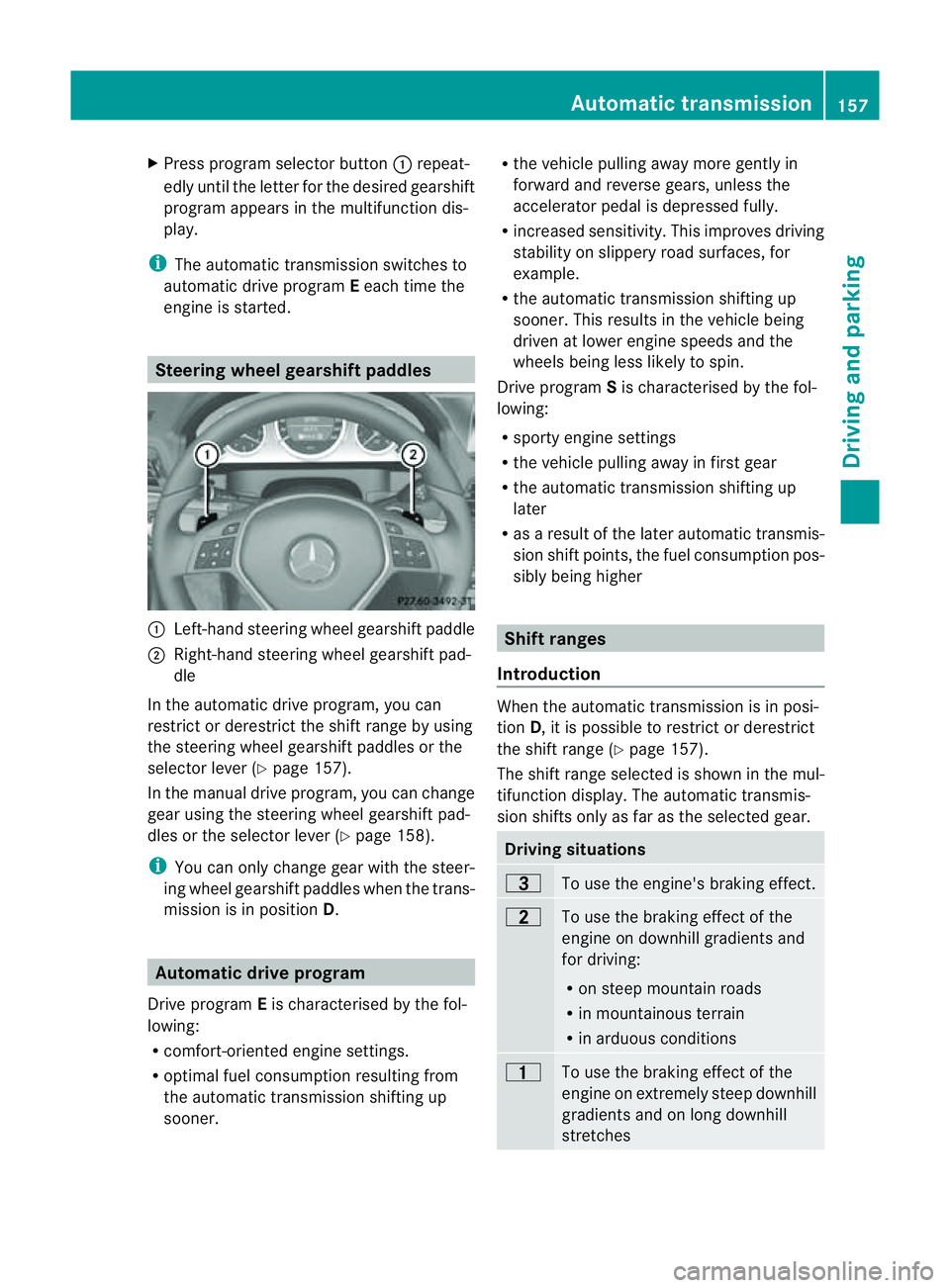
engine is started. Steering wheel gearshift paddles
:
Left-hand steerin gwheel gearshift paddle
; Right-hand steerin gwheel gearshift pad-
dle
In the automatic drive program, you can
restrict or derestrict the shift range by using
the steerin gwheel gearshift paddles or the
selector lever (Y page 157).
In the manual drive program, you can change
gear using the steerin gwheel gearshift pad-
dles or the selector lever (Y page 158).
i You can only change gear with the steer-
ing wheel gearshift paddles when the trans-
mission is in position D.Automatic drive program
Drive program Eis characterised by the fol-
lowing:
R comfort-oriented engine settings.
R optimal fuel consumption resulting from
the automatic transmission shiftin gup
sooner. R
the vehicle pulling away more gently in
forward and reverse gears, unless the
accelerator pedal is depressed fully.
R increased sensitivity. This improves driving
stability on slippery road surfaces, for
example.
R the automatic transmission shiftin gup
sooner. This results in the vehicle being
driven at lower engine speeds and the
wheels being less likely to spin.
Drive program Sis characterised by the fol-
lowing:
R sporty engine settings
R the vehicle pulling away in first gear
R the automatic transmission shiftin gup
later
R as aresult of the later automatic transmis-
sion shift points, the fuel consumption pos-
sibly being higher Shift ranges
Introduction When the automatic transmission is in posi-
tion
D,itisp ossible to restrict or derestrict
the shift range (Y page 157).
The shift range selected is shown in the mul-
tifunction display. The automatic transmis-
sion shifts only as far as the selected gear. Driving situations
=
To use the engine's braking effect.
5
To use the braking effect of the
engine on downhill gradients and
for driving:
R
on steep mountain roads
R in mountainous terrain
R in arduous conditions 4
To use the braking effect of the
engine on extremely steep downhill
gradients and on long downhill
stretches Automatic transmission
157Driving and parking Z
Page 161 of 353
Restricting the shift range
X
Press the selector lever to the left towards
D–.
or
X Pull the left-hand steering wheel gearshift
paddle.
The automatic transmissio nshifts down
one gear and restrictst he shift range to the
relevant gear.
i If the engine exceeds the maximum
engine speed when shifting down, the auto-
matic transmission protectsa gainst engine
damage by not shifting down.
i If the maximum engine speed for the shift
range is reached and you continue to accel-
erate, the automatic transmission shifts up
in order to prevent the engine from over-
revving, even if the shift range is restricted.
Derestricting the shift range X
Briefly press the selector lever to the right
towards D+.
or
X Pull the right-hand steering wheel gearshift
paddle.
The shift range is derestricted.
Clearing the shift range restriction X
Press and hold the selector lever towards
D+ until Dis shown once more in the mul-
tifunction display.
or
X Pull and hold the right-hand steering wheel
gearshift paddle until Dis shown again in
the multifunction display.
The automatic transmission shifts from the
current shift range directly to D.
Selecting the ideal shift range X
Press the selector lever to the left towards
D– and hold it in position. or
X
Pull the left-hand steering wheel gearshift
paddle and hold it in position.
The automatic transmission shifts to the
gear which allowso ptimum acceleration
and deceleration. To do this, the automatic
transmission shifts down one or more
gears. Manual drive program
Switching on the manuald rive program Manual drive program
Mcan be selected
using the program selector button. You can
change gears using the steering wheel gear-
shift paddlesort he selector lever in manual
drive program Mif the transmission is in posi-
tion D.The gear selected is shown in the mul-
tifunction display.
X Press the program selector button
(Y page 156) repeatedly until Mappears in
the multifunction display.
Upshifting X
Briefly press the selector lever to the right
towards D+.
or
X Pull the right-hand steering wheel gearshift
paddle (Y page 157).
The automatic transmission shifts up to the
next gear.
Downshifting X
Briefly press the selector lever to the left
towards D–.
or
X Pull the left-hand steering wheel gearshift
paddle (Y page 157).
The automatic transmission shifts down to
the next gear.
i If you desire maximum acceleration, push
the selector lever to the left or pull and hold 158
Automatic transmissionDriving and parking
Page 162 of 353
the left-hand steering whee
lgearshift pad-
dle until the transmission shift stothe opti-
mal gear for the curren tspeed.
Kickdown You can also use kickdown for maximum
acceleration in manual drive program
M.
X Depres sthe accelerator pedal beyond the
pressure point.
The transmission shift stoalower gear
dependin gonthe engin espeed.
Switching off the manual drive program X
Vehicles without the dynamic handling
package with sports mode: press the
program selector button (Y page 156)
repeatedly until Eor Sappears in the mul-
tifunction display.
X Vehicles with the dynamic handling
package with sports mode: press the
program selector button (Y page 156).M
is no longer shown in the multifunction dis-
play. Automatic transmission
159Driving and parking Z