towing MERCEDES-BENZ E-CLASS COUPE 2011 User Guide
[x] Cancel search | Manufacturer: MERCEDES-BENZ, Model Year: 2011, Model line: E-CLASS COUPE, Model: MERCEDES-BENZ E-CLASS COUPE 2011Pages: 353, PDF Size: 8.42 MB
Page 148 of 353
Useful information
............................146
Running-in notes ............................... 146
Driving ............................................... 146
Manual transmission ........................153
Automatic transmission ...................154
Refuelling ........................................... 160
Parking ............................................... 165
Driving tips ........................................ 166
Driving systems ................................ 169
Trailer towing .................................... 204 145Driving and parking
Page 156 of 353
Problem Possible causes/consequences and
M Solutions
Vehicles with
apetrol
engine:
The engine is not run-
ning smoothly and is
misfiring. There is
amalfunction in the engine electronics or in amechanical
componentoft he engine management system.
X Only depress the accelerator pedal slightly.
X Have the cause rectified immediately at aqualified specialist
workshop, e.g. aMercedes-Benz Service Centre.
Otherwise, non-combusted fuel may get into the catalytic con-
verter and damage it. The coolant tempera-
ture display is showing
more than 120 †. The
coolant warning lamp
may also be lit and a
warning tone may
sound. The coolant level is too low. The coolant is too hot and the engine
is no longer being cooled sufficiently.
X
Stop as soon as possible and allow the engine and the coolant
to cool down.
X Check the coolant level (Y page 283). Observe the warning
notes as you do so and top up the coolant if necessary. If the coolant level is correct, the engine radiator fan may be faulty.
The coolant is too hot and the engine is no longer being cooled
sufficiently.
X
At coolant temperatures under 120 †, drive on to the nearest
qualified specialist workshop, e.g. to aMercedes-Benz Service
Centre.
X Avoid heavy loads on the engine as you do so, e.g. driving on
mountain roads and stop/start driving. Manual transmission
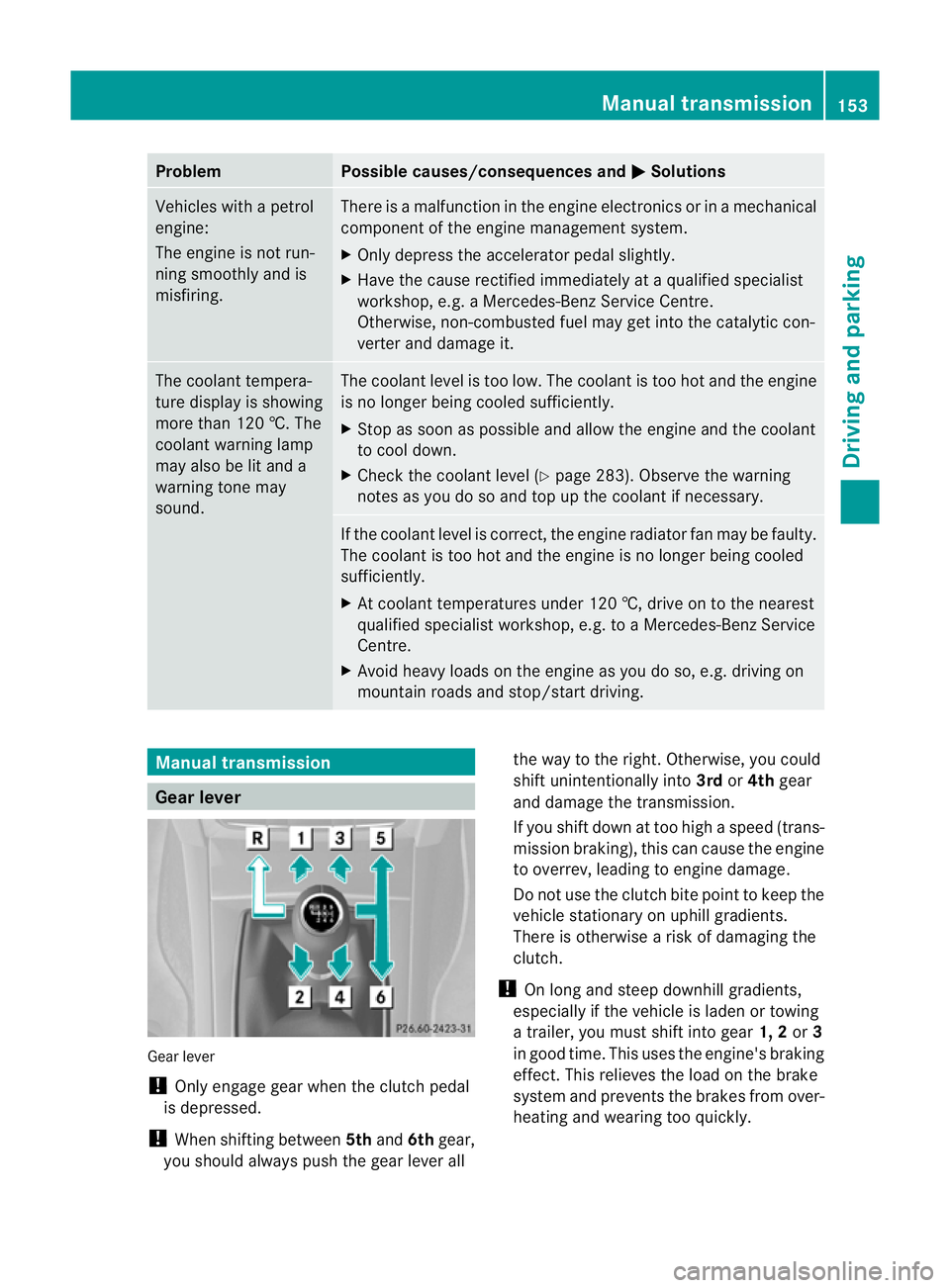
Gear lever
Gear lever
!
Only engage gear when the clutch pedal
is depressed.
! When shifting between 5thand 6thgear,
you should always push the gear lever all the way to the right. Otherwise, you could
shift unintentionally into
3rdor4th gear
and damage the transmission.
If you shift down at too high aspeed (trans-
mission braking), this can cause the engine
to overrev, leading to engine damage.
Do not use the clutch bite point to keep the
vehicle stationary on uphill gradients.
There is otherwise arisk of damaging the
clutch.
! On long and steep downhill gradients,
especially if the vehicle is laden or towing
at railer, you must shift into gear 1, 2or3
in good time. This uses the engine's braking
effect.T his relieves the load on the brake
system and prevents the brakes from over-
heating and wearing too quickly. Manual transmission
153Driving and parking Z
Page 159 of 353
Double-clutch function
E3
50 an dE500 only: when shifting down,
the double-clutch function is activ eregard-
less of the currently selected drive program.
The double-clutch function reduces load
chang ereactions and is conducive to asporty
driving style. The sound generated by the
double-clutch function depends on the drive
program selected.
Kickdown Use kickdown for maximum acceleration.
X
Depres sthe accelerator pedal beyond the
pressure point.
The transmission shift stoalower gear
dependin gonthe engin espeed.
X Ease off the accelerator pedal onc ethe
desired speed is reached.
The automatic transmission shift sback up.
Trailer towing X
Driv eint he middle of the engin espeed
range on uphill gradients.
X Shift down to shift range 3or
2(Y page 157 )dependin gonthe uphill or
downhill gradient ,even if cruise control,
DISTRONIC PLUS or SPEEDTRONIC is acti-
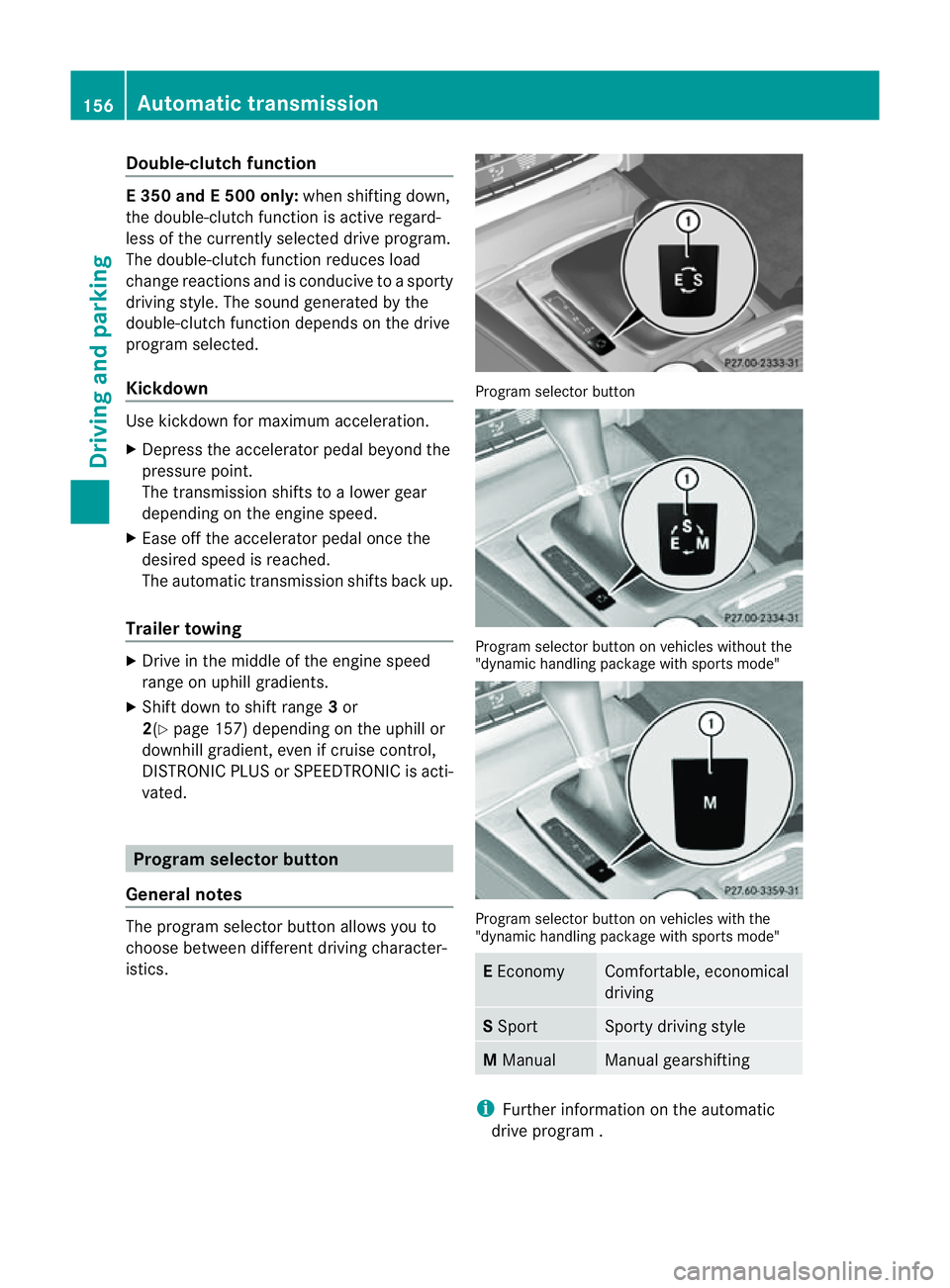
vated. Program selector button
General notes The program selector butto
nallows you to
choose between differen tdriving character-
istics. Progra
mselector button Program selecto
rbutton on vehicle swithout the
"dynamic handlin gpackage with sports mode" Program selecto
rbutton on vehicle swith the
"dynamic handlin gpackage with sports mode" E
Economy Comfortable, economical
driving
S
Sport Sport
ydriving style M
Manual Manual gearshifting
i
Further informatio nontheautomatic
driv eprogram . 156
Automatic transmissionDriving and parking
Page 172 of 353
sonous carbon monoxide (CO) may enter the
vehicle, resulting in loss of consciousness and
even death.
To assure sufficient fresh air ventilation, open
aw indow slightly on the side of the vehicle
not facing the wind.
At the onset of winter, have your vehicle win-
terproofed at aqualified specialist workshop,
e.g. at aMercedes-Benz Service Centre.
Observe the notes in the "Winter operation"
section (Y page 319).
Driving with summer tyres Observe the notes in the "Winter operation"
section (Y
page 319).
Slippery road surfaces G
WARNING
Do not shift down for additional engine brak-
ing on aslippery road surface. This could
cause the drive wheels to lose their grip and
the vehicle could skid.
You should drive particularlyc arefully on slip-
pery road surfaces. Avoid sudden accelera-
tion, steering and braking manoeuvres.
If the vehicle threatens to skid or cannot be
stopped when moving at low speed:
X Vehicles with manual transmission: engage
neutral.
X Vehicles with automatic transmission: shift
the transmission to position N.
X Try to bring the vehicle under control by
using corrective steering.
i For more information on driving with
snow chains, see (Y page 320). Driving systems
Cruise control
Important safety notes Cruise control maintains
aconstant road
speed for you. It brakes automaticallyino rder
to avoid exceeding the set speed. On long and
steep downhill gradients, especially if the
vehicle is laden or towing atrailer, you must
shift to alower gear in good time or select
shift range 1,2or 3on vehicles with auto-
matic transmission. By doing so, you will
make use of the braking effect of the engine,
which relieves the load on the brake system
and prevents the brakes from overheating
and wearing too quickly. G
WARNING
Do not change down for additional engine
braking on aslippery road surface. This could
cause the drive wheels to lose their grip and
the vehicle could skid.
Use cruise control only if road and traffic con-
ditions make it appropriate to maintain a
steady speed for aprolonged period. You can
store any road speed above 30 km/h. G
WARNING
Cruise control cannot take account of road
and traffic conditions.
Always pay attention to traffic conditions
even when cruise control is activated.
Cruise control is only an aid designed to assist
driving. You are responsible for the vehicle's
speed and for braking in good time. G
WARNING
Do not use cruise control
R in traffic conditions that do not allow you to
drive at aconstant speed (e.g. heavy traffic Driving systems
169Driving and parking
Z
Page 175 of 353
On long and steep downhill gradients, espe-
cially if the vehicle is laden or towing atrailer,
you must select shift range 1,2or 3in good
time. By doing so, you will make use of the
braking effect of the engine, which relieves
the load on the brake system and prevents
the brakes from overheating and wearing too
quickly.
If as lower-moving vehicle is detected in front,
DISTRONIC PLUS causes your vehicle to
brake and maintain apreset distance to the
vehicle in front. G
WARNING
Do not change down for additional engine
braking on aslippery road surface. This could
cause the drive wheels to lose their grip and
the vehicle could skid. G
WARNING
DISTRONIC PLUS is only an aid designed to
assist driving. The driver remains fully respon-
sible for the vehicle's distance from other
vehicles, the vehicle's speed and for braking
in good time.
DISTRONIC PLUS does not react in particular
to:
R pedestrians
R stationary obstacles on the road, e.g. stop-
ped or parked vehicles
R oncoming and crossing traffic
DISTRONIC PLUS may not detect narrow vehi-
cles driving in front,e .g. motorcycles, or vehi-
cle sd riving on adifferent line. Therefore,
always pa yattention to traffic conditions even
when DISTRONIC PLU Sisactivated. Other-
wise, yo umay fai ltorecognis edanger sin
time ,cause an accident and injure yourself
and others. G
WARNING
DISTRONIC PLU Scanno ttake account of road
and traffic conditions .IfDISTRONIC doe snot
recognise or no longer recognises the vehicle
in front,don ot activate DISTRONIC or, if it is
already active, deactivate it. This is especially
the case:
R before corners
R on filter lanes
R when changing to alane with faster moving
traffic
R in complex driving situations or where lanes
are diverted, e.g. at roadworks on amotor-
way
DISTRONIC PLUS otherwise maintains the
current speed set by you or accelerates up to
the set speed.
DISTRONIC PLUS cannot take account of
weather conditions. Deactivate, or do not
activate, DISTRONIC PLUS:
R if the roads are slippery, snow-covered or
icy. The wheels could lose their grip when
braking or accelerating. The vehicle could
start to skid.
R if the sensors are dirty or there is poor vis-
ibility, e.g. due to snow, rain or fog. Dis-
tancec ontrol may be impaired.
Always pay attention to traffic conditions
even when DISTRONIC PLUS is activated.
Otherwise, you may fail to recognise dangers
in time, cause an accident and injure yourself
and others.
! You must deactivate the radar sensor sys-
tem in certain countries and near radio
telescope facilities. You will find further
information under "Radar sensor system"
in the index.
The radar sensor system is automatically
deactivated near radio telescope facilities
(Y page 345).
If you want DISTRONIC PLUS to assist you,
the radar sensor system must be activated
(Y page 229) and operational. 172
Driving systemsDriving and parking
Page 176 of 353
If there is no vehicle in front, DISTRONIC
PLUS operates in the same way as cruise
control in the speed range between
30 km/h and 200 km/h. If avehicle is driving
in fron tofyou, DISTRONIC operates in the
speed range between 0km/h and
200 km/h.
Do not use DISTRONIC PLUS while driving on
road swith steep gradients. G
WARNING
DISTRONIC PLUS brakes yourv ehicle up to a
maximum of 4m/s2
depending on its speed.
This corresponds to approximately 40% of
your vehicle's maximum braking power. You
must also apply the brakes yourself if this
braking power is not sufficient.
If DISTRONIC PLUS detect sarisk of collision
with avehicle in front, an intermittent warning
tones ounds. In addition, the ·distance
warning lamp in the instrument cluster lights
up. Brak etoavoidacollision.
Cruise control lever With the cruise control lever, you can operate
DISTRONIC PLUS and variable SPEED-
TRONIC.
The LIM indicator lamp on the cruise control
lever indicates which system you have selec-
ted:
R LIM indicator lamp off: DISTRONIC PLUS
is selected.
R LIM indicator lamp on: variable SPEED-
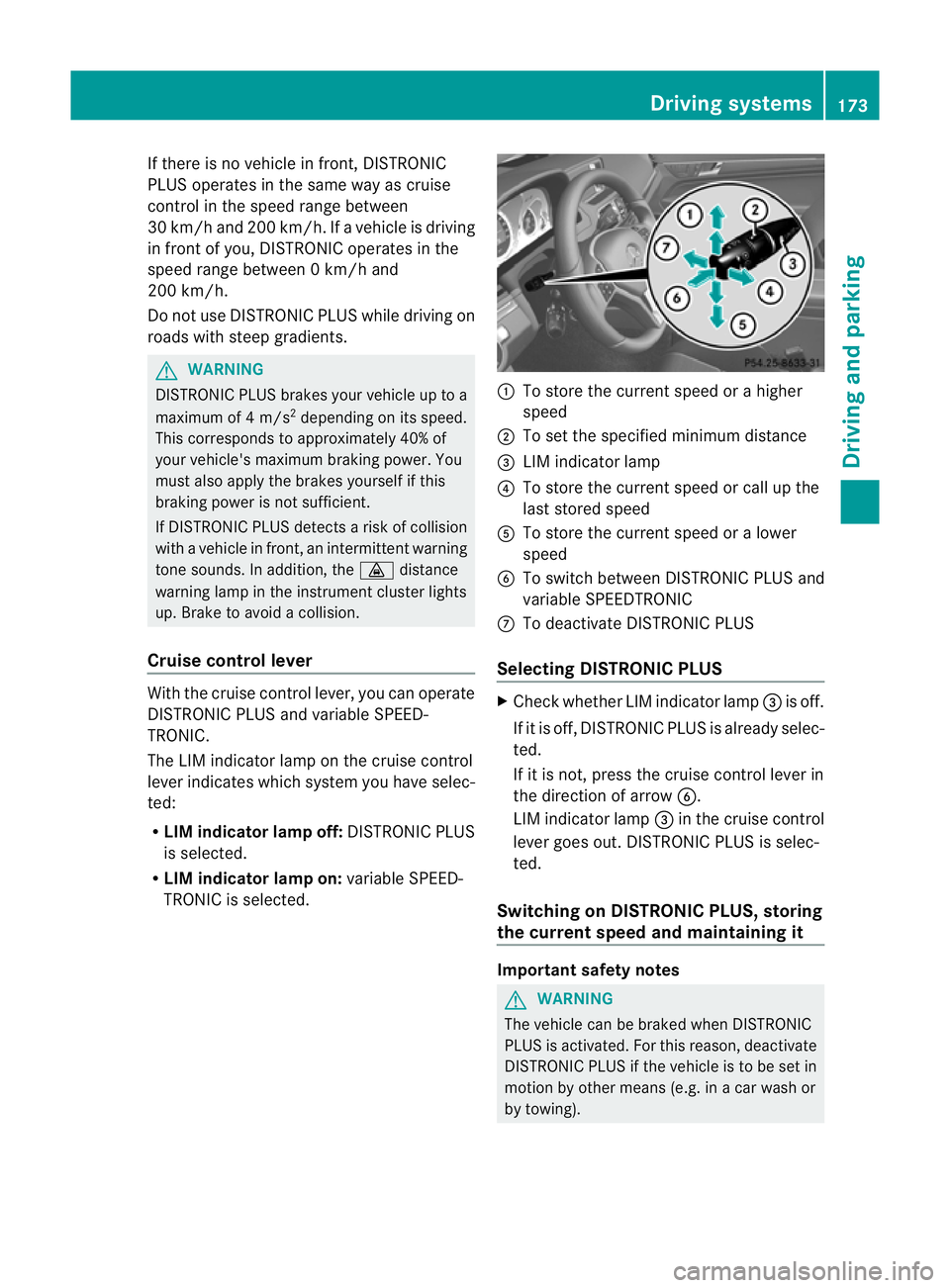
TRONIC is selected. :
To stor ethe curren tspeed or ahigher
speed
; To set the specified minimum distance
= LIM indicator lamp
? To stor ethe curren tspeed or call up the
last stored speed
A To stor ethe curren tspeed or alower
speed
B To switc hbetween DISTRONIC PLUS and
variable SPEEDTRONIC
C To deactivate DISTRONIC PLUS
Selecting DISTRONIC PLUS X
Check whether LIM indicator lamp =is off.
If it is off, DISTRONIC PLUS is already selec-
ted.
If it is not ,press the cruise contro llever in
the direction of arrow B.
LIM indicator lamp =in the cruise control
lever goes out. DISTRONIC PLUS is selec-
ted.
Switching on DISTRONIC PLUS, storing
the current speed and maintaining it Important safet
ynotes G
WARNING
The vehicle can be braked when DISTRONIC
PLUS is activated. For this reason, deactivate
DISTRONIC PLUS if the vehicle is to be set in
motion by other means (e.g. in acar wash or
by towing). Driving systems
173Driving and parking Z
Page 183 of 353
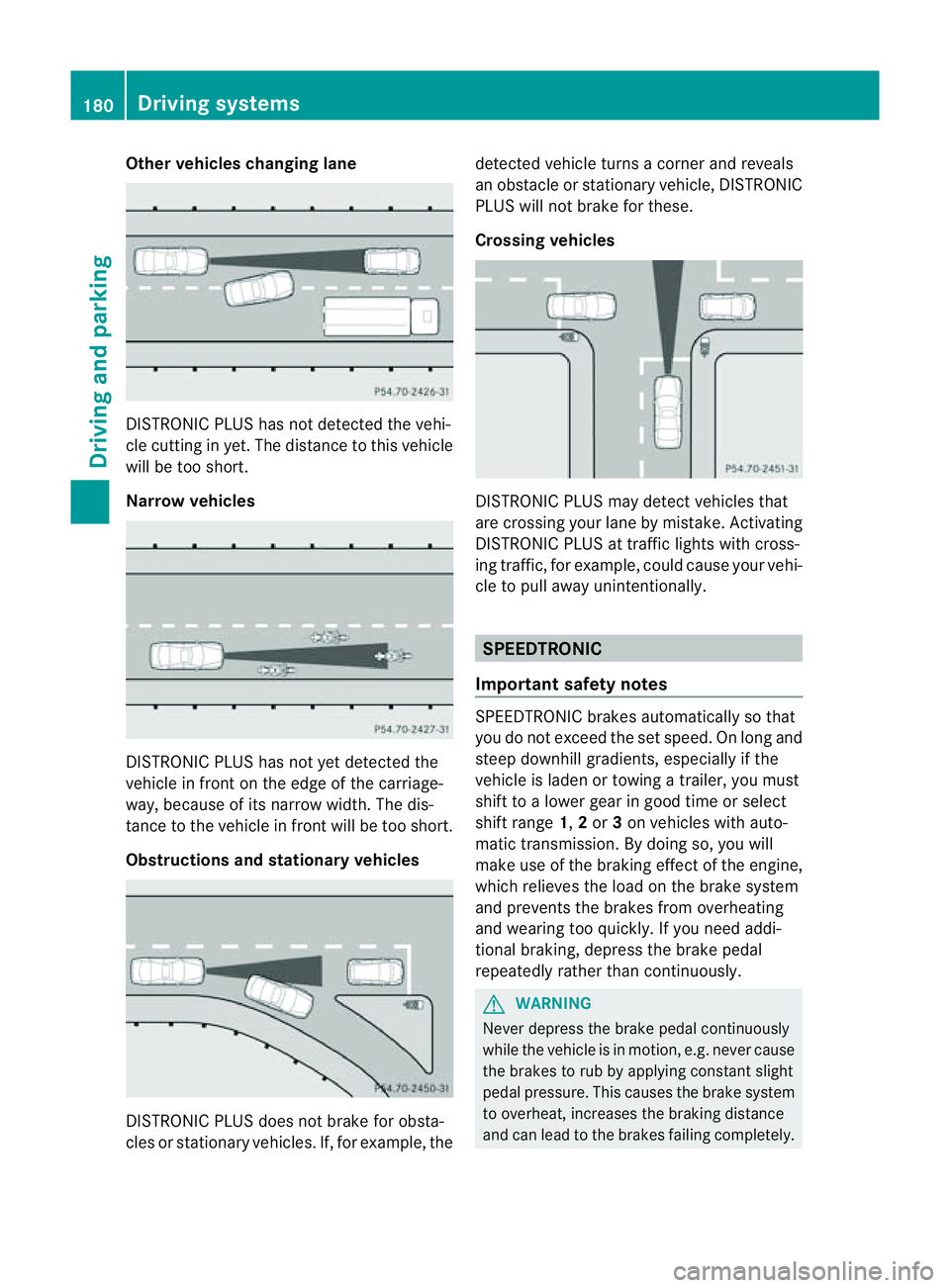
Other vehicles changing lane
DISTRONIC PLUS has not detected the vehi-
cle cutting in yet. The distanc
etothis vehicle
will be too short.
Narrow vehicles DISTRONIC PLUS has not yet detected the
vehicle in fron
tonthe edge of the carriage-
way,b ecause of its narrow width. The dis-
tance to the vehicle in front will be too short.
Obstructions and stationary vehicles DISTRONIC PLUS does not brake for obsta-
cles or stationary vehicles. If, for example, the detected vehicle turns
acorner and reveals
an obstacle or stationary vehicle, DISTRONIC
PLUS will not brake for these.
Crossing vehicles DISTRONIC PLUS may detect vehicles that
are crossing your lane by mistake. Activating
DISTRONIC PLUS at traffic lights with cross-
ing traffic, for example, could cause your vehi-
cle to pull away unintentionally.
SPEEDTRONIC
Important safety notes SPEEDTRONIC brakes automatically so that
you do not exceed the set speed. On long and
steep downhill gradients, especiallyift
he
vehicle is laden or towing atrailer, you must
shift to alower gear in good time or select
shift range 1,2or 3on vehicles with auto-
matic transmission. By doing so, you will
make use of the braking effect of the engine,
which relieves the load on the brake system
and prevents the brakes from overheating
and wearing too quickly. If you need addi-
tional braking, depress the brake pedal
repeatedly rather than continuously. G
WARNING
Never depress the brake pedal continuously
while the vehicle is in motion, e.g. never cause
the brakes to rub by applying constant slight
pedal pressure. This causes the brake system
to overheat, increases the braking distance
and can lead to the brakes failing completely. 180
Driving systemsDriving and parking
Page 187 of 353
HOLD function
General notes The HOLD function can assist the drive
rinthe
following situations:
R when pulling away,e speciallyonsteep
slopes
R when manoeuvring on steep slopes
R when waiting in traffic
The vehicle is kept stationary without the
driver having to depress the brake pedal.
The braking effect is cancelled and the HOLD
function is deactivated when you depress the
accelerator pedal to pull away.
Activation conditions You can activate the HOLD function if:
R the vehicle is stationary.
R the engine is running or if it has been auto-
matically switched off by the ECO start/
stop function.
R the driver's door is closed or if your seat
belt is fastened.
R the parking brake is not applied.
R the bonnet is closed.
R the selector lever is in position D,Ror Non
vehicles with automatic transmission.
R DISTRONIC PLUS is deactivated.
Activating the HOLD function X
Make sure that the activation conditions
are met.
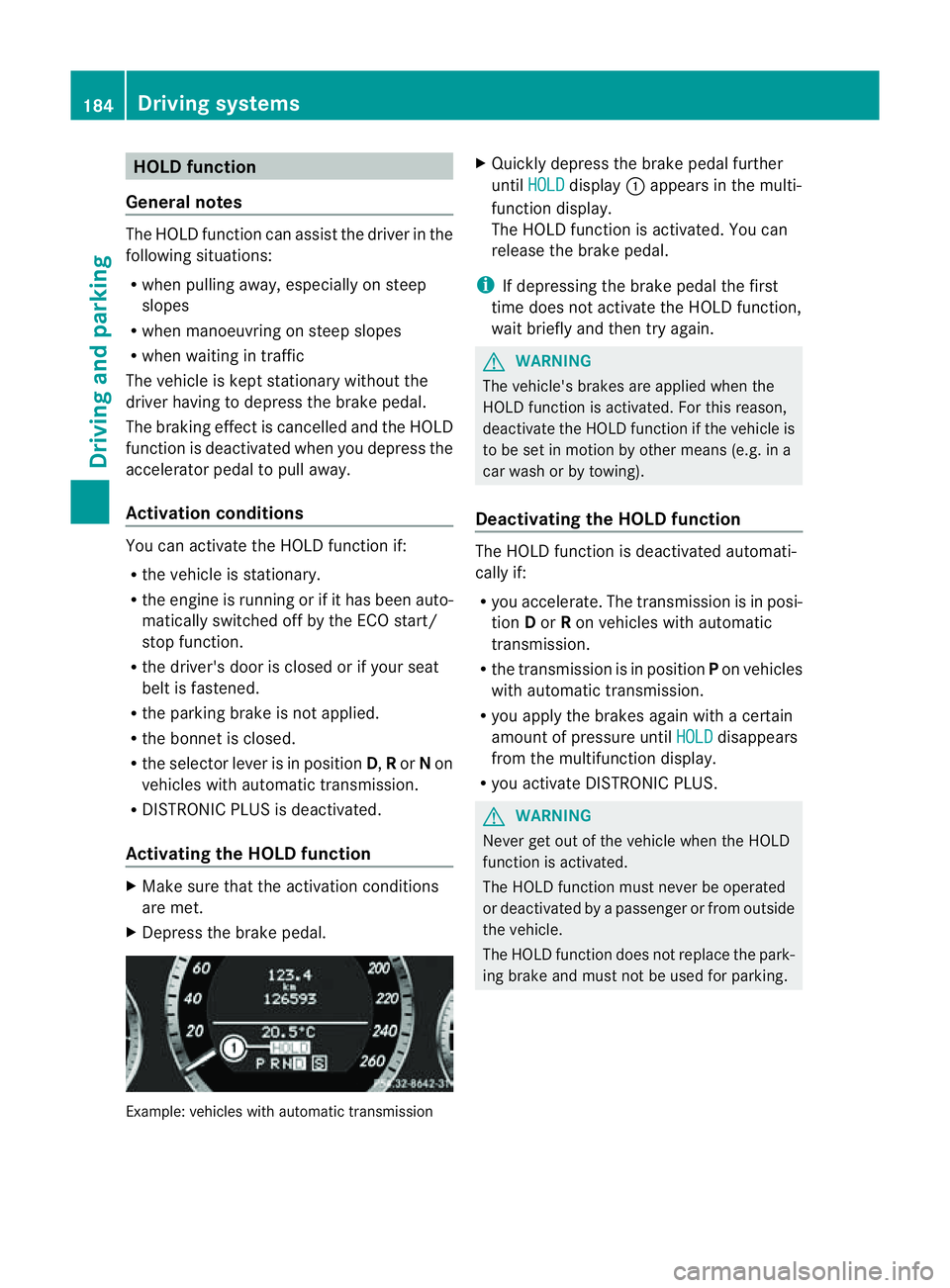
X Depress the brake pedal. Example: vehicles with automatic transmission X
Quickly depress the brake pedal further
until HOLD display
:appears in the multi-
function display.
The HOLD function is activated. You can
release the brake pedal.
i If depressing the brake pedal the first
time does not activate the HOLD function,
wait briefly and then try again. G
WARNING
The vehicle's brakes are applied when the
HOLD function is activated. For this reason,
deactivate the HOLD function if the vehicle is
to be set in motion by other means (e.g. in a
car wash or by towing).
Deactivating the HOLD function The HOLD function is deactivated automati-
cally if:
R
you accelerate. The transmission is in posi-
tion Dor Ron vehicles with automatic
transmission.
R the transmission is in position Pon vehicles
with automatic transmission.
R you apply the brakes again with acertain
amount of pressure until HOLD disappears
from the multifunction display.
R you activate DISTRONIC PLUS. G
WARNING
Never get out of the vehicle when the HOLD
function is activated.
The HOLD function must never be operated
or deactivated by apassenger or from outside
the vehicle.
The HOLD function does not replace the park-
ing brake and must not be used for parking. 184
Driving systemsDriving and parking
Page 191 of 353
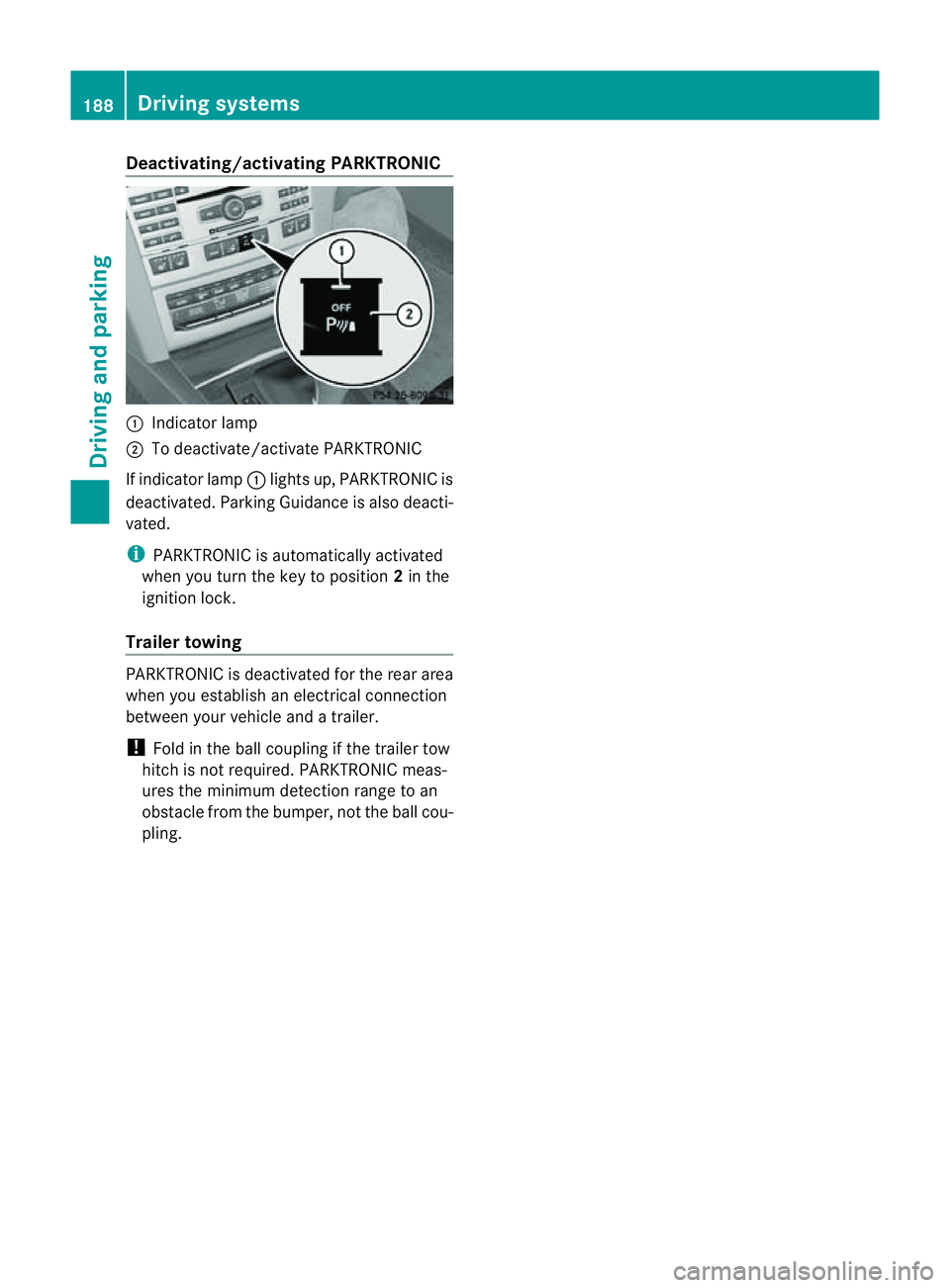
Deactivating/activating PARKTRONIC
:
Indicator lamp
; To deactivate/activat ePARKTRONIC
If indicator lamp :lights up, PARKTRONIC is
deactivated. Parking Guidance is also deacti-
vated.
i PARKTRONIC is automatically activated
when you turn th ekeyto position 2in the
ignition lock.
Trailer towing PARKTRONIC is deactivated fo
rthe rear area
when you establish an electrical connection
between your vehicle and atrailer.
! Fold in the ball coupling if the trailer tow
hitch is not required. PARKTRONIC meas-
ures the minimum detection range to an
obstacle from the bumper, not the ball cou-
pling. 188
Driving systemsDriving and parking
Page 195 of 353
X
To revers eintot he parking space: main-
tai nt he steering wheel angle and reverse
carefully.
X Stop as soon as you hear awarning tone,
at the latest when PARKTRONIC sounds the
continuous warning tone.
The Parking Guidance finished mes-
sage appears in the multifunction display
and awarning tone sounds. You may be
asked to steer in adifferen tdirection and
the nchange gear. In this case, further dis-
playsint he multifunction displayw ill direct
you to the final position.
X Manoeuvre if necessary.
X Always observe the warning messages dis-
played by PARKTRONIC (Y page 187).
Cancelling Parking Guidance X
Press the PARKTRONIC button on the
centre console (Y page 188).
Parking Guidance is cancelled immediately
and PARKTRONIC is deactivated.
Parking Guidance is cancelled automatically
if it is no longer possible to guide you into the
parking space, or if amalfunction occurs.
The parking space symbol goes out and a
warning tone sounds. The Parking Guid‐ance cancelled message appears in the
multifunction display.
Trailer towing For vehicles with
atrailer tow hitch, the min-
imum length for parking spaces is slightly
increased.
If you have attached atrailer to your vehicle,
you should not use Parking Guidance. When
the electrical connection is established
between your vehicle and the trailer, Parking
Guidance ceases to be available. PARK-
TRONIC is deactivated for the rear area. Reversing camera
Important safety notes The reversing camera is an optical parking
aid. It shows the area behind your vehicle in
the COMAND APS display.
G
WARNING
Make sure that no persons or animals are in
the manoeuvring range. Otherwise, they
could be injured.
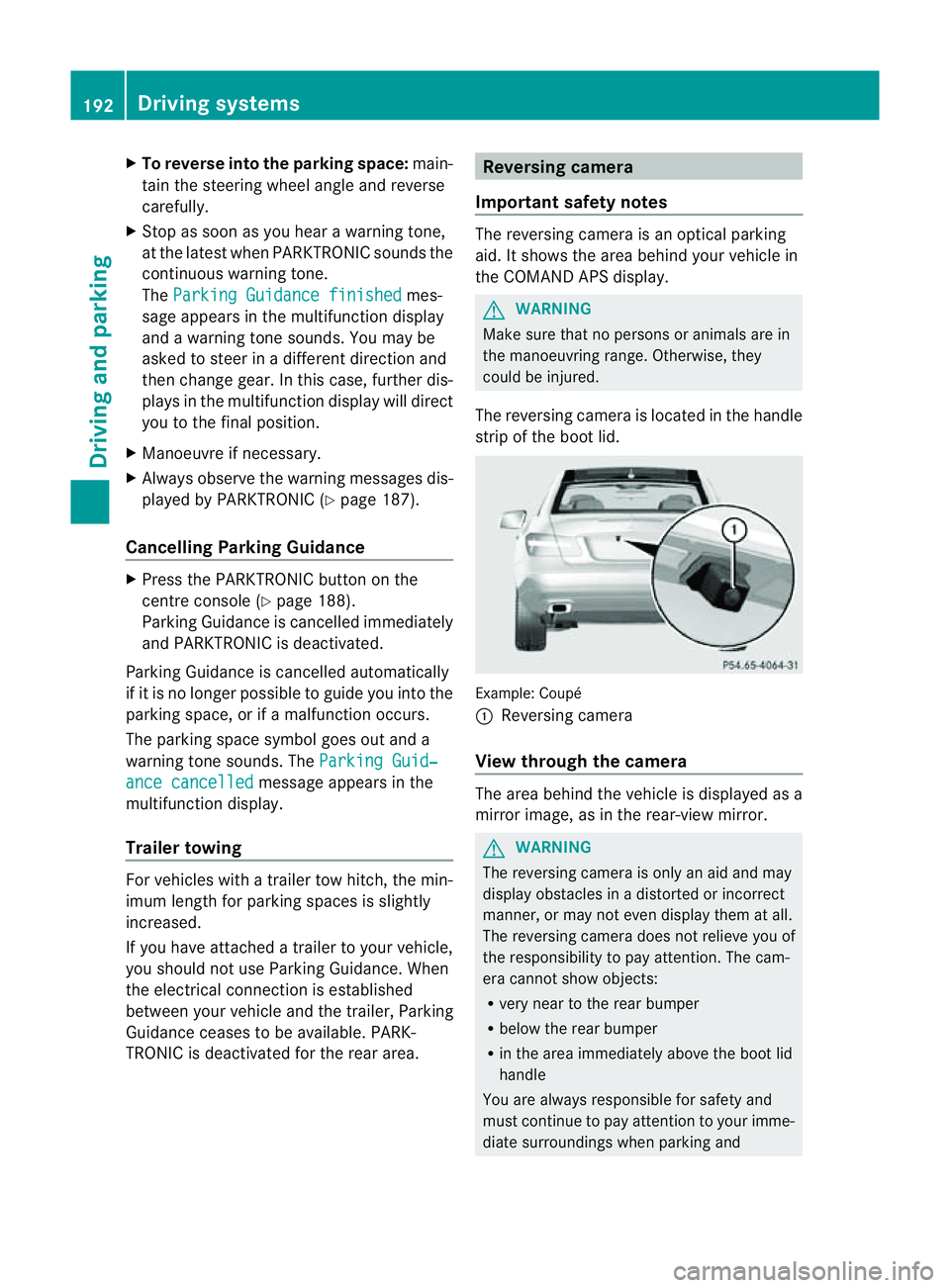
The reversing camera is located in the handle
strip of the boot lid. Example: Coupé
:
Reversing camera
View through the camera The area behind the vehicle is displayed as a
mirror image, as in the rear-view mirror.
G
WARNING
The reversing camera is only an aid and may
display obstacles in adistorted or incorrect
manner, or may not even display them at all.
The reversing camera does not relieve you of
the responsibility to pay attention. The cam-
era cannot show objects:
R very near to the rear bumper
R below the rear bumper
R in the area immediately above the boot lid
handle
You are always responsible for safety and
must continue to pay attention to your imme-
diate surroundings when parking and 192
Driving systemsDriving and parking