ECO mode MERCEDES-BENZ E-CLASS COUPE 2011 Owner's Manual
[x] Cancel search | Manufacturer: MERCEDES-BENZ, Model Year: 2011, Model line: E-CLASS COUPE, Model: MERCEDES-BENZ E-CLASS COUPE 2011Pages: 353, PDF Size: 8.42 MB
Page 141 of 353
You cannot use the auxiliary ventilation to
cool the vehicle interior to atemperature
lower than the outsid etemperature.
Befor eswitchin gon X
Turn the key to position 2in the ignition
lock.
X Set the temperature.
The auxiliary heating/ventilation can be acti-
vated even when the climat econtrol is being
controlled manually. Optimum comfor tcan
be attained when the system is set to auto-
matic mode. Set the temperature to 22 †.
The auxiliary heating/ventilation can be acti-
vated or deactivate dusing the remote control
or the button on the centr econsole.
The on-board computer can be used to spec-
ify up to three departure times, one of which
may be preselected (Y page 229).
Switchin gthe auxiliar yheating/venti-
lation on/off usin gthe centr econsole
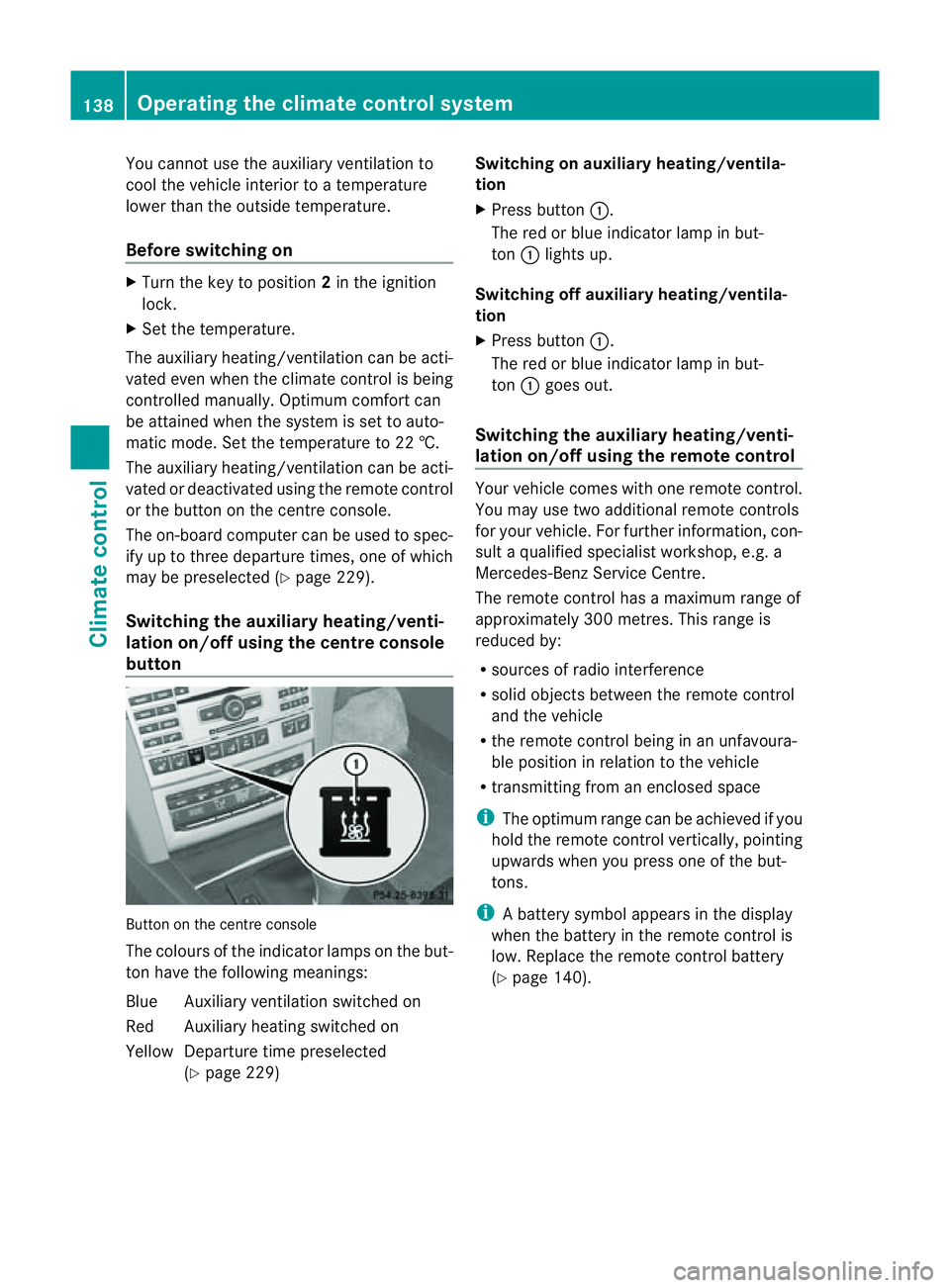
button Butto
nont hecentr econsole
The colours of th eindicator lamps on th ebut-
to nh ave th efollowin gmeanings:
Blue Auxiliary ventilatio nswitched on
Red Auxiliary heating switche don
Yellow Departure tim epreselected
(Y page 229) Switching on auxiliary heating/ventila-
tion
X
Pres sbutton :.
The red or blue indicator lamp in but-
ton :light sup.
Switching off auxiliary heating/ventila-
tion
X Pres sbutton :.
The red or blue indicator lamp in but-
ton :goes out.
Switching th eauxiliary heating/venti-
lation on/off using th eremote control Your vehicle comes with one remot
econtrol.
You may use two additional remot econtrols
for your vehicle. For further information, con-
sult aqualified specialist workshop ,e.g.a
Mercedes-Ben zService Centre.
The remote control has amaximum range of
approximately 300 metres. This range is
reduced by:
R sources of radio interference
R solid objectsb etween the remote control
and the vehicle
R the remote control being in an unfavoura-
ble position in relation to the vehicle
R transmitting from an enclosed space
i The optimum range can be achieved if you
hold the remote control vertically, pointing
upwards when you press one of the but-
tons.
i Abattery symbol appear sinthedisplay
when th ebattery in th eremot econtro lis
low. Replac ethe remot econtro lbattery
(Y page 140). 138
Operatin
gthe climat econtrol systemClimat econtrol
Page 152 of 353
Using KEYLESS-G
Otostart the engine G
WARNING
Your vehicle can be started using avalid KEY-
LESS-GO key. For this reason ,children should
neve rbel eft unsupervised in the vehicle.
Always take the key with you when leaving the
vehicle, even if you are only leaving it for a
short time.
i The Start/Stop button can be used to
start the vehicle manually without inserting
the key into the ignition lock. The key must
be in the vehicle and the Start/Stop button
must be inserted in the ignition lock. This
mode for starting the engine operates inde-
pendently of the ECO start/stop automatic
engine start function.
X Depress the brake pedal and keep it
depressed.
X To star tapetrol engine: pressthe Start/
Stop button (Y page 147) once.
The engine starts.
X To start adiesel engine: press the Start/
Stop button (Y page 147)once.
Preglow is activated and the engin estarts. Pulling away
Manual transmission X
Depress the brake pedal and keep it
depressed.
X Fully depress the clutch pedal.
X Shif ttoe itherfirst gear or reverse gear R.
X Release the parkin gbrake (Y page 166).
X Release the brake pedal.
X Slowly release the clutch pedal and gently
depress the accelerato rpedal.
! Change gear in good time and avoid spin-
ning the wheels. Otherwise, you could dam-
age the vehicle.
i Follow the shift recommendations in the
multifunction display for an economical
driving style (Y page 154). i
The vehicle locks centrally oncey ou have
pulled away. The lockin gknobs in the doors
drop down.
You can open the doors from the inside at
any time.
You can also deactivat ethe automatic lock-
ing feature (Y page 228).
Automatic transmission i
It is only possible to shift the transmission
from position Pto the desired position if
you depress the brake pedal. Only then is
the selector lever lock released.
X Depress the brake pedal and keep it
depressed.
X Shift the transmission to position Dor R.
X Release the parkin gbrake (Y page 166).
X Release the brake pedal.
X Carefully depress the accelerator pedal.
i The vehicle locks centrally oncey ou have
pulled away. The lockin gknobs in the doors
drop down.
You can open the doors from the inside at
any time.
You can also deactivat ethe automatic lock-
ing feature (Y page 228).
i Upshift stake place at higher engine
speeds after acold start .This helps the
catalytic converter to reach its operating
temperature more quickly.
Hill starta ssist Hill start assist helps you when pulling away
forwards or in reverse on an uphill gradient.
It holds the vehicle for
ashort time after you
have removed your foot from the brake pedal.
This gives you enough time to move your foot
from the brake pedal to the accelerator pedal
and depress it before the vehicle begins to
roll. Driving
149Driving and parking Z
Page 153 of 353
G
WARNING
Never leave the vehicl ewhen it is held by hill
start assist. After approximatel yone second,
hills tart assist willnol onger brake yourv ehi-
cle and it could roll away.
X Take your foot off the brake pedal.
i Oncey ou have taken your foot off the
brake pedal, the vehicle is held for around
one second.
X Pull away.
Hill start assist will not function if:
R you are pulling away on alevel road or a
downhill gradient.
R on vehicles with automatic transmission,
the transmission is in position N.
R the parking brake is applied.
R ESP ®
is malfunctioning. ECO start/stop function
General notes The ECO start/stop function is only available
for the
E200 CGI BlueEFFICIENCY model with
manual transmission.
The ECO start/stop function switches the
engine off automatically in certain situations.
The engine start sautomatically when you pull
away again. The ECO start/stop function
thereby helps you to reduce the fuel con-
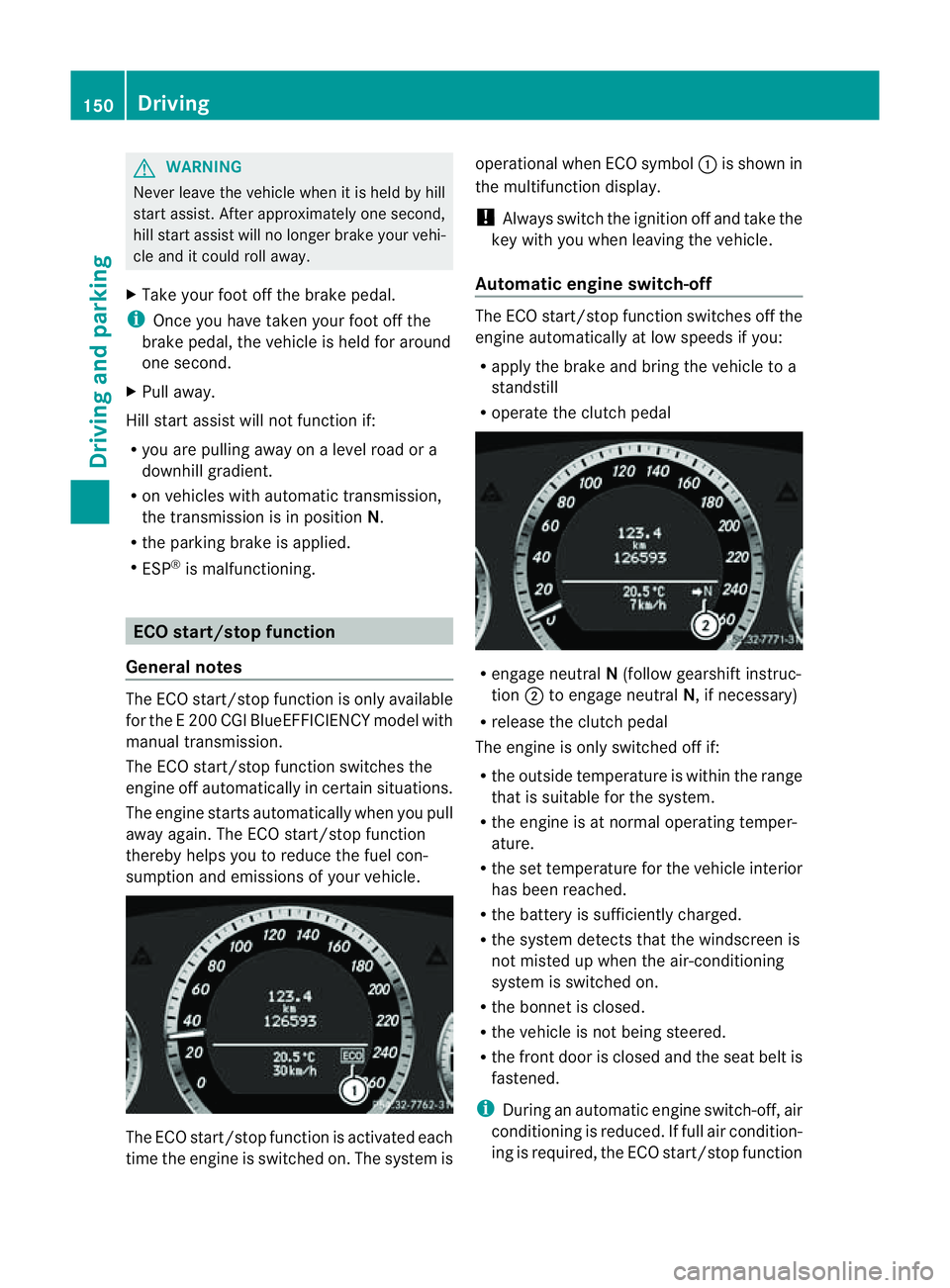
sumption and emissions of your vehicle. The ECO start/stop function is activated each
time the engine is switched on. The system is operational when ECO symbol
:is shown in
the multifunction display.
! Always switch the ignition off and take the
key with you when leaving the vehicle.
Automatic engine switch-off The ECO start/stop function switches off the
engine automatically at low speeds if you:
R
apply the brake and bring the vehicle to a
standstill
R operate the clutc hpedal R
engage neutral N(follow gearshift instruc-
tion ;to engage neutral N,ifnecessary)
R release the clutc hpedal
The engine is only switched off if:
R the outside temperature is within the range
that is suitable for the system.
R the engine is at normal operatin gtemper-
ature.
R the set temperature for the vehicle interior
has been reached.
R the batter yissufficiently charged.
R the system detects that the windscreen is
not misted up when the air-conditioning
system is switched on.
R the bonnet is closed.
R the vehicle is not being steered.
R the fron tdoor is closed and the seat belt is
fastened.
i During an automatic engine switch-off, air
conditioning is reduced. If full air condition-
ing is required, the ECO start/stop function 150
DrivingDriving and parking
Page 159 of 353
Double-clutch function
E3
50 an dE500 only: when shifting down,
the double-clutch function is activ eregard-
less of the currently selected drive program.
The double-clutch function reduces load
chang ereactions and is conducive to asporty
driving style. The sound generated by the
double-clutch function depends on the drive
program selected.
Kickdown Use kickdown for maximum acceleration.
X
Depres sthe accelerator pedal beyond the
pressure point.
The transmission shift stoalower gear
dependin gonthe engin espeed.
X Ease off the accelerator pedal onc ethe
desired speed is reached.
The automatic transmission shift sback up.
Trailer towing X
Driv eint he middle of the engin espeed
range on uphill gradients.
X Shift down to shift range 3or
2(Y page 157 )dependin gonthe uphill or
downhill gradient ,even if cruise control,
DISTRONIC PLUS or SPEEDTRONIC is acti-
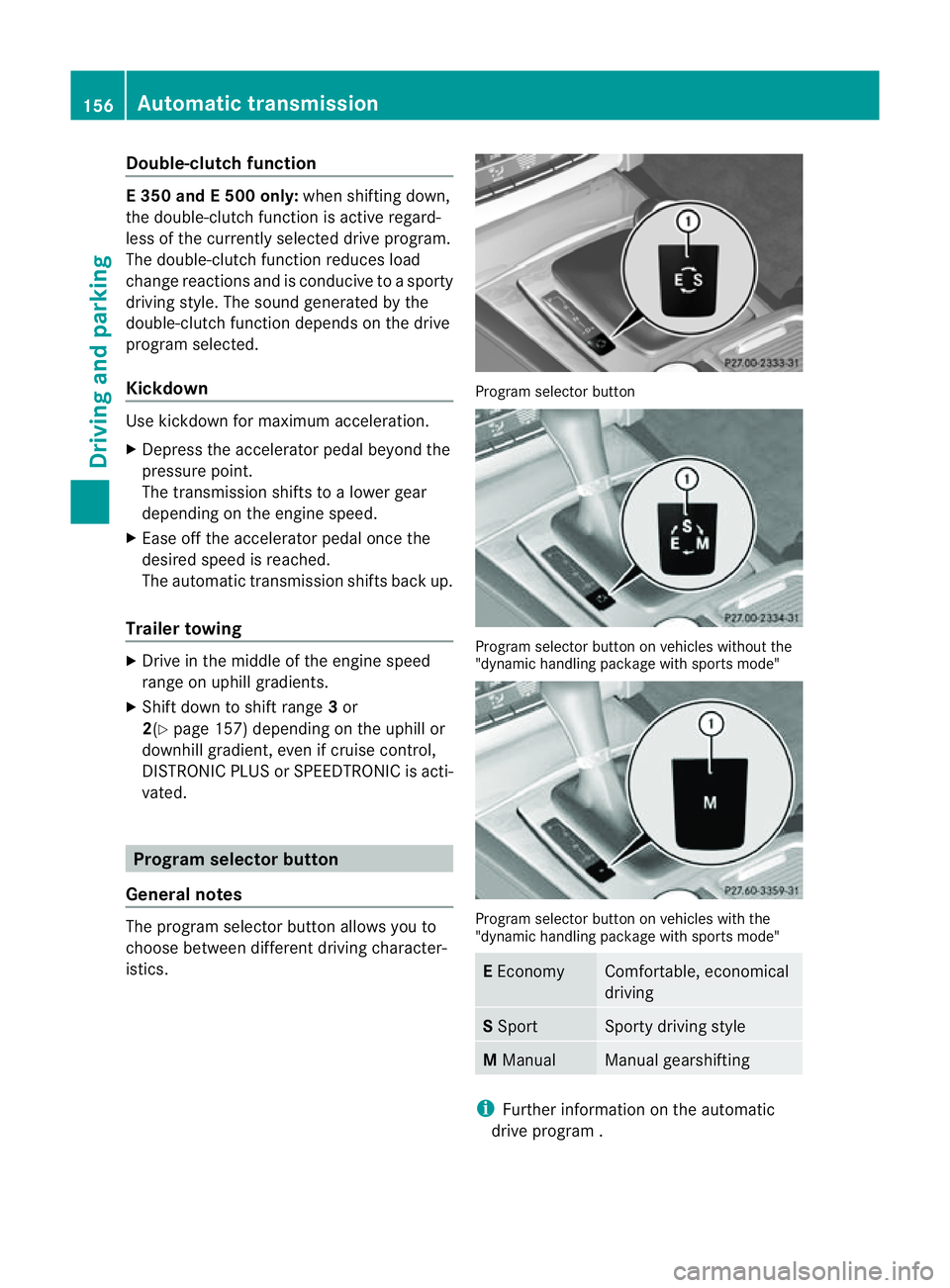
vated. Program selector button
General notes The program selector butto
nallows you to
choose between differen tdriving character-
istics. Progra
mselector button Program selecto
rbutton on vehicle swithout the
"dynamic handlin gpackage with sports mode" Program selecto
rbutton on vehicle swith the
"dynamic handlin gpackage with sports mode" E
Economy Comfortable, economical
driving
S
Sport Sport
ydriving style M
Manual Manual gearshifting
i
Further informatio nontheautomatic
driv eprogram . 156
Automatic transmissionDriving and parking
Page 163 of 353
Problems with the transmission
Problem Possible causes/consequences and
M Solutions
The transmission has
problems shifting gear. The transmission is losing oil.
X
Have the transmission checked at aqualified specialist work-
shop, e.g. aMercedes-Benz Service Centre, immediately. The acceleration ability
is deteriorating.
The transmission no
longer changes gear. The transmission is in emergency mode.
It is only possible to shift into
secondgear and reverse gear.
X Stop the vehicle.
X Shift the transmission to position P.
X Switch off the engine.
X Wait at least 10 seconds before restarting the engine.
X Shift the transmission to position Dor R.
If D is selected, the transmission shifts into secondgear; ifRis
selected, the transmission shifts into reverse gear.
X Have the transmission checked at aqualified specialist work-
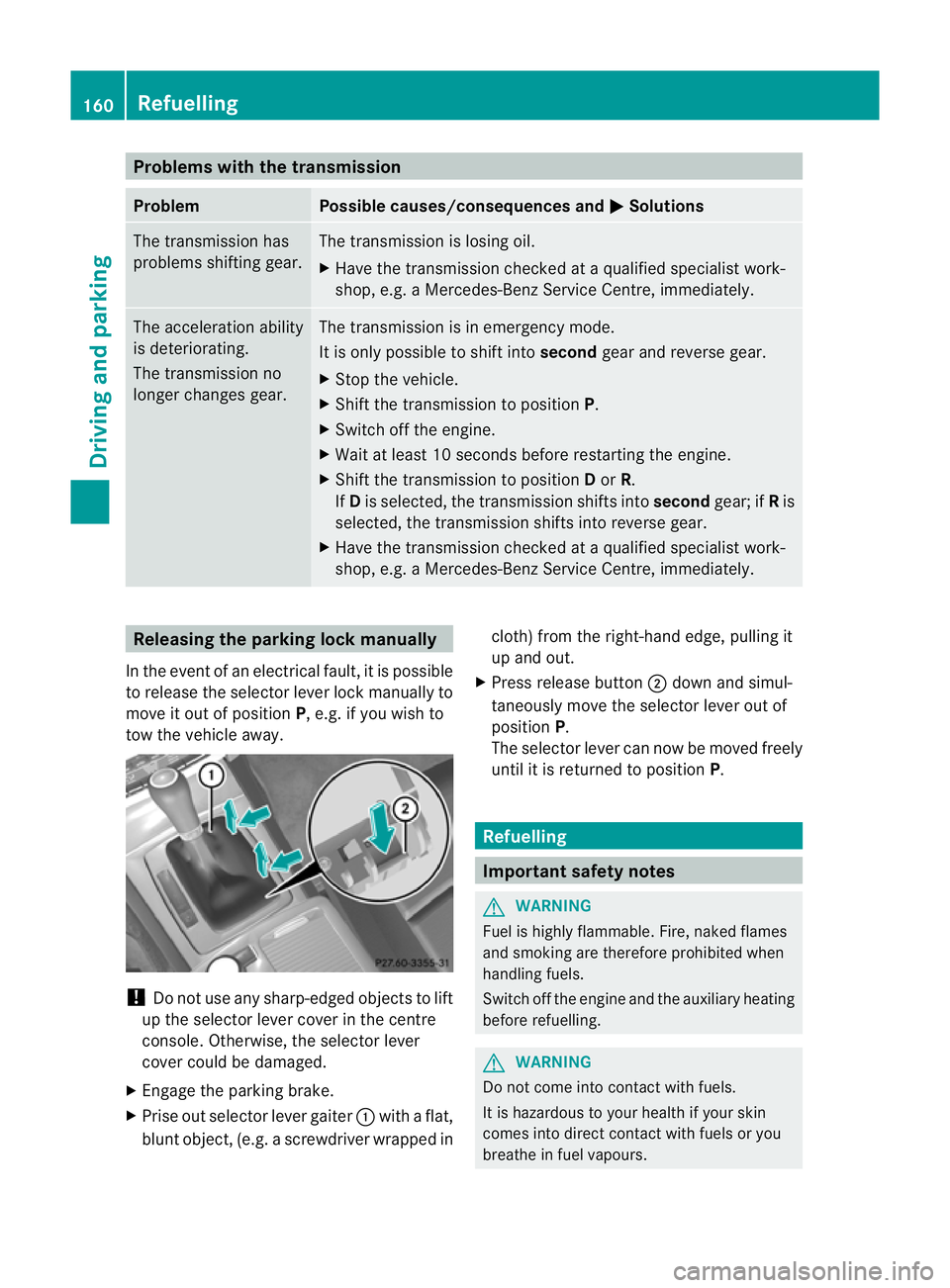
shop, e.g. aMercedes-Benz Service Centre, immediately. Releasing the parking lock manually
In the event of an electrical fault, it is possible
to release the selector lever lock manually to
move it out of position P,e.g. if you wish to
tow the vehicle away. !
Do not use any sharp-edged objectstol ift
up the selector lever cover in the centre
console. Otherwise, the selector lever
cover could be damaged.
X Engage the parking brake.
X Prise out selector lever gaiter :with aflat,
blunt object,( e.g.ascrewdriver wrappe dincloth
)from the right-hand edge, pulling it
up and out.
X Press release button ;dow nand simul-
taneousl ymovet he selecto rlever out of
position P.
The selector lever can now be moved freely
until it is returned to position P. Refuelling
Important safet
ynotes G
WARNING
Fuel is highly flammable. Fire, naked flames
and smoking are therefore prohibited when
handling fuels.
Switc hoff the engin eand the auxiliary heating
before refuelling. G
WARNING
Do not come into contact with fuels.
It is hazardous to your health if your skin
comes into direct contact with fuels or you
breathe in fuel vapours. 160
RefuellingDriving and parking
Page 215 of 353
Useful information
i This Owner's Manual describes all models
and all standard and optional equipment
available to your vehicle at the time of pub-
lication of the Owner's Manual. Country-
specific deviation sare possible. Please
not ethat your vehicle may not be equipped
with all feature sdescribed. This also
applies to safety-relevan tsystems and
functions.
i Pleas ereadt he information on qualified
specialist workshop s(Ypage 22). Important safet
ynotes
You will fin danillustration of th einstrument
cluster in th e"At ag lance "section
(Y page 28). G
WARNING
Only use th eon-bo ardc om puter when road
and traffic condition spermit .You would oth-
erwise be distracted and unable to concen-
trate properly on driving, and could cause an
accident. G
WARNING
If the instrument cluster or multifunction dis-
play fails, no messages can be displayed.
This means that you will not see information
about the driving situation, such as the speed,
outside temperature, warning/indicator
lamps, display messages or system failures.
Handling characteristics may be affected.
Adapt your driving style and speed accord-
ingly.
Immediately consult aqualified specialist
workshop which has the necessary specialist
knowledge and tools to carry out the work
required. Mercedes-Benz recommends that
you use aMercedes-Benz Service Centre for
this purpose. In particular, work relevant to
safety or on safety-related systems must be
carried out at aqualified specialist workshop. G
WARNING
The on-board computer only records and dis-
plays malfunctions and warnings from certain
systems. For this reason, you should always
make sure that your vehicle is safe to use. You
could otherwise cause an accident by driving
an unsafe vehicle. G
WARNING
The operating safety of your vehicle could be
jeopardised if maintenance work is carried
out incorrectly. As aresult, you could lose
control of the vehicle and cause an accident.
In addition, the safety systems may no longer
be able to protec tyou or others as they are
designed to do.
Always have maintenance work carried out at
aq ualified specialist workshop. The qualified
specialist workshop must have the necessary
specialist knowledge and tools to carry out
the work required. Mercedes-Benz recom-
mends that you use aMercedes-Benz Service
Centre for this purpose. In particular, work
relevant to safety or on safety-related sys-
tems must be carried out at aqualified spe-
cialist workshop. Displays and operation
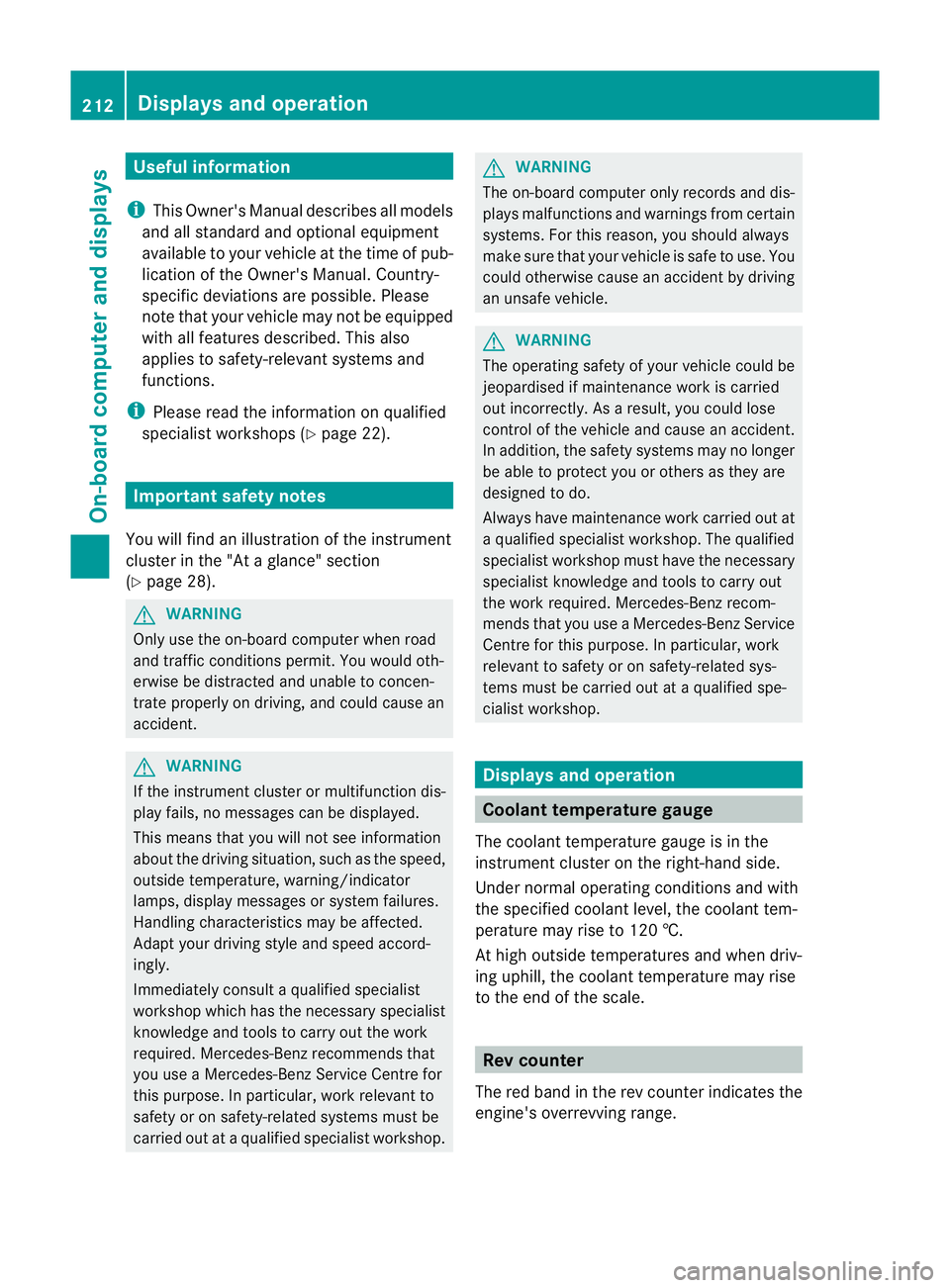
Coolant temperature gauge
The coolant temperature gauge is in the
instrument cluster on the right-hand side.
Under normal operating conditions and with
the specified coolant level, the coolant tem-
perature may rise to 120 †.
At high outside temperatures and when driv-
ing uphill, the coolant temperature may rise
to the end of the scale. Rev counter
The red band in the rev counter indicates the
engine's overrevving range. 212
Displays and operationOn-board computer and displays
Page 222 of 353
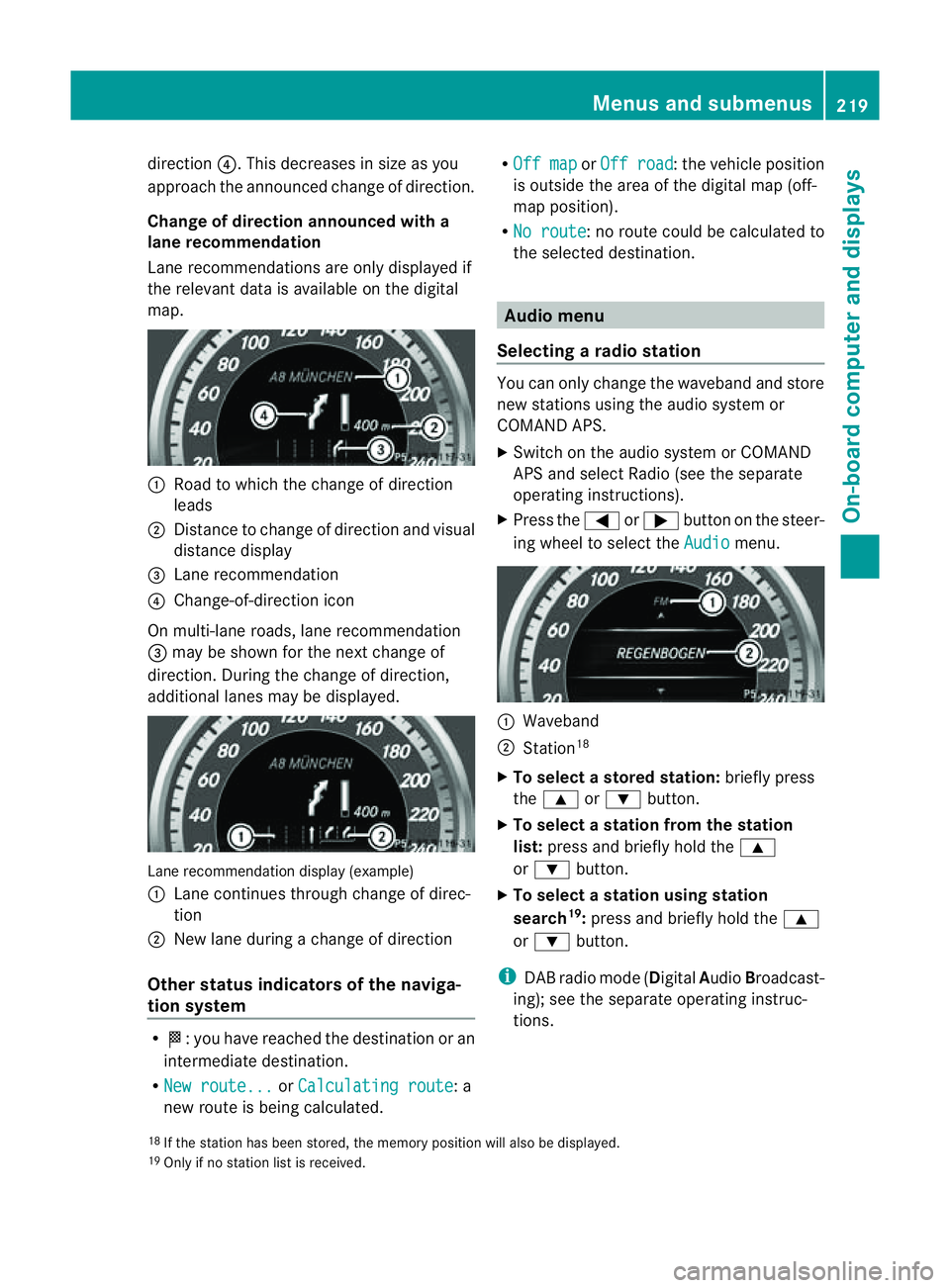
direction
?.This decreases in size as you
approach the announced change of direction.
Change of direction announced with a
lane recommendation
Lane recommendations are only displayed if
the relevant data is available on the digital
map. :
Road to which the change of direction
leads
; Distancetoc hange of direction and visual
distance display
= Lane recommendation
? Change-of-direction icon
On multi-lane roads, lane recommendation
= may be shown for the next change of
direction. During the change of direction,
additional lanes may be displayed. Lane recommendation display (example)
:
Lane continues through change of direc-
tion
; New lane during achange of direction
Other status indicators of the naviga-
tion system R
O:y ou have reached the destination or an
intermediate destination.
R New route... or
Calculating route :a
new route is being calculated. R
Off map or
Off road :t
he vehicle position
is outside the area of the digital map (off-
map position).
R No route :nor
oute could be calculated to
the selected destination. Audio menu
Selecting aradio station You can only change the waveband and store
new stations using the audio system or
COMAND APS.
X Switch on the audio system or COMAND
APS and select Radio (see the separate
operating instructions).
X Press the =or; button on the steer-
ing wheel to select the Audio menu.
:
Waveband
; Station 18
X To selectas toredstation: brieflypress
the 9 or: button.
X To select astation from the station
list: press and briefl yholdt he 9
or : button.
X To select astatio nusing station
search 19
:press and briefl yholdt he 9
or : button.
i DAB radi omode(Digit alAudio Broadcast-
ing); see the separate operating instruc-
tions.
18 If the statio nhas been stored ,the memory position will also be displayed.
19 Onl yifnos tatio nlist is received. Menus and submenus
219On-boardcomputer and displays Z
Page 223 of 353
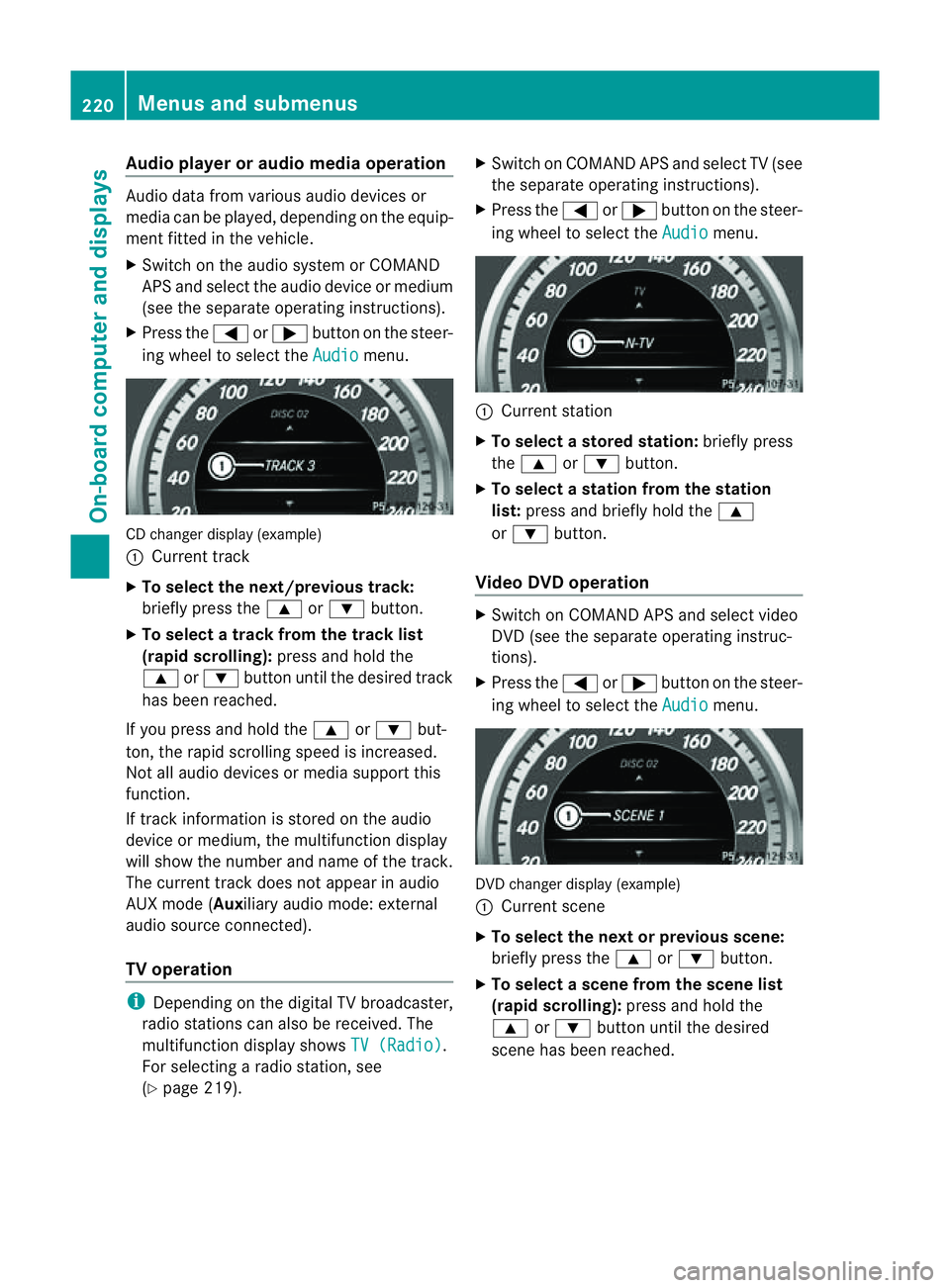
Audio player or audio media operation
Audio dat
afromv arious audio device sor
media can be played, depending on th eequip-
men tfitte dint hevehicle.
X Switc hont heaudio system or COMAND
AP Sa nd select the audi odeviceorm edium
(see the separate operating instructions).
X Press the =or; button on the steer-
ing whee ltoselect the Audio menu.
CD change
rdisplay (example)
: Curren ttrack
X To select th enext/previou strack:
briefl ypress the 9or: button.
X To select atrac kfromt he trac klist
(rapid scrolling): press and hold the
9 or: button unti lthe desired track
ha sb eenr eached.
If yo upress and hold the 9or: but-
ton, the rapi dscrolling spee disincreased.
Not al laudio devices or media support this
function.
If track information is stored on the audio
device or medium, the multifunctio ndisplay
will show the number and name of the track.
The current track does not appear in audio
AUX mode (Aux iliary audio mode: external
audio sourc econnected).
TV operation i
Dependin gonthe digital TV broadcaster,
radio station scan also be received. The
multifunction display shows TV (Radio) .
For selectin garadio station ,see
(Y page 219). X
Switch on COMAND APS and selec tTV(see
the separate operating instructions).
X Press the =or; button on the steer-
ing wheel to select the Audio menu.
:
Current station
X To select astore dstation: brieflypress
the 9 or: button.
X To select astation from the station
list: press and briefl yholdt he 9
or : button.
Vide oDVD operation X
Switch on COMAND APS and select video
DVD (see the separate operating instruc-
tions).
X Press the =or; button on the steer-
ing whee ltoselect the Audio menu.
DVD change
rdisplay (example)
: Curren tscene
X To select th enext or previous scene:
briefly press the 9or: button.
X To select ascene from th escene list
(rapid scrolling): press and hold the
9 or: buttonuntil the desired
scene ha sbeenr eached. 220
Menus and submenusOn-board computer and displays
Page 230 of 353
If you set the dipped-bea
mheadlamps for
driving on the right/left (Y page 227), the
multifunction display shows the Systeminoperative display message under the
image of the vehicle for the Intell. Light
Sys. function in the
Light submenu.
Setting the dipped-beam headlampsf or
driving on the right/left
This function is only available on vehicles with
the Intelligent Light System.
You can use this function to switch between
symmetrical beam and asymmetrical dipped
beam (Y page 114).
If you set the dipped-beam headlamps for
driving on the right/left, then motorway
mode and the extended range foglamps are
not available.
X Press the =or; button on the steer-
ing wheel to select the Settings menu.
X Press the :or9 button to select the
Light submenu.
X Press the abutton to confirm.
X Press :or9 to select the Dipped beams Setting for: function.
You will see the selected setting: Right-side traffic or
Left-side traffic .
X Press the abutton to save the setting.
When you change the setting, conversion
does not take place until the nextt ime the
vehicle is stationary.
You can also have the dipped-beam head-
lamps set for drivin gonthe right/lef tata
qualified specialist workshop, e.g. a
Mercedes-Ben zServic eCentre.
Switching Adaptive Highbeam Assist on/
off
X Press the =or; button on the steer-
ing wheel to selec tthe Settings menu.
X Press the :or9 button to select the
Light submenu.
X Press the abutton to confirm. X
Press :or9 to select the Adapt. main beam function.
If the Adapt. main beam function has
been switched on, the cone of light and the
_ symbol in the multifunction display
are shown in red.
X Press the abutton to save the setting.
Activating/deactivating the surround
lighting and exterior lighting delayed
switch-off
If you have activated the Surround light‐ ing function and the light switch is in the
à position,
R the exterior lighting remains on for another
40 seconds after you unlock the vehicle
using the key.
The exterior lighting switches off when you
open the driver’s door.
R the exterior lighting remains on for another
15 seconds after closing the doors when it
is dark.
If the engine is switched off and then none
of the doors are opened, or if an open door
is not closed, the exterior lighting goes out
after 60 seconds.
If you activate the Surround lighting func-
tion, the following light up depending on the
vehicle's equipment:
R the side lamps
R the foglamps
R the daytime driving lights
R the surround lighting in the exterior mirrors
X Press the =or; button on the steer-
ing wheel to select the Settings menu.
X Press the :or9 button to select the
Light submenu.
X Press the abutton to confirm.
X Press the :or9 button to select the
Surround lighting function.
When the Surround lighting function is
activated, the light cone and the area Menus and submenus
227On-board computer and displays Z
Page 277 of 353
Mercedes-Ben
zrecommends the use of an
approved exterior aerial. This ensures:
R optimal mobile phone reception quality in
the vehicle
R mutual influences between the vehicle
electronics and mobile phones are mini-
mised
An exterior aerial has the following advan-
tages:
R it conducts the electromagnetic fields gen-
erated by awireless device to the exterior.
R the field strengt hinthe vehicle interior is
lower than in avehicle that does not have
an exterior aerial.
i There are various mobile phone brackets
that may be fitted to your vehicle; in some
cases, these are country-specific.
i Even if your vehicle is equipped with con-
venience telephony, you can connecta
Bluetooth ®
capable mobil ephone to Audio
20 or COMAND Online via the Bluetooth ®
interface.
More information on suitabl emobilephones,
mobil ephone brackets and on connecting
Bluetooth ®
capable mobil ephones to Audio
20 or COMAND Online can be obtained:
R at your Mercedes-Benz Service Centre
R on the Internet at http://www.mercedes-
benz.com/connect
i The functions and service savailablew hen
you use the phone depend on yourm obile
phone model and service provider.
Inserting the mobile phone X
Open the telephone compartment
(Y page 265).
X Place the mobile phone bracket into the
pre-installed bracket (see the separate
mobile phone bracket installation instruc-
tions).
X Insert the mobile phone into the mobile
phone bracket (see the separate mobile
phone bracket installation instructions). If the mobile phone is inserted in the mobile
phone bracket
,you can speak to the person
you are calling using the hands-free system.
i On some mobile phone brackets, you first
have to connect the mobile phone via Blue-
tooth ®
to am obile phone bracket (see the
separate operating instructions for the
mobile phone bracket).
On these mobile phone brackets, the
mobile phone does not have to be inserted
into the bracket for you to be able to use
the telephone functions. In this case, the
charging function and aerial function are
not available.
Operating the mobile phone You can operate the telephone using the
6
and~ button sonthe multifunction
steerin gwheel. You can operate other mobile
phone functions via the on-board computer
(Y page 221).
If you take the key out of the ignition lock, the
mobile phone stays on but you can no longer
use the hands-free system.
If you are making acall and you would like to
take the key out of the ignition lock, first
remove the mobile phone from the bracket.
Otherwise, the call will be ended.
i When amobile phone bracket is used that
is connected to the mobile phone via Blue-
tooth ®
:ify ou want to continue acall in
"Private mode", you have to perform the
necessary steps on the mobile phone (see
the separate mobile phone operating
instructions).
You can fold the pre-installed bracket up to
improve access to the stowage space
beneath it. Dependin gonthe vehicle's equip-
ment,aU SB connection and an AUX-IN con-
nection/Media Interface are fitted in the
stowage compartment (Y page 265).274
FeaturesStowing and features