Seat MERCEDES-BENZ E-CLASS COUPE 2011 Repair Manual
[x] Cancel search | Manufacturer: MERCEDES-BENZ, Model Year: 2011, Model line: E-CLASS COUPE, Model: MERCEDES-BENZ E-CLASS COUPE 2011Pages: 353, PDF Size: 8.42 MB
Page 154 of 353
can be switched off with the ECO button
(Y page 151).
Automatic engine start If the engine ha
sbeens witched off by the
ECO start/stop function ,itrestart sautomat-
ically if you:
R depress th eclutch pedal
R depress th eaccelerator pedal
The engine is started automatically if:
R theE CO start/stop function is deactivated
by pressin gthe ECO button.
R thev ehicle start storoll.
R theb rak esystem requires this.
R thes ystem detect smoistur eont he wind-
screen when the air-conditioning system is
switched on.
R the battery's charge status is too low.
R the driver's seat belt is removed or the driv-
er's door is opened.
R you steer the vehicle.
! Only engage gear when the clutch pedal
is depressed.
Deactivating/activating the ECO start/
stop function :
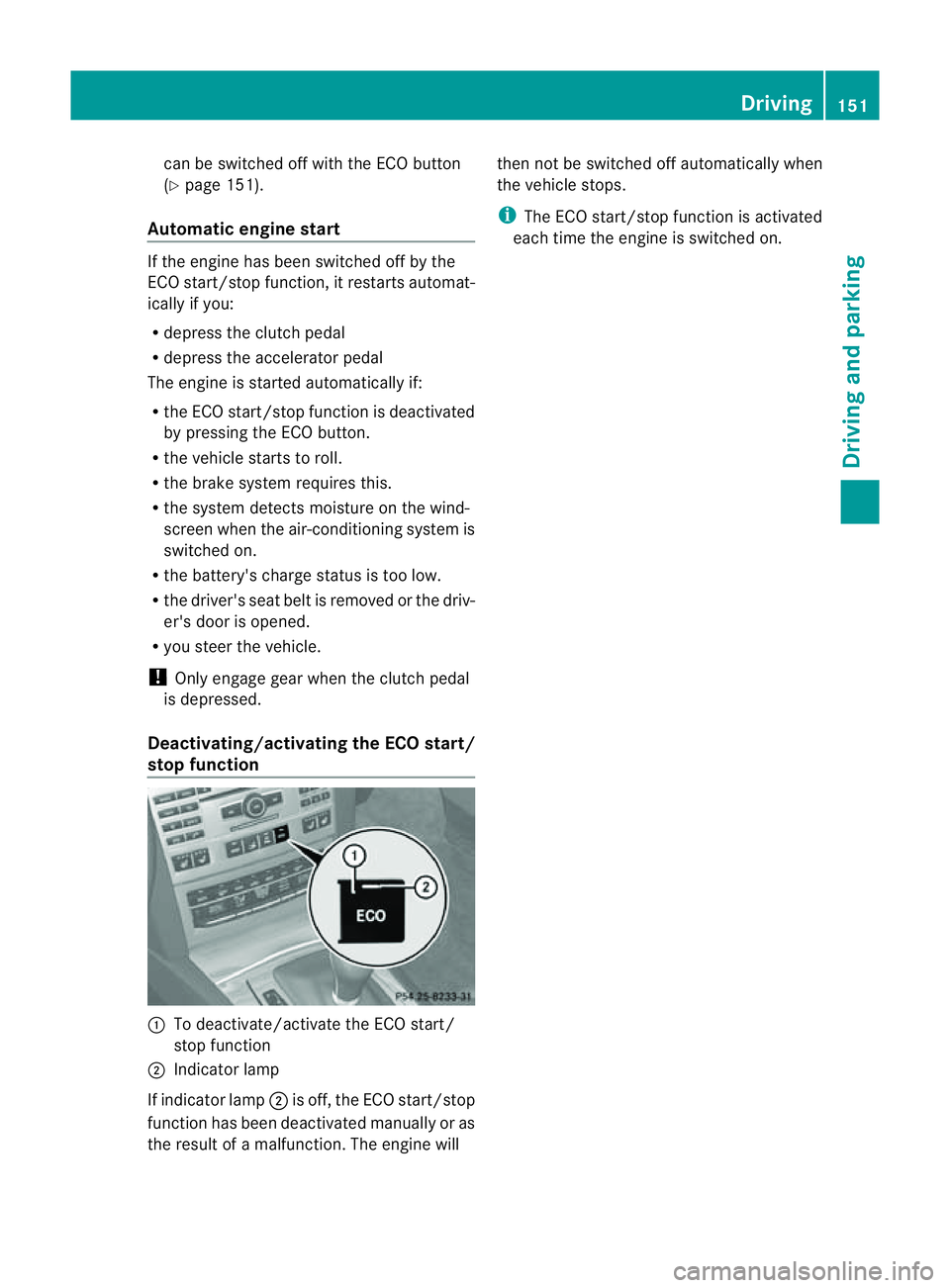
To deactivate/activate the ECO start/
stop function
; Indicator lamp
If indicator lamp ;is off, the ECO start/stop
function has been deactivated manually or as
the result of amalfunction. The engine will then not be switched off automatically when
the vehicle stops.
i
The ECO start/stop function is activated
each time the engine is switched on. Driving
151Driving and parking Z
Page 177 of 353
To activat
ethe DISTRONIC PLUS, the follow-
ing conditions must be fulfilled:
R the engine must be running. It may take up
to two minutes of driving before DIS-
TRONIC PLUS is ready for use.
R the parking brake is not applied.
R ESP ®
is activated.
R the transmission is in position D.
R the bonnet is closed.
R the driver's door must be closed when you
shift from Pto Dor your seat belt must be
fastened.
R the frontp assenger door is closed.
R thev ehicle is no tskidding.
Activatin gwhile driving
When drivin gatspeeds below30k m/h,you
can onl yactivate DISTRONI CPLUSift he vehi-
cle in front has been detected and is shown
in the multifunction display. If the vehicle in
front is not shown in the multifunction display
and is no longer being detected, for example
because it has changed lanes, DISTRONIC
PLUS is deactivated and atone sounds.
X Briefly pull the cruise control lever towards
you ?or press it up :or down Ato the
pressure point.
DISTRONIC PLUS is selected.
X Keep the cruise control lever pressed
up : or down Auntil the desired speed
is set.
X Remove your foot from the accelerator
pedal.
Your vehicle adapts its speed to that of the
vehicle in front,b ut only up to the desired
stored speed.
i If you do not fully release the accelerator
pedal, the DISTRONIC PLUS suspended message appears in the multifunction dis-
play. The set distance to
aslower-moving
vehicle in front will then not be maintained.
You will be driving at the speed you deter-
mine by the position of the accelerator
pedal. Activating when driving toward
sasta-
tionary vehicle
If the vehicl einfront of yo uisstationary, you
can onl yactivate DISTRONI CPLUSo nce your
vehicl eisstationar yaswell.
X Briefl ypullt he cruis econtro llev er towards
you ?or press it up :or down Ato the
pressure point.
DISTRONI CPLUSiss elected.
i DISTRONIC PLUS can only be activated at
under 30 km/h if avehicle in front has been
detected. Therefore, the DISTRONIC PLUS
distance displayint he instrument cluster
should be activated (Y page 223).
X Keep the cruise control lever pressed
up : or down Auntil the desired speed
is set.
i You can use the cruise control lever to set
the stored speed and the control on the
cruise control lever to set the specified
minimum distance (Y page 177).
Pulling away
X If the vehicleinf ront pulls away:remove
your foot from the brake pedal.
X Briefly pull the cruise control lever towards
you ?.
or
X Accelerate briefly.
Your vehicle pullsa wayand adapts its
speed to that of the vehicle in front.
Driving
If there is no vehicle in front,D ISTRONIC
PLUS operates in the same way as cruise
control.
If as lower-moving vehicle is detected in front,
DISTRONIC PLUS causes your vehicle to
brake and maintain apreset distance to the
vehicle in front.
If DISTRONIC PLUS detects afaster-moving
vehicle in front,iti ncreases the driving speed,
but only up to the desired speed you have
stored. 174
Driving systemsDriving and parking
Page 179 of 353
The DISTRONIC PLUS braking effect is can-
celled and the vehicle can start moving if:
R DISTRONIC PLUS is deactivated using the
cruise control lever.
R you accelerate.
R there is amalfunction in the system or an
interruption in the power supply, e.g. bat-
tery failure.
R the electrical system in the engine com-
partment, the battery or the fuses are tam-
pered with.
R the battery is disconnected.
If you wish to leave the vehicle or park it,
deactivate DISTRONIC PLUS and secure the
vehicle against rolling away.
If DISTRONIC PLUS detect sthat the vehicle
in frontiss topping, it brakes your vehicle until
it is stationary.
Once your vehicle is stationary, it remains
stationary and you do not need to depress the
brake.
i Depending on the specified minimum dis-
tance, your vehicle will come to astandstill
at as ufficient distance behind the vehicle
in front.T he specified minimum distance is
set using the control on the cruise control
lever.
You will see awarning message in the multi-
function displayifD ISTRONIC PLUS is acti-
vated and:
R the driver's door is open and the driver's
seat belt is unfastened.
R the engine is switched off, unless it is auto-
matically switched off by the ECO start/
stop function.
R the bonnet is opened.
Select Park (P) X
Move the selector lever to Pto prevent the
vehicle from rolling away.
DISTRONIC PLUS is deactivated. The warn-
ing message in the multifunction display
disappears. The horn will also sound at regular intervals if
DISTRONIC PLUS is activated and you:
R
switch the engine off, open the driver's
door and take off your seat belt
R open the bonnet
The sounding of the horn alerts you to the fact
that the vehicle has been parked while DIS-
TRONIC PLUS is still activated. The sound
becomes louder if you attempt to lock the
vehicle. The vehicle is not locked until DIS-
TRONIC PLUS is deactivated.
i If the engine has been switched off, it
cannot be started again until DISTRONIC
PLUS has been deactivated.
If DISTRONIC PLUS is activated and afault
occurs in the system or if there is adisruption
in the power supply,t heBrake immedi‐ ately message is shown in the multifunction
display. Immediately depress the brake firmly
until the warning message in the multifunc-
tion displayg oes out or shift the transmission
to position P.DISTRONIC PLUS is deactiva-
ted.
Setting aspeed X
Press the cruise control lever to the pres-
sure point, up :for ahighe rs peed or
down Afor alower speed.
X Keep the cruise contro llever pressed until
the desired speed is reached.
X Release the cruise contro llever.
The new speed is stored. DISTRONIC PLUS
is activated and adjusts the vehicle's speed
to the new speed stored.
Making adjustments in 1km/h incre-
ments X
Briefly press the cruise contro llever to the
pressure point ,up:for ahigher speed or
down Afor alower speed.
The last speed stored is increased or
reduced. 176
Driving systemsDriving and parking
Page 187 of 353
HOLD function
General notes The HOLD function can assist the drive
rinthe
following situations:
R when pulling away,e speciallyonsteep
slopes
R when manoeuvring on steep slopes
R when waiting in traffic
The vehicle is kept stationary without the
driver having to depress the brake pedal.
The braking effect is cancelled and the HOLD
function is deactivated when you depress the
accelerator pedal to pull away.
Activation conditions You can activate the HOLD function if:
R the vehicle is stationary.
R the engine is running or if it has been auto-
matically switched off by the ECO start/
stop function.
R the driver's door is closed or if your seat
belt is fastened.
R the parking brake is not applied.
R the bonnet is closed.
R the selector lever is in position D,Ror Non
vehicles with automatic transmission.
R DISTRONIC PLUS is deactivated.
Activating the HOLD function X
Make sure that the activation conditions
are met.
X Depress the brake pedal. Example: vehicles with automatic transmission X
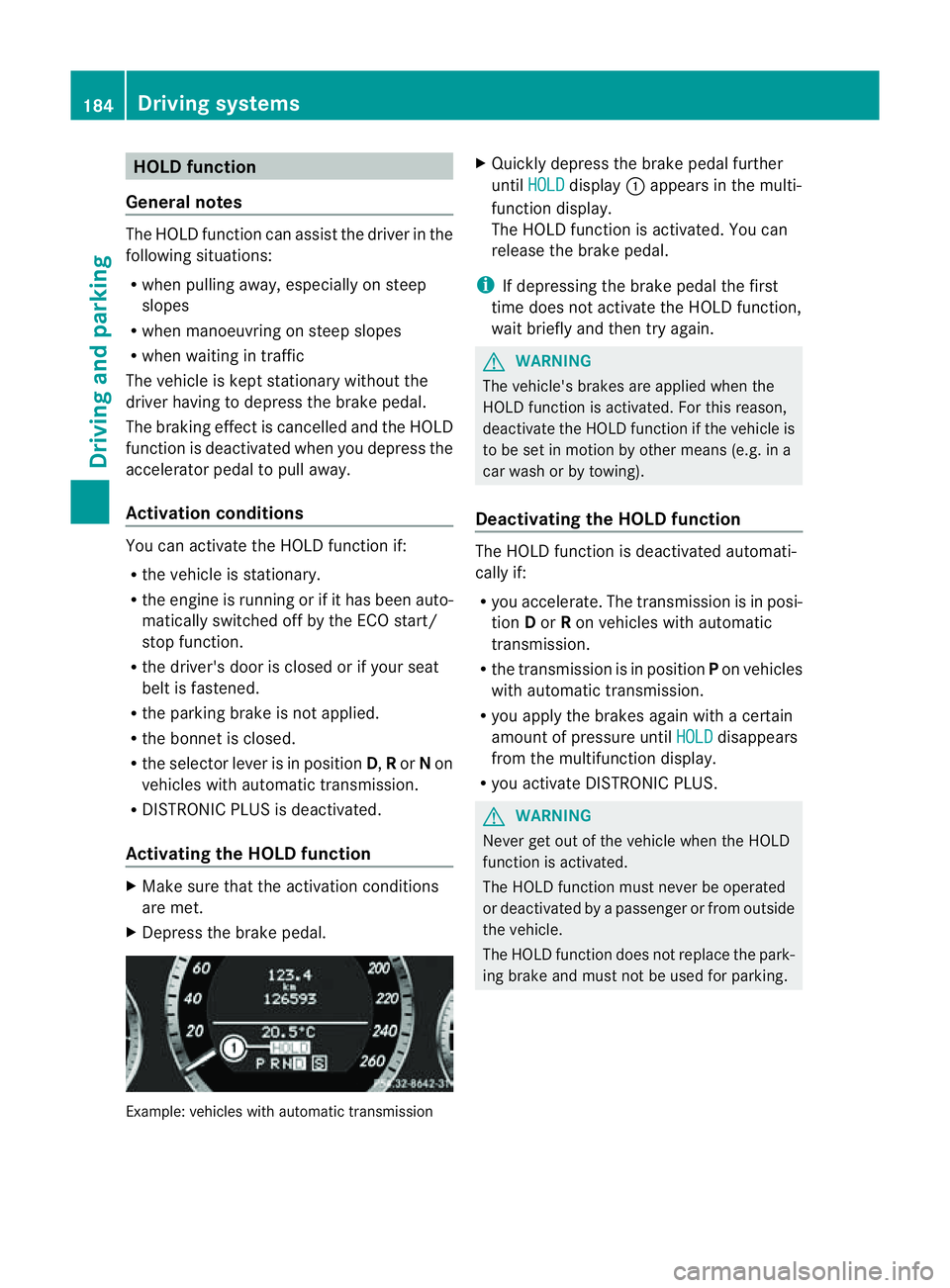
Quickly depress the brake pedal further
until HOLD display
:appears in the multi-
function display.
The HOLD function is activated. You can
release the brake pedal.
i If depressing the brake pedal the first
time does not activate the HOLD function,
wait briefly and then try again. G
WARNING
The vehicle's brakes are applied when the
HOLD function is activated. For this reason,
deactivate the HOLD function if the vehicle is
to be set in motion by other means (e.g. in a
car wash or by towing).
Deactivating the HOLD function The HOLD function is deactivated automati-
cally if:
R
you accelerate. The transmission is in posi-
tion Dor Ron vehicles with automatic
transmission.
R the transmission is in position Pon vehicles
with automatic transmission.
R you apply the brakes again with acertain
amount of pressure until HOLD disappears
from the multifunction display.
R you activate DISTRONIC PLUS. G
WARNING
Never get out of the vehicle when the HOLD
function is activated.
The HOLD function must never be operated
or deactivated by apassenger or from outside
the vehicle.
The HOLD function does not replace the park-
ing brake and must not be used for parking. 184
Driving systemsDriving and parking
Page 188 of 353
The braking effect of the HOLD function is
cancelled and the vehicle could roll away if:
R the HOLD function is deactivated by
depressing the accelerator pedal or the
brake pedal.
R there is amalfunction in the system or an
interruption in the power supply, e.g. bat-
tery failure.
R the electrical system in the engine com-
partment, the battery or the fuses are tam-
pered with.
R the battery is disconnected.
If you leave the vehicle or park it, deactivate
the HOLD function and secure the vehicle
against rolling away.
You will see awarning message in the multi-
function display if the HOLD function is acti-
vated and:
R the driver's door is open and the driver's
seat belt is unfastened.
R the engine is switched off, unless it is auto-
matically switched off by the ECO start/
stop function.
R the bonnet is opened.
For vehicles with manual transmission:
Brake immediately X
Immediately depress the brake pedal firmly
until the warning message in the multifunc-
tion display goes out. This deactivates the
HOLD function.
On vehicles with automatic transmission:
Select Park (P) X
Move the selector lever to Pto prevent the
vehicle from rolling away.
The HOLD function is deactivated. The
warning message in the multifunction dis-
play disappears.
Ah orn will also sound at regular intervals if
the HOLD function is activated and you:
R switch the engine off, open the driver's
door and take off your seat belt
R open the bonnet The sounding of the horn alerts you to the fact
that the vehicle has been parked while the
HOLD function is still activated. The tone
becomes louder if you attempt to lock the
vehicle. The vehicle is not locked until the
HOLD function is deactivated.
i If the engine has been switched off, it
cannot be started again until the HOLD
function has been deactivated.
If there is afault in the system or power supply
while the HOLD function is activated, the
Brake immediately message is shown in
the multifunction display .Immediately
depress the brake firmly until the warning
message in the multifunction display goes
out.
On vehicles with automatic transmission, you
can alsos hift into position P.This deactivates
the HOLD function. PARKTRONIC
Important safety notes G
WARNING
PARKTRONIC is only an aid and may not
detect all obstacles. It is not asubstitute for
attentive driving.
You are always responsible for safety and
must continue to pay attention to your imme-
diate surroundings when parking and
manoeuvring. You could otherwise endanger
yourself and others. G
WARNING
Make sure that no persons or animals are in
the manoeuvring range. Otherwise, they
could be injured.
PARKTRONIC is an electronic parking aid with
ultrasonic sensors. It indicates visuallya nd
audibly the distance between your vehicle
and an object. Driving systems
185Driving and parking Z
Page 190 of 353
the minimum
,the distance ma ynolongerbe
shown.
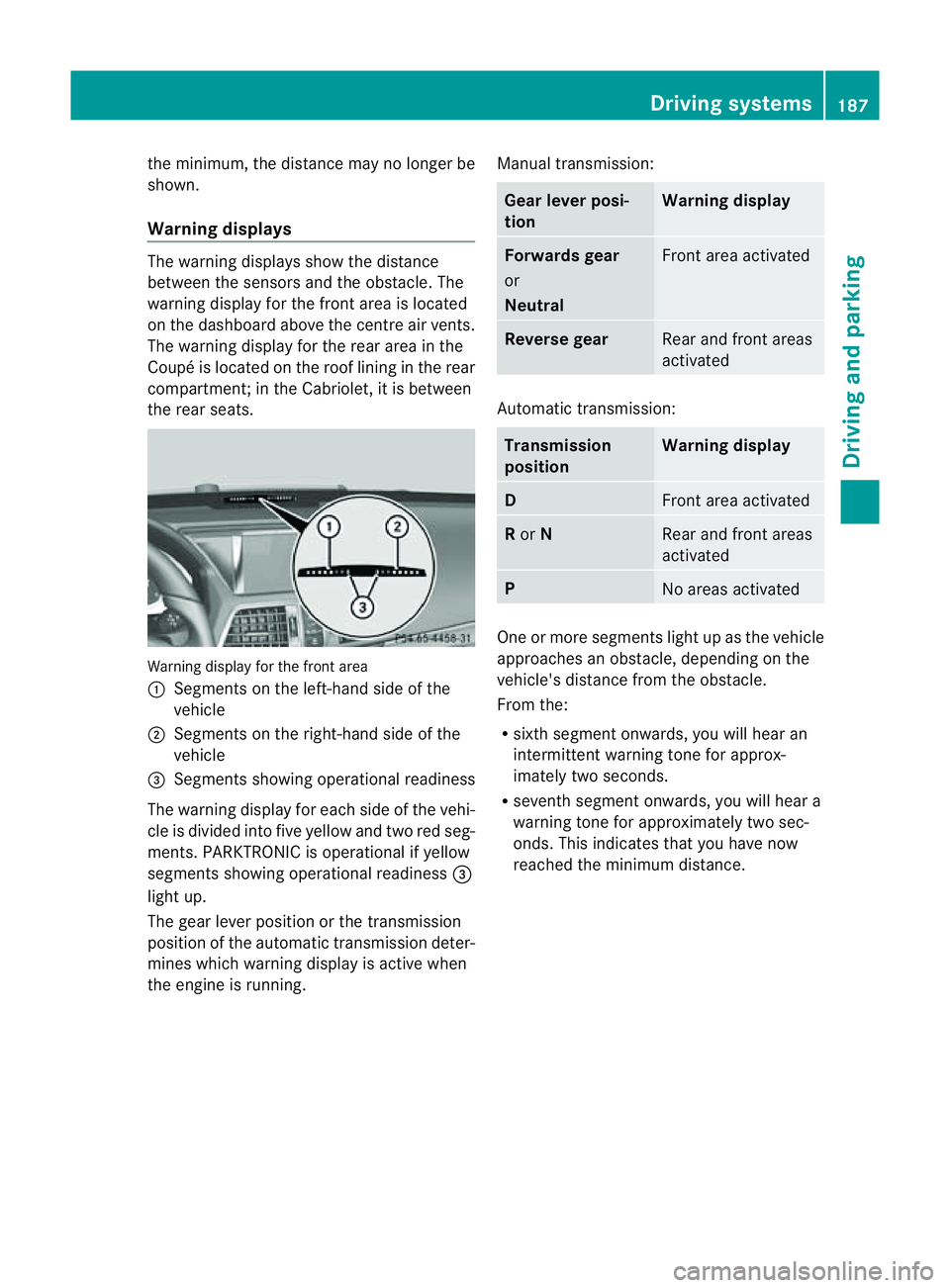
Warning displays The warning displays show the distance
between the sensors and the obstacle. The
warning displayf or the front area is located
on the dashboard above the centre air vents.
The warning displayf or the rear area in the
Coupéisl ocated on the roof lining in the rear
compartment;int he Cabriolet, it is between
the rear seats. Warning displayf
or the front area
: Segmentsont he left-hand side of the
vehicle
; Segmentsont he right-hand side of the
vehicle
= Segmentss howing operational readiness
The warning displayf or each side of the vehi-
cle is divided into five yellow and two red seg-
ments. PARKTRONIC is operational if yellow
segments showing operational readiness =
light up.
The gear lever position or the transmission
position of the automatic transmission deter-
mines which warning displayisa ctive when
the engine is running. Manual transmission: Gear lever posi-
tion Warning display
Forwards gear
or
Neutral
Front area activated
Reverse gear
Rear and front areas
activated
Automatic transmission:
Transmission
position Warning display
D
Front area activated
R
or N Rear and front areas
activated
P
No areas activated
One or more segments light up as the vehicle
approaches an obstacle, depending on the
vehicle's distance from the obstacle.
From the:
R
sixth segment onwards, you will hear an
intermittent warning tone for approx-
imately two seconds.
R seventh segment onwards, you will hear a
warning tone for approximately two sec-
onds. This indicates that you have now
reached the minimum distance. Driving systems
187Driving and parking Z
Page 198 of 353
still detects typical indicators of fatigue or
increasing lapses in concentration, you will be
warned againa fter 15 minutes at the earliest.
ATTENTION ASSIST is reset whe nyou con-
tinue you rjourney and it startsa ssessing your
tiredness again if:
R you switch off the engine.
R you take off your seat belt and open the
driver's door, e.g. for achange of drivers or
to take abreak. Speed Limit Assist
Important safety notes i
Speed Limit Assist is not operational in all
countries.
Speed Limit Assist shows you detected speed
limits in the multifunction display .Data from
th en avigation system is also used for this
purpose. The display appear sifatraffic sign
indicating aspee dlimit or th eend ofas peed
limit is detected. If Speed Limit Assist does
no td etec tany traffic signs, the speed limit
from the digital roa dmap is take nand shown
in the display.
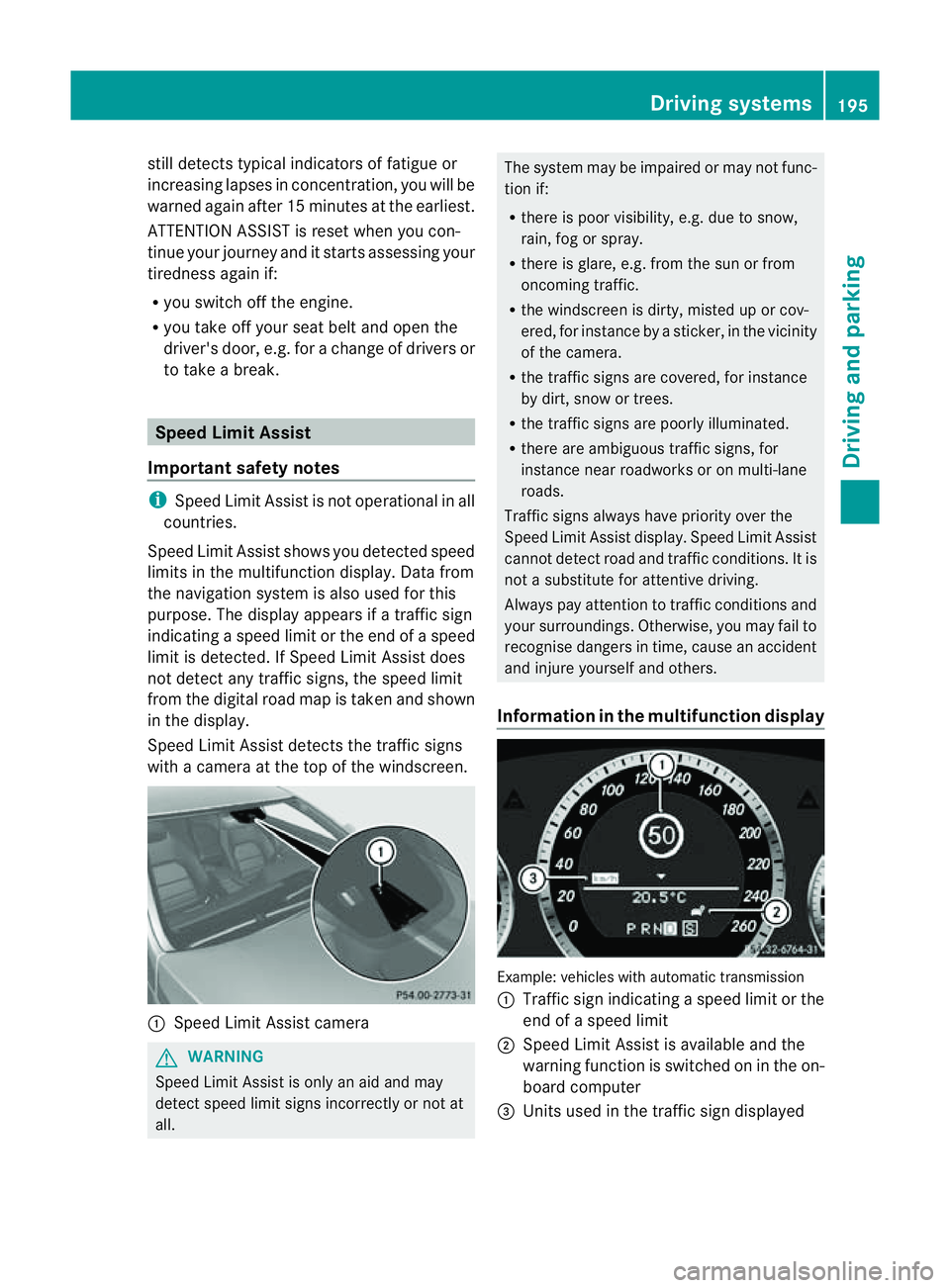
Speed Limit Assist detects the traffic signs
with acamera at the top of the windscreen. :
Speed Limit Assist camera G
WARNING
Speed Limit Assist is only an aid and may
detect speed limit signs incorrectly or not at
all. The system may be impaired or may not func-
tion if:
R
there is poor visibility, e.g. due to snow,
rain, fog or spray.
R there is glare, e.g. from the sun or from
oncoming traffic.
R the windscreen is dirty, misted up or cov-
ered, for instance by asticker, in the vicinity
of the camera.
R the traffic signs are covered, for instance
by dirt, snow or trees.
R the traffic signs are poorly illuminated.
R there are ambiguous traffic signs, for
instance near roadworks or on multi-lane
roads.
Traffic signs always have priority over the
Speed Limit Assist display. Speed Limit Assist
cannot detect road and traffic conditions. It is
not asubstitute for attentive driving.
Always pay attention to traffic conditions and
your surroundings. Otherwise, you may fail to
recognise dangers in time, cause an accident
and injure yourselfa nd others.
Information in the multifunctio ndisplay Example
:vehicles with automatic transmission
: Traffic sign indicatin gaspeed limit or the
end of aspeed limit
; Speed Limit Assist is available and the
warning function is switched on in the on-
board computer
= Unit sused in the traffic sign displayed Driving systems
195Driving and parking Z
Page 233 of 353
Selecting the departuret
ime or deactivat-
ing aselected departuret ime
X Press the =or; button on the steer-
ing wheel to select the Settings menu.
X Press the :or9 button to select the
Heating submenu.
X Press the abutton to confirm.
You will see the selected setting.
X Press the abutton to confirm.
X Press the :or9 button to select
one of the three departure times or Timeroff (no timer active).
X Press the abutton to confirm.
When adeparture time is selected, the yel-
low indicator lamp lights up on the auxiliary
heating button.
Changing the departuret ime
X Press the =or; button on the steer-
ing wheel to select the Settings menu.
X Press the :or9 button to select the
Heating submenu.
X Press the abutton to confirm.
You will see the selected setting.
X Press the abutton to confirm.
X Press the :or9 button to select
Change A ,
B or
C .
X Press the abutton to confirm.
You can now change the departure time.
X Press the =or; button to select the
display to be changed: hours, minutes.
X Press the :or9 button to set the
selected display.
X Press the abutton to store the entry.
The yellowi ndicator lamp on the auxiliary
heating button lights up.
Convenience Activating/deactivating the EASY-
ENTRY/EXIT feature
You can use the Easy Entry/Exit: function
to activate or deactivate the EASYE NTRY/
EXIT feature (Y page 108). G
WARNING
The steering wheel moves when the EASY-
ENTRY/EXIT feature is active. There is arisk
of occupants becoming trapped. Before acti-
vating the EASY-ENTRY/EXIT feature, make
sure that nobody can become trapped.
Do not leave children unsupervised in the
vehicle, even if they are secured in achild
restraint system. The children could open the
driver's door and thereby unintentionally acti-
vate the EASY-ENTRY/EXIT feature and
become trapped.
X Press the =or; button on the steer-
ing wheel to select the Settings menu.
X Press the :or9 button to select the
Convenience submenu.
X Press the abutton to confirm.
X Press the :or9 button to select the
Easy Entry/Exit function.
If the Easy Entry/Exit function is activa-
ted, the vehicle steering wheel is displayed
in red in the multifunction display.
X Press the abutton to save the setting.
Switching the belt adjustment on/off
For further information on belt adjustment,
see (Y page 49).
X Press the =or; button on the steer-
ing wheel to select the Settings menu.
X Press the :or9 button to select the
Convenience submenu.
X Press the abutton to confirm.
X Press the :or9 button to select the
Belt adjustment function.
When the Belt adjustment function is
activated, the vehicle seat belt is displayed
in red in the multifunction display.
X Press the abutton to save the setting.
Switching the Fold in mirrors when lock-
ing function on/off
If you switch on the Auto. fold in function,
the exterior mirrors fold in when you lock the
vehicle. When you unlock the vehicle and then 230
Menus and submenusOn-board computer and displays
Page 239 of 353
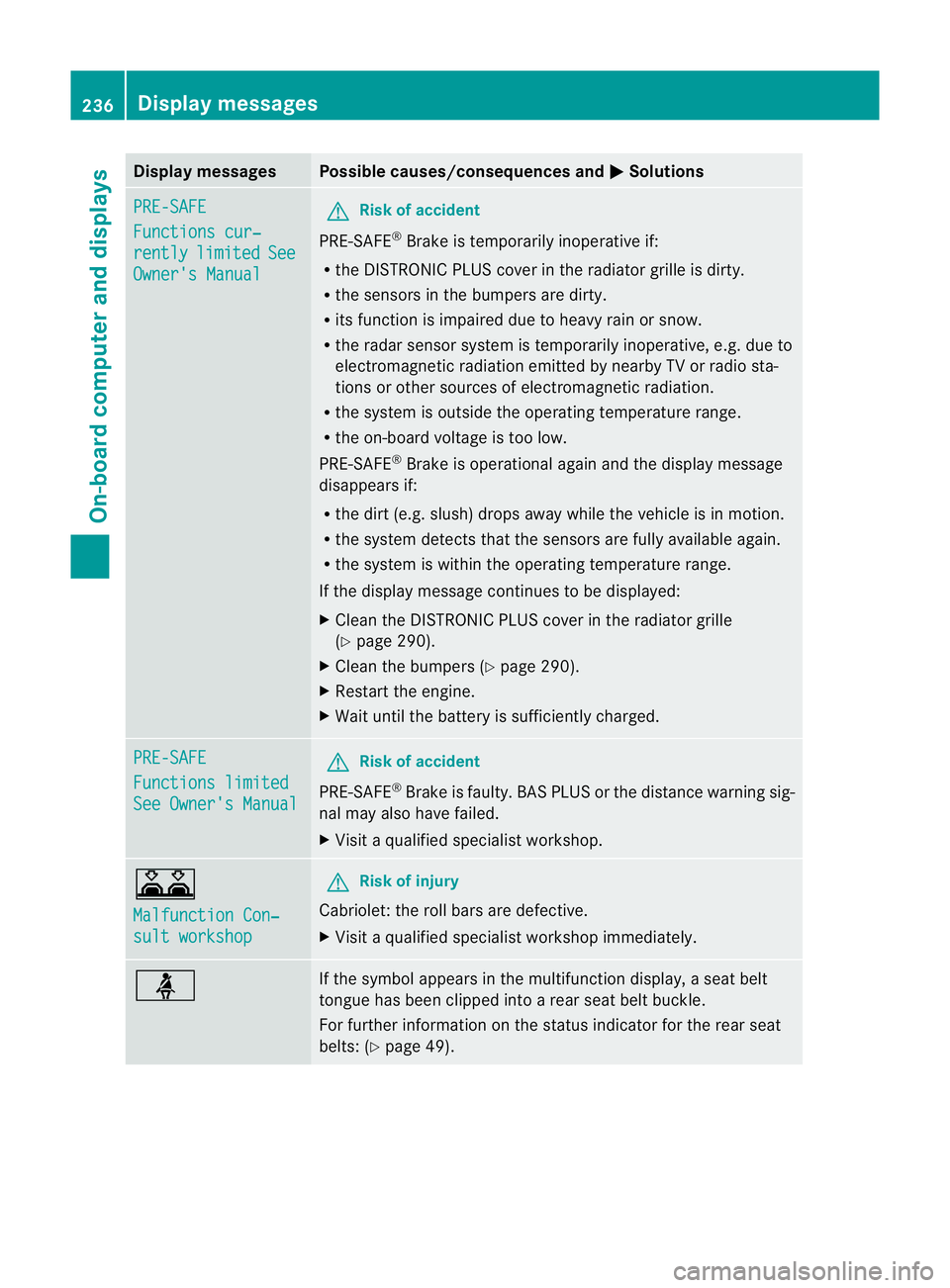
Display messages Possible causes/consequences and
M Solutions
PRE-SAFE
Functions cur‐
rently limited See
Owner'
sManual G
Risk of accident
PRE-SAFE ®
Brake is temporarily inoperative if:
R theD ISTR ONIC PLU Scover in th eradiato rgrille is dirty.
R thes ensor sinthebumpers are dirty.
R itsf unction is impaire ddue to heav yrain or snow.
R ther ada rsensor system is temporarily inoperative, e.g. due to
electromagnetic radiation emitted by nearby TV or radio sta-
tion soro ther sources of electromagnetic radiation.
R the system is outside the operatin gtemperature range.
R the on-board voltage is too low.
PRE-SAFE ®
Brak eiso perational again and the display message
disappears if:
R the dirt (e.g. slush) drops away while the vehicle is in motion.
R the system detects that the sensor sare fully available again.
R the system is within the operatin gtemperature range.
If the display message continues to be displayed:
X Clean the DISTRONIC PLUS cover in the radiator grille
(Y page 290).
X Clean the bumpers (Y page 290).
X Restart the engine.
X Wait until the batter yissufficiently charged. PRE-SAFE
Functions limited
See Owner's Manual G
Risk of accident
PRE-SAFE ®
Brak eisf aulty. BASP LUS or the distance warning sig-
nal may also have failed.
X Visit aqualified specialist workshop. A
Malfunction Con‐
sult workshop G
Risk of injury
Cabriolet: the roll bars are defective.
X Visit aqualified specialist workshop immediately. ü If the symbola
ppears in the multifunction display,as eat belt
tongue has been clipped intoar ear seat belt buckle.
For further information on the status indicator for the rear seat
belts: (Y page 49). 236
Display messagesOn-boar
dcomputer and displays
Page 240 of 353
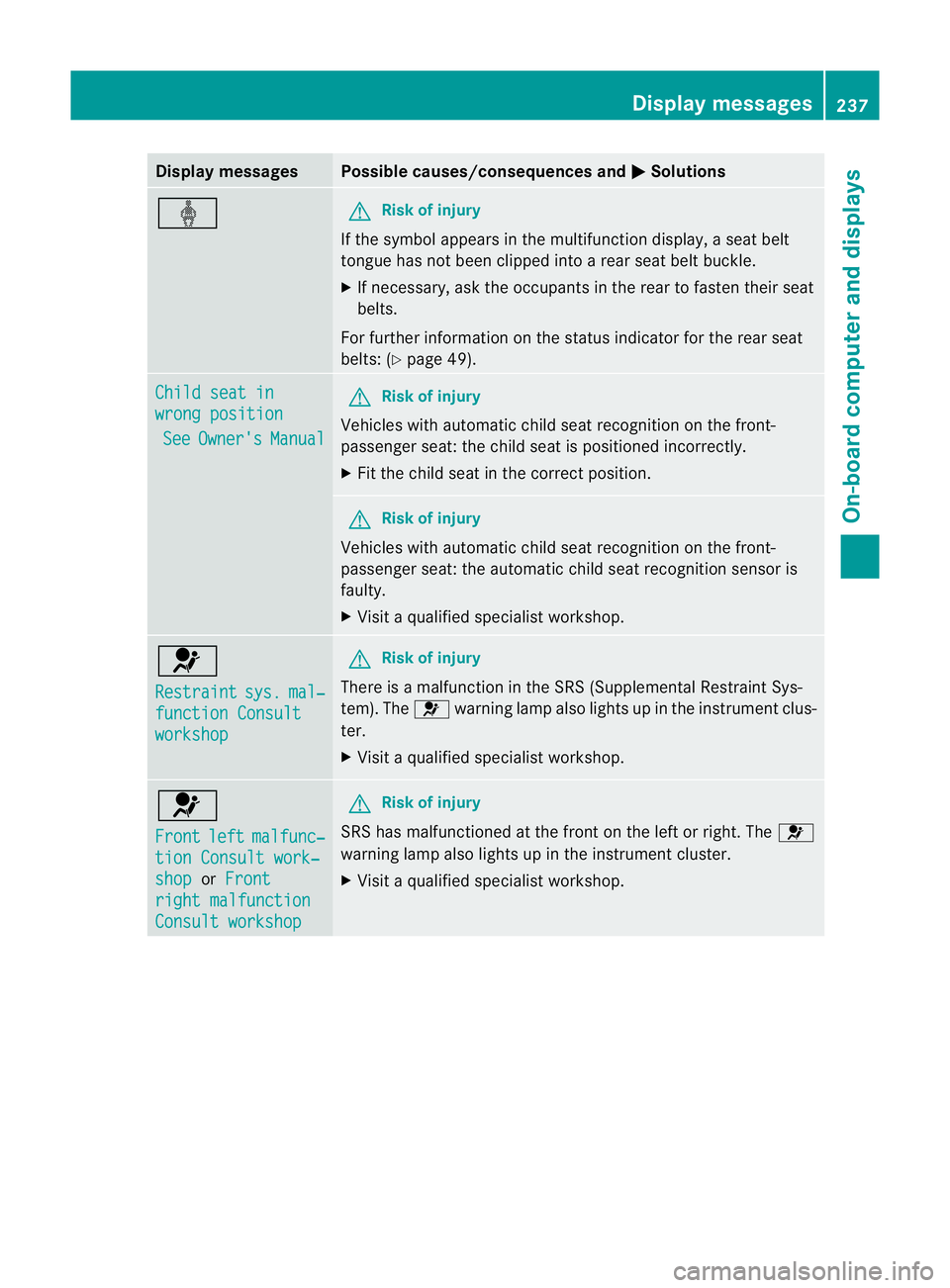
Display messages Possible causes/consequences and
M Solutions
ý G
Risk of injury
If th esymbol appears in th emultifunction display, aseat belt
tongue has not been clipped intoar ear seat belt buckle.
X If necessary, ask the occupants in the rear to fasten their seat
belts.
For further information on the status indicator for the rear seat
belts: (Y page 49). Child seat in
wrong position
See Owner's Manual G
Risk of injury
Vehicles with automatic child seat recognition on the front-
passenger seat: the child seat is positioned incorrectly.
X Fit the child seat in the correct position. G
Risk of injury
Vehicles with automatic child seat recognition on the front-
passenger seat: the automatic child seat recognition sensor is
faulty.
X Visit aqualified specialist workshop. 6
Restraint
sys. mal‐
functio
nConsult workshop G
Risk of injury
There is amalfunction in the SRS (Supplemental Restraint Sys-
tem). The 6warning lamp also lights up in the instrument clus-
ter.
X Visit aqualified specialist workshop. 6
Front
left malfunc‐
tion Consult work‐
shop or
Front right malfunction
Consult workshop G
Risk of injury
SRS has malfunctioned at the fron tonthe left or right. The 6
warning lamp also lights up in the instrument cluster.
X Visit aqualified specialist workshop. Display messages
237On-boardcomputer and displays Z