brake MERCEDES-BENZ E-CLASS COUPE 2011 Repair Manual
[x] Cancel search | Manufacturer: MERCEDES-BENZ, Model Year: 2011, Model line: E-CLASS COUPE, Model: MERCEDES-BENZ E-CLASS COUPE 2011Pages: 353, PDF Size: 8.42 MB
Page 225 of 353
X
Press the 9or: button to select the
desired name.
To start scrolling rapidly, press and hold the
9 or: button for longer than one
second. After ashort time, the rapid scroll
speeds up.
Rapid scrolling stops when you release the
button or reach the end of the list.
X If only one telephone number is stored
for aname: press the 6ora button
to start dialling.
or
X If thereism ore thanone number for a
particular name: press the6ora
button to display the numbers.
X Press the 9or: button to select the
number you want to dial.
X Press the 6ora button to start dial-
ling.
or
X If you do not want to makeac all:press
the ~ or% button.
Redialling The on-board computer saves the last names
or numbers dialled in the redial memory.
X Press the =or; button on the steer-
ing wheel to select the Tel menu.
X Press the 6button to switch to the
redial memory.
X Press the 9or: button to select the
desired name or number.
X Press the 6ora button to start dial-
ling.
or
X If you do not want to makeac all:press
the ~ or% button. Assistance menu
Introduction In the
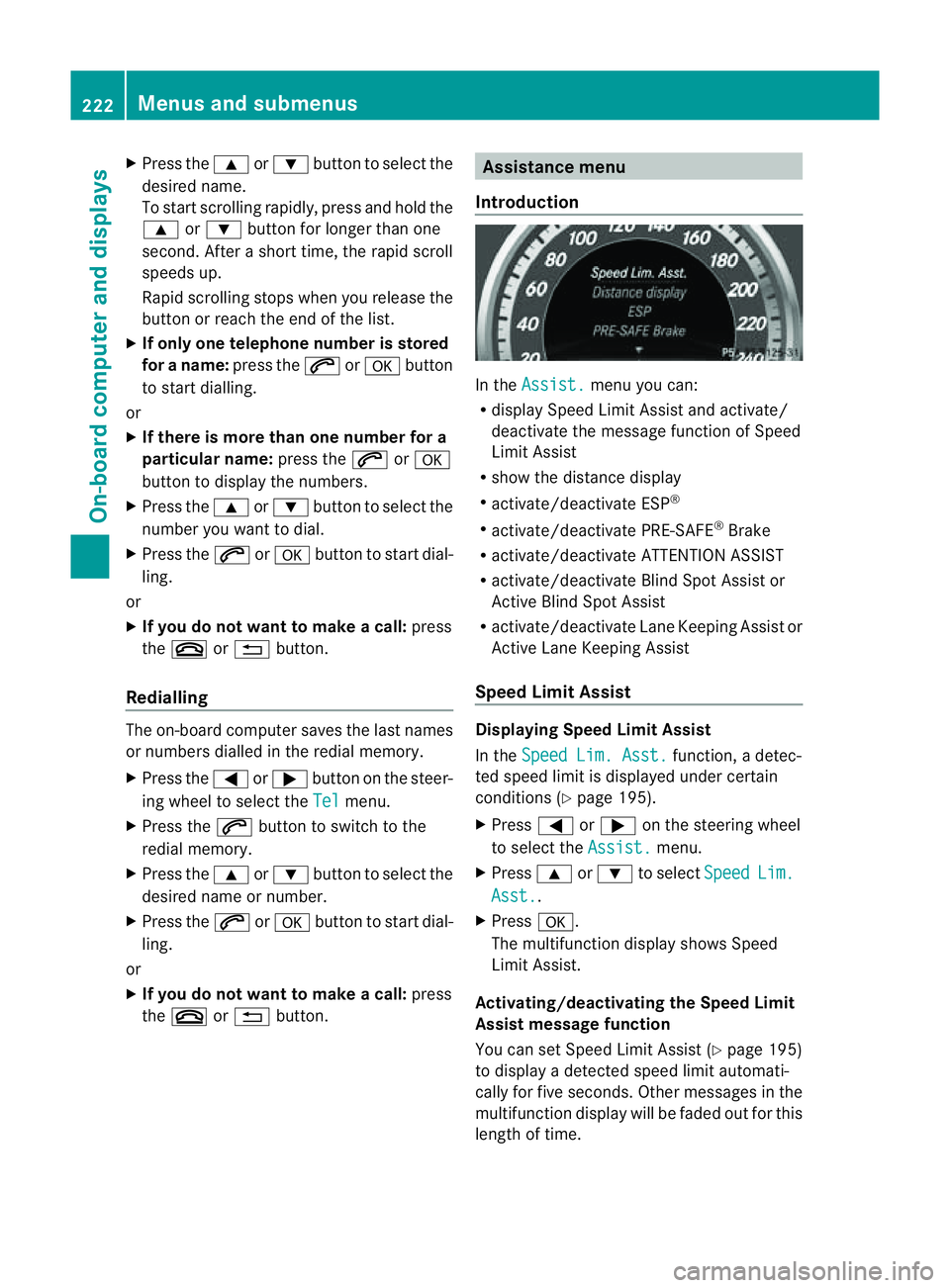
Assist. menu you can:
R display Speed Limit Assist and activate/
deactivat ethe message function of Speed
Limit Assist
R show the distanc edisplay
R activate/deactivate ESP ®
R activate/deactivate PRE-SAFE ®
Brake
R activate/deactivate ATTENTION ASSIST
R activate/deactivate Blind Spot Assist or
Active Blind Spot Assist
R activate/deactivate Lane Keeping Assist or
Active Lane Keeping Assist
Speed Limit Assist Displaying Speed Limit Assist
In the
Speed Lim. Asst. function,
adetec-
ted speed limit is displaye dunder certain
conditions (Y page 195).
X Press =or; on the steerin gwheel
to select the Assist. menu.
X Press 9or: to select Speed Lim.
Asst. .
X Press a.
The multifunction display shows Speed
Limit Assist.
Activating/deactivating the Speed Limit
Assist message function
You can set Speed Limit Assist (Y page 195)
to display adetected speed limit automati-
cally for five seconds. Other messages in the
multifunction display will be faded out for this
length of time. 222
Menus and submenusOn-board computer and displays
Page 226 of 353
X
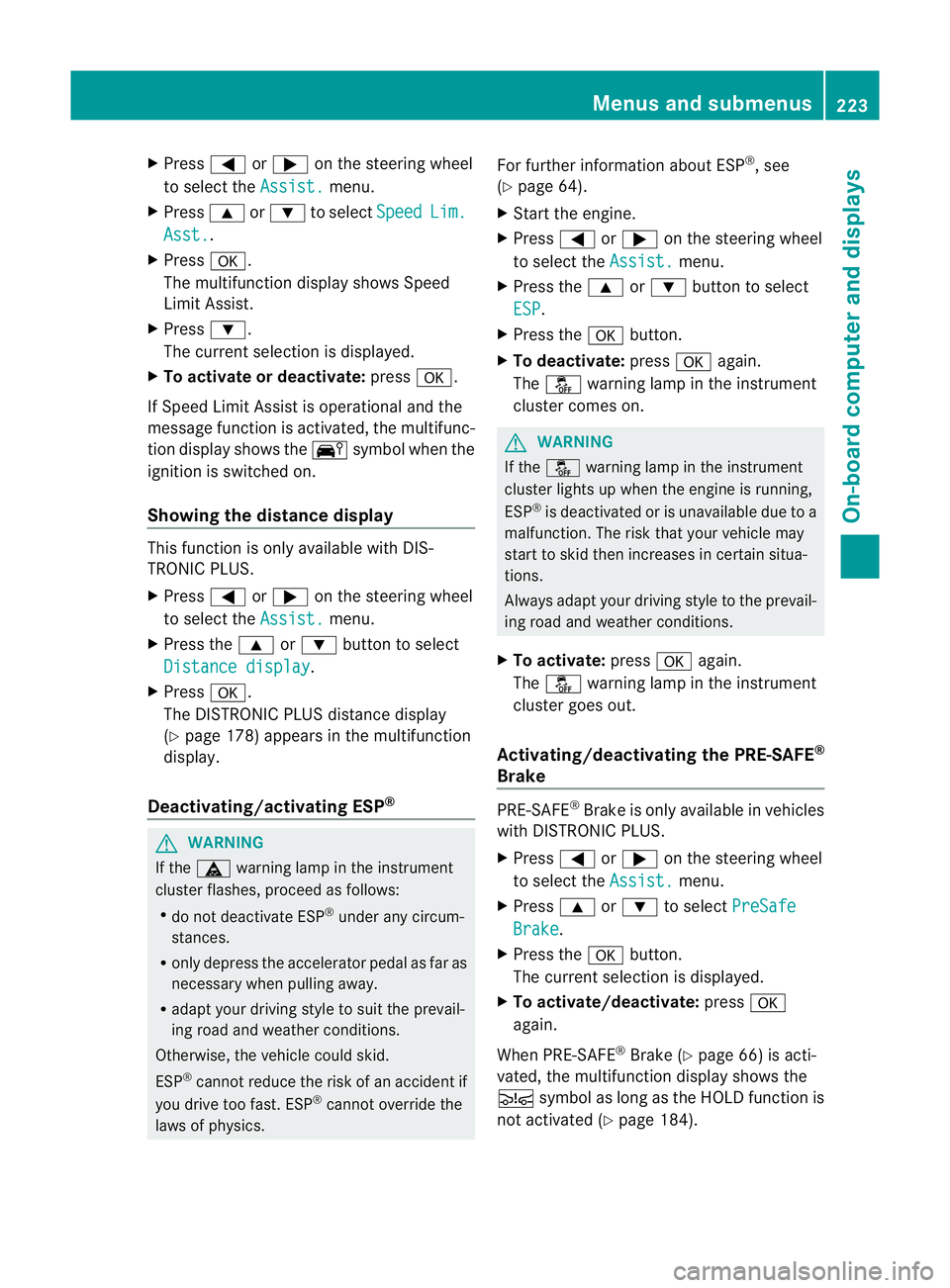
Press =or; on the steerin gwheel
to select the Assist. menu.
X Press 9or: to select Speed Lim.
Asst. .
X Press a.
The multifunction display shows Speed
Limit Assist.
X Press :.
The curren tselection is displayed.
X To activate or deactivate: pressa.
If Speed Limit Assist is operational and the
message function is activated, the multifunc-
tion display shows the Äsymbol when the
ignition is switched on.
Showing the distance display This function is only available with DIS-
TRONIC PLUS.
X Press =or; on the steering wheel
to select the Assist. menu.
X Press the 9or: button to select
Distanc edisplay .
X Press a.
The DISTRONIC PLUS distanc edisplay
(Y page 178)a ppears in the multifunction
display.
Deactivating/activating ESP ®G
WARNING
If the ä warning lamp in the instrument
cluster flashes, proceed as follows:
R do not deactivat eESP®
under any circum-
stances.
R only depress the accelerator pedal as far as
necessary when pulling away.
R adapt your driving style to suit the prevail-
ing road and weather conditions.
Otherwise, the vehicle could skid.
ESP ®
cannot reduce the risk of an acciden tif
you drive to ofast. ESP ®
canno toverride the
laws of physics. Fo
rfurther information about ESP ®
,s ee
(Y page 64).
X Start th eengine.
X Press =or; on thesteerin gwheel
to select the Assist. menu.
X Press the 9or: buttontos elect
ESP .
X Press the abutton.
X To deactivate: pressaagain.
The å warning lamp in the instrument
cluster comes on. G
WARNING
If the å warning lamp in the instrument
cluster lights up when the engine is running,
ESP ®
is deactivated or is unavailabl edue to a
malfunction. The risk that your vehicle may
start to skid then increases in certain situa-
tions.
Always adapt your driving style to the prevail-
ing road and weather conditions.
X To activate: pressaagain.
The å warning lamp in the instrument
cluster goes out.
Activating/deactivating the PRE-SAFE ®
Brake PRE-SAFE
®
Brake is only available in vehicles
with DISTRONIC PLUS.
X Press =or; on the steerin gwheel
to select the Assist. menu.
X Press 9or: to select PreSafe Brake .
X Press the abutton.
The current selection is displayed.
X To activate/deactivate: pressa
again.
When PRE-SAFE ®
Brake (Y page 66) is acti-
vated, the multifunction display shows the
Ä symbol as long as the HOLD function is
not activated (Y page 184). Menus and submenus
223On-board computer and displays Z
Page 232 of 353
X
Press the :or9 button to select the
Acoustic Lock function.
If the Acoustic Lock function is activated,
the & symbol in the multifunction dis-
play lights up red.
X Press the abutton to save the setting.
Activating/deactivating the radar sensor
system
i You must deactivate the radar sensor sys-
tem in certain countries and near radio
telescope facilities. For further informa-
tion, see (Y page 345).
Vehicles with anavigation system: the radar
sensor system is deactivated automatically if
you are close to radio telescope facilities.
The following systems are switched off when
the radar sensor system is deactivated:
R DISTRONIC PLUS (Y page 171)
R BAS PLUS (Y page 62)
R PRE-SAFE ®
Brake (Y page 66)
R Blind Spot Assist (Y page 196)
R Active Blind Spot Assist (Y page 199)
X Press the =or; button on the steer-
ing wheel to select the Settings menu.
X Press the :or9 button to select the
Vehicle submenu.
X Press the abutton to confirm.
X Press the 9or: button to select
Radar sensor (See Owner's Man.): .
You will see the selected setting: on or
off .
X Press the abutton to save the setting.
Heating menu Auxiliary heating departuret
ime
This function is only availabl eonvehicles with
auxiliary heating (Y page 137).
In the Heating submenu, you can select a
stored departure time or change adeparture
time. The auxiliary heating timer function calcu-
lates the switch-on time accordin
gtothe out-
side temperature so that the vehicle is pre-
heated by the departure time. When the
departure time is reached, the auxiliary heat-
ing continues to heat for afurther five
minutes and then switches off. The auxiliary
heating adopts the THERMATIC or
THERMOTRONIC temperature setting.
You can switch off the auxiliary heating by
using the remot econtrol or the auxiliary heat-
ing button on the centre console. G
WARNING
Exhaust fumes are produced when the auxili-
ary heating is in operation. Inhaling these
exhaust fumes can be poisonous. You should
therefore switch off the auxiliary heating in
confined spaces without an extraction sys-
tem, e.g. agarage. G
WARNING
When operating the auxiliary heating parts of
the vehicle can get very hot. Make sure that
the exhaust system does not under any cir-
cumstances come into contact with easily
ignitable material such as dry grass or fuels.
The material could otherwise ignite and set
the vehicle alight. Choose your parking spot
accordingly.
Operating the auxiliary heating is thus pro-
hibited at filling station sorwhen your vehicle
is being refuelled. You must therefore switch
off the auxiliary heating at filling stations.
! Operating the auxiliary heating/ventila-
tion draws on the vehicle battery. After you
have heated or ventilated the vehicle a
maximum of two times, drive for alonger
distance.
i Switc hthe auxiliary heating on regularly
once amonthfor about 10 minutes. Menus and submenus
229On-board computer and displays Z
Page 236 of 353
Safety systems
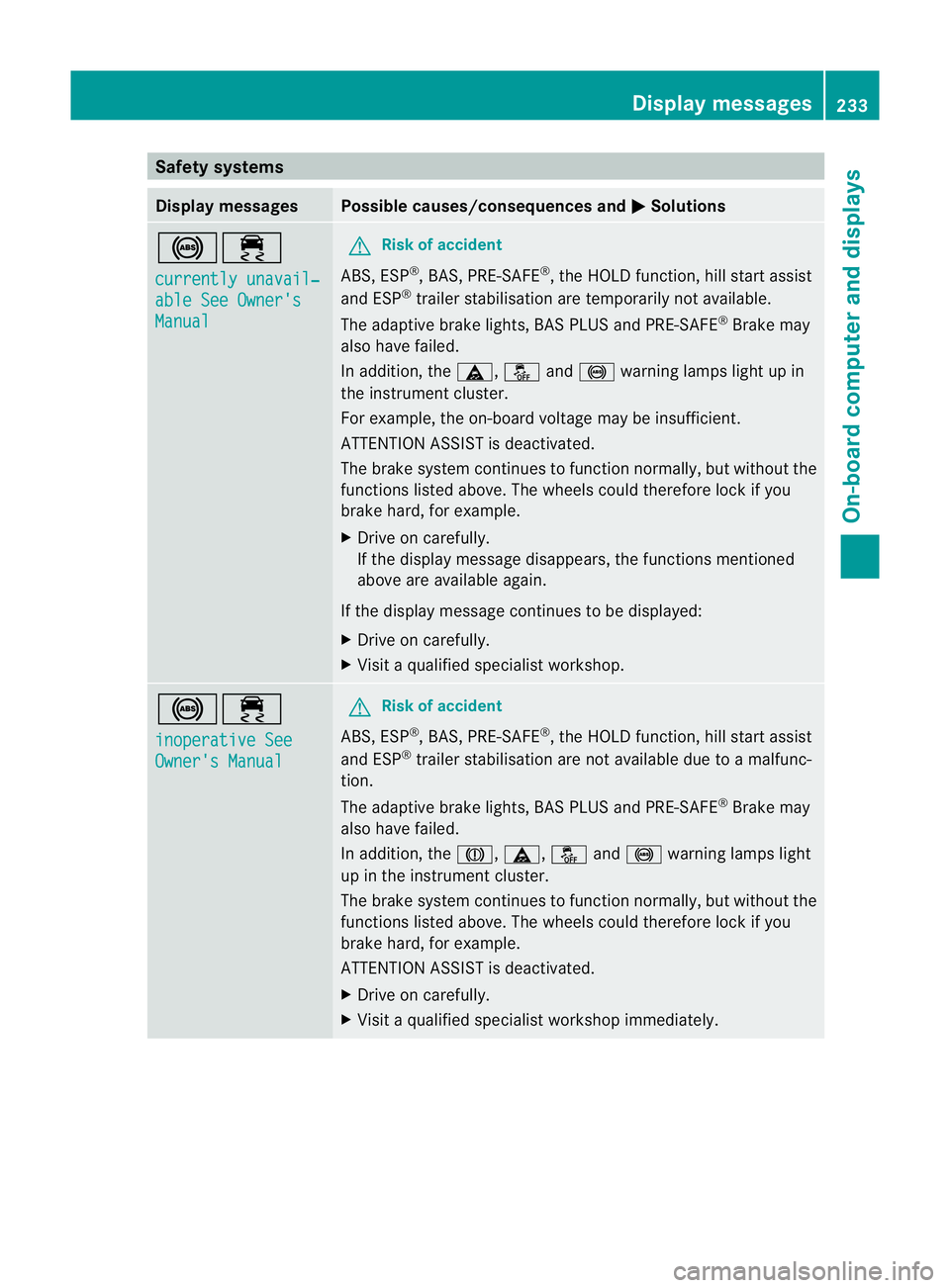
Display messages Possible causes/consequences and
M Solutions
!÷
currently unavail‐
able See Owner's
Manual G
Risk of accident
ABS,E SP®
,B AS ,PRE-SAFE ®
,t he HOLD function, hill start assist
and ESP ®
trailer stabilisation are temporarily not available.
The adaptive brake lights, BAS PLUS and PRE-SAFE ®
Brake may
also have failed.
In addition, the ä,åand! warning lamps light up in
the instrumen tcluster.
For example, the on-board voltage may be insufficient.
ATTENTIONA SSIST is deactivated.
The brake system continues to function normally, but without the
functions listed above. The wheels could therefore lock if you
brake hard, for example.
X Drive on carefully.
If the display message disappears, the functions mentioned
above are available again.
If the display message continues to be displayed:
X Drive on carefully.
X Visit aqualified specialist workshop. !÷
inoperative See
Owner's Manual G
Risk of accident
ABS,E SP®
,B AS ,PRE-SAFE ®
,t he HOLD function, hill start assist
and ESP ®
trailer stabilisation are not available due to amalfunc-
tion.
The adaptive brake lights, BAS PLUS and PRE-SAFE ®
Brake may
also have failed.
In addition, the J,ä,åand! warning lamps light
up in the instrumen tcluster.
The brake system continues to function normally, but without the
functions listed above. The wheels could therefore lock if you
brake hard, for example.
ATTENTION ASSIST is deactivated.
X Drive on carefully.
X Visit aqualified specialist workshop immediately. Display messages
233On-board computer and displays Z
Page 237 of 353
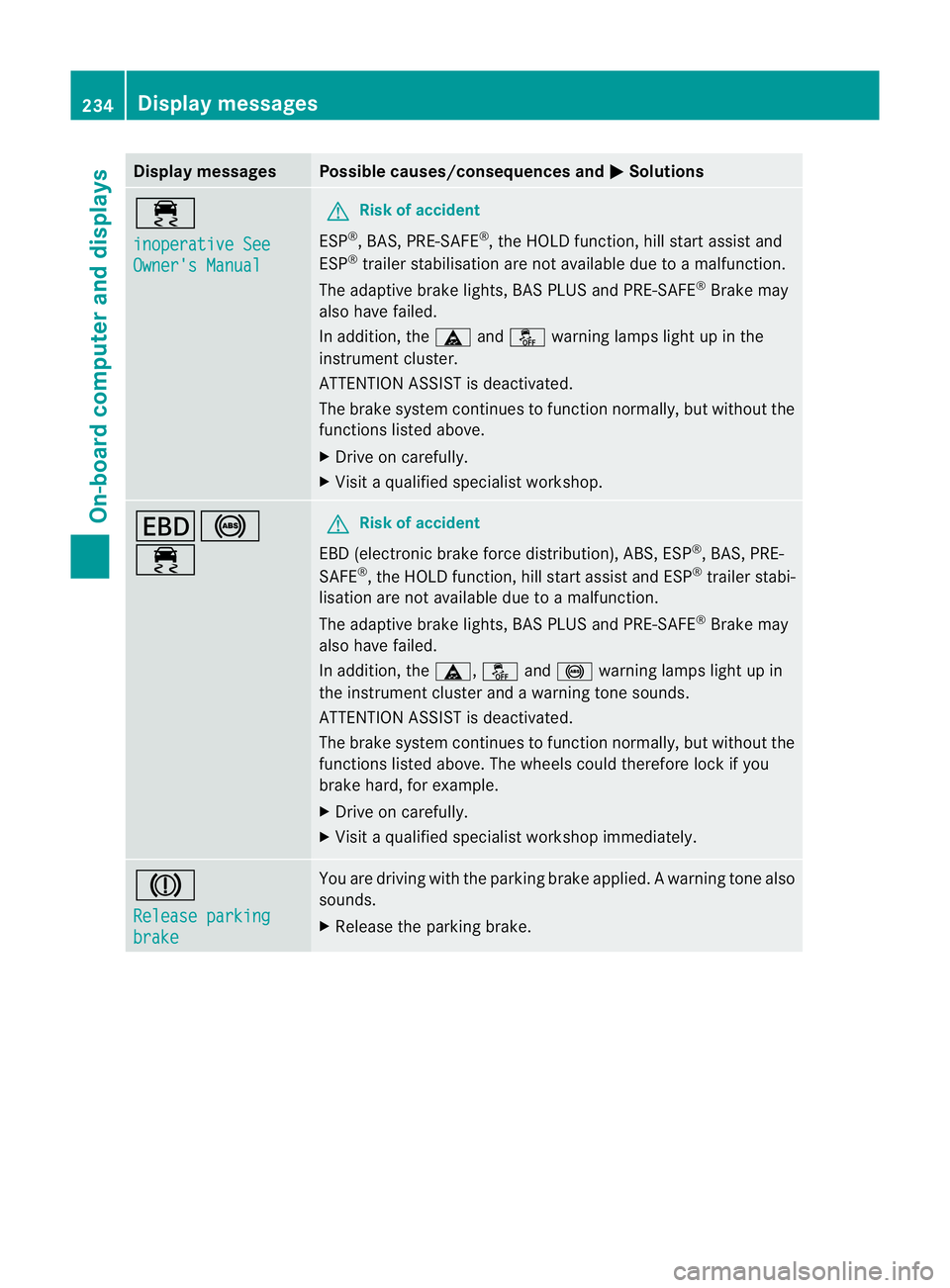
Display messages Possible causes/consequences and
M Solutions
÷
inoperative See
Owner'
sManual G
Risk of accident
ESP ®
,B AS ,PRE-SAFE ®
,t he HOLD function ,hill start assist and
ESP ®
trailer stabilisation are no tavailabled ue toamalfunction.
The adaptive brake lights, BAS PLUS and PRE-SAFE ®
Brake may
alsoh ave failed.
In addition, the äandå warning lamp slight up in the
instrument cluster.
ATTENTION ASSIST is deactivated.
The brake system continues to function normally, but without the
functions listed above.
X Drive on carefully.
X Visi taq ualified specialist workshop. T!
÷ G
Risk of accident
EBD( electronic brake forc edistribution), ABS, ESP ®
,B AS ,PRE-
SAFE ®
,t he HOLD function ,hill start assist and ESP ®
trailer stabi-
lisatio nare not available due to amalfunction.
The adaptive brake lights, BAS PLUS and PRE-SAFE ®
Brake may
alsoh ave failed.
In addition, the ä,åand! warning lamp slight up in
the instrument cluster and awarning tone sounds.
ATTENTION ASSIST is deactivated.
The brake system continues to function normally, but without the
functions listed above. The wheels coul dtherefore lock if you
brake hard ,for example.
X Drive on carefully.
X Visi taq ualified specialist workshop immediately. J
Releas
eparking brake You are drivin
gwith the parkin gbrake applied. Awarning tone also
sounds.
X Release th eparking brake. 234
Display messagesOn-boar
dcomputer and displays
Page 238 of 353
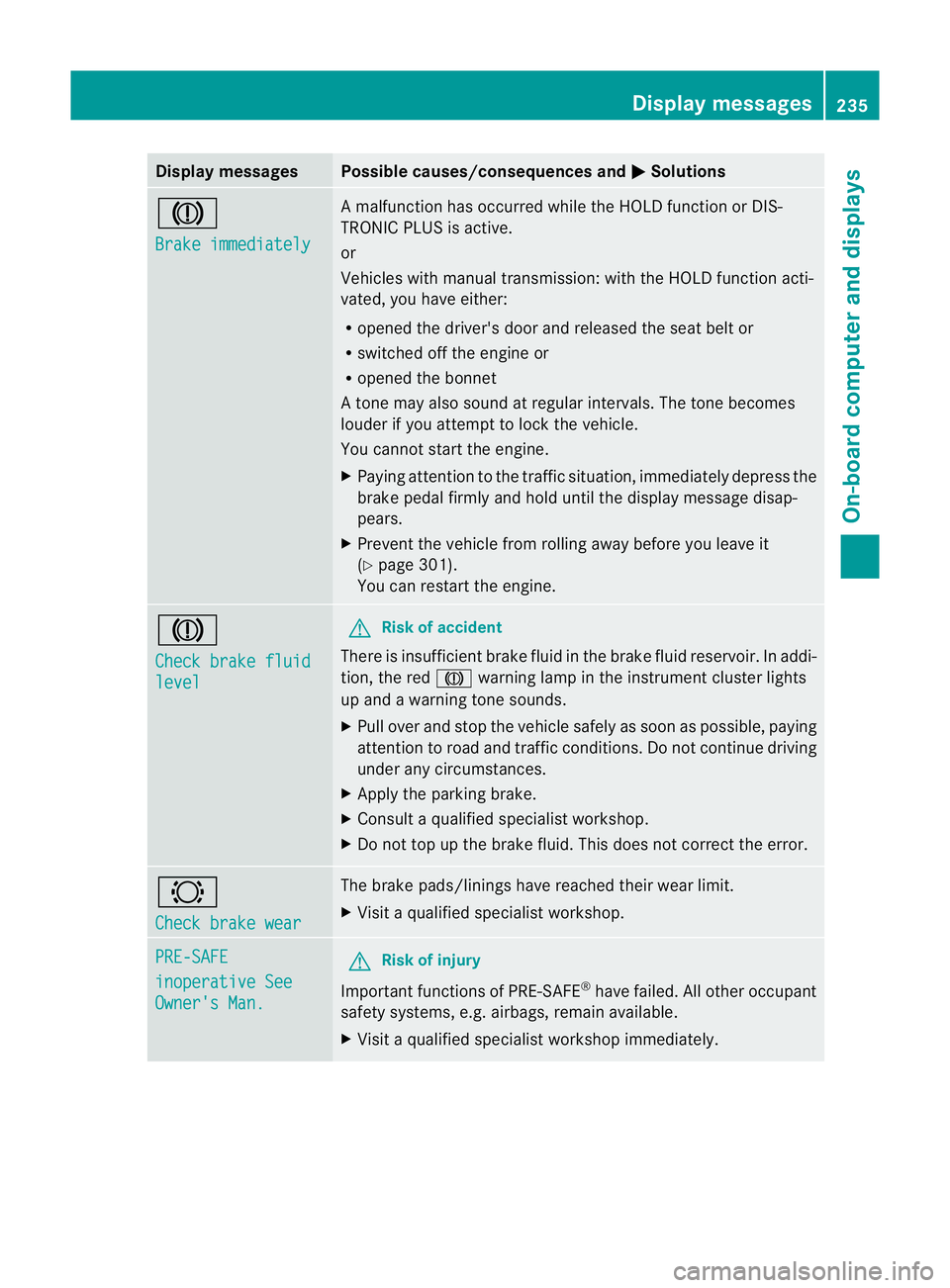
Display messages Possible causes/consequences and
M Solutions
J
Brake immediately Am
alfunction has occurred while th eHOLDf unction or DIS-
TRONIC PLU Sisactive.
or
Vehicles wit hmanual transmission: wit hthe HOLD function acti-
vated, you hav eeither:
R opened th edriver's doo rand released the sea tbelt or
R switched off the engin eor
R opened the bonnet
At one may also sound at regular intervals. The toneb ecomes
louder if you attempt to lock the vehicle.
You cannot start the engine.
X Paying attention to the traffic situation, immediately depress the
brake pedal firmly and hold until the display message disap-
pears.
X Prevent the vehicle from rolling away before you leave it
(Y page 301).
You can restart the engine. J
Check brake fluid
level G
Risk of accident
There is insufficient brake fluid in the brake fluid reservoir. In addi-
tion, the red Jwarning lamp in the instrument cluster lights
up and awarning tone sounds.
X Pullo ver and stop the vehicl esafel yass oon as possible,p aying
attention to road and traffic conditions. Do not continue driving
under any circumstances.
X Apply the parking brake.
X Consult aqualified specialist workshop.
X Do not top up the brake fluid. This does not correct the error. #
Check brake wear The brake pads/linings have reache
dtheir wearl imit.
X Visit aqualified specialist workshop. PRE-SAFE
inoperative See
Owner's Man. G
Risk of injury
Important function sofPRE-SAFE ®
have failed .All other occupant
safet ysystems, e.g. airbags, remain available.
X Visit aqualified specialist workshop immediately. Display messages
235On-board computer and displays Z
Page 239 of 353
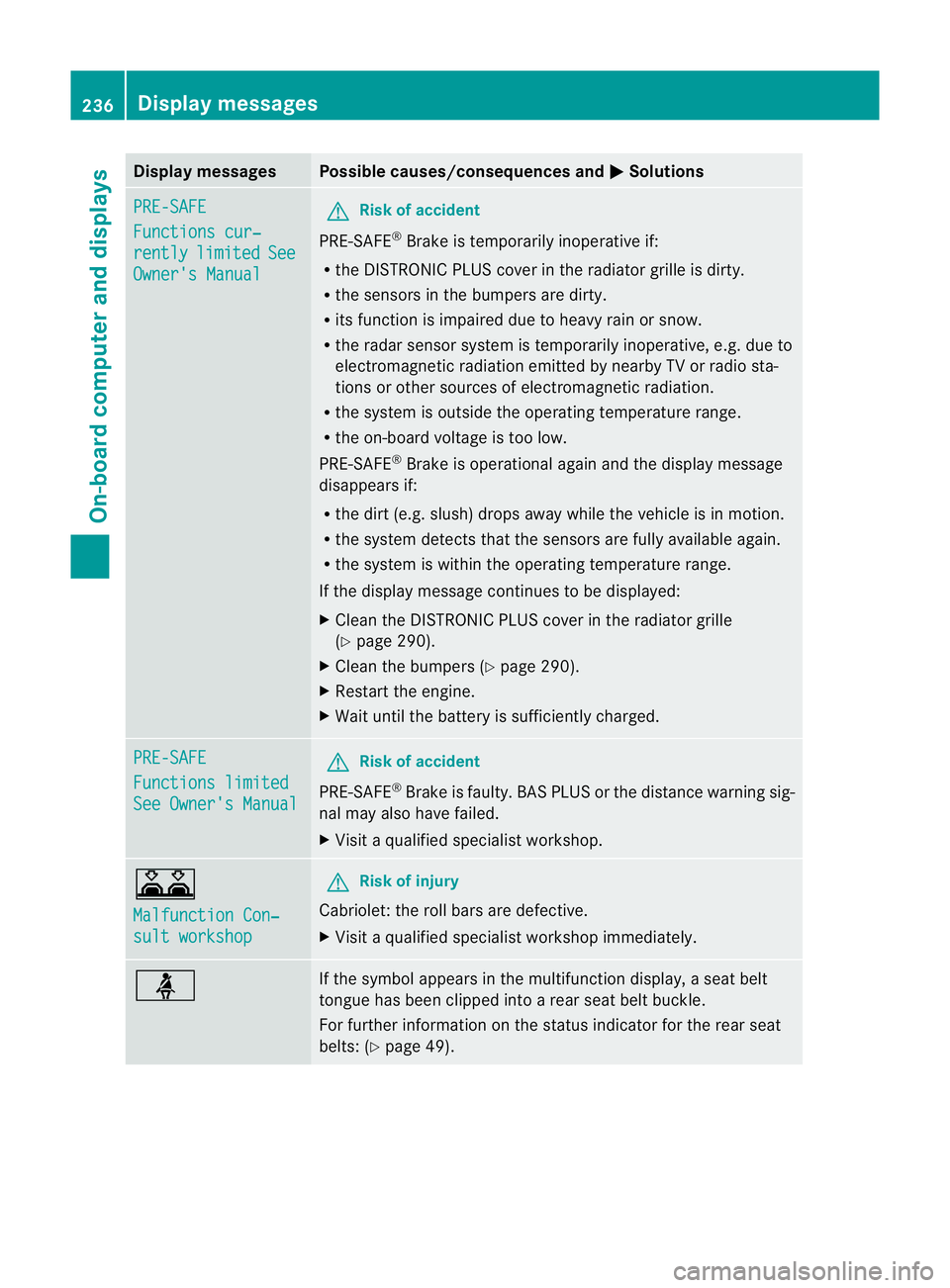
Display messages Possible causes/consequences and
M Solutions
PRE-SAFE
Functions cur‐
rently limited See
Owner'
sManual G
Risk of accident
PRE-SAFE ®
Brake is temporarily inoperative if:
R theD ISTR ONIC PLU Scover in th eradiato rgrille is dirty.
R thes ensor sinthebumpers are dirty.
R itsf unction is impaire ddue to heav yrain or snow.
R ther ada rsensor system is temporarily inoperative, e.g. due to
electromagnetic radiation emitted by nearby TV or radio sta-
tion soro ther sources of electromagnetic radiation.
R the system is outside the operatin gtemperature range.
R the on-board voltage is too low.
PRE-SAFE ®
Brak eiso perational again and the display message
disappears if:
R the dirt (e.g. slush) drops away while the vehicle is in motion.
R the system detects that the sensor sare fully available again.
R the system is within the operatin gtemperature range.
If the display message continues to be displayed:
X Clean the DISTRONIC PLUS cover in the radiator grille
(Y page 290).
X Clean the bumpers (Y page 290).
X Restart the engine.
X Wait until the batter yissufficiently charged. PRE-SAFE
Functions limited
See Owner's Manual G
Risk of accident
PRE-SAFE ®
Brak eisf aulty. BASP LUS or the distance warning sig-
nal may also have failed.
X Visit aqualified specialist workshop. A
Malfunction Con‐
sult workshop G
Risk of injury
Cabriolet: the roll bars are defective.
X Visit aqualified specialist workshop immediately. ü If the symbola
ppears in the multifunction display,as eat belt
tongue has been clipped intoar ear seat belt buckle.
For further information on the status indicator for the rear seat
belts: (Y page 49). 236
Display messagesOn-boar
dcomputer and displays
Page 242 of 353
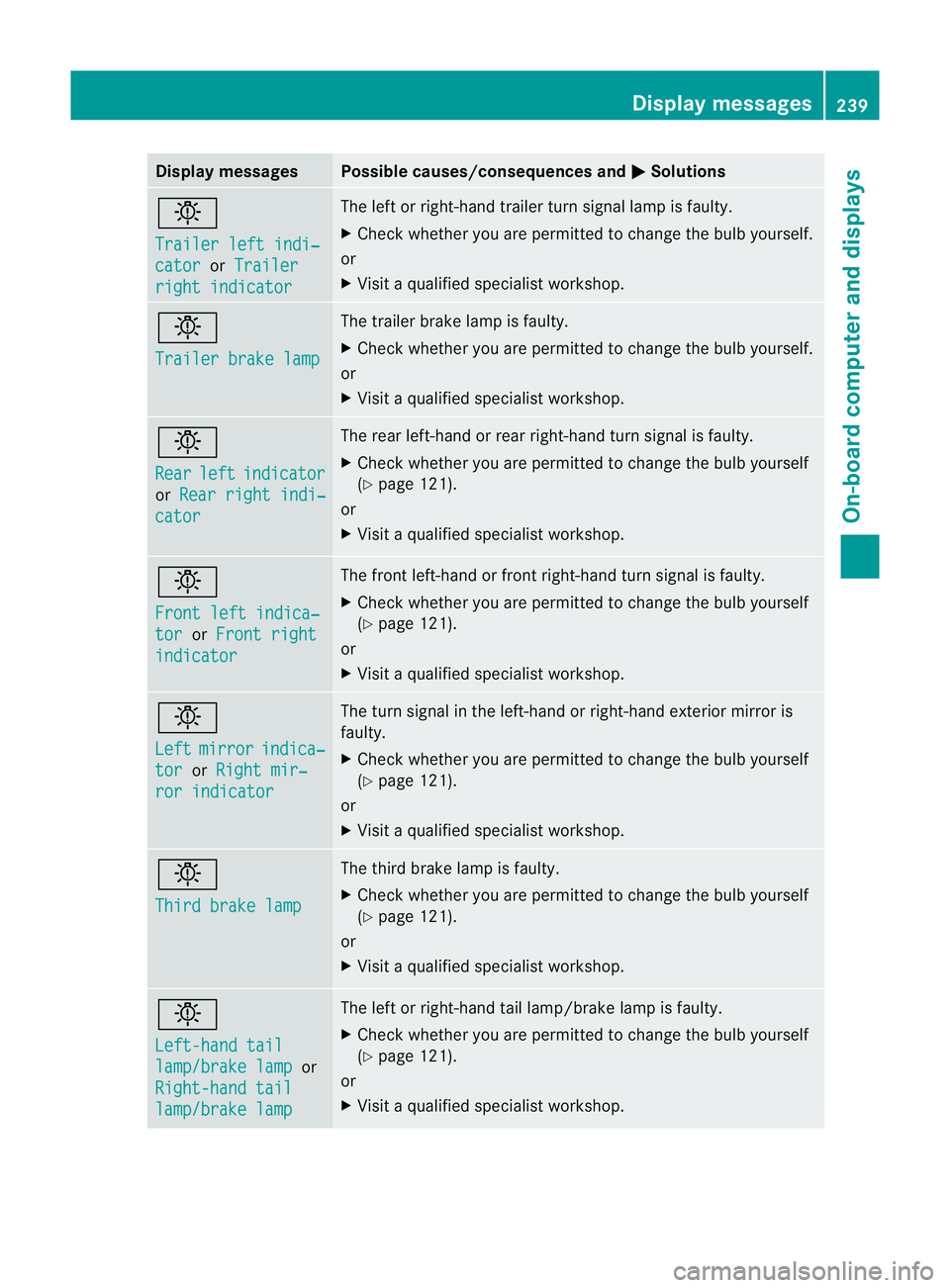
Display messages Possible causes/consequences and
M Solutions
b
Traile
rlefti ndi‐ cator or
Trailer right indicator The lef
torright-han dtrailer tur nsignal lamp is faulty.
X Check whether you are permitted to change the bulb yourself.
or
X Visit aqualified specialist workshop. b
Trailer brak
elamp The trailer brak
elamp is faulty.
X Check whether you are permitted to change the bulb yourself.
or
X Visit aqualified specialist workshop. b
Rear
left indicator
or
Rear righ tindi‐ cator The rear left-han
dorrear right-han dturns ignal is faulty.
X Check whether you are permitted to change the bulb yourself
(Y page 121).
or
X Visit aqualified specialist workshop. b
Fron
tleft indica‐ tor or
Fron tright indicator The front left-han
dorfront right-han dturns ignal is faulty.
X Check whether you are permitted to change the bulb yourself
(Y page 121).
or
X Visit aqualified specialist workshop. b
Left
mirror indica‐
tor or
Righ tmir‐ ror indicator The tur
nsignal in the left-han dorright-han dexterior mirror is
faulty.
X Check whether you are permitted to change the bulb yourself
(Y page 121).
or
X Visit aqualified specialist workshop. b
Thir
dbrakel amp The thir
dbrak elamp is faulty.
X Check whether you are permitted to change the bulb yourself
(Y page 121).
or
X Visit aqualified specialist workshop. b
Left-han
dtail lamp/brake lamp or
Right-hand tail lamp/brake lamp The left or right-han
dtail lamp/brak elamp is faulty.
X Check whether you are permitted to change the bulb yourself
(Y page 121).
or
X Visit aqualified specialist workshop. Display messages
239On-board computer and displays Z
Page 248 of 353
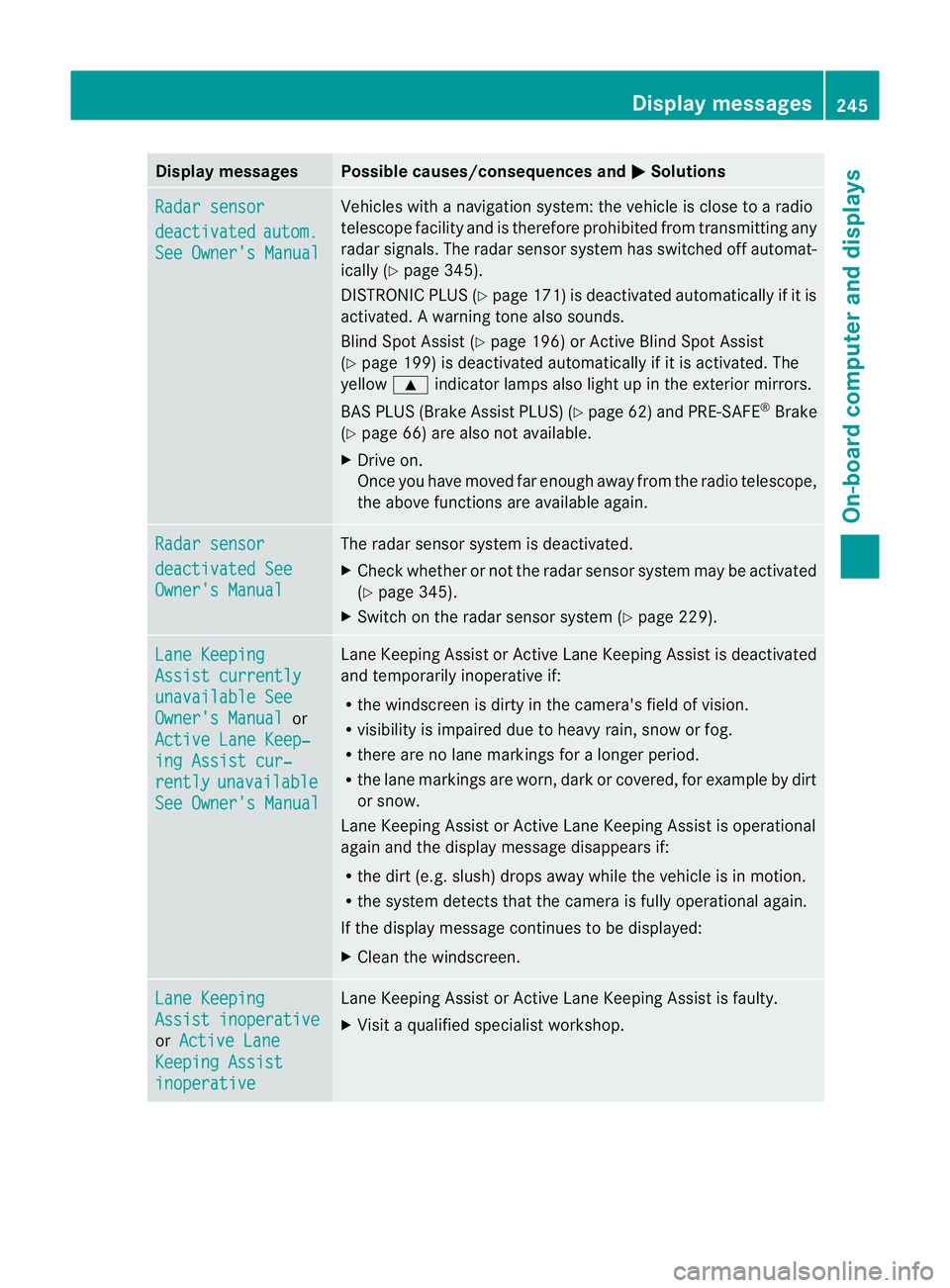
Display messages Possible causes/consequences and
M Solutions
Radar sensor
deactivated autom.
See Owner'
sManual Vehicles wit
hanavigation system: th evehicl eisc lose to aradio
telescope facilit yand is therefore prohibite dfromt ransmitting any
rada rsignals .The radar sensor system has switched off automat-
ically (Y page 345).
DISTRONIC PLUS (Y page 171) is deactivated automatically if it is
activated. Awarning tone also sounds.
Blin dSpotA ssist (Y page 196) or Active Blind Spot Assist
(Y page 199) is deactivated automaticallyifitisa ctivated. The
yellow 9indicator lamps also light up in the exterior mirrors.
BAS PLUS (Brake Assist PLUS) (Y page 62) and PRE-SAFE®
Brake
(Y page 66) are also not available.
X Drive on.
Once you have moved far enough awayf rom the radio telescope,
the above functionsa re available again.Radar sensor
deactivated See
Owner's Manual The radar sensor system is deactivated.
X
Check whether or not the radar sensor system may be activated
(Y page 345).
X Switch on the radar sensor system (Y page 229).Lane Keeping
Assist currently
unavailable See
Owner's Manual or
Active Lane Keep‐ ing Assist cur‐
rently unavailable
See Owner's Manual Lane Keeping Assist or Active Lane Keeping Assist is deactivated
and temporarily inoperative if:
R the windscreen is dirty in the camera's field of vision.
R visibility is impaired due to heavy rain, snow or fog.
R there are no lane markings for alonger period.
R the lane markings are worn, dark or covered, for example by dirt
or snow.
Lane Keeping Assist or Active Lane Keeping Assist is operational
againa nd the display message disappears if:
R the dirt (e.g. slush) drops away whil ethe vehicl eisinmotion.
R the system detects tha tthe camera is fully operational again.
If the displaym essage continues to be displayed:
X Cleant he windscreen. Lane Keeping
Assist inoperative
or
Active Lane Keeping Assist
inoperative Lane Keeping Assist or Active Lane Keeping Assist is faulty.
X
Visit aqualified specialist workshop. Display messages
245On-board computer and displays Z
Page 251 of 353
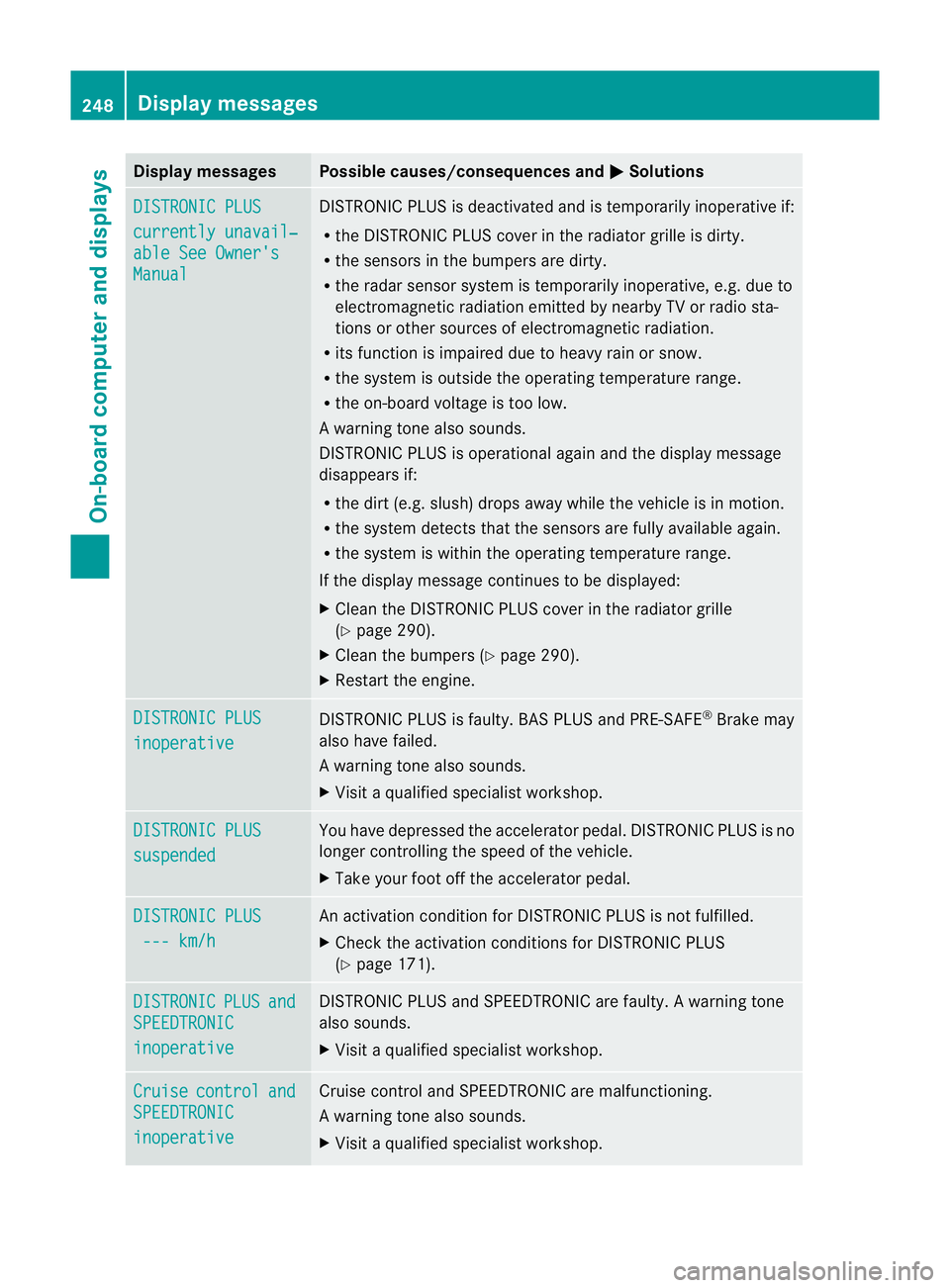
Display messages Possible causes/consequences and
M Solutions
DISTRONIC PLUS
currently unavail‐
abl
eS ee Owner's Manual DISTRONIC PLU
Sisdeactivated and is temporarily inoperative if:
R the DISTRONIC PLUS cover in the radiator grille is dirty.
R the sensors in the bumpers are dirty.
R the radar sensor system is temporarily inoperative, e.g. due to
electromagnetic radiation emitted by nearby TV or radio sta-
tions or other sources of electromagnetic radiation.
R its function is impaired due to heavy rain or snow.
R the system is outside the operating temperature range.
R the on-board voltage is too low.
Aw arning tone also sounds.
DISTRONI CPLUSiso perational againa nd the display message
disappears if:
R the dirt (e.g. slush) drops away whil ethe vehicl eisinmotion.
R the system detects tha tthe sensors are fully available again.
R the system is within the operating temperature range.
If the displaym essage continues to be displayed:
X Cleant he DISTRONIC PLUS cover in the radiator grille
(Y page 290).
X Cleant he bumpers (Y page 290).
X Restart the engine. DISTRONIC PLUS
inoperative DISTRONIC PLUS is faulty. BAS PLUS and PRE-SAFE
®
Brake may
also have failed.
Aw arning tone also sounds.
X Visi taq ualified specialist workshop. DISTRONIC PLUS
suspended You have depressed the accelerator pedal. DISTRONIC PLUS is no
longer controlling the speed of the vehicle.
X
Take your foot off the accelerator pedal. DISTRONIC PLUS
--- km/h An activation condition for DISTRONIC PLUS is not fulfilled.
X
Check the activation condition sfor DISTRONIC PLUS
(Y page 171). DISTRONIC PLUS and
SPEEDTRONIC
inoperative DISTRONIC PLUS and SPEEDTRONIC are faulty.
Awarning tone
also sounds.
X Visit aqualified specialist workshop. Cruise control and
SPEEDTRONIC
inoperative Cruise contro
land SPEEDTRONIC are malfunctioning.
Aw arning tone also sounds.
X Visi taq ualified specialist workshop. 248
Display messagesOn-boar
dcomputer and displays