fog light MERCEDES-BENZ E-CLASS COUPE 2011 Owners Manual
[x] Cancel search | Manufacturer: MERCEDES-BENZ, Model Year: 2011, Model line: E-CLASS COUPE, Model: MERCEDES-BENZ E-CLASS COUPE 2011Pages: 353, PDF Size: 8.42 MB
Page 16 of 353
Foglamp
s....................................... 115
Foglamps (extende drange )........... 118
Hazard warning lamps ...................117
Headlamp flasher ........................... 117
Headlamp range ............................ 116
Ligh tswitc h................................... 114
Main-beam headlamps ................... 117
Motorway mode ............................. 118
Parking lamps ................................ 114
Rea rfoglamp ................................. 116
Switching Adaptive Highbeam
Assist on/off ................................. 227
Switching the daytime driving
lights on/off (on-board computer) .226
Switching the daytime driving
lights on/off (switch) .....................115
Switching the exterio rlighting
delayed switch-off on/off (on-
board computer )............................ 227
Switching the surround lighting
on/off (on-board computer) ..........227
Turn signals ................................... 116
see Changing bulbs
see Interior lighting
Light sensor (display message) .......241
LIMi ndicator lamp
Cruise control ................................ 170
DISTRONI CPLUS ........................... 173
Variabl eSPEEDTRONIC .................181
Limiting the speed
see SPEEDTRONIC
Loading guidelines ............................264
Locking see Centra llocking
Locking (doors)
Automatic ........................................ 78
Emergency locking ........................... 79
From insid e(central locking but-
ton) .................................................. 78
Locking centrally
see Centra llocking
Locking verification signal (on-
board computer) ............................... 228
Luggage cover see Boot separator
Luggage net ....................................... 266Lumbar support
Adjusting the 4-way lumba rsup-
por t................................................ 105 M
M+ Styres ........................................... 319
Main-beam headlamps Changing bulbs .............................. 123
Display message ............................ 240
Switching Adaptive Highbeam
Assist on/off ................................. 119
Switching on/off ........................... 117
Maintenance
see ASSYST PLUS service interval
display
Manual transmission
Engaging revers egear ................... 154
Gea rlever ...................................... 153
Pulling away ................................... 149
Shifting to neutra l.......................... 154
Shift recommendatio n................... 154
Starting the engine ........................148
Matt finish (cleaning instructions) ..287
Memory card (audio) .........................220
Memory function ............................... 112
Mercedes-Benz Service Centre see Qualified specialist workshop
Message memory (on-board com-
puter) ................................................. .232
Messages see Display messages
Mirrors
see Exterior mirrors
see Rear-view mirror
see Vanity mirror
Mobile phone
Frequencies ................................... 331
Installatio n..................................... 331
Menu (on-board computer) ............221
Notes/placing in the bracket ......... 273
Transmissio noutput (maximum ).... 331
Modifying the programming (key) .....73
MOExtende drun-flat system ...........305
Motorway mode ................................ 118
MP3 Operating ...................................... .220
see Separate operating instructions Index
13
Page 117 of 353
Useful information
i This Owner's Manual describes all models
and all standard and optional equipment
available to your vehicle at the time of pub-
lication of the Owner's Manual. Country-
specific deviation sare possible. Please
not ethat your vehicle may not be equipped
with all feature sdescribed. This also
applies to safety-relevan tsystems and
functions.
i Pleas ereadt he information on qualified
specialist workshop s(Ypage 22). Exterior lighting
Important safet
ynotes
Fo rreasons of safety, Mercedes-Benzr ecom-
mends that you drive with the lights switched
on even during the daytime. In some coun-
tries, operation of the headlamps varies due
to legal requirement sand self-imposed obli-
gations. Notes on driving abroad
Convert to symmetrical dipped beam
when driving abroad: switch the headlamps
to symmetrical dipped beam in countries in
which traffic drives on the opposite side of the
road to the country where the vehicle is reg-
istered. This prevents glare to oncoming traf-
fic. Symmetrical lights do not illuminate as
large an area of the edge of the carriageway.
Convert the headlamps as close to the border
as possible before driving in these countries
(Y page 227).
Convert to asymmetrical dipped beam
after returning: convert the headlamps back
to asymmetrical dipped beam as soon as pos-
sible after crossing the border when returning
(Y page 227). If the headlamps are converted to symmetri-
cal dipped beam, the "motorway mode" and
"extended range foglamps" function
s(Intelli-
gent Light System )are not available. Light switch
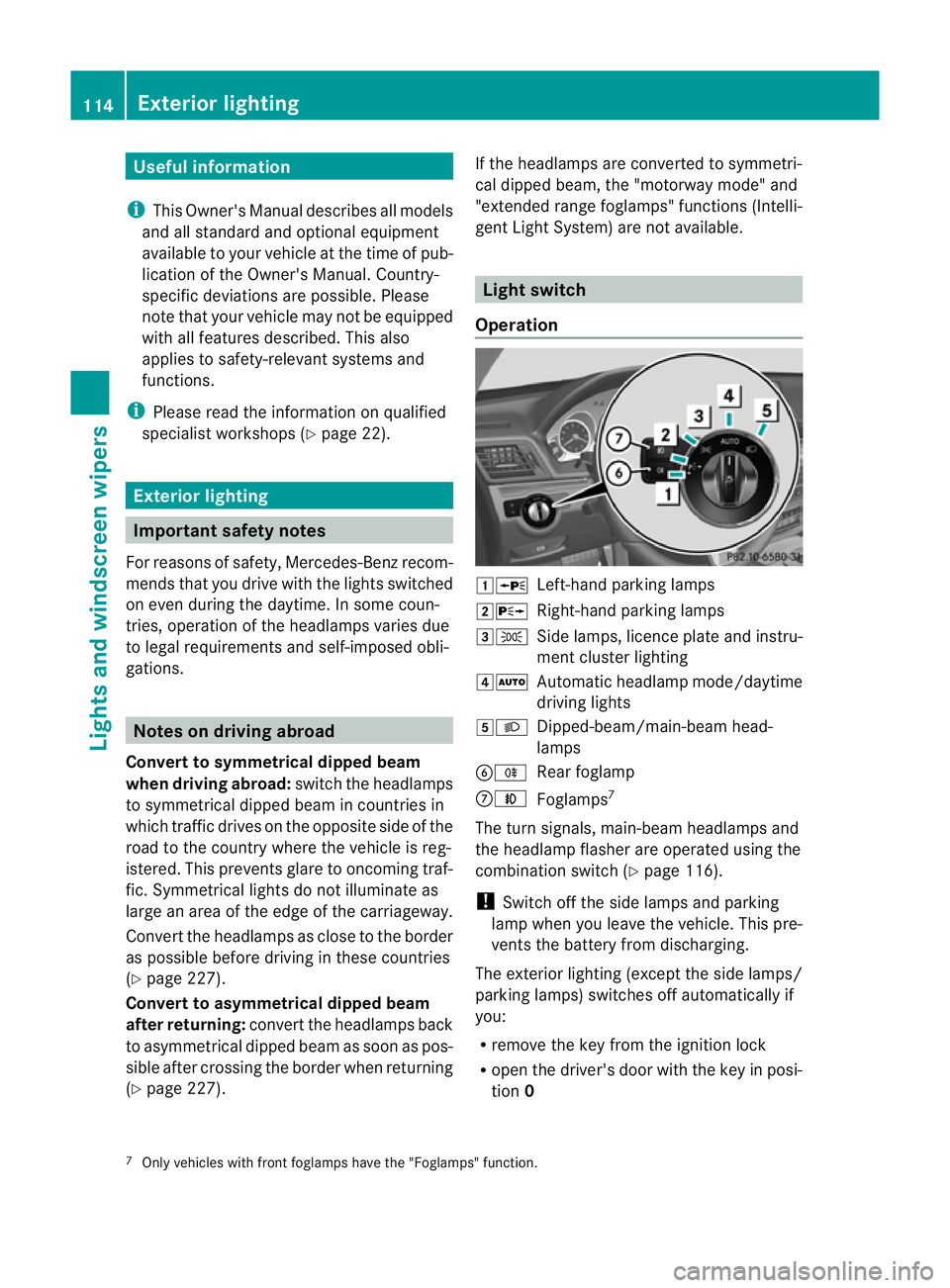
Operation 1W
Left-hand parkin glamps
2X Right-hand parkin glamps
3T Side lamps, licenc eplate and instru-
ment cluster lighting
4Ã Automatic headlamp mode/daytime
driving lights
5L Dipped-beam/main-beam head-
lamps
BR Rear foglamp
CN Foglamps 7
The turn signals, main-beam headlamps and
the headlamp flasher are operated using the
combination switch (Y page 116).
! Switc hoff the side lamps and parking
lamp when you leave the vehicle. This pre-
vent sthe batter yfrom discharging.
The exterior lighting (except the side lamps/
parkin glamps) switches off automatically if
you:
R remove the key from the ignition lock
R open the driver's door with the key in posi-
tion 0
7 Only vehicles with fron tfoglamps have the "Foglamps" function. 114
Exterior lightingLights and windscree
nwipers
Page 118 of 353
If you hear
awarning tone when you leave the
vehicle ,the lights may still be switched on.
X Turn the lights witchtoà .
Dipped-beam headlamps X
To switch on th edipped-bea mhead-
lamps: turnthe key in th eignitio nlock to
position 2or start th eengine.
X Turn th elight switch to L.
The L indicator lamp in th einstrument
cluster light sup.
Daytime driving lights You can activat
eordeactivat ethe daytime
driving light sfunction usin gthe on-board
compute r(Ypage 226).
X Daytime driving lights: activatethe day-
tim edriving light sfunction usin gthe on-
board computer.
X Turn th elight switch to Ã.
When th eengine is on: depending on the
ambien tlight conditions, the daytime driv-
ing light sorthe parking and dipped-beam
headlamps are switched on.
When the dipped-beam headlamps are
switched on, the Lindicator lamp in the
instrumen tcluster light sup.
Automatic headlam pmode X
To switch on automatic headlamp
mode: turnthe light switc htoÃ.
Key in position 1in the ignition lock :the
side lamps are switched on or off automat-
ically depending on the brightnes softhe
ambien tlight.
With the engine running: depending on the
brightnes softhe ambien tlight ,the daytime
drivin glights 8
or the dipped-beam head-
lamps are switched on or off automatically.
When the dipped-beam headlamps are
switched on, the Lindicator lamp in the
instrumen tcluster light sup. G
WARNING
If the light switc hisset to Ã,t he dipped-
beam headlamps will not com eonautomati-
cally if it is foggy. This could endanger you and
others. Therefore, tur nthe light switch to
L in fog.
The automatic headlamp feature is only an
aid. The driver is responsible for the vehicle's
lighting at all times.
Foglampsa nd rear foglamp Front foglamps
Only vehicles with front foglamps have the
"Foglamps" function.
G
WARNING
If you suspect that driving conditions will be
foggy, turn the light switch to Lbefore you
start your journey. Otherwise, your vehicle
may not be visible and you could endanger
yourself and others.
X To switch on the front foglamps: turn the
key in the ignition lock to position 2or start
the engine.
X Turn the light switch to T,Lor
Ã.
X Press the Nbutton.
The green Nindicator lamp in the instru-
ment cluster lights up.
X To switch off the front foglamps: press
the N button.
The green Nindicator lamp in the instru-
ment cluster goes out.
i If you switch the engine off (key in posi-
tion 1in the ignition lock) and then restart
it, the previous foglamp settings are
restored.
8 Only if daytime driving lights have been activated via the on-board computer. Exterior lighting
115Lights and windscreen wipers Z
Page 119 of 353
Rear foglamp
X
To switc honthe rear foglamp: turn the
key in the ignition lock to position 2or start
the engine.
X Turn the light switch to LorÃ.
X Press the Rbutton.
The yellow Rindicator lamp in the
instrument cluster lights up.
X To switc hoff the rear foglamp: press the
R button.
The yellow Rindicator lamp in the
instrument cluster goe sout.
Vehicles with front foglamps: when the light
switch is in the Tposition, the rea rfog-
lamp can only be switched on if the foglamps
(without dipped-beam headlamps) are
switched on.
i If you switch the engine off (key in posi-
tion 1in the ignition lock) and then restart
it, the previous rear foglamp settings are
restored.
Adjusting the headlam prange (halogen
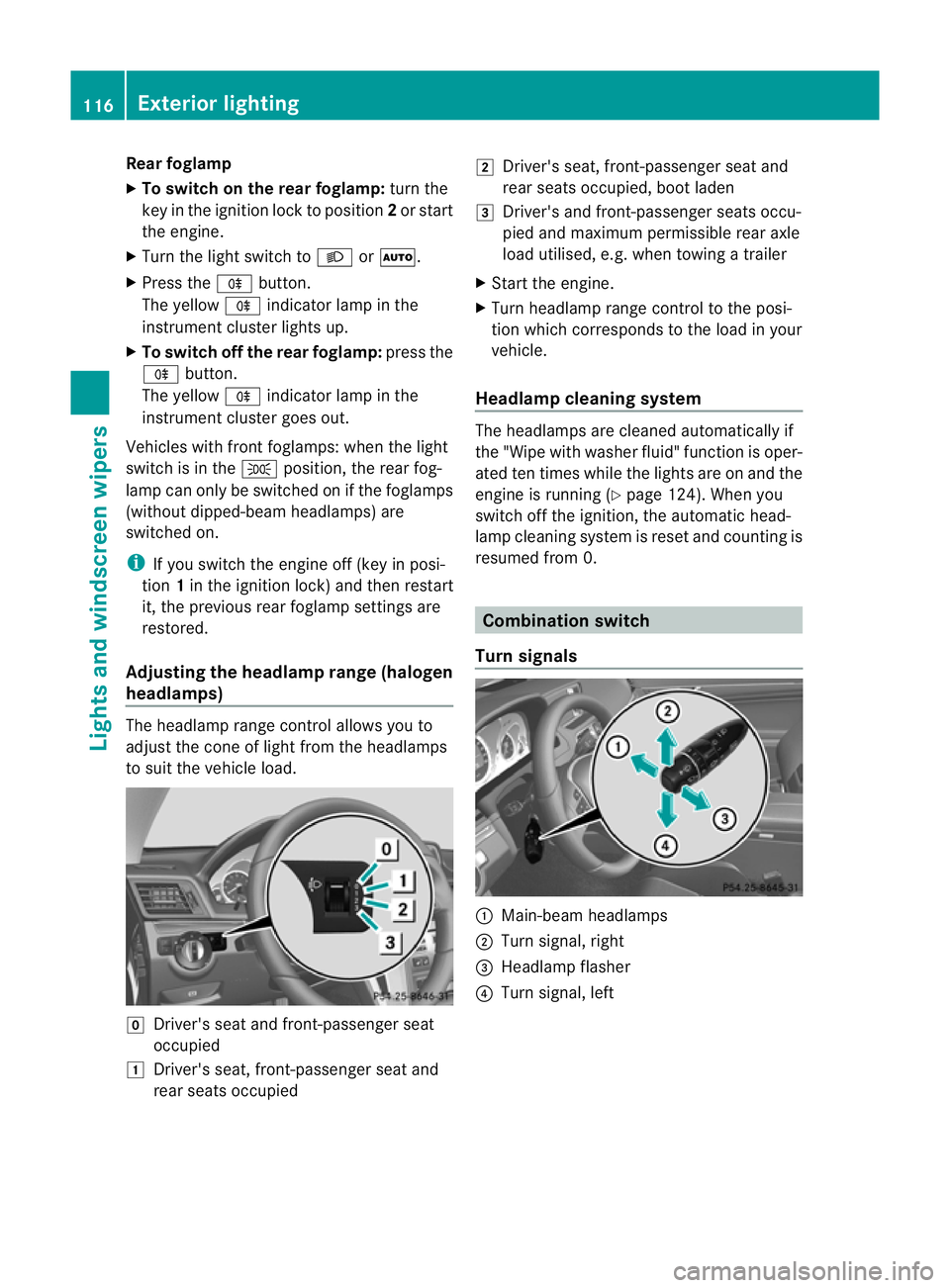
headlamps) The headlamp range control allow
syou to
adjust the cone of light from the headlamps
to sui tthe vehicle load. g
Driver's seat and front-passenger seat
occupied
1 Driver's seat, front-passenger seat and
rear seats occupied 2
Driver's seat, front-passenger seat and
rear seats occupied, boot laden
3 Driver's and front-passenger seats occu-
pied and maximum permissible rear axle
load utilised, e.g. when towing atrailer
X Start the engine.
X Turn headlamp range control to the posi-
tion which corresponds to the load in your
vehicle.
Headlampc leaning system The headlamps are cleaned automatically if
the "Wipe with washer fluid" function is oper-
ated ten times while the light
sare on and the
engin eisrunning (Y page 124). When you
switc hoff the ignition, the automatic head-
lamp cleaning syste misreset and counting is
resumed from 0. Combination switch
Turns ignals :
Main-beam headlamps
; Turn signal, right
= Headlamp flasher
? Turn signal, left 116
Exterior lightingLights and windscreen wipers
Page 121 of 353
Intelligen
tLight System
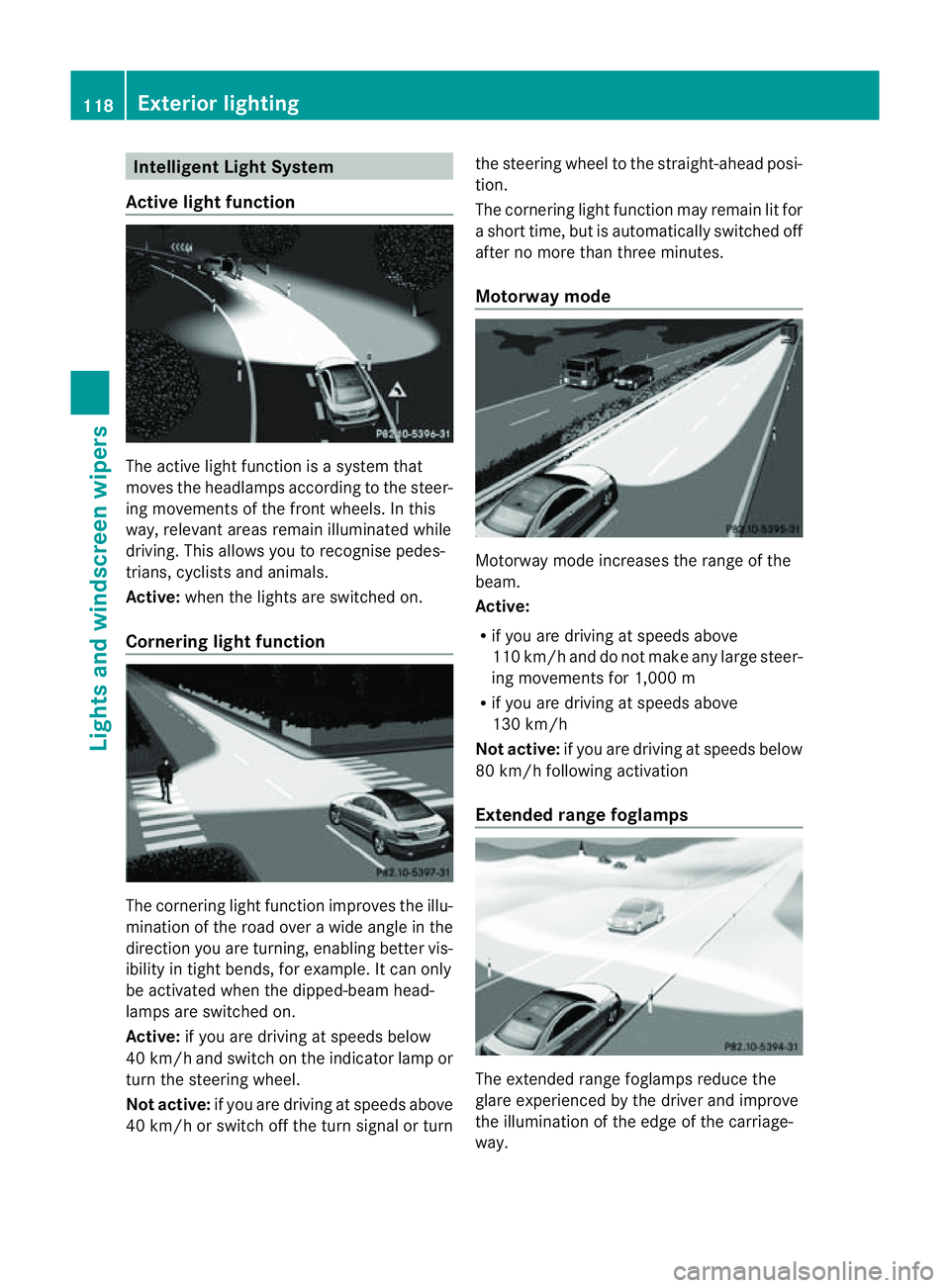
Active light function The active light function is
asyste mthat
moves the headlamps according to the steer-
ing movementsoft he front wheels. In this
way,r elevant areas remain illuminated while
driving. This allowsy ou to recognise pedes-
trians, cyclists and animals.
Active: when the lights are switched on.
Cornering light function The cornering light function improves the illu-
mination of the road over
awide angle in the
direction you are turning, enabling better vis-
ibility in tight bends, for example. It can only
be activated when the dipped-beamh ead-
lamps are switched on.
Active: if you are driving at speeds below
40 km/ha nd switch on the indicator lamp or
tur nthe steering wheel.
Not active: if you are driving at speeds above
40 km/h or switch off the turn signal or turn the steering wheel to the straight-ahead posi-
tion.
The cornering light function may remain lit for
as
hort time, but is automatically switched off
after no more than three minutes.
Motorway mode Motorway mode increases the range of the
beam.
Active:
R
if you are driving at speeds above
110 km/h and do not make any large steer-
ing movementsf or 1,000 m
R if you are driving at speeds above
130 km/h
Not active: if you are driving at speeds below
80 km/h following activation
Extended range foglamps The extended range foglamps reduce the
glare experienced by the driver and improve
the illumination of the edge of the carriage-
way.118
Exterior lightingLights and windscreen wipers
Page 122 of 353
Active:
if you are driving at speeds below
70 km/h and you switch on th erear foglamp
Not active: if you are driving at speeds above
10 0k m/h or if you switch off the rear foglamp
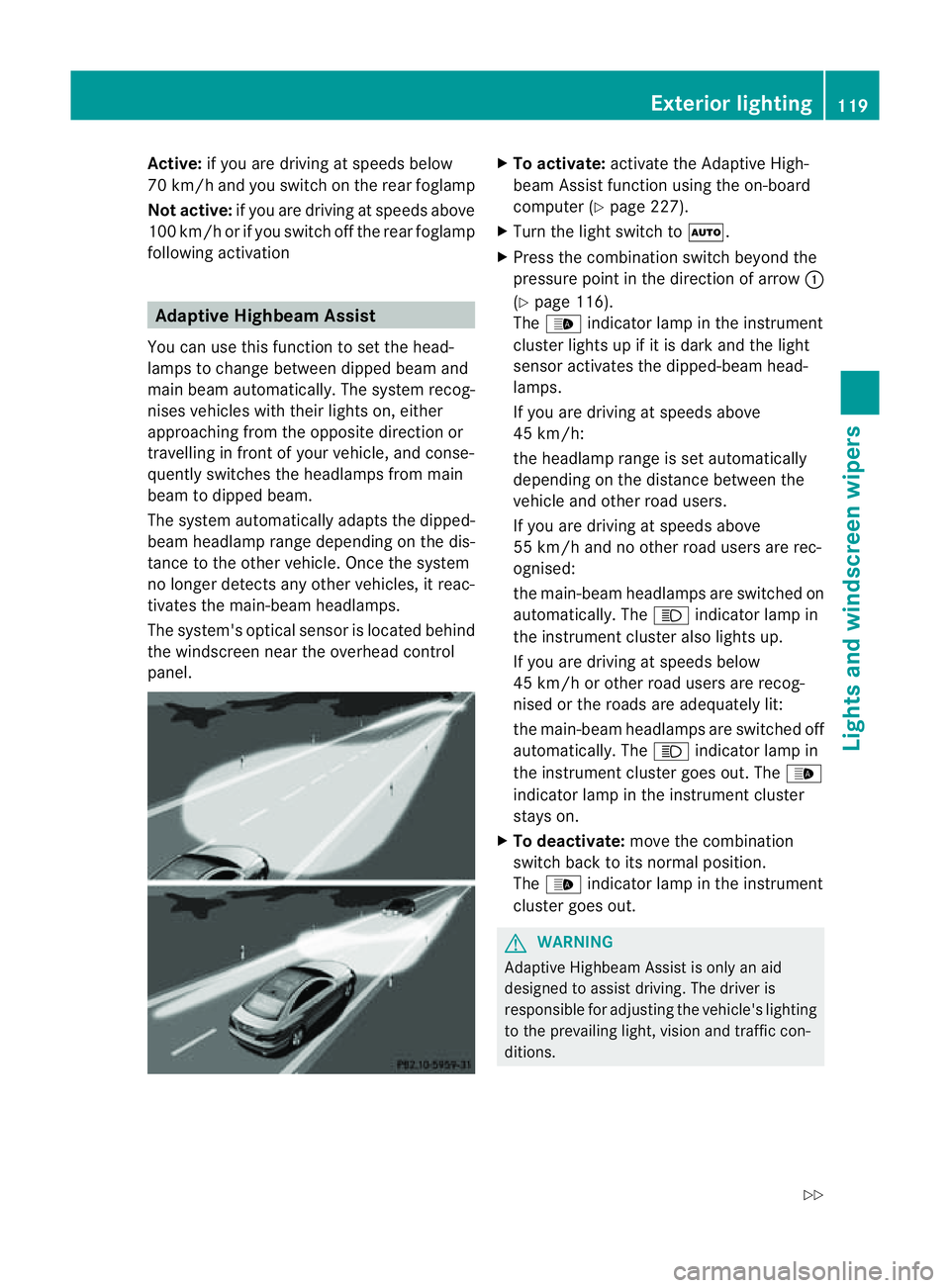
following activation Adaptive Highbeam Assist
You can use this function to set the head-
lamp stoc hange between dipped beama nd
main beam automatically. The system recog-
nises vehicles with thei rlight son, either
approaching fro mthe opposite direction or
travelling in front of your vehicle, and conse-
quently switches the headlamps from main
beam to dipped beam.
The system automatically adapts the dipped-
beam headlamp range depending on the dis-
tance to the other vehicle. Once the system
no longer detects any other vehicles, it reac-
tivates the main-beam headlamps.
The system's optical sensor is located behind
the windscreen near the overhead control
panel. X
To activate: activate the Adaptive High-
beam Assist function using the on-board
computer (Y page 227).
X Turn the light switch to Ã.
X Press the combination switch beyond the
pressure point in the direction of arrow :
(Y page 116).
The _ indicator lamp in the instrument
cluster lights up if it is dark and the light
sensor activates the dipped-beamh ead-
lamps.
If you are driving at speeds above
45 km/h:
the headlamp range is set automatically
depending on the distanc ebetween the
vehicle and other road users.
If you are driving at speeds above
55 km/ha nd no other road users are rec-
ognised:
the main-beam headlamps are switched on
automatically. The Kindicator lamp in
the instrument cluster also lights up.
If you are driving at speeds below
45 km/ho rother road users are recog-
nised or the roads are adequately lit:
the main-beam headlamps are switched off
automatically. The Kindicator lamp in
the instrument cluster goes out. The _
indicator lamp in the instrument cluster
stays on.
X To deactivate: move the combination
switch back to its normal position.
The _ indicator lamp in the instrument
cluster goes out. G
WARNING
Adaptiv eHighbeam Assist is only an aid
designed to assist driving. The driver is
responsible for adjustin gthe vehicle's lighting
to the prevailing light, vision and traffic con-
ditions. Exterior lighting
119Lights and windscreen wipers
Z
Page 123 of 353
The system may be impaired or deactivated:
R
if there is poor visibility, e.g. due to snow,
rain, fog or spray
R if the area of the windscreen around the
optical sensor is dirty, misted up or covered
up, e.g. by asticker
The system may not recognise the following
road users:
R road users that have no lighting, e.g. pedes-
trians
R road users that have poor lighting, e.g.
cyclists
R road users whose lighting is not clearly visi-
ble, e.g. road users behind acrash barrier
R on rare occasions :road users that have
lights that may be recognised too late or not
at all
The automatic main-beam headlamps will not
be deactivated, or they may be activated
despite road users travelling in front of or
approaching the vehicle.
Thus, you could cause an accident and injure
yourself and others. Always observe traffic
conditions and, if necessary, dip the lights
manually. Headlamps misted up inside
The headlamps may mist up on the inside if
there is high atmospheric humidity.
X Drive with the headlamps switched on.
The level of moisture diminishes, depend-
ing on the length of the journey and the
weather conditions (humidity and temper-
ature).
If the level of moisture does not diminish:
X Have the headlamps checked at aqualified
specialist workshop. Interior lighting
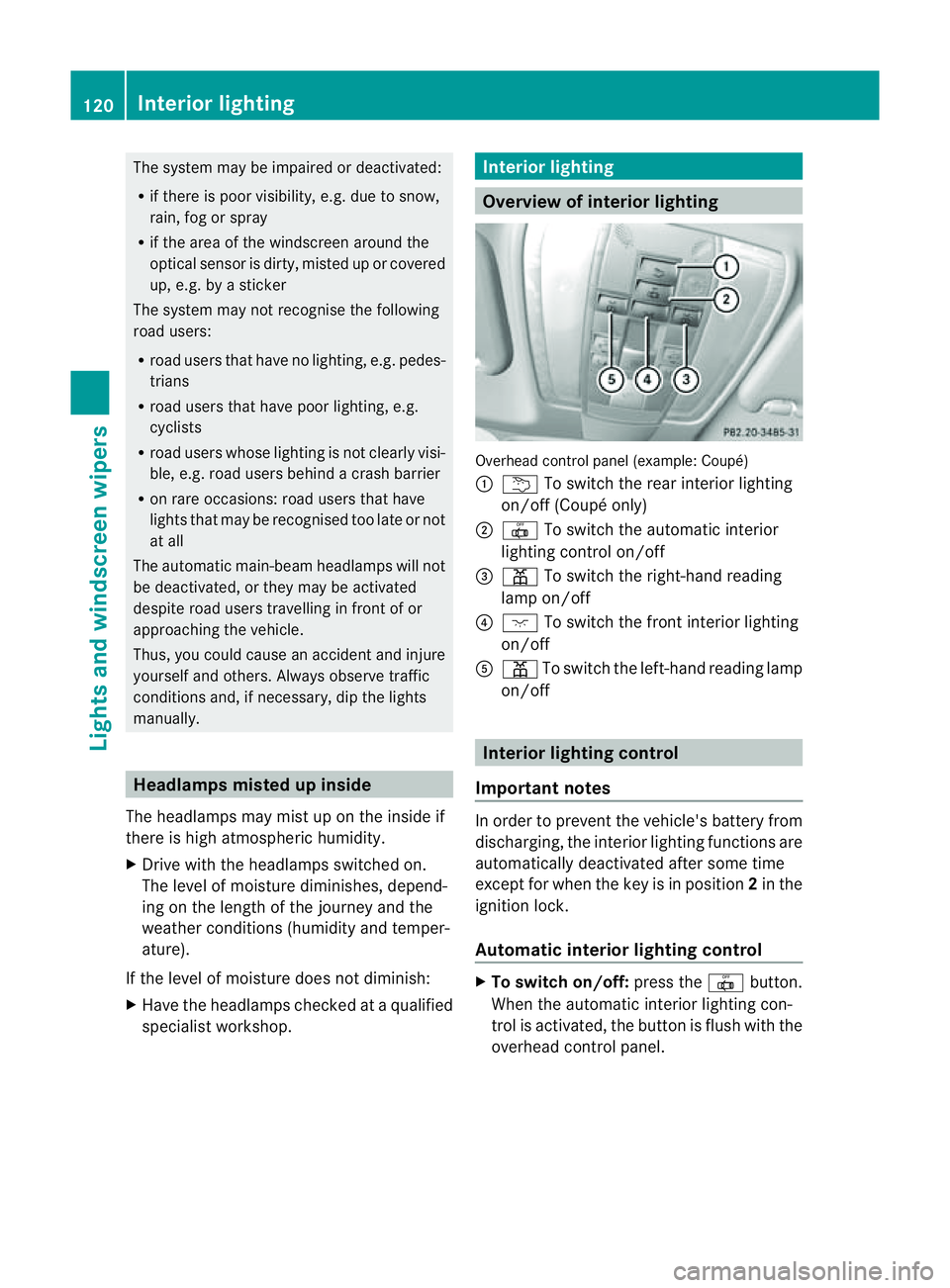
Overview of interior lighting
Overhead control panel (example: Coupé)
:
u To switch the rear interior lighting
on/off( Coupé only)
; | To switch th eautomatic interior
lighting control on/off
= p To switch th eright-hand reading
lamp on/off
? c To switch th efront interio rlighting
on/off
A p To switch th eleft-hand reading lamp
on/off Interior lightin
gcontrol
Important notes In order to preven
tthe vehicle's battery from
discharging, the interior lighting functions are
automatically deactivated after some time
except for when the key is in position 2in the
ignition lock.
Automatic interior lighting control X
To switch on/off: press the|button.
When the automatic interior lighting con-
trol is activated, the button is flush with the
overhead control panel. 120
Interior lightingLights and windscreen wipers
Page 173 of 353
or winding roads). You may otherwise
cause an accident.
R on slippery roads. The drive wheels may
lose their grip when braking or accelerating
and the vehicle may skid.
R when there is low visibility, e.g. due to fog,
heavy rain or snow.
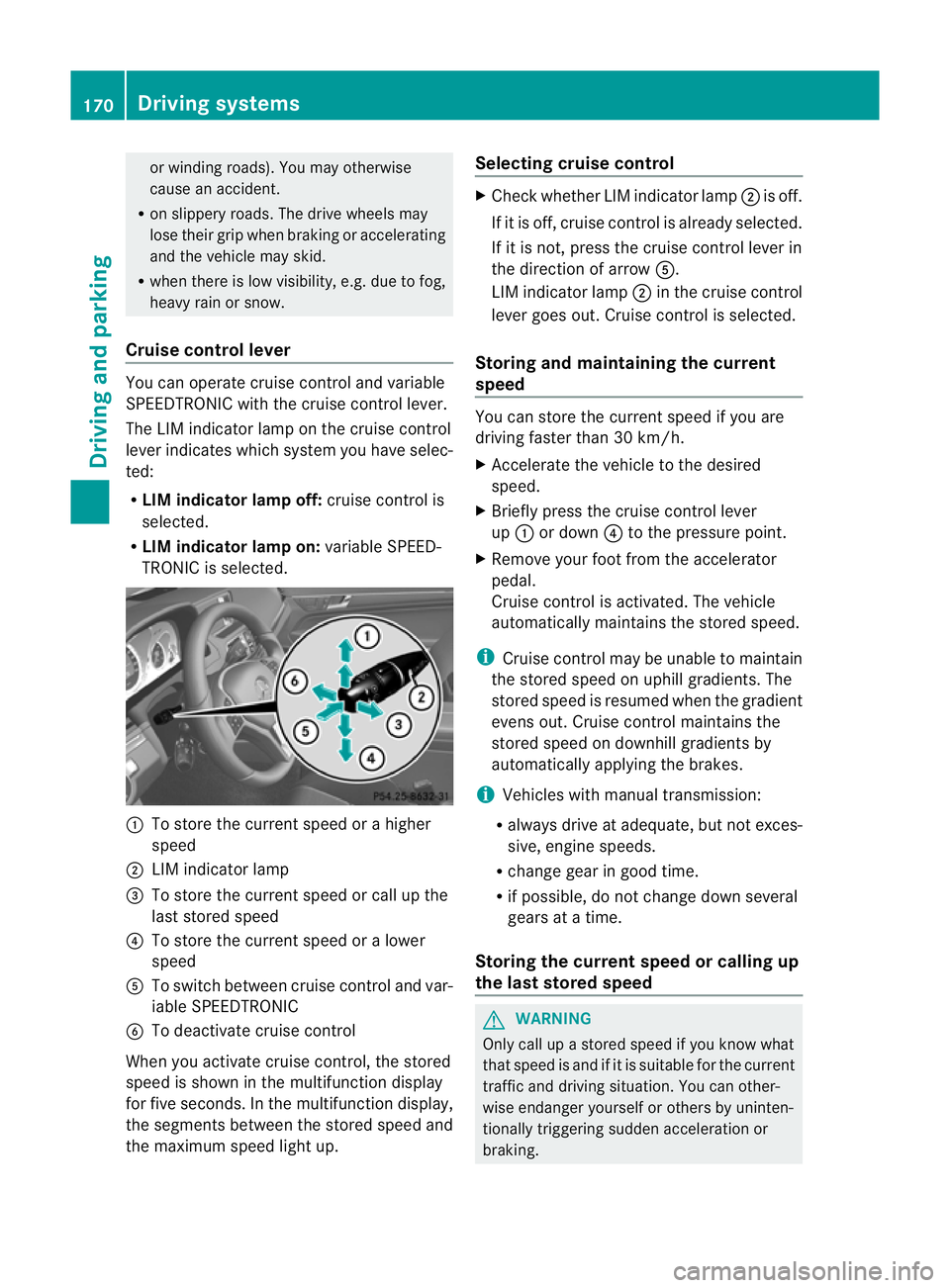
Cruise control lever You can operate cruise control and variable
SPEEDTRONIC with the cruise control lever.
The LIM indicator lamp on the cruise control
lever indicates which system you have selec-
ted:
R LIM indicator lamp off: cruise control is
selected.
R LIM indicator lamp on: variable SPEED-
TRONIC is selected. :
To store the current speed or ahigher
speed
; LIM indicator lamp
= To store the current speed or call up the
last stored speed
? To store the current speed or alower
speed
A To switch between cruise control and var-
iable SPEEDTRONIC
B To deactivate cruise control
When you activate cruise control, the stored
speed is shown in the multifunction display
for five seconds. In the multifunction display,
the segment sbetween the stored speed and
the maximum speed light up. Selecting cruise control X
Check whether LIM indicator lamp ;is off.
If it is off, cruise control is already selected.
If it is not,p ress the cruise control lever in
the direction of arrow A.
LIM indicator lamp ;in the cruise control
lever goes out. Cruise control is selected.
Storing and maintaining the current
speed You can store the current speed if you are
driving faster than 30 km/h.
X
Accelerate the vehicle to the desired
speed.
X Briefly press the cruise control lever
up : or down ?to the pressure point.
X Remove your foot from the accelerator
pedal.
Cruise control is activated. The vehicle
automatically maintains the stored speed.
i Cruise control may be unable to maintain
the stored speed on uphill gradients. The
stored speed is resumed when the gradient
evens out. Cruise control maintains the
stored speed on downhill gradients by
automatically applying the brakes.
i Vehicles with manual transmission:
R always drive at adequate, but not exces-
sive, engine speeds.
R change gear in good time.
R if possible, do not change down several
gears at atime.
Storing the current speed or calling up
the last stored speed G
WARNING
Only call up astored speed if you know what
that speed is and if it is suitable for the current
traffic and driving situation. You can other-
wise endanger yourself or others by uninten-
tionally triggerin gsudden acceleration or
braking. 170
Driving systemsDriving and parking
Page 196 of 353
manoeuvring. This appliestot
he areas
behind, in front of and next to the vehicle. You
could otherwise endange ryourself and oth-
ers. G
WARNING
Under the following circumstances, the
reversing camera will not function, or will
function in alimited manner:
R if the boot lid is open
R in heavy rain, snow or fog
R at night or in very dark places
R if the camera is exposed to very bright light
R if the area is lit by fluorescent light (the dis-
play may flicker)
R if there is asudden change in temperature,
e.g. when driving into aheated garage in
winter
R if the camera lens is dirty or obstructed
R if the rear of your vehicle is damaged. In this
event,h ave the camera position and setting
checked at aqualified specialist workshop.
Mercedes-Benz recommends that you use
aM ercedes-Benz Service Centre for this
purpose.
Do not use the reversing camera in these
types of situation. You could otherwise injure
others or damage object sand your vehicle
while you are parking.
Activating the reversing camera X
Make sure that the key is in position 2in
the ignition lock.
X Make sure that the "Reversing camera"
function is selected in COMAND APS (see
the separate operating instructions for
COMAND APS).
X Engage reverse gear.
The area behind the vehicle is shown in the
COMAND APS display. Guide lines in the COMAND APS display Depending on the date of manufacture of the
vehicle, the guide lines are shown in the
COMAND APS display.
G
WARNING
Using the reversing camera can be dangerous
if you are colour blind or if your ability to dis-
tinguish colours is impaired.
Only use the reversing camera if you can see
and distinguish between all the coloured
guide lines that are displayed by the reversing
camera in the COMAND APS display. G
WARNING
Please note that object snot at ground level
may appear to be further away than they
actually are. These include:
R the bumper of avehicle that is parked
behind your vehicle
R at railer drawbar
R the ball coupling of atrailer tow hitch
R the tail-end of alorry
R slanted posts
The lines are only guides, not accurate meas-
urements of the distance to an obstacle.
Therefore, you should never pass the red line
when approaching an obstacle. You could oth-
erwise cause an accident and injure yourself
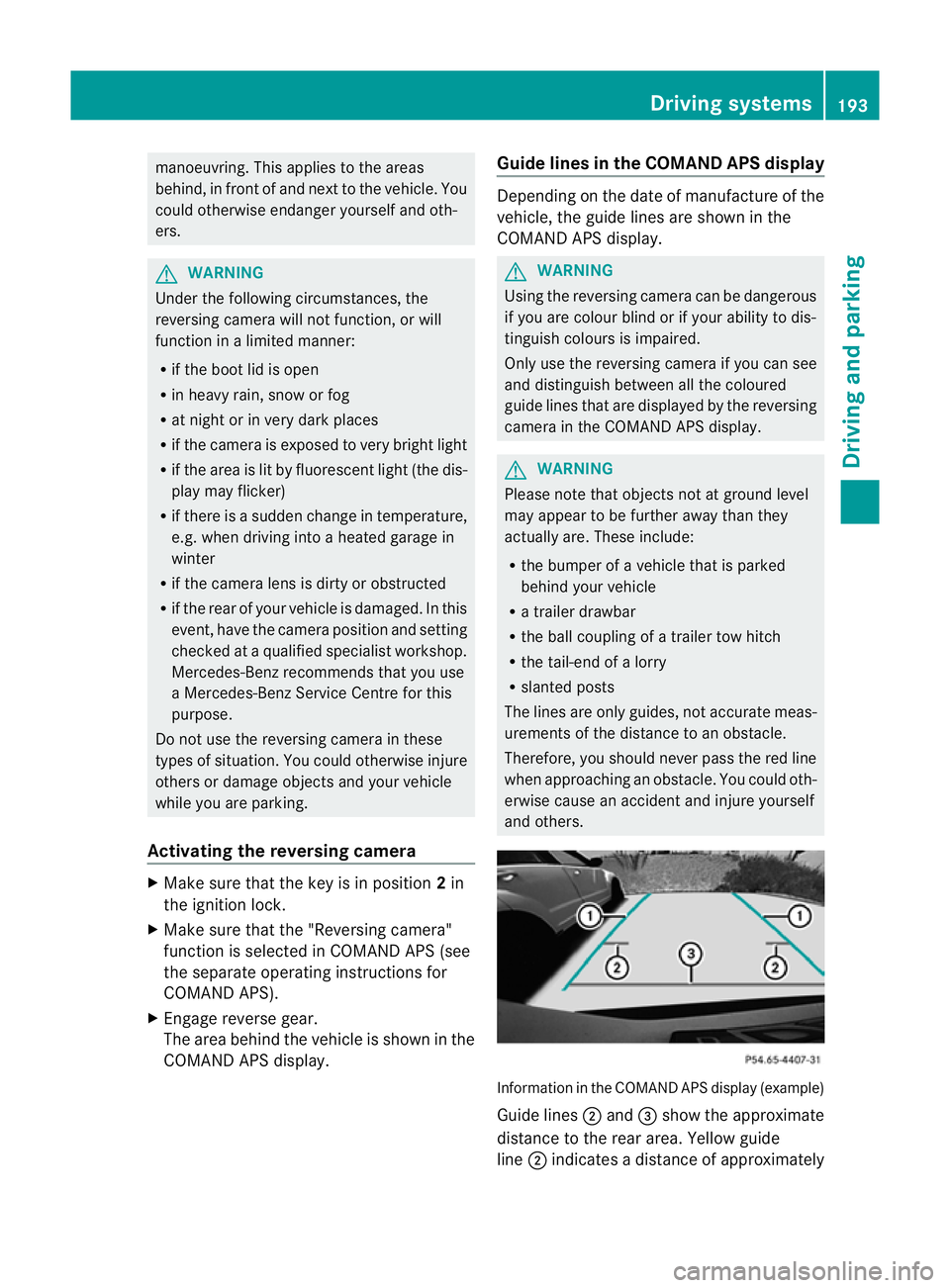
and others. Information in the COMAND APS display (example)
Guide lines
;and =show the approximate
distance to the rear area. Yellow guide
line ;indicates adistance of approximately Driving systems
193Driving and parking Z
Page 201 of 353
the warning onl
yoccurs if the differenc ein
spee dislesst han1 2km/h.
The yellow indicator lamp goes out if reverse
gearise ngaged. Blind Spot Assist is then
deactivated.
The brightness of the indicator/warning
lamps is adjusted automaticallya ccording to
the ambient light. G
WARNING
Blind Spot Assist is not active at speeds below
30 km/h, and the indicator lamps in the exte-
rior mirrors are yellow. Vehicles in the moni-
toring range are then not indicated.
Always pay attention to traffic conditions and
your surroundings. Otherwise, you may fail to
recognise dangers in time, cause an accident
and injure yourselfa nd others.
Collisio nwarning
If av ehicl eisd etected in the monitoring range
of Blind Spo tAssist and you switch on the turn
signal, adoublew arning tone sounds. Red
warning lamp :flashes. If the turn signal
remains on, detected vehicles are indicated
by the flashing of red warning lamp :.There
are no further warning tones.
Switching on Blind Spot Assist
X Make sure that the radar sensor system
(Y page 229) and Blind Spot Assist
(Y page 224) are activated in the on-board
computer.
X Turn the key to position 2in the ignition
lock.
Warning lamps :light up red in the exte-
rior mirrors for approximately 1.5 seconds
and then turn yellow.
Trailer towing
If you attach atrailer, make sure you have
correctly established the electrical connec-
tion. This can be accomplished by checking
the trailer lighting. In this event, Blind Spot
Assist is deactivated. The indicator lamp in
the exterior mirrors lights up yellow, and the
Blind Spot Assist currently unavail‐ able See Owner's Manual message
appears in the multifunction display.
i You can deactivate the indicator lamps in
the exterior mirrors.
To do so, switch off Blind Spot Assist if:
R the key is in position 2in the ignition
lock.
R the engine is not running.
R the electrical connection to the trailer
has been established.
Lane Keeping Assist Important safety notes
Lane Keeping Assist monitors the area in
front of your vehicle by means of
acamera at
the top of the windscreen. Lane Keeping
Assist detectsl ane markings on the road and
warns you before you leave your lane unin-
tentionally.
If you have chosen the (Y page 225) function
in the on-board computer and select km as
the unit of measurement, Active Lane Keep-
ing Assist is active from speeds of 60 km/h.
If the displayu nit is selected, the assistance
range begins at 40 mph. G
WARNING
Lane Keeping Assist does not keep your vehi-
cle in its lane. It is only an aid and may detect
the lane markings on the road incorrectly or
not at all.
The system may be impaired or may not func-
tion if:
R there is poor visibility, e.g. due to insuffi-
cient illumination of the road, or due to
snow, rain, fog or spray.
R there is glare, e.g. from oncomingt raffic,
the sun, or reflection from other vehicles.
R the windscreen is dirty, misted up or cov-
ered, for instancebyas ticker, in the vicinity
of the camera
R several or no lane markings for asingle lane
are present. 198
Driving systemsDriving and parking