warning light MERCEDES-BENZ E-Class COUPE 2012 C207 Owner's Guide
[x] Cancel search | Manufacturer: MERCEDES-BENZ, Model Year: 2012, Model line: E-Class COUPE, Model: MERCEDES-BENZ E-Class COUPE 2012 C207Pages: 352, PDF Size: 14.48 MB
Page 66 of 352
for example if the road surface is slippery on
one side.
Traction control remains active if you
deactivate ESP ®
.
Deactivating/activating ESP ®
i
Observe the "Important safety notes"
section ( Y page 61).
GWARNING
ESP ®
should not be deactivated during
normal driving other than in the
circumstances described below. Disabling
the system will reduce vehicle stability in
driving maneuvers.
Do not deactivate ESP ®
when the emergency
or spare wheel is mounted.
ESP ®
is activated automatically when the
engine is started.
It may be best to deactivate ESP ®
in the
following situations:
R when using snow chains
R in deep snow
R on sand or gravel
GWARNING
Switch on ESP ®
immediately if one of the
previously stated conditions is no longer met.
Otherwise, ESP ®
cannot stabilize the vehicle
if it begins to lurch or when a wheel spins.
When you deactivate ESP ®
:
R ESP ®
no longer improves driving stability.
R the engine's torque is no longer limited and
the drive wheels can spin. The spinning of
the wheels results in a cutting action, which
provides better grip.
R traction control is still activated.
R ESP ®
still provides support when you
brake.
If ESP ®
is deactivated and one or more wheels
start to spin, the ÷ ESP®
warning lamp in
the instrument cluster flashes. In such
situations, ESP ®
will not stabilize the vehicle.
XTo deactivate: (Y page 206).
The å ESP®
OFF warning lamp in the
instrument cluster lights up.GWARNING
When the å ESP®
OFF warning lamp is lit,
ESP ®
is deactivated.
If the ÷ ESP®
warning lamp and the
å ESP®
OFF warning lamp remain lit,
ESP ®
is not available due to a malfunction.
When ESP ®
is deactivated or not operational,
vehicle stability in standard driving
maneuvers is reduced.
Adapt your speed and driving to the prevailing
road conditions and to the non-operating
status of the ESP ®
.
! Avoid spinning the driven wheels for an
extended period with ESP ®
deactivated.
You could otherwise damage the drivetrain.
XTo activate: (Y page 206).
The å ESP®
OFF warning lamp in the
instrument cluster goes out.
EBD (electronic brake force
distribution)
i Observe the "Important safety notes"
section ( Y page 61).
EBD monitors and controls the brake
pressure on the rear wheels to improve
driving stability while braking.
GWARNING
If EBD has malfunctioned, the braking system
remains available with full brake boosting
effect. However, the rear wheels can still lock,
e.g. under full braking. This could cause you
to lose control of your vehicle and cause an
accident. You should therefore adapt your
driving style to the different handling
characteristics.
64Driving safety systemsSafety
Page 67 of 352
XObserve the notes on warning and indicator
lamps ( Y page 242) as well as display
messages ( Y page 215).
ADAPTIVE BRAKE
ADAPTIVE BRAKE enhances braking safety
and offers increased braking comfort. In
addition to the braking function, ADAPTIVE
BRAKE also has the HOLD function
( Y page 176) and hill start assist
( Y page 147). For further information, see
Driving tips ( Y page 161).
PRE-SAFE ®
Brake
PRE-SAFE ®
Brake is only available in vehicles
with DISTRONIC PLUS.
i Observe the "Important safety notes"
section ( Y page 61).
PRE-SAFE ®
Brake can help you to minimize
the risk of a frontal collision with a vehicle
ahead or reduce the effects of such a
collision. If PRE-SAFE ®
Brake has detected a
risk of collision, you will be warned visually
and acoustically as well as by automatic
braking. PRE-SAFE ®
Brake cannot prevent a
collision without your intervention.
At speeds above approximately
20 mph (30 km/h), this function warns you
when you are rapidly approaching the vehicle
in front. An intermittent warning tone will
then sound and the · distance warning
lamp in the instrument cluster will light up.
XBrake immediately in order to increase the
distance from the vehicle in front.
or
XTake evasive action provided it is safe to do
so.At speeds of above approximately
20 mph (30 km/h), if the driver and front
passenger have fastened their seat belts,
PRE-SAFE ®
Brake can:
R brake the vehicle automatically at speeds
up to approximately 124 mph (200 km/h)
R trigger preventative occupant protection
measures (PRE-SAFE ®
) ( Y page 48)
Due to the nature of the system, particularly
complicated driving conditions may cause
unnecessary warnings or the unnecessary
intervention of PRE-SAFE ®
Brake. To stop the
braking action, you can either depress the
accelerator pedal further, activate kickdown
or release the brake pedal.
The braking action of PRE-SAFE ®
Brake is
ended automatically if:
R your speed drops below approximately
9 mph (15 km/h).
R you maneuver to avoid the obstacle.
R there is no longer any danger of a rear-end
collision.
R there is no longer an obstacle detected in
front of your vehicle.
i USA only: this device has been approved
by the FCC as a "Vehicular Radar System".
The radar sensor system is intended for use
in an automotive radar system only.
Removing, altering or tampering with the
device will void any warranties, and is not
permitted by the FCC. Do not tamper with,
alter, or use in any non-approved way.
Any unauthorized modification to this
device could void the user's authority to
operate the equipment.
i Canada only: this device complies with
RSS-210 of Industry Canada. Operation is
subject to the following two conditions:
1. This device may not cause interference,
and
2. this device must accept any interference
received, including interference that may
cause undesired operation of the device.Driving safety systems65SafetyZ
Page 72 of 352
Useful information
i This Operator's Manual describes all
models and all standard and optional
equipment of your vehicle available at the
time of publication of the Operator's
Manual. Country-specific differences are
possible. Please note that your vehicle may
not be equipped with all features
described. This also applies to safety-
related systems and functions.
i Please read the information on qualified
specialist workshops ( Y page 23).
SmartKey
Important safety notes
GWARNING
When leaving the vehicle, always remove the
SmartKey from the ignition lock. Always take
the SmartKey with you and lock the vehicle.
Do not leave children unsupervised in the
vehicle, even if they are secured in a child
restraint system, and do not give them access
to an unlocked vehicle. A child's unsupervised
access to a vehicle could result in an accident
and/or serious personal injury. They could:
R injure themselves on vehicle parts
R be seriously or fatally injured by extreme
heat or cold
R injure themselves or have an accident with
vehicle equipment that may still be in
operation even after the SmartKey has
been removed from the ignition, such as the
seat adjustment, steering wheel
adjustment or memory function.
If children open a door, they could cause
severe or even fatal injury to other persons; if
they get out of the vehicle, they could injure
themselves when doing so or be seriously or
even fatally injured by any passing traffic.
Do not expose the child restraint system to
direct sunlight. The child restraint system's
metal parts, for example, could become very
hot, and a child could be burned on these
parts.GWARNING
If a key ring is too heavy or too large, the
weight acting on the key could cause it to turn
in the ignition lock or catch on the steering
wheel. This could cause the engine to be
switched off suddenly. You could lose control
of the vehicle and cause an accident. Do not
attach any heavy or large key rings to the key
that is inserted in the ignition.
General notes
If you cannot lock or unlock the vehicle with
the SmartKey, either the battery in the
SmartKey is discharged, the SmartKey is
faulty or the starter battery is discharged.
XCheck the battery in the SmartKey and
replace it if necessary ( Y page 74).XUnlock the driver's door using the
mechanical key ( Y page 79).XLock the vehicle using the mechanical key
( Y page 79).XHave the starter battery and the battery
contacts checked at a qualified specialist
workshop.
If the SmartKey is faulty, contact Roadside
Assistance or a qualified specialist workshop.
SmartKey functions
General notes
i USA only:
This device complies with Part 15 of the
FCC Rules. Operation is subject to the
following two conditions:
1. This device may not cause harmful
interference, and
2. this device must accept any interference
received, including interference that may
cause undesired operation.
70SmartKeyOpening/closing
Page 76 of 352
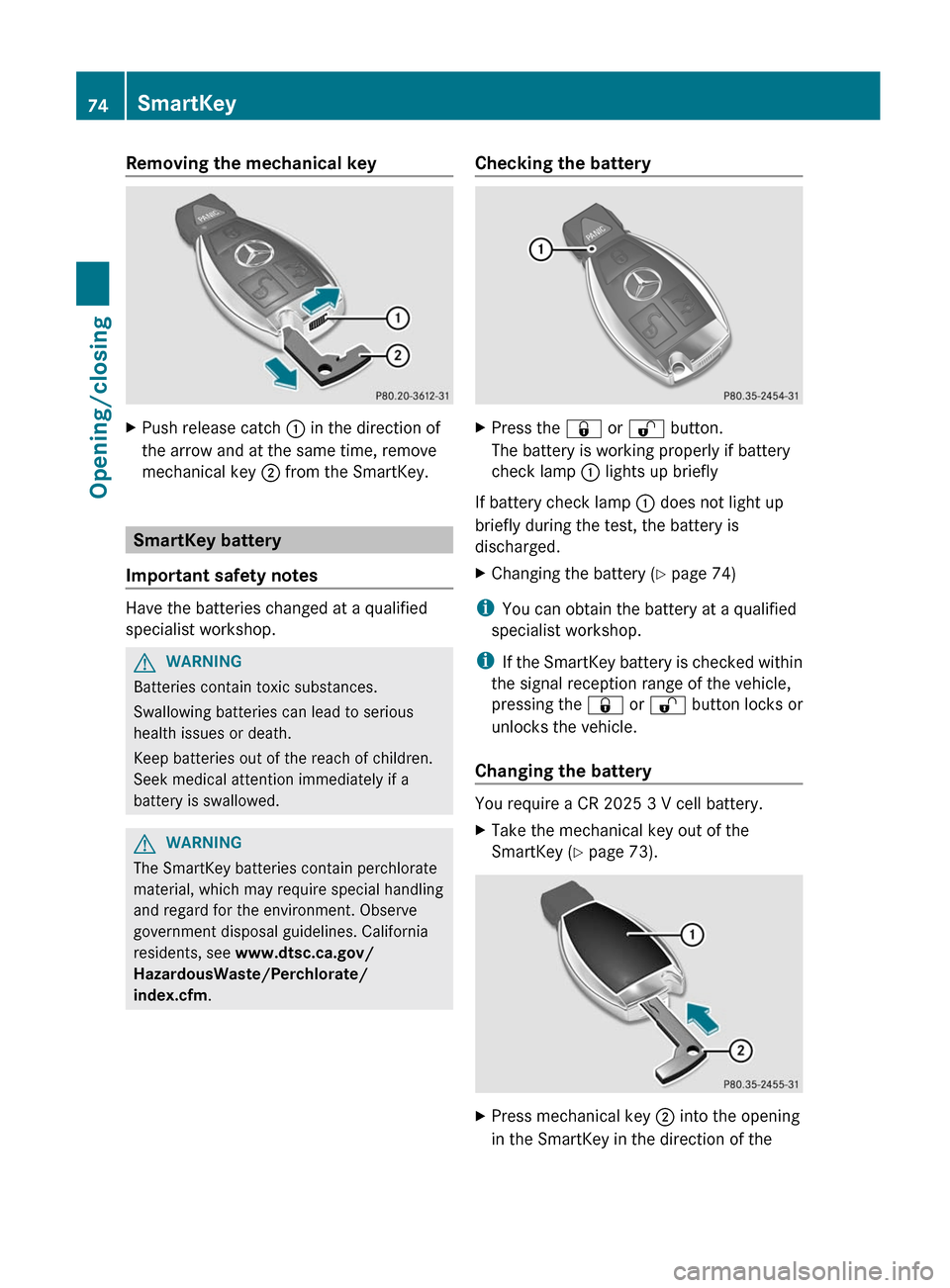
Removing the mechanical keyXPush release catch : in the direction of
the arrow and at the same time, remove
mechanical key ; from the SmartKey.
SmartKey battery
Important safety notes
Have the batteries changed at a qualified
specialist workshop.
GWARNING
Batteries contain toxic substances.
Swallowing batteries can lead to serious
health issues or death.
Keep batteries out of the reach of children.
Seek medical attention immediately if a
battery is swallowed.
GWARNING
The SmartKey batteries contain perchlorate
material, which may require special handling
and regard for the environment. Observe
government disposal guidelines. California
residents, see www.dtsc.ca.gov/
HazardousWaste/Perchlorate/
index.cfm .
Checking the batteryXPress the & or % button.
The battery is working properly if battery
check lamp : lights up briefly
If battery check lamp : does not light up
briefly during the test, the battery is
discharged.
XChanging the battery ( Y page 74)
i
You can obtain the battery at a qualified
specialist workshop.
i If the SmartKey battery is checked within
the signal reception range of the vehicle,
pressing the & or % button locks or
unlocks the vehicle.
Changing the battery
You require a CR 2025 3 V cell battery.
XTake the mechanical key out of the
SmartKey ( Y page 73).XPress mechanical key ; into the opening
in the SmartKey in the direction of the74SmartKeyOpening/closing
Page 79 of 352
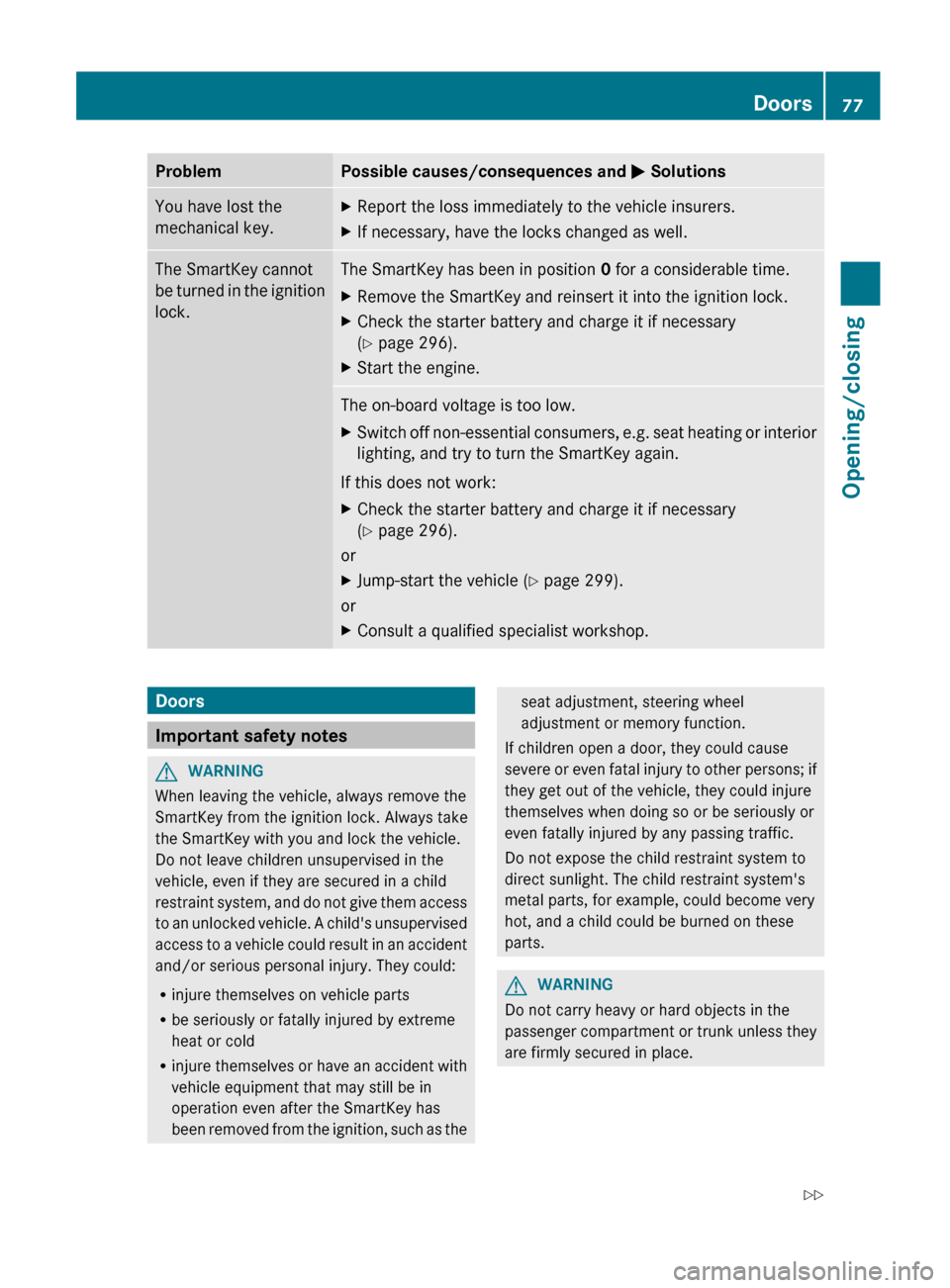
ProblemPossible causes/consequences and M SolutionsYou have lost the
mechanical key.XReport the loss immediately to the vehicle insurers.XIf necessary, have the locks changed as well.The SmartKey cannot
be turned in the ignition
lock.The SmartKey has been in position 0 for a considerable time.XRemove the SmartKey and reinsert it into the ignition lock.XCheck the starter battery and charge it if necessary
( Y page 296).XStart the engine.The on-board voltage is too low.XSwitch off non-essential consumers, e.g. seat heating or interior
lighting, and try to turn the SmartKey again.
If this does not work:
XCheck the starter battery and charge it if necessary
( Y page 296).
or
XJump-start the vehicle ( Y page 299).
or
XConsult a qualified specialist workshop.Doors
Important safety notes
GWARNING
When leaving the vehicle, always remove the
SmartKey from the ignition lock. Always take
the SmartKey with you and lock the vehicle.
Do not leave children unsupervised in the
vehicle, even if they are secured in a child
restraint system, and do not give them access
to an unlocked vehicle. A child's unsupervised
access to a vehicle could result in an accident
and/or serious personal injury. They could:
R injure themselves on vehicle parts
R be seriously or fatally injured by extreme
heat or cold
R injure themselves or have an accident with
vehicle equipment that may still be in
operation even after the SmartKey has
been removed from the ignition, such as the
seat adjustment, steering wheel
adjustment or memory function.
If children open a door, they could cause
severe or even fatal injury to other persons; if
they get out of the vehicle, they could injure
themselves when doing so or be seriously or
even fatally injured by any passing traffic.
Do not expose the child restraint system to
direct sunlight. The child restraint system's
metal parts, for example, could become very
hot, and a child could be burned on these
parts.GWARNING
Do not carry heavy or hard objects in the
passenger compartment or trunk unless they
are firmly secured in place.
Doors77Opening/closingZ
Page 82 of 352
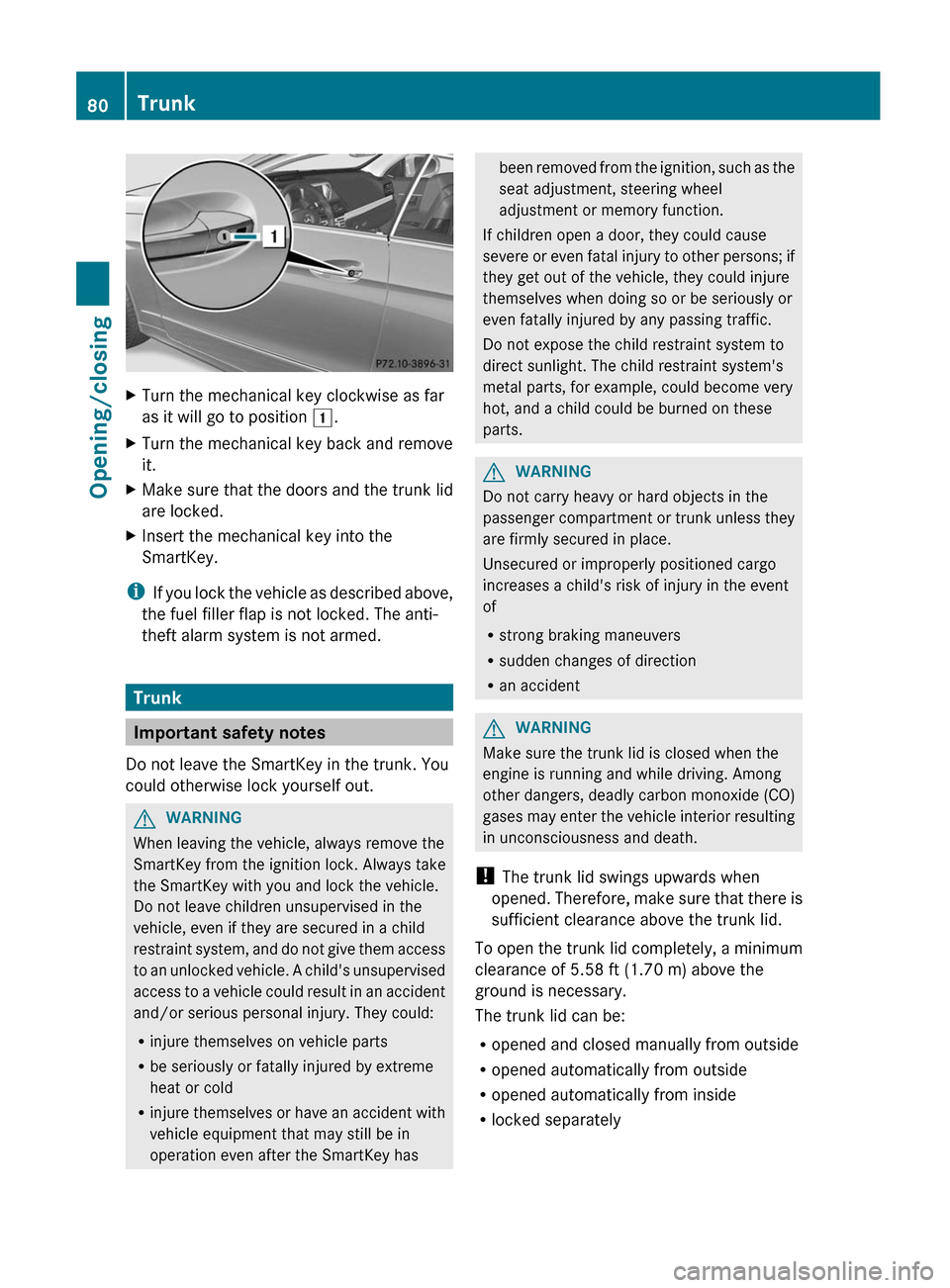
XTurn the mechanical key clockwise as far
as it will go to position 1.XTurn the mechanical key back and remove
it.XMake sure that the doors and the trunk lid
are locked.XInsert the mechanical key into the
SmartKey.
i If you lock the vehicle as described above,
the fuel filler flap is not locked. The anti-
theft alarm system is not armed.
Trunk
Important safety notes
Do not leave the SmartKey in the trunk. You
could otherwise lock yourself out.
GWARNING
When leaving the vehicle, always remove the
SmartKey from the ignition lock. Always take
the SmartKey with you and lock the vehicle.
Do not leave children unsupervised in the
vehicle, even if they are secured in a child
restraint system, and do not give them access
to an unlocked vehicle. A child's unsupervised
access to a vehicle could result in an accident
and/or serious personal injury. They could:
R injure themselves on vehicle parts
R be seriously or fatally injured by extreme
heat or cold
R injure themselves or have an accident with
vehicle equipment that may still be in
operation even after the SmartKey has
been removed from the ignition, such as the
seat adjustment, steering wheel
adjustment or memory function.
If children open a door, they could cause
severe or even fatal injury to other persons; if
they get out of the vehicle, they could injure
themselves when doing so or be seriously or
even fatally injured by any passing traffic.
Do not expose the child restraint system to
direct sunlight. The child restraint system's
metal parts, for example, could become very
hot, and a child could be burned on these
parts.GWARNING
Do not carry heavy or hard objects in the
passenger compartment or trunk unless they
are firmly secured in place.
Unsecured or improperly positioned cargo
increases a child's risk of injury in the event
of
R strong braking maneuvers
R sudden changes of direction
R an accident
GWARNING
Make sure the trunk lid is closed when the
engine is running and while driving. Among
other dangers, deadly carbon monoxide (CO)
gases may enter the vehicle interior resulting
in unconsciousness and death.
! The trunk lid swings upwards when
opened. Therefore, make sure that there is
sufficient clearance above the trunk lid.
To open the trunk lid completely, a minimum
clearance of 5.58 ft (1.70 m) above the
ground is necessary.
The trunk lid can be:
R opened and closed manually from outside
R opened automatically from outside
R opened automatically from inside
R locked separately
80TrunkOpening/closing
Page 85 of 352
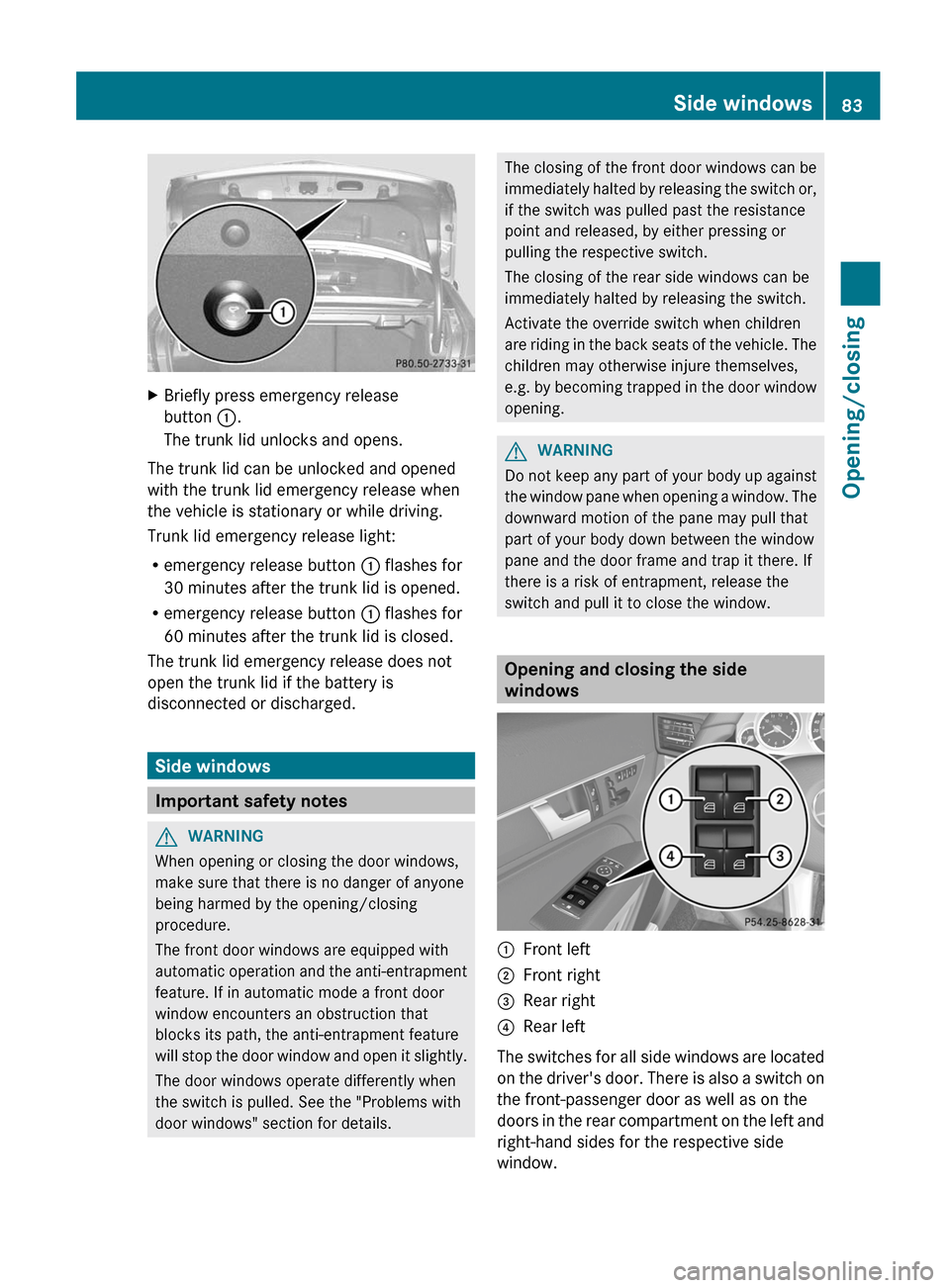
XBriefly press emergency release
button :.
The trunk lid unlocks and opens.
The trunk lid can be unlocked and opened
with the trunk lid emergency release when
the vehicle is stationary or while driving.
Trunk lid emergency release light:
R emergency release button : flashes for
30 minutes after the trunk lid is opened.
R emergency release button : flashes for
60 minutes after the trunk lid is closed.
The trunk lid emergency release does not
open the trunk lid if the battery is
disconnected or discharged.
Side windows
Important safety notes
GWARNING
When opening or closing the door windows,
make sure that there is no danger of anyone
being harmed by the opening/closing
procedure.
The front door windows are equipped with
automatic operation and the anti-entrapment
feature. If in automatic mode a front door
window encounters an obstruction that
blocks its path, the anti-entrapment feature
will stop the door window and open it slightly.
The door windows operate differently when
the switch is pulled. See the "Problems with
door windows" section for details.
The closing of the front door windows can be
immediately halted by releasing the switch or,
if the switch was pulled past the resistance
point and released, by either pressing or
pulling the respective switch.
The closing of the rear side windows can be
immediately halted by releasing the switch.
Activate the override switch when children
are riding in the back seats of the vehicle. The
children may otherwise injure themselves,
e.g. by becoming trapped in the door window
opening.GWARNING
Do not keep any part of your body up against
the window pane when opening a window. The
downward motion of the pane may pull that
part of your body down between the window
pane and the door frame and trap it there. If
there is a risk of entrapment, release the
switch and pull it to close the window.
Opening and closing the side
windows
:Front left;Front right=Rear right?Rear left
The switches for all side windows are located
on the driver's door. There is also a switch on
the front-passenger door as well as on the
doors in the rear compartment on the left and
right-hand sides for the respective side
window.
Side windows83Opening/closingZ
Page 88 of 352
Resetting the side windows
You must reset each side window if a side
window can no longer be closed fully.XClose all the doors.XTurn the SmartKey to position 1 or 2 in the
ignition lock.XPull the corresponding switch on the door
control panel until the side window is
completely closed. ( Y page 83)XHold the switch for an additional second.
If the side window opens again slightly:
XImmediately pull the corresponding switch
on the door control panel until the side
window is completely closed ( Y page 83).XHold the switch for an additional second.XIf the corresponding side window remains
closed after the button has been released,
the side window has been reset correctly.
If this is not the case, repeat the steps
above again.
Problems with the side windows
Problem: a side window cannot be closed
because it is blocked by objects, e.g.
leaves in the window guide.
XRemove the objects.XClose the side window.
Problem: a side window cannot be closed
and you cannot see the cause.
GWARNING
Closing the side windows with increased force
or without the anti-entrapment feature could
lead to serious or even fatal injury. Make sure
that nobody can become trapped when
closing the side windows.
If a side window is obstructed during closing
and reopens again slightly:XImmediately after the window blocks, pull
the corresponding switch again until the
side window has closed.
The side window is closed with increased
force.
If a side window is obstructed again during
closing and reopens again slightly:
XImmediately after the window blocks, pull
the corresponding switch again until the
side window has closed.
The side window is closed without the anti-
entrapment feature.GWARNING
Pulling and holding the switch to close the
window immediately after it had been blocked
two times will cause the window to close
without the anti-entrapment feature for as
long as you hold the switch.
Soft top (Cabriolet)
Important safety notes
You can open or close the soft top:
R when the vehicle is stationary or
R when the speed does not exceed 25 mph
(40 km/h).
If there is a strong head wind, it may not be
possible to close the soft top fully. In this
case, reduce speed or stop in order to close
the soft top fully.
For safety reasons, Mercedes-Benz
recommends that you only open or close the
soft top when the vehicle is stationary.
GWARNING
Only drive with the soft top fully open or
closed.
If the soft top does not open or close fully, the
soft-top hydraulics are depressurized and the
soft top is lowered:
86Soft top (Cabriolet)Opening/closing
Page 96 of 352
vehicles. This helps to prevent damage to
the vehicle.
! Observe the backrest position of the front
seats if the wind screen is installed, since
the backrest could collide with the wind
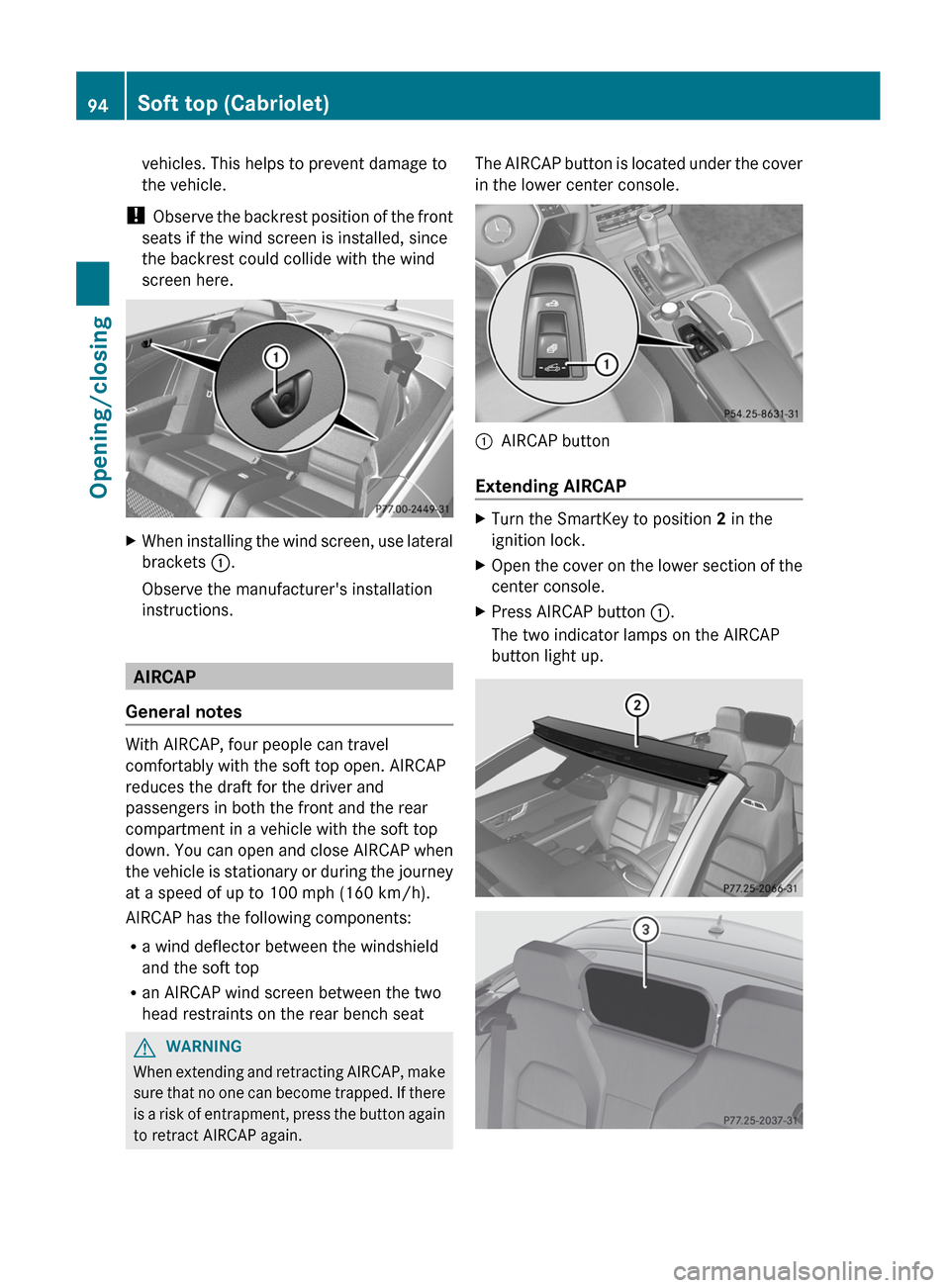
screen here.XWhen installing the wind screen, use lateral
brackets :.
Observe the manufacturer's installation
instructions.
AIRCAP
General notes
With AIRCAP, four people can travel
comfortably with the soft top open. AIRCAP
reduces the draft for the driver and
passengers in both the front and the rear
compartment in a vehicle with the soft top
down. You can open and close AIRCAP when
the vehicle is stationary or during the journey
at a speed of up to 100 mph (160 km/h).
AIRCAP has the following components:
R a wind deflector between the windshield
and the soft top
R an AIRCAP wind screen between the two
head restraints on the rear bench seat
GWARNING
When extending and retracting AIRCAP, make
sure that no one can become trapped. If there
is a risk of entrapment, press the button again
to retract AIRCAP again.
The AIRCAP button is located under the cover
in the lower center console.:AIRCAP button
Extending AIRCAP
XTurn the SmartKey to position 2 in the
ignition lock.XOpen the cover on the lower section of the
center console.XPress AIRCAP button :.
The two indicator lamps on the AIRCAP
button light up.94Soft top (Cabriolet)Opening/closing
Page 99 of 352
Problems with the soft topProblemPossible causes/consequences and M SolutionsThe soft top will not
open or close.The ignition is not switched on.XMake sure that the SmartKey is in position 2 in the ignition lock.The trunk lid is open.XClose the trunk lid ( Y page 93).The trunk partition is not closed.XClose the trunk partition ( Y page 93).The roll bars have been deployed.XVisit a qualified specialist workshop.The head restraints in the rear compartment do not retract
automatically.XLower the head restraints in the rear compartment manually
( Y page 105).The soft-top mechanism or control system is defective.XClose the soft top manually if necessary ( Y page 88).XVisit a qualified specialist workshop.The soft top was opened and closed several times in succession.
The soft-top drive has been deactivated automatically for safety
reasons.
You can open or close the soft top again after approximately ten
minutes.XSwitch the ignition off and then on again.XRepeat the opening or closing procedure.Sliding sunroof 2
Important safety notes
In the following section, the term "sliding
sunroof" refers to the panorama roof with
power tilt/sliding panel.
GWARNING
When opening or closing the sliding sunroof,
make sure that there is no danger of anyone
being harmed by the opening/closing
procedure.
The sliding sunroof is equipped with
automatic operation and the anti-entrapment
feature. If the movement of the sliding sunroof
is blocked during the closing procedure, the
sliding sunroof will stop and open slightly.
The sliding sunroof operates differently when
the sliding sunroof switch is pressed and held.2 Coupe only.Sliding sunroof97Opening/closingZ