287 MERCEDES-BENZ E-CLASS COUPE 2012 Owners Manual
[x] Cancel search | Manufacturer: MERCEDES-BENZ, Model Year: 2012, Model line: E-CLASS COUPE, Model: MERCEDES-BENZ E-CLASS COUPE 2012Pages: 389, PDF Size: 9.32 MB
Page 14 of 389
Fuel
Additives ........................................ 373
Consumptio ninformation ..............374
Consumption statistics ..................233
Displaying the current consump-
tion ................................................ 234
Displaying the range ......................234
Fuel gauge ............................... 30, 229
Grade (petrol) ................................ 372
Important safety notes ..................372
Problem (malfunction) ...................176
Quality (diesel )............................... 373
Refuelling ...................................... .173
Tank content/reserve fuel .............372
Fuel filler flap
Opening/closing ............................ 174
Fuel filte r(white display message) .262
Fuel level Calling up the range (on-board
computer) ...................................... 234
Gauge ...................................... 30, 229
Fuel reserve
see Fuel
Fuel tank
Capacity ........................................ 372
Problem (malfunction) ...................176
Fuse allocation chart (vehicle tool
kit) ...................................................... 323
Fuses Allocation chart ............................. 336
Before changing ............................. 336
Dashboard fuse box .......................336
Fuse box in the boot ......................337
Fuse box in the engine compart-
ment .............................................. 337
Important safety notes ..................336 G
Garage door opener Clearing the memory .....................299
Frequencies ................................... 299
Important safety notes ..................297
Opening/closing the garage door ..299
Programming (button in the rear-
view mirror) ................................... 297
Genuine Mercedes-Benz parts .........368
Glove compartment ..........................287 H
Handbrake see Parking brake
Hazard warning lamps ......................127
Headbag Display message ............................ 255
Operation ........................................ .46
Headlamp
Cleaning system (function) ............128
Cleaning system (notes) ................377
Headlamps
Misting up ...................................... 131
Topping up the cleaning system ....310
see Automatic headlamp mode
Head level heating (AIRSCARF) ........115
Head restraint Lowering manually (rear) ...............111
Head restraints
Adjusting ....................................... 111
Adjusting (electrically). ..................111
Adjusting (manually). .....................111
Adjusting (rear) .............................. 111
see NECK-PR Ohead restraints
Heating
see Climate control
High-pressure cleaners ....................313
Hill start assist .................................. 162
HOLD function Display message ............................ 263
Function/notes ............................. 198 I
Ignition lock see Key positions
Immobiliser .......................................... 71
Indicator and warning lamps Coolant .......................................... 281
DISTRONI CPLUS ........................... 283
Engine diagnostics .........................280
Indicator lamps
Display message ............................ 256
see Warning and indicator lamps
Insectp rotection on the radiator ....308
Inspection see ASSYST PLUS Index
11
Page 20 of 389
Problem (malfunction)
.....................92
resetting .......................................... 91
Sliding sunroof
see Panorama sliding sunroof
Snow chains ...................................... 343
Socket Centre console .............................. 295
Rea rcompartmen t......................... 295
Sockets
General notes ................................ 295
Soft top
AIRCAP .......................................... 100
Cleaning ......................................... 314
Closing manually in an emergency ... 94
Display message ............................ 273
Draught stop .................................... 99
Fitting/removing the AIRCAP
draugh tstop .................................. 101
Important safety notes ....................92
Opening/closing (with key) .............. 94
Opening/closing (with soft-top
switch) ............................................. 93
Problem (malfunction) ...................103
Re-locking ........................................ 98
Soft-top switch .................................... 93
Spare wheel Storage location ............................ 363
Specialist workshop ............................ 23
Speed, controlling see Cruise control
Spee dLimit Assist
Activating/deactivating the warn-
ing function .................................... 239
Displayin g...................................... 239
Display message ............................ 262
Display message in the multifunc-
tion displa y.................................... 210
Important safety notes ..................209
Speedometer
Activating/deactivating the addi-
tional speedometer ........................242
Digita l............................................ 234
In the Instrument cluster .........30, 229
Segments ...................................... 231
Selecting the unit of measure-
ment .............................................. 242
see Instrument cluster SPEEDTRONIC
Deactivating variabl e..................... 188
Display message ............................ 267
Function/notes ............................. 185
Important safety notes ..................185
LIM indicator lamp .........................186
Permanent ..................................... 188
Selecting ........................................ 186
Storing the current spee d.............. 187
Variabl e......................................... 186
SRS (Supplemental Restraint Sys-
tem)
Display message ............................ 254
Introduction ..................................... 41
Warning lamp ................................. 280
Warning lamp (function) ................... 41
Starting (engine) ................................ 160
Steering (display message) ..............272
Steering wheel Adjusting (electrically). ..................116
Adjusting (manually). .....................116
Button overview ............................... 33
Buttons (on-board computer) ......... 231
Cleaning ......................................... 318
Gearshift paddles ........................... 170
Important safety notes ..................115
Storing settings (memory func-
tion) ............................................... 120
Steering wheel gearshift paddles ....170
Stowage areas ................................... 286
Stowage compartments Armrest (under) ............................. 287
Centre console .............................. 287
Cuph older..................................... 291
Glove compartment .......................287
Important safety information .........286
Stowage net ....................................... 288
Stowage space Stowage net ................................... 288
Stowage well beneath the boot
floor .................................................... 290
Summer tyres .................................... 342
Sun visor ............................................ 293
Supplement Restraint System see SRS (Supplemental Restraint
System) Index
17
Page 21 of 389
Surround lighting (on-board com-
puter)
.................................................. 244
Switching off the alarm (ATA) ............71 T
Tail lamps Display message ............................ 257
Tank
see Fuel tank
Technical data
Emergency spare wheel .................364
Information .................................... 368
Trailer loads ................................... 381
Tyres/wheels ................................. 350
Vehicle data ................................... 378
Telephone
Accepting acall............................. 238
Display message ............................ 273
Menu (on-board computer) ............238
Number from the phone book ....... .238
Redialling ....................................... 239
Rejecting/ending acall................. 238
Telephone compartment ................287
Temperature
Coolant .......................................... 230
Outside temperature ..................... .231
Setting (climate control) ................144
TEMPOMAT
Function/notes ............................. 182
Theft-deterrent system
ATA (Anti-Theft Alarm system) .........71
Immobiliser ...................................... 71
Through-loading ................................ 288
Through-loading feature ...................288
Time see Separate Owner' smanual
Tiredness Assist
see ATTENTION ASSIST
TIREFIT kit .......................................... 325
Top Tether ............................................ 58
Total distance recorder ....................233
Tow-away protection ..........................71
Towing Important safety notes ..................333
With the rear axle raised ................334Towing
atrailer
Activ eBlind Spot Assist .................217
Active Lane Keeping Assist ............220
Axle load, permissible ....................381
Bulb failure indicator for LED
lamps ............................................. 224
ESP ®
(Electronic Stability Pro-
gram) ............................................... 68
Towing away
Fitting the towing eye. ...................334
Removing the towing eye. ..............334
With both axles on the ground .......335
Tow-starting
Emergency engine starting ............335
Important safety notes ..................333
Removing the towing eye. ..............334
Trailer
Display message ............................ 272
Trailer coupling
see Towing atrailer
Trailer towing
7-pin connector ............................. 225
Blind Spot Assist ............................ 212
Cleaning the trailer tow hitch ......... 317
Coupling up atrailer ...................... 223
Decoupling atrailer ....................... 223
Driving tips .................................... 221
Folding in the ball coupling ............223
Folding out the ball coupling ..........222
Important safety notes ..................220
Lights displa ymessage .................. 256
Mounting dimensions ....................380
Parking Guidance ........................... 206
Parktroni c...................................... 202
Power supply ................................. 224
Shift range ..................................... 169
Trailer loads ................................... 381
Transmission
see Automatic transmission
see Manual transmission
Transporting the vehicle ..................335
Trim pieces (cleaning instructions) .318
Trip computer (on-board com-
puter) ................................................. .233
Trip meter Calling up ....................................... 233
Resetting (on-board computer) ......234 18
Index
Page 290 of 389
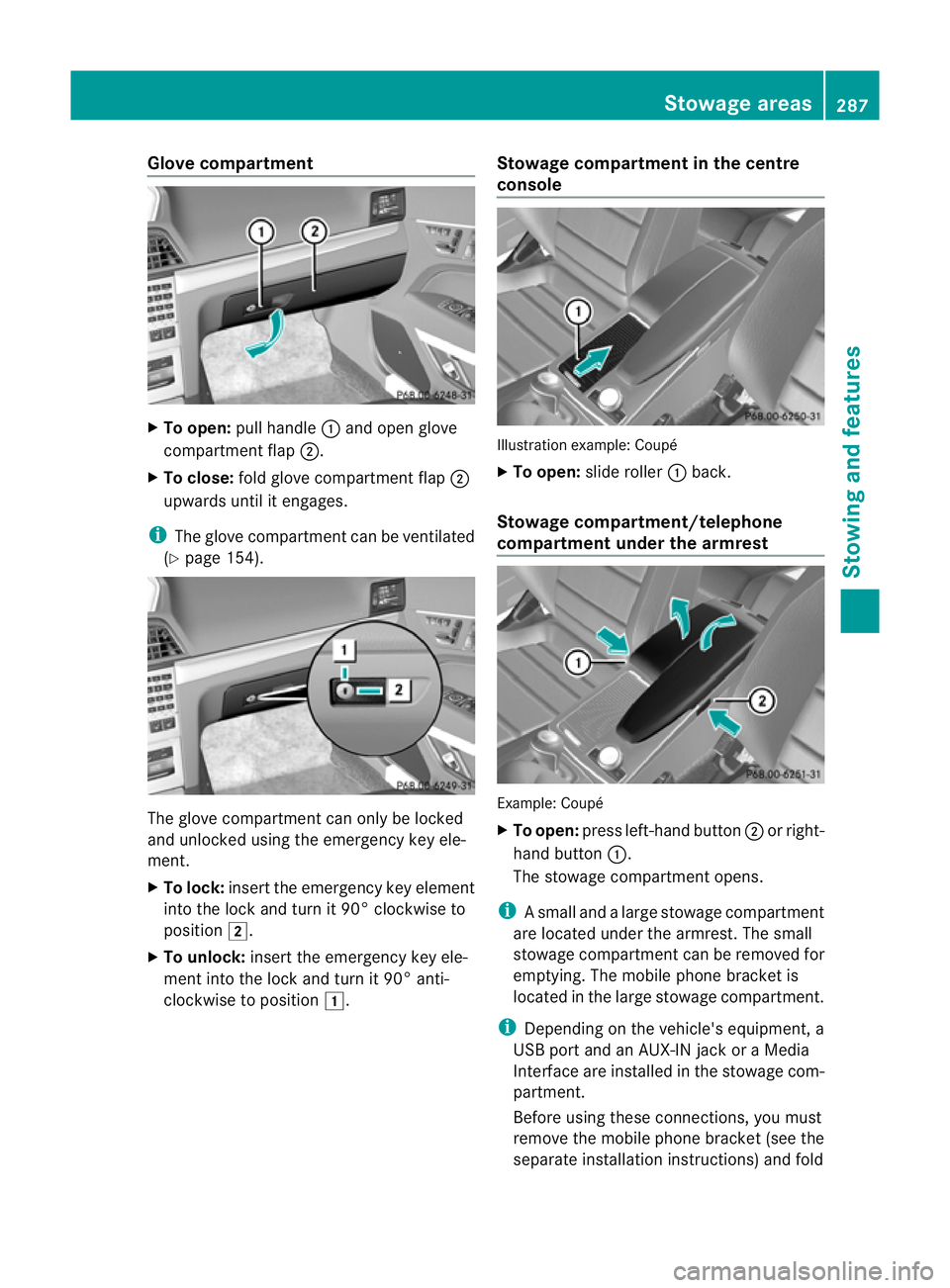
Glove compartment
X
To open: pull handle :and open glove
compartment flap ;.
X To close: fold glove compartment flap ;
upwards until it engages.
i The glove compartment can be ventilated
(Y page 154). The glove compartment can only be locked
and unlocked using the emergency key ele-
ment.
X To lock: insert the emergency key element
into the lock and turn it 90° clockwise to
position 2.
X To unlock: insert the emergency key ele-
ment into the lock and turn it 90° anti-
clockwise to position 1. Stowage compartment in the centre
console Illustration example: Coupé
X
To open: slide roller :back.
Stowage compartment/telephone
compartment under the armrest Example: Coupé
X
To open: press left-hand button ;or right-
hand button :.
The stowage compartment opens.
i Asmall and a large stowage compartment
are located under the armrest. The small
stowage compartment can be removed for
emptying. The mobile phone bracket is
located in the large stowage compartment.
i Depending on the vehicle's equipment, a
USB port and an AUX-IN jack or a Media
Interface are installed in the stowage com-
partment.
Before using these connections, you must
remove the mobile phone bracket (see the
separate installation instructions) and fold Stowage areas
287Stowing and features Z
Page 299 of 389
Mobile phone
Important safety notes G
WARNING
Observe the legal requirements of the country
in which you are currently driving regarding
operating mobile communications equipment
in a vehicle.
If it is permitted by law to operate communi-
cations equipment while the vehicle is in
motion, you must only do so if the traffic sit-
uation permits. Otherwise, you could be dis-
tracted from the traffic conditions, cause an
accident and injure yourself and others.
Two-way radios and fax equipment used with-
out low-reflectio nexterior aerials can inter-
fere with the vehicle's electronics and thereby
jeopardise the operating safety of the vehicle
and your safety .Therefore, you must only use
this equipment if it is correctly connected to
a separate reflection-free exterior aerial. G
WARNING
Excessive levels of electromagnetic radiation
may cause damage to your health and the
health of others. Using an exterior aerial takes
into account current scientific discussions
relating to the possible health risk posed by
electromagnetic fields.
Mercedes-Ben zrecommends the use of an
approved exterior aerial. This ensures:
R optimal mobile phone reception quality in
the vehicle
R mutual influences between the vehicle
electronics and mobile phones are mini-
mised
An exterior aerial has the following advan-
tages:
R it conducts the electromagnetic fields gen-
erated by a wireless device to the exterior.
R the field strength in the vehicle interior is
lower than in a vehicle that does not have
an exterior aerial. i
There are various mobile phone brackets
that may be fitted in your vehicle; in some
cases, these are country-specific.
i You can connect a Bluetooth ®
-capable
mobile phone with Audio 20, Audio 50 or
COMAND Online via the Bluetooth ®
inter-
face. This also applies if your vehicle is
equipped with convenience telephony.
More information on suitable mobile phones,
mobile phone brackets and on connecting
Bluetooth ®
-capable mobile phones with
Audio 20, Audio 50 or COMAND Online can
be obtained:
R at your Mercedes-Benz Service Centre
R on the Internet at http://www.mercedes-
benz.com/connect
i The functions and services available when
you use the phone depend on your mobile
phone model and service provider.
Using amobile phone If the mobile phone is inserted in the mobile
phone bracket, you can speak to the person
you are calling using the hands-free system.
X
Open the telephone compartment
(Y page 287).
X Place the mobile phone bracket into the
pre-installed fitting (see the separate
installation instructions for the mobile
phone fitting).
X Inser tthe mobile phone into the mobile
phone bracket (see the separate installa-
tion instructions for the mobile phone fit-
ting).
i On some mobile phone brackets, you first
have to connect the mobile phone via Blue-
tooth ®
to the mobile phone bracket (see
the separate operating instructions for the
mobile phone bracket).
If this is the case, the mobile phone does
not have to be inserted into the bracket for
you to be able to use the telephone func- 296
FeaturesStowing and features