tire pressure MERCEDES-BENZ E-Class COUPE 2013 C207 User Guide
[x] Cancel search | Manufacturer: MERCEDES-BENZ, Model Year: 2013, Model line: E-Class COUPE, Model: MERCEDES-BENZ E-Class COUPE 2013 C207Pages: 372, PDF Size: 12.69 MB
Page 209 of 372
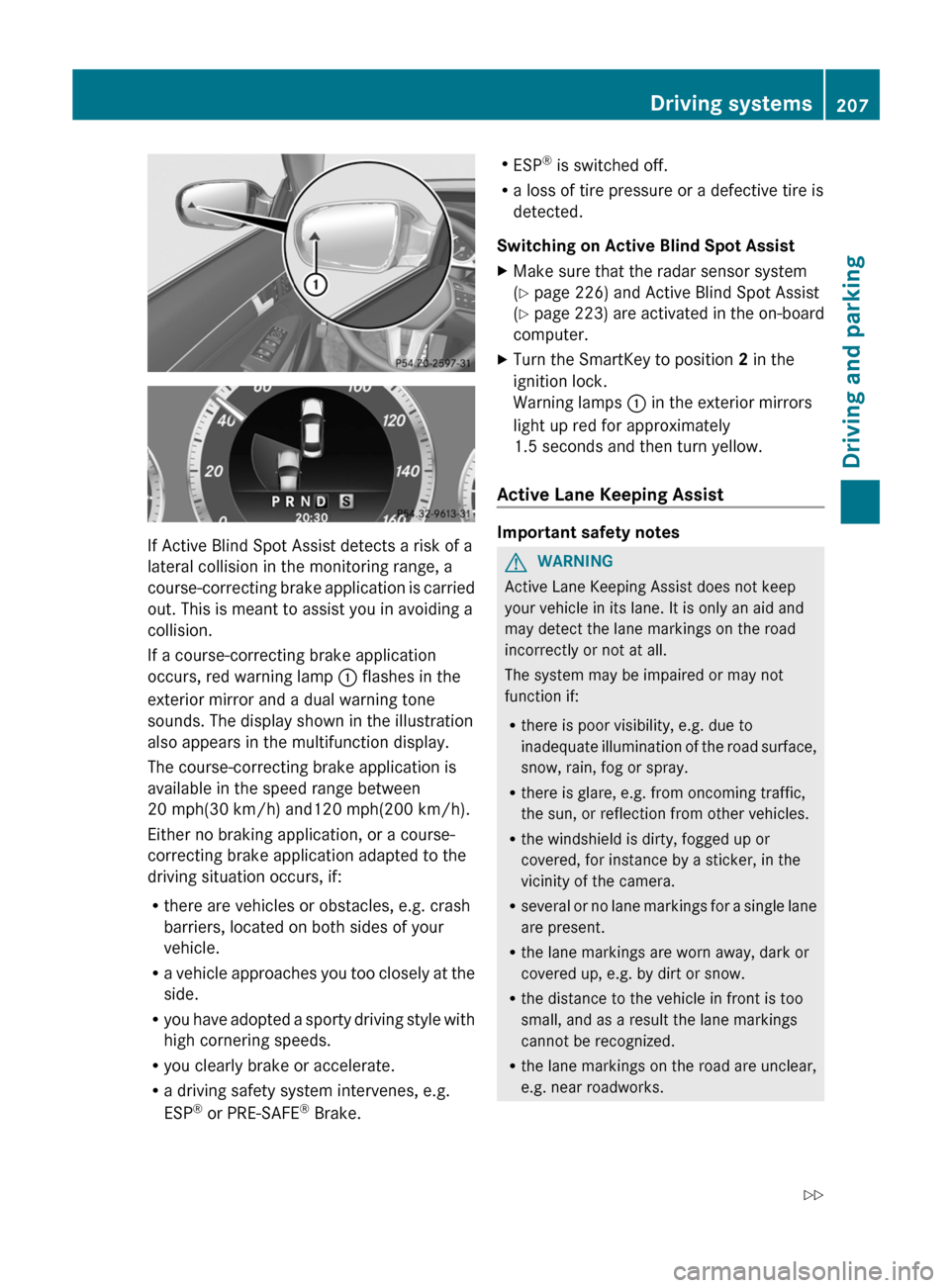
If Active Blind Spot Assist detects a risk of a
lateral collision in the monitoring range, a
course-correcting
brake application is carried
out. This is meant to assist you in avoiding a
collision.
If a course-correcting brake application
occurs, red warning lamp : flashes in the
exterior mirror and a dual warning tone
sounds. The display shown in the illustration
also appears in the multifunction display.
The course-correcting brake application is
available in the speed range between
20 mph(30 km/h) and120 mph(200 km/h).
Either no braking application, or a course-
correcting brake application adapted to the
driving situation occurs, if:
R there are vehicles or obstacles, e.g. crash
barriers, located on both sides of your
vehicle.
R a vehicle approaches you too closely at the
side.
R you have adopted a sporty driving style with
high cornering speeds.
R you clearly brake or accelerate.
R a driving safety system intervenes, e.g.
ESP ®
or PRE-SAFE ®
Brake. R
ESP ®
is switched off.
R a loss of tire pressure or a defective tire is
detected.
Switching on Active Blind Spot Assist
X Make sure that the radar sensor system
(Y page 226) and Active Blind Spot Assist
(Y page
223) are activated in the on-board
computer.
X Turn the SmartKey to position 2 in the
ignition lock.
Warning lamps : in the exterior mirrors
light up red for approximately
1.5 seconds
and then turn yellow.
Active Lane Keeping Assist Important safety notes
G
WARNING
Active Lane Keeping Assist does not keep
your vehicle in its lane. It is only an aid and
may detect the lane markings on the road
incorrectly or not at all.
The system may be impaired or may not
function if:
R there is poor visibility, e.g. due to
inadequate
illumination of the road surface,
snow, rain, fog or spray.
R there is glare, e.g. from oncoming traffic,
the sun, or reflection from other vehicles.
R the windshield is dirty, fogged up or
covered, for instance by a sticker, in the
vicinity of the camera.
R several or no lane markings for a single lane
are present.
R the lane markings are worn away, dark or
covered up, e.g. by dirt or snow.
R the distance to the vehicle in front is too
small, and as a result the lane markings
cannot be recognized.
R the lane markings on the road are unclear,
e.g. near roadworks. Driving systems
207
Driving and parking
Z
Page 211 of 372
you may fail to recognize dangers in time,
cause an accident and injure yourself and
others.
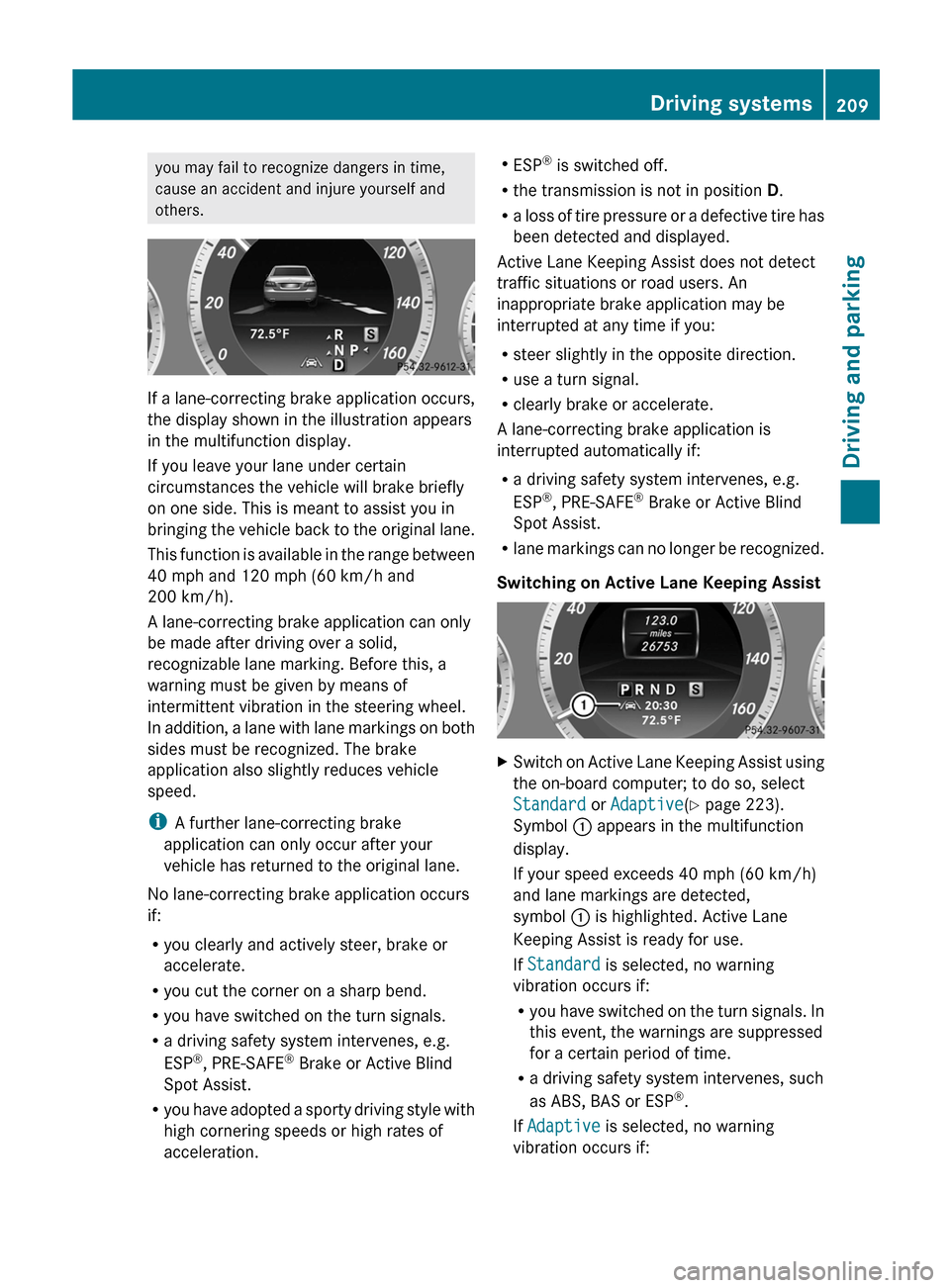
If a lane-correcting brake application occurs,
the display shown in the illustration appears
in the multifunction display.
If you leave your lane under certain
circumstances the vehicle will brake briefly
on one side. This is meant to assist you in
bringing
the vehicle back to the original lane.
This function is available in the range between
40 mph and 120 mph (60 km/h and
200 km/h).
A lane-correcting brake application can only
be made after driving over a solid,
recognizable lane marking. Before this, a
warning must be given by means of
intermittent vibration in the steering wheel.
In addition, a lane with lane markings on both
sides must be recognized. The brake
application also slightly reduces vehicle
speed.
i A further lane-correcting brake
application can only occur after your
vehicle has returned to the original lane.
No lane-correcting brake application occurs
if:
R you clearly and actively steer, brake or
accelerate.
R you cut the corner on a sharp bend.
R you have switched on the turn signals.
R a driving safety system intervenes, e.g.
ESP ®
, PRE-SAFE ®
Brake or Active Blind
Spot Assist.
R you have adopted a sporty driving style with
high cornering speeds or high rates of
acceleration. R
ESP ®
is switched off.
R the transmission is not in position D.
R a
loss of tire pressure or a defective tire has
been detected and displayed.
Active Lane Keeping Assist does not detect
traffic situations or road users. An
inappropriate brake application may be
interrupted at any time if you:
R steer slightly in the opposite direction.
R use a turn signal.
R clearly brake or accelerate.
A lane-correcting brake application is
interrupted automatically if:
R a driving safety system intervenes, e.g.
ESP ®
, PRE-SAFE ®
Brake or Active Blind
Spot Assist.
R lane markings can no longer be recognized.
Switching on Active Lane Keeping Assist X
Switch on Active Lane Keeping Assist using
the on-board computer; to do so, select
Standard or Adaptive(Y page 223).
Symbol : appears in the multifunction
display.
If your speed exceeds
40 mph (60 km/h)
and lane markings are detected,
symbol : is highlighted. Active Lane
Keeping Assist is ready for use.
If Standard is selected, no warning
vibration occurs if:
R you have switched on the turn signals. In
this event, the warnings are suppressed
for a certain period of time.
R a driving safety system intervenes, such
as ABS, BAS or ESP ®
.
If Adaptive is selected, no warning
vibration occurs if: Driving systems
209
Driving and parking Z
Page 225 of 372
For further information about ATTENTION
ASSIST, see (
Y page 199).
Activating/deactivating Blind Spot
Assist X
Press = or ; on the steering wheel
to select the DriveAssist menu.
X Press the 9 or : button to select
Blind Spot Asst..
X Press the a button.
The current selection is displayed.
X To activate/deactivate: press the a
button again.
If the Blind Spot Assist Sensors
Deactivated or Act. Blind Spot Asst.
Sensors Deactivated message appears,
the radar sensor system is deactivated.
X Switch on the radar sensor system
(Y page 226).
For further information about Blind Spot
Assist, see (Y page 200).
For further information about Active Blind
Spot Assist, see (Y page 204).
Activating/deactivating Lane Keeping
Assist X
Press = or ; on the steering wheel
to select the DriveAssist menu.
X Press the 9 or : button to select
Lane Keep. Asst.
X Press the a button.
The current selection is displayed.
X Press a to confirm.
When Lane Keeping Assist or Active Lane
Keeping Assist is activated, the à symbol
appears in the multifunction display when the
ignition is on.
For further information about Active Lane
Keeping Assist, see ( Y page 207). Service menu
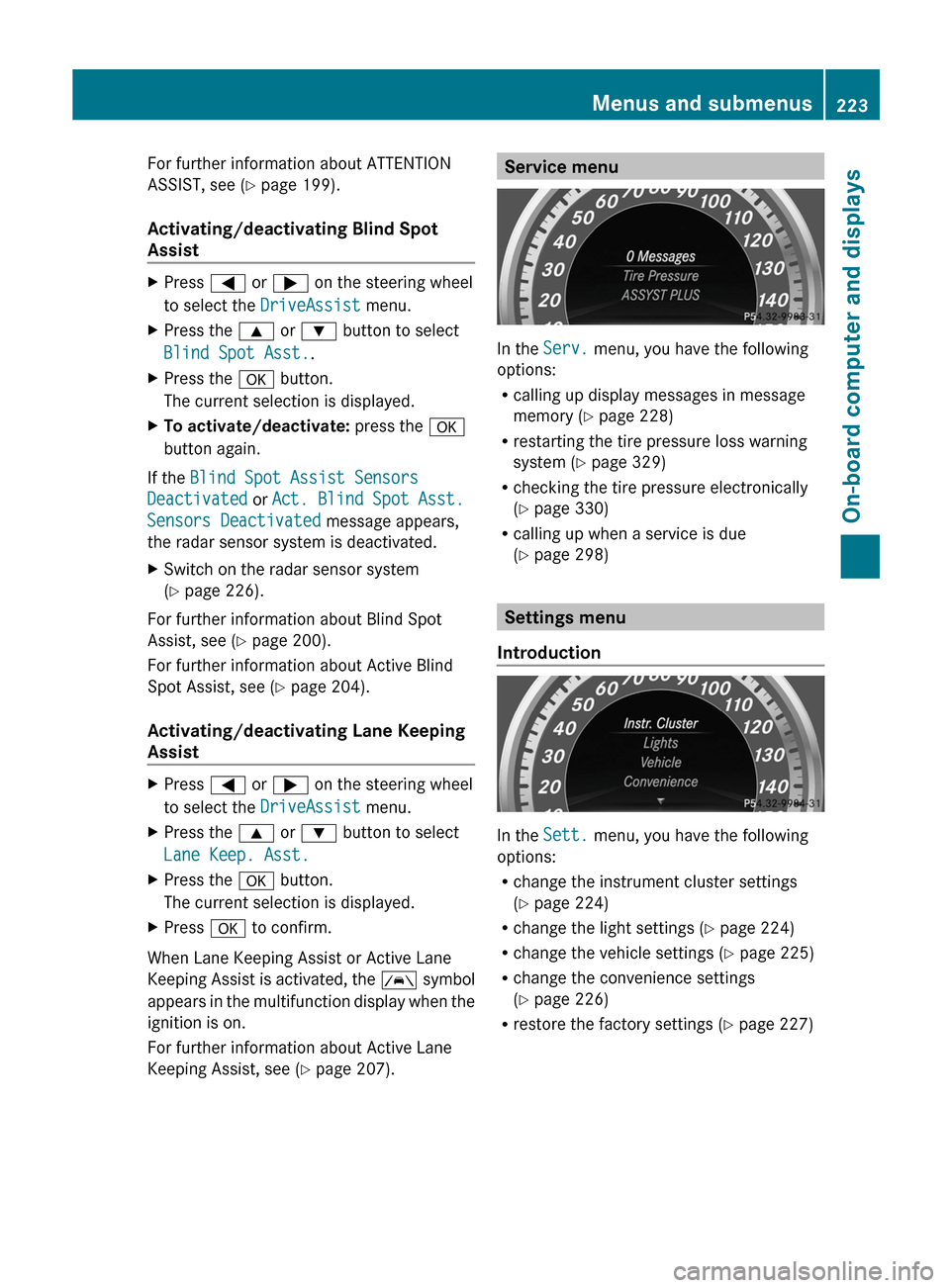
In the
Serv. menu, you have the following
options:
R calling up display messages in message
memory ( Y page 228)
R restarting the tire pressure loss warning
system (Y page 329)
R checking the tire pressure electronically
(Y page 330)
R calling up when a service is due
(Y page 298) Settings menu
Introduction In the
Sett. menu, you have the following
options:
R change the instrument cluster settings
(Y page 224)
R change the light settings ( Y page 224)
R change the vehicle settings ( Y page 225)
R change the convenience settings
(Y page 226)
R restore the factory settings
(Y page 227) Menus and submenus
223
On-board computer and displays Z
Page 250 of 372
Tires
Display messages Possible causes/consequences and
M SolutionsCheck
Tire Pressure The tire pressure loss warning system has detected a significant
loss in pressure.
A warning tone also sounds.
G WARNING
With tire pressures which are too low, there is a risk of the
following hazards:
R they may burst, especially as the load and vehicle speed
increase.
R they
may wear excessively and/or unevenly, which may greatly
impair tire traction.
R the driving characteristics, as well as steering and braking, may
be greatly impaired.
There is a risk of an accident.
X Stop the vehicle without making any sudden steering or braking
maneuvers.
Pay attention to the traffic conditions as you do so.
X Secure the vehicle against rolling away ( Y page 167).
X If there is a flat tire, inspect the tires ( Y page 308).
X Check the tire pressures and, if necessary, correct the tire
pressure.
X Restart the tire pressure loss warning system when the tire
pressure is correct (Y page 329). Check Tire Pressure
Then Restart Run
Flat Indicator The tire pressure loss warning system generated a display
message and has not been restarted since.
X
Set the correct tire pressure in all four tires.
X Restart the tire pressure loss warning system ( Y page 329).Run Flat Indicator
Inoperative The tire pressure loss warning system is faulty.
X
Visit a qualified specialist workshop. Tire pressures
will be displayed
after driving a
few minutes The tire pressure monitor is measuring the tire pressure.
X
Drive on.
The
tire pressures appear in the multifunction display after you
have been driving for a few minutes. Tire Press. Monitor
Inoperative The tire pressure monitor is faulty.
X
Visit a qualified specialist workshop.248
Display messages
On-board computer and displays
Page 251 of 372
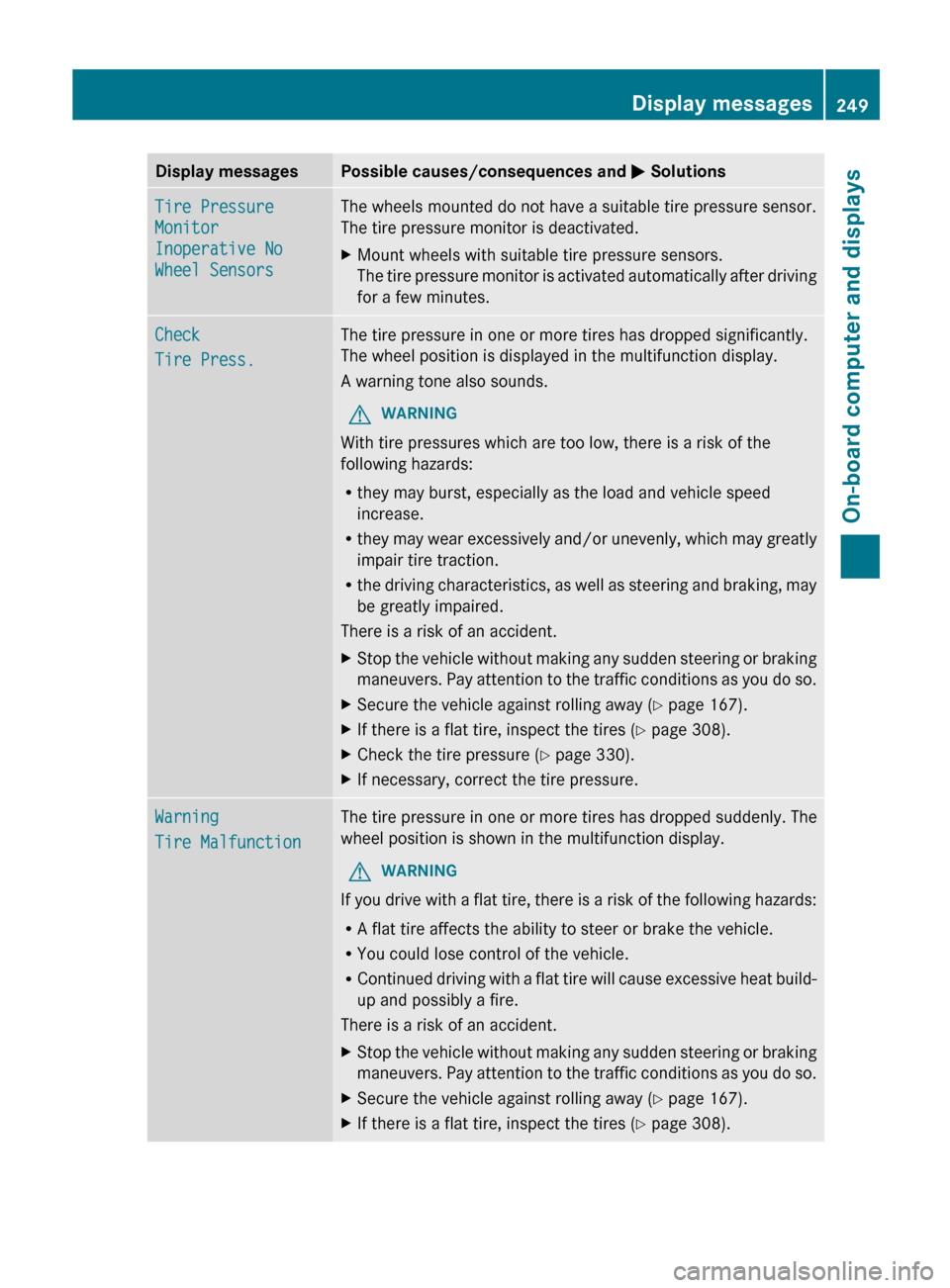
Display messages Possible causes/consequences and
M SolutionsTire Pressure
Monitor
Inoperative No
Wheel Sensors The wheels mounted do not have a suitable tire pressure sensor.
The tire pressure monitor is deactivated.
X
Mount wheels with suitable tire pressure sensors.
The
tire pressure monitor is activated automatically after driving
for a few minutes. Check
Tire Press. The tire pressure in one or more tires has dropped significantly.
The wheel position is displayed in the multifunction display.
A warning tone also sounds.
G WARNING
With tire pressures which are too low, there is a risk of the
following hazards:
R they may burst, especially as the load and vehicle speed
increase.
R they
may wear excessively and/or unevenly, which may greatly
impair tire traction.
R the driving characteristics, as well as steering and braking, may
be greatly impaired.
There is a risk of an accident.
X Stop the vehicle without making any sudden steering or braking
maneuvers.
Pay attention to the traffic conditions as you do so.
X Secure the vehicle against rolling away ( Y page 167).
X If there is a flat tire, inspect the tires ( Y page 308).
X Check the tire pressure (Y page 330).
X If necessary, correct the tire pressure. Warning
Tire Malfunction The tire pressure in one or more tires has dropped suddenly. The
wheel position is shown in the multifunction display.
G WARNING
If you drive with a flat tire, there is a risk of the following hazards:
R A flat tire affects the ability to steer or brake the vehicle.
R You could lose control of the vehicle.
R Continued
driving with a flat tire will cause excessive heat build-
up and possibly a fire.
There is a risk of an accident.
X Stop the vehicle without making any sudden steering or braking
maneuvers.
Pay attention to the traffic conditions as you do so.
X Secure the vehicle against rolling away ( Y page 167).
X If there is a flat tire, inspect the tires ( Y page 308). Display messages
249
On-board computer and displays Z
Page 252 of 372
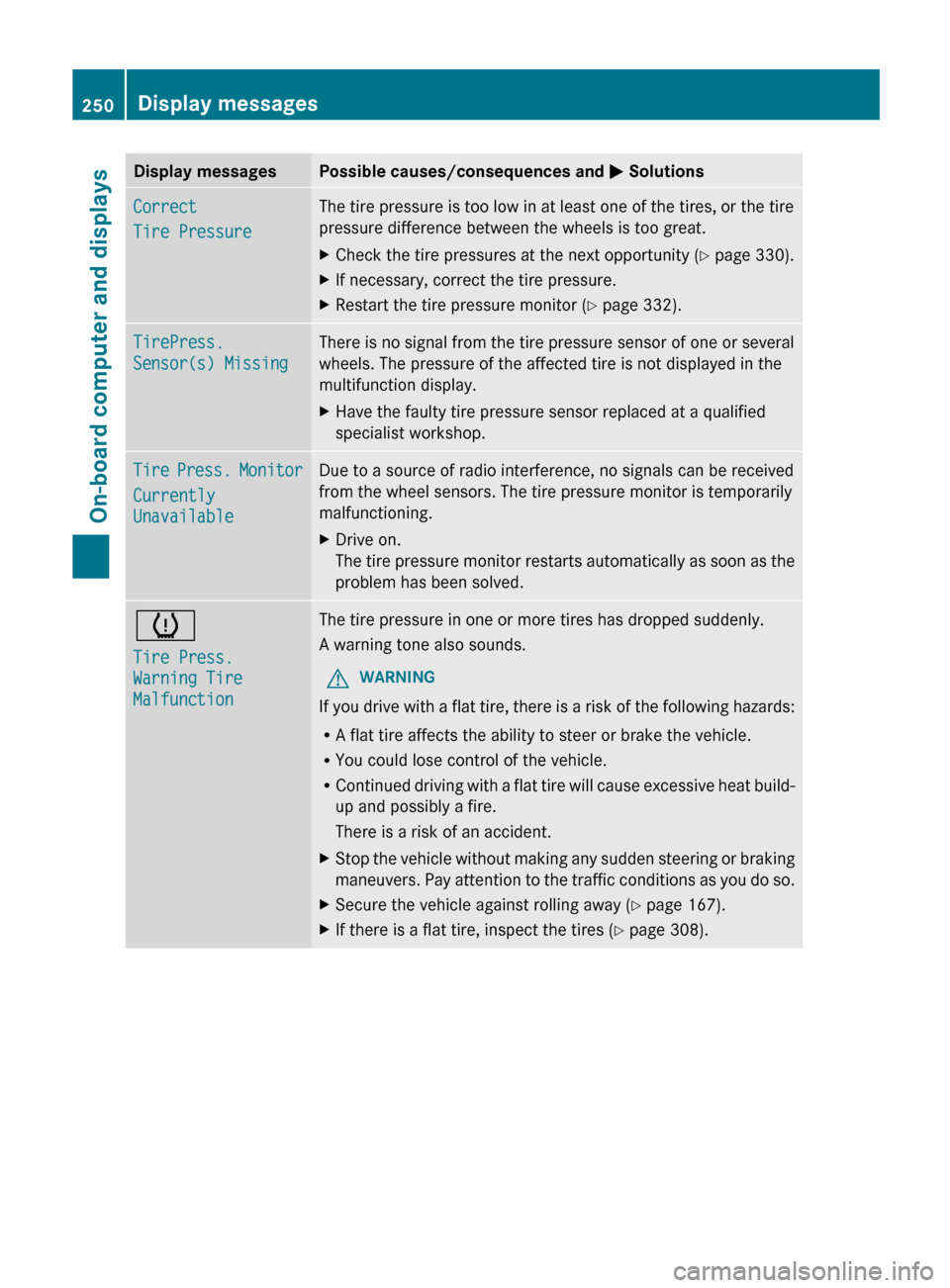
Display messages Possible causes/consequences and
M SolutionsCorrect
Tire Pressure The tire pressure is too low in at least one of the tires, or the tire
pressure difference between the wheels is too great.
X
Check the tire pressures at the next opportunity (Y page 330).
X If necessary, correct the tire pressure.
X Restart the tire pressure monitor (Y page 332). TirePress.
Sensor(s) Missing There is no signal from the tire pressure sensor of one or several
wheels. The pressure of the affected tire is not displayed in the
multifunction display.
X
Have the faulty tire pressure sensor replaced at a qualified
specialist workshop. Tire Press. Monitor
Currently
Unavailable Due to a source of radio interference, no signals can be received
from the wheel sensors. The tire pressure monitor is temporarily
malfunctioning.
X
Drive on.
The
tire pressure monitor restarts automatically as soon as the
problem has been solved. h
Tire Press.
Warning Tire
Malfunction The tire pressure in one or more tires has dropped suddenly.
A warning tone also sounds.
G WARNING
If you drive with a flat tire, there is a risk of the following hazards:
R A flat tire affects the ability to steer or brake the vehicle.
R You could lose control of the vehicle.
R Continued
driving with a flat tire will cause excessive heat build-
up and possibly a fire.
There is a risk of an accident.
X Stop the vehicle without making any sudden steering or braking
maneuvers.
Pay attention to the traffic conditions as you do so.
X Secure the vehicle against rolling away ( Y page 167).
X If there is a flat tire, inspect the tires ( Y page 308).250
Display messages
On-board computer and displays
Page 253 of 372
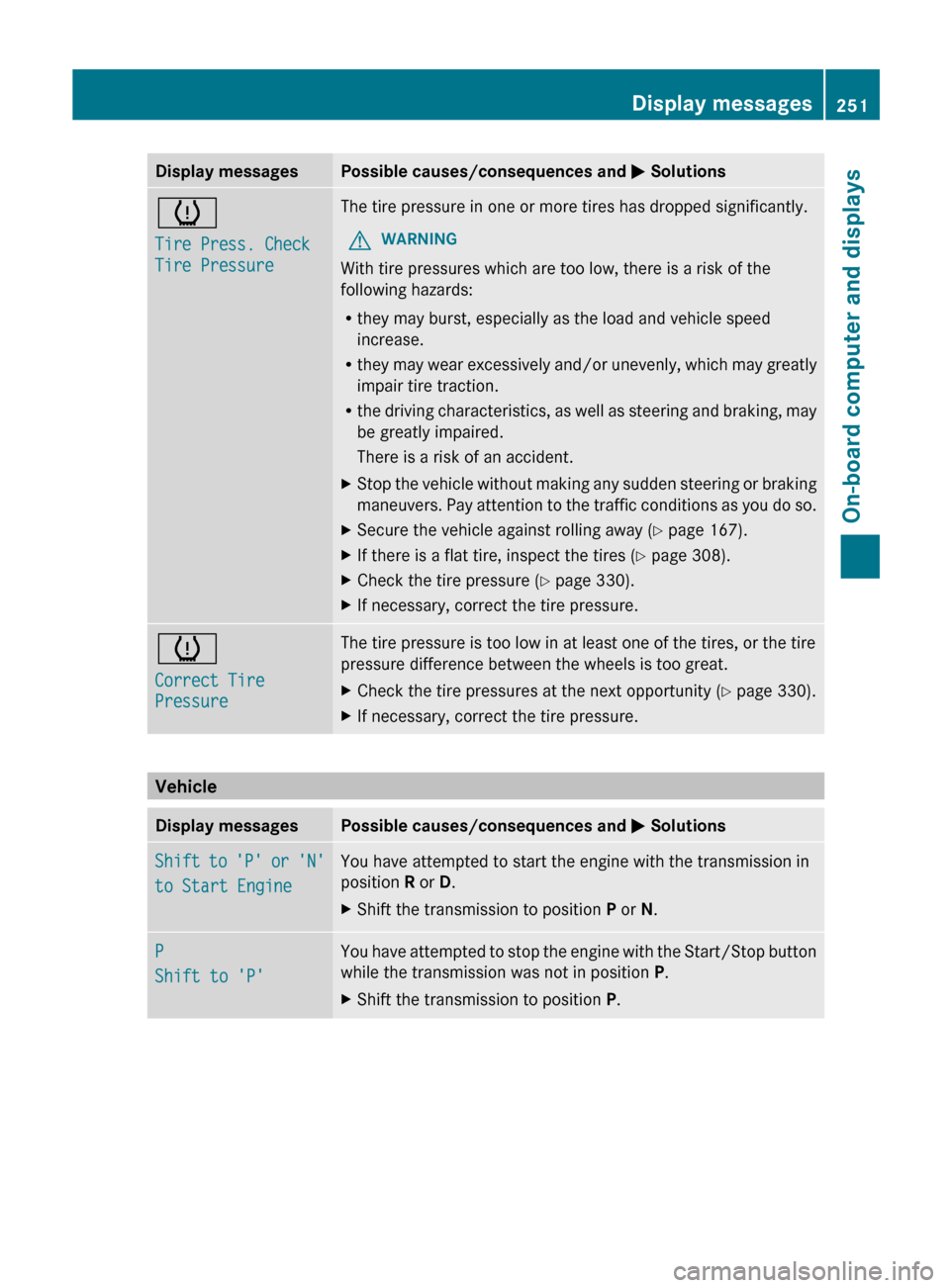
Display messages Possible causes/consequences and
M Solutionsh
Tire Press. Check
Tire Pressure The tire pressure in one or more tires has dropped significantly.
G WARNING
With tire pressures which are too low, there is a risk of the
following hazards:
R they may burst, especially as the load and vehicle speed
increase.
R they
may wear excessively and/or unevenly, which may greatly
impair tire traction.
R the driving characteristics, as well as steering and braking, may
be greatly impaired.
There is a risk of an accident.
X Stop the vehicle without making any sudden steering or braking
maneuvers.
Pay attention to the traffic conditions as you do so.
X Secure the vehicle against rolling away ( Y page 167).
X If there is a flat tire, inspect the tires ( Y page 308).
X Check the tire pressure (Y page 330).
X If necessary, correct the tire pressure. h
Correct Tire
Pressure The tire pressure is too low in at least one of the tires, or the tire
pressure difference between the wheels is too great.
X
Check the tire pressures at the next opportunity (Y page 330).
X If necessary, correct the tire pressure. Vehicle
Display messages Possible causes/consequences and
M SolutionsShift to 'P' or 'N'
to Start Engine You have attempted to start the engine with the transmission in
position R or D.
X
Shift the transmission to position P or N.P
Shift to 'P' You have attempted to stop the engine with the Start/Stop button
while the transmission was not in position P.
X
Shift the transmission to position P. Display messages
251
On-board computer and displays Z
Page 258 of 372
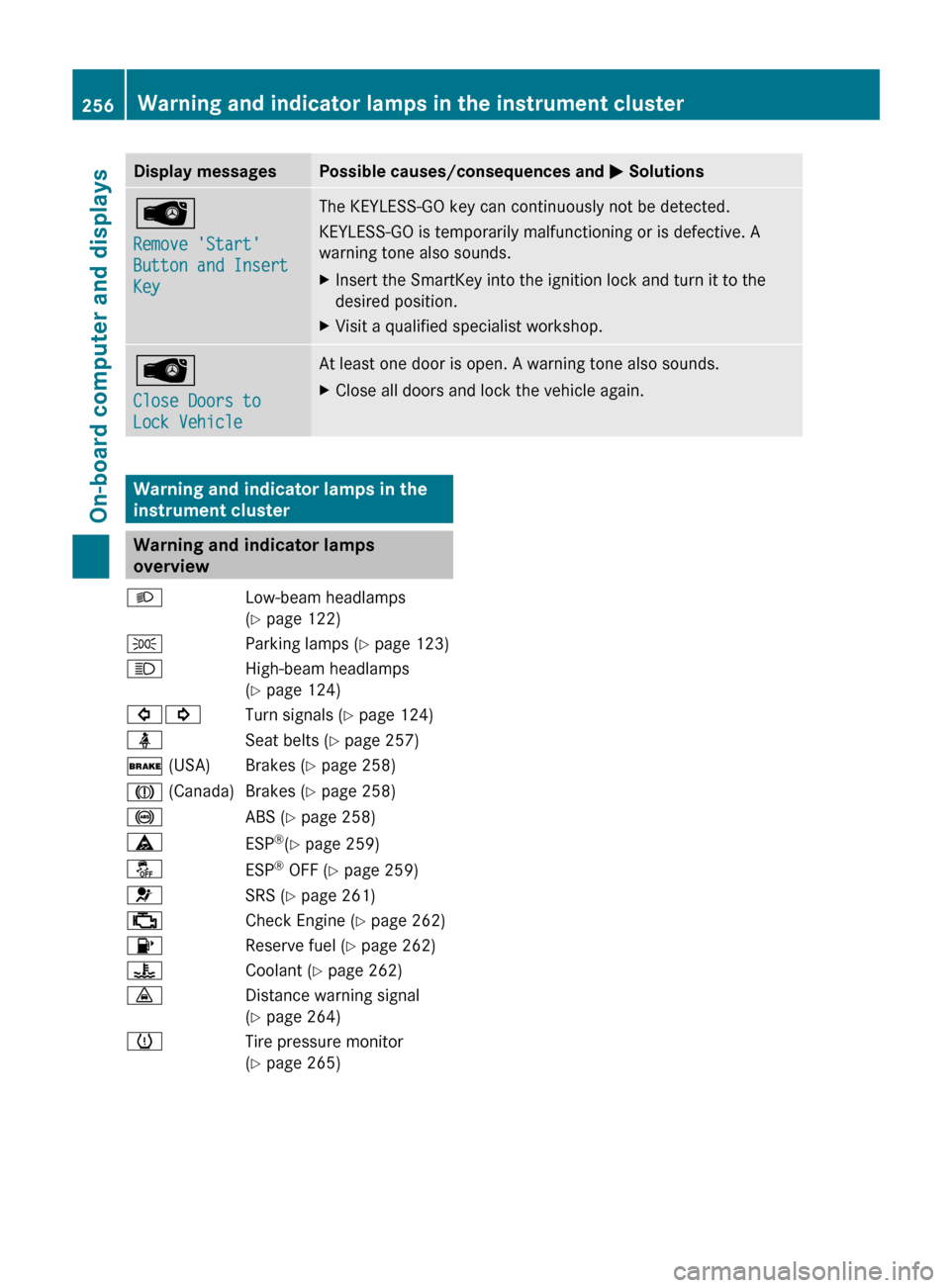
Display messages Possible causes/consequences and
M SolutionsÂ
Remove 'Start'
Button and Insert
Key The KEYLESS-GO key can continuously not be detected.
KEYLESS-GO is temporarily malfunctioning or is defective. A
warning tone also sounds.
X
Insert the SmartKey into the ignition lock and turn it to the
desired position.
X Visit a qualified specialist workshop. Â
Close Doors to
Lock Vehicle At least one door is open. A warning tone also sounds.
X
Close all doors and lock the vehicle again. Warning and indicator lamps in the
instrument cluster
Warning and indicator lamps
overview
L Low-beam headlamps
(Y page 122)
T Parking lamps (Y page 123)
K High-beam headlamps
(Y page 124)
#! Turn signals (Y page 124)
ü Seat belts (Y page 257)
$ (USA) Brakes (Y page 258)
J (Canada) Brakes (Y page 258)
! ABS (Y page 258)
ä ESP®
(Y page 259)
å ESP®
OFF (Y page 259)
6 SRS (Y page 261)
; Check Engine (Y page 262)
8 Reserve fuel (Y page 262)
? Coolant (Y page 262)
· Distance warning signal
(Y page 264)
h Tire pressure monitor
(Y page 265)256
Warning and indicator lamps in the instrument clusterOn-board computer and displays
Page 267 of 372
Tires
Problem Possible causes/consequences and
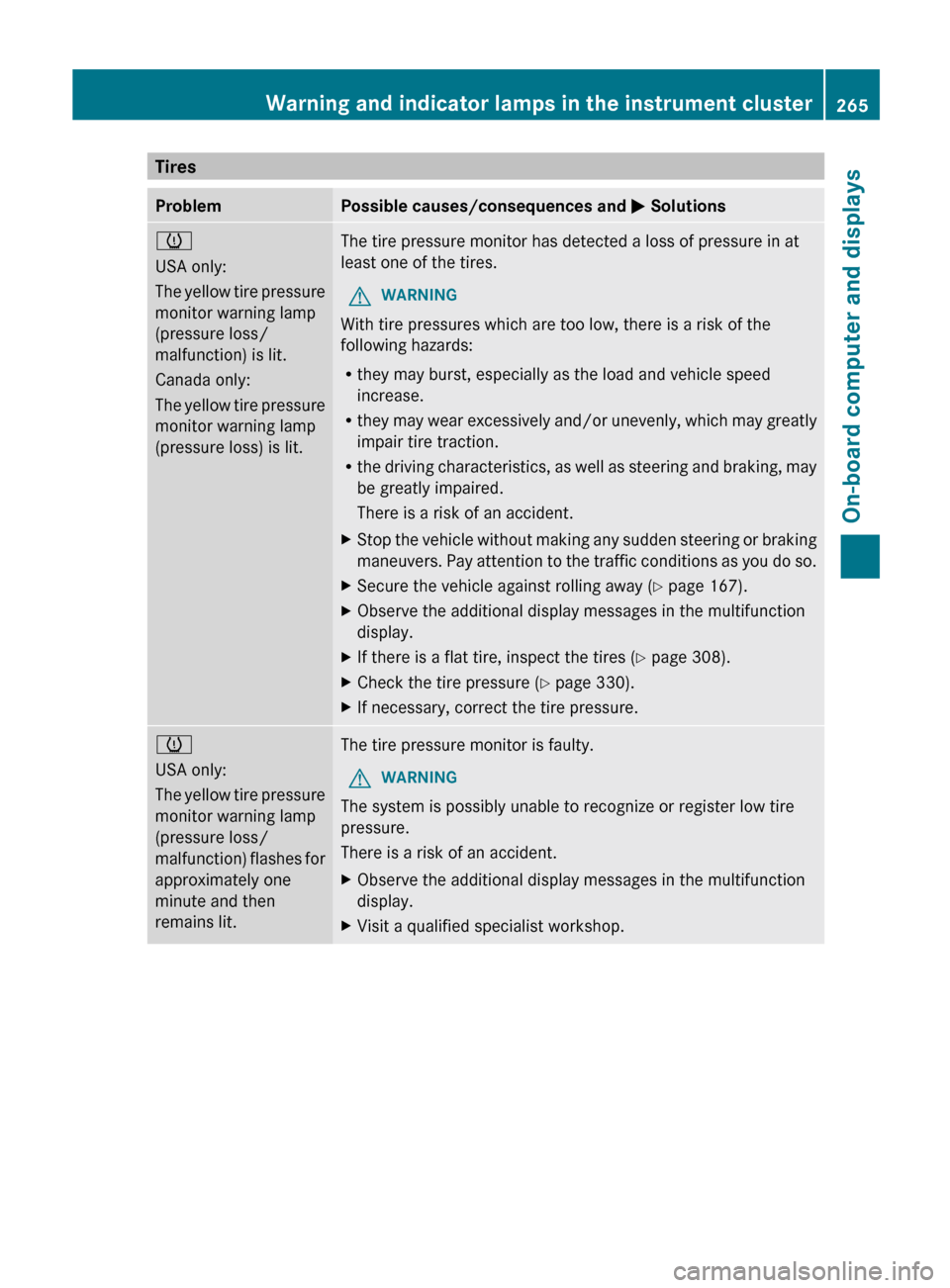
M Solutionsh
USA only:
The
yellow tire pressure
monitor warning lamp
(pressure loss/
malfunction) is lit.
Canada only:
The yellow tire pressure
monitor warning lamp
(pressure loss) is lit. The tire pressure monitor has detected a loss of pressure in at
least one of the tires.
G WARNING
With tire pressures which are too low, there is a risk of the
following hazards:
R they may burst, especially as the load and vehicle speed
increase.
R they
may wear excessively and/or unevenly, which may greatly
impair tire traction.
R the driving characteristics, as well as steering and braking, may
be greatly impaired.
There is a risk of an accident.
X Stop the vehicle without making any sudden steering or braking
maneuvers.
Pay attention to the traffic conditions as you do so.
X Secure the vehicle against rolling away ( Y page 167).
X Observe the additional display messages in the multifunction
display.
X If there is a flat tire, inspect the tires ( Y page 308).
X Check the tire pressure (Y page 330).
X If necessary, correct the tire pressure. h
USA only:
The
yellow tire pressure
monitor warning lamp
(pressure loss/
malfunction) flashes for
approximately one
minute and then
remains lit. The tire pressure monitor is faulty.
G WARNING
The system is possibly unable to recognize or register low tire
pressure.
There is a risk of an accident.
X Observe the additional display messages in the multifunction
display.
X Visit a qualified specialist workshop. Warning and indicator lamps in the instrument cluster
265
On-board computer and displays Z
Page 311 of 372
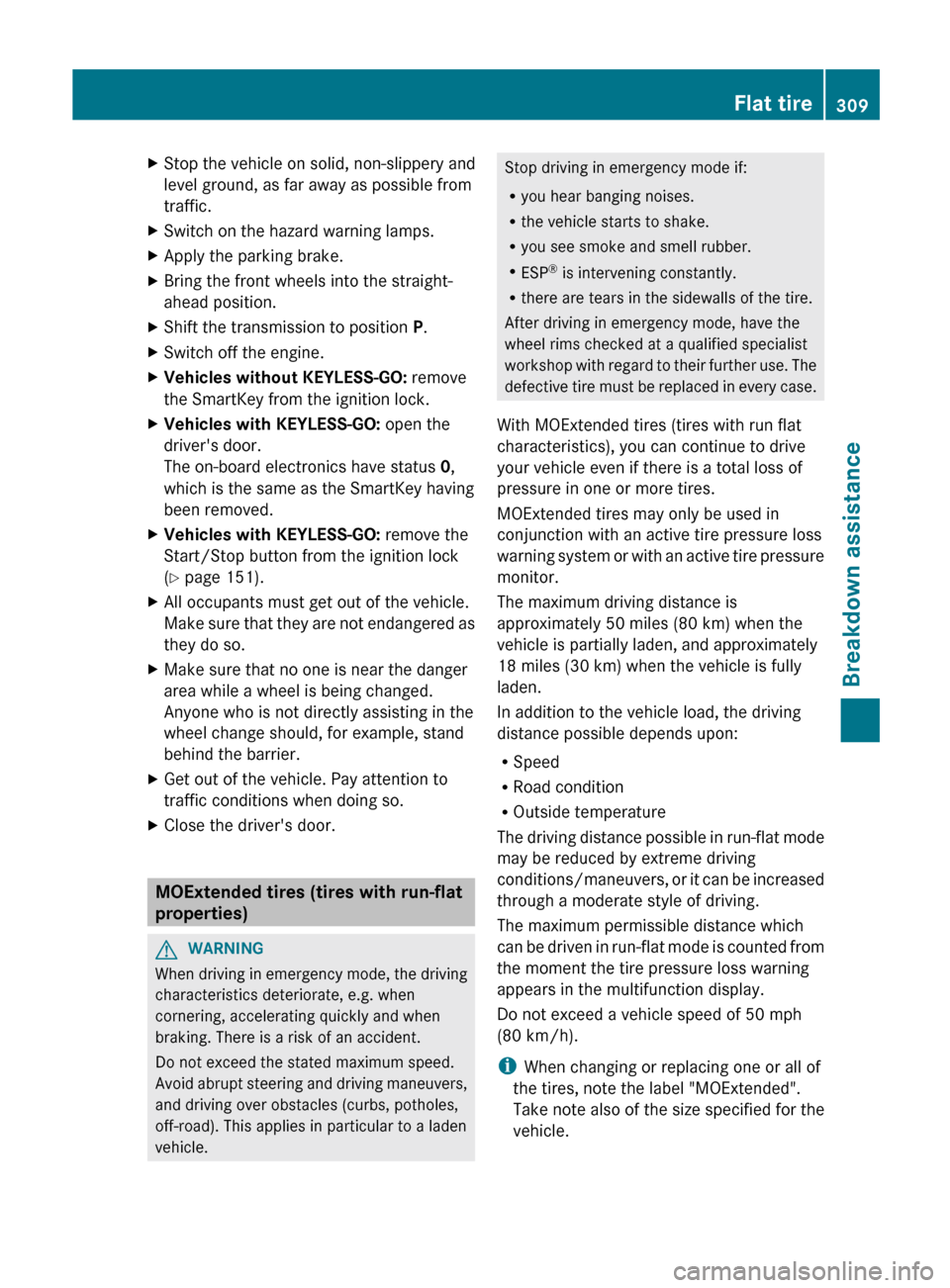
X
Stop the vehicle on solid, non-slippery and
level ground, as far away as possible from
traffic.
X Switch on the hazard warning lamps.
X Apply the parking brake.
X Bring the front wheels into the straight-
ahead position.
X Shift the transmission to position P.
X Switch off the engine.
X Vehicles without KEYLESS-GO: remove
the SmartKey from the ignition lock.
X Vehicles with KEYLESS-GO: open the
driver's door.
The on-board electronics have status 0,
which is the same as the SmartKey having
been removed.
X Vehicles with KEYLESS-GO: remove the
Start/Stop button from the ignition lock
(Y page 151).
X All occupants must get out of the vehicle.
Make
sure that they are not endangered as
they do so.
X Make sure that no one is near the danger
area while a wheel is being changed.
Anyone who is not directly assisting in the
wheel change should, for example, stand
behind the barrier.
X Get out of the vehicle. Pay attention to
traffic conditions when doing so.
X Close the driver's door. MOExtended tires (tires with run-flat
properties)
G
WARNING
When driving in emergency mode, the driving
characteristics deteriorate, e.g. when
cornering, accelerating quickly and when
braking. There is a risk of an accident.
Do not exceed the stated maximum speed.
Avoid
abrupt steering and driving maneuvers,
and driving over obstacles (curbs, potholes,
off-road). This applies in particular to a laden
vehicle. Stop driving in emergency mode if:
R
you hear banging noises.
R the vehicle starts to shake.
R you see smoke and smell rubber.
R ESP ®
is intervening constantly.
R there are tears in the sidewalls of the tire.
After driving in emergency mode, have the
wheel rims checked at a qualified specialist
workshop
with regard to their further use. The
defective tire must be replaced in every case.
With MOExtended tires (tires with run flat
characteristics), you can continue to drive
your vehicle even if there is a total loss of
pressure in one or more tires.
MOExtended tires may only be used in
conjunction with an active tire pressure loss
warning system or with an active tire pressure
monitor.
The maximum driving distance is
approximately 50 miles (80 km) when the
vehicle is partially laden, and approximately
18 miles (30 km) when the vehicle is fully
laden.
In addition to the vehicle load, the driving
distance possible depends upon:
R Speed
R Road condition
R Outside temperature
The driving distance possible in run-flat mode
may be reduced by extreme driving
conditions/maneuvers, or it can be increased
through a moderate style of driving.
The maximum permissible distance which
can be driven in run-flat mode is counted from
the moment the tire pressure loss warning
appears in the multifunction display.
Do not exceed a vehicle speed of 50 mph
(80 km/h).
i When changing or replacing one or all of
the tires, note the label "MOExtended".
Take note also of the size specified for the
vehicle. Flat tire
309
Breakdown assistance Z