warning light MERCEDES-BENZ E-Class COUPE 2013 C207 Workshop Manual
[x] Cancel search | Manufacturer: MERCEDES-BENZ, Model Year: 2013, Model line: E-Class COUPE, Model: MERCEDES-BENZ E-Class COUPE 2013 C207Pages: 372, PDF Size: 12.69 MB
Page 142 of 372
Information about using 3-zone
automatic climate control
The following contains instructions and
recommendations to enable you to get the
most out of your automatic climate control.
R Activate
climate control using the à and
¿ buttons. The indicator lamps above
the à and ¿ buttons light up.
R In automatic mode, you can also use the
ñ button to set a climate mode
(FOCUS/MEDIUM/DIFFUSE). The
MEDIUM level is recommended.
R Set the temperature to 72 ‡ (22 †).
R Only use the "defrosting" function briefly
until the windshield is clear again.
R Only use "air-recirculation" mode briefly,
e.g. if there are unpleasant outside odors
or when in a tunnel. The windows could
otherwise fog up, since no fresh air is drawn
into the vehicle in air-recirculation mode.
R Use the ZONE function to adopt the
temperature settings on the driver's side
for the front-passenger side and the rear
compartment as well. The indicator lamp
above the á button goes out.
R Use the residual heat function if you want
to heat or ventilate the vehicle interior
when the ignition is switched off. The
"residual heat" function can only be
activated or deactivated with the ignition
switched off. Operating the climate control
systems
Activating/deactivating climate
control
Points to observe before use G
WARNING
When the climate control system is
deactivated, the outside air supply and
circulation are also deactivated. Only choose
this setting for a short time. Otherwise the windows could fog up, impairing visibility and
endangering you and others.
i Switch on climate control primarily using
the à button ( Y page 141).
Activating/deactivating X
Turn the SmartKey to position 2 in the
ignition lock.
X To switch on: press the à button.
The indicator lamp above the à button
lights
up. Airflow and air distribution are set
to automatic mode.
or
X Press the ^ button.
The indicator lamp above the ^ button
goes out. The previously selected settings
are restored.
X To switch off: press the ^ button.
The indicator lamp above the ^ button
lights up. Activating/deactivating cooling with
air dehumidification
Points to observe before use G
WARNING
If you switch off the cooling function, the
vehicle will not be cooled when weather
conditions
are warm. The windows can fog up
more quickly. This may prevent you from
observing the traffic conditions, thereby
causing an accident.
The cooling with air dehumidification function
is only available when the engine is running.
The air inside the vehicle is cooled and
dehumidified according to the temperature
selected.
Condensation may drip from the underside of
the vehicle when it is in cooling mode. This is
normal and not a sign that there is a
malfunction. 140
Operating the climate control systems
Climate control
Page 143 of 372
i
The cooling with air dehumidification
function uses refrigerant R134a. This
coolant does not contain
chlorofluorocarbons, and therefore does
not damage the ozone layer.
Activating/deactivating X
To activate: press the ¿ button.
The indicator lamp above the ¿ button
lights up.
X To deactivate: press the ¿ button.
The indicator lamp above the ¿ button
goes out. The cooling with air
dehumidification function has a delayed
switch-off feature.
Problems with the cooling with air
dehumidification function When you press the
¿ button, the
indicator lamp in the button flashes three
times
or remains off. You can no longer switch
on the cooling with air dehumidification
function.
X Visit a qualified specialist workshop. Setting climate control to automatic
G
WARNING
If you switch off the cooling function, the
vehicle will not be cooled when weather
conditions
are warm. The windows can fog up
more quickly. Window fogging may impair
visibility and endanger you and others.
In automatic mode, the set temperature is
maintained automatically at a constant level.
The system automatically regulates the
temperature of the dispensed air, the airflow
and the air distribution.
Automatic mode will achieve optimal
operation if cooling with air dehumidification
is also activated. If desired, cooling with air
dehumidification can be deactivated. X
Turn the SmartKey to position 2 in the
ignition lock.
X Set the desired temperature.
X To activate: press the à button.
The indicator lamp above the à button
lights up. Automatic air distribution and
airflow are activated.
i 3-zone automatic climate control: when
automatic mode is activated, you can
select a climate mode setting
(Y page 141).
X To deactivate: press the air distribution
button.
Dual-zone
automatic climate control: press
button F(Y page 137).
3-zone automatic climate control: press
button I(Y page 139).
The indicator lamp above the à button
goes out.
or
X Press the airflow button.
Dual-zone
automatic climate control: press
button G(Y page 137).
3-zone automatic climate control: press
button H(Y page 139).
The indicator lamp above the à button
goes out. Adjusting the climate mode settings
You can select the following climate mode
settings in automatic mode:
FOCUS high airflow that is set slightly cooler
MEDIUM medium airflow, standard setting
DIFFUSE low airflow that is set slightly warmer and with less draft
X Turn the SmartKey to position 2 in the
ignition lock.
X Press the à button.
X Press button G
up or down and select the
desired level ( Y page 139) Operating the climate control systems
141
Climate control Z
Page 146 of 372
or
X
Automatic climate control: press switch
G up or down ( Y page 137).
Automatic climate control: press button
H up or down ( Y page 139).MAX COOL maximum cooling
The MAX COOL function is only available in
vehicles for the USA.
MAX COOL is only operational when the
engine is running.
X To activate: press the Ù button.
The indicator lamp in the button lights up.
X To activate: press off-road button Ù
again.
The
indicator lamp goes out. The previously
selected settings are restored.
When you activate MAX COOL, climate
control switches to the following functions:
R maximum cooling
R maximum airflow
R air-recirculation mode on Defrosting the windows
Windows fogged up on the inside X
Activate the ¿ cooling with air
dehumidification function.
X Activate automatic mode Ã.
X If the windows continue to fog up, activate
the defrosting function
(Y page 143).
i You should only select this setting until
the windshield is clear again.
Windows fogged up on the outside X
Automatic climate control: press switch
F up or down ( Y page 137) until the
P or O symbol appears in the
display.
X Automatic climate control: press button
I up or down ( Y page 139) until the P or O symbol appears in the
display.
i You should only select this setting until
the windshield is clear again. Rear window defroster
Activating/deactivating G
WARNING
Clear all windows of ice or snow before setting
off. Otherwise, impaired visibility could
endanger you and others.
The
rear window defroster has a high current
draw. You should therefore switch it off as
soon as the rear window is clear. Otherwise,
the rear window defroster switches off
automatically after several minutes.
If the battery voltage is too low, the rear
window defroster may switch off.
X Turn the SmartKey to position 2 in the
ignition lock.
X Press the ¤ button.
The indicator lamp above the ¤ button
lights up or goes out.
Problems with the rear window
defroster The rear window defroster has deactivated
prematurely or cannot be activated.
X
Switch off any consumers that are not
required, e.g. reading lamps or interior
lighting.
When the battery is sufficiently charged,
the rear window defroster is activated
again automatically. Activating/deactivating air-
recirculation mode
G
WARNING
At low outside temperatures, only switch over
to air-recirculation mode for brief periods. 144
Operating the climate control systems
Climate control
Page 154 of 372
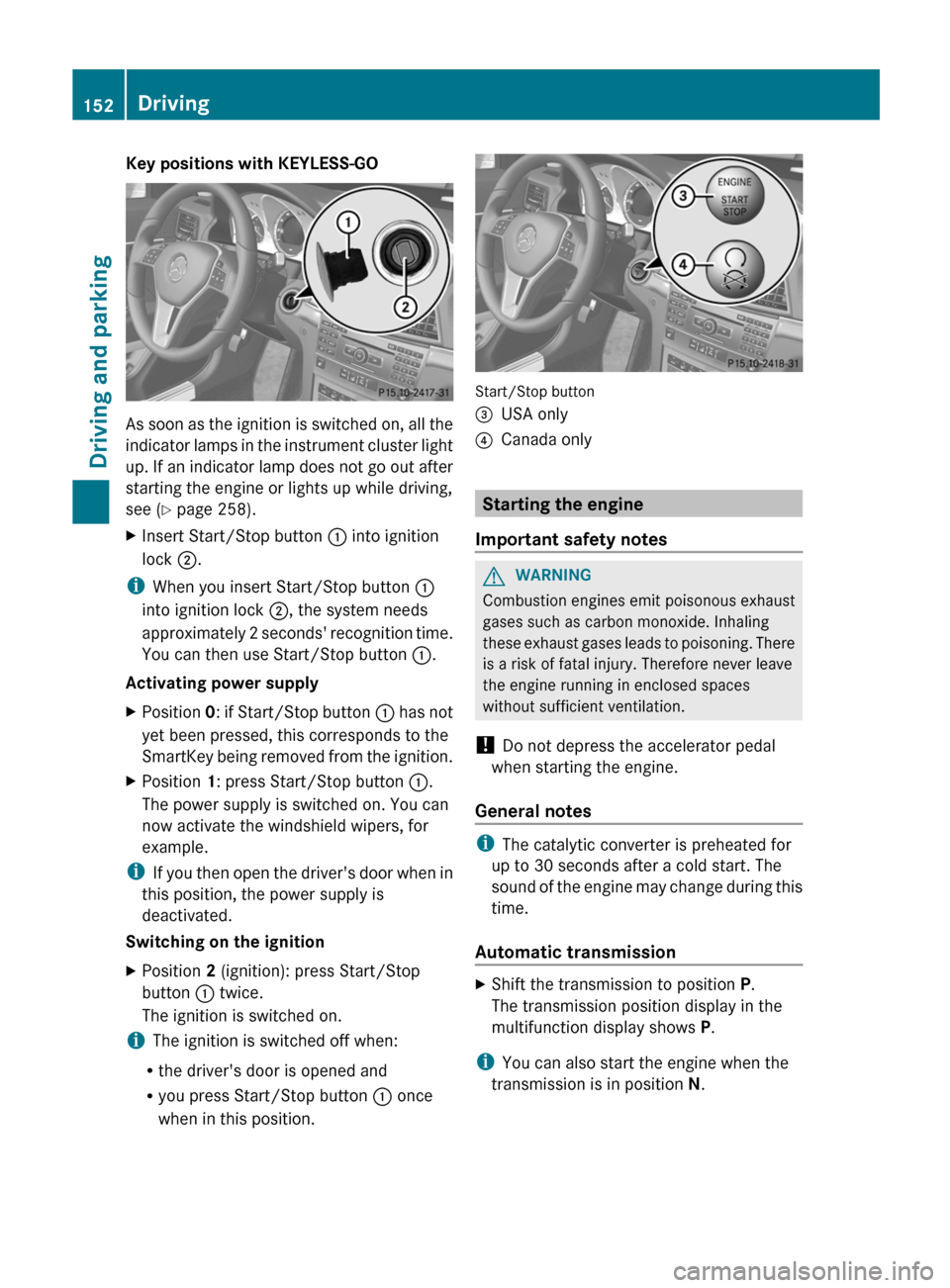
Key positions with KEYLESS-GO
As soon as the ignition is switched on, all the
indicator
lamps in the instrument cluster light
up. If an indicator lamp does not go out after
starting the engine or lights up while driving,
see ( Y page 258).
X Insert Start/Stop button : into ignition
lock ;.
i When you insert Start/Stop button :
into ignition lock ;, the system needs
approximately
2 seconds' recognition time.
You can then use Start/Stop button :.
Activating power supply
X Position 0:
if Start/Stop button : has not
yet been pressed, this corresponds to the
SmartKey being removed from the ignition.
X Position 1: press Start/Stop button :.
The power supply is switched on. You can
now activate the windshield wipers, for
example.
i If
you then open the driver's door when in
this position, the power supply is
deactivated.
Switching on the ignition
X Position 2 (ignition): press Start/Stop
button : twice.
The ignition is switched on.
i The ignition is switched off when:
R the driver's door is opened and
R you press Start/Stop button : once
when in this position. Start/Stop button
=
USA only
? Canada only Starting the engine
Important safety notes G
WARNING
Combustion engines emit poisonous exhaust
gases such as carbon monoxide. Inhaling
these
exhaust gases leads to poisoning. There
is a risk of fatal injury. Therefore never leave
the engine running in enclosed spaces
without sufficient ventilation.
! Do not depress the accelerator pedal
when starting the engine.
General notes i
The catalytic converter is preheated for
up to 30 seconds after a cold start. The
sound
of the engine may change during this
time.
Automatic transmission X
Shift the transmission to position P.
The transmission position display in the
multifunction display shows P.
i You can also start the engine when the
transmission is in position N. 152
Driving
Driving and parking
Page 159 of 372
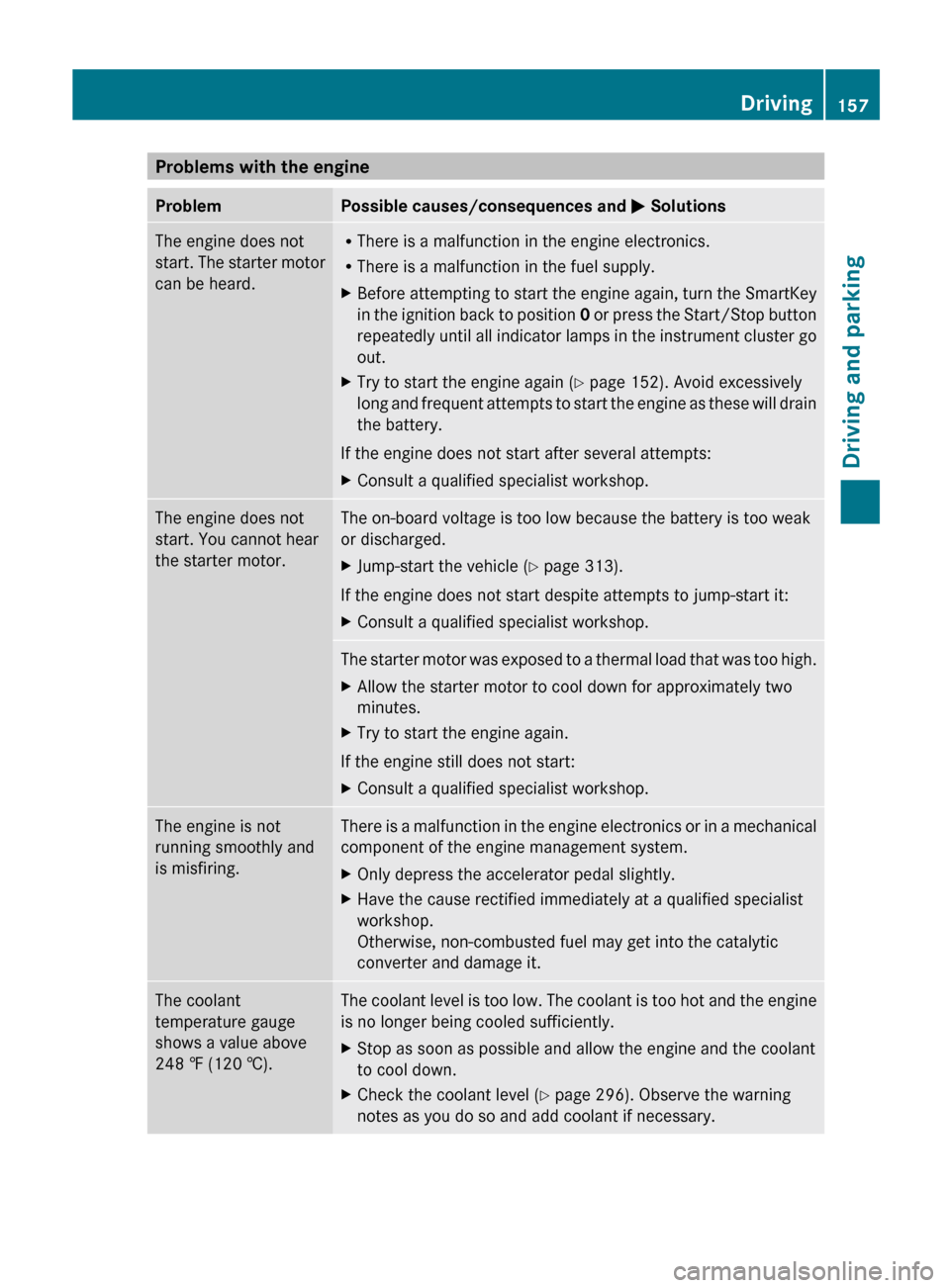
Problems with the engine
Problem Possible causes/consequences and
M SolutionsThe engine does not
start.
The starter motor
can be heard. R
There is a malfunction in the engine electronics.
R There is a malfunction in the fuel supply.
X Before attempting to start the engine again, turn the SmartKey
in
the ignition back to position 0 or press the Start/Stop button
repeatedly until all indicator lamps in the instrument cluster go
out.
X Try to start the engine again (Y page 152). Avoid excessively
long
and frequent attempts to start the engine as these will drain
the battery.
If the engine does not start after several attempts:
X Consult a qualified specialist workshop. The engine does not
start. You cannot hear
the starter motor. The on-board voltage is too low because the battery is too weak
or discharged.
X
Jump-start the vehicle (Y page 313).
If the engine does not start despite attempts to jump-start it:
X Consult a qualified specialist workshop. The starter motor was exposed to a thermal load that was too high.
X
Allow the starter motor to cool down for approximately two
minutes.
X Try to start the engine again.
If the engine still does not start:
X Consult a qualified specialist workshop. The engine is not
running smoothly and
is misfiring. There is a malfunction in the engine electronics or in a mechanical
component of the engine management system.
X
Only depress the accelerator pedal slightly.
X Have the cause rectified immediately at a qualified specialist
workshop.
Otherwise, non-combusted fuel may get into the catalytic
converter and damage it. The coolant
temperature gauge
shows a value above
248 ‡
(120 †). The coolant level is too low. The coolant is too hot and the engine
is no longer being cooled sufficiently.
X
Stop as soon as possible and allow the engine and the coolant
to cool down.
X Check the coolant level (Y page 296). Observe the warning
notes as you do so and add coolant if necessary. Driving
157
Driving and parking Z
Page 160 of 372
Automatic transmission
Important safety notes
G
WARNING
If the engine speed is above the idling speed
and you engage transmission position D or
R,
the vehicle could pull away suddenly. There
is a risk of an accident.
When engaging transmission position D or R,
always firmly depress the brake pedal and do
not simultaneously accelerate. G
WARNING
The automatic transmission switches to
neutral position N when you switch off the
engine. The vehicle may roll away. There is a
risk of an accident.
After switching off the engine, always switch
to parking position P. Prevent the parked
vehicle from rolling away by applying the
parking brake. Selector lever
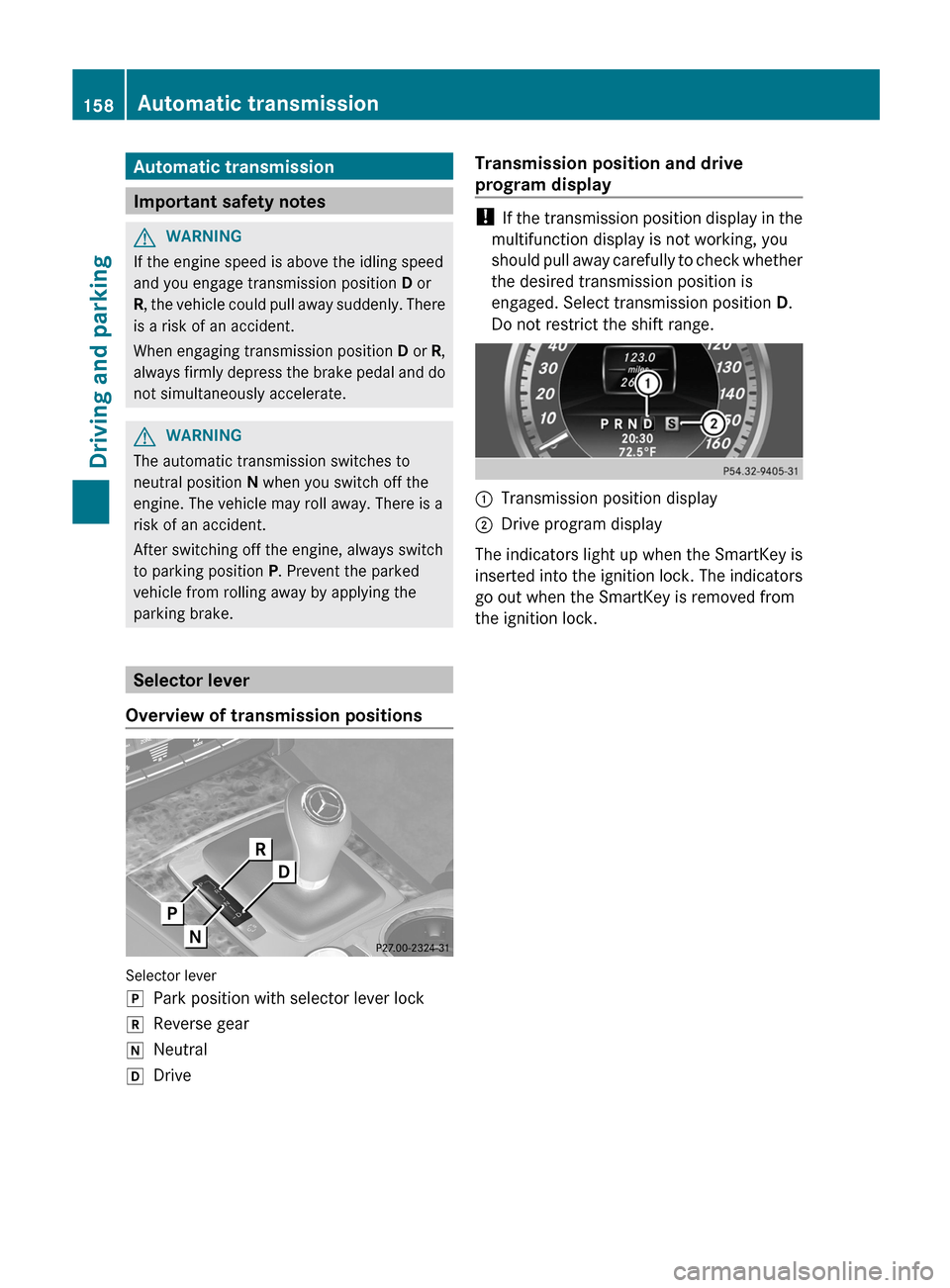
Overview of transmission positions Selector lever
j
Park position with selector lever lock
k Reverse gear
i Neutral
h Drive Transmission position and drive
program display !
If
the transmission position display in the
multifunction display is not working, you
should pull away carefully to check whether
the desired transmission position is
engaged. Select transmission position D.
Do not restrict the shift range. :
Transmission position display
; Drive program display
The indicators light up when the SmartKey is
inserted
into the ignition lock. The indicators
go out when the SmartKey is removed from
the ignition lock. 158
Automatic transmission
Driving and parking
Page 168 of 372
vehicle with the SmartKey or with KEYLESS-
GO.
The position of the fuel filler cap is displayed
8 in the instrument cluster. The arrow
next to the filling pump indicates the side of
the vehicle.
Opening
X
Switch off the engine.
X Remove the SmartKey from the ignition
lock.
X KEYLESS-GO: open the driver’s door.
This corresponds to key position 0:
"SmartKey removed".
The driver’s door can be closed again.
X Press the fuel filler flap in the direction of
arrow :.
The fuel filler flap opens slightly.
X Open the fuel filler flap fully.
X Turn the fuel filler flap counter-clockwise
and remove it.
X Insert the fuel filler cap into the holder
bracket on the inside of filler flap ;.
X Completely insert the filler neck of the fuel
pump nozzle into the tank and refuel.
X Only fill the tank until the pump nozzle
switches off.
i Do not add any more fuel after the pump
stops filling for the first time. Otherwise,
fuel may leak out.
Closing X
Replace the cap on the filler neck and turn
clockwise until it engages audibly.
X Close the fuel filler flap.
i Close the fuel filler flap before locking the
vehicle. Otherwise, the locking pin of the
central locking prevents the fuel filler flap
from closing.
i The 8 reserve fuel light flashes if you
are driving with the fuel filler cap open. In
addition, the ; Check Engine warning lamp may light up. A message appears in
the multifunction display
(Y page 241).
For further information on warning and
indicator lamps in the instrument cluster,
see ( Y page 262).166
Refueling
Driving and parking
Page 170 of 372
To ensure that the vehicle is secured against
rolling away unintentionally:
R
the parking brake must be applied.
R the
transmission must be in position P and
the SmartKey must be removed from the
ignition lock.
R on uphill or downhill gradients, the front
wheels must be turned towards the curb. Switching off the engine
Vehicles with automatic transmission X
Apply the parking brake firmly.
X Shift the transmission to position P.
Using the SmartKey
X Turn the SmartKey to position 0 in the
ignition lock and remove it.
The immobilizer is activated.
i The
SmartKey can only be removed if the
transmission is in position P.
Using KEYLESS-GO
X Press the Start/Stop button (Y page
151).
The engine stops and all the indicator
lamps in the instrument cluster go out.
i When the driver's door is closed, this
corresponds
to SmartKey position 1. When
the driver's door is open, it corresponds to
SmartKey position 0 or "SmartKey
removed".
If you try to switch off the engine when the
transmission is not in position P, a message
appears in the multifunction display. A signal
sounds. Parking brake
G
WARNING
If you must brake the vehicle with the parking
brake, the braking distance is considerably
longer
and the wheels could lock. There is an
increased danger of skidding and accidents. Only use the parking brake to brake the
vehicle when the service brake is faulty. Do
not apply the parking brake too firmly. If the
wheels lock, release the parking brake until
the wheels begin turning again.
G
WARNING
If you leave children unsupervised in the
vehicle, they could set it in motion by, for
example:
R releasing the parking brake
R shifting the automatic transmission out of
the parking position P
R starting the engine.
They could also operate the vehicle's
equipment.
There is a risk of an accident and
injury.
When leaving the vehicle, always take the
SmartKey with you and lock the vehicle. Never
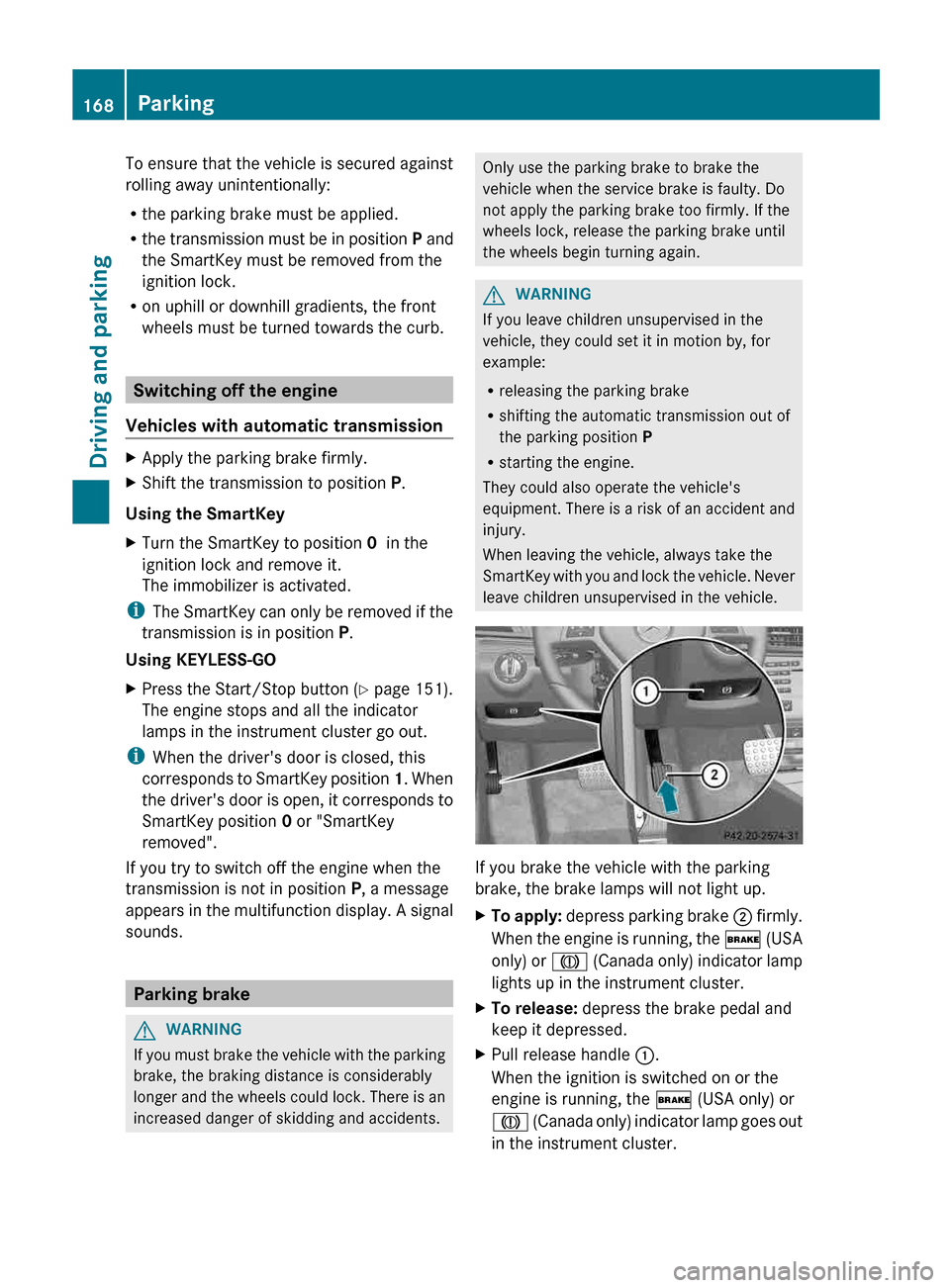
leave children unsupervised in the vehicle. If you brake the vehicle with the parking
brake, the brake lamps will not light up.
X
To apply:
depress parking brake ; firmly.
When the engine is running, the $ (USA
only) or J (Canada only) indicator lamp
lights up in the instrument cluster.
X To release: depress the brake pedal and
keep it depressed.
X Pull release handle :.
When the ignition is switched on or the
engine is running, the $ (USA only) or
J
(Canada only) indicator lamp goes out
in the instrument cluster. 168
Parking
Driving and parking
Page 173 of 372
Acceleration (evaluation of all
acceleration)
The bar fills up: The bar empties:
Moderate
acceleration,
especially at high
speeds Sporty acceleration
Constant (evaluation of driving style at
any time)
The bar fills up: The bar empties:
Constant speed and
avoidance of
unnecessary
acceleration and
deceleration Speed variations
Coasting (evaluation of total
deceleration)
The bar fills up: The bar empties:
Drive with care and
remove your foot
from
the accelerator
pedal in good time:
the vehicle can
coast without
braking Frequent braking
i
An economical driving style specially
requires driving at moderate engine
speeds.
Achieving a higher value in the categories
"Acceleration" and "Constant":
R observe
the gearshift recommendations.
R drive in drive program E.
i On longer journeys, e.g. on highways, the
only the bar in the "Constant" category
changes.
i The ECO display calculates the driving
style from the start of the journey to the
end. For this reason, the bars change dynamically at the beginning of the journey.
On longer journeys, there are fewer
changes.
For more dynamic changes, carry
out a manual reset.
Further information on the ECO display
(Y page 217). Braking
Important safety notes G
WARNING
If you shift down on a slippery road surface in
an attempt to increase the engine's braking
effect, the drive wheels could lose their grip.
There is an increased danger of skidding and
accidents.
Do not shift down for additional engine
braking on a slippery road surface.
Downhill gradients !
On long and steep gradients, you must
reduce the load on the brakes by shifting
early
to a lower gear. This allows you to take
advantage of the engine braking effect and
helps avoid overheating and excessive
wear of the brakes.
When you take advantage of the engine
braking effect, a drive wheel may not turn
for some time, e.g. on a slippery road
surface. This could cause damage to the
drive train. This type of damage is not
covered by the Mercedes-Benz warranty.
Heavy and light loads G
WARNING
If you rest your foot on the brake pedal while
driving,
the braking system can overheat. This
increases the stopping distance and can even
cause the braking system to fail. There is a
risk of an accident.
Never use the brake pedal as a footrest. Never
depress the brake pedal and the accelerator
pedal at the same time. Driving tips
171
Driving and parking Z
Page 174 of 372
!
Depressing the brake pedal constantly
results
in excessive and premature wear to
the brake pads.
If the brakes have been subjected to a heavy
load, do not stop the vehicle immediately, but
drive on for a short while. This allows the
airflow to cool the brakes more quickly.
Wet roads If you have driven for a long time in heavy rain
without braking, there may be a delayed
reaction
from the brakes when braking for the
first time. This may also occur after the
vehicle has been washed or driven through
deep water.
You have to depress the brake pedal more
firmly. Maintain a greater distance from the
vehicle in front.
After driving on a wet road or having the
vehicle washed, brake firmly while paying
attention to the traffic conditions. This will
warm up the brake discs, thereby drying them
more quickly and protecting them against
corrosion.
Limited braking performance on salt-
treated roads If you drive on salted roads, a layer of salt
residue may form on the brake discs and
brake pads. This can result in a significantly
longer braking distance.
R
Brake
occasionally to remove any possible
salt residue. Make sure that you do not
endanger other road users when doing so.
R Carefully depress the brake pedal and the
beginning and end of a journey.
R Maintain a greater distance to the vehicle
ahead.
Servicing the brakes G
WARNING
If brake pads or brake fluid other than those
recommended are used, the braking
properties of the vehicle can be degraded to an extent that safe braking is substantially
impaired. This could result in an accident.
G
WARNING
Make sure that you do not endanger other
road users when you apply the brakes.
! If
the red brake warning lamp lights up in
the instrument cluster and you hear a
warning tone while the engine is running,
the brake fluid level may be too low.
Observe additional warning messages in
the multifunction display.
The brake fluid level may be too low due to
brake pad wear or leaking brake lines.
Have the brake system checked
immediately. This work should be carried
out at a qualified specialist workshop.
! Vehicles with 4MATIC: function or
performance tests may only be carried out
on a 2-axle dynamometer. If you are
planning to have the vehicle tested on such
a dynamometer, contact an authorized
Mercedes-Benz Center to obtain further
information first. Otherwise, you could
damage the drive train or the brake system.
! Vehicles with 4MATIC: as the ESP®
system operates automatically, the engine
and the ignition must be switched off
(SmartKey in position 0 or 1 in the ignition
lock or Start/Stop button in position 0 or
1) while the parking brake is being tested
on a brake dynamometer.
Braking maneuvers triggered automatically
by ESP ®
may seriously damage the brake
system. 172
Driving tips
Driving and parking