automatic transmission MERCEDES-BENZ E-Class COUPE 2014 C207 Owner's Guide
[x] Cancel search | Manufacturer: MERCEDES-BENZ, Model Year: 2014, Model line: E-Class COUPE, Model: MERCEDES-BENZ E-Class COUPE 2014 C207Pages: 394, PDF Size: 5.28 MB
Page 177 of 394
Changing gear
The automatic transmission shifts to the
individual gears automatically when it is in
transmission position D.This automatic
gearshifting behavior is determined by:
R the selected drive program (Y page 175)
R the position of the accelerator pedal
R the road speed Driving tips
Kickdown Use kickdown for maximum acceleration.
X
Depress the accelerator pedal beyond the
pressure point.
The automatic transmission shifts to a
lower gear depending on the engine speed.
X Ease off the accelerator pedal once the
desired speed is reached.
The automatic transmission shifts back up.
Rocking the vehicle free Rocking the vehicle free by shifting back and
forth between transmission positions Dand
R can help to free a vehicle that has become
stuck in mud or snow. The vehicle's engine
management restricts switching between
transmission positions Dand Rto speeds up
to a maximum of 5 mph (9 km/h). To shift
back and forth between transmission
positions Dand R, move the selector lever up
and down beyond the pressure point. Program selector button
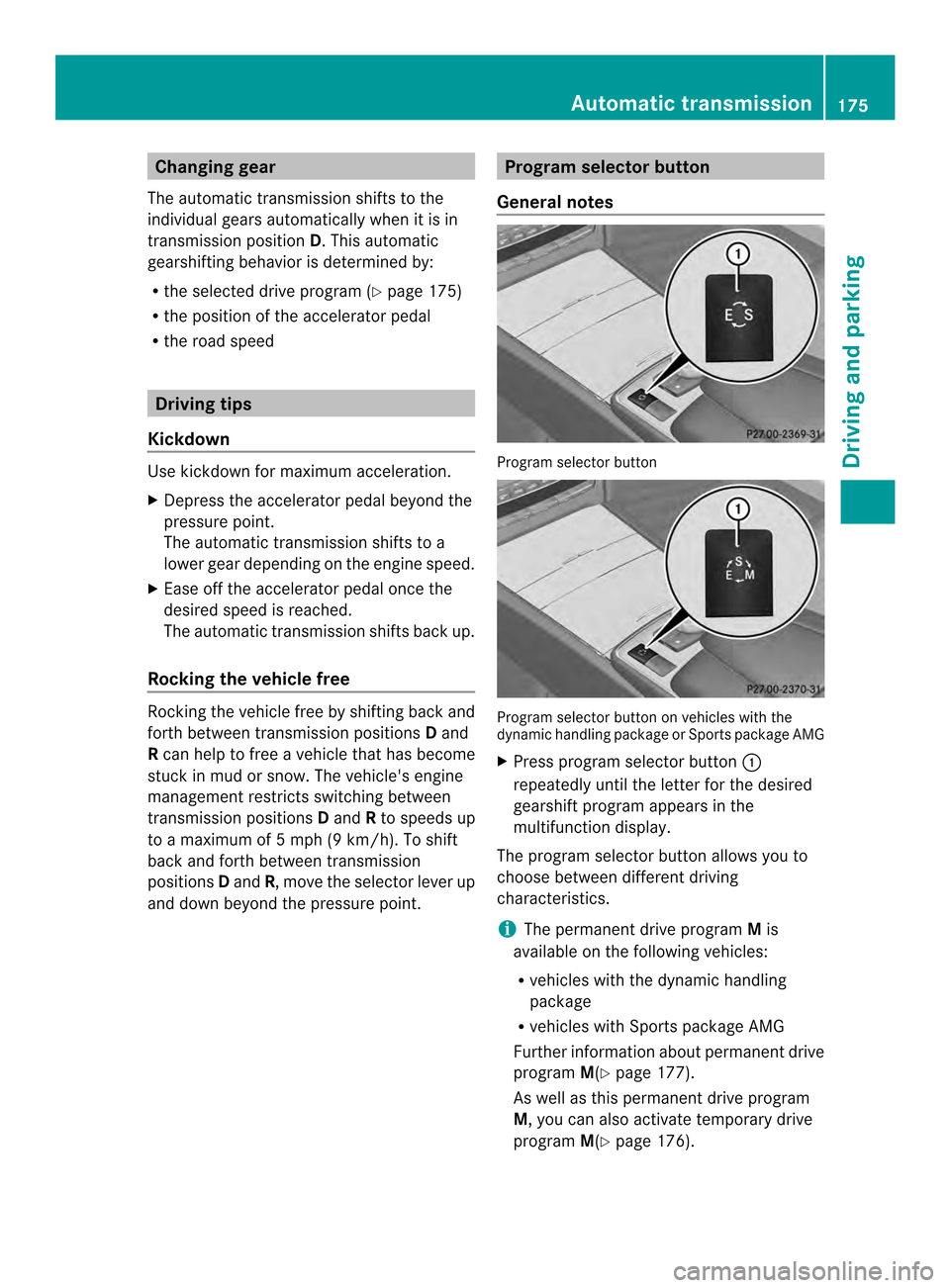
General notes Program selector button
Program selector button on vehicles with the
dynamic handling package or Sports package AMG
X
Press program selector button 0002
repeatedly until the letter for the desired
gearshift program appears in the
multifunction display.
The program selector button allows you to
choose between different driving
characteristics.
i The permanent drive program Mis
available on the following vehicles:
R vehicles with the dynamic handling
package
R vehicles with Sports package AMG
Further information about permanent drive
program M(Ypage 177).
As well as this permanent drive program
M, you can also activate temporary drive
program M(Ypage 176). Automatic transmission
175Driving and parking Z
Page 178 of 394
E
Economy Comfortable, economical
driving
S
Sport Sporty driving style
M
Manual Manual gear shifting
i
For further information on the automatic
drive program, see (Y page 176).
Only change fro mautomatic drive program
E or Sto manual drive program Mwhen the
vehicle is stationary.
i The automatic transmission shifts to
automatic drive program Eeach time the
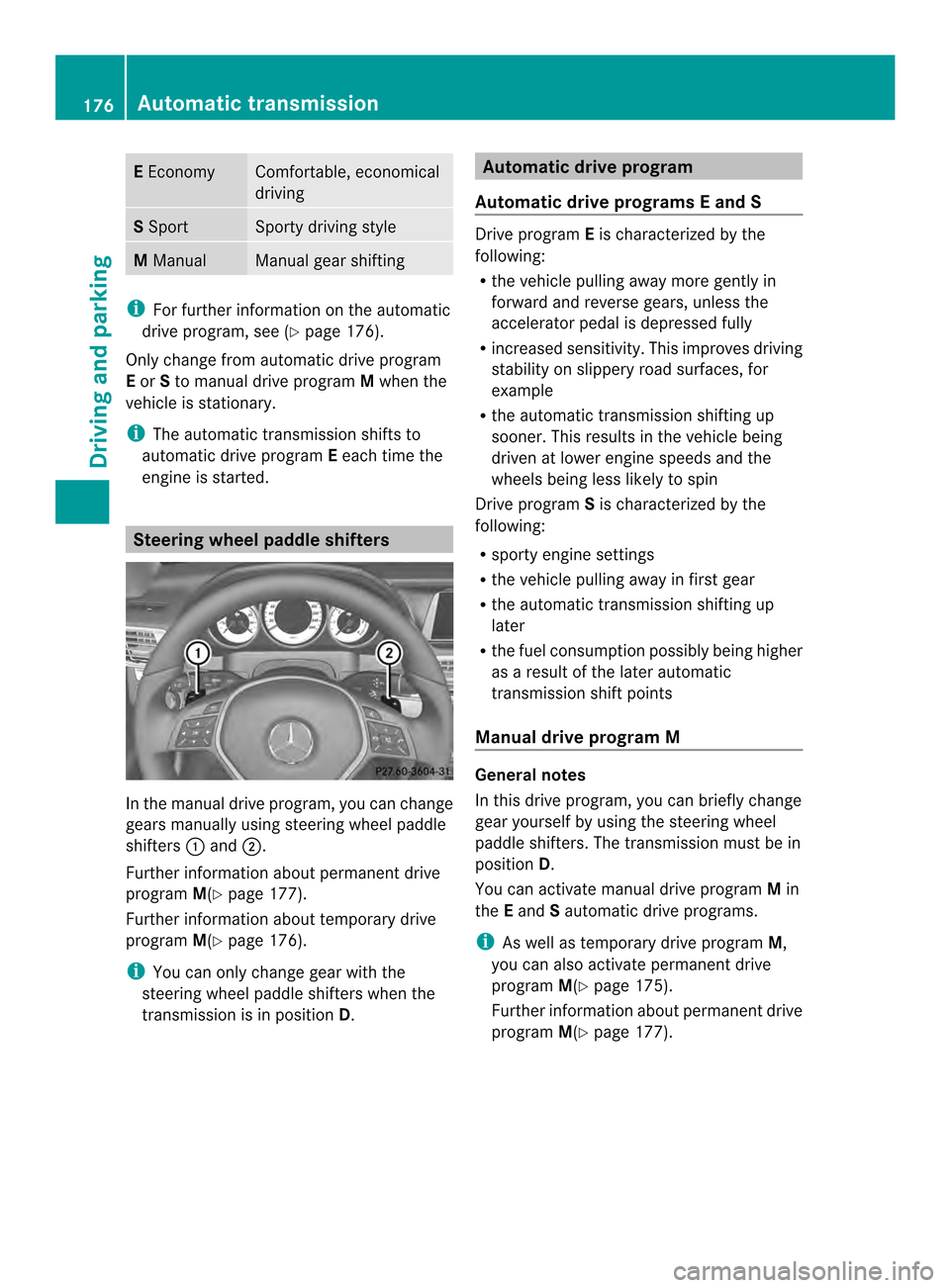
engine is started. Steering wheel paddle shifters
In the manual drive program, you can change
gears manually using steering wheel paddle
shifters
0002and 0003.
Further information about permanent drive
program M(Ypage 177).
Further information about temporary drive
program M(Ypage 176).
i You can only change gear with the
steering wheel paddle shifters when the
transmission is in position D. Automatic drive program
Automatic drive program sEand S Drive program
Eis characterized by the
following:
R the vehicle pulling away more gently in
forward and reverse gears, unless the
accelerator pedal is depressed fully
R increased sensitivity .This improves driving
stability on slippery road surfaces, for
example
R the automatic transmission shifting up
sooner. This results in the vehicle being
driven at lower engine speeds and the
wheels being less likely to spin
Drive program Sis characterized by the
following:
R sporty engine settings
R the vehicle pulling away in first gear
R the automatic transmission shifting up
later
R the fuel consumption possibly being higher
as a result of the later automatic
transmission shift points
Manual drive program M General notes
In this drive program, you can briefly change
gear yourself by using the steering wheel
paddle shifters. The transmission must be in
position
D.
You can activate manual drive program Min
the Eand Sautomatic drive programs.
i As well as temporary drive program M,
you can also activate permanent drive
program M(Ypage 175).
Further information about permanent drive
program M(Ypage 177). 176
Automatic transmissionDriving and parking
Page 179 of 394
Activating
X
Shift the transmission to position D.
X Pull the left or right steering wheel paddle
shifte r(Ypage 176).
Manual drive program Mis temporarily
activated. The selected gear and Mappear
in the multifunction display.
Shifting gears
If you pull on the left or right steering wheel
paddle shifter, the automatic transmission
switches to manual drive program Mfor a
limited amount of time. Depending on which
paddle shifter is pulled, the automatic
transmission immediately shifts into the next
gear down or up, if permitted.
X To shift up: pull the right-hand steering
wheel paddle shifter (Y page 176).
The automatic transmission shifts up to the
next gear.
i If the maximum engine speed on the
currently engaged gear is reached and you
continue to accelerate, the automatic
transmission automatically shifts up in
order to preven tengine damage.
X To shift down: pull on the left-hand
steering wheel paddle shifter
(Y page 176).
The automatic transmission shifts down to
the next gear.
i If the engine exceeds the maximum
engine speed when shifting down, the
automatic transmission protects against
engine damage by not shifting down.
i Automatic down shifting occurs when
coasting.
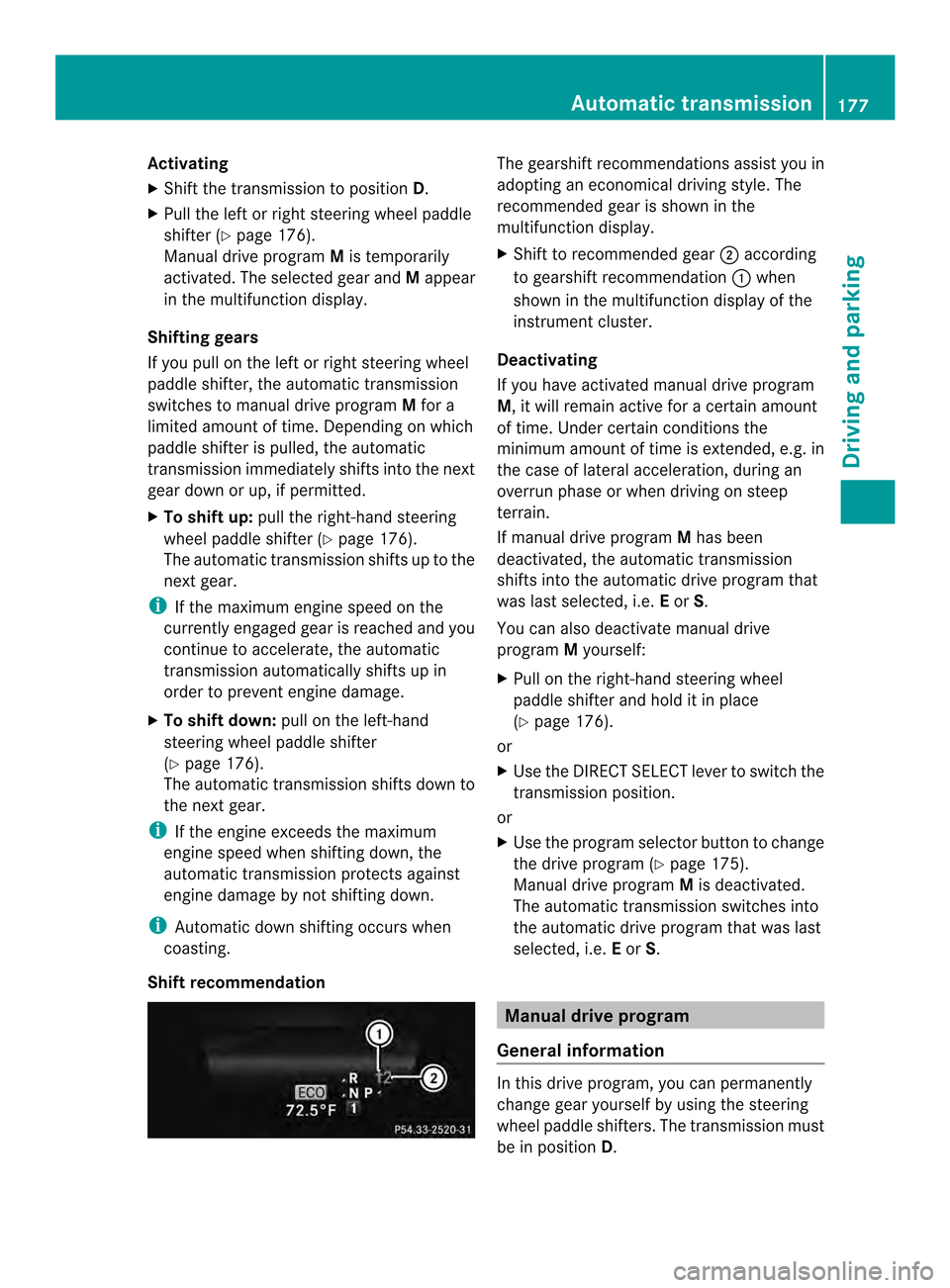
Shift recommendation The gearshift recommendations assist you in
adopting an economical driving style
.The
recommended gear is shown in the
multifunction display.
X Shift to recommended gear 0003according
to gearshift recommendation 0002when
shown in the multifunction display of the
instrument cluster.
Deactivating
If you have activated manual drive program
M, it will remain active for a certain amount
of time. Under certain conditions the
minimum amount of time is extended, e.g. in
the case of lateral acceleration, during an
overrun phase or when driving on steep
terrain.
If manual drive program Mhas been
deactivated, the automatic transmission
shifts into the automatic drive program that
was last selected, i.e. Eor S.
You can also deactivate manual drive
program Myourself:
X Pull on the right-hand steering wheel
paddle shifter and hold it in place
(Y page 176).
or
X Use the DIRECT SELECT lever to switch the
transmission position.
or
X Use the program selector button to change
the drive program (Y page 175).
Manual drive program Mis deactivated.
The automatic transmission switches into
the automatic drive program that was last
selected, i.e. Eor S. Manual drive program
General information In this drive program, you can permanently
change gear yourself by using the steering
wheel paddle shifters. The transmission must
be in position
D. Automatic transmission
177Driving and parking Z
Page 180 of 394
i
As well as this permanent drive program
M, you can also activate temporary drive
program M(Ypage 176).
Switching on the manual drive program X
Press the progra mselecto rbutton
(Y page 175) repeatedly until Mappears in
the multifunction display.
The manual drive program is only available on
vehicles with the dynamic handling package
or AMG sports package.
Manual drive program Mis different from
drive program Swith regard to spontaneity,
responsiveness and smoothness of gear
changes.
Manual drive program Mcan be selected
using the program selector button. In manual
drive program M, you can change gear using
the steering wheel paddle shifters if the
transmission is in position D.The gear
selected is shown in the multifunction
display.
Upshifting X
Pull the right-hand steering wheel paddle
shifter.
The automatic transmission shifts up to the
next gear.
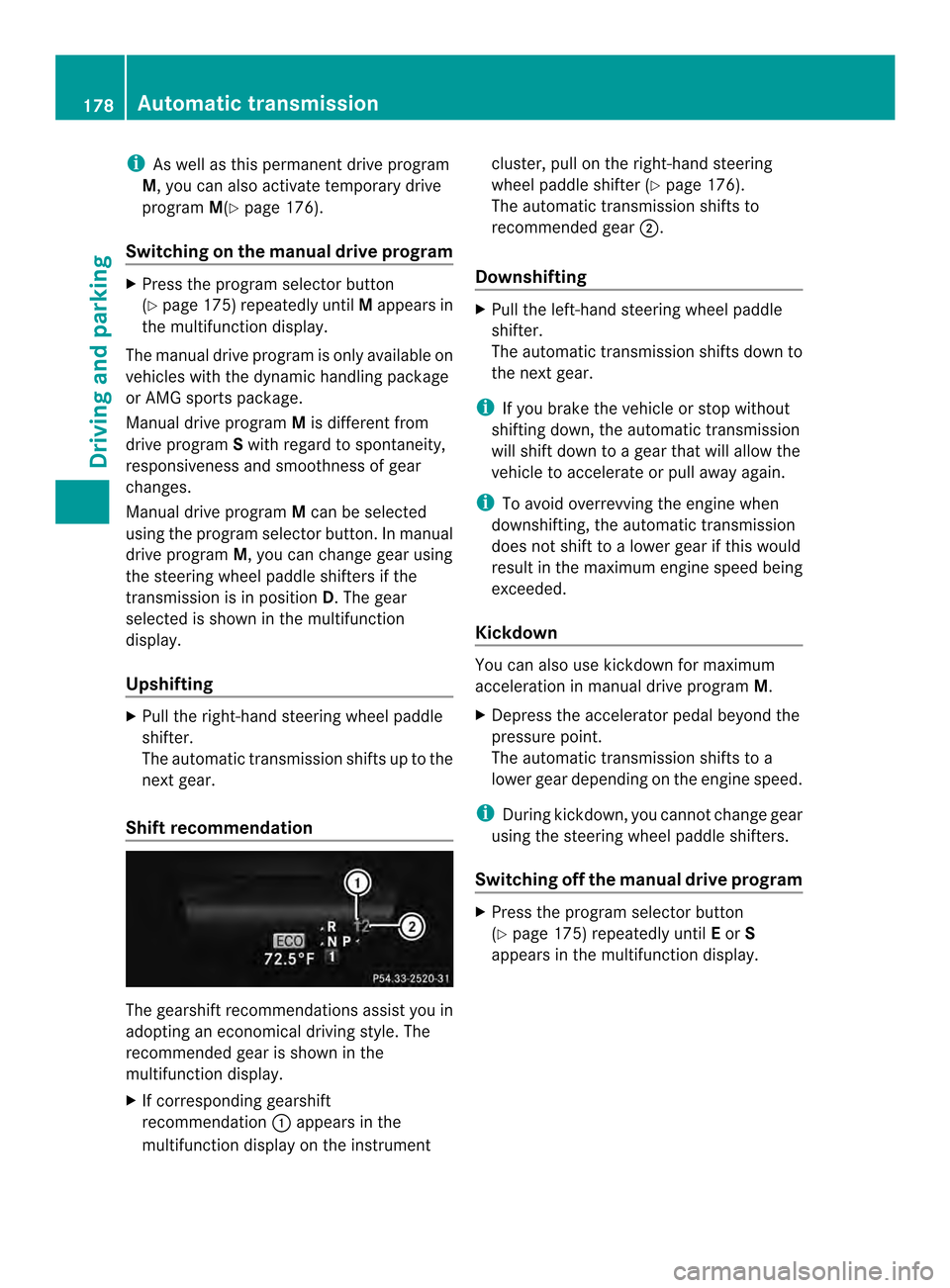
Shift recommendation The gearshift recommendations assist you in
adopting an economical driving style. The
recommended gear is shown in the
multifunction display.
X
If corresponding gearshift
recommendation 0002appears in the
multifunction display on the instrument cluster, pull on the right-hand steering
wheel paddle shifter (Y
page 176).
The automatic transmission shifts to
recommended gear 0003.
Downshifting X
Pull the left-hand steering wheel paddle
shifter.
The automatic transmission shifts down to
the next gear.
i If you brake the vehicle or stop without
shifting down, the automatic transmission
will shift down to a gear that will allow the
vehicle to accelerate or pull away again.
i To avoid overrevving the engine when
downshifting, the automatic transmission
does not shift to a lower gear if this would
result in the maximum engine speed being
exceeded.
Kickdown You can also use kickdown for maximum
acceleration in manual drive program
M.
X Depress the accelerator pedal beyond the
pressure point.
The automatic transmission shifts to a
lower gear depending on the engine speed.
i During kickdown, you cannot change gear
using the steering wheel paddle shifters.
Switching off the manuald rive program X
Press the progra mselecto rbutton
(Y page 175) repeatedly until Eor S
appears in the multifunction display. 178
Automatic transmissionDriving and pa
rking
Page 181 of 394
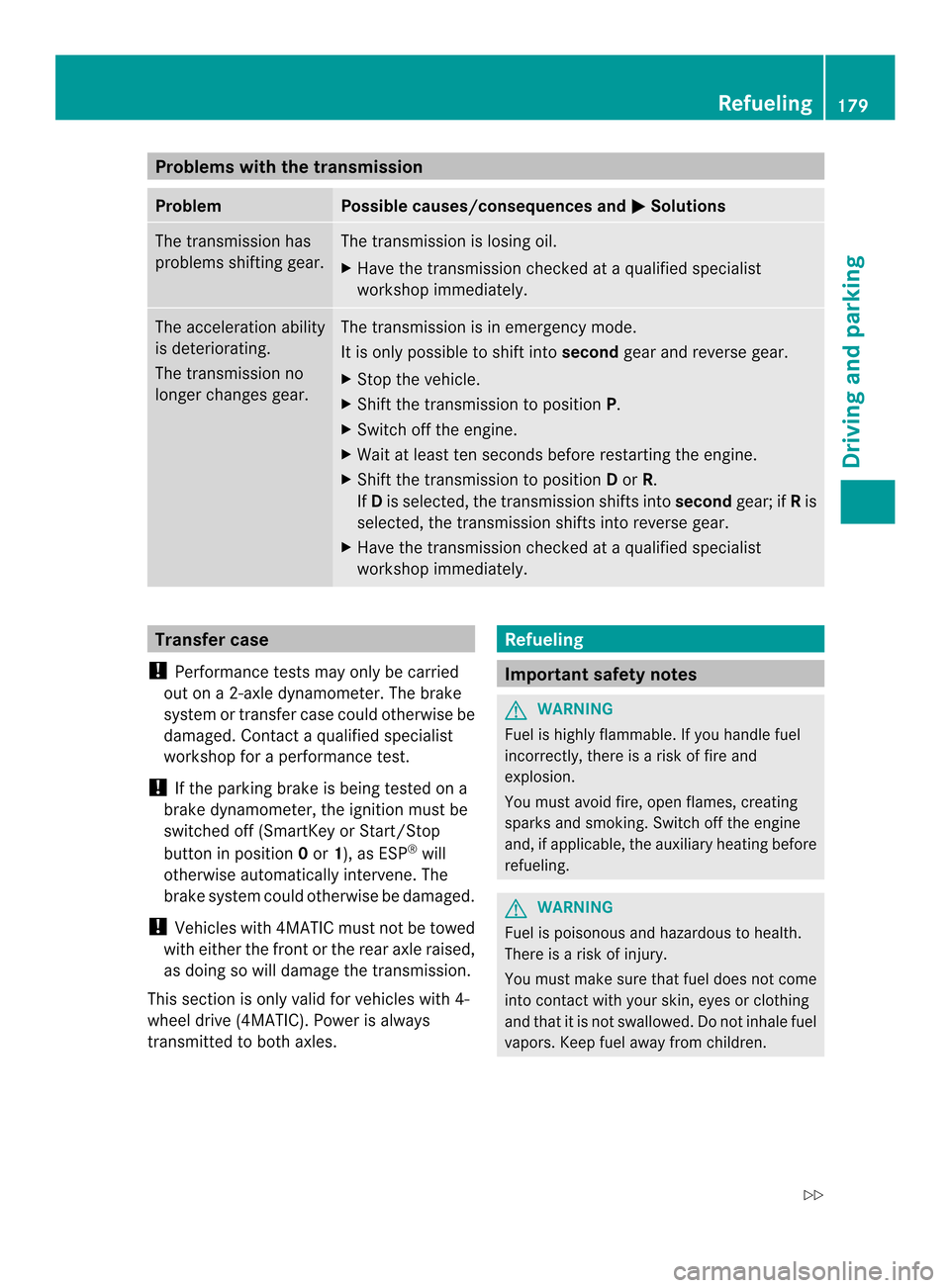
Problems with the transmission
Problem Possible causes/consequences and
0001 Solutions
The transmission has
problems shifting gear. The transmission is losing oil.
X
Have the transmission checked at a qualified specialist
workshop immediately. The acceleration ability
is deteriorating.
The transmission no
longer changes gear. The transmission is in emergency mode.
It is only possible to shift into
secondgear and reverse gear.
X Stop the vehicle.
X Shift the transmission to position P.
X Switch off the engine.
X Wait at least ten seconds before restarting the engine.
X Shift the transmission to position Dor R.
If D is selected, the transmission shifts into secondgear; ifRis
selected, the transmission shifts into reverse gear.
X Have the transmission checked at a qualified specialist
workshop immediately. Transfer case
! Performance tests may only be carried
out on a 2-axle dynamometer. The brake
system or transfer case could otherwise be
damaged. Contact a qualified specialist
workshop for a performance test.
! If the parking brake is being tested on a
brake dynamometer, the ignition must be
switched off (SmartKey or Start/Stop
button in position 0or 1), as ESP ®
will
otherwise automatically intervene. The
brake system could otherwise be damaged.
! Vehicles with 4MATIC must not be towed
with either the front or the rear axle raised,
as doing so will damage the transmission.
This section is only valid for vehicles with 4-
wheel drive (4MATIC). Power is always
transmitted to both axles. Refueling
Important safety notes
G
WARNING
Fuel is highly flammable. If you handle fuel
incorrectly, there is a risk of fire and
explosion.
You must avoid fire, open flames, creating
sparks and smoking. Switch off the engine
and, if applicable, the auxiliary heating before
refueling. G
WARNING
Fuel is poisonous and hazardous to health.
There is a risk of injury.
You must make sure that fuel does not come
into contact with your skin, eyes or clothing
and that it is not swallowed. Do not inhale fuel
vapors. Keep fuel away from children. Refueling
179Driving and parking
Z
Page 184 of 394
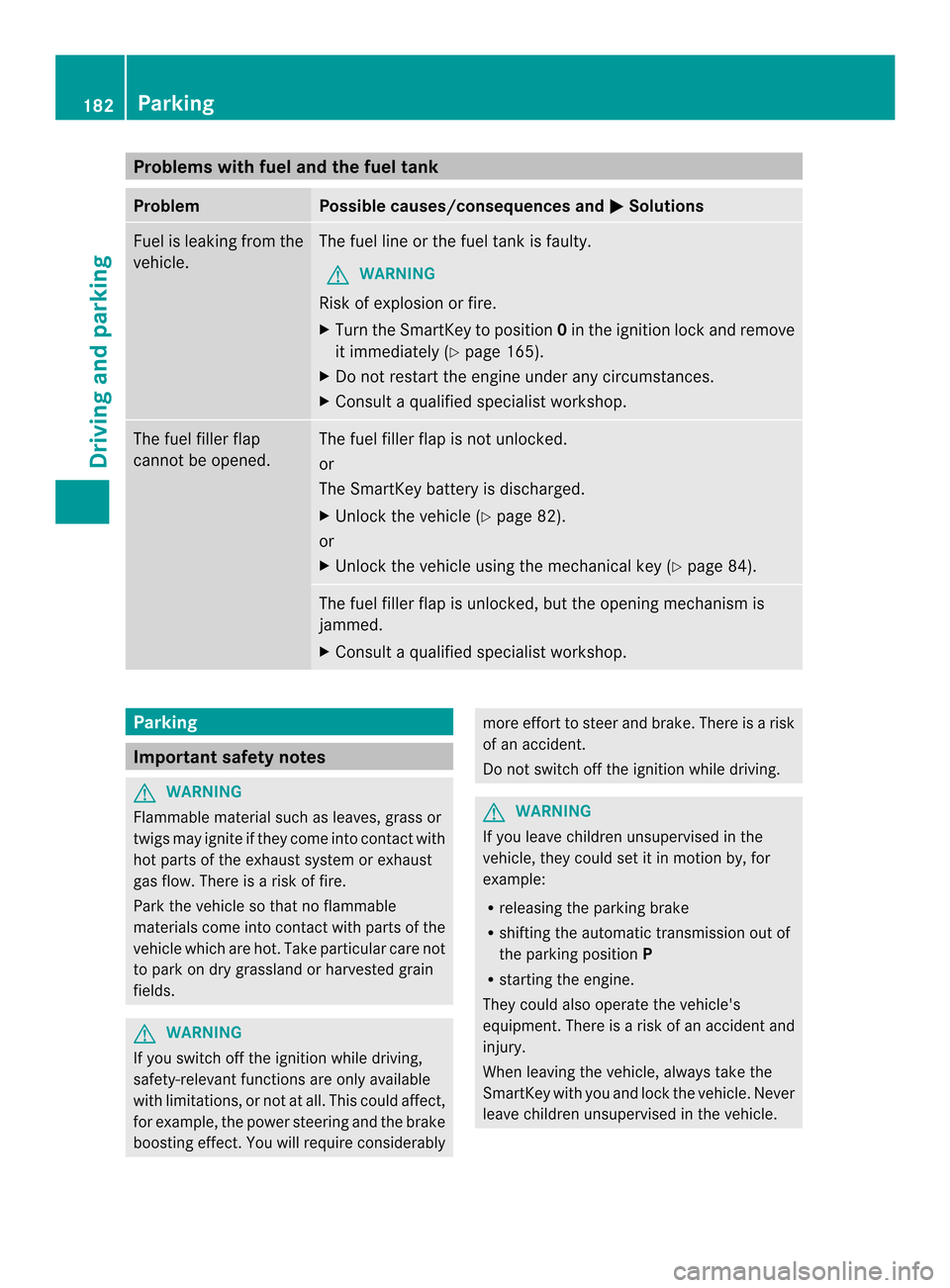
Problems with fuel and the fuel tank
Problem Possible causes/consequences and
0001 Solutions
Fuel is leaking from the
vehicle. The fuel line or the fuel tank is faulty.
G WARNING
Risk of explosion or fire.
X Turn the SmartKey to position 0in the ignition lock and remove
it immediately (Y page 165).
X Do not restart the engine under any circumstances.
X Consult a qualified specialist workshop. The fuel filler flap
cannot be opened. The fuel filler flap is not unlocked.
or
The SmartKey battery is discharged.
X
Unlock the vehicle (Y page 82).
or
X Unlock the vehicle using the mechanical key (Y page 84).The fuel filler flap is unlocked, but the opening mechanism is
jammed.
X
Consult a qualified specialist workshop. Parking
Important safety notes
G
WARNING
Flammable material such as leaves, grass or
twigs may ignite if they come into contact with
hot parts of the exhaust system or exhaust
gas flow. There is a risk of fire.
Park the vehicle so that no flammable
materials come into contact with parts of the
vehicle which are hot. Take particular care not
to park on dry grassland or harvested grain
fields. G
WARNING
If you switch off the ignition while driving,
safety-relevant functions are only available
with limitations, or not at all. This could affect,
for example, the power steering and the brake
boosting effect.Y ou will require considerably more effort to steer and brake. There is a risk
of an accident.
Do not switch off the ignition while driving.
G
WARNING
If you leave children unsupervised in the
vehicle, they could set it in motion by, for
example:
R releasing the parking brake
R shifting the automatic transmission out of
the parking position P
R starting the engine.
They could also operate the vehicle's
equipment. There is a risk of an accident and
injury.
When leaving the vehicle, always take the
SmartKey with you and lock the vehicle. Never
leave children unsupervised in the vehicle. 182
ParkingDriving and parking
Page 185 of 394

!
Always secure the vehicle correctly
against rolling away. Otherwise, the vehicle
or its drivetrain could be damaged.
To ensure that the vehicle is secured against
rolling away unintentionally:
R the parking brake must be applied.
R the transmission must be in position Pand
the SmartKey must be removed from the
ignition lock.
R on uphill or downhill gradients, the front
wheels must be turned towards the curb. Switching off the engine
Important safety notes G
WARNING
The automatic transmission switches to
neutral position Nwhen you switch off the
engine. The vehicle may roll away. There is a
risk of an accident.
After switching off the engine, always switch
to parking position P. Prevent the parked
vehicle from rolling away by applying the
parking brake.
Vehicles with automatic transmission X
Apply the parking brake firmly.
X Shift the transmission to position P.
Using the SmartKey
X Turn the SmartKey to position 0in the
ignition lock and remove it.
The immobilizer is activated.
i The SmartKey can only be removed if the
transmission is in position P.
Using KEYLESS-GO
X Press the Start/Stop button (Y page 165).
The engine stops and all the indicator
lamps in the instrument cluster go out.
i When the driver's door is closed, this
corresponds to key position 1. When the
driver's door is open, this corresponds to
key position 0:"key removed". If you try to switch off the engine when the
transmission is not in position
P, a message
appears in the multifunctio ndisplay. Asignal
sounds. Parking brake
G
WARNING
If you must brake the vehicle with the parking
brake, the braking distanc eis considerably
longer and the wheels could lock. There is an
increased danger of skidding and accidents.
Only use the parking brake to brake the
vehicle when the service brake is faulty. Do
not apply the parking brake too firmly. If the
wheels lock, release the parking brake until
the wheels begin turning again. G
WARNING
If you leave children unsupervised in the
vehicle, they could set it in motion by, for
example:
R releasing the parking brake
R shifting the automatic transmission out of
the parking position P
R starting the engine.
They could also operate the vehicle's
equipment. There is a risk of an accident and
injury.
When leaving the vehicle, always take the
SmartKey with you and lock the vehicle. Never
leave children unsupervised in the vehicle. If you brake the vehicle with the parking
brake, the brake lamps will not light up. Parking
183Driving and parking Z
Page 190 of 394
If the brake system has only been subject to
moderate loads, you should test the
functionality of yourb
rakes at regular
intervals. To do so, press firmly on the brake
pedal when driving at a high speed. This
improves the grip of the brake pads.
You can find a description of Brake Assist
(BAS) at (Y page 69) or of BAS PLUS with
Intersection Assist at (Y page 70).
The braking characteristics of the vehicle can
be seriously impaired if:
R brake pads other than those recommended
are installed
R the recommended brake flui dis not used
Safe braking can no longer be guaranteed. Driving on wet roads
Hydroplaning If water has accumulated to a certain depth
on the road surface, there is a danger of
hydroplaning occurring, even if:
R
you drive at low speeds.
R the tires have adequate tread depth.
For this reason, in the event of heavy rain or
in conditions in which hydroplaning may
occur, you must drive in the following
manner:
R lower your speed.
R avoid ruts.
R brake carefully.
Driving on flooded roads !
Do not drive through flooded areas.
Check the depth of any water before driving
through it. Drive slowly through standing
water. Otherwise, water may enter the
vehicle interior or the engine compartment.
This can damage the electronic
components in the engine or the automatic
transmission. Water can also be drawn in
by the engine's air suction nozzles and this
can cause engine damage. Winter driving
Important safety notes G
WARNING
If you shift down on a slippery road surface in
an attempt to increase the engine's braking
effect, the drive wheels could lose their grip.
There is an increased danger of skidding and
accidents.
Do not shift down for additional engine
braking on a slippery road surface. G
DANGER
If the exhaust pipe is blocked or adequate
ventilation is not possible, poisonous gases
such as carbon monoxide (CO) may enter the
vehicle. This is the case, e.g. if the vehicle
becomes trapped in snow. There is a risk of
fatal injury.
If you leave the engine or the auxiliary heating
running, make sure the exhaust pipe and area
around the vehicle are clear of snow. To
ensure an adequate supply of fresh air, open
a window on the side of the vehicle that is not
facing into the wind.
Have your vehicle winterproofed at a qualified
specialist workshop at the onset of winter.
Observe the notes in the "Winter operation"
section (Y page 346).
Driving with summer tires Observe the notes in the "Winter operation"
section (Y
page 346).
Slippery road surfaces G
WARNING
If you shift down on a slippery road surface in
an attempt to increase the engine's braking
effect, the drive wheels could lose their grip.
There is an increased danger of skidding and
accidents.
Do not shift down for additional engine
braking on a slippery road surface. 188
Driving tipsDriving and parking
Page 191 of 394

If the vehicle threatens to skid or cannot be
stopped when moving at low speed:
X Shift the transmission to position N.
Drive particularly carefully on slippery road
surfaces .Avoid sudden acceleration, steering
and braking maneuvers. Do not use the cruise
control or DISTRONIC PLUS.
i For more information on driving with
snow chains, see (Y page 347).
The outside temperature indicator is not
designed to serve as an ice-warning device
and is therefore unsuitable for that purpose.
Changes in the outside temperature are
displayed after a short delay.
Indicated temperatures just above the
freezing point do not guarantee that the road
surface is free of ice. The road may still be icy,
especially in wooded areas or on bridges. The
vehicle could skid if you fail to adapt your
driving style .Always adapt your driving style
and drive at a speed to suit the prevailing
weathe rconditions.
You should pay special attention to road
conditions when temperatures are around
freezing point. Driving systems
Cruise control
General notes Cruise control maintains a constant road
speed for you. It brakes automatically in order
to avoid exceeding the set speed. On long and
steep downhill gradients, especially if the
vehicle is laden, you must shift to a lower gear
in time. By doing so, you will make use of the
braking effect of the engine. This relieves the
load on the brake system and prevents the
brakes from overheating and wearing too
quickly.
Use cruise control only if road and traffic
conditions make it appropriate to maintain a
steady speed for a prolonged period. You can store any road speed above 20 mph
(30 km/h).
Important safety notes If you fail to adapt your driving style, cruise
control can neither reduce the risk of an
accident nor override the laws of physics.
Cruise control cannot take into account the
road, traffic and weather conditions. Cruise
control is only an aid. You are responsible for
the distance to the vehicle in front, for vehicle
speed, for braking in good time and for
staying in your lane.
Do not use cruise control:
R
in road and traffic conditions which do not
allow you to maintain a constant speed e.g.
in heavy traffic or on winding roads
R on slippery road surfaces. Braking or
accelerating could cause the drive wheels
to lose traction and the vehicle could then
skid
R when there is poor visibility, e.g. due to fog,
heavy rain or snow
If there is a change of drivers, advise the new
driver of the speed stored.
Cruise control lever 0002
To activate or increase speed
0003 To activate or reduce speed
0023 To deactivate cruise control
0022 To activate at the current speed/last
stored speed Driving systems
189Driving and parking Z
Page 192 of 394

When you activate cruise control, the stored
speed is shown in the multifunction display
for five seconds.
Activation conditions
To activate cruise control, all of the following
activation conditions must be fulfilled:
R
the parking brake must be released.
R you are driving faster than 20 mph
(30 km/h).
R ESP ®
must be active, but not intervening.
R the transmission must be in position D.
Storing and maintaining the current
speed You can accept the curren
tspeed if you are
driving faster than 20 mph (30 km/h).
X Accelerate the vehicle to the desired
speed.
X Briefly press the cruise control lever
up 0002 or down 0003.
X Remove your foot from the accelerator
pedal.
Cruise control is activated. The vehicle
automatically maintains the stored speed.
i Cruise control may be unable to maintain
the stored speed on uphill gradients. The
stored speed is resumed when the gradient
evens out. Cruise contro lmaintains the
stored speed on downhill gradients by
automatically applying the brakes. Storing the curren
tspee dorc alling up
the last stored speed G
WARNING
If you call up the stored speed and it is lower
than the current speed, the vehicle
decelerates. If you do not know the stored
speed, the vehicle could decelerate
unexpectedly. There is a risk of an accident.
Pay attention to the road and traffic
conditions before calling up the stored speed.
If you do not know the stored speed, store the
desired speed again. X
Briefly pull the cruise control leve rtowards
you 0002.
X Remove your foot from the accelerator
pedal.
The first time cruise control is activated, it
stores the current speed or regulates the
speed of the vehicle to the previously
stored speed.
Setting aspeed 190
Driving systemsDriving and parking