trunk MERCEDES-BENZ E-Class COUPE 2014 C207 Owner's Guide
[x] Cancel search | Manufacturer: MERCEDES-BENZ, Model Year: 2014, Model line: E-Class COUPE, Model: MERCEDES-BENZ E-Class COUPE 2014 C207Pages: 394, PDF Size: 5.28 MB
Page 104 of 394

X
Turn rotary catch 0002counter-clockwise
and fold down cover 0003.X
Insert Allen key 0023into valve screw 0022on
the hydrauli cpump.
X Turn valve screw 0022of the hydraulic pump
with Allen key 0023counter-clockwise a full
turn. X
On both sides of the trunk, tear paneling
0020 along the perforation in the direction of
the arrow. X
Pull out catch 0021on both sides as far as it
will go and tur nitapproximately a quarter
of a turn counter-clockwise.
X Make sure catch 0021is not drawn in again.
If this happens, pull out catch 0021again as
far as possible and turn it about a quarter
turn counter-clockwise. The soft-top compartment hinges are on the
right-hand and left-hand side in the gap
between the lid of the soft-top compartment
and the trun kseal.
X Shift both levers 0015of soft-top
compartment hinges 0014forwards beyond
the deten tposition on both sides. 102
Soft top (Cabriolet)Opening and closing
Page 105 of 394

X
On both sides, pull the straps through
behind the soft-top compartment hinges in
the direction of the arrow.
X Route the straps through the created loops. X
Pull the straps between the soft-top
compartment hinges and the soft-top
compartment.
i Do not pull the straps as long as the trunk
is open. X
Place straps 0016on the soft-top
compartment lid.
i Take the hex-socket wrench and the
SmartKey out of the trunk if necessary. You can only access the trunk again once you
have fully closed the soft top manually.
X Close the trunk lid.
! The trunk lid must be closed for the next
steps. The soft top compartment cover
could otherwise collide with the trunk lid. X
Each person takes a strap.
X Pulling with force, simultaneously lift out
the cover of the soft-top compartment
back/up by the straps in the direction of
the arrow. G
WARNING
If anywhere other than the indicated gripping
points is gripped, you or others can become
trapped or stuck. There is a risk of injury.
Take off jewelery and watches. Only hold the
indicated gripping points. Do not reach
between the cover halves and into the hinges. Soft top (Cabriolet)
103Opening and closing Z
Page 106 of 394

X
One person stands on the right-hand side
and the other person on the left-hand side
of the vehicle.
X Grip the soft-top compartment with one
hand as illustrated.
X Use the other hand to support yourselfon
the edge of the trunk lid as illustrated.
X Lift soft-top compartment lid 0017up as far
as it will go .Indoing so, pull soft-top
compartment lid 0017to the rear, applying
constant force. G
WARNING
If anywhere other than the indicated gripping
points is gripped, you or others can become
trapped or stuck. There is a risk of injury.
Take off jewelery and watches. Only hold the
indicated gripping points. Do not reach
between the cover halves and into the hinges. X
Reach under the tip of soft top 0018in the
soft-top compartment from the right-hand
and left-hand sides. X
Lift the soft top out of the soft-top
compartment and guide it forwards in the direction of the arrow onto windshield
frame
001A. 001B
To open
001C To lock
X Pull off the cover of the roof lock behind the
overhead control panel.
X Insert the Allen key into the roof lock.
X Turn the Allen key clockwise 001Bas far as
possible.
! During the following step, make sure that
the Allen key is turned counter-clockwise
as far as it will go. Otherwise, the soft top
may not be properly locked.
X Turn the Allen key counter-clockwise 001Cas
far as possible.
The soft top is now pre-locked on the
windshield frame. X
Move material tensioning frame 001Dto an
upright position.
! Make sure the soft-top compartment
cover does not collide with the material
tensioning frame during the following step. 104
Soft top (Cabriolet)Opening and closing
Page 107 of 394

X
Lower soft-top compartment lid 001E.X
With yourh and flat, pres sdown the
material tensioning frame until it rests on
soft-top support 001Fof the soft-top
compartment lid.
X With your hand flat, press the soft-top
compartment cover forwards/downwards
on both sides simultaneously until it
engages in the guide. Apply your hands to
the points indicated with arrows.
At the same time, press the material
tensioning frame gently downwards with
your flat hand. X
Insert the Allen key into the roof lock.
X Turn the Allen key counter-clockwise 0024as
far as possible.
X Have the soft-top mechanism repaired
immediately at a specialist workshop.
i Press the soft-top compartment lid again
if the trunk lid cannot be opened.
! Do not under any circumstances open the
trunk lid with the emergency key. You could
otherwise damage the trunk lid and the
soft-top compartment cover. Relocking the soft top
Important safety notes G
WARNING
If you do not fully open/close the soft top, the
soft-top hydraulics depressurize after a short
time. This causes the soft top to lower
unexpectedly and may cause you or others to
be trapped. There is a risk of injury.
Always open or close the soft top completely.
The soft top is not locked if:
R the Convertible Top in Operation message appears in the multifunction
display.
R you hear a warning tone for up to ten
seconds when pulling away or while driving.
To lock You can lock the soft top again if it is not
locked fully.
X
Pull over and stop the vehicle safely as soon
as possible, paying attention to road and
traffic conditions.
X Turn the SmartKey to position 2in the
ignition lock.
X Press the soft-top switch (Y page 100). Soft top (Cabriolet)
105Opening and closing Z
Page 108 of 394

Trunk partition
General notes !
To avoid damaging the sof ttop or load
when folding back the soft top, observe the
following:
R when the trunk partition is open, do not
place any objects in or behind the net on
the side that are so long they could
obstruct the trunk partition or damage
the opened soft top.
R make sure that the cargo does not push
the trunk partition upwards.
The soft top can only be opened when the
trunk partition is closed.
The trunk partition can be used to cover
luggage and loads in the trunk.
Opening and closing X
To close: pull trunk partition 0002by the
handle in the direction of the arrow until it
rests on the sides of the trunk.
Trunk partition 0002finishes closing
automatically.
X To open: push trunk partition 0002against
the direction of the arrow by the handle.
The trunk partition finishes opening
automatically. Brackets for the wind screen
G
WARNING
If you use the wind screen in darkness or in
other conditions offering poor visibility, your
view to the rear is further impaired. There is a
risk of an accident.
Only use the wind screen when visibility
conditions are good.
! Mercedes-Benz recommends that you
only use wind screens which have been
tested and approved for Mercedes-Benz
vehicles. This helps to prevent damage to
the vehicle.
! Observe the backrest position of the front
seats if the wind screen is installed, since
the backrest could collide with the wind
screen here. The wind screen protects against wind when
driving with the soft top open. It is secured
above the rear bench seats. For this reason,
only the driver and the front passenger can
travel in the vehicle when the wind screen is
installed.
X
When installing the wind screen, use lateral
brackets 0002.
Observe the manufacturer's installation
instructions. 106
Soft top (Cabriolet)Opening and closing
Page 112 of 394
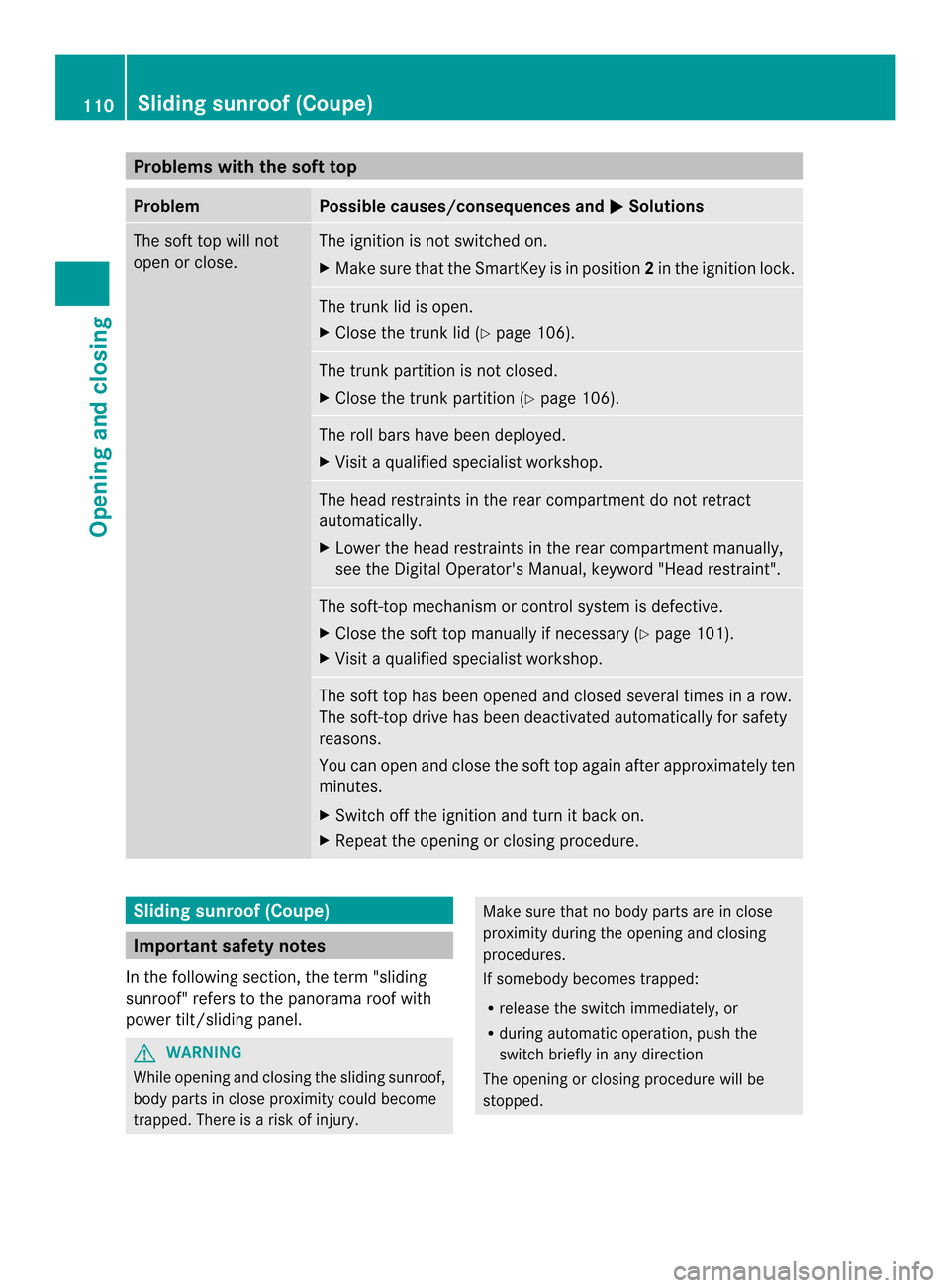
Problems with the soft top
Problem Possible causes/consequences and
0001 Solutions
The soft top will not
open or close. The ignition is not switched on.
X
Make sure that the SmartKey is in position 2in the ignition lock. The trunk lid is open.
X
Close the trunk lid (Y page 106). The trunk partition is not closed.
X
Close the trunk partition (Y page 106). The roll bars have been deployed.
X
Visit a qualified specialist workshop. The head restraints in the rear compartment do not retract
automatically.
X
Lower the head restraints in the rear compartmen tmanually,
see the Digital Operator's Manual, keyword "Head restraint". The soft-top mechanism or control system is defective.
X
Close the sof ttop manually if necessary (Y page 101).
X Visit a qualified specialist workshop. The soft top has been opened and closed several times in a row.
The soft-top drive has been deactivated automatically for safety
reasons.
You can open and close the soft top again after approximately ten
minutes.
X
Switch off the ignition and turn it back on.
X Repeat the opening or closing procedure. Sliding sunroof (Coupe)
Important safety notes
In the following section, the term "sliding
sunroof" refers to the panorama roof with
power tilt/sliding panel. G
WARNING
While opening and closing the sliding sunroof,
body parts in close proximity could become
trapped. There is a risk of injury. Make sure that no body parts are in close
proximity during the opening and closing
procedures.
If somebody becomes trapped:
R
release the switch immediately, or
R during automatic operation, push the
switch briefly in any direction
The opening or closing procedure will be
stopped. 110
Sliding sunroof (Coupe)Opening and closing
Page 214 of 394
Rear view camera
General notes Example
:Coupe
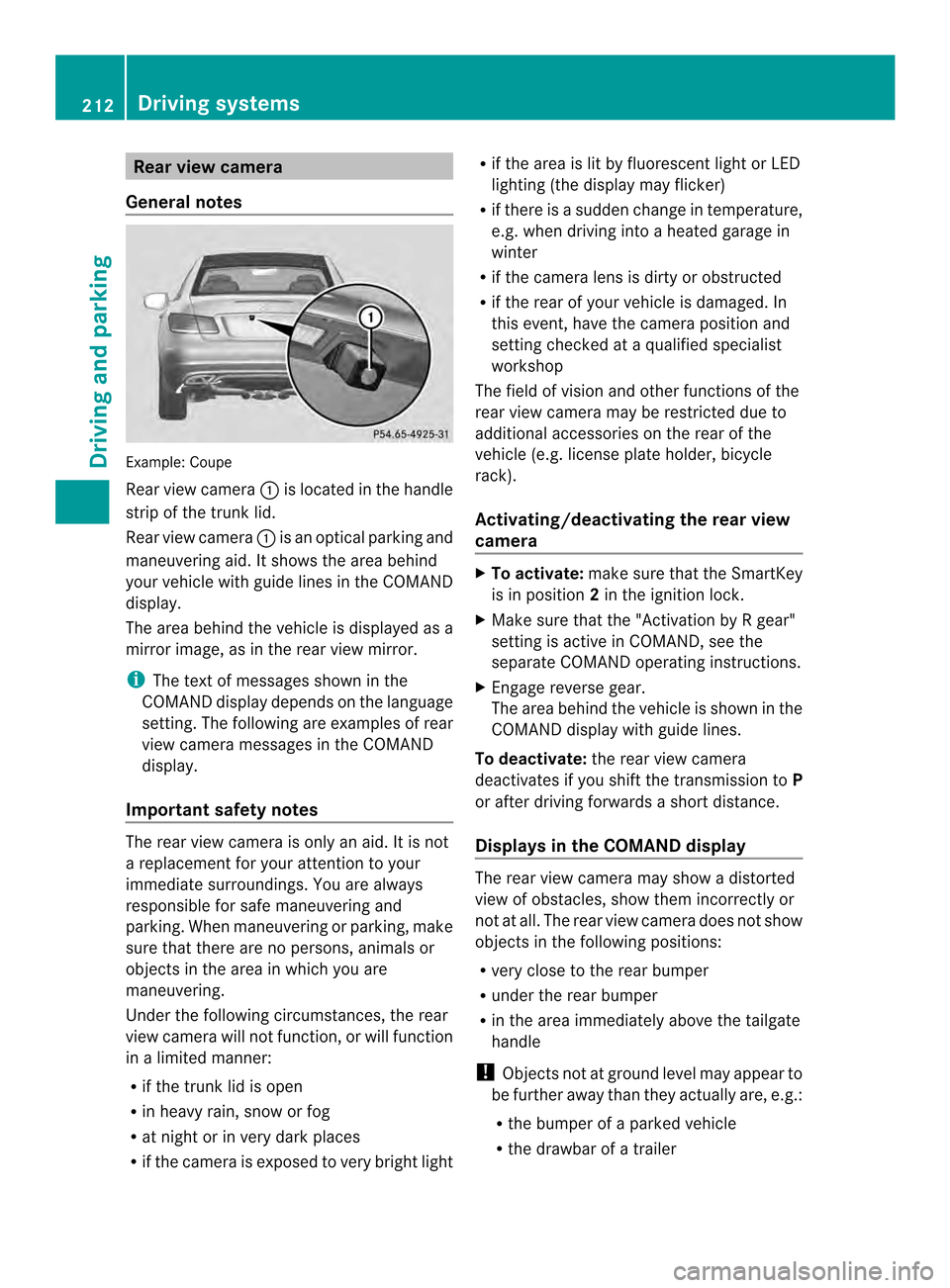
Rear view camera 0002is located in the handle
strip of the trunk lid.
Rear view camera 0002is an optical parking and
maneuvering aid. It shows the area behind
your vehicle with guide lines in the COMAND
display.
The area behind the vehicle is displayed as a
mirror image, as in the rear view mirror.
i The text of messages shown in the
COMAND display depends on the language
setting. The following are examples of rear
view camera messages in the COMAND
display.
Important safety notes The rear view camera is only an aid. It is not
a replacement for your attention to your
immediate surroundings. You are always
responsible for safe maneuvering and
parking. When maneuvering or parking, make
sure that there are no persons, animals or
objects in the area in which you are
maneuvering.
Under the following circumstances, the rear
view camera will not function, or will function
in a limited manner:
R if the trunk lid is open
R in heavy rain, snow or fog
R at night or in very dark places
R if the camera is exposed to very bright light R
if the area is lit by fluorescent light or LED
lighting (the display may flicker)
R if there is a sudden change in temperature,
e.g. when driving into a heated garage in
winter
R if the camera lens is dirty or obstructed
R if the rear of your vehicle is damaged. In
this event, have the camera position and
setting checked at a qualified specialist
workshop
The field of vision and other functions of the
rear view camera may be restricted due to
additional accessories on the rear of the
vehicle (e.g. license plate holder, bicycle
rack).
Activating/deactivating the rear view
camera X
To activate: make sure that the SmartKey
is in position 2in the ignition lock.
X Make sure that the "Activation by R gear"
setting is active in COMAND, see the
separate COMAND operating instructions.
X Engage reverse gear.
The area behind the vehicle is shown in the
COMAND display with guide lines.
To deactivate: the rear view camera
deactivates if you shift the transmission to P
or after driving forwards a short distance.
Displays in the COMAND display The rear view camera may show a distorted
view of obstacles, show them incorrectly or
not at all. The rear view camera does not show
objects in the following positions:
R
very close to the rear bumper
R under the rear bumper
R in the area immediately above the tailgate
handle
! Objects not at ground level may appear to
be further away than they actually are, e.g.:
R the bumper of a parked vehicle
R the drawbar of a trailer 212
Driving systemsDriving and parking
Page 218 of 394
incorrectly or not at all. The 360°camera is
not a substitute for attentive driving.
You are always responsible for safe
maneuvering and parking. When
maneuvering or parking, make sure that there
are no persons, animals or objects in the area
in which you are maneuvering.
You are always responsible for safety, and
must always pay attention to your
surroundings when parking and
maneuvering. This applies to the areas
behind, in front of and beside the vehicle. You
could otherwise endanger yourself and
others.
The 360° camera will not function or will
function in a limited manner:
R if the doors are open
R if the exterior mirrors are folded in
R if the trunk lid is open
R in heavy rain, snow or fog
R at night or in very dark places
R if the cameras are exposed to very bright
light
R if the area is lit by fluorescen tlight or LED
lighting (the display may flicker)
R if you exit a heated garage in winter,
resulting in a rapid change in temperature
R if the camera lenses are dirty or covered
R if the vehicle components in which the
cameras are installed are damaged. In this
event, have the camera position and setting
checked at a qualified specialist workshop.
Do not use the 360 °camera in this case. You
can otherwise injure other sorcause damage
to objects or the vehicle.
Guide lines are always shown at road level.
Activation conditions The 360° camera image can be displayed if:
R
your vehicle is equipped with a 360°
camera
R the SmartKey is in position 2in the ignition
lock R
COMAND is switched on, see the separate
COMAND operating instructions
R the 360° Camera function is activated
Activating the 360° camera using the
SYS button X
Press and hold the 0003button for longer
than 2seconds, see the separate COMAND
operating instructions.
Depending on whether position Dor Ris
engaged, the following is shown:
R full screen display with the image from
the front camera
R full screen display with the image from
the rear camera
Activating the 360° camer awith
COMAND X
Press the 0003button; see the separate
COMAND operating Instructions.
or
X Select System by turning
000E0002000Fthe
COMAN Dcontroller and press 000Cto
confirm.
X Select 360° Camera and press
000Cto
confirm.
Depending on whether position Dor Ris
engaged, the following is shown:
R a split screen with top view and the
image from the front camera or
R a split screen with top view and the
image from the rear view camera
For further information about the COMAND
controller, see the separate COMAND
operating instructions.
Activating the 360° camera using
reverse gear The 360° camera images can be
automatically displayed by engaging reverse
gear.216
Driving systemsDriving and parking
Page 219 of 394
X
Make sure that the SmartKey is in position
2 in the ignition lock.
X Make sure that the Activation by R gear setting is active in COMAND, see the
separate COMAND operating instructions.
X To show the 360° camera image: engage
reverse gear.
The area behind the vehicle is shown in the
COMAND display in split-screen mode. You
see the top view of the vehicle and the
image from the rear view camera.
Selecting the split-screen and full
screen displays X
To switch between split screen views:
switch to the line with the vehicle icons by
sliding 000B0002the COMAND controller.
X Turn 000E0002000F the COMAND controller and
select one of the vehicle symbols.
X To switch to full screen mode: select
Full Screen by turning
000E0002000Fthe
COMAND controller and press 000Cto
confirm.
i The full screen option is only available in
the following views:
R Top view with picture from the rear view
camera
R Top view with picture from the front
camera
Displays in the COMAND display Important safety notes
The camera system may show a distorted
view of obstacles, show them incorrectly or
not at all. Obstacles are not shown by the
system in the following locations:
R under the front and rear bumpers
R very close to the front and rear bumpers
R in the area immediately above the tailgate
handle/trunk lid handle R
very close to the exterior mirrors
R in the transitional areas between the
various cameras in the virtual top view
! Objects not at ground level may appearto
be further away than they actually are, e.g.:
R the bumper of a parked vehicle
R the drawbar of a trailer
R the ball coupling of a trailer tow hitch
R the rear section of an HGV
R a slanted post
Use the guidelines only for orientation.
Approach objects no further than the
bottom-most guideline.
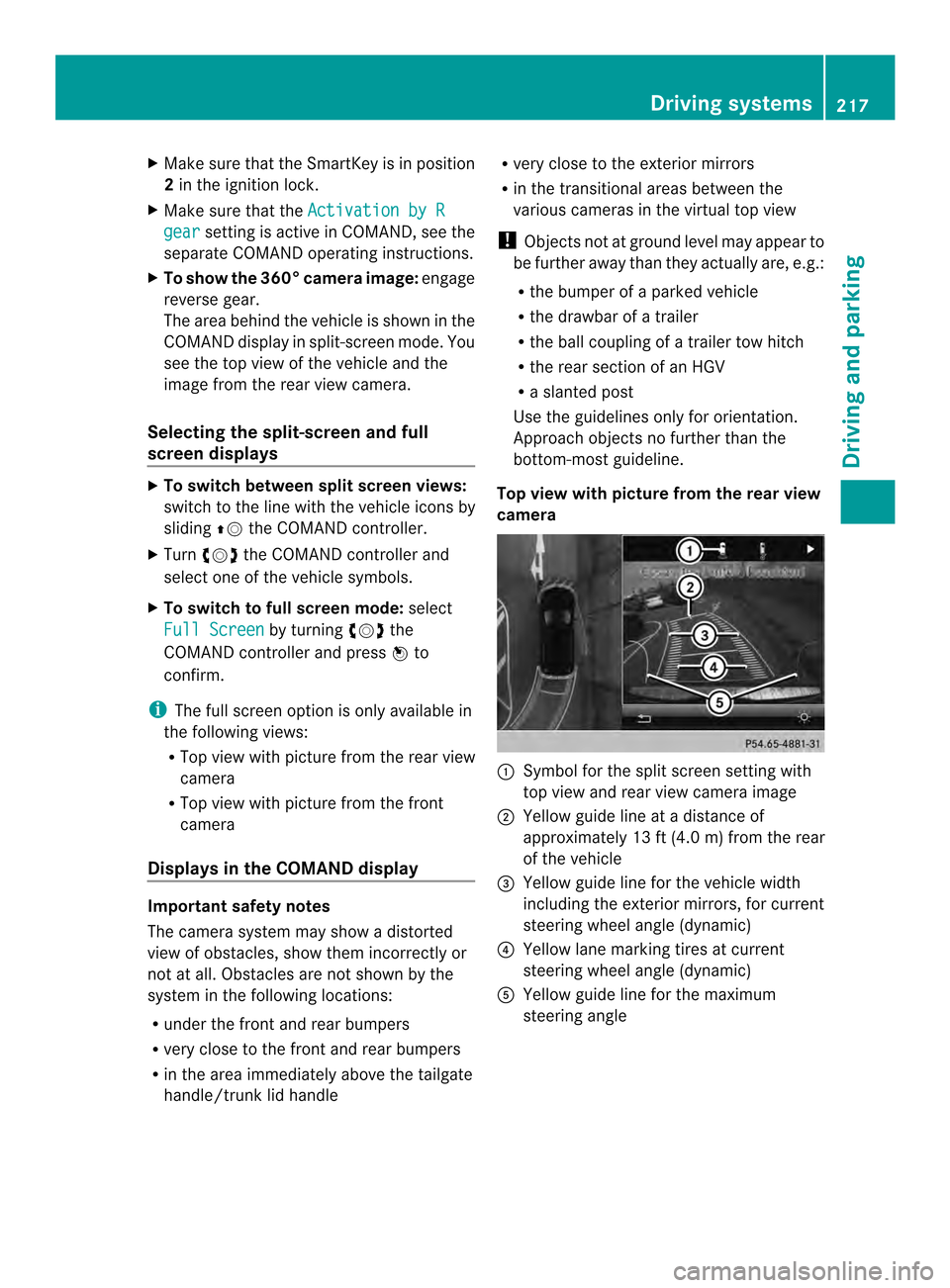
Top view with picture from the rear view
camera 0002
Symbol for the split scree nsetting with
top view and rear view camera image
0003 Yellow guide line at a distance of
approximately 13 ft (4.0 m) from the rear
of the vehicle
0023 Yellow guide line for the vehicle width
including the exterior mirrors, for current
steering wheel angle (dynamic)
0022 Yellow lane marking tires at current
steering wheel angle (dynamic)
0020 Yellow guide line for the maximum
steering angle Driving systems
217Driving and parking Z
Page 247 of 394

X
Press 000Bto confirm.
X Press the 0004or0003 button to set the
color to SOLAR ,
NEUTRAL or
POLAR .
X Press the 000Bor0007 button to save the
setting.
Activating/deactivating surround
lighting and exterior lighting delayed
switch-off
X Press the 0002or0005 button on the
steering wheel to select the Sett. menu.
X Press the 0004or0003 button to select the
Lights submenu.
X Press 000Bto confirm.
X Press 0004or0003 to select the
Surround Lighting function.
If the Surround Lighting function is
activated, the light cone and the area
around the vehicle are displayed in orange
in the multifunction display.
X Press the 000Bbutton to save the setting.
Deactivating delayed switch-off of the
exterior lighting temporarily:
X Before leaving the vehicle, turn the
SmartKey to position 0in the ignition lock.
X Turn the SmartKey to position 2in the
ignition lock.
The exterior lighting delayed switch-off is
deactivated.
Delayed switch-off of the exterior lighting is
reactivated the next time you start the
engine.
If you have activated the SurroundLighting function and the light switch is set
to 0004, the following functions are activated
when it is dark:
R surround lighting: the exterior lighting
remains lit for 40 seconds after unlocking
with the SmartKey. If you start the engine,
the surround lighting is switched off and
automatic headlamp mode is activated
(Y page 135).
R exterior lighting delayed switch-off: the
exterior lighting remains lit for 60 seconds after the engine is switched off.
If you close all the doors and the trunkl
id,
the exterior lighting goes off after
5s econds.
i Depending on your vehicle's equipment,
when the surround lighting and delayed
switch-off exterior lighting are on, the
following light up:
R Parking lamps
R Low-beam headlamps
R Daytime running lamps
R Side marker lamps
R Surround lighting in the exterior mirrors
Activating/deactivating the interior
lighting delayed switch-off
If you activate the Light. Delay function,
the interior lighting remains on for
20 seconds after you remove the key from the
ignition lock.
X Press the 0002or0005 button on the
steering wheel to select the Sett. menu.
X Press the 0004or0003 button to select the
Lights submenu.
X Press 000Bto confirm.
X Press the 0004or0003 button to select the
Light. Delay function.
If the Light. Delay function has been
switched on, the vehicle interior is
displayed in orange in the multifunction
display.
X Press the 000Bbutton to save the setting.
Vehicle Activating/deactivating the automatic
door locking mechanism
X
Press the 0002or0005 button on the
steering wheel to select the Sett. menu.
X Press 0004or0003 to select the Vehicle submenu.
X Press 000Bto confirm. Menus and submenus
245On-board computer and displays Z