esp MERCEDES-BENZ E-Class COUPE 2016 C207 Repair Manual
[x] Cancel search | Manufacturer: MERCEDES-BENZ, Model Year: 2016, Model line: E-Class COUPE, Model: MERCEDES-BENZ E-Class COUPE 2016 C207Pages: 318, PDF Size: 7.35 MB
Page 151 of 318
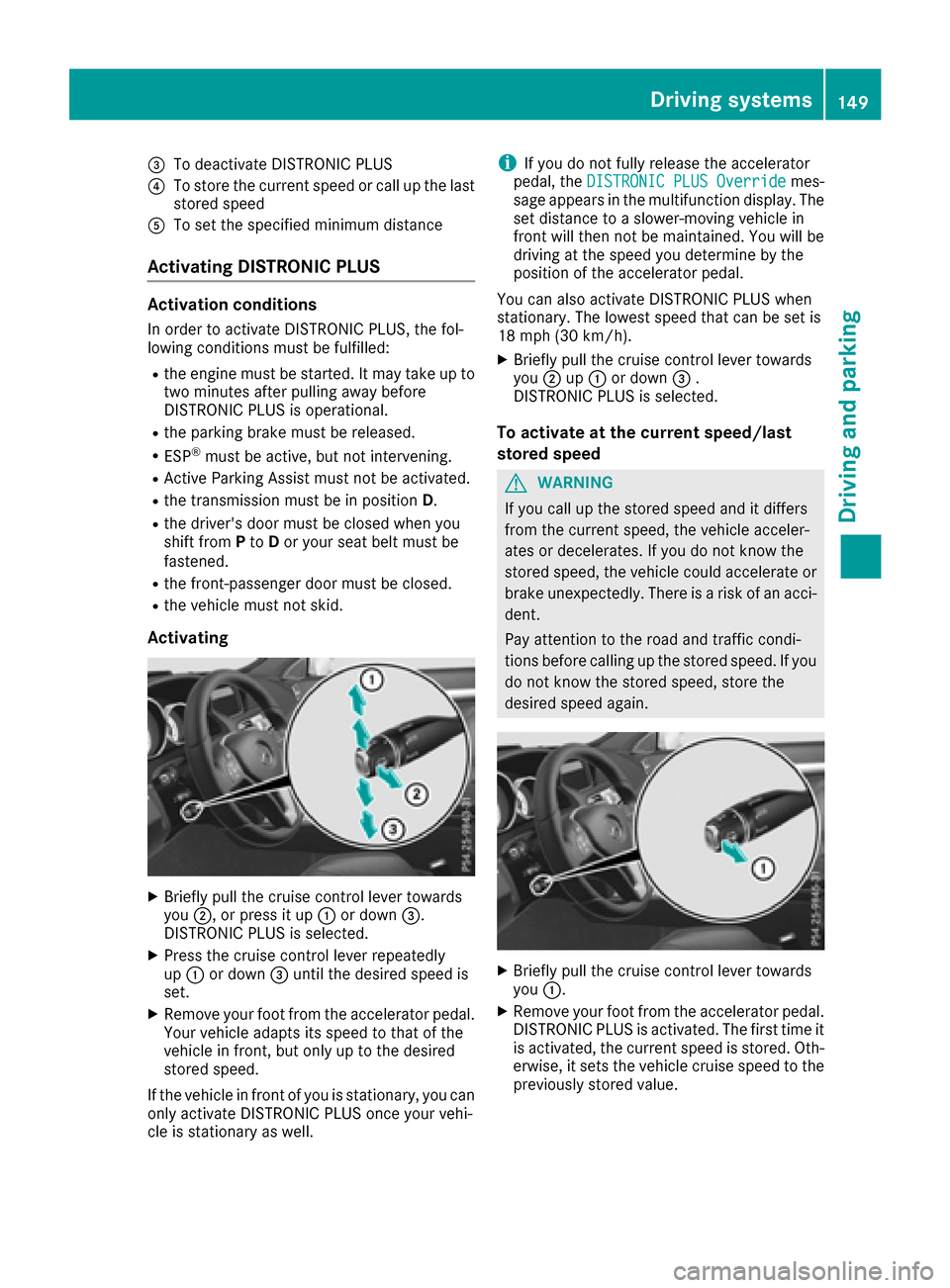
=To deactivate DISTRONIC PLUS
?To store the current speed or call up the last
stored speed
ATo set the specified minimum distance
Activating DISTRONIC PLUS
Activation conditions
In order to activate DISTRONIC PLUS, the fol-
lowing conditions must be fulfilled:
Rthe engine must be started. It may take up totwo minutes after pulling away before
DISTRONIC PLUS is operational.
Rthe parking brake must be released.
RESP®must be active, but not intervening.
RActive Parking Assist must not be activated.
Rthe transmission must be in position D.
Rthe driver's door must be closed when you
shift fromPto Dor your seat belt must be
fastened.
Rthe front-passenger door must be closed.
Rthe vehicle must not skid.
Activating
XBriefly pull the cruise control lever towards
you ;, or press it up :or down =.
DISTRONIC PLUS is selected.
XPress the cruise control lever repeatedly
up : or down =until the desired speed is
set.
XRemove your foot from the accelerator pedal.
Your vehicle adapts its speed to that of the
vehicle in front, but only up to the desired
stored speed.
If the vehicle in front of you is stationary, you can only activate DISTRONIC PLUS once your vehi-
cle is stationary as well.
iIf you do not fully release the accelerator
pedal, the DISTRONIC PLUS Overridemes-
sage appears in the multifunction display. The
set distance to a slower-moving vehicle in
front will then not be maintained. You will be
driving at the speed you determine by the
position of the accelerator pedal.
You can also activate DISTRONIC PLUS when
stationary. The lowest speed that can be set is
18 mph (30 km/h) .
XBriefly pull the cruise control lever towards
you;up: or down =.
DISTRONIC PLUS is selected.
To activate at the current speed/last
stored speed
GWARNING
If you call up the stored speed and it differs
from the current speed, the vehicle acceler-
ates or decelerates. If you do not know the
stored speed, the vehicle could accelerate or brake unexpectedly. There is a risk of an acci-
dent.
Pay attention to the road and traffic condi-
tions before calling up the stored speed. If you
do not know the stored speed, store the
desired speed again.
XBriefly pull the cruise control lever towards
you :.
XRemove your foot from the accelerator pedal.
DISTRONIC PLUS is activated. The first time it
is activated, the current speed is stored. Oth-
erwise, it sets the vehicle cruise speed to the
previously stored value.
Driving systems149
Driving and parking
Z
Page 152 of 318
Drivingwit hDISTRONI CPLUS
Pullin gawa yan ddrivin g
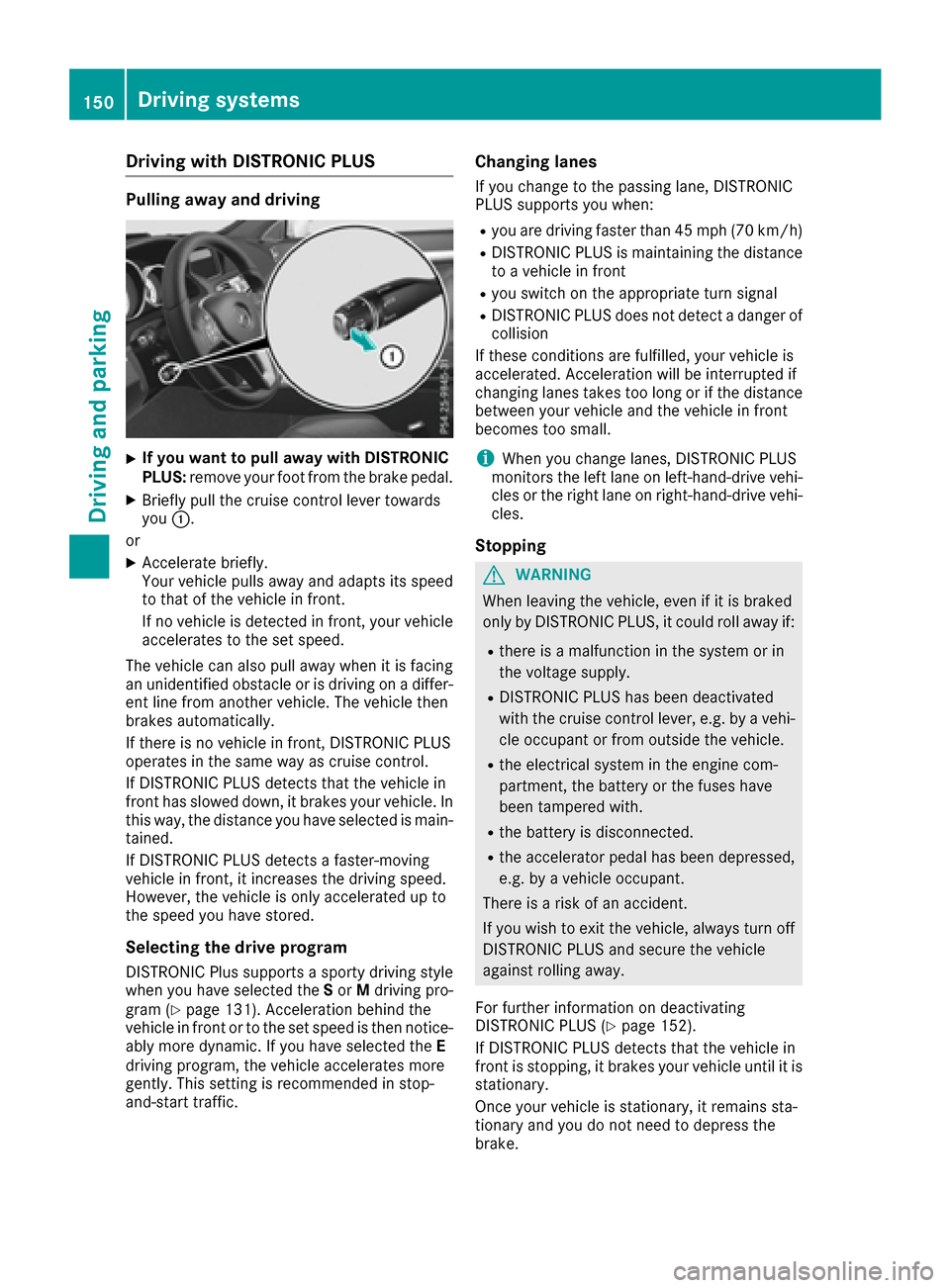
XIf you wan tto pull awa ywit hDISTRONI C
PLUS :remov eyour foot from th ebrake pedal.
XBriefly pull th ecruise contro llever toward s
you :.
or
XAccelerat ebriefly.
Your vehicle pulls away and adapt sits speed
to that of th evehicle in front.
If no vehicle is detecte din front, your vehicle
accelerates to th eset speed.
The vehicle can also pull away when it is facin g
an unidentifie dobstacl eor is drivin gon adiffer-
en tlin efrom another vehicle. The vehicle then
brake sautomatically.
If there is no vehicle in front, DISTRONIC PLU S
operates in th esam eway as cruise control.
If DISTRONIC PLU Sdetects that th evehicle in
fron thas slowed down ,it brake syour vehicle. In
this way, th edistanc eyou hav eselecte dis main -
tained.
If DISTRONIC PLU Sdetects afaster-movin g
vehicle in front, it increase sth edrivin gspeed.
However, th evehicle is only accelerated up to
th espeed you hav estored.
Selecting th edrive program
DISTRONIC Plus supports asport ydrivin gstyle
when you hav eselecte dth eS or Mdrivin gpro -
gram (
Ypage 131). Acceleration behin dth e
vehicle in fron tor to th eset speed is then notice -
ably more dynamic .If you hav eselecte dth eE
drivin gprogram, th evehicle accelerates more
gently. Thi ssetting is recommended in stop-
and-start traffic .
Changinglanes
If you chang eto th epassin glane, DISTRONIC
PLU Ssupports you when :
Ryou are drivingfaste rthan 45 mph (70 km/h)
RDISTRONIC PLU Sis maintainin gth edistanc e
to avehicle in fron t
Ryou switch on th eappropriat eturn signal
RDISTRONIC PLU Sdoe sno tdetec t adanger of
collision
If these condition sare fulfilled, your vehicle is
accelerated. Acceleration will be interrupted if
changin glanes take sto olon gor if th edistanc e
between your vehicle and th evehicle in fron t
becomes to osmall.
iWhe nyou chang elanes, DISTRONIC PLU S
monitors th elef tlan eon left-hand-drive vehi-
cles or th eright lan eon right-hand-driv evehi-
cles.
Stopping
GWARNING
Whe nleavin gth evehicle, eve nif it is brake d
only by DISTRONIC PLUS, it could roll away if:
Rthere is amalfunction in th esyste mor in
th evoltage supply.
RDISTRONIC PLU Shas bee ndeactivated
wit hth ecruise contro llever, e.g. by avehi-
cl e occupant or from outsid eth evehicle.
Rth eelectrical system in th eengin ecom-
partment, th ebattery or th efuses hav e
bee ntampered with.
Rth ebattery is disconnected.
Rth eaccelerator peda lhas bee ndepressed,
e.g. by avehicle occupant .
There is aris kof an accident.
If you wish to exit th evehicle, always turn of f
DISTRONIC PLU Sand secure th evehicle
against rollin gaway.
Fo rfurther information on deactivatin g
DISTRONIC PLU S (
Ypage 152).
If DISTRONIC PLU Sdetects that th evehicle in
fron tis stopping, it brake syour vehicle until it is
stationary.
Once your vehicle is stationary, it remain ssta-
tionary and you do no tneed to depress th e
brake .
150Driving systems
Driving an d parking
Page 154 of 318
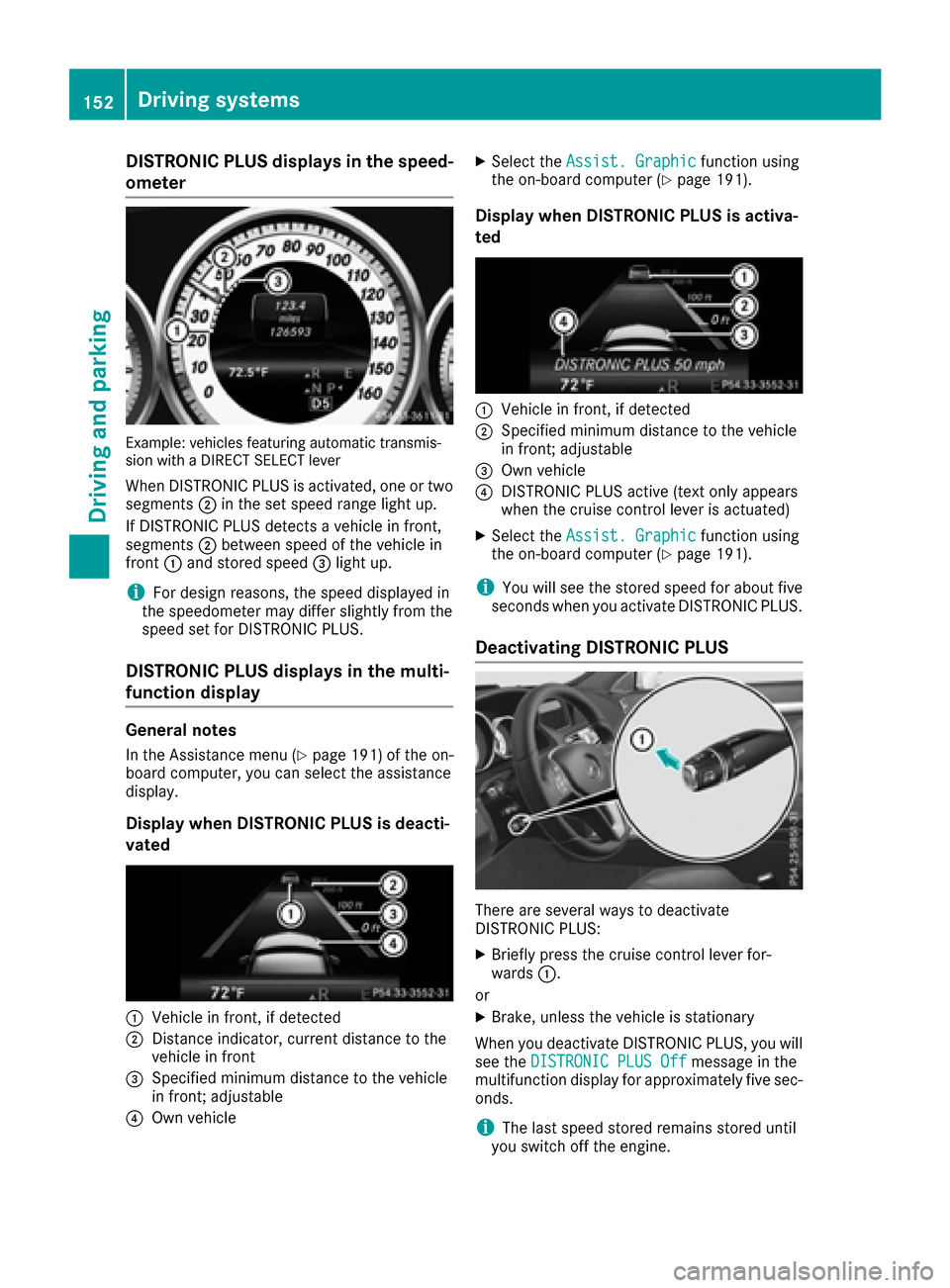
DISTRONICPLUS display sin th espeed -
ometer
Example: vehicles featurin gautomatic transmis -
sio nwit h a DIREC TSELECT lever
Whe nDISTRONIC PLU Sis activated, on eor tw o
segments ;in th eset speed range ligh tup.
If DISTRONIC PLU Sdetects avehicle in front,
segments ;between speed of th evehicle in
fron t: and stored speed =ligh tup.
iFo rdesign reasons, th espeed displaye din
th espeedometer may diffe rslightly from th e
speed set fo rDISTRONIC PLUS.
DISTRONI CPLUS display sin th emulti-
function display
General notes
In th eAssistanc emen u (Ypage 191) of th eon -
boar dcomputer, you can selec tth eassistanc e
display.
Display when DISTRONI CPLUS is deacti -
vate d
:Vehicle in front, if detecte d
;Distanceindicator ,curren tdistanc eto th e
vehicle in fron t
=Specified minimum distanc eto th evehicle
in front; adjustable
?Own vehicle
XSelec tth eAssist .Graphi cfunction usin g
th eon-boar dcompute r (Ypage 191).
Display when DISTRONI CPLUS is activa -
te d
:Vehicle in front, if detecte d
;Specified minimum distanc eto th evehicle
in front; adjustable
=Own vehicle
?DISTRONIC PLU Sactive (tex tonly appears
when th ecruise contro llever is actuated)
XSelec tth eAssist .Graphi cfunction usin g
th eon-boar dcompute r (Ypage 191).
iYou will see th estored speed fo rabout fiv e
seconds when you activat eDISTRONIC PLUS.
Deactivating DISTRONI CPLUS
There are severa lways to deactivat e
DISTRONIC PLUS:
XBriefly press th ecruise contro llever for-
ward s:.
or
XBrake, unless th evehicle is stationary
Whe nyou deactivat eDISTRONIC PLUS, you will
see th eDISTRONIC PLU SOff
messag ein th e
multifunction display fo rapproximately fiv esec -
onds.
iThe last speed stored remain sstored until
you switch of fth eengine.
152Driving systems
Driving an d parking
Page 155 of 318
iDISTRONIC PLUS is not deactivated if you
depress the accelerator pedal.
DISTRONIC PLUS is automatically deactivated
if:
Ryou engage the parking brake
RESP®intervenes or you deactivate ESP®
Rthe transmission is in the P,R or Nposition
Ryou pull the cruise control lever towards you
in order to pull away and the front-passenger
door is open
Rthe vehicle is skidding
Ryou activate Active Parking Assist
If DISTRONIC PLUS is deactivated, you will hear a warning tone. You will see the DISTRONIC
PLUS Offmessage in the multifunction display
for approximately five seconds.
Tips for driving with DISTRONIC PLUS
General notes
Pay particular attention in the following traffic
situations:
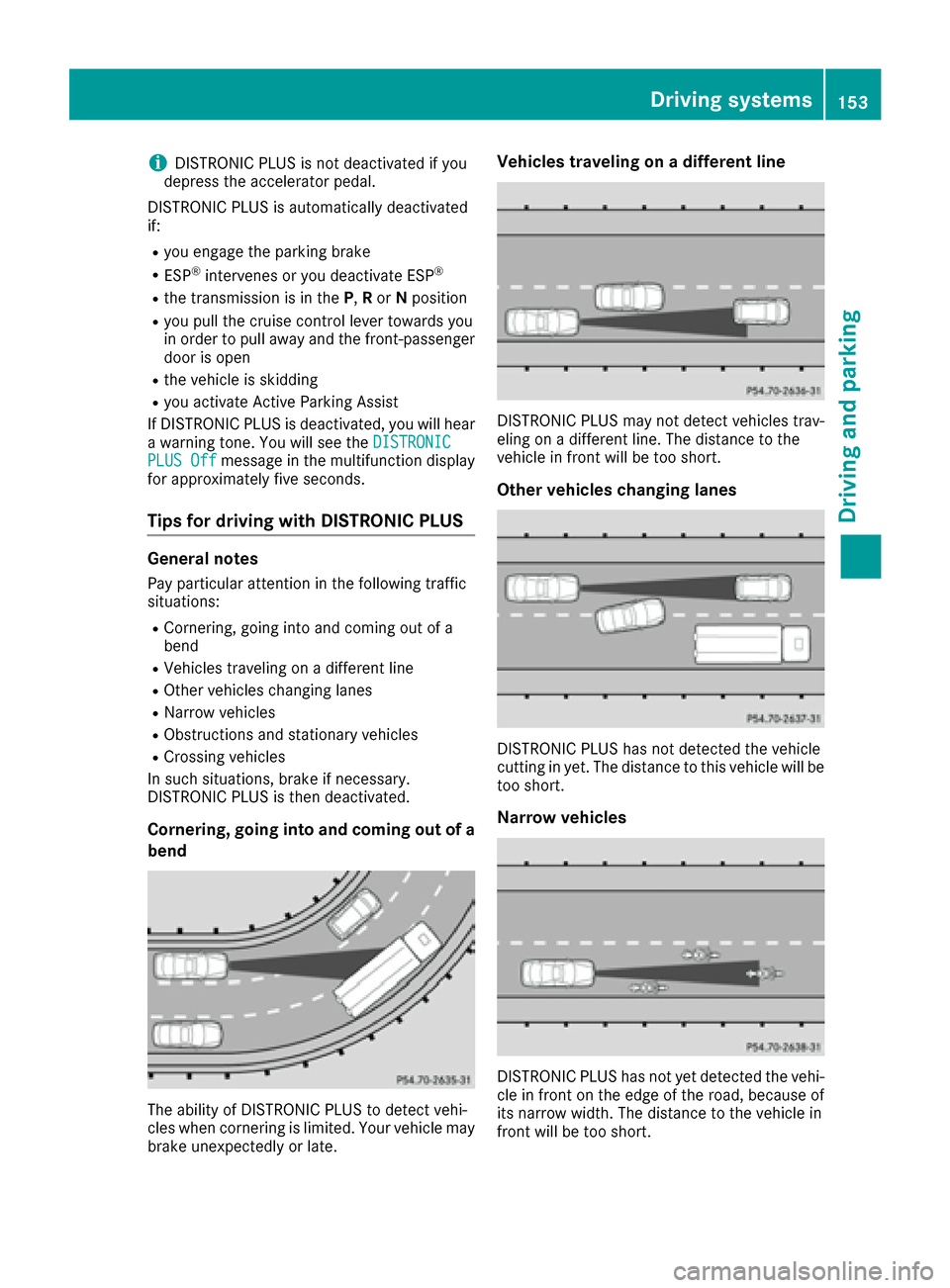
RCornering, going into and coming out of a
bend
RVehicles traveling on a different line
ROther vehicles changing lanes
RNarrow vehicles
RObstructions and stationary vehicles
RCrossing vehicles
In such situations, brake if necessary.
DISTRONIC PLUS is then deactivated.
Cornering, going into and coming out of a
bend
The ability of DISTRONIC PLUS to detect vehi-
cles when cornering is limited. Your vehicle may
brake unexpectedly or late.
Vehicles traveling on a different line
DISTRONIC PLUS may not detect vehicles trav-
eling on a different line. The distance to the
vehicle in front will be too short.
Other vehicles changing lanes
DISTRONIC PLUS has not detected the vehicle
cutting in yet. The distance to this vehicle will be
too short.
Narrow vehicles
DISTRONIC PLUS has not yet detected the vehi-
cle in front on the edge of the road, because of
its narrow width. The distance to the vehicle in
front will be too short.
Driving system s153
Driving an d parking
Z
Page 156 of 318
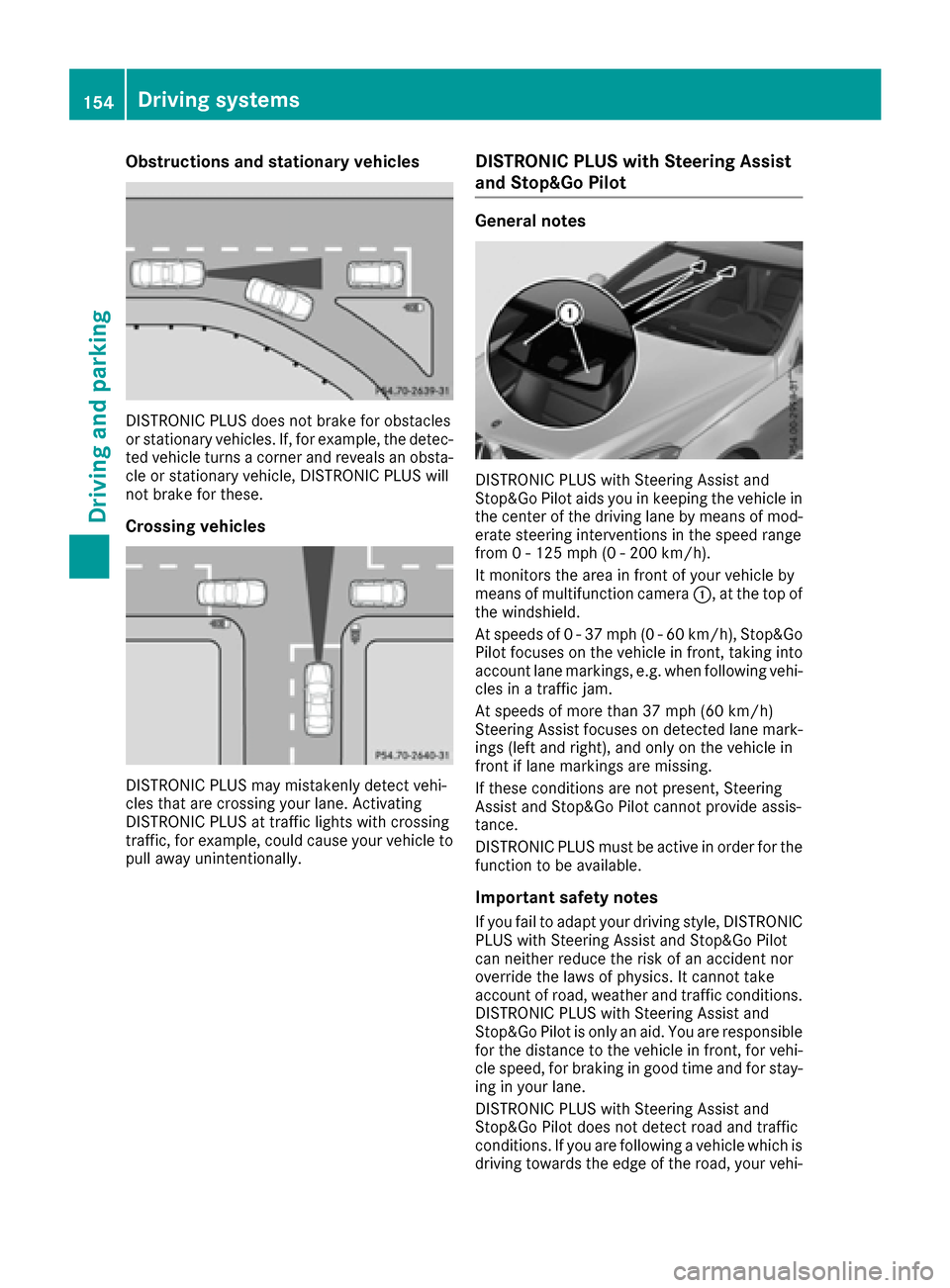
Obstructions and stationary vehicles
DISTRONIC PLUS does not brake for obstacles
or stationary vehicles. If, for example, the detec-
ted vehicle turns a corner and reveals an obsta-cle or stationary vehicle, DISTRONIC PLUS will
not brake for these.
Crossing vehicles
DISTRONIC PLUS may mistakenly detect vehi-
cles that are crossing your lane. Activating
DISTRONIC PLUS at traffic lights with crossing
traffic, for example, could cause your vehicle to
pull away unintentionally.
DISTRONIC PLUS with Steering Assist
and Stop&Go Pilot
General notes
DISTRONIC PLUS with Steering Assist and
Stop&Go Pilot aids you in keeping the vehicle in
the center of the driving lane by means of mod-
erate steering interventions in the speed range
from 0 - 125 mph (0 - 200 km/ h).
It monitors the area in front of your vehicle by
means of multifunction camera :, at the top of
the windshield.
At speeds of 0 - 37 mph (0 - 60 km/h), Stop&Go Pilot focuses on the vehicle in front, taking into
account lane markings, e.g. when following vehi-
cles in a traffic jam.
At speeds of more than 37 mph (60 km/h)
Steering Assist focuses on detected lane mark-
ings (left and right), and only on the vehicle in
front if lane markings are missing.
If these conditions are not present, Steering
Assist and Stop&Go Pilot cannot provide assis-
tance.
DISTRONIC PLUS must be active in order for the
function to be available.
Important safety notes
If you fail to adapt your driving style, DISTRONIC
PLUS with Steering Assist and Stop&Go Pilot
can neither reduce the risk of an accident nor
override the laws of physics. It cannot take
account of road, weather and traffic conditions.
DISTRONIC PLUS with Steering Assist and
Stop&Go Pilot is only an aid. You are responsible
for the distance to the vehicle in front, for vehi-
cle speed, for braking in good time and for stay-
ing in your lane.
DISTRONIC PLUS with Steering Assist and
Stop&Go Pilot does not detect road and traffic
conditions. If you are following a vehicle which is
driving towards the edge of the road, your vehi-
154Driving systems
Driving and parking
Page 158 of 318
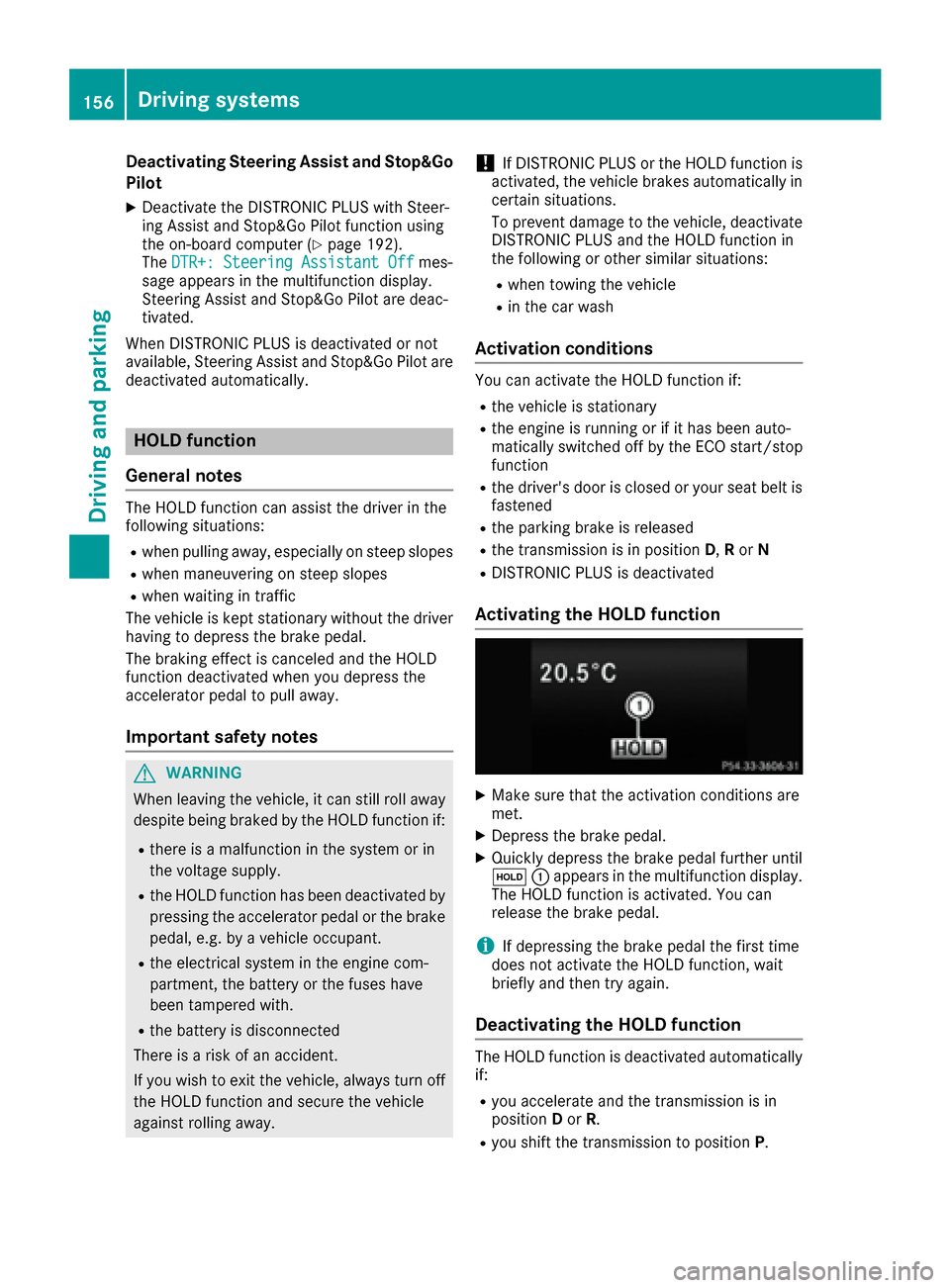
Deactivating Steering Assistand Stop&Go
Pilot
XDeactivat eth eDISTRONIC PLU Swit hSteer -
in g Assis tand Stop&Go Pilo tfunction usin g
th eon-boar dcomputer (
Ypage 192).
The DTR+: Steering Assistant Offmes-
sage appears in th emultifunction display.
Steerin gAssis tand Stop&Go Pilo tare deac -
tivated.
Whe nDISTRONIC PLU Sis deactivated or no t
available, Steerin gAssis tand Stop&Go Pilo tare
deactivated automatically.
HOL Dfunction
General notes
The HOLD function can assist th edriver in th e
following situations:
Rwhen pullin gaway, especially on steep slopes
Rwhen maneuverin gon steep slopes
Rwhen waitin gin traffic
The vehicl eis kept stationary without th edriver
havin gto depress th ebrak epedal.
The brakin geffec tis canceled and th eHOLD
function deactivated when you depress th e
accelerato rpeda lto pull away.
Important safet ynotes
GWARNIN G
Whe nleavin gth evehicle, it can still rol laway
despit ebein gbraked by th eHOLD function if:
Rthere is amalfunction in th esystem or in
th evoltag esupply.
Rth eHOLD function has been deactivated by
pressing th eaccelerato rpeda lor th ebrak e
pedal, e.g. by avehicl eoccupant .
Rtheelectrica lsystem in th eengin ecom-
partment, th ebattery or th efuses hav e
been tampered with.
Rth ebattery is disconnected
There is aris kof an accident.
If you wish to exit th evehicle, always tur nof f
th eHOLD function and secure th evehicl e
against rollin gaway.
!If DISTRONIC PLU Sor th eHOLD function is
activated, th evehicl ebrakes automatically in
certain situations.
To preven tdamage to th evehicle, deactivat e
DISTRONIC PLU Sand th eHOLD function in
th efollowing or other similar situations:
Rwhen towin gth evehicl e
Rin thecar wash
Activation conditions
You can activat eth eHOLD function if:
Rth evehicl eis stationary
Rth eengin eis running or if it has been auto-
matically switched of fby th eECO start/sto p
function
Rth edriver's doo ris closed or your seat belt is
fastene d
Rtheparkin gbrak eis release d
Rthetransmissio nis in position D,Ror N
RDISTRONIC PLU Sis deactivated
Activating th eHOL Dfunction
XMak esur ethat th eactivation condition sare
met .
XDepress th ebrak epedal.
XQuickl ydepress th ebrak epeda lfurther until
ë :appears in th emultifunction display.
The HOLD function is activated. You can
release th ebrak epedal.
iIf depressin gth ebrak epeda lth efirst time
doe sno tactivat eth eHOLD function ,wait
briefl yand then tr yagain .
Deactivating th eHOL Dfunction
The HOLD function is deactivated automatically
if:
Ryou accelerate and th etransmissio nis in
position Dor R.
Ryou shift th etransmissio nto position P.
156Driving systems
Driving and parking
Page 159 of 318
Ryou depress thebrak epedal again wit h acer-
tai namount of pressur euntil ë disap-
pear sfrom th emultifunction display.
Ryou activat eDISTRONI CPLUS.
Whe nth eHOLD function is activated, th etrans -
mission is shifted automatically to position Pif:
Rth edriver's doo ris open and th edriver's seat
belt is unfastened.
Rth eengin eis switched off ,unless it is auto-
matically switched off by th eECO start/sto p
function .
Rasystem malfunction occurs.
Rth epowe rsupply is no tsufficient.
Dynami c handling package with
spor tsmo de
Gene ral notes
The mos timportant part of th edynamic han -
dlin gpackag ewit hsport smod eis th eadjusta-
ble dampin gsystem. This automatically control s
and adapt sth esuspension to th erespective
drivin gsituation .
The calibration of th esuspension depend son :
Ryour drivin gstyle
Rth eroa dsurfac econdition s
Ryour individual selection ;see th efollowin g
description
Vehicles wit hdynamic handling package
wit hsport smode: In addition to th edrive pro -
grams Eand S,there is also th emanual drive
progra mM (
Ypage 132).
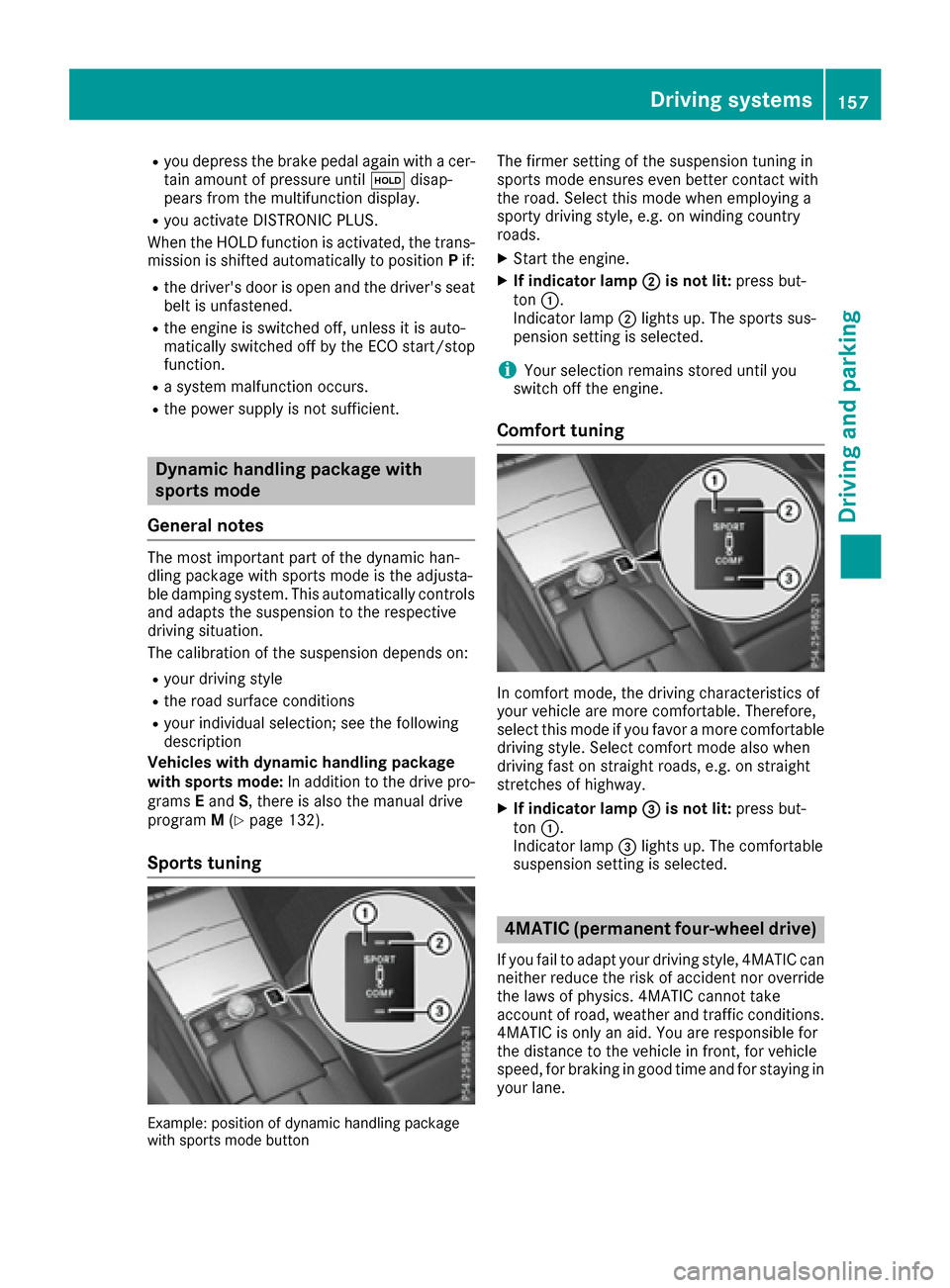
Spor ts tuning
Example: position of dynamic handlin gpackag e
wit hsport smod ebutto n
The firmer setting of th esuspension tunin gin
sport smod eensures eve nbette rcontact wit h
th eroad. Selec tthis mod ewhen employin g a
sport ydrivin gstyle, e.g. on windin gcountry
roads.
XStart th eengine.
XIf indicator lam p;is not lit :press but -
to n:.
Indicato rlamp ;lights up. The sport ssus-
pension setting is selected.
iYour selection remain sstore duntil you
switch off th eengine.
Comfort tuning
In comfort mode, th edrivin gcharacteristics of
your vehicl eare mor ecomfortable. Therefore ,
select this mod eif you favor amor ecomfortable
drivin gstyle. Selec tcomfort mod ealso when
drivin gfas ton straight roads, e.g. on straight
stretches of highway.
XIf indicator lam p=is not lit :press but -
to n:.
Indicato rlamp =lights up. The comfortable
suspension setting is selected.
4MATIC (permanent fou r-wheel drive)
If you fail to adapt your drivin gstyle, 4MATIC can
neither reduce th eris kof acciden tno roverride
th elaws of physics .4MATIC canno ttak e
accoun tof road, weather and traffic conditions.
4MATIC is only an aid. You are responsibl efor
th edistanc eto th evehicl ein front, for vehicl e
speed, for brakin gin goo dtime and for stayin gin
your lane.
Driving systems157
Driving and parking
Z
Page 160 of 318
If a drive wheel spins due to insufficient grip:
ROnly depress the accelerator pedal as far as
necessary when pulling away.
RAccelerate less when driving.
!Never tow the vehicle with one axle raised.
This may damage the transfer case. Damage
of this sort is not covered by the Mercedes-
Benz Limited Warranty. All wheels must
remain either on the ground or be fully raised.
Observe the instructions for towing the vehi-
cle with all wheels in full contact with the
ground.
iIn wintry driving conditions, the maximum
effect of 4MATIC can only be achieved if you
use winter tires (M+S tires), with snow chains
if necessary.
4MATIC ensures that all four wheels are perma-
nently driven. Together with ESP
®, it improves
the traction of your vehicle whenever a drive
wheel spins due to insufficient grip.
PARKTRONIC
Important safety notes
PARKTRONIC is an electronic parking aid with
ultrasonic sensors. It monitors the area around
your vehicle using six sensors in the front
bumper and six sensors in the rear bumper.
PARKTRONIC indicates visually and audibly the
distance between your vehicle and an object.
PARKTRONIC is only an aid. It is not a replace-
ment for your attention to your immediate sur-
roundings. You are always responsible for safe
maneuvering, parking and exiting a parking
space. When maneuvering, parking or pulling
out of a parking space, make sure that there are
no persons, animals or objects in the area in
which you are maneuvering.
!When parking, pay particular attention to
objects above or below the sensors, such as
flower pots or trailer drawbars. PARKTRONIC
does not detect such objects when they are in
the immediate vicinity of the vehicle. You
could damage the vehicle or the objects.
The sensors may not detect snow and other
objects that absorb ultrasonic waves.
Ultrasonic sources such as an automatic car
wash, the compressed-air brakes on a truck
or a pneumatic drill could cause PARKTRONIC
to malfunction. PARKTRONIC may not function correctly on
uneven terrain.
PARKTRONIC is activated automatically when
you:
Rswitch on the ignition
Rshift the transmission to position D,R or N
Rrelease the parking brake
PARKTRONIC is deactivated at speeds above
11 mph (18 km/h). It is reactivated at lower
speeds.
Range of the sensors
General notes
PARKTRONIC does not take objects into con-
sideration that are:
Rbelow the detection range, e.g. people, ani-
mals or objects.
Rabove the detection range, e.g. overhanging
loads, truck overhangs or loading ramps.
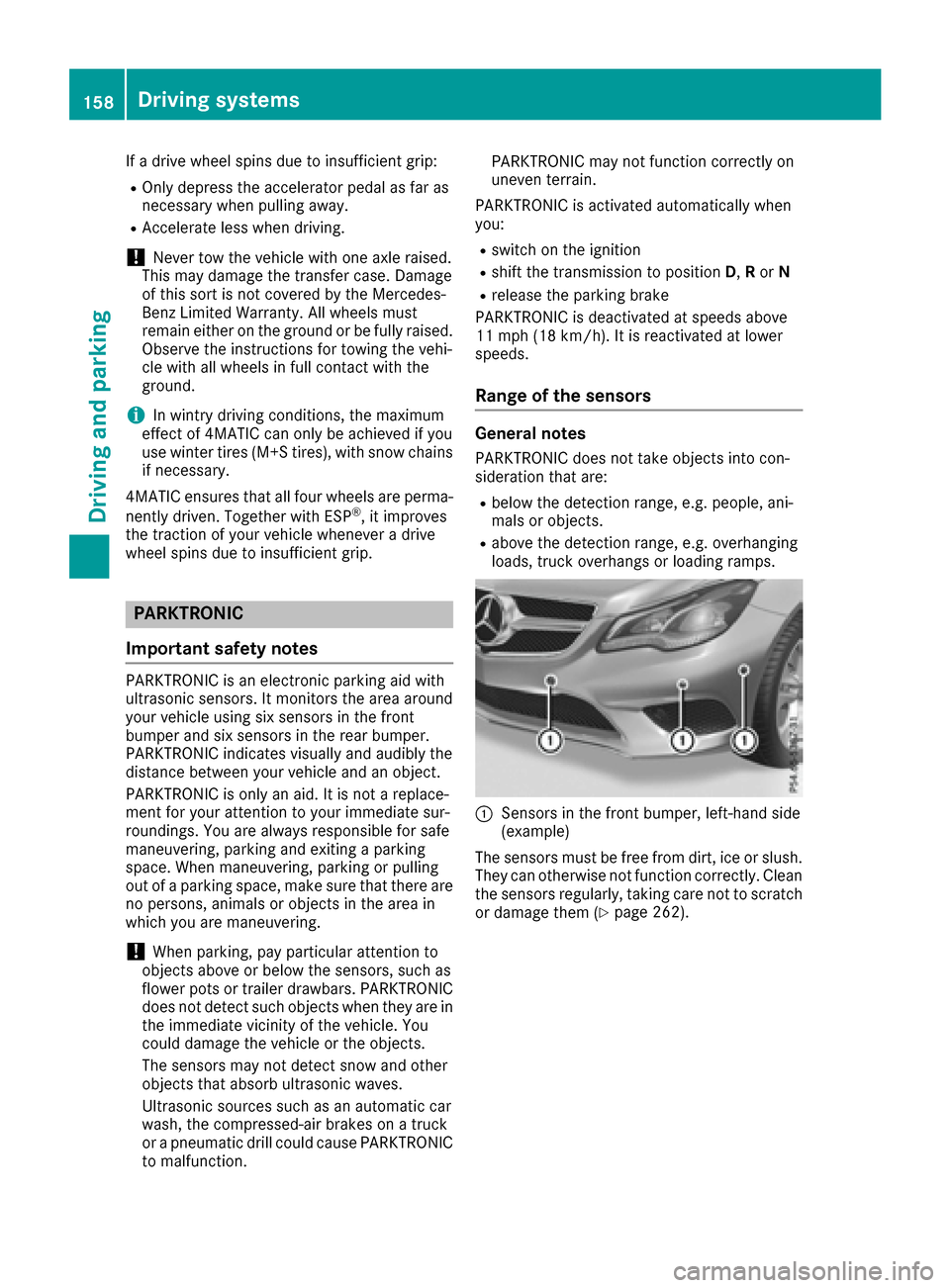
:Sensors in the front bumper, left-hand side
(example)
The sensors must be free from dirt, ice or slush.
They can otherwise not function correctly. Clean
the sensors regularly, taking care not to scratch
or damage them (
Ypage 262).
158Driving systems
Driving and parking
Page 163 of 318
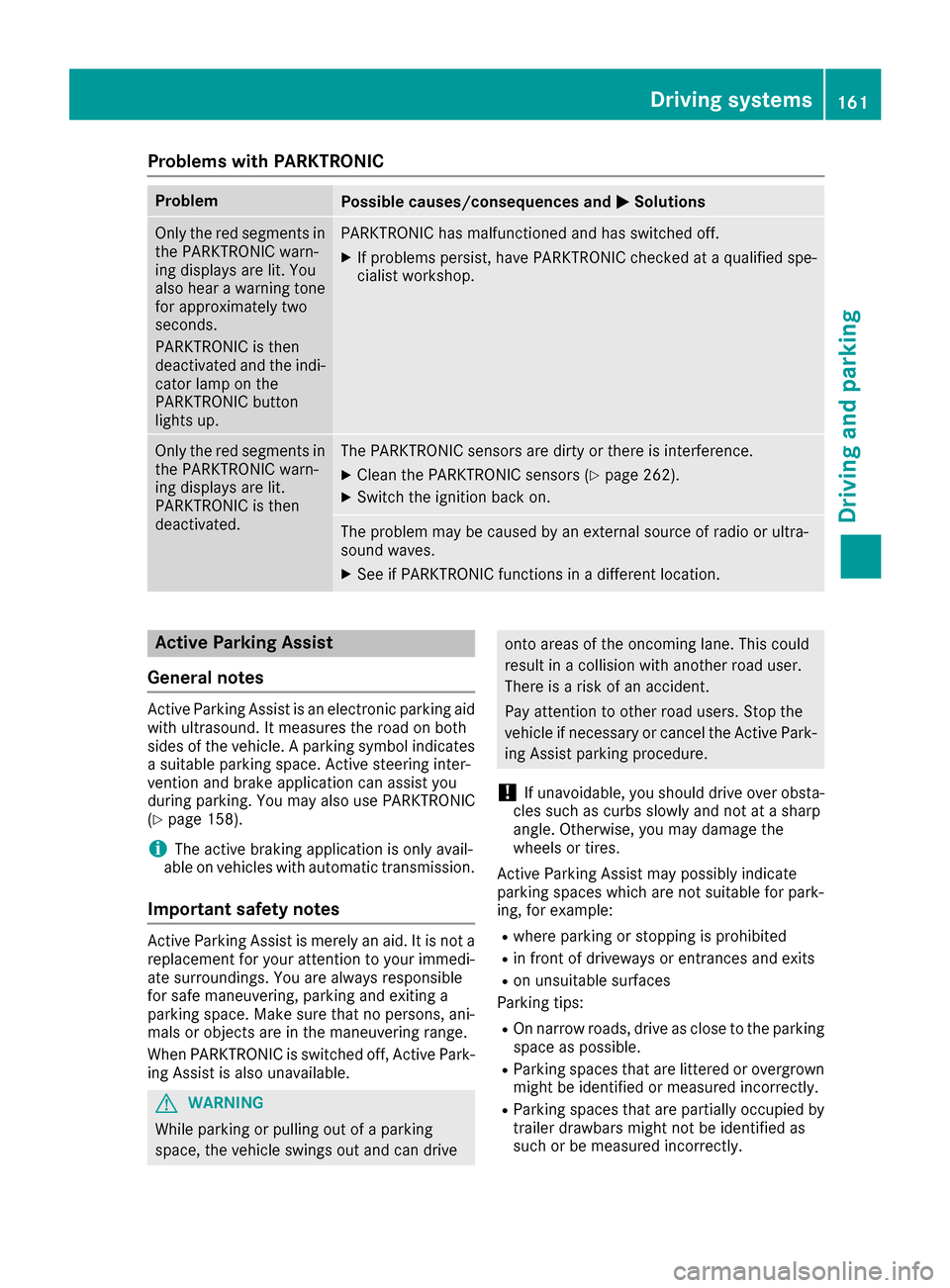
Problems with PARKTRONIC
ProblemPossible causes/consequences andMSolutions
Only the red segments in
the PARKTRONIC warn-
ing displays are lit. You
also hear a warning tone
for approximately two
seconds.
PARKTRONIC is then
deactivated and the indi-
cator lamp on the
PARKTRONIC button
lights up.PARKTRONIC has malfunctioned and has switched off.
XIf problems persist, have PARKTRONIC checked at a qualified spe-
cialist workshop.
Only the red segments in
the PARKTRONIC warn-
ing displays are lit.
PARKTRONIC is then
deactivated.The PARKTRONIC sensors are dirty or there is interference.
XClean the PARKTRONIC sensors (Ypage 262).
XSwitch the ignition back on.
The problem may be caused by an external source of radio or ultra-
sound waves.
XSee if PARKTRONIC functions in a different location.
Active Parking Assist
General notes
Active Parking Assist is an electronic parking aid
with ultrasound. It measures the road on both
sides of the vehicle. A parking symbol indicates a suitable parking space. Active steering inter-
vention and brake application can assist you
during parking. You may also use PARKTRONIC
(
Ypage 158).
iThe active braking application is only avail-
able on vehicles with automatic transmission.
Important safety notes
Active Parking Assist is merely an aid. It is not a
replacement for your attention to your immedi-
ate surroundings. You are always responsible
for safe maneuvering, parking and exiting a
parking space. Make sure that no persons, ani-
mals or objects are in the maneuvering range.
When PARKTRONIC is switched off, Active Park-
ing Assist is also unavailable.
GWARNING
While parking or pulling out of a parking
space, the vehicle swings out and can drive
onto areas of the oncoming lane. This could
result in a collision with another road user.
There is a risk of an accident.
Pay attention to other road users. Stop the
vehicle if necessary or cancel the Active Park- ing Assist parking procedure.
!If unavoidable, you should drive over obsta-
cles such as curbs slowly and not at a sharp
angle. Otherwise, you may damage the
wheels or tires.
Active Parking Assist may possibly indicate
parking spaces which are not suitable for park-
ing, for example:
Rwhere parking or stopping is prohibited
Rin front of driveways or entrances and exits
Ron unsuitable surfaces
Parking tips:
ROn narrow roads, drive as close to the parking
space as possible.
RParking spaces that are littered or overgrown
might be identified or measured incorrectly.
RParking spaces that are partially occupied by
trailer drawbars might not be identified as
such or be measured incorrectly.
Driving systems161
Driving and parking
Z
Page 165 of 318
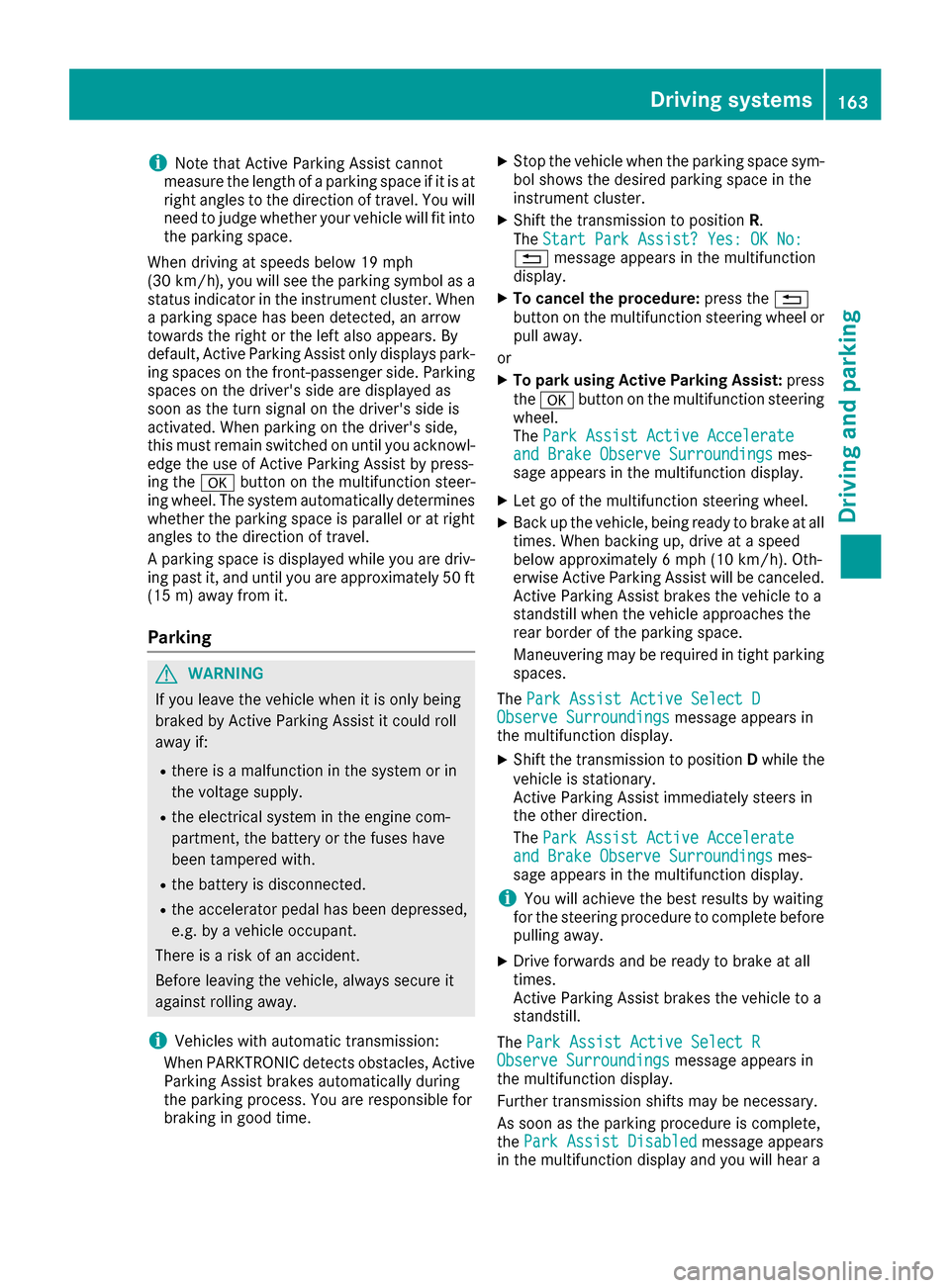
iNote that Active Parking Assist cannot
measure the length of a parking space if it is at
right angles to the direction of travel. You will
need to judge whether your vehicle will fit into
the parking space.
When driving at speeds below 19 mph
(30 km/h), you will see the parking symbol as a
status indicator in the instrument cluster. When
a parking space has been detected, an arrow
towards the right or the left also appears. By
default, Active Parking Assist only displays park-
ing spaces on the front-passenger side. Parking spaces on the driver's side are displayed as
soon as the turn signal on the driver's side is
activated. When parking on the driver's side,
this must remain switched on until you acknowl-
edge the use of Active Parking Assist by press-
ing the abutton on the multifunction steer-
ing wheel. The system automatically determines
whether the parking space is parallel or at right
angles to the direction of travel.
A parking space is displayed while you are driv- ing past it, and until you are approximately 50 ft
(15 m) away from it.
Parking
GWARNING
If you leave the vehicle when it is only being
braked by Active Parking Assist it could roll
away if:
Rthere is a malfunction in the system or in
the voltage supply.
Rthe electrical system in the engine com-
partment, the battery or the fuses have
been tampered with.
Rthe battery is disconnected.
Rthe accelerator pedal has been depressed,
e.g. by a vehicle occupant.
There is a risk of an accident.
Before leaving the vehicle, always secure it
against rolling away.
iVehicles with automatic transmission:
When PARKTRONIC detects obstacles, Active
Parking Assist brakes automatically during
the parking process. You are responsible for
braking in good time.
XStop the vehicle when the parking space sym-
bol shows the desired parking space in the
instrument cluster.
XShift the transmission to position R.
The Start Park Assist? Yes: OK No:
% message appears in the multifunction
display.
XTo cancel the procedure: press the%
button on the multifunction steering wheel or pull away.
or
XTo park using Active Parking Assist: press
the a button on the multifunction steering
wheel.
The Park Assist Active Accelerate
and Brake Observe Surroundingsmes-
sage appears in the multifunction display.
XLet go of the multifunction steering wheel.
XBack up the vehicle, being ready to brake at all
times. When backing up, drive at a speed
below approximately 6 mph (10 km/h). Oth-
erwise Active Parking Assist will be canceled.
Active Parking Assist brakes the vehicle to a
standstill when the vehicle approaches the
rear border of the parking space.
Maneuvering may be required in tight parking
spaces.
The Park Assist Active Select D
Observe Surroundingsmessage appears in
the multifunction display.
XShift the transmission to position Dwhile the
vehicle is stationary.
Active Parking Assist immediately steers in
the other direction.
The Park Assist Active Accelerate
and Brake Observe Surroundingsmes-
sage appears in the multifunction display.
iYou will achieve the best results by waiting
for the steering procedure to complete before
pulling away.
XDrive forwards and be ready to brake at all
times.
Active Parking Assist brakes the vehicle to a
standstill.
The Park Assist Active Select R
Observe Surroundingsmessage appears in
the multifunction display.
Further transmission shifts may be necessary.
As soon as the parking procedure is complete,
the Park Assist Disabled
message appears
in the multifunction display and you will hear a
Driving systems163
Driving and parking
Z