warning MERCEDES-BENZ E-Class COUPE 2017 C207 User Guide
[x] Cancel search | Manufacturer: MERCEDES-BENZ, Model Year: 2017, Model line: E-Class COUPE, Model: MERCEDES-BENZ E-Class COUPE 2017 C207Pages: 318, PDF Size: 7.35 MB
Page 16 of 318
P
Paint code number............................307
Paintwork (cleaning instructions) ... 260
Panic alarm .......................................... 40
Panorama roof with power tilt/
sliding panel
Important safety notes .................... 86
Operating ......................................... 87
Operating the roller sunblinds for
the sliding sunroof ........................... 87
Problem (malfunction) ..................... 90
Reversing feature .............................8 7
Parking
Important safety notes .................. 138
Parking brake ................................ 139
Position of exterior mirror, front-
passenger side ...............................1 01
Rear view camera .......................... 165
see PARKTRONIC
Parking aid
Active Parking Assist ..................... 161
see Exterior mirrors
see PARKTRONIC
Parking assistance
see PARKTRONIC
Parking brake
Display message ............................ 199
Notes/function .............................. 139
Warning lamp ................................. 221
Parking lamps
Switching on/off ........................... 104
PARKTRONIC
Deactivating/activating ................. 160
Driving system ............................... 158
Function/notes .............................1 58
Important safety notes .................. 158
Problem (malfunction) ................... 161
Range of the sensors ..................... 158
Warning display ............................. 159
PASSENGER AIR BAG
Display message ............................ 204
PASSENGER AIR BAG OFF
Indicator lamp .................................. 41
Problems (malfunctions) ................ 204
Pets in the vehicle ............................... 62 Phone book
see also Digital Operator's Man-
ual .................................................. 229
Plastic trim (cleaning instruc-
tions) .................................................. 263
Power washers .................................. 260
Power windows
see Side windows
PRE-SAFE
®(anticipatory occupant
protection)
Display messa
ge ............................ 200
Operation ......................................... 55
PRE-SAFE
®Brake
Activating/deactivating ................. 192
Display message ............................ 201
Function/notes ................................ 69
Important safety notes .................... 70
Warning lamp ................................. 227
PRE-SAFE
®PLUS (anticipatory
occupant protection PLUS)
Display message ............................ 201
Operation ......................................... 56
Program selector button .................. 131
Protection against theft
ATA (Anti-Theft Alarm system) ......... 72
Immobilizer ...................................... 72
Protection of the environment
General notes .................................. 24
Pulling away
Automatic transmission ................. 124
General notes ................................ 124
Q
QR codeMercedes-Benz Guide App ................. 1
Rescue card ..................................... 29
Qualified specialist workshop ........... 28
R
Radio
Selecting a station ......................... 189
see separate operating instructions
Radio mode
see also Digital Operator's Man-
ual .................................................. 229
14Index
Page 17 of 318
Radio-wave reception/transmis-
sion in the vehicleDeclaration of conformity ................ 27
Reading lamp ..................................... 107
Rear compartment
Setting the temperature ................ 116
Rear fog lamp
Display message ............................ 206
Switching on/off ........................... 104
Rear seats
Display message ............................ 217
Rear view camera
Cleaning instructions ..................... 262
Display in the multimedia system .. 166
Function/notes ............................. 165
Switching on/off ........................... 166
Rear window blind ............................ 241
Rear window defroster
Problem (malfunction) ................... 119
Switching on/off ........................... 118
Rear-view mirror
Anti-glare (manual) .......................... 99
Dipping (automatic) ....................... 100
Refrigerant (air-conditioning sys-
tem)
Important safety notes .................. 313
Refueling
Fuel gauge ....................................... 33
Important safety notes .................. 135
Refueling process .......................... 136
see Fuel
Remote control
Garage door opener ....................... 250
Programming (garage door
opener) .......................................... 250
Replacing bulbs
Important safety notes .................. 107
Overview of bulb types .................. 108
Reporting safety defects .................... 28
Rescue card ......................................... 29
Reserve (fuel tank)
see Fuel
Reserve fuel
Display message ............................ 208
Warning lamp ................................. 225
see Fuel
Residual heat (climate control) ........ 119Restraint system
Display message ............................ 202
Introduction ..................................... 40
Problem (malfunction) ................... 224
Warning lamp (function) ................... 40
Reversing feature
Panorama sliding sunroof ................ 87
Roller sunblinds ............................... 88
Side windows ................................... 82
Sliding sunroof ................................. 87
Reversing lamps (display mes-
sage) ................................................... 206
Roads ide A
ssistance (breakdown)
.... 26
Roller sunblind
Panorama roof with power tilt/
sliding panel ..................................... 87
Rear window .................................. 241
Roof lining and carpets (cleaning
guidelines) ......................................... 265
Roof load (maximum) ........................ 313
Route guidance
see also Digital Operator's Man-
ual .................................................. 229
S
SafetyChildren in the vehicle ..................... 56
see Occupant safety
Safety system
see Driving safety systems
SD memory card
Ejecting .......................................... 234
Inserting ........................................ 234
Inserting/removing ........................ 234
see also Digital Operator's Man-
ual .................................................. 229
Selecting ........................................ 189
Search & Send
see also Digital Operator's Man-
ual .................................................. 229
Seat belts
Adjusting the driver's and front-
passenger seat belt ......................... 45
Automatic comfort-fit feature .......... 44
Cleaning ......................................... 264
Correct usage .................................. 43
Fastening ......................................... 43
Index15
Page 18 of 318
Important safety guidelines .............42
Introduction .....................................4 1
Releasin g ......................................... 44
Switching belt adjustment on/off
(on-board computer) ...................... 196
Warning lamp ................................. 220
Warning lamp (function) ................... 45
Seats
Adjusting (electrically) ..................... 92
Adjusting the 4-way lumbar sup-
port .................................................. 94
Adjusting the head restraint ............ 93
Adjusting the multicontour seat ....... 94
Cleaning the cover ......................... 264
Correct driver's seat position ........... 91
Folding the backrests forward/
back ................................................. 93
Important safety notes .................... 91
Overview .......................................... 91
Seat backrest display message ..... 217
Seat heating .................................... 95
Seat heating problem ...................... 96
Storing settings (memory func-
tion) ............................................... 102
Switching seat heating on/off ......... 95
Switching seat ventilation on/
off .................................................... 95
Section
Trunk ............................................... 80
Securing cargo .................................. 238
Selector lever
Cleaning ......................................... 263
Sensors (cleaning instructions) ....... 262
Service menu (on-board com-
puter) .................................................. 193
Service message
see ASSYST PLUS
Service products
Brake fluid ..................................... 311
Coolant (engine) ............................ 312
Engine oil ....................................... 311
Fuel ................................................ 309
Important safety notes .................. 308
Refrigerant (air-conditioning sys-
tem) ............................................... 313
Washer fluid ................................... 312
Setting the air distribution ............... 116Setting the airflow
............................ 117
Setting the date/time format
see also Digital Operator's Man-
ual .................................................. 229
Setting the language
see also Digital Operator's Man-
ual .................................................. 229
Setting the time
see also Digital Ope rator's Ma
n-
ual .................................................. 229
Settings
Factory (on-board computer) ......... 196
On-board computer ....................... 193
Side impact air bag ............................. 47
Side marker lamp (display mes-
sage) ................................................... 206
Side windows
Cleaning ......................................... 261
Convenience closing feature ............ 84
Convenience opening feature .......... 83
Important safety information ........... 82
Opening/closing .............................. 83
Problem (malfunction) ..................... 86
Resetting ......................................... 85
Reversing feature ............................. 82
SIRIUS services
see also Digital Operator's Man-
ual .................................................. 229
Sliding sunroof
see Panorama roof with power
tilt/sliding panel
SmartKey
Changing the battery ....................... 76
Changing the programming ............. 74
Checking the battery ....................... 76
Convenience closing feature ............ 84
Convenience opening feature .......... 83
Display message ............................ 218
Door central locking/unlocking ....... 73
Important safety notes .................... 73
Loss ................................................. 77
Mechanical key ................................ 75
Overview .......................................... 73
Positions (ignition lock) ................. 122
Problem (malfunction) ..................... 77
Starting the engine ........................ 124
16Index
Page 20 of 318
Redialing ........................................ 191
Rejecting/endin g acall ................ .190
see also Digital Operator's Man-
ual ..................................................2 29
Switching between mobile
phones ...........................................2 34
Temperature
Coolant .......................................... 184
Outside temperature ......................1 84
Setting (climate control) ................ 116
Tire pressure
Calling up (on-board computer) ..... 287
Checking manually ........................ 287
Display message ............................ 214
Maximum ....................................... 287
Not reached (TIREFIT) .................... 269
Notes ............................................. 286
Reached (TIREFIT) .......................... 269
Recommended ............................... 284
Tire pressure monitor
Checking the tire pressure elec-
tronically ........................................ 289
Function/notes .............................2 87
General notes ................................ 287
Important safety notes .................. 288
Restarting ...................................... 289
Warning lamp ................................. 228
Warning message .......................... 289
Tire-change tool kit ........................... 266
TIREFIT kit .......................................... 267
Important safety notes .................. 267
Tire pressure not reached .............. 269
Tire pressure reached .................... 269
Tires
Aspect ratio (definition) ................. 298
Average weight of the vehicle
occupants (definition) .................... 297
Bar (definition) ............................... 297
Changing a wheel .......................... 299
Characteristics .............................. 297
Checking ........................................ 281
Curb weight (definition) ................. 298
Definition of terms ......................... 297
Direction of rotation ...................... 300
Display message ............................ 214
Di
stribution of the vehicle occu-
pants (definition) ............................ 299 DOT (Department of Transporta-
tion) (definition) ............................. 297
DOT, Tire Identification Number
(TIN) ............................................... 297
GAWR (Gross Axle Weight Rating)
(definition) ..................................... 298
GVW (Gross Vehicle Weight) (def-
inition) ........................................... 298
GVWR (Gross Vehicle Weight Rat-
ing) (definition) .............................. 298
Important safety notes .................. 281
Increased vehicle weight due to
optional equipment (definition) ...... 298
Information on driving .................... 281
Kilopascal (kPa) (definition) ........... 298
Labeling (overview) ........................ 294
Load bearing index (definition) ...... 299
Load index ..................................... 296
Load index (definition) ................... 298
Maximum load on a tire (defini-
tion) ............................................... 298
Maximum loaded vehicle weight
(definition) ..................................... 298
Maximum permissible tire pres-
sure (definition) ............................. 298
Maximum tire load ......................... 296
Maximum tire load (definition) ....... 298
MOExtended tires .......................... 283
Optional equipment weight (defi-
nition) ............................................ 299
PSI (pounds per square inch) (def-
inition) ........................................... 298
Replacing ....................................... 299
Service life ..................................... 282
Sidewall (definition) ....................... 299
Speed rating (definition) ................ 298
Storing ........................................... 300
Structure and characteristics
(definition) ..................................... 297
Temperature .................................. 294
TIN (Tire Identification Number)
(definition) ..................................... 299
Tire bead (definition) ...................... 299
Tire pressure (definition) ................ 299
Tire pressures (re
commended) ...... 298
Tire size (data) ............................... 303
Tire size designation, load-bearing
capacity, speed rating .................... 294
18Index
Page 22 of 318
Locking (in an emergency) ............... 80
Locking (SmartKey) .......................... 73
Lowering ........................................ 303
Maintenance .................................... 26
Parking for a long period ................ 140
Pulling away ................................... 124
Raising ........................................... 301
Reporting problems ......................... 28
Securing from rolling away ............ 300
Towing away .................................. 276
Transporting .................................. 278
Unlocking (in an emergency) ........... 80
Unlocking (SmartKey) ...................... 73
Vehicle data ................................... 313
Vehicle data ....................................... 313
Vehicle dimensions ........................... 313
Vehicle emergency locking ................ 80
Vehicle identification number
see VIN
Vehicle identification plate .............. 307
Vehicle tool kit .................................. 266
Video
Operating the DVD ......................... 189
see also Digital Operator's Man-
ual .................................................. 229
VIN
Seat ............................................... 308
Type plate ...................................... 307
Voice Control System
see Separate operating instructions
W
Warning and indicator lampsABS ................................................ 222
Brakes ........................................... 221
Check Engine ................................. 225
Coolant .......................................... 225
Distance warning ........................... 227
ESP
®.............................................. 222
ESP®OFF ....................................... 223
Fuel tank ........................................ 225
General notes ................................ 219
Overview .......................................... 33
PASSENGER AIR BAG OFF ............... 41
Reserve fuel ................................... 225
Restraint system ............................ 224
Seat belt ........................................ 220 Tire pressure monitor .................... 228
Warranty .............................................. 25
Washer fluid
Display message ............................ 218
Wheel and tire combinations
Tires ............................................... 303
Wheel bolt tightening torque ........... 303
Wheel chock ...................................... 300
Wheels
Changing a wheel .......................... 299
Checking ........................................ 281
Cleaning ......................................... 261
Emergency spare wheel ................. 304
Important safety notes .................. 281
Information on driving .................... 281
Interchanging/changing ................ 299
Mounting a new wheel ................... 302
Mounting a wheel .......................... 300
Removing a wheel .......................... 302
Storing ........................................... 300
Tightening torque ........................... 303
Wheel size/tire size ....................... 303
Window curtain air bag
Operation ......................................... 48
Windows
see Side windows
Windshield
Defrosting ...................................... 117
Windshield washer fluid
see Windshield washer system
Windshield washer system
Adding washer fluid ....................... 257
Important safety notes .................. 312
Windshield wipers
Problem (malfunction) ................... 110
Replacing the wiper blades ............ 109
Switching on/off ........................... 108
Winter driving
Important safety notes .................. 283
Slippery road surfaces ................... 144
Snow chains .................................. 283
Winter tires
M+S tires ....................................... 283
Wiper blades
Cleaning ......................................... 261
Important safety notes .................. 109
Replacing ....................................... 109
20Index
Page 24 of 318
Introduction
The printedOperator's Manual provide sinfor-
mation about th esaf eoperation of your vehicle.
The Digital Operator's Manual additionally
describe sfurther function sand equipmen t
installed in your vehicle. The function sof th e
vehicl eand multimedia system are describe din
th eDigital Operator's Manual. You can call up
th eDigital Operator's Manual via th emultimedia
system.
iYou will no tincur any cost swhen calling up
th eDigital Operator's Manual. The Digital
Operator's Manual works without connecting
to th eInternet .
Ther eare three ways to access th etopic sof th e
Digital Operator's Manual:
RVisua lsearch
The visual search allows you to explor eyour
vehicl e"virtually". Starting from either th e
vehicl eexterio rvie wor interio rview, you can
access man yof th edifferen ttopic scovered
by th eDigital Operator's Manual. To access
th evehicl einterior section ,select th e"Vehi-
cle interior" view.
RKeywor dsearch
The keyword search allows you to search for a
keyword by enterin gcharacters. Further
information can be foun din th eDigital Oper -
ator's Manual in th e"Audio 20 "or "COMAND "
section under th e"Character entr y(teleph -
ony)" keyword .
RContents
You can select individual section sin th econ-
tents
.
iThe Digital Operator's Manual is deactiva-
te dfor safet yreason swhile driving .
Operation
Calling up the Digital Operator's Man-
ual
XPress theØ buttonin th ecenter console.
The overview relating to th evehicl eappears.
XSelec tth e"Operator' sManual" men uitem by
turnin g3 or pressin g7 thecontroller .
XConfirm7 themessage about th ewarning
and safet ynotes.
The basic men ufor th eDigital Operator's
Manual appears.
Operating the Digital Operator's Man-
ual
General notes
Pleas eobserv eth einformation about th eoper -
ation of th econtroller (Ypage 230).
Content pages
The conten tpages can be accessed by mean sof
a visual search , akeyword search or usin gth e
contents .
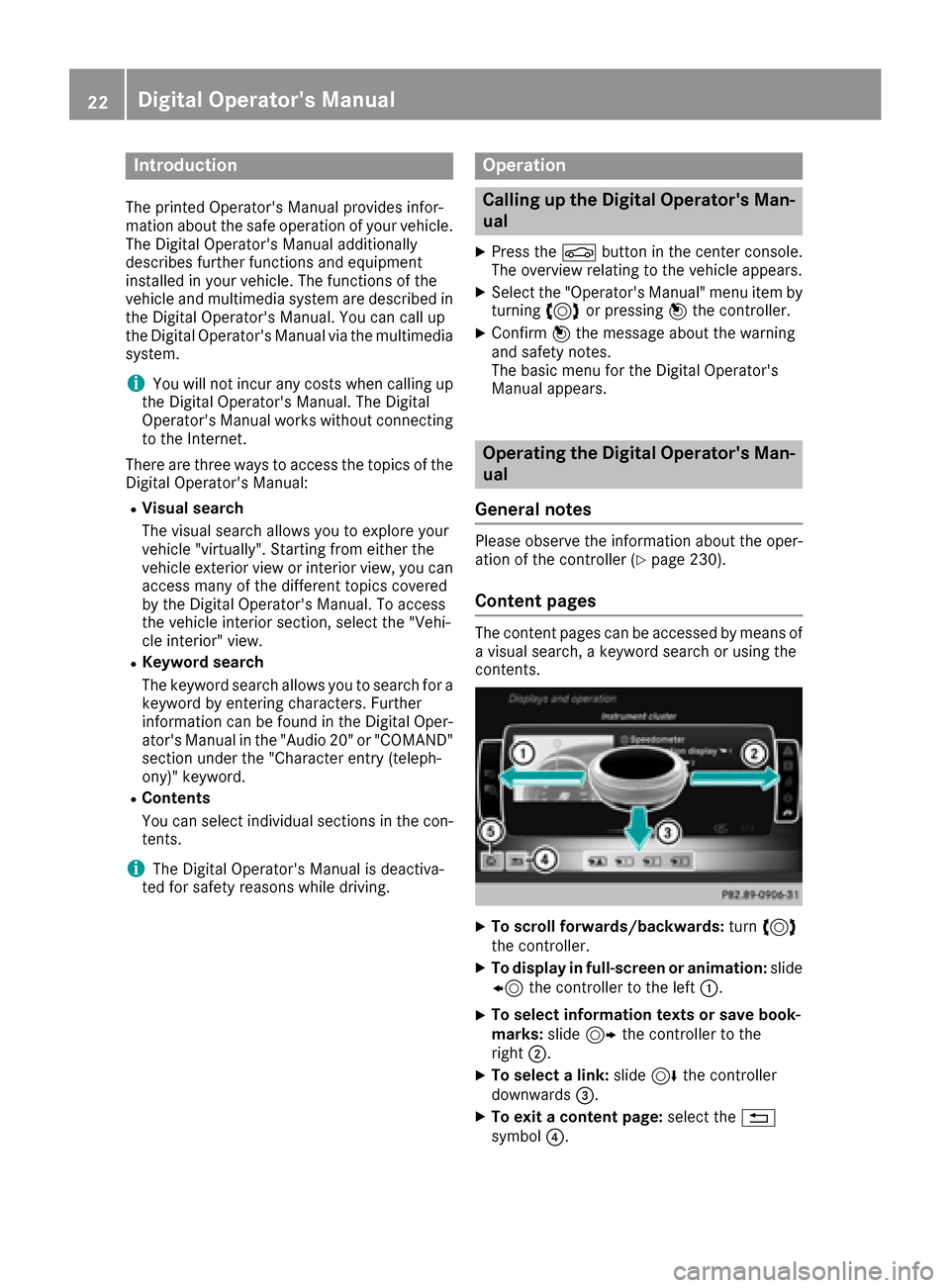
XTo scroll forwards/backwards: turn3
th econtroller .
XTo displayin full-screen or animation: slide
8 thecontroller to th elef t:.
XTo select information texts or sav ebook -
marks: slide9 thecontroller to th e
right ;.
XTo select alink :slide 6thecontroller
downwards =.
XTo exitacontent page: select the%
symbol ?.
22Digital Operator's Manual
Page 29 of 318
Operating safety
Important safety notes
GWARNING
If you do not have the prescribed service/
maintenance work or any required repairs
carried out, this can result in malfunctions or system failures. There is a risk of an accident.
Always have the prescribed service/mainte-
nance work as well as any required repairs
carried out at a qualified specialist workshop.
GWARNING
Flammable material such as leaves, grass or
twigs may ignite if they come into contact with
hot parts of the exhaust system. There is a risk of fire.
When driving off road or on unpaved roads,
check the vehicle's underside regularly. In
particular, remove parts of plants or other
flammable materials which have become
trapped. In the case of damage, contact a
qualified specialist workshop.
GWARNING
Modifications to electronic components, their software as well as wiring can impair their
function and/or the function of other net-
worked components. In particular, systems
relevant to safety could also be affected. As a
result, these may no longer function as inten-
ded and/or jeopardize the operating safety of
the vehicle. There is an increased risk of an
accident and injury.
Never tamper with the wiring as well as elec-
tronic components or their software. You
should have all work to electrical and elec-
tronic equipment carried out at a qualified
specialist workshop.
!There is a risk of damage to the vehicle if:
Rthe vehicle becomes stuck, e.g. on a high
curb or an unpaved road
Ryou drive too fast over an obstacle, e.g. a
curb or a hole in the road
Ra heavy object strikes the undercarriage or
parts of the chassis
In situations like this, the body, the undercar-
riage, chassis parts, wheels or tires could be
damaged without the damage being visible.
Components damaged in this way can unex-
pectedly fail or, in the case of an accident, no
longer withstand the strain they are designed to.
If the underbody paneling is damaged, com-
bustible materials such as leaves, grass or
twigs can gather between the underbody and
the underbody paneling. If these materials
come in contact with hot parts of the exhaust
system, they can catch fire.
In such situations, have the vehicle checked
and repaired immediately at a qualified spe-
cialist workshop. If on continuing your jour-
ney you notice that driving safety is impaired,
pull over and stop the vehicle immediately,
paying attention to road and traffic condi-
tions. In such cases, consult a qualified spe-
cialist workshop.
Declarations of conformity
Vehicle components which receive
and/or transmit radio waves
USA: "The wireless devices of this vehicle com-
ply with Part 15 of the FCC Rules. Operation is
subject to the two following two conditions: 1)
These devices may not cause harmful interfer-
ence, and 2) These devices must accept any
interference received, including interference
that may cause undesired operation. Changes
or modifications not expressly approved by the
party responsible for compliance could void the
user’s authority to operate the equipment."
Canada: "The wireless devices of this vehicle
comply with Industry Canada license-exempt
RSS standard(s). Operation is subject to the fol-
lowing two conditions: (1) These devices may
not cause interference, and (2) These devices
must accept any interference, including inter-
ference that may cause undesired operation of
the device."
Operating safety27
Introduction
Z
Page 30 of 318
Diagnostics connection
The diagnosticsconnection is only intended fo r
th econnection of diagnostic equipmen tat a
qualified specialis tworkshop .
GWARNING
If you connec tequipmen tto th ediagnostic s
connection in th evehicle, it may affec tth e
operation of th evehicle systems .As aresult ,
th eoperatin gsafet yof th evehicle could be
affected. There is aris kof an accident.
Do no tconnec tany equipmen tto adiagnos-
tics connection in th evehicle.
GWARNING
Objects in th edriver's footwell can restric tth e
peda ltrave lor obstruct adepressed pedal.
The operatin gand road safet yof th evehicle is
jeopardized. There is aris kof an accident.
Mak esur ethat all objects in th evehicle are
stowed correctly, and that they canno tente r
th edriver's footwell. Install th efloormat s
securely and as specifie din order to ensur e
sufficien tclearanc efo rth epedals. Do no tuse
loose floormat sand do no tplac efloormat son
to pof on eanother.
!If th eengin eis switched of fand equipmen t
on th ediagnostic sconnection is used ,th e
starter battery may discharge.
Connectin gequipmen tto th ediagnostic scon-
nection can lead to emission smonitorin ginfor-
mation bein greset ,fo rexample. Thi smay lead
to th evehicle failin gto mee tth erequirements of
th enext emission stest durin gth emain inspec-
tion .
Qualified specialist workshop
An authorized Mercedes-Ben zCente ris aquali-
fie dspecialis tworkshop .It has th enecessary
specialis tknowledge ,tools and qualification sto
correctl ycarry out th ewor krequire don your
vehicle. Thi sis especially th ecas efo rwor krel -
evant to safety.
Observ eth enote sin th eMaintenance Booklet .Always hav
eth efollowin gwor kcarrie dout at an
authorized Mercedes-Ben zCenter:
Rwor krelevant to safet y
Rserviceand maintenance wor k
Rrepair work
Ralterations, installation wor kand modifica-
tion s
Rworkon electronic component s
Correct use
If you remov eany warnin gstickers ,you or oth-
ers could fail to recogniz ecertain dangers.
Leave warnin gstickers in position .
Observ eth efollowin ginformation when drivin g
your vehicle:
Rth esafet ynote sin this manual
Rth evehicle technical dat a
Rtraffic rulesand regulation s
Rlaws and safetystandard spertainin gto moto r
vehicles
Problem swit hyou rvehicle
If you should experience aproblem wit hyour
vehicle, particularly on ethat you believe may
affec tit s saf eoperation ,we urg eyou to contact
an authorized Mercedes-Ben zCente rimmedi-
ately to hav eth eproblem diagnosed and recti -
fied. If th eproblem is no tresolved to your sat -
isfaction ,please discus sth eproblem again wit h
a Mercedes-Ben zCente ror contact us at on eof
th efollowin gaddresses.
In th eUSA
Customer Assistanc eCente r
Mercedes-Ben zUSA, LL C
On eMercedes Drive
Montvale, NJ 07645-0350
In Canad a
Customer Relation sDepartmen t
Mercedes-Ben zCanada, Inc.
98 Vanderhoo fAvenue
Toronto ,Ontario M4 G4C9
Reporting safet ydefect s
USAonly:
28Operating safety
Introduction
Page 32 of 318
The vehicle is read out by employees of the ser-
vice network (including the manufacturer) using
special diagnostic testers. More detailed infor-
mation is obtained from it, if required.
After a malfunction has been rectified, the infor-
mation is deleted from the malfunction memory
or is continually overwritten.
When operating the vehicle, situations are con-
ceivable in which this technical data, in connec-
tion with other information (if necessary, under
consultation with an authorized expert), could
be traced to a person.
Examples include:
Raccident reports
Rdamage to the vehicle
Rwitness statements
Further additional functions that have been con-
tractually agreed upon with the customer allow
certain vehicle data to be conveyed by the vehi- cle as well. The additional functions include, for
example, vehicle location in case of an emer-
gency.
COMAND/mbrace
If the vehicle is equipped with COMAND or
mbrace, additional data about the vehicle's
operation, the use of the vehicle in certain sit-
uations, and the location of the vehicle may be
compiled through COMAND or the mbrace sys-
tem.
For additional information please refer to the
COMAND User Manual or the Digital Operator's
Manual and/or the mbrace Terms and Condi-
tions.
Event data recorders
This vehicle is equipped with an event data
recorder (EDR). This vehicle is equipped with an
event data recorder (EDR). The main purpose of
an EDR is to record, in certain crash or near
crash-like situations, such as an air bag deploy- ment or hitting a road obstacle, data that will
assist in understanding how a vehicle's systems
performed. The EDR is designed to record data
related to vehicle dynamics and safety systems for a short period of time, typically 30 seconds
or less. The EDR in this vehicle is designed to record
such data as:
RHow various systems in your vehicle were
operating
RWhether or not the driver and passenger
safety belts were buckled/fastened
RHow far (if at all) the driver was depressing the
accelerator and/or brake pedal and
RHow fast the vehicle was traveling.
These data can help provide a better under-
standing of the circumstances in which acci-
dents and injuries occur. NOTE: EDR data are
recorded by your vehicle only if a non-trivial
crash situation occurs; no data is recorded by
the EDR under normal driving conditions and no
personal data (e.g. name, gender, age and acci-
dent location) are recorded. However, other par- ties, such as law enforcement could combine
EDR data with the type of personally identifying
data routinely acquired during a crash investi-
gation.
Access to the vehicle and/or the EDR is needed
to read data that is recorded by the EDR, and
special equipment is required. In addition to the
vehicle manufacturer, other parties that have
the special equipment, such as law enforce-
ment, can read the information by accessing the
vehicle or the EDR.
EDR data may be used in civil and criminal mat-ters as a tool in accident reconstruction, acci-
dent claims and vehicle safety. Since the Crash
Data Retrieval CDR tool that is used to extract
data from the EDR is commercially available,
Mercedes-Benz USA, LLC ("MBUSA") expressly
disclaims any and all liability arising from the
extraction of this information by unauthorized
Mercedes-Benz personnel.
MBUSA will not share EDR data with others
without the consent of the vehicle owners or, if
t
he vehicle is leased, without the consent of the
lessee. Exceptions to this representation
include responses to subpoenas by law enforce-
ment; by federal, state or local government; in
connection with or arising out of litigation involv-
ing MBUSA or its subsidiaries and affiliates; or,
as required by law.
Warning: The EDR is a component of the
Restraint System Module. Tampering with, alter-
ing, modifying or removing the EDR component
may result in a malfunction of the Restraint Sys-
tem Module and other systems.
State laws or regulations regarding EDRs that
conflict with federal regulation are pre-empted.
30Data stored in the vehicle
Introduction
Page 34 of 318
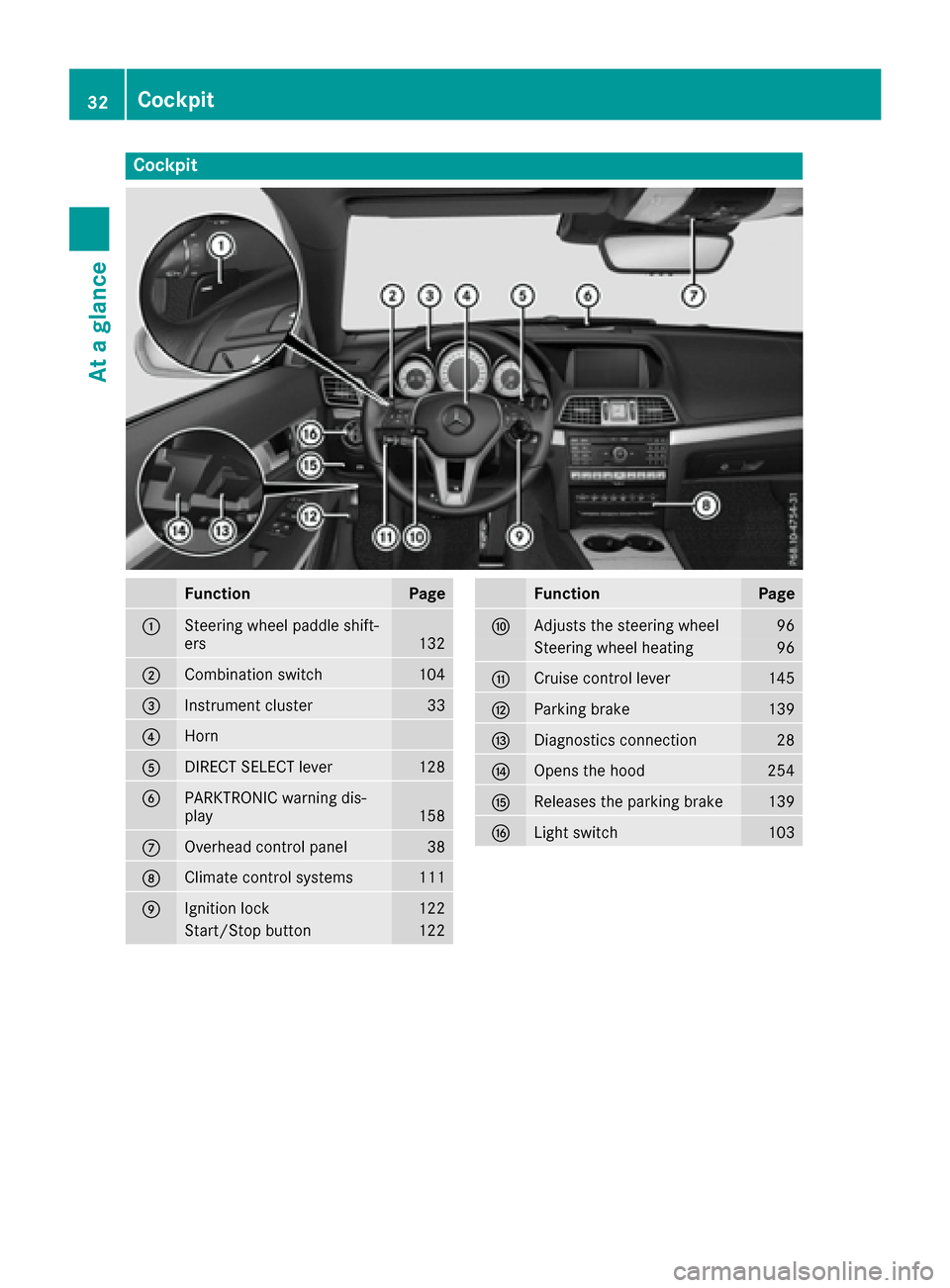
Cockpit
FunctionPage
:Steering wheel paddle shift-
ers132
;Combination switch104
=Instrument cluster33
?Horn
ADIRECT SELECT lever128
BPARKTRONIC warning dis-
play158
COverhead control panel38
DClimate control systems111
EIgnition lock122
Start/Stop button122
FunctionPage
FAdjusts the steering wheel96
Steering wheel heating96
GCruise control lever145
HParking brake139
IDiagnostics connection28
JOpens the hood254
KReleases the parking brake139
LLight switch103
32Cockpit
At a glance