seat ventilation MERCEDES-BENZ E-Class COUPE 2017 C207 Owner's Manual
[x] Cancel search | Manufacturer: MERCEDES-BENZ, Model Year: 2017, Model line: E-Class COUPE, Model: MERCEDES-BENZ E-Class COUPE 2017 C207Pages: 318, PDF Size: 7.35 MB
Page 18 of 318
Important safety guidelines .............42
Introduction .....................................4 1
Releasin g ......................................... 44
Switching belt adjustment on/off
(on-board computer) ...................... 196
Warning lamp ................................. 220
Warning lamp (function) ................... 45
Seats
Adjusting (electrically) ..................... 92
Adjusting the 4-way lumbar sup-
port .................................................. 94
Adjusting the head restraint ............ 93
Adjusting the multicontour seat ....... 94
Cleaning the cover ......................... 264
Correct driver's seat position ........... 91
Folding the backrests forward/
back ................................................. 93
Important safety notes .................... 91
Overview .......................................... 91
Seat backrest display message ..... 217
Seat heating .................................... 95
Seat heating problem ...................... 96
Storing settings (memory func-
tion) ............................................... 102
Switching seat heating on/off ......... 95
Switching seat ventilation on/
off .................................................... 95
Section
Trunk ............................................... 80
Securing cargo .................................. 238
Selector lever
Cleaning ......................................... 263
Sensors (cleaning instructions) ....... 262
Service menu (on-board com-
puter) .................................................. 193
Service message
see ASSYST PLUS
Service products
Brake fluid ..................................... 311
Coolant (engine) ............................ 312
Engine oil ....................................... 311
Fuel ................................................ 309
Important safety notes .................. 308
Refrigerant (air-conditioning sys-
tem) ............................................... 313
Washer fluid ................................... 312
Setting the air distribution ............... 116Setting the airflow
............................ 117
Setting the date/time format
see also Digital Operator's Man-
ual .................................................. 229
Setting the language
see also Digital Operator's Man-
ual .................................................. 229
Setting the time
see also Digital Ope rator's Ma
n-
ual .................................................. 229
Settings
Factory (on-board computer) ......... 196
On-board computer ....................... 193
Side impact air bag ............................. 47
Side marker lamp (display mes-
sage) ................................................... 206
Side windows
Cleaning ......................................... 261
Convenience closing feature ............ 84
Convenience opening feature .......... 83
Important safety information ........... 82
Opening/closing .............................. 83
Problem (malfunction) ..................... 86
Resetting ......................................... 85
Reversing feature ............................. 82
SIRIUS services
see also Digital Operator's Man-
ual .................................................. 229
Sliding sunroof
see Panorama roof with power
tilt/sliding panel
SmartKey
Changing the battery ....................... 76
Changing the programming ............. 74
Checking the battery ....................... 76
Convenience closing feature ............ 84
Convenience opening feature .......... 83
Display message ............................ 218
Door central locking/unlocking ....... 73
Important safety notes .................... 73
Loss ................................................. 77
Mechanical key ................................ 75
Overview .......................................... 73
Positions (ignition lock) ................. 122
Problem (malfunction) ..................... 77
Starting the engine ........................ 124
16Index
Page 38 of 318
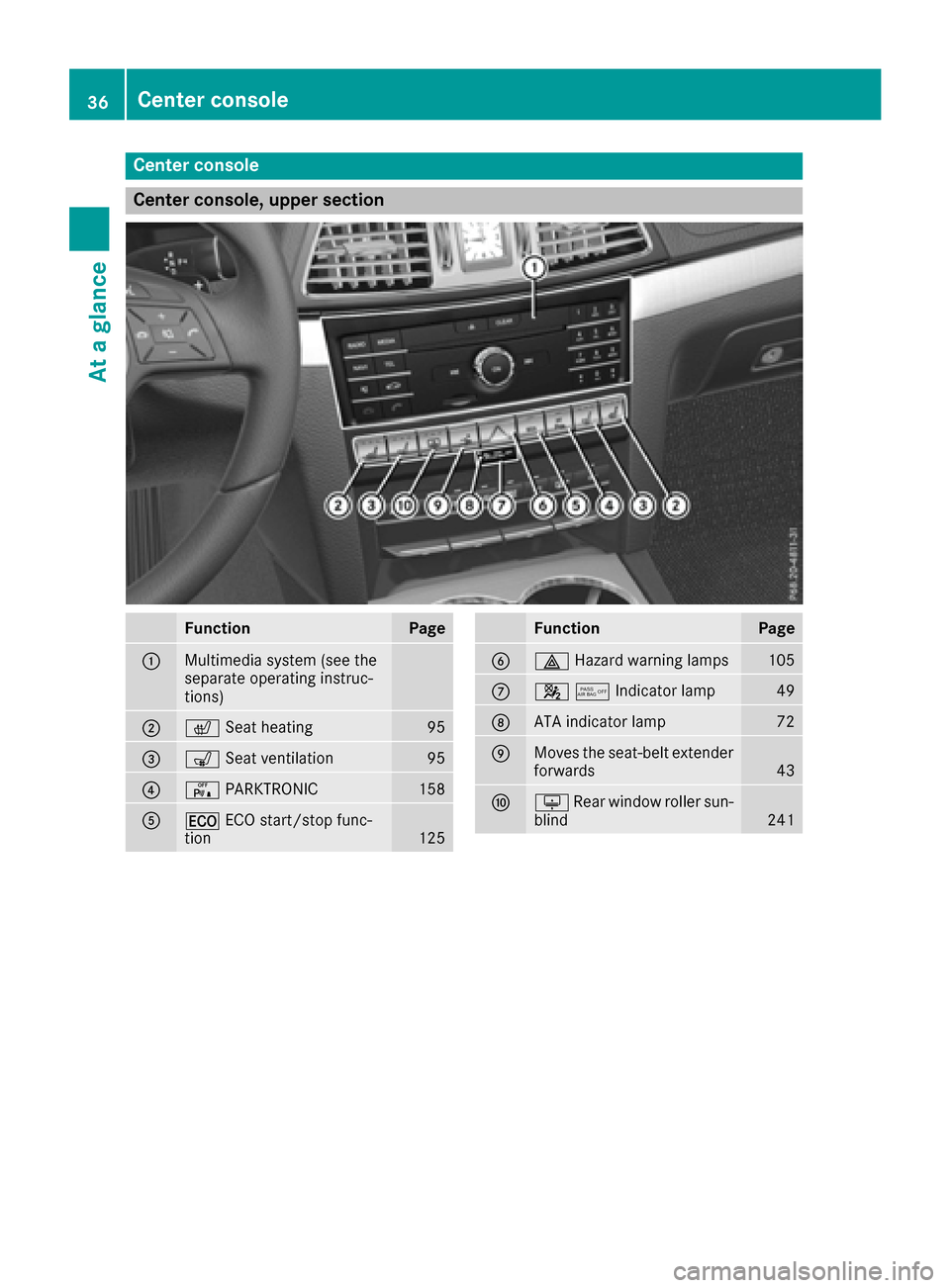
Center console
Center console, upper section
FunctionPage
:Multimedia system (see the
separate operating instruc-
tions)
;cSeat heating95
=sSeat ventilation95
?cPARKTRONIC158
A¤ECO start/stop func-
tion125
FunctionPage
B£ Hazard warning lamps105
C45Indicator lamp49
DATA indicator lamp72
EMoves the seat-belt extender
forwards43
FuRear window roller sun-
blind241
36Center console
At a glance
Page 85 of 318
Make sure that no body parts are in close
proximity during the closing procedure. If
someone becomes trapped, press the switch
to open the side window again.
Opening and closing the side win-
dows
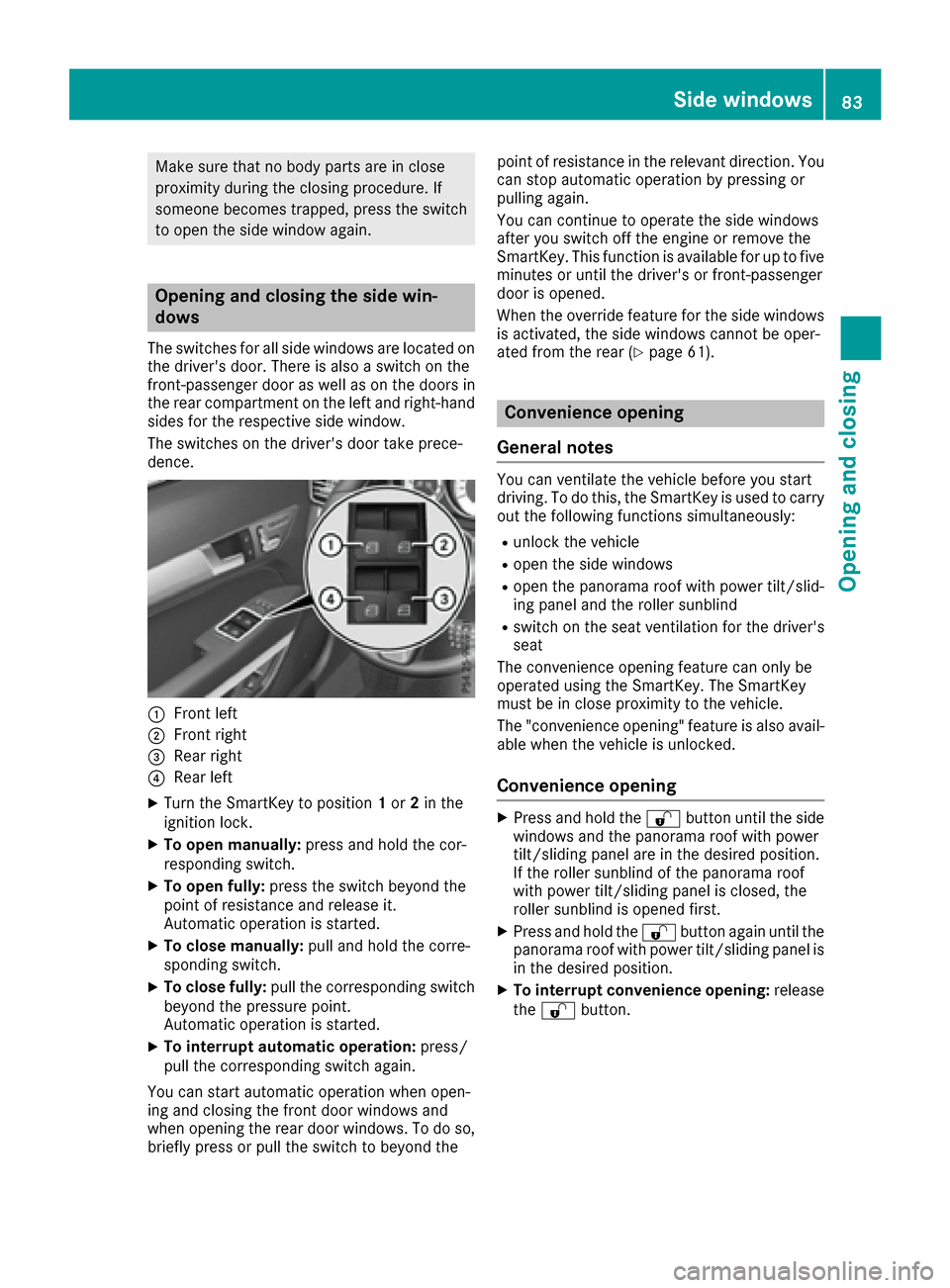
The switches for all side windows are located onthe driver's door. There is also a switch on the
front-passenger door as well as on the doors in
the rear compartment on the left and right-hand
sides for the respective side window.
The switches on the driver's door take prece-
dence.
:Front left
;Front right
=Rear right
?Rear left
XTurn the SmartKey to position 1or 2in the
ignition lock.
XTo open manually: press and hold the cor-
responding switch.
XTo open fully: press the switch beyond the
point of resistance and release it.
Automatic operation is started.
XTo close manually: pull and hold the corre-
sponding switch.
XTo close fully: pull the corresponding switch
beyond the pressure point.
Automatic operation is started.
XTo interrupt automatic operation: press/
pull the corresponding switch again.
You can start automatic operation when open-
ing and closing the front door windows and
when opening the rear door windows. To do so,
briefly press or pull the switch to beyond the point of resistance in the relevant direction. You
can stop automatic operation by pressing or
pulling again.
You can continue to operate the side windows
after you switch off the engine or remove the
SmartKey. This function is available for up to five
minutes or until the driver's or front-passenger
door is opened.
When the override feature for the side windows
is activated, the side windows cannot be oper-
ated from the rear (
Ypage 61).
Convenience opening
General notes
You can ventilate the vehicle before you start
driving. To do this, the SmartKey is used to carry out the following functions simultaneously:
Runlock the vehicle
Ropen the side windows
Ropen the panorama roof with power tilt/slid-
ing panel and the roller sunblind
Rswitch on the seat ventilation for the driver's
seat
The convenience opening feature can only be
operated using the SmartKey. The SmartKey
must be in close proximity to the vehicle.
The "convenience opening" feature is also avail-
able when the vehicle is unlocked.
Convenience opening
XPress and hold the %button until the side
windows and the panorama roof with power
tilt/sliding panel are in the desired position.
If the roller sunblind of the panorama roof
with power tilt/sliding panel is closed, the
roller sunblind is opened first.
XPress and hold the %button again until the
panorama roof with power tilt/sliding panel is
in the desired position.
XTo interrupt convenience opening: release
the % button.
Side windows83
Opening and closing
Z
Page 97 of 318
Seat heating and seat ventilation
Switching the seat heating on/off
GWARNING
Repeatedly switching on the seat heating can
cause the seat cushion and backrest pads to
become very hot. The health of persons with
limited temperature sensitivity or a limited
ability to react to excessively high tempera-
tures may be affected or they may even suffer
burn-like injuries. There is a risk of injury.
Therefore, do not switch the seat heating on
repeatedly.
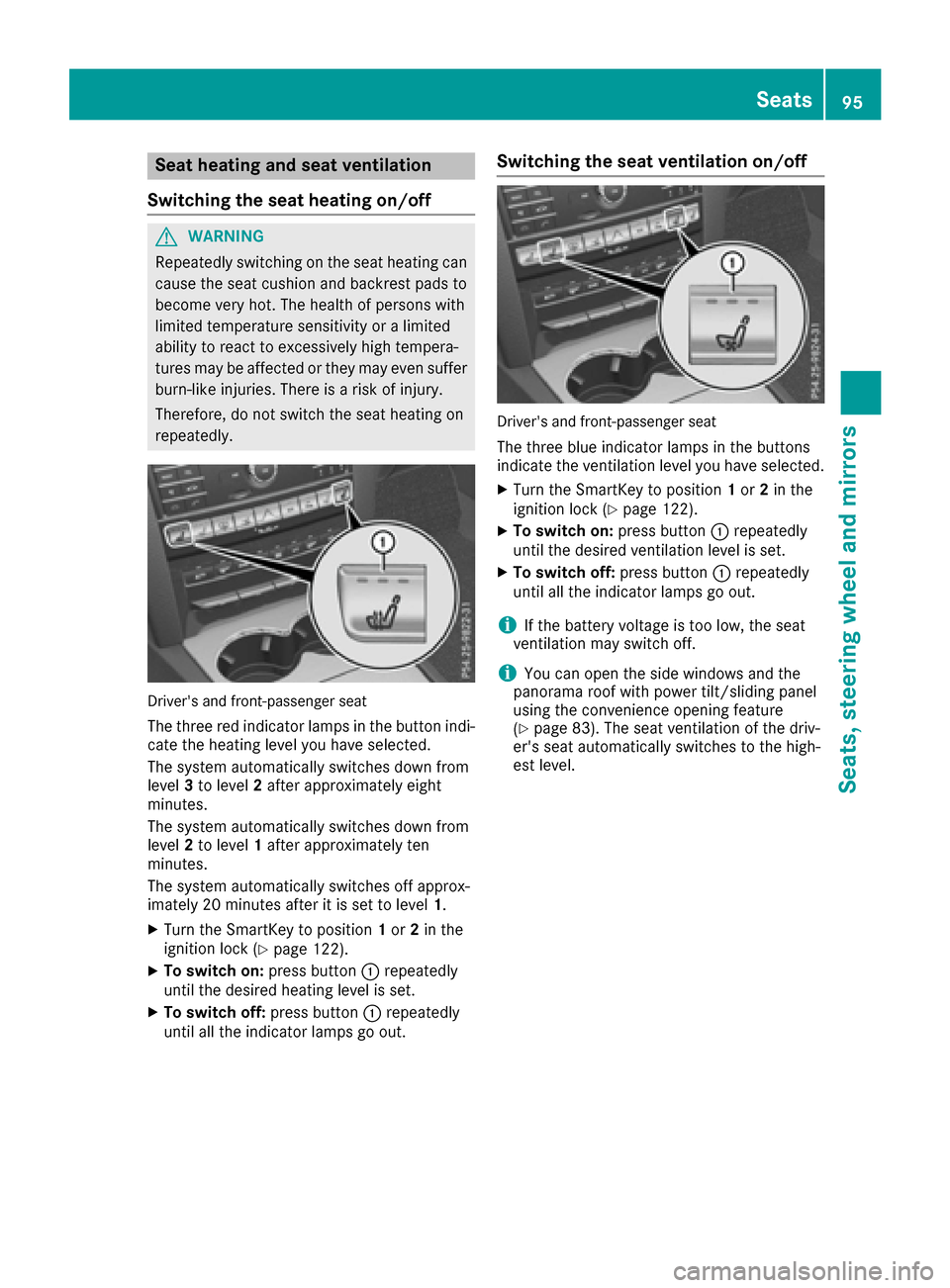
Driver's and front-passenger seat
The three red indicator lamps in the button indi-
cate the heating level you have selected.
The system automatically switches down from
level 3to level 2after approximately eight
minutes.
The system automatically switches down from
level 2to level 1after approximately ten
minutes.
The system automatically switches off approx-
imately 20 minutes after it is set to level 1.
XTurn the SmartKey to position1or 2in the
ignition lock (Ypage 122).
XTo switch on: press button:repeatedly
until the desired heating level is set.
XTo switch off: press button:repeatedly
until all the indicator lamps go out.
Switching the seat ventilation on/off
Driver's and front-passenger seat
The three blue indicator lamps in the buttons
indicate the ventilation level you have selected.
XTurn the SmartKey to position 1or 2in the
ignition lock (Ypage 122).
XTo switch on: press button:repeatedly
until the desired ventilation level is set.
XTo switch off: press button:repeatedly
until all the indicator lamps go out.
iIf the battery voltage is too low, the seat
ventilation may switch off.
iYou can open the side windows and the
panorama roof with power tilt/sliding panel
using the convenience opening feature
(
Ypage 83). The seat ventilation of the driv-
er's seat automatically switches to the high-
est level.
Seats95
Seats, steering wheel and mirrors
Z
Page 98 of 318
Problems with the seat heating or seat ventilation
ProblemPossible causes/consequences andMSolutions
The seat heating or seat
ventilation has switched
off prematurely or can-
not be switched on.The on-board voltage is too low because too many electrical consum-
ers are switched on.
XSwitch off electrical consumers that you do not need, such as the
rear window defroster or interior lighting.
Once the battery is sufficiently charged, the seat heating or seat
ventilation can be switched back on manually.
Steering wheel
Important safety notes
GWARNING
You could lose control of your vehicle if you do the following while driving:
Radjust the driver's seat, head restraint,
steering wheel or mirrors
Rfasten the seat belt
There is a risk of an accident.
Adjust the driver's seat, head restraint, steer-
ing wheel and mirror and fasten your seat belt before starting the engine.
GWARNING
Children could injure themselves if they
adjust the steering wheel. There is a risk of
injury.
When leaving the vehicle, always take the
SmartKey with you and lock the vehicle. Never
leave children unsupervised in the vehicle.
The electrically adjustable steering wheel can
still be adjusted when there is no SmartKey in
the ignition lock.
Adjusting the steering wheel
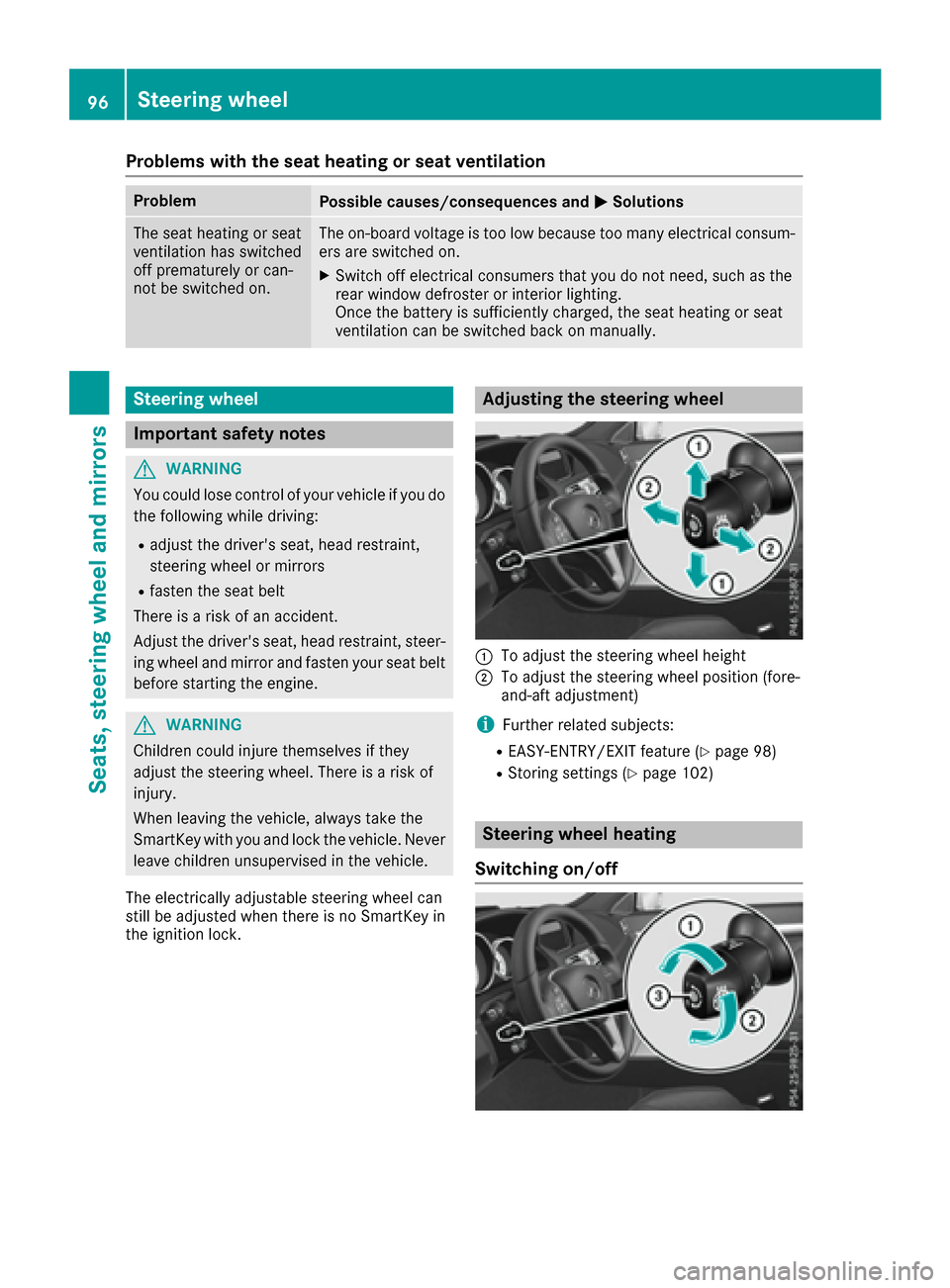
:To adjust the steering wheel height
;To adjust the steering wheel position (fore-
and-aft adjustment)
iFurther related subjects:
REASY-ENTRY/EXIT feature (Ypage 98)
RStoring settings (Ypage 102)
Steering wheel heating
Switching on/off
96Steering wheel
Seats, steering wheel and mirrors
Page 121 of 318
Problems with the rear window defroster
ProblemPossible causes/consequences andMSolutions
The rear window
defroster has deactiva-
ted prematurely or can-
not be activated.The battery has not been sufficiently charged.
XSwitch off any consumers that are not required, e.g. reading lamps,
interior lighting or the seat heating.
When the battery is sufficiently charged, the rear window defroster
can be activated again.
Switching air-recirculation mode
on/off
General notes
You can deactivate the flow of fresh air if
unpleasant odors are entering the vehicle from
outside. The air already inside the vehicle will
then be recirculated.
If you switch on air-recirculation mode, the win-
dows can fog up more quickly, in particular at
low temperatures. Only use air-recirculation
mode briefly to prevent the windows from fog-
ging up.
Activating or deactivating
XTurn the SmartKey to position 2in the ignition
lock (Ypage 122).
XTo activate: press thegbutton.
The indicator lamp above the gbutton
lights up.
XTo deactivate: press thegbutton.
The indicator lamp above the gbutton
goes out.
iAir-recirculation mode deactivates auto-
matically:
Rafter approximately five minutes at outside
temperatures below approximately 41 ‡
(5 †)
Rafter approximately five minutes if cooling
with air dehumidification is deactivated
Rafter approximately 30 minutes at outside
temperatures above approximately 41 ‡
(5 †) if the "Cooling with air dehumidifica-
tion" function is activated
Switching the residual heat on or off
General notes
It is possible to make use of the residual heat of
the engine to continue heating the vehicle for
approximately 30 minutes after the engine has
been switched off. The heating time depends on
the set interior temperature.
The "residual heat" function only functions opti-
mally with the side windows and panorama roof
with power tilt/sliding panel closed.
Activating/deactivating
XTurn the SmartKey to position 0in the ignition
lock or remove it (Ypage 122).
XTo activate: press theÌbutton.
The indicator lamp above the Ìbutton
lights up.
iIf the residual heat function is activated, the
windows may fog up on the inside.
iThe blower will run at a low speed regardless
of the airflow setting.
iIf you activate the residual heat function at
high temperatures, only the ventilation will be
activated. The blower runs at medium speed.
XTo deactivate: press theÌbutton.
The indicator lamp above the Ìbutton
goes out.
Residual heat is deactivated automatically:
Rafter approximately 30 minutes
Rwhen the ignition is switched on
Rif the battery voltage drops
Operating the climate control systems119
Climate control