fog light MERCEDES-BENZ E-CLASS COUPE 2017 User Guide
[x] Cancel search | Manufacturer: MERCEDES-BENZ, Model Year: 2017, Model line: E-CLASS COUPE, Model: MERCEDES-BENZ E-CLASS COUPE 2017Pages: 541, PDF Size: 10.71 MB
Page 209 of 541
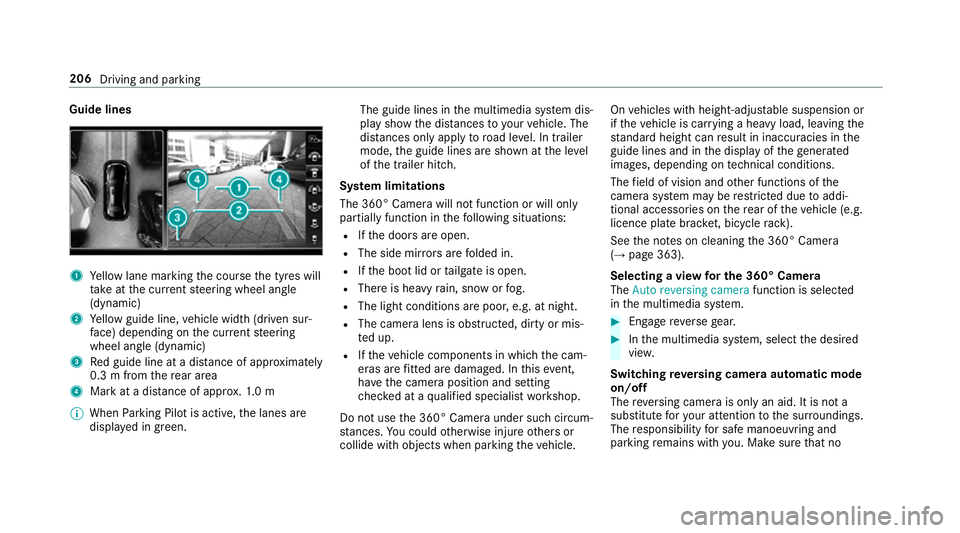
Guide lines
1
Yellow lane marking the course the tyres will
ta ke atthe cur rent steering wheel angle
(dynamic)
2 Yellow guide line, vehicle width (driven sur‐
fa ce) depending on the cur rent steering
wheel angle (dynamic)
3 Red guide line at a dis tance of appr oximately
0.3 m from there ar area
4 Mark at a distance of appr ox.1. 0 m
% When Parking Pilot is active, the lanes are
displa yed in green. The guide lines in
the multimedia sy stem dis‐
play show the dis tances toyour vehicle. The
dis tances only apply toroad le vel. In trailer
mode, the guide lines are shown at the le vel
of the trailer hitch.
Sy stem limitations
The 360° Camera will not function or will only
partially function in thefo llowing situations:
R Ifth e doors are open.
R The side mir rors are folded in.
R Ifth e boot lid or tailgate is open.
R There is heavy rain, snow or fog.
R The light conditions are poor, e.g. at night.
R The camera lens is obstructed, dirty or mis‐
ted up.
R Ifth eve hicle components in which the cam‐
eras are fitted are dama ged. In this event,
ha ve the camera position and setting
ch ecked at a qualified specialist workshop.
Do not use the 360° Camera under such circum‐
st ances. You could otherwise injure others or
collide with objects when parking theve hicle. On
vehicles with height-adjus table suspension or
if th eve hicle is car rying a heavy load, leaving the
st andard height can result in inaccuracies in the
guide lines and in the display of thege nerated
ima ges, depending on tech nical conditions.
The field of vision and other functions of the
came rasystem may be restricted due toaddi‐
tional accesso ries on there ar of theve hicle (e.g.
licence plate brac ket, bicycle rack ).
See the no tes on cleaning the 360° Camera
(→ page 363).
Selecting a view for the 360° Camera
The Auto reversing camera function is selected
in the multimedia sy stem. #
Enga gereve rsege ar. #
Inthe multimedia sy stem, select the desired
vie w.
Switching reve rsing camera automatic mode
on/off
The reve rsing camera is only an aid. It is not a
substitute foryo ur attention tothe sur roundings.
The responsibility for safe manoeuvring and
parking remains with you. Make sure that no 206
Driving and parking
Page 224 of 541
The
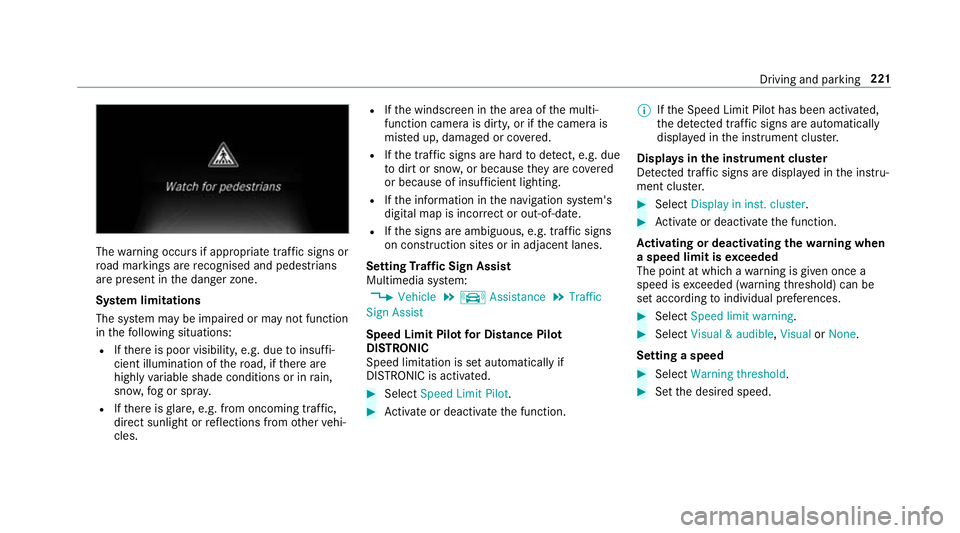
warning occurs if appropriate traf fic signs or
ro ad markings are recognised and pedestrians
are present in the danger zone.
Sy stem limitations
The sy stem may be impaired or may not function
in thefo llowing situations:
R Ifth ere is poor visibility, e.g. due toinsuf fi‐
cient illumination of thero ad, if there are
highly variable shade conditions or in rain,
sno w,fog or spr ay.
R Ifth ere is glare, e.g. from oncoming traf fic,
di re ct sunlight or reflections from other vehi‐
cles. R
Ifth e windscreen in the area of the multi‐
function camera is dirty, or if the camera is
mis ted up, damaged or co vered.
R Ifth e tra ffic signs are hard todetect, e.g. due
to dirt or sno w,or because they are co vered
or because of insuf ficient lighting.
R Ifth e information in the navigation sy stem's
digital map is incor rect or out-of-da te.
R Ifth e signs are ambiguous, e.g. tra ffic signs
on con stru ction sites or in adjacent lanes.
Setting Traf fic Sign Assist
Multimedia sy stem:
, Vehicle .
k Assistance .
Traffic
Sign Assist
Speed Limit Pilot for Di stance Pil ot
DISTRONIC
Speed limi tation is set au tomatically if
DISTRONIC is activated. #
Select Speed Limit Pilot. #
Activate or deacti vate the function. %
Ifth e Speed Limit Pilot has been activated,
th e de tected traf fic signs are au tomatical ly
displa yed in the instrument clus ter.
Displa ysinthe instrument clus ter
De tected traf fic signs are displ ayed in the instru‐
ment clus ter. #
Select Display in inst. cluster. #
Activate or deacti vate the function.
Ac tivating or deactivating the warning when
a speed limit is exceeded
The point at which a warning is given once a
speed is exceeded (warning thre shold) can be
set according toindividual preferences. #
Select Speed limit warning. #
Select Visual & audible ,Visual orNone.
Setting a speed #
Select Warning threshold. #
Set the desired speed. Driving and parking
221
Page 225 of 541
Blind Spot Assi
stand Active Blind Spot
Assi st Fu
nction of Blind Spot Assist and Active
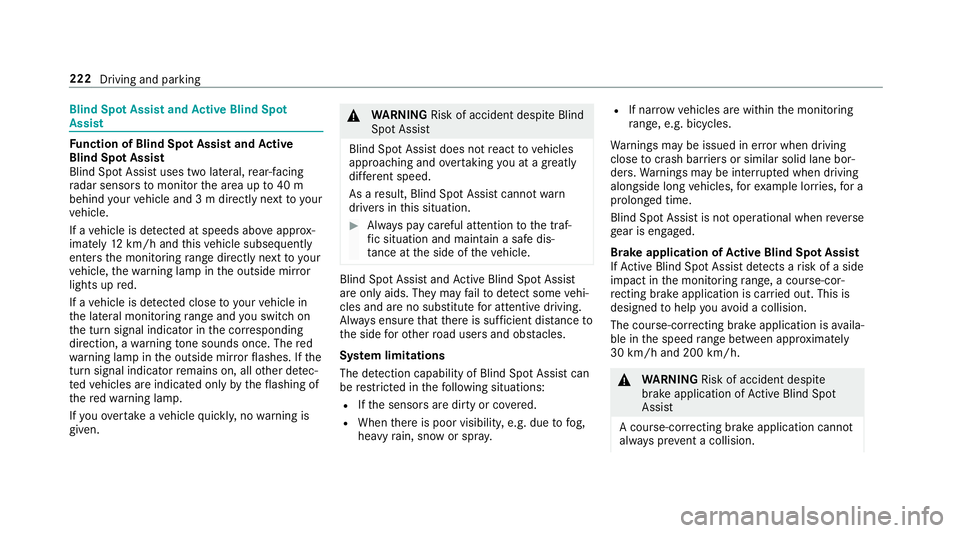
Blind Spot Assi st
Blind Spot Assi stuses two lateral, rear-facing
ra dar sensors tomonitor the area up to40 m
behind your vehicle and 3 m directly next to your
ve hicle.
If a vehicle is de tected at speeds ab ove appr ox‐
imately 12km/h and this vehicle subsequently
enters the monitoring range di rectly next to your
ve hicle, thewa rning lamp in the outside mir ror
lights up red.
If a vehicle is de tected close to yourvehicle in
th e lateral monitoring range and you swit chon
th e turn signal indicator in the cor responding
direction, a warning tone sounds once. The red
wa rning lamp in the outside mir rorflashes. If the
turn signal indica torre mains on, all other de tec‐
te dve hicles are indicated only bytheflashing of
th ere dwa rning lamp.
If yo uove rtake a vehicle quickl y,no warning is
given. &
WARNING Risk of accident despi teBlind
Spot Assi st
Blind Spot Assi stdoes not react tovehicles
approaching and overtaking you at a greatly
di fferent speed.
As a result, Blind Spot Assist cannot warn
drivers in this situation. #
Alw ays pay careful attention tothe traf‐
fi c situation and maintain a safe dis‐
ta nce at the side of theve hicle. Blind Spot Assist and
Active Blind Spot Assi st
are on lyaids. They may failto detect some vehi‐
cles and are no substitute for attentive driving.
Alw ays ensure that there is suf ficient di stance to
th e side forot her road users and obs tacles.
Sy stem limitations
The de tection capability of Blind Spot Assi stcan
be restricted in thefo llowing situations:
R Ifth e sensors are dirty or co vered.
R When there is poor visibility, e.g. due tofog,
heavy rain, snow or spr ay. R
If nar rowvehicles are within the monitoring
ra nge, e.g. bicycles.
Wa rnings may be issued in er ror when driving
close tocrash ba rriers or similar solid lane bor‐
ders. Warnings may be inter rupte d when driving
alongside long vehicles, forex ample lor ries, for a
prolonged time.
Blind Spot Assist is not operational when reve rse
ge ar is engaged.
Brake application of Active Blind Spot Assi st
If Ac tive Blind Spot Assi stdetects a risk of a side
impact in the monitoring range, a cou rse-cor‐
re cting brake application is car ried out. This is
designed tohelp youavo id a collision.
The course-cor recting brake application is availa‐
ble in the speed range between appr oximately
30 km/h and 200 km/h. &
WARNING Risk of accident despi te
brake application of Active Blind Spot
Assi st
A cou rse-co rrecting brake application cann ot
alw ays pr event a collision. 222
Driving and parking
Page 483 of 541
Display messages
Possible causes/consequences and M
MSolutions
Adaptive Highbeam Assist
Plus Camera view restric-
ted See Owner's Manual *T
he camera view is restricted. Possible causes:
R dirt on the windscreen in the camera's field of vision
R heavy rain, snow or fog
Driving sy stems and driving saf ety sy stems may be malfunctioning or temp orarily una vailable.
Once the cause of the problem is no longer present, driving sy stems and driving saf ety sy stems are available again.
If th e display message does not disappear: #
Pull over and stop theve hicle safely as soon as possible, paying attention toroad and traf fic conditions. #
Clean the windscreen. Wa
rning and indicator lamps Overview of
warning and indicator lamps Some sy
stems per form a self-test when the igni‐
tion is switched on. Some warning and indicator
lamps may briefly light up or flash. This behav‐
iour is non-critical. These warning and indicator
lamps only indicate a malfunction if they light up
or flash af terth e engine is star ted or during a
journe y. Instrument Display (standard)480
Display messages and warning/indicator lamps
Page 484 of 541
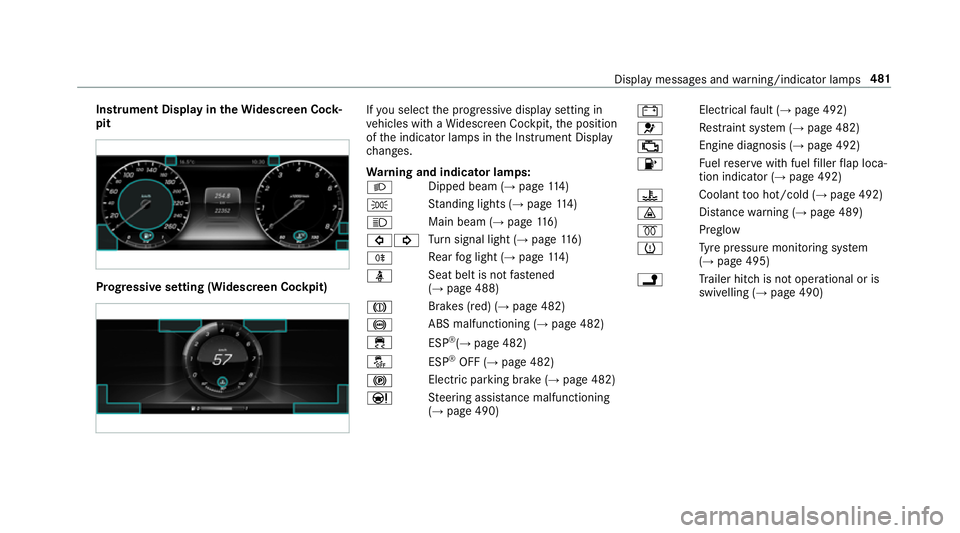
Instrument Display in
theWi descreen Co ck‐
pit Prog
ressive setting (Widescreen Cockpit) If
yo u select the progressive display setting in
ve hicles with a Widescreen Cockpit, the position
of the indicator lamps in the Instrument Display
ch anges.
Wa rning and indicator lamps:
L Dipped beam (→
page114)
T St
anding lights (→ page114)
K Main beam (→
page116)
#! Tu
rn signal light (→ page116)
R Re
ar fog light (→ page114)
ü Seat belt is not
fastened
(→ page 488)
J Brakes (red) (→
page 482)
! ABS malfunctioning (→
page 482)
÷ ESP®
(→ page 482)
å ESP®
OFF (→ page 482)
! Elect
ric pa rking brake (→ page 482)
Ð St
eering assis tance malfunctioning
(→ page 490) #
Electrical
fault (→ page 492)
6 Re
stra int sy stem (→ page 482)
; Engine diagnosis (→
page 492)
8 Fu
elreser vewith fuel filler flap loca‐
tion indicator (→ page 492)
? Coolant
too hot/cold (→ page 492)
· Dis
tance warning (→ page 489)
% Preglow
h Ty
re pressure monitoring sy stem
(→ page 495)
j Tr
ailer hit chis not operational or is
swivelling (→ page 490) Display messages and
warning/indicator lamps 481
Page 519 of 541
LED light
see In telligent Light Sy stem
Le vel control sy stem
see AIR BODY CONTROL
Light switch Overview .............................................. 11 4
Lighting .................................................... .121
Lighting see Lights
Lights ................................................ 114, 121
Ac tive light function ............................. 11 7
Ad aptive Highbeam Assist Plus ............ 11 9
Ad justing the instrument lighting ........ 238
Ad versewe ather light .......................... 11 8
Au tomatic driving lights ....................... 11 5
City lighting .......................................... 11 8
Combination swit ch............................. 11 6
Corne ring light function ....................... 11 7
Dipped beam ........................................ 11 4
Driving ab road .................................... .114
Fo g light (extended range) ................... 11 8
Haza rdwa rning lights .......................... .116
Headla mpflashing .............................. .116
Intellige nt Light Sy stem ........................ 11 7Light switch .........................................1
14
Main beam ...........................................1 16
Mo torw ay mode ................................... 11 8
Pa rking lights ...................................... .114
Re ar fog light ........................................1 15
Re sponsibility for lighting sy stems .......1 14
Setting the dipped beam ..................... 12 0
Setting the sur round lighting .............. .120
St anding lights .................................... .114
Tu rn signal light .................................... 11 6
Limiter ...................................................... 181
Ac tivating ............................................ .181
Calling up a speed .............................. .181
Deactivating ......................................... 181
Fu nction ............................................... 181
Le ver ................................................... .181
Pa ssive mode ....................................... 181
Pe rm anent setting .............................. .183
Re quirements ...................................... 181
Selecting .............................................. 181
Setting a speed .................................... 181
St oring a speed .................................... 181
Sy stem limits ....................................... 181
Limiting speed see Limiter LINGU
ATRO NIC ........................................ 247
Application-speci fic vo ice commands
............................................................ .248
Au dible help functions .........................2 49
Entering numbe rs................................ 24 8
Global voice commands ...................... 24 8
Impr oving speech quality .................... .249
Language setting ................................. 24 9
Media pla yervo ice commands ............ 255
Message voice commands .................. 255
Multifunction steering wheel (operat‐
ing) ...................................................... 247
Na vigation voice commands ................ 251
Operable functions .............................. 24 8
Operating saf ety .................................. 247
Ra dio voice commands ...................... .254
Switch voice commands ...................... 24 9
Te lephone voice commands ................ 253
Te xt messa gevoice commands .......... .255
TV voice commands ............................ 254
Ty pes of voice commands .................. .248
Ve hicle voice commands .................... .256
Vo ice prom pting .................................. 24 8
Live Traf fic Information
Displaying subsc ript ion information .... 288 516
Index
Page 526 of 541
Ra
ising
Ve hicle ................................................ 402
Ra nge
Displaying ............................................ 239
Re ading lamp
see Interior lighting
Re ar fog light ............................................ 11 5
Re ar seat
see Seat
Re ar seat belt
St atus display ........................................ 33
Re ar seat belt status display .................... 33
Re ar window
Ro ller sunblind ...................................... .72
Re ar window heater ................................ 12 9
Re ar-view mir ror
see Outside mir rors
Re cycling
see Take -ba ckof end-of-life vehicles
Re ducing agent
see AdBlue ® Re
fuelling
Re fuelling theve hicle .......................... 154
To pping up AdBlue ®
............................. 15 8
Re gistration
Ve hicle ................................................... 24
Re mo tecont rol (stationa ryheater)
Displ ays ............................................... 13 6
Problems ............................................. 13 8
Re placing the battery .......................... 137
Setting ................................................. 13 5
Re mo teParking Pilot .............................. .212
Auth orising a mobile phone ................. 216
Fu nction/no tes .................................... 212
Operating ............................................. 213
Sy stem limitations ...............................2 12
Re scue card ............................................... 25
Re ser ve
Fu el ...................................................... 41 5
Re set function (multimedia sy stem) .....2 73
Re sidual heat ...........................................1 32
Re storing (factory settings)
see Reset function (multimedia sy stem) Re
stra int sy stem
Children ................................................ .42
Fu nction in an accident ........................ .28
Fu nctionality .......................................... 28
Malfunction ........................................... 28
Pr otection ..............................................27
Re duced pr otection ...............................27
Sy stem self-test .....................................28
Wa rning lamp ........................................ 28
Re stra int sy stem
see Occupant saf ety
Re turning an end-of-li fevehicle
Pr otection of the environment ............... 19
Re versege ar
Selecting ............................................. 15 2
Re versing camera .................................... 201
Assigning as a favo urite ...................... .207
Care .................................................... 363
Fu nction .............................................. 201
Opening the camera co ver .................. 207
Switching auto matic mode on/off ..... .206
RF transmitters see Two-w ayradios
Rims (Care) .............................................. 363 Index
523