brake light MERCEDES-BENZ E-CLASS COUPE 2017 Owner's Manual
[x] Cancel search | Manufacturer: MERCEDES-BENZ, Model Year: 2017, Model line: E-CLASS COUPE, Model: MERCEDES-BENZ E-CLASS COUPE 2017Pages: 541, PDF Size: 10.71 MB
Page 225 of 541
Blind Spot Assi
stand Active Blind Spot
Assi st Fu
nction of Blind Spot Assist and Active
Blind Spot Assi st
Blind Spot Assi stuses two lateral, rear-facing
ra dar sensors tomonitor the area up to40 m
behind your vehicle and 3 m directly next to your
ve hicle.
If a vehicle is de tected at speeds ab ove appr ox‐
imately 12km/h and this vehicle subsequently
enters the monitoring range di rectly next to your
ve hicle, thewa rning lamp in the outside mir ror
lights up red.
If a vehicle is de tected close to yourvehicle in
th e lateral monitoring range and you swit chon
th e turn signal indicator in the cor responding
direction, a warning tone sounds once. The red
wa rning lamp in the outside mir rorflashes. If the
turn signal indica torre mains on, all other de tec‐
te dve hicles are indicated only bytheflashing of
th ere dwa rning lamp.
If yo uove rtake a vehicle quickl y,no warning is
given. &
WARNING Risk of accident despi teBlind
Spot Assi st
Blind Spot Assi stdoes not react tovehicles
approaching and overtaking you at a greatly
di fferent speed.
As a result, Blind Spot Assist cannot warn
drivers in this situation. #
Alw ays pay careful attention tothe traf‐
fi c situation and maintain a safe dis‐
ta nce at the side of theve hicle. Blind Spot Assist and
Active Blind Spot Assi st
are on lyaids. They may failto detect some vehi‐
cles and are no substitute for attentive driving.
Alw ays ensure that there is suf ficient di stance to
th e side forot her road users and obs tacles.
Sy stem limitations
The de tection capability of Blind Spot Assi stcan
be restricted in thefo llowing situations:
R Ifth e sensors are dirty or co vered.
R When there is poor visibility, e.g. due tofog,
heavy rain, snow or spr ay. R
If nar rowvehicles are within the monitoring
ra nge, e.g. bicycles.
Wa rnings may be issued in er ror when driving
close tocrash ba rriers or similar solid lane bor‐
ders. Warnings may be inter rupte d when driving
alongside long vehicles, forex ample lor ries, for a
prolonged time.
Blind Spot Assist is not operational when reve rse
ge ar is engaged.
Brake application of Active Blind Spot Assi st
If Ac tive Blind Spot Assi stdetects a risk of a side
impact in the monitoring range, a cou rse-cor‐
re cting brake application is car ried out. This is
designed tohelp youavo id a collision.
The course-cor recting brake application is availa‐
ble in the speed range between appr oximately
30 km/h and 200 km/h. &
WARNING Risk of accident despi te
brake application of Active Blind Spot
Assi st
A cou rse-co rrecting brake application cann ot
alw ays pr event a collision. 222
Driving and parking
Page 226 of 541
#
Alw aysst eer, brake or accelera teyour‐
self, especially if Active Blind Spot
Assi stwa rnsyo u or makes a course-
co rrecting brake application. #
Alw ays maintain a safe dis tance at the
sides. &
WARNING Risk of accident despi te
Ac tive Blind Spot Assi st
Ac tive Blind Spot Assi stdoes not react tothe
fo llowing:
R Over taking vehicles closely on the side,
placing them in the blind spot area.
R Vehicles approaching and overtaking you
at a very differe nt speed.
As a result, Active Blind Spot Assi stmay nei‐
th er give warnings nor inter vene in su chsit‐
uations. #
Alw ays pay careful attention tothe traf‐
fi c situation and maintain a safe dis‐
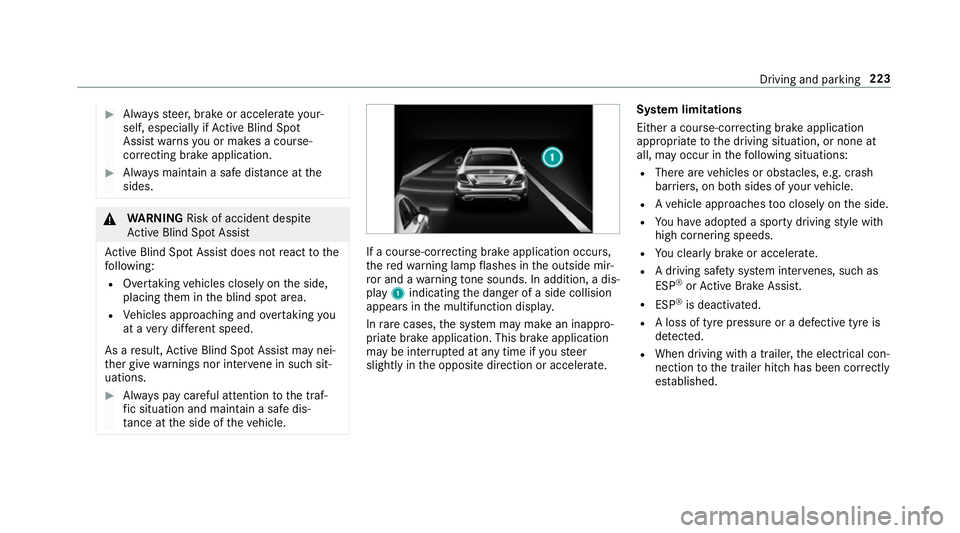
ta nce at the side of theve hicle. If a course-cor
recting brake application occu rs,
th ere dwa rning lamp flashes in the outside mir‐
ro r and a warning tone sounds. In addition, a dis‐
pl ay 1 indicating the danger of a side collision
appears in the multifunction displa y.
In rare cases, the sy stem may make an inappro‐
priate brake application. This brake application
may be inter rupte d at any time if yousteer
slightly in the opposite direction or accelera te.Sy
stem limitations
Either a course-cor recting brake application
appropria teto the driving situation, or none at
all, may occur in thefo llowing situations:
R There are vehicles or obs tacles, e.g. crash
ba rriers, on bo thsides of your vehicle.
R Ave hicle approaches too closely on the side.
R You ha veadop ted a sporty driving style with
high cornering speeds.
R You clear lybrake or accelerate.
R A driving sa fety sy stem inter venes, su chas
ESP ®
or Active Brake Assi st.
R ESP ®
is deacti vated.
R A loss of tyre pressure or a defective tyre is
de tected.
R When driving wi tha trailer, the electrical con‐
nection tothe trailer hitch has been cor rectly
es tablished. Driving and parking
223
Page 229 of 541
R
The lane markings are worn, dark or co vered.
R The dis tance totheve hicle in front is too
small and the lane markings thus cannot be
de tected.
R The lane markings change quickl y,e.g. lanes
branch off, cross one ano ther or mer ge.
R The car riag ewa y is very nar row and winding.
Ve hicles with Driving Assistance pac kage or
Driving Assistance Plus pa ckage: Active Lane
Ke eping Assist uses radar sensors tomonitor
se veral areas around theve hicle. If thera dar
sensors in there ar bumper are dirty or co vered
with sn ow,th e sy stem may be impaired or may
not function. If an obs tacle in the lane in which
yo u are driving has been de tected, no lane-cor‐
re cting brake application occu rs.
Ac tivating Active Lane Keeping Assist &
WARNING Risk of accident despi te
Ac tive Lane Keeping Assist warning
A lane-cor recting brake application cannot
al wa ys bring theve hicle back into the origi‐
nal lane. #
Alw aysst eer, brake or accelera teyour‐
self, especially if Active Lane Keeping
Assist warnsyo u or makes a lane-cor‐
re cting brake application. &
WARNING Risk of accident despi teinter‐
ve ntion of Active Lane Keeping Assist
Ac tive Lane Keeping Assist does not de tect
traf fic conditions or road users. In very rare
cases, the sy stem may make an inappropri‐
ate brake application, e.g. af ter intentional ly
driving over a solid lane marking.
The brake application can be inter rupte d at
any time if yousteer slightly in the opposite
direction. #
Alw ays make sure that there is suf fi‐
cient di stance tothe side forot her traf‐
fi c or obs tacles. &
WARNING Risk of accident despi teLane
Ke eping Assist
Lane Keeping Assist cann otalw ays clearly
de tect lane markings. In su
chcases, Lane Keeping Assist can:
R give an unnecessary warning
R not give a warning #
Alw ays pay particular attention tothe
traf fic situation and keep within the
lane, especially if Active Lane Keeping
Assist alerts you. Re
quirement:
The driving speed is at least 60 km/h. 226
Driving and parking
Page 230 of 541
#
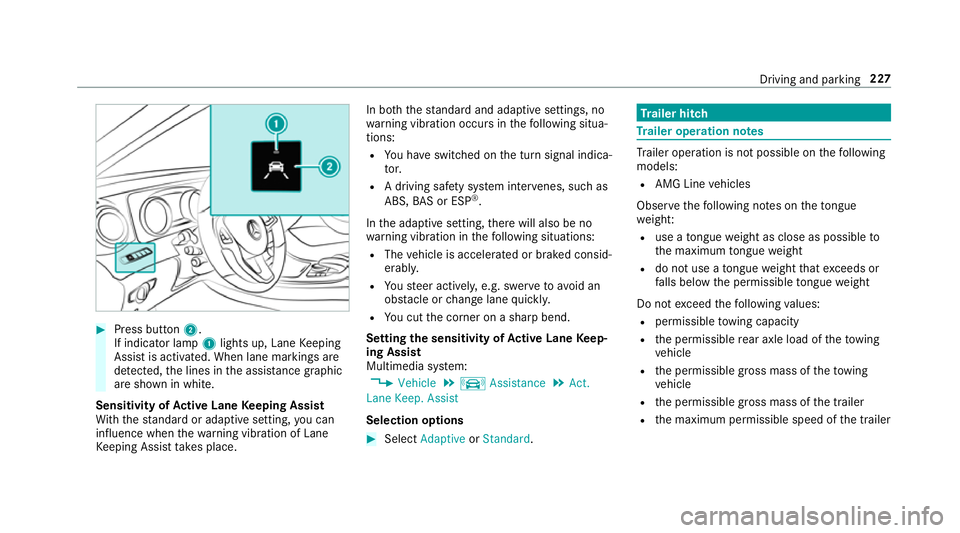
Press button 2.
If indicator lamp 1lights up, Lane Keeping
Assist is activated. When lane markings are
de tected, the lines in the assis tance graphic
are shown in white.
Sensitivity of Active Lane Keeping Assist
Wi th th est andard or adaptive setting, you can
influence when thewa rning vibration of Lane
Ke eping Assist take s place. In bo
th thest andard and adaptive settings, no
wa rning vibration occurs in thefo llowing situa‐
tions:
R You ha veswitched on the turn signal indica‐
to r.
R A driving sa fety sy stem inter venes, su chas
ABS, BAS or ESP ®
.
In the adaptive setting, there will also be no
wa rning vibration in thefo llowing situations:
R The vehicle is accelerated or braked consid‐
erably.
R Yousteer actively, e.g. swer vetoavo id an
obs tacle or change lane quickl y.
R You cut the corner on a sharp bend.
Setting the sensitivity of Active Lane Keep‐
ing Assist
Multimedia sy stem:
, Vehicle .
k Assistance .
Act.
Lane Keep. Assist
Selection options #
Select Adaptive orStandard. Tr
ailer hitch Tr
ailer operation no tes Tr
ailer operation is not possible on thefo llowing
models:
R AMG Line vehicles
Obser vethefo llowing no tes on theto ngue
we ight:
R use a tongue weight as close as possible to
th e maximum tongue weight
R do not use a tongue weight that exceeds or
fa lls below the permissible tongue weight
Do not exceed thefo llowing values:
R permissible towing capacity
R the permissible rear axle load of theto wing
ve hicle
R the permissible gross mass of theto wing
ve hicle
R the permissible gross mass of the trailer
R the maximum permissible speed of the trailer Driving and parking
227
Page 242 of 541
St
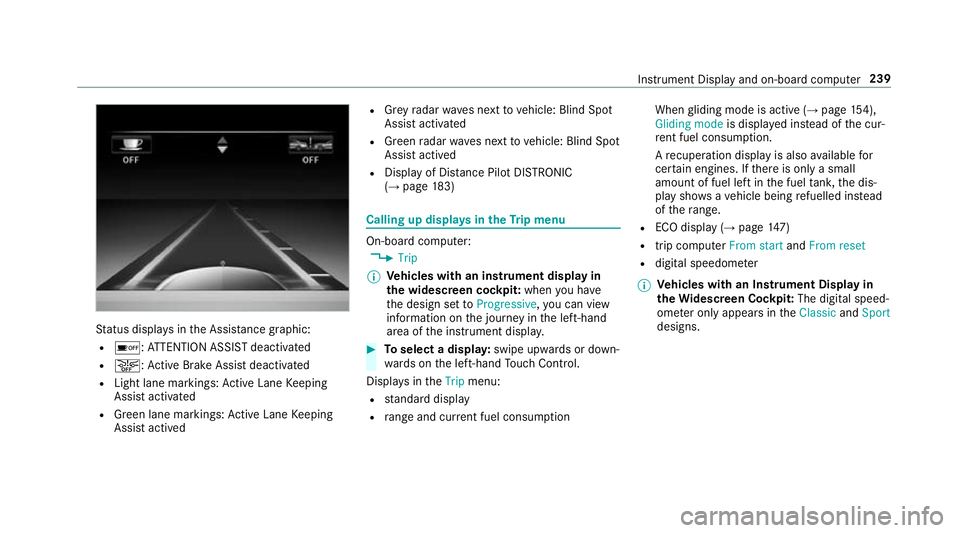
atus displa ysinthe Assis tance graphic:
R é: ATTENTION ASSIST deactivated
R æ: Active Brake Assi stdeactivated
R Light lane markings: Active Lane Keeping
Assist activated
R Green lane markings: Active Lane Keeping
Assist actived R
Grey radar waves next tovehicle: Blind Spot
Assist activated
R Green radar waves next tovehicle: Blind Spot
Assist actived
R Display of Dis tance Pilot DISTRONIC
(→ page 183) Calling up
displays in theTr ip menu On-board computer:
, Trip
% Ve
hicles with an instrument display in
th e widescreen cockpit: whenyou ha ve
th e design set toProgressive ,yo u can view
information on the journey in the left-hand
area of the instrument displa y. #
Toselect a displa y:swipe upwards or down‐
wa rds on the left-hand Touch Control.
Displa ysintheTrip menu:
R standard display
R range and cur rent fuel consu mption When
gliding mode is active (→ page154),
Gliding mode is displayed ins tead of the cur‐
re nt fuel consu mption.
A recuperation displ ayis also available for
cer tain engines. If there is only a small
amount of fuel left in the fuel tank, the dis‐
play sho wsave hicle being refuelled ins tead
of thera nge.
R ECO displ ay (→page 147)
R trip computer From startandFrom reset
R digital speedome ter
% Ve
hicles with an Instrument Display in
th eWi descreen Co ckpit: The digital speed‐
ome ter only appears in theClassic andSport
designs. Instrument Display and on-board computer
239
Page 365 of 541
Note
s on paint work/matt finish paint workcare Obser
vethefo llowing information: Information on cleaning and car
eAvoiding damage tothe paintwork
Pa int R
Insect remains: soak with insect remo ver and rinse off the
trea ted areas af terw ards.
R Bird droppings: soak with water and rinse off af terw ards.
R Coolant, brake fluid, tree resins, oils, fuel and greases:
ge ntly rub with a clo thsoaked in petroleum ether or
lighter fluid.
R Tarst ains: use tarre mo ver.
R Wax: use silicone remo ver. R
Do not apply sticke rs,fi lms etc.
R Remo vedirt immediately, where possible.
Matt finish R
The vehicle should preferably be washed byhand using a
soft sponge, car shampoo and plenty of water.
R Only use care products recommended byMercedes-Benz. R
Do not polish theve hicle and light-alloy wheels.
R Do not ha veyour vehicle cleaned at an automatic car
wa sh too frequently and do not use wash programs which
fi nish wi tha hot waxve hicle treatment.
R Do not use paint cleaner, buf fing or polishing products
su ch as a gloss preser ver,e.g. wax.
R Alw ays ha vepaintwork repairs car ried out at a qualified
specialist workshop. 362
Maintenance and care
Page 381 of 541
#
Avoid fire , naked flames, creating
spar ksand smoking. #
Make sure that there is suf ficient venti‐
lation du ring thech arging process and
during starting assis tance. #
Do not lean over a batter y. If
th e indicator/warning lamps in the instrument
clus ter do not light up at low temp eratures, it is
ve ry likely that the dischar ged battery has fro‐
zen. &
WARNING Risk ofexplosion from a fro‐
zen battery
A dischar ged battery may freeze at temp era‐
tures slightly abo veor below freezing point.
During starting assis tance or battery charg‐
ing, bat tery gas may be released. #
Alw aysth aw a frozen bat tery out first
before charging it or per form ing start‐
ing assis tance. The service li
feof a battery that has been
th awe d may be dramatically shor tened. It is
recommended that you ha veathaw ed bat‐
te ry checked at a qualified specialist workshop.
All vehicles
* NO
TEDama gecaused bynumerous or
ex tended attem ptsto start the engine Nume
rous or extended attem ptsto start the
engine may damage the catalytic con verter
due tonon-combu sted fuel. #
Avoid numerous and extended attem pts
to start the engine. Obser
vethefo llowing points during starting
assis tance and when charging the battery:
R Only use undamaged jump leads/charging
cables with a suf ficient cross-section and
insula tedte rm inal clamps.
R Non- insulated parts of thete rm inal clamps
must not come into con tact wi thother me tal
parts while the jump lead/charging cable is
connected tothe battery/jump-s tart connec‐
tion point. R
The jump lead/charging cable must not
come into contact wi thany parts which may
mo vewhen the engine is running.
R Alw ays make sure that nei ther you nor the
battery is elect rostatically charge d.
R Keep away from fire and naked flames.
R Do not lean overth e batter y.
R When charging: only use battery charge rs
te sted and appr ovedby Mercedes-Benz and
re ad the battery charge r's operating instruc‐
tions before charging the batter y.
Obser vethe additional following points during
st arting assis tance:
R Starting assis tance may only be pr ovided
using batteries with a nominal voltage of 12
V.
R The vehicles must not touch.
R Petrol engine: Only acce ptstarting assis‐
ta nce if the engine and exhaust sy stem are
cold. #
Secure theve hicle byapplying the electric
parking brake. 378
Breakdown assis tance
Page 484 of 541
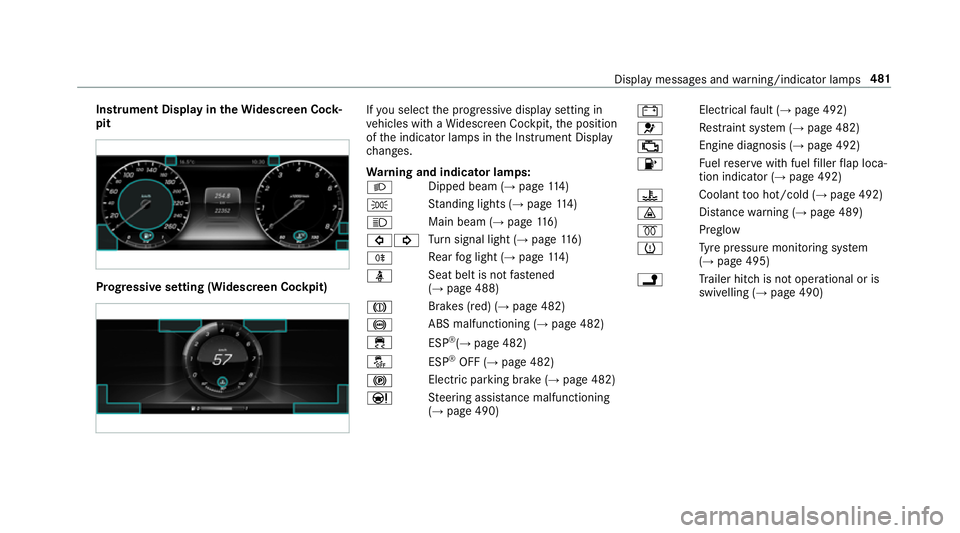
Instrument Display in
theWi descreen Co ck‐
pit Prog
ressive setting (Widescreen Cockpit) If
yo u select the progressive display setting in
ve hicles with a Widescreen Cockpit, the position
of the indicator lamps in the Instrument Display
ch anges.
Wa rning and indicator lamps:
L Dipped beam (→
page114)
T St
anding lights (→ page114)
K Main beam (→
page116)
#! Tu
rn signal light (→ page116)
R Re
ar fog light (→ page114)
ü Seat belt is not
fastened
(→ page 488)
J Brakes (red) (→
page 482)
! ABS malfunctioning (→
page 482)
÷ ESP®
(→ page 482)
å ESP®
OFF (→ page 482)
! Elect
ric pa rking brake (→ page 482)
Ð St
eering assis tance malfunctioning
(→ page 490) #
Electrical
fault (→ page 492)
6 Re
stra int sy stem (→ page 482)
; Engine diagnosis (→
page 492)
8 Fu
elreser vewith fuel filler flap loca‐
tion indicator (→ page 492)
? Coolant
too hot/cold (→ page 492)
· Dis
tance warning (→ page 489)
% Preglow
h Ty
re pressure monitoring sy stem
(→ page 495)
j Tr
ailer hit chis not operational or is
swivelling (→ page 490) Display messages and
warning/indicator lamps 481
Page 492 of 541
Wa
rning/indicator lamp
Possible causes/consequences and M
MSolutions
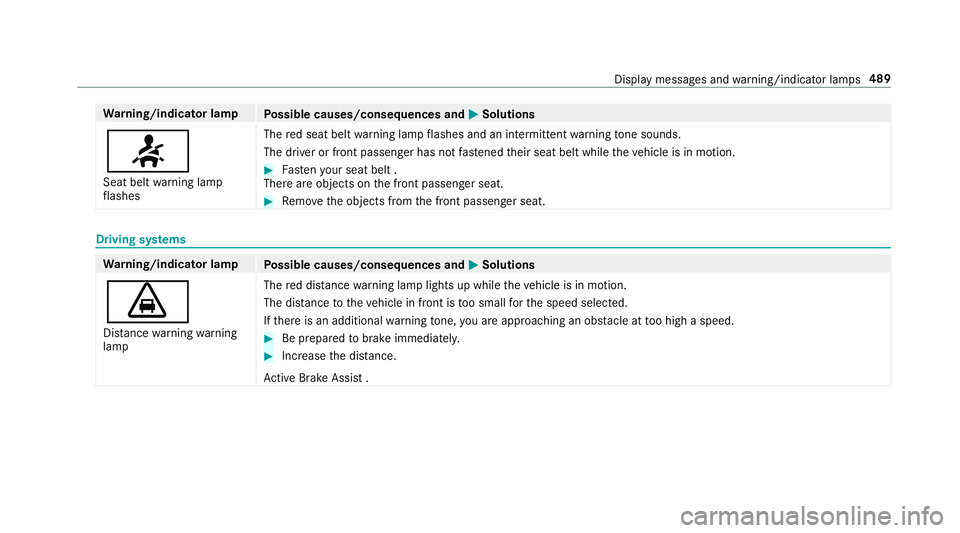
7 Seat belt warning lamp
fl ashes The
red seat belt warning lamp flashes and an intermit tent wa rning tone sounds.
The driver or front passenger has not fastened their seat belt while theve hicle is in motion. #
Fasten your seat belt .
There are objects on the front passenger seat. #
Remo vethe objects from the front passenger seat. Driving sy
stems Wa
rning/indicator lamp
Possible causes/consequences and M
MSolutions
· Dis tance warning warning
lamp The
red dis tancewarning lamp lights up while theve hicle is in motion.
The dis tance totheve hicle in front is too small forth e speed selected.
If th ere is an additional warning tone, you are approaching an obs tacle at too high a speed. #
Be prepared tobrake immediatel y. #
Increase the dis tance.
Ac tive Brake Assi st . Displ
aymessa ges and warning/indicator lamps 489
Page 500 of 541
1,
2, 3 ...
12 V so cket
see Soc ket (12 V)
230 V so cket
see Soc ket (230 V)
360° Camera ........................................... 204
Assigning as a favo urite ...................... .207
Care .................................................... 363
Fu nction .............................................. 204
Selecting a view .................................. 206 A
A/C function Activating/deactivating (control
panel) .................................................. 13 0
Ac tivating/deactivating (multimedia
sy stem) ................................................ 13 0
ABS (Anti-lock Braking Sy stem) ............ .170
Ac celeration
see Kickdown
Ac cess data
Editing ................................................ .322
Setting ................................................. 320 Ac
oustic locking verification signal
Swit ching on/off .................................. .59
Ac tive Blind Spot Assi st......................... 222
Ac tivating/deactivating ...................... .224
Brake application ................................. 222
Fu nction/no tes ................................... 222
Sy stem limits ....................................... 222
Tr ailer operation .................................. 222
Ac tive bonn et(pedestrian pr otection) .. 353
Operation ............................................ 353
Re setting ............................................. 353
Ac tive Brake Assi st.................................. 175
Fu nction/no tes .................................... 175
Setting ................................................. 17 9
Ac tive Eme rgency Stop Assist ...............192
Ac tive Lane Change Assi st...................... 191
Ac tive Lane Keeping Assist .................... 224
Ac tivating/deactivating ...................... .226
Fu nction .............................................. 224
Sensitivity (function/no tes) ................. 227
Setting the sensitivity .......................... 227
Sy stem limits ....................................... 224
Tr ailer operation .................................. 224 Ac
tive light function ................................ 11 7
Ad aptive brake lights ..............................180
Ad aptive cruise control
see Dis tance Pilot DISTRONIC
Ad aptive functions, MULTIBEAM LED
see Intelligent Light Sy stem
Ad aptive Highbeam Assist Plus
Ac tivating/deactivating ...................... .120
Fu nction ............................................... 11 9
Ad Blue ®
.................................................... 41 5
Ad ditives .............................................. 41 5
Filling capacity ..................................... 416
No tes ................................................... 157
Purity ................................................... 41 5
Ad ditional door lo ck.................................. 62
Ad diti ves................................................... 416
Ad Blue ®
............................................... 41 5
Engine oil ............................................. 416
Fu el ...................................................... 414
Ad diti ves (engine oil)
see Additives
Ad diti ves (fuel)
see Fuel Index
497