brake MERCEDES-BENZ E-CLASS COUPE 2018 Manual Online
[x] Cancel search | Manufacturer: MERCEDES-BENZ, Model Year: 2018, Model line: E-CLASS COUPE, Model: MERCEDES-BENZ E-CLASS COUPE 2018Pages: 486, PDF Size: 6.31 MB
Page 432 of 486
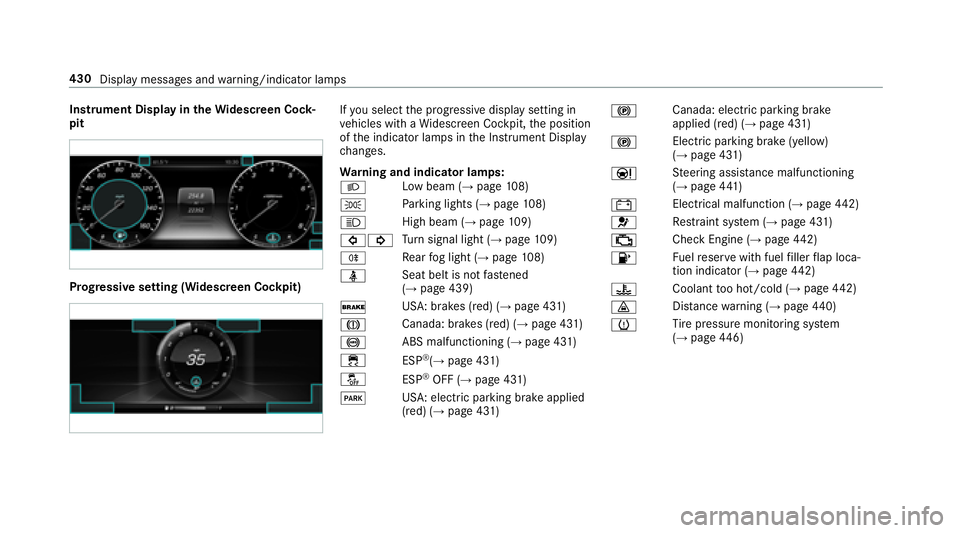
Instrument Display intheWi descreen Co ck‐
pit
Prog ressive setting (Widescreen Cockpit)
Ifyo u select the progressive display setting in
ve hicles with a Widescreen Cockpit, the position
of the indicator lamps in the Instrument Display
ch anges.
Wa rning and indicator lamps:
L Low beam (
→page
108)
T Pa
rking lights (
→page 108)
K High beam
(
→page10 9)
#! Tu
rn signal light (
→page 109)
R Re
ar fog light (
→page 108)
ü Seat belt is not
fastened
(
→page 439)
$ USA: brakes (red) (
→page 431)
J Canada: brakes (red) (
→page 431)
! ABS malfunctioning (
→page 431)
÷ ESP
®(→page 431)
å ESP
®OFF (→page 431)
F USA: electric parking brake applied
(red) (
→page 431) !
Canada: electric parking brake
applied (red) (
→page 431)
! Elect
ric park ing brake (yellow)
(
→page 431)
Ð St
eering assis tance malfunctioning
(
→pa ge 441)
# Electrical malfunction (
→pa
ge 442)
6 Re
stra int sy stem (
→page 431)
; Check Engine (
→page
442)
8 Fu
elreser vewith fuel filler flap loca‐
tion indicator (
→page 442)
? Coolan
tto o hot/cold (
→page 442)
· Dis
tance warning (
→page 440)
h Ti
re pressure monitoring sy stem
(
→page 446)
43 0
Displ aymessage s andwarning/indicator lamps
Page 433 of 486
Safety sy stems
Wa rning/indicator lamp
Possible causes/consequences and MSolutions
é
RBSwarning lamp (USA/
CND) The
yellow RBS warning lamp is lit while the engine is running.
&
WARNING Risk of an accident due toa brake sy stem malfunction
If th e brake sy stem is malfunctioning, braking characteristics may be impaired.
#Drive on carefull y.
#Have the brake sy stem checked immediately at a qualified specialist workshop.
#Ad just your speed and continue todrive carefull y,leaving a suitable dis tance totheve hicle in front.
#Ifth e multifunction display sho wsa display message, please observ eth is.
#Visit a qualified specialist workshop.
Display messages and warning/indicator lamps 431
Page 434 of 486
Warning/indicator lamp
Possible causes/consequences and MSolutions
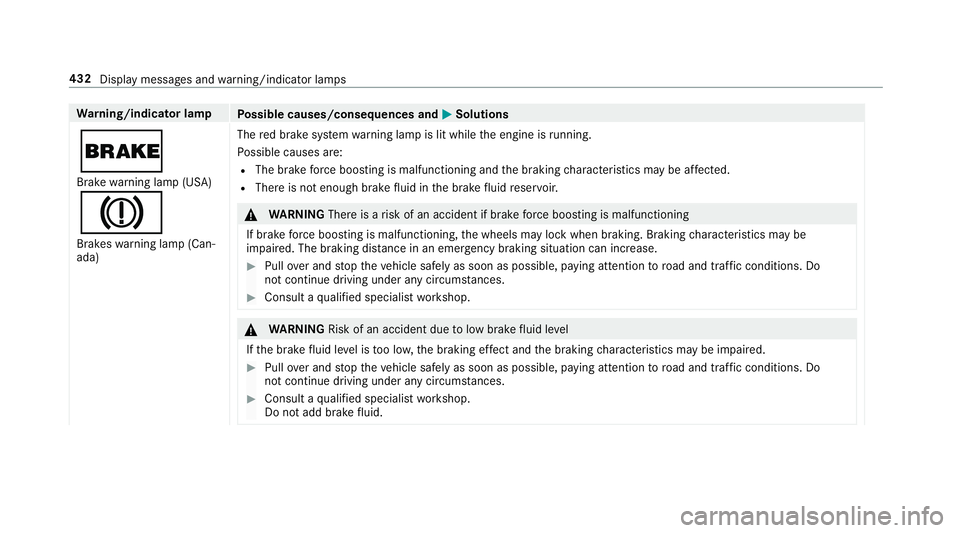
$
Brakewarning lamp (USA)
J
Brakes warning lamp (Can‐
ada) The
red brake sy stem warning lamp is lit while the engine is running.
Po ssible causes are:
RThe brake forc e boosting is malfunctioning and the braking characteristics may be af fected.
RThere is not enough brake fluid inthe brake fluid reser voir.
&
WARNING Thereis arisk of an accident if brake forc e boosting is malfunctioning
If brake forc e boosting is malfunctioning, the wheels may lock when braking. Braking characteristics may be
impaired. The braking dis tance in an eme rgency braking situation can increase.
#Pull over and stop theve hicle safely as soon as possible, paying attention toroad and traf fic conditions. Do
not continue driving under any circums tances.
#Consult a qualified specialist workshop.
&
WARNING Risk of an accident due tolow brake fluid le vel
If th e brake fluid leve l is too lo w,the braking ef fect and the braking characteristics may be impaired.
#Pull over and stop theve hicle safely as soon as possible, paying attention toroad and traf fic conditions. Do
not continue driving under any circums tances.
#Consult a qualified specialist workshop.
Do not add brake fluid.
432
Display messages and warning/indicator lamps
Page 435 of 486
Warning/indicator lamp
Possible causes/consequences and MSolutions
#Pullover and stop theve hicle safely as soon as possible, paying attention toroad and traf fic conditions. Do not
continue driving under any circums tances.
#Obser vethe messages in the multifunction displa y.
#Consult aqualified specialist workshop.
USA onl y:if an additional display message appears with the# symbol in the multifunction displa y,the brake linings
ha ve reached their wear limit.
#Visit a qualified specialist workshop.
Display messages and warning/indicator lamps 433
Page 436 of 486
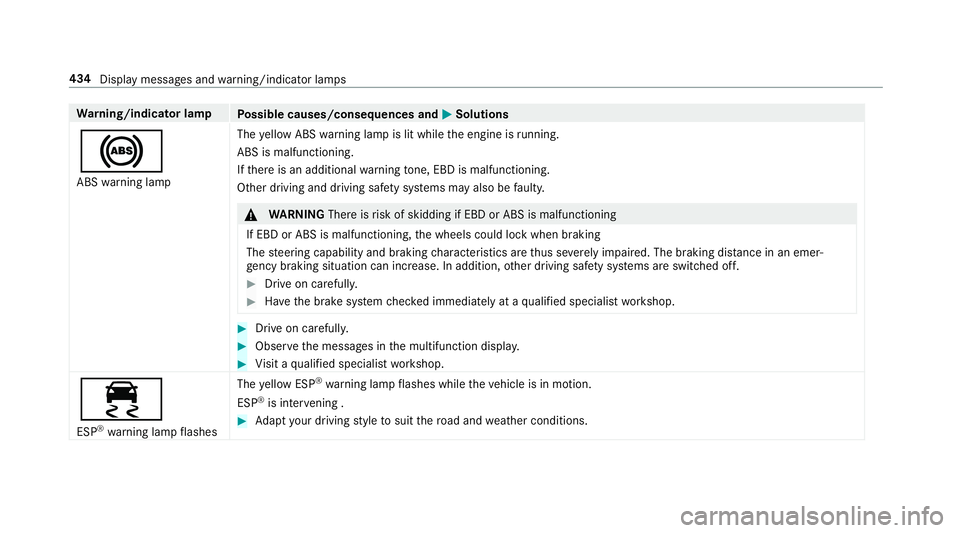
Warning/indicator lamp
Possible causes/consequences and MSolutions
!
ABSwarning lamp The
yellow ABS warning lamp is lit while the engine is running.
ABS is malfunctioning.
If th ere is an additional warning tone, EBD is malfunctioning.
Other driving and driving safe ty systems may also be faulty.
&
WARNING Thereisrisk of skidding if EBD or ABS is malfunctioning
If EBD or ABS is malfunctioning, the wheels could lock when braking
The steering capability and braking characteristics are thus se verely impaired .Th ebr aking dis tance in an emer‐
ge ncy braking situation can increase. In addition, other driving saf etysy stems are switched off.
#Drive on carefull y.
#Have the brake sy stem checked immediately at a qualified specialist workshop.
#Drive on carefully.
#Obser vethe messages in the multifunction displa y.
#Visit a qualified specialist workshop.
÷
ESP®wa rning lamp flashes The
yellow ESP
®wa rning lamp flashes while theve hicle is in motion.
ESP
®is inter vening .
#Ad apt your drivin gst yle to suit thero ad and weather conditions.
434
Display messages and warning/indicator lamps
Page 439 of 486
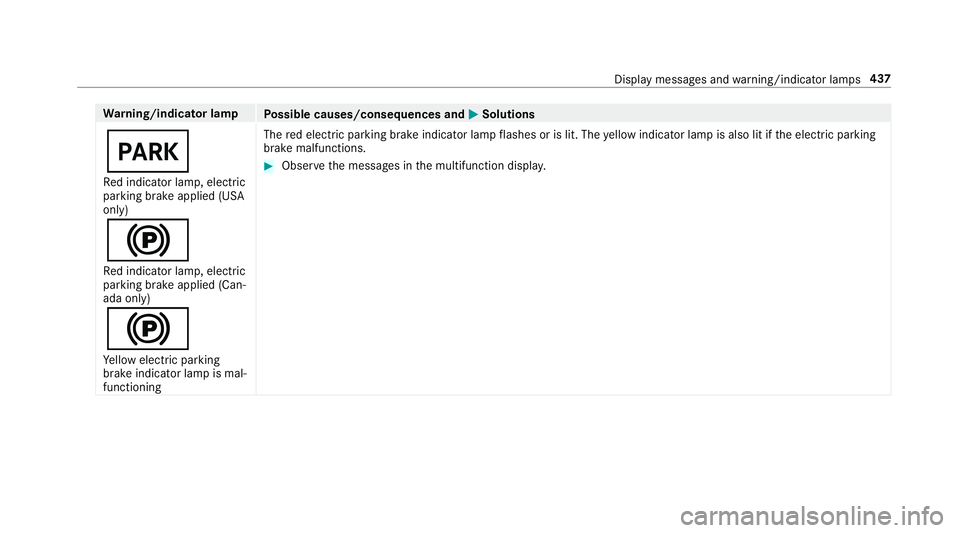
Warning/indicator lamp
Possible causes/consequences and MSolutions
F
Red indicator lamp, elect ric
parking brake applied (USA
only)
!
Re d indicator lamp, elect ric
parking brake applied (Can‐
ada only)
!
Ye llow elect ric park ing
brake indicator lamp is mal‐
functioning The
red elect ric park ing brake indicator lamp flashes or is lit. The yellow indicator lamp is also lit if the electric parking
brake malfunctions.
#Obser vethe messages in the multifunction displa y.
Displaymessage s andwarning/indicator lamps 437
Page 442 of 486
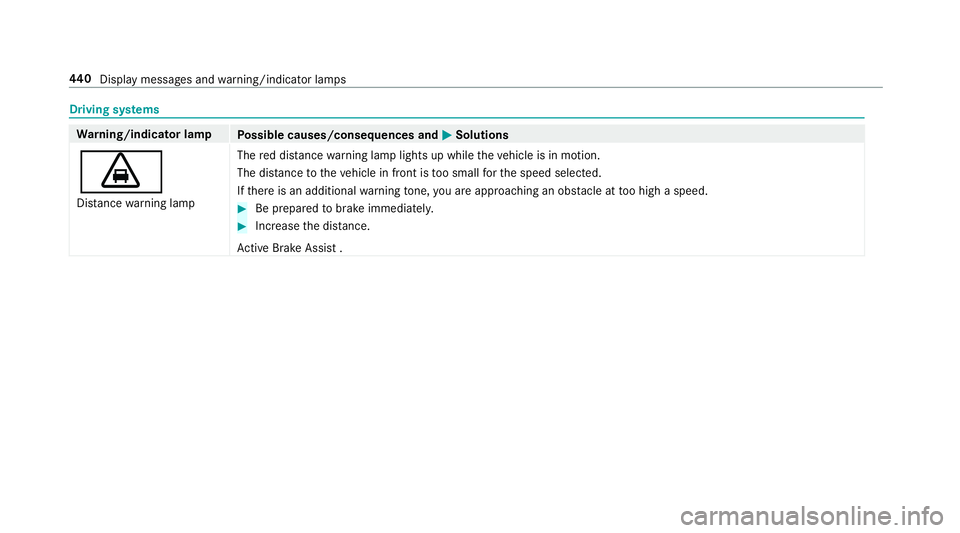
Drivingsy stems
Wa rning/indicator lamp
Possible causes/consequences and MSolutions
·
Distance warning lamp The
red dis tancewarning lamp lights up while theve hicle is in motion.
The dis tance totheve hicle in front is too small forth e speed selected.
If th ere is an additional warning tone, you are approaching an obs tacle at too high a speed.#Be prepared tobrake immediatel y.
#Increasethe dis tance.
Ac tive Brake Assi st.
44 0
Displ aymessage s andwarning/indicator lamps
Page 450 of 486
1,2, 3 ...
12 V sock et
see Soc ket (12 V)
11 5 V soc ket
see Soc ket (1 15 V)
360° Camera ........................................... 182
Assigning as a favo rite ......................... 184
Care .................................................... .318
Fu nction .............................................. 182
Selecting a view ................................... 184
A
A/C function Activating/deactivating (control
panel) .................................................. 122
Ac tivating/deactivating (multimedia
sy stem) ................................................ 122
ABS (Anti-lock Braking Sy stem) ............ .151
Ac celeration
see Kickdown
Ac cess data
Editing ................................................ .281
Setting ................................................. 279 Ac
oustic locking verification signal
Swit ching on/off .................................. .56
Ac tive Blind Spot Assi st.......................... 198
Ac tivating/deactivating .......................2 00
Brake application ................................. 199
Fu nction/no tes ................................... 198
Sy stem limits ....................................... 198
To wing a trailer .................................... 199
Ac tive Brake Assi st................................. 155
Fu nction/no tes ................................... 155
Setting ................................................. 159
Ac tive Eme rgency Stop Assist ................ 171
Ac tive hood (pedestrian pr otection) ...... 309
Me thod of operation ............................3 09
Re setting ............................................. 309
Ac tive Lane Change Assi st..................... 170
Ac tive Lane Keeping Assist .................
... 201
Fu nction .............................................. 201
Sensitivity (function/no tes) ................. 203
Setting the sensitivity .......................... 204
Switching on/off ................................. 202
Sy stem limits ....................................... 201
To wing a trailer .................................... 201 Ad
aptive cruise control
see Dis tance Pilot DISTRONIC
Ad aptive Highbeam Assist
Fu nction ............................................... 111
Switching on/off .................................. 112
Ad ditive s.................................................. 378
Engine oil ............................................. 378
Fu el ..................................................... 378
Ad ditive s (engine oil)
see Additives
Ad ditive s (fuel)
see Fuel
Ad dress book
see Contacts
Ad justing the balance/ fader
Burmes ter
®high-end 3D sur round
sound sy stem ...................................... 307
Burmes ter
®sur round sound sy stem ... 306
Ad justing the sound focus
Burmes ter
®sur round sound sy stem ... 306
Ad justing the sound optimization
Burmes ter
®high-end 3D sur round
sound sy stem ...................................... 307
44 8
Index
Page 452 of 486
Assistancegraphic
Menu (on-board computer) .................. 209
Assistance sy stems
see Driving saf etysy stem
ASS YST PLUS ........................................... 308
Battery disconnection pe riods .............3 09
Display ingthe service due date ........... 308
Fu nction/no tes ................................... 308
Re gular service work ........................... 308
Special service requirements .............. 308
ATA (Anti-Theft Alarm sy stem)
Deactivating the alarm .......................... 79
Fu nction ................................................ 78
ATA (anti-theft alarm system)
see Pr otection against theft
AT TENTION ASSIST ..........................195, 196
Ac tivating/deactivating .......................1 96
Fu nction .............................................. 195
Sy stem limitations .............................. .195
At tention assistant
see ATTENTION ASSIST
Au dio mode
Ac tivating media mode ........................ 287 Connecting USB devices ..................... 290
Co
pyright ............................................. 287
Information .......................................... 286
Inserting/ removing an SD card ...........2 87
Media sear ch....................................... 293
Overview ............................................. 289
Pa use and playback function .............. .290
Selecting a track ................................. 290
Selecting playba ckoptions .................. 290
Tr ack list .............................................. 290
Au thorized workshop
see Qualif ied specialist
workshop
Au tomati
c car wash (care) ......................3 15
Au tomatic distance control
see Dis tance Pilot DISTRONIC
Au tomatic driving lights .........................109
Au tomatic engine start (ECO start/
sto p function) .......................................... 133
Au tomatic engine stop (ECO start/
sto p function) .......................................... 133
Au tomatic front passen ger air bag
shu toff
see Front passenger air bag shutoff Au
tomatic mir rorfo lding function
Ac tivating/deactivating ........................ 119
Au tomatic transmission
DIRECT SELECT le ver ........................... 136
Drive program display .......................... 135
Drive programs .................................... 135
DY NA MIC SELECT switch .................... 135
Engaging drive position ....................... 138
Engaging reve rsege ar ........................ .137
Kickdown ............................................. 139
Manual gear shifting ............................ 138
Selecting pa rkposition ........................ 138
Shifting toneutral ................................ 137
St eering wheel gearshift paddles ........ .138
Tr ansmission position display .............. 136
Tr ansmission positions ........................ 136
Au tomatic transmission
see Selector le ver
B
Bag hook .................................................... 98
BA S (Brake Assist Sy stem) .................... .151
Battery Key........................................................ 57
450
Index
Page 453 of 486
Battery (vehicle)Charging .............................................. 330
Jump -star ting ...................................... 330
No tes .................................................. 328
Battery (vehicle) see Vehicle battery
Belt .............................................................3 2
Blind Spot Assist ..................................... 198
Ac tivating/deactivating .......................2 00
Fu nction/no tes ................................... 198
Sy stem limits ....................................... 198
Blind Spot Assist see Active Blind Spot Assi st
Blo wer
see Climate control
Blue tooth
®
Ac tivating/deactivating .......................2 37
Setting up an Internet connection ....... 279
Settings ............................................... 237
Switching profile (DUN/PAN) .............. 281
Blue tooth
®Au dio
Ac tivating ............................................ 298 De-authorizing (de-regis
tering) the
device .................................................. 298
Information .......................................... 295
Overview .............................................2 96
Sear ching for and au thorizing the
device .................................................. 297
Switching device via NFC .................... 298
Brake Assist Sy stem
see BAS (Brake Assist System)
Brak e
fluid
No tes ................................................... 379
Brake forc e d
istribution
EBD (Elect ronic Brake forc e Distribu‐
tion) ..................................................... 155
Brakes ABS (Anti-lock Braking Sy stem) ........... 151
BA S (Brake Assist System) .................. .151
Driving tips .......................................... 131
EBD (Electronic Brake forc e Distribu‐
tion) ..................................................... 155
HOLD function .....................................1 71
Limited braking ef fect (salt-treate d
ro ads) .................................................. 131 New/replaced brake linings/brake
discs ....................................................
131
No tes on breaking-in a new vehicle ..... 131
Brakes see Active Brake Assi st
Braking assistance see BAS (Brake Assist System)
Breakdown ............................................... 322
Changing a wheel ................................ 366
Overview of the help functions .............. 16
Ro adside Assis tance .............................. 21
To w starting ........................................ 338
To wing away ........................................ 334
Tr ansporting theve hicle ......................3 36
Burmes ter
®high-end 3D sur round
so
und sy stem
Ad justing the balance/fader ............... 307
Ad justing the sound optimization ........ 307
Ad justing treble, mid and bass ............ 307
Calls up the sound menu ..................... 306
Information .......................................... 306
Setting the sound profile ..................... 307
Burmes ter
®sur round sound sy stem .....3 05
Ad justing the balance/fader ............... 306
Index 451