fog light MERCEDES-BENZ E-CLASS COUPE 2018 User Guide
[x] Cancel search | Manufacturer: MERCEDES-BENZ, Model Year: 2018, Model line: E-CLASS COUPE, Model: MERCEDES-BENZ E-CLASS COUPE 2018Pages: 593, PDF Size: 10.63 MB
Page 215 of 593
The
warning message does not appear or disap‐
pears if one of thefo llowing conditions are me t:
R The driver steers theve hicle.
R The driver presses a steering wheel button or
operates Touch Control.
Ac tive Steering Assist is only an aid. The driver is
re sponsible forth e dis tance totheve hicle in
front, forve hicle speed, for braking in good time
and forst ay ing in lane. Before changing lanes,
th e driver must make sure that the neighbouring
lane is free (glance over the shoulder).
Sy stem limitations
Ac tive Steering Assist has a limited steering tor‐
qu efo r lateral guidance. In some cases, the
st eering inter vention is not su fficient tokeep the
ve hicle in the lane or todrive past exits.
The sy stem may be impaired or may not function
in thefo llowing ins tances:
R In sno w,rain, fog, heavy spr ay, if there is
gl are, direct sunlight, greatlyvarying light
conditions, reflections or stro ng shado wson
th e car riag ew ay.
R Insuf ficient road illumination. R
The windsc reen in the area of the camera is
dirty, mis ted up, damaged or co vered.
R Absence of lane markings, or se veral unclear
lane markings, or if the markings change rap‐
idl y.
R The dis tance totheve hicle in front is too
small and the lane markings thus cannot be
de tected.
R The road is nar row and winding.
R Obs tacles on the lane or projecting out into
th e lane.
The sy stem does not pr ovide assis tance in the
fo llowing conditions:
R On tight bends, junctions, tollst ations,
ro undabouts and when turning.
R When towing a trailer.
R When actively changing lane without swit ch‐
ing on the turn signal.
R When the tyre pressure is too lo w. &
WARNING Risk of accident if Active
St eering Assist unexpectedly stops func‐
tioning
If th e sy stem limitations of Active Steering
Assist are reached there is no guarantee that
th e sy stem will remain active or will keep the
ve hicle in lane. #
Alw ayske ep your hands on thesteering
wheel and obser vethe tra ffic carefull y. #
Alw aysst eer theve hicle paying atten‐
tion totraf fic conditions. &
WARNING Risk of accident if Active
St eering Assist unexpectedly inter venes
A malfunction in the de tection of lane mark‐
ings and objects can occu r.
This could cause unexpected steering inter‐
ve ntion. #
Steer according totraf fic conditions. 212
Driving and pa rking
Page 228 of 593
#
Select Warn early. #
Activate Oor deacti vate ª the function.
Ac tivating/deactivating audio fadeout
Yo u can specify whe ther thevo lume of a media
source in the multimedia sy stem is tobe
re duced when Parking Assist PARKTRONIC gives
an audible warning. #
Select Audio fadeout during warning tones .#
Activate Oor deacti vate ª the function. Re
versing camera Fu
nction of there ve rsing camera If
yo u ha veactivated the function in the multime‐
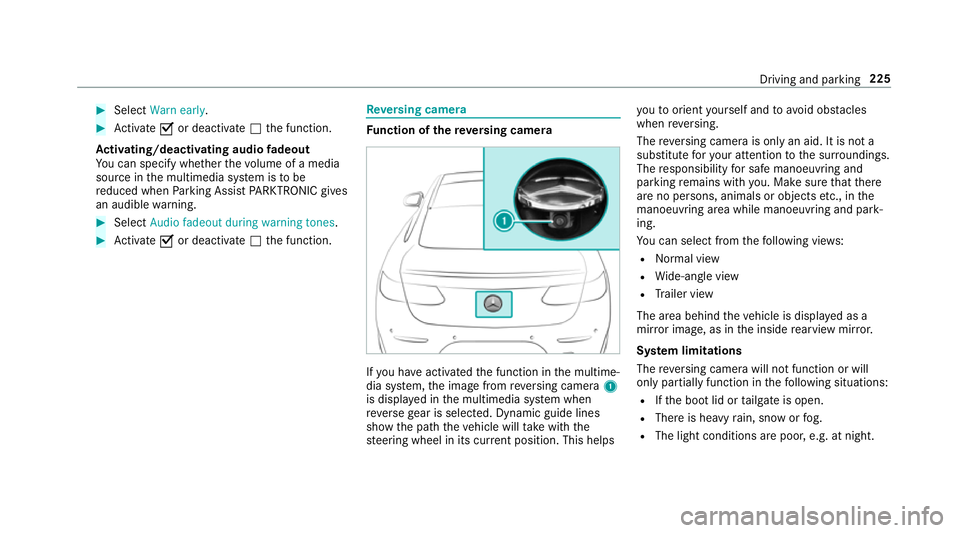
dia sy stem, the image from reve rsing camera 1
is displa yed in the multimedia sy stem when
re ve rsege ar is selec ted. Dynamic guide lines
show the path theve hicle will take with the
st eering wheel in its cur rent position. This helps yo
uto orient yourself and to avoid obs tacles
when reve rsing.
The reve rsing camera is only an aid. It is not a
substitute foryo ur attention tothe sur roundings.
The responsibility for safe manoeuvring and
parking remains with you. Make sure that there
are no persons, animals or objects etc., in the
manoeuvring area while manoeuvring and park‐
ing.
Yo u can select from thefo llowing vie ws:
R Normal view
R Wide-angle view
R Trailer view
The area behind theve hicle is displa yed as a
mir ror image, as in the inside rearview mir ror.
Sy stem limitations
The reve rsing camera will not function or will
only partially function in thefo llowing situations:
R Ifth e boot lid or tailgate is open.
R There is heavy rain, snow or fog.
R The light conditions are poor, e.g. at night. Driving and parking
225
Page 234 of 593
Sy
stem limitations
The 360° Camera will not function or will only
partially function in thefo llowing situations:
R The doors are open.
R The side mir rors are folded in.
R The boot lid is open.
R There is heavy rain, snow or fog.
R The light conditions are poor, e.g. at night.
R The camera lens is obstructed, dirty or mis‐
te d up.
R If cameras or vehicle components in which
th e cameras are fitted are dama ged. In this
eve nt, ha vethe cameras, their positions and th
eir setting checked at a qualified specialist
wo rkshop.
Do not use the 360° Camera under such circum‐
st ances. You could otherwise injure others or
collide with objects when parking or manoeu‐
vring theve hicle.
On vehicles with height-adjus table suspension or
if th eve hicle is car rying a heavy load, leaving the
st andard height can result in inaccuracies in the
guide lines and in the display of thege nerated
ima ges, depending on tech nical conditions.
The field of vision and other functions of the
came rasystem may be restricted due toaddi‐
tional attachments on theve hicle (e.g. licence
plate brac ket, bicycle rack ).
See the no tes on cleaning the 360° Camera
(→ page 414).
Selecting a view for the 360° camera
Requ irements:
R The Auto reversing camera function is selec‐
te d in the multimedia sy stem. #
Enga gereve rsege ar. #
Inthe multimedia sy stem, select the desired
vie w.
Switching reve rsing camera automatic mode
on/off
The reve rsing camera is only an aid. It is not a
substitute foryo ur attention tothe sur roundings.
The responsibility for safe manoeuvring and
parking remains with you. Make sure that no
persons, animals or objects etc. are in the
manoeuvring range. Pay attention to your sur‐
ro undings and be ready tobrake at all times.
Multimedia sy stem:
Vehicle kAssistance Camera &
Park. Assist Auto reversing camera #
Activate Oor deacti vate ª the function.
Opening the camera co ver of the reve rsing
camera
Multimedia sy stem:
Vehicle kAssistance Camera &
Park. Assist #
Select Open camera cover. Driving and parking
231
Page 249 of 593
Tr
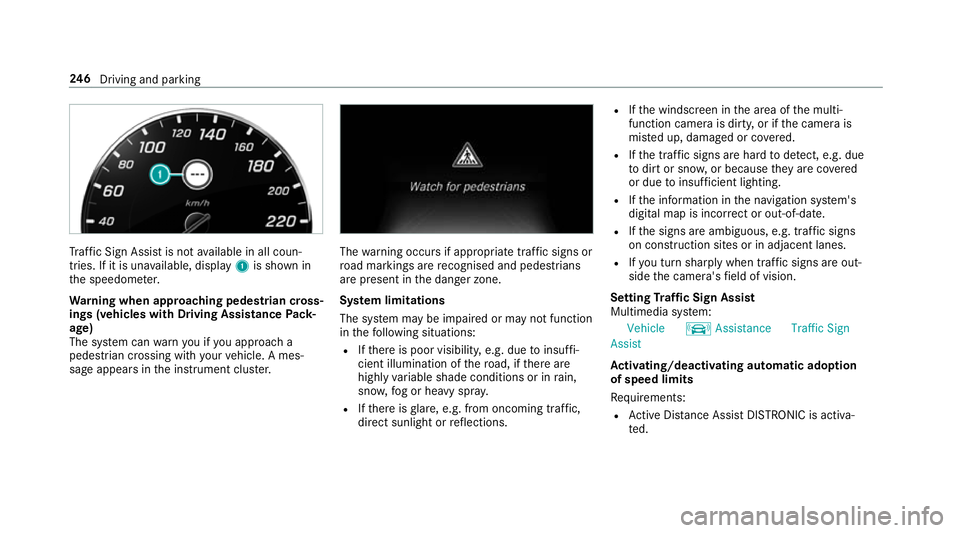
af fic Sign Assi stis not available in all coun‐
tries. If it is una vailable, display 1is shown in
th e speedome ter.
Wa rning when app roaching pedestrian cross‐
ings (vehicles with Driving AssistancePack‐
age)
The sy stem can warnyou if you approach a
pedestrian crossing with your vehicle. A mes‐
sage appears inthe instrument clus ter. The
warning occurs if appropriate traf fic signs or
ro ad markings are recognised and pedestrians
are present in the danger zone.
Sy stem limitations
The sy stem may be impaired or may not function
in thefo llowing situations:
R Ifth ere is poor visibility, e.g. due toinsuf fi‐
cient illumination of thero ad, if there are
highly variable shade conditions or in rain,
sno w,fog or heavy spr ay.
R Ifth ere is glare, e.g. from oncoming traf fic,
di re ct sunlight or reflections. R
Ifth e windscreen in the area of the multi‐
function camera is dirty, or if the camera is
mis ted up, damaged or co vered.
R Ifth e tra ffic signs are hard todetect, e.g. due
to dirt or sno w,or because they are co vered
or due toinsuf ficient lighting.
R Ifth e information in the navigation sy stem's
digital map is incor rect or out-of-da te.
R Ifth e signs are ambiguous, e.g. tra ffic signs
on con stru ction sites or in adjacent lanes.
R Ifyo u turn sharply when traf fic signs are out‐
side the camera's field of vision.
Setting Traf fic Sign Assist
Multimedia sy stem:
Vehicle kAssistance Traffic Sign
Assist
Ac tivating/deactivating automatic adoption
of speed limits
Re quirements:
R Active Dis tance Assi stDISTRONIC is acti va‐
te d. 246
Driving and pa rking
Page 534 of 593
Wa
rning and indicator lamps Overview of
warning and indicator lamps Some sy
stems will per form a self-test when the
ignition is switched on. Some warning and indi‐
cator lamps may brief lylight up or flash. This
behaviour is non-critical. These warning and indi‐
cator lamps indicate a malfunction only if they
light up or flash af terth e engine has been star‐
te d or during a journe y.
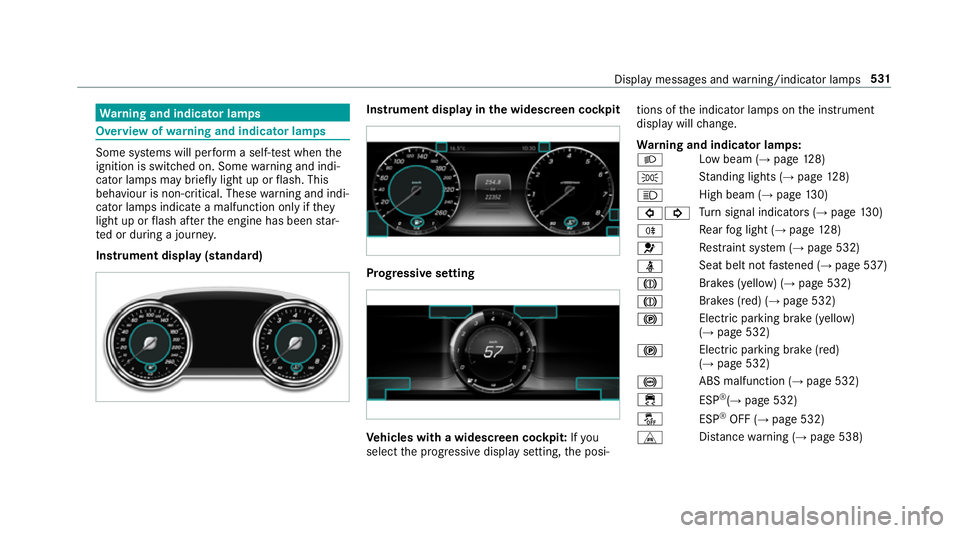
Instrument display (standard) Instrument display in
the widescreen cockpit Prog
ressive setting Ve
hicles with a widescreen cock pit:Ifyou
select the progressive display setting, the posi‐ tions of
the indicator lamps on the instrument
display will change.
Wa rning and indicator lamps:
L Low beam (→
page128)
T St
anding lights (→ page128)
K High beam (→
page130)
#! Tu
rn signal indicators (→ page130)
R Re
ar fog light (→ page128)
6 Re
stra int sy stem (→ page 532)
ü Seat belt not
fastened (→ page 537)
J Brakes (yellow) (→
page 532)
J Brakes (red) (→
page 532)
! Elect
ric pa rking brake (yellow)
(→ page 532)
! Electric parking brake (red)
(→ page 532)
! ABS malfunction (→
page 532)
÷ ESP®
(→ page 532)
å ESP®
OFF (→ page 532)
L Distance warning (→ page 538) Display messages and
warning/indicator lamps 531
Page 569 of 593
Knee airbag
................................................ 38L
Lamp see In terior lighting
Lamps (instrument display) see Warning/indicator lamps
Lane de tection (au tomatic)
see Active Lane Keeping Assist
Lane Keeping Assist
see Active Lane Keeping Assist
Language .................................................3 04
No tes .................................................. 304
Setting .................................................3 04
LED light see Intelligent Light Sy stem
Le vel control sy stem
see AIR BODY CONTROL
Light switch Overview .............................................1 28
Lighting see Interior lighting
see Lights Lights
........................................................ 12 8
Ac tive headla mps ................................ 131
Ad aptive Highbeam Assist Plus .......... .133
Ad justing the instrument lighting ........ 265
Ad versewe ather light .......................... 13 3
Au tomatic driving lights ....................... 12 9
City lighting ........................................ .133
Combination switch ............................ .130
Cornering light ..................................... 13 2
Driving ab road (symm etrical dipped
beam) .................................................. 12 8
Fo g light (extended range) ................... 13 2
Haza rdwa rning lights .......................... 131
Headla mpflasher ................................ 13 0
High beam ........................................... 13 0
Intellige nt Light Sy stem ....................... 131
Light switch .........................................1 28
Low beam ............................................ 12 8
Mo torw ay mode ................................... 13 2
Pa rking lights ...................................... .128
Re ar fog light ....................................... 12 8
Re sponsibility for lighting sy stems .......1 28
Setting the dipped beam ..................... 13 4
Setting theex terior lighting switch-
off delay time ...................................... 13 5
Setting the sur round lighting .............. .135 St
anding lights .................................... .128
Tu rn signal lights ................................. 13 0
Limiter ...................................................... 202
Ac tivating ............................................ 203
Buttons ................................................ 203
Calling up a speed ............................... 203
Deactivating ........................................ 203
Fu nction .............................................. 202
Pa ssive mode ...................................... 202
Pe rm anent setting .............................. .204
Re quirements: .................................... .203
Selecting ............................................. 203
Setting a speed ................................... 203
St oring a speed ................................... 203
Sy stem limitations ...............................2 02
Limiting speed see Limi ter
LINGU ATRO NIC ........................................ 274
Application specific voice commands
............................................................ .275
Au dible help functions .........................2 76
Global voice commands ...................... .275
Impr oving speech quality .................... .276
Langua gesetting ................................. 276
Media pla yervo ice commands ............ 283 566
Index
Page 577 of 593
Ra
nge
Ad Blue ®
............................................... 265
Displaying ............................................ 266
REA CHregulation ...................................... 26
Re ading light
see Interior lighting
Re alwo od (Care) ...................................... 416
Re ar fog light
Switching on/off .................................1 29
Re ar seat
see Seat
Re ar seat belt
St atus display ........................................ 37
Re ar seat belt status display .................... 37
Re ar window
Ro ller sunblind ...................................... 85
Re ar window heater ................................ 14 5
Re ar-view mir ror
see Outside mir rors
Re cycling
see Take -ba ckof end-of-life vehicles Re
ducing agent
see AdBlue ®
Re fuelling
Re fuelling theve hicle ........................... 175
To pping up AdBlue ®
............................. 17 9
Re gistration
Ve hicle .................................................. 25
Re mo tecont rol (stationa ryheater/
ve ntilation)
Displa ys............................................... 15 2
Problems ............................................. 154
Re placing the battery .......................... 15 3
Setting ................................................. 15 2
Re mo teOnline
Charging the battery ............................1 62
Cooling or heating theve hicle inte‐
ri or .......................................................1 61
St arting theve hicle ............................. 16 2
Re mo teParking Assist ............................ 237
Auth orising a mobile phone ................. 241
Fu nction .............................................. 237
Ope rating ............................................ 238
Sy stem limitations ...............................2 37
Re scue card ............................................... 26 Re
ser ve
Fu el ..................................................... 469
Re set function (multimedia sy stem) .....3 09
Re sidual heat ...........................................1 48
Re storing (factory settings)
see Reset function (multimedia sy stem)
Re stra int sy stem ...................................... .30
Basic instructions forch ildren .............. .46
Fu nction in an accident ........................ .31
Fu nctionality .......................................... 31
Malfunction ...........................................31
Pr otection ..............................................30
Re duced pr otection ...............................30
Self-test ................................................. 31
Wa rning lamp ........................................ .31
Re versege ar
Inserting .............................................. 172
Re versing camera .................................. .225
Care ..................................................... 414
Fu nction .............................................. 225
Opening the camera co ver (360°
Camera) ............................................... 231
Setting favo urites (360° Camera) ...... .232 574
Index