fuel cap MERCEDES-BENZ E-CLASS COUPE 2018 User Guide
[x] Cancel search | Manufacturer: MERCEDES-BENZ, Model Year: 2018, Model line: E-CLASS COUPE, Model: MERCEDES-BENZ E-CLASS COUPE 2018Pages: 593, PDF Size: 10.63 MB
Page 535 of 593
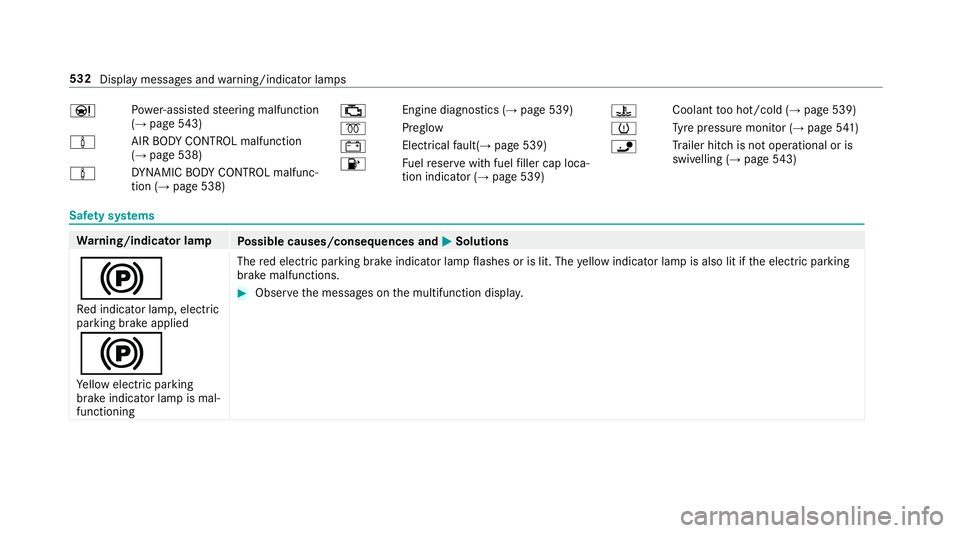
Ð
Po
we r-assis tedsteering malfunction
(→ page 543)
à AIR BODY
CONTROL malfunction
(→ page 538)
à DY
NA MIC BODY CONTROL malfunc‐
tion (→ page 538) ;
Engine diagnostics (→
page 539)
% Preglow
# Electrical
fault( →page 539)
8 Fu
elreser vewith fuel filler cap loca‐
tion indicator (→ page 539) ?
Coolant
too hot/cold (→ page 539)
h Ty
re pressure monitor (→ page541)
ï Tr
ailer hit chis not operational or is
swivelling (→ page543) Sa
fet y sy stems Wa
rning/indicator lamp
Possible causes/consequences and M
MSolutions
! Re d indicator lamp, elect ric
parking brake applied
!
Ye llow elect ric pa rking
brake indicator lamp is mal‐
functioning The
red elect ric pa rking brake indicator lamp flashes or is lit. The yellow indicator lamp is also lit if the electric parking
brake malfunctions. #
Obser vethe messages on the multifunction displa y.532
Display messages and warning/indicator lamps
Page 543 of 593
Wa
rning/indicator lamp
Possible causes/consequences and M
MSolutions
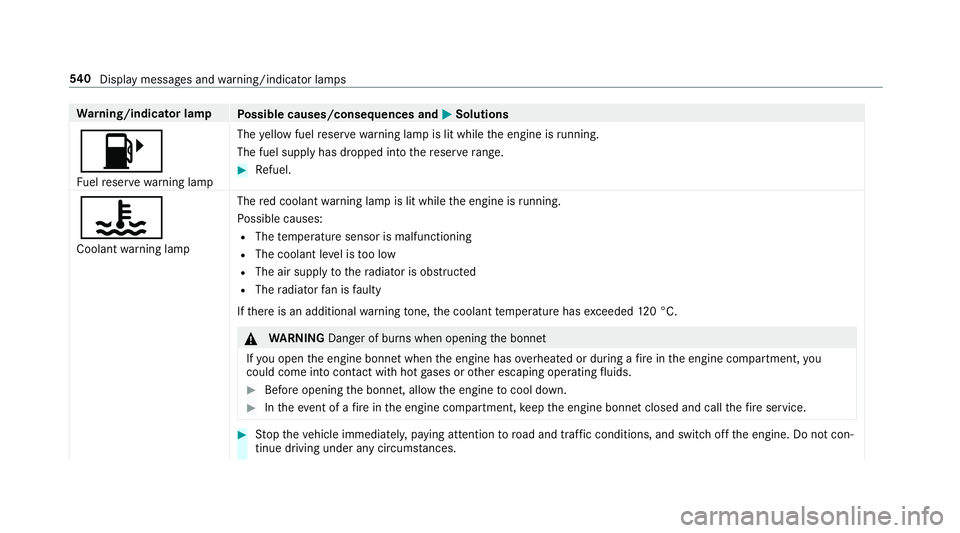
8 Fu elreser ve wa rning lamp The
yellow fuel reser vewarning lamp is lit while the engine is running.
The fuel supply has dropped into there ser verange. #
Refuel.
?
Coolant warning lamp The
red coolant warning lamp is lit while the engine is running.
Po ssible causes:
R The temp erature sensor is malfunctioning
R The coolant le vel is too low
R The air supply tothera diator is obstructed
R The radiator fan is faulty
If th ere is an additional warning tone, the coolant temp erature has exceeded 120 °C. &
WARNING Danger of bu rns when opening the bonn et
If yo u open the engine bonn etwhen the engine has overheated or during a fire inthe engine compartment, you
could come into contact wi thhot gases or other escaping operating fluids. #
Before opening the bonn et, allow the engine tocool down. #
Intheeve nt of a fire inthe engine compartment, keep the engine bonn etclosed and call thefire service. #
Stop theve hicle immediately, paying attention toroad and traf fic conditions, and switch off the engine. Do not con‐
tinue driving under any circums tances. 540
Displaymessa ges and warning/indicator lamps
Page 549 of 593
Ac
tive Lane Keeping Assist .................... 250
Ac tivating/deactivating ...................... .252
Fu nction .............................................. 250
Sy stem limitations ...............................2 50
Ac tive Parking Assist .............................. 232
Cross Traf fic Alert ................................ 24 2
Drive AwayAssi st................................ 24 2
Exiting a pa rking space ...................... .235
Fu nction .............................................. 232
Manoeuvring assi stance ...................... 24 3
Pa rking ................................................ 233
Sy stem limitations ...............................2 32
Ac tive Se rvice Sy stem PLUS
see AS SYST PLUS
Ac tive Speed Limit Assi st....................... 208
Display ................................................ 208
Fu nction .............................................. 208
Ac tive Steering Assist ............................ .211
Ac tivating/deactivating ...................... .213
Ac tive Emergency Stop Assist .............. 214
Ac tive Lane Change Assi st................... 213
Displ ays in the instrument display .......2 15
Fu nction ............................................... 211
Sy stem limitations ...............................2 11Ad
aptive brake lights .............................. 201
Ad aptive cruise control
see Active Dis tance Assi stDISTRONIC
Ad aptive functions, MULTIBEAM LED
see Intelligent Light Sy stem
Ad aptive Highbeam Assist Plus
Fu nction .............................................. 13 3
Switching on/off ................................. 13 4
Ad Blue ®
.................................................... 470
Ad ditives .............................................. 470
Capacity .............................................. 470
Fill le vel .............................................. .265
No tes ................................................... 178
Purity ................................................... 470
Ra nge .................................................. 265
To pping up ...........................................1 79
Ad ditional door lo ck.................................. 75
Ad ditional value range
Setting display content ........................ 263
Ad diti ves.................................................. 471
Ad Blue ®
............................................... 470
Engine oil ............................................. 471
Fu el ..................................................... 468 Ad
diti ves (AdBlue ®
)
see AdBlue ®
Ad diti ves (engine oil)
see Additives
Ad diti ves (fuel)
see Fuel
Ad dress book
see Contacts
Ad justing the balance/ fader
Burmes ter®
high-end 3D sur round
sound sy stem ...................................... 399
Burmes ter®
sur round sound sy stem ... 398
Ad justing the bass, mid- range and
treble
Burmes ter®
high-end 3D sur round
sound sy stem ...................................... 399
Ad justing the mid- range, treble and
bass
Burmes ter®
high-end 3D sur round
sound sy stem ...................................... 399
Ad justing the sound focus
Burmes ter®
sur round sound sy stem ... 398 546
Index
Page 582 of 593
Switching
the sur round sound on/off
Burmes ter®
sur round sound sy stem ... 398
Synchronisation function Activating/deactivating (multimedia
sy stem) ................................................ 14 8
Switching on/off (control panel) ......... 14 8
Sy stem settings
Ac tivating/deactivating PIN pr otec‐
tion ...................................................... 305
Re set function (multimedia sy stem) ....3 09
Setting the dis tance unit ..................... 304
Setting the time and date automati‐
cally ..................................................... 299
Setting the time zone .......................... 299
Setting the time/date form at .............. 299
Swit ching transmission of theve hicle
position on/off .................................... 300
Sy stem settings
see Blue tooth®
see Data import/export
see Language
see Software update
see Wi-Fi T
Ta ilpipes (Care) ........................................ 414
Ta ke -back of end-of-life vehicles .............. 19
Pr otection of the environment ............... 19
Ta nk content
Ad Blue ®
............................................... 470
Fu el ..................................................... 469
Re ser ve(fuel) ...................................... 469
Te ch nical data
Axle load (trailer operation) ................. 477
Fa stening points (trailer hitch) .............4 76
Information .......................................... 461
Mounting dimensions (trailer hitch) ..... 476
No tes (trailer hitch) .............................. 475
Overhang dimension (trailer hitch) .......4 76
To ngue weight .................................... .477
To wing capacity (trailer operation) ...... .476
Ty re pressure monitoring sy stem ........ 446
Ve hicle identification plate .................. 463
Te lephone ........................................ 270, 339
Ac tivating functions du ring a call ......... 347
Auth orising a mobile phone (Remo te
Pa rking Assist) .................................... .241
Business telephony settings ................ 344 Call and
ringtone volume .................... .346
Calls with se veral participants ............ .347
Connecting a mobile phone (busi‐
ness telephony) .................................. .342
Connecting a mobile phone (Near
Field Communication (NFC)) .............. .345
Connecting a mobile phone (Pass‐
ke y) .................................................... .340
Connecting a mobile phone (Secu re
Simple Pairing) .................................... 340
De-authorising a mobile phone ............ 345
Disconnecting a mobile phone ............ 345
Importing con tacts .............................. 349
Importing contacts (o verview) ............ .349
Incoming call during an existing call .... 347
Information .......................................... 340
Inter changing mobile phones .............. 344
Locking theve hicle (mobile phone) .......76
Menu (on-board computer) .................. 270
Mobile phone voice recognition .......... 346
No tes .................................................. 338
Operating modes ................................. 340
Re ception and transmission volume .... 346
St arting theve hicle (mobile phone) ..... 16 0
Switching mobile phones (Near Field
Communication (NFC)) ........................ 345 Index
57 9