display MERCEDES-BENZ E-CLASS COUPE 2018 Owners Manual
[x] Cancel search | Manufacturer: MERCEDES-BENZ, Model Year: 2018, Model line: E-CLASS COUPE, Model: MERCEDES-BENZ E-CLASS COUPE 2018Pages: 593, PDF Size: 10.63 MB
Page 6 of 593
Infrared
reflective windscreen function ...... 14 4Climate control
........................................ 14 5
Overview of climate contro l systems ..........1 45
Operating the climate control sy stem ......... 14 6 Driving and pa
rking ................................. 15 8
Driving ........................................................ 15 8
DY NA MIC SELECT switch ............................1 69
Au tomatic transmission .............................. 171
Fu nction of the 4MATIC .............................. 175
Re fuelling .................................................... 175
Pa rking ........................................................ 181
Driving and driving sa fety sy stems .............1 89
Tr ailer hit ch................................................ 253
Bicycle rack function .................................. 257
Ve hicle towing instructions ........................ .259 Instrument Display and on-board
comp uter.................................................. 260
Instrument display overview ...................... .260
Overview of the buttons on thesteering
wheel ..........................................................2 61Operating
the on-board computer .............. 262
Setting the design ...................................... 263
Setting the additional value range .............. 263
Overview of displ ays on the multifunc‐
tion display .................................................2 64
Ad justing the instrument lighting ............... 265
Menus and submenus ................................ 265
Head-up Display ......................................... 272 LINGU
ATRO NIC ......................................... 274
No tes on operating saf ety .......................... .274
Operation ....................................................2 74
Using LINGU ATRO NIC ef fectively ................ 276
Essential voice commands ........................ .277 Multimedia sy
stem .................................. 289
Overview and operation .............................. 289
Sy stem settings .......................................... 298
Fit & Healt hy............................................... 309
Na vigation ................................................... 311
Te lephone .................................................. .338
Online and Internet functions ..................... 364
Media ........................................................ .372
Ra dio .......................................................... 385 TV
............................................................... 388
Sound ......................................................... 397 Main
tenance and care ............................. 400
ASS YST PLUS service inter val display ........ 400
Engine compartment .................................. 401
Cleaning and care ...................................... .408 Breakdown assi
stance ............................. 41 8
Emergency ................................................. .418
Flat tyre ...................................................... 420
Battery (vehicle) ......................................... 426
To w- starting or towing away ....................... 432
Electrical fuses ........................................... 437 Wheels and tyres
..................................... 441
No tes on noise or unusual handling char‐
acteristics .................................................. .441
No tes on regular lyinspecting wheels and
tyres .......................................................... .441
No tes on snow chains ................................ .441
Ty re pressure .............................................. 442
Wheel change ............................................ .449 Contents
3
Page 7 of 593
Emergency spare wheel .............................. 459
Te
ch nical data .......................................... 461
No tes on tech nical da ta.............................. 461
On-board electronics .................................. 461
Ve hicle identification plate, VIN and
engine number ...........................................4 63
Operating fluids .......................................... 465
Ve hicle data ................................................ 474
Tr ailer hit ch................................................. 475Display messages and
warning/indi‐
cator lamps ............................................... 478
Displ aymessa ges ....................................... 478
Wa rning and indicator lamps ...................... 531 Index
......................................................... 5454
Contents
Page 8 of 593
In
this Owner's Manual, you will find thefo llow‐
ing symbols: &
DANG ER Dan ger due tonot observing
th ewa rning notices
Wa rning notices dr awyour attention tohaz‐
ards that may endanger your health or life, or
th e health or life of others. #
Obser vethewa rning notices. +
ENVIRONMENTAL
NOTEEnvironmental
dama gedue tofailure toobser veenvi‐
ro nmental no tes Environmental no
tes include information on
environmentally responsible behaviour or
environmentally responsible disposal. #
Obser veenvironmen tal no tes. *
NO
TEDama getoproperty due tofailure
to obser venotes on material damage No
tes on material damage inform you of
ri sks which may lead to yourvehicle being
damaged. #
Obser venotes on material damage. %
Useful instructions or fur ther information
th at could be helpful to you.
X In
stru ction
(Q page) Fu
rther information on a topic
Display Information on
the multifunction dis‐
play/media display
+ Highest menu le vel, which is tobe
selected in the multimedia sy stem
* Corresponding submenus, which are
to be selected in the multimedia sys‐
tem
*M arks a cause Symbols
5
Page 10 of 593
1
Steering wheel gearshift paddle →
173
2 Combination swit ch →
13 0
3 DIRECT SELECT le ver →
171
4 Displ ay(multimedia sy stem) →
290
5 Start/ stop button →
15 9
6 Control panel forth e multimedia sy stem →
290
7 Climate control sy stems →
14 5
8 Glovebox →
11 5
9 Haza rdwa rning lights →
131
A Stow age compartment →
11 5
B Control elements forth e multimedia sy stem →
290
C Rear wind ow roller sunblind →
85
D Extends/ retracts the seat belt extender →
35
E ECO start/ stop function →
167
F Active Parking Assist →
233 G
Sets theve hicle le vel →
220
H DYNA MIC SELECT switch →
17 0
I PASSENGER AIRB AGindicator lamps →
42
J Cont rol panel forth e multimedia sy stem →
261
K Adjusts thesteering wheel →
11 0
L Control panel forth e on-board computer →
261
M Unloc ksthe bonn et →
402
N Electric parking brake →
186
O Light switch →
12 8
P Control panel for:
Ac tive Steering Assist →
213
Ac tive Lane Keeping Assist →
252
Pa rking Assist PARKTRONIC →
224
Head-up display →
273 At
aglance – Cockpit 7
Page 11 of 593
Instrument display
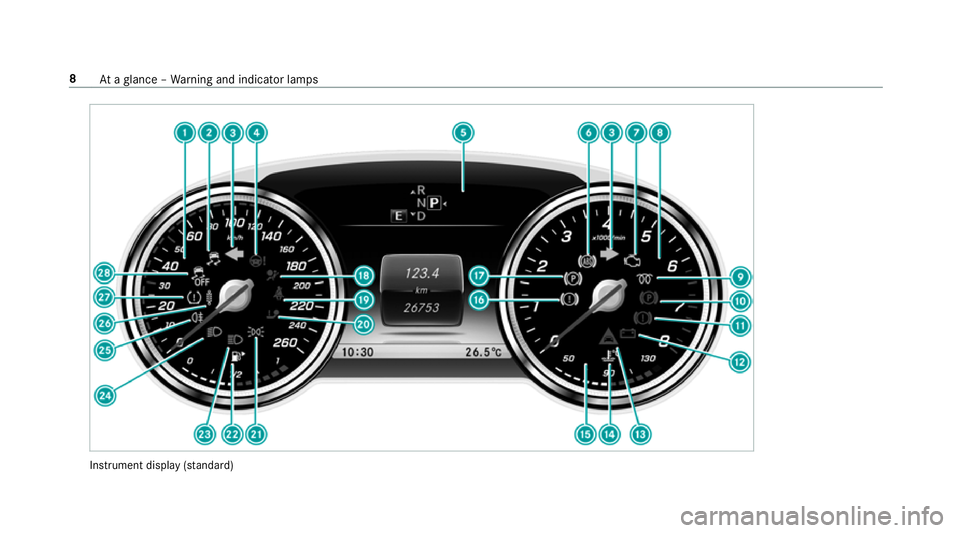
(sta nda rd) 8
Ataglance – Warning and indicator lamps
Page 12 of 593
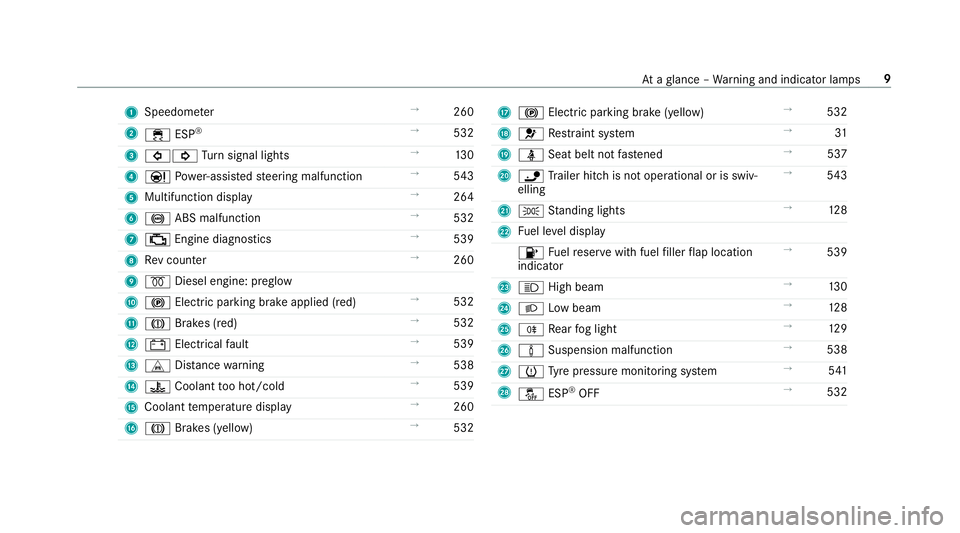
1
Speedom eter →
260
2 ÷ ESP®
→
532
3 #! Turn signal lights →
13 0
4 Ð Powe r-assis tedsteering malfunction →
543
5 Multifunction display →
264
6 ! ABS malfunction →
532
7 ; Engine diagnostics →
539
8 Rev counter →
260
9 % Diesel engine: preglow
A ! Electric parking brake applied (red) →
532
B J Brakes (red) →
532
C # Electrical fault →
539
D L Distance warning →
538
E ? Coolant too hot/cold →
539
F Coolant temp erature display →
260
G J Brakes (yellow) →
532 H
! Electric pa rking brake (yellow) →
532
I 6 Restra int sy stem →
31
J ü Seat belt not fastened →
537
K ï Trailer hit chis not operational or is swiv‐
elling →
543
L T Standing lights →
12 8
M Fuel le vel display
8 Fuelreser vewith fuel filler flap location
indicator →
539
N K High beam →
13 0
O L Low beam →
12 8
P R Rear fog light →
12 9
Q à Suspension malfunction →
538
R h Tyre pressure monitoring sy stem →
541
S å ESP®
OFF →
532 At
aglance – Warning and indicator lamps 9
Page 13 of 593
Instrument display
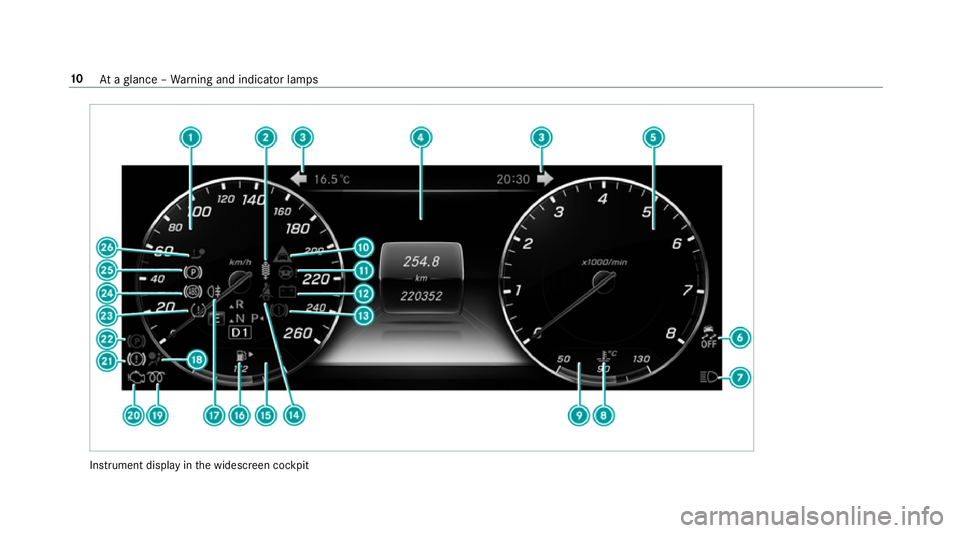
inthe widescreen cockpit 10
Ataglance – Warning and indicator lamps
Page 14 of 593
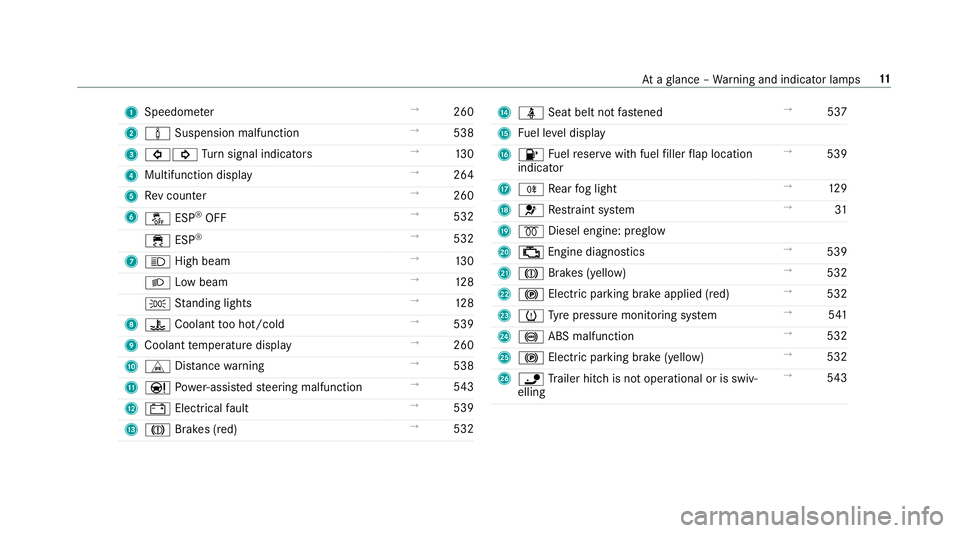
1
Speedom eter →
260
2 à Suspension malfunction →
538
3 #! Turn signal indicators →
13 0
4 Multifunction display →
264
5 Rev counter →
260
6 å ESP®
OFF →
532
÷ ESP®
→
532
7 K High beam →
13 0
L Low beam →
12 8
T Standing lights →
12 8
8 ? Coolant too hot/cold →
539
9 Coolant temp erature display →
260
A L Distance warning →
538
B Ð Powe r-assis tedsteering malfunction →
543
C # Electrical fault →
539
D J Brakes (red) →
532 E
ü Seat belt not fastened →
537
F Fuel le vel display
G 8 Fuelreser vewith fuel filler flap location
indicator →
539
H R Rear fog light →
12 9
I 6 Restra int sy stem →
31
J % Diesel engine: preglow
K ; Engine diagnostics →
539
L J Brakes (yellow) →
532
M ! Electric pa rking brake applied (red) →
532
N h Tyre pressure monitoring sy stem →
541
O ! ABS malfunction →
532
P ! Electric pa rking brake (yellow) →
532
Q ï Trailer hit chis not operational or is swiv‐
elling →
543 At
aglance – Warning and indicator lamps 11
Page 22 of 593
Pr
otection of the environment
+ ENVIRONMENTAL
NOTEEnvironmental
dama gedue tooperating conditions and
personal driving style The pollutant emission of
your vehicle is
directly related tothewa yyo u operate your
ve hicle.
Help toprotect the environment byoperating
yo ur vehicle in an environmentally responsi‐
ble manner. Please obser vethefo llowing rec‐
ommendations on ope rating conditions and
pe rsonal driving style.
Operating conditions: #
Make sure that the tyre pressure is cor‐
re ct. #
Do not car ryany unnecessary weight
(e.g. roof luggage rack s once you no
lon ger need them). #
Adhere tothe service inter vals.
A regularly serviced vehicle will contri b‐
ute toenvironmen tal pr otection. #
Alw ays ha vemaintenance workcar ried
out at a qualified specialist workshop.
Pe rsonal driving style: #
Do not depress the accelera tor pedal
when starting the engine. #
Do not warm upthe engine while the
ve hicle is stationar y. #
Drive carefully and maintain a suitable
di st ance from theve hicle in front. #
Avoid frequent, sudden acceleration
and braking. #
Change gear in good time and use each
ge ar on lyup toÔ of its maximum
engine speed. #
Switch off the engine in stationary traf‐
fi c, e.g. byusing the ECO start/ stop
function. #
Drive fuel-ef ficiently. Obser vethe ECO
display for a fuel-ef ficient driving style. Ta
ke -back of end-of-life vehicles
EU countries onl y:
Mercedes-Benz will take back your end-of-life
ve hicle for environment-friendly disposal in
accordance with the European Union(EU) End-
of-Life Vehicles Directive.
A network of vehicle take -ba ckpoints and dis‐
mantlers has been es tablished foryo uto return
yo ur vehicle. You can lea veit at any of these
points free of charge . This makes an impor tant
contribution toclosing there cycling circle and
conse rving resources.
Fo r fur ther information about there cycling and
disposal of end-of-li fevehicles, and theta ke-
back conditions, please visit the national
Mercedes-Benz website foryo ur count ry. Gene
ral no tes 19
Page 30 of 593
In
general, this information documents thest ate
of a component part, a module, a sy stem or the
sur roundings such as:
R operating status of sy stem components (e.g.
fi ll le vels, battery status, tyre pressure)
R status messages concerning theve hicle or
its individual components (e.g. number of
wheel revo lutions/speed, longitudinal accel‐
eration, lateral acceleration, display of fas‐
te ned seat belts)
R malfunctions or faults in impor tant sy stem
components (e.g. lights, brakes)
R information on events leading tovehicle
damage
R system reactions in special driving situations
(e.g. airbag deployment, inter vention of sta‐
bility control sy stems)
R ambient conditions (e.g. temp erature, rain
sensor)
In addition toprov iding the actual control unit
function, this data assists the manufacturer in
de tecting and rectifying faults and optimising
ve hicle functions. The majority of this data is te
mp orary and is only processed in theve hicle
itself. Only a small portion of the data is stored
in theeve nt or fault memor y.
When your vehicle is serviced, tech nical da ta
from theve hicle can be read out byservice net‐
wo rkemplo yees (e.g. workshops, manufactur‐
ers) or third parties (e.g. breakdown services).
Services include repair services, maintenance
processes, warranty claims and quality assur‐
ance measures, forex ample. The read out is per‐
fo rm ed via the legally prescribed port forthe
diagnostics connection in theve hicle. The
re spective service network locations or third
parties collect, process and use the data. They
document tech nical statuses of theve hicle,
assist in finding faults and impr oving quality and
are transmitted tothe manufacturer, if neces‐
sar y.Fu rthermore, the manufacturer is subject
to product liability. Forth is, the manufacturer
requ irestech nical da tafrom vehicles.
Fa ult memories in theve hicle can be reset by a
service outlet as part of repair or maintenance
wo rk. Depending on
the selected equipment, you can
import data into theve hicle's comfort and info‐
ta inment functions yourself.
This includes, forex ample:
R multimedia data such as music, films or pho‐
to sfo r playback in an integrated multimedia
sy stem
R address book data for use in connection with
an integrated hands-free sy stem or an inte‐
grated navigation sy stem
R entered navigation destinations
R data about the use of Internet services
This data can be sa ved locally in theve hicle or it
is located on a device which you ha veconnected
to theve hicle (e.g. smartphone, USB flash drive
or MP3 pla yer). If this data is stored in theve hi‐
cle, you can dele teit at any time. This data is
sent tothird parties only at your requ est, partic‐
ular lywhen you use online services in accord‐
ance with the settings that you ha veselected.
Yo u can store or change con venience settings/
individualisations in theve hicle at any time. General no
tes27