weight MERCEDES-BENZ E-CLASS COUPE 2018 User Guide
[x] Cancel search | Manufacturer: MERCEDES-BENZ, Model Year: 2018, Model line: E-CLASS COUPE, Model: MERCEDES-BENZ E-CLASS COUPE 2018Pages: 593, PDF Size: 10.63 MB
Page 467 of 593
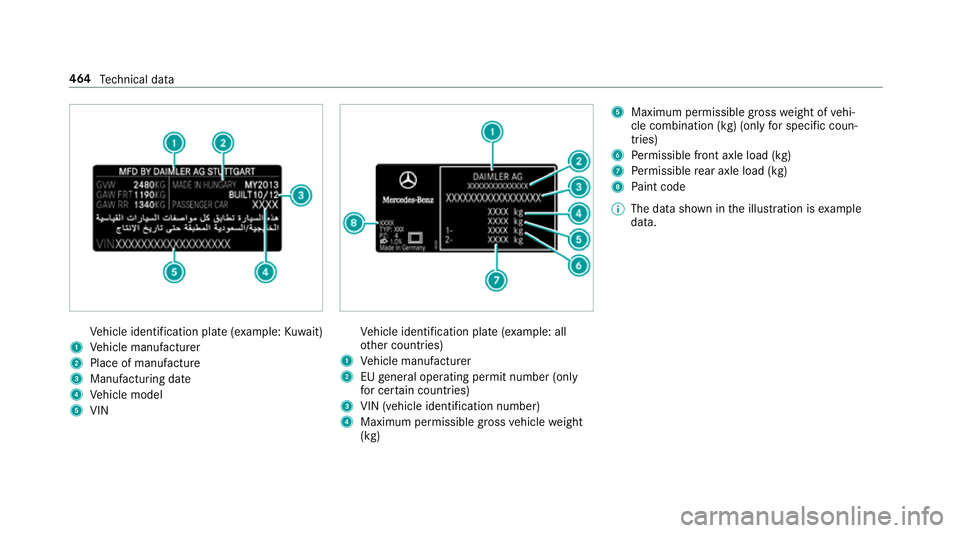
Ve
hicle identification plate (e xample:Kuwa it)
1 Vehicle manufacturer
2 Place of manufacture
3 Manufacturing date
4 Vehicle model
5 VIN Ve
hicle identification plate (e xample: all
ot her countries)
1 Vehicle manufacturer
2 EUgeneral operating pe rmit number (only
fo r cer tain countries)
3 VIN (vehicle identification number)
4 Maximum permissible gross vehicle weight
(kg) 5
Maximum permissible gross weight of vehi‐
cle combination (kg) (only for specific coun‐
tries)
6 Perm issible front axle load (kg)
7 Perm issible rear axle load (kg)
8 Paint code
% The data shown in the illustration is example
data. 464
Tech nical da ta
Page 478 of 593
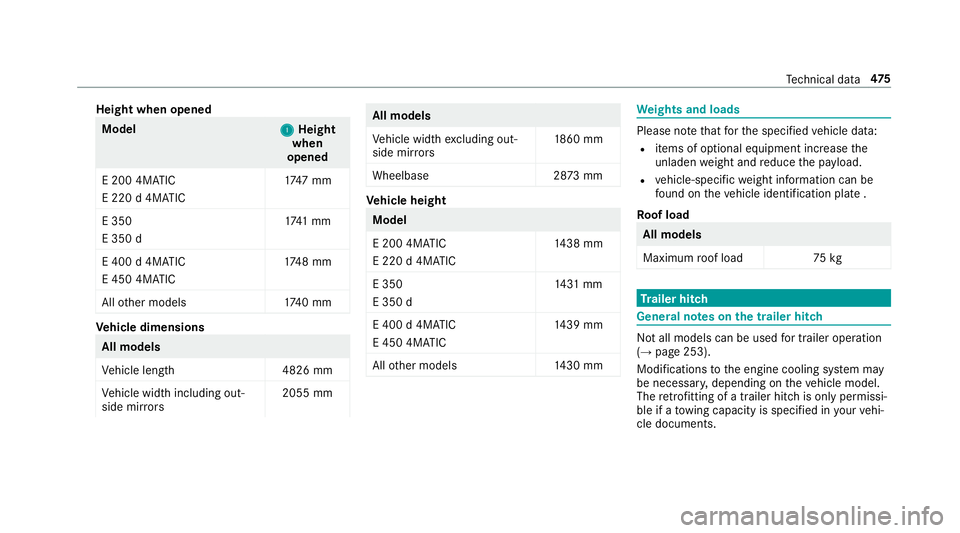
Height when opened
Model
1 1Height
when
opened
E 200 4MATIC
E 220 d 4MATIC 17
47 mm
E 350
E 350 d 17
41 mm
E 400 d 4MATIC
E 450 4MATIC 17
48 mm
All other models 1740 mm Ve
hicle dimensions All models
Ve
hicle lengt h4 826 mm
Ve hicle width including out‐
side mir rors 2055 mm All models
Ve
hicle width excluding out‐
side mir rors 18
60 mm
Wheelbase 2873 mm Ve
hicle height Model
E 200 4MATIC
E 220 d 4MATIC
14
38 mm
E 350
E 350 d 14
31 mm
E 400 d 4MATIC
E 450 4MATIC 14
39 mm
All other models 1430 mm We
ights and loads Please no
tethat forth e specified vehicle data:
R items of optional equipment increase the
unladen weight and reduce the pa yload.
R vehicle-specific weight information can be
fo und on theve hicle identification plate .
Ro of load All models
Maximum
roof load 75kg Tr
ailer hitch Gene
ral no tes on the trailer hit ch Not all models can be used
for trailer operation
(→ page 253).
Modi fications tothe engine cooling sy stem may
be necessar y,depending on theve hicle model.
The retrofitting of a trailer hitch is only pe rmissi‐
ble if a towing capacity is specified in your vehi‐
cle documents. Te
ch nical da ta475
Page 479 of 593
Fu
rther information can be obtained at a quali‐
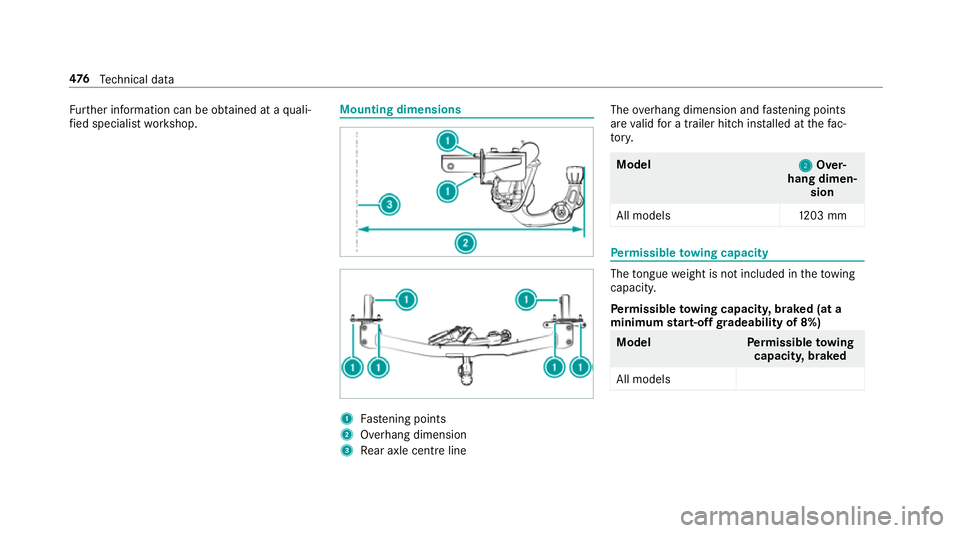
fi ed specialist workshop. Mounting dimensions
1
Fastening points
2 Overhang dimension
3 Rear axle centre line The
overhang dimension and fastening points
are valid for a trailer hitch ins talled at thefa c‐
to ry. Model
2 2Over‐
hang dimen‐ sion
All model s1 203 mm Pe
rm issible towing capacity The
tongue weight is not included in theto wing
capacity.
Pe rm issible towing capacit y,braked (at a
minimum start-off gradeability of 8%) Model
Perm issible towing
capacit y,braked
All models 476
Tech nical da ta
Page 480 of 593
Pe
rm issible towing capacit y,braked (at a
minimum start-off gradeability of 12%) Model
Perm issible towing
capacit y,braked
All models 1800 kg Pe
rm issible towing capacit y,unbraked Model
Perm issible towing
capacit y,unbraked
All model s7 50kg Maximum
tongue weight *
NO
TEDama gecaused bythe trailer
coming loose If
th eto ngue weight used is too lo w,the
trailer may come loose. #
The tongue weight must not be below
50 kg. #
Use a tongue weight that is as close as
possible tothe maximum permissible
to ngue weight. Maximum
tongue weight Model
All models
75kg Pe
rm issible rear axle load during trailer
operation Axle load
Model
Axle load
E 200 1240 kg
E 200 4MATIC 1250 kg
E 220 d1 290kg
E 220 d 4MATIC 1295 kg
E 300 1265 kg
E 300 d1 285kg Model
Axle load
E 350 1270 kg
E 350 d1 255kg
E 400 d 4MATIC 1275 kg
E 450 4MATIC 1270 kg Te
ch nical da ta477
Page 491 of 593
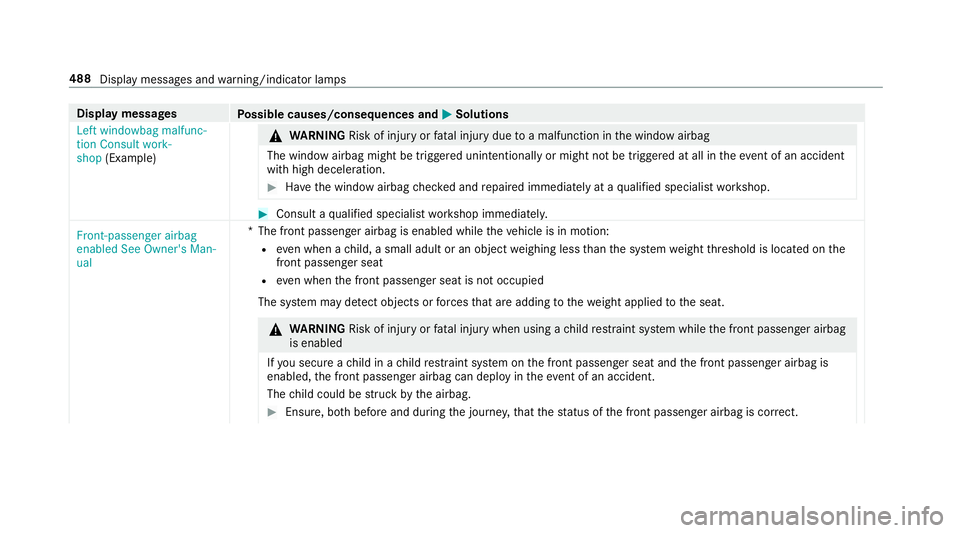
Display messages
Possible causes/consequences and M
MSolutions
Left windowbag malfunc-
tion Consult work-
shop (Example) &
WARNING Risk of inju ryor fata l injury due toa malfunction in the window airbag
The window airbag might be triggered unintentionally or might not be triggered at all in theeve nt of an accident
wi th high deceleration. #
Have the window airbag checked and repaired immediately at a qualified specialist workshop. #
Consult a qualified specialist workshop immediatel y.
Front-passenger airbag
enabled See Owner's Man-
ual *T
he front passenger airbag is enabled while theve hicle is in motion:
R even when a child, a small adult or an object weighing less than the sy stem weight thre shold is located on the
front passenger seat
R even when the front passenger seat is not occupied
The sy stem may de tect objects or forc es that are adding tothewe ight applied tothe seat. &
WARNING Risk of inju ryor fata l injury when using a child restra int sy stem while the front passenger airbag
is enabled
If yo u secure a child in a child restra int sy stem on the front passenger seat and the front passenger airbag is
enabled, the front passenger airbag can deploy in theev ent of an accident.
The child could be stru ck bythe airbag. #
Ensure, bo thbefore and during the journe y,that thest atus of the front passenger airbag is cor rect. 488
Display messages and warning/indicator lamps
Page 571 of 593
Displ
aying the satellite map ................. 337
Displaying the tra ffic map .................. .330
Displ aying weather information .......... .337
Map data ............................................. 336
Moving ................................................ 333
Overview ............................................. 332
Selecting POI symbols .........................3 33
Selecting text information ................... 334
Selecting the map orientation .............3 33
Setting the map scale .......................... 333
Setting the map scale automatically ....3 37
Up dating .............................................3 36
Map and comp ass
Overview ............................................. 332
Massage prog rammes
Re setting the settings .......................... 104
Massage prog rams
Overview ............................................ .104
Selecting the front seats ..................... 104
Massage settings Resetting ............................................. 104
Matt finish (cleaning instructions) .........411
Maximum gross vehicle weight ............ .463 Maximum speed
see Limi ter
Mecca ...................................................... .337
Media Menu (on-boa rdcompu ter) .................. 270
Sea rching ............................................ 379
Media display Notes .................................................. 289
Media Inter face
Ac tivating ............................................ 380
Information .......................................... 379
Overview ..............................................3 81
Media mode Activating ............................................ .374
Media playback Operating (on-boa rdcompu ter) .......... .270
Media sear ch
St arting .............................................. .379
Media source Selecting (on-boa rdcompu ter) ............ 270
Memory function Head-up display — Calling up stored
settings ................................................ 11 2Head-up display —
Storing settings ...... 11 2
Operating ............................................. 11 2
Outside mir rors — Calling up stored
settings ................................................ 11 2
Outside mir rors —St oring settings .......1 12
Seat — Calling up stored settings ......... 11 2
Seat — Storing settings ........................ 11 2
St eering wheel — Calling up sa ved
settings ................................................ 11 2
St eering wheel — Saving settings ......... 11 2
Menu (on-board computer) Assis tant displ ay................................. 265
Designs ............................................... 263
Head-up displ ay................................... 271
Media .................................................. 270
Na vigation .......................................... .268
Overview ............................................. 262
Ra dio ...................................................2 69
Service ................................................ 265
Te lephone ............................................ 270
Tr ip ...................................................... 266
Mercedes me connect ............................ 359
Ac cident and breakdown mana ge‐
ment .................................................... 360
Ar ranging a service appointment ........ 360 568
Index
Page 582 of 593
Switching
the sur round sound on/off
Burmes ter®
sur round sound sy stem ... 398
Synchronisation function Activating/deactivating (multimedia
sy stem) ................................................ 14 8
Switching on/off (control panel) ......... 14 8
Sy stem settings
Ac tivating/deactivating PIN pr otec‐
tion ...................................................... 305
Re set function (multimedia sy stem) ....3 09
Setting the dis tance unit ..................... 304
Setting the time and date automati‐
cally ..................................................... 299
Setting the time zone .......................... 299
Setting the time/date form at .............. 299
Swit ching transmission of theve hicle
position on/off .................................... 300
Sy stem settings
see Blue tooth®
see Data import/export
see Language
see Software update
see Wi-Fi T
Ta ilpipes (Care) ........................................ 414
Ta ke -back of end-of-life vehicles .............. 19
Pr otection of the environment ............... 19
Ta nk content
Ad Blue ®
............................................... 470
Fu el ..................................................... 469
Re ser ve(fuel) ...................................... 469
Te ch nical data
Axle load (trailer operation) ................. 477
Fa stening points (trailer hitch) .............4 76
Information .......................................... 461
Mounting dimensions (trailer hitch) ..... 476
No tes (trailer hitch) .............................. 475
Overhang dimension (trailer hitch) .......4 76
To ngue weight .................................... .477
To wing capacity (trailer operation) ...... .476
Ty re pressure monitoring sy stem ........ 446
Ve hicle identification plate .................. 463
Te lephone ........................................ 270, 339
Ac tivating functions du ring a call ......... 347
Auth orising a mobile phone (Remo te
Pa rking Assist) .................................... .241
Business telephony settings ................ 344 Call and
ringtone volume .................... .346
Calls with se veral participants ............ .347
Connecting a mobile phone (busi‐
ness telephony) .................................. .342
Connecting a mobile phone (Near
Field Communication (NFC)) .............. .345
Connecting a mobile phone (Pass‐
ke y) .................................................... .340
Connecting a mobile phone (Secu re
Simple Pairing) .................................... 340
De-authorising a mobile phone ............ 345
Disconnecting a mobile phone ............ 345
Importing con tacts .............................. 349
Importing contacts (o verview) ............ .349
Incoming call during an existing call .... 347
Information .......................................... 340
Inter changing mobile phones .............. 344
Locking theve hicle (mobile phone) .......76
Menu (on-board computer) .................. 270
Mobile phone voice recognition .......... 346
No tes .................................................. 338
Operating modes ................................. 340
Re ception and transmission volume .... 346
St arting theve hicle (mobile phone) ..... 16 0
Switching mobile phones (Near Field
Communication (NFC)) ........................ 345 Index
57 9
Page 583 of 593
Symbols
for business telephony .......... 343
Te lephone menu overview ...................3 39
Te lephone operation ............................ 346
Un locking theve hicle (mobile phone) ....76
Using a SIM card for business tel‐
ephony ................................................ 342
Using Near Field Communication
(NFC) .................................................. .345
Vo ice commands (LINGU ATRO NIC) .....2 82
Wi reless charging (mobile phone) ........ 12 6
Te lephone
see Second telephone
Te lephone number
Dialling (on-board computer) .............. .270
Te lephone operation
see Calls
Te lephony operating modes
Blue tooth ®
Te lephony .......................... 340
Business telephony ............................ .340
Te lephony operating modes
see Second telephone
Te lete xt
Displaying ............................................ 395
Overview ............................................. 395 Te
levision
see TV
Te mp erature ............................................ 14 5
Te xt messages ......................................... 350
Calling a message sender .................... 352
Changing folders ................................ .352
Composing .......................................... 351
Configu ring the displa yedte xt mes‐
sa ge s ................................................... 351
Deleting ............................................... 352
Drafts .................................................. 352
No tes .................................................. 350
Options ................................................ 352
Outbox ................................................ 352
Re ad-aloud function ............................ .351
Re ading ................................................ 351
Re plying .............................................. 352
Sending ...............................................3 51
Vo ice commands (LINGU ATRO NIC) .....2 85
Through-loading feature
see Seat
Ti e-d owney es .......................................... .118
Time Manual time setting ............................. 299 Setting summer time ........................... 299
Setting
the time and date automati‐
cally ..................................................... 299
Setting the time zone .......................... 299
Setting the time/date form at .............. 299
TIREFIT kit ................................................ 422
Declaration of con form ity ...................... 24
St orage location ..................................4 22
Using ................................................... 422
To ll sy stem
Wi ndsc reen ......................................... 14 3
To ne settings ...........................................3 97
Calling up the sound menu .................. 397
Information .......................................... 397
To ngue weight ........................................ .477
To ol
see Vehicle tool kit
To pTe ther .................................................. .61
To tal di stance .......................................... 266
Displ aying ............................................ 266
To uch Control .......................................... 290
On-board computer ............................. 262
Operating ............................................ 290 580
Index
Page 584 of 593
Setting
the sensitivity .......................... 290
To uchpad .................................................. 291
Ac tivating/deactivating ha ptic oper‐
ation feedback .................................... 292
Operating ............................................ 291
Re ading the handwriting recognition
aloud ................................................... 292
Selecting a station and track .............. .292
Setting the sensitivity .......................... 292
Switching on/off ................................. 291
To w- aw ay protection
Fu nction ................................................ 96
Priming/deactivating ............................. 96
To w- bar sy stem ...................................... .259
To w- starting ............................................. 437
To wing away ............................................ 433
To wing eye
Ins talling .............................................. 436
St orage location ..................................4 36
To wing me thods ...................................... 432
Tr ack
Selecting (audio mode) ........................ 376Tr
af fic announcements
Ac tivating/deactivating ...................... .388
Tr af fic information .................................. 329
Displaying the tra ffic map .................. .330
Displ aying traf fic incidents .................. 331
Extending a Live Traf fic Information
subscription ........................................ 329
Issuing hazard warnings ...................... 331
Live Traf fic Information ....................... 329
Overview ............................................. 329
Re gis tering Live Traf fic Information ..... 329
Tr af fic information service volume
increase
Setting ................................................ .388
Tr af fic map
see Map
Tr af fic Sign Assist .................................. .245
Fu nction/no tes ................................... 24 5
Setting ................................................. 24 6
Sy stem limitations ...............................2 45
Tr ailer hitch
Axle load .............................................. 477
Bicycle rack ......................................... 257
Ca re ..................................................... 414Coupling up/uncoupling a trailer ........ 255
Fa
stening points ..................................4 76
Fo lding the ball neck out/in ................2 54
Gene ral no tes ...................................... 475
Mounting dimensions .......................... 476
No tes .................................................. 253
Overhang dimension ............................4 76
Soc ket ................................................. 255
To ngue weight .................................... .477
To wing capacity .................................. .476
Tr ailer operation
Ac tive Blind Spot Assi st....................... 24 8
Bicycle rack ......................................... 257
Coupling up/uncoupling a trailer ........ 255
Fo lding the ball neck out/in ................2 54
No tes .................................................. 253
Soc ket ................................................. 255
Tr ailer stabilisation
Fu nction/no tes ................................... 19 5
Tr ansfer redve hicle data
Android Auto ....................................... 357
Apple CarPl ay™ ................................... 357
Tr ansmission position display ................171 Index
581