door lock MERCEDES-BENZ E-CLASS COUPE 2018 Owners Manual
[x] Cancel search | Manufacturer: MERCEDES-BENZ, Model Year: 2018, Model line: E-CLASS COUPE, Model: MERCEDES-BENZ E-CLASS COUPE 2018Pages: 593, PDF Size: 10.63 MB
Page 18 of 593
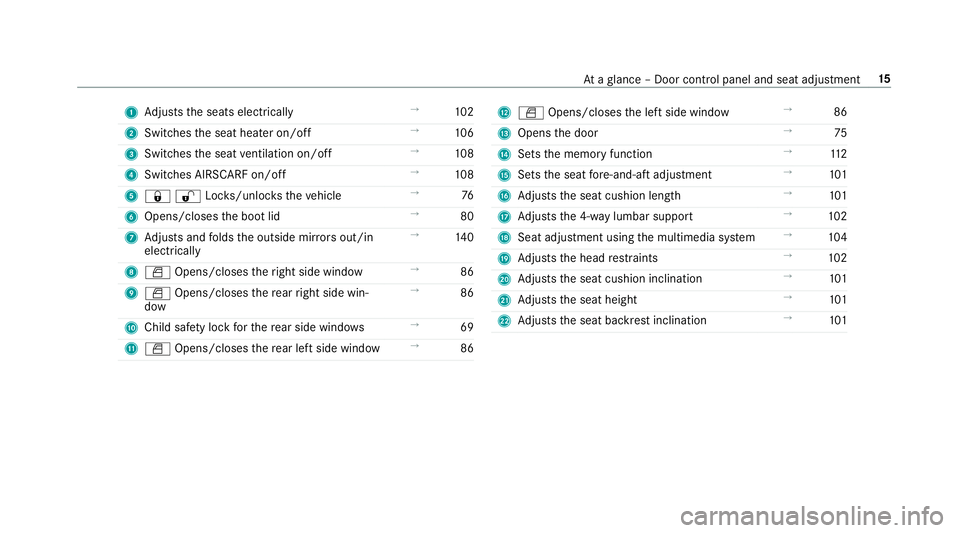
1
Adjusts the seats electrically →
102
2 Switches the seat heater on/off →
106
3 Switches the seat ventilation on/o ff →
108
4 Switches AIRSCARF on/off →
108
5 &%Loc ks/unloc kstheve hicle →
76
6 Opens/closes the boot lid →
80
7 Adjusts and folds the outside mir rors out/in
electrically →
14 0
8 W Opens/closes theright side window →
86
9 W Opens/closes there ar right side win‐
dow →
86
A Child saf ety lock forth ere ar side wind ows →
69
B W Opens/closes there ar left side wind ow→
86 C
W Opens/closes the left side window →
86
D Opens the door →
75
E Sets the memory function →
11 2
F Sets the seat fore -and-aft adjustment →
101
G Adjusts the seat cushion length →
101
H Adjusts the 4-w aylumbar support →
102
I Seat adjustment using the multimedia sy stem →
104
J Adjusts the head restra ints →
102
K Adjusts the seat cushion inclination →
101
L Adjusts the seat height →
101
M Adjusts the seat backrest inclination →
101 At
aglance – Door control panel and seat adjustment 15
Page 73 of 593
#
When leaving theve hicle, alw aysta ke
th eke y with you and lock theve hicle.
This also applies tothe Digital Vehicle
Ke y if the "Digital Vehicle Key" function
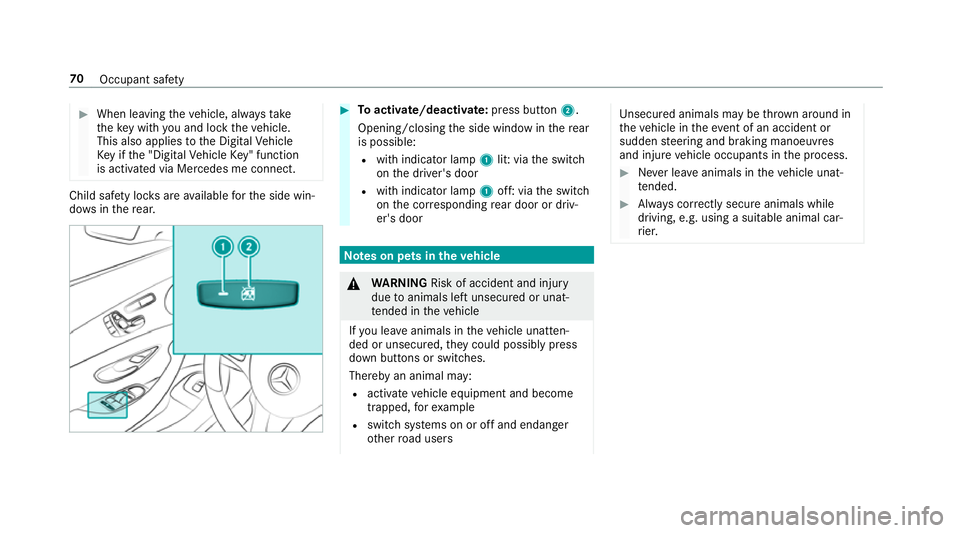
is activated via Mercedes me connect. Child saf
ety loc ksare available forth e side win‐
do ws inthere ar. #
Toactivate/deacti vate:press button 2.
Opening/closing the side window in there ar
is possible:
R with indicator lamp 1lit: via the switch
on the driver's door
R with indicator lamp 1off: via the switch
on the cor responding rear door or driv‐
er's door Note
s on pets in theve hicle &
WARNING Risk of accident and inju ry
due toanimals left unsecured or unat‐
te nded in theve hicle
If yo u lea veanimals in theve hicle unatten‐
ded or unsecured, they could possib lypress
down buttons or switches.
Thereby an animal may:
R activate vehicle equipment and become
trapped, forex ample
R swit chsystems on or off and endanger
ot her road users Uns
ecured animals may be throw n around in
th eve hicle in theeve nt of an accident or
sudden steering and braking manoeuvres
and injure vehicle occupants in the process. #
Never lea veanimals in theve hicle unat‐
te nded. #
Alw ays cor rectly secu reanimals while
driving, e.g. using a suitable animal car‐
ri er. 70
Occupant saf ety
Page 74 of 593
Key
Overview of
key functions &
WARNING Risk of accident and inju ry
due tochildren left unat tended in the
ve hicle
If ch ildren are left unat tended in theve hicle,
th ey could:
R open doo rs,th ereby endangering other
persons or road users.
R get out of theve hicle and be hit by
oncoming traf fic.
R ope rate ve hicle equipment and become
trapped, forex ample.
In addition, children could also set theve hi‐
cle in motion, forex ample, by:
R releasing the parking brake.
R shifting the automatic transmission out of
park position jor shifting manual trans‐
mission into idle position.
R starting the engine. #
Never lea vechildren and animals unat‐
te nded in theve hicle. #
When leaving theve hicle, alw aysta ke
th eke y with you and lock theve hicle.
This also applies tothe Digital Vehicle
Ke y if the "Digital Vehicle Key" function
is activated via Mercedes me connect. #
Keep theve hicle key out of reach of
ch ildren. This also applies tothe Digital
Ve hicle Key if the "Digital Vehicle Key"
function is activated via Mercedes me
connect. *
NO
TEDama getotheke y caused by
magnetic fields #
Keep theke yaw ay from strong mag‐
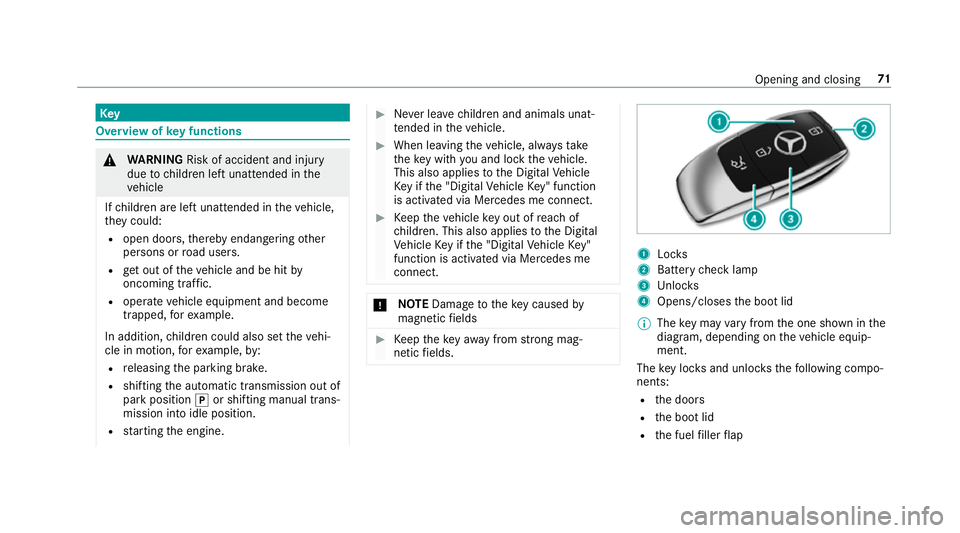
netic fields. 1
Locks
2 Battery check lamp
3 Unloc ks
4 Opens/closes the boot lid
% The key may vary from the one shown in the
diagram, depending on theve hicle equip‐
ment.
The key loc ksand unlo cksth efo llowing compo‐
nents:
R the doors
R the boot lid
R the fuel filler flap Opening and closing
71
Page 75 of 593
If
th eve hicle is not opened within appr oximately
40 seconds af ter unlocking, it loc ksagain. Anti-
th eft pr otection is primed again.
Do not keep theke yto ge ther with electronic
devices or me tal objects. This can af fect the
ke y's functionalit y.
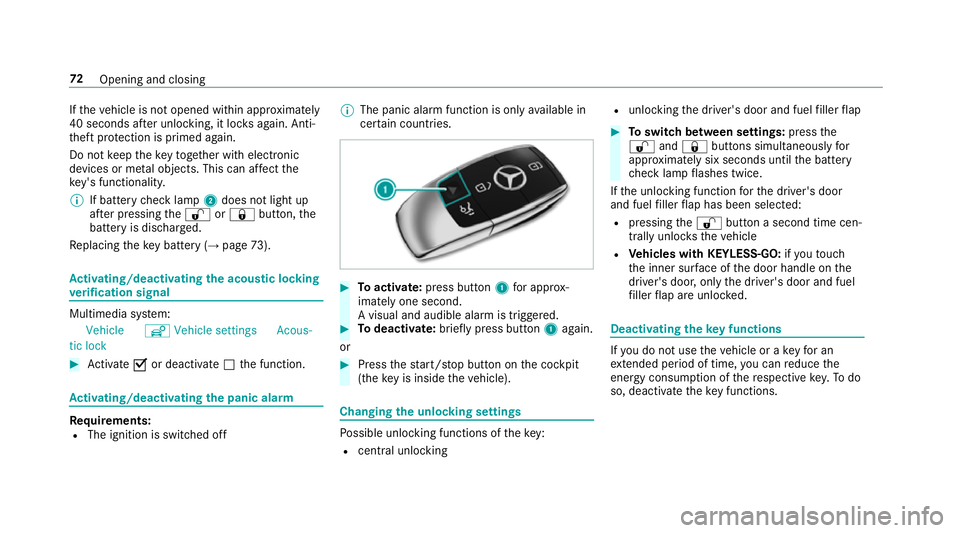
% If battery check lamp 2does not light up
af te r pressing the% or& button, the
battery is dischar ged.
Re placing theke y bat tery ( →page 73). Ac
tivating/deactivating the acoustic lo cking
ve rification signal Multimedia sy
stem:
Vehicle îVehicle settings Acous-
tic lock #
Activate Oor deacti vate ª the function. Ac
tivating/deactivating the panic alarm Re
quirements:
R The ignition is switched off %
The panic alarm function is only available in
cer tain countries. #
Toactivate: press button 1for appro x‐
ima tely one second.
A visual and audible alarm is triggered. #
Todeactivate: briefly press but ton1 again.
or #
Press thest art/ stop button on the cockpit
(the key is inside theve hicle). Changing
the unlocking settings Po
ssible unlocking functions of theke y:
R cent ral unlocking R
unlocking the driver's door and fuel filler flap #
Toswitch between settings: pressthe
% and& buttons simultaneously for
appr oximately six seconds until the battery
ch eck lamp flashes twice.
If th e unlocking function forth e driver's door
and fuel filler flap has been selec ted:
R pressing the% button a second time cen‐
trally unloc kstheve hicle
R Vehicles with KEYLESS-GO: ifyo uto uch
th e inner sur face of the door handle on the
driver's door, only the driver's door and fuel
fi ller flap are unlo cked. Deactivating
theke y functions If
yo u do not use theve hicle or a keyfo r an
ex tended pe riod of time, you can reduce the
energy consum ption of there spective key.Todo
so, deactivate theke y functions. 72
Opening and closing
Page 78 of 593
Problem
Possible causes/consequences and M
MSolutions #
Check the battery using the battery check lamp and replace if necessary (→ page73). #
Use the emer gency keyto lock or unlock (→ page73). #
Have theke ych ecked at a qualified specialist workshop.
Yo u ha velost a key. #
Have theke y deacti vated at a qualified specialist workshop. #
If necessar y,ha ve the mechanical lock changed as well. Doors
Note
s onthe additional door lock The additional door lock is only
available for
ve hicles forth eUni ted Kingdom. &
WARNING Risk of inju ryto persons
inside theve hicle when the additional
door lock is activated
If th e additional door lock is activated, the
doors can no longer be opened from the
inside.
If th ere are persons in theve hicle, they can
no longer le aveth eve hicle, e.g. in hazardous
situations. #
Never lea vepersons unattended in the
ve hicle, particularly children, elderly
persons or persons in need of help. #
Ifth ere are persons in theve hicle, do
not activate the additional door loc k. The additional door lock is automatically activa‐
te d in thefo llowing situations:
R The vehicle is loc ked using thekey.
R The vehicle is loc ked using KEYLESS-GO.
If th eve hicle has been loc ked via Mercedes me
connect, the additional door lock is not activa‐
te d. If
th e additional door lock is activated, the doors
cann otbe opened from the inside.
% After locking you can issue a signal with the
horn.
Yo u can pr eventthe additional door lock from
being activated bydeactivating interior pr otec‐
tion before locking theve hicle (→ page97). Un
locking/opening the doors from the inside #
United Kingdom onl y:obser vethe no tes on
th e additional door lock (→ page75). Opening
and closing 75
Page 79 of 593
#
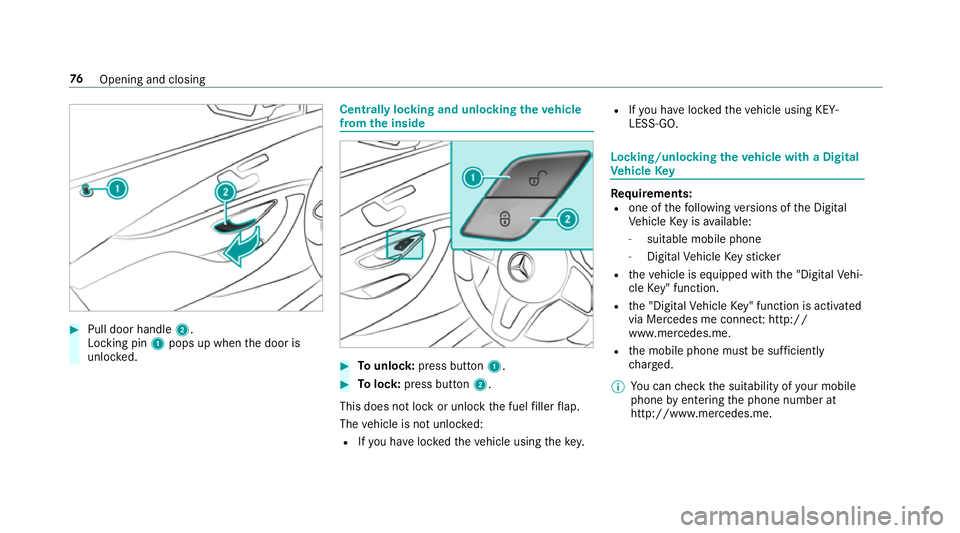
Pull door handle 2.
Locking pin 1pops up when the door is
unloc ked. Centrally locking and unlocking
theve hicle
from the inside #
Tounlo ck:press button 1. #
Tolock: press button 2.
This does not lock or unlock the fuel filler flap.
The vehicle is not unloc ked:
R Ifyo u ha veloc kedth eve hicle using thekey. R
Ifyo u ha veloc kedth eve hicle using KEY‐
LESS-GO. Locking/unlocking
theve hicle with a Digital
Ve hicle Key Re
quirements:
R one of thefo llowing versions of the Digital
Ve hicle Key is available:
- suitable mobile phone
- Digital Vehicle Keyst icker
R theve hicle is equipped with the "Digital Vehi‐
cle Key" function.
R the "Digital Vehicle Key" function is activated
via Mercedes me connec t:http://
www.mercedes.me.
R the mobile phone must be suf ficiently
ch arge d.
% You can check the suitability of your mobile
phone byentering the phone number at
http://www.mercedes.me. 76
Opening and closing
Page 80 of 593
Information about suitable mobile phones
can be obtained from your Mercedes-Benz
service centre or at http://www.mercedes-
benz.com/connect.
% Mercedes-Benz recommends that you car ry
th e emer gency key in case of function
re strictions.
% The function is only available in combination
with Mercedes me connect and on lyin cer‐
ta in countries.
% Protective cases around the mobile phone
can impair thera nge of functions.
If th eve hicle has been par kedfo r longer than
two weeks, the NFC aerial in the door handle is
deactivated. #
Pull the door handle.
The NFC aerial is activated. #
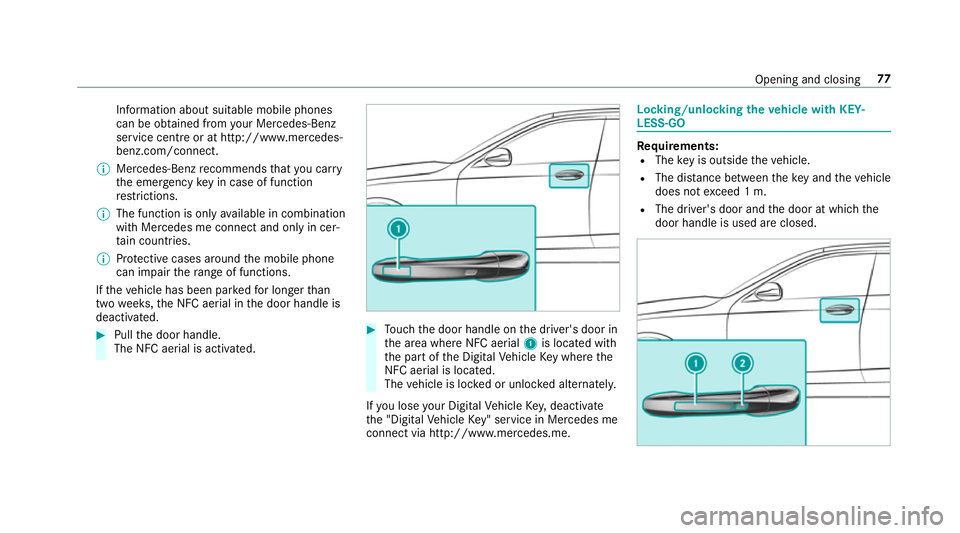
Touch the door handle on the driver's door in
th e area where NFC aerial 1is located with
th e part of the Digital Vehicle Key where the
NFC aerial is located.
The vehicle is loc ked or unloc ked alternately.
If yo u lose your Digital Vehicle Key,deactivate
th e "Digital Vehicle Key" service in Mercedes me
connect via http://www.mercedes.m e. Locking/unlocking
theve hicle with KEY‐
LESS-GO Re
quirements:
R The key is outside theve hicle.
R The dis tance between theke y and theve hicle
does not exceed 1 m.
R The driver's door and the door at which the
door handle is used are closed. Opening and closing
77
Page 81 of 593
#
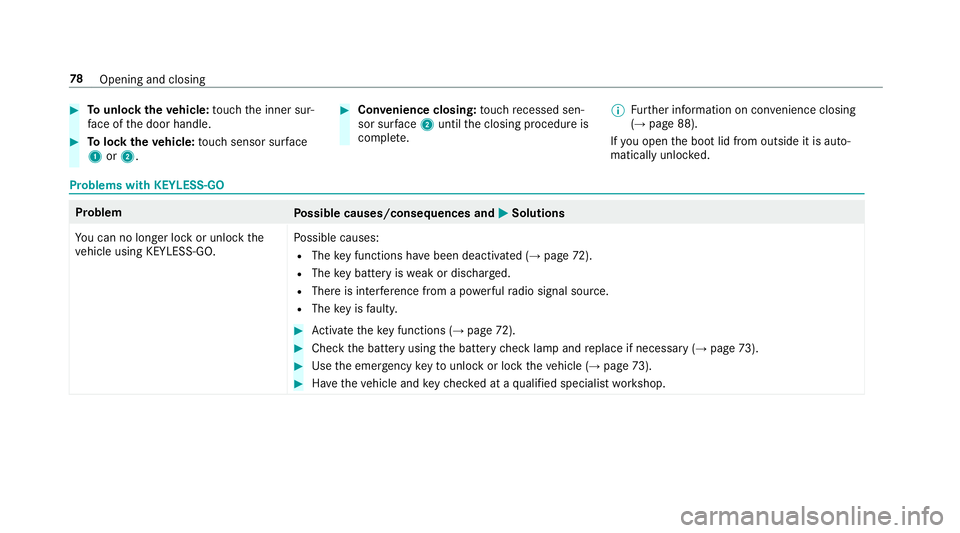
Tounlo cktheve hicle: touch the inner sur‐
fa ce of the door handle. #
Tolock theve hicle: touch sensor sur face
1 or2. #
Convenience closing: touch recessed sen‐
sor su rface 2until the closing procedure is
comple te. %
Further information on con venience closing
(→ page 88).
If yo u open the boot lid from outside it is auto‐
matically unloc ked. Problems with KEYLESS-GO
Problem
Possible causes/consequences and M
MSolutions
Yo u can no lon ger lock or unlock the
ve hicle using KEYLESS-GO. Po
ssible causes:
R The key functions ha vebeen deactivated (→ page72).
R The key bat tery iswe ak or dischar ged.
R There is inter fere nce from a po werful radio signal source.
R The key is faulty. #
Activate theke y functions (→ page72). #
Check the battery using the battery check lamp and replace if necessary (→ page73). #
Use the emer gency keyto unlo ckor lock theve hicle (→ page73). #
Have theve hicle and keych ecked at a qualified specialist workshop. 78
Opening and closing
Page 82 of 593
Ac
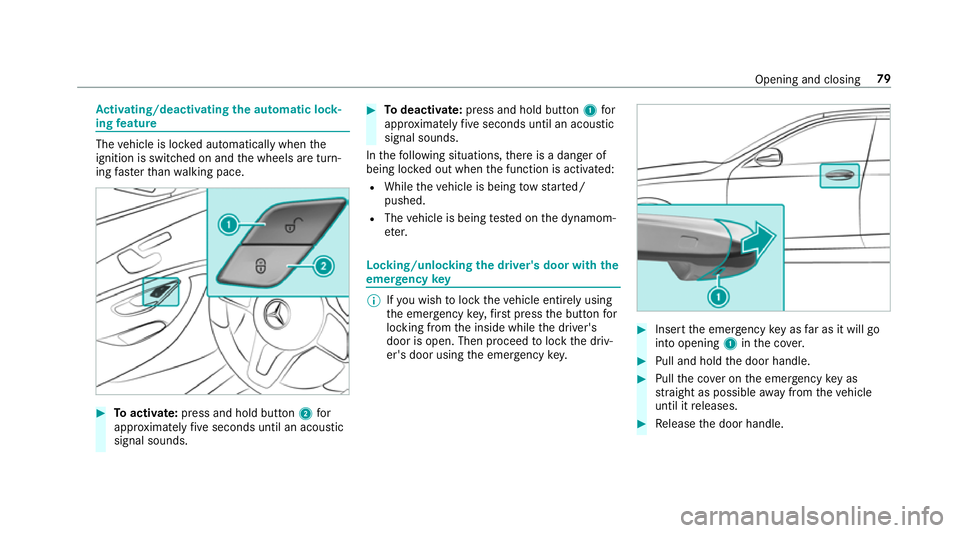
tivating/deactivating the automatic lo ck‐
ing feature The
vehicle is loc ked automatically when the
ignition is switched on and the wheels are turn‐
ing fast erthan walking pace. #
Toactivate: press and hold button 2for
appr oximately five seconds until an acoustic
signal sounds. #
Todeactivate: press and hold button 1for
appr oximately five seconds until an acoustic
signal sounds.
In thefo llowing situations, there is a danger of
being loc ked out when the function is activated:
R While theve hicle is being tow star ted/
pushed.
R The vehicle is being tested on the dynamom‐
et er. Locking/unlocking
the driver's door with the
emer gency key %
Ifyo u wish tolock theve hicle entirely using
th e emer gency key,firs t press the button for
locking from the inside while the driver's
door is open. Then proceed tolock the driv‐
er's door using the emer gency key. #
Insert the emer gency key as far as it will go
into opening 1inthe co ver. #
Pull and hold the door handle. #
Pull the co ver on the emer gency key as
st ra ight as possible away from theve hicle
until it releases. #
Release the door handle. Opening and closing
79
Page 84 of 593
#
Vehicles with HANDS-FREE ACCESS: Use
yo ur foot to kick below the bumper
(→ page 83). #
Vehicles with boot lid conve nience clos‐
ing feature: withthe boot lid stopped in an
intermediate position, pull it upwards and
re lease it as soon as it begins toopen.
Wi th th e boot lid opening limiter activated,
manually pull thestopped boot lid upwards.
Ve hicles with boot lid conve nience closing:if
an object restricts the boot lid during the auto‐
matic opening process, the object recognition
function stops the boot lid. The object recogni‐
tion function is only an aid and is not a substi‐
tute foryo ur attentiveness. Closing
the boot lid &
WARNING Risk of inju ryfrom unsecu red
items in theve hicle
If objects, luggage or loads are not secured
or not secured suf ficientl y,they could slip, tip
ove r or be throw n around and thereby hit
ve hicle occupants.
There is a risk of injur y,particularly in the
ev ent of sudden braking or a sudden change
in direction. #
Alw aysstow objects in such a wayth at
th ey cannot be thro wn around. #
Before the journe y,secure objects, lug‐
ga ge or loads against slipping or tipping
ove r. Comply with
the loading guidelines when loading
th eve hicle. &
WARNING Risk of becoming trapped
du ring au tomatic closing of the boot lid
Pa rts of the body could become trapped dur‐
ing automatic closing of the boot lid. More‐
ove r,people, e.g. children, may be standing
in the closing area or may enter the closing
area during the closing process. #
Make sure that nobody is in the vicinity
of the closing area during the closing
process. #
Use one of thefo llowing options tostop
th e closing process:
R Press thep button on thekey.
R Press or pull there mo teoperating
switch on the driver's door.
R Press the closing or locking button
on the boot lid.
R Press theto p of thest ar on the boot
lid. Ve
hicles with HANDS-FREE ACCESS: it is also
possible tostop the closing process bymaking a
kicking mo vement with your foot below there ar
bumper.
Yo u ha vethefo llowing options toclose the
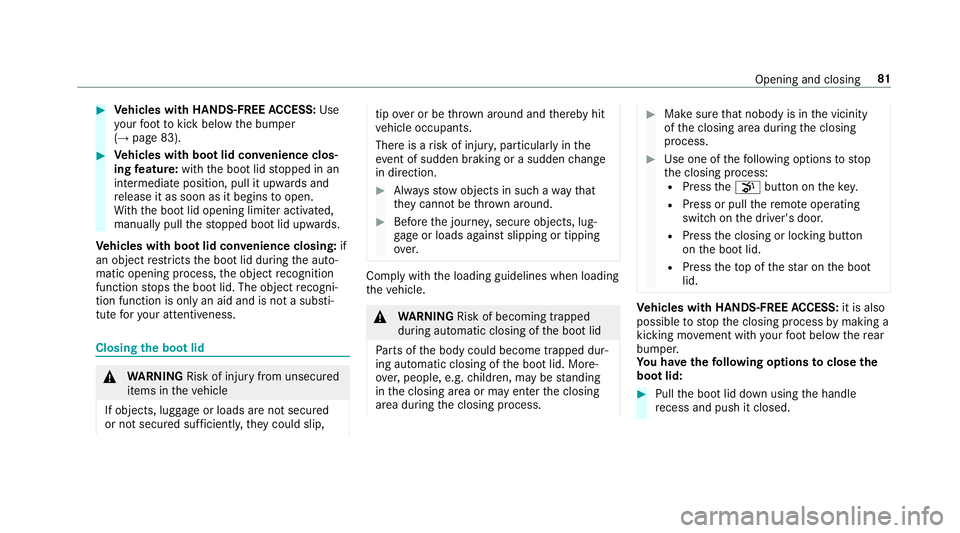
boot lid: #
Pull the boot lid down using the handle
re cess and push it closed. Opening and closing
81