fuse MERCEDES-BENZ E-CLASS COUPE 2018 Owners Manual
[x] Cancel search | Manufacturer: MERCEDES-BENZ, Model Year: 2018, Model line: E-CLASS COUPE, Model: MERCEDES-BENZ E-CLASS COUPE 2018Pages: 593, PDF Size: 10.63 MB
Page 6 of 593
Infrared
reflective windscreen function ...... 14 4Climate control
........................................ 14 5
Overview of climate contro l systems ..........1 45
Operating the climate control sy stem ......... 14 6 Driving and pa
rking ................................. 15 8
Driving ........................................................ 15 8
DY NA MIC SELECT switch ............................1 69
Au tomatic transmission .............................. 171
Fu nction of the 4MATIC .............................. 175
Re fuelling .................................................... 175
Pa rking ........................................................ 181
Driving and driving sa fety sy stems .............1 89
Tr ailer hit ch................................................ 253
Bicycle rack function .................................. 257
Ve hicle towing instructions ........................ .259 Instrument Display and on-board
comp uter.................................................. 260
Instrument display overview ...................... .260
Overview of the buttons on thesteering
wheel ..........................................................2 61Operating
the on-board computer .............. 262
Setting the design ...................................... 263
Setting the additional value range .............. 263
Overview of displ ays on the multifunc‐
tion display .................................................2 64
Ad justing the instrument lighting ............... 265
Menus and submenus ................................ 265
Head-up Display ......................................... 272 LINGU
ATRO NIC ......................................... 274
No tes on operating saf ety .......................... .274
Operation ....................................................2 74
Using LINGU ATRO NIC ef fectively ................ 276
Essential voice commands ........................ .277 Multimedia sy
stem .................................. 289
Overview and operation .............................. 289
Sy stem settings .......................................... 298
Fit & Healt hy............................................... 309
Na vigation ................................................... 311
Te lephone .................................................. .338
Online and Internet functions ..................... 364
Media ........................................................ .372
Ra dio .......................................................... 385 TV
............................................................... 388
Sound ......................................................... 397 Main
tenance and care ............................. 400
ASS YST PLUS service inter val display ........ 400
Engine compartment .................................. 401
Cleaning and care ...................................... .408 Breakdown assi
stance ............................. 41 8
Emergency ................................................. .418
Flat tyre ...................................................... 420
Battery (vehicle) ......................................... 426
To w- starting or towing away ....................... 432
Electrical fuses ........................................... 437 Wheels and tyres
..................................... 441
No tes on noise or unusual handling char‐
acteristics .................................................. .441
No tes on regular lyinspecting wheels and
tyres .......................................................... .441
No tes on snow chains ................................ .441
Ty re pressure .............................................. 442
Wheel change ............................................ .449 Contents
3
Page 150 of 593
%
If climate control is switched off, the win‐
do ws may mist up more quickl y.Switch off
climate control only brie fly. Switching
the A/C function on or off via the
cont rol panel The A/C function heats, cools and dehumidifies
th
eve hicle's interior air. #
Press button ¿.
Switch off the A/C function only brief ly;ot her‐
wise, the windo wsmay mist up more quickl y.
Condensation may drip from the underside of
th eve hicle when cooling mode is active. This is
not a sign that there is a malfunction. Ac
tivating/deactivating the A/C function via
the multimedia sy stem Multimedia sy
stem:
Vehicle bClimate control A/C
The A/C function heats, cools and dehumidifies
th eve hicle's interior air. #
Activate Oor deacti vate ª the function. Setting climate control
toautomatic mode In auto
matic mode, the set temp erature is con‐
trolled and maintained at a const ant levelby the
air suppl y. #
Press the à button. #
Toswitch tomanual mode: pressthe H
or _ button. Climate
style Climate
style function
In automatic mode, you can select thefo llowing
climate style settings forth e driver's and front
passenger areas:
R FOCUS: high air flow , slightly cooler setting
R MEDIUM: medium air flow ,st andard setting
R DIFFUSE: low airflow , slightly warmer and
draught-f ree setting Setting
the clima testyle
Multimedia sy stem:
Vehicle bClimate control Climate
mode #
Select Driverand/or Passenger. #
Select FOCUS, MEDIUM orDIFFUSE .
% Tofeel the ef fect of the climate style, the
à function must be active (→ page147). Overvi
ewofthe air distribution settings The symbols on
the display indicate which vents
th e air flow is being directed thro ugh:
¯ def
rost ervents
P centre and side air
vents
O fo
ot we llve nts
S centre, side and
foot we llve nts
a defros
ter and foot we llve nts
_ all
vents
b defros
ter,middle and side air vents
W au
tomatic air distribution Climate control
147
Page 220 of 593
HOLD function
HOLD function
The HOLD function holds
theve hicle at a stand‐
st ill without requ iring youto depress the brake
pedal, e.g. while waiting in traf fic.
The HOLD function is only an aid. The responsi‐
bility forth eve hicle safely standing still remains
with the driver.
Sy stem limitations
The HOLD function is only intended toprov ide
assis tance when driving and is not a su fficient
means of safeguarding theve hicle against rolling
aw ay when stationar y.
R The incline must not be greater than 30%. Ac
tivating/deactivating the HOLD function &
WARNING Risk of an accident due tothe
HOLD function being activated when you
lea vetheve hicle
If yo u lea vetheve hicle while only the HOLD
function is braking theve hicle, theve hicle
can rollaw ay inthefo llowing situations:
R Ifth ere is a malfunction in the sy stem or
in the po wer supply.
R Ifth e HOLD function is deactivated by
depressing the accelerator pedal or the
brake pedal, e.g. byave hicle occupant.
R Ifth e electrics in the engine compart‐
ment, the battery or the fuses are tam‐
pered with or if the battery is disconnec‐
te d. #
Alw ays deactivate the HOLD function
and secure theve hicle against rolling
aw ay before leaving theve hicle. *
NO
TEDama gefrom auto matic braking When
Active Brake Assi st,Ac tive Dis tance
Assi stDISTRONIC or the HOLD function are
activated, theve hicle brakes autonomously
in cer tain situations.
To avo id damage totheve hicle, deactivate
th ese sy stems in thefo llowing or similar sit‐
uations: #
During towing #
In a car wash Re
quirements:
R The vehicle is stationar y.
R The driver's door is closed or the seat belt on
th e driver's side is fastened.
R The engine is running or has been au tomati‐
cally switched off bythe ECO start/ stop
function.
R The electric parking brake is released.
R Active Dis tance Assi stDISTRONIC is not acti‐
va ted. Driving and parking
217
Page 440 of 593
to
wing eye. Fasten theto w bar tothe trailer
hitch.
% Make sure that co ver1 engages in the
bumper when youre mo vetheto wing eye.
* NO
TEDama gedue toincor rect use of
th eto wing eye When a
towing eye is used toreco ver a vehi‐
cle, theve hicle may be damaged in the proc‐
ess. #
Only use theto wing eyeto to waw ay or
to w start theve hicle. To
w starting theve hicle (eme rgency engine
st art) Ve
hicles with automatic transmission
* NO
TEDama getothe automatic trans‐
mission due to tow-starting The automatic transmission may be damaged
in the process of tow- starting vehicles with
automatic transmission. #
Vehicles with automatic transmission
must not be tow- star ted. #
Vehicles with automatic transmission must
not be tow- star ted. Electrical fuses
Note
s on electrical fuses &
WARNING Risk of accident and inju ry
due to ov erloaded lines
If yo u manipulate or bridge a faulty fuse or if
yo ure place it with a fuse with a higher
amperage, the electric line could be overloa‐
ded.
This could result in a fire. #
Alw aysre place faulty fuses with speci‐
fi ed new fuses conta iningthe cor rect
amperage. *
NO
TEDama gedue toincor rect fuses Electrical components or sy
stems may be
damaged byincor rect fuses, or their func‐
tionality may be significant lyimpaired. #
Only use fuses that ha vebeen appr oved
by Mercedes-Benz and which ha vethe
cor rect fuse rating. Blown fuses mu
stbe replaced with fuses of the
same rating, which you can recognise bythe col‐
our and fuse rating. The fuse ratings and fu rther
information tobe obser ved are lis ted in the fuse
assignment diagram.
Fu se assignment diag ram: onthe fuse box in
th e boot (→ page 439).
* NO
TEDama geor malfunctions caused
by moisture Moisture may cause dama
getothe electrical
sy stem or cause it tomalfunction. Breakdown assi
stance 437
Page 441 of 593
#
When the fuse box is open, make sure
th at no moisture can enter the fuse
box. #
When closing the fuse box, make sure
th at the seal of the lid is positioned cor‐
re ctly on the fuse box. If
th e newly inser ted fuse also blo ws, ha vethe
cause traced and rectified at a qualified special‐
ist workshop.
Ensure thefo llowing before replacing a fuse:
R The vehicle is secured against rolling away
R All electrical consumers are switched off
R The ignition is switched off
The electrical fuses are located in various fuse
bo xes:
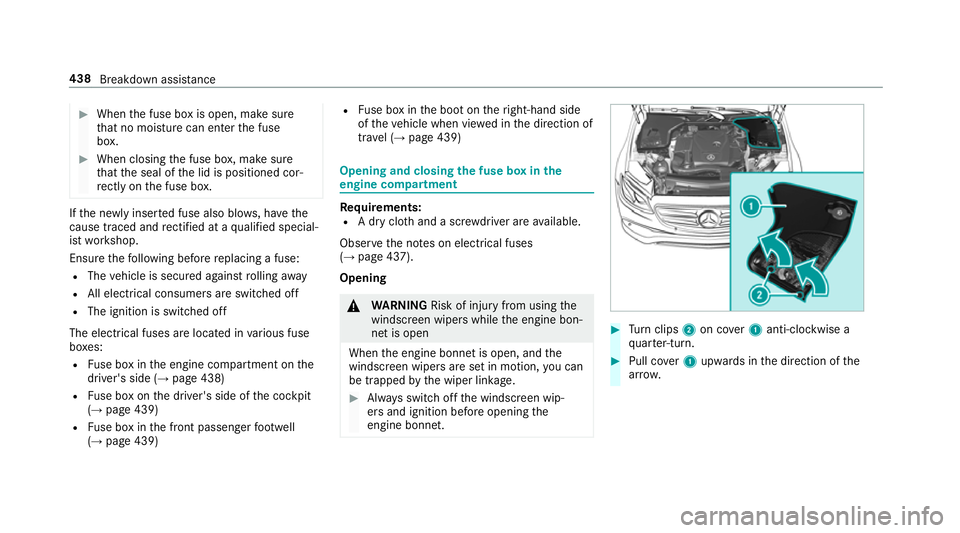
R Fuse box in the engine compartment on the
driver's side (→ page 438)
R Fuse box on the driver's side of the cockpit
(→ page 439)
R Fuse box in the front passenger foot we ll
(→ page 439) R
Fuse box in the boot on theright-hand side
of theve hicle when vie wed in the direction of
tr ave l (→ page 439) Opening and closing
the fuse box in the
engine compa rtment Re
quirements:
R A dry clo thand a sc rewdriver are available.
Obse rveth e no tes on electrical fuses
(→ page 437).
Opening &
WARNING Risk of inju ryfrom using the
windscreen wipers while the engine bon‐
net is open
When the engine bonn etis open, and the
windscreen wipers are set in motion, you can
be trapped bythe wiper linkage. #
Alw ays switch off the windscreen wip‐
ers and ignition before opening the
engine bonn et. #
Turn clips 2on co ver1 anti-clockwise a
qu arter-turn. #
Pull co ver1 upwards in the direction of the
ar row. 438
Breakdown assis tance
Page 442 of 593
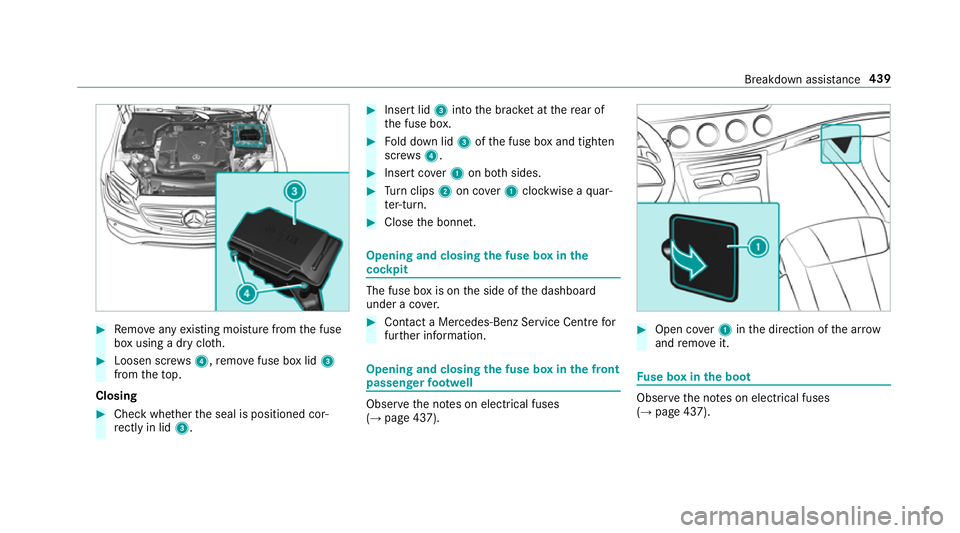
#
Remo veany existing moisture from the fuse
box using a dry clo th.#
Loosen scr ews4, remo vefuse box lid 3
from theto p.
Closing #
Check whe ther the seal is positioned cor‐
re ctly in lid 3. #
Insert lid 3into the brac ket at there ar of
th e fuse box. #
Fold down lid 3ofthe fuse box and tighten
scr ews4. #
Insert co ver1 on bo thsides. #
Turn clips 2on co ver1 clockwise a quar‐
te r-turn. #
Close the bonn et. Opening and closing
the fuse box in the
cockpit The fuse box is on
the side of the dashboard
under a co ver. #
Con tact a Mercedes-Benz Service Centre for
fur ther information. Opening and closing
the fuse box in the front
passenger foot we ll Obser
vethe no tes on electrical fuses
(→ page 437). #
Open co ver1 inthe direction of the ar row
and remo veit. Fu
se box in the boot Obser
vethe no tes on electrical fuses
(→ page 437). Breakdown assis
tance 439
Page 443 of 593
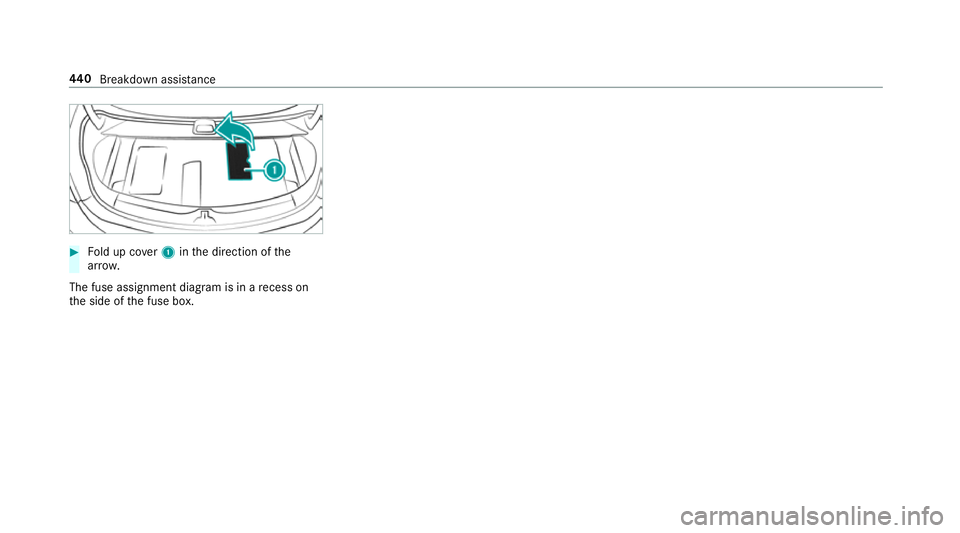
#
Fold up co ver1 inthe direction of the
ar row.
The fuse assignment diagram is in a recess on
th e side of the fuse box. 440
Breakdown assis tance
Page 532 of 593
Display messages
Possible causes/consequences and M
MSolutions
Switch off lights
b
Malfunction See Owner's
Manual *T
heexterior lighting is faulty. #
Consult a qualified specialist workshop.
Ve hicles with a trailer hitch: a fuse may haveblown. #
Pull over and stop theve hicle, paying attention toroad and traf fic conditions. #
Check the fuses and replace them if necessary (→ page 437).
b
Switch on headlamps *Y
ou are driving without lo w-beam headlamps. #
Turn the light switch totheL orà position.
b
Automatic driving lights
inoperative *T
he light sensor is faulty. #
Consult a qualified specialist workshop.
b Hazard warning lamps mal-
functioning *T
he hazard warning lamp switch is faulty. #
Consult a qualified specialist workshop. Display messages and
warning/indicator lamps 529
Page 563 of 593
see
Active Lane Change Assi st
see Active Lane Keeping Assist
see Active Parking Assist
see Active Speed Limit Assi st
see Active Steering Assist
see AIR BODY CONTROL
see ATTENTION ASSIST
see Blind Spot Assist
see Cruise control
see Driving saf ety sy stem
see HOLD function
see Limiter
see Parking Assist PARKTRONIC
see Remo teParking Assist
see Reversing camera
see Traf fic Sign Assi st
Driving tips Driving abroad (symmetrical dipped
beam) .................................................. 12 8
Gene ral driving tips ............................ .163
Ru nning-in no tes ..................................1 62
Dr ow siness de tection
see ATTENTION ASSIST
DY NA MIC BODY CONT ROL
Chassis ................................................ 218Dynamic handling cont
rol sy stem
see ESP ®
(Elect ronic Stability Prog ram)
DY NA MIC SELECT .................................... 16 9
Con figuring drive program I ................. 17 0
Displ aying engine data ........................ 17 0
Displ aying vehicle data ........................ 17 0
Drive program display .......................... 17 0
Drive programs .................................... 16 9
Fu nction .............................................. 16 9
Operating (DYNAMIC SELECT switch) .............................................................1 70
Selecting the drive prog ram ............... .170
Showing operation feedback ............... 17 0 E
E10 ............................................................ 467
Easy entry feature
Fu nction/no tes .................................... 111
Setting ................................................. 11 2
Easy exitfeature
Fu nction/no tes .................................... 111
Setting ................................................. 11 2EBD (Electronic Brake
forc e Distribu‐
tion)
Function/no tes ................................... 19 5
ECO Assist Displaying ............................................ 16 9
Fu nction/no tes .................................... 167
ECO display Function ............................................... 167
Re setting ............................................. 268
ECO start/s top function ......................... 16 5
Au tomatic engine start ........................ 16 5
Au tomatic engine stop .........................1 65
Operation ............................................ 16 5
Switching off/on ................................. 167
Electric pa rking brake ............................ .186
Applying auto matically ........................ 186
App lying or releasing manually ............ 188
Emergency braking .............................. 188
Re leasing automatically ...................... .187
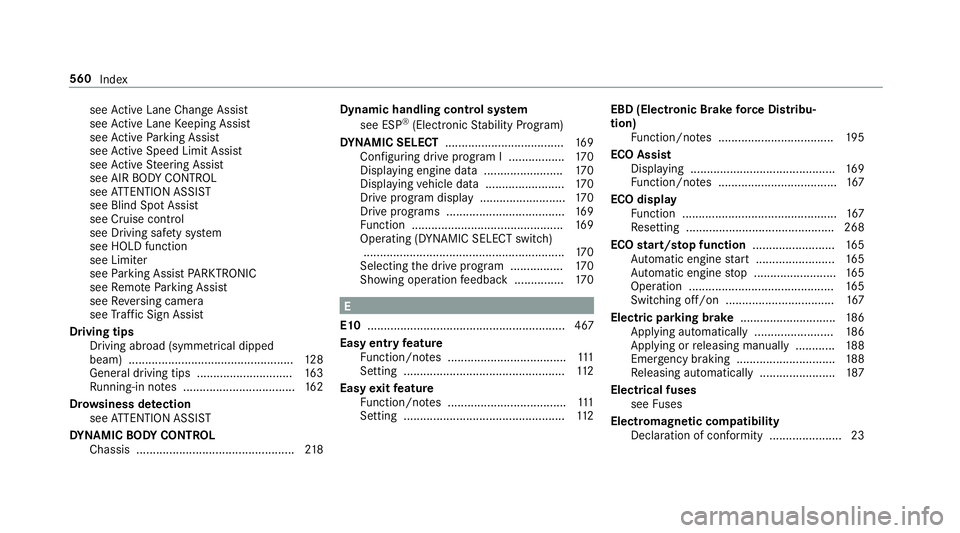
Electrical fuses see Fuses
Electromagnetic compatibility Declaration of conformity ......................23 560
Index
Page 566 of 593
Quality (petrol) ..................................... 467
Re fuelling ............................................. 175
Sulphur content ................................... 467
Ta nk content ....................................... 469
Fu el consum ption
On-board computer ............................ .266
Fu nction seat
see Door cont rol panel
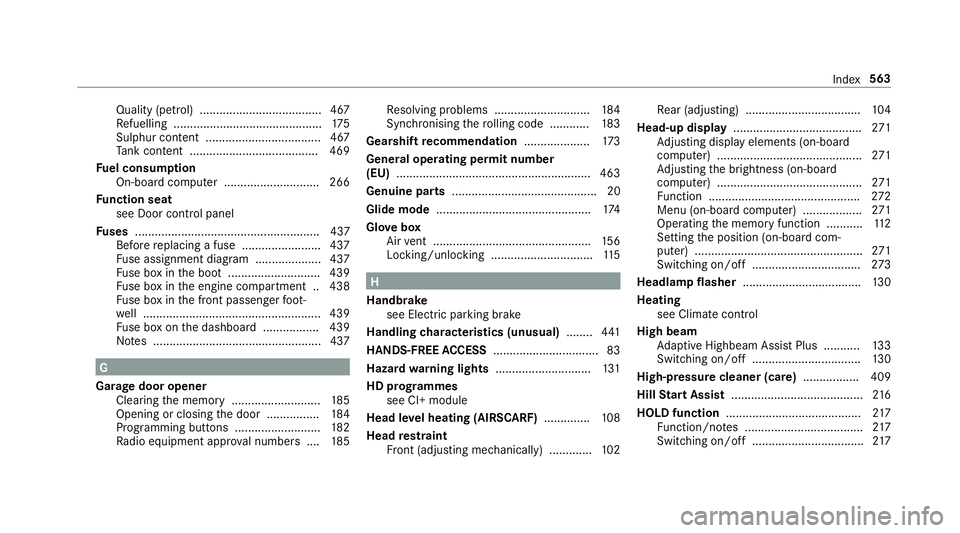
Fu ses ........................................................ 437
Before replacing a fuse ........................ 437
Fu se assignment diagram .................... 437
Fu se box in the boot ............................4 39
Fu se box in the engine compartment .. 438
Fu se box in the front passenger foot‐
we ll ...................................................... 439
Fu se box on the dashboard ................. 439
No tes ................................................... 437 G
Garage door opener Cleari ngthe memory ........................... 185
Opening or closing the door ................1 84
Programming buttons .......................... 182
Ra dio equipment appr oval numbers .... 185Re
solving problems ............................. 184
Synchronising thero lling code ............ 183
Gearshift recommendation ....................173
Genera l operating permit number
(EU) .......................................................... .463
Genuine parts ............................................ 20
Glide mode ............................................... 174
Glo vebox
Air vent ................................................ 15 6
Locking/unlocking ...............................1 15 H
Handbrake see Electric parking brake
Handling characteristics (unusual) ........441
HANDS-FREE ACCESS ................................ 83
Haza rdwa rning lights ............................ .131
HD prog rammes
see CI+ module
Head le vel heating (AIRSCARF) ..............108
Head restra int
Fr ont (adjusting mechanically) .............1 02Re
ar (adjusting) .................................. .104
Head-up display ....................................... 271
Ad justing display elements (on-board
compu ter) ............................................ 271
Ad justing the brightness (on-board
computer) ............................................ 271
Fu nction .............................................. 272
Menu (on-board computer) .................. 271
Operating the memory function ........... 11 2
Setting the position (on-board com‐
puter) ................................................... 271
Switching on/off ................................. 273
Headlamp flasher ................................... .130
Heating see Clima tecontrol
High beam Adaptive Highbeam Assist Plus .......... .133
Switching on/off ................................. 13 0
High-pressure cleaner (care) ................. 409
Hill Start Assist ........................................ 216
HOLD function ......................................... 217
Fu nction/no tes .................................... 217
Switching on/off .................................. 217 Index
563