belt MERCEDES-BENZ E-CLASS COUPE 2020 Service Manual
[x] Cancel search | Manufacturer: MERCEDES-BENZ, Model Year: 2020, Model line: E-CLASS COUPE, Model: MERCEDES-BENZ E-CLASS COUPE 2020Pages: 473, PDF Size: 8.5 MB
Page 117 of 473
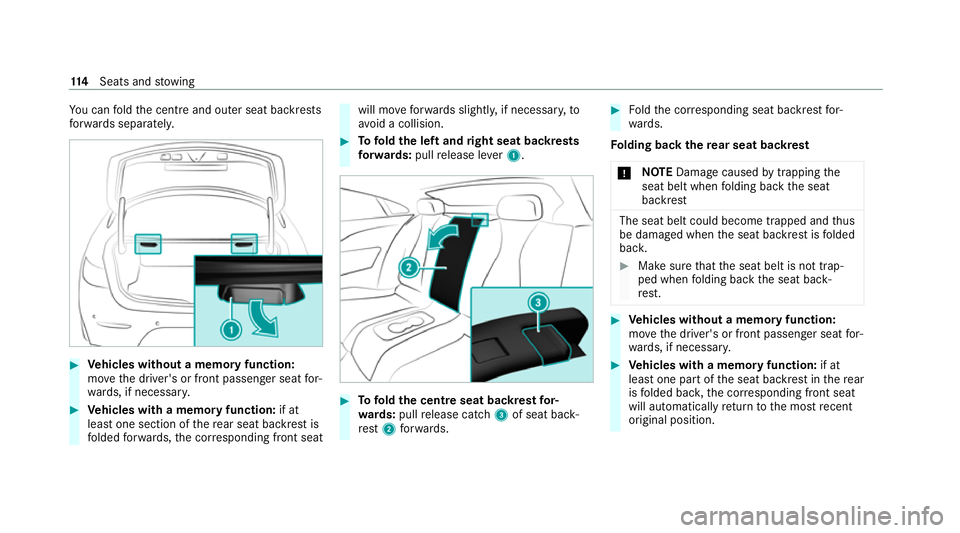
Yo
u can fold the cent reand outer seat backrests
fo rw ards separatel y.#
Vehicles without a memory function:
mo vethe driver's or front passenger seat for‐
wa rds, if necessar y. #
Vehicles with a memory function: if at
lea stone section of there ar seat backrest is
fo lded forw ards, the cor responding front seat will mo
veforw ards slightl y,if necessar y,to
av oid a collision. #
Tofold the left and right seat backrests
fo rw ards: pullrelease le ver1. #
Tofold the centre seat backrest for‐
wa rds: pull release cat ch3 of seat back‐
re st 2 forw ards. #
Foldthe cor responding seat backrest for‐
wa rds.
Fo lding back there ar seat backrest
* NO
TEDama gecaused bytrapping the
seat belt when folding back the seat
backrest The seat belt could become trapped and
thus
be damaged when the seat backrest is folded
bac k. #
Make sure that the seat belt is not trap‐
ped when folding back the seat back‐
re st. #
Vehicles without a memory function:
mo vethe driver's or front passenger seat for‐
wa rds, if necessar y. #
Vehicles with a memory function: if at
lea stone part of the seat backrest in there ar
is folded bac k,the cor responding front seat
will automatically return tothe most recent
original position. 11 4
Seats and stowing
Page 140 of 473
Mir
rors Operates
the outside mir rors &
WARNING Risk of accident due to
adjusting vehicle settings while theve hi‐
cle is in motion
Yo u could lose cont rol of theve hicle in the
fo llowing situations in particular:
R Ifyo u adjust the driver's seat, the head
re stra ints, thesteering wheel or the mir‐
ro r while theve hicle is in motion.
R Ifyo ufast enyour seat belt while theve hi‐
cle is in motion. #
Before starting the engine: adjust the
driver's seat, the head restra ints, the
st eering wheel and the mir ror and fas‐
te nyo ur seat belt. &
WARNING Risk of accident due tomis‐
judgement of dis tance when using the
outside mir ror
The outside mir rors reflect objects on a
smaller scale. The objects in view are in fact
closer than they appear. #
Therefore, alw ays look over your shoul‐
der in order toensure that you are
aw are of the actual dis tance between
yo u and thero ad users driving behind
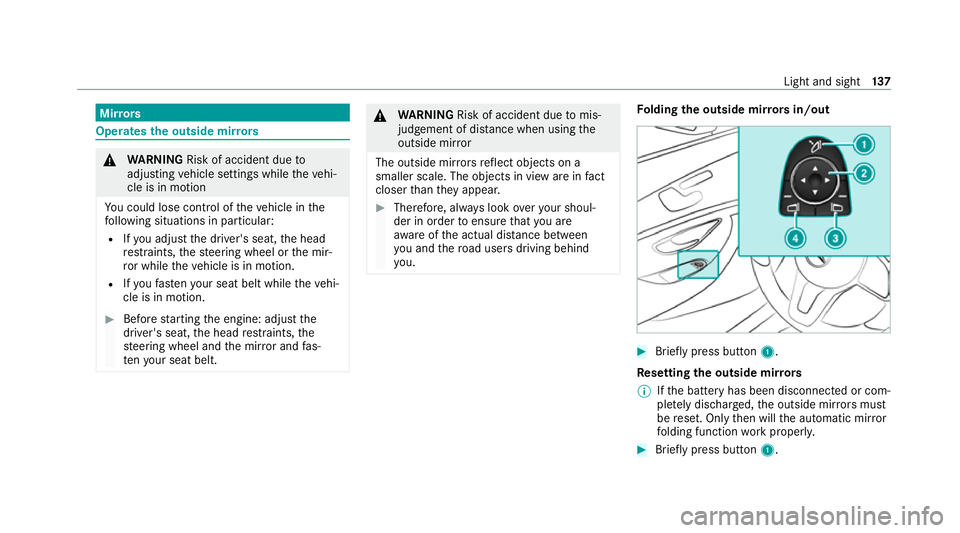
yo u. Fo
lding the outside mir rors in/out #
Brief lypress button 1.
Re setting the outside mir rors
% Ifth e battery has been disconnected or com‐
ple tely discharged, the outside mir rors must
be reset. Only then will the automatic mir ror
fo lding function workproperly. #
Brief lypress button 1. Light and sight
137
Page 183 of 473
R
get out and be stru ck byoncoming traf‐
fi c.
R ope rate vehicle equipment and become
trapped, forex ample.
In addition, thech ildren could also set the
ve hicle in motion, forex ample by:
R releasing the parking brake.
R changing the transmission position.
R starting theve hicle. #
Never lea vechildren unat tended in the
ve hicle. #
When leaving theve hicle, alw aysta ke
th eke y with you and lock theve hicle. #
Keep theve hicle key out of reach of
ch ildren. This also applies
tothe Digital Vehicle Key
st icke r.
The electric parking brake is applied if the trans‐
mission is in position jand one of thefo llow‐
ing conditions is fulfilled:
R The engine is switched off. R
The seat belt tongue is not inser ted in the
seat belt buckle of the driver's seat and the
driver's door is opened.
% Toprev ent application: pull the handle of the
electric parking brake.
In thefo llowing situations, the electric parking
brake is also applied:
R Active Dis tance Assi stDISTRONIC is bringing
th eve hicle toast andstill.
R The HOLD function is keeping theve hicle sta‐
tionar y.
R Active Parking Assist is keeping theve hicle
st ationar y.
This is the case if one of thefo llowing conditions
is also fulfilled:
R The engine is switched off.
R The seat belt tongue is not inser ted in the
seat belt buckle of the driver's seat and the
driver's door is opened.
R There is a sy stem malfunction.
R The po wer supply is insuf ficient.
R The vehicle is stationary for a lengt hyperiod. When
the electric parking brake is applied, the
re d! indicator lamp lights up in the instru‐
ment clus ter.
The electric parking brake is not automatically
applied if the engine is switched off bythe ECO
st art/ stop function.
Electric parking brake function (releasing
automatically)
The electric parking brake is released when the
fo llowing conditions are fulfilled:
R The driver's door is closed.
R The engine is running.
R The transmission is in position hork and
yo u depress the accelera tor pedal or you
shift from transmission position jtoh or
k when on le velground withthe driver's
door closed.
R Ifth e transmission is in position k,the boot
lid must be closed.
R The seat belt tongue is inser ted into the seat
belt buckle of the driver's seat. 18 0
Driving and pa rking
Page 184 of 473
If
th e seat belt tongue is not inser ted into the
seat belt buckle of the driver's seat, one of the
fo llowing conditions must be fulfilled:
R You shift from transmission position j.
R You ha veprev iously driven at speeds greater
th an 3 km/h.
When the electric parking brake is released, the
re d! indicator lamp in the instrument clus‐
te r goes out. Applying/releasing
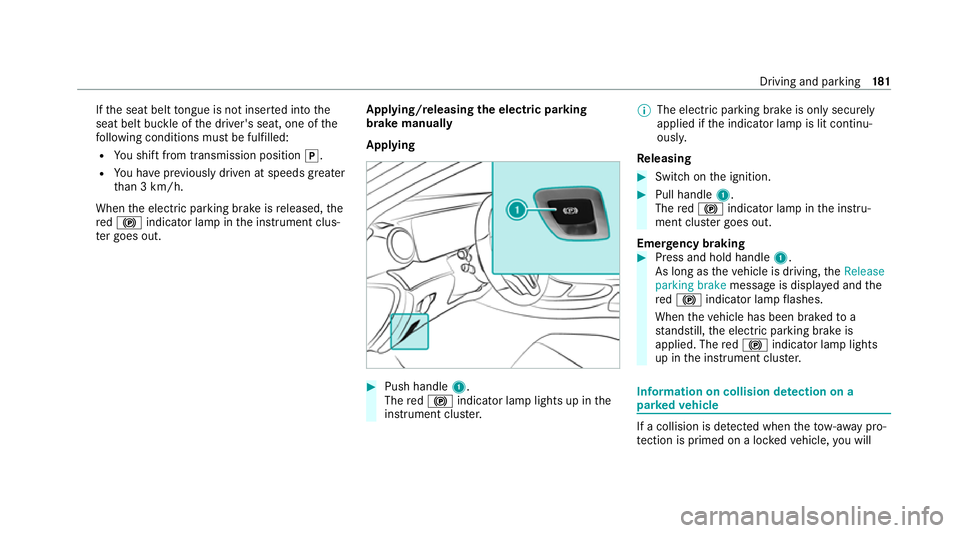
the electric pa rking
brake manually
Applying #
Push handle 1.
The red! indicator lamp lights up in the
instrument clus ter. %
The electric parking brake is only securely
applied if the indicator lamp is lit continu‐
ously.
Re leasing #
Swit chon the ignition. #
Pull handle 1.
The red! indicator lamp in the instru‐
ment clus ter goes out.
Emer gency braking #
Press and hold handle 1.
As long as theve hicle is driving, theRelease
parking brake message is displa yed and the
re d! indicator lamp flashes.
When theve hicle has been braked to a
st andstill, the electric parking brake is
applied. The red! indicator lamp lights
up in the instrument clus ter. Information on collision de
tection on a
pa rked vehicle If a collision is de
tected when theto w- aw ay pro‐
te ction is primed on a loc kedve hicle, you will Driving and parking
181
Page 210 of 473
&
WARNING Risk of accident and inju ry
due totheve hicle rolling away
Af ter a short time, Hill Start Assist no lon ger
holds theve hicle. #
Swiftly mo veyour foot from the brake
pedal tothe accelera tor pedal. Do not
lea vetheve hicle when it is being held
by Hill Start Assist. HOLD function
HOLD function
The HOLD function holds
theve hicle at a stand‐
st ill without requ iring youto depress the brake
pedal, e.g. while waiting in traf fic.
The HOLD function is only an aid. The responsi‐
bility forth eve hicle safely standing still remains
with the driver.
Sy stem limits
The HOLD function is only intended toprov ide
assis tance when driving and is not a su fficient
means of safeguarding theve hicle against rolling
aw ay when stationar y. R
The incline must not be greater than 30%.
Ac tivating/deactivating the HOLD function &
WARNING Risk of an accident due tothe
HOLD function being active when you
lea vetheve hicle
If th eve hicle is only braked with the HOLD
function it could, in thefo llowing situations,
ro llaw ay:
R Ifth ere is a malfunction in the sy stem or
in the po wer supp ly.
R Ifth e HOLD function is deactivated by
depressing the accelera tor pedal or brake
pedal, e.g. byave hicle occupant. #
Alw ays secure theve hicle against roll‐
ing away before you lea veit. Re
quirements:
R The vehicle is stationar y.
R The driver's door is closed or the seat belt on
th e driver's side is fastened. R
The engine is running or has been au tomati‐
cally switched off bythe ECO start/ stop
function.
R The electric parking brake is released.
R Active Dis tance Assi stDISTRONIC is deacti‐
va ted.
R The transmission is in position h,kori.
Ac tivating the HOLD function #
Dep ress the brake pedal, and af ter a short
time quickly depress fur ther until theë
display appears in the multifunction displa y. #
Release the brake pedal.
Deactivating the HOLD function #
Depress the accelerator pedal topull away.
or #
Depress the brake pedal until theë dis‐
play disappears from the multifunction dis‐
pla y.
The HOLD function is deactivated in thefo llow‐
ing situations:
R Active Dis tance Assi stDISTRONIC is acti va‐
te d. Driving and parking
207
Page 211 of 473
R
The transmission is shif tedto position j.
R The vehicle is secured with the electric park‐
ing brake.
In thefo llowing situations, theve hicle is held by
transmission position jand/or bythe electric
parking brake:
R The seat belt is unfas tened and the driver's
door is opened.
R The vehicle is switched off.
R There is a malfunction in the sy stem or the
po we r supply is insuf ficient. DY
NA MIC BODY CONT ROL function DY
NA MIC BODY CONTROL continuously adjusts
th ech aracteristics of the suspension dampers to
th e cur rent operating and driving conditions.
The da mping is tuned individually for each wheel
and is af fected bythefo llowing factors:
R The road sur face conditions
R Vehicle load
R The drive program selected R
The driving style
The drive program can be adjus ted using the
DY NA MIC SELECT switch. AIR
BODY CONT ROL AIR
BODY CONT ROL function
* NO
TEMercedes-AMG vehicles #
Obser vethe no tes in the Supplement.
Yo u could otherwise failto recognise
dangers. AIR BODY
CONTROL is an air suspension sy stem
with variable damping for impr oved driving com‐
fo rt. The all-round le vel control sy stem ensures
th e best possible suspension and const ant
ground clearance, even wi tha laden vehicle.
When driving at speed, theve hicle is lo wered
automatically toimpr ovedriving saf ety and to
re duce fuel consum ption. You also ha vethe
option of manually adjusting theve hicle le vel. AIR
BODY CONTROL includes thefo llowing com‐
ponents and functions:
R Air suspension with variable spring rate
R Automatic le vel control sy stem
R Speed-dependent lo wering toreduce fuel
consum ption
R Manually selec table high-le vel setting for
grea ter ground clea rance
R ADS PLUS (Ada ptive Damping Sy stem with
const ant damping forc e adjustment)
R DYNA MIC SELECT switch and le vel button
Suspension settings and vehicle le vel per
drive prog ram
Drive program A:
R The suspension setting is comfor table.
R The vehicle is set tothe normal le vel.
R When driving at speeds of appr oximately
12 5 km/h or abo ve,th eve hicle is lo wered.
R When driving at speeds below appr oximately
80 km/h, theve hicle is raised again. 208
Driving and parking
Page 231 of 473
If
AT TENTION ASSIST is unable tocalculate the
attention le vel and cannot issue a warning, the
System suspended messageappears.
If a warning is given in the Instrument Displa y,
th e multimedia sy stem of fers to sear chfor a rest
area. You can select a rest area and start naviga‐
tion tothis rest area. This function can be activa‐
te d and deactivated in the multimedia sy stem.
If AT TENTION ASSIST is deactivated, theÛ
symbol appears in the assis tance graphic in the
Instrument Display when the engine is running.
AT TENTION ASSIST is activated automatically
when the engine is re-sta rted. The last selected
sensitivity le velre mains stored.
Sy stem limits
AT TENTION ASSIST is active in the 60 km/h to
200 km/h speed range.
Pa rticular lyin thefo llowing situations, ATTEN‐
TION ASSIST only functions in a restricted man‐
ner and warnings may be dela yed or not occur:
R Ifyo u ha vebeen driving for less than appr ox‐
imately 30 minutes. R
Ifth ero ad condition is poor (une venro ad
sur face or po tholes).
R Ifth ere is a strong side wind.
R Ifyo u adopt a sporty driving style (high cor‐
nering speeds or high rates of acceleration).
R Ifth eSt eering Assist function of Active Dis‐
ta nce Assi stDISTRONIC is acti ve.
R Ifth e time has been set incor rectly.
R Ifyo uch ange lanes and vary your speed fre‐
qu ently In active driving situations.
The ATTENTION ASSIST tiredness or alertness
assessment is dele ted and restar ted when con‐
tinuing the journey in thefo llowing situations:
R Ifyo u swit choff the engine.
R Ifyo u unfas tenyo ur seat belt and open the
driver's door (e.g. changing drivers or taking
a break). Setting
ATTENTION ASSI ST
Multimedia sy stem:
4 © 5
Settings 5
Assistance
5 Attention Assist
Setting options #
Select Standard, SensitiveorOff.
Suggesting a rest area #
Select Suggest rest area . #
Activate or deacti vate the function.
If AT TENTION ASSIST de tects fatigue or
increasing la ckof attention, it suggests a
re st area in the vicinit y. #
Select the sugges tedre st area.
Yo u are guided tothe selected rest area. Tr
af fic Sign Assist Fu
nction of Traf fic Sign Assist
Tr af fic Sign Assi stdetects traf fic signs wi th the
multifunction camera (/ page183). It assists
yo uby displaying de tected speed limits and
ove rtaking restrictions in the instrument clus ter. 228
Driving and parking
Page 262 of 473
R
The seat belt on the front passenger seat
must notbe inser ted in the seat belt buckle.
Switching there ading light on and off #
Brief lymo vea hand up or down beneath the
inside rearview mir ror.
The reading light is swit ched on or off forthe
driver or front passenger. Switching
the sear chlight on and off #
Toswitch on: reach across the front
passenger seat with a hand.
The sear chlight is switched on forth e driver. #
Toswitch off: take a hand back away from
th e front passenger seat.
The sear chlight is switched off again. Information on profiles,
themes, suggestions
and favo urites Fo
r electrical lyadjus table seats obser vethefo l‐
lowing no tes. &
WARNING Risk of becoming trapped
du ring adjustment of the driver's seat
af te r calling up a driver profile
Selecting a profile may trigger an adju stment
of the driver's seat tothe position sa ved
under the profile. You or other vehicle occu‐
pants could be injured in the process. #
Make sure that when the position of
driver's seat is being adjus ted using the
multimedia sy stem, no people or body
parts are in the seat's range of mo ve‐
ment.
If th ere is a risk of someone becoming trap‐
ped, stop the adjustment process immedi‐
ately: #
a)Tapth ewa rning message on the
media displa y.
or #
b) Press a memory position button or a
seat adjustment switch on the driver's
door.
The adjustment process is stopped. MBUX multimedia sy
stem 259
Page 287 of 473
Yo
u can find more information on there gional
av ailability of eCall at: https://www.mercedes-
benz-mobile.com/ext ra/ecall/
Messages on the displ ay
The following messages appear in the display:
R SOS NOT READY :th e ignition is not on or
th ere is a malfunction with the emer gency
call sy stem . This does not necessarily indi‐
cate comple tefailure of the emer gency call
sy stem. Emer gency calls call still be trans‐
mit ted.
The display only refers to theve hicle and
does not take account of theav ailability of
mobile phone networ ksand the Mercedes-
Benz emer gency call centre.
The functional readiness of the emer gency
call sy stem on theve hicle can be seen when
th eSOS NOT READY display disappears once
th e ignition is switched on.
R G: The icon appears in the display during
an active emer gency call.
% Ifth ere is a malfunction in the Mercedes-
Benz emer gency call sy stem (e.g. a fault with th
e speaker, microphone, airbag, SOS but‐
to n), a cor responding message appears in
th e multifunction display of the instrument
clus ter. Tr
iggering an automatic Mercedes‑Benz
emer gency call Re
quirements:
R The ignition is switched on.
R The star ter battery is suf ficiently charge d.
The Mercedes‑Benz emer gency call sy stem trig‐
ge rs an emer gency call au tomatical lyin thefo l‐
lowing cases:
R After activation of there stra int sy stems such
as airbags or seat belt tensioners af ter an
accident
The emergency call has been made:
R Avo ice connection is made tothe
Mercedes‑Benz emer gency call centre.
R A messa gewith accident data is transmitted
to the Mercedes‑Benz emer gency call centre. The Mercedes‑Benz emergency call centre
can transmit
theve hicle position data toone
of the public emer gency services call cen‐
tres.
R Under cer tain circums tances da tais also
transmitte d inthevo ice channel tothe
Mercedes‑Benz emer gency call centre.
This allo wsmeasu resfo rre scue, reco very or
to wing toa Mercedes‑Benz Service Cent reto
be initiated quickl y.
The SOS button in theove rhead control panel
fl ashes until the emer gency call is finished.
It is not possible toimmediately end an auto‐
matic emer gency call.
If th e Mercedes‑Benz emer gency call sy stem
cann otconnect tothe Mercedes‑Benz emer‐
ge ncy call centre, the emer gency call is au tomat‐
ically sent tothe public emer gency services call
centre.
If no connection can be made tothe public
emer gency services, a cor responding message
appears inthe displa y. 284
MBUX multimedia sy stem
Page 310 of 473
Note
s on care of the interior &
WARNING Risk of inju ryfrom pla stic
parts breaking off af terth e use of sol‐
ve nt-based care products
Ca reand cleaning products con taining sol‐
ve nts can cause su rfaces in the cockpit to
become porous. When the airbags are
deplo yed, plastic parts may break away. #
Do not use any care or cleaning prod‐
ucts containing sol vents toclean the
cockpit. &
WARNING Risk of inju ryor death from
bleached seat belts
Bleaching or dyeing seat belts can se verely
we aken them.
This can, forex ample, cause seat belts to
te ar or fail in an accident. #
Never blea chor dye seat belts. To
avo id damage totheve hicle, obser vethe
no tes on cleaning and care. Seat belts
R Clean with luk ewarmand soapy water.
R Do not use chemical cleaning agents.
R Do not dry seat belts byheating them toover
80°C or exposing them todirect sunlight.
Display
R Switch off the display and let it cool down.
R Clean the sur face carefully wi tha mic rofibre
clo thand a suitable display care product
(TF T-LC D).
R Do not use any other agents.
Plastic trim R Clean with a damp microfibre clo th.
R For heavy soiling: use a cleaner recommen‐
ded for Mercedes-Benz.
R Do not attach sticke rs,fi lms or similar mate‐
ri als.
R Do not allow cosmetics, insect repellent or
sun cream tocome in contact wi th the plas‐
tic trim.
Re alwo od and trim elements
R Clean with a mic rofibre clo th. R
Blackpiano-lac quer look: clean with a damp
clo thand soapy water.
R For heavy soiling: use a cleaner recommen‐
ded for Mercedes-Benz.
R Do not use sol vent-based cleaning agents,
polishes or waxes.
Ro of lining
R Clean with a brush or dry shampoo.
Carpet
R Use a carpet and textile cleaning agent rec‐
ommended for Mercedes-Benz.
St eering wheel made of genuine leather or
DINAMICA
* NO
TEDama gecaused bywrong cleaners #
Do not use solvent-based cleaning
agents such as tarre mo ver or wheel
cleaner; neither should you use pol‐
ishes or waxes. Otherwise you may
damage thefinish. R
Clean wi tha damp clo thand 1% soapy water
solution and then wipe with a dry clo th. Maintenance and care
307