tow MERCEDES-BENZ E-CLASS ESTATE 2008 Owner's Manual
[x] Cancel search | Manufacturer: MERCEDES-BENZ, Model Year: 2008, Model line: E-CLASS ESTATE, Model: MERCEDES-BENZ E-CLASS ESTATE 2008Pages: 401, PDF Size: 6.89 MB
Page 66 of 401
Anti-theft syste
ms 63Tow-away protection*
An audible and visual alarm is triggered if your
vehicle's angle of inclination is altered while
tow-away protection is primed. This happens
if the vehicle is jacked up on one side, for
example.
Priming tow-away protection X
Lock the vehicle using the key. On vehicles
with KEYLESS GO*, the locking button on
the door handle/boot lid/tailgate can also
be used.
Tow-away protection is primed after
approximately 30 seconds.
To deactivate tow-away protection When you unlock your vehicle using the key
or KEYLESS GO
*,tow-away protection is
automatically deactivated.
Deactivate tow-away protection manually to
prevent a false alarm if your vehicle:
R is being transported
R is being loaded, e.g. onto a ferry or car
transporter
R is being parked on a movable surface, e.g.
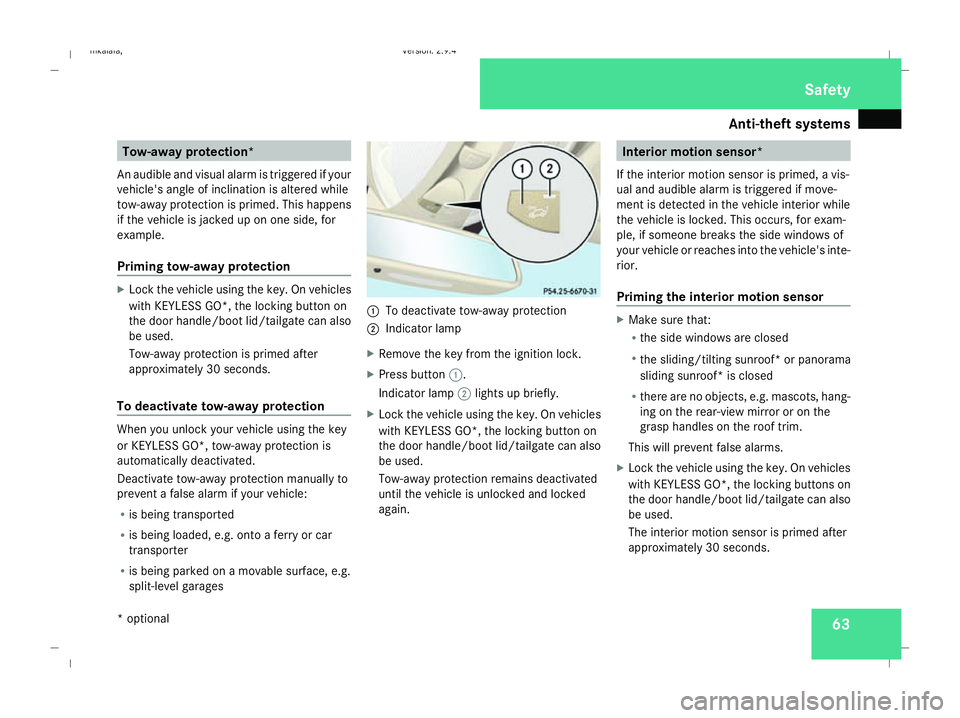
split-level garages 1
To deactivate tow-away protection
2 Indicator lamp
X Remove the key from the ignition lock.
X Press button 1.
Indicator lamp 2lights up briefly.
X Lock the vehicle using the key. On vehicles
with KEYLESS GO*, the locking button on
the door handle/boot lid/tailgate can also
be used.
Tow-away protection remains deactivated
until the vehicle is unlocked and locked
again. Interior motion sensor*
If the interior motion sensor is primed, a vis-
ual and audible alarm is triggered if move-
ment is detected in the vehicle interior while
the vehicle is locked. This occurs, for exam-
ple, if someone breaks the side windows of
your vehicle or reaches into the vehicle's inte-
rior.
Priming the interior motion sensor X
Make sure that:
R
the side windows are closed
R the sliding/tilting sunroof* or panorama
sliding sunroof* is closed
R there are no objects, e.g. mascots, hang-
ing on the rear-view mirror or on the
grasp handles on the roof trim.
This will prevent false alarms.
X Lock the vehicle using the key. On vehicles
with KEYLESS GO*, the locking buttons on
the door handle/boot lid/tailgate can also
be used.
The interior motion sensor is primed after
approximately 30 seconds. Safety
* optional
211_AKB; 2; 5, en-GB
mkalafa
,V ersion: 2.9.4
2008-02-29T16:57:07+01:00 - Seite 63 ZDateiname: 6515_3416_02_buchblock.pdf; preflight
Page 68 of 401
65
Opening and closing
...........................66
Key positions ....................................... 76
Seats .................................................... 77
Steering wheel .................................... 89
Mirrors ................................................. 91
Memory functions* .............................93
Seat belts ............................................. 95
Lights ................................................... 99
Windscreen wipers ...........................105
Side windows .................................... 107Driving and parking
..........................110
Transmission ..................................... 114
Instrument cluster ............................120
On-board computer ..........................121
Driving systems ................................ 142
Air conditioning ................................. 162
Sliding sunroof .................................. 180
Loading and stowing ........................186
Features ............................................. 207 Controls
211_AKB; 2; 5, en-GB
mkalafa,
Version: 2.9.4
2008-02-29T16:57:07+01:00 - Seite 65 Dateiname: 6515_3416_02_buchblock.pdf; preflight
Page 84 of 401
Seats
81
Luxury head restraint* G
Risk of injury
When folding back the head restraint side
bolsters, do not put your hands between
the side bolster and the cushion holder.
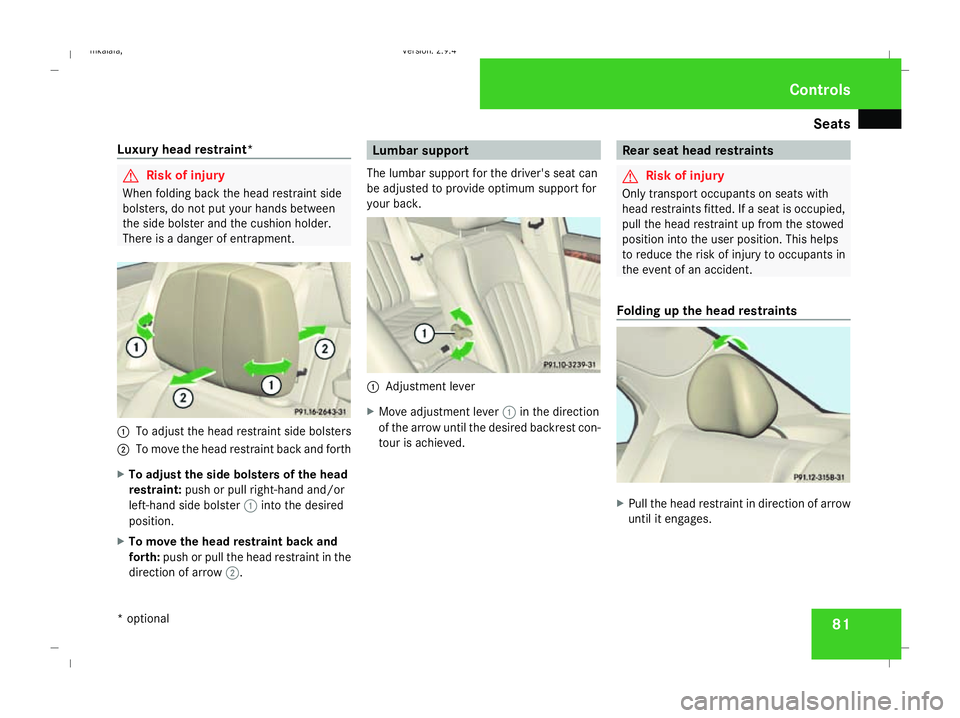
There is a danger of entrapment. 1
To adjust the head restraint side bolsters
2 To move the head restraint back and forth
X To adjust the side bolsters of the head
restraint: push or pull right-hand and/or
left-hand side bolster 1into the desired
position.
X To move the head restraint back and
forth: push or pull the head restraint in the
direction of arrow 2. Lumbar support
The lumbar support for the driver's seat can
be adjusted to provide optimum support for
your back. 1
Adjustment lever
X Move adjustment lever 1in the direction
of the arrow until the desired backrest con-
tour is achieved. Rear seat head restraints
G
Risk of injury
Only transport occupants on seats with
head restraints fitted. If a seat is occupied,
pull the head restraint up from the stowed
position into the user position. This helps
to reduce the risk of injury to occupants in
the event of an accident.
Folding up the head restraints X
Pull the head restraint in direction of arrow
until it engages. Controls
* optional
211_AKB; 2; 5, en-GB
mkalafa,
Version: 2.9.4 2008-02-29T16:57:07+01:00 - Seite 81 ZDateiname: 6515_3416_02_buchblock.pdf; preflight
Page 99 of 401
Seat belts
96 For this reason, check regularly that the
seat belts are not damaged or dirty.
Always have damaged seat belts or seat
belts that have been subjected to a load in
an accident replaced at a qualified special-
ist workshop. Choose a qualified specialist
workshop which has the necessary special-
ist knowledge and tools for the work
required. Mercedes-Benz recommends
that you use a Mercedes-Benz Service
Centre for this purpose.
For safety reasons, Mercedes-Benz recom-
mends that you only use seat belts which
have been approved by Mercedes-Benz for
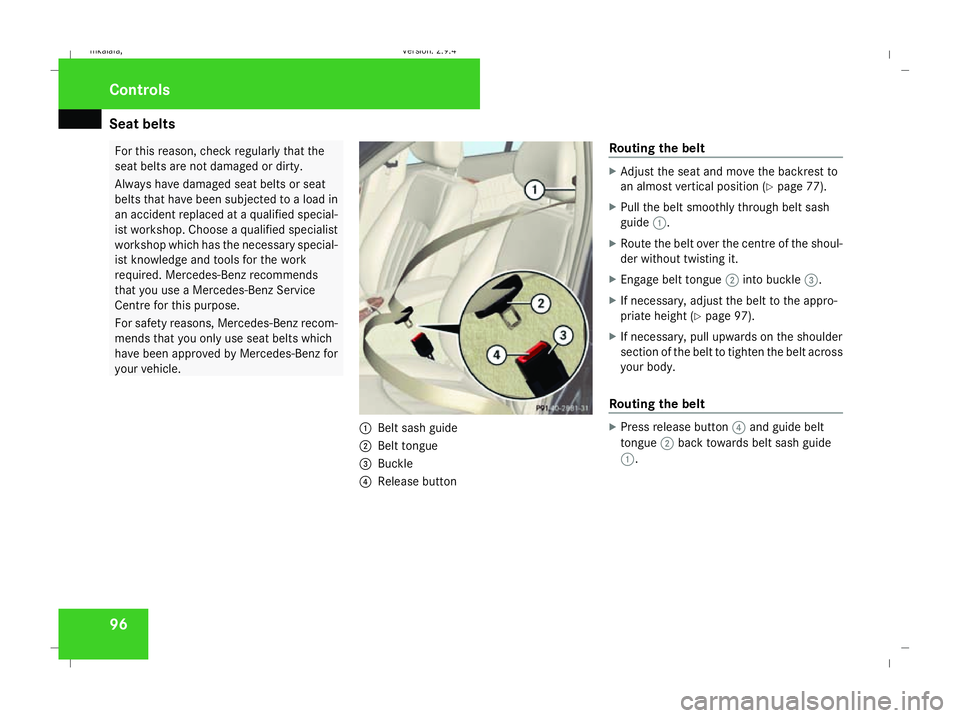
your vehicle. 1
Belt sash guide
2 Belt tongue
3 Buckle
4 Release button Routing the belt X
Adjust the seat and move the backrest to
an almost vertical position (Y page 77).
X Pull the belt smoothly through belt sash
guide 1.
X Route the belt over the centre of the shoul-
der without twisting it.
X Engage belt tongue 2into buckle 3.
X If necessary, adjust the belt to the appro-
priate height (Y page 97).
X If necessary, pull upwards on the shoulder
section of the belt to tighten the belt across
your body.
Routing the belt X
Press release button 4and guide belt
tongue 2back towards belt sash guide
1. Controls
211_AKB; 2; 5, en-GB
mkalafa,
Version: 2.9.4 2008-02-29T16:57:07+01:00 - Seite 96Dateiname: 6515_3416_02_buchblock.pdf; preflight
Page 116 of 401
Driving and pa
rking 113
Automatic transmission* i
It is only possible to move the selector
lever to the desired position if you depress
the brake pedal. Only then is the selector
lever lock released.
X Depress the brake pedal and hold it down.
X Pull the parking brake release handle to
release the parking brake.
X Move the selector lever to position Dor R.
i Wait for the shift process to complete
before pulling away.
X Release the brake pedal.
X Carefully depress the accelerator pedal.
i Upshifts take place at higher engine
speeds after a cold start. This helps the
catalytic converter to reach its operating
temperature more quickly. Parking
G
Risk of accident
Only remove the key from the ignition lock
when the vehicle is stationary since you
cannot steer the vehicle with the key
removed.
Never leave children unsupervised in the
vehicle. They could release the parking
brake. This could lead to a serious or fatal
accident. G
Risk of fire
Make sure that the exhaust system does
not under any circumstances come into
contact with easily ignitable material such
as dry grass or petrol. The material could
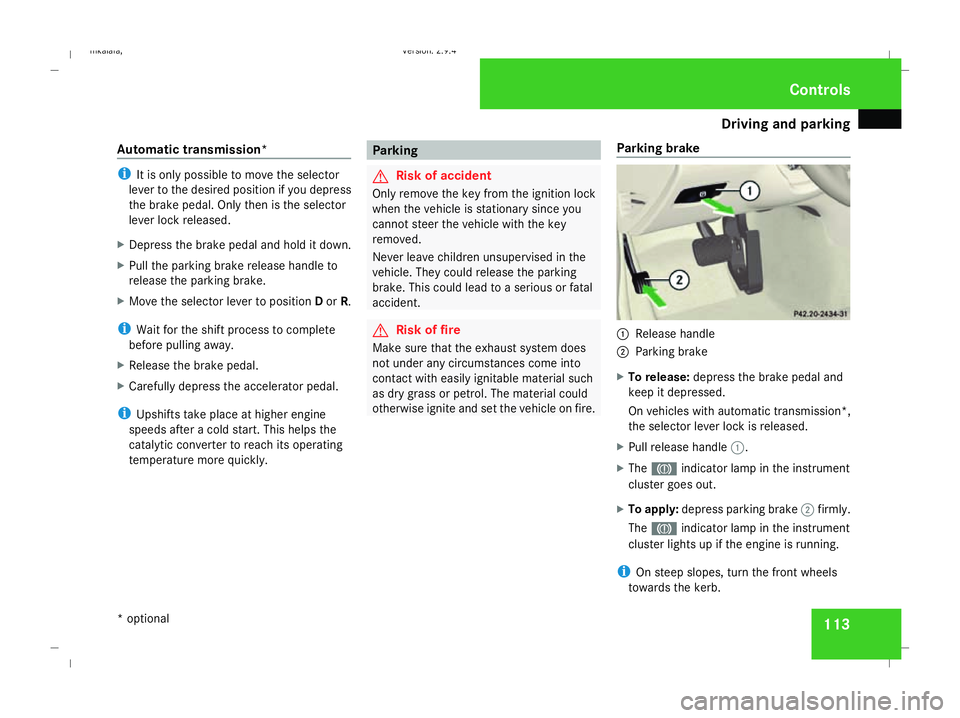
otherwise ignite and set the vehicle on fire. Parking brake 1
Release handle
2 Parking brake
X To release: depress the brake pedal and
keep it depressed.
On vehicles with automatic transmission*,
the selector lever lock is released.
X Pull release handle 1.
X The 3 indicator lamp in the instrument
cluster goes out.
X To apply: depress parking brake 2firmly.
The 3 indicator lamp in the instrument
cluster lights up if the engine is running.
i On steep slopes, turn the front wheels
towards the kerb. Controls
* optional
211_AKB; 2; 5, en-GB
mkalafa
,V ersion: 2.9.4
2008-02-29T16:57:07+01:00 - Seite 113 ZDateiname: 6515_3416_02_buchblock.pdf; preflight
Page 119 of 401
Transmission
116 ë Neutral
Releasing the brakes will allow you
to move the vehicle freely, e.g. to
push it or tow it.
Do not move the selector lever to
N while you are driving. The auto-
matic transmission could other-
wise be damaged.
If ESP ®
is deactivated or faulty:
only move the selector lever to Nif
the vehicle is in danger of skidding,
e.g. on icy roads. ê Drive
The automatic transmission
changes gear automatically. All
forward gears are available.
One-touch gearshifting
When the selector lever is in position
D, you
can perform gearshifts yourself, even on vehi-
cles with automatic transmission.
X To shift up: briefly press the selector lever
to the right towards D+.
The automatic transmission shifts up to the
next gear, depending on the gearshift pro- gram selected. This also extends the shift
range.
X To shift down: briefly press the selector
lever to the left towards D–.
The automatic transmission shifts down to
the next gear, depending on the gear cur-
rently selected. This also restricts the shift
range.
i To prevent the engine from overrevving,
the automatic transmission does not shift
down if you push the selector lever towards
D– while driving at too high a speed.
X To derestrict the shift range: press and
hold the selector lever towards D+until D
is shown once more in the display.
The automatic transmission shifts from the
current shift range directly to D.
X To select the most effective shift
range: press and hold the selector lever to
the left towards D–.
The automatic transmission will shift to a
range which allows ideal acceleration and
deceleration. To do this, the automatic
transmission will shift down one or more
gears. Shift ranges When the selector lever is in position
D, it is
possible to restrict or derestrict the shift
range for the automatic transmission.
X Briefly press the selector lever to the right
towards D+or to the left towards D–.
The shift range selected is shown in the
display. The automatic transmission shifts
only as far as the selected gear.
i If the maximum engine speed for the shift
range is reached and you continue to accel-
erate, the automatic transmission shifts up
in order to prevent the engine from over-
revving even if the shift range is restricted. Driving situation
è The braking effect of the engine can
be used in this position.Controls
211_AKB; 2; 5, en-GB
mkalafa
,V ersion: 2.9.4
2008-02-29T16:57:07+01:00 - Seite 116 Dateiname: 6515_3416_02_buchblock.pdf; preflight
Page 120 of 401
Transmission
117ç To use the braking effect of the
engine on downhill gradients and
for driving:
R
on steep mountain roads
R in mountainous terrain
R in arduous conditions æ To use the braking effect of the
engine on extremely steep downhill
gradients and long downhill
stretches.
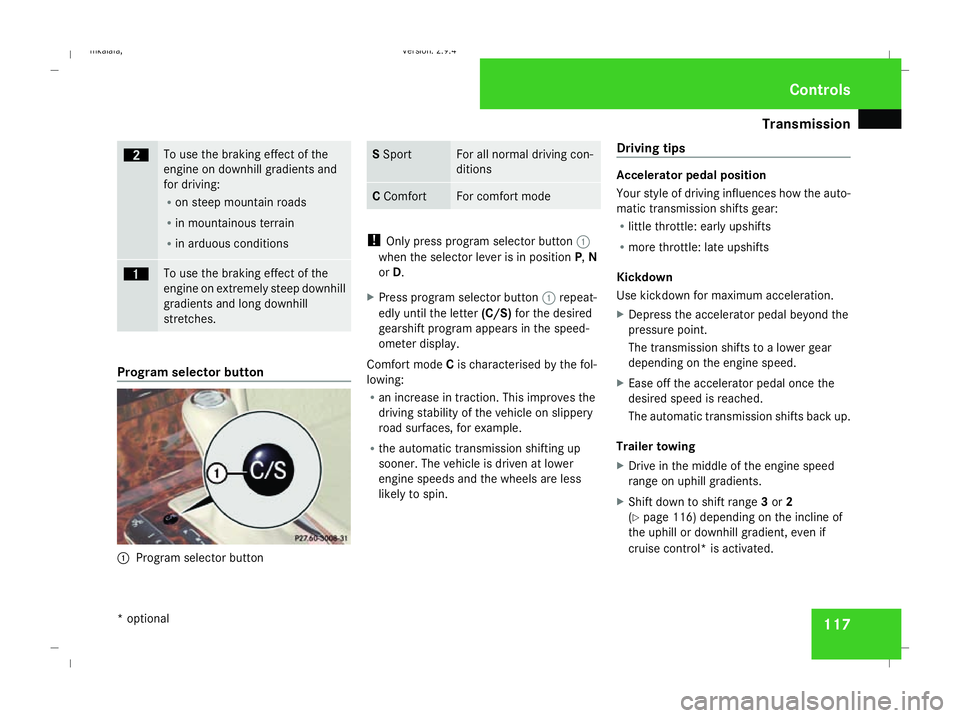
Program selector button
1
Program selector button S
Sport For all normal driving con-
ditions
C
Comfort For comfort mode
!
Only press program selector button 1
when the selector lever is in position P,N
or D.
X Press program selector button 1repeat-
edly until the letter (C/S)for the desired
gearshift program appears in the speed-
ometer display.
Comfort mode Cis characterised by the fol-
lowing:
R an increase in traction. This improves the
driving stability of the vehicle on slippery
road surfaces, for example.
R the automatic transmission shifting up
sooner. The vehicle is driven at lower
engine speeds and the wheels are less
likely to spin. Driving tips Accelerator pedal position
Your style of driving influences how the auto-
matic transmission shifts gear:
R little throttle: early upshifts
R more throttle: late upshifts
Kickdown
Use kickdown for maximum acceleration.
X Depress the accelerator pedal beyond the
pressure point.
The transmission shifts to a lower gear
depending on the engine speed.
X Ease off the accelerator pedal once the
desired speed is reached.
The automatic transmission shifts back up.
Trailer towing
X Drive in the middle of the engine speed
range on uphill gradients.
X Shift down to shift range 3or 2
(Y page 116) depending on the incline of
the uphill or downhill gradient, even if
cruise control* is activated. Controls
* optional
211_AKB; 2; 5, en-GB
mkalafa
,V ersion: 2.9.4
2008-02-29T16:57:07+01:00 - Seite 117 ZDateiname: 6515_3416_02_buchblock.pdf; preflight
Page 122 of 401
Transmission
119
currently selected and engaged is shown in
the display.
Upshifting
X
Briefly press the selector lever to the right
towards D+
or
X Pull the right-hand steering wheel gearshift
paddle (Y page 118).
The automatic transmission shifts up to the
next gear.
Vehicles with AMG engines
! In manual gearshift program M, the auto-
matic transmission does not shift up auto-
matically even when the limiting speed for
the current gear is reached. When the lim-
iting speed is reached, the fuel supply is cut
to prevent the engine from overrevving.
You must make sure that the engine speed
does not reach the red area of the rev coun-
ter. There is otherwise a risk of engine
damage.
X Shift up a gear when the ^upshift symbol
appears in the display instead of M.
When the AMG display is switched on, the
display colour changes to red and UPappears next to the gear indicator, instructing you to
shift up.
Downshifting G
Risk of accident
Do not change down for additional engine
braking on a slippery road surface. This
could cause the drive wheels to lose their
grip and the vehicle could skid.
X Briefly press the selector lever to the left
towards D-
or
X Pull the left-hand steering wheel gearshift
paddle (Y page 118).
The automatic transmission shifts down to
the next gear.
i For maximum acceleration, pull the left-
hand steering wheel gearshift paddle until
the transmission selects the optimum gear
for the current speed.
Kickdown
i It is not possible to use kickdown in the
manual gearshift program Mon vehicles
with AMG engines. You can also use kickdown for maximum
acceleration in manual gearshift program
M.
X Depress the accelerator pedal beyond the
pressure point.
The transmission shifts to a lower gear
depending on the engine speed.
i It is not possible to shift gears using the
steering wheel gearshift paddles during
kickdown. Controls
211_AKB; 2; 5, en-GB
mkalafa
,V ersion: 2.9.4
2008-02-29T16:57:07+01:00 - Seite 119 ZDateiname: 6515_3416_02_buchblock.pdf; preflight
Page 146 of 401
Driving sys
tems 143Cruise control
Cruise control maintains a constant road
speed for you. It brakes automatically in order
to avoid exceeding the set speed. On long and
steep downhill gradients, especially if the
vehicle is laden or towing a trailer, you must
shift to a lower gear in good time or select
shift range 1,2or 3in vehicles with automatic
transmission*. By doing so you will make use
of the braking effect of the engine, which
relieves the load on the brake system and
prevents the brakes from overheating and
wearing too quickly. G
Risk of accident
Do not change down for additional engine
braking on a slippery road surface. This
could cause the drive wheels to lose their
grip and the vehicle could skid.
Use cruise control only if road and traffic con-
ditions make it appropriate to maintain a
steady speed for a prolonged period. You can
store any road speed above 30 km/h. G
Risk of accident
Cruise control cannot take account of road
and traffic conditions.
Always pay attention to traffic conditions
even when cruise control is activated. Cruise control is only an aid designed to
assist driving. You are responsible for the
vehicle's speed and for braking in good
time. G
Risk of accident
Do not use cruise control:
R in road and traffic conditions which do
not allow you to maintain a constant
speed (e.g. heavy traffic or winding
roads). You could otherwise cause an
accident.
R on slippery roads. Braking or accelerat-
ing could cause the drive wheels to lose
traction and the vehicle could then skid.
R when there is poor visibility, e.g. due to
fog, heavy rain or snow
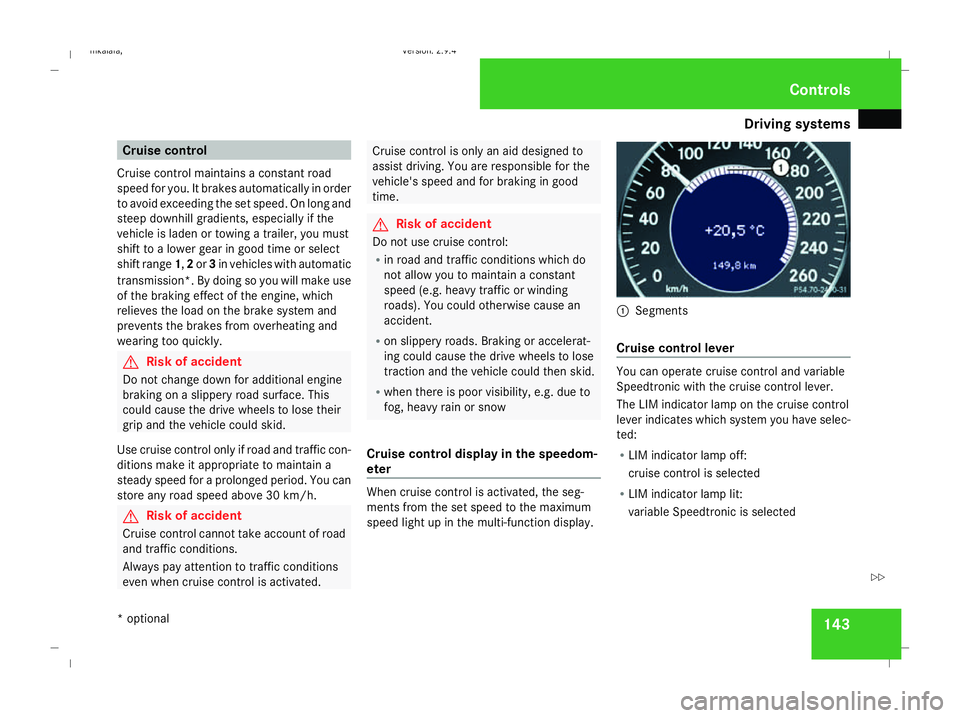
Cruise control display in the speedom-
eter When cruise control is activated, the seg-
ments from the set speed to the maximum
speed light up in the multi-function display. 1
Segments
Cruise control lever You can operate cruise control and variable
Speedtronic with the cruise control lever.
The LIM indicator lamp on the cruise control
lever indicates which system you have selec-
ted:
R
LIM indicator lamp off:
cruise control is selected
R LIM indicator lamp lit:
variable Speedtronic is selected Controls
* optional
211_AKB; 2; 5, en-GB
mkalafa
,V ersion: 2.9.4
2008-02-29T16:57:07+01:00 - Seite 143 ZDateiname: 6515_3416_02_buchblock.pdf; preflight
Page 147 of 401
Driving sys
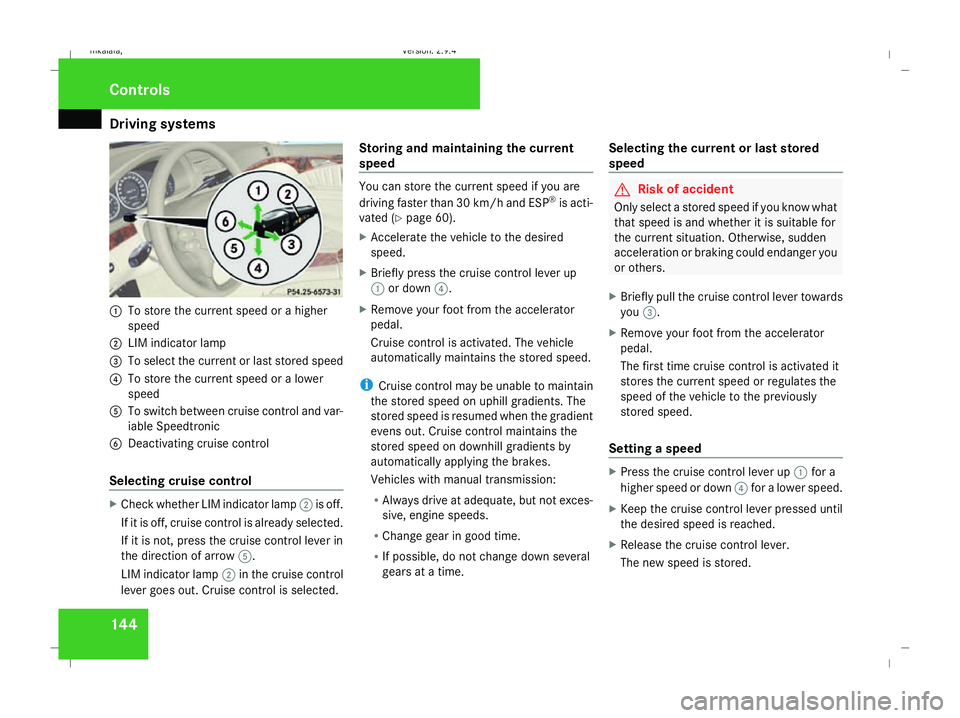
tems 1441
To store the current speed or a higher
speed
2 LIM indicator lamp
3 To select the current or last stored speed
4 To store the current speed or a lower
speed
5 To switch between cruise control and var-
iable Speedtronic
6 Deactivating cruise control
Selecting cruise control X
Check whether LIM indicator lamp 2is off.
If it is off, cruise control is already selected.
If it is not, press the cruise control lever in
the direction of arrow 5.
LIM indicator lamp 2in the cruise control
lever goes out. Cruise control is selected. Storing and maintaining the current
speed You can store the current speed if you are
driving faster than 30 km/h and ESP ®
is acti-
vated (Y page 60).
X Accelerate the vehicle to the desired
speed.
X Briefly press the cruise control lever up
1 or down 4.
X Remove your foot from the accelerator
pedal.
Cruise control is activated. The vehicle
automatically maintains the stored speed.
i Cruise control may be unable to maintain
the stored speed on uphill gradients. The
stored speed is resumed when the gradient
evens out. Cruise control maintains the
stored speed on downhill gradients by
automatically applying the brakes.
Vehicles with manual transmission:
R Always drive at adequate, but not exces-
sive, engine speeds.
R Change gear in good time.
R If possible, do not change down several
gears at a time. Selecting the current or last stored
speed G
Risk of accident
Only select a stored speed if you know what
that speed is and whether it is suitable for
the current situation. Otherwise, sudden
acceleration or braking could endanger you
or others.
X Briefly pull the cruise control lever towards
you 3.
X Remove your foot from the accelerator
pedal.
The first time cruise control is activated it
stores the current speed or regulates the
speed of the vehicle to the previously
stored speed.
Setting a speed X
Press the cruise control lever up 1for a
higher speed or down 4for a lower speed.
X Keep the cruise control lever pressed until
the desired speed is reached.
X Release the cruise control lever.
The new speed is stored. Controls
211_AKB; 2; 5, en-GB
mkalafa
,V ersion: 2.9.4
2008-02-29T16:57:07+01:00 - Seite 144 Dateiname: 6515_3416_02_buchblock.pdf; preflight