battery MERCEDES-BENZ E-CLASS ESTATE 2009 User Guide
[x] Cancel search | Manufacturer: MERCEDES-BENZ, Model Year: 2009, Model line: E-CLASS ESTATE, Model: MERCEDES-BENZ E-CLASS ESTATE 2009Pages: 373, PDF Size: 12.37 MB
Page 112 of 373
R
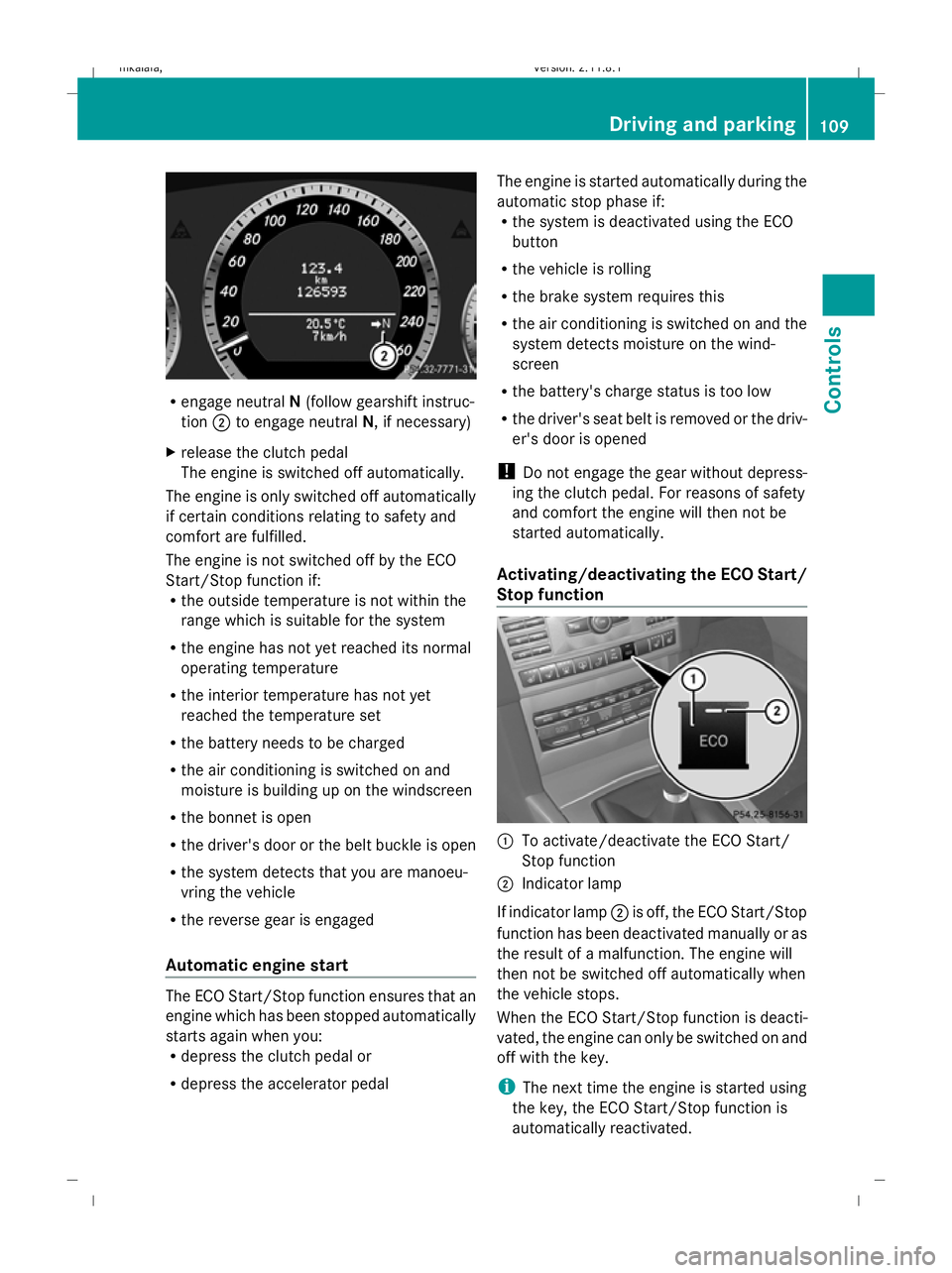
engage neutral N(follow gearshift instruc-
tion ;to engage neutral N, if necessary)
X release the clutch pedal
The engine is switched off automatically.
The engine is only switched off automatically
if certain conditions relating to safety and
comfort are fulfilled.
The engine is not switched off by the ECO
Start/Stop function if:
R the outside temperature is not within the
range which is suitable for the system
R the engine has not yet reached its normal
operating temperature
R the interior temperature has not yet
reached the temperature set
R the battery needs to be charged
R the air conditioning is switched on and
moisture is building up on the windscreen
R the bonnet is open
R the driver's door or the belt buckle is open
R the system detects that you are manoeu-
vring the vehicle
R the reverse gear is engaged
Automatic engine start The ECO Start/Stop function ensures that an
engine which has been stopped automatically
starts again when you:
R
depress the clutch pedal or
R depress the accelerator pedal The engine is started automatically during the
automatic stop phase if:
R
the system is deactivated using the ECO
button
R the vehicle is rolling
R the brake system requires this
R the air conditioning is switched on and the
system detects moisture on the wind-
screen
R the battery's charge status is too low
R the driver's seat belt is removed or the driv-
er's door is opened
! Do not engage the gear without depress-
ing the clutch pedal. For reasons of safety
and comfort the engine will then not be
started automatically.
Activating/deactivating the ECO Start/
Stop function :
To activate/deactivate the ECO Start/
Stop function
; Indicator lamp
If indicator lamp ;is off, the ECO Start/Stop
function has been deactivated manually or as
the result of a malfunction. The engine will
then not be switched off automatically when
the vehicle stops.
When the ECO Start/Stop function is deacti-
vated, the engine can only be switched on and
off with the key.
i The next time the engine is started using
the key, the ECO Start/Stop function is
automatically reactivated. Driving and parking
109Controls
212_AKB; 2; 4, en-GB
mkalafa, Version: 2.11.8.1 2009-05-05T14:17:16+02:00 - Seite 109 Z
Dateiname: 6515346702_buchblock.pdf; erzeugt am 07. May 2009 14:16:06; WK
Page 146 of 373
Pulling away
X
If the vehicle in front pulls away: remove
your foot from the brake pedal.
X Briefly pull the cruise control lever towards
you ?.
or
X Accelerate briefly.
Your vehicle pulls away and adapts its
speed to that of the vehicle in front.
Driving
If there is no vehicle in front, Distronic Plus
operates in the same way as cruise control.
If a slower-moving vehicle is detected in front,
Distronic Plus causes your vehicle to brake
and maintain a preset distance to the vehicle
in front.
If Distronic Plus detects a faster-moving vehi-
cle in front, it increases the driving speed, but
only up to the stored speed. G
Risk of accident
If you depress the brake, Distronic Plus is
deactivated unless your vehicle is stationary.
Distronic Plus then no longer brakes your
vehicle. The driver is fully responsible for the
vehicle's distance from other vehicles, its
speed and for braking in good time.
Stopping G
Risk of accident
The Distronic Plus braking effect is cancelled
and the vehicle can start moving if:
R Distronic Plus is deactivated using the
cruise control lever
R you accelerate
R the system or the power supply is disrup-
ted, e.g. due to battery failure
R the electrical system in the engine com-
partment or the fuses have been tampered
with
R the battery is disconnected G
Risk of accident
Never get out of the vehicle when Distronic
Plus is activated.
Distronic Plus must never be operated or
deactivated by a passenger or from outside
the vehicle.
Distronic Plus does not replace the parking
brake and must not be used for parking.
If you wish to leave the vehicle or park it,
deactivate Distronic Plus and secure the vehi-
cle against rolling away.
If Distronic Plus detects that the vehicle in
front is stopping, it brakes your vehicle until
it is stationary.
Once your vehicle is stationary, it remains
stationary and you do not need to depress the
brake.
i Depending on the specified minimum dis-
tance, your vehicle will come to a standstill
at a sufficient distance behind the vehicle
in front. The specified minimum distance is
set using the thumbwheel on the cruise-
control lever.
Vehicles with automatic transmission
with selector lever
When Distronic Plus is activated and the vehi-
cle is at a standstill, a warning message
appears in the multi-function display if:
R the driver's door is opened and you release
the seat belt.
R the engine is switched off, unless it is auto-
matically switched off by the ECO Start/
Stop function.
R the bonnet is opened.
Select Park (P)
X Move the selector lever to Pto prevent the
vehicle from rolling away.
Distronic Plus is deactivated. The warning
message in the multi-function display dis-
appears. Driving systems
143Controls
212_AKB; 2; 4, en-GB
mkalafa, Version: 2.11.8.1 2009-05-05T14:17:16+02:00 - Seite 143 Z
Dateiname: 6515346702_buchblock.pdf; erzeugt am 07. May 2009 14:16:18; WK
Page 155 of 373
The HOLD function must never be operated
or deactivated by a passenger or from outside
the vehicle.
The HOLD function does not replace the park-
ing brake and must not be used for parking.
The braking effect of the HOLD function is
cancelled and the vehicle could roll away if:
R the HOLD function is deactivated by
depressing the accelerator pedal or the
brake pedal.
R there is a malfunction in the system or an
interruption in the power supply, e.g. bat-
tery failure.
R the electrical system in the engine com-
partment, the battery or the fuses are tam-
pered with.
R the battery is disconnected. G
Risk of accident
If you leave the vehicle or park it, deactivate
the HOLD function and secure the vehicle
against rolling away.
In vehicles with automatic transmission and
a DIRECT SELECT lever*, the transmission is
automatically shifted to Pif the HOLD func-
tion is activated and:
R the driver's door is opened and you release
the seat belt.
R the engine is switched off, unless it is auto-
matically switched off by the ECO Start/
Stop function.
R the bonnet is opened.
R a system fault occurs.
R the power supply is not sufficient. In vehicles with manual transmission or auto-
matic transmission* with a selector lever, you
see a warning message in the multi-function
display if the HOLD function is activated and:
R
the driver's door is opened and you release
the seat belt.
R the engine is switched off, unless it is auto-
matically switched off by the ECO Start/
Stop function.
R the bonnet is opened.
Vehicles with manual transmission:
Brake immediately
X Immediately depress the brake pedal firmly
until the warning message in the multi-
function display goes out. This deactivates
the HOLD function.
On vehicles with automatic transmission*
with a selector lever:
Select Park (P)
X Move the selector lever to Pto prevent the
vehicle from rolling away.
The HOLD function is deactivated. The
warning message in the multi-function dis-
play disappears.
A horn will also sound at regular intervals if
the HOLD function is activated and you:
R switch off the engine, open the driver's
door and remove your seat belt.
R open the bonnet.
The sounding of the horn alerts you to the fact
that the vehicle has been parked while the
HOLD function is still activated. The tone
becomes louder if you attempt to lock the
vehicle. The vehicle is not locked until the
HOLD function is deactivated.
i If the ignition has been switched off, the
engine cannot be started again until the
HOLD function has been deactivated.
If there is a fault in the system or power supply
while the HOLD function is activated, the
Brake immediately message is shown in
the multi-function display. Immediately
depress the brake firmly until the warning 152
Driving systemsControls
* optional
212_AKB; 2; 4, en-GB
mkalafa,
Version: 2.11.8.1 2009-05-05T14:17:16+02:00 - Seite 152
Dateiname: 6515346702_buchblock.pdf; erzeugt am 07. May 2009 14:16:21; WK
Page 183 of 373
switches off automatically after several
minutes.
i If the battery voltage is too low, the rear
window heating may switch off.
X Turn the key to position 2in the ignition
lock.
X Press the ¤button.
The indicator lamp above the ¤button
lights up or goes out. Activating/deactivating air-recircula-
tion mode
You can deactivate the flow of fresh air if
unpleasant odours are entering the vehicle
from outside. The air already inside the vehi-
cle will then be recirculated. G
Risk of accident
Only switch over to air-recirculation mode
briefly at low outside temperatures. Other-
wise, the windows could mist up, thus impair-
ing visibility and endangering yourself and
others. This may prevent you from observing
the traffic conditions, thereby causing an
accident.
X Turn the key to position 2in the ignition
lock.
X To activate: press thegbutton.
The indicator lamp above the gbutton
lights up.
i Air-recirculation mode is activated auto-
matically at high outside temperatures.
When air-recirculation mode is activated
automatically, the indicator lamp above the
g button is not lit.
Outside air is added after about 30
minutes.
X To switch off: press thegbutton.
The indicator lamp above the gbutton
goes out. i
Air-recirculation mode switches off auto-
matically:
R after approximately five minutes at out-
side temperatures below approximately
5 †
R after approximately five minutes if cool-
ing with air dehumidification is deactiva-
ted
R after approximately 30 minutes at out-
side temperatures above approximately
5 †
Convenience opening/closing G
Risk of injury
Make sure that nobody can become trapped
between the side window and the door frame
as the side windows are opened and closed.
Do not place objects or lean against the side
windows when they are being opened or
closed. You or the objects could be drawn in
or become trapped between the side window
and the door frame as the window moves. If
there is a risk of entrapment, press the
g button again. Press the button for stop-
ping, opening or closing the side windows in
the opposite direction as appropriate.
Make sure that nobody can become trapped
when you open or close the sliding/tilting
sunroof*/panorama sliding sunroof*. If there
is a risk of entrapment, press the gbutton
again. Press the button for stopping, opening
or closing the sliding/tilting sunroof*/pano-
rama sliding sunroof* in the opposite direc-
tion as appropriate.
X Convenience closing: press and hold the
g button for a second until the side win-
dows and the sliding/tilting sunroof*/pan-
orama sliding sunroof* have closed.
The indicator lamp above the gbutton
lights up. Air-recirculation mode is activa-
ted. 180
Air conditioningControls
* optional
212_AKB; 2; 4, en-GB
mkalafa,
Version: 2.11.8.1 2009-05-05T14:17:16+02:00 - Seite 180
Dateiname: 6515346702_buchblock.pdf; erzeugt am 07. May 2009 14:16:31; WK
Page 184 of 373
X
Convenience opening: press and hold the
g button for a second until the side win-
dows and the sliding/tilting sunroof*/pan-
orama sliding sunroof* have reached their
original position.
The indicator lamp above the gbutton
goes out. Air-recirculation mode is deacti-
vated.
i If you open the side windows or the slid-
ing/tilting sunroof* or panorama sliding
sunroof* manually after closing with the
convenience closing feature, they will
remain in this position when opened using
the convenience opening feature. Switching the residual heat on/off
The "residual heat" function is only available
with Thermotronic luxury 3-zone automatic
climate control*.
It is possible to make use of the residual heat
of the engine to continue heating the station-
ary vehicle for up to 30 minutes after the
engine has been switched off. The heating
time depends on the temperature that has
been set.
i The blower will run at a low speed regard-
less of the airflow setting.
i If you activate the "residual heat" function
at high temperatures, only the ventilation
will be activated. The blower runs at
medium speed.
i It is possible that the "residual heat" func-
tion may be activated automatically an hour
after the key is removed. The vehicle is then
ventilated for 30 minutes to dry the air con-
ditioning system.
X Turn the key to position 0in the ignition
lock or remove it.
X To switch on: press theÌbutton.
The indicator lamp above the Ìbutton
lights up. X
To deactivate: press theÌbutton.
The indicator lamp above the Ìbutton
goes out.
i The residual heat automatically switches
off after around 30 minutes or if:
R the ignition is switched on
R the battery voltage drops Switching the auxiliary heating/ven-
tilation* on/off
Notes on the auxiliary heating/ventila-
tion system G
Risk of poisoning
Exhaust fumes are produced when the auxili-
ary heating is in operation. Inhaling these
exhaust fumes can be poisonous. You should
therefore switch off the auxiliary heating in
confined spaces without an extraction sys-
tem, e.g. a garage. G
Risk of fire
When operating the auxiliary heating, parts of
the vehicle may become very hot, and highly
inflammable material such as fuels could be
ignited. Operating the auxiliary heating is thus
prohibited at filling stations or when your vehi-
cle is being refuelled. You must therefore
switch off the auxiliary heating at filling sta-
tions.
i Switch the auxiliary heating on regularly
once a month for about ten minutes.
The auxiliary heating heats the air in the vehi-
cle interior to the set temperature without
using the heat of the running engine. The aux-
iliary heating is operated using the vehicle's
fuel. For this reason, the tank content must
be at least at reserve fuel level to ensure that
the auxiliary heating functions.
The auxiliary heating/ventilation automati-
cally adjusts to changes in temperature and
weather conditions. For this reason, the aux-
iliary heating could switch from ventilation Air conditioning
181Controls
* optional
212_AKB; 2; 4, en-GB
mkalafa,
Version: 2.11.8.1 2009-05-05T14:17:16+02:00 - Seite 181 Z
Dateiname: 6515346702_buchblock.pdf; erzeugt am 07. May 2009 14:16:31; WK
Page 185 of 373
mode to heating mode or from heating mode
to ventilation mode.
You cannot use the auxiliary ventilation to
cool the vehicle interior to a temperature
lower than the outside temperature.
Before activating X
Turn the key to position 2in the ignition
lock.
X Set the temperature.
The auxiliary heating/ventilation can be acti-
vated even when the air conditioning is being
controlled manually. Optimum comfort can
be attained when the system is set to auto-
matic mode. Set the temperature to 22 †.
The auxiliary heating/ventilation can be acti-
vated or deactivated using the remote control
or the button on the centre console.
The on-board computer can be used to spec-
ify up to three departure times, one of which
may be preselected (Y page 135).
Switching the auxiliary heating/venti-
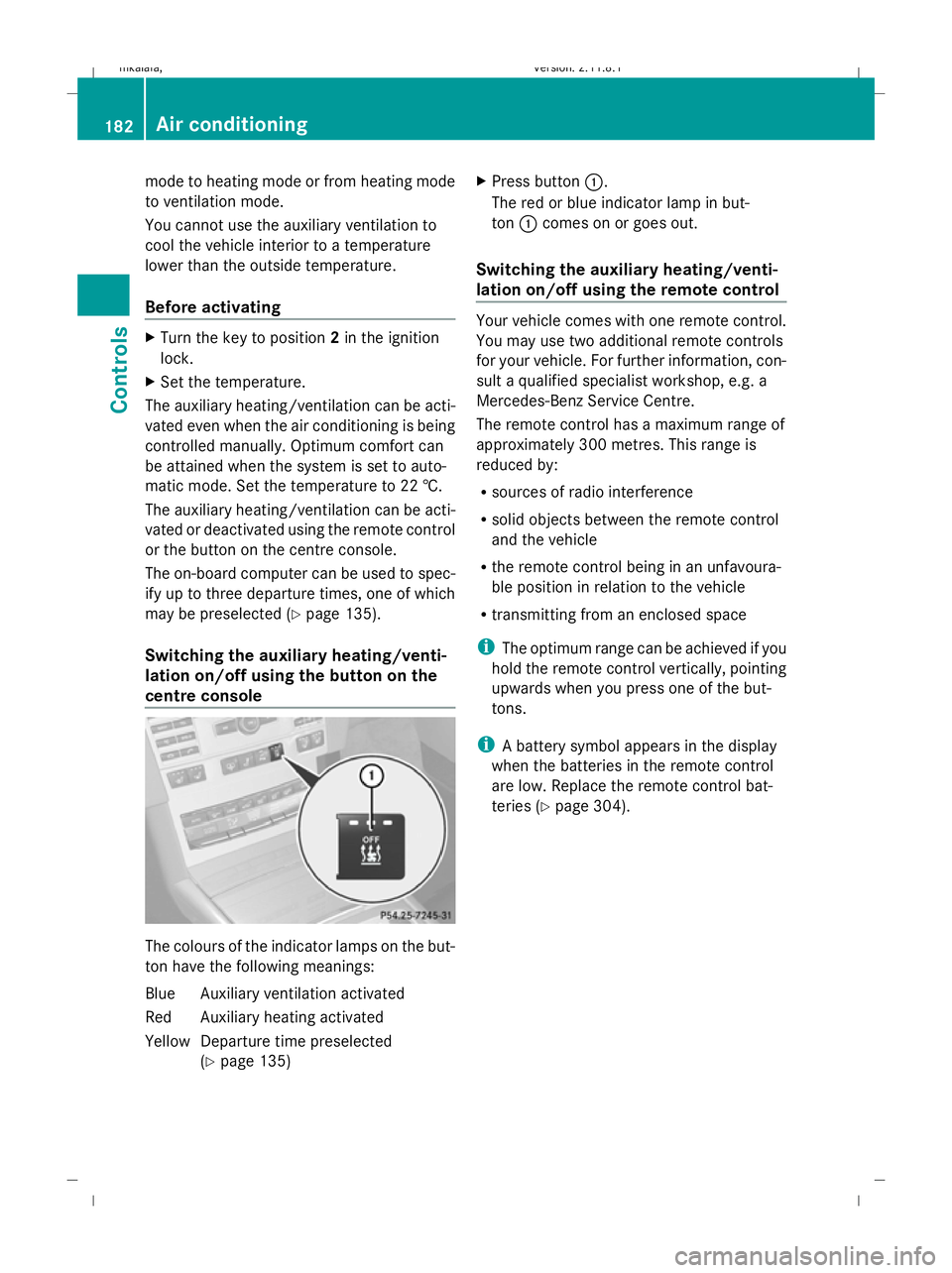
lation on/off using the button on the
centre console The colours of the indicator lamps on the but-
ton have the following meanings:
Blue Auxiliary ventilation activated
Red Auxiliary heating activated
Yellow Departure time preselected (Ypage 135) X
Press button :.
The red or blue indicator lamp in but-
ton :comes on or goes out.
Switching the auxiliary heating/venti-
lation on/off using the remote control Your vehicle comes with one remote control.
You may use two additional remote controls
for your vehicle. For further information, con-
sult a qualified specialist workshop, e.g. a
Mercedes-Benz Service Centre.
The remote control has a maximum range of
approximately 300 metres. This range is
reduced by:
R
sources of radio interference
R solid objects between the remote control
and the vehicle
R the remote control being in an unfavoura-
ble position in relation to the vehicle
R transmitting from an enclosed space
i The optimum range can be achieved if you
hold the remote control vertically, pointing
upwards when you press one of the but-
tons.
i A battery symbol appears in the display
when the batteries in the remote control
are low. Replace the remote control bat-
teries (Y page 304). 182
Air conditioningControls
212_AKB; 2; 4, en-GB
mkalafa,
Version: 2.11.8.1 2009-05-05T14:17:16+02:00 - Seite 182
Dateiname: 6515346702_buchblock.pdf; erzeugt am 07. May 2009 14:16:31; WK
Page 241 of 373
X
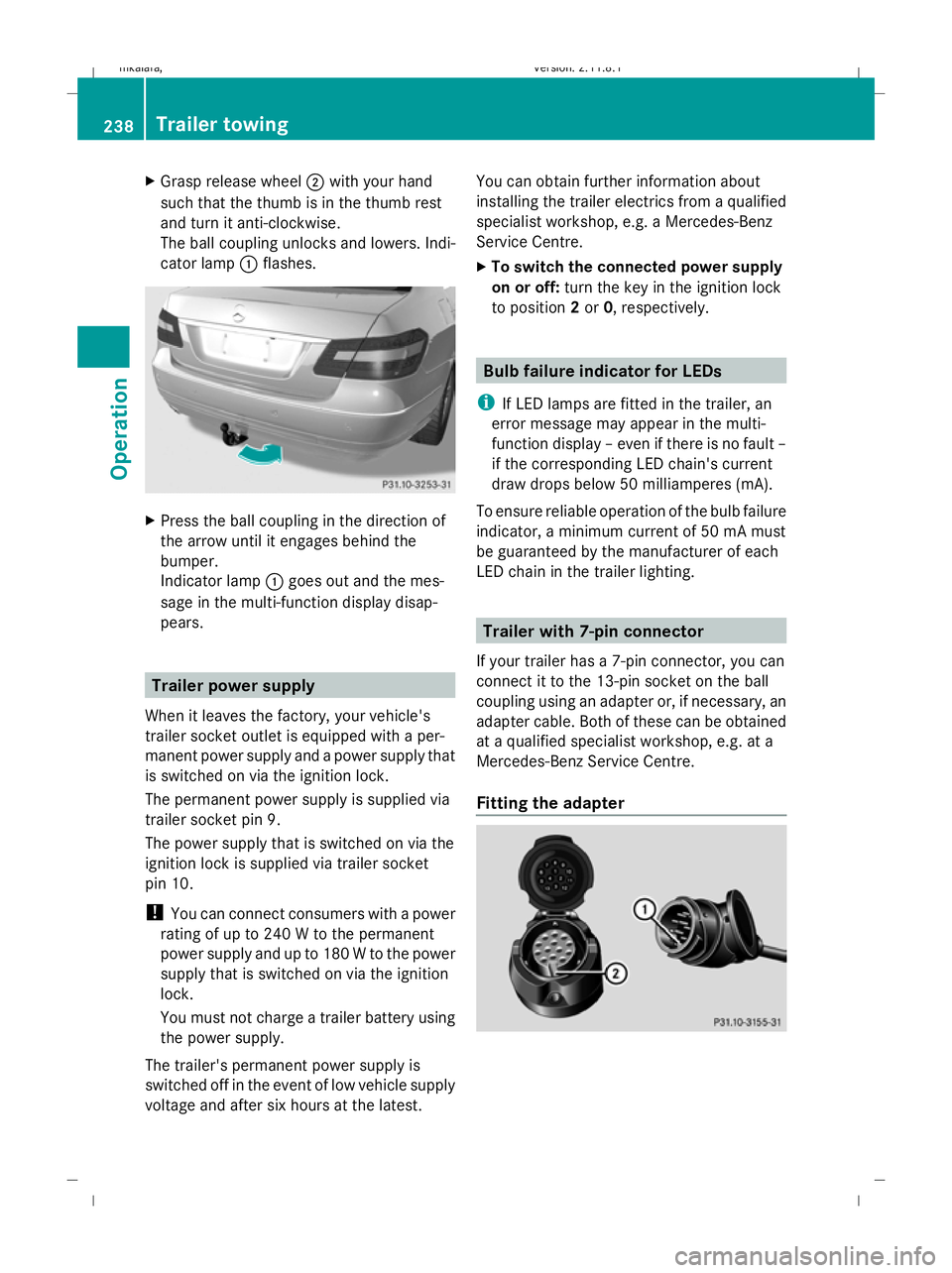
Grasp release wheel ;with your hand
such that the thumb is in the thumb rest
and turn it anti-clockwise.
The ball coupling unlocks and lowers. Indi-
cator lamp :flashes. X
Press the ball coupling in the direction of
the arrow until it engages behind the
bumper.
Indicator lamp :goes out and the mes-
sage in the multi-function display disap-
pears. Trailer power supply
When it leaves the factory, your vehicle's
trailer socket outlet is equipped with a per-
manent power supply and a power supply that
is switched on via the ignition lock.
The permanent power supply is supplied via
trailer socket pin 9.
The power supply that is switched on via the
ignition lock is supplied via trailer socket
pin 10.
! You can connect consumers with a power
rating of up to 240 W to the permanent
power supply and up to 180 W to the power
supply that is switched on via the ignition
lock.
You must not charge a trailer battery using
the power supply.
The trailer's permanent power supply is
switched off in the event of low vehicle supply
voltage and after six hours at the latest. You can obtain further information about
installing the trailer electrics from a qualified
specialist workshop, e.g. a Mercedes-Benz
Service Centre.
X
To switch the connected power supply
on or off: turn the key in the ignition lock
to position 2or 0, respectively. Bulb failure indicator for LEDs
i If LED lamps are fitted in the trailer, an
error message may appear in the multi-
function display – even if there is no fault –
if the corresponding LED chain's current
draw drops below 50 milliamperes (mA).
To ensure reliable operation of the bulb failure
indicator, a minimum current of 50 mA must
be guaranteed by the manufacturer of each
LED chain in the trailer lighting. Trailer with 7-pin connector
If your trailer has a 7-pin connector, you can
connect it to the 13-pin socket on the ball
coupling using an adapter or, if necessary, an
adapter cable. Both of these can be obtained
at a qualified specialist workshop, e.g. at a
Mercedes-Benz Service Centre.
Fitting the adapter 238
Trailer towingOperation
212_AKB; 2; 4, en-GB
mkalafa
,V ersion: 2.11.8.1
2009-05-05T14:17:16+02:00 - Seite 238
Dateiname: 6515346702_buchblock.pdf; erzeugt am 07. May 2009 14:17:01; WK
Page 242 of 373
X
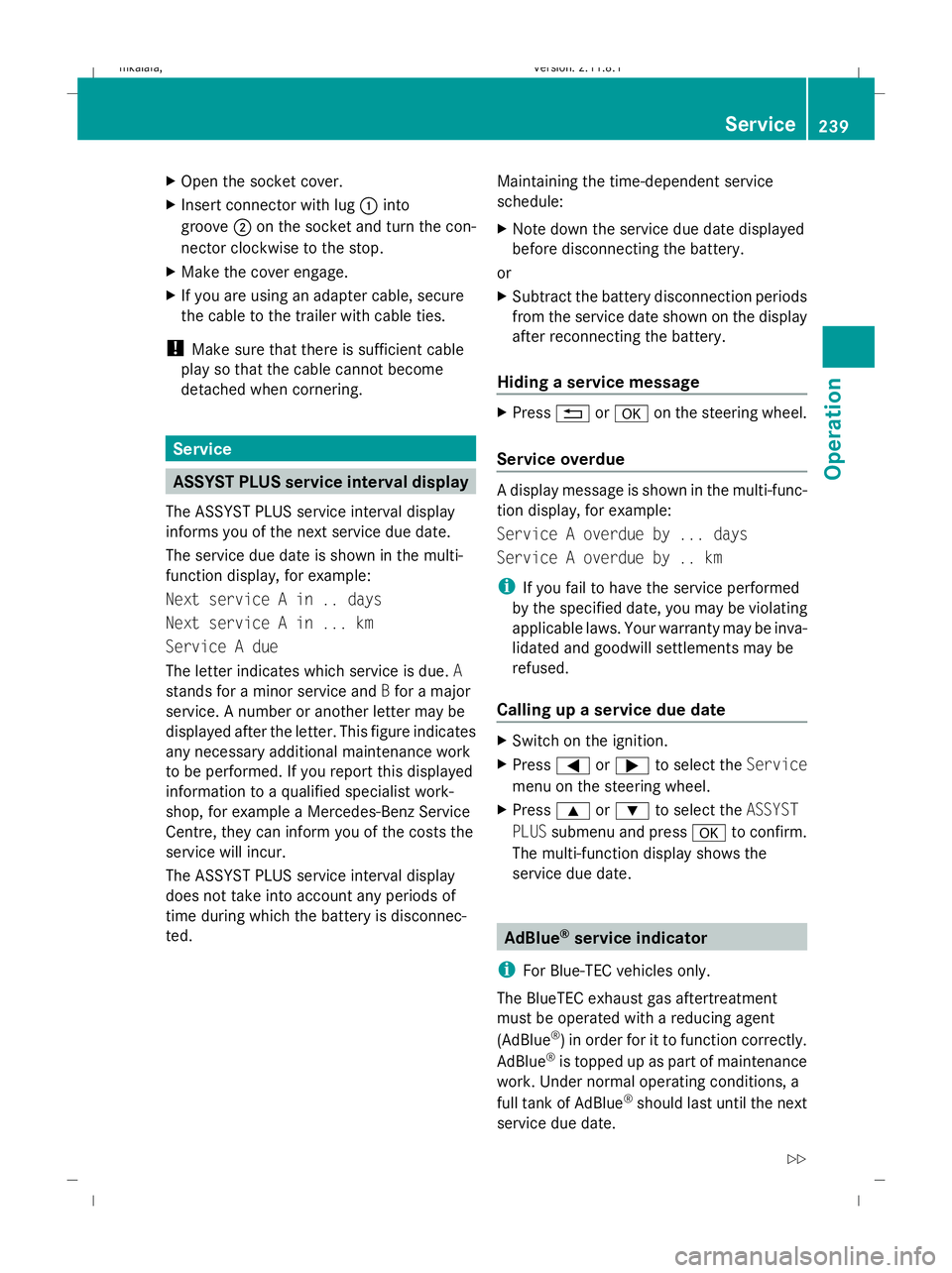
Open the socket cover.
X Insert connector with lug :into
groove ;on the socket and turn the con-
nector clockwise to the stop.
X Make the cover engage.
X If you are using an adapter cable, secure
the cable to the trailer with cable ties.
! Make sure that there is sufficient cable
play so that the cable cannot become
detached when cornering. Service
ASSYST PLUS service interval display
The ASSYST PLUS service interval display
informs you of the next service due date.
The service due date is shown in the multi-
function display, for example:
Next service A in .. days
Next service A in ... km
Service A due
The letter indicates which service is due. A
stands for a minor service and Bfor a major
service. A number or another letter may be
displayed after the letter. This figure indicates
any necessary additional maintenance work
to be performed. If you report this displayed
information to a qualified specialist work-
shop, for example a Mercedes-Benz Service
Centre, they can inform you of the costs the
service will incur.
The ASSYST PLUS service interval display
does not take into account any periods of
time during which the battery is disconnec-
ted. Maintaining the time-dependent service
schedule:
X
Note down the service due date displayed
before disconnecting the battery.
or
X Subtract the battery disconnection periods
from the service date shown on the display
after reconnecting the battery.
Hiding a service message X
Press %ora on the steering wheel.
Service overdue A display message is shown in the multi-func-
tion display, for example:
Service A overdue by ... days
Service A overdue by .. km
i
If you fail to have the service performed
by the specified date, you may be violating
applicable laws. Your warranty may be inva-
lidated and goodwill settlements may be
refused.
Calling up a service due date X
Switch on the ignition.
X Press =or; to select the Service
menu on the steering wheel.
X Press 9or: to select the ASSYST
PLUS submenu and press ato confirm.
The multi-function display shows the
service due date. AdBlue
®
service indicator
i For Blue-TEC vehicles only.
The BlueTEC exhaust gas aftertreatment
must be operated with a reducing agent
(AdBlue ®
) in order for it to function correctly.
AdBlue ®
is topped up as part of maintenance
work. Under normal operating conditions, a
full tank of AdBlue ®
should last until the next
service due date. Service
239Operation
212_AKB; 2; 4, en-GB
mkalafa, Version: 2.11.8.1 2009-05-05T14:17:16+02:00 - Seite 239 Z
Dateiname: 6515346702_buchblock.pdf; erzeugt am 07. May 2009 14:17:01; WK
Page 244 of 373
If the vehicle is very dirty, pre-wash it before
cleaning it in an automatic car wash.
! Make sure that the automatic car wash is
suitable for the size of the vehicle. Fold in
the exterior mirrors before the vehicle is
washed. There is otherwise a risk of dam-
age to the exterior mirrors.
! When washing your vehicle in a tow-
through car wash, make sure that the auto-
matic transmission* is in position N. The
vehicle could otherwise be damaged.
R Vehicles with DIRECT SELECT lever and
key:
Do not remove the key from the ignition
lock. Do not open the driver's or front-
passenger door when the engine is
switched off, as this automatically shifts
the automatic transmission to park posi-
tion Pand locks the wheels, unless you
have previously shifted the automatic
transmission to N.
R Vehicles with DIRECT SELECT lever and
KEYLESS GO*:
Do not open the driver's or front-
passenger door when the engine is
switched off, as this shifts the automatic
transmission to park position Pand locks
the wheels.
! Make sure that the side windows are
closed completely, that the blower for the
ventilation/heating is switched off and that
the windscreen wiper switch is in position
0. The rain/light sensor could otherwise be
activated and thereby cause unintentional
wiping. This could result in damage to the
vehicle.
After using an automatic car wash, wipe off
wax and drying agents from the windscreen
and the wiper blades. This will prevent smears
and reduce wiping noises caused by residue
on the windscreen. High-pressure cleaners G
Risk of accident
Do not use high-pressure cleaners with circu-
lar-jet nozzles (dirt grinders) to clean your
vehicle, in particular the tyres. You could oth-
erwise damage the tyres and cause an acci-
dent.
! Observe the instructions issued by the
equipment manufacturer concerning the
distance to be maintained between the
nozzle of the high-pressure cleaner and the
vehicle (at least 30 cm).
Move the high-pressure cleaner nozzle
around when cleaning your vehicle.
Do not aim directly at any of the following:
R tyres
R door joint
R electrical components
R battery
R connectors
R lights
R seals
R trim elements
R ventilation slots
Damaged seals or electrical components
can lead to failures or leaks.
Care and treatment of matt paint-
work* Your vehicle has a clear matt finish. For this
reason, you should make sure that you
adhere to the following instructions to avoid
damage to paintwork due to improper treat-
ment.
!
Under no circumstances should you pol-
ish the vehicle. Polishing will make the
paintwork shine.
! When caring for your paintwork, do not
use paint cleaner, grinding or polishing Care
241Operation
* optional
212_AKB; 2; 4, en-GB
mkalafa
,V ersion: 2.11.8.1
2009-05-05T14:17:16+02:00 - Seite 241 Z
Dateiname: 6515346702_buchblock.pdf; erzeugt am 07. May 2009 14:17:01; WK
Page 250 of 373
Where will I find...?
...........................248
Display messages ............................. 251
Troubleshooting ................................ 278
Locking/unlocking in an emer-
gency ................................................. 299
Resetting the active bonnet
(pedestrian protection) after trig-
gering ................................................. 302
Resetting triggered NECK-PRO
head restraints .................................. 303
Replacing batteries (key and
remote control) ................................. 303
Changing bulbs ................................. 304
Replacing the wiper blades ..............308
Flat tyre ............................................. 309
Battery ............................................... 319
Jump-starting .................................... 323
Towing and tow-starting ..................324
Fuses .................................................. 327 247Practical advice
212_AKB; 2; 4, en-GB
mkalafa,
Version: 2.11.8.1 2009-05-05T14:17:16+02:00 - Seite 247
Dateiname: 6515346702_buchblock.pdf; erzeugt am 07. May 2009 14:17:04; WK